
BT2080 - Bluetooth earphones JABRA - Free user manual and instructions
Find the device manual for free BT2080 JABRA in PDF.



User questions about BT2080 JABRA
0 question about this device. Answer the ones you know or ask your own.
Ask a new question about this device
Download the instructions for your Bluetooth earphones in PDF format for free! Find your manual BT2080 - JABRA and take your electronic device back in hand. On this page are published all the documents necessary for the use of your device. BT2080 by JABRA.
USER MANUAL BT2080 JABRA
Thank you for purchasing the Jabra BT2080 Bluetooth® headset. We hope you enjoy it! This instruction manual will get you started and ready to make the most of your headset.
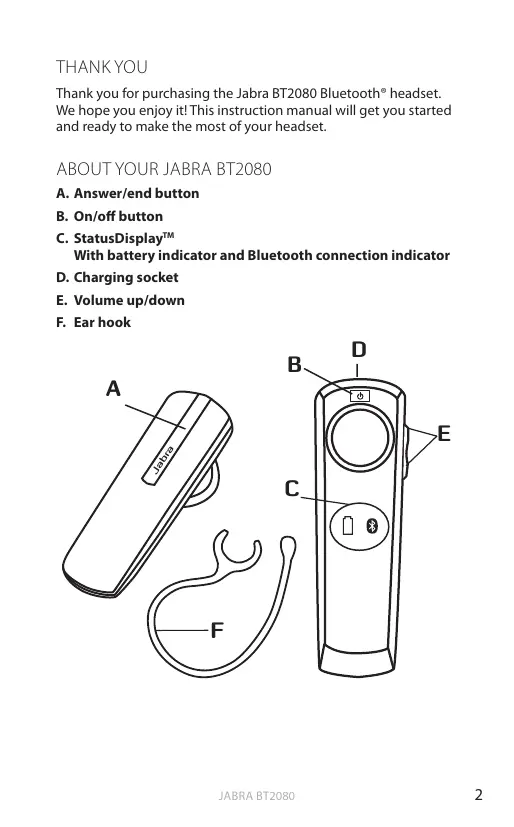
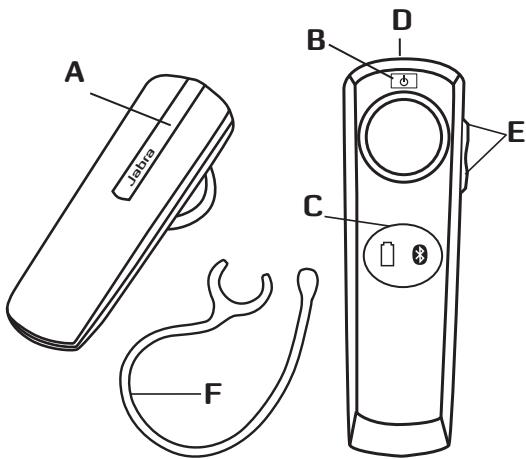
ABOUT YOUR JABRA BT2080
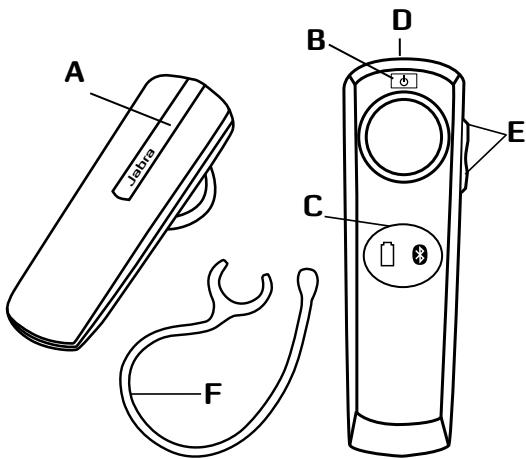
A. Answer/end button
B. On/off button
C. StatusDisplay™ With battery indicator and Bluetooth connection indicator
D. Charging socket
E. Volume up/down
F. Ear hook
WHAT YOUR HEADSET CAN DO
Your Jabra BT2080 lets you do all this:
- Answer calls
- End calls
See battery status
See Bluetooth connection status
Reject calls*
Voice dialling* - Last number redial*
- Mute
- Transfer calls
- Adjust volume
Specifications
- Talk time 6 hours
- Standby time 8 days
- Bluetooth specification version 2.1 with EDR and eSCO
Weight 8 gram - Operating range up to 10 meters (approximately 33 feet)
Supported Bluetooth profiles: HFP, HSP - Internal rechargeable battery charged by wall charger
Always see your battery and connection status on the Jabra StatusDisplay™
GETTING STARTED
You should follow three steps before using your headset
1 Charge your headset
2 Activate Bluetooth on your mobile phone (refer to the manual for your mobile phone)
3 Pair your headset to your mobile phone
The Jabra BT2080 is easy to operate. The answer/end button on the headset performs different functions depending on how long you press it.
| Instruction | Duration of press |
| Tap | Press briefly |
| Press | Approx: 1 second |
| Press and hold | Approx: 5 seconds |
CHARGE YOUR HEADSET
Make sure that your headset is fully charged for two hours before you start using it. Use the AC power supply to charge from a power socket. When the battery indicator has a solid red light, your headset is charging. When the headset is fully charged the battery indicator turns solid green for five minutes and is then turned off.
Use only the charger provided in the box - do not use chargers from any other devices as this may damage your headset.
Please note: The lifetime of the battery will be significantly reduced if your device is left uncharged for a long period. We therefore recommend that you recharge your device at least once a month.
TURNING YOUR HEADSET ON AND OFF
To turn on your headset please press the ON/OFF button for 2 seconds until both indicators flash on the Jabra StatusDisplay™.
PAIRING IT WITH YOUR PHONE
Headsets are connected to phones using a procedure called 'pairing'. By following a few simple steps, a phone can be paired with a headset in a matter of minutes.
1 Put the headset in pairing mode
- When you turn on your Jabra BT2080 for the first time, the headset will automatically start up on pairing mode - i.e. it is discoverable for your phone. When the headset is in pairing mode the Bluetooth status indication on the StatusDisplay™ is flashing.
2 Set your Bluetooth phone to 'discover' the Jabra BT2080
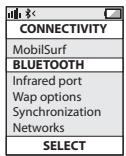
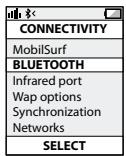
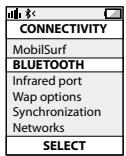
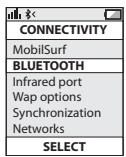
- Follow your phone's instruction guide. First make sure that Bluetooth is activated on your mobile phone. Then set your phone to discover new devices. This usually involves going to a 'setup', 'connect' or 'Bluetooth' menu on your phone and selecting the option to 'discover' or 'add' a Bluetooth device.*
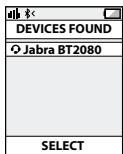
3 Your phone will find the Jabra BT2080
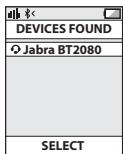
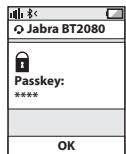
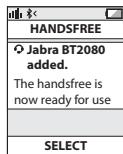
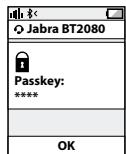
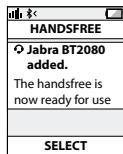
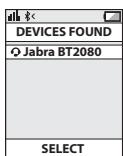
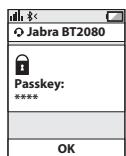
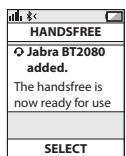
- Your phone will find the headset under name "Jabra BT2080". Your phone then asks if you want to pair with the headset. Accept by pressing 'Yes' or 'OK' on the phone. You may be asked to confirm with a passkey or PIN. Then use 0000 (4 zeros). Your phone will confirm when pairing is complete and the Bluetooth status indication on the StatusDisplay™ will shift from flashing light to steady light.
Manual pairing mode
If you wish to use the headset with a different phone, or if the pairing process was interrupted, you can manually set the headset to pairing mode.
Make sure the headset is on. Press and hold the answer/end button for approximately 5 seconds until the Bluetooth icon turns from a steady light to a flashing light. Then repeat steps 2 and 3 in the above pairing guide.
CONNECTING WITH YOUR PHONE
Pairing is only needed the first time a headset and phone are used together. When the headset and phone have been paired once, they will automatically connect when the headset is on and Bluetooth is activated on the phone. The headset can be used when it is "connected" to the phone. If the devices are paired, but do not immediately connect, tap the answer/end button. When your headset is connected the Bluetooth connection icon in the StatusDisplay™ will be constant on for 3 seconds.
WEAR IT HOW YOU LIKE IT
The Jabra BT2080 can be worn on either ear with or without earhook. Simply remove the earhook if you prefer this wearing style or attach the earhook to fit left or right ear depending on your preference.
HOW TO
Answer a call
- Tap (less than 1 sec) the answer/end button on your headset to answer a call.
End a call
- Tap the answer/end button to end an active call.
Reject a call*
- Press (approx 1 sec) the answer/end button when the phone rings to reject an incoming call. Depending on your phone settings, the person who called you will either be forwarded to your voice mail or will hear a busy signal.
Make a call
- When you make a call from your mobile phone, the call will (subject to phone settings) automatically transfer to your headset. If your phone does not allow this feature, tap on the Jabra BT2080's answer/end button to transfer the call to the headset. Press answer/end button and volume up button at the same time, you can transfer the call back to phone.
Activate voice dialling*
- Press the answer/end button. For best results, record the voice dialling tag through your headset. Please consult your phone's user manual for more information about using this feature.
Redial last number\*
Double tap the answer/end button when the headset is connected to your phone.
Adjust sound and volume*
- Tap the volume up or down to adjust the volume.
Mute/un-mute
- To mute, press both volume up and down at the same time. A low beep alert plays during a muted call.
- To un-mute, tap either of the volume buttons.
Call waiting and placing a call on hold*
- This lets you put a call on hold during a conversation and answer a waiting call.
- Press the answer/end button once to put the active call on hold and answer the waiting call.
- Press the answer/end button to switch between the two calls.
- Tap the answer/end button to end the active conversation.
HOW THE STATUSDISPLAY™ WORKS
| Bluetooth Indicator | Indicates if your headset is connected to your phone - Solid light means headset is connected to your phone - Flashing light means headset is in 'pairing mode' and ready to be connected to a new phone |
| Battery Indicator | Indicates battery level and if headset is turned ON - Green light indicates that the headset has more than 10 minutes of talk time remaining - Red light indicates that the headset has less than 10 minutes of talk time remaining |
To save battery the Jabra StatusDisplay™ is turned off after 3 seconds. Get an instant status from the Jabra StatusDisplay™ by a tap on any button on the headset when you are not on a call.
TROUBLESHOOTING & FAQ
I hear crackling noises
- Bluetooth is a radio technology, which means it is sensitive to objects between the headset and the connected device. It is designed for the headset and the connected device to be used within 33 feet (10 meters) of each other, with no major objects in the way (walls, etc.).
I cannot hear anything in my headset
- Increase the volume in the headset.
- Ensure that the headset is paired to the device that you wish to use.
- Make sure your phone is connected to the headset by tapping the Answer/End button. See the Jabra StatusDisplay™.
I am having pairing problems
- You may have deleted your headset pairing connection in your mobile phone.
Follow the pairing instructions.
I want to reset the headset
It is possible to reset and test the headset by 'Press and hold' the volume down and answer/end buttons at the same time. In the StatusDisplay™ the battery icon and Bluetooth icon will flash 5 times simultaneously. In this mode, the pairing list is reset, and you can test if the headset works as you will be able to hear audio in the speaker from the microphone.
The headset will automatically turn off after approx. 10 seconds. The next time you power on, the headset will go into pairing mode as the first time you powered your new BT2080 on.
Will the Jabra BT2080 work with other Bluetooth equipment?
- The Jabra BT2080 is designed to work with Bluetooth mobile phones. It can also work with other Bluetooth devices that are compliant with Bluetooth version 1.1 or higher and support a headset and/or hands-free profile.
I cannot use Reject call, call on hold, Redial or voice dialling
These features are dependent on the ability of your phone to support a hands-free profile. Even if the hands-free profile is implemented reject call, call hold and voice dialling are optional features which are not supported by all devices. Please consult your device manual for details.
NEED MORE HELP?
1. Web: www.jabra.com
(for the latest support info and online User Manuals)
2. E-mail:
Deutsch support.de@jabra.com
English support.uk@jabra.com
Espanol support.es@jabra.com
François support.fr@jabra.com
Italiano support.it@jabra.com
Always store the Jabra BT2080 with the power off and safely protected
- Avoid storage at extreme temperatures (above 45^ / 113^ - including direct sunlight - or below -10^ / 14^ ). This can shorten battery life and may affect operation. High temperatures may also degrade performance.
- Do not expose the Jabra BT2080 to rain or other liquids.
WARNING!
EXCESSIVE VOLUME LEVELS CAN CAUSE PERMANENT HEARING DAMAGE. USE AS LOW A VOLUME AS POSSIBLE.
Headsets are capable of delivering sounds at loud volumes and high pitched tones which under certain circumstances can result in permanent hearing loss damage. Avoid prolonged use of the headset at excessive sound pressure levels. Please read the safety guidelines below prior to using this headset.
You can reduce the risk of hearing damage by following these safety guidelines
1. Prior to using this product follow these steps
- Before putting on the headset, turn the volume control to its lowest level,
Put the headset on, and then - Slowly adjust the volume control to a comfortable level.
2. During the use of this product
- Keep the volume at the lowest level possible and avoid using the headset in noisy environments where you may be inclined to turn up the volume;
If increased volume is necessary, adjust the volume control slowly; - If you experience discomfort or ringing in your ears, immediately discontinue using the headset and consult a physician.
With continued use at high volume, your ears may become accustomed to the sound level, which may result in permanent damage to your hearing without any noticeable discomfort.
SAFETY INFORMATION!
Use of a headset will impair your ability to hear other sounds. Use caution while using your headset when you are engaging in any activity that requires your full attention.
If you have a pace maker or other electrical medical devices, you should consult your physician before using this device.
- This package contains small parts that may be hazardous to children and should be kept out of reach from children. The bags themselves or the many small parts they contain may cause choking if ingested.
- Never try to dismantle the product yourself. None of the components can be replaced or repaired by users. Only authorized dealers or service centers may open the product. If any parts of your product require replacement for any reason, including normal wear and tear or breakage, contact your dealer.
- Avoid exposing your product to rain, moisture or other liquids to protect against damage to the product or injury to you.
- Observe all signs and instructions that require an electrical device or RF radio product to be switched off in designated areas such as hospitals or aircrafts.
Remember: Always drive safely, avoid distractions and follow local laws!
Using the headset while operating a motor vehicle, motorcycle, watercraft or bicycle may be dangerous, and is illegal in some jurisdictions, just as use of this headset with both ears covered while driving is not permitted in certain jurisdictions. Check your local laws. Use caution while using your headset when you are engaging in any activity that requires your full attention. Also, do not take notes or read documents.
BUILT-IN BATTERY CARE:
- Your device is powered by a rechargeable battery.
- The full performance of a new battery is achieved only after two or tree complete charge and discharge cycles.
-
The battery can be charged and discharged hundreds of times, but will eventually wear out. Recharge your battery only with the provided approved chargers designated for this device.
-
Unplug the charger from the electrical plug and the device when not in use. Do not leave a fully charged battery connected to a charger, since overcharging may shorten its lifetime.
- If left unused, a fully charged battery will lose its charge over time.
Leaving the device in hot or cold places, such as in a closed car in the summer and winter conditions, will reduce the capacity and lifetime of the battery.
Always try to keep the battery between 15^ and 25^ (59°F and 77°F). A device with a hot or cold battery may not work temporary, even when the battery is fully charged. Battery performance is particularly limited in temperatures well below freezing. - Do not dispose of batteries in a fire as they may explode.
- Batteries may also explode if damaged.
Battery warning!
- "Caution" - The battery used in this device may present a risk of fire or chemical burn if mistreated.
- Do not attempt to open the product or replace the battery. It is built-in and not changeable.
Use of other batteries may present a risk of fire or explosion and the warranty will be terminated. - Recharge your battery only with the provided approved chargers designated for this device.
- Dispose of batteries according to local regulations. Please recycle when possible. Do not dispose as household waste.
Always store product out of the reach of children.
CHARGER CARE:
- Do not attempt to charge your headset with anything other than the AC adaptor provided. The use of any other types may damage or destroy the headset and may invalidate any approval or warranty, and may be dangerous. For availability of approved enhancements, please check with your dealer.
Important: The headset cannot be used while charging
Charger warning!
- When you disconnect the power cord or any enhancement, grasp and pull the plug, not the cord, never use a charger that is damaged.
- Do not attempt to disassemble the charger as it may expose you to dangerous electric shock. Incorrect reassembly can cause electric shock or fire when the product is subsequently used.
- Avoid charging your headset in extremely high or low temperatures and do not use the charger outdoors or in damp areas.
WARRANTY
Limited One (1) -year Warranty
GN Netcom A/S ("GN") warrants this Product to be free from defects in materials and workmanship (subject to the terms set forth below) for a period of one (1) year from the date of purchase ("Warranty Period"). During the Warranty Period, GN will repair or replace (at GN's discretion) this Product or any defective parts ("Warranty Service"). If repair or replacement is not commercially practicable or cannot be timely made, GN may choose to refund to you the purchase price paid for the affected Product. Repair or replacement under the terms of this Warranty does not give right to any extension or a new beginning of the period of Warranty.
Claims under the Warranty
To obtain Warranty Service, please contact the GN dealer from which you purchased this product or visit www.jabra.com for further information about customer support. You will need to return this Product to the dealer or ship it to the dealer or to GN (if so indicated on www.jabra.com) in either its original packaging or packaging affording an equal degree of protection. You will bear the cost of shipping the product to GN. If the Product is covered by the warranty, GN will bear the cost of shipping product back to you after the completion of service under this warranty. Return shipping will be charged to you for products not covered by the warranty or requiring no warranty repair.
The Following information must be presented to obtain Warranty Service: (a) the product, and (b) proof of purchase, which clearly indicates the name and address of the seller, the date of purchase and the product type, which is evidence that this product is within the Warranty Period. Please further include (c) your return address. (d) daytime telephone number, and (e) reason for return. As part of GN Netcom's efforts to reduce environmental waste you understand that the product may consist of reconditioned equipment that contains used components, some of which have been reworked. The used components all live up to GN's high quality standards and comply with the GN product performance and reliability specifications. You understand that replaced parts or components will become the property of GN.
Limitation of Warranty
This Warranty is only valid for the original purchaser and will automatically terminate prior to expiration, if this Product is sold or otherwise transferred to another party. The Warranty provided by GN in this statement applies only to Products purchased for use, and not for resale. It does not apply to open box purchases, which are sold "as is" and without any warranty. Specifically exempt from Warranty are limited-life consumable components subject to normal wear and tear, such as microphone windscreens, ear cushions, modular plugs, ear tips, decorative finishes, batteries and other accessories. This Warranty is invalid if the factory-applied serial number, date code label, or product label has been altered or removed from this Product. This Warranty does not cover defects or damages that result from: (a) improper storage, misuse or abuse, accident or neglect, such as physical damage (cracks, scratches, etc.) to the surface of the Product resulting from misuse; (b) contact with water, extreme humidity, sand, dirt or the like or extreme heat; (c) use of the Product or accessories for commercial purposes or subjecting the Product or accessories to abnormal usage or conditions; or (d) other acts which are not the fault of GN. This Warranty does not cover damage due to improper operation, maintenance or installation, or attempted repair by anyone other than GN or a GN dealer which is authorized to do GN warranty work. Any unauthorized repairs will void this Warranty. This Warranty does not cover defects or damages that result from the use of non-GN branded or certified products, accessories, or other peripheral equipment.
REPAIRS OR REPLACEMENTS AS PROVIDED UNDER THIS WARRANTY ARE THE EXCLUSIVE REMEDY OF THE CONSUMER. GNSHELL NOT BE LIABLE FOR ANY INCIDENTAL OR CONSEQUENTIAL DAMAGES FOR BREACH OF ANY EXPRESS OR IMPLIED WARRANTY ON THIS PRODUCT. EXCEPT TO THE EXTENT PROHIBITED BY LAW, THIS WARRANTY IS EXCLUSIVE AND IN LIEU OF ALL OTHER EXPRESS AND IMPLIED WARRANTYES WHAT SO EVER, INCLUDING BUT NOT LIMITED TO THE WARRANTY OF MERCHANTABILITY AND FITNESS FOR A PRACTICAL PURPOSE.
NOTE! This warranty gives you specific legal rights. You may have other rights which vary from location to location. Some jurisdictions do not allow the exclusion or limitation of incidental or consequential damages or implied warranties, so the above exclusions may not apply to you. This warranty does not affect your legal (statutory) rights under your applicable national or local laws.
CERTIFICATION
CE
This product is CE marked according to the provisions of the R & TTE Directive (99/5/EC). Hereby, GN Netcom A/S, declares that this product is in compliance with the essential requirements and other relevant provisions of Directive 1999/5/EC. For further information please consult http://www.jabra.com.
Bluetooth
The Bluetooth® word mark and logos are owned by the Bluetooth SIG, Inc. and any use of such marks by GN Netcom A/S is under license. Other trademarks and trade names are those of their respective owners.
Dispose of the product according to local standards and regulations. www.jabra.com/wee
GLOSSARY
1 Bluetooth is a radio technology that connects devices, such as mobile phones and headsets, without wires or cords over a short distance (approx. 10 meters/33 feet). Bluetooth is safe to use. It is secure too, so once a connection has been made no-one can listen in and there is no interference from other Bluetooth devices either. Get more information at www.bluetooth.com.
2 Bluetooth profiles are the different ways that Bluetooth devices communicate with other devices. Bluetooth phones support the headset profile, the hands-free profile or both. In order to support a certain profile, a phone manufacturer must implement certain mandatory features within the phone's software.
3 Pairing creates a unique and encrypted link between two Bluetooth devices and lets them communicate with each other. Bluetooth devices will not work if the devices have not been paired.
4 Passkey or PIN is a code that you enter on your Bluetooth enabled device (e.g. a mobile phone) to pair it with your Jabra BT2080. This makes your device and the Jabra BT2080 recognize each other and automatically work together.
5 Standby mode is when the Jabra BT2080 is passively waiting for a call. When you 'end' a call on your mobile phone, the headset goes into standby mode.

Dispose of the product according to local standards and regulations.
www.jabra.com/wee
CONTENTS
THANK YOU. 2
ABOUT YOUR JABRA BT2080 2
WHAT YOUR HEADSET CAN DO 3
GETTING STARTED 3
CHARGE YOUR HEADSET. 4
TURING YOUR HEADSET ON AND OFF 4
PAIRING IT WITH YOUR PHONE 4
CONNECTING WITH YOUR PHONE 5
WEAR IT HOW YOU LIKE IT 6
HOW TO 6
HOW THE STATUSDISPLAYTM WORKS. 7
TROUBLESHOOTING & FAQ 8
NEED MORE HELP? 9
TAKING CARE OF YOUR HEADSET 9
WARNING! 9
SAFETY INFORMATION! 10
BUILT-IN BATTERY CARE: 11
CHARGER CARE: 12
WARRANTY 13
CERTIFICATION AND SAFETY APPROVALS. 15
GLOSSARY 16
THANK YOU
Thank you for purchasing the Jabra BT2080 Bluetooth® headset. We hope you enjoy it! This instruction manual will get you started and ready to make the most of your headset.
ABOUT YOUR JABRA BT2080
A. Answer/end button
B. On/off button
C. StatusDisplay™ With battery indicator and Bluetooth connection indicator
D. Charging socket
E. Volume up/down
F. Ear hook
WHAT YOUR HEADSET CAN DO
Your Jabra BT2080 lets you do all this:
- Answer calls
- End calls
See battery status
See Bluetooth connection status
Reject calls*
Voice dialling* - Last number redial*
- Mute
- Transfer calls
- Adjust volume
Specifications
- Talk time 6 hours
- Standby time 8 days
- Bluetooth specification version 2.1 with EDR and eSCO
Weight 8 gram - Operating range up to 10 meters (approximately 33 feet)
Supported Bluetooth profiles: HFP, HSP - Internal rechargeable battery charged by wall charger
Always see your battery and connection status on the Jabra StatusDisplay™
GETTING STARTED
You should follow three steps before using your headset
1 Charge your headset
2 Activate Bluetooth on your mobile phone (refer to the manual for your mobile phone)
3 Pair your headset to your mobile phone
The Jabra BT2080 is easy to operate. The answer/end button on the headset performs different functions depending on how long you press it.
| Instruction | Duration of press |
| Tap | Press briefly |
| Press | Approx: 1 second |
| Press and hold | Approx: 5 seconds |
CHARGE YOUR HEADSET
Make sure that your headset is fully charged for two hours before you start using it. Use the AC power supply to charge from a power socket. When the battery indicator has a solid red light, your headset is charging. When the headset is fully charged the battery indicator turns solid green for five minutes and is then turned off.
Use only the charger provided in the box - do not use chargers from any other devices as this may damage your headset.
Please note: The lifetime of the battery will be significantly reduced if your device is left uncharged for a long period. We therefore recommend that you recharge your device at least once a month.
TURNING YOUR HEADSET ON AND OFF
To turn on your headset please press the ON/OFF button for 2 seconds until both indicators flash on the Jabra StatusDisplay™
PAIRING IT WITH YOUR PHONE
Headsets are connected to phones using a procedure called 'pairing'. By following a few simple steps, a phone can be paired with a headset in a matter of minutes.
1 Put the headset in pairing mode
- When you turn on your Jabra BT2080 for the first time, the headset will automatically start up on pairing mode - i.e. it is discoverable for your phone. When the headset is in pairing mode the Bluetooth status indication on the StatusDisplay™ is flashing.
2 Set your Bluetooth phone to 'discover' the Jabra BT2080
- Follow your phone's instruction guide. First make sure that Bluetooth is activated on your mobile phone. Then set your phone to discover new devices. This usually involves going to a 'setup,' 'connect' or 'Bluetooth' menu on your phone and selecting the option to 'discover' or 'add' a Bluetooth device.*
3 Your phone will find the Jabra BT2080
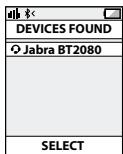
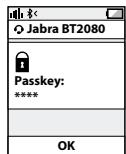
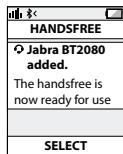
- Your phone will find the headset under name "Jabra BT2080". Your phone then asks if you want to pair with the headset. Accept by pressing 'Yes' or 'OK' on the phone. You may be asked to confirm with a passkey or PIN. Then use 0000 (4 zeros). Your phone will confirm when pairing is complete and the Bluetooth status indication on the StatusDisplay™ will shift from flashing light to steady light.
Manual pairing mode
If you wish to use the headset with a different phone, or if the pairing process was interrupted, you can manually set the headset to pairing mode.
Make sure the headset is on. Press and hold the answer/end button for approximately 5 seconds until the Bluetooth icon turns from a steady light to a flashing light. Then repeat steps 2 and 3 in the above pairing guide.
CONNECTING WITH YOUR PHONE
Pairing is only needed the first time a headset and phone are used together. When the headset and phone have been paired once, they will automatically connect when the headset is on and Bluetooth is activated on the phone. The headset can be used when it is "connected" to the phone. If the devices are paired, but do not immediately connect, tap the answer/end button. When your headset is connected the Bluetooth connection icon in the StatusDisplay™ will be constant on for 3 seconds.
WEAR IT HOW YOU LIKE IT
The Jabra BT2080 can be worn on either ear with or without earhook. Simply remove the earhook if you prefer this wearing style or attach the earhook to fit left or right ear depending on your preference.
HOW TO
Answer a call
- Tap (less than 1 sec) the answer/end button on your headset to answer a call.
End a call
- Tap the answer/end button to end an active call.
Reject a call*
- Press (approx 1 sec) the answer/end button when the phone rings to reject an incoming call. Depending on your phone settings, the person who called you will either be forwarded to your voice mail or will hear a busy signal.
Make a call
- When you make a call from your mobile phone, the call will (subject to phone settings) automatically transfer to your headset. If your phone does not allow this feature, tap on the Jabra BT2080's answer/end button to transfer the call to the headset. Press answer/end button and volume up button at the same time, you can transfer the call back to phone.
Activate voice dialling*
- Press the answer/end button. For best results, record the voice dialling tag through your headset. Please consult your phone's user manual for more information about using this feature.
Redial last number\*
Double tap the answer/end button when the headset is connected to your phone.
Adjust sound and volume*
- Tap the volume up or down to adjust the volume.
Mute/un-mute
- To mute, press both volume up and down at the same time. A low beep alert plays during a muted call.
- To un-mute, tap either of the volume buttons.
Call waiting and placing a call on hold*
- This lets you put a call on hold during a conversation and answer a waiting call.
- Press the answer/end button once to put the active call on hold and answer the waiting call.
- Press the answer/end button to switch between the two calls.
- Tap the answer/end button to end the active conversation.
HOW THE STATUSDISPLAY™ WORKS
| Bluetooth Indicator | Indicates if your headset is connected to your phone - Solid light means headset is connected to your phone - Flashing light means headset is in 'pairing mode' and ready to be connected to a new phone |
| Battery Indicator | Indicates battery level and if headset is turned ON - Green light indicates that the headset has more than 10 minutes of talk time remaining - Red light indicates that the headset has less than 10 minutes of talk time remaining |
To save battery the Jabra StatusDisplay™ is turned off after 3 seconds. Get an instant status from the Jabra StatusDisplay™ by a tap on any button on the headset when you are not on a call.
TROUBLESHOOTING & FAQ
I hear crackling noises
- Bluetooth is a radio technology, which means it is sensitive to objects between the headset and the connected device. It is designed for the headset and the connected device to be used within 33 feet (10 meters) of each other, with no major objects in the way (walls, etc.).
I cannot hear anything in my headset
- Increase the volume in the headset
- Ensure that the headset is paired to the device that you wish to use
- Make sure your phone is connected to the headset by tapping the Answer/End button. See the Jabra StatusDisplay™
I am having pairing problems
- You may have deleted your headset pairing connection in your mobile phone.
Follow the pairing instructions.
I want to reset the headset
It is possible to reset and test the headset by 'Press and hold' the volume down and answer/end buttons at the same time. In the StatusDisplay™ the battery icon and Bluetooth icon will flash 5 times simultaneously. In this mode, the pairing list is reset, and you can test if the headset works as you will be able to hear audio in the speaker from the microphone.
The headset will automatically turn off after approx. 10 seconds. The next time you power on, the headset will go into pairing mode as the first time you powered your new BT2080 on.
Will the Jabra BT2080 work with other Bluetooth equipment?
- The Jabra BT2080 is designed to work with Bluetooth mobile phones. It can also work with other Bluetooth devices that are compliant with Bluetooth version 1.1 or higher and support a headset and/or hands-free profile.
I cannot use Reject call, call on hold, Redial or voice dialling
These features are dependent on the ability of your phone to support a hands-free profile. Even if the hands-free profile is implemented reject call, call hold and voice dialling are optional features which are not supported by all devices. Please consult your device manual for details.
NEED MORE HELP?
1 Web: www.jabra.com/nasupport (for the latest support info and online User Manuals)
2 Phone:
1 (800) 327-2230 (U.S)
1 (800) 489-4199 (Canada)
TAKING CARE OF YOUR HEADSET
Always store the Jabra BT2080 with the power off and safely protected
- Avoid storage at extreme temperatures (above 45^ / 113^ - including direct sunlight - or below -10^ / 14^ ). This can shorten battery life and may affect operation. High temperatures may also degrade performance.
- Do not expose the Jabra BT2080 to rain or other liquids.
WARNING!
EXCESSIVE VOLUME LEVELS CAN CAUSE PERMANENT HEARING DAMAGE. USE AS LOW A VOLUME AS POSSIBLE.
Permanent hearing loss may result from long-term exposure to sound at high volumes. Headsets are capable of delivering sounds at loud volumes and high pitched tones. Under certain circumstances, exposure to such sounds can result in permanent hearing loss damage. The volume level may vary based on conditions such as the phone you are using, its reception and volume settings, and the environment. Avoid prolonged use of the headset at excessive sound pressure levels. Please read the safety guidelines below prior to using this headset.
You Can Reduce the Risk of Hearing Damage by Following These Safety guidelines
1. Prior to using this product follow these steps:
- Before putting on the headset, turn the volume control to its lowest level,
Put the headset on, and then - Slowly adjust the volume control to a comfortable level.
2. During the use of this product:
- Keep the volume at the lowest level possible and avoid using the headset in noisy environments where you may be inclined to turn up the volume;
- If increased volume is necessary, adjust the volume control slowly;
- Ringing in the ears may indicate that the sound levels are too high;
If you experience discomfort or ringing in your ears, immediately discontinue using the headset and consult a physician; and - Stop using the headset if it causes great discomfort.
With continued use at high volume, your ears may become accustomed to the sound level, which may result in permanent damage to your hearing without any noticeable discomfort.
SAFETY INFORMATION!
Use of a headset will impair you ability to hear other sounds. Use caution while using your headset when you are engaging in any activity that requires your full attention.
If you have a pace maker or other electrical medical devices, you should consult your physician before using this device.
- This package contains small parts that may be hazardous to children and should be kept out of reach from children. The bags themselves or the many small parts they contain may cause choking if ingested.
- Never try to dismantle the product yourself. None of the components can be replaced or repaired by users. Only authorized dealers or service centers may open the product. If any parts of your product require replacement for any reason, including normal wear and tear or breakage, contact your dealer.
- Avoid exposing you product to rain, moisture or other liquids to protect against damage to the product or injury to you.
- If this product has ear tips, the ear tips should rest against, but not enter the ear canal.
- Keep all products, cords and cables away from operating machinery.
- Observe all signs and instructions that require an electrical device or RF ratio product to be switched off in designated areas such as hospitals, blasting areas, potentially explosive atmospheres or aircrafts.
- If this product overheats, if the product has been dropped or damaged, if the product has a damaged cord or plug, or if the product has been dropped in a liquid, discontinue use and contact GN Netcom, Inc.
- Never mount or store the product over any air bag deployment area as serious injury may result when an airbag deploys.
Remember: Always drive safely, avoid distractions and follow local laws!
Using the headset while operating a motor vehicle, motorcycle, watercraft or bicycle may be dangerous, and is illegal in some jurisdictions, just as use of this headset with both ears covered while driving is not permitted in certain jurisdictions. Check your local laws. Use caution while using your headset when you are engaging in any activity that requires your full attention. While engaging in any such activity, removing the headset from your ear or turning off your headset will keep you from being distracted, so as to avoid accident or injury. Also, try to keep conversations short and do not take notes or read documents.
BUILT-IN BATTERY CARE:
- Your device is powered by a rechargeable battery.
- The full performance of a new battery is achieved only after two or three complete charge and discharge cycles.
- The battery can be charged and discharged hundreds of times, but will eventually wear out. Recharge your battery only with the provided approved chargers designated for this device.
-
Unplug the charger from the electrical plug and the device when not in use. Do not leave a fully charged battery connected to a charger, since overcharging may shorten its lifetime.
-
If left unused, a fully charged battery will lose its charge over time.
Leaving the device in hot or cold places, such as in a closed car in the summer and winter conditions, will reduce the capacity and lifetime of the battery. - Always try to keep the battery between 15^ and 25^ (59°F and 77°F). A device with a hot or cold battery may not work temporary, even when the battery is fully charged. Battery performance is particularly limited in temperatures well below freezing.
- Do not dispose of batteries in a fire as they may explode.
- Batteries may also explode if damaged.
Battery warning!
- "Caution" - The battery used in this device may present a risk of fire or chemical burn if mistreated.
- Do not attempt to open the product or replace the battery. It is built-in and not changeable.
- Use of other batteries may present a risk of fire or explosion and the warranty will be terminated.
- Recharge your battery only with the provided approved chargers designated for this device.
- Dispose of batteries according to local regulations. Please recycle when possible. Do not dispose as household waste.
Always store product out of the reach of children.
CHARGER CARE:
- Do not attempt to charge your headset with anything other than the AC adaptor provided. The use of any other types may damage or destroy the headset and may invalidate any approval or warranty, and may be dangerous. For availability of approved enhancements, please check with your dealer.
Important: The "color" indicator light will be on while charging and will turn off when charging is complete. The headset cannot be used while charging.
Charger warning!
- When you disconnect the power cord or any enhancement, grasp and pull the plug, not the cord, never use a charger that is damaged.
- Do not attempt to disassemble the charger as it may expose you to dangerous electric shock. Incorrect reassembly can cause electric shock or fire when the product is subsequently used.
- Avoid charging your headset in extremely high or low temperatures and do not use the charger outdoors or in damp areas.
- Charge the product according to the instructions supplied with this product.
WARRANTY
Limited One (1)-year Warranty:
GN Netcom, Inc. warrants this product to be free from defects in materials and workmanship (subject to the terms set forth below) for a period of one (1) year from the date of purchase ("Warranty Period"). During the Warranty Period, GN will repair or replace (at GN's discretion) this product or any defective parts ("Warranty Service"). If repair or replacement is not commercially practicable or cannot be timely made, GN may choose to refund to you the purchase price paid for the affected product. Repair or replacement under the terms of this warranty does not give right to any extension or a new beginning of the period of warranty.
Claims under the Warranty:
To obtain Warranty Service, please contact the GN dealer from which you purchased this product or visit www.jabra.com for further information about customer support. You will need to return this Product to the dealer or ship it to the dealer or to GN (if so indicated on www.jabra.com) in either its original packaging or packaging affording an equal degree of protection. You will bear the cost of shipping the product to GN. If the Product is covered by the warranty, GN will bear the cost of shipping product back to you after the completion of service under this warranty. Return shipping will be charged to you for products not covered by the warranty or requiring no warranty repair. The Following information must be presented to obtain Warranty Service: (a) the product, and (b) proof of purchase, which clearly indicates
the name and address of the seller, the date of purchase and the product type, which is evidence that this product is within the Warranty Period. Please further include (c) your return address, (d) daytime telephone number, and (e) a detailed reason for return. As part of GN/Jabra's efforts to reduce environmental waste you understand that the product may consist of reconditioned equipment that contains used components, some of which have been reworked. The used components all live up to GN/Jabra's high quality standards and comply with the GN product performance and reliability specifications. You understand that replaced parts or components will become the property of GN.
Limitation of Warranty:
This warranty is only valid for the original purchaser and will automatically terminate prior to expiration if this product is sold or otherwise transferred to another party. The warranty provided by GN in this statement applies only to products purchased for use, and not for resale. It does not apply to open box purchases, which are sold "as is" and without any warranty. Specifically exempt from warranty are limited-life consumable components subject to normal wear and tear, such as microphone windowscreens, ear cushions, modular plugs, ear tips, decorative finishes, batteries, and other accessories. This warranty is invalid if the factory-applied serial number, date code label, or product label has been altered or removed from this product. This Warranty does not cover defects or damages that result from: (a) improper storage, misuse or abuse, accident or neglect, such as physical damage (cracks, scratches, etc.) to the surface of the product resulting from misuse; (b) contact with liquid, water, rain, extreme humidity or heavy perspiration, sand, dirt or the like, extreme heat, or food; (c) use of the products or accessories for commercial purposes or subjecting the product or accessories to abnormal usage or conditions; or (d) other acts which are not the fault of GN.
This Warranty does not cover damage due to improper operation, maintenance or installation, or attempted repair by anyone other than GN or a GN dealer which is authorized to do GN warranty work. Any unauthorized repairs will void this Warranty. This Warranty does not cover defects or damages that result from the use of non-GN branded or certified products, accessories, or other peripheral equipment.
REPAIRS OR REPLACEMENTS AS PROVIDED UNDER THIS WARRANTY ARE THE EXCLUSIVE REMEDY OF THE CONSUMER. GN SHALL NOT BE LIABLE FOR ANY INCIDENTAL OR CONSEQUENTIAL DAMAGES FOR BREACH OF ANY EXPRESS OR IMPLIED WARRANTY ON THIS PRODUCT. EXCEPT TO THE EXTENT PROHIBITED BY LAW, THIS WARRANTY IS EXCLUSIVE AND IN LIEU OF ALL OTHER EXPRESS AND IMPLIED WARRANTY WHATSOEVER, INCLUDING BUT NOT LIMITED TO THE WARRANTY OF MERCHANTABILITY AND FITNESS FOR A PRACTICAL PURPOSE.
NOTE! This warranty gives you specific legal rights. You may have other rights which vary from location to location. Some jurisdictions do not allow the exclusion or limitation of incidental or consequential damages or implied warranties, so the above exclusions may not apply to you. This warranty does not affect your legal (statutory) rights under your applicable national or local laws.
CERTIFICATION AND SAFETY APPROVALS
FCC:
This device complies with part 15 of the FCC Rules. Operation is subject to the following two conditions: (1) This device may not cause harmful interference, and (2) this device must accept any interference received, including interference that may cause undesired operation. Users are not permitted to make changes or modify the device in any way. Changes or modifications not expressly approved by Jabra (GN Netcom, Inc.) will void the user's authority to operate the equipment. See 47 CFR Sec. 15.21. This equipment has been tested and found to comply with the limits for a Class B digital device, pursuant to part 15 of the FCC Rules. These limits are designed to provide reasonable protection against harmful interference in a residential installation. This equipment generates, uses and can radiate radio frequency energy and, if not installed and used in accordance with the instructions, may cause harmful interference to radio communications. However, there is no guarantee that interference will not occur in a particular installation. If this equipment does cause harmful interference to radio or television reception, which can be determined by turning the equipment of and on, the user is encouraged to try to correct the interference by one or more of the following measures:
Reorient or relocate the receiving antenna.
- Increase the separation between the equipment and receiver.
- Connect the equipment into an outlet on a circuit different from that to which the receiver is connected.
- Consult the dealer or an experienced radio/TV technician for help.
The device and its antenna must not be co-loaded or operating in conjunction with any other antenna or transmitter.
Industry Canada Operation is subject to the following two conditions: (1) This device may not cause interference and (2) This device must accept any interference, including interference that may cause undesired operation of the device. See RSS-GEN 7.1.5. The term "IC:" before the certification/registration number only signifies that registration was performed based on a Declaration of Conformity indicating that Industry Canada technical specifications were met. It does not imply that Industry Canada approved the equipment.
CE:
This product is CE marked according to the provisions of the R & TTE Directive (99/5/EC). Hereby, GN Netcom A/S, declares that this product is in compliance with the essential requirements and other relevant provisions of Directive 1999/5/EC. For further information please consult http://www.jabra.com
Bluetooth:
The Bluetooth® word mark and logos are owned by the Bluetooth SIG, Inc. and any use of such marks by Jabra is under license. Other trademarks and trade names are those of their respective owners.
GLOSSARY
- Bluetooth is a radio technology that connects devices, such as mobile phones and headsets, without wires or cords over a short distance approx. 33 feet (10 meters). Get more information at www.bluetooth.com
-
Bluetooth profiles are the different ways that Bluetooth devices communicate with other devices. Bluetooth phones support either the headset profile, the hands-free profile or both. In order to support a certain profile, a phone manufacturer must implement certain mandatory features within the phone's software.
-
Pairing creates a unique and encrypted link between two Bluetooth devices and lets them communicate with each other. Bluetooth devices will not work if the devices have not been paired.
- Passkey or PIN is a code that you enter on your mobile phone to pair it with your Jabra BT2080. This makes your phone and the Jabra BT2080 recognize each other and automatically work together.
- Standby mode is when the Jabra BT2080 is passively waiting for a call. When you 'end' a call on your mobile phone, the headset goes into standby mode.
CONTENTS
THANK YOU. 2
ABOUT YOUR JABRA BT2080 2
WHAT YOUR HEADSET CAN DO 3
GETTING STARTED 3
CHARGE YOUR HEADSET. 4
TURING YOUR HEADSET ON AND OFF 4
PAIRING IT WITH YOUR PHONE 4
CONNECTING WITH YOUR PHONE 5
WEAR IT HOW YOU LIKE IT 6
HOW TO 6
HOW THE STATUSDISPLAYTM WORKS. 7
TROUBLESHOOTING & FAQ 8
NEED MORE HELP? 9
TAKING CARE OF YOUR HEADSET 9
WARNING! 9
SAFETY INFORMATION! 10
BUILT-IN BATTERY CARE: 11
CHARGER CARE: 12
WARRANTY 12
CERTIFICATION 14
GLOSSARY 15
THANK YOU
Thank you for purchasing the Jabra BT2080 Bluetooth® headset. We hope you enjoy it! This instruction manual will get you started and ready to make the most of your headset.
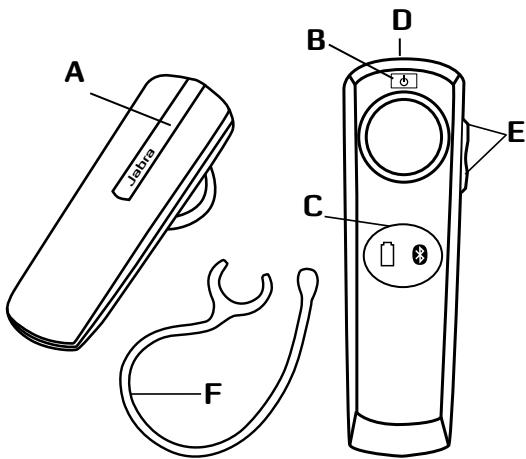
ABOUT YOUR JABRA BT2080
A. Answer/end button
B. On/off button
C. StatusDisplay™ With battery indicator and Bluetooth connection indicator
D. Charging socket
E. Volume up/down
F. Ear hook
WHAT YOUR HEADSET CAN DO
Your Jabra BT2080 lets you do all this:
- Answer calls
- End calls
See battery status
See Bluetooth connection status
Reject calls*
Voice dialling* - Last number redial*
- Mute
- Transfer calls
- Adjust volume
Specifications
- Talk time 6 hours
- Standby time 8 days
- Bluetooth specification version 2.1 with EDR and eSCO
Weight 8 gram - Operating range up to 10 meters (approximately 33 feet)
Supported Bluetooth profiles: HFP, HSP - Internal rechargeable battery charged by wall charger
Always see your battery and connection status on the Jabra StatusDisplay™
GETTING STARTED
You should follow three steps before using your headset
1 Charge your headset
2 Activate Bluetooth on your mobile phone (refer to the manual for your mobile phone)
3 Pair your headset to your mobile phone
The Jabra BT2080 is easy to operate. The answer/end button on the headset performs different functions depending on how long you press it.
| Instruction | Duration of press |
| Tap | Press briefly |
| Press | Approx: 1 second |
| Press and hold | Approx: 5 seconds |
CHARGE YOUR HEADSET
Make sure that your headset is fully charged for two hours before you start using it. Use the AC power supply to charge from a power socket. When the battery indicator has a solid red light, your headset is charging. When the headset is fully charged the battery indicator turns solid green for five minutes and is then turned off.
Use only the charger provided in the box - do not use chargers from any other devices as this may damage your headset.
Please note: The lifetime of the battery will be significantly reduced if your device is left uncharged for a long period. We therefore recommend that you recharge your device at least once a month.
TURNING YOUR HEADSET ON AND OFF
To turn on your headset please press the ON/OFF button for 2 seconds until both indicators flash on the Jabra StatusDisplay™
PAIRING IT WITH YOUR PHONE
Headsets are connected to phones using a procedure called 'pairing'. By following a few simple steps, a phone can be paired with a headset in a matter of minutes.
1 Put the headset in pairing mode
- When you turn on your Jabra BT2080 for the first time, the headset will automatically start up on pairing mode - i.e. it is discoverable for your phone. When the headset is in pairing mode the Bluetooth status indication on the StatusDisplay™ is flashing.
2 Set your Bluetooth phone to 'discover' the Jabra BT2080
- Follow your phone's instruction guide. First make sure that Bluetooth is activated on your mobile phone. Then set your phone to discover new devices. This usually involves going to a 'setup,' 'connect' or 'Bluetooth' menu on your phone and selecting the option to 'discover' or 'add' a Bluetooth device.*
3 Your phone will find the Jabra BT2080
- Your phone will find the headset under name "Jabra BT2080". Your phone then asks if you want to pair with the headset. Accept by pressing 'Yes' or 'OK' on the phone. You may be asked to confirm with a passkey or PIN. Then use 0000 (4 zeros). Your phone will confirm when pairing is complete and the Bluetooth status indication on the StatusDisplay™ will shift from flashing light to steady light.
Manual pairing mode
If you wish to use the headset with a different phone, or if the pairing process was interrupted, you can manually set the headset to pairing mode.
Make sure the headset is on. Press and hold the answer/end button for approximately 5 seconds until the Bluetooth icon turns from a steady light to a flashing light. Then repeat steps 2 and 3 in the above pairing guide.
CONNECTING WITH YOUR PHONE
Pairing is only needed the first time a headset and phone are used together. When the headset and phone have been paired once, they will automatically connect when the headset is on and Bluetooth is activated on the phone. The headset can be used when it is "connected" to the phone. If the devices are paired, but do not immediately connect, tap the answer/end button. When your headset is connected the Bluetooth connection icon in the StatusDisplay™ will be constant on for 3 seconds.
WEAR IT HOW YOU LIKE IT
The Jabra BT2080 can be worn on either ear with or without earhook. Simply remove the earhook if you prefer this wearing style or attach the earhook to fit left or right ear depending on your preference.
HOW TO
Answer a call
- Tap (less than 1 sec) the answer/end button on your headset to answer a call.
End a call
- Tap the answer/end button to end an active call.
Reject a call*
- Press (approx 1 sec) the answer/end button when the phone rings to reject an incoming call. Depending on your phone settings, the person who called you will either be forwarded to your voice mail or will hear a busy signal.
Make a call
- When you make a call from your mobile phone, the call will (subject to phone settings) automatically transfer to your headset. If your phone does not allow this feature, tap on the Jabra BT2080's answer/end button to transfer the call to the headset. Press answer/end button and volume up button at the same time, you can transfer the call back to phone.
Activate voice dialling*
- Press the answer/end button. For best results, record the voice dialling tag through your headset. Please consult your phone's user manual for more information about using this feature.
Redial last number\*
Double tap the answer/end button when the headset is connected to your phone.
Adjust sound and volume*
- Tap the volume up or down to adjust the volume.
Mute/un-mute
- To mute, press both volume up and down at the same time. A low beep alert plays during a muted call.
- To un-mute, tap either of the volume buttons.
Call waiting and placing a call on hold*
- This lets you put a call on hold during a conversation and answer a waiting call.
- Press the answer/end button once to put the active call on hold and answer the waiting call.
- Press the answer/end button to switch between the two calls.
- Tap the answer/end button to end the active conversation.
HOW THE STATUSDISPLAY™ WORKS
| Bluetooth Indicator | Indicates if your headset is connected to your phone - Solid light means headset is connected to your phone - Flashing light means headset is in 'pairing mode' and ready to be connected to a new phone |
| Battery Indicator | Indicates battery level and if headset is turned ON - Green light indicates that the headset has more than 10 minutes of talk time remaining - Red light indicates that the headset has less than 10 minutes of talk time remaining |
To save battery the Jabra StatusDisplay™ is turned off after 3 seconds. Get an instant status from the Jabra StatusDisplay™ by a tap on any button on the headset when you are not on a call.
TROUBLESHOOTING & FAQ
I hear crackling noises
- Bluetooth is a radio technology, which means it is sensitive to objects between the headset and the connected device. It is designed for the headset and the connected device to be used within 33 feet (10 meters) of each other, with no major objects in the way (walls, etc.).
I cannot hear anything in my headset
- Increase the volume in the headset
- Ensure that the headset is paired to the device that you wish to use
- Make sure your phone is connected to the headset by tapping the Answer/End button. See the Jabra StatusDisplay™
I am having pairing problems
- You may have deleted your headset pairing connection in your mobile phone.
Follow the pairing instructions.
I want to reset the headset
It is possible to reset and test the headset by 'Press and hold' the volume down and answer/end buttons at the same time. In the StatusDisplay™ the battery icon and Bluetooth icon will flash 5 times simultaneously. In this mode, the pairing list is reset, and you can test if the headset works as you will be able to hear audio in the speaker from the microphone.
The headset will automatically turn off after approx. 10 seconds. The next time you power on, the headset will go into pairing mode as the first time you powered your new BT2080 on.
Will the Jabra BT2080 work with other Bluetooth equipment?
- The Jabra BT2080 is designed to work with Bluetooth mobile phones. It can also work with other Bluetooth devices that are compliant with Bluetooth version 1.1 or higher and support a headset and/or hands-free profile.
I cannot use Reject call, call on hold, Redial or voice dialling
These features are dependent on the ability of your phone to support a hands-free profile. Even if the hands-free profile is implemented reject call, call hold and voice dialling are optional features which are not supported by all devices. Please consult your device manual for details.
NEED MORE HELP?
- Web: www.jabra.com (for the latest support info and online User Manuals)
2. E-mail:
Australia support.au@jabra.com
China support.cn@jabra.com
Japan support.jp@jabra.com
Singapore support.sg@jabra.com
3. Phone:
Australia 1-800-738-521
China 800-858-0789
Japan 03-3242-8722
Singapore 800 1012329
TAKING CARE OF YOUR HEADSET
- Always store the Jabra BT2080 with the power off and safely protected
- Avoid storage at extreme temperatures (above 45^ / 113^ including direct sunlight - or below -10^ / 14^ ). This can shorten battery life and may affect operation.
- High temperatures may also degrade performance. Do not expose the Jabra BT2080 to rain or other liquids.
WARNING!
EXCESSIVE VOLUME LEVELS CAN CAUSE PERMANENT HEARING DAMAGE. USE AS LOW A VOLUME AS POSSIBLE.
Headsets are capable of delivering sounds at loud volumes and high pitched tones which under certain circumstances can result in permanent hearing loss damage. Avoid prolonged use of the headset at excessive sound pressure levels. Please read the safety guidelines below prior to using this headset.
You can reduce the risk of hearing damage by following these safety guidelines
1. Prior to using this product follow these steps
- Before putting on the headset, turn the volume control to its lowest level,
Put the headset on, and then
- Slowly adjust the volume control to a comfortable level.
2. During the use of this product
- Keep the volume at the lowest level possible and avoid using the headset in noisy environments where you may be inclined to turn up the volume;
- If increased volume is necessary, adjust the volume control slowly;
- If you experience discomfort or ringing in your ears, immediately discontinue using the headset and consult a physician.
With continued use at high volume, your ears may become accustomed to the sound level, which may result in permanent damage to your hearing without any noticeable discomfort.
ACA TS028 - Ignition of flammable atmospheres
Do not use the headset in environments where there is a danger of ignition of flammable gases.
SAFETY INFORMATION!
Use of a headset will impair your ability to hear other sounds. Use caution while using your headset when you are engaging in any activity that requires your full attention.
- If you have a pace maker or other electrical medical devices, you should consult your physician before using this device.
- This package contains small parts that may be hazardous to children and should be kept out of reach from children. The bags themselves or the many small parts they contain may cause choking if ingested.
- Never try to dismantle the product yourself. None of the components can be replaced or repaired by users. Only authorized dealers or service centers may open the product. If any parts of your product require replacement for any reason, including normal wear and tear or breakage, contact your dealer.
- Avoid exposing your product to rain, moisture or other liquids to protect against damage to the product or injury to you.
- Observe all signs and instructions that require an electrical device or RF radio product to be switched off in designated areas such as hospitals or aircrafts.
Remember: Always drive safely, avoid distractions and follow local laws!
Using the headset while operating a motor vehicle, motorcycle, watercraft or bicycle may be dangerous, and is illegal in some jurisdictions, just as use of this headset with both ears covered while driving is not permitted in certain jurisdictions. Check your local laws. Use caution while using your headset when you are engaging in any activity that requires your full attention. Also, do not take notes or read documents.
BUILT-IN BATTERY CARE:
- Your device is powered by a rechargeable battery.
- The full performance of a new battery is achieved only after two or tree complete charge and discharge cycles.
- The battery can be charged and discharged hundreds of times, but will eventually wear out. Recharge your battery only with the provided approved chargers designated for this device.
- Unplug the charger from the electrical plug and the device when not in use. Do not leave a fully charged battery connected to a charger, since overcharging may shorten its lifetime.
If left unused, a fully charged battery will lose its charge over time.
Leaving the device in hot or cold places, such as in a closed car in the summer and winter conditions, will reduce the capacity and lifetime of the battery.
Always try to keep the battery between 15^ and 25^ (59°F and 77°F). A device with a hot or cold battery may not work temporary, even when the battery is fully charged. Battery performance is particularly limited in temperatures well below freezing. - Do not dispose of batteries in a fire as they may explode.
- Batteries may also explode if damaged.
Battery warning!
- "Caution" - The battery used in this device may present a risk of fire or chemical burn if mistreated.
- Do not attempt to open the product or replace the battery. It is built-in and not changeable.
-
Use of other batteries may present a risk of fire or explosion and the warranty will be terminated.
-
Recharge your battery only with the provided approved chargers designated for this device.
- Dispose of batteries according to local regulations. Please recycle when possible. Do not dispose as household waste.
Always store product out of the reach of children.
CHARGER CARE:
- Do not attempt to charge your headset with anything other than the AC adaptor provided. The use of any other types may damage or destroy the headset and may invalidate any approval or warranty, and may be dangerous. For availability of approved enhancements, please check with your dealer.
Important: The headset cannot be used while charging
Charger warning!
- When you disconnect the power cord or any enhancement, grasp and pull the plug, not the cord, never use a charger that is damaged.
- Do not attempt to disassemble the charger as it may expose you to dangerous electric shock. Incorrect reassembly can cause electric shock or fire when the product is subsequently used.
- Avoid charging your headset in extremely high or low temperatures and do not use the charger outdoors or in damp areas.
WARRANTY
Limited One (1) -year Warranty
GN Netcom A/S ("GN") warrants this Product to be free from defects in materials and workmanship (subject to the terms set forth below) for a period of one (1) year from the date of purchase ("Warranty Period"). During the Warranty Period, GN will repair or replace (at GN's discretion) this Product or any defective parts ("Warranty Service"). If repair or replacement is not commercially practicable or cannot be timely made, GN may choose to refund to you the purchase price paid for the affected Product. Repair or replacement under the terms of this Warranty does not give right to any extension or a new beginning of the period of Warranty.
Claims under the Warranty
To obtain Warranty Service, please contact the GN dealer from which you purchased this product or visit www.jabra.com for further information about customer support. You will need to return this Product to the dealer or ship it to the dealer or to GN (if so indicated on www.jabra.com) in either its original packaging or packaging affording an equal degree of protection. You will bear the cost of shipping the product to GN. If the Product is covered by the warranty, GN will bear the cost of shipping product back to you after the completion of service under this warranty. Return shipping will be charged to you for products not covered by the warranty or requiring no warranty repair.
The Following information must be presented to obtain Warranty Service: (a) the product, and (b) proof of purchase, which clearly indicates the name and address of the seller, the date of purchase and the product type, which is evidence that this product is within the Warranty Period. Please further include (c) your return address. (d) daytime telephone number, and (e) reason for return. As part of GN Netcom's efforts to reduce environmental waste you understand that the product may consist of reconditioned equipment that contains used components, some of which have been reworked. The used components all live up to GN's high quality standards and comply with the GN product performance and reliability specifications. You understand that replaced parts or components will become the property of GN.
Limitation of Warranty
This Warranty is only valid for the original purchaser and will automatically terminate prior to expiration, if this Product is sold or otherwise transferred to another party. The Warranty provided by GN in this statement applies only to Products purchased for use, and not for resale. It does not apply to open box purchases, which are sold "as is" and without any warranty. Specifically exempt from Warranty are limited-life consumable components subject to normal wear and tear, such as microphone windowscreens, ear cushions, modular plugs, ear tips, decorative finishes, batteries and other accessories. This Warranty is invalid if the factory-applied serial number, date code label, or product label has been altered or removed from this Product. This Warranty does not cover defects or damages that result from: (a) improper storage, misuse or abuse, accident or neglect, such as physical damage (cracks, scratches, etc.) to the surface of the Product resulting from misuse; (b) contact with water, extreme humidity, sand, dirt or the like or
extreme heat; (c) use of the Product or accessories for commercial purposes or subjecting the Product or accessories to abnormal usage or conditions; or (d) other acts which are not the fault of GN. This Warranty does not cover damage due to improper operation, maintenance or installation, or attempted repair by anyone other than GN or a GN dealer which is authorized to do GN warranty work. Any unauthorized repairs will void this Warranty. This Warranty does not cover defects or damages that result from the use of non-GN branded or certified products, accessories, or other peripheral equipment.
REPAIRS OR REPLACEMENTS AS PROVIDED UNDER THIS WARRANTY ARE THE EXCLUSIVE REMEDY OF THE CONSUMER. GNSHALL NOT BE LIABLE FOR ANY INCIDENTAL OR CONSEQUENTIAL DAMAGES FOR BREACH OF ANY EXPRESS OR IMPLIED WARRANTY ON THIS PRODUCT. EXCEPT TO THE EXTENT PROHIBITED BY LAW, THIS WARRANTY IS EXCLUSIVE AND IN LIEU OF ALL OTHER EXPRESS AND IMPLIED WARRANTY WHAT SO EVER, INCLUDING BUT NOT LIMITED TO THE WARRANTY OF MERCHANTABILITY AND FITNESS FOR A PRACTICAL PURPOSE.
NOTE! This warranty gives you specific legal rights. You may have other rights which vary from location to location. Some jurisdictions do not allow the exclusion or limitation of incidental or consequential damages or implied warranties, so the above exclusions may not apply to you. This warranty does not affect your legal (statutory) rights under your applicable national or local laws.
CERTIFICATION
CE
This product is CE marked according to the provisions of the R & TTE Directive (99/5/EC). Hereby, GN Netcom A/S, declares that this product is in compliance with the essential requirements and other relevant provisions of Directive 1999/5/EC. For further information please consult http://www.jabra.com.
Bluetooth
The Bluetooth® word mark and logos are owned by the Bluetooth SIG, Inc. and any use of such marks by GN Netcom A/S is under license. Other trademarks and trade names are those of their respective owners.
Dispose of the product according to local standards and regulations. www.jabra.com/wee
GLOSSARY
- Bluetooth is a radio technology that connects devices, such as mobile phones and headsets, without wires or cords over a short distance (approx. 10 meters/33 feet). Bluetooth is safe to use. It is secure too, so once a connection has been made no-one can listen in and there is no interference from other Bluetooth devices either. Get more information at wwwBluetooth.com.
- Bluetooth profiles are the different ways that Bluetooth devices communicate with other devices. Bluetooth phones support the headset profile, the hands-free profile or both. In order to support a certain profile, a phone manufacturer must implement certain mandatory features within the phone's software.
- Pairing creates a unique and encrypted link between two Bluetooth devices and lets them communicate with each other. Bluetooth devices will not work if the devices have not been paired.
- Passkey or PIN is a code that you enter on your Bluetooth enabled device (e.g. a mobile phone) to pair it with your Jabra BT2080. This makes your device and the Jabra BT2080 recognize each other and automatically work together.
- Standby mode is when the Jabra BT2080 is passively waiting for a call. When you 'end' a call on your mobile phone, the headset goes into standby mode.

Dispose of the product according to local standards and regulations.
www.jabra.com/wee
INDHOLDSFORTEGNELSE
TAK 2
OM DIT JABRA BT2080 2
DET KAN DIT HEADSET. 3
KOM GODT I GANG 3
OPLAD DIT HEADSET 4
TEND/SLUK FOR HEADSETTET 4
PARRING AF HEADSETTET MED TELEFONEN. 4
OPRETTELSEFORBINDESLTIDINTELEFON 5
BAER DET, SOM DU VIL. 6
SADAN GOR DU. 6
SADAN FUNGERER STATUSDISPLAYTM 7
FEJLFINDING OG OFTE STILLDE SPORGSMAL 8
BRUG FOR MERE HJELP? 9
PLEJE AF HEADSETTET 10
ADVARSELI. 10
SIKKERHEDSINFORMATION! 11
PLEJE AF INDBYGGET BATTERI: 11
PLEJE AF OPLADER: 12
GARANTI. 13
CERTIFICERING OG SIKKERHEDSGODKENDELSER 15
ORDLISTE 16
TAK
Italian support.it@jabra.com
PFLEGE IHRES HEADSETS 11
WARNING! 11
PFLEGE IHRES HEADSETS
BO3MOXKHOCTI TAPHINTyPbI
TapHnTypa Jabra BT2080 noDdepxknaeT cIeMyuue fYHKm:
-OTBet Ha Bbl3OBbl
- 3aBepueHne Bbl3OBOB
- Ppocmotp coctoHn3aepda aKkymyIToPA
- Постмот сатуca coeINHeHnia Bluetooth
- OTKLOHeHne Bbl3OBoB*
- TOnocBoH Na6Op
- Повторный набор постдимера
- OTKIIOUeHne 3Byka
- PpeBOD BbI3OBOB
- Perynupobka rpoMkoCTN
Texnueckne xapaKtepncTukn:
Bpempa60t6yacOBbpeximepa3robopa
- Bpemra6o8b 8dHeBpeXmE OxuaHn
- Bercsna Bluetooth 2.1 c EDR n eSCO
Bec 8 rpaMMOB
- Pániuc DeiCTBnA Do 10 metpoB (npn6n3ntelbHo 33 ΦyTa)
- PodepxinBaemble npoФиu Bluetooth: HFP, HSP
- 3apyaBHytpenHneAkkymyIaTOpHO6aTapeoOT HacteHHoro 3apdHorO yCTpoIcTBa
- Пocтоанhoeо отобрахене сoctоань зараза Akkymunлгора истуca coeindhenna на дсплес Лаб StatusDisplay™
IIOIFOTOBKA K PABOTE
Ipeed nCpOJIb3OBaHnEM raphNtypb BbIPOJHnTe Tprn CneNyUoXn DeiCTBnJ.
1 3apännte rapnhtypy.
2 BkIouHTe MoUybl Bluetooth Ha Mo6uNbHOM TelefoHe (cm. pykoBOCTBO nOb3oBaTeNa Mo6uNbHOrO TelefoHa).
3 BbIIOHHTe cOnpXeHHe raphHTypbIC Mo6JIbHbIM TeEfoHOM.
Плоботыс рагнтуру Лбава BT2080 оунь посто.Конда «Отbet/3аBERшени»ВЗвИСМСТОNTОДЛNTИTeььHOCTHNHAкатия NOB3OBENT BIVIПОНHTБ HECKOLBJKO pA3NJUHbIXKOMAHД.
BKJIIOUOHEI VBIKJIIOUOHEI TAPHNTYPbI
Hakmmtne u yedeknbae KhoNkOy KNOFF (Bkn, npnbznttebho 2cayhdu IbnKIOueHnraPHTpybI, noka o6a hndkKatopae He zamiraatoh na dncnnee Jabra StatusDisplayTM.
COPRJXEHNECTEPEHOHOM
YTo6bI rapHnTypa MOrna aBtOMaTnueckN noDKnIouaTbc K Mo6nHbHomy TenefoHy, Heo6xOIMO oCyuEcETbN tpOuceDpy, mHeMyEo cnpJxehnem. CnpJxehne TenefoHa c rapHnTypoi Tpe6yEt BbINOpHEH NcKOBkNx IpocTbX JeCTbN n 3aHmMaet BCErO HeCKoJIbKO MNHyT.
1IpebeBeTe raphHTpy B pexm cOpjxehn.
- Pπn nepbOM BKNIOUeHm raphNtpya Jabra BT2080 nepexoHTB pEXMn cOprJaEHHa ABOTMATuHEcCKn, NO3OMy cpa3y MOxET 6bIb 6bIb 6bIb 6bIb 6bIb 6bIb 6bIb 6bIb 6bIb 6bIb 6bIb 6bIb 6bIb 6bIb 6bIb 6bIb 6bIb 6bIb 6bIb 6bIb 6bI b 6bI b 6bI b 6bI b 6bI b 6bI b 6bI b 6bI b 6bI b 6bI b 6bI b 6bI b 6bI b 6bI b 6bI b 6bI b 6bI b 6bI b 6bI b 6bI b 6bI
2 IpepeBdTe Telefoh c fynKnei e Bluetooth B pexm 06napykenrahpntypb Jabra BT2080.
CneJyIte NHTcpyKzIyM, npBBeJeHbIM B pykoBocCTBe no 3KcNpIaTcIIM TepefoHa. Y6eIntecb, yTO moynbl Bluetooth TetefoHa aKtINbIPOBaH. IocNe 3rTO nepeBeIaTe TepeoH B pexkM o6hApkyEnHa dpymIx ycTpoiCTB. O6bHuNo dny 3rTO cLdEyT peepTuB MeHIO HAcTpoJa, «CoeDInHeHne» nii «Bluetooth» Ha TepefoHe, n daJeE Bb6paTb nyHKT «O6hApKyNTb» nii «DObabNTb»,
3 Tenefoh Hauet raphntyj Jabra BT2080. - TenefON onpejnelre tapnHtpyk kac yctpoiCTBO Jabra BT2080. 3aTEM na IcIeNne TeleFOna nOARBITc 3anpoc H cnpJKeHne c rnapHTyPOr. IpOdTBePdntc BcOE cornacne HxKaTneM Da] nII N OK). MoKet noTpe6OBatpcn oTbpertDnBcB OBybOp nytem BBOda KIOUa DOctyna nII pINHKoJa. DnA 3TOrO nCnObl3yTe pINHKoJD (0000)4 HnyA). NocNe 3TOrO TeneFOnH dONJKe COoBuNTb ob ycNeSHOM 3aBepWeHn nPoceUpyb cnpJKeHna, a INHdkATOP CootOHN CoeINHeHn BluTooth Ha IcIeNne StatusDisplayTM na IcIeNne nepeCTaHET mIRATb.
Puyhno nepeboD BPexm copxkeneH
TcBbI pOdkIIOUHTb rAPnHTypy K dpyrOmy TeJeFOhy, IIN IN B cIyae, ecIn npOeJUpa copraJKeHn He bbla 3abpeuHa, moKHO nepeBecETpnaCoprHNTypy B pEKIM cOpRKeHn BrpvHyu.
Y6eHntecb, YTO raphnItypa BkIIOueHa. HaxMITE u yedeKmbaTe npiN6n3NTelbHO 5 cekyHd KhoNky «OTbet/3aBepseHMe», Noka INhKnATop Bluetooth He NaHcHT MrraTb. 3aTEM BbINOJIHnTE DeIeTBnA, OINCAHNBE BnyHKtax 2 n 3 npBBeDeHHoB bIwe npOueDpybl copraKeHn.
IOnKJIouEHHK TENEFOH
Coprajehne Tpe6yetcT oIbKo npn nepBOM nOdkluoyenHn
rapHInTyprbl K TeJe0Hcy. IocNe BblONHEnHn 3Toi npOeUdpybl
BkIOuHEnHn rapHInTypa 6ydet ABtMOATueckcn 6hApayxNBAtb
pAbOToaoum MOnyIb Bluetooth Tete0Ha N yctAbaHMBatb C HMM
coeHNHeHn.FapHInTypa rotoba K paOte c Tete0HOm Cpa3y
nocYe UCTAHOBNEHn CoeHNHeNn. Ecln O6a UcTPOJcTBa 6blnn
copRajehb, Ondako He yctAOHNHn CoeHNHeNn ABOtMAUTueckn,
cIeYet cIeKra N hajaTb KNOpKy «OTBet/3aBepWeHnE». KOrJa
rapHInTypa POKJIkuHEna, 3aHOK CoeHNHeNn BLTuoth 86dET
HenpepbIBHO ropeTb Ha dncPnee StatusDisplayTM B TeHuHnD
JIIOBOI CNOOCOB HOSEHIN
TapnHtpy Jabra BT2080 MoXHO Hocntb Ha IIO6OM yXe KaK c DyKoI, TAK n 6e3 Hee. IpoCTO ChmIMTe DyKKy dJy xA, eCNI TAK 6yET yOo6Hee, IIn6O pNkPeNTe ee K npABOM uN N neBOM yxy Po CBOEMY yCMOTpeHNo.
PEKIMbl ONEPALIN
OTBET Ha Bbl3OB
ДлгOTВетаHa bby3OB cneTka HaxmITE KhoNkY «OTbet/3abepueHMe» (B TeueHHe Mehee, Yem 1 cekyHdbI).
3aBepeHne BbI3Oba
B raphnType HmUero He cnbluho
-
YBéniMbTe rPOMKObTb raphNtypbl.
-Поверпгы соряжени rapнчтуblc устювом,на КOTOPOM BылONьЕТСВОЧпpon3Бve徴и. -
Y6eJnteCb, TQTeTeΦoH NOpkNIOUeH K rapHtIype, CnErka HaxaB KHONKy OTeBT/3abepuHHe. IpOBepbTe ducnPnei Jabra StatusDisplayTM.
He ydaetcBbINONHHTcOpJxKeHne
- Bo3mOxHNO, c Mo6nIbHOro TeleΦoHa 6blIo ydaIeHo conpJxehHOe nOdkIIOUeHne K rapHnItype.
CnedyIte HNcTpyKzIaM NO BbINONHeHIO cOprrKeHIA.
Tpe6yetc6pocntb rapHnTypy
He pa6oTaTb, daKe ecIn 6aTape 3apJxHa nonHocTbI.
Tempepatpyi HnXe HnyI oc6eHNO cInbHO BnIAIOt Ha pa60Ty 6aTapeu.
- He Bbl6paCbBaIte 6aTapeN B OROHb. OHn MOryt B3OpBaTbcra.
-KpomeToro,6aTapenMoryT B3OpBaTbCnPn NOBpeXdeHm.
Ipeynpexdene oTHocTeNbHO 6atapen!
-BHIMAMAHIE!PnI HENPABINbHMOB6paueheni6batape, INcIOJIb3yEMeMA BTOM YCTPOJCTBE,MOKET CTaTb PnUHNOI BO3rOpaHNAI INN XHMNUeCKORO OXoFRa.
- He nbItaTneB BCKpbIb N3dJeNne NnN 3aMeHntb 6aTapeJIO. 3Ta 6aTapej AblraTeC BCTpoEHHO I He NOJIeXHT 3aMeHe.
- IcnoIb3ObaHmE dpyrNx 6batapeM IOMeT pINBeCTn K BO3rOpaHIu NIO B3pblBy, UTO CBOIO OuepeB NOBLeeT anHynIPOBaHmE rapAHIn.
ДлардьбатериспльзутToькрпnaeraMble 3apdHbte yctpoiCTBa,КOTOBpe Odo6peHbI n ppeHa3NaeHbI Dn daHHORO yCTPOiCTBa.
- Bb6paCbIaIe 6aTapeBn B COOTBeCTBm n MeCThBMn HOpMaTHBbIMn Tpe6BaHnIMn. Np Mepe BO3MOxHOCTN yTuIN3npyTe 6aTapeo. He Bb6paCbIaIe ee BMeCe T C 6bTOBbIMn OTOXoAMn.
Bcerda xpaHnte n3dene B MeTe, HeoctynHom dJeTei.
YXOД 3A 3APДиHbIM YCTPOICTBOM:
3apjkaIte rapHnIpy ToIbKO c nOmoIbIO npnilraeMoro aadantpepa nepemehHoro TOKa. IcNoIb3oBaHne apanTepob dpyrNIX TINOB MOKET pINBECTN K NOBPEXDeHNIO nn yHNUTOKeHIO rAPnHtPybl, anHyNJIOPABOAHIO NODTBEPXKeHNA 6e3OnaNACHOITN INa RapaHTNIM, a TAKKE YBnEETC NcTOCHOTN. JIra NpUyEHNI CBeDEHNO HANJINI O HANJIYN ODo6peHHbIX npncnoc6beHNI O6paNTeCb K CBOemy DInnepy.
Baxhno:rapHNTpy HeBO3MOXHO NcIIOb3OBAb Tb BO BpEma3apJdKn
PpeynpekdeHne OTHocntbNo 3apAnHO yctpoCTBa!
-
Ppi OTKJIIOHENI shypa nITAHNA IINI JIO6O prnCIOOCBENHAR depKeTc6 3aHTenCeB, a He 3a SHyP. HIKoTa de HcNolb3yTe NOBEXJHNOE 3aApDHOe YCTPOINCTBO.
-
He pytaTaeTcpa3o6paTb 3apJHoe yCtpoNCTBO, nockOblky 3TO MOKET NPOBECTN K ONACHMOY NOPAXEHIO 3NEKTPNueCKIM TOKOM. EcnI NOBTOPHAR c60pka BblONHeHa HnpePabINbHO, npn DaJIbHeNiem IcNpON3OBAHN II 3dEJIIN MOKOT PnON3OITN nopaxEHNE 3NEKTPNueCKIM TOKOM II IN BO3rOpAHne.
- StapaTteCb He 3aPaxTaB rapHnTppy npn OueHb Bblcoknx Hn HnK3Kx TEmpepatpax n He McNolb3OBatb 3apdHoe yctpoCTBO HVE NOMeUehn HnB NOMeUehnx C NObIyHeHNO BlaXHoCTbIo.
TAPAHNTY
OrpaHnueHHaR rapaHTncaPOKOM oDnH (1) roD
KOMnAHHa GN Netcom A/S (GNG) rapaHTpyet,чToB TeueHne OJHO (1) rOda c MOnemaT pno6bTeHEni (FapAHTnHbI nepePiOd) n3JeHN B HEM He 6yBeT bYBaJIeHNO pOns3BODCTBEHNHO 6paKa nIIe DeEkeTob MaTePnaIOB (cOrnACHO yka3AHbIM NHege YcNoBIAm).B TeueHne FapAHTnHORo nepIoDA kOMnAHHa GN 063ByETcAOTpEmoHTNPOBaTb NNIm ZAmEHnTB (po YMOTpeHnIO GN) 3TO n3JeHnIe NIn IIObIe HeNCnPABhIE tDetAI (FapAHTnHoe 06CbNyKbMaHue).EclNI pMeOHNtNIM aZMeHa HNeUENEcoO6Pa3HbI NO fHAnCobbIM COo6paKeHnM NIn He MOrT 6bITb BbINOJIHHebl CBoEBPemehNO, KOMnAHHa GN MOKeT BO3MeCTNTb CTMOCTb, BbIIaIauHENyIO 3a HeNCnPABHoe n3JeHn. PEmoHT NIN ZAmHa No yCObNbAM HAcToueIepAHTmN He npOJIaIOT PApAHTnHORo nepIoNAuH e NepeIOnaIaOT ero NOtBOPHO hauJa.
PpeTeH3n no rapaHTn
Для поочусянг ДагаHTиHOrO obcLУЖИВаньЯобразпесь КДиЕРу Companyni GN,у KOTorpo BblПрибори Дадhoe иЗдели,ил nxocTeNte Be6-caTbWww.jabra.com Для поочу? DOnOLNHITeBbHx CbeDEHnO TExHuNeCkO NpDepeKHe.Бbl Должны ВсрHTb 3To ИЗдELINE ДагуNEpy li60 OTOPIAABNTB erO ДиЕру IInI B KompanhIO GN (ecnI takoe Tpe6obAHne yka3aHO ha Be6-caiTAX www.jabra.com) B erO opriuHaJIbHoi YnakOBKe иlnуypakOBke c analonrUHNo CTepeHbIO 3aunltb. PaxCXoIbIha OdoCTABXИЗдELN B KompanHIO GN HeCet nOKyPateNB.Сcll иЗдELNe NOdIXeKNT cepBnCHOMY oObcLNUJBANIO NO rapaHTNi, KOMpanHry NG BO3MeuSaET paxCOIbI Ha DoCTABKу NO OKOHuaHN OBcLNUJBANHry NO NaCTOUIe rapaHTN. PaxCXoIbI NO opBATHoi OdoCTABKИЗдELN, He OTBeueAIOUeO yCNOBIMr rapaHTNи IInI He Tpe6bUeIero rapiANTHINoro PEMOnTa, Hecet nOKyPateNB. Для поочусянг ДагаHTиHOrO obcLУЖИВаньЯ Heo6xOdimo
npedoctabt: (a) cmoN3dene i (6) doka3atebCTBO
copehneHn NOKyKn, B KOTOPM JcHO Yka3Ahnbl IMM n aDpeC
npodabua, data NOKyKn, n TnI n3dJeHn, NOdTBepKdaIOuHne
AKTyalbHocf FapantHnhoro nepnoDa I dT ONeJIO.
KpOme TORO, yKa3bIAhoTcR (B) o6paTHb aDpcE NOKynATeH,
(r) HOMEP TeleEoHa dIra 3BOHKO B dHeBHOe Bpemr n (D)
prnHHa BO3BPATA. Kompana GN pIpaIraeET Bce ycINNA no
ymehbseHn 3aqr3HHeNn OKpyuaIoUe cpebl nOToTMY
BKIOuaeB T npOduKyHIO BOCCTaHOBLeHHeO bOpdyOBaHnC
c B6bIMM B yN0TpE6bHmN KOMNoHENTAmi, KOTOpbl
caTChNO MoePnH3npyOtcr. Bce b6bHn E yN0TpE6bHmN
KOMNoHEHTb OTBeauoBT BVICOKHM Tpe6OBaHmN K KaueCTBy,
pnOn3BOIDntelbHOCTn N HadeXHoCTn, PnpDeBIAReM N 3dJeHNM
KomAHnGN. TPOkunATEb corNaAetaet c TEM, qTO 3aMeHNbte
detanll nII KOMNoHEnbI npinadLnckat KOMnHN GN.
Orpahuene rapaHTn.
Hactoiaa rapaHTna paccOCTpAAeTc TOnbko Ha nepBOHaunbHOIO NOKyntale IN B CnUyae npOdaXn IINI nepeau daHAnHOIOI3dEINa TpeTbeMy IInu yABTomAtneckn AnHNyIpyeTc DocpoHry. Hactoiaa rapaHTNa KOMPAnHM GN pacnpocptpanAETc ToBko HA 3dEINa, npNo6peTeHHbIe dIaNcNob3OBAHn, Ho Ne IJIe nepenpOAdxk. OHa He paNPocTpaHETcRaHa I3dEINa CO BCKpbIToI yNAKOBKO, KOtOpBe IPOdaOTc KAK eTb> Be3 BCsKaOHr papaHTm. HapAHTHe Ia paNPocTpaHETcHa paXoDyEmbIe DeTaIiC o rpaHueHHbIM cPoKOM CnyKbI, NOBpeKEnHbIe ECTeTBHHOMY I3HOcy, BCAHTHOCTBETPOBIE YUHTKN MHKPOFOHOB, HAYUNIKN, MOyNbHbIe WTEKeBbI, UShbIe BkLnAbdyIe, DekOpaTHBHyIO OTeENKy, BataPeR nIOPOue npINAldJeHXoCT. HapAHTN aHNNpyETc PnI N3MeHEHn IIN yDAleEHM 3aBODcKo HakLeiKc C cepNIbHMl HOMEpOM, RpbIka DaTI bI3ROTBLeHHn IIN NdENTnFikCaIOHHOR APbIka. Hactoiaa rapaHTa papaNOCPTpaHETcHa deEkeKbI IIN NOBpeKDeHHa, BIAJHOUmeCe pe3yIbTatom: (a) HnepaBNbHO rxaHEHHa, MCNOb3OBAHn IIN oBaPAHHe, HecCaCTHO CNYAAR II IN He6peKHOCTN, TAKe KACfN3UcEKeO nobPEJdeHne (TPeUHbI, apcAPNHbIy nT.n.) NOBepXHOCTN I3dEINu B pe3yIbTate HnepaBNbHO IcNOb3OBAHn; (6) KONTAKTA C BODoI, CpEOD C NOBbUHeHHoB BLAnXHOCTBo, NcKOM, Prp3bIO I.T.n. IIN BO3DeICTBn BvICOKX TMIIeHPATy; (b) MCNOb3OBAHn I3dEINu IIN npINAhdJeHXoCTe B KOMpeKChN cEJIAX NcNOB3OBAHn I3dEINu IIN pINAHDJeHXoCTB, HE ABLIHOUxxC OwIH6KOg GN. Hactoiaa rapaHTNa He
pacnpoctpaHReTcna HOBpeXeHnra, Bb3BaHhBHe HenpaBnIbHOJ KcPnIyatauNe, OcNlyKxBaHnEm, YCTAHOBKO nIM CB3AHHBe C bINOJIHeHm peMOHT IaIcOM, He JABIOUHmCMe COTpydNHcOM KOMpAHnGN II INI dIInepoM GN, yNPOHONHbHnBtKmKOMpanHe GN Ha oOcUeCTbLnHe rapaHTnHO 06cLyKHBnA. JIoob HecaHKUHOHPoBAHbI pEMoHT aHHynpyet HAcToSyUO rapaHTnIO.HactoIaJra rapaTnI He pacnpoctpaHaTeCn HdeΦeKtBI INI NOBpeXeHnRA, JABIOUHneS Pe3yIbTaTOM nCNoIb3OBAHNIA nEJIen, npNaHdJeXHoCTe INI dpyrOrO nepiΦepmHORo 06OpdyOBaHnRA, He npOn3BeDeHHOrO INI He ceTpNΦpOBAHnHO KOMpanHe GN.
COJIACHO HACTOUII IAPAHNTIN, EINHCTBEHHbIM CPEICTBOM 3AUINITIPAB KOKYATATEJRAIBNOTCPEMOHTNI 3AMEHA N3DEJNIA. KOMPAHNA GN HE HECET OTBETCTBEHHOCTIN 3A CNYAHNBNI NKOCBEHNBI YUSEPB, BO3NHKUINI N3-3A HAPUYEHNIA RBHbIX NIII IIOJPA3YMEBAEMbIX YCIOBNI IAPAHNTNI HA 3TO IN3DEJINE. B PA3PEJEHHOM 3AKOHODATEJBCTOBM OBJEIME HACTOJIAR TAPAHNTNI NCKLIQUAYETI 3AMEHRET BCE ABHbIE IIOJPA3YMEBAEMbIE IAPAHNTIN, B TOM WICNE IAPAHNTIO TOBAPHORO COCTOHRNIN I PNIINOHOCTNI DIA KOHKPETHOI LCEJIN.
BHVMAHNE! Hactoia rapaHTnna hadennet nokyataTe naDOM
KpUdIuecknx npab. B 3aVcIMocTn OT meCTa KxtneBCTBa
NOKyataTe no MoKT e IMeT bIpyTe npaba. 3aKaHOdaTeNbCTBO B
HEKOTbIX pereINHOH he DOnyCkAET NCKLIouHEN IIN OrpaHNUeHN
OTBeCTBeHHOCTn 3a CnyauHbI INI KOCBeHbN yUep6 IIn60
IOpa3aYMeBaembIX rapaHTn, PO3OMY BblEuyKa3aHbIe NCKLIouHEN
MORYT K BAM HE OTHOCNTBc. HAToTauaR rapaHTnHe Hapuyaet
IPOIduceKnX (3aKOHbIX) npab nOKyataTeN, UCTAHOBNeHbIX
CyueCTByUOuIM fpeApalbHbIM INI MyHUnPiJbHbIM
3aKOHOdaTeNbCTBM.
CEPTINΦIKAIIY I HOPMbI B3OΠACHOCTN
CE
Тоюиздени IMeety Метуг КБУ CB COOTВETCTBИN C NOLOJOEHIMMДИЕКТИБЛ R & TTE (Radio and Telecommunications Terminal Equipment — Тер'mнаньhoe ради- И тelenkomуникauионhoe obopydobaine) (95/EC).ТakIM образим, KMOMаня GN NetcomA/S 3aЯлг,在ул STOДСОТВETCTBYET OCHOBOJONARAOUISMTpe6OBAHINМИДРУГIMBAЖНМYCNOBIWMIДИЕКТИБЛ 1999/5/ECДолJOHNTeBJHbIce BcEDENHcM.нс calTe http://www.jabra.com.
Bluetooth
Toprobny 3nak n norotnbl Bluetooth® BRAJIOCTC CO6CTBEHNOCTBIO KOMNAHNI BLuHTeSHoG, Inc. n cnoNBo3yOITc GN Netcom A/S NO IINIeHNI. OctaJIbHbIe TOBaPHe B3nAHI NaHMeHOBAH NBAJIPOCTC CO6CTBEHNOCTBIO COOTBETCTBYUOUX BNADEJBUEB.
YtIIN3npyTe npOyKT cOrnaCHO MeCTHbIM CTaHApTaM I HopMaM. www.jabra.com/Wee
TIOCCAPNI
- Bluetooth — 3TO paDNIOHNTEPpeic, coeINHNOUIsTAKnE yCToRcTBa, KaK MObINbIe TneIeFOHOI bI rAPHTpbl, 63e Ka6eBEN I NPOBOIDbA HO KOPOTKO pACSTOIO (PiP6N. 10 MToPb). DOnOJIHNTeBbIe CBeDEHm CM. Ha caiTe www.bluetooth.com.
2.ПрфblnBluetooth-этpo pa3nHbIe cnooc6bl CB3n yctpoCTB Bluetooth c npyTmmy uctpoCTBaMn.MoNBhIe TepefoHbIc nHTepFeiCom Bluetooth noDepKmbAOT npOphiNb Headset(TapHtpya)иln Hands-free(Be3ncPb3OBAHnny pk)иln oba 3tnpOphiNlaДЯобecneuHnnoDepKkN KOKpeTHORO pOFOHnI n3rTOBHTenb TeteFOHa npDeYcmATpNbAet B IIO TEPEHOpaI odob3aTeNbblxФyHKuyn. - Cornacobahnie cozaaet yHnKaIbHbI 3aIINΦpOBAHHb KaHAn CbZn Mekdy DByMg yCTpoiETBaMn BluToothy. YCTpoiCTBa Bluetooth paOtaTOT TohIbNo cnoIe cornacobHnA.
- Naponb nnn PIN-koD —эTO KOD, KOTopb Bbl BBOdnte Ha BaWEM MOiNbBOM TeneΦOHe DnToro, QTOb6 bCINXPOH3mPoBAtb erO C raphNtypoi Jabra BT2080. Nocne erO BBOda TeneΦoH n raphNtypa Jabra BT2080 06hApyKnaBaoT dpyr dpyra n ABTOMaTHueckn nepexoDat BpekIM CBsY.
- Pekim OkndaHn —TO peKIM naccBHOrO okndaHn Bb3Oba Ha rapHnType Jabra BT2080. No 3aBepseHn Bbl3Oba Ha M6nIbHOM Tenefohe rapHnTypa nepexoDnB pekim OkndaHn.

Ytulm3npyuye npoDyKT cOrnaCHO mctbHIM CTaHdaptAm HOpMaM. www.jabra.com/wee
3MICT
ПОДЯKA 2
IPO TAPHITPY JABRA BT2080. 2
MOXJIINBOCTI TAPHITYPN 3
IPOYATOK POBOTN 3
3APJXAHHRAPHITYPN 4
YBIMKHEHHA TBAUMKHEHHIAPHITPYN 4
3'ENHNNI TAPHTYPN 3 TEJIeFOHOM 4
IIIKJIOUOENHNO TELEFOHY 6
HOCITb TAPHITYPY TAK, YK BAM 3PYUHO. 6
IOPRAOK BIKOPUCTAHNHA YHKUH 6
ПИИЦИ ПОБOTи ДИСПЛЕ RA CTAHY STATUSDISPLAYT......8
UCYHEHHH HENOJAOKIPOUHPEH3APNTAHN8
IOTPIBHA DONOMO? 10
IOrJIa3AΓAPHITyPOIO. 11
YBAGA! 11
IHΦOPMALJI3TEXHIKNBE3NEKNI. 12
YMOBI BVKOPNCTAHN BByIOBAHO AkyMylrTOPA.13
YMOBI BVKOPNUCTAHN3APJHNO PIPCTPOIO 14
TAPAHTIA 14
CEPTIΦIKALIA 17
CJIOBHNIK. 17
ПОДЯKA
JaKyemo 3a npn6baHnra pHiTpyn Jabra BT2080 Bluetooth° CnoDiBaMaOcM, Bn 6bIeTe 3aDobObeHneI Heo! CeJe noci6Hnk 3 ekCnPyataui o3HaONMItb Bac i3 rapHiTypoTo Ta donOMOxe RaKaHkKaPrae BnKOpNtOByBatni II.
ПО Г希ТуР JABRA BT2080
A. Khonka Biñobiδi/3abepuenb Buknky
B. Khonka yBimKHeHHa/BmKHeHHa
C.Дисп徴 сану StatusDisplayTM 3 iIndikatopamn akymyntopara ta 3'εdhaHna Bluetooth
D. TnI3do 3apAHoro npncTropo
E. PerynjanTop ryuhocti
F.Дужka дя Byxa
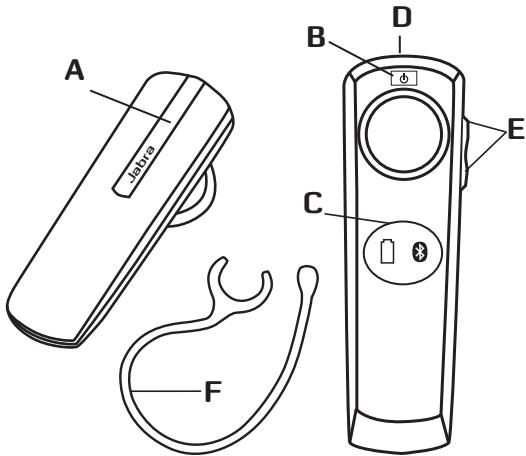
MOXJIINBOCTI FAPHITYPN
TapHItypa Jabra BT2080 nIgTpMmye taki yHKii:
BIDIOBHa BKNIKN;
- 3aBepWeHHBVKlnkIB;
BIDO6paXeHHaCTaHyakymyITopa;
BIDO6paXeHHcTAnHy 3'EnHaHnBluTooth;
-BiIXINHeHHBnKlnKiB*;
- roIocBn Habip*
- NOBTOPHN Ha6ip OCTaHHbOro HOMepa*;
BUMKHeHH3ByKy;
- nepebeedeHHBAKNIKIB;
-peryIIOBaHnryuHocTi.
Texhi xapaKTepeNtKN
Tpmbaictbpo60nBpekmi po3MObN 6 roH.
- Tpnbaniictb po60Tu y pekmi oukyBaHH8 dHIB.
Cneuikaciaj Bluetooth Bepci 2.1 i3 niTprmkoEO EDR ta eSCO.
- Bara 8 rpaMiB.
Paiciyc ii do 10 metpiB (npn6n3no 33 yTuN).
-Пдтpresуваи npooffini Bluetooth: HFP, HSP.
- B6yobabn ankyumnyTop i3 mojlnbictio 3apdjaHnB bID po3eTKa DOONOMOIO 3apdHoro pncIptoI.
-МожлбICTьбд-якоI мипіаpeвіріntСтанakумілітopaТ
3'EDннгзЗа дОнOMOIOДиСПЕЗСТУJБА StatusDisplay™.
ПОЧАТOK POБТИ
Ipeed BnKOpNCTaHHaR rapHItypu BnKoHaTe Tpr HnXeHaBeDeHi dII.
1 3apjdtb rapHitpy.
2 Ybimkhntb yHKuio Bluetooth y Mobihomy Telefohi (nB. noci6Hm 3 ekcnnyataaui Mobihoro Tenefohy).
3 3'εηhaɪte rapihɪtypy 3 Mo6ɪnbHm TeneΦoHOM.
Garhitypaba Jabra BT2080 dyKne npocTa y BmKOpriCTaHnHi. KhONka BiNDOBiIa3BepuHHe BnKInky BnKOHye KInbKa fYHKui, 3aJexHoB BID TprBaNOcTI ii HATMCKAHHa.
| Дя | ТравалICTь натуckenhamн |
| Швдke натуckenhamн | КорOTke натуckenhamн |
| Натиckeань | Приблизно 1 секунда |
| Натиckeань утеймваань | Приблизно 5 секунд |
3APJIXAHHHIAPHITYPI
Ipeed noaTkom BkOpNCtAHN NOBHCtO 3apdItb raphiTyp npotrAOM DBOX RoDIN. Jnra 3apRzHAnh BkOpCtOByIte po3eKy eNEkTOxHJBENH3MHNHO CTPMy. KOni iNDnKATopakymlaTopa 63nepepbHO CbitntbCayepBOHM, raphiTypa 3apRZKaTeCB. KOni raphiTyPO NBcHtO 3apRzHeO, IHNDnKATopakymlaTopa CTAe 3eJeHIM i uepe3 n'YbXBNH BmNkaEtCBs.
BnKOpNCTOByTe TIlbKn ToT 3aqrDnH npCtpi, kAkn NoctaAeTbCBA B komJIaIi. He BnKOpNCTOByTe 3aqrDnH npCtpoB iD inIwInx npJnlaDb, OcklBkn BOH NMOKYTB NpOoiKDnITr napHtypy.
3BepHbTb YBary: TepMih Cnyxh6n kAkyMlTaPora 3aHuHO KcOPOyETbC8, Akuo nprictpr He zapArkata n ppoTfOM TrpBaIorO aacy. Tomy PEKOMEHyETCbNpe3eAp4XraTn rAPHtpy PnIHmHI p3a Na MICAJIb.
YBIMKHEHHA TABIMKHEHHIAPHITYPN
UO6 yBIMKHTyrapHITpy, yTPMMyTE HATNCHYTOO KHONKY yBIMKHEHHB/UMKHEHHN PNOJROM 2 cekHyD,doKN he 6bIMNHytb 06bDha IHINKAATOPI Ha DNJIeTIe CTAH JByra StatusDisplayTM.
3'EDHAHHIAPHITYPIN3 TELEDOHOM
TapHitypiaPiE'ENyETbC8do TENEFOHOy3aDOnOMOHO npOeDuyn, Jka H3nBaEtcBc4 3'EtDaHHa. BvKoHabWk KInbKa npOCTnx Di, TENEFOH MoKHs3 E'EDHATN3 rAPHTYPOO3 aKJbKaXbINH.
1 Ipebeiditb raphityp B pexm 3'ednHaHHa
YMOBNI BUKOPNCTAHNHA3APJHOI PIPNCPTPOIO
3apdkaTepaTpytbnk3aDOnomorioaadantepa 3mHOro ctpmy, knn doJaTeBcB a KOMnIeKti. BnkOpriCTanHa dAnTePb iHIOrTO TnPy MoKe noKoJOnTu a60 3aMaTu npaHITpy, e He6e3neuHIM Ta moKe npaNtBeScBdo anHyJIobAHx CxBaJIeHH A60 rapaHTII. 1O6 Di3natcnpoDcTyNI xBaJIeHI 3ac6u, 1O pO3wnpIOUToTexHiNl MoKInBOcTi, 3BepHITbcDo npOpaDbua.
Baxnbo. TapHitypHe moXHa BnKOpNCTOByBaTn BiD qac 3apJxKaHH.
PonepeJxHnIoo3apAnHoro npncptpo
-Пд ус вд'eндань кабюхиньнь aбо iихи xacobib,цо рзшироть TextiHICI MOKINBOCTI, ciiD TIRHYTN, trmaOuCb b3ат ekep,a He 3a kabob. HikoiNe HbIKOpncTOByTe noshokdken 3apdHn npicpti.
HeHAMaraIteca camoctiHNO p03i6paTm 3ap4nHn pnictpi, OCKilbKn Ie MoKe np3BcTeN Do cepo3HOrO ypaXehn eEkeTpnuHm CTpyMOM. HnpabInbHe NObTOpe 3bpuHn pncIcPOIO MOKe np3BcTeN Do ypaXehn eEkeTpnuHm CTpyMOM a6o noJexi nD ac HactynHO BVKOpNCaTHn pnCTpOio.
- He zaprakjte terpHtny B cepeDOnuIaX 3 HndZbUauH BO BnCOKIO a60 Hn3bKOIO Tne pntypo, a TAKOKe H bVOKOpCTOByTe 3apeAHI nprictprn ha Bynuu c6o y BMovz BnCOKIO BONORCT.
TAPAHTIA
06mexeHa rapaHTria Ha oDIn (1) pik
Komnaiy GN Netcom A/S (Hadani «Komnaiy») rapaHTye, 0o BcOmy npicrpoi BiCyTuH 6bIy-kiΦi3mHiu mTexHoIorHi DeΦeKTH (Jk npz ce Ka3Ano BymOBax HnXue) npotarom Ondoro (1) poky 3 datn npid6aHny («Pepioj rapaHTii) Y nepioj rapaHTii Komnaiy 3ozob'3ayetbcB iDpemOnTyBaTn a60 zAMHnT (3a
Bnachn paxhok) cei PpOykt a60 6yIb-ky 6paKoBaHcy Detanb («FapantIInHe o6CnyoBvAHnR»).KaIIO pEMoHT a60 3aMHa HeBvriDi3 eKOHMOHIOTUOKI 3Opy a60 TprBaTHmUTb HnT0 DOBro, Kompania Moke bIduKoDyBatn Bam rpoSi, cPnaCheni 3a HecnpArBNH PpOykt. PEmoHT a60 3aMHa 3rIHO 3 yMoBAmu iEi FapantII He npz3BeDe no pOdoBxehnHa a6o NoatkY HOBOr PeipoyraPantII.
Bumorn3riidno3 rapantieo
L06 otprmatn npabaHO raapantHne 06cnyrobyaHHN, 38'jKtBc4
3 dIJIpOM KomNAHII, y kAKO BV pniD6aJIu cIe npOdyKT, a6O
3abITae HA cAIW.jabra.com, 6o otprmatn noJadb.com
BIDOMOCTI 0oIO nIITPMKKn KIIEHTB. Bn NOBHNI NOBepHyTN
a6O doPABATIN CEI PPOyDK TINEPY a6O Komnai (AknIO npO
ce cKa3Ano HA cAIWI www.jabra.com) B oRiHaJIbHI ynaKoBI
a6O bYnakOBU, IIO hADAE pIBHocnblHN pIBeHB 3axCTY.
Bn cNaayete BHTpatn Ha doCTABky PPOyDKy DO Komnai.
kXIO yMOBN rapaHTI NOniPrIOyTBc H PPOyDK, KomnaiH
camoTlHO OOnAtnB BAPrTb 3BOPOTHO JOCTABKN PPOyDKT
nicra 3abepeHennRApaHTIHoro 06cNYrobyaHHN. 3 Bac 6ye
ytPMAHO BAPrTb 3BOPOTHO JOCTABKN PPOyDKTIB, ha Aki He
pO3NOBcDOxMyOTBCs yMOBN UeIg PAHTI, a6O Aki He Notpe6yOtB
raPANTIHORO pEMOHTY.
Дя отpresmaуну rapaHTiHOrO o6cnyrobyaHnry Heo6xioHnHa naTAt ty iHOFMaui: (a) npOyKT, (6) dOKa3 NOrO npu6BaHHB, B kOMy cyTKo BkAzoHa hOny TaApDyau, DaTy npUdBaHHa T aTN npOyKty, kJI e DoCTaTHmIaNpOka3Mn TORO, uO h PnOdyKT noWupIOeTBc npEIO npaHTIi. TaKox BKaJXtB (b) BauY 3BOpOTHy apCey, (r) pOoCHy TEnefoh Ta (Д) npuNHy NOBepHeHHa. Kompania 忍 NG Netcom] nparre 3meMuHNTu 3abpdynHennHO dBokInla, TOM By MaTeY cYbIDOMNUBoHAtu, uO npOyKT MKeMe MTChTI npOyKTn nepepo6Kn, kIcMiTaB bNkOpNCtAHi nepepo6LeHi KOMnoHEHTN. BkOpNCtAHi KOMnoHENTu BiNObiAdTOB BVcOKM tAndaptam YkoCTi KOMpanai, a ToKox TeXhiHmU xapakTepncSTknAm pO6Ot Tu haHiiHoCTi npOyKty. Bnu cYbIDOMIOte, uO 3aMHeHi Detani ta KOMnoHEHTs CTaNytB bNaChiCTIO KOMpanHii.
06mexeHHy mOB TapaHTi
LγIrapaHTi nooiproctbca lihe na nepBHHNHO nokynpia, ii bye abTOMATNUHO cKACOBAHO do 3aKiHHeHH BkA3AHO rEPMIHYB pazi npdoaxy ni nepeadaiPiOpykTy tptei CTOPOH.IapaHTi, hadaHa KOMpanaIE C bOmyDOKyMeHTI, nooiproctbla line ha ToBAPn, iki yIIO npidbaHO Ira BlaCHOr BO BnKOpNCtAHNa, a He
Длп порнода. Вona He пошюетс на Товари, як 6ул пгдбану в Бдкртгу унakobши, як подаовся на Умвах «К €» 6e3 Наданн rapацтii. Гаротя тakож He пошюетс на Тaki Нededогвotingи зношьаги пid сас робота Тынокор_STANH КOMTOHETN, як Мембани мikpofohib, Мemбани habuyshnikib, ModyNJbHI Wttenceni, 흱онechунки habuyushnikib, emenentn deKOpy, akymylantopu tin I ta hiж accecyanр. Гаротя Вьжабсг Реди choю, ЯкSOZABOcBkI sepiHniH Homep, рялк 3 КODm Datru Ch штук-КОД PMoDуКТу 6БУ 3MiHEnOч 3НЯТо 3 ПоюуТу.
IapaHTia He nooHIOeTbca Ha deEeKTN Ta nooKoJXeHHa B pe3yBtata: (a) HennpaBnIbHO 36epirAHnn, BnOKOpCTaHn CH nOraHOrO NObOxKeHHa, HeuaChorO BnuAkyu CH neYBaXHoCTi, TAK iKΦiunHi NooKoJXeHHa (TpiUHN, NODpRAnHm ToTO) HA NoBepxHi IpoDyKTy, kAi BnHKnL bHaCNIIDOK HennpaBnIbHOro Noro BnOKOpCTaHHa; (6) KOtACTy 3 BOIOU, HAdMpHOIO BOLOrICTo, IIcKOM, 6yDb-IAKN M6pyOM a60 HAdMIPHOIO TEMpeATpyPOO; (8) BnOKOpCTaHHa IpoDyKTy a60 akCEcyApiv y KomepuIINHX cInjAx a60 HenpBnIbHOro BNOKOpCTaHHa IpoDyKTy uKcEcxApiv; (r) iUnx dIi, kAi He BnHKnL 3 BnHn KomNaHii. IapaHTia He nooHIOeTbca Ha nooKoJXeHHa, kAi BnHKnL BnACNIIDOK HennpaBnIbHX ECKNpyAtauqii, TexHIVORO oCbNyROByBaHHa Y C bCTahOBLeHHa a60 cPOnBu 3diJcEHHHa pMOHTO OcOabAm, kAi He npdctBaJIyIOb KOMpanHIIO a60 dIePa KOMpanJIi, kAki Mae Do3BIn Ha 3diJcEHHHa rapaHTiIHorO oCbNyROByBaHHa. Bydb-IA KcPOnBu 3diJcCHNTu HecaHKUioHOBaHHa pEmOH NT pinnHryOTb DIO ciEi IpaHTiII. IapHTia He nooHIOeTbca Ha deEeKTeN a60 NooKoJXeHHa, kAi BnHKnL BnACNIIDOK BnOKOpCTaHHa BnpoIB, AkeceCyapib Ta iHwOro nepHnePeHHo OBnadHaHHa, 10 He 6Iyo BnROTOBNeHO a60 ceTpNfIKOBAHO KomNaHieIO.
PEMOHT ABO 3AMIHA, RAKI 3DIJNCHIOIOTbC3IINHO IIGI TAPAHITI, € EINIHIM IOCTVTHNM KJIENHTY 3ACOBOM. 3A YMOBNI BIVIADKOBOTO ABO HABMNCHOTOIPOIKOJXEHNN, KOMIATAHIR HE BECE BIINOIBIAJBHOCTI 3A IOPYUHEHHTEPMIHOBIX YI MOJKIINBIX TAPAHTII HA CEINPOJNYKT. Y BIVAIKAX, HE 3A6OPOHEHNIX 3AKOOHDBCTBOM, LJR TAPAHTIR EKKCKJIIO3NBIOHO TA 3AMILUYE BUJb-KRBI N3HAEHI YI MOJKIINBIPAAHTIH, B TOMY IICNJI TAPAHITII HA PNPIDAHTICb DO IPODAXTU MOJKINBOCTI PPAKTNUHOTO BIKOPICTAHN.
3AYBAKEXHH! Lr rapaHTiHaAe Bam neBHiOpuDnHi npaba. Li npaba MoKytb Bldpi3HATncs 3anekHo BId BaWOrO MiCua npKoBXBaHH. DeKa3aKOH He Bu3HaOTb BNUKIOUeH OmMeXeHb 3a yMOB BnuADKOBo a6o HauMBCHO rOuMoKHO nOuKOJxHeH NtMxAcBOI rapaHTi, ToK HabeDeHI BNuE BNUKIOUeHHo MoxyTb He cTOCyBaTHcBac. Lr rapaHTi He o6MeXye BAuNX OpuDNuHnx (CTatYTHNX) npab, HauAHNX Bam HauJOHaBnH a6o MiCueBnM 3aKOHODaBCTBM.
CEPTIVIDAKALIJA
CE
LcI npOdyKT nO3haeHc 3HaKOM CE 3rIiHO 3 yMOBaMn DInpeKTbN B R & TTE (99/5/EC). KomAnia H« GN Netcom A/S» 3aBnAe, IIO cIeI npOdyKT BiIObIaE BCIM Heo6xIDHM BmOMRa t iHsIM BiIOBIDHM yMOBaM DInpeKTbN 1997/5/EC. IIO6 OTpImaTn DoaTkOBi BiOmoCTi, 3aBitaTe ha caTt http://www.jabra.com.
Bluetooth
Пава на Наду влгове Компаи «Bluetooth SIG«.Бдь-як eн ВКорисань Здшсютсь KMonaию «GNNetcomA/S»здно 3ліценio.ИшtenTOproBIMKNTaНЗвиналжат bHINM bIINOJIbIMHIM BlaCHNKaM.
Ytni3yutee neBnip6BilnoiDHOoMICueBnx cTaNaptiB i npabn. www.jabra.com/weee.
CJIOBHNIK
-
Bluetooth —— ce paiaotexhonorior, 3a donomoroo koi3diChiOeTcBn iNdkUohEnoDHNpNCTpoIB Do IHsInH, HnpiKnad M6biNbHnTeNoOHb Do rapHtipy, 6e3 BkOpriCTAHnH shyprib a60 Ka6enib Ha neHeBnii BldCTahi (np6bni3HO 10 mptB a60 33 fyn). Texhonorior BluTooth 6e3neuHO y BkOpriCTAHnH. BOHa tanok E nadiHoB POBoTI, TOMY niCnI BCTahOBJIHH 3'edHnna JKOHa iHwa oO6a He 3MoKe i NclyXobyBatn Bac i he 6bye KOnHnx nepEkwKb Bd iIHx npNCTpoIB Bluetooth. Dokladni Hi BiDOMocTi Ha caaiTi www.bluetooth.com.
-
Ipophiini Bluetooth —е рi3hi сиоби оьміну даими між npicstpoamn Bluetooth. Tepeohn Bluetooth niDrpmyoTb npoiib «GarHitypa», «Bilbni pyKn» abo obuBa zi npophiini. Дд збe3neuehnni nDtpmkn neBHorO npoФiIO Bvro6nK INeTeФOny NOINHEN nepe6aunTN neBHI oOB'3KObI yHKciBВnporpaHOMy 3a6e3neuehHi telofohy.
- 3'εdhaHnHa 3a6e3neUy eYiKaIbHn 3aUnIφoBaHn 3B'3OK MIX dBOMA pIcTpOAMn BluTooth i D0B0Je IM O6MInHOBATmC DAHNMI KIOc6OIO. PInCTpoI BleTuoth He npauoBaTuMByT, JAKIO x He 6bNo 3'εdHaO oDIN 3 ODNIM.
- Naponb a6o PIN-koI — ue KoI, JIKN BBOINtcb Ra npICTpoi Bluetooth (hapriKnaIa, Ha moBilbHomy TepefoHI) nIq cac 3'edHaHH 3 rapHITpyIOJABA TB2080.IIoro donomorio npnctprT ra hcapHITyBAJA TB2080 po3ni3HAOT obne dHorO Ta ABTomATNUHO noOHnAHTb npauObaTN b napi.
- PekkIM OuyiBAAHH —— peKIM naCUBHORO OUYIYBAHNN BIKNIKY RAPHITyPOJ Jabra BT2080. PicNIA 3aBepuHennHa BVKNIKY Ha MO6ilbHOMy TenefoHri RAPHTpynepeXODnBy y PekkIM OUYIYBAHNN.
INHOUD
BEDANKT 2
INFORMATIE OVER JABRA BT2080 2
DE MOGELIJKHEDEN VAN UW HEADSET 3
AAN DE SLAG 3
DE HEADSET OPLADEN 4
UW HEADSET IN- EN UITSCHAKELEN 4
DE HEADSET KOPPELEN MET DE TELEFOON. 4
VERBINDING MAKEN MET UW TELEFOON 5
UW EIGEN DRAAGSTIJL 6
HOE MOETIK. 6
INFORMATIE OVER DE STATUSDISPLAYTM 7
PROBLEM OPLOSSEN EN VEELGESTELDE VRAGEN 8
MEER HULP NODIG? 9
UW HEADSET VERZORGEN 10
WAARSCHUWING! 10
VEILIGHEIDSINFORMATIE 11
VERZORGING VAN DE INGEBOUWDE BATTERIJ: 12
VERZORGING VAN DE LADER: 13
GARANTIE 14
VERKLARING EN VEILIGHEIDSGOEDKEURINGEN. 16
WOORDENLIJST. 17
BEDANKT
SA HAR GOR DU FÖR ATT
Besvara ett samtal
CÓMOFUÑCIONAELSTATUSDISPLAYTM
JAK PRACUJE INDIKÁTOR STAVU™
INGRIJREA BATERIEI INCORPORATE:
$$ \therefore \angle C E O = 1 8 0 ^ {\circ} $$
.110sO 12y11 yAol31 wJlAclaw gaggall slgj/2J j (a)
allso
a.b.c. all cos1gjxgljy1sjj jll
allso
aaii aaii aai i aaiia aie eai 1111111111111111 1 1 1 1 1 1 1 1 1 1 1 1 1 1 1 1 1 1 1 1 1 1 1 1 1 1 1 1 1 1 1 1 1
all
Llalc! Lc lalcc) jgsd lclg aillsc plj yagai Ioc
yaj 13. Jauuui Jauu Jauu Jauu Jauu Jauu Jauu Jauu Jauu Jauu Jauu Jauu Jauu Jauu Jauu Jauu Jauu Jauu Jauu Jauu Jauu Jauu Jauu Jauu Jauu Jauu Jauu Jauu Jauu Jauu Jauu Jauu Jauu Jauu Jauu
aIglll 10 aIeLLIg
jglalllllal
aLj 10000000000000000000000000000000000000000000000000000000000000000
JLJIJIJIJIJIJIJIJIJIJIJIJIJIJIJIJIJIJIJIJIJIJIJIJIJIJIJIJIJIJIJIJIJIJIJIJIJIJIJIJIJIJIJIJIJIJIJIJIJIJIJIJIJIJIJIJIJIJIJIJIJIJIJIJIJIJIJIJIJIJIJIJIJIJIJIJIJIJIJIJIJIJIJIJIJIJIJIJIJIJIJIJIJIJIJIJIJIJIJIJIJ
Lalg: alao wJl acaw gSi Looic Lgjo LwI gJ1/2JjJll
*olgiinogigaiI
gall ggiin baii gail giiin jia gj jll
agallis
uagai gai jia jia jia jia jia jia jia jia jia jia jia jia jia jia jia jia jia jia jia jia jia jia jia jia jia jia jia jia jia jia jia jia jia jia jia jia jia jia jia jia jia jia
1sll sssssssssssss
a1111 1
g aocdo 2 gai yaiyaiyaiyaiyaiyaiyaiyaiyaiyaiyaiyaiyaiyaiyaiyaiyaiyaiyaiyaiyaiyaiyaiyaiyaiyaiyaiyaiyaiyaiyaiyaiyaiyaiyaiyaiyaiyaiyaiyaiyaiyai
JusolaljLgssdcljolstjLgsljdoa
502cLwU 10000Jl JcL3 Jd
www.jabra.com
()
1
support.es@jabra.com
support.no@jabra.com
support.de@jabra.com
support.uk@jabra.com
support.it@jabra.com
support.pl@jabra.com
support.ru@jabra.com
support.fr@jabra.com
support.nl@jabra.com
info@jabra.com:Log1
:21g1
9A20V9… LiW
aFVVFvF…A… JL
aFVv.v
-5.49 1
| 1r7v01..A.. | Ljll |
| -r7v..A.. | a..a..lll.Slll |
| 11r7v..A.. | c..g..j..ll |
| a..r7v..V..A.. | Lw..o..ll |
| v..r7v..A.. | Ljllb.. |
| a..r7v..V..A.. | Lc..j.. |
| oo..A..A..1 | I..j..j.. |
| a..vi..2.90v.. | L..w..g |
| a..r7v..V..A.. | I..w..g..w |
| q..r7o..A.. | L..u..j.. |
| a..r7v..V..A.. | I..u..i.. |
| a..r7v..V..A.. | c..g..a..w..Sj |
| r..r..r..9..A.. | I..u..j..o.. |
| a..r7v..V..A.. | y..l..c |
wJJI aclaw ayLioJI
Lgic ailll Jaa Jabra BT2080 wJll actow jiaa Jla 1le . aol aayla Lg:La
117/42g 20 60 10 Lc) aaylll alj 30 20 20 20 20 20 20 20 20 20 20 20 20 20 20 20 20 20 20 20 20 20 20 20 20 20 20 20 20 20 20 20 20 20 2
1
g aall paoaag aagaae aee aaiy g aabll cagall agaannn 10000000000000000000000000000000000000000000000000000000000000000000000000
aaii aaii iaii iaii iaii iaii iaii iaii
i 1
jg jz jz jz jz jz jz jz jz jz jz jz jz jz jz jz jz jz jz jz jz jz jz jz jz jz jz jz jz jz jz jz jz jz jz jz jz
Lgeo JoleiJI s yj 1 jy
Jzill alg cag aonoo gae. aIbll Jilaiw gl ciell jglx
JaaJIyag JaaIg 1 g 1 y
A
jgl 111 1000000000000000000000000000000000
Lgio valisi 8. 501 Lguyi o3cLgai aLgii gllg iia guiu
A. l_1 = l_2 = = l_n - 1
Jlalb2g Jgliooc Jlaio jaii
LJI LJI
Jw 20. gjll 22. jll jggo gss s w s Jw Jl Jclaw Jg38
gI gI gI gI gI gI gI gI gI gI gI gI gI gI gI gI gI gI gI gI gI gI gI gI gI gI gI gI gI
olaiell oxclll ojg21 1a, e1. gbs jLl JsS. jLo sJlaic
131 15
jll jll aclaw plsc 8:plb
1
10a 10g-llwJWJWJWJWJWJWJWJWJWJWJWJWJWJWJWJW
LJIOLISIJI LALBOJLOJUJA JSSJG.
jolil gaoiill oybiy aayss 5 aoaii ci jie Jg38
1a>2jg31p1nuiuic 4g>g a2g5 auaa gaa
i 1
aLg aLg Lg Lg Lg Lg
Jaa
(1) _lg_Lc_L and _sg_sg
Lgagclal goggagglg (GN Netcom A/S (GN
jz)slulLi no (1) 1gpld al (olilglcagall
ii1i (GN a5j jlll)
cLxJyJLs1!("JLaal yjie gll aas" Jlaal yjie JIyAe jg
aagllg aolglalg gglgglgglgglgglg
aill 1 a 1 1 1 1 1 1 1 1 1 1 1 1 1 1 1 1 1 1
Jalai jia jia jia jia jia jia jia jia jia jia jia jia jia jia jia jia jia jia jia jia jia jia jia jia jia jia jia jia jia jia jia jia jia jia jia jia jia jia jia jia jia jia jia jia jia jia jia jia jia jia j
.000000000000000000000000000000
Joo
gill iia aio jil gll GN ggc Jlaai jy jaoa Jld ai sgl Jgs
J.50eJI JcJgLgell Joo Jgl Jgww.Jabra.com oJyj
JJJ JJJJJI JGL g) GN JgJgJdJdJLWgJgJgJgJgJgJgJgJgJgJgJgJgJgJgJgJgJgJgJgJgJgJgJgJgJgJgJgJg
jogc ggl LooI ogjll Lo! juul jub (www.jabra.com gogo Lc
ciil 151g.GN jll iJL; Joai gaw.glaol no aagluao
JgIg21 10000000000000000000000000000000000000
111 111 111 111 111 111 111 111 111 111 111 111
Jalll Jls Cw! Jl c1s 2 g! Jalaill algoa ooc aill oic ciS
iio (g) g. iill (1): jolal Jnl doa 1gl Jg aal al logell
jIcJusL cillg jg jll gag aale Lao, slil
(2) 12 × 12 × 12 × 12 × 12 × 12 × 12 × 12 × 12 × 12 × 12 × 12 × 12 × 12 × 12 × 75
aJbJbJdJdJcLc clllloLcI Igill lag Jgill
gic giaa oaoaic no ciiil ng ci Li aaii iaiia Jaii G
jaioliligSllioaIg.SalizlaoLgioJzll.dosso
JcLac21 aagg GGN Lalolgo gagg GGN J
GN aS jIISLo aaiw aiwiwlilgS11 gJj21 oJ jai J Ls .a
Jaaal Jaaal Jaaii aai jaaai gaaaag aai aai Jaaai Jaaai Jaaai Jaaai Jaaai Jaaai Jaaai Jaaai
aill Jaiy y. baiy plaaall alil aill GNI 10
e liy gaiy aaiy aay yag lojaiy ay gail aaiy Ige yaiy gaiy ai
aii iaiy aaiy aliy alay alig ci kai yaiy aaiy gaiy gaiy
Jaiy gaiy alg jaiy aluaygg yajy kai jia yaiy aaiy aaiy
liy ax ayaiy aliy aluyg ayay aluyg ai yaiy aluyg ayaiy
gaiy gaiy gaiy ai yaiy agay gaiy aluyg ayaiy
glllgl glllgl glllgl glllgl glllgl glllgl glllgl glllgl glllgl glllgl glllgl glllgl glllgl glllgl glllgl glllgl glllgl glllgl glllgl glllgl glllgl glllgl glllgl glllgl glllgl glllgl
Lo g aaiygl gl aalllggl glaill gaii (w) palaasllgwl
yagai gdl yalee alao gail plaaai (c) ayaiil gdl daiu
ayaiyai gdl (z) gaiyai yae ggl gaiyai plaaai yaiia gn gl aiiaa gl gaii yaiyai yaiia yaiia yaiia yaiia yaiia yaiia yaiia yaiia yaiia yaiia yaiia yaiia yaiia yaiia yaiia yaiia yaiia yaiia yaiia yaiia yaiia yaiia yaiia yaiia yaiia yaiia yaiia yaiia yaiia yaiia yaiia yaiia yaiia yaiia
Lg yzao zc zc zc zc zc zc zc zc zc zc zc zc zc zc zc zc zc zc zc zc zc zc zc zc zc zc zc zc zc zc zc zc zc zc
GN Jn aasyll gN aic Lac Jgill aacuill yaglgl lalllg
pall ayall jayall gnyaull llae yagall Jyall ggl
aj all aek aek gl agl aegl jayl agl agel gnn GJaoi 8. llagll all
jgall ayell agk algl slal tllt wgl aale algl ae
L1 aaiiagaiyaiyaiyaiyaiyaiyaiyaiyaiyaiyaiyaiyaiyaiyaiyaiyaiyaiyaiyaiyaiyaiyaiyaiyaiyaiyaiyaiyaiyaiyaiyaiyaiyaiyaiyaiyaiyaiyaiyaiyaiyaiyaiyaiyaiyaiyaiyaiyaiyaiyai
aaii gaa aai yag aiaagiglaag jaoal lio clnlc i aiao 1 g aaiyall yaaai g tllwul g baill waa 2.5g all aiaia 0 2 .dac aaiuall cialttaa 8 a aag aaiaal ciuaal g aaii 1 g aaiogll qaiagall agg aaiagilall aagga ae alal
a
CE
aJyJrR & TTE (99/5/EC aJyJG pLgT LgO eJc JuaJgll IaJ 1uJUJI cIbI Ie gJgIO gJgIO gJgIO gJgIO gJgIO gJgIO gJgIO gJgIO gJgIO gJgIO gJgIO gJgIO gJgIO gJgIO gJgIO gJgIO gJgIO gJgIO gJgIO gJgIO gJgIO gJgIO gJgIO gJgIO gJgIO gJgNO GNetcom A/S 1sI JcI JcI JcI JcI JcI JcI JcI JcI JcI JcI JcI JcI JcI JcI JcI JcI JcI JcI JcI JcI JcI JcI JcI JcI JcI JcI JcI JcI JcI JcI JcI JcI JcI JcII
http://www.jabra.com
Bluetooth
Bluethooth SIG, Inc aS. 45g LgjLg jBtiooth aAeJl g JzIaLcAaj GGNetcom A/S Joo oLoLL p
111111111111111111111
a11111111111111111
www.jabra.com/wee
Clllalall
1
Laa Laa aalaaa aalaaa aalaaa aalaaa aalaaa aalaaa aalaaa aalaaa aalaaa aalaaa aalaaa aalaaa aalaaa aalaaa aalaaa aalaaa aalaaa aalaaa aalaaa aalaaa aalaaa aalaaa aalaaa aalaaa aalaaa aalaa aalaa aalaa aalaa aalaa aalaa aalaa aalaa aalaa aalaa aalaa aalaa aalaa aalaa aalaa aalaa aalaa aalaa aalaa aalaa aalaa aalaa aalaa aalaa aalaa aalaa aalaa
p 1 1 1 1 1 1 1 1 1 1 1 1 1 1 1 1 1 1 1 1 1
jgl Jg 1g jgl aai aai g jg
. www.bluetooth.com 8g11 aLjC Lc Log11
g2Lgiglgjg1gJgJgJgJgJgJgJgJgJgJgJgJgJgJgJgJgJgJgJgJgJgJgJgJgJgJgJgJgJgJgJgJgJgJgJgJgJgJgJg
gag gag gag gag gag gag gag gag gag gag gag gag gag gag gag gag gag gag gag gag gag gag gag gag gag gag gag gag gag gag gag gag gag gag gag gag gag gag gag gag gag gag gag gag gag gag gag gag gag gag gag
J 1 J 1 J 1 J 1 J 1 J 1 J 1 J 1 J 1 J 1
J (OK) " (Yes)
jL (PIN) jLgC L 1 J L 1
Lac Jly Laawg. oLaIwJg hio jy (jau Li) ... jI JU
gj gjj jll jil jg 1s
jLj StatusDisplayTM
| CONNECTIVITY |
| MobiSurf |
| BLUETOOTH |
| Infrared port |
| Wap options |
| Synchronization Networks |
| SELECT |
| ID: |
| DEVICES FOUND |
| O Jabra BT2080 |
| SELECT |
| Jabra BT2080 |
| Passkey:*** |
| OK |
| HANSDFREE |
| O Jabra BT2080 added. The handsfree is now ready for use |
| SELECT |
"ss"
c"JlJy j 1j w d jg oLo Lw. dyj JyLd y cagog LjS
1
0 1 1 1 1 1 1 1 1 1 1 1 1 1 1 1 1 1 1 1 1 1
y j 100
aies jy1j gge yzg cie glaioi r 10
g+g4-ww20Juaio
jooaiw jg jy 1 g 0g 000000000000000000000000000000000000000000
juiu jie jie jie jie jie jie jie jie jie jie jie jie jie jie jie jie jie jie jie jie jie jie jie jie jie jie jie jie jie jie jie jie jie jie jie jie jie jie jie jie jie jie jie jie jie jie jie
Jua 1
joo0oLaiuJiao"Juaio"g4a5g cuaa.
Lg 1Jg 1g g
JLJUoJuaio Looaow 45 g. auiu uuiy Juyu/2
Lg 2000
a≤0a<1j1j2j3a≥a≥i
Jg j 12 g g g Jg Jg Jg Jg Jg Jg Jg Jg Jg Jg Jg Jg Jg Jg Jg Jg Jg Jg
a 10000000000000000000000000000000000000000000000000000
Jauo!jwJgS JgS
s 定义域为 Rt
wU
42.2g3.150.5g3.150.5g3.150.5g3.150.5g3.150.5g3.150.5
(a1j1j05 4j j05
wL 1
a 42) a 42
()j1j0s
wL2≤j≥
wJLjUJUcUaU2gOgUgUgUgUgUgUgUgUgUgUgUgUgUgUgUgUgUgUgUgUgUgUgUgUgUgUgUgUgUgUgUgUgUgUgUgUgUgUgUgUgUgUgUgUgUgUgUgUgUgUg
aio Lai ggy a lai wdo as yas
2,150,150,150,·s
ggljL

jL jL

Jabra StatusDisplayTM.
(duuLc LJGg)Jabra StatusDisplayTM jj
auiu uuaa aaa 1s
jglio 215g g g jglai
gjoo jg jg j
a a a a a a a a a a a a a a a a a a a a a a a a a a a a a a a a a a a a a a a a a a a a a a a a a a a a a a a a a a
a
1 1 1 1 1 1 1 1 1 1 1 1 1 1 1 1 1 1 1 1 1 1 1 1 1 1 1 1 1 1 1 1 1 1 1 1 1 1 1 1 1 1 1 1 1 1 1 1 1 1 1
pJ 10000000000000000000
2gjw(59j1Lgjw(y)Jlai cui 0
Jus Jus 1 jus s Jus Jus
aies giliijj1i iiaaae aeggo joo
aas g 1234567890123456789012345678901234567890123456789012345678901234567890123456789012345678901234567890123456789
1j j 5s a 400 a 200 a 1. 5a 3j 1j 152g j g 1000
J 1000
BT2080 45 5u 7u 11u 11u 11u 11u
Jabra BT2080 1
yLg 1.1 gLg 1.4 5g 1.8 g 1.2 g 1.6 g 1.9 g 2.0 g 2.3 g 2.5 g 2.7 g 2.9 g 3.0 g 3.2 g 3.4 g 3.6 g 3.8 g 4.0 g 4.2 g 4.4 g 4.6 g 4.8 g 5.0 g 5.2 g 5.4 g 5.6 g 5.8 g 6.0 g 6.2 g 6.4 g
L 1000000000000000000000000000000000000000000000000000000000
i 1000000000000000000000000000000000000000000000000000000000000000000000
jJjLj jLjLqal,
www.jabra.com :w
gla aololol g jlll lcll b1 jjgs
(2) x ,y
:J
support.es@jabra.com
support.no@jabra.com
support.de@jabra.com
support.uk@jabra.com
support.it@jabra.com
support.ru@jabra.com
support.fr@jabra.com
support.pl@jabra.com
support.nl@jabra.com
info@jabra.com:
:
a#r#r#r#r#
120 jzj 42 Lai gigg wu Jy. dji yL oB iWJ j pao oaii
14>Lo JLe jyLi wLw> agg 4s23 ggg JIq> g
21g Laiy gaiy aai 1
1
j 102 103 104 105 106 107 108 109 110 111 112 113 114 115 116 117 118 119 120
j1,2g a aaoa oai 2jg l g jiaiaai i aoai yj ydo efaiy j t cbiy jiai ay
. gaiagay kaiy ai yaiy jyaiy aoi yaiy oaiy ai yaiy
jayaiy jayaiy jayaiy oaiy ai yaiy jayaiy ayaiy as ayie Jao Jaiy jayaiy g aale aies
Lalayaiy Lg Lg Jiaay Laiio nlaie g pail adn aiaiaiaiaiaiaiaiaiaia
Jg 1
gla 1500000000000000000000000000000000000000000000000000000000000000000000000000000
S_ LHS = S_ SHS + S_ SHS
aJi jLj 5j 12000000000000000000000000000000000000000000000000000000000000000
a a a a a a a a a a a a a a a a a a a a a a a a a a a a a a a a a a a a a
gjL 10eJg jyj J 10aLai JIoo
Jg j Jj JJJ JJJ JJJ JJJ JJJ JJJ JLL
325gjLgaccl
1jg jLJ Looj gno 4o ooo Loo oo ooo JooLooo ooo
120 10g cwwj
gjiuui li aaiyoo yogjod yLio.0yw LpSla jlo oolieo
JWLi09)JyLjLwJgT0Li1o ySLoJgJyLj
g<2j>2j>2j>2j>2j>2j>2j>2j>2j>2j>2j>2j>2j>2j>2j>2j>2j>2j>2j>2j>2j>2j>2j>2j>2j>2j>2j>2j>2j>2j>2j>2j>2j>2j>
j0a2g 4y jL iS .iS iS Li g o w J Lw d J Ld JLs
32y5g0g2g2o.oLg1sLg0j jJzLjLzLgLo
J 1
aigjg jgi jg jg jg Jd 1000000000000000000000000000
1.5
aIgGwliol oai w gO aLcWJd oia WJd oia WJd -oia
1 1
g0gjglgj1gj1j. Lgagjbjgj1j 0e; g
J
g 0d j 1j g 0j j 0j 0j 0j 0j 0j
12g 120g 1201,0
aiejS bjjolg jglajdsswli gdoLWjolLaIwI LgijgjgL
LjIgJ.150sJgJ.150JgJ.150JgJ
JdJdJdJdJdJdJd
2.2.124 2.2.135 2.2.146
1212z( 3,5) = z( 3,5)
jACg jg 1aLw gJ aLw Lg 1s J
y 1234567890123456789012345678901234567890123456789012345678901234567890123456789012345678901234567890123456789
g 1jLj j00000000000000000000000000000000000000
Llalal. 1
2.2.1: wLg-0.1wlg
wJoaLaiW JLi JJJLipc
1
aLg0cuaa j1j1 aue gba 1s yae aLwge Lg yepaaas golie
aaii oieiow aoiu jjLw jjSg,aaaw cww g ai
g j 1 L a d g i 1 j j j j j j j j
g 00
g jg jg jj j j j j j j j j
1jg 1 j000000000000000000000000000000000000000000000000
Laii
JgA Jw (1) C
Lw g aiee Jg jg 1J Gg
() ≤slant _i = 1^n - 1_j = 1^n - 1_k = 1^n - 1_l = 1^n - 1_m = 1^n - 1_n = 1^n - 1_p = 1^n - 1_q = 1^n - 1_r = 1^n - 1_s = 1^n - 1_t = 1^n - 1
Jgaa (GN LLaL) jagai y aaj Gn. ciaa o gJb J.
jggljy
a a a a a a a a a a a a a a a a a a a a a a a a a a a a a a a a a a a a a a a a a a a a a a a a a a a a a a a a a a a a a
JLac JLa 100 g0g0g0g0g0g0
gag gag gag gag gag gag gag gag gag gag gag gag gag gag gag gag gag gag gag gag gag gag gag gag gag gag gag gag gag gag gag gag gag gag gag gag gag gag gag gag gag gag gag gag gag gag gag gag gag gag gag
g 5 g 5 g 5 g 5 g 5 g 5 g 5 g 5 g 5 g 5 g 5 g 5 g 5 g 5 g 5 g 5 g 5 g 5 g 5 g 5 g 5 g 5 g 5 g 5 g 5 g 5 g 5 g 5 g 5 g 5 g 5 g 5 g 5 g 5 g
Jz Jz Jz Jz Jz Jz Jz Jz Jz Jz Jz Jz Jz Jz Jz Jz Jz Jz Jz Jz Jz Jz Jz Jz Jz Jz Jz Jz Jz Jz Jz Jz Jz Jz Jz Jz Jz Jz Jz Jz Jz Jz Jz Jz Jz Jz Jz Jz Jz Jz Jz
LjJlJIu JIeJUJg
aai 100
www.jabra.com/wee

目录
| HANDSFREE |
| O Jabra BT2080 added. |
| The handsfree is now ready for use |
| SELECT |
永通印城有限公司
| HANDSFREE |
| ○Jabra BT2080 added. |
| The handsfree is now ready for use |
| SELECT |
Mod berpasangan manual
Jikaandinginengunakanalatdengaranda dengantelefon yang berbeza,atajika prosesberpasangandiganggu,anda bolehmenetapkanalatdengarkepada modberpasangansecara manual.
Jabra BT2080 ananannanenananaananaananaananaananaananaananaananaananaananaananaananaananaananaananaananaananaananaananaananaananaananaananaananaananaananaananaananaananaananaananaananaananaananaananaananaananaananaananaananaananaananaananaananaananaananaananaananaananaananaanara
#
n
- uunuunununu(ununun)
mnnn
- Bluetooth 5.0/5.1/5.2/5.3/5.4/5.5/5.6/5.7/5.8/5.9/5.10/5.11/5.12/5.13/5.14/5.15/5.16/5.17/5.18/5.19/5.20/5.21/5.22/5.23/5.24/5.25/5.26/5.27/5.28/5.29/5.30/5.31/5.32/5.33/5.34/5.35/5.36/5.37/5.38/5.39/5.40/5.41/5.42/5.43/5.44/5.45/5.46/5.47/5.48/5.49/5.50/5.51/5.52/5.53/5.54/5.55/5.56/5.57/5.58/5.59/5.60/5.61/5.62/5.63/5.64/5.65/5.66/5.67/5.68/5.69/5.70/
taaannnnnna
© 2009 GN Netcom A/S. All rights reserved. Jabra® is a registered trademark of GN Netcom A/S. All other trademarks included herein are the property of their respective owners. The Bluetooth® word mark and logos are owned by the Bluetooth SIG, Inc. and any use of such marks by GN Netcom A/S is under license. (Design and specifications subject to change without notice).
MADE IN CHINA
TYPE: OTE4


Bluetooth