
ASPIRE M3-580G - Laptop ACER - Free user manual and instructions
Find the device manual for free ASPIRE M3-580G ACER in PDF.



| Product Type | Laptop |
| Brand | ACER |
| Model | ASPIRE M3-580G |
| Screen | Multi-touch |
| Webcam | Yes, with built-in microphone |
| Keyboard | With special keys (Fn combinations) |
| Touchpad | Touch surface with left and right click |
| USB Ports | USB 2.0 (black) and USB 3.0 (blue), one with power-off charging |
| HDMI | Yes |
| Ethernet RJ-45 | 10/100/1000 Gigabit |
| Optical drive | CD/DVD |
| Card reader | 2-in-1 (SD/SDHC/MMC) |
| Audio | Headphone/microphone jack, stereo speakers |
| Power | AC adapter, rechargeable battery |
| Power management | Acer Green Instant On (sleep and deep sleep) |
| Security | Kensington lock slot |
| Operating temperature | 5°C to 35°C |
| Operating humidity | 20% to 80% non-condensing |
| Operating system | Windows |
| Accessories | Available online at store.acer.com |
| Product registration | At www.acer.com |
Frequently Asked Questions - ASPIRE M3-580G ACER
User questions about ASPIRE M3-580G ACER
0 question about this device. Answer the ones you know or ask your own.
Ask a new question about this device
Download the instructions for your Laptop in PDF format for free! Find your manual ASPIRE M3-580G - ACER and take your electronic device back in hand. On this page are published all the documents necessary for the use of your device. ASPIRE M3-580G by ACER.
USER MANUAL ASPIRE M3-580G ACER
Product registration
When using your product for the first time, it is recommended that you immediately register it. This will give you access to some useful benefits, such as:
- Faster service from our trained representatives. Membership in the Acer community: receive promotions and participate in customer surveys. The latest news from Acer.
Hurry and register, as other advantages await you!
How to register
To register your Acer product, please visit www.acer.com. Select your country, click PRODUCT REGISTRATION and follow the simple instructions.
You will also be asked to register your product during the setup process, or you can double-click the Registration icon on the desktop.
After we receive your product registration, you will be sent a confirmation email with important data that you should keep in a safe place.
Obtaining Acer accessories
We are happy to inform you that Acer's warranty extension program and Notebook accessories are available online. Come and visit our online shop and find what you need at store.acer.com.
The Acer store is being progressively rolled out, and, unfortunately may not be available in some regions. Please check back regularly to see when it will be available in your country.
© 08/2012. All Rights Reserved.
Aspire M3 Quick Guide
This revision: 08/2012
Model number:
Serial number:
Date of purchase:
Place of purchase:
First things first
We would like to thank you for making an Acer notebook your choice for meeting your mobile computing needs.
Your guides
To help you use your Acer notebook, we have designed a set of guides:
First off, the Setup Poster helps you get started with setting up your computer.
The Quick Guide introduces you to the basic features and functions of your new computer.
For more on how your computer can help you to be more productive, please refer to the Aspire M3 User's Manual. The Aspire M3 User's Manual contains useful information applying to your new computer. It covers basic topics such as using the keyboard and audio, etc.
This guide contains detailed information on such subjects as system utilities, data recovery, expansion options and troubleshooting. In addition it contains warranty information and the general regulations and safety notices for your notebook.
Follow these steps to access it:
1 Type "User" from Start. 2 Click/tap on Acer User's Manual.
Your Acer notebook tour
After setting up your computer as illustrated in the setup poster, let us show you around your new Acer notebook.
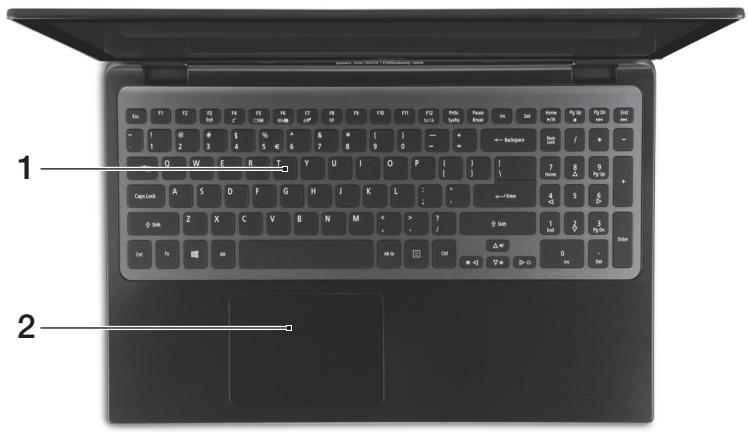
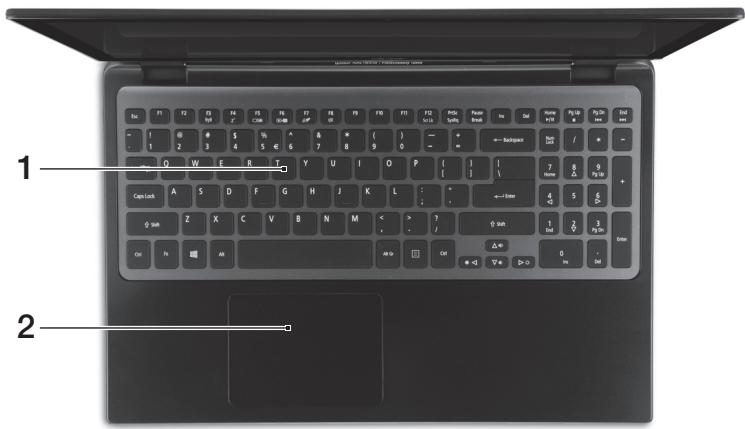
Keyboard view
| # | Icon | Item | Description |
| 1 | Keyboard | For entering data into your computer. Caution: Do not use a keyboard protector or similar cover as the keyboard includes ventilation intakes for cooling. | |
| 2 | Touchpad | Touch-sensitive pointing device. The touchpad and selection buttons form a single surface. Press down firmly on the touchpad surface to perform a left click. Press down firmly on the lower right corner to perform a right click. |
Hotkeys
The computer employs hotkeys or key combinations to access most of the computer's controls like screen brightness and volume output.
To activate hotkeys, press and hold the key before pressing the other key in the hotkey combination.
| Hotkey | Icon | Function | Description |
| +Fn> + <F3> | (▲▲) | Communication | Enables/disables the computer's communication devices. |
| <Fn> + <F4> | Z² | Sleep | Puts the computer in Sleep mode. |
| <Fn> + <F5> | □□ | Display toggle | Switches display output between the display screen, external monitor (if connected) and both. |
| <Fn> + <F6> | □□□ | Screen blank | Turns the display screen backlight off to save power. Press any key to return. |
| <Fn> + <F7> | ∅□ | Touchpad toggle | Turns the internal touchpad on and off. |
| <Fn> + <F8> | 鸣 | Speaker toggle | Turns the speakers on and off. |
| <Fn> + <F9> | Brightness up | Increases the screen brightness. | |
| <Fn> + <F10> | Brightness down | Decreases the screen brightness. | |
| <Fn> + <△> | Volume up | Increases the sound volume. | |
| <Fn> + <▼> | Volume down | Decreases the sound volume. | |
| <Fn> + <Home> | /| | | Play/Pause | Play or pause a selected media file. |
| <Fn> + <Pg Up> | ■ | Stop | Stop playing the selected media file. |
| <Fn> + <Pg Dn> | | | | | Previous | Return to the previous media file. |
| <Fn> + <End> | ▶▶ | | Next | Jump to the next media file. |
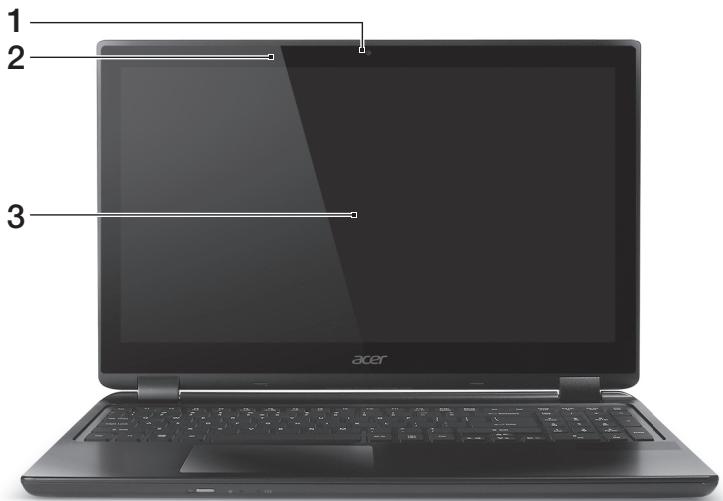
Screen view
| # | Icon | Item | Description |
| 1 | Webcam | Web camera for video communication. A light next to the webcam indicates that the webcam is active. | |
| 2 | Microphone | Internal microphone for sound recording. | |
| 3 | Touchscreen | Displays computer output, supports multi-touch input. |
Front view

| # | Icon | Item | Description |
| 1 | Power button | Turns the computer on and off. | |
| 2 | Power indicator | Indicates the computer's power status. | |
| Battery indicator | Indicates battery status. Charging: The light is amber when the battery is charging. Fully charged: The light is blue. |
Rear view

| # | Icon | Item | Description |
| 1 | Ventilation and cooling fan | Allows the computer to stay cool. Do not cover or obstruct the openings. | |
| 2 | Headset/speaker jack | Connects to audio devices (e.g., speakers, headphones) or a headset with microphone. | |
| 3 | USB ports | Connects to USB devices. If a port is black it is USB 2.0 compatible, if it is blue it is also USB 3.0 compatible (see below). | |
| 4 | USB port with power-off charging | ||
| 5 | HDMI | HDMI port | Supports high-definition digital video connections. |
| 6 | Ethernet (RJ-45) port | Connects to an Ethernet 10/100/1000-based network. | |
| 7 | DC-in jack | Connects to an AC adapter. |
Information on USB 3.0
- Compatible with USB 3.0 and earlier devices.
- For optimal performance, use USB 3.0-certified devices.
- Defined by the USB 3.0 specification (SuperSpeed USB).
Left view
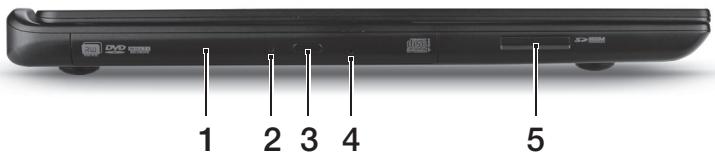
| # | Icon | Item | Description |
| 1 | Optical drive | Internal optical drive; accepts CDs or DVDs. | |
| 2 | Optical disk access indicator | Lights up when the optical drive is active. | |
| 3 | Optical drive eject button | Ejects the optical disk from the drive. | |
| 4 | Emergency eject hole | Ejects the optical drive tray when the computer is turned off. Carefully insert a straightened paper clip to eject the optical drive tray. | |
| 5 | IIIIMM MULTIMEDICHD SD | 2-in-1 card reader | Accepts one Secure Digital (SD or SDHC) card or MultiMediaCard (MMC). Note: To remove the card, simply pull it from the slot. |
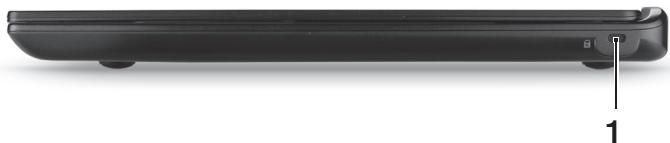
Right view
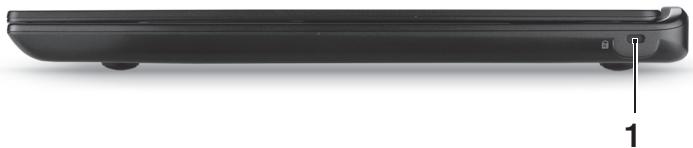
| # | Icon | Item | Description |
| 1 | K | Kensington lock slot | Connects to a Kensington-compatible computer security lock. Wrap the computer security lock cable around an immovable object such as a table or handle of a locked drawer. Insert the lock into the notch and turn the key to secure the lock.Keyless models are also available. |
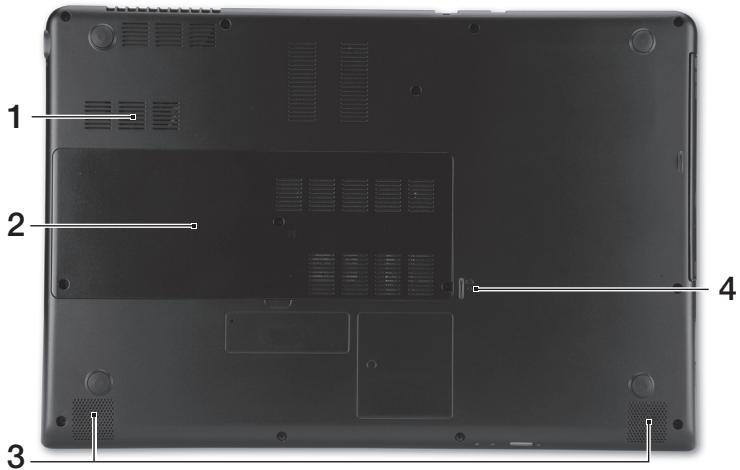
Base view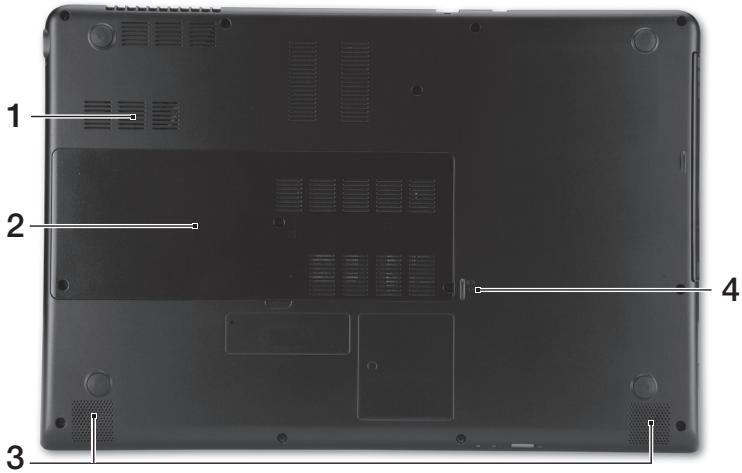
| # | Icon | Item | Description |
| 1 | Ventilation and cooling fan | Allows the computer to stay cool. Do not cover or obstruct the openings. | |
| 2 | Hard disk bay | Houses the computer's hard disk. | |
| Memory compartment | Houses the computer's main memory. | ||
| 3 | Speakers | Deliver stereo audio output. | |
| 4 | Battery reset pinhole | Simulates removing and reinstalling the battery Insert a paperclip into the hole and press for four seconds to reset the computer. |
Environment
Temperature:
- Operating: 5°C to 35°C Non-operating: -20°C to 65°C
- Humidity (non-condensing):
Operating: 20% to 80% Non-operating: 20% to 80%
Connecting to the Internet
Your computer's wireless connection is turned on by default.
Windows will detect and display a list of available networks during setup.
Select your network and enter the password if required.
Otherwise, open Internet Explorer and follow the instructions. Please also refer to your ISP or router documentation.
Acer Instant Connect
Instant Connect ensures a faster connection to any of the networks that your computer connects to most frequently.
Power management
This computer has a built-in power management unit that monitors system activity, such as activity involving one or more of the following devices:
keyboard, mouse, hard disk, peripherals connected to the computer, and video memory. If no activity is detected for a period of time, the computer stops some or all of these devices in order to conserve energy.
Acer Green Instant On
Note: For selected models only.
The Acer Green Instant On feature allows your computer to wake up from Sleep mode in less than the time it takes to open the lid. When you close the lid, or leave your computer for a while, your computer enters Sleep mode. While the computer is in Sleep mode, the power indicator LED will flash orange.
Open the lid or press any key to wake the computer from Sleep mode.
After a certain amount of time in Sleep mode, the computer will automatically enter Deep Sleep to preserve battery life. When the computer is in Deep Sleep, the power indicator LED will be turned off. In this state, battery remains ready to use for many weeks.
Press the power button to wake up from Deep Sleep.
Note: Once in Deep Sleep, your PC will consume significantly less power compared with Sleep mode, but it will take a little longer to wake up from Deep Sleep.
Deep Sleep and Sleep mode work together to ensure that your computer saves as much power as possible while still enabling quick, instant on access.
To save more power, your computer will typically enter and stay in Deep Sleep during times when it will not be frequently accessed, for example, during the middle of the night. To provide quicker access, your computer will enter and stay in Sleep mode during times when it will be frequently accessed, for example, during working hours.
Aspire M3
Quick Guide
Acer Instant Connect
Acer Instant Connect
Acer Instant Connect
Acer Instant Connect
Acer notebook is bundled with the approved telecom modules for your networking. Those modules' model number and specific homologation number refers to below:
[Modem]
| Modelo: RD02-D330 | CNC 54-4512 |
| Modelo: Delphi D40 (AM5) | CNC 54-5681 |
[Bluetooth]
| Modelo: BCM92046 | CNC 16-6735 |
| Modelo: BCM92070MD_REF | CNC 16-7165 |
| Modelo: T77H056 | CNC 16-7788 |
| Modelo: AR5BBU12 | CNC 16-7946 |
[Bluetooth+802.11bgn]
| Modelo: BCM943225HMB | CNC C-7497 |
[802.11AGN]
| Modelo: 512AN_MMW | CNC C-6399 |
| Modelo: 533AN_MMW | CNC C-6385 |
| Modelo: 512AN_HMW | CNC C-7612 |
| Modelo: 533AN_HMW | CNC C-7618 |
| Modelo: 622ANHMW | CNC C-7682 |
| Modelo: 633ANHMW | CNC C-7681 |
[802.11BGN]
| Modelo: AR5B95 | CNC C-7152 |
| Modelo: AR5B93 | CNC C-7151 |
| Modelo: 112BNHMW | CNC C-7470 |
| Modelo: 112BNMMW | CNC C-7471 |
| Modelo: RTL8192SE | CNC C-7495 |
| Modelo: BCM943225HM | CNC C-7395 |
| Modelo: AR5B97 | CNC C-7781 |
| Modelo: BCM94313HMG2L | CNC C-7881 |
[802.11BG]
| Modelo: BCM94312HMG | CNC 16-6180 |
[3G]
| Modelo: UNDP-1 | CNC 17-6334 |
| Modelo: Gobi2000 | CNC 17-7291 |
[Brazil] Additional notice of Anatel regulation
Acer notebook is bundled with the approved telecom modules for your networking. Those modules' model number and specific homologation number refers to below:
[Modem]
| Modelo: RD02-D330 | COFETEL: TTDCORD06-536 |
| Modelo: Delphi_D40 (AM5) | COFETEL: TTDAGDE07-056 |
[Bluetooth]
| Modelo: BCM92046 | COFETEL: RCPFOBC08-0472 |
| Modelo: BCM92070MD_REF | COFETEL: RCPBRBC09-0213 |
| Modelo: T77H056 | COFETEL: RCPATT709-1049 |
| Modelo: AR5BBU12 | COFETEL: RCPATAR10-0064 |
[Bluetooth+802.11BGN]
| Modelo: BCM943225HMB | COFETEL: RCPBRBC09-0574 |
[802.11AGN]
| Modelo: 512AN_HMW | COFETEL:RCPIN5108-0260 |
| Modelo: 512AN_MMW | COFETEL:RCPIN5108-0260-A3 |
| Modelo: 533AN_HMW | COFETEL:RCPIN5108-0260-A2 |
| Modelo: 533AN_MMW | COFETEL:RCPIN5108-0260-A1 |
| Modelo: 622ANHMW | COFETEL:RCPIN6209-1009 |
| Modelo: 633ANHMW | COFETEL:RCPIN6309-1010 |
[802.11BGN]
| Modelo: AR5B95 | COFETEL:RCPATAR09-0168 |
| Modelo: AR5B93 | COFETEL: RCPATAR09-0167 |
| Modelo: 112BNHMW | COFETEL: RCPIN1109-0613-A1 |
| Modelo: 112BNMMW | COFETEL: RCPIN1109-0613 |
| Modelo: RTL8192SE | COFETEL: RCPRERT09-0751 |
| Modelo: BCM943225HM | COFETEL: RCPBRBC09-0464 |
| Modelo: AR5B97 | COFETEL: RCPATAR09-1103 |
| Modelo: BCM94313HMG2L | COFETEL: RCPBRBC09-1196 |
[802.11BG]
| Modelo: BCM94312HMG | COFETEL: RCPBRBC08-0015 |
[3G]
| Modelo: UNDP-1 | COFETEL:RTIQUUN08-0253 |
| Modelo: Gobi2000 | COFETEL:RTIQUGO09-0555 |
| Modelo: EM770W | COFETEL:RTIHUEM10-0096 |
[WiMax]
| Modelo: 622ANXHMW | COFETEL: RCPIN6210-0219 |
Aspire M3
Quick Guide
Product Registration
Acer Instant Connect
Acer Instant Connect
Acer Instant Connect
Acer Instant Connect
Acer Instant Connect
Acer Instant Connect
- Working: 20% to 80% - Standby: 20% to 80%
Acer Instant Connect
The Instant Connect function provides faster connection to any of the networks that your computer has connected to before.
Power Management
This computer has a built-in power management unit that monitors system activity. To conserve power, it controls the power to one or more devices, such as: keyboard, mouse, optical disk, peripheral devices connected to the computer, and video card. If no activity is detected from one or more devices within a specified time interval, the computer will stop power to some or all of these devices.
Acer Green Instant On

Acer Instant Connect
Acer Instant Connect
Acer Instant Connect
Acer Instant Connect
Acer Instant Connect
Acer Instant Connect
Instant Connect provides faster connection to the network with which your computer most frequently connects.
Acer Instant Connect
1 Click "User" from Start. 2 Click or tap Acer User's Guide.
Before using your Acer notebook
After you have set up the computer as shown in the setup poster, let us familiarize you with your new Acer notebook.
Keyboard
| # | ЕLEMENT | Описане |
| 1 | Клавиatype | Служи за въбждане на данни в komпюъра Ви.В humанue: He uzhanstбайме помекмор на клавиамypama улл пообну почимь, мыкamо клавиамypama вklюоча веншалцонни омөрөдү. Чувствітелно на дори росочваши устрийстvo.Тъчад uSBUMHU 3a uzбор om edha obша повьхн检м.Hamuscheme сullno ebpxu noь BXHOCMma на мъчада 3a uzpakahe c лягБуmon.Hamuscheme сullno e doлня degen babl 3a uzpakahe c degen sbumн. |
| 2 | Тъчад |
Hotkeys
The computer uses hotkeys or key combinations for quick access to some of its controls, such as screen brightness and sound volume.
To activate the hotkeys, press and hold the key before pressing the other key of the combination.
- Working: from 20% to 80% for storage: from 20% to 80%
Connecting to the Internet
The wireless connection of your computer is enabled by default.
Windows opens and displays some screens during installation. Select your screen and, if necessary, enter the password.
You can also open Internet Explorer and follow the instructions. Also refer to your provider or see the router documentation.
Acer Instant Connect
Instant Connect helps you establish a faster connection with each of the networks your computer connects to most often.
Power Management
This computer has built-in power management that monitors system activity, such as activity when one or more of the following devices are active: keyboard, mouse, hard disk, peripherals connected to the computer, and video memory. If no activity is detected for a specified period of time, the computer turns off some or all of these devices to save energy.
Acer Green Instant On

Note: Only for selected models.
The Acer Green Instant On function allows the computer to wake from Sleep mode in less time than is needed to open the lid. When you close the lid and leave the computer idle for a while, it will enter Sleep mode. While the computer is in Sleep mode, the storage indicator will blink orange.
Open the lid or press any key to wake the computer from Sleep mode.
After a certain period of time in Sleep mode, the computer will automatically enter Deep Sleep mode to save battery. When the computer is in Deep Sleep mode, the LED indicator will be off. In this state, the battery is ready for use for many weeks.
Press the power button to wake the computer from Deep Sleep mode.

Note: In Deep Sleep mode, your computer will consume less energy compared to Sleep mode, but it will take longer to wake from Deep Sleep mode.
Deep Sleep mode and Sleep mode work together to ensure that your computer operates as efficiently as possible while continuing to provide fast and reliable access.
For greater energy savings, your computer will usually enter and remain in Deep Sleep mode when you are not using it regularly, for example, overnight. For faster access, your computer should enter and remain in Sleep mode when you use it more frequently, for example, during working hours.
Aspire M3
User's Guide
Product registration
Instructions for opening:
Acer Instant Connect
Acer Instant Connect
Instant Connect provides a faster connection to any of the networks that your computer connects to most often.
Acer Instant Connect
Instant Connect guarantees faster connection to the networks that your computer connects to most often.
Power management
Acer Instant Connect
Instant Connect uses a database to connect to all the networks that the user connects to most often.
Power management
This computer is equipped with an energy-saving power management feature. It monitors the system activity, for example the activity of the CPU, hard disk, peripherals connected to the computer, and memory. If no activity is detected for a certain period of time, the computer stops the operation of some or all of these devices to save energy.
Acer Green Instant On

Note: The selected settings are saved.
The Acer Green Instant On eco-function allows your computer to wake up from sleep mode in less time than it takes to open the lid. If you close the lid or briefly turn off the computer, your computer enters sleep mode. While your computer is in sleep mode, the power LED blinks with an orange color.
Open the lid or press any key to wake the computer from sleep mode.
After a certain time in sleep mode, the computer automatically enters deep sleep or hibernation for a longer duration. When the computer is in deep sleep, the power LED is off. In this state, the battery remains in a state of readiness for several weeks.
Press the power button to wake the computer from deep sleep.

Acer Instant Connect
Instant Connect, bilgisayarınızın en sık bağlandığı tüm ağlara daha hızlı bağlantı kurulmasını sağlar.
Güç yönetimi
| # | 아이본 | Hangok | 선명 |
| 1 | Kengsington隨著목지通知书 | Kengsington隨著목지通知书 | Kengsington隨著목지通知书 |
| SEAI들어라운积极参与 build up of the people in the future. | SEAI들어라운积极参与 build up of the people in the future. | ||
| NOitori에 autoism을 썼고 autoism을 썼리� autoism. | NOitori에 autoism을 썼고 autoism을 썼리� autoism. | ||
| 自动/manual Autoism. | 自动/manual Autoism. |
Acer Instant Connect
Acer Instant Connect
Acer Instant Connect
Acer Instant Connect
Acer Instant Connect
Instant Connect
6900000000000000
1
Acer Green Instant On


- PRODUCT REGISTRATION
- HOW TO REGISTER
- OBTAINING ACER ACCESSORIES
- FIRST THINGS FIRST
- YOUR GUIDES
- YOUR ACER NOTEBOOK TOUR
- KEYBOARD VIEW
- HOTKEYS
- SCREEN VIEW
- FRONT VIEW
- REAR VIEW
- INFORMATION ON USB
- LEFT VIEW
- RIGHT VIEW
- ENVIRONMENT
- CONNECTING TO THE INTERNET
- ACER INSTANT CONNECT
- POWER MANAGEMENT
- ACER GREEN INSTANT ON
- ASPIRE M
- QUICK GUIDE
- [BRAZIL] ADDITIONAL NOTICE OF ANATEL REGULATION
- BEFORE USING YOUR ACER NOTEBOOK
- KEYBOARD
- USER'S GUIDE
- GÜÇ YÖNETIMI
Brand : ACER
Model : ASPIRE M3-580G
Category : Laptop