
TRAVELMATE 4750Z - Laptop ACER - Free user manual and instructions
Find the device manual for free TRAVELMATE 4750Z ACER in PDF.


| Product Type | Laptop |
| Brand | Acer |
| Model | TravelMate 4750Z |
| Dimensions (L x D x H) | Approximately 34.2 x 24.5 x 2.8 cm |
| Weight | Approximately 2.4 kg |
| Power Supply | 65 W AC adapter, lithium-ion battery |
| Display | 14 inches, 1366x768 pixels resolution (estimate) |
| Processor | 2nd generation Intel Core i3/i5 (estimate) |
| RAM (Memory) | 4 GB DDR3 (expandable) |
| Hard Drive | 320 GB / 500 GB SATA (depending on configuration) |
| Optical Drive | DVD±RW drive |
| Ports | 3x USB 2.0, 1x HDMI, 1x VGA, 1x Ethernet RJ-45, headphone/microphone jack |
| Wireless Network | Wi-Fi 802.11b/g/n, Bluetooth (depending on model) |
| Webcam | Integrated, 1.3 megapixel (estimate) |
| Card Reader | Multi-in-1 (SD, MMC, MS PRO, xD) |
| Main Functions | Office work, web browsing, multimedia, mobile productivity |
| Maintenance and Cleaning | Unplug before cleaning; use a soft, dry cloth. Do not use abrasive products. |
| Safety | Do not expose to moisture; do not block ventilation; use a suitable power outlet. |
| Spare Parts and Repairability | Battery, hard drive, memory accessible; other components requiring a certified technician. |
| Operating Environment | Temperature: 5°C to 35°C; humidity: 20% to 80% without condensation |
Frequently Asked Questions - TRAVELMATE 4750Z ACER
User questions about TRAVELMATE 4750Z ACER
0 question about this device. Answer the ones you know or ask your own.
Ask a new question about this device
Download the instructions for your Laptop in PDF format for free! Find your manual TRAVELMATE 4750Z - ACER and take your electronic device back in hand. On this page are published all the documents necessary for the use of your device. TRAVELMATE 4750Z by ACER.
USER MANUAL TRAVELMATE 4750Z ACER
TravelMate Notebook Series
Quick Guide
Acer recommends...
Productivity Software
Work Great with Microsoft Office 2010 - Express your ideas, solve problems and simplify everyday projects with Office 2010.
Photo editing - Easily edit and print your photos with Windows Live Photo Gallery. Then share them on Facebook, YouTube or Windows Live.
Search & Decide with Bing -- Find and organize the answers you need using Bing ^TM , so you can make faster, more informed decisions.
Model number:
Serial number:
Date of purchase:
Place of purchase:
First things first
We would like to thank you for making an Acer notebook your choice for meeting your mobile computing needs.
Your guides
To help you use your Acer notebook, we have designed a set of guides:
First off, the setup poster helps you get started with setting up your computer.
The TravelMate Generic User Guide contains useful information applying to all models in the TravelMate product series. It covers basic topics such as using the keyboard and audio, etc. Please understand that due to its nature, the Generic User Guide will occasionally refer to functions or features which are only contained in certain models of the series, but not necessarily in the model you purchased. Such instances are marked in the text with language such as "only for certain models".
The Quick Guide introduces you to the basic features and functions of your new computer. For more on how your computer can help you to be more productive, please refer to the TravelMate Generic User Guide. This guide contains detailed information on such subjects as system utilities, data recovery, expansion options and troubleshooting. In addition it contains warranty information and the general regulations and safety notices for your notebook. It is available in Portable Document Format (PDF) and comes preloaded on your notebook.
Follow these steps to access it:
1 Click on Start > All Programs > Documentation.
2 Click on TravelMate Generic User Guide.

Note: Viewing the file requires Adobe Reader. If Adobe Reader is not installed on your computer, clicking on TravelMate Generic User Guide will run the Adobe Reader setup program first. Follow the instructions on the screen to complete the installation. For instructions on how to use Adobe Reader, access the Help and Support menu.
Your Acer notebook tour
After setting up your computer as illustrated in the setup poster, let us show you around your new Acer notebook.
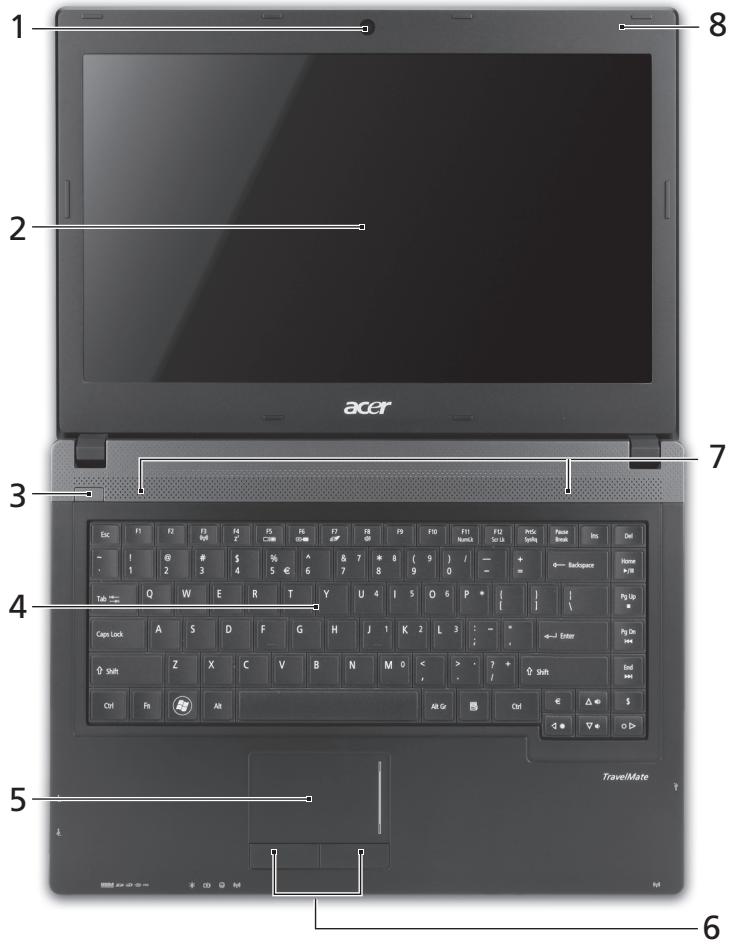
Top view
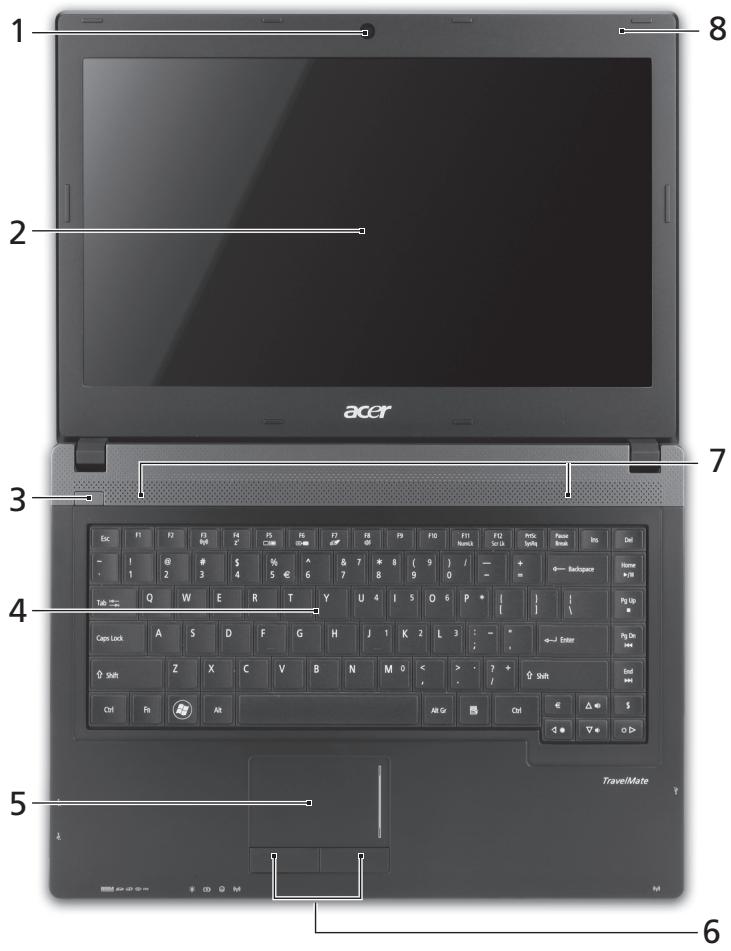
| # | Icon | Item | Description |
| 1 | Integrated webcam | Web camera for video communication. | |
| 2 | Display screen | Also called Liquid-Crystal Display (LCD), displays computer output (configuration may vary by model). | |
| 3 | ○ | Power button / indicator | Turns the computer on and off. Indicates the computer's power status. |
| 4 | Keyboard | For entering data into your computer. | |
| 5 | Touchpad | Touch-sensitive pointing device which functions like a computer mouse. | |
| 6 | Click buttons (left and right) | The left and right buttons function like the left and right mouse buttons. | |
| 7 | Speakers | Deliver stereo audio output. | |
| 8 | Microphone | Internal microphone for sound recording. |
Hotkeys
The computer employs hotkeys or key combinations to access most of the computer's controls like screen brightness and volume output.
To activate hotkeys, press and hold the
| Hotkey | Icon | Function | Description |
| +Fn> + <F3> | (###) | Communication | Enables/disables the computer's communication devices. |
| <Fn> + <F4> | Z² | Sleep | Puts the computer in Sleep mode. |
| <Fn> + <F5> | □□ | Display toggle | Switches display output between the display screen, external monitor (if connected) and both. |
| <Fn> + <F6> | □□□ | Screen blank | Turns the display screen backlight off to save power. Press any key to return. |
| <Fn> + <F7> | ∅ | Touchpad toggle | Turns the internal touchpad on and off. |
| <Fn> + <F8> | 呦 | Speaker toggle | Turns the speakers on and off. |
| <Fn> + <F9> | Brightness up | Increases the screen brightness. | |
| +Fn> + <▲> | Brightness down | Decreases the screen brightness. | |
| +Fn> + <△> | Volume up | Increases the sound volume. | |
| +Fn> + <▼> | Volume down | Decreases the sound volume. | |
| +Fn> + <Home> | /II | Play/Pause | Play or pause a selected media file. |
| +Fn> + <Pg Up> | Stop | Stop playing the selected media file. | |
| +Fn> + <Pg Dn> | Previous | Return to the previous media file. | |
| +Fn> + <End> | Next | Jump to the next media file. |

Closed front view
| # | Icon | Item | Description |
| 1 | MULTIMEDIACARD PRO | Multi-in-1 card reader | Accepts Secure Digital (SD), MultiMediaCard (MMC), Memory Stick PRO (MS PRO), xD-Picture Card (xD). Note: Push to remove/install the card. Only one card can operate at any time. |
| 2 | Power indicator | Indicates the computer's power status. | |
| Battery indicator | Indicates the computer's battery status. 1. Charging: The light shows amber when the battery is charging. 2. Fully charged: The light shows blue when in AC mode. | ||
| HDD indicator | Indicates when the hard disk drive is active. | ||
| Communication indicator | Indicates the computer's wireless connectivity device status. | ||
| 3 | Communication switch | Enables/disables the computer's communication devices. |
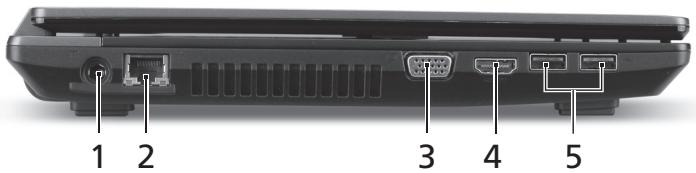
Left view
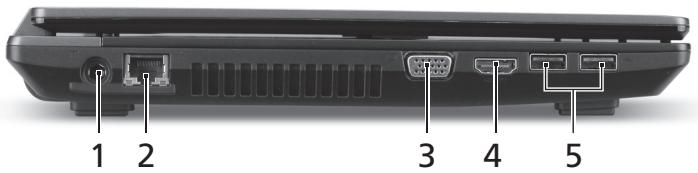
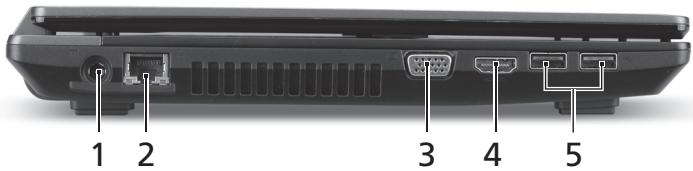
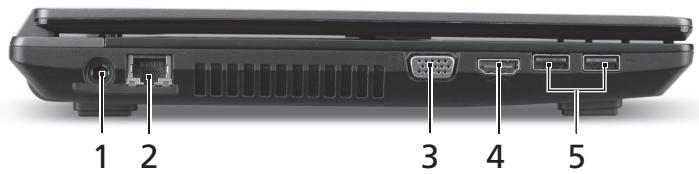
| # | Icon | Item | Description |
| 1 | DC-in jack | Connects to an AC adapter. | |
| 2 | Ethernet (RJ-45) port | Connects to an Ethernet 10/100/1000-based network. | |
| 3 | External display(VGA) port | Connects to a display device (e.g.,external monitor, LCD projector). | |
| 4 | HDMI | HDMI port | Supports high-definition digital video connections. |
| 5 | USB 2.0 ports | Connect to USB 2.0 devices (e.g., USB mouse, USB camera). |
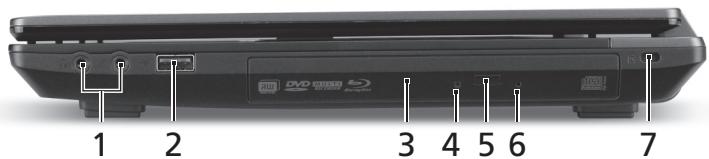
Right view
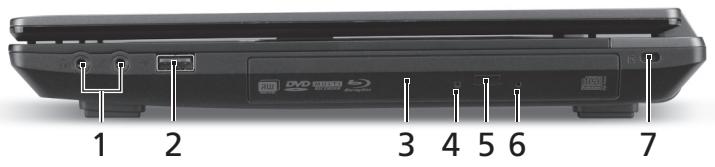
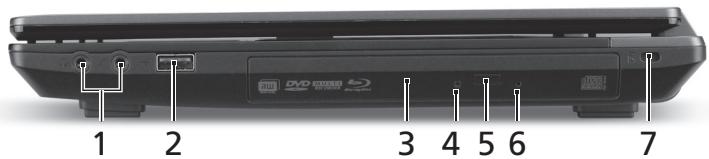
| # | Icon | Item | Description |
| 1 | Microphone jack | Accepts inputs from external microphones. | |
| Headphones/speaker jack | Connects to audio devices (e.g., speakers, headphones). | ||
| 2 | USB 2.0 port | Connects to USB 2.0 devices (e.g., USB mouse, USB camera). | |
| 3 | Optical drive | Internal optical drive; accepts CDs or DVDs. | |
| 4 | Optical disk access indicator | Lights up when the optical drive is active. | |
| 5 | Optical drive eject button | Ejects the optical disk from the drive. | |
| 6 | Emergency eject hole | Ejects the optical drive tray when the computer is turned off. Note: Insert a paper clip to the emergency eject hole to eject the optical drive tray when the computer is off. | |
| 7 | Kensington lock slot | Connects to a Kensington-compatible computer security lock. Note: Wrap the computer security lock cable around an immovable object such as a table or handle of a locked drawer. Insert the lock into the notch and turn the key to secure the lock. Some keyless models are also available. |
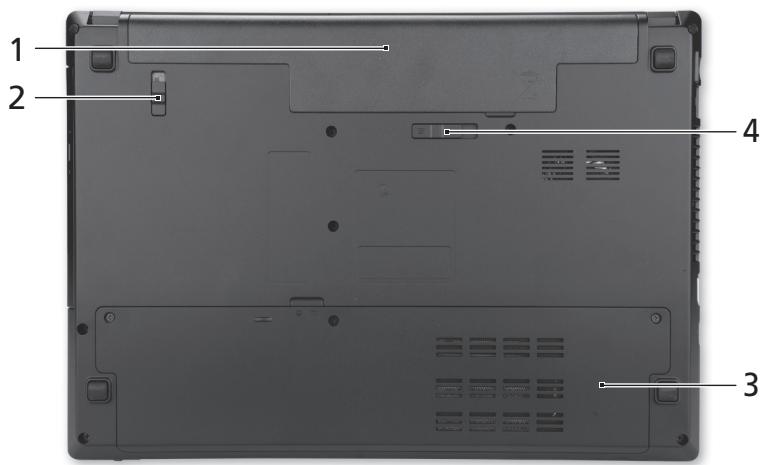
Base view
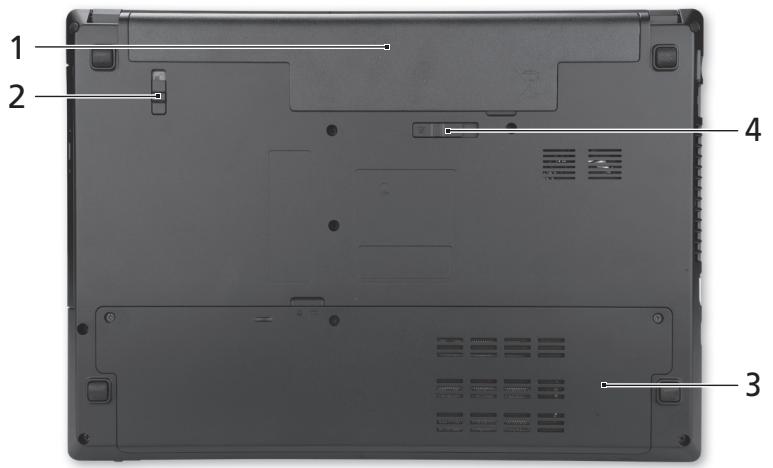
| # | Icon | Item | Description |
| 1 | Battery bay | Houses the computer's battery pack. | |
| 2 | Battery lock | Locks the battery in position. | |
| 3 | Hard disk bay | Houses the computer's hard disk (secured with screws). | |
| Memory compartment | Houses the computer's main memory. | ||
| 4 | Battery release latch | Releases the battery for removal. |
Environment
Temperature:
-
Operating: 5^ C to 35^ C
Non-operating: -20 °C to 65 °C -
Humidity (non-condensing):
-
Operating: 20% to 80% .
Non-operating: 20% to 80%
Gammede notebook TravelMate
Guide rapide
Pour commencer
Acer notebook is bundled with the approved telecom modules for your networking. Those modules' model number and specific homologation number refers to below:
[Modem]
| Modelo: RD02-D330 | CNC 54-4512 |
| Modelo: Delphi D40 (AM5) | CNC 54-5681 |
[Bluetooth]
| Modelo: BCM92046 | CNC 16-6735 |
| Modelo: BCM92070MD_REF | CNC 16-7165 |
| Modelo: T77H056 | CNC 16-7788 |
| Modelo: AR5BBU12 | CNC 16-7946 |
[Bluetooth+802.11bgn]
| Modelo: BCM943225HMB | CNC C-7497 |
[802.11AGN]
| Modelo: 512AN_MMW | CNC C-6399 |
| Modelo: 533AN_MMW | CNC C-6385 |
| Modelo: 512AN_HMW | CNC C-7612 |
| Modelo: 533AN_HMW | CNC C-7618 |
| Modelo: 622ANHMW | CNC C-7682 |
| Modelo: 633ANHMW | CNC C-7681 |
[802.11BGN]
| Modelo: AR5B95 | CNC C-7152 |
| Modelo: AR5B93 | CNC C-7151 |
| Modelo: 112BNHMW | CNC C-7470 |
| Modelo: 112BNMMW | CNC C-7471 |
| Modelo: RTL8192SE | CNC C-7495 |
| Modelo: BCM943225HM | CNC C-7395 |
| Modelo: AR5B97 | CNC C-7781 |
| Modelo: BCM94313HMG2L | CNC C-7881 |
[802.11BG]
| Modelo: BCM94312HMG | CNC 16-6180 |
[3G]
| Modelo: UNDP-1 | CNC 17-6334 |
| Modelo: Gobi2000 | CNC 17-7291 |
[Brasil] Noticia adicional de regulamento Anatel
Acer notebook is bundled with the approved telecom modules for your networking. Those modules' model number and specific homologation number refers to below:
[Modem]
| Modelo: RD02-D330 | COFETEL: TTDCORD06-536 |
| Modelo: Delphi_D40 (AM5) | COFETEL: TTDAGDE07-056 |
[Bluetooth]
| Modelo: BCM92046 | COFETEL: RCPFOBC08-0472 |
| Modelo: BCM92070MD_REF | COFETEL: RCPBRBC09-0213 |
| Modelo: T77H056 | COFETEL: RCPATT709-1049 |
| Modelo: AR5BBU12 | COFETEL: RCPATAR10-0064 |
[Bluetooth+802.11BGN]
| Modelo: BCM943225HMB | COFETEL: RCPBRBC09-0574 |
[802.11AGN]
| Modelo: 512AN_HMW | COFETEL:RCPIN5108-0260 |
| Modelo: 512AN_MMW | COFETEL:RCPIN5108-0260-A3 |
| Modelo: 533AN_HMW | COFETEL:RCPIN5108-0260-A2 |
| Modelo: 533AN_MMW | COFETEL:RCPIN5108-0260-A1 |
| Modelo: 622ANHMW | COFETEL:RCPIN6209-1009 |
| Modelo: 633ANHMW | COFETEL:RCPIN6309-1010 |
[802.11BGN]
| Modelo: AR5B95 | COFETEL:RCPATAR09-0168 |
| Modelo: AR5B93 | COFETEL: RCPATAR09-0167 |
| Modelo: 112BNHMW | COFETEL: RCPIN1109-0613-A1 |
| Modelo: 112BNMMW | COFETEL: RCPIN1109-0613 |
| Modelo: RTL8192SE | COFETEL: RCPRERT09-0751 |
| Modelo: BCM943225HM | COFETEL: RCPBRBC09-0464 |
| Modelo: AR5B97 | COFETEL: RCPATAR09-1103 |
| Modelo: BCM94313HMG2L | COFETEL: RCPBRBC09-1196 |
[802.11BG]
| Modelo: BCM94312HMG | COFETEL: RCPBRBC08-0015 |
[3G]
| Modelo: UNDP-1 | COFETEL:RTIQUUN08-0253 |
| Modelo: Gobi2000 | COFETEL:RTIQUGO09-0555 |
| Modelo: EM770W | COFETEL:RTIHUEM10-0096 |
[WiMax]
| Modelo: 622ANXHMW | COFETEL: RCPIN6210-0219 |
Portail Série TravelMate
Guia=rápido
TravelMate Notebook Series
Snelgids
TravelMate Notebook-serial
Hurtigguide
Mby pa3pa6oTaII pI dy pyKOBoIDCTB, KOToPbIe NOMOryT Bam B IcNoIb3OBAHIN HoyT6yka Acer:
3TOT nJaKat NOMOXET BbINONHITb NepBOHaJbHyIO HAcToPyKy KOMNBoTepa.
TnnoBoe pyKoBOcCTBO noIb3OBAteJIa KOMnbIOTepa cepNI TravelMate coDEpXNT nIone3HyU INHOpMaUIO, pIIMeHNMyU KO BcEM MoJeIaM cepNI TravelMate. B HEm ONIsCbIAOTcA OCHOBHbIe TEMbl, TaKne KaK paBota C KJIaBnATpyoi, 3ByKOM n.T.D. YUHTe, UTO TnnoBoe pyKoBOcTBO noIb3OBAteJIa ABJETcR o6ObIeHNbIM, nO3ToMv B HEm INHOgDa 6yDyT ONIsCbIbATcBc cyHKuIN IJIIN CBOIcTBa, peAnI3OBAHbIe He B KypIeHNHO BamN MoJeIN, a IINsB B ONpeJeHbIX MOJeIax 3ToI cepIN B TAKNX cIyuaX B TEkCTe daETc NometKa "TOnbKO dIaONpeJeHNbIX MoJeIeN".
KpaTkoe pyKOBOCTBO 3HaKOMIT BAC C OCHOBbIMN XapakTePncTKaMn IN ФункцЯMuBaWero HOBOrO KOMNbHTope. YTObI y3HaTb 60JIbIe O TOM, KaK C NOMOuIbIO KOMNbHTope NaBICITb IPOyKTINBHOCTb CBOe paBOtI, CM. TInnoBoe pyKOBOCTBO noIb3OBaTeJRA KomNbHTope cepm TravelMate. 3TO pyKOBOCTBO CoDEpXINT NOIpo6HyIO INHΦOpMaunIO O CNCTeMHbIX ΦYHKUx, BOCCTaHOBJIeHN DAHHbIX, BO3MOxHocT8x PaCUnpeHn I yCTpaHeHN HeNCnPabHOcte. B HEM TAKKe IprNBedeHa INHΦOpMaunr O rapaHTNIHOM OBCnykBaHN, a TAKKe obUne IpeDNsacHn I npaBnla 6e3OnaNcHcTn Ipn paBoTe C HOY6yKom. 3TO pyKOBOCTBO В Вид ФаIIa PDF ИЗнчально 3aRpyKeHo B KOMNbHTope. YTObI OTKpbITb erO, BvIOnHInTe cNeDyUoSe:
BnD cpeeni C 3aKpbIToi KpbIiKoI

BnaxKHOCTb (6e3 KOHDeHcauN):
- Paδочая: ot 20% до 80%
- Hespera: ot 20% do 80%
Notebook seriii TravelMate
Skrócony poradnik
Rada notebookù TravelMate
StručnéPokyny
StručnéPokyny
Ipeeden n3rJIeI npn 3aTbOpeH JaPTOn

| # | Икona | Еlement | Опсанne |
| 1 | IIIIMM MULTIMEDIAID S2D PRO | Чет ec Ha Kaptni Multi-in-1 (Mного-B-1) | Чет ec Secure Digital (SD), MultiMediaCard (MMC), Memory Stick Pro (MS PRO), xD Picture Card (xD). 3абелека:Натисенье, за ду Извашиte/ Инстамерate Карта. He e Вьз金融机构 ИзюлбаHETO на поеве OT endha карта. |
| # | Икona | ЕLEMENT | Описиме |
| 2 | Индikatop на Зхранвашио | Показастуca на зхранвашие на Компютьра. | |
| Индikatop за Новото на батерияа | Покочастуca на захетая на Компютьра. 1. Зaporжданe: Индikatopът CBETиЖылTO, Докато захетая се зaporжда. 2. Нарълно зараздана: Индikatopът CBETиВ синьо, Когато стЕВ реким AC. | ||
| Индikatop на Тврдия дисK | Показа дади ТьрдиядисК e akтувен. | ||
| Индikatop за Комунikaши | Покочастуca на устroduствOTо за бezжчна Врьзka на КOMпютьра. | ||
| 3 | Клич за Комунikaши | Влкоча/Изклоча устroduствATERa за Комунikaши на КOMпютьра. |
I3rpeI OToJIaBO
| # | Икona | ЕLEMENT | Описание |
| 1 | Жак за DC вхов | За врьзka с AC щадалтор. | |
| 2 | Порот за Ethernet (RJ-45) | За врьзka с мрека, баширана на Ethernet 10/100/1000. | |
| 3 | Порот за Вьншен дисplen (VGA) | За врьзka с дисplenho устюстwo (напр. Вьншен монITOR, LCD поектор). | |
| 4 | HOMI | HDMI пот | Повдьржа високODEтайда цфpondа вideо врьзka. |
| 5 | USB 2.0 потоve | За врьзka с USB 2.0 устюства (напр. USB мишик, USB камери). |
I3rpeI OITJACHO
2 Klopsake real TravelMate Generic User Guide.

Acer 不豆膝部将从朝朝朝朝朝朝朝朝朝朝朝朝朝朝朝朝朝朝朝朝朝朝朝朝朝朝朝朝朝朝朝朝朝朝朝朝朝朝朝朝朝
賊公道的是
Acer 罗丶德専用者,
BaRoGaIiKJIeHbSHeHaHrReaBnRnOgaiKlJtOaHdNnEa
| 버로가기 키 | 이어본 | 기憑 | 선명 | ||||||||||||||||||||||||||||||||
| 복预案 | 화면 기재를 출가시KEN发展壮大. | ||||||||||||||||||||||||||||||||||
| 어论述预案 | 화면 기재를 썼소지ken发展壮大. | ||||||||||||||||||||||||||||||||||
| 복류 친预案 | 소리를 놀일发展壮大. | ||||||||||||||||||||||||||||||||||
| 복류 직预案 | 소리를 놀일发展壮大. | ||||||||||||||||||||||||||||||||||
| 개선 /일서 종지 | 선ACKnowledgment of the work of the author(s) of the author(s) of the work of the author(s) of the author(s) of the work of the author(s) of the work of the author(s) of the work of the author(s) of the work of the author(s) of the work of the author(s) of the work of the author(s) of the work of the author(s) of the work of the author(s) of the work of the author(s) of the work of the author(s) of the work of the author(s) of the work of the author(s) of the work of the author(S) of the work of the author(S) of the work of the author(S) of the work of the author(S) of the work of the author(S) of the work of the author(S) of the work of the author(S) of the work of the author(S) of the work of the author(S) of the work of the author(S) of the work of the author(S) of the work of the author(S) of the work of the author(S) of the <|im_start|>assistant | 개선 /일서 종지 | 선ACKnowledgment of the work of the author(s) of the author(s) of the author(s) of the author(s) of the work of the author(s) of the work of the author(S) of the work of the author(S) of the work of the author(S) of the work of the author(S) of the work of the author(S) of the work of the author(S) of the work of the author(S) of the work of the author(S) of the work of the author(S) of the work of the author(S) of the work of the author (S) of the work of the author(S) of the work of the author(S) of the work of the author(S) of the work of the author(S) of the work of the author(S) of the work of the author(S) of the work of the author(S) of the work of the author(S) of the work of the author(S) of the work of the author(S) of the work of the author(S) of the work of the author(S) of the <|im_start|>assistant | 개선 /일서 종지 | 선ACKnowledgment of the work of the author(s) of the author(s) of the author(s) of the author(s) of the author(s) of the work of the author(S) of the work of the author(S) of the work of the author(S) of the work of the author(S) of the work of the author(S) of the work of the author(S) of the work of the author(S) of the work of the author(S) of the work of the author(S) of the work of the author(S) of the work of the author(S) of the work of the author (S) of the work of the author(S) of <|im_start|>assistant | 개선 /일서 종지 | 선ACKnowledgment of the work of the author(s) of the author(s) of the author(s) of the author(s) of the author(s) of the author(s) of the work of the author(S) of the work of the author(S) of the work of the author(S) of the work of the author(S) of the work of the author(S) of the work of the author(S) of the work of the author(S) of the work of the author(S) of the work of the author(S) of <|im_start|>assistant | 개선 /일서 종지 | 선ACKnowledgment of the work of the author(s) of the author(s) of the author(s) of the author(s) of the author(s) of the author(s) of the work of the author(S) of the work of the author(S) of the work of the author(S) of the work of the author(S) of the work of <|im_start|>assistant | 개선 /일서 종지 | 선ACKnowledgment of the work of the author(s) of the author(s) of the author(s) of the author(s) of the author(s) of the author(s) of the work of the author(S) of the work of the author(S) of the work of the author(S) of the work of the author(S) of <|im_start|>assistant | 개선 /일서 종지 | 선ACKnowledgment of the work of the author(s) of the author(s) of the author(s) of the author(s) of the author(s) of the author(s) of the work of the author(S) of the work of <|im_start|>assistant | 개선 /일서 종지 | 선ACKnowledgment of the work of the author(s) of the author(s) of the author(s) of the author(s) of the author(s) of the work of the author(S) of the work of <|im_start|>assistant | 개선 /일서 종지 | 선ACKnowledgment of the work of the author(s) of the author(s) of the author(s) of the author(s) of the author(s) of the work of the author(S) of the work of <|im_start|> |
当然是上面的首歌。

| # | 이본KH | halok | selmy |
| 1 | MUMIM SDx PRO | 일지 치드 힍 dkog | Secure Digital (SD), MultiMediaCard (MMC), Memory Stick PRO (MS PRO) & xD-Picture Card (xD)를용 ht수有问题nore . htopy : 치드를 기재 썼어는 쿰지acht다 . 치드를 하면에 heart anan사용 ht수有问题nore . |
| # | 이어본 | Hangrook | 선명 |
| 2 | 전원 Flagga | 버류터の 전원상图为 Flagga. | |
| arraerai Flagga | 버류터 Flagga: 1. 2. 3. 4. 5. 6. 7. 8. 9. 10. 11. 12. 13. 14. 15. 16. 17. 18. 19. 20. 21. 22. 23. 24. 25. 26. 27. 28. 29. 30. 31. 32. 33. 34. 35. 36. 37. 38. 39. 40. 41. 42. 43. 44. 45. 46. 47. 48. 49. 50. 51. 52. 53. 54. 55. 56. 57. 58. 59. 60. 61. 62. 63. 64. 65. 66. 67. 68. 69. 70. 71. 72. 73. 74. 75. 76. 77. 78. 79. 80. 81. 82. 83. 84. 85. 86. 87. 88. 89. 90. 91. 92. 93. 94. 95. 96. 97. 98. 99. 100. 101. 102. 103. 104. 105. 106. 107. 108. 109. 110. 111. 112. 113. 114. 115. 116. 117. 118. 119. 120. 121. 122. 123. 124. 125. 126. 127. 128. 129. 130. 131. 132. 133. 134. 135. 136. 137. 138. 139. 140. 141. 142. 143. 144. 145. 146. 147. 148. 149. 150. 151. 152. 153. 154. 155. 156. 157. 158. 159. 160. 161. 162. 163. 164. 165. 166. 167. 168. 169. 170. 171. 172. 173. 174. 175. 176. 177. 178. 179. 180. 181. 182. 183. 184. 185. 186. 187. 188. 189. 190. 191. 192. 193. 194. 195. 196. 197. 198. 199. 200. 201. 202. 203. 204. 205. 206. 207. 208. 209. 210. 211. 212. 213. 214. 215. 216. 217. 218. 219. 220. 221. 222. 223. 224. 225. 226. 227. 228. 229. 230. 231. 232. 233. 234. 235. 236. 237. 238. 239. 240. 241. 242. 243. 244. 245. 246. 247. 248. 249. 250. 251. 252. 253. 254. 255. 256. 257. 258. 259. 260. 261. 262. 263. 264. 265. 266. 267. 268. 269. 270. 271. 272. 273. 274. 275. 276. 277. 278. 279. 280. 281. 282. 283. 284. 285. 286. 287. 288. 289. 290. 291. 292. 293. 294. 295. 296. 297. 298. 299. 300. 301. 302. 303. 304. 305. 306. 307. 308. 309. 310. 311. 312. 313. 314. 315. 316. 317. 318. 319. 320. 321. 322. 323. 324. 325. 326. 327. 328. 329. 330. 331. 332. 333. 334. 335. 336. 337. 338. 339. 340. 341. 342. 343. 344. 345. 346. 347. 348. 349. 350. 351. 352. 353. 354. 355. 356. 357. 358. 359. 360. 361. 362. 363. 364. 365. 366. 367. 368. 369. 370. 371. 372. 373. 374. 375. 376. 377. 378. 379. 380. 381. 382. 383. 384. 385. 386. 387. 388. 389. 390. 391. 392. 393. 394. 395. 396. 397. 398. 399. 400. 401. 402. 403. 404. 405. 406. 407. 408. 409. 410. 411. 412. 413. 414. 415. 416. 417. 418. 419. 420. 421. 422. 423. 424. 425. 426. 427. 428. 429. 430. 431. 432. 433. 434. 435. 436. 437. 438. 439. 440. 441. 442. 443. 444. 445. 446. 447. 448. 449. 450. 451. 452. 453. 454. 455. 456. 457. 458. 459. 460. 461. 462. 463. 464. 465. 466. 467. 468. 469. 470. 471. 472. 473. 474. 475. 476. 477. 478. 479. 480. 481. 482. 483. 484. 485. 486. 487. 488. 489. 490. 491. 492. 493. 494. 495. 496. 497. 498. 499. 500. 501. 502. 503. 504. 505. 506. 507. 508. 509. 510. 511. 512. 513. 514. 515. 516. 517. 518. 519. 520. 521. 522. 523. 524. 525. 526. 527. 528. 529. 530. 531. 532. 533. 534. 535. 536. 537. 538. 539. 540. 541. 542. 543. 544. 545. 546. 547. 548. 549. 550. 551. 552. 553. 554. 555. 556. 557. 558. 559. 560. 561. 562. 563. 564. 565. 566. 567. 568. 569. 570. 571. 572. 573. 574. 575. 576. 577. 578. 579. 580. 581. 582. 583. 584. 585. 586. 587. 588. 589. 590. 591. 592. 593. 594. 595. 596. 597. 598. 599. 600. 601. 602. 603. 604. 605. 606. 607. 608. 609. 610. 611. 612. 613. 614. 615. 616. 617. 618. 619. 620. 621. 622. 623. 624. 625. 626. 627. 628. 629. 630. 631. 632. 633. 634. 635. 636. 637. 638. 639. 640. 641. 642. 643. 644. 645. 646. 647. 648. 649. 650. 651. 652. 653. 654. 655. 656. 657. 658. 659. 660. 661. 662. 663. 664. 665. 666. 667. 668. 669. 670. 671. 672. 673. 674. 675. 676. 677. 678. 679. 680. 681. 682. 683. 684. 685. 686. 687. 688. 689. 690. 691. 692. 693. 694. 695. 696. 697. 698. 699. 700. 701. 702. 703. 704. 705. 706. 707. 708. 709. 710. 711. 712. 713. 714. 715. 716. 717. 718. 719. 720. 721. 722. 723. 724. 725. 726. 727. 728. 729. 730. 731. 732. 733. 734. 735. 736. 737. 738. 739. 740. 741. 742. 743. 744. 745. 746. 747. 748. 749. 750. 751. 752. 753. 754. 755. 756. 757. 758. 759. 760. 761. 762. 763. 764. 765. 766. 767. 768. 769. 770. 771. 772. 773. 774. 775. 776. 777. 778. 779. 780. 781. 782. 783. 784. 785. 786. 787. 788. 789. 790. 791. 792. 793. 794. 795. 796. 797. 798. 799. 800. 801. 802. 803. 804. 805. 806. 807. 808. 809. 810. 811. 812. 813. 814. 815. 816. 817. 818. 819. 820. 821. 822. 823. 824. 825. 826. 827. 828. 829. 830. 831. 832. 833. 834. 835. 836. 837. 838. 839. 840. 841. 842. 843. 844. 845. 846. 847. 848. 849. 850. 851. 852. 853. 854. 855. 856. 857. 858. 859. 860. 861. 862. 863. 864. 865. 866. 867. 868. 869. 870. 871. 872. 873. 874. 875. 876. 877. 878. 879. 880. 881. 882. 883. 884. 885. 886. 887. 888. 889. 890. 891. 892. 893. 894. 895. 896. 897. 898. 899. 900. 901. 902. 903. 904. 905. 906. 907. 908. 909. 910. 911. 912. 913. 914. 915. 916. 917. 918. 919. 920. |
単
Seri Notebook TravelMate
Panduan cepat
Nomor model:
Nomor seri:
Tanggal pembelian:
Alamat pembelian:
Informasi penting
aee aee aee aee aee aee aee aee aee aee aee aee aee aee aee aee aee aee aee aee aee aee aee aee aee aee aee aee aee aee aee aee aee aee aee aee aee aee aee aee aee aee aee aee aee aee aee aee aee aee aee
1 Start > All Programs > Documentation
2 TravelMate Generic User Guide

wunu: mwnwauu uauu Adabo Reader lunuunu uauuad Aboe Reader Uunuwwu uauu uuuu TraveMate Generic User Guide uuuuuuuuuuuu uuuu Adabo Reader uuuuuu uuuu uuuuuuuuuuuuuuu uuuu uuuu uuuu uuuu uuuu uuuu uuuu uuuu uuuu uuuu uuuu uuuu uuuu uuuu uuuu uuuu uuuu uuuu uuuu uuuu uuuu uuuu uuuu uuuu uuuu uuuu uuuu uuuu uuuu uuuu uuuu uuuu uuuu uUU
Acer yavn
nannnnnnnnnnnnnnnnnnnnnnnnnnnnnnnnnnnnnnnnnnnnnnnnnnnnnnnnnnnnnnnnnnnnnnnnnnnnnnnnnnnnnnnnnnnnnnnnnnnnnnnnnnnnnnnnnnnnnnnnnnnnnnnnnnnnnnnnnnnnnn
JNJNJNJNJNJ
| # | baham | baham | baham |
| 1 | baham | baham | baham |
| # | ### | ### | ### |
| 2 | ### | Liquid-Crystal Display (LCD) | |
| ### | |||
| ### | |||
| ### | |||
| 3 | ### | ### | |
| ### | |||
| ### | |||
| 4 | ### | ### | |
| 5 | ### | ### | |
| 6 | ### | ### | |
| 7 | ### | ### | |
| 8 | ### | ### | |
JQ
WwDnVJrnnn nnwn
| ### | ### | ### | ### |
| <Fn> + <F3> | (###) | ### | ### |
| <Fn> + <F4> | Z² | Sleep | ### Sleep |
| <Fn> + <F5> | □□ | ### | ### |
| <Fn> + <F6> | + | ### | ### |
| <Fn> + <F7> | # | ### | ### |
| <Fn> + <F8> | 呦 | ### | ### |
| ### | ### | ### |
| +Fn> + <|> | ### | ### |
| +Fn> + <|> | ### | ### |
| +Fn> + <△> | ### | ### |
| +Fn> + <V> | ### | ### |
| +Fn> + <Home> | ### | ### |
| +Fn> + <Pg Up> | ### | ### |
| +Fn> + <Pg Dn> | ### | ### |
| +Fn> + <End> | ### | ### |
JQJNJQJNJ76JJ6

| # | ### | ### | ### |
| 1 | MULIMENU MULTIMEDICRG SD xD PRO | MUTUANUMEN MUTUANUMEN Secure Digital (SD), MultiMediaCard (MMC), Memory Stick PRO (MS PRO), xD-Picture Card (xD) | MUTUANUMEN MUTUANUMEN Secure Digital (SD), MultiMediaCard (MMC), Memory Stick PRO (MS PRO), xD-Picture Card (xD) |
| 2 | ### | ### | |
| ### | ### | ||
2
| # | ### | ### | ### |
| 1 | ### | DC-in | ### AC |
| 2 | ### | Ethernet (RJ-45) | Ethernet 10/100/1000 |
| 3 | ### | VGA) | ### LCD) |
| 4 | HOMI | HDMI | ### USB 2.0 |
| 5 | ### | USB 2.0 | ### USB 2.0 (### USB) |
| # | ### | ### | ### |
| 1 | ### | ### | ### |
| ### | ### | ### | |
| 2 | ### USB 2.0 | ### USB 2.0 (### USB) | |
| 3 | ### | ### CD DVD | |
| 4 | ### | ### | |
| 5 | ### | ### | |
| 6 | ### | ### | |
| 7 | K | Kingsington | Kingsington |
| Kingsington | |||
| Kingsington | |||
| Kingsington | |||
| Kingsington | |||
| Kingsington | |||
| Kingsington | |||
| Kingsington | |||
| Kingsington | |||
| Kingsington | |||
| Kingsington | |||
| Kingsington | |||
2
| # | ### | ### | ### |
| 1 | ### | ### | ### |
| 2 | ### | ### | ### |
| 3 | ### | ### | ### |
| 4 | ### | ### | ### |
2
- 0000:
- 0000: 5^ 35°C
- 0000: -20^ 65°C
- 0000: (1000000000):
- 0000: 20% 80%
- 0000: 20% 80%