
TRAVELMATE 4740G - Laptop ACER - Free user manual and instructions
Find the device manual for free TRAVELMATE 4740G ACER in PDF.


| Product type | Laptop |
| Brand | Acer |
| Model | TravelMate 4740G |
| Screen | LCD screen (type not specified), resolution varies by model |
| Processor | Intel Core (estimate, not specified in the manual) |
| RAM | Internal memory slot (capacity not specified) |
| Hard drive | SATA hard drive bay (capacity not specified) |
| Optical drive | Internal DVD/CD drive |
| Webcam | Acer Crystal Eye webcam (depending on model) |
| Microphone | Internal microphone |
| Speakers | Built-in stereo speakers |
| Keyboard | AZERTY keyboard with special keys (Fn) |
| Touchpad | Touchpad with left and right buttons |
| USB ports | 3 USB 2.0 ports (two on left, one on right) |
| VGA port | 1 external VGA port |
| Ethernet port | 1 RJ-45 10/100/1000 port |
| Audio jack | Headphone/speaker output, microphone input |
| Card reader | Multi-card: SD, MMC, MS, MS PRO, xD |
| Security | Kensington lock slot |
| Battery | Removable Lithium-Ion battery |
| Power supply | AC adapter (DC jack) |
| Operating temperature | 5°C to 35°C |
| Storage temperature | -20°C to 65°C |
| Operating humidity | 20% to 80% (non-condensing) |
| Storage humidity | 20% to 80% (non-condensing) |
Frequently Asked Questions - TRAVELMATE 4740G ACER
User questions about TRAVELMATE 4740G ACER
0 question about this device. Answer the ones you know or ask your own.
Ask a new question about this device
Download the instructions for your Laptop in PDF format for free! Find your manual TRAVELMATE 4740G - ACER and take your electronic device back in hand. On this page are published all the documents necessary for the use of your device. TRAVELMATE 4740G by ACER.
USER MANUAL TRAVELMATE 4740G ACER
TravelMate 4740/4740Z/4340 Series
Quick Guide
TravelMate 4740/4740Z/4340 Series Notebook PC
Model number:
Serial number:
Date of purchase:
Place of purchase:
First things first
We would like to thank you for making an Acer notebook your choice for meeting your mobile computing needs.
Your guides
To help you use your Acer notebook, we have designed a set of guides:
First off, the poster helps you get started with setting up your computer.
The TravelMate Series Generic User Guide contains useful information applying to all models in the TravelMate product series. It covers basic topics such as using the keyboard and audio, etc. Please understand that due to its nature, the Generic User Guide as well as the AcerSystem User Guide mentioned below will occasionally refer to functions or features which are only contained in certain models of the series, but not necessarily in the model you purchased. Such instances are marked in the text with language such as "only for certain models".
The Quick Guide introduces you to the basic features and functions of your new computer. For more on how your computer can help you to be more productive, please refer to the AcerSystem User Guide. This guide contains detailed information on such subjects as system utilities, data recovery, expansion options and troubleshooting. In addition it contains warranty information and the general regulations and safety notices for your notebook. It is available in Portable Document Format (PDF) and comes preloaded on your notebook. Follow these steps to access it:
1 Click on Start > All Programs > AcerSystem.
2 Click on AcerSystem User Guide.

Note: Viewing the file requires Adobe Reader. If Adobe Reader is not installed on your computer, clicking on AcerSystem User Guide will run the Adobe Reader setup program first. Follow the instructions on the screen to complete the installation. For instructions on how to use Adobe Reader, access the Help and Support menu.
Your Acer notebook tour
After setting up your computer as illustrated in the poster, let us show you around your new Acer notebook.
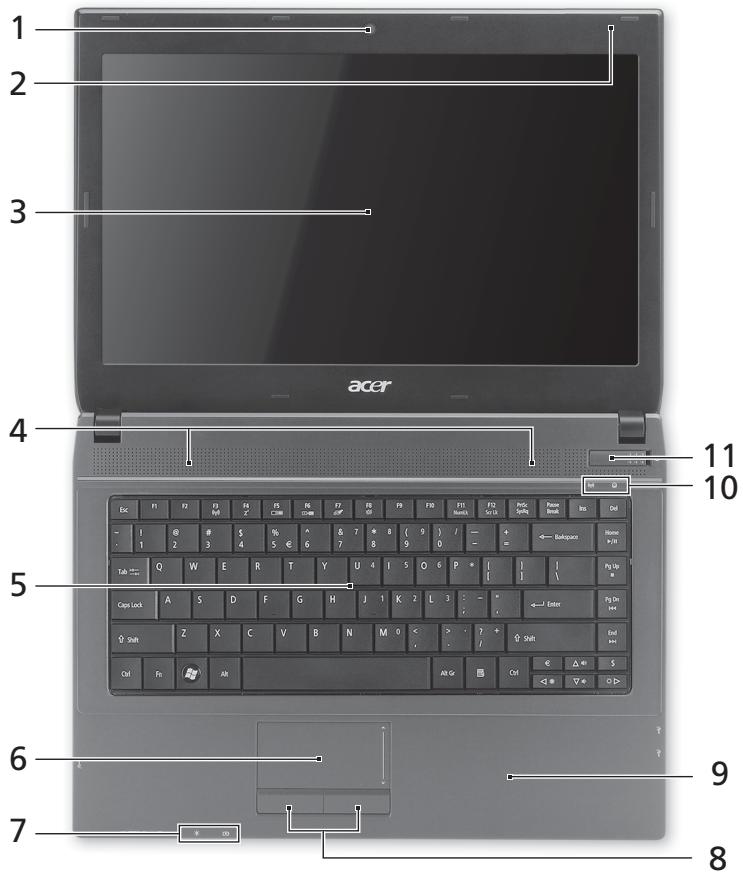
Top view
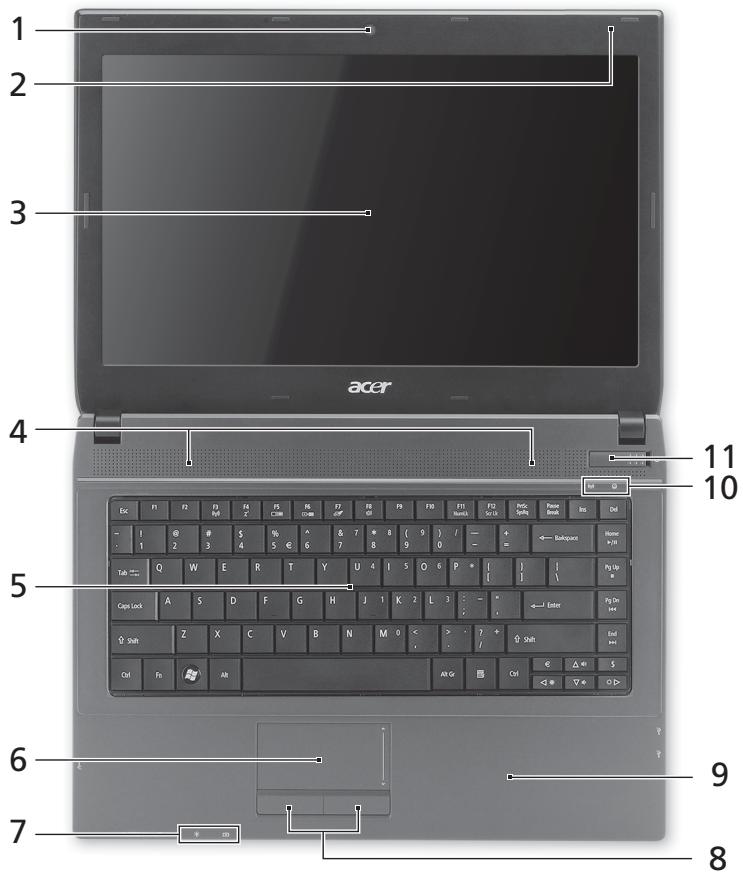
| # | Icon | Item | Description |
| 1 | Acer Crystal Eye webcam | Web camera for video communication (only for certain models). | |
| 2 | Microphone | Internal microphone for recording sound. | |
| 3 | Display screen | Also called Liquid-Crystal Display (LCD), displays computer output (configuration may vary by model). | |
| 4 | Speakers | Left and right speakers deliver stereo audio output. | |
| 5 | Keyboard | For entering data into your computer. | |
| 6 | Touchpad | Touch-sensitive pointing device which functions like a computer mouse. | |
| 7 | Power indicator1 | Indicates the computer's power status. | |
| Battery indicator1 | Indicates the computer's battery status. 1. Charging: The light shows amber when the battery is charging. 2. Fully charged: The light shows blue when in AC mode. | ||
| 8 | Click buttons (left and right) | The left and right buttons function like the left and right mouse buttons. | |
| 9 | Palmrest | Comfortable support area for your hands when you use the computer. | |
| 10 | Communication indicator | Indicates the computer's wireless connectivity device status. | |
| HDD indicator | Indicates when the hard disk drive is active. | ||
| 11 | Power switch | Turns the computer on and off. |
- The front panel indicators are visible even when the computer cover is closed up.

Note: The exact configuration of your PC depends on the model purchased.
Hotkeys
The computer employs hotkeys or key combinations to access most of the computer's controls like screen brightness and volume output.
To activate hotkeys, press and hold the
| Hotkey | Icon | Function | Description |
| +Fn> + <F3> | ( ) | Communication key | Enables / disables the computer's communication devices. (Communication devices may vary by configuration.) |
| +Fn> + <F4> | Z | Sleep | Puts the computer in Sleep mode. |
| +Fn> + <F5> | ☐ | Display toggle | Switches display output between the display screen, external monitor (if connected) and both. |
| +Fn> + <F6> | * | Display off | Turns the display screen backlight off to save power. Press any key to return. |
| +Fn> + <F7> | ∅ | Touchpad toggle | Turns the internal touchpad on and off. |
| +Fn> + <F8> | 哟 | Speaker toggle | Turns the speakers on and off. |
| +Fn> + <F11> | NumLk | NumLock | Turns the embedded numeric keypad on or off. |
| +Fn> + <F12> | Scr Lk | Scroll Lock | When Scroll Lock is on, the screen moves one line up or down when you press the up or down arrow keys respectively. Scroll Lock does not work with some applications. |
| +Fn> + <D> | Brightness up | Increases the screen brightness. | |
| +Fn> + <Δ> | Brightness down | Decreases the screen brightness. | |
| +Fn> + <Δ> | Volume up | Increases the sound volume. | |
| +Fn> + <∇> | Volume down | Decreases the sound volume. | |
| +Fn> + <Home> | /II | Play/Pause | Play or pause a selected media file. |
| +Fn> + <Pg Up> | ■ | Stop | Stop playing the selected media file. |
| +Fn> + <Pg Dn> | | | Previous | Return to the previous media file. |
| +Fn> + <End> | ▶ | Next | Jump to the next media file. |
Closed front view

| # | Icon | Item | Description |
| 1 | MULTI-MEDIACARD PRO | Multi-in-1 card reader | Accepts Secure Digital (SD), MultiMediaCard (MMC), Memory Stick (MS), Memory Stick PRO (MS PRO), xD-Picture Card (xD). Note: Push to remove/install the card. Only one card can operate at any given time. |
Left view
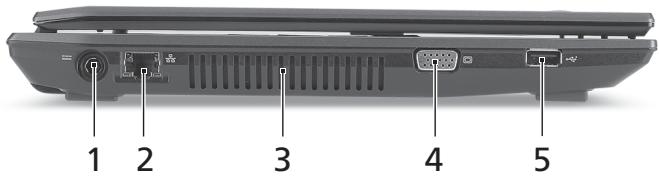
| # | Icon | Item | Description |
| 1 | DC-in jack | Connects to an AC adapter. | |
| 2 | Ethernet (RJ-45) port | Connects to an Ethernet 10/100/1000-based network. | |
| 3 | Ventilation slots | Enable the computer to stay cool, even after prolonged use. | |
| 4 | External display (VGA) port | Connects to a display device (e.g., external monitor, LCD projector). | |
| 5 | USB 2.0 port | Connect to USB 2.0 devices (e.g., USB mouse, USB camera). |
Right view
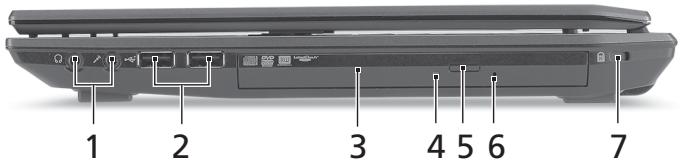
| # | Icon | Item | Description |
| 1 | Headphones/ speaker/line-out jack | Connects to audio line-out devices (e.g., speakers, headphones). | |
| Microphone jack | Accepts inputs from external microphones. | ||
| 2 | + | USB 2.0 port | Connect to USB 2.0 devices (e.g., USB mouse, USB camera). |
| 3 | Optical drive | Internal optical drive; accepts CDs or DVDs. | |
| 4 | Optical disk access indicator | Lights up when the optical drive is active. | |
| 5 | Optical drive eject button | Ejects the optical disk from the drive. | |
| 6 | Emergency eject hole | Ejects the optical drive tray when the computer is turned off. Note: Insert a paper clip to the emergency eject hole to eject the optical drive tray when the computer is off. | |
| 7 | K | Kensington lock slot | Connects to a Kensington-compatible computer security lock. |
Base view
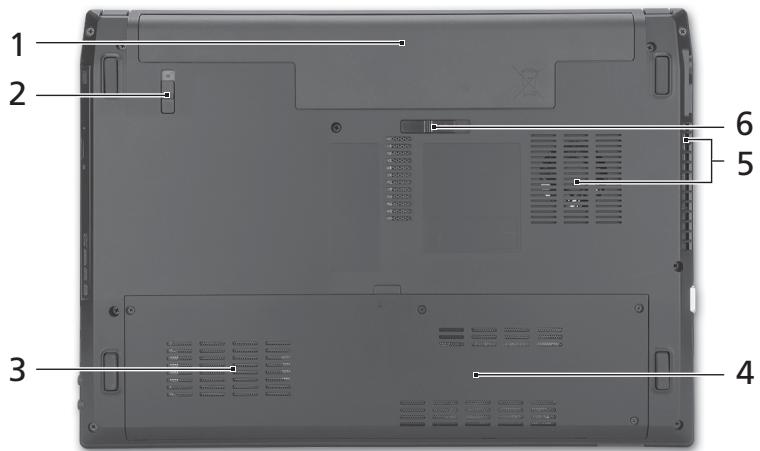
| # | Icon | Item | Description |
| 1 | Battery bay | Houses the computer's battery pack. | |
| 2 | Battery lock | Locks the battery in position. | |
| 3 | Hard disk bay | Houses the computer's hard disk (secured with screws). | |
| 4 | Memory compartment | Houses the computer's main memory. | |
| 5 | Ventilation slots and cooling fan | Enable the computer to stay cool, even after prolonged use. Note: Do not cover or obstruct the opening of the fan. | |
| 6 | Battery release latch | Releases the battery for removal. |
Environment
Temperature:
-
Operating: 5^ C to 35^ C
Non-operating: -20^ to 65^ -
Humidity (non-condensing):
-
Operating: 20% to 80% .
Non-operating: 20% to 80%
Gamme TravelMate 4740/ 4740Z/4340
Guide rapide
Ordinateur notebook de la gamme TravelMate 4740/4740Z/4340
Modèle :
No. de série :
Date d'achat:
Lieud'achat:
Pour commencer
Mby pa3pa6oTaII pI dy pyKOBoIDCTB, KOToPbIE NOMOryT Bam B INCIOJIb3OBAHIN HoyT6yka Acer:
3TOT IJIaKAT NOMOKeT BAM BbIOnHHT IbepBOHaUaJIbHyO HAcTpOky KOMlbIOpTepa.
Tynoboe pykoBOCTBO DnA cepnn TravelMate coJepKNT nOle3HyIOHΦopMaUHO, npImeHmMyo KO BcEM MoJeAM cepnn TravelMate. B HEMONcBbIAOTcOCHOBHbIe TEMbl, TAKNe KaPbaOta C KJIaBnAtypoi, 3BykOM N.T.D.YHTNE, YTO Tynoboe pykoBOCTBO NOlb3OBAteJIy UYnOMaHYTOE HNKePykoBOCTBO NOlb3OBAteJIe CNCTeMbl Acer ABnIOTc O6OuHbIMN, PO3ToMBy H INX INOrda BydUT ONcBbATbcra FyHKUIN IIN CBOITBa, peAN3OBAHbIe He B KynpeHHoB Bamn MOeJIa, a NlSbB OnpedeHbIX MOeJIax 3ToI cepnn. B TaKxClyuayxB TeKCTe DaETcN NOMTeKA "TOnbKO dIg ONpeDeHbIX MOeJIe".
KpaTkoe pyKOBODCTBO 3HaKOMNT Bac C OCHOBHbIMn XapaKTepNCtIKaMn I ΦyHKUJIMn BaIero HOBOrO KOMNbIoTepe. YTo6bl y3HaTb 60JIbIe O TOM, KaK IOBbICNTb IpoDyKTUBHOCTb BaIeI pa6Otbl c NOMOJIbIO KOMNbIoTepe, Bbl MOKeTe O6bATNtBCr K AcerSystem User Guide. 3To pyKOBODCTBO COePjNIT NOIpOboHyIO INHΦOpMaUIO O CnCTeMHbIX ΦyHKUJX, BOCCTaHOBJIeHN DaHHbIX, BO3MOXHOCTx paCUnpeHNA I yCTpAneHNI HeINCPaBHOCTe. B HEM TAKKe pInBeDeHa INHΦOpMaUIO rapaHTnHOM o6cnyKJBAHm, a TaKKe O6JIe NpeIINCAHNA I npArBnla 630NaacHOCTn Ipn pa6Ote C HoYt6yKom. 3To pyKOBODCTBO B VInde PaIINa PDF n3NaHbHO 3aRpyJKeHO B KOMNbIoTepe. I Jn ero OTKpbITn BAInONHInTe cIeMyUoee:
1 HaxmTe Pnyck > Bce nporpaMMbl > AcerSystem.
2 HaxmTe PykoBoCTBO nonb3ObaTeNa CnCTembl Acer.

PpimmeaHne:JnI npocMToPa 3Toro foA hynKa nporpaMa Adobe Acrobat Reader.Ecnn npoprpMaMa Adobe Acrobat Reader He yctahOBIneHa Bawaem KOMblbOtepe,TO NOcJIe NAcTaNy HNTKa PyKoBODCTBO NOnlb3ObaTei
CnCTEmbAer Chauana 3anyCTnTC yTuINHTa YCTAHOBKn npoprpaMbI Acrobat Reader. JnI 3aBepSeHHy UCTAHOBKn BbIOnHnTE oTObpKaemHe Ha 3kpaHe
HnCTpyuKn. Yka3aHnNo paBoTe C npoprpaMMo Adobe Acrobat Reader cm.
B MeHNO CnpBaKa nNoDpeKkA.
3HaKOMCTBO C HoyT6ykom Acer
Tenepb, KOrda Bbl BbInOnHnHn HacToPouKn, KaK noka3aHo Ha nnKaTe, daBaIte no6nXe no3HaKoMmMc C BaUIM HOBIM HOyTbYKom Acer.
BnD cBepxu
BnD cpeeni C 3aKpbIToi KpbIshkoJ

1
- Pa6oua: ot 20% do 80%
- Hespera: ot 20% do 80%
Ko mputer seri i1 TravelMate 4740/4740Z/4340
Skrócony poradnik
Séria TravelMate 4740/4740Z/4340
Stručná príručka
Notebook serial TravelMate 4740/4740Z/4340
Numarul modelului:
Numarulserie:
Data achizitiei:
Locul achizitiei:
Înaine de所所长
TravelMate 4740/4740Z/4340 sri|z|z
邯在
TravelMate 4740/4740Z/4340 SIRIUS NTDKPC
M
- 一元一次不等式组的解法:
六日:
六、合同的种类和内容:
消費現場的消費
aTruHmTruHmTruHmTruHmTruHmTruHmTruHmTruHmTruHmTruHmTruHmTruHmTruHmTruHmTruHmTruHmTruHmTruHmTruHmTruHmTruHmTruHmTruHmTruHmTruHmTruH
TraveMATE 1
aannnnnne nnnnnnnnnnnnnnnnnnnnnnnnnnnnnnnnnnnnnnnnnnnnnnnnnnnnnnnnnnnnnnnnnnnnnnnnnnnnnnnnnnnnnnnnnnnnnnnnnnnnnnnnnnn
y
aunnnnnaanannnnnnnnnnnnnnnnnnnnnnnnnnnnnnnnnnnnnnnnnnnnnnnnnnnnnnnnnnnnnnnnnnnnnnnnnnnnnnnnnnnnnnnnnnnnnnnnnnnnnnnnnnnnnnnnnnnnnnnnnn
a
AcerSystem User Guide
y
mnyuuyaya, mkiienlumtsyuyuyuyuziunyuy
yannnnnneanennnnnnnnnnnnnnnnnnnnnnnnnnnnnnnnnnnnnnnnnnnnnnnnnnnnnnnnnnnnnnnnnnnnnnnnnnnnnnnnnnnnnnnnnnnnnnnn
uannnnnnaaennnnnnnnnnnnnnnnnnnnnnnnnnnnnnnnnnnnnnnnnnnnnnnnnnnnnnnnnnnnnnnnnnnnnnnnnnnnnnnnnnnnnnnnnnnnnnnnnnnnnnnnnnnnnnnnnnnnnnnnnnnnnnnnnnnnnnnnnnnnnnnnnnnn
wauu: wauu wauu wauu wauu Adobe Reader uuuuuuuuuuuuuuuuuuuuuuuuuuuuuuuuuuuuuuuuuuuuuuuuuuuuuuuuuuuuuuuuuuuuuuuuuuuuuuuuuuuuuuuuuuuuuuuuuuuuuuuuuuuuuuuuuuuuuuuuuuuuuuuuuuuuuuuuuuuuuuuuuuuuuuuuuuuuuuuuuuuuuuuuuuuuuuuuuuuuuuuuuuuuuuuuuuuuuuuuuUU
Acer yavn
nanaanannnnnaaennnnnnaaannnnnnaaannnnnnaaannnnnnaaannnnnnaaannnnnnaaannnnnnaaannnnnnaaannnnnnaaannnnnnaaannnnnnaaannnnnnaaannnnnnaaannnnnnaaannnnnnaaannnnnnaaannnnnnaaannnnnnaaannnnnnaaannnnnnaaannnnnnaaennnnnnaaannnnnnaaannnnnnaaannnnnnaaannnnnnaaannnnnnaaannnnnnaaannnnnnaaannnnnnaaannnnnnaaannnnnnaaannnnnnaaannnnnnaaannnnnnaaannnnnnaaannnnnnaaannnnnnaaannnnnnaaannnnnnaaannnn
2
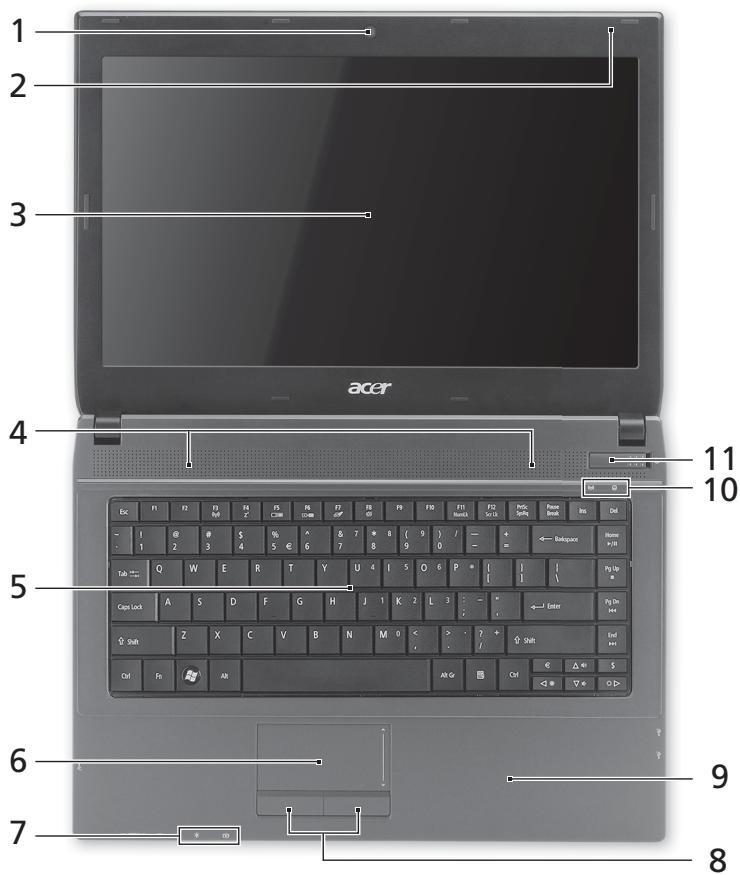
| # | ### | ### | ### |
| 1 | ### Acer Crystal Eye | ### | ### |
| 2 | ### | ### | ### |
| 3 | ### | ### | ### |
| 4 | ### | ### | ### |
| 5 | ### | ### | ### |
| 6 | ### | ### | ### |
| 7 | ### | ### | ### |
| ### | ### | ### | |
| 8 | ### | ### | ### |
| 9 | ### | ### | ### |
| 10 | ### | ### | ### |
| ### | ### | ### | |
| 11 | ### | ### | ### |
1.

nanae: aunuunnnnnaaannnnnneanennnnnneaaee
JNJ
- TravelMate 4740/4740Z/4340 Series
- First things first
- Your guides
- Your Acer notebook tour
- Top view
- Hotkeys
- Closed front view
- Left view
- Right view
- Base view
- Environment
- Gamme TravelMate 4740/ 4740Z/4340
- Pour commencer
- 3HaKOMCTBO C HoyT6ykom Acer
- BnD cBepxu
- BnD cpeeni C 3aKpbIToi KpbIshkoJ
- Ko mputer seri i1 TravelMate 4740/4740Z/4340
- Séria TravelMate 4740/4740Z/4340
- Înaine de所所长
- TravelMate 4740/4740Z/4340 sri|z|z
- 消費現場的消費
- JNJ
Brand : ACER
Model : TRAVELMATE 4740G
Category : Laptop