
PTA 2400 - Miter saw BOSCH - Free user manual and instructions
Find the device manual for free PTA 2400 BOSCH in PDF.


| Product type | Worktable for miter saw |
| Brand | Bosch |
| Model | PTA 2400 |
| Table length without extension | 1220 mm |
| Table length with extension | 2440 mm |
| Table height | 820 mm |
| Max load capacity (without extension) | 160 kg |
| Max load capacity (with extension) | 110 kg (total), 25 kg per extension |
| Weight | 20.4 kg |
| Material | Steel |
| Included accessories | Mounting sets, adapters, length stops, workpiece supports, extensions |
| Tool compatibility | Bosch stationary saws (PCM 7, PCM 8S, PCM 10, version 2009.05) |
| Main functions | Stable and adjustable support for sawing boards and profiles |
| Settings | Adjustable feet height, adjustable length stop, extendable extensions |
| Safety | Locking rods, adjustable feet for stability, respect maximum load |
| Maintenance | Regular cleaning, tightening screws, adjusting clamps if necessary |
| Spare parts | Available through Bosch customer service, specify article number 3 603 M05 0.. |
| After-sales service | Phone and email support (see manual) |
| Warranty | According to Bosch terms |
Frequently Asked Questions - PTA 2400 BOSCH
User questions about PTA 2400 BOSCH
0 question about this device. Answer the ones you know or ask your own.
Ask a new question about this device
Download the instructions for your Miter saw in PDF format for free! Find your manual PTA 2400 - BOSCH and take your electronic device back in hand. On this page are published all the documents necessary for the use of your device. PTA 2400 by BOSCH.
USER MANUAL PTA 2400 BOSCH
Power Tools Division
70745 Leinfelden-Echterdingen
Germany
www.bosch-pt.com
1 609 929 T64 (2009.06) PS / 151 UNI
PTA 2400

BOSCH
de Originalbetriebsanleitung en Original instructions fr Notice originale es Manual original pt Manual original it Istruzioni originali nl Oorspronkelijke gebruiksaanwijzing da Original brugsanvisning sv Bruksanvisning i original no Original driftsinstruks
fi Alkuperäiset ohjeet el PnpotuO odnyiwxphon tr Original isletmet talimati pl Instrukcja oryginalna cs Puvodni navod k pouzivani sk Póvodny námod na použitie hu Eredeti hasznalatiutasitas ru OpHnHaIbHoe pyKOBOaCT-BO IIO 3KcIaYatauIN uk OpniHaIbHa iHCTpyKciI 3 ekTnAyaTaui
ro Instruetiuni originale bg OpiuHaHa HNCTpyKcua sr Originalno uputstvo za rad sl Izvirna navodila hr Originalne upute za rad et Algupärane kasutusjuhend Instrukcijasoriginalvaloda It Originali instrukcija

2

PTA 2400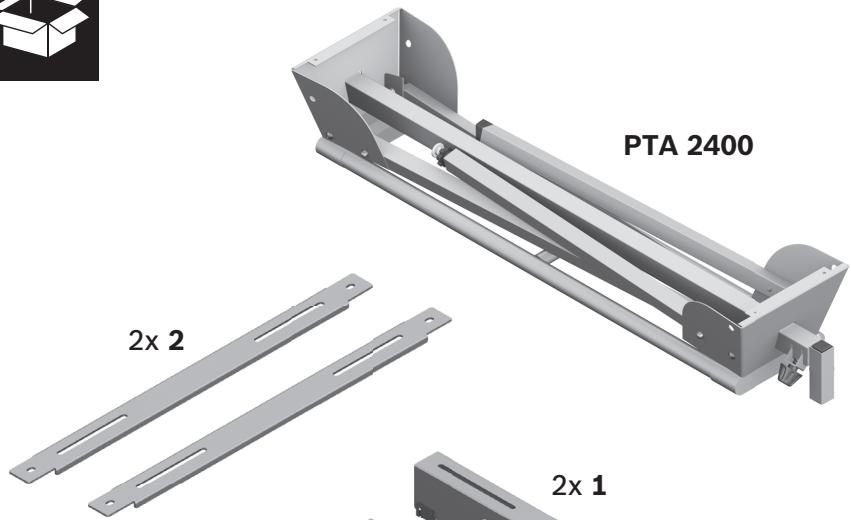
4
A1
A2
B1
B2
C1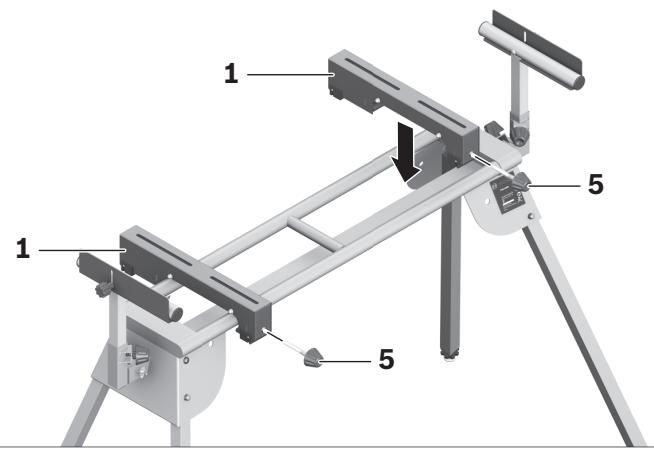
C2 C3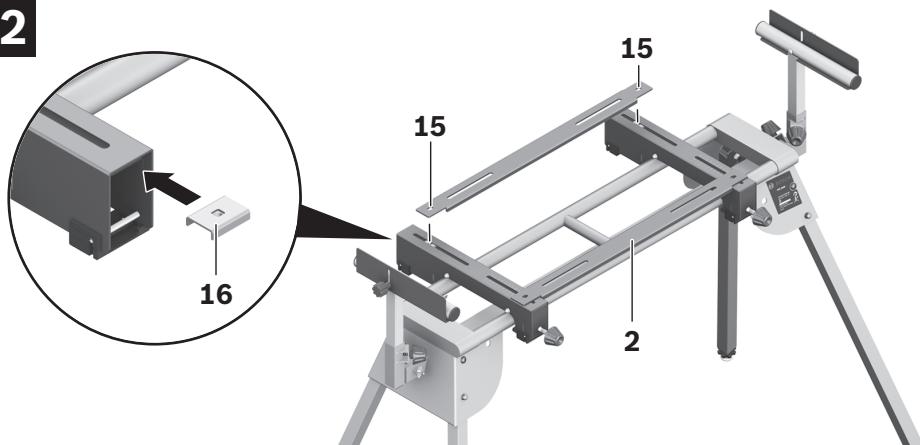
6
D1
D2
D3
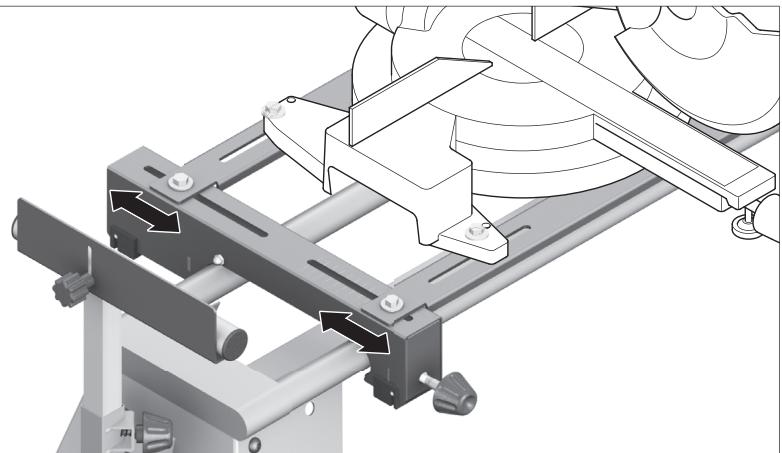
F1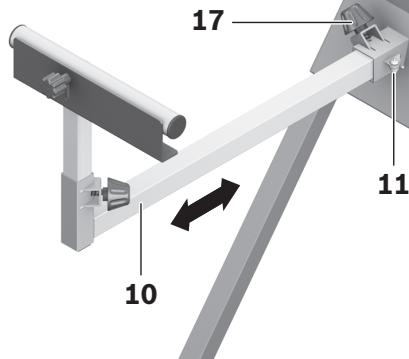
F2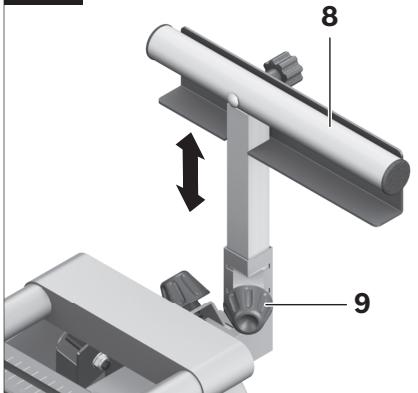
G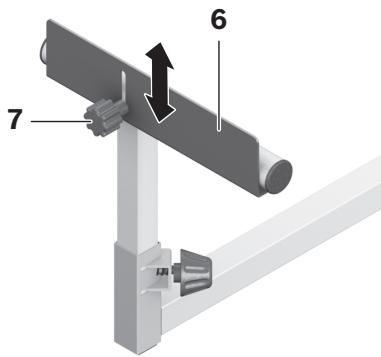
H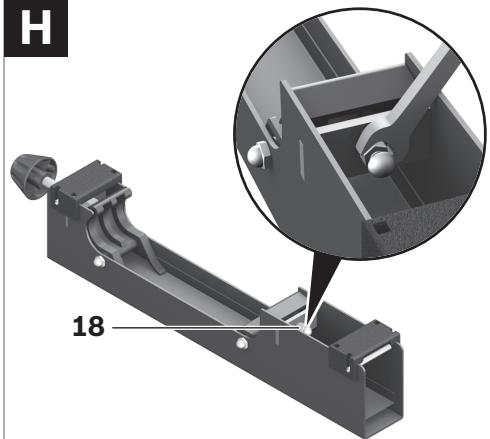
8
German. 9
English. Page 15
French. Page 21
Spanish. Page 27
Portuguese. Page 33
Italian. Page 38
Dutch. Page 43
Danish. Page 48
Swedish. Page 53
Norwegian. Page 58
Finnish. Page 63
Greek. Page 68
Turkish. Page 74
Polish. Page 79
Czech. Page 84
Slovak. Page 89
Hungarian. Page 94
Russian... Page 99
Ukrainian Page 105
Romanian. 110
General Safety Rules
WARNING Read all warning notes and instructions enclosed with the saw stand and the power tool to be mounted. Failure to follow the warnings and instructions may result in electric shock, fire and/or serious injury.
Safety Warnings for Saw Stands
Pull the plug from the mains receptacle and/or remove the battery from the power tool before making adjustments on the tool or changing tool accessories. Unintentional switching on of the power tool is the cause of many accidents. - Assemble the saw stand in the proper manner before mounting the power tool. Proper assembly is important to prevent the risk of a collapse of the saw stand. - Attach the power tool securely to the saw stand before using it. Slipping off of the power tool on the saw stand can lead to loss of control. - Place the saw stand on a firm, level and horizontal surface. If the saw stand can slip off or wobbles, the power tool or the workpiece cannot be uniformly and securely guided. Do not overload the saw stand and do not use it as a ladder or scaffolding. Overloading or standing on the saw stand can lead to the upward shifting of the centre of gravity of the stand and its tipping over. - When working or transporting, take care that all bolts and connecting elements are firmly tightened. The attachment sets for the power tool must always be firmly locked. Loose connections can lead to instability and inexact sawing.
- Mount and dismount the power tool only when it is in the transport position (for instructions on the transport position, also see the operating instructions of the respective power tool). Otherwise, the power tool can have such an unfavourable centre of gravity that it cannot be held securely.
- When the power tool is mounted to the attachment set, operate it exclusively on the saw stand. Without the saw stand, the attachment set with the power tool does not stand securely and can tip over. - Ensure that long and heavy workpieces do not affect the equilibrium of the saw stand. Long and/or heavy workpieces must be supported at the free end.
Symbols
The following symbols can be important for the operation of your saw stand. Please memorise the symbols and their meanings. The correct interpretation of the symbols helps you operate the saw stand better and more secure.
Symbol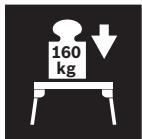
Meaning
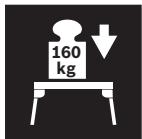
The maximum carrying capacity (power tool + workpiece) of the saw stand is 160 kg.
Functional Description

Read all warning notes and instructions enclosed with the saw stand and the power tool to be mounted. Failure to follow the warnings and instructions may result in electric shock, fire and/or serious injury.
Intended Use
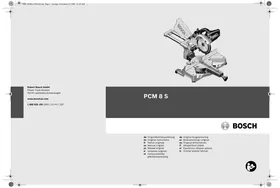
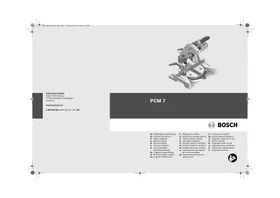
The saw stand is intended exclusively for mounting the following stationary Bosch saws (as of 2009.05):
- PCM 7 3603 M01 2.. - PCM 8S 3603 L020..
- PCM 10 3603 L01 0..
Together with the power tool, the saw stand is intended for the cutting to length of boards and profiles.
Product Features
The numbering of the product features refers to the illustration of the saw stand on the graphics pages.
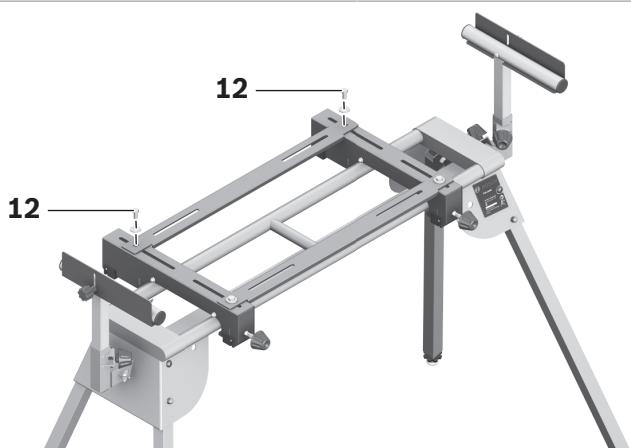
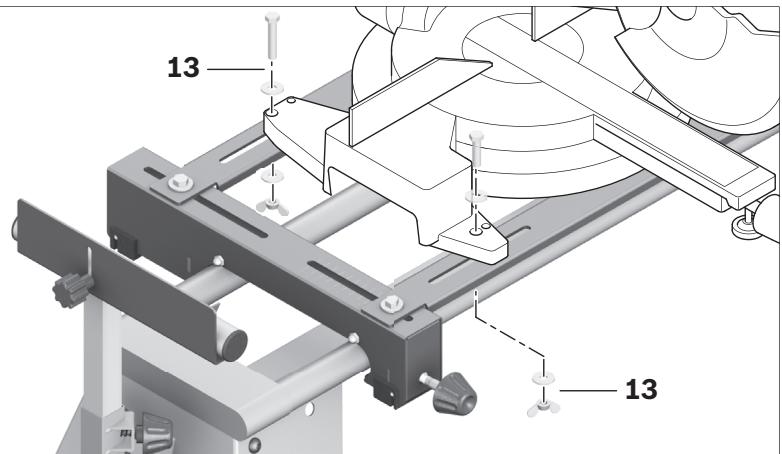
1 Attachment set 2 Retaining adapter 3 Locking pin of the saw stand legs 4 Height-adjustable leg 5 Locking knob of the attachment set 1 6 Length stop 7 Locking knob of the length stop 6 8 Workpiece support 9 Locking knob of the workpiece support 8 10 Table extension 11 Locking pin of the table extension 10 12 Fastening kit, retaining adapter 13 Fastening kit, power tool 14 Lock nut 15 Fastening hole 16 Assembly-sliding plate 17 Locking knob of the table extension 10 18 Adjustment screw of the attachment set 1
Accessories shown or described are not part of the standard delivery scope of the product. A complete overview of accessories can be found in our accessories program.
Technical Data
| Saw stand | PTA 2400 | |
| Article number | 3 603 M05 0.. | |
| Length of saw stand without table extension | mm | 1220 |
| Length of saw stand with table extension | mm | 2440 |
| Height of saw stand | mm | 820 |
| Max. carrying capacity (power tool + work-piece) without table extension - Attachment set | kg | 160 |
| Max. carrying capacity (power tool + work-piece) with table extension - Attachment set | kg | 110 |
| - Per table extension | kg | 25 |
| Weight according to EPTA-Procedure 01/2003 | kg | 20.4 |
Assembly
Delivery Scope

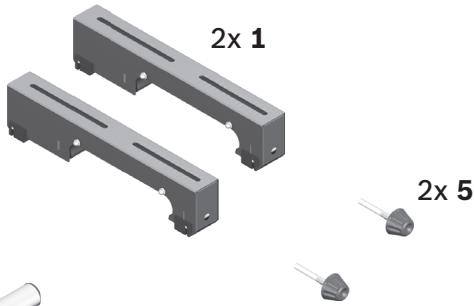
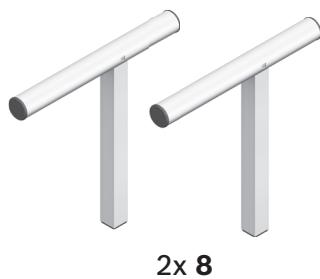
Please also observe the representation of the delivery scope at the beginning of the operating instructions.
Before assembling the saw stand, check if all parts listed below are provided:
| No. | Designation | Quan-tity |
| Saw stand PTA 2400 | 1 | |
| 1 | Attachment set | 2 |
| 5 | Locking knob of the attach-ment set | 2 |
| 2 | Retaining adapter | 2 |
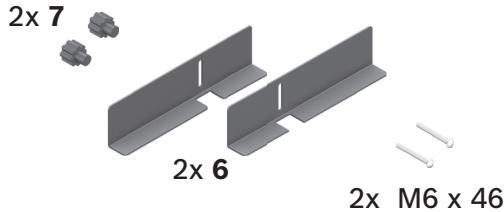
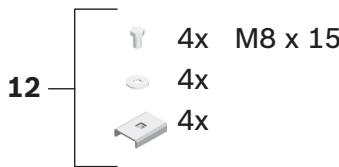
| 12 | Retaining adapter fastening kit consisting of: - Assembly-sliding plate | 4 |
| - Hexagon bolt (M8 x 15) | 4 | |
| - Washer | 4 | |
| 8 | Workpiece support | 2 |
| 6 | Length stop | 2 |
| 7 | Locking knob of the length stop | 2 |
| Carriage bolt (M6 x 46) | 2 | |
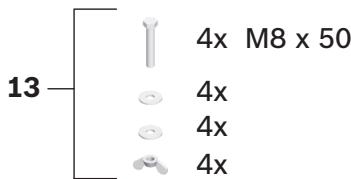
| 13 | Power tool fastening kit consisting of: - Hexagon bolt (M8 x 50) | 4 |
| - Washer | 8 | |
| - Wing nut | 4 |
Additionally required tools (not in delivery scope):
- Phillips screwdriver
- Spanner
Assembling the Saw Stand
- Carefully remove all parts included in the delivery from their packaging.
- Remove all packaging material.
Setting Up the Saw Stand (see figures A1-A2)
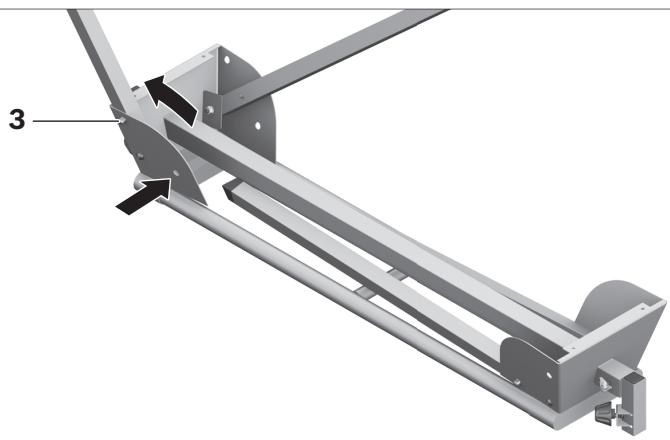
- Lay the saw stand upside down on the floor (legs facing upward). Push the locking pin 3 in and tilt the leg outward until the locking pin can be heard to engage.
- Repeat this workstep with the other three legs.
- Turn around the saw stand to the working position. The manufacturer logo must face toward the front so that it can be read.
- Ensure that the saw stand is stable and that all locking pins have engaged.
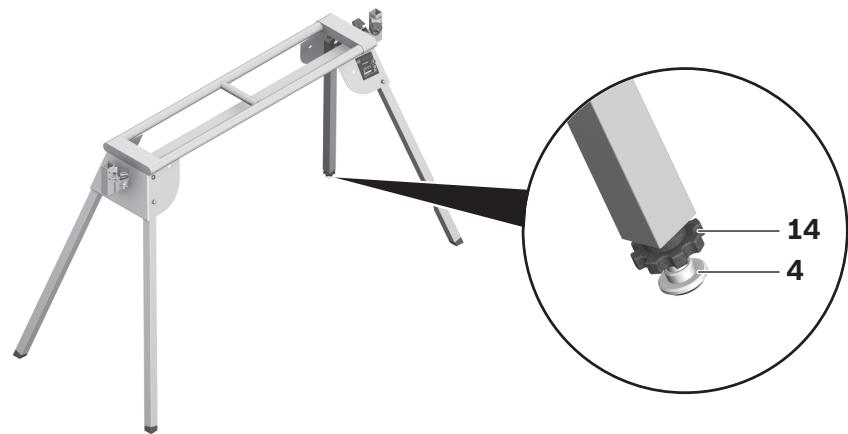
The saw stand is easily aligned with the height-adjustable leg 4.
- Loosen lock nut 14 and screw the leg in or out until the saw stand is aligned level and all four legs face against the floor.
Mounting the Length Stop and Workpiece Support (see figures B1-B2)
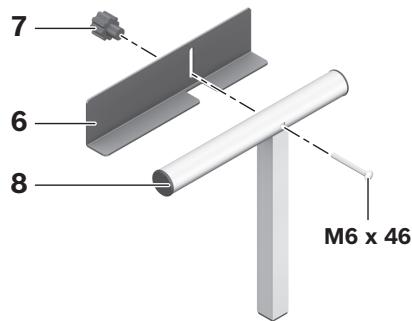
- Screw the length stop 6 to the workpiece support 8 with carriage bolt M6 x 46 and locking knob 7.
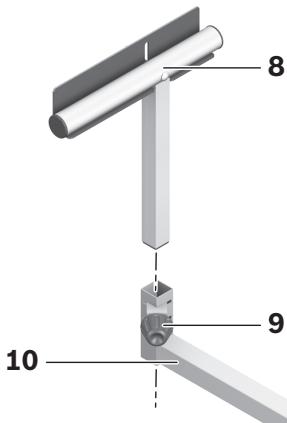
- Insert the workpiece support into the table extension 10.
- Tighten the locking knob 9 to lock the workpiece support.
- Repeat the worksteps with the second workpiece support.
Preparing the Saw Stand
Preparing the Attachment Sets (see figures C1-C3)
- Place both attachment sets 1 on the saw stand in such a manner that the labelling can be read.
- Hand-tighten both locking knobs 5.
- Place the retaining adapters 2 with the flat side facing upward on both attachment sets and move them apart so that the fastening holes 15 are aligned. Guide two assembly-sliding plates 16 each (perpendicular, with the flat side facing upward) from the rear into the guide compartment of the attachment sets 1. Move the assembly-sliding plates apart so that they are aligned with the fastening holes 15.
- Hand-tighten the attachment sets and retaining adapters with the washers and hexagon bolts from fastening kit 12.
- Afterwards, firmly tighten both locking knobs 5 of the attachment sets.
Fastening the Power Tool to the Attachment Sets (see figures D1-D3)
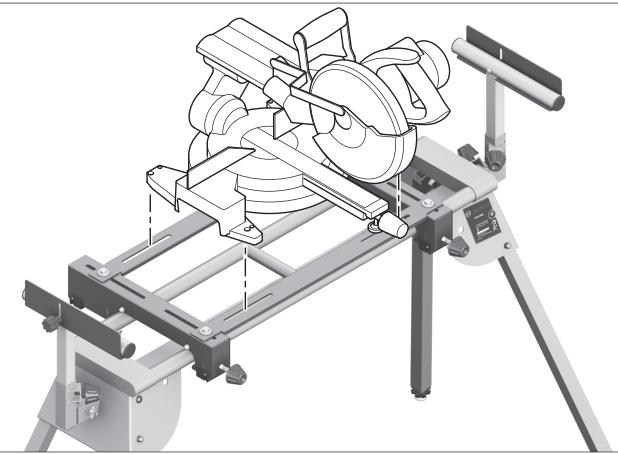
- Position the power tool in the transport position. Notes on the transport position are given in the operating instructions of the respective power tool.
- Position the power tool on the front retaining adapter in such a manner that the front mounting holes on the power tool are brought into alignment with the slots of the retaining adapter.
- Screw the front retaining adapter and the power tool together with the hexagon bolts, washers, and wing nuts from the fastening kit 13. Position the rear retaining adapter so that the rear mounting holes on the power tool align with the slots of the retaining adapter.
- Screw the rear retaining adapter and the power tool together with the hexagon bolts, washers, and wing nuts from the fastening kit 13.
Align the retaining adapters 2 uniformly. The imprinted scale helps in adjusting the same clearance on both sides. Finally, firmly tighten all screws of fastening kit 12 (retaining adapter) and all wing nuts of fastening kit 13 (power tool).
Operation
Working Advice
Do not overload the saw stand. Always observe the maximum carrying capacity of the saw stand and the two table extensions.
Always hold the workpiece firmly, especially the longer and heavier sections. After cutting through the workpiece, the center of gravity may become dislocated in such an unfavorable manner that the saw stand tips over.
If possible, always place the workpiece on one or both workpiece supports.
Extending the Saw Stand (see figures F1-F2)
Long workpieces must be underlaid or supported at their free end.
- Place your long workpiece onto the saw table of the power tool.
- Loosen locking knob 17 and pull the table extension 10 out to the desired clearance. Due to locking pin 11, the table extension can only be pulled out to the stop.
- Retighten the locking knobs again.
- Loosen locking knob 9 and adjust the height of the workpiece support 8 so that the workpiece rests level. The workpiece must be positioned level on the power tool's saw table.
- Retighten the locking knobs again.
Sawing Workpieces of the Same Length (see figure G)
The length stop 6 can be used for easily sawing workpieces to the same length.
- Adjust the desired workpiece length. (see figures F1-F2)
- Loosen locking knob 7 and position the length stop 6 to the desired clearance to the saw blade of the power tool.
- Retighten the locking knobs again.
Adjusting the Attachment-set Bracket (see figure H)
After intensive use of the saw stand, the bracket that locks the attachment set 1 to the saw table via the locking knob 5 may possibly require readjustment.
- Remove the power tool from the attachment sets.
- Turn the attachment set upside down.
- When the attachment set cannot be locked to the saw stand despite firmly tightening the locking knob, screw the adjustment screw 18 in clockwise direction.
When the attachment set does not fit onto both rails (front and rear) of the saw stand at the same time, screw the adjustment screw 18 in anticlockwise direction.
- Check the firm and correct seating of the attachment set and repeat the adjustment, if required.
- Repeat the worksteps with the second attachment set.
Maintenance and Service
Maintenance
If the saw stand should fail despite the care taken in manufacture and testing, repair should be carried out by an authorised customer services agent for Bosch power tools.
In all correspondence and spare parts orders, please always include the 10-digit article number given on the type plate of the saw stand.
After-sales Service and Customer Assistance
Our after-sales service responds to your questions concerning maintenance and repair of your product as well as spare parts. Exploded views and information on spare parts can also be found under:
www.bosch-pt.com
Our customer service representatives can answer your questions concerning possible applications and adjustment of products and accessories.
Great Britain
Robert Bosch Ltd. (B.S.C.)
P.O.Box 98
Broadwater Park
North Orbital Road
Denham
Uxbridge
UB 95HJ
Tel. Service: +44 (0844) 736 0109
Fax: +44 (0844) 736 0146
Australia, New Zealand and Pacific Islands
Robert Bosch Australia Pty. Ltd.
Power Tools
Locked Bag 66
Clayton South VIC 3169
Customer Contact Center
Inside Australia:
Phone: +61 (01300) 307 044
Fax: +61 (01300) 307 045
Inside New Zealand:
Phone: +64 (0800) 543 353
Fax: +64 (0800) 428 570
Outside AU and NZ:
Phone: +61 (03) 9541 5555
www.bosch.com.au
Republic of South Africa
Customer service
Hotline: +27 (011) 651 96 00
Gauteng - BSC Service Centre
35 Roper Street, New Centre
Johannesburg
Tel.: +27 (011) 493 93 75
Fax: +27 (011) 4930126
E-Mail: bsctools@icon.co.za
KZN - BSC Service Centre
Unit E, Almar Centre
143 Crompton Street
Pinetown
Tel.: +27 (031) 7 01 21 20
Fax: +27 (031) 7 01 24 46
E-Mail: bsc.dur@za.bosch.com
Western Cape - BSC Service Centre
Democracy Way, Prosperity Park
Milnerton
Tel.: +27 (021) 551 25 77
Fax: +27 (021) 5513223
E-Mail: bsc@zsd.co.za
Bosch Headquarters
Midrand, Gauteng
Tel.: +27 (011) 6519600
Fax: +27 (011) 6519880
E-Mail: rbsa-hq.pts@za.bosch.com
Disposal
The saw stand, accessories and packaging should be sorted for environmental-friendly recycling.
Subject to change without notice.
Robert Bosch (France) S.A.S.
Bosch Service Center
Telegrafvej 3
2750 Ballerup
Tel. Service Center: +45 (4489) 8855
Fax: +45 (4489) 87 55
E-Mail: vaerktoej@dk.bosch.com
Disposal
Bosch Service Center
Telegrafvej 3
2750 Ballerup
Denmark
Tel.: +46 (020) 41 44 55
Fax: +46 (011) 187691
Waste disposal
Bosch San. ve Tic. A.S.
Ahi Evran Cad. No:1 Kat:22
Polaris Plaza
80670 Maslak/Istanbul
Customer consultant: +90 (0212) 335 06 66
Customer service line: +90 (0212) 335 07 52
Disposal
Robert Bosch Sp. z o.o.
Bosch Service Center PT
K Vapence 1621/16
692 01 Mikulov
Tel.: +420 (519) 305 700
Fax: +420 (519) 305 705
E-Mail: servis.naradi@cz.bosch.com
Waste disposal
The workbench, accessories, and packaging should be sent for environmentally friendly recycling.
Subject to change without notice.
Safety instructions
General safety instructions
A WARNING
Read all the supplied safety warnings and instructions.
Failure to follow the warnings and instructions may result in electric shock, fire, and/or serious injury.
Safety instructions for workbenches
Safety instructions for workbenches
Safety instructions for workbenches
Before setting up the tool or replacing any of its accessories, always pull the mains plug out of the socket and/or remove the battery from the power tool. Accidental starting of the power tool is the cause of many accidents. Correctly set up the workbench before mounting the power tool on it. A secure setup is very important to prevent the tool from falling. Securely fasten the power tool to the workbench before starting to work with it. Slipping of the power tool on the workbench can lead to loss of control over it. Set up the workbench on a firm, level, horizontal surface. If the workbench wobbles or moves, it is impossible to guide the power tool or the workpiece safely and evenly. Do not overload the workbench and do not use it as a ladder or support. Overloading or standing on the workbench can cause its center of gravity to shift upward and the workbench to tip over.
Make sure that during transport all screws and connecting elements are firmly tightened. The clamping unit with the power tool must always be securely fastened. Loose connections can lead to instability and inaccurate results. Mount and dismount the power tool only when it is in the transport position (see the transport position in the operating instructions for the respective power tool). Otherwise, the power tool may have such an unfavorable center of gravity that you will not be able to hold it securely. When working with the power tool clamped in the clamping unit, use it only on the workbench. Without the workbench, the clamping unit with the power tool is unstable and can tip over. Be careful with heavy workpieces; they do not affect the balance of the workbench. Long workpieces such as boards or heavy workpieces must be supported or held.
Symbols
Some symbols may be important when operating your workbench. Please remember the symbols and their meanings. Correct interpretation of the symbols will help you use the workbench better and more safely.
Symbol meaning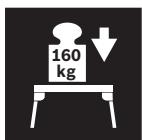
The maximum load capacity of the workbench (power tool + workpiece) is 160 kg.
Function description

Read the documentation supplied with the workbench and the power tool attached to it, all instructions and safety warnings. Ignoring safety instructions and warnings may result in electric shock, fire and/or serious injury.
Usage instructions
Do not overload the workbench. Always keep in mind the maximum load capacity of the workbench and both supports.
Always clamp the workpiece securely, especially the heavier and longer part. After cutting, the workpiece may shift so unfavorably that the workbench could tip over.
Whenever possible, always place the workpiece on one or both supports.
Extending the workbench (see fig. F1-F2)
The free end of long workpieces must rest on a support.
- Place the long workpiece on the table of the power tool. Loosen the clamping lever 17 and pull out the table extension 10 to the desired distance. Thanks to the side stop 11, the table extension can only be pulled out up to the stop.
- Tighten the clamping lever again.
- Loosen the clamping lever 9 and adjust the height of the support 8 so that the workpiece is positioned evenly.
The workpiece must lie flat on the table of the power tool.
- Tighten the fixing handle again.
Cut the workpieces to the same length (see Fig. G).
Simply cut the workpieces to the same length and you can use the stop.
- Adjust the required workpiece length. (see Fig. F1-F2) Loosen the fixing handle and position the stop at the required distance from the cutting disc of the power tool.
- Tighten the fixing handle again.
Adjusting the bracket of the clamping unit (see Fig. H)
If necessary, after intensive use of the machine, adjust the bracket with which the clamping unit is fixed to the machine using the fixing handle.
- Remove the power tool from the clamping units. -Turn the clamping unit. Turn the adjusting screw 18 counterclockwise if the clamping unit, despite the tightly tightened fixing handles, is not fixed to the machine.
Turn the adjusting screw 18 counterclockwise if the clamping unit is not simultaneously on both rails (guide rails) of the machine.
Illustrated components
The numbering of the illustrated components refers to the illustration of the machine on the pages with the diagrams.
1 Clamping unit 2 Clamping adapter 3 Stop rail for the machine 4 Height-adjustable foot 5 Fixing handle for clamping unit 1 6 Stop 7 Fixing handle for stop 6 8 Workpiece support 9 Fixing handle for workpiece support 8
10 Stop 11 Stop rail for stop 10 12 Mounting kit for clamping adapter 13 Mounting kit for power tool 14 Contact plate 15 Tilt hole 16 Mounting hole 17 Fixing handle for stop 10 18 Adjusting screw for clamping unit 1
Illustrated or described accessories are not included in the standard scope of delivery. The complete range of accessories can be found in our accessories program.
Intended use
The bench is intended for installation on new and existing stationary Bosch testing benches (as of 2009.05):
- PCM 7 3603 M01 2.. - PCM8S 3603L020..
- PCM 10 3603 L01 0..
The kit includes 3 adapters for the bench intended for opening doors and profiles.
Technical data
| Верстak | PTA 2400 | |
| Товарни homер | 3 603 M05 0.. | |
| Довхина верстaka 6е3 ПОДВЖУBAча StOу | MM | 1220 |
| Довхина верстaka 3 ПОДВЖУBAчem StOу | MM | 2440 |
| Висota верстaka | MM | 820 |
| Мамс. Нecuya здатнICTь (elektroponprilad + 3arotobka) | ||
| 6e3 ПОДВЖУBAча StOу | ||
| - 3aTHSCHи KOMПLEKT | КГ | 160 |
| Мамс. Нecuya здатнICTь (elektroponprilad + 3arotobka) | ||
| 3 ПОДВЖУBAчem StOу | КГ | 110 |
| - 3aTHSCHи KOMПLEKT | ||
| - кожни ПОДВЖУBAч STOу | КГ | 25 |
| Bara BiДпоВідно Do EPTA-Procedure 01/2003 | КГ | 20,4 |
Installation
Scope of delivery

See scope of delivery, designation for start-up and operating instructions.
Before installing the bench, check the availability of all specified parts:
Installing the bench (Fig. MA1-A2)
- Place the bench on the floor with the legs up. - Insert the locking pin into the middle and turn the nut until the locking pin is visible again in the slot. - Repeat this operation with the other three legs. - Check the bench for correct position. The workpiece must be placed in the middle so that it can be read. Make sure that the bench is installed stably and the locking pins are in the slots.
Adjust the height of the leg with the help of the adjusting screw.
Turn the counter nut 14 and turn or tighten the leg until the bench position is level and all four legs are on the floor.
Installing the longitudinal stop for the workpiece (Fig. MA1-B1-B2)
- Turn the longitudinal stop with the screw M6 x 46 and the fixing handle 7 to the workpiece stop 8. Insert the workpiece stop into the slot of the table 10.
- Fix the workpiece on one side. Repeat the operation from the other side of the workpiece.
Workpiece preparation
Preparing the workpiece for the mounting kit (see Fig. C1-C3)
- Install the mounting kit 1 on the workpiece so that the inscription can be read.
- Tighten the fixing handles 5 slightly.
- Install the mounting adapters 2 with the flat side up on the mounting kit and push them until they are at the mounting holes 15. Insert the mounting rails 16 (across, flat side up) into the front part of the mounting kits 1. Push the mounting rails until they are at the mounting holes 15. Slightly secure the mounting kit and the mounting adapter with the help of washers and screws with hexagon socket from the mounting kit 12. Then tighten the fixing handles 5 of the mounting kit.
Securing the electric drill on the mounting kit (see Fig. D1-D3)
Set the electric drill to the transport position. You will find instructions on the transport position in the operating instructions for the electric drill. Place the electric drill on the front mounting adapter so that the front mounting holes on the electric drill align with the corresponding holes of the mounting adapter. Connect the front mounting adapter and the electric drill with the help of screws with hexagon socket, washers and hexagon nuts from the mounting kit 13. Press the front mounting adapter so that the front mounting holes on the electric drill align with the corresponding holes of the mounting adapter.
Connect the rear mounting adapter and the electric drill with the help of screws with hexagon socket, washers and hexagon nuts from the mounting kit 13. Evenly tighten the mounting adapters 2. The markings on the scale will help you adjust the lateral distance from both sides. Finally, tighten all screws of the mounting kit 12 (mounting adapter) and all hexagon nuts of the mounting kit 13 (electric drill).
Operation
Operating instructions
Do not overload the workpiece. Always pay attention to the maximum load capacity of the workpiece and support it if necessary.
Always hold the workpiece firmly, especially the heavier parts. After cutting, the center of the workpiece may contain parts that are not supported, and the workpiece may tip over.
Place the workpiece on one or two supports.
Workpiece supports (see Fig. F1-F2)
On the workpieces of good quality, there is no need to clamp anything or use a support.
- Place the good workpiece on the table of the electric planer. Pull out the fixing handle 17 and raise the table 10 to the required height. Thanks to the side handle 11, the table can be raised only up to the stop. Then tighten the fixing handle. Adjust the support height of the workpiece 8 so that the workpiece lies straight. The workpiece must lie flat on the table of the electric planer.
- Then tighten the fixing handle.
Planing workpieces of the same thickness (see Fig. G)
For simple planing of workpieces of the same thickness, you can use the auxiliary stop 6.
Set the required workpiece thickness. (See Fig. F1-F2) Pull out the fixing handle 7 and set the auxiliary stop 6 to the appropriate height according to the cutting depth of the electric planer. - Then tighten the fixing handle.
Adjusting the pressure roller unit (see Fig. H)
During intensive operation of the planer, it may be necessary to adjust the roller, which is fixed in the pressure roller unit 1 with the fixing handle 5 on the planer.
- Remove the electric planer from the pressure roller units.
- Check the pressure roller unit. Turn the adjusting screw 18 counterclockwise so that the pressure roller unit, despite the strong tightening of the fixing handle, is not fixed on the planer.
Turn the adjusting screw 18 counterclockwise if the pressure roller unit does not sit evenly on both rails (front and rear) of the planer.
Check the strength and correctness of the pressure roller unit installation and, if necessary, repeat the adjustment procedure. Repeat this work operation with the other pressure roller unit.
Technical service
Technical service
If, despite the careful procedure of manufacturing and testing the planer, it still fails, the repair must be carried out only by a workshop authorized for electric tools Bosch.
When ordering spare parts, please quote the 10-digit order number shown on the type plate.
Service and customer support
Our service department will answer your questions regarding repair and maintenance of your product.
You can find detailed information about spare parts at:
www.bosch-pt.com
Bosch consultants will be happy to help you with any questions regarding the purchase, use, and setup of our products and accessories.
Ukraine
Bosch Service Center for Power Tools, Krainy, 1, 02660, Kyiv-60
Tel.: +38 (044) 5 12 03 75
Tel.: +38 (044) 5 12 04 46
Tel.: +38 (044) 512 05 91
Fax: +38 (044) 512 04 46
E-Mail: service@bosch.com.ua
The addresses of the regional warranty service centers are given in the warranty certificate.
Batteries, accessories, and packaging must be disposed of in an environmentally friendly manner.
Subject to change.
110 | Romanian
Bosch Service Center
Str. Horia Macelariu Nr. 30-34,
013937 Bucureşti
Tel. Service scule electrice: +40 (021) 4 05 75 40
Fax: +40 (021) 405 7566
E-Mail: infoBSC@ro.bosch.com
Tel. Consultanta tehnica: +40 (021) 4 05 75 39
Fax: +40 (021) 405 7566
E-Mail: infoBSC@ro.bosch.com
www.bosch-romania.ro
Disposal
The work table, accessories, and packaging must be directed to an ecological recycling station.
Subject to modifications.
Safety instructions.
General safety instructions.
WARNING! Read all safety warnings and instructions.
Both for the wall and for the power tool that is mounted on the wall. Failure to follow the safety instructions and the instructions for working with the power tool may result in electric shock, fire and/or serious injuries.
Safety instructions for wall-mounted tools.
Before starting to set up the power tool, before changing the working tool, before disconnecting the tool from the mains, before removing the battery from the power tool. Any reason for the tool to be switched on unintentionally. Before mounting the power tool, make sure the wall is clean and level. Secure mounting is important to prevent the risk of falling during work. Before starting work with the power tool, make sure it is securely attached to the wall. Using the power tool on the wall may result in loss of control over it. Place the wall on a firm, level, horizontal surface. If the wall can be moved or does not stand stably with the adjustable feet, the power tool and the workpiece may be moved unintentionally. Do not overload the wall; do not use it as a ladder or as a scaffold. Overloading or climbing on the wall may cause the center of gravity of the tool to shift and cause it to tip over.
When working, make sure all screws and connecting elements are tightened securely. The mounting screws for the power tool must be tightened firmly. Loose connections may cause instability and inaccuracy during operation. Mount and dismount the power tool only when it is in the transport position (for the transport position instructions, see the operating manual of the respective power tool). In any case, the center of gravity of the power tool may be in a position where the power tool cannot be held securely. Use the handles of the power tool only when they are attached to the wall; the handles do not ensure the stability of the power tool. Make sure in advance that the workpieces and the tools do not shift the center of gravity of the wall and do not tip it over. The edges of the workpieces and the tools must be rounded and deburred.
Symbols
The symbols below may be important for the correct operation of your wall. Please remember the symbols and their meaning. Correct interpretation of the symbols will help you use the wall more effectively and safely.
Symbol
Meaning
The maximum load capacity (power tool + workpiece) of the wall is 160 kg.
Function description

Read the warnings and instructions both for the wall and for the power tool that is to be mounted on the wall. Failure to follow the instructions for safe operation and for working with the power tool may result in electric shock, fire, and/or serious injury.
Intended use of the power tool
The wall is intended for mounting only on walls perpendicular to the floor (state as of 2009.05):
-PCM7
3603M012..
-PCM8S
3603 L02 0..
-PCM10
3603 L01 0..
Together with the power tool, the wall is intended for holding workpieces and profiles.
Illustrated components
The numbering of the illustrated components refers to the illustration of the wall on the graphics pages.
1 Mounting bracket for the power tool 2 Mounting screws 3 Swing arm for the wall 4 Adjustable in height arm 5 Locking lever for the mounting rails for the power tool 1 6 Base support 7 Locking lever for the stop for length 6 8 Workpiece support 9 Locking lever for the support for workpieces A8 10 Device for holding the work area 11 Swing arm for the adjustable work area 10
12 Set of fastening elements for mounting screws 13 Set of fastening elements for the power tool 14 Counter-wall 15 Saw blade guard 16 Mounting plate 17 Locking lever for the adjustable work area 10 18 Adjusting screw for the mounting rails for the power tool 1
The illustrations and the descriptions of the accessories are included in the standard scope of delivery. An exhaustive list of accessories can be found in the catalog and in the accessories section.
TexHnueckn daHHN
| Стetedа | FTA 2400 | |
| Каталожен Homep | 3 603 M05 0.. | |
| Дыжина на стetedа 6e3 удьлжаванe | mm | 1220 |
| Дыжина на стetedа с удьлжаванe | mm | 2440 |
| Височина на стetedа | mm | 820 |
| Мамс. Товаронocимоct (еlektroponнструмент + образовдан detай) 6e3 удьлжител - Монтajши ггеди за elektroponнструмент | kg | 160 |
| Мамс. Товаронocимоct (еlektroponнструмент + образовдан detай) c удьлжител - Монтajши ггеди за elektroponнструмents | kg | 110 |
| - на удьлжител | kg | 25 |
| Maca сбгальicho EPTA-Procedure 01/2003 | kg | 20,4 |
MOnTnpaHe
OKOMTIAEKTOBka

Moi, BxTe n3o6paxeHneTo Ha OKOMTIeKTOBkata B HauaLTo Ha pkoBOdCTB0To 3a ekTlOaTaun.
Ipea 3aTOnHeTe CTo6BaHTo Ha CTeHda TPOBepTe DaAN BCnUKN H3bpoEHN I0-DOy eAEMENT Ca HAUNH:
Otpra3BaHe Ha eHaKBO dIaIaIaIaI (BnXTe pHypa G)
3a aeCHOTO OTPaBaHe Ha DaTeaMn C eHaKBa AbxHnHa MoKeTe Da N3IOA3BaTe OppaHnHTeA TIO AbxHnHa 6.
HactpoTeKeHaHaTaDbAeknHaHaDeTaIa. (BxTe fngypn F1-F2) Pa3BnTe 3aCToOpRaBaata pBkoXBAtka7 HaCTpoIe OrpaHnHTeA IIO DbAKnHa 6 Ha JeLaHOTo pa3CTOarHne OT UINPKyAerPHn DaCK Ha eEAEKTPoHnHCTpyMeHtA. - OTHOBO 3aTeHHeTe 3aCTOnOpRAuTa Ta pbKoXBaTka.
Perynpahe Ha cko6aTa Ha MOHTaXHnTe rpeu 3a eLeKtpoHcTpymeHT (Bxxte fHyrgpa H)
CLeI INTeH3INBHa yIIOptpe6a MoKe Da ce HaLoXn peRyInpaHe Ha cKo6aTa, KOrTo 3axBa7a MoTAtxHIne TpeAn1 KbM CTeHda C POMOHTa Ha 3aCTOITOPBA7aTa pbKOXBATka 5.
ИЗваде Te ealektpoHCTpyMeHTa MOHTaXHHTe rpeDN. - 3aBbPTeMe MOHTaxxHaTa rpeda. - Ako BbIpeKn CnHHOTo 3aTЯRaHe Ha pbkOxBaTKaTa MOHTaXHaTa rPeDa He ce 3aCTOIIOPRABa 3dpaBO KbM CTeHda, 3aBbPTePe pyIlnpaUaNBA BVNT 18 IO NocOKa Ha yaCOBHNIKObA Ta CTEpAka.
AkoMOHTaXHaTa rpeDa He MoXe Da 6bDe 3axBaHaTa eHOBpEmHo KbM DBeTe HaIpeuHNrpeDN (PpeHaTa N 3aHA TA) Ha CTehda, 3aBpTepeYnpaunBnHT 18 06paTHo Ha YacOBnKOBaTa CTePAka.
- ПобереTe Дали монтайнITE греди могат Да ce 3axBaHaT правинои 3драВО и Ппн Heo6xOДИМОCT пOBTOpeTe Горнite CTbПКИ. -Повторе горнente CTытки 3a Втора моHTахнаду.
Подьржан ecpви3
TnDApbXkaHe
Before starting any repair, carefully inspect the device for damage. The repair must be carried out by an authorized service center for power tools.
If you have any questions about your device, please contact our customer service. You can find the 10-digit code on the type plate of the device.
Service and consultation
The service will answer your questions regarding repair and maintenance of your purchased product, as well as regarding spare parts. You can find the spare parts diagrams and information on spare parts at
www.bosch-pt.com
The Bosch consultation team will be happy to help you with any questions regarding purchase, application, and adjustment options for the various products from the Bosch product range, as well as accessories.
Robert Bosch EOOD - Bulgaria
Bosch Service Center
Warranty and repair
ul. Srebarna No. 3-9
1907 Sofia
Tel.: +359 (02) 962 5302
Tel.: +359 (02) 962 5427
Tel.: +359 (02) 962 5295
Fax: +359 (02) 62 46 49
The stand, accessories and tools must be handed in for recycling in accordance with the regulations.
Rights to changes reserved.
Safety instructions
General safety instructions
WARNING Read all warnings and instructions supplied with the workbench or power tool to be mounted.
Failure to follow the safety warnings and instructions may result in electric shock, fire and/or serious injury.
Safety warnings for workbenches
Pull the plug out of the socket and/or remove the battery from the power tool before making adjustments to the device or changing accessory parts. Unintentional starting of power tools is the cause of some accidents. Assemble the workbench correctly before mounting the power tool. Proper assembly is important to prevent the risk of breakage. - Securely attach the power tool to the workbench before using it. Slipping of the power tool on the workbench can lead to loss of control. Place the workbench on a firm, level and horizontal surface. If the workbench can slip or wobble, the power tool or workpiece cannot be guided evenly and safely. Do not overload the workbench and do not use it as a ladder or scaffold. Overloading or standing on the workbench can cause the center of gravity of the workbench to shift and it to tip over. Make sure that all screws and connecting elements are firmly tightened during transport and operation. The holder set for the power tool must always be firmly locked. Loose connections can lead to instability and inaccurate cuts.
Mount and dismount the power tool only when it is in the transport position (see the warnings regarding the transport position in the operating instructions of the respective power tool). The power tool may have such an unfavorable center of gravity that it cannot be held safely. Work with the power tool attached to the holder set exclusively on the workbench. Without the workbench, the holder set with the power tool stands unsteadily and can tip over. Make sure that long and heavy workpieces do not throw the workbench off balance. Long and heavy workpieces must be supported or rested at the free end.
Symbols
The following symbols may be relevant only for the use of your workbench. Please remember the symbols and their meaning. Correct interpretation of the symbols will help you to use the workbench better and more safely.
Symbol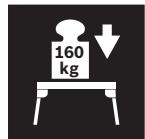
Meaning
Maximum load capacity (power tool + workpiece) of the workbench is 160 kg.
Function description

Read all safety warnings and instructions supplied with the workbench or power tool to be mounted. Failure to comply with safety warnings and instructions may result in electric shock, fire, and/or serious injury.
Intended use
The workbench is designed exclusively to accept the following stationary saws from Bosch (as of 2009.05):
-PCM7
3603M012..
-PCM8S
3603 L02 0..
-PCM10
3603 L01 0..
Together with the power tool, the workbench is intended for cross-cutting boards and profiles.
Components illustrated
General safety instructions
CAUTION


- PTA
- BOSCH
- GENERAL SAFETY RULES
- SAFETY WARNINGS FOR SAW STANDS
- SYMBOLS
- MEANING
- FUNCTIONAL DESCRIPTION
- INTENDED USE
- PRODUCT FEATURES
- TECHNICAL DATA
- ASSEMBLY
- DELIVERY SCOPE
- ADDITIONALLY REQUIRED TOOLS (NOT IN DELIVERY SCOPE)
- ASSEMBLING THE SAW STAND
- SETTING UP THE SAW STAND (SEE FIGURES A1-A2)
- MOUNTING THE LENGTH STOP AND WORKPIECE SUPPORT (SEE FIGURES B1-B2)
- PREPARING THE SAW STAND
- PREPARING THE ATTACHMENT SETS (SEE FIGURES C1-C3)
- FASTENING THE POWER TOOL TO THE ATTACHMENT SETS (SEE FIGURES D1-D3)
- OPERATION
- WORKING ADVICE
- EXTENDING THE SAW STAND (SEE FIGURES F1-F2)
- SAWING WORKPIECES OF THE SAME LENGTH (SEE FIGURE G)
- ADJUSTING THE ATTACHMENT-SET BRACKET (SEE FIGURE H)
- MAINTENANCE AND SERVICE
- MAINTENANCE
- AFTER-SALES SERVICE AND CUSTOMER ASSISTANCE
- WWW.BOSCH-PT.COM
- GREAT BRITAIN
- AUSTRALIA, NEW ZEALAND AND PACIFIC ISLANDS
- REPUBLIC OF SOUTH AFRICA
- CUSTOMER SERVICE
- GAUTENG - BSC SERVICE CENTRE
- KZN - BSC SERVICE CENTRE
- WESTERN CAPE - BSC SERVICE CENTRE
- BOSCH HEADQUARTERS
- DISPOSAL
- WASTE DISPOSAL
- SAFETY INSTRUCTIONS
- GENERAL SAFETY INSTRUCTIONS
- A WARNING
- SAFETY INSTRUCTIONS FOR WORKBENCHES
- FUNCTION DESCRIPTION
- USAGE INSTRUCTIONS
- EXTENDING THE WORKBENCH (SEE FIG. F1-F2)
- CUT THE WORKPIECES TO THE SAME LENGTH (SEE FIG. G)
- ADJUSTING THE BRACKET OF THE CLAMPING UNIT (SEE FIG. H)
- ILLUSTRATED COMPONENTS
- INSTALLATION
- SCOPE OF DELIVERY
- INSTALLING THE BENCH (FIG. MA1-A2)
- INSTALLING THE LONGITUDINAL STOP FOR THE WORKPIECE (FIG. MA1-B1-B2)
- WORKPIECE PREPARATION
- PREPARING THE WORKPIECE FOR THE MOUNTING KIT (SEE FIG. C1-C3)
- SECURING THE ELECTRIC DRILL ON THE MOUNTING KIT (SEE FIG. D1-D3)
- OPERATING INSTRUCTIONS
- WORKPIECE SUPPORTS (SEE FIG. F1-F2)
- PLANING WORKPIECES OF THE SAME THICKNESS (SEE FIG. G)
- ADJUSTING THE PRESSURE ROLLER UNIT (SEE FIG. H)
- TECHNICAL SERVICE
- SERVICE AND CUSTOMER SUPPORT
- UKRAINE
- ROMANIAN
- WARNING! READ ALL SAFETY WARNINGS AND INSTRUCTIONS
- SAFETY INSTRUCTIONS FOR WALL-MOUNTED TOOLS
- SYMBOL
- INTENDED USE OF THE POWER TOOL
- MONTNPAHE
- OKOMTIAEKTOBKA
- OTPRA3BAHE HA EHAKBO DIAIAIAIAI (BNXTE PHYPA G)
- PERYNPAHE HA CKO6ATA HA MOHTAXHNTE RPEU 3A ELEKTPOHCTPYMEHT (BXXTE FHYRGPA H)
- ПОДЬРЖАН ECPВИ
- TNDAPBXKAHE
- SERVICE AND CONSULTATION
- ROBERT BOSCH EOOD - BULGARIA
- WARNING READ ALL WARNINGS AND INSTRUCTIONS SUPPLIED WITH THE WORKBENCH OR POWER TOOL TO BE MOUNTED
- SAFETY WARNINGS FOR WORKBENCHES
- COMPONENTS ILLUSTRATED
- CAUTION
Brand : BOSCH
Model : PTA 2400
Category : Miter saw