USER MANUAL PDO MULTI BOSCH
Operating instructions
Functional Description

Optimal working with the measuring tool is possible only when the operating instructions and information are read completely, and the instructions contained therein are strictly followed. SAVE THESE INSTRUCTIONS.
Please unfold the fold-out page with the representation of the measuring tool and leave it unfolded while reading the operating instructions.
Intended Use
The measuring tool is intended for the detection of metals (ferrous and nonferrous metals, e.g., rebar), joists and "live" wires/conductors in walls, ceilings and floors.
Product Features
The numbering of the product features shown refers to the illustration of the measuring tool on the graphic page.
1 Illuminated ring
2 Marking hole
3 Display
4 “ZOOM” button
5 Wood-detection button
6 Metal-detection button
7 "on/off" button
8 Felt pads
9 Sensor area
10 Battery lid
11 Pencil for marking (removable)
12 Latch of battery lid
Display Elements
a "Live" wire indicator
b Wood detection indicator
c Metal detection indicator
d “ZOOM” function indicator
e "ZOOM" measuring indicator
f Measuring indicator
g "AutoCal" calibration indicator
h Indicator for magnetic metals
Indicator for non-magnetic metals
j Switched-off audio signal indicator
k Battery indication
Technical Data
| Digital Detector | PDO Multi |
| Article number | 3 603 K10 000 |
| Maximum scanning depth*: |
| Ferrous metals | 80 mm |
| Non-ferrous metals (copper) | 60 mm |
| Copper conductors (live)** | 40 mm |
| Wood | 20 mm |
| Automatic switch-off after approx. | 5 min |
| Operating temperature | -10 °C ... +50 °C |
| Storage temperature | -20 °C ... +70 °C |
| Battery | 1 x 9 V 6LR61 |
| Rechargeable battery | 1 x 9 V 6F22 |
| Operating lifetime(alkali-manganese batteries) approx. | 6 h |
| Weight according to EPTA-Procedure 01/2003 | 0.25 kg |
| * depends on material and size of objects as well as material and condition of struc-ture |
| ** less scanning depth for wires/conductors that are not "live"Please observe the article number on the type plate of your measuring tool. The trade names of the individual measuring tools may vary. |
Operation
Inserting/Replacing the Battery
Use only alkali-manganese or rechargeable batteries.
To open the battery lid 10, press the latch 12 in the direction of the arrow and fold up the battery lid. Insert the supplied battery. Pay attention that the polarity is correct, according to the representation on the inside of the battery lid.
When the battery indication k in the display lights up, measuring is possible for approx. 1 h when using alkali-manganese batteries (service life is shorter with rechargeable batteries). When the battery indication k flashes, measuring is still possible for approx. 10 minutes. When the battery indication k and the illuminated ring 1 (red) are flashing, measuring is no longer possible and the battery or the rechargeable battery respectively, must be replaced.
If the measuring tool is not used for a long period of time, the battery must be removed. The battery can corrode or discharge itself over long periods.
Initial Operation
Protect the measuring tool against moisture and direct sun irradiation.
Switching On and Off
Before switching the measuring tool on, make sure that the sensor area 9 is not moist. If required, wipe the measuring tool dry using a cloth.
If the measuring tool was subject to an extreme temperature change, allow it to adjust to the ambient temperature before switching on.
To switch on switch on the measuring tool on, press any button.
When switching the measuring tool on with the wood-detection button 5 or with the metal-detection button 6, it will automatically be in the respective detection function.
When switching the measuring tool on with the "on/off" button 7 or with the "ZOOM" button 4, it will be in the detection function last used.
After a brief self-check, the measuring tool is ready for operation. When the measuring tool is in the metal-detection function, the service readiness is indicated through a check mark behind the "AutoCal" calibration indicator g.
To switch the measuring tool off, press the "on/off" button 7.
If none of the measuring tool buttons are pressed for approx. 5 minutes, the measuring tool switches off automatically in order to extend the service life of the battery.
Operating Modes
The measuring tool detects objects below the sensor area 9.
When scanning for metal objects, press the metal-detection button 6. The metal detection indicator symbol c is indicated in the display and the illuminated ring 1 lights up green.
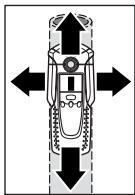
Place the measuring tool on the surface to be scanned and move it sideways. When the measuring tool comes close to a metal object, the amplitude in the measuring indicator f increases and when it is moved away, the measuring indicator decreases. At the position of the maximum amplitude, the metal object is below the centre of the sensor (below the marking hole 2). As long as the measuring tool is above the metal object, the illuminated ring 1 lights up red and a steady tone sounds.
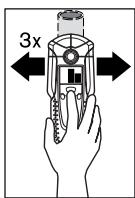
To localise the object precisely, press the "ZOOM" button 4 and keep it pressed while repeatedly (3x) moving the measuring tool over the object. The "Zoom" function indicator d appears in the display. The "Zoom" measuring indicator e has the greatest amplitude over the centre of the metal object.
When very small or deeply embedded metal objects are being detected and the measuring indicator f does not
react, press the "ZOOM" button 4 and keep it pressed while continuing to move the measuring tool over the area. Observe only the zoom measuring indicator e for the scan.
If there are any metal inclusions in the material being scanned, then a continuous signal is indicated in the measuring indicator f. In this case, press the "ZOOM" button 4 and keep it pressed while continuing to move the measuring tool over the area. Observe only the "Zoom" measuring indicator e for the scan.
If the metal object found is a magnetic (e.g. iron), then the indicator for magnetic metals h is displayed. For non-magnetic metals, the indicator for non-magnetic metals i is displayed. In order for the measuring tool to differentiate between the metal types, it must be positioned above the detected metal object (the illuminated ring 1 lights up red). For weak signals, the indication of the metal type is not possible.

For steel wire mesh and reinforcements in the scanned structural material, an amplitude of the measuring indicator f is displayed over the complete surface. In this case, always use the "Zoom" function for the scan. For steel wire mesh, it is typical that the indicator for magnetic metals h is displayed directly above the rebar; the indicator for non-magnetic metals i is displayed between the rebars.
Detecting Wooden Objects
When scanning for wooden objects, press the wood-detection button 5. The wood detection indicator symbol b and the "Zoom" function indicator d are indicated in the display and the arrow below the "Zoom" function indicator d flashes. The "AutoCal" calibration indicator g and the illuminated ring 1 go out.
Position the measuring tool onto the surface being scanned. Then press the "ZOOM" button 4 and keep it pressed. Now the illuminated ring 1 lights up green, the "AutoCal" calibration indicator g is displayed again, the "Zoom" function indicator d as well as the arrow below it go out.
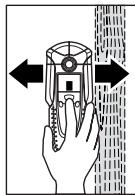
With the “ZOOM” button 4 pressed, evenly move the measuring tool over the surface without lifting off or changing the applied pressure. While measuring, the felt pads 8 must always be in contact with the surface.
When a wooden object is detected, an amplitude is displayed in the measuring indicator f. Move the measuring tool over the surface repeatedly to localise the wooden object more precisely. After moving over the same area
several times, the wooden object can be indicated quite accurately: The illuminated ring 1 lights up red and a steady tone sounds as long as the measuring tool is over the wooden object. The measuring indicator f has the greatest amplitude over the centre of the wooden object. The "Zoom" measuring indicator e is inactive when scanning for wooden objects.
Caution: When having placed the measuring tool onto the surface to be scanned under which a wooden object is coincidentally located, and having moved it over the surface, the measuring indicator f, the arrow below the "Zoom" function indicator d and the illuminated ring 1 flash red. In this case, start the scan again by repositioning the measuring tool somewhat offset onto the structure and pressing the "ZOOM" button 4 again.
When scanning for wooden objects, metal objects are sometimes also indicated as objects found at depths between 20 - 50mm . To distinguish between wooden and metal objects, switch to the detecting-metal function (see "Detecting Metal Objects"). When an object is indicated at the same location in this function, then it is clearly a metal object and not a wooden object. To continue searching for wooden objects, switch back to the detecting-wood function.
Scanning for "Live" Wires
The measuring tool indicates lines that carry a voltage between 110V and 400V with frequencies corresponding to the widespread standard (AC with 50 or 60Hz ). Other lines (DC, higher/ lower frequency or voltage) are indicated only as metal objects.
"Live" wires/conductors are indicated both during a metal scan as well as during a wood scan. When a "live" wire/conductor is detected, the indicator a appears in the display. Move the measuring tool over the surface repeatedly in order to localise the "live" wire/conductor more precisely. After moving the measuring tool over the surface several times, the "live" wire/conductor can be indicated quite precisely. If the measuring tool is very close to the wire/conductor (four or five bars in indicator a ), the illuminated ring 1 flashes red and the signal tone sounds with a rapid tone sequence.

"Live" wires/conductors can be detected easier when power consumers (e.g., lamps, appliances) are connected to the wire/conductor being sought and switched on. Wires/conductors with 110 V, 230 V and 400 V (three-phase current) are detected with about the same scan capacity.
Under certain conditions (such as when behind metal surfaces or behind surfaces with high water content), "live" wires/conductors cannot be detected with certainty. These ranges can be recognised in the metal detection function. When a measuring value is indicated all over a larger range of the measuring indicator f , then the material is screening off electrically and the scan for "live" wires/conductors is not reliable.
Wires that are not "live" can be found as metal objects with the detecting-metal function. However, stranded cables are not indicated (contrary to solid copper conductors).
Operating Instructions
- On condition of the principle, the measuring values can be impaired through certain ambient conditions. These include, e.g., the proximity of other equipment that produce strong magnetic or electromagnetic fields, moisture, metallic building materials, foil-laminated insulation materials or conductive wallpaper. Therefore, please also observe other information sources (e.g. construction plans) before drilling, sawing or routing into walls, ceilings or floors.
Switching Off the Signal Tone
The signal tone can be switched on and off. For this, press the metal-detection button 6 and the wood-detection button 5 at the same time. When the signal tone is switched off, the switched-off audio signal indicator j appears on the display.
The signal tone setting is maintained after switching the measuring tool off and on again.
Marking Objects
Detected objects can be marked as required. For this, remove the pencil 11 from the measuring tool and carry out the scan as usual. Once you have found the limits or the centre of an object, simply mark the sought after location through the marking opening 2.
"AutoCal" Calibration Indicator
When the check mark behind the "AutoCal" calibration indicator g flashes over a longer period or if it is not displayed anymore, reliable scanning is no longer possible. In this case, send in the measuring tool to an authorised Bosch after-sales service agent. Exception: In the detecting wooden objects' function, the "AutoCal" calibration indicator g goes out as long as the "ZOOM" button 4 is not pressed.
Maintenance and Service
Maintenance and Cleaning
When the measuring indicator f continuously shows an amplitude even though there is no metal object in the vicinity of the measuring tool, the measuring tool can be calibrated manually. For this, remove all objects in the vicinity of the measuring tool (including wrist watches or rings of metal) and hold the measuring tool up in the air. With the measuring tool switched off, press both the "on/off" button 7 and the wood-detection button 5 until the illuminated ring 1 lights up red and green at the same time. Then release both buttons. When the calibration process was successful, the measuring tool will start over after a few seconds and is then ready for operation.
Wipe away debris or contamination with a dry, soft cloth. Do not use cleaning agents or solvents.
In order not to affect the measuring function, decals/stickers or name plates, especially metal ones, may not be attached in the sensor area 9 on the front or back side of the measuring tool.
Do not remove the felt pads 8 on the back side of the measuring tool. Replace the felt pads when they are damaged or used. For this, completely remove the felt pads and glue the new felt pads onto the same spots.
Store and transport the measuring tool only in the supplied protective case.
If the measuring tool should fail despite the care taken in manufacturing and testing procedures, repair should be carried out by an authorized after-sales service centre for Bosch power tools.
In all correspondence and spare parts orders, please always include the 10-digit article number given on the type plate of the measuring tool.
Spare Parts
Protective case 1609 203 P19
Battery lid 10. 1609 203 R32
Felt pads 8. 1609203 P21
Service and Customer Assistance
Exploded views and information on spare parts can be found under: www.bosch-pt.com
Great Britain
Robert Bosch Ltd. (B.S.C.)
P.O.Box 98
Broadwater Park
North Orbital Road
Denham-Uxbridge
MIDDLEX UB 9 5HJ
Service: 44 (0) 18 95 / 83 87 82
Advice line: +44 (0) 18 95 / 83 87 91
Fax: +44 (0) 1895 / 838789
Ireland
Beaver Distribution Ltd.
Greenhills Road
Tallaght-Dublin 24
Service: +353 (0)1 / 4 14 94 00
Fax: +353 (0)1 / 4 59 80 30
Australia and New Zealand
Robert Bosch Australia Pty. Ltd.
RBAU/SPT
1555 Centre Road
P.O.Box 66
3168 Clayton/Victoria
念 61 (0)1 / 3 00 30 70 44
Fax: +61 (0)1 / 3 00 30 70 45
www.bosch.com.au
Disposal
Measuring tools, accessories and packaging should be sorted for environmental-friendly recycling.
Only for EC countries:
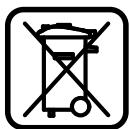
Do not dispose of measuring tools into household waste! According the European Guideline 2002/96/EC for Waste Electrical and Electronic Equipment and its implementation into national right, measuring tools that are no longer usable must be collected separately and disposed of in an environmentally correct manner.
Battery packs/batteries:
Do not dispose of battery packs/batteries into household waste, fire or water. Battery packs/batteries should be collected, recycled or disposed of in an environmental-friendly manner.
Only for EC countries:
Defective or dead out battery packs/batteries must be recycled according the guideline 91/157/EEC.
Batteries no longer suitable for use can be directly returned at:
Great Britain
Robert Bosch Ltd. (B.S.C.)
P.O.Box 98
Broadwater Park
North Orbital Road
Denham-Uxbridge
MIDDLEX UB 9 5HJ
Service: 44 (0) 18 95 / 83 87 82
Advice line: +44 (0) 18 95 / 83 87 91
Fax: +44 (0) 1895 / 838789
Subject to change without notice.
Robert Bosch France S.A.S.
ServiceAprès-vente/Outillage
Móvo yia xwpeC tnc EE:

Mn pixveTe ta opya maetpnonc oTa anoppimuata Tou ontiou oac!
Sigmaomega Tnv Koivotikn Odbnyia 2002/96/EK npi naaiw v Nktpkiw kai Nktpovikw ouokuw kai eTn mtaopap Ta nC eVtiko dioEv iaval nEto anapaitto, ta axpota opya maetpnonc va oullEyovtaeXewoiaKa v aavukkwovtau M tpofoilko npocTo nepiBaalov.
Mnataipec/Enavafoptizouevcmuataipec:
Mn pixveTe TIC mntapieC/TIC ENAVAFOPTIcOeVc MNTAPiEc Ota anoppmuata Tou otiou oac, otN oT0 vepo. OI
Batarya gozü kapağıni 10污染防治 implementation of the vegetation management system in Batarya, including the following activities:
Bosch San. ve Tic. A.S.
Ahi Evran Cad. No:1 Kat:22
Polaris Plaza
80670 Maslak/Istanbul
Müsteri Danismani: +90 (0)2 12 / 3 35 06 66
Müsteri Servis Hatti: +90 (0)2 12 / 3 35 07 52
Tasfiye



