
MINIKIT - Hands-free kit PARROT - Free user manual and instructions
Find the device manual for free MINIKIT PARROT in PDF.

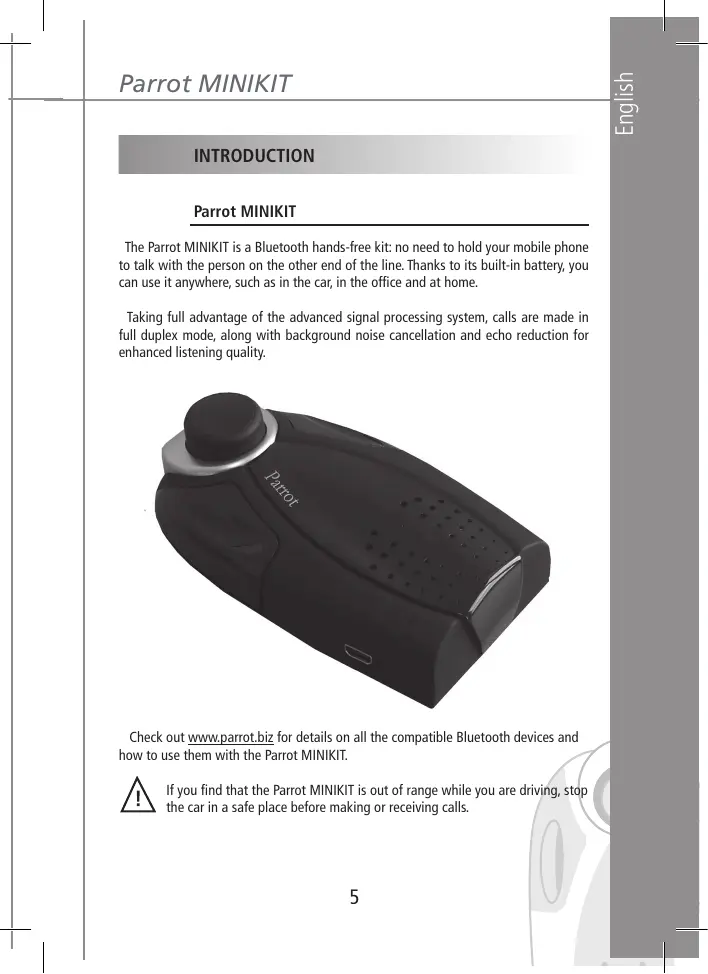


| Product type | Bluetooth hands-free kit |
| Brand | Parrot |
| Model | MINIKIT |
| Dimensions | 63 × 28 × 110 mm |
| Weight | 105 g |
| Battery | Li-ion 1100 mAh |
| Talk time | Approximately 10 hours |
| Standby time | More than 250 hours |
| Charging time | 3 hours |
| Charger | 5.15 V DC / 0.5 A max (cigarette lighter socket) |
| Bluetooth range | Approximately 10 m |
| Bluetooth version | 1.2 |
| Bluetooth profiles | Hands-free (HFP 1.0 and 1.5), Headset (HSP 1.1), Object Push (OPP) |
| PIN code | 1234 |
| Number of pairable devices | Up to 5 |
| Main functions | Full-duplex hands-free communication, noise and echo cancellation, voice recognition, voice dialing, last number redial, private mode, DTMF sending, volume adjustment, receiving contacts via Bluetooth |
| Indicators | Green and red LED (flashing for calls, charging) |
| Mounting | Sun visor clip included |
| Voice recognition | Recording of keywords (home, work, mobile, general, other) |
| Update | Via Bluetooth from the Parrot website |
| Languages | Selectable, multiple languages available |
| Care and cleaning | Clean with a soft, dry cloth. Do not use liquids. |
| Safety | Do not use the kit while driving if it is out of reach. Stop the vehicle to answer or end calls. |
Frequently Asked Questions - MINIKIT PARROT
User questions about MINIKIT PARROT
0 question about this device. Answer the ones you know or ask your own.
Ask a new question about this device
Download the instructions for your Hands-free kit in PDF format for free! Find your manual MINIKIT - PARROT and take your electronic device back in hand. On this page are published all the documents necessary for the use of your device. MINIKIT by PARROT.
USER MANUAL MINIKIT PARROT
Recharging the Parrot MINIKIT p 6
Fitting the kit . p 7
Description of the Parrot MINIKIT .p 7
Connecting your Bluetooth phone/PDA. p 8
FEATURES p 9
Description and use of the functions .p 9
Voice menu structure p 11
Voice recognition p 11
Receiving contacts p 12
UPDATING . p 13
HOTLINE p 14
SPECIFICATIONS p 14
NOTES p 16
GENERAL INFORMATION p 157
INTRODUCTION
Parrot MINIKIT
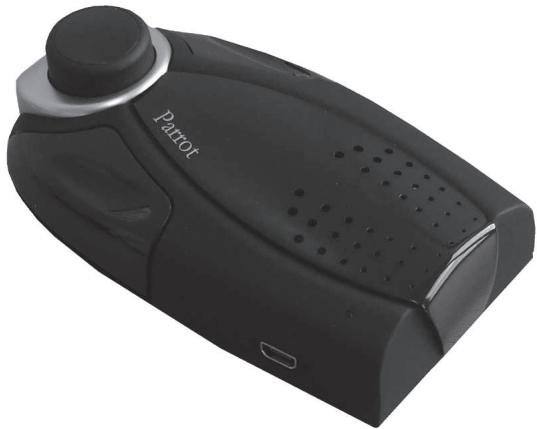
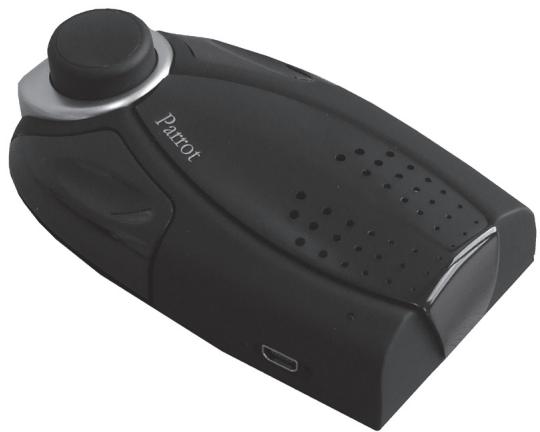
The Parrot MINIKIT is a Bluetooth hands-free kit: no need to hold your mobile phone to talk with the person on the other end of the line. Thanks to its built-in battery, you can use it anywhere, such as in the car, in the office and at home.
Taking full advantage of the advanced signal processing system, calls are made in full duplex mode, along with background noise cancellation and echo reduction for enhanced listening quality.
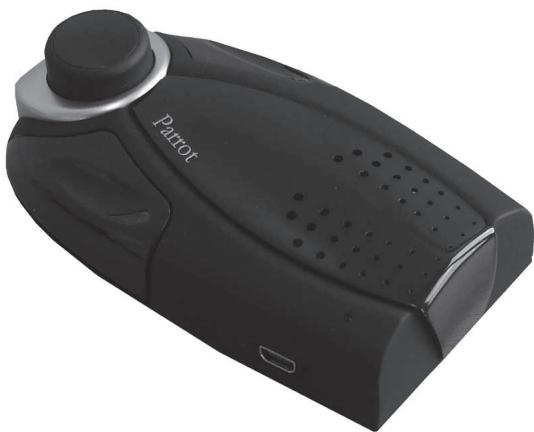
Check out www.parrot.biz for details on all the compatible Bluetooth devices and how to use them with the Parrot MINIKIT.

If you find that the Parrot MINIKIT is out of range while you are driving, stop the car in a safe place before making or receiving calls.
KIT CONTENTS
The kit contains
- The Parrot MINIKIT kit.
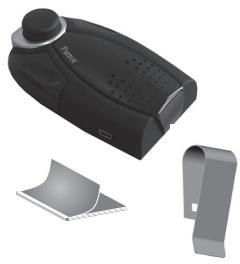
- A bracket for fixing the Parrot MINIKIT to your vehicle's sun visor.
- A user guide.
- A Parrot product guide.
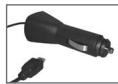
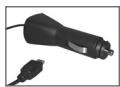
A cigar lighter charger.



USING FOR THE FIRST TIME
Recharging the Parrot MINIKIT
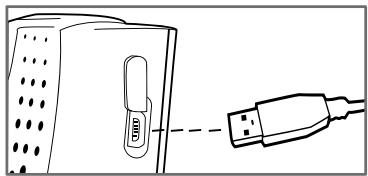
Before using for the first time, the Parrot MINIKIT needs to be recharged.
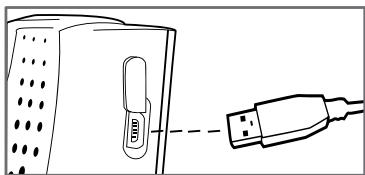
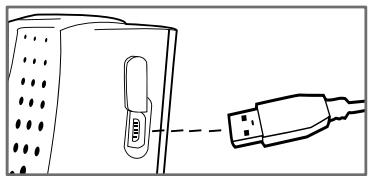
To do so, plug the charger into your vehicle's cigar lighter.
The colour of the LED changes from orange to green when the device is fully charged (the LED is off when the charger is not connected).
When the battery level is low, the device issues a series of beeps.
Fitting the kit
A bracket is supplied for fitting the Parrot MINIKIT to the sun visor, so that it can be used as a hands-free kit in your vehicle.
To use the device in the office or at home, simply place it on a flat surface and use it for your calls (tip: remove the sun visor bracket for greater stability).
Description of the Parrot MINIKIT
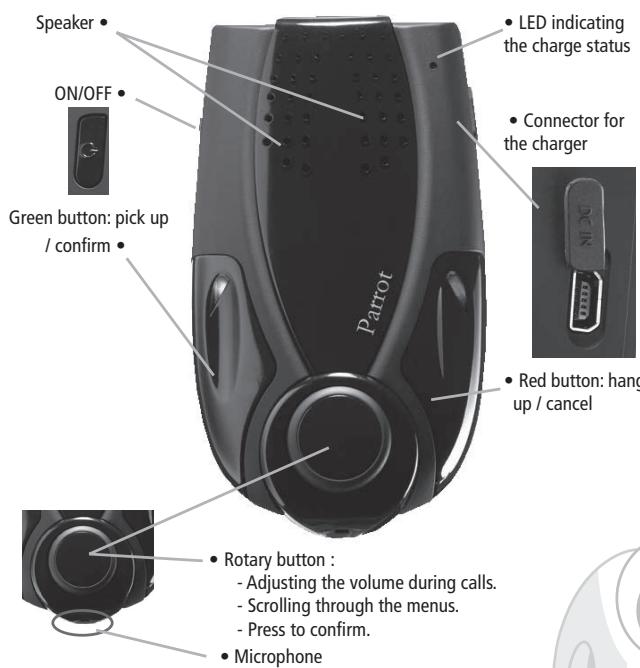
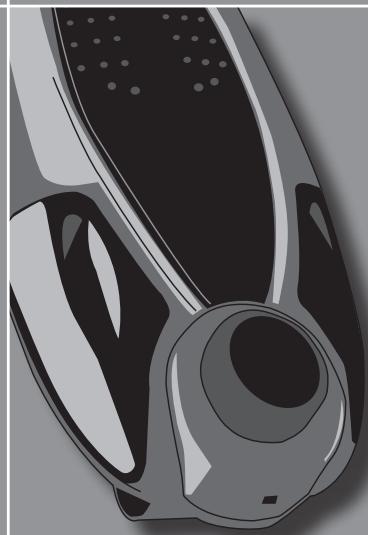
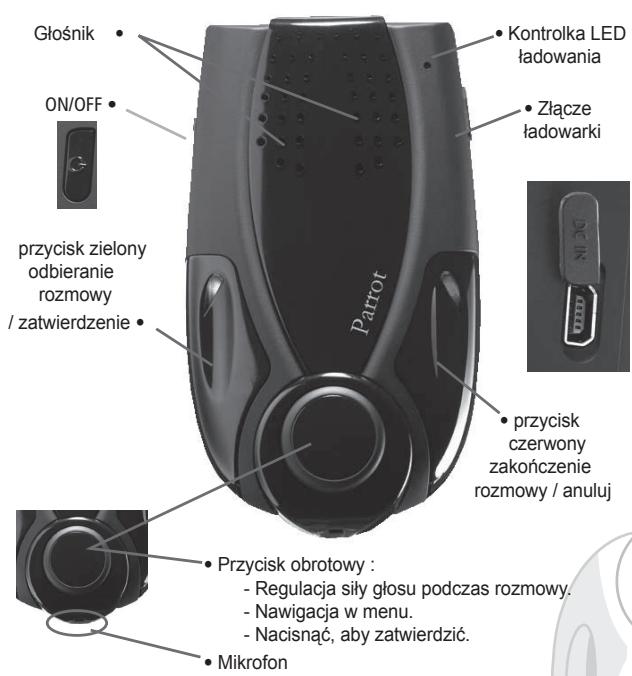
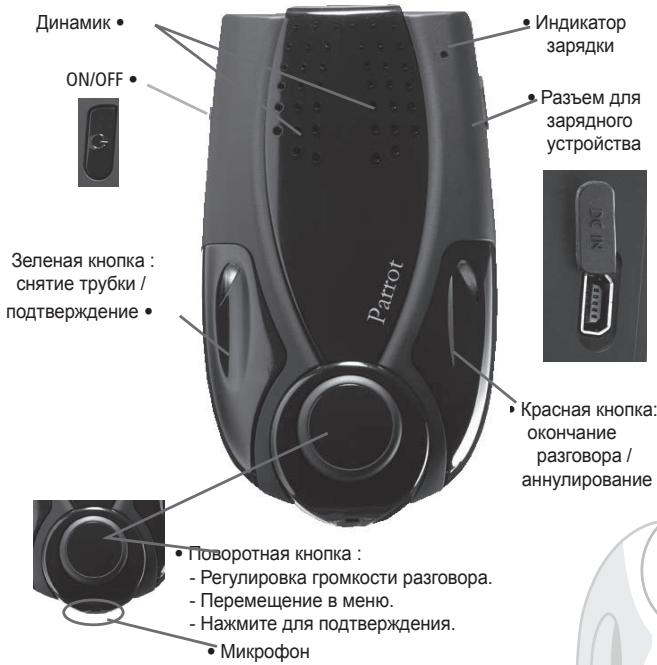
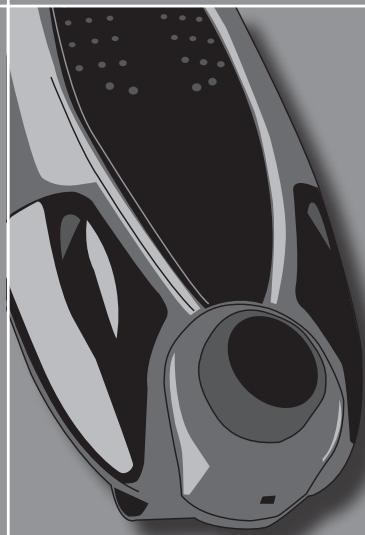
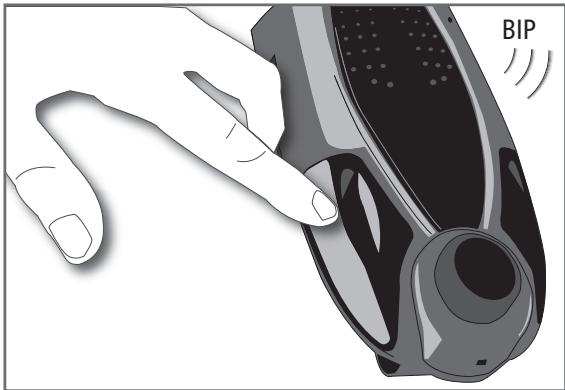
The buttons on the Parrot MINIKIT
Connecting your Bluetooth phone/PDA
To ensure that all the features on your phone can be used, a special pairing mode is built into the Parrot MINIKIT.
Generic pairing - applies to most phones (supporting the Hands-free profile):
Once your Parrot MINIKIT has been fully recharged, you must pair your Bluetooth phone/ PDA.
- From your Bluetooth phone, search for Bluetooth peripherals (consult your phone's user guide or refer to the «Support» heading on the www.parrot.biz website).
- Select «MINIKIT».
- Enter «1234» on your phone when prompted.
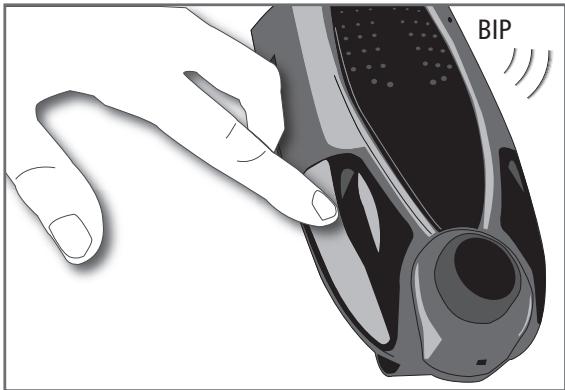
- The Parrot MINIKIT says «pairing successful» when both devices are connected. The device sounds a beep when connected.
- The language is automatically selected if your phone supports this feature.
Otherwise, you can adjust the language yourself.
(())
Special pairing - for phones supporting the Headset profile (consult your phone's user guide or refer to the www.parrot.biz website):
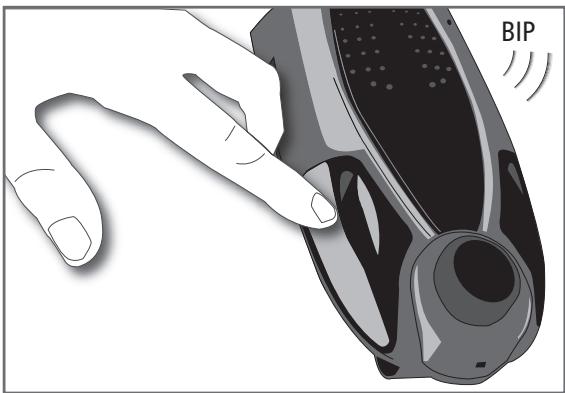
- Press the red button and the rotary button at the same time for three seconds. The green and red LEDs both flash. The Parrot MINIKIT is visible to all Bluetooth devices for three minutes.
- From your Bluetooth phone, search for Bluetooth peripherals (consult your phone's user guide or refer to the «Support» heading on the www.parrot.biz website).
- Select «MINIKIT».
- Enter «1234» on your phone when prompted.
- The Parrot MINIKIT says «pairing successful» when both devices are paired. The device sounds a beep when connected.
- The language is automatically selected if your phone supports this feature.
Parrot MINIKIT
Otherwise, you can adjust the language yourself.
For details on the specific pairing procedure for your phone, refer to the «Support» heading on our www.parrot.biz website.
FEATURES
Description and use of the functions
Making a call manually
- Dial the number using the phone's keypad and start the call.
- The call automatically changes to hands-free mode. Otherwise, press the green button on the Parrot MINIKIT.
Making a call via the voice recognition feature
- Press the green button on the Parrot MINIKIT.
- Say the name of the person that you wish to call after the «beep».
- IMPORTANT: you must have first recorded the voiceprints on your phone or the kit (refer to the chapter entitled «Voice recognition»).
- When using the kit's voice recognition feature, say «Home», «Work», «Mobile», «General» or «Other» after the second beep.
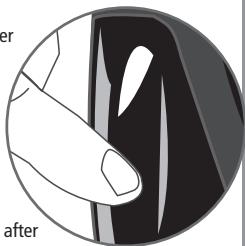
Receiving a call
- An incoming call is indicated by a ringtone and the green and red LEDs flashing on the Parrot MINIKIT.
- Press the green button on the device to answer the call.
Ending a call
- To end a call, press the red button on the Parrot MINIKIT.
Redial function
- Hold down the green button on the kit for two seconds to radial the last number.
Adjusting the volume
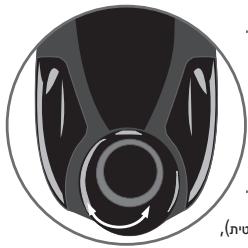
- During a call, turn the scroll wheel on the Parrot MINIKIT or adjust the volume directly on your phone. The volume setting is saved for subsequent calls.
Changing to discreet mode
- During a call, if you want to continue the conversation on your phone (private conversation), press the green button on the Parrot MINIKIT. The call is transferred to the phone.
- If you want to switch back to the kit, press the green button again.

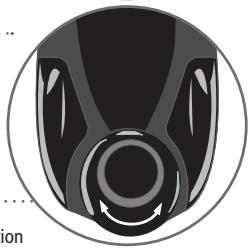
Sending DTMFs
- During a call, you can send DTMFs (Dual-Tone Multi-Frequency) for touch-tone dial ling. This feature can be used for managing your voice mail, for example.
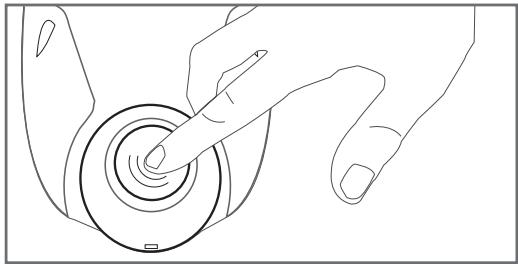
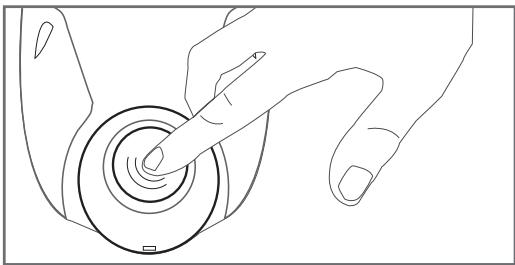
- Press the rotary button - the kit says «0».
- Turn the wheel to scroll through the numbers.
- Press the scroll wheel to send the number to the phone.
- Repeat this sequence to send other DTMFs.
Clearing the memory
- You can pair up to five devices.
- If you attempt to pair a sixth phone, the kit says «memory full».
- You must clear the memory by holding down both the red and green buttons for three seconds. Doing so also clears all the contacts and the associated voiceprints.
Parrot MINIKIT
Note: The use of certain features (voice recognition, radial, discreet mode) depends exclusively on your phone (support of the Hands-free or Headset profile). Refer to the Support heading on our www.parrot.biz website for further information.
Voice menu structure
Accessing the kit's menus
- Press the central scroll wheel to access the menus.
- Browse through the menus by turning the wheel and confirm with the green button or by pressing the scroll wheel.
Menu structure
- Language: select the language.
Volume: adjust the volume of the voice menus. - Add contact: enables you to prepare the Parrot MINIKIT for receiving a contact (sent one by one - refer to the chapter entitled «Receiving contacts»).
- Record keywords: to use the voice recognition feature and all its possibilities, record the following keywords: «general», «mobile», «work», «home» and «other».
- Update: enable this option before updating via Bluetooth (www.parrot.biz, Down load section).
Voice recognition
To use the Parrot MINIKIT's voice recognition feature, proceed as follows:
Recording the keywords
Click on the central button - the kit says «Language» and the name of the language currently used by the kit.
- Turn the scroll wheel until the kit says «Record keywords» and then confirm.
- The kit says «Record all keywords».
- If one or more keywords are already recorded, the kit selects the first keyword that has not yet been recorded.
- Press the central button or the green button to start recording. Follow the prompts given by the kit.
- When a keyword is correctly recorded, the kit automatically goes to the next.
- As soon as all keywords are correctly recorded, the kit enables them automatically.
- You can exit the menu at any time by pressing the red button and then go back to record or modify the keywords whenever required.
- If you do not wish to record all the keywords, turn the scroll wheel to select the required word.
Further details on www.parrot.biz.
Receiving contacts
To use the Parrot MINIKIT's voice recognition feature, you must send the contacts from your phone to the Parrot MINIKIT via Bluetooth (if your phone supports this feature).
Proceed as follows
- Go to the «Receive contacts» menu.
- Press the scroll wheel or the green button : the Parrot MINIKIT and the phone disconnect - the Parrot MINIKIT is now ready to receive contacts.
- On your phone, go to the phonebook, select the contact, press Options and send by Bluetooth.
- Select Parrot MINIKIT from the list (enter 1234 as the PIN code if prompted by your phone).
Once received, the kit asks you to record the name corresponding to the contact. The voiceprint is assigned to the contact.
From now on, to call this contact from the Parrot MINIKIT, proceed as follows
- Press the green button.
After the beep, say the pre-recorded name. - If your contact has several numbers, specify whether it is Home, Office, Mobile, and so on, after the beep.
- Your phone calls the contact and the call is established by the Parrot MINIKIT.
UPDATING
- The Parrot MINIKIT can be updated by Bluetooth. The update protocol is secure. Download the flash utilities from our website at www.parrot.biz.
- Updating can make the Parrot MINIKIT compatible with more source devices.
HOTLINE
Our hotline is at your disposal. You can contact us by email or telephone.
Europe: +33 (0) 148036069
Italy: +39 02 86 39 14 63
Spain: +34 902 404 202
UK: +44 (0) 870 112 5872
Germany: +49 900 172 77 68
USA: +1 (877) 9 PARROT (toll-free)
China: + 862 164 601 944
Check out the Support heading of our website at www.parrot.biz for further information.
SPECIFICATIONS
Bluetooth
- Bluetooth 1.2 qualified.
- Hands-free profile 1.0 and 1.5.
- Headset profile 1.1.
- Object Push Profile.
- Bluetooth PIN code «1234»
Maximum range: around 10m - Pairing of up to five phones.
Mechanics
- Dimensions: 63 × 28 × 110 mm .
Weight: 105g
Electronics
- 1 100 mA Li-ion battery.
- Talk time: around 10 hr.
- Standby time: over 250 hr.
- Recharging time: 3 hr.
- Charger: 5.15 V DC / 0.5 A max.
Signal processing
- Echo cancellation.
- Residual echo and noise cancellation.
Built-in voice recognition.
Compliance
FCC.
E2.
- Bluetooth.
CE.
NOTES
Parrot MINIKIT
Guide d'utilisation
FRANÇAIS
SOMMAIRE
INTRODUCTION p 19
CONTENU DE L'EMBALLAGE p 20
PREMIERE UTILISATION p 20
Charger le Parrot MINIKIT p 20
Installer parrot MINIKIT p 21
Description du Parrot MINIKIT p 21
Connector son telephone/PDA Bluetooth . p 22
FONCTIONNALITES p 23
Charger le Parrot MINIKIT
FCC.
E2.
- Bluetooth.
CE.
NOTES
Parrot MINIKIT
Návod k použití
CESKY
OBSAH
UVOD p 33
OBSAH BALENI p 34
PRI PRVNIMPOUZITI p 34
Nabiti pristroje Parrot MINIKIT p 34
Instalace soupravy p 35
Popis pristroje Parrot MINIKIT p 35
Pripojeni Telefonu/PDA Bluetooth p 36
FUNKCE p 37
FCC.
E2.
- Bluetooth.
CE.
POZNÁMKY
Parrot MINIKIT
Instrukcja obslugi
POLSKI
SPIS TRESCI
WSTEP. p 47
ZAWARTOSC OPAKOWANIA p 48
PIERWSZE UZYCIE p 48
Ladowanie Parrot MINIKIT p 48
Przyciski Parrot MINIKIT
FCC.
E2.
- Bluetooth.
CE.
UWAGI
Parrot MINIKIT
Hnctpykunno nOKeepnyataunn
PUCCKH
COIDEPKAHNE
BBEDEHNE 61
CODEPKHMOE YNAKOBKN 62
IPEBOE INCIOJIb3OBAHNE p 62
3apndTe Parrot MINIKIT p 62
UcTaHOBIne KOMJIeKT p63
OncaHne Parrot MINIKIT p 63
PoioknouHTe CBOI TepeOH/KPK Bluetooth p 64
ФУHKUHOHAJIbHbIe BO3MOXHOCTN p 65
OnncanHe nncnOJIb3OBaHne cyHKcun . 65
Cxema roJocOBbIX MeHIO p 68
Tolocobon haoop 68
PpHem KOHTaKTOB p 69
OBHOBJEHNIE p 70
TOPRAJJIHHN p71
TEXHUNECKNE XAPAKTEPNCNTIKN p 71
PIMMEUHIN 72
OBsue CBeHn 157
BVEDEHNE
Parrot MINIKIT
Parrot MINKIT - 3to komplnekt rpoMkoRorOBopraeien cB83n Bluetooth : y Bac HET Heo6xOIMMOCTN DepeXaT bTepeOH B pyE BO BPEMa pa3roBOPa C BaAMIN abOHeHOM. BnaOpapr BCTPOEHOMy AkkymyIATopy Bbl MoKeTe NcNOb3OBaTb 3TO yCToPcIbTO B ABtOMOJIbe, B oDInce N BAWeM DOne...
Bnagopapepeoobu ufofoob o6pa60ke cnHana (DSP II), C83b ocyuectBnTcB nONHOyUeKCHCPOE KpmeC nOaBneHem nomex uycpTaHeHEM 3xA dno6bIeero ydoCbCTBa o6hEnu.
3apnTe Parrot MINIKIT
IpeepnepBbIM nCNoJIb3OBAHmE Heo6xOdmo 3apAaTb Parrot MINIKIT.
Ппзаразшени зардддцьETИнДИКATOPAСМЕНТССОAPANKKEBOHAжелтын (ИнДИКATOP He CBETNTCЯ,ecnЗарядhoe yctpoiCTBO He nodkIKNIOHE)。
Pn pa3pJe aekymyIaTopa yctpoCTBO nOaCT cepHIO 3ByKOBbIX cINHaNoB.
YctaHOBNTe KOMNJIeKT
KpOnHTeIN DnI KpEnIeHn Parrot MINKIT Ha coNHe3aUHTHom KO3bIpBe KaBawero ABtOMo6JI Na03BOJET NcOJIb3OBAbT Parrot MINKIT KaK KomPNeKT rPOMKOROBOPaIe CBA3N B BAwEM ABTOMO6JIe.
Длгсплбьогиь В орпuce ИИн ДOMA рpoctо NOONKITE yCTPOINCTBOИ pazroBAPBaIte Hepe3 Hero (pekomenDAци:ДЯ BoJbш YeCTOINBOCTN CHMIMTE kPOHHTeIN КРENPHENHa COHJIe3aUHTHOM KOB3pIbKe).
Onicahne Parrot MINIKIT
KhoNk Parrot MINIKIT
IopKJIIOHNTe CBOI TeneoH/KPK Bluetooth
FCC.
E2.
- Bluetooth.
CE.
NOTLAR
Parrot MINIKIT
Odnyóç Xpnoστη
EAAHNIKA
TIEPIXOMENA
EIAIQIH p89
IPEIXOMENO TOY ΣET p 90
XPHSEH IIA INPOTH OPA p 90
Eπαναφόρτηοιn tou Parrot MINIKIT p 90
SuvapuoloyonTou oet p 91
Iepiyapn Tou Parrot MINIKIT p 91
FCC.
E2.
- Bluetooth.
CE.
ZHMEIQSEIEZ
Parrot MINIKIT
用户手册
汉语
内容
介绍 p103
工具包的内容 p 104
第一次使用 p104
重新充电Parrot MINIKIT. p104
装配工具包 p105
Parrot MINIKIT的说明 p105
Parrot MINIKIT wonn nn wwnnnn nn,
.
.
.
Parrot MINKIT
D7V
.000000000000000000000000000000000000000000000000
. www.parrot.biz / flash
Parrot MINIKIT
nnnnn nn no
nynnnnnnnnnnnnnnnnnnnnnnnnnnnnnnnnnnnnnnnnnnnnnnnnnnnnnnnnnnnnnnnnnnnnnnnnnnnnnnnnnnnnnnnnnnnnnnnnn
.
nnnnn nnnn nn nnnnnnnnnnn
.
nnnnnnnnnnnnnnnnnnnnnnnnnnnnnnnnnnnnnnnnnnnnnnnnnnnnnnnnnnnnnnnnnnnnnnnnnnnnnnnnnnnnnnnnnnnnnnn
n nn nnnn nn nn nn nn nn nn nn nn nn nn nn nn nn nn nn nn nn nn nn nn nn nn nn nn nn nn nn nn nn nn nn nn nn nn nn nn nn nn nn nn nn nn nn nn nn nn nn nn nn nn nn nn nn nn nn nn nn nn nn nn nn nn nn nn nn nn nn nn nn nn nn nn nn nn nn nn nn nn nn nn nn nn nn nn nn nn nn nn nn nn nn nn nn nn nn nn nn nn nn nn
.10IOIN PING INN NNNN NNNN NNNN
n nnnnnnnnnnnnnnnnnnnnnnnnnnnnnnnnnnnnnnnnnnnnnnnnnnnnnnnnn
.
.
. www.parrot.biz 1
W
Pn Pn Pn Pn Pn Pn Pn Pn Pn Pn Pn Pn Pn Pn Pn Pn Pn Pn Pn Pn Pn Pn Pn Pn Pn Pn Pn Pn Pn Pn Pn Pn Pn Pn Pn Pn Pn Pn Pn Pn Pn Pn Pn Pn Pn Pn Pn Pn Pn Pn Pn
(《wip wip nip》n-yn wny
n nn nnnn nn nn nn no n
.《N《1《N》》,《N》》,《》:nun nn nnn nn nn nn nn nn nn nn nn nn nn nn nn nn nn nn nn nn nn nn nn nn nn nn nn nn nn nn nn nn nn nn nn nn nn nn nn nn nn nn nn nn nn nn nn nn nn nn nn nn nn nn nn nn nn nn nn nn nn nn nn nn nn nn nn nn nn nn nn nn nn
y
(nnnn nn, www.parrot.biz) Bluetooth
中
Parrot MINIKIT

nni
Parrot MINIKIT
TIN LIN
n n nn nnnnnnnnnnnnnnnnnnnnnnnnnnnnnnnnnnnnnnnnnnnnnnnnnnnnnnnnnnnnnnnnnnnnnnnnnnnnnnnnnnnnnnnnnnnnn
11000
yun nn yni
Wn nn nnnn nn nnnn
Parrot MINKIT
ninnnnnnnnnnnnnnnnnn
y
(1)
Parrot MINIKIT
.
n n nn
.
《0》nnnn-1onnnnyny
.
1.1900nn nn nn by y
.
.
.《Nn nnnn nn,nnn nn noon
y
Parrot MINKIT wuyu wuyu www.parrot.biz (Support)
.《MINIKIT》n
- p 1234
Parrot MINKIT Bluetooth - 2023-01-09
(www.parrot.biz (Support)《n
.《MINIKIT》
- p nivw npnnn w 1234
. . . . . . . . . . . . . . . . . . . . . . . . . . . . . . . . . . . . . . . . . . . . . . . . . . . . . . . . . . . . . . . . . . . . . . . . . . . . . . . . . . . Parrot MINIKIT
.
Parrot MINIKIT npnpn np
wnnnn nn
Parrot nnnn
wnn nnwn
nuiun nn yin
Parrot MINIKIT nnnn nn
Parrot MINIKIT wwn nn ynnn nn nnnnnnnnnnnnnnnnn
.
(annnnn nn nnnnnnnnnnnnnnnnnnnnnnnnnnnnnnnnnnnnnnnnnnnnnnnnnnnnnnnnnnnnnnnnnnnnnnnnn
n nn nnnnnnnnnnnnnnnnnnnnnnnnnnnnnnnnnnnnnnnnnnnnnnnnnnnnnnnnnnnnnnnnnnnnnnnnnnnnnnnnnnnnnnnnnnnnnnnnnnnnnnn
Parrot MINIKIT
y 1 y
n nn nnnn nn nnnnnnnnnnnnnnnnnnnnnnnnnnnnnnnnnnnnnnnnnnnnnnnnnnnnnnnnnnnnnnnnnnnnnnnnnnnnnnnnnnnnnnnnnnnnnnnnnnnnnnnnnnnnnnnnnnn

ywn yynn nbltee
. www.parrot.biz ,Parrot MINIKIT
1
140
139
139
139 .Parrot MINIKIT
138
138 .Parrot MINIKIT
137 1nnn/Bluetooth
136
136
135
135
134
133
132
132 079
131
157
Parrot MINIKIT
y
lk = 2l0
bLx
G
C
aill gial aill
FCC
E2
Bluetooth
CE
S_ OBC = S_ COD + S_ BOC - S_ BOC
aillgllg jyjzLl yjy jy jy Jluai Lsc.
69 60 03 48 1 (0) +33:Lg9j
631439862+39:L#
202404902+34:
5872 112 870 (0) +44: a=11 a<1.11
6877172900+49:L:山
(jLJ)8779PARROT:
944601164+862·
Logell www.parrot.biz jLgj
| - a| = | a - b|
Bluetooth
Bluetooth 1.2
Hands-free profile 1.0 and 1.5
Headset profile 1.1
Object Push Profile
《1234》Bluetooth
10 1
aiaaaas
a:aaJll
63x28x110:LaL
105:
a.1234567890123456789012345678901234567890123456789012345678901234567890123456789012345678901234567890123456789
1100mA Li-ion 品 _ 出
10
acw250 1j
LcLw3:J#
5.15 VDC/0.5A max: L
yI Ls .Parrot MINIKIT 0000000000000000000000000
jinn 21jjnlnn
LaaalwJyJyJyJyJyJyJyJyJy
. iji_i LgJgA 11111111111111111111111111
.Parrot MINIKIT joo allSui joi woswoswoswoswos
Lclogig) aJIJIaIJIJI JaiJiJiJiJiJiJiJiJiJiJiJiJiJi
Lc:logjlgai:ci:ajt1pgiw.
Jgjgl Jlll lgs jra21 jllc hiai ala wlg cag g jg aaiall no g3g31 ci5
a.131 c.213 131 a.141 141 LdSLL
aalall aollll alalal alalal alalal alalal alal
. www.parrot.biz
Parrot MINKIT
(2) Bell 100, 100, 100, 100, 100, 100, 100, 100, 100, 100, 100, 100, 100, 100, 100, 100, 100, 100, 100, 100, 100
glcs
.(LwJpLiw)aqilj Js
Parrot MINIKIT 1234567890123456789012345678901234567890123456789012345678901234567890123456789012345678901234567890123456789
sLw21 pLW8 jLj parrot MINIKIT
.Bluetooth 1JwJgJyJzJzJzJzJzJzJzJzJzJzJzJzJzJzJzJzJz
1234 1
()
aaii iai jiaai 1821 aaiy wai 1821 jaiwai aojli cio wihw. pkiwai 22:
.
jie jie gieio (aill pae pblai wlll oolg iigwll qyil) aie yu plsiul . kdo Liedgog Support 1. (wJJI acLo Jgge g) jIyI plsiul 0900000000000
Logell jn www.parrot.biz
aajall aolll a
a#
aJgaggl Jgaggl aJgaggl Jaaggl Jaaggl
.
aiial
.
aigall gailgall gssgnslni:glal gns
jLJwjParrot MINIKIT 1
(《Lw21xw)jgjgjgl
LgLSJU JgJgLSOgJgSgJgSgJgSgJgSgJgSgJgSgJgSgJgSgJgSgJgSgJgSgJgSgJgSgJgSgJgSgJgSgJgSgJgSgJgSgJgSgJgSgJgSgJgSgJgSgJgSgJg
..(www.parrot.biz c#g#e
.《MINIKIT》
1234
J 1 J J J J J J J J J J J J J J J J J J J J J J J J J J J J J J J J J J J J J J J J J J J J J J J J J
Maa 5g5 Laiic J
LSS 15
S ADB = S COD + S_ BDO
a0j1 1
aJss aasssssssssssssssssssssssssssssssssssssssssssssssssssssssssssssssssssssssssssss
.
11111111111111111111111
FCC Compliance Statement (FCCID: RKXMYNOS)
This device complies with part 15 of the FCC rules. Operation is subject to the following two conditions:
- this device may not cause harmful interference, and
- this device must accept any interference received, including interference that may cause undesired operation.
Note: The manufacturer is not responsible for any radio or tv interference caused by unauthorized modifications to this equipment. Such modifications could void the user's authority to operate the equipment.
Declaration of Conformity
CE
We, Parrot S.A. of 174 quai de Jemmapes, 75010 Paris, France, declare under our sole responsibility that our product, the Parrot MINIKIT to which this declaration relates is in conformity with appropriate standards EN300328, EN301489-1, EN60950 fol
lowing the provision of Radio Equipment and Telecommunication Equipment directive (1999/5/EC R&TTE), and requirements covering EMC directive 89/336/EEC and Low Voltage directive 73/23/EEC.
Bluetooth
The Bluetooth® word mark and logos are owned by the Bluetooth® SIG, Inc. and any use of such marks by Parrot S.A. is under license. Other trademarks and trade names are those of their respective owners.
Correct Disposal of This Product (Waste Electrical & Electronic Equipment)
(Applicable in the European Union and other European countries with separate collection systems). This marking shown on the product or its literature, indicates that it should not be disposed with other household wastes at the end of its working life. To prevent possible harm to the environment or human health from
Parrot MINIKIT
uncontrolled waste disposal, please separate this from other types of wastes and recycle it responsibly to promote the sustainable reuse of material resources. Household users should contact either the retailer where they purchased this product, or their local government office, for details of where and how they can take this item for environ, mentally safe recycling. Business users should contract their supplier and the terms and conditions of the purchase contract. This product should not be mixed with other commercial wastes for disposal.
GENERAL INFORMATION
Copyrights
Copyright © 2004 Parrot. All rights reserved. The total or even partial reproduction, transmission or storage of this guide in any form or by any process whatsoever (electronic, mechanical, photocopy, recording or otherwise) is strictly prohibited without prior consent from Parrot.
Registered trademarks
All the names and trademarks mentioned in this document are copyright-protected and are the property of their respective owners.
Modifications
The explanations and specifications in this guide are given for information purposes only and may be modified without prior notice. They are deemed to be correct at time of going to press. The utmost care has been taken when writing this guide, as part of the aim to provide you with accurate information. However, Parrot shall not be held responsible for any consequences arising from any errors or omissions in the guide, nor for any damage or accidental loss of data resulting directly or indirectly from the use of the information herein. Parrot reserves the right to amend or improve the product design or user guide without any restrictions and without any obligation to notify users.
As part of our ongoing concern to upgrade and improve our products, the product that you have purchased may differ slightly from the model described in this guide. If so, a later version of this guide might be available in electronic format at Parrot's website at www.parrot.biz.

Parrot
move wireless
Parrot S.A. - 174, quai de Jemmapes - 75010 Paris - France
Fax +33 1 48 03 06 66 / Phone +33 1 48 03 60 60
www.parrot.com

PI030382AB
JAP
ENG
EAA
CHI
FRA
TUR
HEB
CES
ARA
PYC
- INTRODUCTION
- Parrot MINIKIT
- KIT CONTENTS
- The kit contains
- USING FOR THE FIRST TIME
- Recharging the Parrot MINIKIT
- Fitting the kit
- Description of the Parrot MINIKIT
- Connecting your Bluetooth phone/PDA
- FEATURES
- Description and use of the functions
- Making a call manually
- Making a call via the voice recognition feature
- Receiving a call
- Ending a call
- Redial function
- Adjusting the volume
- Changing to discreet mode
- Sending DTMFs
- Clearing the memory
- Voice menu structure
- Accessing the kit's menus
- Menu structure
- Voice recognition
- Recording the keywords
- Receiving contacts
- Proceed as follows
- UPDATING
- HOTLINE
- SPECIFICATIONS
- Bluetooth
- Mechanics
- Electronics
- Signal processing
- Compliance
- Guide d'utilisation
- SOMMAIRE
- Charger le Parrot MINIKIT
- NOTES
- Návod k použití
- OBSAH
- POZNÁMKY
- Instrukcja obslugi
- SPIS TRESCI
- Hnctpykunno nOKeepnyataunn
- COIDEPKAHNE
- BVEDEHNE
- 3apnTe Parrot MINIKIT
- YctaHOBNTe KOMNJIeKT
- Onicahne Parrot MINIKIT
- KhoNk Parrot MINIKIT
- IopKJIIOHNTe CBOI TeneoH/KPK Bluetooth
- NOTLAR
- Odnyóç Xpnoστη
- TIEPIXOMENA
- ZHMEIQSEIEZ
- 内容
- nnnnn nn no
- nuiun nn yin
- S_ OBC = S_ COD + S_ BOC - S_ BOC
- | a - a| = | a - b|
- FCC Compliance Statement (FCCID: RKXMYNOS)
- Declaration of Conformity
- CE
- Correct Disposal of This Product (Waste Electrical & Electronic Equipment)
- GENERAL INFORMATION
- Copyrights
- Registered trademarks
- Modifications
- Parrot
Brand : PARROT
Model : MINIKIT
Category : Hands-free kit