
RF-U350 - Radio PANASONIC - Free user manual and instructions
Find the device manual for free RF-U350 PANASONIC in PDF.



| Product type | FM radio with alarm |
| Brand | Panasonic |
| Model | RF-U350 |
| Weight with batteries | Approx. 1700 g |
| Weight without batteries | Approx. 1290 g |
| Mains power supply | AC 230 V, 50 Hz, 6.0 W |
| Battery power supply | 6 R14/LR14 batteries (9 V) |
| Power consumption in standby | 0.9 W |
| FM frequency range | 87.50 – 108.00 MHz (50 kHz steps) |
| Loudspeaker | Extended range 10 cm, 8 Ω × 1 |
| Output power | 1 W (RMS) |
| Headphone jack | 3.5 mm mono mini-jack (8-16 Ω) |
| Main functions | FM reception, RDS, preset 10 stations, on/off timer, sleep timer (30/60/90/120 min), slow dialog playback |
| Display | LCD screen with frequency, clock, indicators |
| Antenna | Telescopic antenna |
| Maintenance and cleaning | Wipe with a soft, dry cloth. Do not use alcohol, thinner, or benzene. |
| Safety | Do not expose to rain, moisture, or splashes. Do not block ventilation openings. |
| Spare parts and repairability | No user-serviceable parts. Refer all servicing to qualified personnel. |
| Included accessories | Power cord |
| General information | Indoor use, temperate climates. Do not place near a TV or computer (magnetically unshielded speakers). |
Frequently Asked Questions - RF-U350 PANASONIC
User questions about RF-U350 PANASONIC
0 question about this device. Answer the ones you know or ask your own.
Ask a new question about this device
Download the instructions for your Radio in PDF format for free! Find your manual RF-U350 - PANASONIC and take your electronic device back in hand. On this page are published all the documents necessary for the use of your device. RF-U350 by PANASONIC.
USER MANUAL RF-U350 PANASONIC
The illustrations show RF-U350.
Ha maJIIOHkax 3O6paXeHa moIb RF-U350.
I figurerna visas RF-U350.
Before connecting, operating or adjusting this product, please read the instructions completely.
Please keep this manual for future reference.
Operating Instructions
Bedienungsanleitung
Thank you for purchasing this product.
For optimum performance and safety, please read the instructions carefully.
Supplied accessories

Please check and identify the supplied accessories.
1 AC power supply code
Table of contents
Power sources 3
Listening to the radio 4
Different ways to use the unit 5
Using the timer 6
Maintenance. 6
Troubleshooting guide 7
Specifications 7
CAUTION!
DO NOT INSTALL OR PLACE THIS UNIT IN A BOOKCASE, BUILT-IN CABINET OR IN ANOTHER CONFINED SPACE.ENSURE THE UNIT IS WELL VENTILATED. TO PREVENT RISK OF ELECTRIC SHOCK OR FIRE HAZARD DUE TO OVERHEATING,ENSURE THAT CURTAINS AND ANY OTHER MATERIALS DO NOT OBSTRUCT THE VENTILATION VENTS.
- DO NOT OBSTRUCT THE UNIT'S VENTILATION OPENINGS WITH NEWSPAPERS, TABLECLOTHS, CURTAINS, AND SIMILAR ITEMS.
- DO NOT PLACE SOURCES OF NAKED FLAMES, SUCH AS LIGHTED CANDLES, ON THE UNIT.
- DISPOSE OF BATTERIES IN AN ENVIRONMENTALLY FRIENDLY MANNER.
The socket outlet shall be installed near the equipment and easily accessible.
The mains plug of the power supply cord shall remain readily operable.
To completely disconnect this apparatus from the AC Mains, disconnect the power supply cord plug from AC receptacle.
WARNING:
TO REDUCE THE RISK OF FIRE, ELECTRIC SHOCK OR PRODUCT DAMAGE,
DO NOT EXPOSE THIS APPARATUS TO RAIN, MOISTURE, DRIPPING OR SPLASHING AND THAT NO OBJECTS FILLED WITH LIQUIDS, SUCH AS VASES, SHALL BE PLACED ON THE APPARATUS.
- USE ONLY THE RECOMMENDED ACCESSORIES.
DO NOT REMOVE THE COVER (OR BACK); THERE ARE NO USER SERVICEABLE PARTS INSIDE. REFER SERVICING TO QUALIFIED SERVICE PERSONNEL.
This product may receive radio interference caused by mobile telephones during use. If such interference is apparent, please increase separation between the product and the mobile telephone.
THIS UNIT IS INTENDED FOR USE IN MODERATE CLIMATES.
These speakers do not have magnetic shielding. Do not place them near televisions, personal computers or other devices easily influenced by magnetism.
CAUTION
Danger of explosion if battery is incorrectly replaced.
Replace only with the same or equivalent type recommended by the manufacturer.
Dispose of used batteries according to the manufacturer's instructions.
Safety precautions
Placement
Set the unit up on an even surface away from direct sunlight, high temperatures, high humidity, and excessive vibration. These conditions can damage the cabinet and other components, thereby shortening the unit's service life.
Do not place heavy items on the unit.
Voltage
Do not use high voltage power sources. This can overload the unit and cause a fire.
AC power supply code protection
Ensure the AC power supply code is connected correctly and not damaged. Poor connection and code damage can cause fire or electric shock. Do not pull, bend, or place heavy items on the code.
Grasp the plug firmly when unplugging the code. Pulling the AC power supply code can cause electric shock.
Do not handle the plug with wet hands. This can cause electric shock.
Foreign matter
Do not let metal objects fall inside the unit. This can cause electric shock or malfunction.
Do not let liquids get into the unit. This can cause electric shock or malfunction. If this occurs, immediately disconnect the unit from the power supply and contact your dealer.
Do not spray insecticides onto or into the unit. They contain flammable gases which can ignite if sprayed into the unit.
Service
Do not attempt to repair this unit by yourself. If sound is interrupted, indicators fail to light, smoke appears, or any other problem that is not covered in these instructions occurs, disconnect the AC power supply code and contact your dealer or an authorized service center. Electric shock or damage to the unit can occur if the unit is repaired, disassembled or reconstructed by unqualified persons.
Extend operating life by disconnecting the unit from the power source if it is not to be used for a long time.
The unit can be powered with household AC power or dry cell batteries (not included).
Using a household AC outlet
Connect the AC power supply code firmly to the unit and the outlet.
1 Plug one end of the AC power supply code (included) into the unit's AC IN socket.
2 Plug the other end into the household AC outlet.

Note
- The included AC power supply code is for use with this unit only. Do not use it with other equipment.
Do not use an AC power supply code from any other type of equipment with this unit. - If you are not going to use the unit for a prolonged time, it is recommended that you unplug the AC power supply code from the household AC outlet. Power will still be consumed even when the unit's power is not turned on. (Approx. 0.9 W)
Using dry cell batteries (not included)
1 Unplug the AC power supply code from the unit's AC IN socket.
- When the AC power supply code is connected to the unit, the unit cannot be powered by the dry cell batteries.
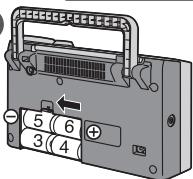
2 Remove the battery cover.
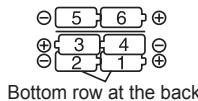
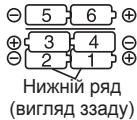
3 Insert six R14/LR14 batteries (not included) in the numerical sequence.
- Insert the batteries correctly with their “ ” and “ ” poles aligned as displayed.
4 Put the battery cover back in its original position.
Removing the batteries
1 Push the “ ” side of battery 6 toward its “ ” side, and remove batteries 5 and 6.
2 Put your finger into the cutout inside the compartment, and remove batteries 3, 4, 1 and 2.

Insert the batteries in numerical sequence while pushing down on their "O" sides.


1


Note
- When the charge of the dry cell batteries is depleted, "LOW BATTERY" appears and "□" flashes on the display panel.
After replacing the batteries, set the clock again (page 5). - The registered preset stations (10 page 5) will be lost if the batteries have been removed for more than 3 minutes. Register the stations again when using the radio next.
Dry cell battery
- Align the poles (+ and -) properly when inserting the batteries.
- Do not mix old and new batteries or different types of batteries.
- Do not recharge ordinary dry cell batteries.
- Do not heat or disassemble the batteries. Do not allow them to contact flame or water.
- If the unit is not going to be used for a long time or if the unit is to be powered exclusively by AC power, remove the batteries and store them in a cool dark place.
- Do not keep together with metallic objects such as necklaces.
- Do not use rechargeable type batteries.
- Do not use batteries if the covering has been peeled off.
Mishandling of batteries can damage other items, cause damage to the unit, and may cause a fire through short-circuiting or electrolyte leakage.
If electrolyte leaks from the batteries, consult your dealer.
Wash thoroughly with water if electrolyte comes in contact with any part of your body.
1 Turn on the unit's power.

To turn the power off, press the button again.
Note
When the power is turned on again, the broadcast station that was last tuned in when the power was turned off, will be tuned in.
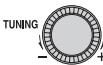
2 Select the broadcast station.

to select the desired station.
Automatic tuning

When NEFCheck is pressed, automatic tuning starts, and it stops at the station which is tuned in first. Repeat this until the station you want to listen to is tuned in.
FM 87.60 TUNED "TUNED" appears about 1 second when station is tuned in.
Note
Depending on the quality of the reception, automatic tuning may not be possible.
During tuning press -TNER CHECK to stop.
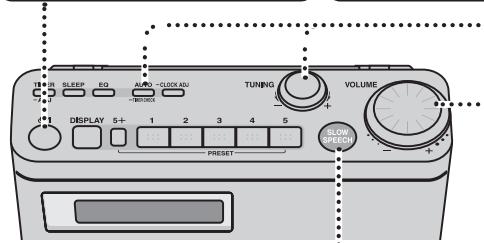
Standby/on switch (U/I)
Press to switch the unit from on to standby mode or vice versa.
In standby mode, the unit is still consuming a small amount of power.
The illustrations show RF-U350.
Making it easier to understand what's being said (RF-U350 only)
You can adjust the speed of what's being said to understand newscasts, the dialogue of characters in dramas, etc. better.
Pre

The indicator around now lights.
- To close the slow speech function, press the button again. (The indicator around now goes off.)
Note
- When the slow speech function is activated, the sound quality will automatically be switched to NORMAL and cannot be changed.
- The slow speech function effects may not be obtained with some music programs and other broadcast content.
- The slow speech function is released in the following cases:
(1) When the power is turned off
(2) When you have changed the station you are now listening to
- When the slow speech function is set to ON, the tone quality will change, and there will be a delay in the sound heard.
- The speed of the slow speech function cannot be changed.
- When the slow speech function is set to ON while the reception is poor and accompanied by a lot of noise, the noise will be amplified, making the sound hard to listen to. At a time like this, set the function to OFF.
3 Adjust the volume.
Turn

to adjust the
volume. (0 to 50)
VOLUME 28
To improve reception
Adjust the length and angle of the rod antenna to obtain the best reception.

Handle
Note
If you take hold of the unit's rod antenna and move it from one place to another, you may damage the unit.
To move the unit, make sure you pick it up by the handle on the rear panel, and then move it.

RDS broadcasting
This unit can display the text data transmitted by the radio data system (RDS) available in some areas.
The panel display is automatically switched when a Program Service name (PS) or Radio Text message (RT) is received.
When a Program Service name
(PS) is received
XXXXXX
# # # # # # # # # #
When a Radio Text message
(RT) is received
Note
- RDS displays may not be available if reception is poor.
- During timer operations the unit will not automatically switch over to the RDS displays. To indicate the RDS displays, press
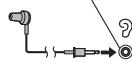
Listening to sound via earphone (not included)
Plug type:
- Turn the volume down before connecting the earphone.

Note
Avoid listening for prolonged periods of time to prevent hearing damage.

RF-U350
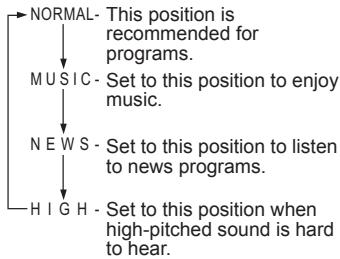
Selecting the sound quality that suits the broadcast
RF-U350
RF-U300
Press


Each time this button is pressed, the position of "▲" changes.
Using the sleep timer
The unit's power is automatically turned off when the set time is reached.
Press

SLEEP

SLEEP 30

Each time the button is pressed, the setting changes in the following sequence: 30 (minutes) → 60 → 90 → 120 OFF (released)

To display how much time remains until the set time
Press

SLEEP

Remaining time
Note
When the power is turned on again, the broadcast station that was last tuned in when the power was turned off, will be tuned in.
Preset tuning
A total of 10 FM stations can be preset.
Preset stations

While listening to the station you want to register, hold down one of the number buttons [1] to [5] for at least 1 second. The number of the button you pressed and "PROGRAM" now appear on the display panel, and the station is registered in the button concerned.
Example: When you registered a station in button [1]
- To register a station greater than 5, first press [5+] , then, e.g. to register 7 (within 10 seconds) press and hold [2].
■ Listening to a station which you have registered
After the power has been turned on, press the number button in which the desired station has been registered. (To listen to, e.g., station 7, press [5 + ] , then press [2].) The station will then be tuned in.
Changing a station which you have registered
With the new station you want to register already tuned in, press and hold the button with the number whose registered station is to be changed so that you will overwrite the existing station with the new one.
Setting the clock
The 24-hour system is used to display the time on the clock.
1. Press and hold.


2. Select the time.


3. Press


To display the clock
when the unit is on
DISPLAY


The time is always displayed while the power is off.
Note
The clock is accurate to within ± 60 seconds a month. Readjust if necessary.
You can set the times at which to turn the power on and off and set the station and volume level while the power is on.
Preparation: Setting the clock. (page 5)
Select the broadcast station. (12 page 4)
Adjust the volume. (page 4)
1. Setting the timer times
① Press and hold.



ON-0:00-FOFF 0:00
If this display appears ...
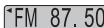
FM 87.50
ADJUST CLOCK
Set the clock.
② Select the ON time.


ON-18:00 → OFF 0:00
③ Press.


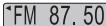
ON18:00→OFF18:00
④ Select the OFF time.


ON18:00→OFF20:00
If this display appears ...
FM 87.50
CHANGE OFF-TIMER
The same time has been set for both the ON time and OFF time. Set the timer times again.

Press.


ON18:00 → OFF20:00
2. Setting the timer settings to ON
Press.


(Turn the unit off)
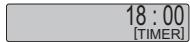
The unit must be off for the timer to operate.
Note
- Once the timer times are set, they need not be set the next time.
- To change the times, perform time setting procedure again.
- The "[TIMER]" display flashes during a timer operation.

The illustrations show RF-U350.
Setting the timer settings to OFF
These steps can be taken while the power is on.
Press.


-ADJ
TIMER-PLAY OFF
Setting the timer settings to ON
Press.


-ADJ

ON18:00→OFF20:00
The unit must be off for the timer to operate.
If this display appears ...
FM 87.50
ADJUST CLOCK
"FM 87.50
ADJUST TIMER
Set the clock.
Set the timer times.
Note
Even when the timer settings are set to OFF, the timer time settings remain in the memory so that when the timer settings are next set to ON, the timer function will be activated at the set times.
Checking the timer settings when the power is off
Press and hold.

(
-TIMER CHECK

ON18:00 → OFF20:00
What has been set is now displayed.
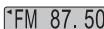
VOLUME 28
Maintenance
If the surfaces are dirty
To clean this unit, wipe with a soft, dry cloth.
- Never use alcohol, paint thinner or benzine to clean this unit.
- Before using a chemically treated cloth, read the instructions that came with the cloth carefully.
Before requesting service, make the following checks. If you are in doubt about any of the check points, or if the solutions indicated in the chart do not solve the problem, consult your dealer for instructions.
The reception is poor. There is too much noise and distortion.
- Try changing the length and angle of the rod antenna.
- Inside some buildings and on some means of transport, the signals may be weak, making it hard to hear the stations. In such cases, use the unit as close to the windows as possible.
If this unit is used close to another radio, TV, VCR or other electrical appliance, noise may be heard from the resulting mutual interference. Try turning off the power of the radio, TV or VCR, etc. in the vicinity.
This unit may not operate properly after it has been moved from a cold location to a warm place. This happens because condensation has formed on the unit's operating parts: The unit will return to normal in about 60 minutes. - Noise may be caused if a mobile telephone is brought close to the unit. Use the unit at a distance from mobile telephones.
No sound is heard.
Is the volume control at the lowest position? Adjust the volume level using

Dry cell batteries were installed in the unit, but the unit won't work.
Is the AC power supply code connected to the unit? To power the unit using the batteries, unplug the AC power supply code from the unit.
■ When the unit's power is turned on, the "CHANGE BATTERY" message is displayed.
Replace the existing batteries with new ones or use a household AC outlet.
The unit's power is not turned off even when the set time is reached.
Is "SLEEP" displayed on the display panel? (page 5)
If it is, press SLEEP, and check the remaining time.
The timer does not work.
Is the timer setting OFF? First turn on the power, and then press to set the timer to ON.
F□□(□□ indicates a number.)
Connect the AC power supply code firmly to the unit and the outlet. If the unit still cannot be turned on, disconnect the AC power supply code, remove the batteries, and consult your dealer.
Specifications
Frequency range
FM 87.50-108.00 MHz (50 kHz steps)
Speakers
Full range 10 cm, 8 Ω x 1
Terminals
Output PHONES: 3.5mm monaural (8-16Ω)
Output power
1 W (RMS)
Power supply
AC 230V,50Hz
Power consumption:
6.0 W (RF-U350)
5.0 W (RF-U300)
Battery 9 V (Six R14/LR14 batteries)
-If you see this symbol
Power consumption if power off: 0.9 W
Note
Specifications are subject to change without notice.
Information on Disposal for Users of Waste Electrical & Electronic Equipment (private households)

This symbol on the products and/or accompanying documents means that used electrical and electronic products should not be mixed with general household waste.
For proper treatment, recovery and recycling, please take these products to designated collection points, where they will be accepted on a free of charge basis. Alternatively, in some countries you may be able to return your products to your local retailer upon the purchase of an equivalent new product.
Disposing of this product correctly will help to save valuable resources and prevent any potential negative effects on human health and the environment which could otherwise arise from inappropriate waste handling.
Please contact your local authority for further details of your nearest designated collection point.
Penalties may be applicable for incorrect disposal of this waste, in accordance with national legislation.
For business users in the European Union
If you wish to discard electrical and electronic equipment, please contact your dealer or supplier for further information.
Information on Disposal in other Countries outside the European Union
This symbol is only valid in the European Union.
If you wish to discard this product, please contact your local authorities or dealer and ask for the correct method of disposal.
Sehr geehrter Kunde
∴ m = 3/11
1
,
EM 87,50
ON-0:00-OFF 0:00
Dimensioni (L x A x P)
270 mm x 152 mm x 92,5 mm
Peso
con batterie 1700 g circa (RF-U350)
1650 g circa (RF-U300)
senza batterie 1290g circa (RF-U350)
1240 g circa (RF-U300)

SLEEP
1FM 87.60
SLEEP 30

Dimensions (L x H x P)
Poids
270 mm x 152 mm x 92,5 mm
Vaelg radiostation. (side 4)
Regular lydstyrken. (side 4)
(Sluk for apparatus) 18:00 [TIMER]
Pa3HbIe cnocobI ncNoJIb3OBAHnAnnapata 5
IcnoJb3ObaHne TaMepa. 6
TexHHueckoe 6
PykoBODCTBO NO noncky u yctpaHnIO HeNCnpaBHOtei ...7
TexHHueckne xapaKTepeHCTnKn 7
PPEIOCTEPEXEHNEI
HE CLEDYET YCTAHABINBATb NIN PA3MEUATb DAHbI INIAPAT B KHNKOM IKAQY, BCTPOEHOM IKAQy INI DYPGOM ORPAHUEHNO IPOCPTAHOCTBE IJRA TORO, YTObI COXPAHNTB YCNOBIA XOPOJEI BEHTINLAUNI YOOCTOBEPbTECb, YTOI STOPBI INDyTNE NOIOBNSI PIEDMETBi HE NPEPNICTBYOT HOPMALHOH BEHTINLAUNI INJ LPENDOTBPAUSEHEN PCKA NOPAKENH 3JIeKTPUeCKM TOKOM INI BO3NHKOHBENI TOKAPA IN3-3A NEPETPBAE.
HE3AKPbIBAATEBEHTNJIUHOHHbIE OTBEPCTNAANIAPATA3ETAMM,CKATEPTMM, UTOPAMNIOIOOBHBMINIPEDMETAMN.
HE PA3MEUANTE HA ANIAPAT ICTOUYHKN OTKPbITOGO PJIAMEH, TAKNE, KAK TOPRUINE CBEH.
BbIePacBlaBante BATApEn B. MYCOP, YUcTbIBA OXPAHY OKpyXaIOJIEN CPEDbI.
Cetebarpo3eTKaDolnHa6bIbpacnoJIOKeHa 6bnHnO6OpUdoBaHH,6bITbNtKoDOCTynHOB. Bnka ceteBOO shypa nHTAHn DOxHnO octabTcBc8 bIcTPO DOCTynHO.
TObbI NOHCTbO OTOeDHNbT 3OT ANnapAT OT CTeN pepeMeHHOro TOKa,OTCeDHNtE BnIKy CeTeBOrO Uhpya NITAHnyo NT OPO3ETKIN pepeMeHHOro TOKa.
IPDEyIPKJDEHNE:
ДЯУМЕнБиЕнHA PUCKA BO3HNUKHOBEHNYIPOXAPA,ПОРAXEHNIAJNEKTPNUeCKM TOKOM NINIOBPEXDEHNAI3JIENNA
HE NOIDBEPRAIHTE 3TOT ANIAPAT BO3JENCTBNIIOJOKJIA, BAIJI, KANEJIb NINBpbl3T, A TAKXHE NOMEUAAITE HA ANIAPAT INPEMDtBIHANOHNHEHHbIE XIKKOCTbIO, HANPIMEP, BA3bl.
NCHONJIbYE TOnTbKO PEKOMEJBOAHBIE PUNHADJEKHOCTN.
HE CHIMAUTE Kpblk Ky (Mn 3ADHIOI PAHEJIb), BHTPN HET CACTEN, IOJNEKAUHX OCS LyK NBAHINO JIb3 OBATELEM. OSPAUIAUTEcB 3A OCSlyKNAVAHNEK KBALNΦUPOBAHHOMY OCLYKNUBAIOUMEY NEPCOHANY.
3To n3dennn moKet npHmMatb padno no nomexn,
ocboNobHeHHne nepeHOCHbIMn TeneFOHAM. EcnI TaKe
nomEXn ABJIOTcA OyBnDhIMn, yBeINuTbe, noXanyJCTa,
paccTOnHMe MEXdy N3dEInEM and PteHOCHbIMn TeneFOHOM.
3TOT APAP INPEDHA3HAYEN IINCIOb3OBAHNA B KINMATE CPEHNIPOOCbl.
3Tn rpoKorOBOpTeHr HmEOT mArHTHOrO 3kAHPHOBAHn. He nOmeaHTe IX kONo TEBEN3OPo, nepCohAnbX KOMNbIbTePOBn A DpyrNx yCTpOCTB, IeKo NODBePraEmbX BO3dNcETBNO mArHTHbIX NOJe.
Pocnn
HHΦOPMAUЯ OCEPTNΦNKAUH
POnDyKuN

BZ02
HdopmaunJnIPOkynatela
EcnH 3aTepeHHaZaMeHEbHnepAEBHNo, CyueCTeBYoNtAnCObTbB3pBa.
3aMeHJeTbeToJIbKO taKmJHKe 6aTaapeKaMm INn 6aTaapeKaMm OOnHakOBOrTO nHa, peKoMeHcBOABHOrO npOn3BODHTenEM.
YTNINNHNYNEI HONIOBBAHNBIE BATAPENK B COOTBETCTBNC C HINTCPKUNMRAI PNO3BDOENTJE.
Mepb6e3oNaChOCTn
Pa3MeUeHne
YcTaHOBnTE Annapat Ha rOpri3oHTaIbHOI NOBepxHOCTn BdAnIOT pRmBX COnHeuHbXbI Pyue, BbCOKIX TEMNEPATy, BbCOKIX BnAeKHOCTn nCmblHOBnBpaunu. Takaie YcBIONIG MOrT NoPbEITb KOpnyc I npOue KOMNOHEtBi, TEM CamIM COKpATIB cPoK cnykBbI annapata. He Nomeuaite Ha annapat TaeKeIbe IpeMeTbI.
Hannpexnne
He nclnblynte NcctuHNI NTaHNA BbICOKO HAnpAHHN. 3ToMoket npribectn K nepepyrke annapata and BozropanHHIO
Mepbipnpedoctoopoxhoctnpnpobaaenm cteBbim hypom
Yb6detaeB TOM,TO CTeB0wIshUPNtAHNApeNEpemEHHORO TOKA NOcOeHNHe NpABINbHO Hne NOBpExDeH. HenNoTHoe NOcOeDMHeH NnOBpEXDHeNIAuMOTyPnBECTN K BoTOrpaHIO INN POpKHeHIO n3eKTPNcEeCKM ToKoH. He DePaHTe, He cRbAaTe CTeB0W SHyD N E KlaDInTe HA NoTe RaTeKnBe IpeMeTbI.
PITOn OTOeINHnOI OToPZEnK KpEnKO UyepXnBaTe IToTcENbHyIO Bnky. DePra3 aTeCBenO hYPurNtAnHe NpeMeHNHO TOKa, BblMOKETe PONuHTb NOPaKeHne 3NeKTpnHECKM TOKOM.
EeNpKAcAteBc TcTencIbHOB NtBKe BnAkhBmPykAMM. 30O MOKET pINBECTCu NopAKEHIO NtEKTPUeCKMIM TOKOM.
NoctoponHne npedMeTbI
He No3BONJIte NOnaDaTb BNYTp b annapata MetaJIINueCKIM npEDEMAM.3To MOKET pINBECTN K NOPAJEXHIO 3NEKTPNECKM TOKOM INI NONOMKE annpata.
He npoinBaIte BHytpb annapata XnDIOCTb. 3TO MOKET npINBcTeN KnpaekEnHIO 3JIeKTpUeCKm TOKOM nONIOME Annapata.EcnI 3TO CnyuINocb, HEmdNeHNO OTCoeDInHrte annapatOT NtOChNkA NITAHN CBsIKTeCb BaAMIM DInepoM. He paCnbIyIe NHCKeTNIuDbl Ha annapat IIN BVHTb HrEo. B IN cOCTab BXoJAT BOCnPaMeHJeIOUmeCe rAbl, nOnaDaHne KOtOBxB Hytpb annapata MOKET npBcTeB K Bo3rOpAHNo.
Texo6cnyxuBaHne
He NtaiTebc camoToTe bHo YHHb annapaT. Ecn 3ByK npepbBaTeC, INdMkatoBte 3a0raOpTc, nIeT DbM, INn Bbl CTOnKnHynCb c dpyro TnpobEmo, HeYomnHyToB hactoae HHTCPyKun, TO tOcOeHNHte CTeBOI uHyp nTahnA nepeMeHHoro ToKa i CBXkntEc b CaWIM dInepoM uNc aBTOp3ObaHHbIM cepBMcbHM CEHTOPc. Ecn pemOH, PA6Oka INp nepeDenka annapata npOn3BODrTa HEKOMTEHeTHMb IuZamU, TO 3To MOKet pINBECTn K npAnKeHNO 3NeKTPNuCeMK TOKOM INN NONMOE Annapata.
IpoDIInte CpO CnykBbI,OTCOeINHMB anNapat OIT MTOCHNka NITAHMA,ECNI OH He 6ydtet NCNOJIb3OBATcB C TceHne DnITeJIbHOrO nepIOA BpeMeHN.
Annapat moKet cHa6kaTbC3JIeKTPoNtAHnEM OT cTeI nepeMeHHOrO TOKa IINOT cyuxx 6aTaapeek (He npinaraotc).
IcnoJIb3OBAHHe cTeB0n po3eTkn nepemEHORo TOKa
Haedxho nooCoeDnHte CeTeBOI uHyp nTuHnIepeMeHHoro ToKa K annapaTy i po3etke.
1 BctabbTe OINKoHeu ceTeBOrO uHypa (npnlaraeTc) B rHe3do AC IN Ha annapate.
2 BctabbTe npyroKoHeu BC cTeByu po3eTKy nepemehHoro TOka.

Cetebo shypr nntaHnnpemehHOro ToKa (npnaaraetc)
PpimmeaHne
- PpnaeraMb cTeBOW hUP nTahnAnpeMeHORO TOKA pPeHa3NaeH ToBko dNcNoIb3OBaHnC 3TNM annapatOM. He cnlo3yte rO cDpHM o6OpYoBaHnE. He cnlo3yte c 3tHM annapatOM cTeBOw hUP nTahnAnpeMeHORO TOKA O bOpdyoBaHnio6oro dpyroro Tnla.
- ECnIn Bbl He 6ydtete NcOnIpb3OaBb annapat B TeueHne DInTeNbHoro BPemeHn, peKOMeHdyETcR bblTaunlt bcTeEBoi shyp n30pEtKnpeMeHHOrTO kToA.3NeKtpo3Heprn86ydtntp6bIbTcra, daXe cInn 3KeKtponItAHne annapata he BkUHOeO. (Ppi6mna.0.9 Br)
Mcnonb3oBaHne cyux6aTapeek (He npJlaraIOTc)
1 BbItaunTe CeTeBoi uHyp n3 rHe3da AC IN Ha annapaTe.
Korda cTeBoH shyp noDcoEINHeN K annapaty, annapat He moKet Cha6kaTbC3neKTponHTAHnEM OT cyuxh 6baateek.
2 ydaJIte KpbIku OTeKa dJaTaapeek.
3 BctaBbTe WeecTb 6aTaapeek R14/LR14 (He npnlaIaOTc) B YncIOBOM nopAKe.
BctabnIte 6bataeKm C npaBnblHO opneHtnpoBaHHbIM nOpHcAMN ",kak nok3aHO.
4 UctaHOBIne KpbIshky OTeCeA dIy 6aTaapeek o6paTHO B INCXoHoe NOnOKeHne.
UdJIeHne 6aTaapeek
1 HaKmTe Ha cToPOHy " + " 6aTapeKn 6 B HApBaJIeHn CToPOhbl " - " n yJaJInte 6aTapeKn 5 n 6.
2 NomecHTe BaI naJIeU B bIpe3 BHyTpU OTceKa n ydaJIte 6aTapeKn 3,4,1 n 2.
PpimmeaHne
Korla 3apad cyxnx 6batapeek 3akahnuBaetcnoBnAeTcN Hdkaun "LOW BATTERY" nHdcnnneHOn pahein Miraet INndkaun
-Посné заменибатAPEEK CHOBA yCTaHOBITE yacbl (LcTp.5).
HΦOpMa3O a 3apeNTpOBaHOBbI xpeBaIeHTbO hOCTaHOBnHEbIX CTAHINX (ct) 65 dyet nToepHa, eCNs batapeKIM 3B3neHbI 600ee Me H M 3MHUY. PIn cNeJyUoEme IcNPOLb3OaBHmD PAIOONPemHMeKHCA OBA 3apeNTprpyte CTAHIN.
Cyxay6atapeika
-Правильно совмшие поюca (+и-) рпу установке батаeeк.
- He nCnoJb3yIte Bmecte CtapBie HOBbie 6aTaapeKn IIN 6aTaapeKn pa3hblx TINOB.
He nepe3apkaTe obbHbIe cyXne 6aTaapeKn.
- He harpebaite n He pa3bnpaite 6batapeiKn. He donyckaite nx KOHTaC orhem nIIN BOdoN.
EeCn anapat he 6yedt Ncnonb08b4 T CEHHe N1nE hNpTbnHOro BpeMeHH, Hn Ecn1nKETPOnTHAne annapata 6yedt OcUeCTBnTbTaTOhKO nPi NMOoi NepeMeHHORO TOKA, YdaNIte BDApatKe IN XPAHNTHE IN TBEMHOM PNOXnADHom Mecte.
- He xpaHnte INX BmecTe C MetaJIInueckIMn IpeDMeTam, HapnMpE, ZeNoUkAm.
He nCnoJIb3yIte 6aTapei nepe3apJkaemoro Tuna.
- He nCnoB3yIte 6aTapeiKn cO ChrToN oBoJIOUcKo.
HenpabnBIOe obaepneHc 6 batapenKAMMOKET Bb3aTbN BOPEkDEHNE DpyIINpeMTOEN, NOpeKdHeN e annpata nMOKET pNBIIECTN K KOJPaY 3-2A KOPIKOTO 3AmbKaIHIN NUI TEUYK 3NeEKTPOJNTNA.
Ecnn 3JneKtponnt BbITEk n3 6baTapeek, npokOHcyIbTynpuYTeCb C BaIIM dInePOM.
Tsqatelbno npomoe BoDoi, ecn 3neKtpoNt nonan Ha kkyu-Hybdyacb BaWero TeJa.
1 Bключnte эльктуponтанне annapata.
HaxmTe

YtobblbIKIOHHTB3eKTKoPNTaHHe, CHOBA HaxMITE KONKY.
PpIMeuaHne
Korda 3nektponntaHne Choba BKNIOUaTcT,TO BbIOnNHeTcN HactpOKa Ha CTaNtCu npaDnOBeUAnHa, Ka KOTOpYbIla BbIOnNHeA HactpOKa B NocneHn pa3 nepeD bBbIKUoyehm 3nektpONNTaHn.
2 BbIbepeTe cTaHcHIO paHIOBeUaHnIa.
ПоворачиBa<|im_start|>Te -TO6bl BbIbpaTbHyKHyIO CTaHcNIO.
ABTomatuecka Hactpoika

Korda ctaunna HactpoeHa, npnbniIntelbHO Ha OndHy cekyHny NpBnIeTcN Hndkaunya "TUNED".
KoIaHaJHMaTeCn-HERcEX,HaHNaHaTeCnABTOMuHeckaHaCTpOJaKa,INoHaOctHaBnBaTeCn Ha nepBoi cTAchUmHaKOtOpyo BbInOnHeHa HAcToPoiKa. NObTOpraIe Do TEX nop, noka He 6ydtBbInOnHeHa HAcToPoiKa cTAchUmHa, KOTOpyo BbXotnte npocnyuBaNTb.
PpIMeuaHne
B 3aBcNMOCTOn t KAeCTBa PnEHa BAtOMaTneCKa HAcTpoKa MoKet 6bItb HeBO3MOXHa.
AUTO BoBpemHaCTpoHnHaKMNTe-IMRCHX,HTO6bIOCTaHOBtB.

IpekHIOUATEb pekIMa OXmDAHnB/KhIOueHHa (I/ I) HAKMITE, YTObIpeKIOHOTb annapat 3N BkIOHcHHO CocToAHn B pEKIM OXmDAHnI HAo6Opot. B pEKIM OXmDAHn annapat BCE jeNotpe6JIeT He0bnLoe KOINueCTBO 3Heprn.
Ha pncyhnkax nokacaHMoedJIb RF-U350.
O6nErUaET noHmAmHe TOrO, O yem roBOpntcra (ToIbKO moJeJIb RF-U350)
BbMOXeTepeRyIINPOBaTcKOpOCTpeHnIJIyUHero NOHMHaNNEpePaDcNoCteNdHxN3BcETHm,IMaIorOB nepCOHAcE B NoctAHOBKaH T.I.D.
Haxmnte KhONky
Tepeb BOKpy INHINKATopa 100 ropnt noDCBeTka.
Длгзakрьтпдункши Меделнй рechи Нхмпte кногіу зараз.(Tenepbвokpyг Иndикатора nocbetka rachet.)
PpmeaHne
KoIgda aKTHBn3HPOBAHa yPHKUJIa MeJIIeHHO peH, KaueCTBO 3bYka bdyet ABOTMAHTeCKnpeKeKIOHeHO HA NORMAL, I erO heOB3MOXHO N3MEHNTb.
Дян HeKOTOpbIy M3y3kAlbHbIx nOprpAMM IpyrORo COpejkaHn paJMOBeaHnФФeKtby FyHKuN MeDNeHHoR peuMOrT He DoCTInaTbC.
ФункцmaMeDJIENHOn peuN OTMHeRcTcB CJIeNyUOxHxCJNUaX:
(1)Korda BbIKHuaeTc nITaHne
(2)Korda Bby n3mehinpi npocnyuinaBaemyu b HactoIuee Bvpea tachunio
KorlaФунклmaMeДлEHNo peu yctahOBnEHa Ha ON,TeM6p n3MeHnTCa N CBtIbIMOM 3Byke 6ydet 3aedpeKka.
-CKopocbTyHKcnnMeDneHHOpeu HnB3a Nm3EHNHTb.
Korda fynkunme MeIeHNOpeu yctahOBnHeHa ON npn pIIOXOM pNIeME, cOPOBOKDaEMOM MHOKeCTBOM nOMex, nOMex 6ydt ycINIBaTcB, n 3Byk 6ydet Tpydno CnyuATb. B TakOM cnyuae yctahOBnte fynkuho HA OFF.
3 Otpereynpyte ypoBeHrpoMkoCTn.
Cyxhe 6aTapeiKn 6bJIn yCTaHOBJeHb I annapaT, Ho annapaT he pa6oTaet.
He noCoeHNen JIN cTeB0I shyp K annapaty? Ch6bI cna6kaTb annapat 3neKtpoNTaHnem OT batapeek, BbTaunTe cTeB0I shyp n3 annapata.
Korda BkJIOaTc3 3eKTPoNTaHne aannapata, BBICBeyBaETc4 COO6eHne "CHANGE BATTERY".
3aMeHInTe HmEoUeNc6 bTaapeKn HOBbIMn IIN NCNoJIb3yIte CeTeByIO PO3eTKy IpeMeHHoro TOKa.
3neKtponntaHne annapata He BbIKNIOyaeTc, daxe KOrda DOCTnraETc yCTaHOBJEHoe Bpemr.
He BbCBeuHbAetcI IN HnDnKaucIg "SLEEP" Ha DnCnneHoi nAhen? (Seite 5)
Ecnn 3TO TAK, HaxMMte SLEEP, nPObepbTe OCTabWeecr Bpemr.
Taimep He pa6oTaet.
He hactpoeha JIN yctahOBka taImepa Ha OFF? Chauana BKJIIOHTe IINTaHne, a 3aTeM HaxMMTe KHOKNJy -ADJ, YTO6bl yCTAHOBtB TaIMep Ha ON.
Iotppe6JIeMaJ MOUHOCb:
6,0 BT (RF-U350)
5,0 BT (RF-U300)
BaTapeiKn 9B (WecTb batapeek R14/LR14)
Pa3mepbl (UxBxΓ)
270 MM x 152 MM x 92,5 MM
Macca
c6batapeiKamn IpruBn3.1700r (RF-U350)
Pn6m3.1650 r (RF-U300)
6e3 6aTaapeek Ppi6n3.1290 r (RF-U350)
Pππδπι3.1240r (RF-U300)
IotppeBnMaM MoUHocTb,ecJIN 3JIeKTPoPNTaHne BbIKIOUcHo:0,9BT
PpmeaHne
Texnueckme xapaKtepcntkMOryt 6bItb n3MeHehI bE3 yBeDOMJIeHJ.
-EcnnBbIyBvNDnTeTAKOICMBOJI
HOpmaunno o6paueHHo COTXODAMn dIa cTpaH, He BxOJaNX B Ebponeckn Co03

IeJCTBnE 3Toro CmBOJa pacnpocTpahReTcra ToIbko Ha Ebponeckn CoIO3.
Ecnn Bb co6npaetcB bIbPOCnTb DaHHbI npOyK, y3HaIe T B MeCThbx OpraHax Bnactn IIN y DInepa, KAK cIeNyET nOCTynatb C OTXoAMN TAKORO TINa.
Caro cliente
FM 87.60 SLEEP 30 SLEEP
Program as hours do temporizador.
Nota
Se as superficies estiverem sujas
BukopncTaHH TaMepa 6
06cJyROByBaHHa 6
Bka3iBkn 3 ycyHeHH HecnpabHocte.. 7
TexhihixapakTepcntuKn 7
YBAGA!
HE BCTAHOBJIIOHTE I HE PO3MIUUYTE UEN ANAPAT Y KHNKKOBINU OAFI, BBYBOBAHNX MEBJX ABO B IHUOMY OBMSEXHEYMO NPOCTOPI,NEPEKOHANTECB, IO ANAPAT IOBSE BEHTNIOCTbCJ.ДЛЯ 3AIOBIGAHHHA BEE3NIKNUYPAXEHNHO ELEKTPNHIM CTPYMOM ABO BUNHKNEHNO NOKEXI BHACILDOK NEPERIPBY, NEPEKOHANTECb, IO 3ABICKN UY BUDJI-RAKI IHUI MATEPIJIN HE 3AOTOPDKJYOTb BEHTNIIUHNIOTBPON
HE 3AFOPOJXUYTE BEHTNIAUHI OTBOPIN TAEETAMC, KATEAPTINHAMN, 3ABICKAMTNAOJIHUMNIPEPEMETAMN.
HECTABTEJXDEPELA BIDKPTORIOI NOUM'Y, HAPNIKJIAD, 3ANJAEHBI CUBIKU, HA APAPAT.
JIIKBVDYNE BATAPEENK EKOLONIHYPOINHHTNUM CNOCOBOM.
UTeNcEnbHy po3eKy noTpi6Ho BCTaHOBHTn 6iJa
06ndahnHnra Ta 3abe3neuHTn BlbHn DOctyn Do Hei.
UTeNcEnb Hnka Whpya XNBHeHH NoBNHnHa
6BytTOrOBA Do BnKKOpNCtAHnH.
Oo6 NOBHCtO BIDKnHouTn cien npCtpii Bid Mepexi XNBHeHHa 3MInHOro CTpyM, BNIMtB tNTencBHy BNKy 3I tNTencBhoH o3eTkn.
YBAGA!
3APAДN YHUKHEHHY PU3NKU BYHNUKHEHHI NOXEXI, YPAJXEHHI EJIKTPWHIM CTPYMOM ABO NOLIKODKEHHI BMPOBY:
3AN051A7E NOTPANJHHHO HA NPHCTPII DOUOBOX KPATJI, BOJON AEO BPN3OK TA HE CTABTE HA NPHCTPII PNDMETI, HAI0BHEHI BOJIOH, HAIHNKIAJ, BA3I.
- BKNÖPNCTOBYNTE TIlbKN PEKOMEHDOBAHE PUNJADJa.
HE 3HIMAITE KPMIUKY (M 3ADHIO PAHENB); BCEPEDHI HEMAC DETAJIEN, KI10TNEPBOTb OBCLTYOBVAHHK KOPUCTYBAYM. ODBIPRIYE POBTI 3 PEOHYTA OBCLTYOBVAHHN TIIJKM KBAIIΦIOBAHHM CTELIJAICTAM.
Ley Bnip6 Moke npHmATn padionepeKoND, uO CTbOPOTbCa MoBILHMN TeteFOHAMNI quc IX BVKNOPCTAHN. KkTO taki nepeHKOnc NOMITHMN, 0yB naKa, 36JIbWHTb BiCTaHb MIX BnPObOM Ta MOiHBM TeteFOHOM.
YEANAPTNIP3NAHCHENIINBIAKOPNCTAHNYOMPHNXKJIMATNUHNXYMOBAX
LI DHHAMIXI He oblaadahi MarHITHM ekpahOM. He BCTAHOBIIHOte IIX npOyI 3 TE neBIL3POM, KOMN'OTepMA T HAUMM NPICTPOMR, JAKI NERKI pIIaDIOB C BYNNBE MATHIHORO NOJI.
3ACTEPEXEHH
JaKIO HENpaBUNbHO 3aMiHHTu 6aTapeO,MOKe BHNKHyTN BuOyX.
3aMihltb 6atapeo Nnhe TakoHO CAMOHO a60 6atapeo eKebiBaHTHORNTNOI TYAK peMOEHDOBAHO BIP6HKNIO.
No36ybTecebNkOpriTaHHx 6aTapei BiDnOBiHO Do bKa3IbOK BmPo6Hnka.
Infopmaia dIJI nokynua
| Ha3Ba Bvpo6b: | FM-panionmam |
| Ha3Ba kpaHn-BVpo6hNka: | Bvpo6bHe B Manai3ii |
| Ha3Ba Bvpo6hNka: | MaCyu7iTa EneKtpNK IHaDaTpiAn Ko.,LITd. |
| IOpDnHuaApeca: | 1006 Kadoma, Ocaka, Jynoia |
| Датa BvTOBnENHЯ:ВМожетe ДінatиCSЯ рКТа MсЯць 3 серінгоHomepa Ha tablncu.Ппriклад МарКУВань—Серінн Homepe № XX68XXXXXX (X-Будь-якua unioФа abo nIOptera) Pk: Tpeta unioPb a CERiHOMy Homepe (6-2006,7-2007,...)MocЯь: Yetberpa lJIteba CERiHOMy Homepe (A-CiEHeB, B-ЛютNi,...L-rgydeNb) | |
| ДоДатКOBa iHΦopmaizя: | Бydн паскa, Увально pOpoHHTaIte INCTpyKuzIo 3 ekCpnyatauili. |
CTpOK CnykO mboro BPO6y, 0u BCtahOBneho BPO6HNOM y npAOKy n.2 CT5 pEepaIbHO 3aOKHy PΦ "Tprn 3axNt npab CNOKBAuH" , DOPBIOHc7 POKAM 3 DaTI BINOTOBNEHHa 3YMOBN, UPOBIO BKNOPOTBOyETCBsCBy CBVOpBI BIDNIOHDGcIO Do LiCi IHcPKU3 E KcTNpyatauTl Ta 3aCTOCOBYBaHINx TEXIHNUH CTAndaptB.
3acTepeKhi 3axoNi
Po3tauBybHn
Po3aowbyte npncptpi Ha pibhi nobepxhi, noadi BiD npramnx cohnuhns npomehiB, dkepen Bucokoi Temnepatypn, BOIORoCTI Ta HADMpHOI B6pauii. Li fapktoN moKyTb NOuKoNDTI KOPNcTa i HUI KOMNoHEHTn npncptoO i ckopOTnT n cTPO KOrO cnjXbN.
He knaiItb BaxkI npedMeTu Ha npucTpi.
Hanpyra
He BnKOpncTobyIe TzkepeJa XmBHeHnHa BnCokoi HapnyI. Lc MoKe np3BecTe Ndo nepeHApynr PnucTroIO Ta BnKImKaTn NoXeky.
3axnct shypa xuBneHHra
Ipebeipte, 06 shyp kbnenHH 3mHnHO ctpmy 6yB He noHKoJxHenn T naPabInbno nDcHnAH. Iorahn KOtAKT a60 noKoJxHenn SHypa Moke npu3BeCTn do noKexi a60 ypaKeHH neEeKTPNHN CTpymOM. He CmKaIte, he 3rHnaiTe uHyp Ta he CTABe Ha hBoO BAkki npdMetNI.
IIOB BITARHyTN UHyp 3 pO3eTKN, Bi3bMItbC8 MlUHO 3a UTENCeNBHy BNIKY TA NOTAHITb II. CMKKAHN HJNHPA XKNBNEHH 3MIHNO TcPMy MOXPe Np3BcTeN Do ypaKeHHEN ENEKTPNHMM CTpyMOM He DOTOPKAINTECb Do UTENCENBHOI BVNIK BONORIMPykAML. Lc MOXe Np3BcTeN Do ypaKeHHEN ENEKTPNHMM CTpyMOM.
CTOPONHI npedmetn
He donyckaie To npanpnnnna metaneBnx npedmetrib BCEpeDnHy npncptpo. L me OKe npi3BeTcN do npaeKHe nEnEeKTPnuHm cTpyMOM abo hencpaBHO pO6ToPi npcTPO.
He donnyckaIte npOnHHKeHnI pIiHNu BCEpeHNHy npICrPoIO. Ie MoKe np3BcTeN O ypaKeHH eNEKTrpHNNM cTpyOM aEO hCnpBaHO p6oToN npCtPO. RaIoo ce TpanlNOcb, HeraiHO BID'eDHaIe npCtpiB iD mepeXk XbIeHNeH Ta 3BepHiTb cO daMaHHy, B kOMy Bi NOrO npDiBaHIn. He po3NIOHte sACoBI bID KOMax Ha npCtPII abo BCEpeHN. Taki 3acOBI MICTb IerKo3aIMMcTI rA3n, IIO MOkyTB cnaLAAxHTN npIOTpanJIHNI H npCtPII.
06cnyroByBaHn
He HamaraiTecra BidiPemOnHTyBatn pnpCTpiBnachOpuy. Jkso 38yk CTae nepepnuactm, He cnpaoboytcb CBITN0I bHdkatopu, 3ABYETcBA DAM a60 BVHNKAE 6bJy-ka IHA np6bneMa, jka He 3raayTeCBsC BA uXH tCPUxjyA, BiE dHaJIte HUnp KJWBeHNH NOCTIOHRO CTpyMBy BID HACTINHOI POzETKn TA 3eBpHtCB So DO mara3HH, BY kOMy BN prNDabAm ue pnpCTpr, a6o do ABTOPOZAHORO cepBICHO CEHTpy. HacNdkAmmi peMOHTY, po3UpaHNHa TpepeNaDHaHH pnpCTPOO HEKBanlqikOBAHMM CNEiianlCTAMM MoKe STa Tu ypaexHH eneKTPuHMM CTpyMOM a60 NouKOdKeHH pnpCTPOO.
IIOb IOIOBxNtCTOK CJyKbnPnICTPOIO,BIDcHnyTe Ioro BID MepeKJI XMBHeHHa, KONi BIn HE BVNKOpNCTOBYcTcPnOTARoTIPBAIOrO Yacy.
JKNBHeHnI pncToPO MOKE 3dIiChIOBaTNC BId NObYTOBOI MEpeKl JKNBHeHHa 3MiHHO CTpyMy a6o 3 BkOpNCTaHHaM cyux6 6atapei (He BXoJaTB Do KOMnJIeKtY).
BnokopncTaanH no6yTOBOI Mepexi XmBneHn 3MiHHOrO ctpymy
ПдклочьнанжимчимКабелЖивlenназMHOrOстуюdo npicstpoTo na nobyTOBoI p03ETK.
1ПiДКЛHOUчТБОДИN KIHeцьKa6eJIIO JxuBJIeHЯ(BXODHTbdoKOMPJIeKTu)do rHi3da AC IN ha naHeni npICrpoI.
2 PIIKNIQUITb IINH KIHeCb Do noNobyTOBoi po3ETKN XNBLeHHa 3MiHHoro CTpyMy.

Побутова розета
3MiHHORO CTpyMy
(230B,50Γu
3MiHHoro CTpyMy)
Ka6eBn XbVbHeHn3MHNHO CTpyMN (BXoDHTdo KOMPNEKTEY)
PpMItKa
KaBebIb JxNIIeHn 3mIHNO TcTpyM, IIO BXOINb ITO KOMNIIEK TY, pIu3HaueHn IJRA BnKOpNCtAHnRA JInIe 3 ZIM nPnCTPOEM. He BnKOpNCTOByte NOrO 3 iHsIM O6naDHaHHaM.
He BnKOpNCObYIe 3 IIM npNcTpoEM kaBeJIb JxNBJIeHnR 3MiHORO cTpyM ByI b-yB-RAKO iHJoro ObnAHaHHa.
JaKIO npIcTpiH he 6yde BnKOpNCTOByBaTncra IpotrAOM TpBAnoro Yacy, BiEHaHte KaBEn JxBnEHn H BiMepexi 3mHnHO CTpyMy. PnpCTpi CTOXnBaC eNEkTpnHy eHeprio, HabITb JaKIO BIN BmKHeHn. (PpIbIm3Ho 0,9 BT)
Bukopnstahn cyxnx 6aTapei (He BXoJaTb Do KOMJIeKTy)
1 BiD'cHaHte Ka6eJIb XnBJeHHa BiD rHi3da AC IN Ha naHeni npncIpo.
- Ka6eBbXnBHeHnNpiKlnHouEnn Do npncTpoU, XnBHeHn BiD cyuNX 6aTapeHemOxKnIbe.
2 Biikpnite Kpnkny Biicky dny 6atapei.
3 BctahOBiBt bicb 6aTapeR R14/LR14 (he BXoJrB do KOMnJIeKry) y uCNCIOBI nocniIOBHOCTi.
BCTaBTe 6aTapei, cnoJyUHbUn iX nonHcN Ta , Rk Bka3aHO Ha MaJIIOHky.
4 BctaHObitkPmukyBicikyDna6atapeynepbche nonoKeHH.
Bümmann 6aTapej XnBJIeHn
1 Haadabitb Ha 6ik 3 no3HaKoIO “⊕” 6aTapei 6 y HaprMky nO3HaKn “Θ” Ta BmItb 6aTapei 5 Ta 6.
2 BcTaBTe naneu b y Bnpi3 ycepeDnHi BiDciKy Ta BnIMtB 6atapei 3,4,1 Ta 2.

Bctabe 6aatapei y cnppoBIO nocnIOBHOCT, HATNCKAIOH naIbceHa CTOPOH 3 N03HaKOO
“

4

2

1

2
PpMItka
-Якш ecypc 6batpei nixoynt do 3akinueHHnHa DCINnei 3'raBnctbca Hannc "LOW BATTERY" ta 6bnmae no3naka "□
-Писяя замин 6атapestен BCtaHOBiTB roDHHNK 3HOby (LCTop.5).
- HanaHTyBaHnHa 36epexeHnX CTaHcui (1-CTOP.5) 6dyTb Btpaehi, JaKIO BuHnAryn BaTapei 6IbSe, HIX Ha 3 XBnHnH. PInn HactynHomy BnKOpNtAHnI pao 3apeCtpyTe CTaHcui 3HOBy.
Cyxa 6atapea
-Пи Вставлгни бате парвьнho спolyаite поюс (+ ta -).
- He BnKOpncTObyIte cTapi 6aTaapei pa3OM 3 HOBIMn a6o 6aTaapei pi3Hnx TnIIB.
He nepe3apdkaTe 3BnuaHnCi cyXi 6aTaPei.
- He niiDaaBaiTe HarpiBaHHIO Ta He po36npaIte 6aTapeI. BepexKITb IX BiD nOTpAnHnY y BOHOy BDOy.
KIIIO npIcTIH ne BIKOPCTOBYBATIMETbC npOTrO TmBnIORo cayo afo IIOJI KMBIEHNHa 6yde 3JINCHOBATMCB INBNILOH BID dXpepeLa 3MHNHO TcPMy, BINIHTb 6aTeapeI t6bePiAteI x y I pONOXODHOM TYEMHO MCIu.
He 36epiraTe 6atapei pa3om i3 MetaIeBIMn npedMeTaMn, TaKIMN k HAMCTO.
- He BnKOpNCToBvIe aKymyJIaTOpHi 6aTapeiKn.
- He BnKOpNCToBnyTe 6aTaapei, kUIO 3 HIX 6yIIO 3HrTO o6OJHOky.
HeDOTPUMAHN BnAPRIN 3 BNKOPMCTAHN 8aBaePR MOKE pIbNECTU DO NIOUKOJXEHN PnIcTPOU CHI HIMX npeDMETIB, A60 CTATN PNHNUHO BVHNKHEHNO NXEXEi BHACNIIDOK TOPOKTOKO 3AMKHAJIEN BYNTIKHAN HEJKTPOINTY.
Y pa3i Bvtikannr enektponity 3bepHtbcra do mara3nHy, B yko npndbo npncptpi.
Y pa3i KOthakTy eIekTpOniity 3i 1kipoIO peTeNbHO npomnIte ypaXeHe MicCe BDOIO.
1 BBIMKHiTb XnBJIeHHn npncTpOIO.
HaTnCHiB KhONkY

Ha maIIOHkax 3O6paKeHa moJeB RF-U350.
Ponerwyepo3ymHHToro,io BmOBnCTbcra (NneMoedbRF-U350)
Mokha Hana ToBAtn WbNdkicTb MOBHeHHa IJa KpaUO rO pO3yMIHHHOBH,PO3MOB repOBIB NoCTaHOBOHmN INpOrpAmX TOIO.
HaTnCHiTb KhONky (Tobijhe MoBJIeHHa).
PokpaueHHaKoCTi cnHany
DnIaDOcRHeHHHaHnKpaUoi JAKOCTi CnHany BcTaHOBtB DOBXNHy Ta KYT BINTXHOHTEH.

Pучka
Ppimitka
JaKIO nepeMIaTIau nPiCTPI 3 OJHORO MICaB INHe, TpMIAOuCH 3a BNTJKNHY AHTEHY, JNHO MOCKHA PNOUKoDHTI.
Длп né老人家 Ростwo Тимау Июо за ручу на зашии я лиме notIM nepemiuуte.

TpaHcJIIOBaHHa 3 BnKOpNCtAHnMa CnCTeMn pepeaui daHnx
Lcen pncptpi niDtpmmye nepedauy TeKCTOBNX NOBIOMMeHb, 10MOKByTb TpaHCnHOBATNc3a DONOMOHO CNTemn nepaayi DaHnx (RDS), Ika DiE B Deeknx periohax.
Диспей AbTomatNHO BmKaTeBc npri OTpMaHHi Na3Bn nporpaamIo nocnyr (PS) a6o TeKCTOBOro paoionobIDomneHHA (RT).
KoNi OtrpImaHa Ha3Ba npOrpaMHOI nocnyr (PS)
XXXXXXXX
# # # # # # # # # # #
KoII n Otpmnahe TeKCTObe padionobiDomneneHHa (RT)
Ppimitka
-Якstoяк'tb cnHany HeaOobinbHa, nobIDomneHnCnCTeMn nepeadai daHnx moKytb He bIDobpaxatnc.
Пд сац ровоти 3 таймером рпсстрин He nepemikatimmetь са Индакioи ССТЕМИ поедаichi dahnx ATOMATNHO.шб BiD6pa3TNI INDAKIAIO CNTeMNIpendaichi daHnx, haTCHITb
IpocnyxOByBaHn3Byky 3BukOpncTaHHaM HabyuHnka (He BXoJrTb Do KOMJIeKtY)
Tun uTekepa:
MoHocOHiUHm MiHi-TeKepe 0,5 MM
- PienedπiDkNIOUeHNrM HabyuHnka3MeHHTe pIBeHb rYHooCTi.
PnmiKa
Hamaaraietae He cnyxatm My3nky BnpoBxk TpnaBaoIORYa, 063anaOriN noiKoDkeHNHO cnxy.

RF-U350

Ha manojnkax 36paxeha Moolje RF-U350.
Bn6ip kocti 3Byky paioctaHcii
RF-U350
RF-U300
HaTnCHiB KhONky EQ a6o

IicnKoXHOrO HATNCHEHNA LIeC HONKN 3MHIObTeBcNPONOKeHHA CmBOJy“

BnKOpncTaHH TaMepa BmMKHeHH
Bido6paKeHHaCy, 0o 3aJIiunBcra Do BCTaHOBeHOrO aacy
HaTnchItb Khonky SLEEP

Uac, 3aJIINIBc
PpimItka
Пи ВИКанні ХИВLEнну yВIMKHTса радioctанця, ра Ka hya HanaшТоваHA OCTaHbTOОпepeД ВIMKHeHHM пиCTpoI.
HanaHTyBaHHHa Bn6paHy cTaHciio
Ycbo ro MoXHa HanaaHTyBaTn 10 cTaHci FM- diana3OHy.
HanaaHTyBaHHcTaHci

Длпгсьршчii санцii nic yap ic npocnyoxbyBaHnry UTPmYte OndHy Здцрobих Honokoi Bd [I] Do [5] BpOdoBx Ochua 6 oDHIc EcyHnI. Ha DiCnnei' 3'RanBtcbN HOpE HATNCHyTO KHNOKI T naOBIDMeHHN "PROGRAM", i staHuipeCTpyTbCn nd zuKhoKIO.
- Hatachitb Ta ytpmmye KhoNkY.
-CLOCK ADJ


- BctaHObitb yac.

- HatncihItb KhoNky
Дя BiDIO6paHENHa roDNHHka, KOnI npCtprIyBIMKHeHHN
HATNCiB
KHONKY
DISPLAY

KoJIIN KIINBHeHnB BIMKHeHe, Ha 3aBKnDn BiIObpaKaæTbcBaHa DnCnIeI.
Ppimitka
POnb6ka roDmHnHna CtaHOBnTb ± 60 cekyhd ha Micra. HanaWtuYe IHO 3HOby a Heo6xIaHcOti.
KoJn XNBIJIeHHa YbIMKHeHe, MoXHa BCTaHOBHTn npOMIXKN Yacy, 3a JKMn XNBIJIeHHa 6yDe BMNKaTNC Ta BIMNKaTNC, cTaNIO i pIBeh rYHOCti.
PiIroTobKa: HanaaHTyBaHHraOINHHnka.
(CTopihka5)
BnbepiB CTanuio. (CtOpiHka 4)
BippernyIOIte rUHICTb. (CTopiHa 4)
1. BctaHOBJIeHH npomixkiv acy TaImepa
① HaTnchItb Ta yTpmyTe KhONky.


FM87.50
ON 0:00 OFF 0:00
JaKuHa eKpaHi 3'YBnIOcA...

HanauTyTe roDHHNK.
② BctaHObitb yac yBIMKHeHHa.


FM.87.50
ON:18:00 → OFF 0:00
③ HaTnCHiB KhONKy.


FM87.50 ON18:00 → OFF 18:00
④ BctaHOBITb yacBUMKHeHHA.


FM 87.50
ON18:00 → OFF20:00
JaKuo Ha ekpani 3'YBnlooc...

Toi camn yac 6yno BCTaHObnEHO iDnB BBIMKHeHH, iDnBIMKHeHH. BCTahOBiTB npomixknu cacy TaImepa 3HObY.
⑤ HatncihTb KHONky.


FM 87.50
ON18:00 → OFF20:00
2. YbIMKHeHHaHcTpoNOK TaMepa
HatnchItb Khonky.


(BmKHiB npncTp)
18:00 [TIMER]
BumkHeHHaCtpoK TaMepa
Li di MOxHa BnKoHbATn pni BBIMKHeHOMy XmBneHHI.
HaTnCHiTb


YbIMKHeHHHaCTpOioK TaMepa
HaTnCiHtB KhONKy.


IpebeBipka HacTpoNOK TaMepa npn BmKHeHomy KINBLeHHi
HaTnCiHtB Ta yTpmyTe
bTa
KHOKNY. THER CHECK
BiodopaKaiaOtbc83NaueHHa, 006yIn BCtAHOBJIeHi.


O6cIyroBvBaHn
JKIO NOBepxHcNCTeMn 3a6pydHnIINcB
IpoTnpaTne npucrpiM'raKoHO cyXoTO TkaHnHOIO.
- He BnKOpncTobyIte dIy NIIeHNN npucTpO cInpT, po3piJxBya u6o 6eH3nH.
- Ppi 3actocybaHHi xiMiuHIO o6pO6neHOI TkaHHN yBaXHO IpOHTaIe IHCTpyKuII DO HeI.
Pepu HIXBcEpaTbCbdo pemOHTOI cyjXbI, npOHTaTe HadaHI HmKHe npAdi. JkUo Bu maTe kICb cymHIBn CTOCBOH nopad y zuMoCy cncky ab0 3anponohOBaHI B Ta6Nci dI He Bnpiuyt bpoBnEMn, 3BepHITbcr do Mara3nHy, B kOMy Bu npDabnn BnipI.
He3aOboJIbHa kicTb cHrHaLy, 10 npImaTbc. 3aHaTTo 6arato 7umib Ta BnKpNbIeHcHany.
-Для досгненя найкраоÖЯ коcti сигну BCTaHOBiT b DOBXnHy ta Kyt BNTJxKHOI aHTeHn.
Iiicn pncnyxobAHna radio b deeknx 6dyhckax a60 tpaHcnopt npno CMrHany Moxe 6ythn cna6kM, y pe3ybnbtaTio rKcikt b BiuHHaTH taHuiy 6yde heseaoBilBoHO. Y uixn BuaNakX po3aUoBHyte npctriy kK moXhA 6hNkue do BIKOH.
- YkIIO uei nprictri BIKOPRTOBcYbCn POpJd 3 IHMM pAioionpniMaMey, TeneBIzOPM, BiEOMaHITofoHM a60 IHIM eKETPmHUM pInnaDM, y DnHaMikax Moe MoBeTbOpBaTcNc Shy mK hAcNIDOK B3aEMNHx npeuKoD. Cnp6oyTe BIMKHyTN pAOIOpMaU, TeneBIzO pAbO BiDEOMaHIToFOH ToUO, 00 3hAxOJaTBcPNOJ.
LcnpctpoMmoaPbHnAeHNAnEHHMmHIO, kIoH bIb 6yBpehnceneH3 xOdoHMCi y Tennne. PpHNOHO BoTOMOe 6yTnKoHdHcAT, oioYTBOPBCBa H aTeJAPx npctPO. PpIbNtUHepe 60 XbnHPOboiXapakTePMrKTIO pnpCTPO npimDyTb HypOM.
-Якшо пояд 3прстpoem 3нхадиьс телфон стльнковоро 3В'83ky, Ze може стати пчнhoю винкенгхуарakтөногушуу днамikax. Викоростовүлүрүлүдүлүйнбүхүлүдүлүйнбүхүлүдүлүдүлүйнбүхүлүдүлүдүлүдүлүдүлүдүлүдүлүдүлүдүлүдүлүдүлүдүлүдүлүдүлүдүлүдүлүдүлүдүлүдүлүдүлүдүлүдүлүдүлүдүлүдүлүдүлergic.
3Byk He yTuN.
Ipebeipte, n He BCTaHOBnHn peyIaTOp ryHocTi y MIIImaJIbHe noIOxoHnHa? HalaUyTe rYuHcIb 3a donomoroio peryIaToppa ryHocTi

Cyxi 6atapei 6yIIN BCTaHOBJIeH y npncptpi, ane Bin He npauoec.
Ipebeipte, nHe n iKJIyueHn do npictpoIO kaBJIb JxNBHeHHa? IJra poobTu npictpoIO bID 6aTaape Heo6XiHO BID'cHaTI KaBJIb JxNBHeHHa Ha 3aDiHi naHeJI.
■Пи BMнканніхИВлЕннЯ ппсстpoю BiДОбражаCTься NOВIDOMЛЕннЯ “CHANGE BATTERY” (Будь Ласka, заминь 6atapei).
BctaHObitb Hoi batapei a6o BnKOpncTae TnJ XnBnHn HIObyTOBy Mepexy3mInHOrO ctpmy.
Iicna doceHHB CbTaHOHeHocy npucpi ABOMaTHNO He BmNkaTbcra.
Ipebeipte, uB iOobpaKaetbca Ha nCnJIe' nobiDomJHHe "SLEEP" (BmKHeHHa)? (CTopinka 5)
Jkso NOBIDOMJIENHBAIObpaKaCTbCa,HaNTCHITb SLEEP Ta nepeBipTe Yac, 30 3aJIINWBcA.
Taimep He npaucoc.
ЧИ ВИМКHEнI HAcTpOyKn TaNMepe? CNoUaTKy BBIMKHITb JxNtBHeHry, a NotIM HATuCHiTb KhoNkY -ADJ (TaMep)ДЯ BBIMKHeHry TaNMepe.
TexhiHixapakTepncTKN
Diana3OH yactOT
FM
87,50-108,00 MΓι (κροκ - 50 κΓι)
Dinhamikn
Uipokm diana3OH
10cm,8Ω×1
THi3da
BuxiHne rHizDo HABUYIHINK:
∴ m = 3/11
DISPLAY


- SUPPLIED ACCESSORIES
- TABLE OF CONTENTS
- CAUTION
- WARNING
- SAFETY PRECAUTIONS
- PLACEMENT
- VOLTAGE
- AC POWER SUPPLY CODE PROTECTION
- FOREIGN MATTER
- SERVICE
- USING A HOUSEHOLD AC OUTLET
- NOTE
- USING DRY CELL BATTERIES (NOT INCLUDED)
- 1 TURN ON THE UNIT'S POWER
- 2 SELECT THE BROADCAST STATION
- AUTOMATIC TUNING
- STANDBY/ON SWITCH (U/I)
- MAKING IT EASIER TO UNDERSTAND WHAT'S BEING SAID (RF-U350 ONLY)
- 3 ADJUST THE VOLUME
- TO IMPROVE RECEPTION
- RDS BROADCASTING
- LISTENING TO SOUND VIA EARPHONE (NOT INCLUDED)
- SELECTING THE SOUND QUALITY THAT SUITS THE BROADCAST
- USING THE SLEEP TIMER
- TO DISPLAY HOW MUCH TIME REMAINS UNTIL THE SET TIME
- PRESET TUNING
- PRESET STATIONS
- LISTENING TO A STATION WHICH YOU HAVE REGISTERED
- CHANGING A STATION WHICH YOU HAVE REGISTERED
- SETTING THE CLOCK
- PRESS AND HOLD
- SELECT THE TIME
- PRESS
- TO DISPLAY THE CLOCK
- WHEN THE UNIT IS ON
- SETTING THE TIMER TIMES
- SETTING THE TIMER SETTINGS TO ON
- SETTING THE TIMER SETTINGS TO OFF
- CHECKING THE TIMER SETTINGS WHEN THE POWER IS OFF
- MAINTENANCE
- SPECIFICATIONS
- INFORMATION ON DISPOSAL FOR USERS OF WASTE ELECTRICAL & ELECTRONIC EQUIPMENT (PRIVATE HOUSEHOLDS)
- FOR BUSINESS USERS IN THE EUROPEAN UNION
- INFORMATION ON DISPOSAL IN OTHER COUNTRIES OUTSIDE THE EUROPEAN UNION
- SEHR GEEHRTER KUNDE
- DIMENSIONI (L X A X P)
- PESO
- PPEIOCTEPEXEHNEI
- IPDEYIPKJDEHNE
- POCNN
- MEPB6E3ONACHOCTN
- PA3MEUEHNE
- HANNPEXNNE
- MEPBIPNPEDOCTOOPOXHOCTNPNPOBAAENM CTEBBIM HYPOM
- NOCTOPONHNE NPEDMETBI
- TEXO6CNYXUBAHNE
- ICNOJIB3OBAHHE CTEB0N PO3ETKN NEPEMEHORO TOKA
- PPIMMEAHNE
- MCNONB3OBAHNE CYUX6ATAPEEK (HE NPJLARAIOTC)
- 1 BКЛЮЧNTE ЭЛЬКТУPONТАННЕ ANNAPATA
- HAXMTE
- PPIMEUAHNE
- 2 BBIBEPETE CTAHCHIO PAHIOBEUAHNIA
- ABTOMATUECKA HACTPOIKA
- O6NERUAET NOHMAMHE TORO, O YEM ROBOPNTCRA (TOIBKO MOJEJIB RF-U350)
- PPMEAHNE
- 3 OTPEREYNPYTE YPOBEHRPOMKOCTN
- CYXHE 6ATAPEIKN 6BJIN YCTAHOBJEHB I ANNAPAT, HO ANNAPAT HE PA6OTAET
- KORDA BKJIOATC3 3EKTPONTAHNE AANNAPATA, BBICBEYBAETC4 COO6EHNE "CHANGE BATTERY
- 3NEKTPONNTAHNE ANNAPATA HE BBIKNIOYAETC, DAXE KORDA DOCTNRAETC YCTAHOBJEHOE BPEMR
- TAIMEP HE PA6OTAET
- PA3MEPBL (UXBXΓ)
- MACCA
- HOPMAUNNO O6PAUEHHO COTXODAMN DIA CTPAH, HE BXOJANX B EBPONECKN CO03
- CARO CLIENTE
- NOTA
- YBAGA
- YEANAPTNIP3NAHCHENIINBIAKOPNCTAHNYOMPHNXKJIMATNUHNXYMOBAX
- 3ACTEPEXEHH
- 3ACTEPEKHI 3AXONI
- PO3TAUBYBHN
- HANPYRA
- 3AXNCT SHYPA XUBNEHHRA
- CTOPONHI NPEDMETN
- 06CNYROBYBAHN
- BNOKOPNCTAANH NO6YTOBOI MEPEXI XMBNEHN 3MIHHORO CTPYMY
- PPMITKA
- BUKOPNSTAHN CYXNX 6ATAPEI (HE BXOJATB DO KOMJIEKTY)
- 1 BBIMKHITB XNBJIEHHN NPNCTPOIO
- PONERWYEPO3YMHHTORO,IO BMOBNCTBCRA (NNEMOEDBRF-U350)
- POKPAUEHHAKOCTI CNHANY
- PPIMITKA
- TPAHCJIIOBAHHA 3 BNKOPNCTAHNMA CNCTEMN PEPEAUI DAHNX
- IPOCNYXOBYBAHN3BYKY 3BUKOPNCTAHHAM HABYUHNKA (HE BXOJRTB DO KOMJIEKTY)
- PNMIKA
- BN6IP KOCTI 3BYKY PAIOCTAHCII
- BNKOPNCTAHH TAMEPA BMMKHEHH
- BIDO6PAKEHHACY, 0O 3AJIIUNBCRA DO BCTAHOBEHORO AACY
- HANAHTYBAHHHA BN6PAHY CTAHCIIO
- BCTAHOBJIEHH NPOMIXKIV ACY TAIMEPA
- YBIMKHEHHAHCTPONOK TAMEPA
- BUMKHEHHACTPOK TAMEPA
- YBIMKHEHHHACTPOIOK TAMEPA
- IPEBEBIPKA HACTPONOK TAMEPA NPN BMKHEHOMY KINBLEHHI
- O6CIYROBVBAHN
- TEXHIHIXAPAKTEPNCTKN
- DIANA3OH YACTOT
- DINHAMIKN
- THI3DA
Brand : PANASONIC
Model : RF-U350
Category : Radio