
SUMMA 21 - Calculator OLIVETTI - Free user manual and instructions
Find the device manual for free SUMMA 21 OLIVETTI in PDF.



| Product type | Electronic calculator with display and printer |
| Keyboard | 10-key system |
| Capacity | 12 digits |
| Display | 12-digit LCD |
| Printer | M31All |
| Printing colors | Black (ink roller IR30 or IR40) |
| Printing speed | 1.4 lines/second |
| Paper roll | Width 57.5 mm, thickness 0.06 to 0.085 mm (60 g) |
| Operating temperature | 0 °C to 40 °C (32 °F to 104 °F) |
| Power supply | 4 UM-3/AA batteries or 6V 300 mA adapter |
| Power consumption | 6.0 W - 0.04 A |
| Dimensions (W × D × H) | 97.7 × 191 × 42 mm |
| Weight | 250 g |
| Main functions | Basic calculations, percentage, VAT (TAX+/TAX-), Euro/currency conversion, financial calculation (loan, interest, monthly payment), memory, margins (MU) |
| Special functions | Programming of 13 exchange rates, decimal selector (A, 0, 2, 3, 4, F), print/display selector |
| Maintenance and cleaning | Clean with a silicone-impregnated or mild detergent cloth; do not use solvents, petrol or alcohol |
| Safety precautions | Do not cover during operation; avoid exposure to sunlight, shocks, humidity, dust; unplug before cleaning |
| Spare parts | Replaceable ink roller (IR30 or IR40); standard 57.5 mm paper roll |
| General information | Treatment guarantee according to WEEE directive; mandatory recycling at end of life |
Frequently Asked Questions - SUMMA 21 OLIVETTI
User questions about SUMMA 21 OLIVETTI
0 question about this device. Answer the ones you know or ask your own.
Ask a new question about this device
Download the instructions for your Calculator in PDF format for free! Find your manual SUMMA 21 - OLIVETTI and take your electronic device back in hand. On this page are published all the documents necessary for the use of your device. SUMMA 21 by OLIVETTI.
USER MANUAL SUMMA 21 OLIVETTI
PUBLICATION ISSUED BY:
Olivetti S.p.A.
www.olivetti.com
Copyright © 2009, Olivetti
All rights reserved
This manual may not be photocopied, translated into any language or reproduced in any form, in whole or in part, without the prior written consent of Olivetti S.p.A.
The compliance of this product to quality standards is certified by the C mark affixed on the product itself.
C E
AVVERTENZE - PRECAUTIONS - AVERTISSEMENTS - HINWEISE - ADVERTENCIAS - ADVERTÉNCIAS - WAARSCHUWINGEN
Before plugging in the AC cord and switching on the calculator, check that the rated voltage indicated on the rating label on the bottom corresponds to the local voltage.
The calculator must not be covered when turned on, as this will cause it to overheat. Do not use organic solutions such as alcohol to clean the casing. Do not use or leave the calculator in direct sun light. Locations subject to quick temperature changes, high humidity and dirt should also be avoided. The electrical power socket-outlet shall be near the equipment and shall be easily accessible.
DIRECTIVE 2002/96/CE ON THE TREATMENT, COLLECTION, RECYCLING AND DISPOSAL OF ELECTRIC AND ELECTRONIC DEVICES AND THEIR COMPONENTS
1. FOR COUNTRIES IN THE EUROPEAN UNION (EU)
The disposal of electric and electronic devices as solid urban waste is strictly prohibited: it must be collected separately. The dumping of these devices at unequipped and unauthorized places may have hazardous effects on health and the environment.
Offenders will be subjected to the penalties and measures laid down by the law.
TO DISPOSE OF OUR DEVICES CORRECTLY:
a) Contact the Local Authorities, who will give you the practical information you need and the instructions for handling the waste correctly, for example: location and times of the waste collection centres, etc.
b) When you purchase a new device of ours, give a used device similar to the one purchased to our dealer for disposal.

The crossed dustbin symbol on the device means that:
- When it to be disposed of, the device is to be taken to the equipped waste collection centres and is to be handled separately from urban waste;
- Olivetti guarantees the activation of the treatment, collection, recycling and disposal procedures in accordance with Directive 2002/96/CE (and subsequent amendments).
2. FOR OTHER COUNTRIES (NOT IN THE EU)
The treatment, collection, recycling and disposal of electric and electronic devices will be carried out in accordance with the laws in force in the country in question.
DIRECTIVE 2002/96/CE SUR LE TRAITEMENT, LA COLLECTE, LE RECYCLAGE ET LA MISE AU REBUT DES EQUIPÉMENTS ELECTRIQUES ET ELECTRONIQUES ET DE LEURS COMPOSANTS
1. POUR LES PAYS DE L'UNION EUROPEENNE (UE)
(12) Mark-Up / AMOUNT
Operation and maintenance
CAUTION
If this calculator is not installed and used properly (in strict compliance with this Instructions manual), its features may be compromised.
This calculator is made of sturdy materials, which provide adequate protection under normal usage. There is a limit, however, to the amount of shock it can withstand. Reasonable care is required to protect the display and other components.
- Do not use or place this calculator in areas of high or low temperature, high humidity, direct sunlight, or a dusty atmosphere for long periods. Excessive exposure to these conditions could result in poor performance, damage to the cabinet, or functional failure of the LSI or other components. Also, avoid using the calculator near audio equipment since interference may result.
- Do not use incorrect electrical power supply.
- Do not expose to physical shock or to water in order to maintain good performance.
- Do not cover the calculator when it is turned on as it may overheat.
- Do not use thinner, petrol or alcohol to clean the calculator. Use a silicone treated cloth or a cloth dampened with gentle cleaning liquid that will not damage the calculator.
- Do not re-ink the ink roller when the print becomes weak. Replace the ink roller with a new one.
- The electrical power outlet must be located near the machine and must be easily accessible.
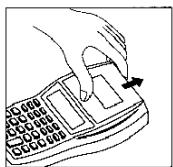
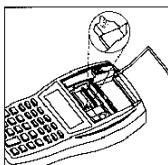
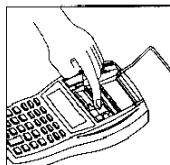
Replacing Ink Roller
- Turn off the power switch.
- Push the printer cover upward so as to remove it from the case.
- Remove the ink cartridge (IR40 or IR30).
- Insert a new ink roller in the proper location.
- Return the printer cover to the original position.
Note:
- If the print is faint, check if the ink roller is properly positioned.
- Do not re-ink the ink roller when the print becomes faint.
Loading paper
- Push the printer cover upward so as to remove it from the case.
- Allow the paper holder to click into place.
- With a pair of scissors, cut the edge of the paper roll straight across so that the paper can feed properly through the printer mechanism.
- While holding the paper roll in one hand, feed the paper from the bottom of the roll and then insert the leading edge of the paper into the paper slot at the back of the machine.
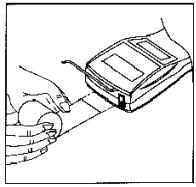
- Turn on the power switch and press the "Paper Feed" key to feed in the paper until it appears through the printer.
- Place the paper roll on the paper holder and return the printer cover to the original position.
Note:
- To remove the paper roll from the printer mechanism, pull the roll forward after cutting the paper on the paper roll side.
- Do not let the paper strip sag between the roll and the insertion slot. If the paper strip sags, it will not advance smoothly and completely.
- Press the Feed key and cut the paper after you calculate.
Keyboard Layout
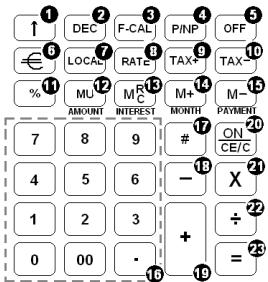
(1) Paper Feed
Feeds the paper roll.
(2) Decimal point selector
A: Add mode (decimal point aligned). The decimal point is automatically set two places to the left in an addition or subtraction calculation, if the decimal point key is not pressed. For multiplications or divisions, the calculation and result is displayed with two decimal places.
0,2,3,4: The results are given according to the setting (number of decimal places) and, if applicable, rounded according to the selected rounding.
F (not) Floating decimal point. Entries and results are displayed and displayed): printed with the maximum possible precision.
(3) Financial Calculation
[MU] key change to [AMOUNT] key.
[M_C^H] key change to [INTEREST] key.
[M + ] key change to [MONTH] key.
[M-] key change to [PAYMENT] key.
(4) Print/Non-Print selector
PRINT: Calculation performed on both the display and the printer.
NP (not: Calculation performed on the display only and only the Paper displayed) Feed key and Non-add/date key can operate the printer.
(5) OFF
Turn off
(6) € (Euro)
Converts the displayed value to Euro currency.
(7) LOCAL
Converts the displayed value to Local currency.
(8) RATE
TAX & Euro currency rate preset keys. Can also be used to view the Tax Rate or Euro Currency Rate.
(9) TAX+
Calculates the value including VAT and prints the VAT separately.
(10) TAX
Calculates the net value without VAT and prints the VAT separately.
(11) Percentage
Completes percent calculation after Multiplication, Division or Mark UP key is used.
If this key is depressed immediately after [+] or [-] key, it works as percent plus or minus calculation.
(12) Mark-Up / AMOUNT
MU: From a known cost of goods and a desired gross margin, automatically calculates and prints the mark-up and selling price amounts.
Amount: Pressed after a 10-key input, the value entered is considered as Total Amount. However if Interest, Month, and Payment are entered beforehand or any of the three are modified beforehand, press this key to calculate / recalculate the Loan Amount.
(13) Memory Recall and Clear / INTEREST
M^Rc : Pressing this key once displays the result and /or prints it out if set to Print mode. Pressed twice clears the memory contents.
INTEREST: Pressed after a 10-key input, the value entered is considered as Loan Interest. However if Amount, Month, and Payment are entered beforehand or any of the three are modified beforehand, press this key to calculate / recalculate the Loan Interest.
(14) Memory Plus/MONTH
M+: Adds an amount to memory. If there is a live calculation pending (× or ÷) , the answer will be calculated and added to Memory.
INTEREST: Pressed after a 10-key input, the value entered is considered as Number of Months to settle the Loan. However if Amount, Interest and Payment are entered beforehand or any of the three are modified beforehand, press this key to calculate / recalculate the Number of Months.
(15) Memory Minus / PAYMENT
M:- Subtracts an amount from memory. If there is a live calculation pending (× or ÷ ), the answer will be calculated and the amount will be subtracted from memory.
PAYMENT: Pressed after a 10-key input, the value entered is considered as Payment. However if Amount, Interest and Months are entered beforehand or any of the three are modified beforehand, press this key to calculate / recalculate the Payment.
(16) Numbers, double zero and decimal point
Set the number to be entered. Any numeral over 12 digits will be ineffective.
Decimal point: When used more than once in one numeral, only the first decimal point will be considered as effective. If the Non-add/date key is used immediately after the Decimal Point in one numeral, the Decimal Point will act as a separator, e.g. date separator.
(17) Non-Add/Date
Prints the displayed content with the "#" sign on left most side of the paper roll and does not perform calculation.
(18) Subtraction
To subtract, enter the first number and press the [-] key. Then enter the second number and press [=] or other keys, as necessary to obtain the result. If do not enter number, the default value is 0. If the [=] key is pressed repeatedly, it will perform sequential subtract calculations.
(19)Addition
To add, enter the first number and press the [+] key. Then enter the second number and press [=] or other keys, as necessary to obtain the result. If do not enter number, the default value is 0. If the [=] key is pressed repeatedly, it will perform sequential add calculations.
(20) ON / Clear Entry / Clear
ON: Turn on.
CE: Clears the last number (displayed number) entered before any function key is pressed.
C: Clears all, except memory contents.
(21) Multiplication
To multiply, enter the first number (multiplicand) and press the [x] key. Then enter the second number (multiplier) and press [-] or other keys, as necessary, to obtain the result. If the [=] key is pressed repeatedly, it will perform sequential multiple calculations.
(22) Division
To divide, enter the number to be divided (dividend) then press the [=] key. Then enter the second number (divisor) and press [=] or other keys, as necessary, to obtain the result. If the [=] key is pressed repeatedly, it will perform sequential division calculations.
(23) Equal
Completes Multiplication, Division or Mark up calculation.
Technical Specifications
Type : Electronic Printing / Display Calculator
Keyboard : 10-key system
Capability : 12 digits
Display : 12 digits Liquid Crystal Display
Printer : M31All
Printout color : Black (Ink cartridge IR30 or IR40)
Printing speed : 1.4 lines/second
Paper roll : Width 57.5 mm (2-11/16") × 25 D, Thickness 0.06 to 0.085mm (60 g)
Operating temperature : 0^ to 40^ (32°F to 104°F)
Power source : UM-3/AAx4 or ADAPTOR 6V 300 mA
Power consumption : 6.0 W - 0.04 A
Dimensions : 97.7 (W) × 191 (D) × 42 (H) mm
Weight : 250 g
TABLE DE MATIERES
FONCTIONNEMENT ET ENTRETIEN 2
SUSBTITUTION DE L'ENCREUR 2
CHARGEMENT DU PAPIER. 3
DESCRIPTION DU CLAVIER 3
SPECIFICATIONS TECHNIQUES 6
EXAMPLES DE CALCUL
(12) Mark-Up / AMOUNT
(17) Non addition/Date
ON: Allume la calculatrice.
Specifications techniques
(12) Mark-Up / AMOUNT
(12) Mark-Up / AMOUNT
(11) Toets percentage
(12) Mark-Up / AMOUNT
| Calculation | Enter | Display | F-CAL - PRINT | ||
| 23=2×2×2=? | [×] [=] | 2. 4. | 2. X 2. = 4. * | ||
| [=] | 8. | 4. X 2. = 8. * | |||
CALCOLO COSTANTE - CONSTANT CALCULATION - CALCUL CONSTANTE - KONSTANTENBERECHNUNG - CALCULO CONSTANTE - CALCULO CONSTANTE - CONSTANT- BEREKENING
| Calculation | Enter | Display | Paper | |||
| 2×5=? | 2 | [×] | 2. | 2. X | ||
| 5 | [=] | 10. | 5. = 10. * | |||
| 2×7=? | 7 | [=] | 14. | 7. X | ||
| 2. = 14. * | ||||||
PREIMPOSTAZIONE TASSO - SET TAX RATE - PROGRAMMATION DU TAUX - VOREINSTELLUNG SATZ - SELECTION PREVIA PERCENTAJE - PREDEFINÇÃO DA TAXA - INSTELLING BTW-TARIEF
| DEC 2 | F-CAL - | P/NP PRINT | |||
| Calculation | Enter | Display | Paper | ||
| Preset TAX=18.6% | [ON/CE/C] | (Blinking) RATE | 0. | 0. C | |
| [RATE] | 0. | ||||
| Print TAX rate | (Press & hold 3 sec.) | TAX % | 18.6 | 18.6% | |
| 18.6 [TAX+] | |||||
| [RATE][TAX+] | TAX % | 18.6 | 18.6% | ||
CALCOLO TASSO - TAX CALCULATION - CALCUL DU TAUX - SATZ-BERECHNUNG - CALCULO DE TASACION - CALCULO DA TAXA - BTW-BEREKENING
| DEC 2 | F-CAL - | P/NP PRINT | |||
| Calculation | Enter | Display | Paper | ||
| Price without tax | 300 | [TAX+] | TAX+ | 355.80 | 300.00 |
| =300 | 18.6 % | ||||
| Price with tax=? | 55.80 Δ | ||||
| Price with tax | 355.80 | [TAX-] | TAX- | 300.00 | 355.80 * |
| =355.80 | 355.80 | ||||
| Price without tax=? | 18.6 % | ||||
| -55.80 Δ | |||||
| 300.00 * | |||||
CALCOLO DELLA PERCENTUALE - PERCENTAGE CALCULATION - CALCUL DU POURCENTAGE - PROZENTSATZ-BERECHNUNG - CÁLCULO DEL PERCENTAJE - CÁLCULO DA PERCENTAGEM - PERCENTAGEBEREKENING
| DEC 2 | F-CAL - | P/NP PRINT | |||
| Calculation | Enter | Display | Paper | ||
| 1279=100% | 1279 | [x] | 1'279.00 | 1,279.00 X | |
| ? =12% | 12 | [%] | 153.48 | 12.00% | |
| 153.48 * | |||||
CALCOLO DELL'ADDIZIONE E DELLO SCONTO - ADD-ON AND DISCOUNT CALCULA-TION - POURCENTAGE DE MAJORATION ET POURCENTAGE DE REMISE - ZUSCHLAG- UND RABATTBECHNUNG - CÁLUCO DE LA ADICION Y DEL DESCUYNTO - CÁLUCO DA ADIÇÃO E DO DESCONTO - BEREKENING VAN TOESLAG EN KORTING
| Calculation | Enter | Display | Paper | ||
| 180+15%-3%=? | 180 | [+] | 180.00 | 180.00 + 15.00 % + 207.00 % | |
| 15 | [%] | 207.00 | |||
| [-] | 207.00 | 207.00 - 3.00 % - 200.79 % | |||
| 3 | [%] | 200.79 | |||
PERCENTUALE DELLA COSTANTE - PERCENTAGE OF CONSTANT -POURCENTAGE DE CONSTANTE - KONSTANTENPROZENTSATZ -PERCENTAJE DE LA CONSTANTE - PERCENTAGEM DA CONSTANTE - PERCENTAGE VAN DE CONSTANTE
| PERCENTAGE AND CONCATIWE | |||
| Calculation | Enter | Display | F-CAL P/NP2 PRINT |
| 120=100% | 120 | [×] 120.00 | 120.00 X |
| ? =25% | 25 | [%] 30.00 | 25.00 %30.00 * |
| ? =33% | 33 | [%] 39.60 | 120.00 X33.00 %39.60 * |
RICAVO - MARK UP- MARGE DE BENEFICE- AUFSCHLAGEPRODUCTO - GANHO- WINSTMARGE
| DEC 2 | F-CAL - | P/NP PRINT | |||
| Calculation | Enter | Display | Paper | ||
| Purchase price=60 | 60.00 M | ||||
| Sale price including 32% margin | 32.00 % | ||||
| 60 | [MU] | 60.00 | 28.24 Δ | ||
| 32 | [=] | 88.24 | 88.24 * | ||
OVERFLOW DELLA CAPACITA - CAPACITY OVER FLOW - SURPLUS DE LA CAPACITE - KAPAZITATSÜBERLAUF - DESBORDAMENTO DE LA CAPACIDAD - OVERFLOW DA CAPACIDADE - OVERFLOW VAN DE CAPACITEIT
| DEC | F-CAL | P/NP | ||
| 2 | - | |||
| Calculation | Enter | Display | Paper | |
| 550000000000 | 550000000000 | [+] 550'000'000'000. | 550,000,000,000. + | |
| +66000000000 | 660000000000 | [=] E | 0. | 660,000,000,000. = |
| Over Flow | ...... |
CALCOLI CON MEMORIA - MEMORY CALCULATION - CALCULS
| DEC 2 | F-CAL - | P/NP PRINT Paper | ||
| Calculation | Enter | Display | ||
| Set Currency rate 6.55957 in r-01 | [RATE] | (Blinking) RATE 0. | ||
| (Press & hold 3 sec.) | ||||
| [€] | (Blinking) RATE € r-01 1. | |||
| 6.55957 [€] | RATE € | 6.55957 | 6.55957 € | |
| 2500+4000+1500 =Total Euro currency? | ||||
| 2500 | [+] | 2'500.00 | 2,500.00 + | |
| 4000 | [+] | 6'500.00 | 4,000.00 + | |
| 1500 | [=] | 8'000.00 | 1,500.00 = | |
| 8,000.00 * | ||||
| [€] | € | 1'219.59 | 8,000.00 ÷ | |
| 6.55957 € | ||||
| 2500+4000+1500 =Total Local currency? | ||||
| 2500 | [+] | 2'500.00 | 2,500.00 + | |
| 4000 | [+] | 6'500.00 | 4,000.00 + | |
| 1500 | [=] | 8'000.00 | 1,500.00 = | |
| [LOCAL] | LOCAL | 52'476.56 | 8,000.00 X | |
| 6.55957 € | ||||
| 52,476.56 * | ||||
Up to 13 foreign currency exchange rates can be programmed.
Proceed as follow to program your rate:
-
To select a position to set your desired rates:
-
Press and hold down the RATE key until the display blinks.
- Press the EURO key, "r-01 1" is displayed.
- Press the + key to advance to next rate.
- Press the - key to go back to the previous rate.
- Enter required rate and then press the EURO key. The current rate is now set.
| DEC | F-CAL | P/NP | ||
| 2 | - | |||
| Calculation | Enter | Display | - | Paper |
| Set Currency rate | (RATE) | (Blinking) RATE | 0. | |
| 6.55957 in r-01 | ||||
| (Press & hold 3 sec.) | ||||
| [€] | (Blinking) RATE € | r-01 1. | ||
| 6.55957 [€] | RATE € | 6.55957 | 6.55957 € | |
| 2500+4000+1500=Total Euro currency? | ||||
| 2500 [+] | 2'500.00 | 2,500.00 + | ||
| 4000 [+] | 6'500.00 | 4,000.00 + | ||
| 1500 [=] | 8'000.00 | 1,500.00 = | ||
| 8,000.00 * | ||||
| [€] | € 1'219.59 | 8,000.00 ÷ | ||
| 6.55957 € | ||||
| 2500+4000+1500=Total Local currency? | ||||
| 2500 [+] | 2'500.00 | 2,500.00 + | ||
| 4000 [+] | 6'500.00 | 4,000.00 + | ||
| 1500 [=] | 8'000.00 | 1,500.00 = | ||
| [LOCAL] LOCAL | 52'476.56 | 8,000.00 X | ||
| 6.55957 € | ||||
| 52,476.56 * | ||||
CHANGE DEVISE
| DEC 2 | F-CAL - | P/NP PRINT Paper | ||
| Calculation | Enter | Display | ||
| Set Currency rate 6.55957 in r-01 | [RATE] (Press & hold 3 sec.) | (Blinking) RATE 0. | ||
| [€] 6.55957 | (Blinking) RATE € r-01 1. RATE € 6.55957 | 6.55957 € | ||
| 2500+4000+1500 =Total Euro currency? | ||||
| 2500 [+] | 2'500.00 | 2,500.00 + | ||
| 4000 [+] | 6'500.00 | 4,000.00 + | ||
| 1500 [=] | 8'000.00 | 1,500.00 = | ||
| 8,000.00 * | ||||
| [€] | € 1'219.59 | 8,000.00 ÷ | ||
| 6.55957 € | ||||
| 2500+4000+1500 =Total Local currency? | 1,219.59 € | |||
| 2500 [+] | 2'500.00 | 2,500.00 + | ||
| 4000 [+] | 6'500.00 | 4,000.00 + | ||
| 1500 [=] | 8'000.00 | 1,500.00 = | ||
| 8.000.00 * | ||||
| [LOCAL] | 52'476.56 | 8,000.00 X | ||
| 6.55957 € | ||||
| 52,476.56 * |
| DEC 2 | F-CAL - | P/NP PRINT | ||
| Calculation | Enter | Display | Paper | |
| Set Currency rate 6.55957 in r-01 | [RATE] | (Blinking) RATE 0. | ||
| (Press & hold 3 sec.) | ||||
| [€] | (Blinking) RATE € r-01 1. | |||
| 6.55957 [€] | RATE € | 6.55957 | 6.55957 € | |
| 2500+4000+1500 =Total Euro currency? | ||||
| 2500 | [+] | 2'500.00 | 2,500.00 + | |
| 4000 | [+] | 6'500.00 | 4,000.00 + | |
| 1500 | [=] | 8'000.00 | 1,500.00 = | |
| 8,000.00 * | ||||
| [€] | € | 1'219.59 | 8,000.00 ÷ | |
| 6.55957 € | ||||
| 2500+4000+1500 =Total Local currency? | ||||
| 2500 | [+] | 2'500.00 | 2,500.00 + | |
| 4000 | [+] | 6'500.00 | 4,000.00 + | |
| 1500 | [=] | 8'000.00 | 1,500.00 = | |
| [LOCAL] | LOCAL | 52'476.56 | 8,000.00 X | |
| 6.55957 € | ||||
| 52,476.56 * | ||||
CAMBIO DIVISA
| DEC 2 | F-CAL - | P/NP PRINT Paper | ||
| Calculation | Enter | Display | ||
| Set Currency rate 6.55957 in r-01 | [RATE] | (Blinking) RATE 0. | ||
| (Press & hold 3 sec.) | ||||
| [€] | (Blinking) RATE € r-01 1. | |||
| 6.55957 [€] | RATE € 6.55957 | 6.55957 € | ||
| 2500+4000+1500 =Total Euro currency? | ||||
| 2500 [+] | 2'500.00 | 2,500.00 + | ||
| 4000 [+] | 6'500.00 | 4,000.00 + | ||
| 1500 [=] | 8'000.00 | 1,500.00 = | ||
| 8,000.00 * | ||||
| [€] | € 1'219.59 | 8,000.00 ÷ | ||
| 6.55957 € | ||||
| 2500+4000+1500 =Total Local currency? | ||||
| 2500 [+] | 2'500.00 | 2,500.00 + | ||
| 4000 [+] | 6'500.00 | 4,000.00 + | ||
| 1500 [=] | 8'000.00 | 1,500.00 = | ||
| [LOCAL] LOCAL | ||||
| 52'476.56 | 8,000.00 X | |||
| 6.55957 € | ||||
| 52,476.56 * | ||||
| DEC 2 | F-CAL - | P/NP PRINT | ||
| Calculation | Enter | Display | Paper | |
| Set Currency rate 6.55957 in r-01 | [RATE] | (Blinking) RATE 0. | ||
| (Press & hold 3 sec.) | ||||
| [€] | (Blinking) RATE € r-01 1. | |||
| 6.55957 [€] | RATE € 6.55957 | 6.55957 € | ||
| 2500+4000+1500 =Total Euro currency? | ||||
| 2500 [+] | 2'500.00 | 2,500.00 + | ||
| 4000 [+] | 6'500.00 | 4,000.00 + | ||
| 1500 [=] | 8'000.00 | 1,500.00 = | ||
| 8,000.00 * | ||||
| [€] | € 1'219.59 | 8,000.00 ÷ | ||
| 6.55957 € | ||||
| 2500+4000+1500 =Total Local currency? | ||||
| 2500 [+] | 2'500.00 | 2,500.00 + | ||
| 4000 [+] | 6'500.00 | 4,000.00 + | ||
| 1500 [=] | 8'000.00 | 1,500.00 = | ||
| [LOCAL] | LOCAL 52'476.56 | 8,000.00 X | ||
| 6.55957 € | ||||
| 52,476.56 * | ||||
WISSELKOERS
| DEC 2 | F-CAL - | P/NP PRINT Paper | ||
| Set Currency rate 6.55957 in r-01 | [RATE] | (Blinking) RATE 0. | ||
| (Press & hold 3 sec.) | ||||
| [€] | (Blinking) RATE € r-01 1. | |||
| 6.55957 [€] | RATE € 6.55957 | 6.55957 € | ||
| 2500+4000+1500 =Total Euro currency? | ||||
| 2500 [+] | 2'500.00 | 2,500.00 + | ||
| 4000 [+] | 6'500.00 | 4,000.00 + | ||
| 1500 [=] | 8'000.00 | 1,500.00 = | ||
| 8,000.00 * | ||||
| [€] | € 1'219.59 | 8,000.00 ÷ | ||
| 6.55957 € | ||||
| 2500+4000+1500 =Total Local currency? | ||||
| 2500 [+] | 2'500.00 | 2,500.00 + | ||
| 4000 [+] | 6'500.00 | 4,000.00 + | ||
| 1500 [=] | 8'000.00 | 1,500.00 = | ||
| [LOCAL] LOCAL | ||||
| 52'476.56 | 8,000.00 X | |||
| 6.55957 € | ||||
| 52,476.56 * | ||||
CALCOLO FINANZIARIO
| Calculation | Enter | Display | Paper | |
| [CE/C] | 0. | 0. C | ||
| Loan Amount =100000 | 100000 | [AMOUNT] | 100'000.00 | 100,000.00 Δ |
| Interest=6.5% | 6.5 | [INTEREST] | 6.50 | 6.50% |
| Months=180 | 180 | [MONTH] | 180. | 180.M |
| * Payment=? | [PAYMENT] | 871.11 | 871.11C | |
| Calculation | Enter | Display | Paper | |
| Payment changed to 600 | 600 | [PAYMENT] | 600.00 | 600.00C |
| Months=? | [MONTH] | 432. | * | |
| 432.M | ||||
| Calculation | Enter | Display | Paper | |
| Payment changed to 1000 | 1000 | [PAYMENT] | 1'000.00 | 1,000.00C |
| Months changed to 180 | [MONTH] | 180. | 180.M | |
| [AMOUNT] | 114'796.41 | 114,796.41Δ | ||
NOTE: The "FIN" symbol is displayed when F-Cal is ON.
DEC F-CAL P/NP
2 FIN PRINT
Example: Assume you are interested in a purchase worth €100,000. The interest rate is 6.5% . You want to finance the loan over a period of 180 months. Calculate for payment per month.
| Calculation | Enter | Display | Paper | |
| [CE/C] | 0. | 0. C | ||
| Loan Amount =100000 | 100000 | [AMOUNT] | 100'000.00 | 100,000.00 Δ |
| Interest=6.5% | 6.5 | [INTEREST] | 6.50 | 6.50% |
| Months=180 | 180 | [MONTH] | 180. | 180.M |
| * Payment=? | [PAYMENT] | 871.11 | 871.11C | |
Let's assume payment is too high. Change the payment amount to € 600 and calculate the period of months.
| Calculation | Enter | Display | Paper | |
| Payment changed to 600 | 600 | [PAYMENT] | 600.00 | 600.00C |
| Months=? | [MONTH] | 432. | * | |
| 432.M | ||||
If I were able to afford 1,000 € per month, paying 6.5% interest annually over 180 months period, how much can I borrow?
| Calculation | Enter | Display | Paper | |
| Payment changed to 1000 | 1000 | [PAYMENT] | 1'000.00 | 1,000.00C |
| Months changed to 180 | 180 | [MONTH] | 180. | 180.M |
| [AMOUNT] | 114'796.41 | 114,796.41Δ | ||
NOTE: When F-Cal Switch is ON, Memory and Mark up are not operational.
CALCUL FINANCIER
| Calculation | Enter | Display | Paper | |
| [CE/C] | 0. | 0. C | ||
| Loan Amount =100000 | 100000 | [AMOUNT] | 100'000.00 | 100,000.00 Δ |
| Interest=6.5% | 6.5 | [INTEREST] | 6.50 | 6.50% |
| Months=180 | 180 | [MONTH] | 180. | 180.M |
| * Payment=? | [PAYMENT] | 871.11 | 871.11C | |
| Calculation | Enter | Display | Paper |
| Payment changed to 600 | 600 | [PAYMENT] | 600.00 |
| Months=? | [MONTH] | 432. | |
| 600.00C | |||
| * | |||
| 432.M |
| Calculation | Enter | Display | Paper | |
| Payment changed to 1000 | 1000 | [PAYMENT] | 1'000.00 | 1,000.00C |
| Months changed to 180 | 180 | [MONTH] | 180. | 180.M |
| [AMOUNT] | 114'796.41 | 114,796.41Δ | ||
| Calculation | Enter | Display | Paper | |
| [CE/C] | 0. | 0. C | ||
| Loan Amount =100000 | 100000 | [AMOUNT] | 100'000.00 | 100,000.00 Δ |
| Interest=6.5% | 6.5 | [INTEREST] | 6.50 | 6.50% |
| Months=180 | 180 | [MONTH] | 180. | 180.M |
| * Payment=? | [PAYMENT] | 871.11 | 871.11C | |
| Calculation | Enter | Display | Paper | |
| Payment changed to 1000 | 1000 | [PAYMENT] | 1'000.00 | 1,000.00C |
| Months changed to 180 | [MONTH] | 180. | 180.M | |
| [AMOUNT] | 114'796.41 | 114,796.41Δ | ||
| Calculation | Enter | Display | Paper | ||
| [CE/C] | 0. | 0. C | |||
| Loan Amount =100000 | 100000 | [AMOUNT] | 100'000.00 | 100,000.00 Δ | |
| Interest=6.5% | 6.5 | [INTEREST] | 6.50 | 6.50% | |
| Months=180 | 180 | [MONTH] | 180. | 180.M | |
| * Payment=? | [PAYMENT] | 871.11 | 871.11C | ||
| Calculation | Enter | Display | Paper | |
| Payment changed to 600 | 600 | [PAYMENT] | 600.00 | 600.00C |
| Months=? | [MONTH] | 432. | * | |
| 432.M | ||||
| Calculation | Enter | Display | Paper | |
| Payment changed to 1000 | 1000 | [PAYMENT] | 1'000.00 | 1,000.00C |
| Months changed to 180 | 180 | [MONTH] | 180. | 180.M |
| [AMOUNT] | 114'796.41 | 114,796.41Δ | ||
| Calculation | Enter | Display | Paper | |
| [CE/C] | 0. | 0. C | ||
| Loan Amount =100000 | 100000 | [AMOUNT] | 100'000.00 | 100,000.00 Δ |
| Interest=6.5% | 6.5 | [INTEREST] | 6.50 | 6.50% |
| Months=180 | 180 | [MONTH] | 180. | 180.M |
| * Payment=? | [PAYMENT] | 871.11 | 871.11C | |
| Calculation | Enter | Display | Paper | |
| Payment changed to 600 | 600 | [PAYMENT] | 600.00 | 600.00C |
| Months=? | [MONTH] | 432. | * 432.M | |
| Calculation | Enter | Display | Paper | |
| Payment changed to 1000 | 1000 | [PAYMENT] | 1'000.00 | 1,000.00C |
| Months changed to 180 | 180 | [MONTH] | 180. | 180.M |
| [AMOUNT] | 114'796.41 | 114,796.41Δ | ||
| Calculation | Enter | Display | Paper | |
| [CE/C] | 0. | 0. C | ||
| Loan Amount =100000 | 100000 | [AMOUNT] | 100'000.00 | 100,000.00 Δ |
| Interest=6.5% | 6.5 | [INTEREST] | 6.50 | 6.50% |
| Months=180 | 180 | [MONTH] | 180. | 180.M |
| * Payment=? | [PAYMENT] | 871.11 | 871.11C | |
| Calculation | Enter | Display | Paper | ||
| Payment changed to 600 | 600 | [PAYMENT] | 600.00 | 600.00C | |
| Months=? | [MONTH] | 432. | * 432.M | ||
| Calculation | Enter | Display | Paper | |
| Payment changed to 1000 | 1000 | [PAYMENT] | 1'000.00 | 1,000.00C |
| Months changed to 180 | 180 | [MONTH] | 180. | 180.M |
| [AMOUNT] | 114'796.41 | 114,796.41Δ | ||

- PUBLICATION ISSUED BY:
- AVVERTENZE - PRECAUTIONS - AVERTISSEMENTS - HINWEISE - ADVERTENCIAS - ADVERTÉNCIAS - WAARSCHUWINGEN
- DIRECTIVE 2002/96/CE ON THE TREATMENT, COLLECTION, RECYCLING AND DISPOSAL OF ELECTRIC AND ELECTRONIC DEVICES AND THEIR COMPONENTS
- FOR COUNTRIES IN THE EUROPEAN UNION (EU)
- TO DISPOSE OF OUR DEVICES CORRECTLY:
- FOR OTHER COUNTRIES (NOT IN THE EU)
- DIRECTIVE 2002/96/CE SUR LE TRAITEMENT, LA COLLECTE, LE RECYCLAGE ET LA MISE AU REBUT DES EQUIPÉMENTS ELECTRIQUES ET ELECTRONIQUES ET DE LEURS COMPOSANTS
- POUR LES PAYS DE L'UNION EUROPEENNE (UE)
- Operation and maintenance
- CAUTION
- Replacing Ink Roller
- Note:
- Loading paper
- Keyboard Layout
- Memory Recall and Clear / INTEREST
- Memory Plus/MONTH
- Memory Minus / PAYMENT
- Numbers, double zero and decimal point
- Non-Add/Date
- Subtraction
- (19)Addition
- ON / Clear Entry / Clear
- Multiplication
- Division
- Equal
- Technical Specifications
- TABLE DE MATIERES
- Non addition/Date
- Specifications techniques
- CALCOLO COSTANTE - CONSTANT CALCULATION - CALCUL CONSTANTE - KONSTANTENBERECHNUNG - CALCULO CONSTANTE - CALCULO CONSTANTE - CONSTANT- BEREKENING
- PREIMPOSTAZIONE TASSO - SET TAX RATE - PROGRAMMATION DU TAUX - VOREINSTELLUNG SATZ - SELECTION PREVIA PERCENTAJE - PREDEFINÇÃO DA TAXA - INSTELLING BTW-TARIEF
- CALCOLO TASSO - TAX CALCULATION - CALCUL DU TAUX - SATZ-BERECHNUNG - CALCULO DE TASACION - CALCULO DA TAXA - BTW-BEREKENING
- CALCOLO DELLA PERCENTUALE - PERCENTAGE CALCULATION - CALCUL DU POURCENTAGE - PROZENTSATZ-BERECHNUNG - CÁLCULO DEL PERCENTAJE - CÁLCULO DA PERCENTAGEM - PERCENTAGEBEREKENING
- CALCOLO DELL'ADDIZIONE E DELLO SCONTO - ADD-ON AND DISCOUNT CALCULA-TION - POURCENTAGE DE MAJORATION ET POURCENTAGE DE REMISE - ZUSCHLAG- UND RABATTBECHNUNG - CÁLUCO DE LA ADICION Y DEL DESCUYNTO - CÁLUCO DA ADIÇÃO E DO DESCONTO - BEREKENING VAN TOESLAG EN KORTING
- CALCOLI CON MEMORIA - MEMORY CALCULATION - CALCULS
- CHANGE DEVISE
- CAMBIO DIVISA
- WISSELKOERS
- CALCOLO FINANZIARIO
- CALCUL FINANCIER
Brand : OLIVETTI
Model : SUMMA 21
Category : Calculator