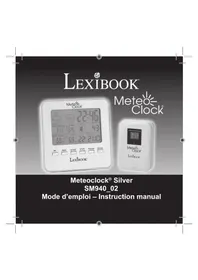
METEOCLOCK PURE SM1670 - Weather Station LEXIBOOK - Free user manual and instructions
Find the device manual for free METEOCLOCK PURE SM1670 LEXIBOOK in PDF.


| Product type | Digital weather station |
| Brand | LEXIBOOK |
| Model | METEOCLOCK PURE SM1670 |
| Dimensions (main unit) | 250 × 155 × 32 mm |
| Dimensions (remote sensor) | 60 × 25 × 95 mm |
| Weight | Not specified |
| Power supply (main unit) | 3 AA/LR6 alkaline batteries 1.5 V |
| Power supply (remote sensor) | 2 AAA/LR03 alkaline batteries 1.5 V |
| Main functions | Indoor/outdoor thermometer, hygrometer, barometer, weather forecast (animated icons), moon phases, sunrise/sunset times, clock, 2 alarms, snooze, backlight |
| Indoor temperature range | 0°C to +50°C |
| Outdoor temperature range | -20°C to +50°C |
| Indoor humidity range | 20% to 99% |
| Wireless transmission | 433 MHz, range up to 30 m in open space |
| Display | LCD with backlight |
| Supported sensors number | Up to 3 remote sensors |
| Temperature units | Celsius (°C) or Fahrenheit (°F) |
| Pressure units | inHg or hPa |
| Maintenance and cleaning | Clean with a soft cloth slightly dampened with water, without detergent. Do not expose to sunlight or heat source. Do not wet, disassemble, or drop. |
| Safety | Do not mix new and used batteries, nor different types. Observe polarity. Remove batteries during prolonged inactivity. Do not incinerate. |
| Warranty | 2 years |
| Spare parts and repairability | Not specified |
| General information | Designed and developed in Europe, made in China. Ref. SM1670 |
Frequently Asked Questions - METEOCLOCK PURE SM1670 LEXIBOOK
User questions about METEOCLOCK PURE SM1670 LEXIBOOK
0 question about this device. Answer the ones you know or ask your own.
Ask a new question about this device
Download the instructions for your Weather Station in PDF format for free! Find your manual METEOCLOCK PURE SM1670 - LEXIBOOK and take your electronic device back in hand. On this page are published all the documents necessary for the use of your device. METEOCLOCK PURE SM1670 by LEXIBOOK.
USER MANUAL METEOCLOCK PURE SM1670 LEXIBOOK
91953 Courtaboeuf Cedex, France.
Service consommateurs: 0892 23 27 26 (0.34€ TTC/min)
www.lexibook.com
Copyright © 2010 LEXIBOOK®
C E
INTRODUCTION
Congratulations on your purchase of this weather station, MeteoClock® Silver SM1670. Please take the time to read and understand this manual so you can begin to enjoy the convenience and features this product has to offer.
What exactly is a Weather Station?
Lexibook digital stations measure not only the time in progress - thanks to their built-in-clock but also the actual and upcoming weather.
The MeteoClock® PURE SM1670 incorporates the following functions:
- Thermometer:
The temperature is displayed in real time to the nearest tenth of a degree Celsius. Thanks to its wireless sensor, the station can detect from a distance the outdoor temperature or that of another room.
- Hygrometer:
Outdoor or indoor hygrometry is expressed in percentage of humidity in the ambient air. The ideal 'Comfort Zone' for the human body ranges from 35 to 65% hygrometry for a given temperature between 18 and 24^ .
- Barometer:
The station also monitors the atmospheric pressure in real time. It displays the weather forecast by means of animated icons (sun, clouds, rain...) and for the next 12 to 24 hours.
PRODUCT DESCRIPTION
Main unit LCD display description
A1. Indoor temperature (^ / ^) and humidity (%)
A2. Outdoor temperature (^ / ^) and humidity (%) , main unit low battery indicator ( ), remote sensor reception channel CH12345 (1, 2 or 3), remote sensor signal ( is displayed briefly during the automatic synchronization of the main unit and the remote sensor)
A3. Animated weather forecast symbols
A4. Absolute and relative barometric pressure reading |×| (inHg/hPa)
A5. Barometric pressure historical graph
A6. Sunrise /sunset time display and moon phases indicator
A7. Clock and DTS (Daylight Saving Time) icon
A8. Alarm icons
A9. Day of the week
A10. Date and month
A11.City
Main unit description
B1. "SNOOZE/LIGHT" key
B2. "CENTIGRADE/FAHRENHEIT" key
B3. "MIN/MAX" key (indoor/outdoor temperature and humidity maximum/minimum readings)
B4. "CHANNEL" key
B5. "MODE/SET" key
B6. "SUN HOURS/RISE" key
B7. “ (12-24)” key
B8. “▼/ALARM ON-OFF” key
B9. "REL/ABS WEATHER" key (relative and absolute barometric pressure)
B10. "inHg/hPa" key (barometric pressure in inHg/hPa)
B11. " ^+ "key
B12. "key
B13. "RESET" key
C1. Wall-mount holder
C2. Battery compartment
C3. Table stand
Remote sensor description
D1. LED (indicates that the main unit and the remote sensor are connected)
D2. Outdoor temperature ^ C / ^ and humidity (%) , reception channel (CH1/2/3), remote sensor low battery indicator ( )
D3. Wall-mount holder
D4. 3-position channel selector (channel 1, 2 or 3)
D5. Battery compartment
D6. “°C/°F” key
D7. "TX" button: press this button and the sensor will send the temperature and humidity readings to the main unit.
D8. Stand
Remote sensor battery installation
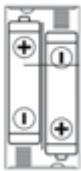
- Use a screwdriver to open the battery compartment located at the back of the remote sensor.
- Insert 2 × 1.5V = -LR03 / AAA type batteries (not included) according to the polarity indicated inside the compartment and as per the diagram shown opposite.
- Close the battery compartment and tighten the screw.
Note: When the remote sensor's batteries are low, the "low battery" indicator is displayed on the LCD screen of the sensor.
Main unit battery installation
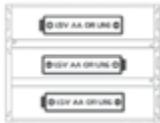
- Open the battery compartment located at the back of the main unit.
- Insert 3 × 1.5V = - - - LR6/AA type batteries (not included) observing the polarity indicated at the bottom of the battery compartment, and as per the diagram shown opposite.
- Close the battery compartment.
Note:
- When the main unit and remote sensor's batteries are low, the "low battery" indicator is displayed on the LCD screen of the main unit.
- When the main unit's LCD display becomes dim, it indicates that the batteries are low and need to be changed.
- If the sensor is exposed to very low temperatures for an extended period of time, the batteries may lose power which may cause the transmission range to be limited. High temperatures also reduce the battery performance.
Non-rechargeable batteries are not to be recharged. Remove the storage batteries before recharging. Recharge storage batteries under adult supervision. Do not mix different types of battery and storage battery, or new and old batteries or storage batteries. Insert batteries and storage batteries according to the polarity. Remove used storage batteries from product. Do not short-circuit the battery or storage battery terminals. Keep batteries away from fire. If the product remains unused for an extended period, remove batteries.
WARNING: Mal-function or loss of memory may be caused by strong frequency interference or electrostatic discharge. Should any abnormal function occur, press the RESET button or remove the batteries and insert them again.
Weather forecast symbols and barometric pressure settings
- When you install or change the unit's batteries (or if you press and hold the "REL/ABS WEATHER" key), the weather forecast symbol flashes on the LCD screen to indicate that you need to set the current weather status.
- Enter the current weather using the "+" and "-" keys to choose among the 5 weather forecast symbols available.
| Sunny | Slightly cloudy | Cloudy | Rainy | Cloudburst |

Note: The icon will be displayed when the weather forecast is "Rainy" or "Cloudburst" and the outdoor temperature is under 0^ .
- Press the "REL/ABS WEATHER" key to confirm the setting. The barometric pressure digits will start flashing.
- Using the "+" and "-" keys to indicate the barometric pressure at sea level then press the "REL/ABS WEATHER" key to confirm the setting.
Note: Please refer to your local weather station to get information about the barometric pressure at your location.
5. If you need to change the settings, press and hold the "REL/ABS WEATHER" key until the weather forecast icon start flashing on the LCD screen then repeat 2, 3 and 4 above.
Note:
- If you do not set the current weather status or if the weather symbol selected is incorrect, the unit's weather forecast may not be accurate.
-
If the weather station is moved to another location significantly higher or lower than its initial standing point (e.g from ground floor to 1st floor of a house), the current weather status must be changed as well.
-
The weather station will start the first forecast 6 hours after the current weather status has been set. After setting up the weather status, reading for weather forecasts should be discarded for the next 6 hours. This will allow sufficient time for the weather station to operate at a constant altitude and therefore result in a more accurate forecast.
- Absolute accuracy cannot be guaranteed regarding weather forecasting. The weather forecasting feature is estimated to have an accuracy level of about 75% due to the varying areas the weather station has been designed to be used in.
- If there is any inconsistency of weather forecast between your local weather station and this unit, the local weather station's forecast should prevail.
Automatic synchronization of the main unit and the remote sensor
- When you change or insert new batteries in the main unit, the synchronization is launched automatically and runs for approximately 2 minutes.
- Within these 2 minutes, the main unit (receiver) picks up the temperature & humidity signals from the remote sensor and displays the readings.
- If the main unit does not display the readings after 2 minutes, open the remote sensor and press the "TX" key to synchronize manually the remote sensor and the main unit.
Note: it may take up to 1 minute before the main unit displays the readings.
CHANNEL SELECTION
Channel setting
The SM1670 comes with one remote sensor. The sensor's default channel is channel 1. You do not need to change it. However, if the sensor (or the main unit) is too close to other electrical devices, interference may cause malfunction. In that case:
- Use the channel selector located inside the sensor's battery compartment to change the channel.
- Press and hold the "CHANNEL" key for a few seconds to reset the temperature and humidity readings of the remote sensor. The main unit will resynchronize with the new channel selected for the remote sensor.
Note:
- If the sensor is exposed to very low temperatures for an extended period of time, the batteries may lose power which may cause the transmission range to be limited. High temperatures also reduce the battery performance.
- If the main unit doesn't receive readings from the remote sensor, "--" is displayed on the LCD screen.
Multiple sensor use
The channel function allows you to use up to 3 additional sensors. The main unit can identify each remote sensor thanks to their assigned channel (channel 1, 2 or 3). If you have one or two additional sensors, you can place them in a different location in your house; in a bedroom, for example. Your main unit can collect the temperature and humidity data of up to three remote sensors.
- Make sure you set each sensor to a different channel.
- Press the TX key inside the remote sensors to synchronize them manually with the main unit. The weather station will detect automatically the new sensors.
Note: it may take up to 1 minute before the main unit displays the readings.
3. Press the "CHANNEL" key repeatedly to select the desired outdoor channel between the 3 available channels ( ).
4. The data of the corresponding remote sensor will be displayed on the main unit's LCD screen. To display successively the readings from all 3 remote sensors, press the "CHANNEL" key repeatedly until the icon is displayed on screen.
CLOCK AND DATE SETTING
- Press and hold the "MODE/SET" key until the weather station plays a "beep" sound and the hour's digits start flashing.
- Use the “▲/(12-24)” and “▼/ALARM ON-OFF” keys to increase or reduce the values, then press “MODE/SET” to confirm and adjust the next setting.
- The setting sequence is displayed in the following order:
Hours Minutes Seconds Year Month Date Day-of-week language Country City Time zone
- Press the "MODE/SET" key to confirm your selection and go back to time display.
- Use the “ (12-24)” key to toggle between 24hr or 12hr display.
Note:
- The time zone is set on "0" by default. You can change this setting when traveling in a city located in a different time zone from yours.
- The day of the week can be displayed in 8 different languages: English (EN), French (FR), Italian (IT), Spanish (ES), German (GE), Danish (DA), Dutch (NL) or Russian (RU).
- You need to set the time after replacing the batteries.
- After a few seconds of inactivity, the unit will go back to time display mode.
ALARM SETTING
- You can set 2 different alarms. In clock mode, press the "MODE/SET" key once to display the alarm time 1 (icon) or twice to display the alarm time 2 (icon).
- When alarm time 1 or 2 is displayed, press and hold the "MODE/SET" key until the hour's digits start flashing.
- Use the “▲/(12-24)” and “▼/ALARM ON-OFF” keys to set the hours, then press “MODE/SET” to adjust the minutes.
- Use the “▲/(12-24)” and “▼/ALARM ON-OFF” keys to set the minutes, then press “MODE/SET” to confirm.
- Once the alarm time has been set, press the “▼/ALARM ON-OFF” key to switch on or switch off the alarm.
Note: When the alarm is switched on, the 3 or 3 icon is displayed on the LCD screen.
- When the alarm rings, press the "SNOOZE/LIGHT" key to switch on the snooze function. The alarm icon flashes and the alarm will ring again 5 minutes later. Press the "MODE/SET", "SUN HOURS/RISE", "(\triangle/(12-24)" or "(\nabla/)ALARM ON-OFF" keys to stop it. The alarm will ring again the next day at the same time. If you wish to switch off the alarm completely, go to alarm time mode then press the "(\nabla/)ALARM ON-OFF" key until the (\text{空}) or (\text{空}) icon disappear from the LCD screen.
Note: After a few seconds of inactivity, the unit will go back to time display mode.
SUNRISE AND SUNSET TIME
Once you have set up the hour and date, your weather station will automatically calculate the time of the sunrise and the sunset according to the day of the year and the latitude of your home town (the sunrise/ sunset time digits flash during the calculation).
- If you want to change the setting of the sunrise/ sunset time, press and hold the "SUN HOURS/RISE" key until the weather station plays a "beep" sound and the city's code start flashing.
- Use the “▲/(12-24)” and “▼/ALARM ON-OFF” keys to increase or decrease the values, then press “SUN HOURS/RISE” to confirm and adjust the next setting.
- The setting sequence is displayed in the following order:
Country City Year Month Date
- Once the new settings have been done, the weather station will calculate the time of the sunrise and the sunset according to the new parameters.
- In clock mode, press the "SUN HOURS/RISE" key once to display the total number of sun hours for the current day.
Your weather station displays the existing atmospheric pressure in inHg (inches of mercury) and hectopascal (hPa).
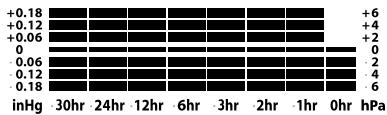
Barometric pressure historical graph
The bar graph lets you see the pressure trend over the past 30 hours.
Barometric pressure trend
The trend pointer displayed indicates the trend of the barometric pressure. Generally, bad weather is associated with low pressure and fine weather with high pressure.
Indicates that the barometric pressure trend is increasing.
Indicates that the barometric pressure trend is steady.
Indicates the barometric pressure trend is decreasing.
Barometric pressure display
Press the "REL/ABS WEATHER" key to display the absolute barometric pressure ("Abs" is displayed on the LCD screen) or the relative barometric pressure ("Rel" is displayed on the LCD screen).
Note: Absolute barometric pressure is the actual atmospheric air pressure at a particular location that profoundly depends upon the location altitude. Relative or sea level pressure is the corrected barometric pressure calculated for the sea or zero level, and usually used to refer atmospheric conditions.
MOON PHASES
Throughout the 28 days of the lunar month, the aspect of the moon changes. Indeed, the moon, being spherical, is always half lightened up by the sun. As the moon rotates around the Earth, the appearance of its lightened side changes continuously. This phenomenon creates moon phases. The moon phase on your MeteoClock® is automatically updated according to the year / month / day.
Moon phases

- New Moon

- Young Crescent

- First Quarter

- Waxing Gibbous

- Full Moon

- Waning Gibbous

- Last Quarter

- Old Crescent
BACKLIGHT
Press the "SNOOZE/LIGHT" key once to switch on the backlight for a few seconds.
TROUBLESHOOTING
Problem:
- Temperature reading of outdoor remote sensor seems too high.
- Main unit is no longer receiving remote sensor signals or display.
- An abnormal operation has been observed and certain functions do not work.
Solution:
-
Ensure the remote sensor is out of direct sunlight, and away from sources of heat.
2. -
Press the TX key inside the remote sensor's battery compartment to synchronize manually the remote sensor and the main unit.
- There may be some interference caused by electrical devices: change the sensor's channel.
- Batteries in remote sensor may need to be replaced.
- Move the remote sensor closer to the main unit.
-
Make sure the remote sensor is away from sources of electrical disturbance.
-
Reset the unit. If this proves to be ineffective, remove and replace the batteries in both the remote sensor and main unit.
SPECIFICATIONS
SM1670 main unit
Dimensions: 250 × 155 × 32 mm
Battery type: 3 X 1.5V AA/LR6 batteries
Indoor Temperature range: 0^ to 50^
Indoor Humidity range: 20% to 99%
Remote sensor
Dimensions: 60 × 25 × 95 ~mm
Battery type: 2 X 1.5V AAA/LR03 batteries
Temperature range: -20^ to +50^
Transmission frequency: 433 MHz
Transmission Range: 30m (open space)
MAINTENANCE
In order to clean the unit, use only a soft cloth moistened with water; do not use any detergent product. Do not dismantle or drop the unit. Remove the batteries if the unit is not going to be used for an extended period of time.
WARRANTY
NOTE: Please keep this instruction manual, it contains important information. This product is covered by our two-year warranty.
To make use of the warranty or the after-sales service, please contact your retailer and supply proof of purchase. Our warranty covers material or installation-related defects attributable to the manufacturer, with the exception of wear caused by failure to respect the instructions for use or any unauthorised work on the equipment (such as dismantling, exposure to heat or damp, etc.). It is recommended to keep the packaging for any further reference.
In a bid to keep improving our services, we could implement modification on the colours and the details of the product shown on the packaging.
Reference: SM1670
Designed and developed in Europe - Made in China
©2010 LEXIBOOK®
United Kingdom & Ireland
For any further information, please call 0808 100 3015
www.lexibook.com
Environmental Protection:
Unwanted electrical appliances can be recycled and should not be discarded along with regular household waste! Please actively support the conservation of resources and help protect the environment by returning this appliance to a collection centre (if available).

DECLARATION OF CONFORMITY
We, Lexibook® S.A.
hereby declare under our full and sole responsibility, that the product:
Name: MeteoClock® PURE
Reference / type: SM1670
Maker: Lexibook®
to which this declaration refers, complies with the essential requirements and any other provisions stated in Directive R&TTE (1999/5/EC) for all that applies to:
EN 301 489-1 V1.8.1
EN 301 489-3 V1.4.1
EN 300 220-1 V2.1.1
EN 300 220-2 V2.1.2
EN 60950-1 :2006+A11 :2009 :A1 :2010
EN 50371:2002
Additional information:
Certified laboratory being consulted: Ke Mei Ou/Intertek
Technical report available from:
Lexibook, 2 avenue de Scandinavie, 91953 Courtaboeuf cedex dated the 29th of March 2006 is suitable for use within the European Union member states.
Wai Man Yiu
Product Development Manager

Issue date: 15/06/2010
Copyright © 2010 LEXIBOOK®
INTRODUCCION
Copyright © 2010 LEXIBOOK®
C E
INTRODUÇÃO
Copyright © 2010 LEXIBOOK®
Nome: MeteoClock® Weather Station
Copyright © 2010 LEXIBOOK®
EINLEITUNG
Name: MeteoClock® Wetterstation
Copyright © 2010 LEXIBOOK®
INLEIDING
WEERGAVE ATMOSFERISCHE DRUK
Copyright © 2010 LEXIBOOK®
| Germany | GER | Saarbruecken | SAA | Sevilla | SEV |
| Aachen | AAC | Schwerin | SCH | Valencia | VAL |
| Berlin | BER | Danmark | DAN | Zaragossa | ZAR |
| Düsseldorf | DUS | Alborg | ALB | France | FRA |
| Dresden | DRE | Arhus | ARH | Besancon | BES |
| Erfurt | ERF | Copenhagen | COP | Biarritz | BIA |
| Frankfurt | FRA | Odense | ODE | Bordeaux | BOR |
| Flensburg | FLE | Spain, Andorra | ESP | Brest | BRE |
| Freiburg | FRE | Alicante | ALI | Cherbourg | CHE |
| Hannover | HAN | Andorra | AND | Lyon | LYO |
| Bremen | BRE | Badajoz | BAD | Marseille | MAR |
| Hamburg | HAM | Barcelona | BAR | Monaco | MON |
| Rostock | ROS | Bilbao | BIL | Metz | MET |
| Stralsund | STR | Cadix | CAD | Nantes | NAN |
| Koeln | KOE | Cordoba | COR | Nice | NIC |
| Kiel | KIE | Ibiza | IBI | Orleans | ORL |
| Kassel | KAS | La Corogna | LAC | Paris | PAR |
| Leipzig | LEI | Leon | LEO | Perpignan | PER |
| Muenchen | MUE | Las Palmas | LPA | Lille | LIL |
| Magdeburg | MAG | Madrid | MAD | Rouen | ROU |
| Nuemberg | NUE | Malaga | MAL | Strasbourg | STR |
| Regensburg | REG | Palma de Mallorca | PDM | Toulouse | TOU |
| Stuttgart | STU | Salamanca | SAL | Finland | FIN |
| Helsinki | HEL |
| Great Britain | GB |
| Aberdeen | ABD |
| Belfast | BEL |
| Birmingham | BIR |
| Bristol | BRI |
| Edinburgh | EDI |
| Glasgow | GLA |
| London | LON |
| Manchester | MAN |
| Plymouth | PLY |
| Hungary | HUN |
| Budapest | BUD |
| Croatia | CRO |
| Zagreb | ZAG |
| Italy | ITA |
| Ancona | ANC |
| Bari | BAI |
| Bologna | BOL |
| Cagliari | CAG |
| Catania | CAT |
| Firenze | FIR |
| Foggia | FOG |
| Genova | GEN |
| Lecce | LEC |
| Messina | MES |
| Milano | MIL |
| Napoli | NAP |
| Palermo | PAL |
| Parma | PAR |
| Perugia | PER |
| Torino | TOR |
| Trieste | TRI |
| Venezia | VEN |
| Verona | VER |
| Ventimiglia | VTG |
| Ireland | IRL |
| Dublin | DUB |
| Luxembourg | LUX |
| Luxembourg | LUX |
| Norway | NOR |
| Bergen | BER |
| Oslo | OSL |
| Stavanger | STA |
| Netherlands | NET |
| Amsterdam | AMS |
| • Eindhoven | EIN |
| Enschede | ENS |
| Groningen | GRO |
| Den Haag | DHA |
| Rotterdam | ROT |
| Portugal | POR |
| Evora | EVO |
| Coimbra | COI |
| Faro | FAR |
| Leiria | LEI |
| Lisbon | LIS |
| Porto | POR |
| • Poland | POL |
| Gdansk | GDA |
| Krakow | KRA |
| Poznan | POZ |
| Szczecin | SZC |
| Warsaw | WAR |
| • Russia | RUS |
| St.Petersburg | PET |
| • Sweden | SWE |
| Gothenburg | GOT |
| Stockholm | STO |
| Slovakia | SLK |
| Bratislave | BRA |
| Slovenia | SLO |
| Ljubljana | LJU |
| Yugoslavia | YUG |
| Belgrade | BER |
| Austria | AUS |
| Graz | GRA |
| Innsbruck | INN |
| Linz | LIN |
| Salzburg | SAL |
| Vienna | VIE |
| Belgium | BEL |
| Antwerpen | ANT |
| Brugges | BRU |
| Bruxelles | BRL |
| Charleroi | CHA |
| Liege | LIE |
| Switzerland, liechtenstein | SWI |
| Basel | BAS |
| Bern | BER |
| Chur | CHU |
| Geneva | GEN |
| Locamo | LOC |
| Luceme | LUC |
| St Moritz | MOR |
| St Gallen | GAL |
| Sion | SIO |
| Vaduz | VAD |
| Zuerich | ZUE |
| Perugia | PER |
YOUR OPINION MATTERS / VOTRE AVIS COMPTE
Very satisfactory! Tres satisfaisant
Disappointing/Decevant