
C340 - Integrated amplifier NAD - Free user manual and instructions
Find the device manual for free C340 NAD in PDF.



| Product type | Stereo integrated amplifier |
| Brand | NAD |
| Model | C340 |
| Audio inputs | Tuner, Disc, CD, Video, Aux, Tape 1 (Input), Tape 2 (Input) |
| Audio outputs | Speakers (impedance ≥ 4 Ω), Pre-out, Tape 1 (Output), Tape 2 (Output), NAD Link |
| Speaker impedance | 4 ohms or more |
| Recommended cable gauge | 16 AWG (1.5 mm²) or larger |
| Controls and adjustments | Motorized volume, Bass, Treble, Balance, Tone Defeat, Input selectors, Soft Clipping, Mute |
| Remote control | NAD universal infrared, range 5 m, AAA batteries (not included) |
| Special features | Soft Clipping circuit, Tone Defeat, NAD Link for centralized control, Tape Monitor |
| Headphone jack | 6.35 mm stereo jack |
| Power supply | Mains (detachable power cord) |
| Cleaning | Soft dry cloth; if necessary, soapy water |
| Safety | Do not remove cover; unplug in case of moisture or prolonged non-use |
| Included accessories | Remote control, power cord, Pre-Out/Main In links |
Frequently Asked Questions - C340 NAD
User questions about C340 NAD
0 question about this device. Answer the ones you know or ask your own.
Ask a new question about this device
Download the instructions for your Integrated amplifier in PDF format for free! Find your manual C340 - NAD and take your electronic device back in hand. On this page are published all the documents necessary for the use of your device. C340 by NAD.
USER MANUAL C340 NAD
Stereo Integrated Amplifier
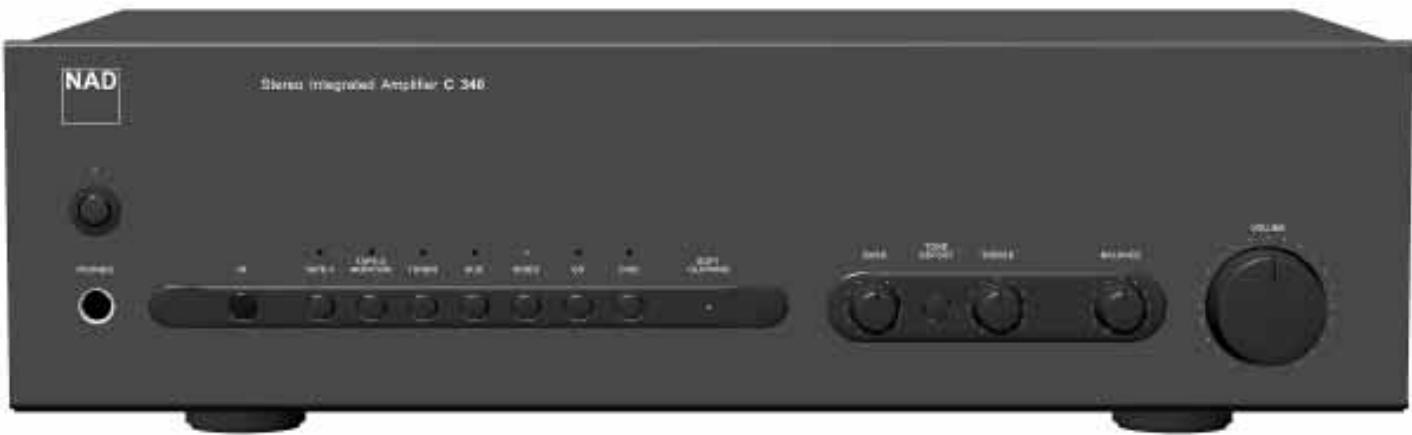
GB Owner's Manual
IMPORTANT SAFETY INSTRUCTIONS
CAUTION
RISK OF ELECTRIC SHOCK DO NOT OPEN
ATTENTION:
RISQUE DE CHOC ELECTRIQUE NE PAS OUVRIR

CAUTION: TO REDUCE THE RISK OF ELECTRIC SHOCK, DO NOT REMOVE COVER (OR BACK). NO USER SERVICEABLE PARTS INSIDE. REFER SERVICING TO QUALIFIED SERVICE PERSONNEL.
Warning: To reduce the risk of fire or electric shock, do not expose this unit to rain or moisture.
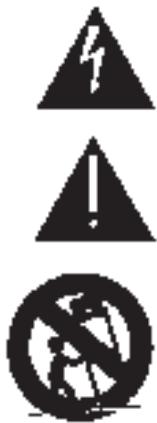
The lightning flash with an arrowhead symbol within an equilateral triangle, is intended to alert the user to the presence of uninsulated "dangerous voltage" within the product's enclosure that may be of sufficient magnitude to constitute a risk of electric shock to persons.
The exclamation point within an equilateral triangle is intended to alert the user to the presence of important operating and maintenance (servicing) instructions in the literature accompanying the product.
Do not place this unit on an unstable cart, stand or tripod, bracket or table. The unit may fall, causing serious injury to a child or adult and serious damage to the unit. Use only with a cart, stand, tripod, bracket or table recommended by the manufacturer or sold with the unit. Any mounting of the device on a wall or ceiling should follow the manufacturer's instructions and should use a mounting accessory recommended by the manufacturer.
An appliance and cart combination should be moved with care. Quick stops, excessive force and uneven surfaces may cause the appliance and cart combination to overturn.
Read and follow all the safety and operating instructions before connecting or using this unit. Retain this notice and the owner's manual for future reference.
All warnings on the unit and in its operating instructions should be adhered to.
Do not use this unit near water; for example, near a bath tub, washbowl, kitchen sink, laundry tub, in a wet basement or near a swimming pool.
The unit should be installed so that its location or position does not interfere with its proper ventilation. For example, it should not be situated on a bed, sofa, rug or similar surface that may block the ventilation openings; or placed in a built-in installation, such as a bookcase or cabinet, that may impede the flow of air through its ventilation openings.
The unit should be situated from heat sources such as radiators, heat registers, stoves or other devices (including amplifiers) that produce heat.
The unit should be connected to a power supply outlet only of the voltage and frequency marked on its rear panel.
The power supply cord should be routed so that it is not likely to be walked on or pinched, especially near the plug, convenience receptacles, or where the cord exits from the unit.
Unplug the unit from the wall outlet before cleaning. Never use benzine, thinner or other solvents for cleaning. Use only a soft damp cloth.
The power supply cord of the unit should be unplugged from the wall outlet when it is to be unused for a long period of time.
Care should be taken so that objects do not fall, and liquids are not spilled into the enclosure through any openings.
This unit should be serviced by qualified service personnel when:
A. The power cord or the plug has been damaged; or
B. Objects have fallen, or liquid has been spilled into the unit; or
C. The unit has been exposed to rain or liquids of any kind; or
D. The unit does not appear to operate normally or exhibits a marked change in performance; or
E. The device has been dropped or the enclosure damaged.
DO NOT ATTEMPT SERVICING OF THIS UNIT YOURSELF. REFER SERVICING TO QUALIFIED SERVICE PERSONNEL
Upon completion of any servicing or repairs, request the service shop's assurance that only Factory Authorized Replacement Parts with the same characteristics as the original parts have been used, and that the routine safety checks have been performed to guarantee that the equipment is in safe operating condition. REPLACEMENT WITH UNAUTHORIZED PARTS MAY RESULT IN FIRE, ELECTRIC SHOCK OR OTHER HAZARDS.
ATTENTION
POUR ÉVITER LES CHOC ELECTRIQUES, INTRODUIRE LA LAME LA PLUS LARGE DE LA FICHE DANS LA BORNE CORRESPONDANTE DE LA PRISE ET POUSSER JUSQU'AU FOND.
CAUTION
TO PREVENT ELECTRIC SHOCK MATCH WIDE BLADE OF PLUG TO WIDE SLOT FULLY INSERT.
If an indoor antenna is used (either built into the set or installed separately), never allow any part of the antenna to touch the metal parts of other electrical appliances such as a lamp, TV set etc.
CAUTION POWER LINES
Any outdoor antenna must be located away from all power lines.
OUTDOOR ANTENNA GROUNDING
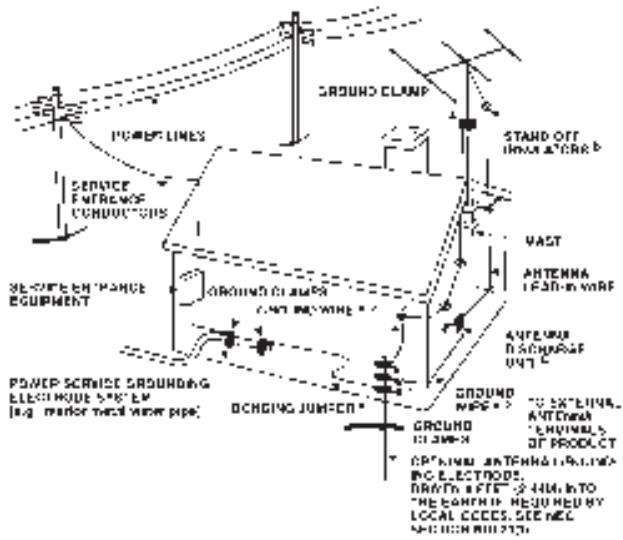
If an outside antenna is connected to your tuner or tuner-preamplifier, be sure the antenna system is grounded so as to provide some protection against voltage surges and built-up static charges. Section 810 of the National Electrical Code, ANSI/NFPA No. 70-1984, provides information with respect to proper grounding of the mast and supporting structure, grounding of the lead-in wire to an antenna discharge unit, size of grounding conductors, location of antenna discharge unit, connection to grounding electrodes and requirements for the grounding electrode.
a. Use No. 10 AWG (5.3mm2) copper, No. 8 AWG (8.4mm2) aluminium, No. 17 AWG (1.0mm2) copper-clad steel or bronze wire, or larger, as a ground wire.
b. Secure antenna lead-in and ground wires to house with stand-off insulators spaced from 4-6 feet (1.22 - 1.83 m) apart.
c. Mount antenna discharge unit as close as possible to where lead-in enters house.
d. Use jumper wire not smaller than No.6 AWG (13.3mm2) copper, or the equivalent, when a separate antenna-grounding electrode is used. see NEC Section 810-21 (j).
EXAMPLE OF ANTENNA GROUNDING AS PER NATIONAL ELECTRICAL CODE INSTRUCTIONS CONTAINED IN ARTICLE 810 - RADIO AND TELEVISION EQUIPMENT.
NOTE TO CATV SYSTEM INSTALLER: This reminder is provided to call the CATV system installer's attention to Article 820-22 of the National Electrical Code that provides guidelines for proper grounding and, in particular, specifies that the ground cable ground shall be connected to the grounding system of the building, as close to the point of cable entry as practical.
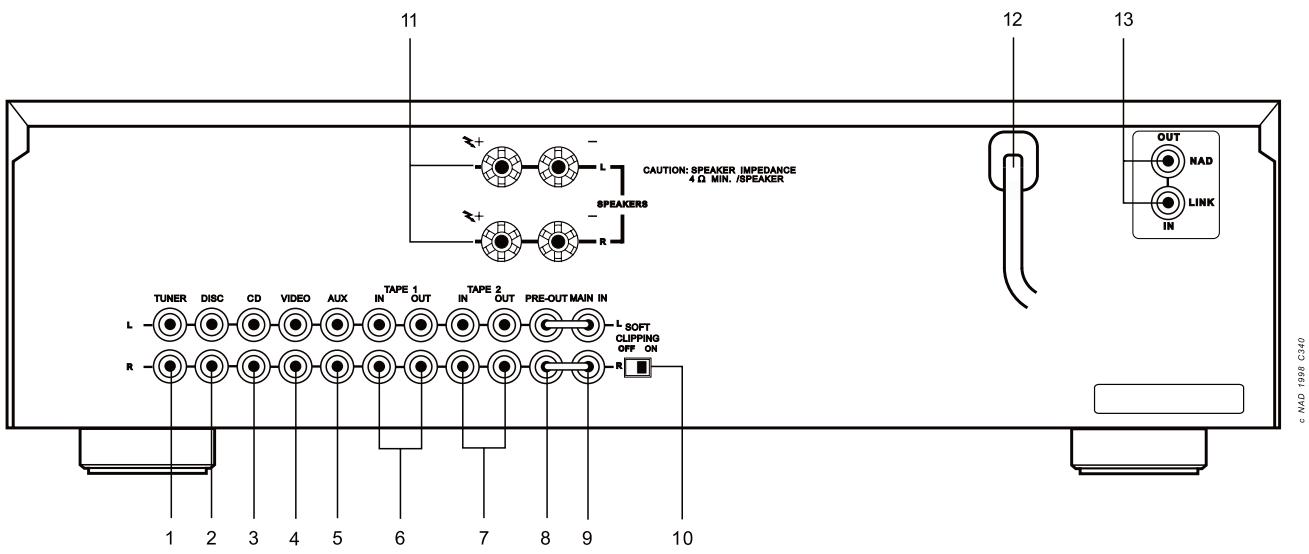
REAR PANEL CONNECTIONS
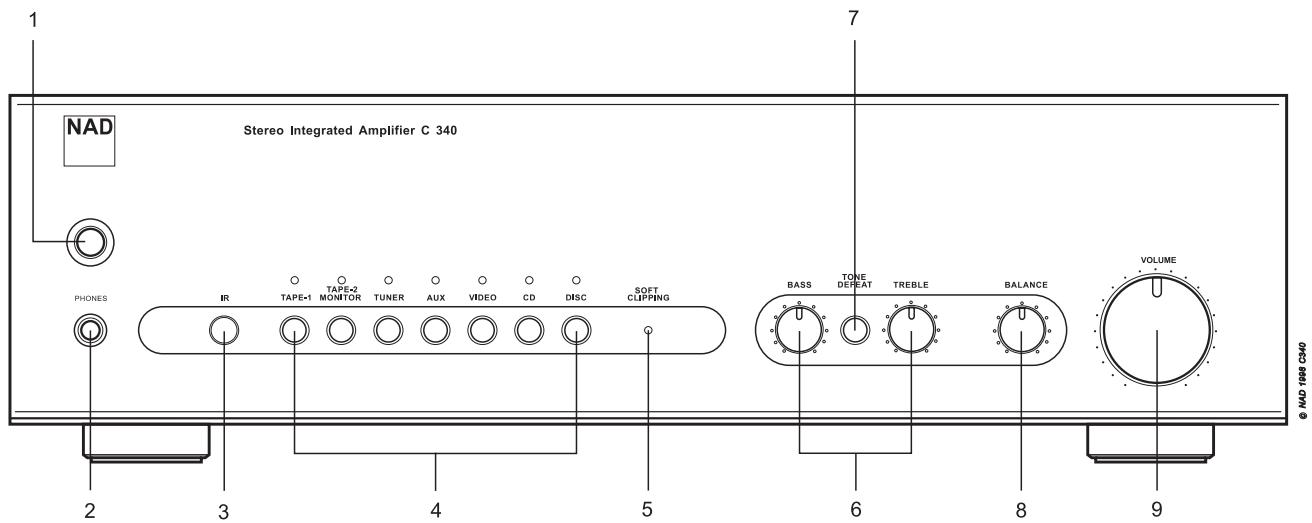
FRONT PANEL CONTROLS
NAD C340 Stereo Integrated Amplifier
NOTES ON INSTALLATION
Your NAD C340 should be placed on a firm, level surface. Avoid placing the unit in direct sunlight or near sources of heat and damp. Allow adequate ventilation. Do not place the unit on a soft surface like a carpet. Do not place or it in an enclosed position such a bookcase or cabinet that may impede the air-flow through the ventilation slots. Make sure the unit is switched off before making any connections.
The RCA sockets on your NAD C340 are colour coded for convenience. Red and white are Right and Left audio respectively, and yellow for NAD Link.
Use high quality leads and sockets for optimum performance and reliability. Ensure that leads and sockets are not damaged in any way and all sockets are firmly pushed home.
For best performance, use quality speaker leads of 16 gauge (1.5mm) thickness or more. If the unit is not going to be used for some time, disconnect the plug from the AC socket.
Should water get into your NAD C340, shut off the power to the unit and remove the plug from the AC socket. Have the unit inspected by a qualified service technician before attempting to use it again. Do not remove the cover, there are no user-serviceable parts inside.
Use a dry soft cloth to clean the unit. If necessary, lightly dampen the cloth with soapy water. Do not use solutions containing benzol or other volatile agents.
QUICK START
- Connect the speakers to the rear Speaker sockets and sources to the relevant rear input sockets.
- Plug in the AC power cord.
- Press the POWER button to turn the NAD C340 on.
- Press the required input selector.
REAR PANEL CONNECTIONS
1. TUNER INPUT
Input for a Tuner or other line-level signal source. Use a twin RCA-to-RCA lead to connect the Tuner left and right 'Audio Outputs' to this input.
2. DISC INPUT
Input for additional line level input signals such as CD, Mini Disc player or the output signal from a step-up amplifier for a turntable. Use a twin RCA-to-RCA lead to connect the auxiliary unit's left and right 'Audio Outputs' to this input.
3. CD INPUT
Input for a CD or other line-level signal source. Use a twin RCA-to-RCA lead to connect the CD player's left and right 'Audio Outputs' to this input. The NAD C340 only accepts analogue signals from your CD player.
4. VIDEO INPUT
Input for the audio signal from a stereo VCR (or stereo TV/Satellite/Cable receiver) or other line-level audio source. Using twin RCA-to-RCA leads, connect to the left and right 'Audio Out' of the unit to these inputs. Note: These are audio inputs only.
5. AUX INPUT
Input for additional line level input signals such as another CD player. Use a twin RCA-to-RCA lead to connect the auxiliary unit's left and right 'Audio Outputs' to this input.
6. TAPE 1 IN, OUT
Connections for analogue recording and playback to an audio tape recorder of any type. Using twin RCA-to-RCA leads, connect to the left and right 'Audio Output' of the tape machine to the TAPE 1 IN sockets for playback and tape monitoring. Connect the left and right 'Audio Input' of the tape machine to the TAPE 1 OUT sockets for recording.
7. TAPE 2 IN, OUT
Connections for analogue recording and playback to a secondary audio tape recorder of any type. Using twin RCA-to-RCA leads, connect to the left and right 'Audio Output' of the tape machine to the TAPE 2 IN sockets for playback and tape monitoring. Connect the left and right 'Audio Input' of the tape machine to the TAPE 2 OUT sockets for recording.
8. PRE OUT
Connections to an external power amplifier or processor, such as a surround-sound decoder. In normal use these should be connected to the Main-In sockets (No. 9) with the links supplied. To connect your NAD C340 to external processor or amplifier sections first remove these links. Use a twin RCA-to-RCA lead to connect to the left and right 'Audio Input' of the Power amp or processor to the Pre Out sockets.
NOTE: The Pre-Out output signal will be affected by the NAD C340's volume and tone control settings, always turn the amplifier off before connecting or disconnecting anything from to Pre-Out and Main-In sockets.
9. MAIN IN
Connections to an external pre-amplifier or processor, such as a surround-sound decoder. In normal use these should be connected to the Pre-Out sockets (No. 8) with the links supplied. To connect your NAD C340 to external processor or pre-amplifier first remove these links. Use a twin RCA-to-RCA lead to connect to the left and right 'Audio Output' of the pre-amp or processor to the Main-In sockets.
NOTE: Always turn the amplifier off before connecting or disconnecting anything from to Pre-Out and Main-In sockets.
10. SOFT CLIPPING
When an amplifier is driven beyond its specified power output, a hard, distorted sound can be heard on very loud sounds. This is caused by the amplifier cutting off or 'hard clipping' the peaks of sound that it was not designed to reproduce. The NAD Soft Clipping circuit gently limits the output of the system to minimise audible distortion if the amplifier is overdriven.
If your listening involves moderate power levels you may leave the Soft Clipping switch to Off. If you are likely to play at high levels, that could stretch the amplifier's power capability, then switch Soft Clip On.
The Soft Clipping LED on the front panel will illuminate when the amplifier is in Soft Clip mode.
11. SPEAKERS
Speaker terminals for speakers with an impedance of 4 ohms or more. Connect the right speaker to the terminals market 'R +' and 'R-' ensuring that the 'R+' is connected to the '+' terminal on your loudspeaker and the 'R-' is connected to the loudspeaker's '-' terminal. Connect the terminals marked 'L+' and 'L-' to the left speaker in the same way.
Always use heavy duty (16 gauge; 1.5mm, or thicker) stranded wire to connect loudspeakers to your NAD C340.
The high-current binding post terminals can be used as a screw terminal for cables terminating in spade or pin sockets or for cables with bare wire ends.
BARE WIRES AND PIN CONNECTORS
Bare wires and pin sockets should be inserted into the hole in the shaft of the terminal. Unscrew the speaker terminal's plastic bushing until the hole in the screw shaft is revealed. Insert the pin or bare cable end into the hole and secure the cable by tightening down the terminal's bushing.
Ensure bare wire from the speaker cables does not touch the back panel or another socket. Ensure that there is only 1/2" (1cm) of bare cable or pin and no loose strands of speakers wire.
12. AC LINE CORD
Plug the AC power cord into a live AC wall socket. Make sure all connections have been made before connecting to mains.
13. NAD LINK IN, OUT
The NAD-Link connector is used to pass commands from other units fitted with NAD-Link connectors. This allows centralised control of a complete system, and also allows some of the basic functions of other NAD components (such as a tuner, CD player or cassette-deck) also equipped with NAD-Link to be controlled with the amplifier's remote control. To function with such other units, connect the C340's NAD-Link Out to the NAD-Link In on the other unit. NAD-Link connectors can be daisy-chained, IN to OUT, so that a whole system can be controlled from the remote control facilities of one unit.
FRONT PANEL CONTROLS
1. POWER
Pressing the POWER switch turns the unit On. The LED for the last selected input will light up. Pressing the POWER switch again will turn the amplifier Off.
NOTE: The remote control handset supplied with the C340 is of a universal NAD type, designed to operate several NAD models. Some buttons on this handset are inoperative as the functions aren't supported by the C340. The Green On/Off button on the remote control handset is inoperative in the case of the C340.
2. HEADPHONE SOCKET
A 1/4" stereo jack socket is supplied for headphone listening and will work with conventional headphones of any impedance. Inserting a headphone jack into this socket automatically switches off the loudspeakers. The volume, tone and balance controls are operative for headphone listening. Use a suitable adapter to connect headphones with other types of sockets, such as 3.5mm stereo 'personal stereo' jack plugs.
NOTE: Make certain that the volume control is turned to minimum (fully anti-clockwise) before connecting or disconnecting headphones. Listening at high levels can damage your hearing.
3. INFRA-RED REMOTE CONTROL COMMAND RECEIVER
The infrared sensor, located behind this circular window, receives commands from the remote control. There must be a clear line-of-sight path from the remote control to this window; if that path is obstructed, the remote control may not work.
NOTE: Direct sunlight or very bright ambient lighting may affect the operating range and angle for the remote control handset.
4. INPUT SELECTORS
These buttons select the active input to the NAD C340 and the signal sent to the loudspeakers, the Tape outputs and the PRE OUT sockets. The buttons on the remote control handset duplicate these buttons, with the exception of the tuner input; see below. Green LEDs just above each button will indicate which input is currently selected.
DISC Selects a line-level source connected to the DISC sockets as the active input.
CD Selects the CD (or other line-level source) connected to the CD sockets, as the active input.
VIDEO Selects the VCR (or stereo TV/Satellite/Cable receiver) connected to the VIDEO sockets, as the active input.
AUX Selects a line-level source connected to the AUX sockets, as the active input.
TUNER Selects the tuner (or other line-level source) connected to the Tuner sockets, as the active input. The remote control handset has separate buttons for AM and FM; pressing either one will select the C340's tuner input.
TAPE 2 Monitor Selects the output from a tape recorder when playing back tapes or monitoring recordings being made through the Tape 2 sockets. Press the Tape 2 button once to select it and again to return to the normal input selection.
Tape 2 is a tape Monitor function which does not override the current input selection. For example, if the CD is the active input when TAPE 2 is selected, then the CD signal will continue to be selected and sent to both the TAPE 1, and TAPE 2 OUTPUT sockets, but it is the sound from recorder connected to Tape 2 that will be heard on the loudspeakers. Apart from the amber LED to indicate Tape 2 is engaged, the green LED for the active input will also stay lit.
TAPE 1 Selects Tape 1 as the active input.
NOTE: The remote control handset with the C340 supplied is of a universal NAD type, designed to operate several NAD models. Some buttons on this handset are inoperative as the functions aren't supported by the C340. The Video 2 and Video 3 input selector buttons on the remote control handset are inoperative in the case of the C340.
5. SOFT CLIPPING INDICATOR
The green Soft Clipping LED shows that the Soft Clipping mode is engaged. Refer also to chapter “Rear Panel Connections”, section 10; “Soft Clipping” for more information.
6. BASS & TREBLE CONTROLS
The NAD C340 is fitted with BASS and TREBLE tone controls to adjust the tonal balance of your system.
The 12 o'clock position is 'flat' with no boost or cut, and an indent indicates this position. Rotate the control clockwise to increase the amount of Bass or Treble. Rotate the control anti-clockwise to decrease the amount of Bass or Treble. The Tone controls do not affect recordings made using the Tape outputs but will affect the signal going to the Pre-amp output (Pre Out).
7. TONE DEFEAT
The TONE DEFEAT switch by-passes the tone control section of the NAD C340. If the Tone Controls are not normally used and left in the 12 o'clock position, then it is advisable to switch out the Tone Control section altogether by using this switch. In the 'out' position, the Tone Control circuits are active, pushing the TONE DEFEAT switch 'in' bypasses the Tone Control section.
8. BALANCE
The BALANCE control adjusts the relative levels of the left and right speakers. The 12 o'clock position provides equal level to the left and right channels. A detent indicates this position.
Rotating the control clockwise moves the balance towards the right. Rotating the control anti-clockwise moves the balance to the left. The BALANCE control does not affect recordings made using the Tape outputs but will affect the signal going to the Pre-amp output (Pre Out).
9. VOLUME
The VOLUME control adjusts the overall loudness of the signals being fed to the loudspeakers. It is motor driven and can be adjusted from the remote control handset. The VOLUME control does not affect recordings made using the Tape outputs but will affect the signal going to the Pre-amp output (Pre Out).
On the remote control handset, press the MUTE Button to temporarily switch off the sound to the speakers and headphones. Mute mode is indicated by the active input LED flashing. Press MUTE again to restore sound. Mute does not affect recordings made using the Tape outputs but will affect the signal going to the Pre-amp output (Pre Out).
TO MAKE A RECORDING
When any source is selected, its signal is also fed directly to any tape machine connected to the TAPE 1 or TAPE 2 OUTPUTS for recording.
TAPE TO TAPE COPYING
You can copy between two tape machines connected to your NAD C340. Put the source tape in the recorder connected to Tape 1 and the blank tape into the recorder connected to Tape 2. By selecting TAPE 1 Input you can now record from Tape 1 to Tape 2 and monitor the signal coming from the original tape.
REMOTE CONTROL HANDSET
The Remote Control handset handles all the key functions of the NAD C340 and has additional controls to remotely operate NAD Tuners, Cassette and CD machines. It will operate up to a distance of 16ft (5m).
Alkaline batteries are recommended for maximum operating life. Two AAA (R 03) batteries should be fitted in the battery compartment at the rear of the Remote Control handset. When replacing batteries, check that they have been put in the right way round, as indicated on the base of the battery compartment.
Please refer to previous sections of the manual for a full description of individual functions.
NOTE: The remote control handset supplied with the C340 is of a universal NAD type, designed to operate several NAD models. Some buttons on this handset are inoperative as the functions aren't supported by the C340.
The Stand-by (large green button) function, Video 2 and Video 3 input selector, and Speakers A and Speakers B buttons on the remote control handset are inoperative in the case of the C340. The input selector buttons perform the same functions as the buttons labelled the same on the front panel. There are a few differences and extra functions with the remote control handset however:
TUNER AM, TUNER FM
Selects the Tuner input on the NAD C340 and respectively the AM or FM waveband on a separate remote controllable NAD Tuner.
MUTE
Press the MUTE Button to temporarily switch off the sound to the speakers and headphones. Mute mode is indicated by the active input LED flashing. Press MUTE again to restore sound. Mute does not affect recordings made using the Tape outputs but will affect the signal going to the Pre-amp output (Pre Out).
MASTER VOLUME
▲ or ▼ respectively increases or decreases the Volume setting. The motorised Volume Control on the front panel will indicate the level set.
Other than the commands relating to the NAD C340 amplifier itself, there are other buttons which will operate most NAD CD players and Cassette decks equipped with NAD Link:
TUNER CONTROL
(for use with NAD Tuner)
BANK Selects a bank of preset stations.
PRESET ◀ or ▶ selects respectively higher or lower number station preset.
CD PLAYER CONTROL
(for use with NAD CD Player)
II engages Pause
engages Stop
▶/II engages Play or toggles between Play and Pause
or ▶▶| engages Track skip; Press once to respectively go to the next track or to return to start of current or previous track. NEXT DISC Go to next disc (for NAD CD changers).
CASSETTE DECK CONTROL
(For use with single (DECK B) or double transport (A and B) NAD Cassette Decks)
◀ or ▶ engages Forward Play or Reverse Play.
●/II Record / Pause. Press to put cassette deck into record-pause. Press Play to start recording.
■ Stops Play or Recording.
◀◀ engages Rewind.
▶▶ engages Fast Forward.
NOTE: Direct sunlight or very bright ambient lighting may affect the operating range and angle for the remote control handset.
| TROUBLESHOOTING | ||
| Problem | Cause | Solution |
| NO SOUND | Power AC lead unplugged or power not switched onTape 2 Monitor selectedMute onRear Pre-out/Main-in amp links not fittedHeadphones inserted | Check if AC lead is plugged in and power switched onDe-select Tape 2 Monitor modeSwitch off MuteFit linksDisconnect headphones |
| NO SOUND ONE CHANNEL | Balance control not centeredSpeaker not properly connected or damagedInput lead disconnected or damaged | Center Balance controlCheck connections and speakersCheck leads and connections |
| WEAK BASS / DIFFUSE STEREO IMAGE | Speakers wired out of phase | Check connections to all speakers in the system |
| REMOTE CONTROL HANDSET NOT WORKING | Batteries flat, or incorrectly insertedIR transmitter or receiver windows obstructedIR receiver in direct sun or very bright ambient light | Check or replace batteriesRemove obstructionPlace unit away from direct sun, reduce amount of ambient light |

NAD C340 Amplificateur Integre Stereo
REMARQUES CONCERNANT L'INSTALLATION
5. ENTREE AUX [AUX INPUT]
1. MARCHE/ARRET [POWER]
(SINTONIZADOR AM, SINTONIZADOR FM)
6. TAPE 1 IN, OUT (NASTRO 1 IN, OUT)
7. TAPE 2 IN, OUT (NASTRO 2 IN, OUT)
13. "NAD LINK IN/OUT"
6. TAPE 1 IN, OUT (ENTRADA/SAÍDA DO GRAVADOR DE CASSETES 1)
13. NAD LINK IN, OUT (ENTRADA/SAÍDA DA INTERLIGAÇÃO NAD)
NAD C340 Stereo Integrated Amplifier
TÄNK PÅ FÖLJANDE VID INKOPPLING.
©1998 NAD ELECTRONICS LTD
LONDON ENGLAND
- Stereo Integrated Amplifier
- IMPORTANT SAFETY INSTRUCTIONS
- CAUTION
- ATTENTION:
- DO NOT ATTEMPT SERVICING OF THIS UNIT YOURSELF. REFER SERVICING TO QUALIFIED SERVICE PERSONNEL
- ATTENTION
- CAUTION POWER LINES
- OUTDOOR ANTENNA GROUNDING
- NAD C340 Stereo Integrated Amplifier
- NOTES ON INSTALLATION
- QUICK START
- REAR PANEL CONNECTIONS
- TUNER INPUT
- DISC INPUT
- CD INPUT
- VIDEO INPUT
- AUX INPUT
- TAPE 1 IN, OUT
- TAPE 2 IN, OUT
- PRE OUT
- MAIN IN
- SOFT CLIPPING
- SPEAKERS
- BARE WIRES AND PIN CONNECTORS
- AC LINE CORD
- NAD LINK IN, OUT
- FRONT PANEL CONTROLS
- POWER
- HEADPHONE SOCKET
- INFRA-RED REMOTE CONTROL COMMAND RECEIVER
- INPUT SELECTORS
- SOFT CLIPPING INDICATOR
- BASS & TREBLE CONTROLS
- TONE DEFEAT
- BALANCE
- VOLUME
- TO MAKE A RECORDING
- TAPE TO TAPE COPYING
- REMOTE CONTROL HANDSET
- TUNER AM, TUNER FM
- MUTE
- MASTER VOLUME
- TUNER CONTROL
- CD PLAYER CONTROL
- CASSETTE DECK CONTROL
- NAD C340 Amplificateur Integre Stereo
- REMARQUES CONCERNANT L'INSTALLATION
- ENTREE AUX [AUX INPUT]
- MARCHE/ARRET [POWER]
- (SINTONIZADOR AM, SINTONIZADOR FM)
- TAPE 1 IN, OUT (NASTRO 1 IN, OUT)
- TAPE 2 IN, OUT (NASTRO 2 IN, OUT)
- "NAD LINK IN/OUT"
- TAPE 1 IN, OUT (ENTRADA/SAÍDA DO GRAVADOR DE CASSETES 1)
- NAD LINK IN, OUT (ENTRADA/SAÍDA DA INTERLIGAÇÃO NAD)
- TÄNK PÅ FÖLJANDE VID INKOPPLING.
Brand : NAD
Model : C340
Category : Integrated amplifier