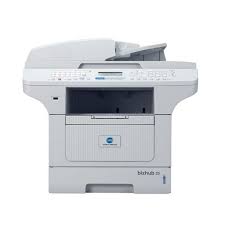
BIZHUB 20 - Multifunction Printer KONICA MINOLTA - Free user manual and instructions
Find the device manual for free BIZHUB 20 KONICA MINOLTA in PDF.

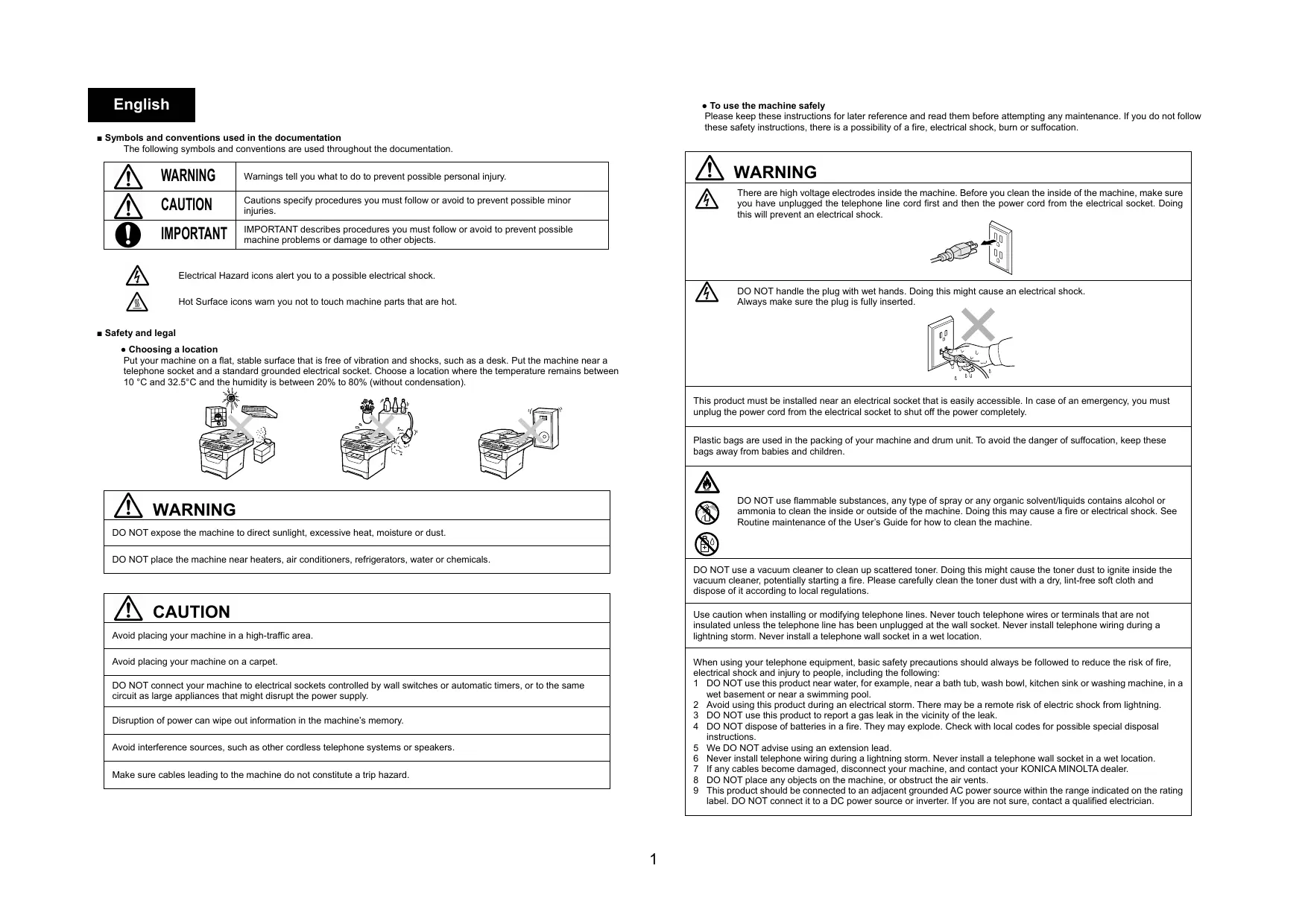


| Product type | Monochrome laser multifunction printer |
| Brand | KONICA MINOLTA |
| Model | BIZHUB 20 |
| Main functions | Print, copy, scan, fax |
| Print speed | Up to 20 pages per minute (A4) |
| Maximum resolution | 600 x 600 dpi |
| Paper capacity | 150 sheets (input tray) |
| Dimensions (W × D × H) | 368 × 360 × 314 mm |
| Weight | Approx. 9 kg |
| Power supply | 220-240 V AC, 50/60 Hz |
| Energy consumption | Approx. 450 W (operating), 2 W (standby) |
| Maintenance and cleaning | Clean with a soft, dry, lint-free cloth. Do not use liquids or aerosols. |
| Safety | Follow safety instructions: do not block ventilation slots, do not use near water, unplug before internal cleaning. |
| Spare parts and repairability | Spare parts and repairs are provided by authorized KONICA MINOLTA dealers. Do not open the scanner. |
| General information | Class 1 laser device, compliant with CE, ENERGY STAR standards. Has network and fax function. |
Frequently Asked Questions - BIZHUB 20 KONICA MINOLTA
User questions about BIZHUB 20 KONICA MINOLTA
0 question about this device. Answer the ones you know or ask your own.
Ask a new question about this device
Download the instructions for your Multifunction Printer in PDF format for free! Find your manual BIZHUB 20 - KONICA MINOLTA and take your electronic device back in hand. On this page are published all the documents necessary for the use of your device. BIZHUB 20 by KONICA MINOLTA.
USER MANUAL BIZHUB 20 KONICA MINOLTA
Safety Information Guide
Symbols and conventions used in the documentation
The following symbols and conventions are used throughout the documentation.
| WARNING | Warnings tell you what to do to prevent possible personal injury. |
| CAUTION | Cautions specify procedures you must follow or avoid to prevent possible minor injuries. |
| IMPORTANT | IMPORTANT describes procedures you must follow or avoid to prevent possible machine problems or damage to other objects. |

Electrical Hazard icons alert you to a possible electrical shock.

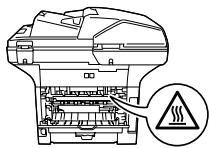
Hot Surface icons warn you not to touch machine parts that are hot.
Safety and legal
- Choosing a location
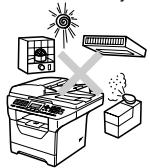
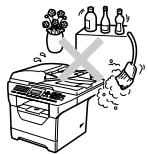
Put your machine on a flat, stable surface that is free of vibration and shocks, such as a desk. Put the machine near a telephone socket and a standard grounded electrical socket. Choose a location where the temperature remains between 10^ and 32.5^ and the humidity is between 20% to 80% (without condensation).
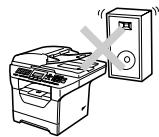

WARNING
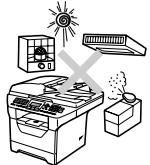
DO NOT expose the machine to direct sunlight, excessive heat, moisture or dust.
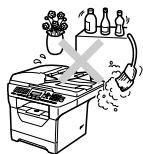
DO NOT place the machine near heaters, air conditioners, refrigerators, water or chemicals.

CAUTION
Avoid placing your machine in a high-traffic area.
Avoid placing your machine on a carpet.
DO NOT connect your machine to electrical sockets controlled by wall switches or automatic timers, or to the same circuit as large appliances that might disrupt the power supply.
Disruption of power can wipe out information in the machine's memory.
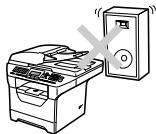
Avoid interference sources, such as other cordless telephone systems or speakers.
Make sure cables leading to the machine do not constitute a trip hazard.
To use the machine safely
Please keep these instructions for later reference and read them before attempting any maintenance. If you do not follow these safety instructions, there is a possibility of a fire, electrical shock, burn or suffocation.
| WARNING | |
| There are high voltage electrodes inside the machine. Before you clean the inside of the machine, make sure you have unplugged the telephone line cord first and then the power cord from the electrical socket. Doing this will prevent an electrical shock. DO NOT handle the plug with wet hands. Doing this might cause an electrical shock. Always make sure the plug is fully inserted. DO NOT use flammable substances, any type of spray or any organic solvent/liquids contains alcohol or ammonia to clean the inside or outside of the machine. Doing this may cause a fire or electrical shock. See Routine maintenance of the User's Guide for how to clean the machine. DO NOT use a vacuum cleaner to clean up scattered toner. Doing this might cause the toner dust to ignite inside the vacuum cleaner, potentially starting a fire. Please carefully clean the toner dust with a dry, lint-free soft cloth and dispose of it according to local regulations. Use caution when installing or modifying telephone lines. Never touch telephone wires or terminals that are not insulated unless the telephone line has been unplugged at the wall socket. Never install telephone wiring during a lightning storm. Never install a telephone wall socket in a wet location. | |
| This product must be installed near an electrical socket that is easily accessible. In case of an emergency, you must unplug the power cord from the electrical socket to shut off the power completely. | |
| Plastic bags are used in the packing of your machine and drum unit. To avoid the danger of suffocation, keep these bags away from babies and children. | |
| DO NOT use flammable substances, any type of spray or any organic solvent/liquids contains alcohol or ammonia to clean the inside or outside of the machine. Doing this may cause a fire or electrical shock. See Routine maintenance of the User's Guide for how to clean the machine. DO NOT use a vacuum cleaner to clean up scattered toner. Doing this might cause the toner dust to ignite inside the vacuum cleaner, potentially starting a fire. Please carefully clean the toner dust with a drying, lint-free soft cloth and dispose of it according to local regulations. | |
| When using your telephone equipment, basic safety precautions should always be followed to reduce the risk of fire, electrical shock and injury to people, including the following: 1 DO NOT use this product near water, for example, near a bath tub, wash bowl, kitchen sink or washing machine, in a wet basement or near a swimming pool. 2 Avoid using this product during an electrical storm. There may be a remote risk of electric shock from lightning. 3 DO NOT use this product to report a gas leak in the vicinity of the leak. 4 DO NOT dispose of batteries in a fire. They may explode. Check with local codes for possible special disposal instructions. 5 We DO NOT advise using an extension lead. 6 Never install telephone wiring during a lightning storm. Never install a telephone wall socket in a wet location. 7 If any cables become damaged, disconnect your machine, and contact your KONICA MINOLTA dealer. 8 DO NOT place any objects on the machine, or obstruct the air vents. 9 This product should be connected to an adjacent grounded AC power source within the range indicated on the rating label. DO NOT connect it to a DC power source or inverter. If you are not sure, contact a qualified electrician. |

CAUTION

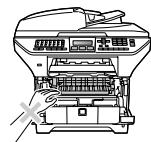
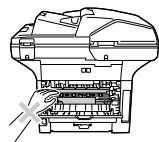
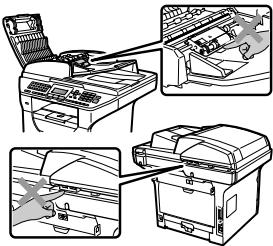
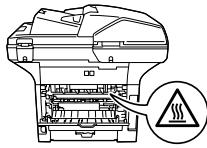
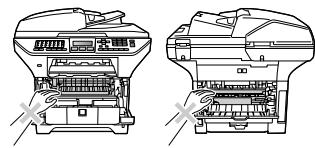
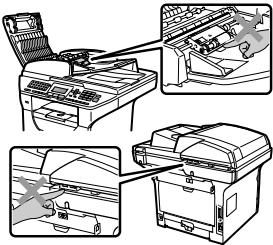
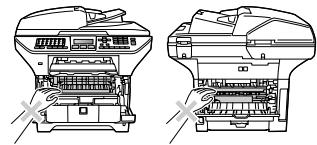
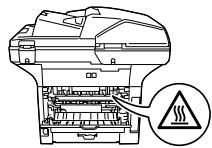
After you have just used the machine, some internal parts of the machine will be extremely hot. When you open the front or back cover of the machine, DO NOT touch the shaded parts shown in the illustrations.
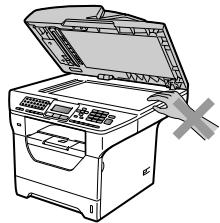
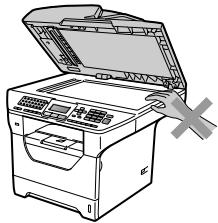
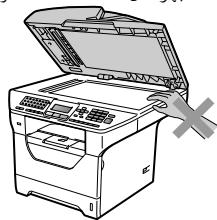
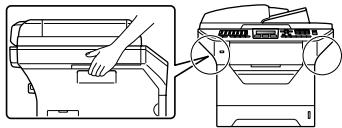
To prevent injuries, be careful not to put your hands on the edge of the machine under the document cover as shown in the illustration.
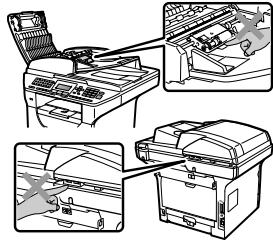
To prevent injuries, be careful not to put your fingers in the areas shown in the illustrations.
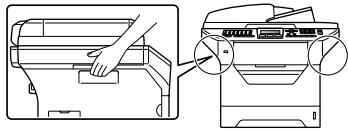
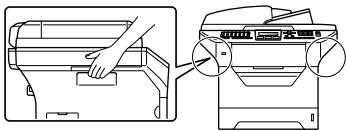
When you move the machine, grasp the side hand holds that are under the scanner.

IMPORTANT
The fuser unit is marked with a Caution label. Please DO NOT remove or damage the label.
- Important safety instructions
1 Read all of these instructions.
2 Save them for later reference.
3 Follow all warnings and instructions marked on the product.
4 Unplug this product from the wall socket before cleaning inside of the machine. DO NOT use liquid or aerosol cleaners. Use a dry lint-free soft cloth for cleaning.
5 DO NOT place this product on an unstable cart, stand, or table. The product may fall, causing serious damage to the product.
6 Slots and openings in the casing at the back or bottom are provided for ventilation. To ensure reliable operation of the product and to protect it from overheating, these openings must not be blocked or covered. The openings should never be blocked by placing the product on a bed, sofa, rug, or other similar surface. This product should never be placed near or over a radiator or heater. This product should never be placed in a built-in installation unless adequate ventilation is provided.
7 This product should be connected to an AC power source within the range indicated on the rating label. DO NOT connect it to a DC power source or inverter. If you are not sure, contact a qualified electrician.
8 This product is equipped with a 3-wire grounded plug. This plug will only fit into a grounded power outlet. This is a safety feature. If you are unable to insert the plug into the outlet, call your electrician to replace your obsolete outlet. DO NOT defeat the purpose of the grounded plug.
9 Use only the power cord supplied with this machine.
10 DO NOT allow anything to rest on the power cord. DO NOT place this product where people can walk on the cord.
11 If an extension cord is used with this product, make sure that the total ampere ratings on the products plugged into the extension cord DO NOT exceed the extension cord ampere rating. Also, make sure that the total of all products plugged into the AC power outlet does not exceed 15 amperes (US only).
12 Use the product in a well-ventilated area.
13 The power cord, including extensions, should be no longer than 16.5 feet (5 metres). DO NOT share the same power circuit with other high powered appliances, such as an air conditioner, copier, shredder, and so on. If you cannot avoid using the printer with these appliances, we recommend that you use a voltage transformer or a high-frequency noise filter. Use a voltage regulator if the power source is not stable.
14 DO NOT place anything in front of the machine that will block received faxes. DO NOT place anything in the path of received faxes.
15 Wait until pages have exited the machine before picking them up.
16 Never push objects of any kind into this product through cabinet slots, since they may touch dangerous voltage points or short out parts resulting in the risk of fire or electric shock. Never spill liquid of any kind on the product. DO NOT attempt to service this product yourself because opening or removing covers may expose you to dangerous voltage points and other risks and may void your warranty. Refer all servicing to a KONICA MINOLTA Authorized Service Center.
17 Unplug this product from the power socket and refer all servicing to our Authorized Service Personnel under the following conditions:
When the power cord is damaged or frayed.
If liquid has been spilled into the product.
If the product has been exposed to rain or water.
If the product does not operate normally when the operating instructions are followed. Adjust only those controls that are covered by the operating instructions. Incorrect adjustment of other controls may result in damage and will often require extensive work by a qualified technician to restore the product to normal operation.
If the product has been dropped or the casing has been damaged.
If the product exhibits a distinct change in performance, indicating a need for service.
18 To protect your product against power surges, we recommend the use of a power protection device (Surge Protector).
19 To reduce the risk of fire, electric shock and injury to people, note the following:
DO NOT use this product near appliances that use water, a swimming pool or in a wet basement.
DO NOT use the machine during an electrical storm (there is the remote possibility of an electrical shock) or to report a gas leak in the vicinity of the leak.
DO NOT use this product in the vicinity of gas leak.
- IEC60825-1:2007 Specification
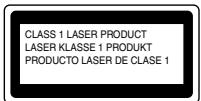
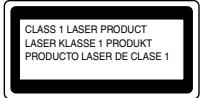
This machine is a Class 1 laser product as defined in IEC60825-1:2007 specifications. The label shown below is attached in countries where required.
This machine has a Class 3B Laser Diode which emits invisible laser radiation in the Scanner Unit. The Scanner Unit should not be opened under any circumstances.
- Internal Laser radiation
Wave length: 770 - 810 nm
Output: 5 mW max.
Laser Class: Class 3B

WARNING
Use of controls, adjustments or performance of procedures other than those specified in this manual may result in hazardous radiation exposure.
- Laser safety
This equipment is certified as a Class 1 laser product as defined in IEC60825-1:2007 specifications under the U.S. Department of Health and Human Services (DHHS) Radiation Performance Standard according to the Radiation Control for Health and Safety Act of 1968. This means that the equipment does not produce hazardous laser radiation.
Since radiation emitted inside the equipment is completely confined within protective housings and external covers, the laser beam cannot escape from the machine during any phase of user operation.
FDA regulations
U.S. Food and Drug Administration (FDA) has implemented regulations for laser products manufactured on and after August 2, 1976. Compliance is mandatory for products marketed in the United States. One of the following labels on the back of the machine indicates compliance with the FDA regulations and must be attached to laser products marketed in the United States.
COMPLIES WITH 21CER 1040.10 AND 1040.11 EXCEPT FOR DEVIATIONS PURSUANT TO LASER NOTICE NO.50, DATED JUNE 24, 2007.
- Disconnect device
This product must be installed near an electrical socket that is easily accessible. In case of emergencies, you must disconnect the power cord from the electrical socket to shut off power completely.
- Wiring information (U.K. only)
If you need to replace the plug fuse, fit a fuse that is approved by ASTA to BS1362 with the same rating as the original fuse.
Always replace the fuse cover. Never use a plug that does not have a cover. If in any doubt, call a qualified electrician.
- Warning - This printer must be earthed.
The wires in the mains lead are colored in line with the following code:
Green and Yellow: Earth
Output: Neutral
Laser Class: Live
- LAN connection
CAUTION
DO NOT connect this product to a LAN connection that is subject to over-voltages.
- Standard telephone and FCC notices
These notices are in effect on models sold and used in the United States only.
When programming emergency numbers or making test calls to emergency numbers:
■ Remain on the line and briefly explain to the dispatcher the reason for the call before hanging up.
Perform these activities in the off-peak hours, such as early morning or late evening.
This equipment complies with Part 68 of the FCC rules and the requirements adopted by the ACTA. On the backside of this equipment is a label that contains, among other information, a product identifier in the format US: AAAEQ##TXXXX. If requested, this number must be provided to the telephone company.
You may safely connect this equipment to the telephone line by means of a standard modular jack, USOC RJ11C.
A plug and jack used to connect this equipment to the premises wiring and telephone network must comply with the applicable FCC Part 68 rules and requirements adopted by the ACTA. A compliant telephone cord and modular plug is provided with this product. It is designed to be connected to a compatible modular jack that is also compliant. (See installation instructions for details.)
The REN is used to determine the number of devices that may be connected to a telephone line. Excessive RENs on a telephone line may result in the devices not ringing in response to an incoming call. In most but not all areas, the sum of RENs should not exceed five (5.0). To be certain of the number of devices that may be connected to a line, as determined by the total RENs, contact the local telephone company. For products approved after July 23, 2001, the REN for this product is part of the product identifier that has the format US:AAAEQ##TXXXX.The digits represented by ## are the REN without a decimal point (e.g., 06 is a REN of 0.6). For earlier products, the REN is separately shown on the label.
If this equipment causes harm to the telephone network, the telephone company will notify you in advance that temporary discontinuance of service may be required. But if advance notice is not practical, the telephone company will notify the customer as soon as possible. Also, you will be advised of your right to file a complaint with the FCC if you believe it is necessary.
The telephone company may make changes in its facilities, equipment, operations or procedures that could affect the operation of the equipment. If this happens the telephone company will provide advance notice in order for you to make necessary modifications to maintain uninterrupted service.
If trouble is experienced with this equipment, for repair or warranty information, please contact our Customer Service. If the equipment is causing harm to the telephone network, the telephone company may request that you disconnect the equipment until the problem is resolved.
Connection to party line service is subject to state tariffs. Contact the state public utility commission, public service commission or corporation commission for information.
If your home has specially wired alarm equipment connected to the telephone line, ensure the installation of this equipment does not disable your alarm equipment. If you have questions about what will disable alarm equipment, call your telephone company or a qualified installer.
If you are not able to solve a problem with your machine, call our Customer Service.
WARNING
For protection against the risk of electrical shock, always disconnect all cables from the wall outlet before servicing, modifying or installing the equipment.
- Federal Communications Commission (FCC) Declaration of Conformity (USA only)
Responsible Party:
KONICA MINOLTA BUSINESS SOLUTIONS U.S.A., INC.
100 Williams Drive
Ramsey, NJ 07446
Phone: 201-825-4000
declares, that the products
Product Name:bizhub 20
comply with Part 15 of the FCC Rules. Operation is subject to the following two conditions: (1) This device may not cause harmful interference, and (2) this device must accept any interference received, including interference that may cause undesired operation.
This equipment has been tested and found to comply with the limits for a Class B digital device, pursuant to Part 15 of the FCC Rules. These limits are designed to provide reasonable protection against harmful interference in a residential installation. This equipment generates, uses, and can radiate radio frequency energy and, if not installed and used in accordance with the instructions, may cause harmful interference to radio communications. However, there is no guarantee that interference will not occur in a particular installation. If this equipment does cause harmful interference to radio or television reception, which can be determined by turning the equipment off and on, the user is encouraged to try to correct the interference by one or more of the following measures:
Reorient or relocate the receiving antenna.
■ Increase the separation between the equipment and receiver.
- Connect the equipment into an outlet on a circuit different from that to which the receiver is connected.
- Call the dealer or an experienced radio/TV technician for help.
This transmitter must not be co-located or operated in conjunction with any other antenna or transmitter.

IMPORTANT
Changes or modifications not expressly approved by us could void the user's authority to operate the equipment.
- A shielded interface cable should be used to ensure compliance with the limits for a Class B digital device.
This equipment may not be used on coin service lines provided by the telephone company or connected to party lines.
We cannot accept any financial or other responsibilities that may be the result of your use of this information, including direct, special or consequential damages. There are no warranties extended or granted by this document.
This machine has been certified to comply with FCC standards, which are applied to the USA only. A grounded plug should be plugged into a grounded AC power outlet after checking the rating of the local power supply for the machine to operate properly and safely.
- Industry Canada Compliance Statement (Canada only)
This Class B digital apparatus complies with Canadian ICES-003.
Operation is subject to the following two conditions: (1) this device may not cause interference, and (2) this device must accept any interference, including interference that may cause undesired operation of this device.
- Special Notice to User - For Canada
NOTICE:
This product meets the applicable Industry Canada technical specifications. The Ringer Equivalence Number is an indication of the maximum number of devices allowed to be connected to a telephone interface. The termination on an interface may consist of any combination of devices subject only to the requirement that the sum of the RENs of all the devices does not exceed five.
This product complies with EN55022 (CISPR Publication 22)/Class B.
For European Users
This product complies with the following EU directives:
2004/108/EC, 2006/95/EC, 1999/5/EC, and 2009/125/EC
This declaration is valid for the areas of the European Union (EU) or EFTA only.
- Special Notice to User-For Europe
The Facsimile has been approved in accordance with Council Decision 1999/5/EC for pan-European single terminal connection to the public switched telephone network (PSTN). However, due to differences between the individual PSTNs provided in different countries, the approval does not, of itself, give an unconditional assurance of successful operation on every PSTN network terminal point.
In the event of problems, you should contact your equipment supplier in the first instance.

- Ozone Release
During print operation, a small quantity of ozone is released. This amount is not large enough to harm anyone adversely. However, be sure the room where the machine is being used has adequate ventilation, especially if you are printing a high volume of materials, or if the machine is being used continuously over a long period.
- Dégagement d'ozone
For EU member states only
This product complies with RoHS (2002/95/EC) directive.
EU Directive 2002/96/EC and EN50419


European
Union only
This equipment is marked with the above recycling symbol. It means that all the end of the life of the equipment you must dispose of it separately at an appropriate collection point and not place it in the normal domestic unsorted waste stream. This will benefit the environment for all. (European Union only)
- EU Directive 2006/66/EC - Removing or Replacing the Battery
This product incorporates a battery that is designed to last for the lifetime of the product. It is not to be replaced by the user. It should be removed as part of the machine recycling process at the end of life and appropriate precautions taken by the recycler.
International ENERGY STAR® Compliance Statement
The purpose of the International ENERGY STAR® Program is to promote the development and popularization of energy-efficient office equipment.
As an ENERGY STAR® Partner, KONICA MINOLTA BUSINESS TECHNOLOGIES, INC. has determined that this product meets the ENERGY STAR® guidelines for energy efficiency.

ENERGY STAR
Français
2004/108/EB, 2006/95/EB, 1999/5/EB e 2009/125/EB
2004/108/CE, 2006/95/CE, 1999/5/CE e 2009/125/CE
2004/108/ES. 2006/95/ES. 1999/5/ES a 2009/125/ES
2004/108/WE. 2006/95/WE. 1999/5/WE i 2009/125/WE
Be3onachocbH npabOBbIe Bonpocbl
- BbI6Op MeCTa yCTaHOBKn
YCTaHOBIne annapat Ha NIOCKyU yCTOHNBHyNO BOpExHOCTb, HApNMeP, CTOn, KOTOpbHe NoJDBepraeTcB Bu6paunu N yIadam. YCTaHABINBaIte annapat pIOM C TEpeoHON HOPEtKOn u CTAnDAPTHO 3a3eMneHHO 3NeKTPrueckOn PO3eTko. BByIpaaiae TnE yCTaHOBkN NOMeSeHne, B KOTOpom TEMnepaTypNa NOpeXKnBAeTcB DmAna30he OTO 10 ^ C Do 32.5 ^ C, a BlaXHOCTb - B dVana3OHe OT 20 DO 80% (Be3 KOHEnCaUm).

PPEyPPEKDEHNE
HE noDBepraIte annapat BO3dEiCTBnIO npMoro COJHeHORO CBeta, N36bItoHORo TenJa, BlaIaI n Iblnn.
HE yctaHabnBaIte aannapat 6bn3n oborpBeateJe, KOHNzIOHePOB Bo3dyxa, XOJIOJIbHNIKOB, BObI xHMkaTOB.

OCTOPOXHO
CTapaTecb He CTaBnTb annapat B nomeeHnX, rTe XoDHT MHOrO JIOdeI.
He cneJeY yctaHaBnBaTb annapaT Ha KoBpe.
HE NOJDKIIOHJaTE Annapat K AIEKTPUeCKoP oozTe B UeNIN, UnpaBnREMOH TnABbHbIM BbIKNoHTeNEm IIN ABOTMATuCckM TaimepOM, A tAKke B ONDHO CEIN C MOUbHMn PnIPbOpAM N IN DpyHMn OBOpYDoBAHEM, KOtOpOE MOKET Bb3BbTbp aP3bVb CEIN pNTAHNA.
PnO TKNIOUeHIN NITAHN INHOpMaUNI3 nAmrtn annapata MoKet 6bItb ydaHa.
He BbIpaJIte MeCTa PRdOM C ITOCHYHKAMM 3NEKTPOGMARHTHbIX NOMEX, TAKIMN KAK DnHaMKIN INI 63OBBeIe 6IOKc 6bcnpoBodhX TEpeFOHOH
IpoknaabaiTe Kaebn K annapaTy TaK, YTO6bI O HN HeJb3a 6bIIO CNOTKHYbcR.
-Дябeзонаноуатуи annapataa
XpaHnte 3TN INHCTpykunn dIa Cnpabok N ObaaatacB K Hmpeep npoBeHeHem IIObIx pa60T no 6cbnyKBAHNIO.
Hec6o10nne DAnhIbX INCTpyKkIM NO TcXHKe 6e3OaNCHbO XMOKET PnBcEHTK BO3rOpAHIO, NOPAKEHNO 3eKTPueckHM TOKOM, nOyHeHHO OxKOF IN yduZbHO.
| ПЕДУПЕЖDEHNE |
| Виуtron annapata ImeOTcA 3NeKTPOdb, HaxODaIeCEsA NOd BbICOKM HAnpJxHHeM. Npeed ChSTKOB BHTyPENHIX ChTaeN annapata ChauaIa Ob3aTeMbHO OTcOeHNITe Ka6eB TneLEoHNO LInHIM, ZaTeM OTcoeDNHtte Ka6eB PnTAHmO rO3NeKTPUeCKo pO3eTKn. 3To npeDOrBaPnt NopaxeHme 3NeKTPuECKM TOKOM. |
| He npKacaiTeCb K BvLIke Ka6eB PnTAHmO MOpblIMpykAM. 3To MOpETnpivBeCTn K Udpay TKOM. BceJa IpoBepaIte, YTO BvIIka PONHOCTbIO BCTABNeHa. |
| 3ToT apAPat DoJIWKe BbIyB UcTaNOBiEN BbIIMN IeKo DOctYINOH 3NeKTPuECKo pO3eTKn. B cKCTpeHNO CNTuaIIM HeobXoDMIO BbIHyB ShHyr PnTAHmN I3 3NeKTPuECKo pO3eTKn, YTObIy PONHOCTbIO OTKnIOChITb PnTAHmE. |
| ДЯуynakovki annapata i phoTo6abapabaHn IcNoBlyuTcA pIaCTIKOBle pakoTeB. Bo u3bExaHne OApACOCTN yduShenHn dePexite 3TI pAkTeB MCeTAX, HeDCtOyTNbX DnA MNaDeHcE B dTeTet. |
| HE nCnoBly3yIte BocPiMaHEnHIOeCA BeueCTBa, a3Po3OJIy IIObO rTIpa, OpraHueCKHe pAcTBOPaTEIIMn CopejkaaIe CNIPT RIMI AMMIAK JxIDKOCTN DnA ONUCTK BHYTPENHIX N BVEHINH X DetanEe anpAPATA. 3To MOKET npivBeCTN K BO3HKNHOBEHIVIO POXAPA RIMI NPOPAJEHNO 3NeKTPuECKM TOKOM. INCTpyKIMn NO ONUCTKE annapata CM. B pa3JeIe TeKyuIee ObcnykBaHne B PYKOBODCTBOIPOJIb3OBATEJIY. |
| He cObipaIte paccBnabwSry Topeh pblLeCOCOM. B 3ToM CUYae PblTb TopeA MOKET BOCPiMaHEnTb C BNYTpR PbIeCCOa I COnDaTb Oyar PoXaPra. OTOPOXHO UdaJIte PblTb TopeA MArKo TcXoH TKAHbU BoPcA n yTuINImIpye Iee B COOTBETCTBIM C MeCTbIMn IPrAVNIAM. |
| CObIoDAIe OTOPOXHOCT bpIpyTcAOBcKHe IINIpePeIeKTE TneloFONHbL IINI. 3AnpeLaeTc PrpKacAtcBcK OroIENHBM TEPEFOHBM IPOBOADIM IINI KNEEMMA, eCNI TEPEFOHNAI PUNIH NIOcDOIeHNeK H NaCTEHNO P03eTKe. 3AnpeLaeTc BbIyNAbTb POKNlAky TneloFONHLO IINI BO BVPaR rPo3b. 3AnpeLaeTc pA3MeUaTb HAcTeHHUO TENEFOHUY PO3eTky B cyIpom NOMeUHIN. |
| Pry IcNoIbOBAHMI TELEOFHONO OboUPyOBaHnI Heo6XoDMIO 6b3aTeMbHO TOcHOBd TcObHbUe OCBIOATb OCSOBHbIe IprAVIIa 6BeOaNACHOCTI DnI yMehbSeHnI OANACHOCTB OZrOpaHnI, NOPaxeHnI 3NeKTPuECKM TOKOM IINI IIOUeHnE TpABM, BkUOJIaCn SNeDuOuIe: |
| 1 HE nCnoBly3yIte DaDHIOE I3dEINE B HEnOCpeCTBENHO 6bIOOCTN OT BDOI, HApRIMeR PRAOM C BAHNOH, YMbIbAlbNHOMK, pAKOBHNO, CTpaIbHNO MaMHIOn, a TAKKHe BO bIaJXHM NIOBaVIE IINI PRAOM C BACCSEHOM. |
| 2 CTApeTceB He npLb3ObTaB DaIHHM AnpAPATOM BO BVPaR rPo3b. CUsYeCTBuYet HebOlbuaa OnaCHOCTb NopaxeHnI 3NeKTPuECKM TOKOM pRyUdare MOnHUM. |
| 3 HE nCnoBly3yIte DaDHIOE I3dEINE DnI nepeDaIy CoOeBHeNIG O pOIN3OSeIeIe NOBIIOCTN yUeKHe r3a. |
| 4 He 6PoCaIe 6BatapeKIM B OROH. OHI MOrY T3OBPaBtBy. 3UChyte DeIeCTBVOIe HOpMaTINBHeIe DoKUMeHTb; B HiN MOrYt CopeXaTbC OCoBle IpeDnIcAHIg N OYtINIAzAI. |
| 5 He peKoMeHNDyETc IcNoIb3OaBt YduNInIEL. |
| 6AnpeLaeTc BbIPOHNTb IPOKIAO LyTefoHNO IINI HIO BVPaR rPo3b. 3AnpeLaeTc pA3MeUaTb HAcTeHHUO TENEFOHUY PO3eTKY B cyIpom NOMeUHIN. |
| 7 B cLyuee NoBpeKdEHIy IIOBOI KABeIe OTKIOUITE MaMHNU I oBpaTInTeB K DUnepy KONICA MINOLTA. 8 He klaIaTe N a AnpAPAT NocTOPOHNIe IpeDMeTb I N He zARoPaxaBVAIe BHTNlIaIOHIIe OTBpcTyr. |
| 9 DaHIIy anpAPAT DoJIWKe NIOdKIIaOHTb K HAXOJIeMcyUE NOBIIOCTN 3aEMLENHOMU IcTOHUY NpepeMeHNO TOKA C hApJxHKeHEm, COOTBTCTBVoIMc HAKAnJIeKHe. HE NIOKIIoult ApanAPAT K IcTOHNVH NocToHNO TOKA IINI INHeTROPy. B cLyuee 3aTrPyDHeHnI O6bAtIneTce K KBaIIMΦuIPOBaHOMY 3NeKTPKvY. |

OCTOPOXHO

Cpaay nocne oOKOHAnHn pa60tBu annapata HEKOTOpbBE HHTpeHNHe erO cAhn octaOTc OeHb rORHHMM. PInO tKpbTm nepeDneH mIu 3adHne KpbUknn annapata HE IINKACAITECb k cactm, BbldeENHbM Ha pncyHke.
Bo n36exaHHe TpA Bm He KlaIaTe pyKHa KpaI annapata NoD KpbIiKoI dIg DOKyMeHTa, KaK Noka3aHO Ha pCsyHke.
Bo n36exkHne TpaBm He nOmeaIe TaJIbIb B MeCTax, NOKa3AHbIX Ha pncyHKax.
Pn npememeuen annapata 6epntecb 3a 60KOBbte 3axBaTbI, paonoloxeHHbe nOd cKaHepom.

BAKHAR INHΦOPMALIN
Y3eI TepMnHECKORO 3AKpenHNeTO Hepe NOMeH peDynpKekDaIOUcIMN HKnJIeKAMN. HeCNHMte 3y HKnEky n CneJITE, T0b6O OhtOBaTaNbA Na Mece I bIaN bITaMaE.
Baxhblie HnctpykunnoTexnke 6e3onacHOCTN
1 PpoTnte 3tn nHCTpyKuIN do KOHua.
2 CoxpanHe Ix dIaIbHeIe Ro IcNoIb3ObaHnI.
3 Co6IIOdaIte BCE npEynpeJdeHn I INcTpyKun Ha Ta6NIuKax, yCTaHOBJIeHHbIX Ha annapaTe.
4peoNcHtKoBHTyepnHxuAeTnAnapataOTKIOhueeroOTcEtNITAHJe. He cNOpNs3yIte KJIXKHe Ia3pOzolbIbIe YcTHUcTePcEpdCTBa. IcNOpNs3yIte Dne OCHTcK cyXuTKAb6e3BOPca.
8 He yctanabnBHTe annapa HneytoHnyo nobepxHOCTb, noctabky nIi CTOn. Iaedne annapata MOKET npinbectn C kepb3bHm NobpexkDeHnM
6 ⅢeHnI OTBepTbI B 3aDHe N HIXHKe Jactc Kopnyca npedHa3auHnebl IyBENTnlaun. IJnObeCneHnnaExekHoI pa60tI apannatI eero 3aUHTbI ot nepeRBeBa HxNc CneHb, YTObI 3tn OTBepTbI He 3aBnAInbcN he b5bn 3akpItb. 3TuOTBepTbI BCdA DIOJXHb 6bItb CBOoDbHb, NO3OMY He yCTaHABNbAte anapat HA KPObatn, Duahe, KOpe HnHn IOIObHO nOBepxHOCTn. 3Anpeaetcyc TycaHabNbaBt anapat paoD cBatapee/oborpeBaTelem HnHn HmMn. 3anpeaetaTCytaHabNbaBt anapat B HnSi, ecn npri 3ToM He oBeCneuBaEeTc COOBETCTByoLda BEHTnlaun.
7Данньй apnnapat Heo6xodmIO pOKnIHyaTb K ICTOCHNky NpeMeHHOrO ToKa C hAnpRjEHNEM, COOTBeTCTBvUcIMH YAkohAMH aHaKneJIe. HE OKnIHyaTe apnnapAT K ICTOCHNky NoctOToHOrO ToKa IIN HInBepToPty. B cTpyae 3atPydNHey 6opatntiteC KBaunIFMnipObaHOMY 3NeKTPKyI.
8 DānHbI annnapat ChabkeH 3-KoHTaKTHOH 3a3eMneHHOB BNIOK NITAHN. Takar BNkA NOxOJNT TOnbKO Ko pO3eTKAMc a3a3eMHeHMe. 3To Heo6XoMDMO dIaBaeI b6OanachCTn. EcnI BNkA B PO3eKY He BCTABJIETC4, BbIOBtE 3eKTPKIA para 3a3eMHbY tCayapeBbIPO3eTK. HpeNo6peraIte 3aazHTNHbIM 3a3eMneHHeN BNIOK KAbEg NITAHN.
9 IcnoIb3yIe ToIbko Ka6eIb NITAHnB, BXOJaIuN B KOMPJIeK TIOCTaBKn.
10 He CTabte NHKAKe IpeMaTeBHa Ka6eBn NITAHnE. He yctahABnBaIe annapat B TAKIX MecTax, dHe na Ka6eBn NITAHNMOxHcSlyAHO HAcTyNtBn.
11 UctahabnBaTe aannapat B xopoOIO npoBepnBaEMOM nomeeHIN.
12Динha shHypa nHTAHN, BkLIOyA yDINHITeBhIe shHpybl, He DoJIxHa npBeBbIaTb 5 MeTPOB.
HE noKIOUaHTe K OJHO cTeI nITAHnI dpyTne MoHbIe 3JIeKTPoPnpObpIy, HApNIMep KOHNIOHOEP, KOINPOBaIbHbI annapat, MaunHKy IraI yHUYTOKeHnIy B6MaR n T.I. EcnI nCNOB3OBAHne npInTEpa C 3tIMn npINbOPam Heu36ExHo, peKOMeHNdyETcNcNoB3OBAb TpAHCfOpMATop HApRJeHnI INI PhIbTp Bv NOMex.
Ecn nctouhN KNTaHnHe hctabnIe, nCNoJIb3yIte CtaBnI3aTOp HaprrKeHn.
13 He Stabte nepei anapatOM preMpTeB, 6nKOpYIOuHne BxIbO npHIMaEMbIX fakCB. 8rarpOMOkJaTne npoctpaHCTBO IyBaXoHa pinnHIMaEMbIX fakCB.
14 PpexKe 3a6npaTb HaneaTaHHbIe CtpaHcIbI, DoxNITcB, NOKa OHN NOJHOCTbO BbIyT nAnnapaTa.
15 3anpeaetcBCTabIbIbB DaaHHe yctpoIcTBO kakne-IlnopeMeIbYepe3 uepnB KOpnye, TAK KAK OHMYK OCHytbCaaTche, HAOdIaXxNcIO DaBICOMN HApKHeJENM ININ Bb3BbTbKoPOTKe 3aBkHAnee, ITO MOKeT npBeTeK B03rOAPAHNO INnnpaKaHEHNO 3NeKtPrNcHexm ToKOM. HIn K BoEM Cnayae He dOnyckaiTe NOpanADH KJIKKOCTNa HcyToIcTBO. HE IIITAITECB YcTpaHnB HeNCnPabHOCTu DAHHO rYcTPOCTBa camOcToTeBHO, TAK KAp nOTKbIITNI INn CHRTN KpbIeK BblMOKE TCOKChyTcA ChTeH, HAOdIaXxNcIO DnB BcOKHM HApKReHEM, N/INn NOBepRHTyCB DpyIM BNam AnOchOCT; KpOME TOR, 3TO MOKeT npBeTeK N AHHynPobAHnO rapAHNTN. Bce paBoTbNo pemOHTO DOLJIHbN pOIM3BOITNb CneUaNCTAmTo OfMuAIIHBO CepBNCHOrO cEHtPa KONICA MINOLTA.
16 CnEduuOxHsCuyAe Hoo6XoDIMO oTOcEOHHITb cTeBOI Ka6eBb OT pOe3Tkn I bOPaTHbCB A BTOPTIOBAHNNbCEpBNCbIeHTP KONICA MINOLTA.
Ecn Ka6eB nTahnnoBpeKDeH nn H3HOweH.
EcnHa annapat 6bila npoJnta KndKocTb.
Ecn annapat nonan noDdojkbn6pb3n B0bl.
Ecn npco6bnoednHm Hcctpykni no 3cknnyataaannapat paobotaet nnoxo. BblonnIte hactpoKy tohko tex fHyknui, KOTOpbe oNcnaHb B INCTpyknuyataaun. HnpabInbHaR aHctpoKa dpyrnx FyHKuM moKET npBeCTN KOBpeJdHIO annapata. DnB OBCtahOBeHEnero HopMaHbO PAoBtBJ MOKeT NOTpe6oBaTcBcA cep63nb peMOHT c pNBueeHnEM kBanlFncipuPbAoHORo CneuaMnCTA.
Ecn annapat nadan nJn eropnyc 6bl nobpexdeH
Ecn06bapyke HaeHoe 3mHeHne paOoHx xapaTePcTnK, yKa3bIaOooHe Ha Heo6XoDMocBt npObeHnpeMOHTa.
Ia 10n aonapata O npenepaado HnnpjekhenpekomeHnyem nCnoJIbOABt CneuaanbHOe 3auTHOE yctpoiCTBO (cetbeoINfnptb).
18Дяумьшени риcka noxapa,napaxhenia TOKOM I noIyueHnra TpaBM obpaTne BHMaHne Ha cIeIyoUee:
He KcnIpyATpyTe DAnHOe IaEne PRAOM C yCTPOBCTBAAM, B KOToPbIX IcNoJIb3YeTcB BOda, PraDM C baccEHOM INI B cyPOM NIOBaBbHOM NOMeHHEN.
I He 3cNPTAYpye annapat BO BPEM rOBo (CUYECTBYET EOBHJIaB BEPOrTHoCTb NopaxenHKOM) He nONJb3yte annapat DnA OooCEHm6 OB YTEKHe Raa DpOM C MeCTOM YTEKHa.
HE nnonb3yIe annapat B6n3n ytekn ra3a.
CneuФkauaI EC60825-1:2007
Даньшнилларягдэпсьнллимаретони Клеса 1 В COOTERTСВИ со сецчфКALIMIMI EC60825-1:2007.В CTAPHAK, B KOTOPBX 3TO pEDINCAHO 3AOHODATENBCTOM, H annapate IMEETCA YkaAANAHN HIXKE AKHJIKA.
B 6bnoke ckahepa daHHoro annapata Imeetcnaeepnbl dnoD knacc3 3B, n3nyauounhe nebnuimble rnaay naeepbIe lyu. CToPoro 3anpeaetc BckpbBatb 6bnok ckahepa!
-BhutypeHHee JazepHoe HJyueHne
Динаньны:
770-810HM
BbIXoHna MoUHocTb:
MAKC.5MBT
Klacc na3epa:
Klacc 3B

PPEyPPEKDEHNE
IcnoJIbOBAHMe Orahe HOBnA ynpaJIeHnB, BlyIOJIeNHe MIOpeUdpy INI NaCTPOKIA, He IpeyCMOTPeHbIe B DAHOM PYKOBOCTBE, MORYI pRINCEtN KOAnOHAYO BO3EJCTBIO PAADInu.
- OTkJluoyehne annapapa
OTN annapat OJANKHeB 1yctahONHb 6bI3n3neHKoOCTNYHnNE 3eKTPcNeCKoP03TeKn. B 3KCTpeHNCHOTyAUMn HEO6XODIMu BbYHTb 5hUP NpTHNAH 3e3NtPKTcNeCKoP3TeKn, OTb6I NHOCTbO kTOKIIPOUHNTaHNE.
- CeTeBoe noDknIouHeHne

OCTOPOXHO
He nodknouaTe 3ToT annapat K nokalbHoC CETn, noDBeRKeHHO cKaYkAM HnaprKeHnA.
PaHOnomExn
Danhyb annapat COOTBETCTByET Tpe6oBaHnM EN55022 (Iy6nkaun 22 CISPR)/Knacc B.
- BbIeJIeHne 03OHa
B npoece 3knpnyataa npiHtepBa bIeJeTcra Mano KOnIECTBO O3OHa. TaKoe KOnIECTBO He npdctabIReT HnKAORO Bpe da I3OpOBb, aNako pnp neaHTB ObnIoTHO KOnIECTBA cTpaHnI NpHnePBHO neaTH B TceHe NpdoONKTbHOro BpEmHo, peKomeHcyTe OBecNEHTb B NOMeUeHNIO DOCTaOHy BOENTIAHNO.
3aBHeHne O COOTBeCTBn NIOOKeHnM MeJyHapOHDn IporpaMMbI ENERGY STAR
LentbmyeMnHapnoHnnporpaMMBENERGYSTAR ABHETCScOedeCTBeNpaa3p60TeK nOnpyrnapa3aun 3hepc6beperaoepoofchncro oboopdouhainia.
IbIaRbC npTHePOM npOrpaMMbI ENERGY STAR®,kopnpoiaJKAONICA MINOLTABUSINESS TECHNOLOGIES, INC. yctAHOBINa,TO daHnOe I3dJeNt OTeBueaET peKoMeHdaZuIIM npOrpAMMbI ENERGY STAR® no 0fpeKeTINBOMy IcNpIb3oBaBHAnU 3eHPrn.

Nederlands
2004/108/EF, 2006/95/EF, 1999/5/EF og 2009/125/EF
- KCLASS 1 LASERAPPARAT

WARNING
a a a a a a a a a a a a a a a a a a a a a a a a a a a a a a a a a a a a a a a a a a a a

y
y
aaiia aaiiiaaiiaaiiaaiiaaiiaaiiaaiiaaiiaaiiaaiiaaiiaaiiaaiiaaiiaaiiaaiiaaiiaaiiaaiiaaiiaaiiaaiiaaiiaaiiaaiiaaiiaaiiaaiiaaiiaaiiaaiiaaiiaaiiaaiiaaiiaaiiaaiiaaiiaaiiaaiiaaiiaaiiaaiiaaiiaaiiaaiiaaiiaaiiaaiiaaiiaaiia

aallll 1
aagll juslcls
1
2
3
y 4
5
y 6
7
8
9
1 10
Aegill sally aibio giall piai 11
.5) 16.5, Lgall yay aalbll Jy 12
a 151 dll lal g a 151 151 151 151 151 151 151 151 151 151 151 151 151 151 151 151 151 151 151 151 151 151 151 151 151 15
Aalwll Caii jus y s i y Aalwll Caii g i y jy jy jy 13
14
a 1 1 1 1 1 1 1 1 1 1 1 1 1 1 1 1 1 1 1 1 1 1 1 1 1 1 1 1 1 1 1 1 1 1 1 1 1 1 1 1 1
ylll llyll yailll lluei jnynndal aedil gdo yjg jnnn 16
4a jao jai ball ciic
aaii
alall jlll lllllll
a a a a a a a a a a a a a a a a a a a a a a a a a a a a a a a a a a a a a a
J 1
Aililal 1j 1 j 1 j 1 j 1 j 1 j 1 j 1 j 1 j 1 j 1 j
.111 17
18
J 1
jll jll jll jll jll jll jll jll jll jll jll jll jll jll jll jll jll jll jll jll jll jll jll jll jll jll jll jll jll jll jll jll jll jll
IEC60825-1:2007
11111111111111111111111111111111111111
CLASS 1 LASER PRODUCT
LASER KLASSE 1 PRODUKT
PRODUCT LASER DE CLASE
aaiiaaa aaiiiaaiiaaiiaaiiaaiiaaiiaaiiaaiiaaiiaaiiaaiiaaiiaaiiaaiiaaiiaaiiaaiiaaiiaaiiaaiiaaiiaaiiaaiiaaiiaaiiaaiiaaiiaaiiaaiiaaiiaaiiaaiiaaiiaaiiaaiiaaiiaaiiaaiiaaiiaaiiaaiiaaiiaaiiaaiiaaiiaaiiaaiiaaiiaaiiaaiiaaiia
a 1
j810-770
5
3B
jlll jlll
aagall jsb
:
:

a a a a a a a a a a a a a a a a a a a a a a a a a a a a a
jdl
y
JSL
Jalal Jalal

a 1
B. B (CISPR Publication 22) EN55022
a 1
Aiyj 0 j 0 j 0 j 0 j 0 j 0 j 0 j 0 j 0 j 0 j 0 j 0 j 0 j 0 j 0 j 0 j 0 j 0 j 0 j 0 j 0 j 0 j 0 j 0 j 0 j 0 j 0 j 0
ENERGY STAR
EENERGY STAR
ENERGY STAR KONICA MINOLTA BUSINESS TECHNOLOGIES, INC.
Aaliall daiiie selki kkiy lgiE NERGY STAR

ENERGY STAR

- Symbols and conventions used in the documentation
- Safety and legal
- - Choosing a location
- WARNING
- CAUTION
- To use the machine safely
- IMPORTANT
- - Important safety instructions
- - IEC60825-1:2007 Specification
- - Internal Laser radiation
- - Laser safety
- FDA regulations
- - Disconnect device
- - Wiring information (U.K. only)
- - Warning - This printer must be earthed.
- - Standard telephone and FCC notices
- These notices are in effect on models sold and used in the United States only.
- - Federal Communications Commission (FCC) Declaration of Conformity (USA only)
- - Special Notice to User - For Canada
- Français
- Be3onachocbH npabOBbIe Bonpocbl
- - BbI6Op MeCTa yCTaHOBKn
- PPEyPPEKDEHNE
- OCTOPOXHO
- -Дябeзонаноуатуи annapataa
- BAKHAR INHΦOPMALIN
- Baxhblie HnctpykunnoTexnke 6e3onacHOCTN
- CneuФkauaI EC60825-1:2007
- -BhutypeHHee JazepHoe HJyueHne
- - OTkJluoyehne annapapa
- - CeTeBoe noDknIouHeHne
- PaHOnomExn
- - BbIeJIeHne 03OHa
- 3aBHeHne O COOTBeCTBn NIOOKeHnM MeJyHapOHDn IporpaMMbI ENERGY STAR
- Nederlands
- - KCLASS 1 LASERAPPARAT
Brand : KONICA MINOLTA
Model : BIZHUB 20
Category : Multifunction Printer