
BIZHUB 283 & BUSINESS HUB 283,MV - Multifunction Printer KONICA MINOLTA - Free user manual and instructions
Find the device manual for free BIZHUB 283 & BUSINESS HUB 283,MV KONICA MINOLTA in PDF.


| Product type | Multifunction printer |
| Brand | Konica Minolta |
| Model | BIZHUB 283 / BUSINESS HUB 283 |
| Maximum paper size | A3 (297 x 420 mm) |
| Print speed (black and white) | 28 ppm (pages per minute) |
| Copy speed (black and white) | 28 ppm |
| Scan speed (color) | 20 ppm at 150 dpi |
| First copy out time (FCOT) | 6.5 seconds |
| Warm-up time (WUT) | 15 seconds |
| Print resolution | 600 x 600 dpi |
| Power supply | 220-240 V, 50/60 Hz |
| Power consumption (max) | Less than 1 kW |
| Dimensions (W x D x H) | Approximately 570 x 580 x 460 mm |
| Weight | Approximately 30 kg |
| Standard paper capacity | 350 sheets |
| Duplex printing | Automatic (with option AD-509) |
| Duplex scanning | Automatic (with option DF-625) |
| Connectivity | USB, Ethernet, Wi-Fi (optional) |
| Special functions | ID copy, Booklet, N-up, Watermark, Secure print |
| Toner type | Simitri biomass, waste-free (toner recycling loop) |
| Maintenance and cleaning | Use a soft, dry cloth. Do not use solvents. |
| Safety | Use a grounded wall outlet. Do not block ventilation slots. |
| Spare parts and repairability | Contact an authorized dealer. Options: Duplex, Document feeder, Network. |
Frequently Asked Questions - BIZHUB 283 & BUSINESS HUB 283,MV KONICA MINOLTA
User questions about BIZHUB 283 & BUSINESS HUB 283,MV KONICA MINOLTA
0 question about this device. Answer the ones you know or ask your own.
Ask a new question about this device
Download the instructions for your Multifunction Printer in PDF format for free! Find your manual BIZHUB 283 & BUSINESS HUB 283,MV - KONICA MINOLTA and take your electronic device back in hand. On this page are published all the documents necessary for the use of your device. BIZHUB 283 & BUSINESS HUB 283,MV by KONICA MINOLTA.
USER MANUAL BIZHUB 283 & BUSINESS HUB 283,MV KONICA MINOLTA
Expanded Basic Functions, to Support Variety of Business Needs

Simple operability to enhance your work efficiency
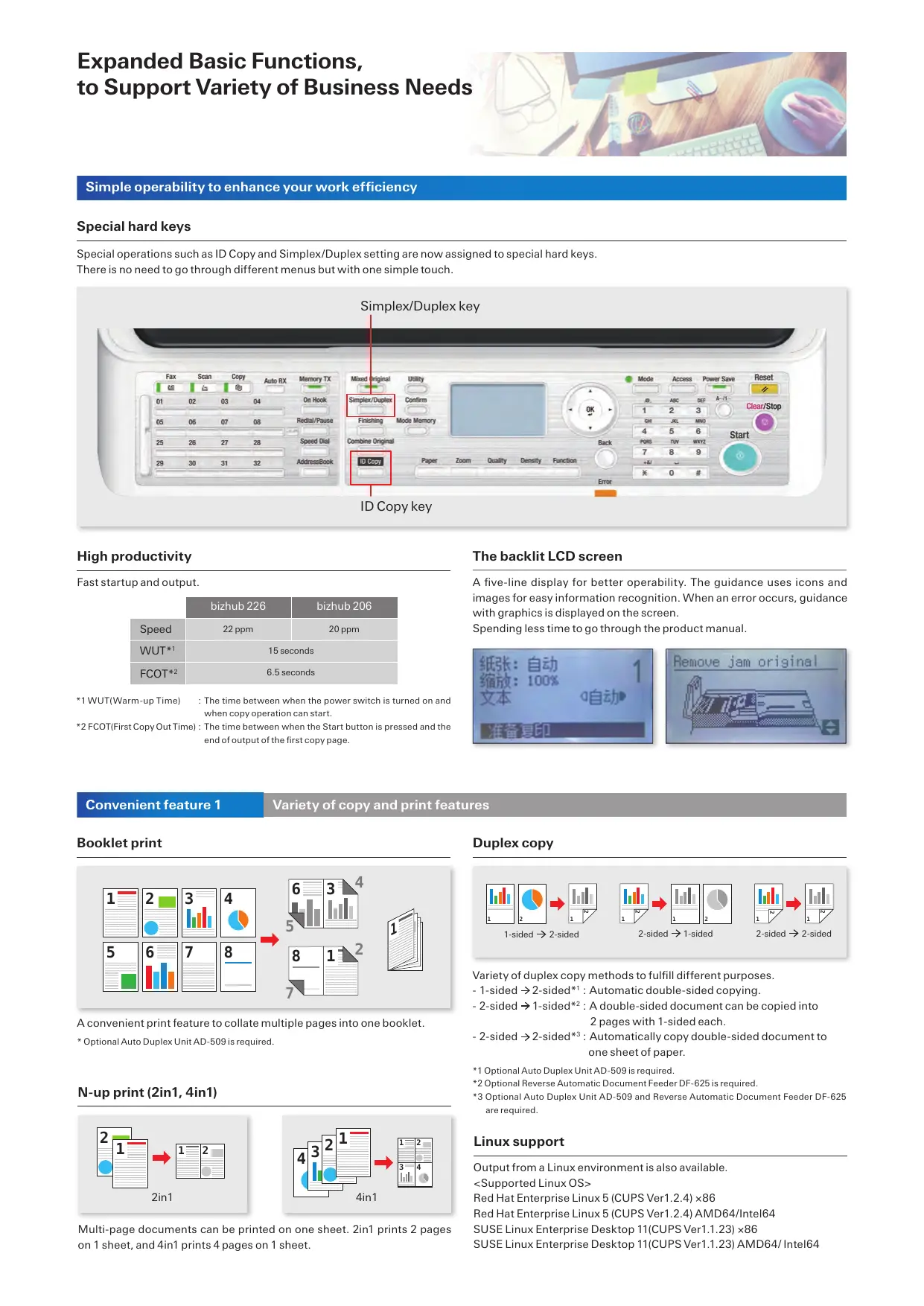
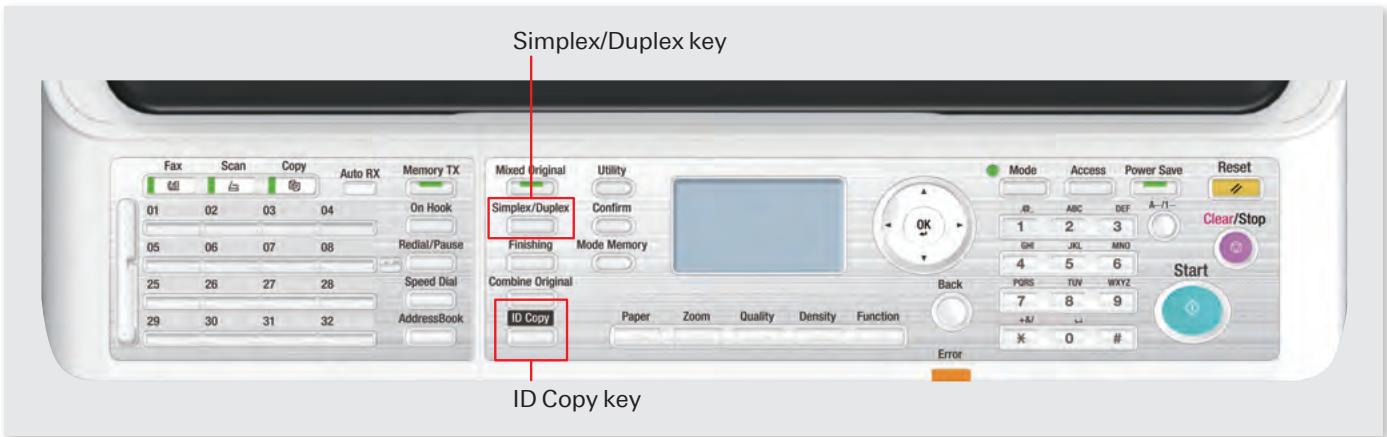
Special hard keys
Special operations such as ID Copy and Simplex/Duplex setting are now assigned to special hard keys. There is no need to go through different menus but with one simple touch.
High productivity
Fast startup and output.
| bizhub 226 | bizhub 206 | |
| Speed | 22 ppm | 20 ppm |
| WUT*1 | 15 seconds | |
| FCOT*2 | 6.5 seconds | |
*1 WUT(Warm-up Time)
The time between when the power switch is turned on and when copy operation can start.
*2 FCOT(First Copy Out Time)
The time between when the Start button is pressed and the end of output of the first copy page.
The backlit LCD screen
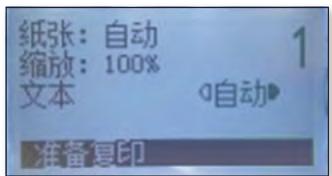
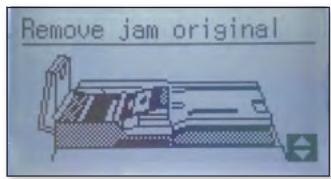
A five-line display for better operability. The guidance uses icons and images for easy information recognition. When an error occurs, guidance with graphics is displayed on the screen.
Spending less time to go through the product manual.
Convenient feature 1
Variety of copy and print features
Booklet print
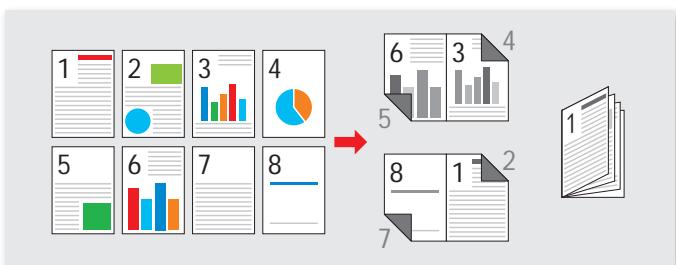
A convenient print feature to collate multiple pages into one booklet.
- Optional Auto Duplex Unit AD-509 is required.
N-up print (2in1, 4in1)
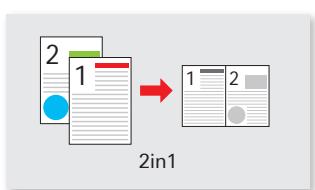

Multi-page documents can be printed on one sheet. 2in1 prints 2 pages on 1 sheet, and 4in1 prints 4 pages on 1 sheet.
Duplex copy
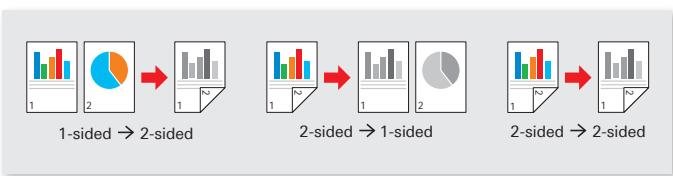
Variety of duplex copy methods to fulfill different purposes.
- 1-sided 2-sided*1: Automatic double-sided copying.
- 2-sided 1-sided*2: A double-sided document can be copied into 2 pages with 1-sided each.
- 2-sided 2-sided ^3 : Automatically copy double-sided document to one sheet of paper.
1 Optional Auto Duplex Unit AD-509 is required.
2 Optional Reverse Automatic Document Feeder DF-625 is required.
3 Optional Auto Duplex Unit AD-509 and Reverse Automatic Document Feeder DF-625 are required.
Linux support
Output from a Linux environment is also available.
Red Hat Enterprise Linux 5 (CUPS Ver1.2.4) × 86
Red Hat Enterprise Linux 5 (CUPS Ver1.2.4) AMD64/Intel64
SUSE Linux Enterprise Desktop 11(CUPS Ver1.1.23) ×86
SUSE Linux Enterprise Desktop 11(CUPS Ver1.1.23) AMD64/Intel64
ID copy
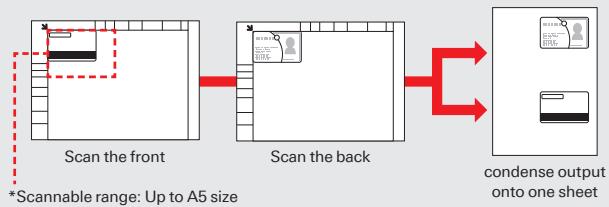
Any small documents such as employee ID or driver license, its front and back side can be output into one sheet of paper. The readable range is up to A5 size ^*1 . Press the ID Copy button on the operation panel to access this feature directly.
*1 More than one card can be placed (up to A5), as long as the originals are placed within the glass platen.
Convenient feature 3
Multiple convenience colour scan features
Colour scan
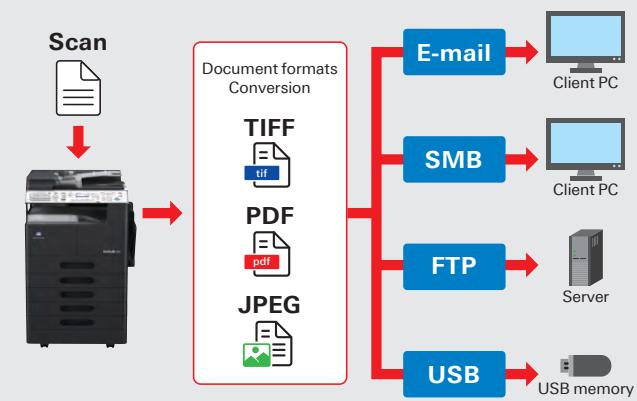
Colour documents can be digitised into colour files. Fast colour scan at 20ppm (150dpi)* ^1 , never slows work down. The supported scan file formats are TIFF, PDF, and JPEG.
*1 This is the speed when equipped with the Reverse Automatic Document feeder DF-625.
Select the destination for the scanned data
The scanned files can be saved directly to USB memory, or sent to different destination such as E-mail*1, SMB*1 or FTP*1. The supported scan formats are TIFF, PDF and JPEG.
*1 Optional Network Interface Card NC-504 or PCL controller with NIC IC-209 and Option Panel MK-749 are required.
Cost and environmental friendliness are always the first priority
Double-sided print and double-sided scan
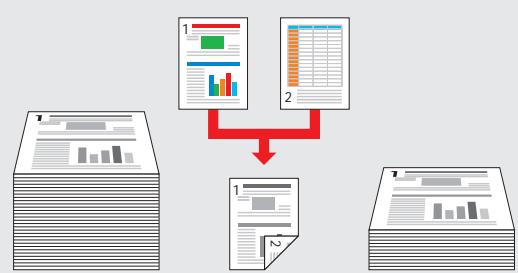
2-sided document can be output by the Auto Duplex Unit AD-509 (optional) to reduce paper amount.
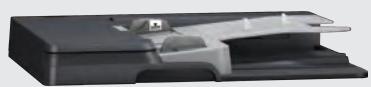
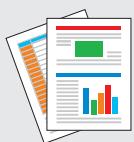
Any multiple 2-sided documents can be scanned automatically all at once with the Reverse Automatic Document Feeder DF-625 (Optional).
Scan performance (1-sided per minute)
| Black/white binary | Grayscale | Full colour | |
| 150dpi | 46ppm | 38ppm | 20ppm |
| 300dpi | 46ppm | 16ppm | 8ppm |
| 600dpi | 23ppm | - | - |
- When equipped with the Reverse Automatic Document feeder DF-625.
Toner loop mechanism
With the Kona Minolta's own Toner Loop Mechanism technology, there will be no more waste toner.
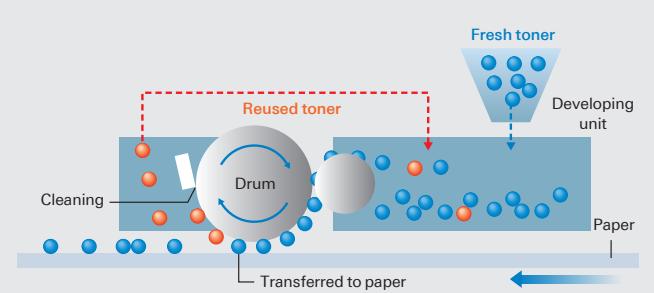
Simitri toner with biomas
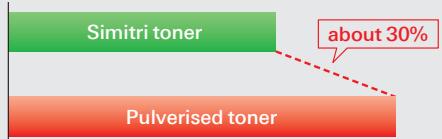
Konica Minolta's own Polymerized Toner technology achieves high image quality. The toner fuses at low temperature to bring the overall reduction of power consumption and CO2 emission, and saving TCO. CO2 emission in the production process can also be also greatly reduced, compared to pulverised toner.

Comparison of CO_2 emissions during the production of Simitri toner and pulverised toner
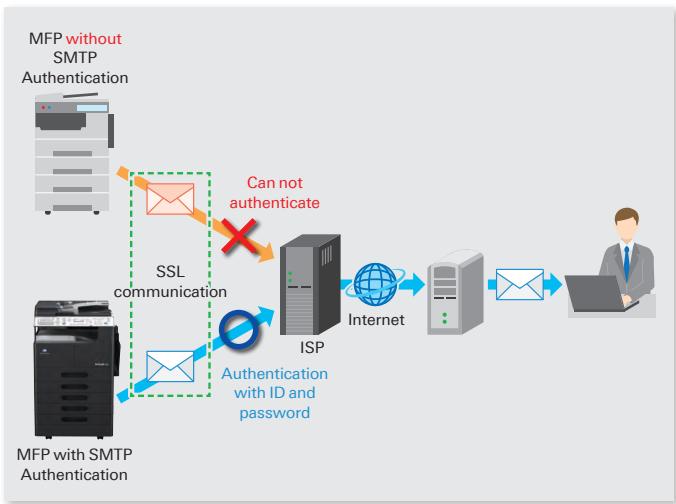
SMTP authentication
To support SMTP authentication which permits sending e-mail to users authenticated by the SMTP server. E-mail servers and ISPs (Internet Service Providers) etc. which are set for SMTP authentication can be used.
Connection to an SMTP server allows SSL communication, so E-mail can be sent in a security-conscious state. This is suitable for small offices and other situations without a private E-mail server.
Watermark
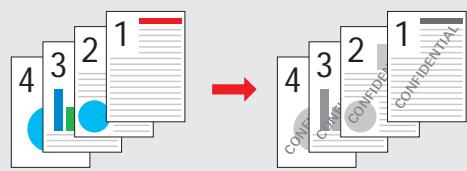
Different types of Watermarks can be added on the documents based on the purpose or importance level of documents.
Account track
The MFP can be set to request a 3-digit account number to use the Copy feature. To restrict users who are not authorized to use the MFP. Also, numbers of copies made under each account can be tracked.
ACCOUNT NO.:---
Input=10Key
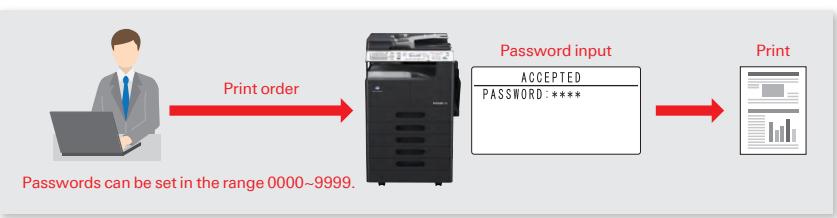
Security print
The MFP will not perform any outputs until user enters the same password as it has been set in the printer driver.
To prevent highly confidentiality documents being left on the MFP or taken by unauthorized user.
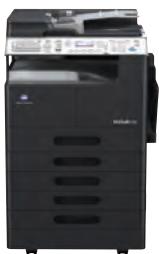
Model shown is 226 with options.
bizhub 226/206
226
B&W
22
ppm
B&W
BQ
A
RADE
46
40opm
¥1
B
C
12
Netwo
Interfa
Car
¥1
PCL
Controller
with NIC
¥1
*1
For more information please visit the bizhub website at
http://www.biz.konicaminolta.com/bw/226_206/index.html
Product appearance, configuration and/or specifications are subject to change without notice. This product is not available for some countries or regions.
The KONICA MINOLTA logo, symbol mark, "Giving Shape to Ideas", bizhub, Simitri and their respective logos are registered trademarks or trademarks of KONICA MINOLTA, INC.
Linux is a registered trademark of Linus Torvalds in the United States and other countries.
Red Hat is a registered trademark of Red Hat, Inc. in the United States and other countries.
SUSE is a registered trademark of Novell, Inc. in the United States and other countries.
All other brands and product names are registered trademarks or trademarks of their respective companies or organisations.
KONICA MINOLTA, INC.
2-7-2 Marunouchi Chiyoda-ku, Tokyo, Japan
http://www.biz.konicaminolta.com
Ecology & Environment
KONICA MINOLTA products are designed with the environment in mind.
Energy Star
RoHS Compliance
WEEE Compliance
- Eco-friendly Toners
- Production at ISO Certified Factories

Requirements for safe use
- Please read and follow the instruction manual to ensure safe operation
- Only operate using appropriate power supply and voltage.
- Connecting the earth wire to an inappropriate place may cause explosion or electric shock.
Please connect accordingly (Taiwan and the Philippines only)
- Expanded Basic Functions, to Support Variety of Business Needs
- Simple operability to enhance your work efficiency
- Special hard keys
- High productivity
- The backlit LCD screen
- Convenient feature 1
- Variety of copy and print features
- Booklet print
- N-up print (2in1, 4in1)
- Duplex copy
- Linux support
- ID copy
- Convenient feature 3
- Multiple convenience colour scan features
- Colour scan
- Select the destination for the scanned data
- Cost and environmental friendliness are always the first priority
- Double-sided print and double-sided scan
- Toner loop mechanism
- Simitri toner with biomas
- SMTP authentication
- Watermark
- Account track
- Security print
- bizhub 226/206
- http://www.biz.konicaminolta.com/bw/226_206/index.html
- KONICA MINOLTA, INC.
- Ecology & Environment
- A Requirements for safe use
Brand : KONICA MINOLTA
Model : BIZHUB 283 & BUSINESS HUB 283,MV
Category : Multifunction Printer