EasyManual
FL 836 XA - Oven SCHOLTES - Free user manual and instructions
Find the device manual for free FL 836 XA SCHOLTES in PDF.


User questions about FL 836 XA SCHOLTES
0 question about this device. Answer the ones you know or ask your own.
Ask a new question about this device
Download the instructions for your Oven in PDF format for free! Find your manual FL 836 XA - SCHOLTES and take your electronic device back in hand. On this page are published all the documents necessary for the use of your device. FL 836 XA by SCHOLTES.
USER MANUAL FL 836 XA SCHOLTES
Programma ARROSTO...
ASSISTENZA -RICAMBI- ACCESSORI
199.199.199
NUMERO UNICO
Electrical connection
Description of the appliance, 19
Overall view
Control panel
Display
Start-up and use, 20-21
Switching the oven on for the first time
Setting the clock
Setting the timer
Child Lock
DEMO mode
Starting the oven
Data plate
Cooking modes, 22-26
Creation cooking modes
Success cooking modes
Programming the cooking mode
Practical cooking advice
Creation cooking advice table
Success cooking advice table
Precautions and tips, 27
General safety
Disposal
Respecting and conserving the environment
Care and maintenance, 28-29
Switching the appliance off
Cleaning the appliance
Replacing the light bulb
Assembling the sliding rack kit
Automatic cleaning using the PYROLYTIC cycle
Assistance, 30

! Before operating your new appliance please read this instruction booklet carefully. It contains important information concerning the safe operation, installation and maintenance of the appliance.
! Please keep these operating instructions for future reference. Make sure that the instructions are kept with the appliance if it is sold, given away or moved.
Positioning
! Keep all packaging materials out of the reach of children. It may present a choking or suffocation hazard (see Precautions and tips).
! The appliance must be installed by a qualified person in compliance with the instructions provided. Incorrect installation may cause harm to people and animals or may damage property.
Built-in appliance
Use the appropriate cabinet to ensure that the appliance functions properly.
- The panels adjacent to the oven must be made of heat-resistant material.
- Cabinets with a veneer exterior must be assembled with glues which can withstand temperatures of up to 100^ C .
- To install the oven under the counter (see diagram) and in a kitchen unit, the cabinet must have the following dimensions:
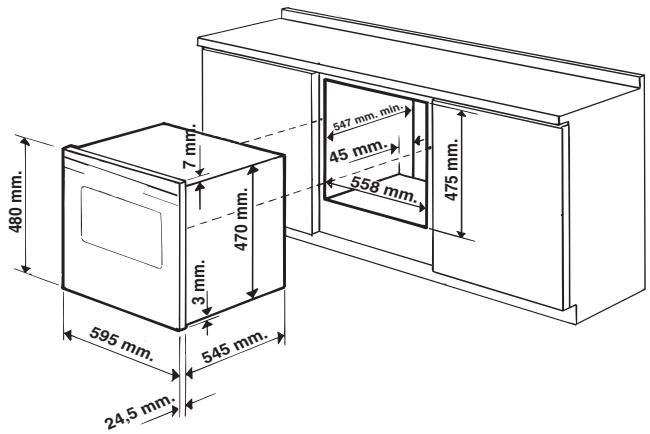
! The appliance must not come into contact with electrical parts once it has been installed. The indications for consumption given on the data plate have been calculated for this type of installation.
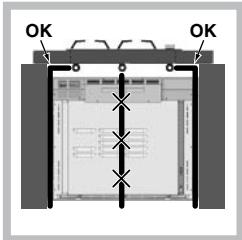
If the appliance is fitted under the counter, make sure that the hob piping is positioned correctly and that it does not interfere with the oven during installation or obstruct the rear vents of the cooling fan.
Ventilation
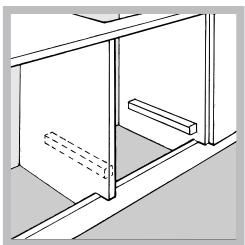
To ensure adequate ventilation is provided, the back panel of the cabinet must be removed. It is advisable to install the oven so that it rests on two strips of wood, or on a completely flat surface with an opening of at least 45 × 560 mm (see diagrams).
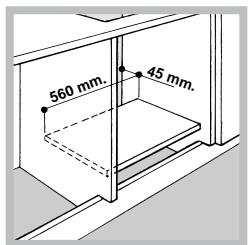
Centring and fixing
Position the 2 tabs on the side of the oven so that they are lined up with the 2 upper holes in the outer frame. Adjust the tabs according to the thickness of the cabinet side panel:
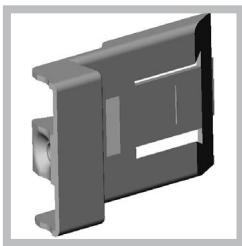
20 mm thick: take off the removable part of the tab (see diagram).
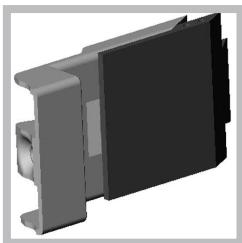
18 mm thick: use the first groove, which has already been set in the factory (see diagram).
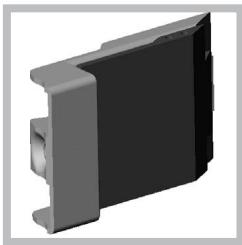
16 mm thick: use the second groove (see diagram).
Secure the appliance to the cabinet by opening the oven door and placing 2 screws into the 2 upper holes in the outer frame.
! All parts which ensure the safe operation of the appliance must not be removable without the aid of a tool.
Electrical connection
! Ovens equipped with a three-pole power supply cable are designed to operate with alternating current at the voltage and frequency indicated on the data plate located on the appliance (see below).
Fitting the power supply cable
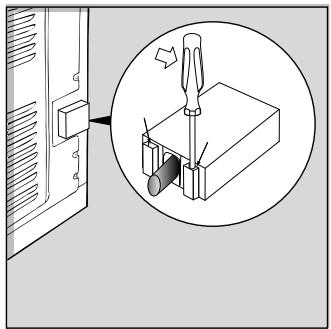
- Open the terminal board by inserting a screwdriver into the side tabs of the cover. Use the screwdriver as a lever by pushing it down to open the cover (see diagram).
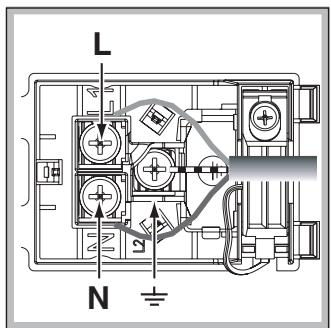
- Install the power supply cable by loosening the cable clamp screw and the three wire contact screws L-N-Connect the wires to the corresponding terminals: the Blue wire to the terminal marked (N), the Brown wire to
the terminal marked (L) and the Yellow/Green wire to the terminal marked 1一 (see diagram).
- Secure the cable by fastening the clamp screw.
- Close the cover of the terminal board.
Connecting the supply cable to the mains
Install a standardised plug corresponding to the load indicated on the data plate (see side). The appliance must be directly connected to the mains using an omnipolar circuit-breaker with a minimum contact opening of 3mm installed between the appliance and the mains. The circuit-breaker must be suitable for the charge indicated and must comply with current electrical regulations (the earthing wire must not be interrupted by the circuit-breaker). The supply cable must be positioned so that it does not come into contact with temperatures higher than 50^ at any point.
! The installer must ensure that the correct electrical connection has been made and that it is fully compliant with safety regulations.
Before connecting the appliance to the power supply, make sure that:
- The appliance is earthed and the plug is compliant with the law.
- The socket can withstand the maximum power of the appliance, which is indicated on the data plate (see below).
- The voltage is in the range between the values indicated on the data plate (see below).
- The socket is compatible with the plug of the appliance. If the socket is incompatible with the plug, ask an authorised technician to replace it. Do not use extension cords or multiple sockets.
! Once the appliance has been installed, the power supply cable and the electrical socket must be easily accessible.
! The cable must not be bent or compressed.
! The cable must be checked regularly and replaced by authorised technicians only (see Assistance).
! The manufacturer declines any liability should these safety measures not be observed.
Overall view
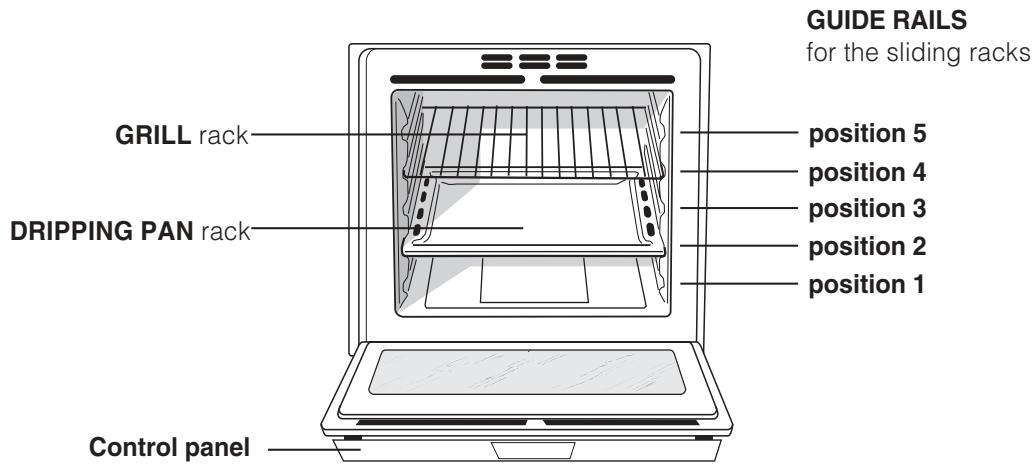
Control panel
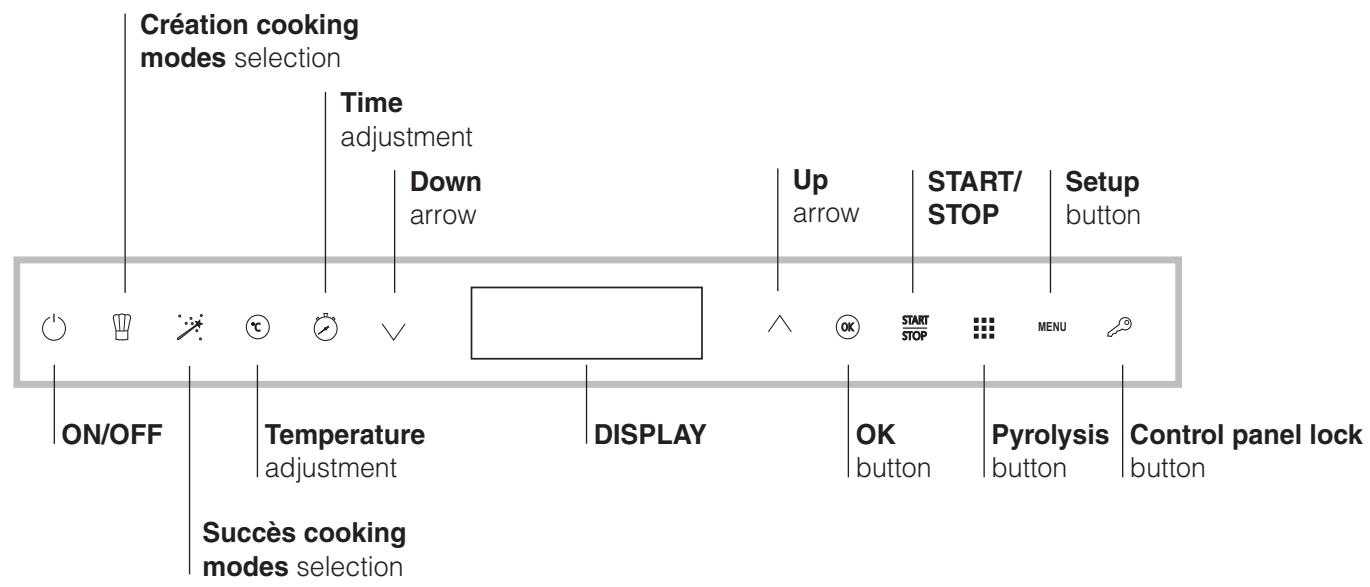
Display
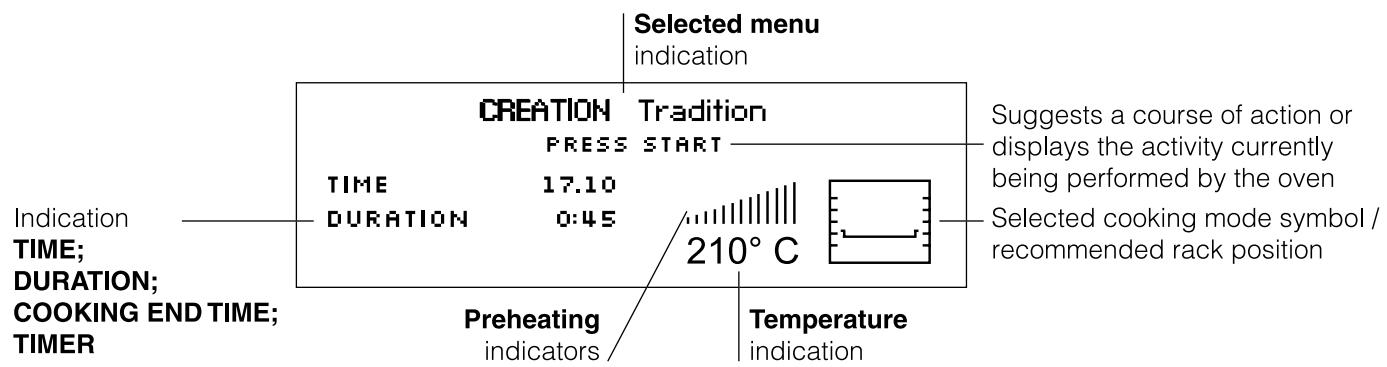
GB
! The first time you switch your appliance on, heat the empty oven to its maximum temperature for at least half an hour, making sure the door is kept shut. Ensure that the room is well ventilated before switching the oven off and opening the oven door. The appliance may emit a slightly unpleasant odour caused by protective substances used during the manufacturing process burning away.
! Every time the oven is switched on it is set to the Creation menu.
! If the user does not touch any of the buttons after the oven is switched on, it will switch off again automatically after 2 minutes.
Switching the oven on for the first time
After connecting the oven to the electricity supply, the first time it is switched on the user should also switch on the control panel by pressing the button. The list of languages in the SETUP menu will appear. To choose the desired language select it using the and buttons. The character in bold indicates which language has been chosen. Press the "OK" button to confirm. Once the selection has been made, the display will show the following parameters:
LANGUAGE
Choose language
TIME
Set the time
SOUND
Keypad sounds
CLOCK
Display the clock
SAFETY INFO
Display the info text
EXIT
Exit the setup menu
! After choosing the language in the SETUP menu, if the display is not used for another 60 seconds it will automatically revert to the Creation menu.
Setting the clock
To set the clock, switch on the oven by pressing the button, then press the "MENU" button and follow the steps described.
- Select the TIME command and press "OK" to begin modifying the value.
- Adjust the hour figure using the or buttons.
- Press the "OK" button to confirm.
- Repeat the process to set the minutes.
Setting the timer
The timer can be set while the oven is switched off or while it is switched on, when navigating the menu for a cooking mode. When the set time has elapsed, the oven will emit a sound signal. This will automatically stop after one minute or when any symbol on the control panel is pressed. To set the timer press the button and adjust the minutes using the or buttons.
Press the "OK" button to confirm.
! The timer does not switch the oven on or off.
Child Lock
The Child Lock function may be used to lock the oven door and controls.
To activate the function, press the button followed by the "OK" button to confirm the setting.
To deactivate the function, repeat the procedure described above.
The child lock function can be activated when a cooking programme is in progress or when the oven is switched off, or when a cooking end time has been set and the start button pressed. The child lock function can also be deactivated in all the above situations and after the oven has completed the cooking programme.
Demo mode
The oven can operate in DEMO mode: all heating elements are deactivated, and controls remain operative.
To enable the DEMO mode, press the , button and the button in sequence, followed by the "OK" button, when the oven is switched on. To disable the mode, press the button and the button in sequence when the oven is switched on.
A buzzer sounds and the display shows "Demo Off".
The Demo mode can only be activated when the oven is switched on and no cooking programme has been commenced.
Starting the oven
! Every time the oven is switched on it is set to the Creation menu.
- Switch the control panel on by pressing the button.
- Press the button relating to the desired Creation cooking mode or Success cooking mode. The display will show the list of available programmes.
- Use the or buttons to select the desired programme and confirm by pressing "OK". The display will show the temperature and the set duration (only the duration is shown for Success modes).
- Press the "START/STOP" button to begin cooking.
- The oven will begin its preheating stage.
- When the preheating process has finished, a buzzer sounds and all current preheating indicator lights show that this stage has been completed:
- During cooking it is always possible to:
- Modify the temperature by pressing the button,
adjust the figure using the or buttons and confirm by pressing "OK" (only for Creation cooking modes).
- Programme the duration of a cooking mode (only for Creation cooking modes).
- Stop cooking by pressing the "START/STOP" button.
- Set the timer
-
Switch off the oven by pressing the () button.
-
In case of a blackout, if the oven was already operating, an automatic system within the appliance will reactivate the cooking mode from where it was interrupted as long as the temperature did not drop below a certain level. Programmed cooking modes which have not started will not be restored and must be reprogrammed.
! There is no preheating stage for the ROASTING and GRILL modes.
! Never put objects directly on the bottom of the oven; this will avoid the enamel coating being damaged.
! Always place cookware on the rack(s) provided.
Cooling ventilation
In order to reduce the external temperature of the oven, a cooling fan generates a stream of air which escapes above the oven control panel. At the beginning of the PYROLYTIC cycle, the cooling fan operates at low speed. At the end of the PYROLYTIC cycle, the cooling fan operates at maximum speed.
! Once the cooking has been completed, the cooling fan remains on until the oven has cooled down sufficiently.
Oven light
When the oven is not in operation, the lamp can be switched on at any time by opening the oven door.
| TABLE OF CHARACTERISTICS | |
| Dimensions * | width 43.5 cm height 32 cm depth 41.5 cm |
| Volume * | 58 l |
| Electrical connections | voltage: 220-240V ~ 50/60Hz maximum power absorbed 2800 W |
| ENERGY LABEL * | Directive 2002/40/EC on the label of electric ovens. Standard EN 50304 Declared energy consumption for Forced convection Class – heating mode: Rotisserie. |
| CE | This appliance conforms to the following European Economic Community directives: 73/23/EEC dated 19/02/73 (Low Voltage) and subsequent amendments; 89/336/EEC dated 03/05/89 (Electromagnetic Compatibility) and subsequent amendments; 93/68/EEC dated 22/07/93 and subsequent amendments. 2002/96/EEC |
- Without removable guide rails
Creation cooking modes
! All cooking modes have a default cooking temperature which may be adjusted manually between 30^ and 300^ as desired.
The Creation cooking mode covers all manual cooking modes.
The oven controls all essential aspects of each of these cooking modes and makes it easier for you to create the perfect dish, from the simplest recipe to the most sophisticated culinary delights: the temperature, heat source, humidity and fan assisted operation are all controlled automatically.
This chapter was written with the help of our very own culinary expert. We invite you to follow his advice so you can benefit from his experience and perfect your cooking skills.
The recommended cooking modes, temperatures and oven shelf heights reflect our expert's own experience in the kitchen and will help you achieve the very best results.
The table below specifies whether it is best to pre-heat your oven or not for each Creation cooking mode.
Observing these suggestions will guarantee perfect results.
If you wish to place food in a preheated oven, wait for the preheating stage to be completed (this will be signalled by a series of beeps).
The temperature is set automatically, according to the cooking mode selected; however, you may adjust it to suit your recipe.
You can also set a cooking time with an immediate or delayed start.

MULTILEVEL mode
All heating elements and the fan are activated. Since the heat remains constant throughout the oven, the air cooks and browns food in a uniform manner. A maximum of two racks may be used at the same time.

GRILL mode
The top heating element comes on. The high and direct temperature of the grill is recommended for food that requires high surface temperature. Always cook in this mode with the oven door closed.

SPIT ROAST mode
The top heating element and the turnspit will be activated. The function is ideal for spit cooking. Always cook in this mode with the oven door closed.

GRATIN mode
The top and circular heating elements switch on and the fan begins to operate. This combination of features increases the effectiveness of the unidirectional thermal radiation of the heating elements through forced circulation of the air throughout the oven. This mode is ideal for cooking gratin dishes, lasagne, etc...
Always cook in this mode with the oven door closed.

OVEN TRADITION mode
When using this traditional cooking mode, it is best to use one cooking rack only. Recommended for slow cooking or cooking with a bain-marie. When using a bain-marie, the water should be poured directly into the dripping pan.

ROASTING mode
The top and circular heating elements switch on and the fan begins to operate. This combination of features increases the effectiveness of the unidirectional thermal radiation of the heating elements through forced circulation of the air throughout the oven. This helps prevent food from burning on the surface and allows the heat to penetrate right into the food.
Always cook in this mode with the oven door closed.

PROVING mode
The circular heating element will come on and the fan will operate during the preheating stage only. The oven temperature is ideal for activating the rising process. Always cook in this mode with the oven door closed.

BRIOCHE mode
The combined use of the upper and circular heating elements make this cooking mode ideal for desserts containing natural yeast.

PIES mode
The combined use of the upper and circular heating elements make this cooking mode ideal for puff pastry or flaky pastry desserts.

BAKED CAKES mode
This cooking mode is suitable for all baked desserts which do not fall into the BRIOCHE or PIES category (for example, small choux pastries, sponge cake, etc...).

LIGHTLY DONE/BROWNED MERINGUE mode
The default temperatures cannot be modified.
The LIGHTLY DONE MERINGUE cooking mode is ideal for drying meringues. The BROWNED
MERINGUE cooking mode is ideal for browning meringues.

DEFROST mode
The fan at the bottom of the oven circulates room-temperature air around the food. This programme is suitable for defrosting any type of food, especially delicate items that should not be heated, for example: ice-cream cakes or cakes made with custard, cream or fruit.

LOW TEMPERATURE modes
This type of cooking mode, used for years by industry professionals, enables food (meat, fish, fruit and vegetables) to be cooked at very low temperatures (between 85 and 120^ ), thereby guaranteeing a perfect level of cooking and enhancing the taste as much as possible.
The value of these advantages should not be underestimated:
- As the cooking temperatures are very low (in general they are lower than the evaporation temperature), the dispersion of cooking sauces due to evaporation is substantially reduced and the food becomes softer.
- When cooking meat, the muscular fibres contract less than they would during a classic cooking programme. The result is a more tender meat which does not need to be rested after it is cooked. Meat should be browned before it is placed in the oven.
Cooking foods which have been vacuum-packed at low temperatures, a technique used for over 30 years by the most prestigious chefs, brings many advantages:
- Culinary: flavours are concentrated and the taste, softness and tenderness of the food are maintained.
Hygienic: provided that hygiene regulations are respected, this type of cooking protects the food from the harmful effects of oxygen, guaranteeing that the dishes may be stored for longer in the refrigerator. - Organisational: thanks to the longer storage period, dishes may be prepared well in advance.
- Diet-related: this type of cooking limits the amount of fatty substances used and therefore means that the food is lighter and easier to digest.
- Financial: the food shrinks less so there is more of the product left after it has been cooked.
To use this technique, you must use a vacuum-packing machine and the appropriate bags. Follow the instructions given relating to vacuum-packing food carefully.
The vacuum-packing technique may also be used for raw products (fruit, vegetables, etc.) in addition to pre-cooked products (traditional cooking).
Spit roast
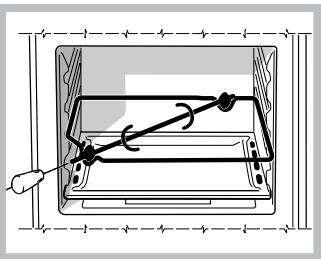
To operate the rotisserie spit (see diagram) proceed as follows:
- Place the dripping pan in position 1.
- Place the rotisserie support in position 3 and insert the spit in the hole provided on the back panel of the oven.
- Start the rotisserie spit by selecting the cooking mode.
! When this mode is enabled, the spit will stop if the door is opened.
Success automatic cooking modes
! Do not open the oven door as this will disrupt the cooking time and temperature.
The Succès function encompasses all the automatic cooking programmes devised and set by our chef.
All Succès cooking modes are completely automatic: the temperature and cooking duration are pre-set values, guaranteeing a perfect result every time - automatically. These values cannot be adjusted using the C.O.P.® (Programmed Optimal Cooking) system. Cooking ends automatically and the oven informs you when the dish is ready (only the "Pizzeria" function requires the user to check the food before taking it out of the oven).
This chapter was written with the help of our very own culinary expert. We invite you to follow his advice so you can benefit from his experience and perfect your cooking skills. The recommended cooking modes, temperatures and oven shelf heights reflect our expert's own experience in the kitchen and will help you achieve the very best results.
None of the Success cooking modes - except the Pizzeria function - require the oven to be preheated (see following paragraph).
For the ROAST... and PIES... cooking modes, it is
possible to programme a delayed start.

ROAST...mode
Use this function to cook beef, pork and lamb. Place the meat inside the oven while it is still cold. The dish may also be placed in a preheated oven.

PIES mode
This function is ideal for cooking desserts which are made using natural yeast, baking powder and desserts which contain no yeast. Place the dish in the oven while it is still cold. The dish may also be placed in a preheated oven.

PIZZA / PIZZERIA mode
Use this function to make pizza. Please see the following chapter for further details.
For the PIZZA mode, the desired cooking level must be set.
For the PIZZERIA mode, the oven will signal when the dish should be placed inside, using the buzzer and the message CONFIRM START OF COOKING.

PIZZA mode
To obtain the best results, we recommend that you carefully observe the instructions below:
- Follow the recipe.
- The weight of the dough should be between 500g and 700g .
- Lightly grease the dripping pan.
Recipe for PIZZA:
1 dripping pan on a low shelf level, hot or cold oven. Recipe for 3 pizzas weighing approximately 550g : 1000g flour, 500ml water, 20g salt, 20g sugar, 100ml olive oil, 20g fresh yeast (or 2 sachets of powder yeast)
Leavening at room temperature: 1 hour.
- Place inside hot or cold oven.
- Start the PIZZA cooking mode.

BREAD mode
Use this function to make bread. Please see the following chapter for further details.
To obtain the best results, we recommend that you carefully observe the instructions below:
- Follow the recipe.
- Do not exceed the maximum weight of the dripping pan.
- Remember to put 100ml of water in the dripping pan above the tray holding the dough; commence
cooking while the oven is still cold.
- The dough must be left to rise at room temperature for 1 - 1 12 hours (depending on the room temperature) or until the dough has doubled in size.
Recipe for BREAD:
1 Dripping pan of 1000 g Max, lower level
2 Dripping pans each holding 1000g Max, medium and lower levels
Recipe for 1000 g of dough: 600 g flour, 350 ml water, 10 g salt, 25 g fresh yeast (or 2 sachets of powder yeast)
Method:
- Mix flour and salt in a large bowl.
- Dilute yeast in lukewarm water (approximately 35 degrees).
- Make a small well in the mound of flour.
- Pour in water and yeast mixture.
- Knead dough by stretching and folding it over itself with the palm of your hand for 10 minutes until it has a uniform consistency and is not too sticky.
- Ball and cover the dough with plastic wrap and leave it to leaven at room temperature for 1 - 1 12 hours (until it has doubled in size).
- Cut the dough into equal sized loaves.
- Place them in the dripping pan on oven paper.
- Cover the loaves with flour.
- Make incisions on the loaves.
- Pour 100ml of cold distilled water into the dripping pan and place it above the tray holding the dough.
- Place the loaves inside the oven while it is still cold.
- Start the BREAD cooking mode.
- Once baked, leave the loaves on one of the grill racks until they have cooled completely.
Programming the cooking mode
! Programming is only possible after a cooking mode has been selected.
Programming the duration
Press the 念 button, then:
- Select the "DURATION" command and press "OK" to confirm.
- Adjust the time by pressing the and buttons.
- Press "OK" to confirm.
-
Select the "EXIT" command and press "OK" to confirm. This setting will be memorised.
-
When the set time has elapsed, a buzzer will sound and the oven will switch off.
- For example: it is 9:00 a.m. and a time of 1 hour and 15 minutes is programmed. The programme will stop automatically at 10:15 a.m.
! Only the duration of Creation cooking programmes may be set.
Programming a delayed cooking mode
- Press the button and repeat steps 1 to 3 as described in the duration procedure.
- Select the "COOKING END TIME" command and press "OK" to confirm.
- Adjust the hour figure using the or buttons.
- Press the "OK" button to confirm.
- Press the or buttons again to set the minutes.
- Press the "OK" button to confirm.
- Press the "START" button to enable the programming process.
- When the set time has elapsed, a buzzer will sound and the oven will switch off.
- For example: it is 9:00 a.m., a time of 1 hour and 15 minutes is programmed and the end time is set to 12:30. The programme will start automatically at 11:15 a.m.
The message "awaiting cooking" shows that a programme has been scheduled. The display shows the cooking end time and the cooking duration alternately.
The cooking end time may be modified while the oven is waiting to start, by following the procedure detailed above.
To cancel a programmed schedule, set the duration to 0:00 or switch the oven off .
! A delayed cooking programme may be scheduled when setting the duration.
Practical cooking advice
! Do not place racks in position 1 and 5 during fan-assisted cooking. This is because excessive direct heat can burn temperature sensitive foods.
! In the SPIT ROAST, GRATIN and ROASTING cooking modes, place the dripping pan in position 1 to collect cooking residues (fat and/or grease).
MULTILEVEL
- Use positions 2 and 4, placing the food which requires more heat on 2.
- Place the dripping pan on the bottom and the rack on top.
GRATIN
- Insert the rack in position 3 or 4. Place the food in the centre of the rack.
- We recommend that the temperature is set to its maximum level. The top heating element is regulated by a thermostat and may not always operate constantly.
Creation cooking advice table
! The Creation cooking programmes have default cooking temperatures.
| Mode | Cooking programme recommended for ... | Shelf level | Rack level 1 | Rack level 2 | Oven at start | NotaNote | |
| Multilevel | Cooking several dishes on 2 or 3 racks simultaneously without the respective flavours or aromas mingling | 1 | 3 | 5 (if cooking on 3 shelves) | Pre-heated | If you use this function for one dish only, place the oven tray on shelf 2. | |
| Grill | Beef steak, fish, grilled food and gratin dishes, etc. | 1 | The shelf height depends on the size of the food to be grilled | Pre-heated | |||
| Spit Roast | Cooking red or white meat roasts | 1 | 3 (spit) | Cold | |||
| Gratin | Gratin/baked foods (potato gratin, parmentier, lasagne, etc.) | 2 | Cold | If you wish to brown the top of a gratin dish which is hot and has already been cooked, select the grill function. Temperature (210 °C) cannot be adjusted. | |||
| Tradition | Slow-cooking dishes (hotpots, beef bourguignon, casseroles, etc.) or bain-marie cooking (terries, crème caramel, etc.) | 2 | Pre-heated | When using a bain-marie, you can pour the water directly into the dripping pan. | |||
| Roasting | Roasts (white or red meat) | 1 | 2 | Cold | The recommended temperature guarantees perfect cooking and sealing of the roast and avoids the formation of smoke. If your meat is in a roasting dish, use the dripping pan on shelf 2. | ||
| Baking | Baking process for dough made with yeast or baking powder (brioches, bread, sugar pie, croissants, etc.) | 2 | Cold | Temperature (40 °C) cannot be adjusted. | |||
| Brioche | Baked desserts (made using natural yeast) | 2 | Pre-heated | If you wish to cook a pizza, set the temperature to 220°C. | |||
| Pies | Sweet or savoury pastries (puff or flaky pastry) | 2 | Pre-heated | Perfect cooking from underneath and browning on top for decoration. | |||
| Baked Cakes | All desserts not included in the Pies / Tarts and Brioche categories (choux pastries, pound cake, sponge cake, turnovers, clafouts, etc.) | 2 | Pre-heated | If you use a single shelf, position the mixture (choux pastry, turnovers, etc.) or the cake tin (sponge cake, etc.) on the dripping pan. | |||
| Lightly done meringue | Drying the meringues | 2 | Pre-heated | Temperature (70°C) may not be adjusted - White and crisp meringues - Long-drying process. | |||
| Browned meringue | Cooking the meringues | 2 | Pre-heated | Temperature (110 °C) may not be adjusted - Golden meringues, crispy on the outside and soft in the centre. | |||
| Defrost | 1 | 2 | There recommended method is still slow defrosting in the refrigerator. Using the oven saves 50% of the normal defrosting time. It is an ideal function for raw or cooked foods. | ||||
| Low temperature 85 | Meat, vegetables, fish, etc. | 2 | Cold | ||||
| Low temperature 95 | Meat, vegetables, fish, etc. | 2 | Cold | ||||
| Low temperature 120 | Meat, vegetables, fish, etc. | 2 | Cold | ||||
| Heating | Pre-prepared dishes | 2 | Cold | Temperature (140 °C) cannot be adjusted. | |||
| Pasteurisation | Fruit, vegetables, etc. | 2 | Cold | Small containers may be positioned on 2 levels (dripping pan on the 1st shelf and rack on the 3rd shelf). Let the containers cool inside the oven. | |||
! The Success cooking programmes have default cooking temperatures and durations.
| Mode | Cooking programme recommended for ... | Shelf level | Rack level 1 | Rack level 2 | Oven at start | Note | |
| 图 | Roast Beef | Roast beef | 1 | 2 | Cold | If your meat is in a roasting dish, use the dripping pan on shelf 2. These dishes may also be placed in a hot oven if necessary. | |
| Roast veal | Roast veal | 1 | 2 | ||||
| Roast pork | Roast pork | 1 | 2 | ||||
| Roast chicken | Roast chicken | 1 | 2 | ||||
| Leg of lamb | Leg of lamb | 1 | 2 | ||||
| 图 | Pies | Sweet or savoury pastries (shortcrust, puff or flaky) | 2 | Cold | To cook several items at once, place the dripping pan on the first shelf and the grids on the third and fifth shelves. These dishes may also be placed in a hot oven. | ||
| Brioche | Desserts made with natural yeast (brioches, almond cake, etc.) | 2 | |||||
| Rich fruit cake | Desserts made with baking powder (marbled biscuits, pound cake, etc.) | 2 | |||||
| Cakes | Desserts without yeast (clafoutis, almond pithivier, torta rustica, etc.) | 2 | |||||
| 图 | Pizza | Deep-pap pizza, focaccia (bread dough) | 2 | Pre-heated | Lay the food directly on the dripping pan. To cook several items at once, place the dripping pan on the first shelf and the grids on the third and fifth shelves. | ||
| Pizzeria | Very thin pizza (bread dough) | 4 (place stone firebrick on shelf) | Place the pizza firebrick in the oven to pre-heat it. Wait until the message CONFIRM START OF COOKING appears before placing the pizza in the oven with the pizza shovel. | ||||
| 图 | Bread | * | * | * |
! This appliance has been designed and manufactured in compliance with international safety standards. The following warnings are provided for safety reasons and must be read carefully.
General safety
! The oven control panel is not a touch-pad, therefore the buttons should be pressed lightly yet firmly to ensure you have performed the intended operations.
- The appliance was designed for domestic use inside the home and is not intended for commercial or industrial use.
- The appliance must not be installed outdoors, even in covered areas. It is extremely dangerous to leave the appliance exposed to rain and storms.
- When moving or positioning the appliance, always use the handles provided on the sides of the oven.
- Do not touch the appliance with bare feet or with wet or damp hands and feet.
- The appliance must be used by adults only for the preparation of food, in accordance with the instructions provided in this booklet.
- Do not touch the heating elements and parts of the oven door when the appliance is in use; these parts become extremely hot. Keep children well away from the appliance.
- Ensure that the power supply cables of other electrical appliances do not come into contact with the hot parts of the oven.
- The openings used for the ventilation and dispersion of heat must never be covered.
- Always grip the oven door handle in the centre: the ends may be hot.
- Always use oven gloves when placing cookware in the oven or when removing it.
- Do not use aluminium foil to line the bottom of the oven.
- Do not place flammable materials in the oven: If the appliance is switched on accidentally, it could catch fire.
- When unplugging the appliance, always pull the plug from the mains socket; do not pull on the cable.
- Never perform any cleaning or maintenance work without having disconnected the appliance from the electricity mains.
- If the appliance breaks down, under no circumstances should you attempt to perform the repairs yourself. Repairs carried out by inexperienced persons may cause injury or further malfunctioning of the appliance. Contact a Service Centre (see Assistance).
- Do not rest heavy objects on the open oven door.
- Avoid accidental knocks to the handle as this could damage the glass.
Disposal
- When disposing of packaging material: observe local legislation so that the packaging may be reused.
- The European Directive 2002/96/EC relating to Waste Electrical and Electronic Equipment (WEEE) states that household appliances should not be disposed of using the normal solid urban waste cycle. Exhausted appliances should be collected separately in order to optimise the cost of re-using and recycling the materials inside the machine, while preventing potential damage to the atmosphere and to public health. The crossed-out dustbin is marked on all products to remind the owner of their obligations regarding separated waste collection.
Exhausted appliances may be collected by the public waste collection service, taken to suitable collection areas in the area or, if permitted by current national legislation, they may be returned to the dealers as part of an exchange deal for a new equivalent product.
All major manufacturers of household appliances participate in the creation and organisation of systems for the collection and disposal of old and disused appliances.
Respecting and conserving the environment
- You can help to reduce the peak load of the electricity supply network companies by using the oven in the hours between late afternoon and the early hours of the morning. The cooking mode programming options, the "delayed cooking" mode (see Cooking modes) and "delayed automatic cleaning" mode (see Care and Maintenance) in particular, enable the user to organise their time efficiently.
- Always keep the oven door closed when using the SPIT ROASTING, GRILL and ROASTING modes. This will achieve improved results while saving energy (approximately 10% ).
- Check the door seals regularly and wipe them clean to ensure they are free of debris so that they adhere properly to the door, thus avoiding heat dispersion.
Switching the appliance off
Disconnect your appliance from the electricity supply before carrying out any work on it.
Cleaning the appliance
- The stainless-steel or enamel-coated external parts as well as the rubber seals may be cleaned using a sponge that has been soaked in lukewarm water and neutral soap. Use specialised products for the removal of stubborn stains. After cleaning, rinse and dry thoroughly. Do not use abrasive powders or corrosive substances.
- The inside of the oven should ideally be cleaned after each use, while it is still lukewarm. Use hot water and detergent, then rinse well and dry with a soft cloth. Do not use abrasive products.
- All accessories - with the exception of the sliding racks - can be washed like everyday crockery, and are even dishwasher safe.
- We advise against spraying detergents directly onto the control panel; instead spray the product onto a sponge.
- Use detergent to remove dirt residues from the glass on the inside of the oven door.
- Do not use steam equipment to clean the appliance.
Inspecting the seals
Check the door seals around the oven regularly. If the seals are damaged, please contact your nearest After-sales Service Centre (see Assistance). We recommend that the oven is not used until the seals have been replaced.
Replacing the light bulb
To replace the oven light bulb:
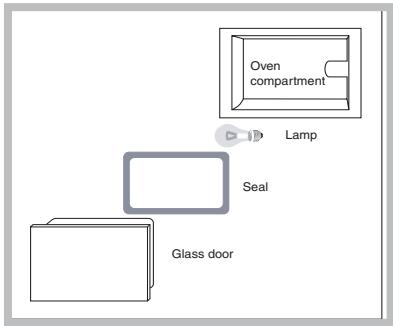
- Remove the glass cover using a screwdriver.
- Remove the light bulb and replace it with a similar
one: Wattage 15 W, cap E 14.
Replace the glass cover, making sure the seal is positioned correctly (see diagram).
Assembling the sliding rack kit
To assemble the sliding racks:
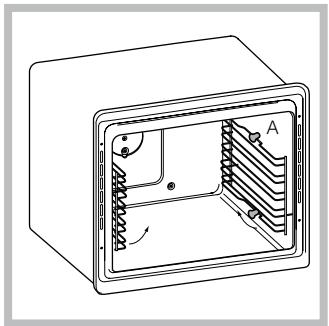
- Remove the two frames, lifting them away from the spacers A (see figure).
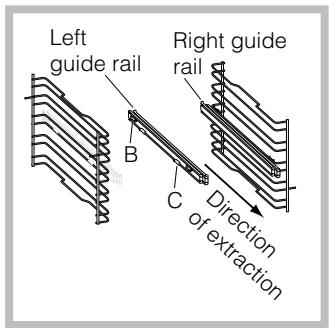
- Choose which shelf to use with the sliding rack. Paying attention to the direction in which the sliding rack is to be extracted, position joint B and then joint C on the frame.
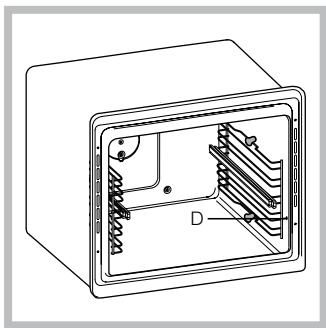
-
Secure the two frames with the guide rails using the holes provided on the oven walls (see diagram). The holes for the left frame are situated at the top, while the holes for the right frame are at the bottom.
-
Finally, fit the frames on spacers A.
! Do not place the sliding racks in position 5.
Automatic cleaning using the PYROLYTIC cycle
During the PYROLYTIC cycle, the internal temperature of the oven reaches 500^ . The pyrolytic cycle is activated and burns away food and grime residues. Dirt is literally incinerated.
Keep children away from the appliance during the automatic cleaning cycle as surfaces may become very hot. Particles may ignite inside the oven due to the spontaneous combustion process. There is no cause for concern: this process is both normal and hazard-free.
! The oven advises the user when it is necessary to perform a cleaning cycle; the display shows the text "PYROLYTIC CYCLE recommended - START?"; select "yes" to set the desired cleaning cycle level.
Before initiating the PYROLYTIC CYCLE:
- Remove large or coarse food residues from inside of the oven using a damp sponge. Do not use detergents.
- Remove all the accessories, the guide rails and the supporting frames.
- Do not place tea towels or pot holders over the oven handle.
If the oven is too hot, the pyrolytic cycle may not start. Wait for the oven to cool down.
The programme may only be started once the oven door has been closed.
To activate the PYROLYTIC cycle, press the button followed by the button. Select the desired PYROLYTIC cycle level by adjusting or . The PYROLYTIC cycle has three default time settings which cannot be modified:
- Economy (ECO): 1 hour
- Normal (NOR): 1 hour and 30 minutes
- Intensive (INT): 2 hours.
Press the "OK" button to confirm.
Press the "START/STOP" button to begin the PYROLYTIC cycle.
Safety devices
- The door is locked automatically as soon as the temperature exceeds a certain value.
-
Should a malfunction occur, the heating elements will switch off.
-
Once the oven door has been locked, you cannot change the cycle time and end time settings.
! Programming is possible only after selecting the PYROLYTIC cycle mode.
Programming delayed automatic cleaning
- Press the button.
- Select the "COOKING END TIME" command and press "OK" to confirm.
- Adjust the hour figure using the or buttons.
- Press the "OK" button to confirm.
- Press the or buttons again to set the minutes.
- Press the "OK" button to confirm.
-
Press the "START/STOP" button to enable the programming process.
-
When the set time has elapsed, a buzzer will sound and the oven will switch off.
-
For example: it is 9:00 a.m. and the Economy PYROLYTIC cycle has been selected: default set time 1 hour. 12:30 is selected as the end time. The programme will start automatically at 11:30 a.m.
The message "awaiting pyrolytic cycle" shows that a programme has been scheduled. The display shows the pyrolytic cycle end time and the duration alternately.
To cancel programming press the button.
Once the automatic cleaning cycle is over
You will have to wait until the temperature inside the oven has cooled down sufficiently before you can open the oven door. You will notice some white dust deposits on the bottom and the sides of your oven; remove these deposits with a damp sponge once the oven has cooled down completely. Alternatively, you can make use of the already heated oven, in which case it is not necessary to remove the deposits, they are completely harmless and will not affect your food in any way.
GB
Warning:
The appliance is fitted with an automatic diagnostic system which detects any malfunctions. Malfunctions are displayed by messages of the following type: "ER" followed by numbers.
Try holding the (1)x button down for 6 seconds and check whether the malfunction has occurred again.
Call for technical assistance if it does.
Before calling for Assistance:
- Check whether you can fix the problem yourself.
- Restart the programme to check whether the malfunction has disappeared.
- If it has not, contact the Authorised Technical Assistance Service.
! Never use the services of an unauthorised technician.
Please have the following information handy:
- The type of problem encountered.
- The message displayed.
- The appliance model (Mod.).
- The serial number (S/N).
The latter two pieces of information can be found on the data plate located on the appliance.

Italiano, 1

English,16

Français, 31

Nederlands, 46

Deutsch, 61
FL 836 XA
FL 836 AN
FL 836 MT
Sommaire
Installation, 32-33
Positionnement