
DGS-1008P - Carte réseau/Adaptateur D-LINK - Free user manual and instructions
Find the device manual for free DGS-1008P D-LINK in PDF.


| Product Type | 8-Port Gigabit PoE Switch |
| Model | DGS-1008P |
| Brand | D-Link |
| Ports | 8 x 10/100/1000 Mbps Gigabit Ethernet |
| PoE Support | 8 PoE ports (802.3af/at), up to 30W per port |
| Total PoE Budget | 120W |
| Switching Capacity | 16 Gbps |
| Forwarding Rate | 11.9 Mpps (148,800 pps per port) |
| MAC Address Table | 8K entries |
| Dimensions (W x D x H) | 190 x 120 x 38 mm (7.48 x 4.72 x 1.50 in) |
| Weight | 1.2 kg (2.65 lbs) |
| Power Input | 100-240 VAC, 50-60 Hz |
| Power Consumption | 140W (maximum with PoE) |
| Cooling | Fanless (no noise) |
| Mounting | Desktop or wall-mountable (kit included) |
| LED Indicators | Power, Link/Activity, PoE for each port |
| Switching Method | Store-and-Forward |
| Supported Features | Auto-MDI/MDIX, 802.1p QoS, 802.1q VLAN passthrough, flow control |
| Maintenance | Clean with a soft, dry cloth; avoid liquids |
| Safety | CE, FCC, RoHS compliant; operate in ventilated area |
| Spare Parts / Repair | Power adapter (if external), no user-serviceable parts; contact D-Link support |
| Warranty | 3 years limited |
Frequently Asked Questions - DGS-1008P D-LINK
User questions about DGS-1008P D-LINK
0 question about this device. Answer the ones you know or ask your own.
Ask a new question about this device
Download the instructions for your Carte réseau/Adaptateur in PDF format for free! Find your manual DGS-1008P - D-LINK and take your electronic device back in hand. On this page are published all the documents necessary for the use of your device. DGS-1008P by D-LINK.
USER MANUAL DGS-1008P D-LINK
If any of these items are missing from your packaging, contact your reseller.
Warning: Using a power adapter with a different voltage rating will damage and void the warranty of this product.
For full product manual, please refer to the website ftp.dlink.eu/Manuals/DGS-1008P_Manual.pdf
INTRODUCTION
The D-Link DGS-1008P is a Gigabit PoE unmanaged switch capable of feeding power to Power over Ethernet (PoE) devices such as network cameras. The DGS-1008P has 8 ports operating at 10/100/1000 Mbps ports with 4 PoE ports (Ports 1 to 4) capability ideal for home and small office businesses with limited budgets.
PRODUCT SETUP
BEFORE SETTING UP THE DGS-1008P
Please follow the steps below to set up the switch:
- Install the DGS-1008P in a cool and dry place. Refer to the Technical Specifications for the acceptable operating temperature and humidity ranges.
- Install the switch in a site free from strong electromagnetic source, vibration, dust, and direct sunlight.
- Leave at least 10cm of space at the left and right-hand side of the switch for ventilation.
- Visually inspect the power jack and make sure that it is fully secured to the power adapter.

Do not stack any device on top of the switch.
CONNECTING THE DGS-1008P TO YOUR NETWORK
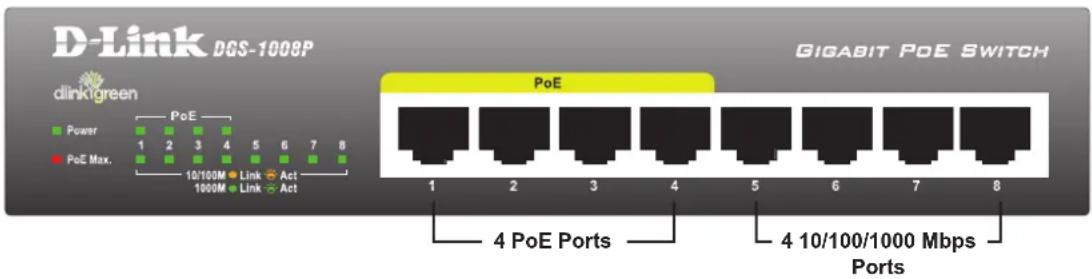
A. POWER
Plug the AC power cord into a free wall socket, then plug the other end of the DC power jack into the power outlet of the DGS-1008P. The Power LED will illuminate confirming that the device has powered up successfully.
B. PoE PORTS (PORTS 1 - 4)
The PoE ports can supply up to 15.4 watts, a total PoE budget of 52 watts, allowing users to attach an IEEE 802.3af compliant device to the DGS-1008P.
C. GIGABIT PORTS (PORTS 1 - 8)
These ports offer network speeds of either 10 Mbps, 100 Mbps or 1000 Mbps and can operate in half and full-duplex transfer modes. These ports also support automatic MDI/MDIX crossover, eliminating the need for crossover cables or uplink ports. Each port can be connected directly to a server, hub, router, or switch using regular straight-through twisted-pair Ethernet cables.
bar
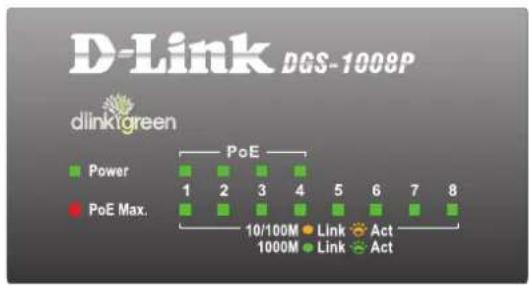
D-Link DGS-1008P | Level | Power | |---|---| | 1 | PoE | | 2 | PoE | | 3 | PoE | | 4 | PoE | | 5 | PoE | | 6 | PoE | | 7 | PoE | | 8 | PoE | Legend: Green = Power, Red = PoE Max., Blue = Link, Green = Act, Orange = Link, Yellow = Act.The LED indicators allow you to monitor, diagnose, and troubleshoot any potential problem within the switch, connection, or attached devices.
| LED Color Status Description | |||
| Power | Green Sol | olid light Power | on |
| Off Power off | |||
| Link/Act/Speed | Green Sol | olid light Secure | connection to a 1000 Mbps Ethernet device. |
| Blinking The port is receiving or transmitting data. | |||
| Amber Sol | olid light Secure | connection to a 10/100 Mbps Ethernet device. | |
| Blinking The port is receiving or transmitting data. | |||
| Off Light | off No link | ||
| PoE (Ports1 to 4) | Green Sol | olid light The port is successfully connected to a PoE device and is powering the device properly. | |
| Off No connection to a PoE device | |||
| Red Solid | light The PoE | port has failed, possibly due to:1. PoE total power budget shortage2. Over current: Exceeds the power current of powered device's classification.3. Short circuit: An intentional short circuit has been performed on a powered device. | |
| PoE Max. | Red Solid | light The PoE | devices' output power is over 45 W.In the meantime, no additional devices can be powered on. |
| Blinking If connected devices are unplugged and the remaining power is over 7 W, the PoE Max. LED will blink for two minutes. | |||
| Off Light | off The power | usage is less than the power budget of 45 W. | |
TROUBLESHOOTING
SETUP AND CONFIGURATION PROBLEMS
1. WHAT SHOULD I DO IF THE POWER LED DOES NOT LIGHT UP?
- Check if the power adapter is connected properly to the wall socket and the back of the device.
- Ensure that the on/off switch is in the "on" position.
2. WHAT SHOULD I DO IF A CONNECTED DEVICE IS NOT DETECTED?
- Ensure the Port LED is illuminated or flashing. If not, try using a new LAN cable.
3. WHAT SHOULD I DO IF A POE DEVICE IS NOT POWERED BY THE DGS-1008P?
- Ensure that the PoE device is connected to one of the four PoE enabled ports (1 to 4) and the connected PoE devices do not exceed the maximum power budget of 52 W.
TECHNICAL SUPPORT
United Kingdom (Mon-Fri) website: http://www.dlink.co.uk FTP: ftp://ftp.dlink.co.uk
Home Wireless/Broadband 0871 873 3000 (9.00am–06.00pm, Sat 10.00am-02.00pm)
Managed, Smart, & Wireless Switches, or Firewalls 0871 873 0909 (09.00am- 05.30pm)
(BT 10ppm, other carriers may vary.)
Ireland (Mon-Fri)
All Products 1890 886 899 (09.00am-06.00pm, Sat 10.00am-02.00pm)
Phone rates: €0.05ppm peak, €0.045ppm off peak times
PACKUNGS- INHALT
INHALT
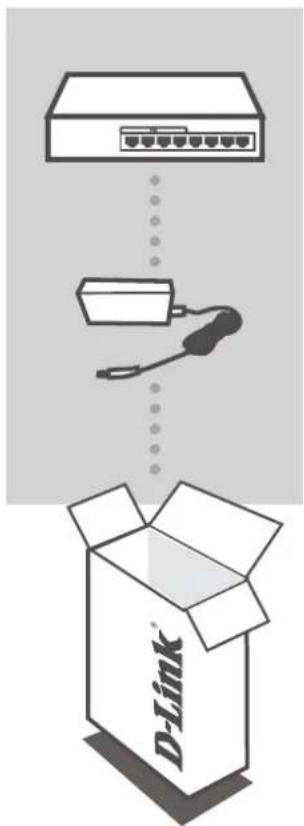
8-PORT GIGABIT ETHERNET PoE-SWITCH DGS-1008P
STROMADAPTER/STECKERNETZTEIL 48 V DC, 1,25 A
CONFIGURATION DU PRODUIT
AVANT DE CONFIGURER LE DGS-1008P
bar
D-Link DGS-1008P | Category | Power | PoE | |---|---|---| | Top Bar | 1 | 2 | | Middle Bar | 3 | 4 | | Bottom Bar | 4 | 5 | | Right Bar | 6 | 7 | | Bottom Right Bar | 8 | 8 | | Label | Value | |---|---| | Top Bar (PoE) | 1 | | Middle Bar (PoE) | 2 | | Bottom Bar (PoE) | 3 | | Bottom Right Bar (PoE) | 4 | | Bottom Left Bar (PoE) | 5 | | Bottom Right Bar (PoE) | 6 | | Bottom Left Bar (PoE) | 7 | | Bottom Right Bar (PoE) | 8 | | Marker Type | Value | |---|---| | Power (10/100M) | Green Square | | Power (10/100M) | Red Square | | Power (10/100M) | Blue Square | | Power (10/100M) | Green Square | | Power (10/100M) | Red Square | | Link (1000M) | Orange Circle | | Link (1000M) | Yellow Circle | | Link (1000M) | Blue Circle | | Link (1000M) | Green Circle | | Act (1000M) | Orange Circle | | Act (1000M) | Yellow Circle | | Act (1000M) | Blue Circle | | Act (1000M) | Green Circle | The chart displays a single bar for 'PoE' at position 4.bar
D-Link DGS-1008P | Level | Power | PoE | |---|---|---| | 1 | 1 | PoE | | 2 | 2 | PoE | | 3 | 3 | PoE | | 4 | 4 | PoE | | 5 | 5 | PoE | | 6 | 6 | PoE | | 7 | 7 | PoE | | 8 | 8 | PoE | Legend: Green squares = Power, Red circles = PoE Max., Blue stars = Link, Green stars = Act, Light green stars = Link, Light green stars = Act.bar
D-Link DGS-1008P | Level | Power | |---|---| | 1 | PoE | | 2 | PoE | | 3 | PoE | | 4 | PoE | | 5 | PoE | | 6 | PoE | | 7 | PoE | | 8 | PoE | Legend: Green = Power, Red = PoE Max., Blue = Link, Green = Act, Orange = Link, Yellow = Act.http://www.dlink.it/support
bar
D-Link DGS-1008P | Level | Power | |---|---| | 1 | PoE | | 2 | PoE | | 3 | PoE | | 4 | PoE | | 5 | PoE | | 6 | PoE | | 7 | PoE | | 8 | PoE | Legend: Green squares = Power, Red squares = PoE Max., Blue lines = 10/100M, Orange circles = Link, Yellow stars = Act, Light green line = Link, Green stars = Act.bar
D-Link DGS-1008P | Level | Power | |---|---| | 1 | PoE | | 2 | PoE | | 3 | PoE | | 4 | PoE | | 5 | PoE | | 6 | PoE | | 7 | PoE | | 8 | PoE | Legend: Green squares = Power, Red squares = PoE Max., Blue lines = 10/100M, Orange circles = Link, Yellow stars = Act, Light green line = Link, Light green line = Act.PROBLEMY ZWI AZANE Z INSTALACJ A I KONFIGURACJ A
bar
D-Link DGS-1008P | Level | Power | |---|---| | 1 | PoE | | 2 | PoE | | 3 | PoE | | 4 | PoE | | 5 | PoE | | 6 | PoE | | 7 | PoE | | 8 | PoE | Legend: Green squares = Power, Red squares = PoE Max., Blue lines = 10/100M, Orange circles = Link, Yellow stars = Act, Purple circles = Link, Green stars = Act.3. MIT KELL TENNEM, HA EGY POE ESZKÖZ A DGS-1008P ÁLTAL NINCS TÁMOGATVA?
bar
D-Link DGS-1008P | Level | Power | PoE | |---|---|---| | 1 | 1 | PoE | | 2 | 2 | PoE | | 3 | 3 | PoE | | 4 | 4 | PoE | | 5 | 5 | PoE | | 6 | 6 | PoE | | 7 | 7 | PoE | | 8 | 8 | PoE | Legend: Green square = Power, Red square = PoE Max., Orange circle = Link, Yellow circle = Act, Purple circle = Link, Green circle = Act.1. HVA B∅R JEG GJ∅RE HVIS STR∅MLED-EN IKKE TENNES?
F∅R INDSTILLING AF DGS-1008P
1. HVAD G∅R JEG, HVIS STR∅M-LED IKKE LYSER?
bar
D-Link DGS-1008P | Level | Power | |---|---| | 1 | PoE | | 2 | PoE | | 3 | PoE | | 4 | PoE | | 5 | PoE | | 6 | PoE | | 7 | PoE | | 8 | PoE | Legend: Green squares = Power, Red squares = PoE Max., Blue lines = 10/100M, Orange circles = Link, Yellow stars = Act, Light green line = Link, Green stars = Act.bar
D-Link DGS-1008P | Level | Power | |---|---| | 1 | PoE | | 2 | PoE | | 3 | PoE | | 4 | PoE | | 5 | PoE | | 6 | PoE | | 7 | PoE | | 8 | PoE | Legend: Green = Power, Red = PoE Max., Blue = Link, Orange = Act, Light Green = Link, Dark Green = Act.bar
D-Link DGS-1008P | Level | Power | |---|---| | 1 | PoE | | 2 | PoE | | 3 | PoE | | 4 | PoE | | 5 | PoE | | 6 | PoE | | 7 | PoE | | 8 | PoE | Legend: Green squares = Power, Red squares = PoE Max., Blue lines = 10/100M, Orange circles = Link, Yellow stars = Act, Light green line = Link, Green stars = Act.bar
D-Link DGS-1008P | Level | Power | |---|---| | 1 | PoE | | 2 | PoE | | 3 | PoE | | 4 | PoE | | 5 | PoE | | 6 | PoE | | 7 | PoE | | 8 | PoE | Legend: Green squares = Power, Red squares = PoE Max., Blue lines = 10/100M, Orange circles = Link, Yellow stars = Act, Light green line = Link, Green stars = Act.D-Link Hellas Support Center
http://www.dlink.gr/support/
bar
D-Link DGS-1008P | Level | Power | |---|---| | 1 | PoE | | 2 | PoE | | 3 | PoE | | 4 | PoE | | 5 | PoE | | 6 | PoE | | 7 | PoE | | 8 | PoE | Legend: Green squares = Power, Red squares = PoE Max., Blue lines = 10/100M, Orange circles = Link, Yellow stars = Act, Light green line = Link, Green stars = Act.Kontrolne lampice omogućuju praćenje, dijagnosticiranje i otklanjanje poteškoća s preklopnikom, vezom ili povezanim uređajima.
bar
D-Link DGS-1008P | Level | Power | |---|---| | 1 | PoE | | 2 | PoE | | 3 | PoE | | 4 | PoE | | 5 | PoE | | 6 | PoE | | 7 | PoE | | 8 | PoE | Legend: Green squares = Power, Red squares = PoE Max., Blue squares = 10/100M, Orange circles = Link, Yellow stars = Act, Light green circles = Link, Green stars = Act.bar
D-Link DGS-1008P | Level | Power | |---|---| | 1 | PoE | | 2 | PoE | | 3 | PoE | | 4 | PoE | | 5 | PoE | | 6 | PoE | | 7 | PoE | | 8 | PoE | Legend: Green squares = Power, Red squares = PoE Max., Blue lines = 10/100M, Orange circles = Link, Yellow stars = Act, Light green line = Link, Green stars = Act.- INTRODUCTION
- PRODUCT SETUP
- BEFORE SETTING UP THE DGS-1008P
- CONNECTING THE DGS-1008P TO YOUR NETWORK
- POWER
- PoE PORTS (PORTS 1 - 4)
- GIGABIT PORTS (PORTS 1 - 8)
- TROUBLESHOOTING
- WHAT SHOULD I DO IF THE POWER LED DOES NOT LIGHT UP?
- WHAT SHOULD I DO IF A CONNECTED DEVICE IS NOT DETECTED?
- WHAT SHOULD I DO IF A POE DEVICE IS NOT POWERED BY THE DGS-1008P?
- TECHNICAL SUPPORT
- Ireland (Mon-Fri)
- PACKUNGS- INHALT
- CONFIGURATION DU PRODUIT
- AVANT DE CONFIGURER LE DGS-1008P
- MIT KELL TENNEM, HA EGY POE ESZKÖZ A DGS-1008P ÁLTAL NINCS TÁMOGATVA?
- HVA B∅R JEG GJ∅RE HVIS STR∅MLED-EN IKKE TENNES?
- HVAD G∅R JEG, HVIS STR∅M-LED IKKE LYSER?
Brand : D-LINK
Model : DGS-1008P
Category : Carte réseau/Adaptateur