
IAN 104853 - Alarm Clock AURIOL - Free user manual and instructions
Find the device manual for free IAN 104853 AURIOL in PDF.


| Product Type | Radio-controlled alarm clock |
| Model Number | IAN 104853 |
| Power Supply | 2 x 1.5V AAA batteries (included) |
| Display | LCD with time (hours, minutes, seconds), date, weekday, indoor temperature, alarm indicators |
| Time Format | 12-hour (AM/PM) or 24-hour selectable |
| Temperature Unit | °C or °F selectable |
| Temperature Measurement Range | -9.9°C to +49.9°C (-14.2°F to +121.8°F) |
| Radio Control | DCF-77 time signal, automatic synchronization, range approx. 1500 km from Frankfurt, Germany |
| Alarm Functions | Two independent alarms with weekday/weekend settings (Mon-Fri, Sat-Sun, Mon-Sun) |
| Snooze Function | Activated by SNOOZE/LIGHT button; alarm repeats after approx. 5 minutes |
| Backlight | Press SNOOZE/LIGHT button to illuminate display briefly |
| Time Zone Setting | Adjustable from -12 to +12 hours for DCF signal offset |
| Manual Time/Date Setting | Yes, via MODE, UP, DOWN buttons |
| Weekday Languages | GER, ENG, DAN, ESP, NET, ITA, FRA |
| Battery Low Indicator | Battery symbol appears on display |
| Cleaning | Use only a soft, dry cloth; no liquids or cleaning agents |
| Safety | Keep away from children, do not disassemble, battery safety precautions |
| Warranty | 3 years from date of purchase |
| Included Items | Alarm clock, 2 x AAA batteries, user manual |
| Dimensions (estimated) | Approx. 15 x 8 x 5 cm |
| Weight (estimated) | Approx. 200 g (with batteries) |
Frequently Asked Questions - IAN 104853 AURIOL
User questions about IAN 104853 AURIOL
0 question about this device. Answer the ones you know or ask your own.
Ask a new question about this device
Download the instructions for your Alarm Clock in PDF format for free! Find your manual IAN 104853 - AURIOL and take your electronic device back in hand. On this page are published all the documents necessary for the use of your device. IAN 104853 by AURIOL.
USER MANUAL IAN 104853 AURIOL
Operation and Safety Notes
HU
RÁDIÓVEZÉRELT
ÉBRESZTOÓRA
natural_image
Color gradient bar transitioning from black to white (no text or symbols)



GB Operation and Safety Notes Page 7
natural_image
Color palette bar with grayscale shades and a color swatch, no text or symbols present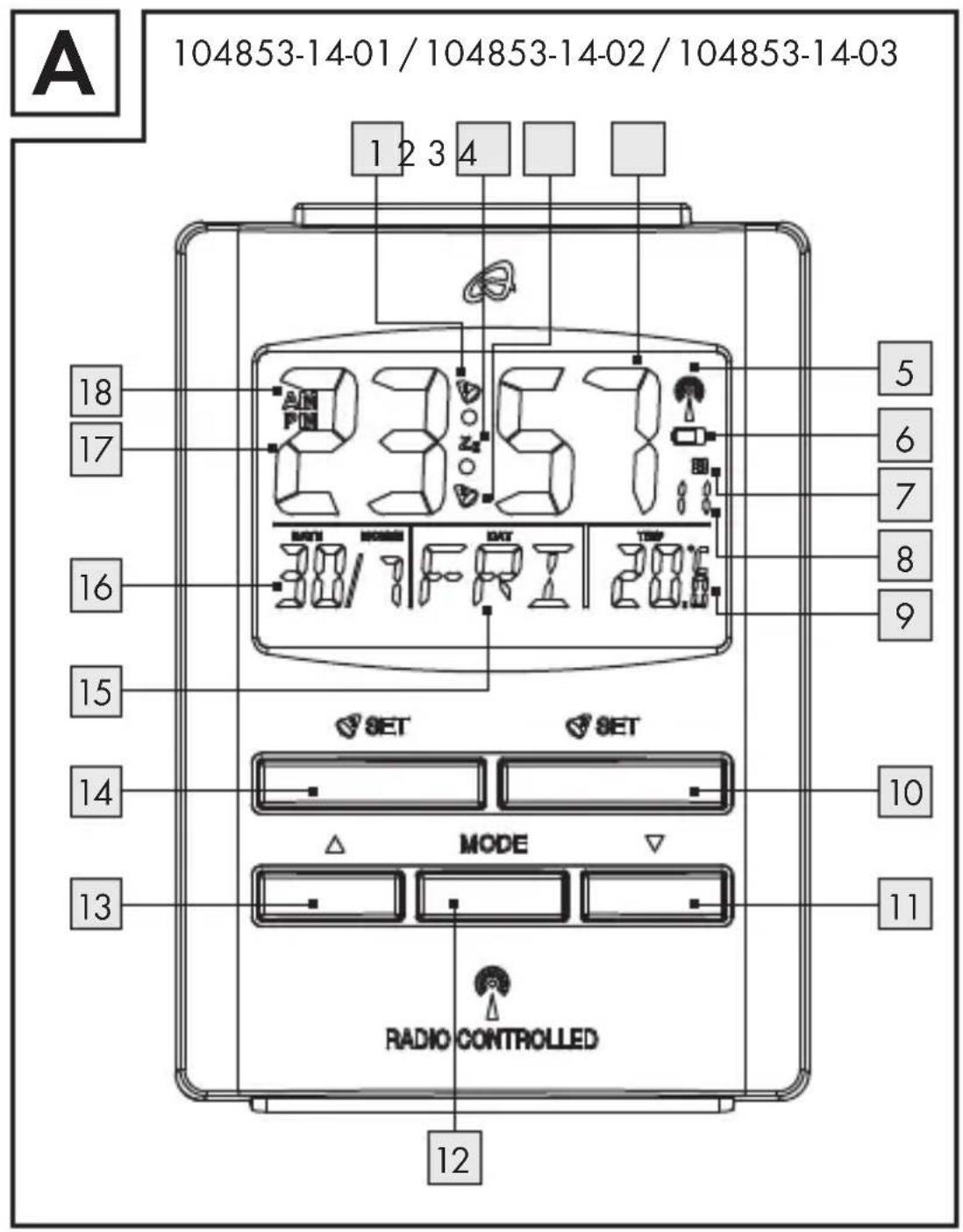

natural_image
Color palette bar with grayscale shades and a color swatch at the bottom (no text or symbols)B
104853-14-01/104853-14-02/104853-14-03
natural_image
Technical line drawing of a mechanical component or bracket (no text or symbols)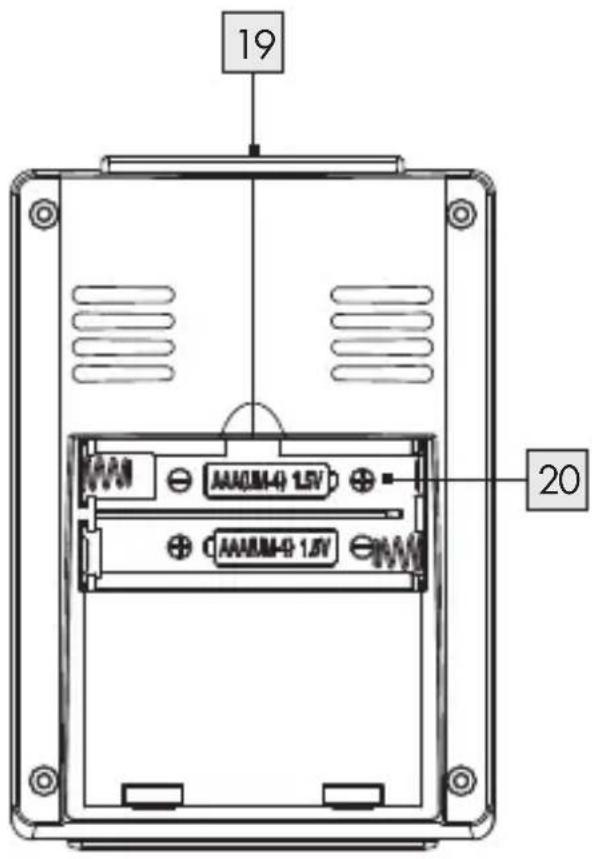
4

natural_image
Color palette bar with grayscale shades and a color swatch at the bottom (no text or symbols)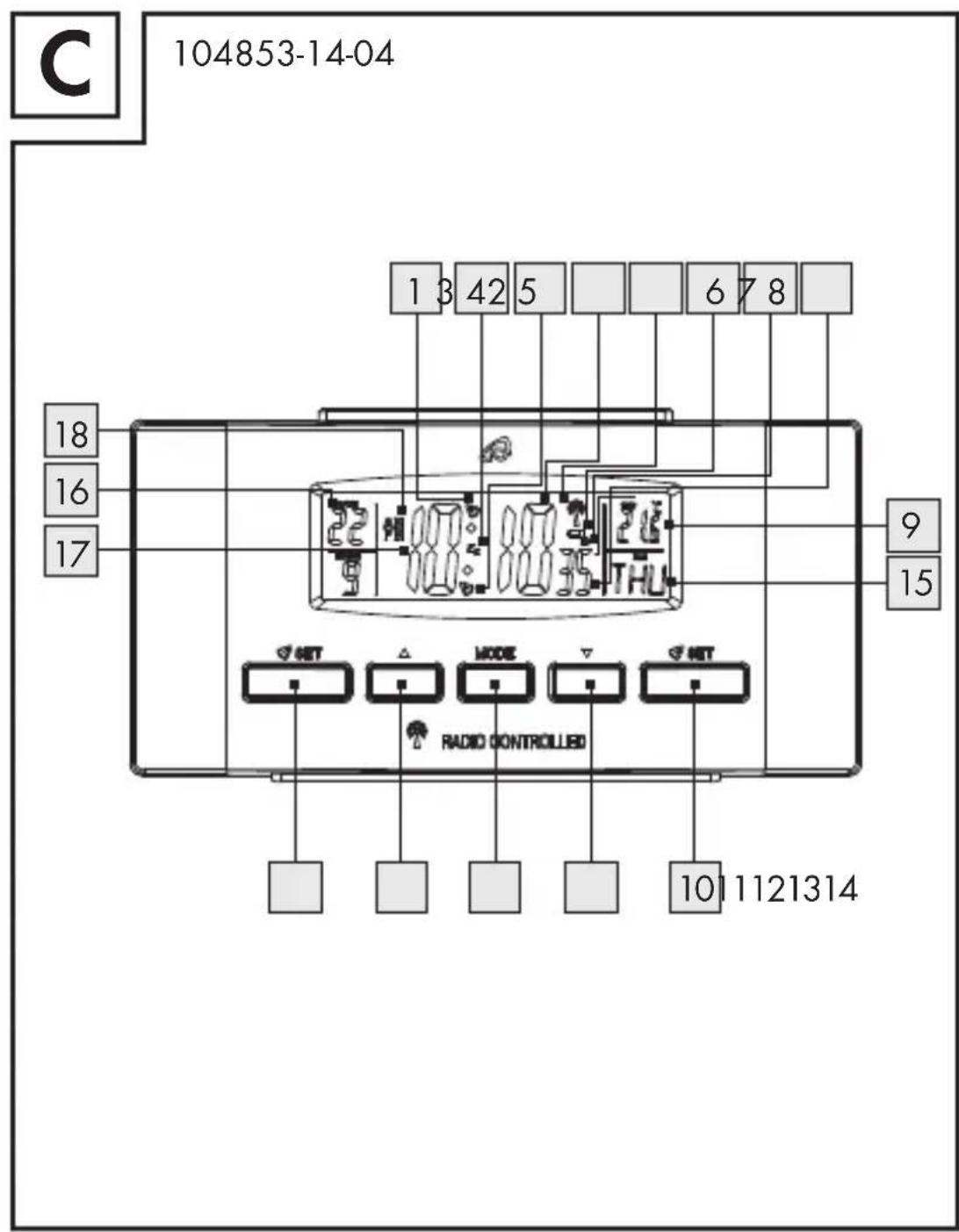
natural_image
Color palette bar with grayscale gradient and a central crosshair symbol (no text or labels)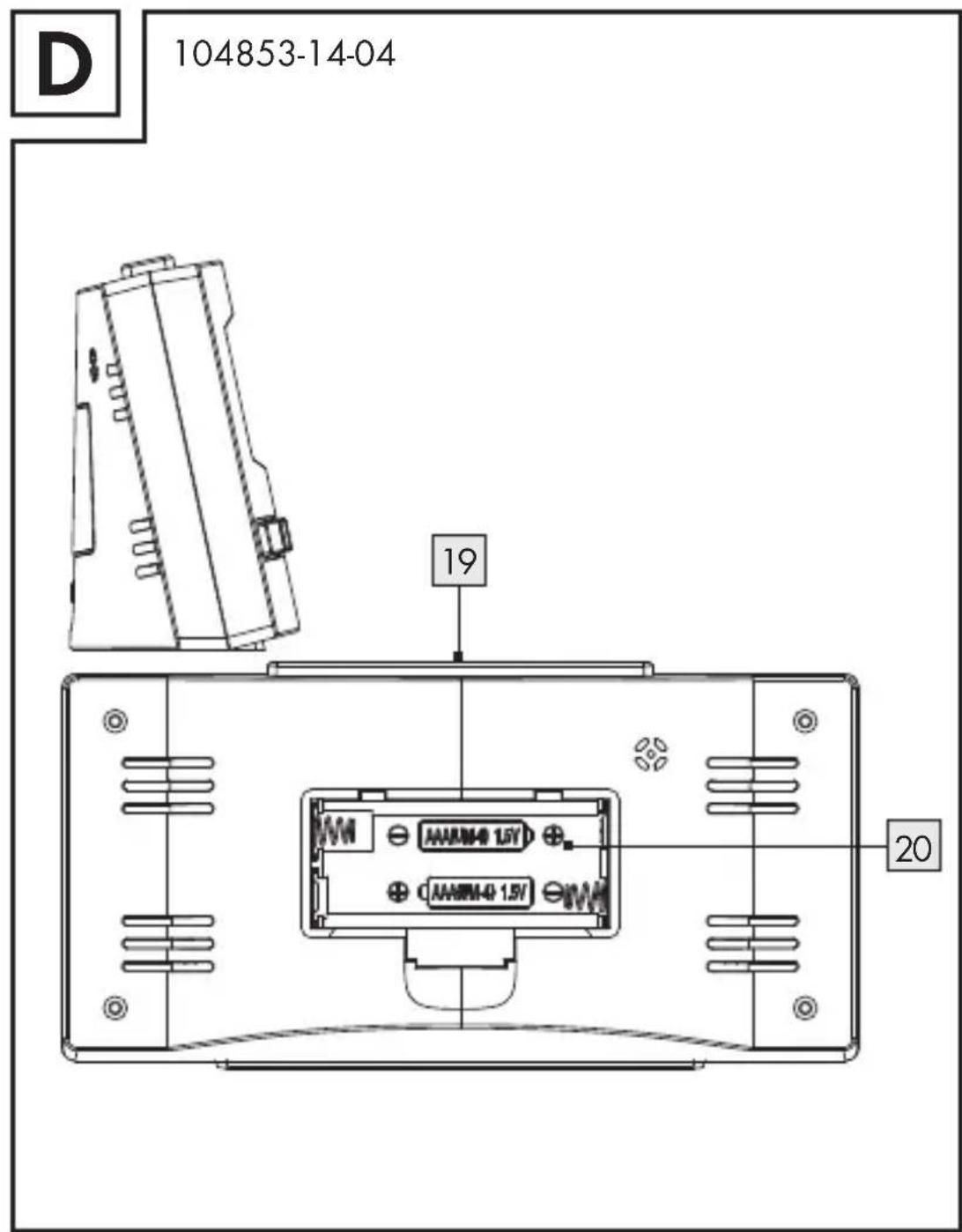
6

Introduction
Intended use Page 8
Description of parts ......Page 9
Technical information Page 10
Included items......Page 11
Safety
General safety information......Page 11
Battery safety instructions......Page 13
Operation......Page 14
Setting the radio-controlled alarm
clock into operation......Page 15
Using the 12/24 hour display Page 17
Display temperature in °C/°F Page 17
Setting the time, time zone and weekday manually...Page 18
Setting the alarm......Page 19
Activating/Deactivating the alarm Page 20
Using SNOOZE/LIGHT button....Page 20
Changing the batteries......Page 21
Troubleshooting......Page 22
Cleaning and care......Page 23
Declaration of conformity......Page 24
Warranty Page 25
GB 7
Radio-controlled alarm clock
Introduction

Keep this manual in a safe place. If you pass the product on to anyone else, please ensure that you also pass on all the documentation.
Intendeduse
The clock shows the time in 12 / 24-hour mode (in hours, minutes and seconds), the day of the week, the date and the room temperature. The clock is also equipped with two different alarm times. The clock is only suitable for operation in enclosed spaces at normal room temperature. Any other use or modification of the clock constitute improper use and may result in injury and / or damage to the clock. The manufacturer is not liable for damage caused by improper use. The clock is not intended for commercial use.
8 GB
natural_image
Color palette bar with grayscale shades and a central crosshair symbol (no text or labels)• Description of parts
1 Alarm 1
2 Z_z symbol (SNOOZE)
3 Alarm 2
4 Minute display
5 Radio symbol
6 Battery symbol
7 Summer time symbol \$
8 Second display
9 Inside temperature
10 SET button (Alarm 2)
11 DOWN button ("downwards")/(°C/°F)
12 MODE button ("set")
13 UP button ("upwards")/(12/24 hours)
14 SET button (Alarm 1)
15 Weekday indicator / weekday- and weekend alarm indicator
16 Date display
17 Hour display
18 AM / PM symbol (12-hour format)
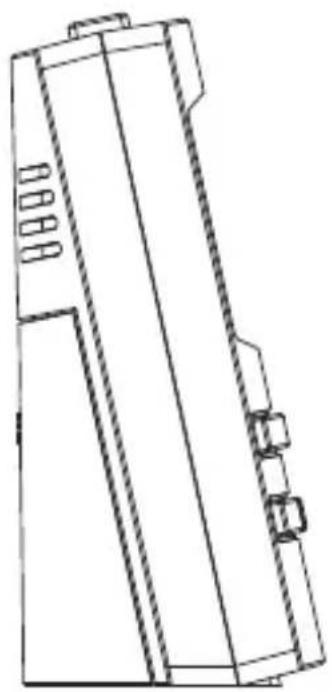
19 SNOOZE/LIGHT button
20 Battery compartment
GB 9

natural_image
Color palette bar with grayscale shades and a central crosshair symbol (no text or labels)●Technicalinformation
Battery type: 2 x 1.5 V AAA 1
Temperature 2
measurement range: -9.9^ - + 49.9^
$$ 1 4. 2 ^ {\circ} \mathrm{F-+121.8} ^ {\circ} \mathrm{F} $$
Note: If the temperature measured is more than +49.9 °C, "HH" will appear in the display.
If the temperature measured is less than -9.9^ , "LL" will appear in the display.


10 GB

natural_image
Color palette bar with grayscale gradient and a central crosshair symbol (no text or labels)Includeditems
1 radio-controlled alarm clock
2 1.5V--- AAA batteries
1 operating instructions

Safety
WARNING! Please read all safety information and instructions. Failure to comply with the safety information and instructions may result in, fire and / or severe injuries.

KEEP ALL THE SAFETY ADVICE AND INSTRUCTIONS IN A SAFE PLACE FOR FUTURE REFERENCE!

Generalsafety information

DANGY OF LOSS!
OF LIFE OR ACCIDENT TO INFANTS AND CHILDREN! Never leave children
11 GB

unsupervised with the packaging material. The packaging material represents a danger of suffocation.
Children frequently underestimate the dangers. Always keep children away from the device. Do not allow the device to be used as a toy.
This appliance can be used by children aged from 8 years and above and persons with reduced physical, sensory or mental capabilities or lack of experience and knowledge if they have been given supervision or instruction concerning use of the appliance in a safe way and understand the hazards involved. Children shall not play with the appliance. Cleaning and user maintenance shall not be made by children without supervision.
WARNING! DANGER TO LIFE! Batteries can be swallowed, which may represent a danger to life. If a battery has been swallowed, medical help is required immediately.
- Do not operate the device if it is damaged. Damaged devices could put your life at risk.
■ Please note that damage arising from improper handling, non-observance of the operating instructions or
12 GB
natural_image
Color palette bar with grayscale shades and a central crosshair symbol (no text or labels)interference with the inside of the device by unauthorised persons is excluded from the warranty.
s
■ Never take the device apart. Improper repairs may place the user in considerable danger. Repairs should only be carried out by specialist personnel.

Batterysafety instructions
■ Remove the batteries from the device if they have not been used for a long period.
■
CAUTION! DANGER OF EXPLOSION!

The batteries must never be recharged!
■ Make sure you insert the batteries with the correct polarity! This is indicated in the battery compartment.
If necessary clean the contacts on the batteries and on the device before inserting them.
■ Only use batteries of the specified type. Otherwise there is danger of explosion.
■ Remove exhausted batteries from the device immediately. There is an increased danger of leaks!
13 GB
If you disregard the above instructions and advice, your batteries may discharge beyond their minimum voltage, thus increasing the chance of leakage. If the batteries in your device have leaked, remove them immediately to prevent damage to the device!
■ Batteries do not belong in household refuse!
■ Every consumer is obliged to dispose of batteries properly in accordance with the regulations!
- Keep batteries away from children. Do not throw batteries into a fire. Never short-circuit them or take them apart.
Do not let the fluid from a leaking battery come into contact with your skin, eyes or mucous membranes. Any parts of the body coming into contact with battery acid should be rinsed off with copious amounts of water and / or a doctor contacted if necessary!
Operation
☐ Make sure that the device is standing safely on a stable surface.
14 GB
☐ Do not place the device near to sources of interference such as televisions, computers, thick walls, etc. These may disrupt reception of the radio signal.
☐ Do not use the clock in reinforced concrete buildings, e.g. airports, high-rises, factories or basements. This can seriously disrupt reception of the radio signal.
☐ Do not start radio reception in a moving vehicle, e.g. car or train. Reception of the radio signal by the device can disrupt the vehicle electronics.
☐ Do not expose the clock to temperatures below -20^ for any length of time.
- Setting the radio-controlled alarm clock into operation
☐ Remove the protective foil before first use.
Open the battery compartment 20 on the back of the clock.
☐ Insert two AAA batteries.
Note: Make sure that the polarity is correct when you insert the batteries. This is indicated in the battery compartment.
15 GB
□ Close the battery compartment.
As soon as the batteries are inserted, automatic reception of the radio signal begins. The correct time and the date are displayed after 3–10 minutes. During reception, all buttons are deactivated except the DOWN button ^11 and the SNOOZE/LIGHT button ^19 . You can stop the reception of the radio signal by pressing the DOWN button. To restart the reception, press and hold down the DOWN button.
Note: Do not change the location of the projection radio-controlled alarm clock during reception. This may disrupt reception.
Radio Signal (DCF):
The DCF signal (time signal transmitter) consists of time impulses, which are transmitted from one of the most accurate clocks in the world, in the proximity of Frankfurt / Main, Germany – it varies by 1 seconds in 1 million years.
Your radio-controlled alarm clock will receive the time signal under optimum conditions up to a distance of approx. 1,500 km from Frankfurt am Main, Germany. Reception of the radio signal generally takes approx. 3–10 minutes.
16 GB
Reception can be considerably impaired by obstacles (e.g. concrete walls) or sources of interference (e.g. other electrical devices). You may have to change the location of the radio-controlled clock (e.g. near a window) if there are problems with reception.
• Using the 12 / 24 hour display
☐ Press the UP button 13 to switch between the 12-hour and the 24-hour format.
Note: AM stand for mornings, PM for afternoons in the 12-hour format.
• Display temperature in °C /°F
The current inside temperature 9 is indicated on the LCD.
☐ Press the DOWN button 11 to switch between the Celsius and Fahrenheit temperature scales.
17 GB
- Setting the time, time zone and weekday manually
☐ Press and hold down the MODE button 12 for approx. 3 seconds. The minute display 4 flashes.
☐ Press the UP 13 or DOWN 11 button to set the desired time zone (-12 hours to +12 hours).
Note: Should you be in a country in which the DCF signal can be received but the time is different to your current local time, you can use the time zone setting to have the clock display your current local time. For example, if you are in a country where the local time is one hour behind Central European Time (CET), then you should set the time zone to +01. The time continues to be controlled by DCF but the clock shows one hour more.
Press the MODE button to confirm your setting.
☐ Set the hours, minutes, the year, the day and the language of the weekday in the same manner.
Note: The following languages are available:
$$ \mathrm{GER} = \mathrm{German} $$
$$ E N G = E n g l i s h $$
$$ D A N = D a n i s h $$
18 GB
natural_image
Color palette bar with grayscale shades and a central crosshair symbol (no text or labels)$$ E S P = S p a n i s h $$
$$ N E T = D u t c h $$
$$ \mathrm{ITA} = \text { Italian } $$
$$ F R A = F r e n c h $$
- Setting the alarm
The radio-controlled alarm clock is equipped with two alarm functions. Press and hold down the SET button 14 or the SET button 10 to set Alarm 1 or Alarm 2. The hour indicator 17 of the alarm time flashes in the display.
☐ Press the UP 13 or DOWN 11 button to set the hours. Press the MODE button 12 to confirm your setting. The minute indicator 4 flashes in the display.
☐ Press the UP 13 or DOWN 11 button to set the minutes. Press the MODE button to confirm your setting. The weekday indicator / weekday- and weekend alarm indicator 15 flashes in the LC display.
☐ Press the UP 13 or DOWN button 11 to set the alarm for the weekday or the weekend (M-F = Monday to
19 GB


natural_image
Color palette bar with grayscale shades and a central crosshair symbol (no text or labels)Friday, S-S = Saturday to Sunday, M-S = Monday to Sunday).
☐ Press the MODE button 12 to confirm your entry.
For example, on a Monday, set Alarm 1 for Monday to Friday and Alarm 2 for Saturday to Sunday. Alarm 1 will sound on Monday, not Alarm 2.
- Activating / Deactivating the alarm
□Pressthe SET button 14 or the SET button 10 to activate the relevant alarm.
☐ The alarm symbol or appears in the LC display.
☐Pressthe SET button or the SET button to deactivate the alarm.
• Using SNOOZE/LIGHT button
☐ Press the SNOOZE /LIGHT button 19 while the alarm signal is sounding to activate the snooze function.
20 GB
natural_image
Color palette bar with grayscale shades and a central crosshair symbol (no text or labels)☐ The alarm signal is silenced and the displays and Zz flash. The alarm signal sounds again after approx. 5 minutes.
☐ Press any button apart from the SNOOZE- / LIGHT button 19 to deactivate the snooze function.
Note: Press any button apart from the SNOOZE-/LIGHT button to stop the alarm signal.
Note: The backlight illuminates when you press the SNOOZE/LIGHT button.

Changing the batteries

The battery symbol ☐ 6 appears on the LCD when the batteries are low. Make sure that you replace the batteries in good time.
☐ Open the battery compartment 20 on the back of the clock.
□ Remove the used batteries.
☐ Insert two AAA batteries.
21 GB

Note: Make sure that the polarity is correct when you insert the batteries. The correct polarity is shown inside the battery compartment.
☐ Close the battery compartment.
Note: When replacing the battery, the saved data will be lost.
●Troubleshooting
☐ The device contains delicate electronic components. This means that if it is placed near an object that transmits radio signals, it could cause interference. If the display indicates a problem, move such objects away from it.
Electrostatic discharges can lead to malfunctions. In the case of such malfunctions remove the batteries briefly and then insert them again.
22 GB
natural_image
Color palette bar with grayscale gradient and a central crosshair symbol (no text or labels)- Cleaning and care
■ Never use liquids or cleaning agents, as they may damage the device.
□ Clean the outside of the device only with a soft, dry cloth.
- Disposal

The packaging is made entirely of recyclable materials, which you may dispose of at local recycling facilities.

Contact your local refuse disposal authority for more details of how to dispose of your worn-out product.
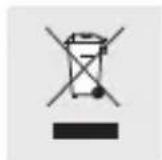
In the interest of the environment, do not throw out your product with your household refuse. Take it to a suitable centre where it can be disposed of properly. Information on collection points and their opening hours can be obtained from your local authority.
23 GB

Defective or used batteries must be recycled in accordance with Directive 2006/66/EC. Return batteries and/or the device via the recycling facilities provided.
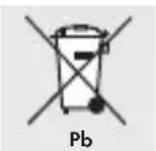
Improper disposal of rechargeable batteries can damage the environment!
Batteries may not be disposed of with the usual domestic waste. They may contain toxic heavy metals and are subject to hazardous waste treatment rules and regulations. The chemical symbols for heavy metals are as follows: Cd = cadmium, Hg = mercury, Pb = lead. That is why you should dispose of used batteries at a local collection point.


Information
Declaration of conformity
We, OWIM GmbH & Co. KG, Stiftsbergstraße 1, D-74167 Neckarsulm, hereby declare under our sole responsibility that the product: Radio-controlled alarm clock,
24 GB

e Model No.: 104853-14-01/104853-14-02/104853-14-03/104853-14-04, Version: 01/2015, to which this declaration refers, complies with the standards /normative documents of 1999/5/EC.

The complete declaration of conformity can be viewed at: www.owim.com

-
Warranty
The device has been manufactured to strict quality guidelines and meticulously examined before delivery. In the event of product defects you have legal rights against the retailer of this product. Your legal rights are not limited in any way by our warranty detailed below.
The warranty for this device is 3 years from the date of purchase. Should this device show any fault in materials or manufacture within 3 years from the date of purchase, we
25 GB

will repair or replace it - at our choice - free of charge to you.
The warranty period begins on the date of purchase. Please keep the original sales receipt in a safe location. This document is required as your proof of purchase. This warranty becomes void if the device has been damaged or improperly used or maintained.
The warranty applies to faults in material or manufacture. This warranty does not cover product parts subject to normal wear, thus possibly considered consumables (e.g. batteries) or for damage to fragile parts, e.g. switches, rechargeable batteries or glass parts.


CE
26 GB
Wstep
natural_image
Color palette bar with grayscale swatches and a central crosshair symbol (no text or labels)natural_image
Color palette bar with grayscale shades and a central crosshair symbol (no text or labels)natural_image
Color palette bar with grayscale shades and a central crosshair symbol (no text or labels)Zawartość zestawu
natural_image
Color palette bar with grayscale gradient and a central crosshair symbol (no text or labels)natural_image
Color palette bar with grayscale shades and a central crosshair symbol (no text or labels)z
natural_image
Color palette bar with grayscale shades and a central crosshair symbol (no text or labels)natural_image
Color palette bar with grayscale shades and a central crosshair symbol (no text or labels)y
natural_image
Color palette bar with grayscale swatches and a central crosshair symbol (no text or labels)natural_image
Color palette bar with grayscale shades and a central crosshair symbol (no text or labels)• Utylizacja

natural_image
Color palette bar with grayscale shades and a central crosshair symbol (no text or labels)natural_image
Color palette bar with grayscale shades and a central crosshair symbol (no text or labels)natural_image
Color palette bar with grayscale shades and a central crosshair symbol (no text or labels)Műszaki adatok
natural_image
Color palette bar with grayscale gradient and a central crosshair symbol (no text or labels)
Biztonság
natural_image
Color palette bar with grayscale swatches and a central crosshair symbol (no text or labels)natural_image
Color palette bar with grayscale gradient and a central crosshair symbol (no text or labels)3
Z
i
k

$$ E N G = a n g o l $$
$$ D A N = d \acute {a} n $$
$$ E S P = \text { s p a n y o l } $$
$$ \mathrm{NET} = \text { h o l l a n d } $$
60 HU
natural_image
Color palette bar with grayscale shades and a central crosshair symbol (no text or labels)$$ \begin{array}{l} \text {ITA = olasz} \ \text {FRA = francia} \end{array} $$
natural_image
Color palette bar with grayscale shades and a central crosshair symbol (no text or labels)natural_image
Color palette bar with grayscale shades and a central crosshair symbol (no text or labels)natural_image
Color palette bar with grayscale shades and a central target symbol (no text or labels)•Opisdelov
1 Alarm 1 T
2 Simbol Z_Z (SNOOZE)
3 Alarm 2 to
4 Prikaz minut
5 Simbol radijske povezave
6 Simbol baterije
7 Simbol poletnega časa \$
8 Prikaz sekund F
9 Notranja temperatura
10 Tipka SET (alarm 2)
11 Tipka DOWN (»navzdol«) / (°C/°F)
12 Tipka MODE (»nastavitev«)
13 Tipka UP (»navzgor«)/(12/24 urni prikaz)
14 Tipka SET (alarm 1) 1
15 Prikaz dneva v tednu / prikaz dneva v tednu in prikaz
alarma med vikendom 1
16 Prikaz datuma
17 Prikaz ur
18 Simbol AM / PM (12-urni format)
19 Tipka SNOOZE/LIGHT
20 Predalček za baterije
72 SI


natural_image
Color palette bar with grayscale gradient and a central crosshair symbol (no text or labels)Tehničnipodatki
Tip baterije: 2 x 1,5 V AAA
Območje merjenja
temperature: -9,9^ C - +49,9^ C
$$ 1 4, 2 ^ {\circ} \mathrm{F} - + 1 2 1, 8 ^ {\circ} \mathrm{F} $$
natural_image
Color palette bar with grayscale shades and a central crosshair symbol (no text or labels)
Varnost
natural_image
Color palette bar with grayscale gradient and a central crosshair symbol (no text or labels)natural_image
Color palette bar with grayscale gradient and a central crosshair symbol (no text or labels)3
natural_image
Color palette bar with grayscale shades and a central crosshair symbol (no text or labels)- Uporaba 12-/24-urnega prikaza
□ Pritisnite tipko UP 13 za preklop med 12-urnim in 24-urnim formatom prikaza časa.
Napotek: AM v 12-urnem formatu označuje dopoldne, PM pa popoldne.
- Prikaz temperature v °C/°F
Trenutna notranja temperatura 9 se pojavi na LC-prika-zovalniku.
□ Pritisnite tipko DOWN 11, da preklopite temperaturno lestvico iz Celzija na Fahrenheit in obratno.
natural_image
Color palette bar with grayscale shades and a central crosshair symbol (no text or labels)□ Pritisnite tipko UP 13 ali DOWN 11, da nastavite želeno časovno cono (-12 ur do + 12 ur).
natural_image
Color palette bar with grayscale shades and a central crosshair symbol (no text or labels)Aktiviranje / deaktiviranje alarma
□Pritisnite tipko SET 14 ali tipko SET 10, da aktivirate ustreznii alarm.
Simbol za alarm ali se pojavi na LC-prikazovalniku.
□Pritisnite tipko SET ali tipko SET, da deaktivirate ustrezni alarm.
- Uporaba tipke SNOOZE/LIGHT

□ Med alarmnim signalom pritisnite tipko SNOOZE / LIGHT 19, da aktivirate funkcijo dremanja.
□ Alarmni signal utihne in na prikazovalniku utripa gli in Zz. Alarmni signal ponovno zadoni čez pribl. 5 minut.
□ Pritisnite katero koli tipko razen tipke SNOOZE / LIGHT 19, da funkcijo dremanja izklopite.
Napotek: Pritisnite katero koli tipko razen tipke SNOOZE / LIGHT, da prekinete alarmni signal.
Napotek: Osvetljava ozadja zasveti, ko pritisnete tipko SNOOZE/LIGHT.
83 SI

- Menjavanje baterij
Na LC-prikazovalniku se pojavi simbol baterije 6, ko so baterije prešibke. Pazite na to, da baterije pravočasno zamenjate.
☐ Odprite predalček za baterije 20 na zadnji strani naprave.
□ Prazne baterije vzemite ven.
□ Vstavite dve bateriji (AAA).
Napotek: Pri tem pazite na pravilno polarnost. Ta je prikazana v predalčku za baterije.
□ Predalček za baterije zaprite.
Napotek: Pri menjavanju baterij se shranjeni podatki izbrišejo.
natural_image
Color palette bar with grayscale shades and a central crosshair symbol (no text or labels)prikazovalniku prikažejo napačni prikazi, takšne na-prave odstranite iz okolice naprave.
C
natural_image
Color palette bar with grayscale shades and a central crosshair symbol (no text or labels)Popisdílů
natural_image
Color palette bar with grayscale gradient and a central crosshair symbol (no text or labels)•Technickéúdaje
natural_image
Color palette bar with grayscale gradient and a central crosshair symbol (no text or labels)ni
natural_image
Color palette bar with grayscale shades and a central crosshair symbol (no text or labels)natural_image
Color palette bar with grayscale shades and a central crosshair symbol (no text or labels)natural_image
Color palette bar with grayscale swatches and a central crosshair symbol (no text or labels)natural_image
Color palette bar with grayscale gradient and a central crosshair symbol (no text or labels)natural_image
Color palette bar with grayscale gradient and a central crosshair symbol (no text or labels)natural_image
Color palette bar with grayscale swatches and a central crosshair symbol (no text or labels)Budík
• Úvod

natural_image
Color palette bar with grayscale shades and a central crosshair symbol (no text or labels)•Opisdielov
natural_image
Color palette bar with grayscale gradient and a central crosshair symbol (no text or labels)•Technickéúdaje
natural_image
Color palette bar with grayscale swatches and a central target symbol (no text or labels)natural_image
Color palette bar with grayscale gradient and a central crosshair symbol (no text or labels)$$ D A N = d a n \check {c} i n a $$
$$ E S P = \check {s} p a n i e l \check {c} i n a $$
$$ N E T = h o l a n d č i n a $$
$$ \text { ITA } = \text { taliančina } $$
$$ F R A = f r a n c u z s t i n a $$

121 SK

Nastavenie alarmu
natural_image
Color palette bar with grayscale shades and a central crosshair symbol (no text or labels)Aktivovanie / deaktivovanie alarmu
natural_image
Color palette bar with grayscale shades and a central crosshair symbol (no text or labels)• Výmena batérií
Symbol batérie 6 sa na LC displeji objaví vtedy, ked'sú batérie takmer vybité. Dbajte na to, aby ste batérie vymenili včas.
natural_image
Color palette bar with grayscale gradient and a central crosshair symbol (no text or labels)natural_image
Color palette bar with grayscale swatches and a central crosshair symbol (no text or labels)natural_image
Color palette bar with grayscale shades and a central target symbol (no text or labels)natural_image
Color palette bar with grayscale gradient and a central crosshair symbol (no text or labels)natural_image
Color palette bar with grayscale shades and a central crosshair symbol (no text or labels)Lieferumfang
natural_image
Color palette bar with grayscale shades and a central crosshair symbol (no text or labels)
natural_image
Color palette bar with grayscale swatches and a central crosshair symbol (no text or labels)natural_image
Color palette bar with grayscale shades and a central crosshair symbol (no text or labels)natural_image
Color palette bar with grayscale swatches and a central crosshair symbol (no text or labels)natural_image
Color palette bar with grayscale shades and a central crosshair symbol (no text or labels)- SNOOZE-/LIGHT-Taste verwenden
natural_image
Color palette bar with grayscale shades and a central crosshair symbol (no text or labels)natural_image
Color palette bar with grayscale shades and a central target symbol (no text or labels)7
CE
3


151 DE/AT/CH

- Introduction
- Safety
- Radio-controlled alarm clock
- Intendeduse
- • Description of parts
- ●Technicalinformation
- Includeditems
- Generalsafety information
- Batterysafety instructions
- CAUTION! DANGER OF EXPLOSION!
- Operation
- - Setting the radio-controlled alarm clock into operation
- Radio Signal (DCF):
- • Using the 12 / 24 hour display
- • Display temperature in °C /°F
- - Setting the time, time zone and weekday manually
- - Setting the alarm
- - Activating / Deactivating the alarm
- • Using SNOOZE/LIGHT button
- Changing the batteries
- ●Troubleshooting
- - Cleaning and care
- - Disposal
- Improper disposal of rechargeable batteries can damage the environment!
- Information
- Declaration of conformity
- Warranty
- Wstep
- Zawartość zestawu
- z
- • Utylizacja
- Műszaki adatok
- Biztonság
- •Opisdelov
- Tehničnipodatki
- Varnost
- - Uporaba 12-/24-urnega prikaza
- - Prikaz temperature v °C/°F
- Aktiviranje / deaktiviranje alarma
- - Uporaba tipke SNOOZE/LIGHT
- - Menjavanje baterij
- Popisdílů
- •Technickéúdaje
- Budík
- • Úvod
- •Opisdielov
- Nastavenie alarmu
- Aktivovanie / deaktivovanie alarmu
- • Výmena batérií
- Lieferumfang
- - SNOOZE-/LIGHT-Taste verwenden
Brand : AURIOL
Model : IAN 104853
Category : Alarm Clock