
SPB 5.2 A1 - Power bank SILVERCREST - Free user manual and instructions
Find the device manual for free SPB 5.2 A1 SILVERCREST in PDF.


| Product type | External battery (Power Bank) |
| Brand | SilverCrest |
| Model | SPB 5.2 A1 |
| Dimensions (L x H x D) | approx. 7.3 x 2.3 x 5.0 cm |
| Weight | approx. 129 g |
| Battery type | Integrated Li-ion 3.7 V / 5200 mAh |
| Input (charging) | 5 V, 500 mA (PC) / 5 V, max. 1 A (power adapter) |
| Output (device charging) | 5 V, 2.1 A |
| Charging time (1 A) | approx. 7 hours |
| Charging time (PC USB) | approx. 15 hours |
| Operating temperature | 5 °C to 45 °C |
| Storage temperature | -5 °C to +50 °C |
| Operating humidity | max. 85% (non-condensing) |
| Status display | 4 LEDs indicating charge level |
| Main functions | Charging external devices via USB port, status control by button |
| Care and cleaning | Clean with a clean, dry cloth. Do not use aggressive liquids. Do not open the housing. |
| Safety | Do not expose to heat, water or impact. Keep out of reach of children. Do not incinerate. |
| Spare parts and repairability | Supplied micro-USB cable replaceable by a standard cable. Repairs only by qualified personnel. |
| Warranty | 3 years, after-sales service TARGA GmbH |
Frequently Asked Questions - SPB 5.2 A1 SILVERCREST
User questions about SPB 5.2 A1 SILVERCREST
0 question about this device. Answer the ones you know or ask your own.
Ask a new question about this device
Download the instructions for your Power bank in PDF format for free! Find your manual SPB 5.2 A1 - SILVERCREST and take your electronic device back in hand. On this page are published all the documents necessary for the use of your device. SPB 5.2 A1 by SILVERCREST.
USER MANUAL SPB 5.2 A1 SILVERCREST
Safety instructions....5
Overview of controls.... 11
Before start-up 11
Initial start-up 11
LED display....12
Charging the Power Bank 12
Checking the charge level....13
Charging external devices 13
Storing the device when not in use....15
Troubleshooting 15
Environmental and waste disposal information.... 17
Marks of conformity 17
Guarantee and service 18
Information on trademarks
USB is a registered trademark.
Other names and products may be trademarks or registered trademarks of their respective owners.
Introduction
Thank you for choosing a SilverCrest product. The SilverCrest Power Bank SPB 5.2 A1 enables you to charge the empty battery of a device (for example, a mobile phone) while on the move, even when no power socket is available.
Intended use
The SilverCrest Power Bank SPB 5.2 A1, referred to herein as 'Power Bank', is an information technology device, and is used to charge mobile devices that are normally charged via a USB port. This SilverCrest Power Bank is not intended for business or commercial use. Use the Power Bank solely for private purposes; any other use is deemed improper. This Power Bank meets the requirements of all relevant standards related to CE conformity. Conformance to these standards is no longer guaranteed if a change is made to the Power Bank without the authorisation of the manufacturer. The manufacturer shall not
be liable for any damages or faults arising as a result. Please observe the national regulations and/or laws of the country in which the device is used.
Package contents
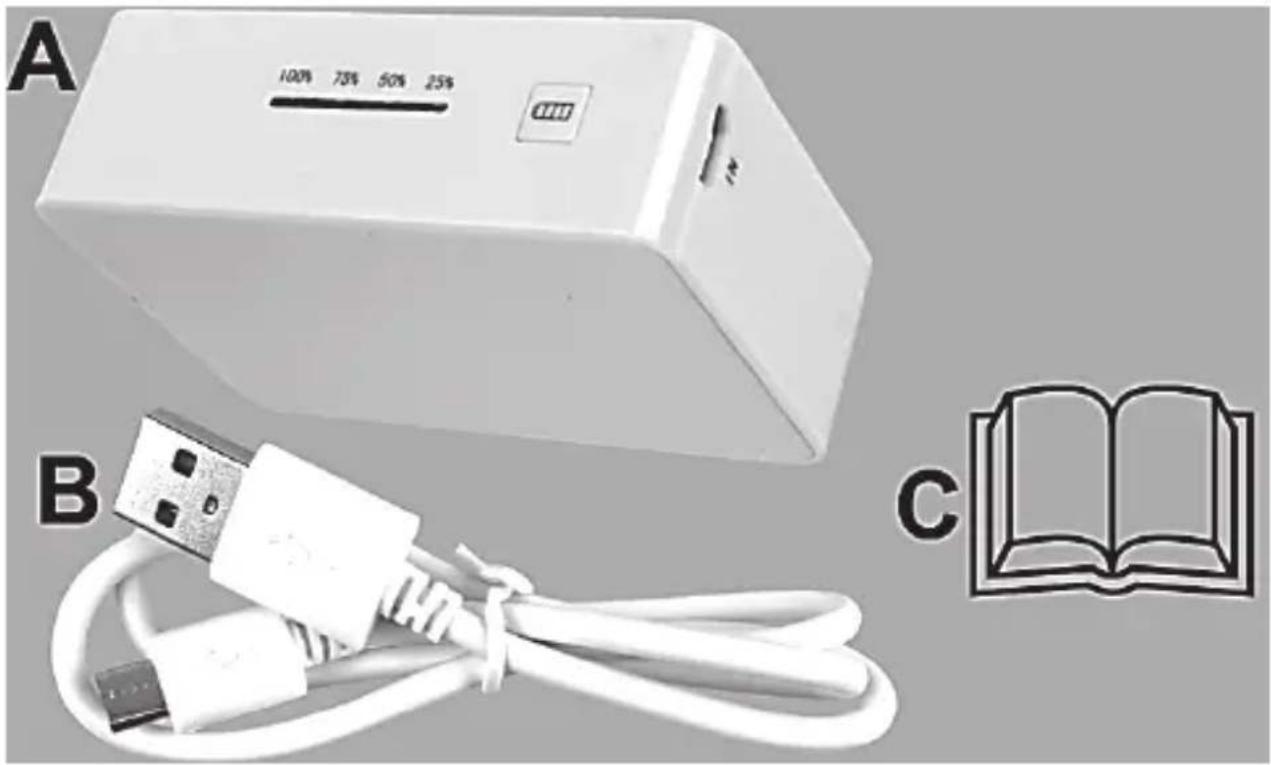
A Power Bank SPB 5.2 A1
B USB charging cable
C These operating instructions (symbol image)
natural_image
White electronic device labeled A, connected to a USB cable with a white connector (B), and an open book icon (C) in the corner (no text or symbols on main components)4 - English
Technical data
| Built-in lithium ion battery 3.7 V/5200 mAh | |
| Input 5 V, 500 mA (PC) | 5 V, maximum 1 A (mains adapter) |
| Output 5 V, 2.1 A | ... |
| Charging time with external USB mains adapter (1A) | Approximately 7 hours |
| Charging time using USB socket on a PC/notebook | Approximately 15 hours |
| Dimensions (W x H x D) | Approximately 7.3 x 2.3 x 5.0 cm |
| Weight Approximately 129 g | |
| Operating temperature 5°C to 45°C | |
| Operating humidity Maximum 85% relative humidity (non condensing) | |
| Permissible storage conditions -5°C to +50°C, maximum 85% relative humidity (non condensing) | |
The technical data and the design are subject to change without notice.
Safety instructions
Before using the Power Bank for the first time, please read the following instructions carefully, even if you are familiar with using electronic devices. Keep these operating instructions in a safe place for future reference. If you
give the Power Bank away, please ensure that you also pass on these operating instructions as they are part of the device.

DANGER! This symbol together with the word 'DANGER' indicates an impending dangerous situation which, if not prevented, can lead to serious injuries or even death.

WARNING! This symbol together with the word 'WARNING' indicates important information for the safe operation of the device and user safety.

This symbol indicates further information on the topic.
Copyright
All contents of these operating instructions are subject to copyright law, and are provided to the user solely as a source of information. Any form of copying or reproduction of data and information is prohibited without the express written permission of the author. This also concerns commercial use of the contents and data. The text and illustrations describe the technical status at the time of printing.
Operating environment
The device is not designed for operation in rooms with high humidity (for example, bathroom) or excessive dust. The permissible operating temperature
range is 5^ C to 45^ C; the maximum relative humidity level is 85%. If you use the device inside a car, in particular, behind the windscreen, please be aware that temperatures can clearly exceed +45^ C.

DANGER! Please make sure that
- the device is not exposed to direct sources of heat (for example, heaters).
- the device is not exposed to strong artificial light.
- contact with splashing and dripping water and aggressive liquids is avoided, and the device is not operated in the vicinity of water. In particular, the device must never be immersed (do not place any objects filled with liquids, for example vases or drinks, on or near the device).
- the device is not placed close to magnetic fields (for example, loudspeakers).
- naked flames (for example, burning candles) are not placed on or near the device.
- no foreign bodies penetrate into the device.
- the output of the Power Bank is never connected with the input.
-
the device is not exposed to excessive temperature fluctuations, as otherwise condensation can occur and lead to electrical short circuits; if, however, the device has been exposed to large temperature fluctuations, wait approximately two hours until the device has reached ambient temperature before starting it up.
-
the device is not exposed to excessive shocks and vibrations, and the device is protected from falling.
- the device or an optional USB mains adapter is not used during lightning storms (the optional USB mains adapter must be removed from the power socket).
- if you are using an optional USB mains adapter, the operating instructions of the mains adapter are observed.
- the device is not covered. If devices are covered, heat can build up and there is a risk of fire.
Failure to observe the above instructions can endanger your health or result in damage to the device.

DANGER! Risk of explosion!
The device must not be thrown into a fire, and the device and the integrated battery must not be deformed, as otherwise the battery can explode. On no account should the Power Bank be opened.
Observe the prohibitions or restrictions on the use of battery-operated devices at places with a special danger situation, such as refuelling facilities, aeroplanes, hospitals, and so on.

DANGER! Children and people with disabilities
Keep electrical equipment out of reach of children. This Power Bank can be used by children aged eight and over, as well as by people with reduced mental, sensory or motor abilities or who lack experience and knowledge, providing they are supervised or have been instructed in the safe use of the Power Bank and understand the resulting dangers. Children should be supervised to ensure they do not play with this device. Cleaning and user maintenance must not be carried out by children unless they are supervised. Small parts and batteries can be lethal if swallowed.
Keep the packaging film away from children.

There is a risk of suffocation.

WARNING! Cables
Always take hold of all cables by the plug and do not pull on the cable itself. Do not place any items of furniture or other heavy objects on cables, and make sure that the cables are not bent (in particular, at the plug and at the connector sockets). Never make a knot in a cable and do not connect it with other cables.
All cables should be laid in such a way that no one steps obstructed by them.

Maintenance/cleaning
Repair work is required if the device has been damaged, for example, if the device housing is damaged, liquids or objects have got inside the device, or if the device has been exposed to rain or moisture. Repair work is also required if the device does not work properly or has been dropped. If you notice any smoke, unusual noises or smells, disconnect all cable connections immediately and remove the optional USB mains adapter from the power socket. In these cases, you must not continue to use the device until it has been checked by a specialist. All repair work should only be carried out by qualified specialists. Never open the housing of the device. Clean the device using a clean, dry cloth and never use abrasive liquids. Do not try to open the housing of the device, as this will void your guarantee.
Overview of controls
A diagram of the controls with the reference numbers used can be found on the fold-out page of the cover.
| 1 USB socket (output): port for the device to be charged | |
| 2 LED display (charge level) | |
| 3 | Charge level/START button |
| 4 Micro-USB socket: charging socket (input) | |
| 5 | Micro-USB connector |
| 6 | USB connector |
Before start-up
Remove the Power Bank and the accessories from the packaging and remove the packaging film. You must fully charge the Power Bank before using it for the first time.
Initial start-up

Never charge the Power Bank while it is being used to charge an external device.
LED display
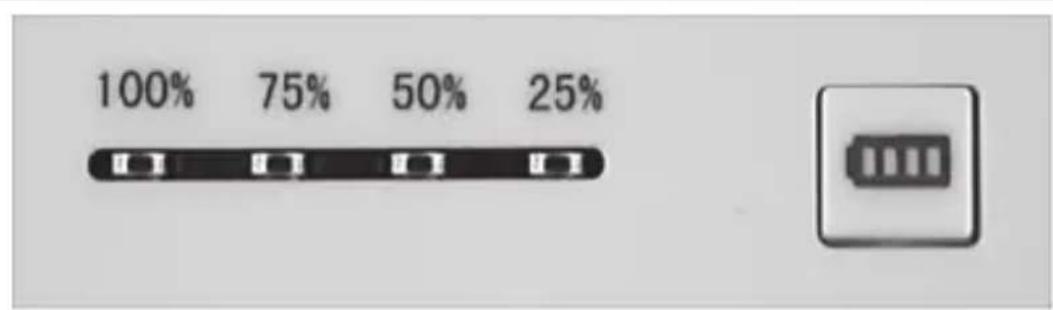
The Power Bank (A) features a LED display (2) which gives you information on the charge level of the built-in battery.
bar
| Percentage (%) | | :--- | | 100 | | 75 | | 50 | | 25 |Charging the Power Bank
To charge the internal battery of the Power Bank (A), connect the Power Bank (A) with a free USB port on your computer using the supplied USB charging cable (B). To do this, plug the Micro-USB connector (5) of the USB charging cable (B) into the Micro-USB socket (4) of the Power Bank (A), and plug the USB connector (6) into the free USB port on your computer (which should be turned on). During the charging process, the four LEDs of the LED display give information about the current charge level of the Power Bank (A).
| LED display Charge level | |
| All LEDs flash in succession 0–25% | |
| One LED on, three LEDs flash in succession 25–50% | |
| Two LEDs on, two LEDs flash in succession 50–75% | |
| Three LEDs on, one LED flashes 75–100% | |
| All LEDs on 100% |
12 - English

Alternatively, you can also use an external USB mains adapter (not included in the package) to charge the battery of the Power Bank.
Checking the charge level
You can also check the charge level of the Power Bank (A) when it is not being charged or discharged. To do this, briefly press the Charge level/START button (3). The LED display (2) gives you information about the charge level of the Power Bank (A) for approximately three seconds:
| LED display Charge level | |
| All LEDs on Approximately 100% | |
| Three LEDs on Approximately 75% | |
| Two LEDs on Approximately 50% | |
| One LED on Approximately 25% | |
| All LEDs off Approximately 0% |
Please note that the LED display gives only an approximate value of the actual charge level of the Power Bank.
Charging external devices
To charge an external device with the Power Bank (A), connect the Power Bank (A) with the external device using the supplied USB charging cable (B). To do this, plug the Micro-USB connector (5) of the USB charging cable (B) into the Micro-USB socket (4) of the external device, and plug the USB connector (6)
into the USB socket (1) of the Power Bank (A). If charging does not start automatically, briefly press the Charge level/START button (3) to start the charging process. Alternatively, you can also use the original charging cable of the respective device manufacturer (USB port).
During the charging process, the LED display (2) gives you information about the current charge level of the Power Bank (A). Briefly press the Charge level/START button (3) to display the charge level (it is displayed for approximately three seconds).
| LED display Charge level | |
| All LEDs on Approximately 100% | |
| Three LEDs on Approximately 75% | |
| Two LEDs on Approximately 50% | |
| One LED on Approximately 25% | |
| All LEDs off Approximately 0% |
Please note that the LED display gives only an approximate value of the actual charge level of the Power Bank.
You can stop the charging process at any time by unplugging the USB charging cable (B) or by pressing the Charge level/START (3) button for a longer time period (approximately three seconds). To restart the charging process, briefly press the Charge level/START button (3).
Storing the device when not in use

If the Power Bank is not going to be used for a long period of time, you should recharge the battery on a regular basis. This helps maintain battery performance.
Store the Power Bank in a cool, dry place.
Troubleshooting
My Power Bank won't charge
- The connection is incorrect; check the connection.
- Some computers turn off the voltage supply of the USB ports when turned off. If the battery of the Power Bank (A) won't charge, make sure your computer is turned on.
All LEDs of the LED display (2) flash simultaneously
The Power Bank recognises an overload/short circuit on the charging output and turns off the charging output. The purpose of this is to protect the Power Bank.
Perform a RESET of the Power Bank (A). To do this, proceed as follows:
- Remove a connected USB charging cable and wait until the LEDs have stopped flashing.
- Now press the Charge level/START button (3) to restart the Power Bank (A).
Check the device to be charged and the USB charging cable for any defects, and replace them if necessary.
- Reconnect the USB charging cable and continue the charging process.
A connected device won't charge
- The battery of the Power Bank (A) is empty; charge the battery.
- There is no connection to the device; check the connection.
- Briefly press the Charge level/START button (3) to start the charging process.
- The LEDs of the Power Bank (A) are not lit; connect the Power Bank (A) to a computer or an external power supply for approximately two seconds in order to reset the internal overload protection.
The Power Bank (A) does not switch on, or it switches on then immediately off.
- The required charging current of the connected device is too low.
Environmental and waste disposal information
natural_image
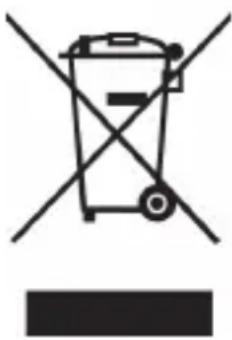
Symbol of a trash bin crossed with two crossed lines and a solid black rectangle below (no text or labels)Devices marked with this symbol are subject to the European Directive 2012/19/EU. All electrical and electronic equipment must not be put in the household waste, but must be disposed of via designated public disposal centres. By properly disposing of the old device, you can avoid environmental damage and hazards to health. Further information regarding disposal of the old device can be obtained from your local authority or the shop where you purchased the device.
The built-in battery cannot be removed for disposal.
Make sure the packaging is disposed of in an environmentally friendly way. Cardboard packaging can be put out for waste-paper collection or taken to public collection points for recycling. The plastic packaging used for your device is collected by your local waste management company and disposed of in an environmentally sound way.
Marks of conformity
CE
This device conforms to the fundamental requirements and other relevant regulations of the EMC Directive 2004/108/EC and the RoHS Directive 2011/65/EU. The declaration of
conformity can also be found at the end of these instructions.
Guarantee and service
Warranty of TARGA GmbH
This device is sold with three years warranty from the date of purchase. Please keep the original receipt in a safe place as proof of purchase. Before using your product for the first time, please read the enclosed documentation. Should any problems arise which cannot be solved in this way, please call our hotline. Please have the article number and, if available, the serial number to hand for all enquiries. If it is not possible to solve the problem on the phone, our hotline support staff will initiate further servicing procedures depending on the fault. Within the warranty period the product will be repaired or replaced free of charge as we deem appropriate. No new warranty period commences if the product is repaired or replaced. Consumables such as batteries, rechargeable batteries and lamps are not covered by the warranty.
Your statutory rights towards the seller are not affected or restricted by this warranty.

Service

Phone: 0207 - 36 50 744
E-Mail: service.GB@targa-online.com
IE
Phone: 01 - 242 15 83
E-Mail: service.IE@targa-online.com
MT
Phone: 800 - 62 175
E-Mail: service.MT@targa-online.com
CY
Phone: 800 - 92 496
E-Mail: service.CY@targa-online.com
IAN: 106960

Manufacturer
TARGA
GmbH
Coesterweg 45
59494 SOEST
GERMANY
Sisällysluettelo
natural_image
White electronic device labeled A, connected to a USB cable with a white connector (B), and an open book icon (C) in the corner (no text or symbols on main components)Tekniset tiedot
natural_image
Symbol of a trash bin crossed out by two crossed lines (no text or numbers present)
natural_image
White electronic device labeled A, connected to a USB cable with a white connector (B), and an open book icon (C) in the corner (no text or symbols on main components)Tekniska data
natural_image
Symbol of a trash bin crossed with two crossed lines, no text or numbers presentnatural_image
White electronic device labeled A, connected to a USB cable with a white connector (B), and an open book icon labeled C (no text or symbols on main components)Tekniske data
natural_image
Symbol of a trash bin crossed with diagonal lines, no text or numbers presentnatural_image
White electronic device labeled A, connected to a USB cable with a white connector (B), and an open book icon labeled C (no text or symbols on main components)natural_image
Simple line drawing of a trash bin with crossed lines indicating no waste or restriction (no text or symbols)
natural_image
White electronic device labeled A, connected to a white USB cable with a plug, and a book icon labeled C (no text or symbols on main components)Technische specificaties
WAARSCHUWING! Kabels
natural_image
Symbol of a trash bin crossed with a diagonal line and a horizontal bar below (no text or numbers present)natural_image
White electronic device labeled A, connected to a USB cable with a white connector (B), and an open book icon labeled C (no text or symbols on main components)Technische Daten
natural_image
Symbol of a trash bin crossed with two crossed lines, no text or numbers presentEU - Declaration of Conformity
Address: Targa GmbH
Coesterweg 45
59494 Soest, Germany
Product: Power Bank SPB 5.2 A1
Model:
Identification number: IAN 106960
The product complies with the requirements of the following European directives:
2004/108/EC Electromagnetic Compatibility
2011/65/EU Restriction of the use of certain hazardous substances in electrical and electronic equipment
Compliance was proved by the application of the following standards:
Year of CE marking: 2015

natural_image
Abstract curved line drawing with no text or symbolsSoest, 06 ^th January 2015
Matthias Klauke, Managing Director