
SLS 2200 B2 - Power bank SILVERCREST - Free user manual and instructions
Find the device manual for free SLS 2200 B2 SILVERCREST in PDF.


| Brand | SilverCrest |
| Model | SLS 2200 B2 |
| Product type | Solar external battery (PowerBank) |
| Integrated battery capacity | 2200 mAh (3.7 V Li-ion) |
| USB input voltage | 5 V / 0.5 A |
| USB output voltage | 5 V ±5 %, 1 A |
| Solar panel | 5 V, 100 mA |
| Solar panel dimensions (W x H) | 59 x 105 mm |
| Device dimensions (W x H x D) | approx. 70 x 129 x 20 mm |
| Weight (without accessories) | approx. 122 g |
| Charging time via solar panel | approx. 22 to 30 hours |
| Charging time via USB | approx. 4 to 6 hours |
| Operating temperature | 5 °C to 45 °C |
| Operating humidity | 85% RH max (without condensation) |
| Package contents | Solar charger, USB cable, brackets (2), suction cups (4), user manual |
| Main functions | Charging external devices up to 1 A (phone, MP3, camera) via solar panel or USB |
| Safety | Overcharge protection, do not expose to heat, keep out of reach of children |
| Maintenance | Clean with a dry cloth, do not use corrosive liquids |
| Repairability | Repairs by qualified personnel only; opening the case voids warranty |
| Warranty | 3 years |
Frequently Asked Questions - SLS 2200 B2 SILVERCREST
User questions about SLS 2200 B2 SILVERCREST
0 question about this device. Answer the ones you know or ask your own.
Ask a new question about this device
Download the instructions for your Power bank in PDF format for free! Find your manual SLS 2200 B2 - SILVERCREST and take your electronic device back in hand. On this page are published all the documents necessary for the use of your device. SLS 2200 B2 by SILVERCREST.
USER MANUAL SLS 2200 B2 SILVERCREST
User manual and service information
SE
Safety instructions 6
Maintenance / cleaning 9
Copyright 9
Overview of controls.... 10
Before you start 11
Fitting the suction pads 11
Charging using the solar panel 13
Charging via the USB cable 13
Getting started 14
Using the ON/OFF pushbutton....14
Viewing the battery level....15
Compatible devices....15
Charging external devices 15
Troubleshooting 16
Environmental regulations and disposal information ...... 16
Conformity notes.... 17
Warranty and Service Information.... 17
Trademarks
USB is a registered trademark.
Other names and products can be the trademarks or registered trademarks of their respective owners.
Introduction
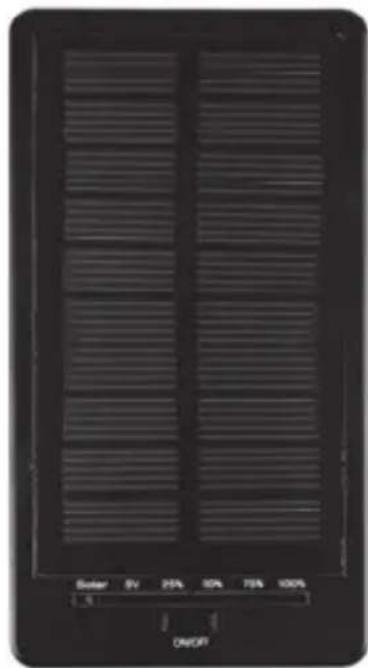
Thank you for choosing the SilverCrest SLS 2200 B2 Solar Power Bank. The Solar Battery Bank can convert sunlight into electrical energy and store it. This allows you to charge a mobile phone, an MP3 player or a digital camera when you are on the move without access to a wall socket.
Intended use
This is an information technology product and has been designed to charge the batteries installed in mobile phones, MP3 players, digital cameras or other battery-powered devices. The Solar Battery Bank converts sunlight into electrical power and stores it into the built-in battery. The device may only be used for private purposes, not for industrial or commercial ones. The device may also not be used in tropical climates. The manufacturer is not liable for any damage or problems caused by unauthorised modifications. Only use accessories recommended by the manufacturer. Observe the regulations and laws in the country of use.
Package contents
A
natural_image
Black rectangular electronic device with horizontal slats and a control panel labeled 'ON/OFF' (no readable text or symbols on the device itself)B
natural_image
Black cable with two USB connectors tied at the bottom (no text or symbols visible)C

natural_image
Black rectangular object with two circular holes, no visible text or symbols
natural_image
Black rectangular object with two circular holes, no visible text or symbols
D

E

A SilverCrest SLS 2200 B2 Solar Power Bank
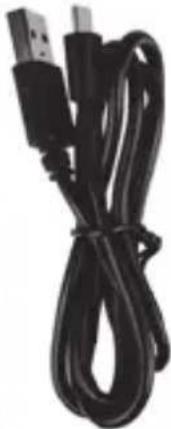
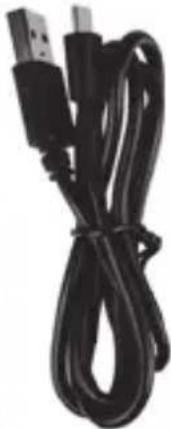
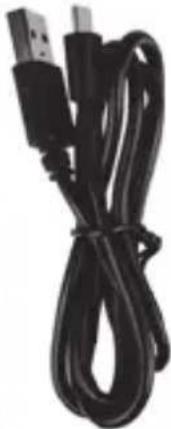
B USB cable
C Holders (2 pieces)
D Suction pads (4 units)
E These operating instructions (line-art illustration)
Technical specifications
| Solar modulePowerDimensions (W x H) | 5.0V ..., 100mAapprox. 59 x 105 mm |
| Rechargeable Li-Ion battery 3.7V / | 2200mAh |
| Input voltage/current (USB) 5.0V / | 0.5A ... |
| Output voltage/current 5.0V +/- 5%, 1A ... | |
| Charging time for built-in Li-Ion batteryVia solar panelPC adapter | approx. 22-30 hours*approx. 4-6 hours |
| Dimensions (W x H x D) approx. 70 x 129 x 20 mm | |
| Weight (without accessories) approx. | 122 g |
| Operating temperature 5°C to 45 °C | |
| Operating humidity max. 85% rel. humidity(non-condensing) | |
| Permissible storage conditions -5 °C to +50 °C,max. 85 % rel. humidity(non-condensing) | |
* The charging time varies greatly depending on the sun's radiation (intensity). This depends on the season, the cloud cover and the location. These factors may also increase the charging time.
The technical specifications and design can be changed without prior notice.
Safety instructions
Before you use this device for the first time, please read the following notes in this manual and heed all warnings, even if you are familiar with handling electronic devices. Keep this manual in a safe place for future reference. If you sell the device or pass it on, it is essential that you also hand over this manual, as it is part of the product.

CAUTION! This symbol and the word "Caution" alert you to a potentially dangerous situation. Ignoring it can lead to severe injury or even death.

This symbol denotes further information on the topic.
Operating environment
The device is not designed for use in environments with high humidity (e.g. bathrooms) or excessive levels of dust. Operating temperature and operating humidity: +5 to +45 °C, max. 85 % relative humidity. Please note that when using the product in a car, especially behind the windscreen, the temperature can significantly increase above +45 °C.

CAUTION! Always make sure that
- the device is not exposed to direct heat sources (e.g. radiators)
- the device is not exposed to strong artificial light
- contact with water spray and drops and aggressive fluids is avoided and the device is never operated near water; the device is never submerged (do not place any items containing liquids, such as drinks, vases, etc. on or near the device).
- the device is never placed near magnetic fields (e.g. speakers)
- no naked flames (e.g. burning candles) are placed on or near the device
- no foreign bodies can penetrate into the device
- the device is not subjected to any major temperature fluctuations as this can cause condensation and short-circuiting. If the device has been exposed to strong temperature fluctuations, wait for it to reach the ambient temperature before using it (about 2 hours)
- the device should not be subjected to excessive shocks and vibrations
- when using an optional USB power adapter, you read the corresponding operating instructions
• the device is not covered
Failure to heed the warnings above may result in damage to the device or injury.

CAUTION! Danger of explosion
Never throw the device into fire, as this could cause the built-in battery to explode.

CAUTION! Children and persons with disabilities
Electrical devices are not suitable for children. Also persons with reduced physical, sensory or mental capabilities should only use electrical devices in appropriate circumstances. Do not allow children or persons with disabilities to use electrical devices unsupervised, unless they are instructed accordingly and supervised by a competent person responsible for their safety. Children should always be supervised to ensure that they do not play with the product. Small parts can represent choking hazards. Keep the packaging away from children and persons with disabilities.

CAUTION! There is a risk of suffocation.

CAUTION! Cables
Unplug all cables by holding the plugs and never pull on the cables themselves. Never place pieces of furniture or other heavy objects on the cables and take care that they do not become damaged, especially at the plugs and sockets. Never tie knots in a cable and do not tie them to other cables. All cables must be laid so that nobody can trip obstructed by them.

Maintenance / cleaning
Repairs are required if this device has been damaged in any way, for example if the device housing is damaged, if liquids or objects have penetrated the device or if the product has been exposed to rain or moisture. Repairs are also necessary if the product is not working properly or has been dropped. If you notice any smoke, unusual noises or strange smells, unplug all cables immediately and disconnect the optional USB power adapter from the power supply. If this occurs, do not continue to use the device and have it checked out by an expert. All repairs must be carried out by qualified service personnel. Only use a clean, dry cloth for cleaning. Never use aggressive liquids. Do not attempt to open the housing of the device, this will void your warranty.
Copyright
All the contents of this user manual are protected by copyright and provided to the reader for information only. Copying data and information without the prior explicit written consent of the author is strictly forbidden. This also applies to any commercial use of the contents and information. All texts and diagrams are up-to-date as of the date of printing.
Overview of controls
An illustration of the items and controls and their corresponding numbers can be found on the inside page of the fold-out cover of this user manual. You can keep this page folded out whilst reading the different chapters of this user manual. This allows you to refer to the relevant controls at any time.
1 Solar panel
2 Solar LED
3 5V LED (output voltage)
4 Battery capacity LEDs
5 ON/OFF pushbutton
6 OUT socket (to connect the device to be charged)
7 IN socket (to connect a PC or USB power adapter)
Before you start
Remove the Solar Power Bank and the accessories from the packaging.
Fitting the suction pads
Option I
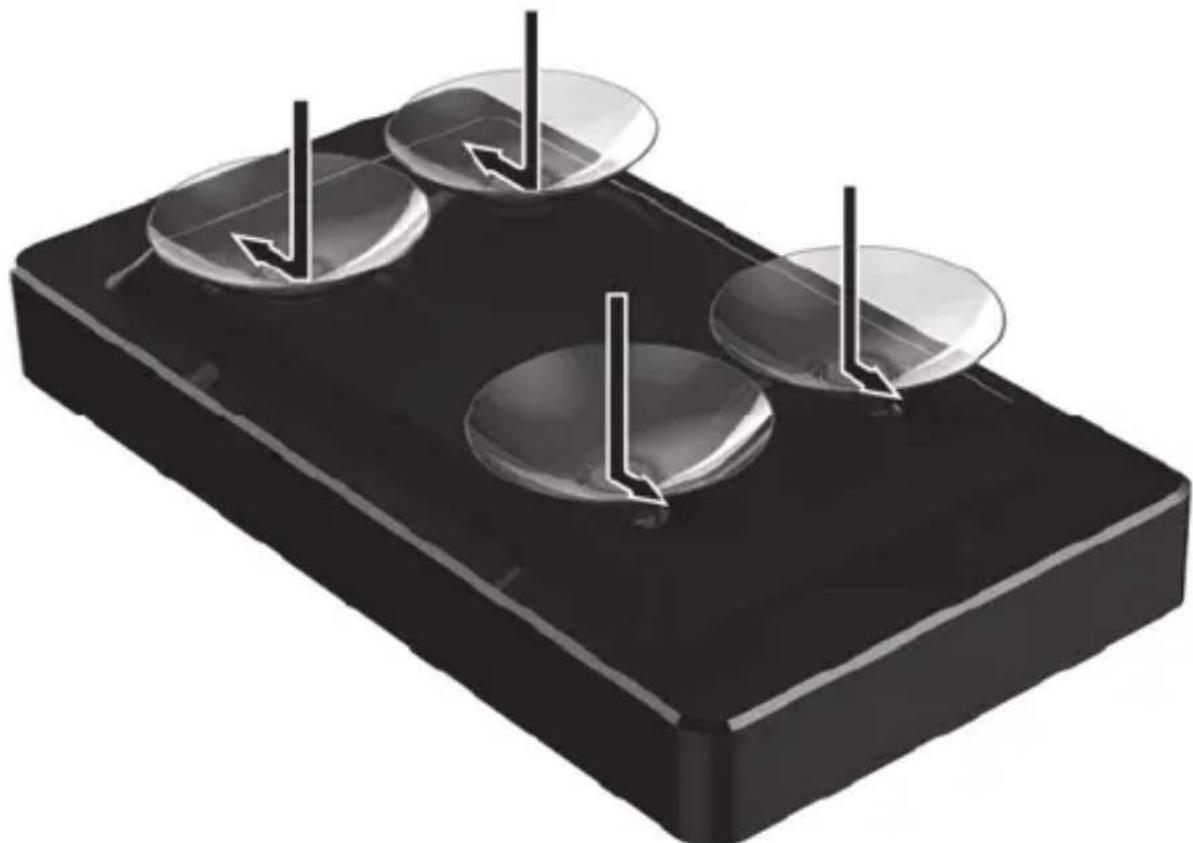
Option I can be used to mount the Solar Power Bank on a flat, even surface. Fix the four suctions pads (D) to the bottom of the Solar Power Bank as shown in the diagram below. Insert the suction pads (D) into the hole. Next, fix the suction pads (D) by sliding them into the smaller hole.
natural_image
3D illustration of a black rectangular block with three circular cavities and vertical arrows indicating force or movement (no text or symbols)You can now mount the Solar Power Bank to a flat, even surface using the suction pads.
Option II
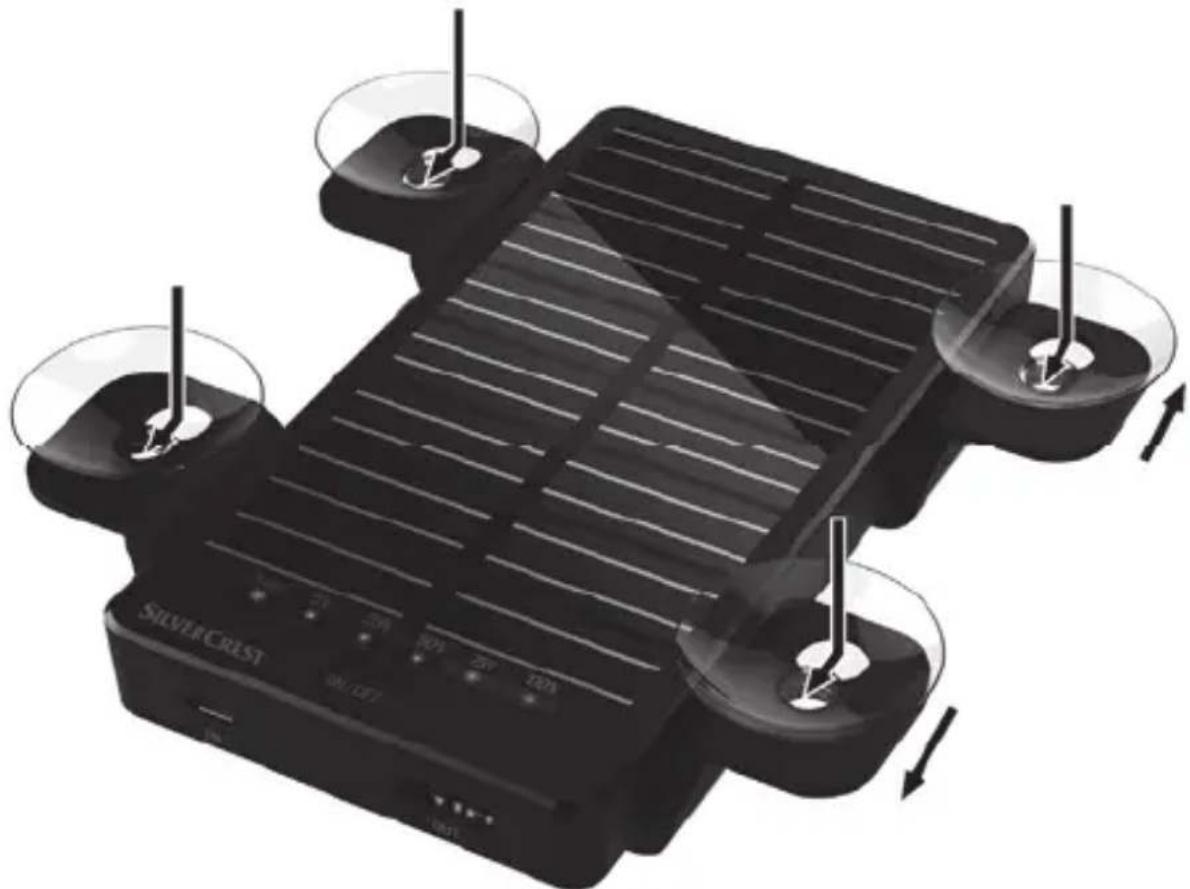
Option II can be used to mount the Solar Power Bank behind a window. Fix the four suctions pads (D) to the holder (C) as shown in the diagram below. Insert the suction pads (D) into the hole. Next, fix the suction pads (D) by sliding them into the smaller hole. Next mount the holder (C) to the bottom of the Solar Power Bank. To do so, insert the holding notches into the corresponding holes on the back of the device.
natural_image
Illustration of a SilverCrest solar cell with four control panels and LED indicators (no text or symbols on the device itself)You can now mount the Solar Power Bank behind a window using the suction pads.

The surface should be free of dust, oil and grease for the suction pads to stick well.
Charging using the solar panel

Make sure that the maximum ambient temperature of +45 °C is not exceeded. This is especially important if you are using the product in a car.
You can charge the built-in battery of the Solar Power Bank using the solar panel (1). Make sure that the solar panel (1) receives sufficient sunlight. As soon as there is enough sunlight, the Solar LED (2) goes orange to indicate that the battery is being charged. If the Solar LED (2) does not light up, there is not enough sunlight. In this case, move the device to a different position or place it in direct sunlight. When the Solar LED (2) goes green, the battery is fully charged.
Charging via the USB cable
If there is no sunlight, you can also charge the built-in battery in your Solar Power Bank using the USB cable (B). Insert the smaller plug of the USB cable (B) into the IN socket (7) of your Solar Power Bank. Then insert the USB plug of the USB cable (B) into a USB port on your computer. You can monitor the charging process using the Battery capacity LEDs (4).
| Battery capacity LEDs (4) State of charge | |
| All LEDs flashing in sequence 0 - 25 % | |
| 1 LED on, 3 LEDs flashing in sequence 25 - 50% | |
| 2 LEDs on, 2 LEDs flashing in sequence 50 - 75% | |
| 3 LEDs on, 1 LED flashing 75 - 100% | |
| All LEDs on 100 % |

Some computers do not supply USB power while they are turned off. If the battery of your Solar Power Bank does not charge, make sure your computer is powered on.

Alternatively, you can use an external USB power adapter (not supplied) to charge the battery of your Solar Power Bank. To do this, you will need the USB cable (B) supplied. You can purchase a suitable 5V USB power adapter with at least 500mA from any electronics retail outlet.

When not using the Solar Power Bank for a long time, it is recommended to recharge the battery from time to time. This ensures a longer battery endurance.

When using an external power adapter, it must be connected to an easily accessible wall outlet so that it can be disconnected quickly in case of an emergency.
Getting started
Using the ON/OFF pushbutton
Powering on
Briefly press the ON/OFF pushbutton (5) to switch the Solar Power Bank on. The 5V LED (3) and the battery capacity LEDs (4) light. After approx. 5 seconds the battery capacity LEDs (4) go off, and the output 5V LED (3) lights while a connected device is being charged.
Auto power off
If no device to be charged is connected within 20 seconds, the device will power off to safe battery power.
Powering off
Keep the ON/OFF pushbutton (5) pressed for at least 3 seconds to switch the Solar Power Bank off and to cancel the current charging process.
Viewing the battery level
Press the ON/OFF pushbutton (5) briefly to display the battery level for a few seconds. The Battery capacity LEDs (4) indicate the battery level as a percentage (25%, 50%, 75% and 100%).
Compatible devices
The Solar Power Bank can be used to charge external devices with a max. charging current of 1A.
If the charging current of your connected device exceeds 1A, the Solar Power Bank will automatically power off after you turn it on with the ON/OFF pushbutton (5). In this case, double-check the external device compatibility by reading its technical specifications (operating instructions).
Charging external devices
Connect the charger cable of your external device to the OUT socket (6) of the Solar Power Bank and to your external device.
Now press the ON/OFF pushbutton (5) briefly to start the charging process. Then the 5V LED (3) lights while the connected device is being charged. When your external device is fully charged, the Solar Power Bank switches off. To cancel the charging process at any time, simply disconnect the external device. If your external device is not fully charged but the 5V LED (3) goes out during charging, the built-in battery of your Solar Power Bank is empty. You will need to recharge your Solar Power Bank in order to charge external devices. Recharging the built-in battery of your Solar Power Bank and an external device at the same time is only possible in solar mode. Recharging the Solar Power Bank and an external device at the same time via the USB IN port (7) is not possible.
Troubleshooting
A connected device is not charging.
- Press the ON/OFF pushbutton (5) briefly to start the charging process.
- The battery of your Solar Power Bank is empty, recharge it.
- No connection to the external device, double-check the connection.
- The Solar Power Bank can be used to charge external devices with a max. charging current of 1A. If the charging current of your connected device exceeds 1A, the Solar Power Bank will automatically power off after you turn it on with the ON/OFF pushbutton (5). In this case, double-check the external device compatibility by reading its technical specifications (operating instructions).
Cannot charge the battery of the Solar Power Bank using the solar panel.
- Make sure that the solar panel (1) is receiving enough sunlight.
Cannot charge the battery of the Solar Power Bank via the USB cable.
- Faulty connection, double-check the connection.
- Some computers do not supply USB power while they are turned off. If the battery of your Solar Power Bank does not charge, make sure your computer is powered on.
Environmental regulations and disposal information

natural_image
Symbol of a trash bin crossed with two crossed lines and a solid black rectangle below (no text or labels)Devices marked with this symbol are subject to the European Directive 2012/19/EU. All electrical and electronic devices must be disposed of separately from household waste at official disposal centres. Proper disposal of old devices prevents damage to the environment or your health. For further information about proper disposal, contact your local council, recycling centre or the shop where you bought the device.
The built-in rechargeable battery cannot be removed for disposal.
Dispose of all packaging in an environmentally friendly manner. Cardboard packaging can be taken to paper recycling centres or public collection points for recycling. Any film or plastic contained in the packaging should be taken to your public collection points for disposal.
Conformity notes
CE
This device complies with the basic and other relevant requirements of EMC Directive 2004/108/EC and the RoHs Directive 2011/65/EU. The Declaration of Conformity can also be found at the end of this Manual.
Warranty and Service Information
Warranty of TARGA GmbH
This device is sold with three years warranty from the date of purchase. Please keep the original receipt in a safe place as proof of purchase. Before using your product for the first time, please read the enclosed documentation. Should any problems arise which cannot be solved in this way, please call our hotline. Please have the article number and, if available, the serial number to hand for all enquiries. If it is not possible to solve the problem on the phone, our hotline support staff will initiate further servicing procedures depending on the fault. Within the warranty period the product will be repaired or replaced free of charge as we deem appropriate. No new warranty period commences if the product is repaired or replaced. Consumables such as batteries, rechargeable batteries and lamps are not covered by the warranty.
Your statutory rights towards the seller are not affected or restricted by this warranty.
Service

Phone: 0207 - 36 50 744
E-Mail: service.GB@targa-online.com

Phone: 01 - 242 15 83
E-Mail: service.IE@targa-online.com

Phone: 800 - 62 175
E-Mail: service.MT@targa-online.com

Phone: 800 - 92 496
E-Mail: service.CY@targa-online.com
IAN: 110433

Manufacturer
TARGA
GmbH
Coesterweg 45
59494 SOEST
GERMANY
natural_image
Product display of a solar power supply unit (A) with cable, battery pack, and three labeled accessories (B, C, D, E), plus an open book icon.A SilverCrest SLS 2200 B2 Solar Power Bank
B USB-kabel
C Hållare (2 st)
D Sugproppar (4 st)
E Denna bruksanvisning (linjegrafiska bilder)
Tekniska specifikationer
natural_image
3D illustration of a black rectangular tray with three circular cavities and vertical arrows indicating flow or force (no text or symbols)natural_image
Illustration of a SilverCrist solar cell with four control panels and a central display (no text or symbols on the device itself)natural_image
Symbol of a trash bin crossed with no text or numbers, representing waste sorting or disposal (no text present)natural_image
Black rectangular electronic device with horizontal slats and a control panel labeled 'ON/OFF' (no readable text or symbols on the device itself)B
natural_image
Coiled black cable with two USB connectors (no text or symbols visible)C

natural_image
Black rectangular object with two circular holes, no visible text or symbols
natural_image
Black rectangular object with two circular holes, no visible text or symbols
D


E

natural_image
3D illustration of a black rectangular tray with three circular wells and vertical arrows indicating flow or movement (no text or symbols)natural_image
Illustration of a SilverCrest solar cell with four control panels and LED indicators (no text or symbols on the device itself)natural_image
Symbol of a trash bin crossed with two crossed lines and a solid black rectangle below (no text or labels)natural_image
Product display of a black electronic device with labeled components and an open book icon (no text or symbols on main objects)natural_image
3D illustration of a black rectangular tray with three circular wells and vertical arrows indicating flow or movement (no text or symbols)natural_image
Illustration of a SilverCrest solar-powered device with four control panels and a central screen (no text or symbols on the device itself)natural_image
Symbol of a trash bin crossed with a diagonal line and a horizontal bar below (no text or labels)natural_image
Black rectangular electronic device with horizontal slats and a control panel labeled 'ON/OFF' (no readable text or symbols on the device itself)B
natural_image
Coiled black cable with two USB connectors (no text or symbols visible)C

natural_image
Black rectangular object with two circular holes, no visible text or symbols
natural_image
Black rectangular object with two circular holes, no visible text or symbols
D


E

natural_image
3D illustration of a black rectangular tray with three circular wells and vertical arrows indicating flow or movement (no text or symbols)natural_image
Illustration of a SilverCrest solar-powered device with four control panels and a central screen (no text or symbols on the device itself)natural_image
Symbol of a trash bin crossed with a diagonal line and a horizontal bar below (no text or numbers present)natural_image
3D illustration of a black rectangular tray with three circular wells and vertical arrows indicating flow or movement (no text or symbols)natural_image
Illustration of a SilverCrest solar-powered device with four control panels and a central screen (no text or symbols on the device itself)natural_image
Symbol of a trash bin crossed with a diagonal line and a horizontal bar below (no text or numbers present)EU - Declaration of Conformity
Address:
Targa GmbH
Coesterweg 45
59494 Soest, Germany
Product:
Solar Power Bank SLS 2200 B2
Model:
Identification number: IAN 110433
The product complies with the requirements of the following European directives:
2004/108/EC
Electromagnetic Compatibility
2011/65/EU
Restriction of the use of certain hazardous substances in electrical and electronic equipment
Compliance was proved by the application of the following standards:
EMC:
EN 55022 : 2010 limit class B
EN 55024:2010
Rohs:
EN 50581:2012
Year of CE marking: 2015

natural_image
Abstract curved line drawing with no text or symbolsSoest, 6 ^th March 2015
Matthias Klauke, Managing Director
- Trademarks
- Introduction
- Intended use
- Package contents
- Technical specifications
- Safety instructions
- Operating environment
- CAUTION! Always make sure that
- CAUTION! Danger of explosion
- CAUTION! Children and persons with disabilities
- CAUTION! There is a risk of suffocation.
- CAUTION! Cables
- Maintenance / cleaning
- Copyright
- Overview of controls
- Before you start
- Fitting the suction pads
- Option I
- Option II
- Charging using the solar panel
- Charging via the USB cable
- Getting started
- Using the ON/OFF pushbutton
- Powering on
- Auto power off
- Powering off
- Viewing the battery level
- Compatible devices
- Charging external devices
- Troubleshooting
- A connected device is not charging.
- Cannot charge the battery of the Solar Power Bank using the solar panel.
- Cannot charge the battery of the Solar Power Bank via the USB cable.
- Environmental regulations and disposal information
- The built-in rechargeable battery cannot be removed for disposal.
- Conformity notes
- CE
- Warranty and Service Information
- Warranty of TARGA GmbH
- Service
- IAN: 110433
- Manufacturer
- Tekniska specifikationer
- EU - Declaration of Conformity
- Address:
- Product:
- Model:
- 2004/108/EC
- 2011/65/EU
- EMC:
- Rohs:
Brand : SILVERCREST
Model : SLS 2200 B2
Category : Power bank