
M800 DUAL - Uncategorized Navitel - Free user manual and instructions
Find the device manual for free M800 DUAL Navitel in PDF.


| Product Type | Dual-channel dashcam for motorcycles |
| Processor | MSTAR 8339DN |
| Camera Sensor | SONY IMX307 (STARVIS) |
| Video Resolution | 1920×1080 (Full HD) |
| Viewing Angle | 130° |
| Moisture Protection | DVR: IP66, Cameras: IP67 |
| Storage | microSD card, up to 128 GB (Class U3 or above) |
| Power Supply | 12V DC (battery connection with ACC) |
| Recording Modes | Loop recording, parking monitor, time-lapse |
| Audio Recording | Yes, with wind/street noise suppression |
| G-Sensor | Built-in, automatically locks video upon impact |
| Tilt Sensor | Adjustable tilt angle limits for automatic file protection |
| Wi-Fi | Built-in, for connection to Navitel DVR Center app |
| Remote Control | Supplied, for locking files and toggling Wi-Fi |
| GPS Module | Included, connects via green connector |
| Operating Temperature | -10°C to +60°C |
| Supercapacitor | 2 F (instead of battery) |
| Spare Parts | Includes spare fuses (2 pcs) |
| Maintenance | Keep lens clean; use dry cloth; avoid chemicals |
| Safety Warnings | Do not disassemble; avoid fire; use only approved accessories |
| Package Contents | DVR, 2 cameras, remote controller, GPS module, power cable, spare fuses, manual, warranty card |
Frequently Asked Questions - M800 DUAL Navitel
User questions about M800 DUAL Navitel
0 question about this device. Answer the ones you know or ask your own.
Ask a new question about this device
Download the instructions for your Uncategorized in PDF format for free! Find your manual M800 DUAL - Navitel and take your electronic device back in hand. On this page are published all the documents necessary for the use of your device. M800 DUAL by Navitel.
USER MANUAL M800 DUAL Navitel
Google Play
App Store
AppGallery
Einleitung
Navitel DVR Center app installation
Google Play
App Store

AppGallery
Sissejuhatus
Lugupeetud klient!
Täname, et ostsite NAVITEL® toote.
Google Play
App Store

AppGallery
Introduction
Dear Customer!
Thank you for purchasing this NAVITEL® product.
NAVITEL M800 DUAL is a multifunctional high-definition DVR with many functions and features that are described in this User Manual. Please read the manual carefully before using the device and keep it for future reference.
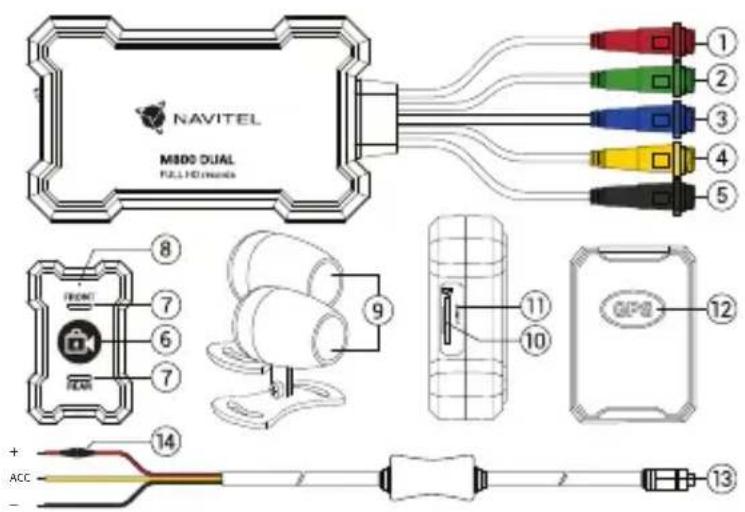
Device layout
- Power connector (red)
- GPS module connector (green)
- Rear camera connector (blue)
- Connector for remote control (yellow)
- Front camera connector (black)
-
Remote controller
-
LED indicator
- Microphone
- Cameras 2 pieces
- MicroSD slot
- Reset
- GPS module
- Power cable
- Fuse
Package contents
• DVR NAVITEL M800 DUAL
- Cameras 2 pieces
- Remote controller
• GPS module
- Power cable
- Spare fuses 2 pcs.
- User manual
- Warranty card
- Gift voucher
Specifications
| Processor MSTAR 8339DN | |
| Camera SONY IMX307 | (STARVIS) |
| Recording format TS | |
| Video resolution 1920×1080 | |
| Viewing angle 130° | |
| Moisture protection degree | DVR IP66cameras IP67 |
| Storage microSD card | |
| MicroSD card capacity Max. 1 | 28 GB |
| Superkapacitor 2 F | |
| Tilt sensor Yes | |
| G-sensor Yes | |
| Wi-Fi Yes |
Note: the package, appearance, specifications that do not change the overall functionality of the device may be changed by the manufacturer without prior notice.
STARVIS and STARVIS are trademarks of Sony Corporation.
Installation
- It is strongly recommended that works on installing the camera and connecting +12V should be done by qualified personnel with the necessary skills. Cable routing may require special tools or attachments. Make sure these works are safe.
- Put the microSD card into the DVR. Use a high-speed SD card (Class U3 or above); capacity should be 128GB max.

• To avoid malfunctions of the DVR and / or SD-card, don't insert and remove SD-card during DVR operation.
- Before using a microSD card, please format it inside the DVR to avoid data errors. For formatting the SD-card in Menu mode select Format SD-card and confirm it.
• Make sure the connectors are properly connected.
- If the plug does not fully fit into the jack, or one of the pins is broken, the device may not function properly.
- The red wire (+) connects to the battery positive.
- Yellow wire, connects to ACC (ignition) 12V.
- The black wire (-) connects to the battery negative.
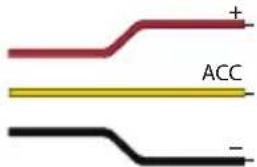
Note: Before connecting, it is recommended to check the power circuit with a multimeter. Incorrect connection may damage the device.
The video recorder has a degree of moisture protection IP66. It is recommended to install the device in the trunk (under the seat) of a motorcycle, metal side up. For better cooling, the upper part of the case is made of aluminum.
Remote controller
| Button Function | |
 | In Video Recording mode, short press to lock the file (the protected file cannot be deleted or overwritten). Long press to turn Wi-Fi on/off. |
| LED indicator | No indication - the device is switched off.The indicator lights up red continuously - the device is turned on, the recording is stopped.The indicator flashes red - the device is turned on and recording is in progress. |
Device functions
| Format SD-card | Formatting a microSD card in the DVR is necessary for the correct operation of the device. Before using a microSD card or in case of data error, please format the microSD card. For formatting the SD-card in Menu mode select Format SD-card and confirm it. |
| Record | When connected to a power source, the device will turn on and start recording automatically (with a red indicator flashing). The video is automatically saved. |
| Loop recording | This feature allows you to save a video as a set of files given in the duration menu. If the memory card runs out of space, the unprotected files will be overwritten in the order in which they were created. |
| Record audio | The device is equipped with a special chip that allows you to record audio with the suppression of wind and street noise, engine operation, etc. |
| Lock file | In Video Recording mode, short press the button on the remote control to protect the current recording. Protected files cannot be deleted or overwritten. |
| G-sensor | If the vehicle is hit by something, the DVR will automatically lock the current video. Protected files cannot be deleted or overwritten. |
| Tilt sensor | The function allows you to set limit values for tilt (roll) angles of the motorcycle, beyond which the current record will be automatically protected from deletion. |
| Parking monitor | In the parking mode, the user has access to the continuous time-lapse recording mode.Continuous video recording is performed at a user-defined frame rate and operating time. |
Precautions
- Use accessories only approved by manufacturer.
- Permissible ambient temperature in operating mode: -10 to +60 °C. Storage temperature: -20 to +80 °C. Relative humidity: 5% to 90% without condensation (25 °C).
- Put the device away from fire sources to avoid explosion or fire.
- Do not expose the device to physical impacts.
- Avoid contacting the device with sources of electromagnetic radiation.
- Keep the lens clean. Do not use chemicals or detergents to clean the product; always turn off the device before cleaning.
- Strictly follow the laws and regulatory acts of the region where the device is used. This device can not be used for illegal purposes.
- Do not disassemble or repair device by yourself. In case of device failure, contact the service center.
- Despite the fact that the device has moisture protection, it is not recommended to wash it with a pressure washer. High pressure water may enter the inside of the device and cause it to malfunction.
Navitel DVR Center app installation
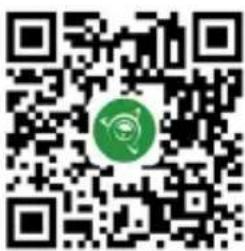
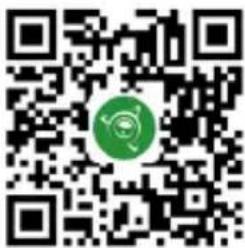
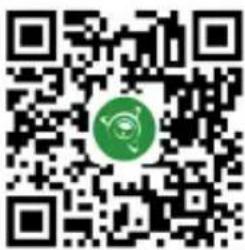
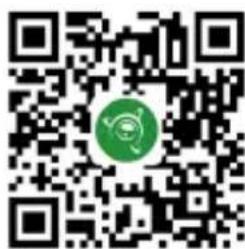
- Download and install Navitel DVR Center to your cell phone or tablet, follow your mobile device instructions. You can download application by scan QR code in DVR's Menu (App QR Code) with your cell phone.Choose Wifi in Settings menu, press On.
- Turn on a Wi-Fi in your mobile device settings.
- Run the app. Choose your DVR in the list. The DVR's information is in DVR's Menu (Wi-Fi Navitel).
- Connect your mobile device to the DVR through Wi-Fi. To connect to the dashcam, use the password 12345678 or 1234567890. You can change it in DVR's Menu (Wi-Fi password).
- Using the Navitel DVR Center you can:
- update DVR's firmware;
• control DVR functions in Settings menu.
Google Play
App Store

AppGallery
Bevezetés
Tisztelt Ügyfelünk!
Google Play
App Store

AppGallery
Ivadas
Gerbiamas, Kliente!
Google Play

App Store

natural_image
QR code with a green circular logo in the center (no readable text or symbols)AppGallery
levads
Cienitais klient!
Google Play

App Store

AppGallery
Wstep
Drogi kliencie!
Google Play
App Store

natural_image
QR code with a green circular logo in the center (no readable text or symbols)AppGallery
Introducere
Dragă client!
Google Play

App Store

AppGallery
Введение
Google Play
App Store

AppGallery
Google Play

App Store

AppGallery
Вступ
Шановний покупець!
Google Play
App Store

AppGallery

natural_image
Green globe with orbiting rings and star highlights (no text or symbols)NAVITEL


Brand : Navitel
Model : M800 DUAL
Category : Uncategorized