Nerro 13Z015 - Coffee maker Zelmer - Free user manual and instructions
Find the device manual for free Nerro 13Z015 Zelmer in PDF.


| Product Type | Espresso Machine / Coffee Maker |
| Brand | Zelmer |
| Model | Nerro 13Z015 |
| Power Rating | 1130–1350 W at 220–240 V |
| Water Tank Capacity | 1.5 L (max) |
| Dimensions (approx.) | 30 × 25 × 35 cm |
| Weight (approx.) | 5 kg |
| Brewing Systems | Perfect Brewing System, SmartPress System |
| Coffee Types | Ground coffee, espresso bags (ESE pods) |
| Espresso Size Options | Single small (40 ml), single big (60 ml), two small (2×40 ml), two big (2×60 ml), manual brewing |
| Steam Function | Yes, for milk frothing |
| Control Panel | Power button, mode knob, temperature/pod button, indicators |
| Indicators | Low water level, descaling, temperature level, cup size |
| Automatic Shut-off | After 1 hour of inactivity |
| Descaling Frequency | At least every 3 months |
| Descaling Method | Citric acid solution or commercial descaler |
| Cleaning | Wipe with damp cloth; do not immerse or dishwasher |
| Safety Features | Pressure protection, auto shut-off, low water alarm, overheat protection |
| Accessories Included | Filter holder, measuring/tamping spoon, 500 ml jug, drip tray |
| Warranty | Standard manufacturer warranty (details in manual) |
Frequently Asked Questions - Nerro 13Z015 Zelmer
User questions about Nerro 13Z015 Zelmer
0 question about this device. Answer the ones you know or ask your own.
Ask a new question about this device
Download the instructions for your Coffee maker in PDF format for free! Find your manual Nerro 13Z015 - Zelmer and take your electronic device back in hand. On this page are published all the documents necessary for the use of your device. Nerro 13Z015 by Zelmer.
USER MANUAL Nerro 13Z015 Zelmer
natural_image
Exterior view of a Zelmer coffee machine with control panel and coffee cup (no visible text or symbols)
PL
2-8
natural_image
Line drawing of a hand using a coffee machine with a keyboard and control panel (no text or symbols)natural_image
Line drawing of a hand operating a coffee machine with an upward arrow indicating motion (no text or symbols)Rys. 1
natural_image
Line drawing of a water tap with a rectangular tank and handle (no text or symbols)Rys. 2
natural_image
Line drawing of a hand using a coffee machine to press or install a tray (no text or symbols present)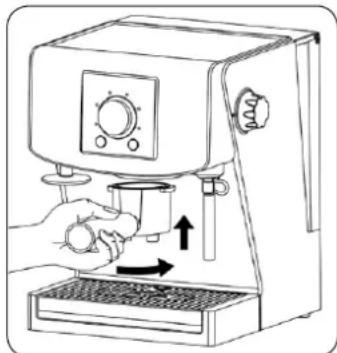
natural_image
Line drawing of a hand using a coffee maker to press or brush into a cup (no text or symbols present)Rys. 3
natural_image
Line drawing of a hand using a coffee maker to press or<|rotate_right|> (no text or symbols present)Rys. 4
natural_image
Line drawing of a hand using a espresso machine to press or adjust the cup (no text or symbols present)Rys. 5
natural_image
Illustration of a hand holding a small object near a circular object (no text or symbols)Rys. 6
natural_image
Line drawing of a hand holding a faucet with liquid pouring from the side (no text or symbols)Rys. 7
natural_image
Line drawing of a hand using a coffee maker machine (no text or symbols)Rys. 8
natural_image
Line drawing of a hand using a standard espresso machine (no text or symbols present)Rys. 9
natural_image
Technical line drawing of a mechanical clamp or bracket mounted on a base (no text or symbols)Rys. 10
13. Odkamienianie
natural_image
Line drawing of a hand operating a standard machine with an upward arrow indicating motion (no text or symbols)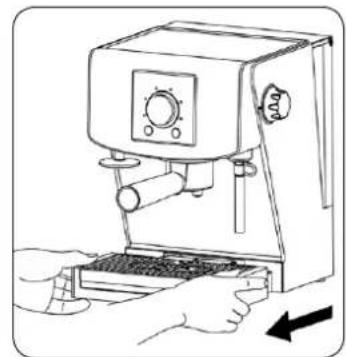
natural_image
Line drawing of a hand using a espresso machine to press or install a keyboard (no text or symbols present)Rys. 11
natural_image
Line drawing of a hand using a tool to interact with a circular mechanical device (no text or symbols)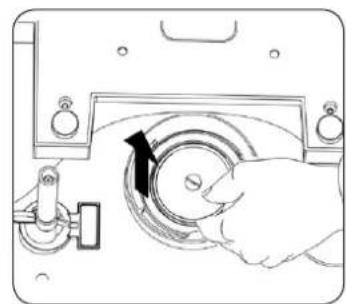
natural_image
Illustration of a hand operating a circular mechanical device with a black arrow indicating rotation (no text or symbols present)Rys. 12
natural_image
Line drawing of a hand using a espresso machine with a right-hand rule (no text or symbols)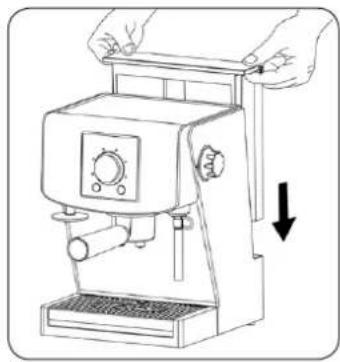
natural_image
Line drawing of a manual espresso machine with hands operating it (no text or symbols)Rys. 13
natural_image
Diagram of a hand operating a circular mechanical device with a pointer indicating rotation (no text or symbols present)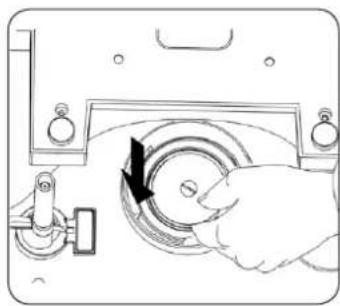
natural_image
Line drawing of a hand operating a circular device with a black arrow indicating rotation (no text or symbols)Rys. 14
natural_image
Line drawing of a hand using a coffee machine to press or install a keyboard (no text or symbols present)natural_image
Line drawing of a manual espresso machine with hands operating it (no text or symbols)Obr. 1
natural_image
Line drawing of a hand pouring liquid into a multi-compartment storage cabinet (no text or symbols)Obr. 2
natural_image
Line drawing of a hand using a coffee machine to press or<|rotate_right|> (no text or symbols present)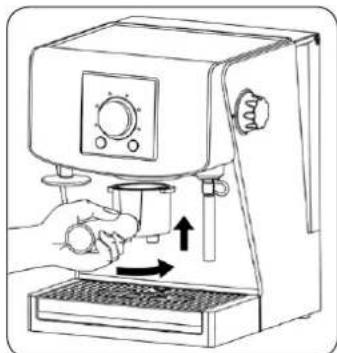
natural_image
Line drawing of a hand using a coffee machine to press or brush (no text or symbols present)Obr. 3
natural_image
Line drawing of a hand using a coffee maker to press or<|rotate_right|> (no text or symbols present)Obr. 4
natural_image
Line drawing of a hand using a espresso machine to press or adjust the cup (no text or symbols present)Obr. 5
natural_image
Illustration of a hand holding a small object near an eye, with a circular object below (no text or symbols)Obr. 6
natural_image
Line drawing of a hand holding a faucet with a handle, no text or symbols presentObr. 7
natural_image
Line drawing of a hand using a coffee machine with a cup (no text or symbols)Obr. 8
natural_image
Line drawing of a hand using a standard espresso machine (no text or symbols present)Obr. 9
natural_image
Technical line drawing of a mechanical component with a base and shaft (no text or symbols)Obr. 10
natural_image
Line drawing of a coffee maker with hands holding the tray, showing mechanical components and an upward arrow (no text or symbols)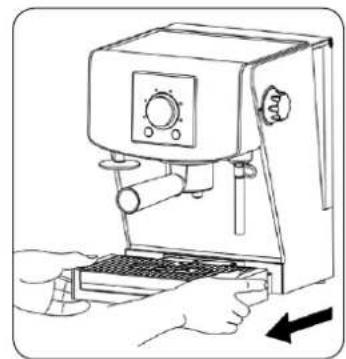
natural_image
Line drawing of a hand using a espresso machine with a keyboard and lever (no text or symbols)Obr. 11
natural_image
Line drawing of a hand using a espresso machine with a keyboard and lever (no text or symbols)Obr. 13
natural_image
Line drawing of a manual espresso machine with hands adjusting the blade (no text or symbols)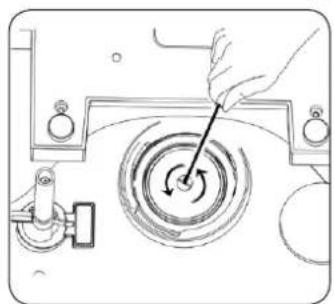
natural_image
Diagram of a hand operating a circular mechanical component with a rotating knob (no text or symbols)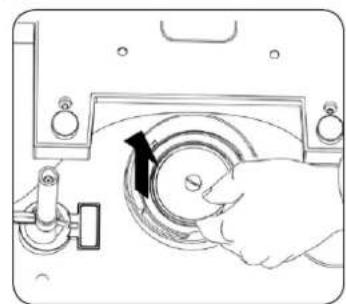
natural_image
Illustration of a hand operating a circular mechanical device with a black arrow indicating rotation (no text or symbols present)Obr. 12
natural_image
Diagram of a hand operating a circular mechanical device with rotating components (no text or symbols)Obr. 14
natural_image
Hand operating a mechanical device with a circular dial and directional arrow (no text or symbols visible)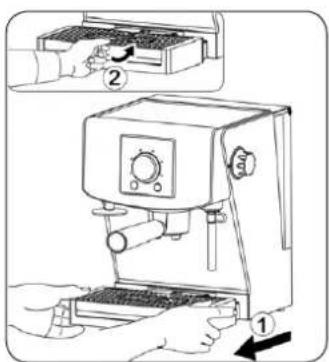
natural_image
Line drawing of a hand using a coffee machine to press or install a keyboard (no text or symbols present)A Tlačidlo zapni/vypni
natural_image
Line drawing of a hand operating a coffee machine with an upward arrow indicating motion (no text or symbols)Obr. 1
natural_image
Line drawing of a water tap with open storage unit (no text or symbols)Obr. 2
natural_image
Line drawing of a hand using a coffee machine to press or adjust its contents (no text or symbols present)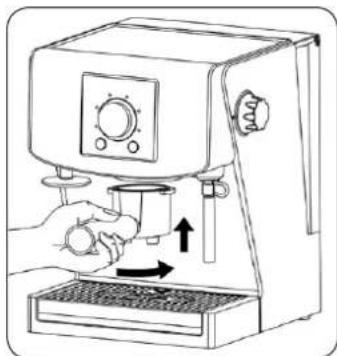
natural_image
Line drawing of a hand using a coffee machine to press or adjust its cup (no text or symbols present)Obr. 3
natural_image
Line drawing of a hand using a coffee maker to press or<|rotate_right|> (no text or symbols present)Obr. 4
natural_image
Line drawing of a hand using a coffee machine to press or adjust the cup (no text or symbols present)Obr. 5
natural_image
Illustration of a hand holding a small object near an eye, with a circular object below (no text or symbols)Obr. 6
natural_image
Line drawing of a hand holding a faucet with liquid pouring from the side (no text or symbols)Obr. 7
POZOR! Ak v nádrži (1) je príliš malé množstvo vody v čase zalievania kávy, kávovar prestane pracovat'. Na paneli riadenia začne mihat' ukazovatel' (N) a budete počut' opakovaný zvukový signál informujúci o nutnosti doplnenia vody. Otvorte prikrývku nádrže na vodu (1) a vlejte vodu. Hned' po doplnení vody, zvukový signál prestane a kávovar samostatne ukončí proces zalievania kávy.
natural_image
Line drawing of a coffee maker with a hand operating the machine (no text or symbols)Obr. 8
natural_image
Line drawing of a hand using a standard espresso machine (no text or symbols present)Obr. 9
natural_image
Line drawing of a mechanical clamp or bracket mounted on a base (no text or symbols)Obr. 10
natural_image
Line drawing of a coffee maker with hands holding the lid and an arrow indicating press direction (no text or symbols)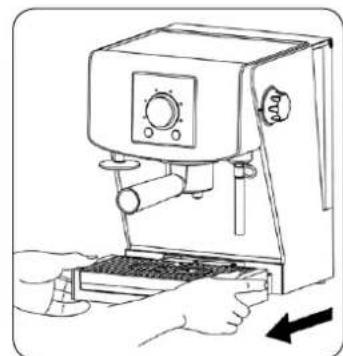
natural_image
Line drawing of a hand using a coffee machine to press or adjust its contents (no text or symbols present)Obr. 11
natural_image
Technical line drawing of a mechanical assembly with a hand operating a rotating component (no text or symbols)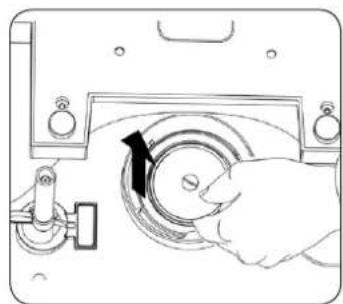
natural_image
Line drawing of a hand operating a mechanical device with a circular component and adjustment knob (no text or symbols)Obr. 12
natural_image
Line drawing of a hand using a espresso machine with a keyboard and lever (no text or symbols)Obr. 13
natural_image
Line drawing of a manual espresso machine with hands adjusting its lid (no text or symbols)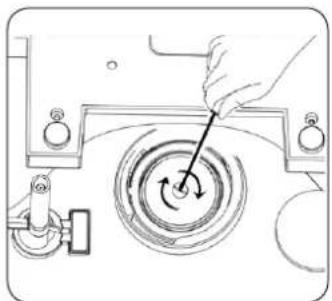
natural_image
Line drawing of a hand using a tool to interact with a circular mechanical device (no text or symbols)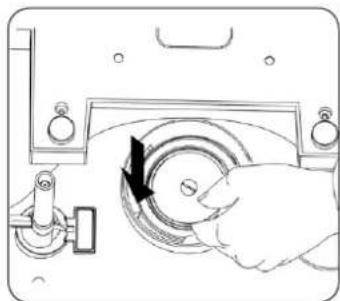
natural_image
Illustration of a hand operating a mechanical device with a circular component and directional arrow (no text or symbols)Obr. 14
natural_image
Line drawing of a hand using a coffee machine to press or install a keyboard (no text or symbols present)natural_image
Line drawing of a hand operating a coffee machine with an upward arrow indicating motion (no text or symbols)- ábra
natural_image
Line drawing of a water tap with open storage unit (no text or symbols)- ábra
natural_image
Line drawing of a hand using a coffee machine to press or adjust the cup (no text or symbols present)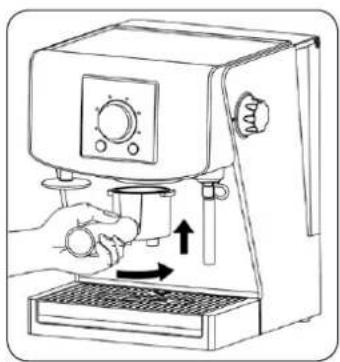
natural_image
Line drawing of a hand using a coffee machine to press or<|rotate_right|> (no text or symbols present)- ábra
natural_image
Line drawing of a hand using a coffee maker to press or<|rotate_right|> (no text or symbols present)- ábra
natural_image
Line drawing of a hand using a coffee machine to press or adjust the cup (no text or symbols present)- ábra
natural_image
Illustration of a hand holding an eye with a magnifying glass, next to a circular object (no text or symbols)- ábra
natural_image
Line drawing of a hand holding a faucet with water pouring from the drain (no text or symbols)- ábra
natural_image
Line drawing of a hand using a coffee machine with a cup on the tray (no text or symbols)- ábra
natural_image
Line drawing of a hand using a standard espresso machine (no text or symbols present)- ábra
natural_image
Technical line drawing of a mechanical clamp or bracket mounted on a base, with no visible text or symbols.- ábra
natural_image
Line drawing of a hand operating a standard coffee machine with an upward arrow indicating motion (no text or symbols)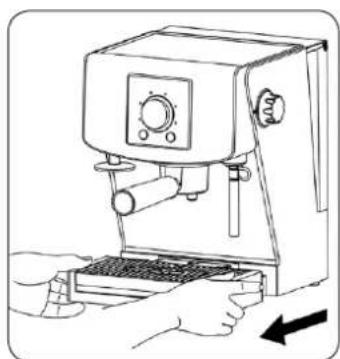
natural_image
Line drawing of a hand using a coffee machine with a keyboard and control panel (no text or symbols)- ábra
natural_image
Line drawing of a hand operating a circular mechanical device with a pointer and rotating arrow (no text or symbols)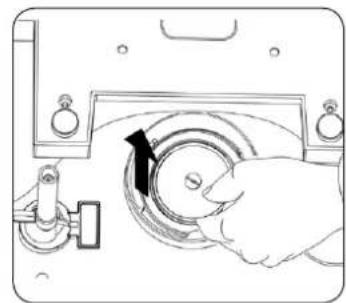
natural_image
Line drawing of a hand operating a circular device with a black arrow indicating rotation (no text or symbols)- ábra
natural_image
Diagram of a hand operating a circular mechanical device with a pointer and rotating arrow (no text or symbols)- ábra
natural_image
Diagram of a hand operating a circular device with a black arrow indicating rotation (no text or symbols present)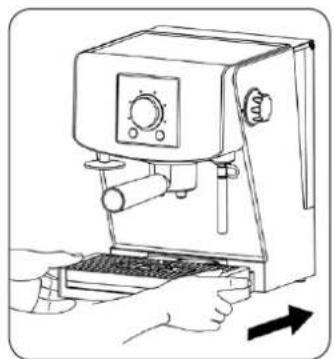
natural_image
Line drawing of a hand using a espresso machine with a keyboard and lever (no text or symbols)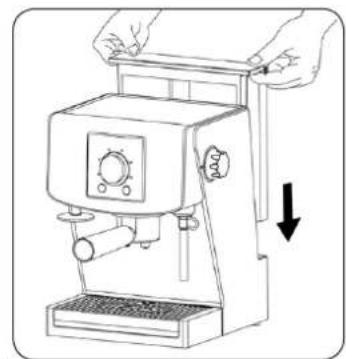
natural_image
Line drawing of a coffee machine with hands operating it, showing no text or symbols- ábra
natural_image
Line drawing of a hand using a coffee machine to press or install a keyboard (no text or symbols present)natural_image
Line drawing of a hand operating a manual pump machine with an arrow indicating motion (no text or symbols)Des. 1
natural_image
Line drawing of a water tap with a rectangular tank and handle (no text or symbols)Des. 2
natural_image
Line drawing of a hand using a coffee machine to press or install a cup (no text or symbols present)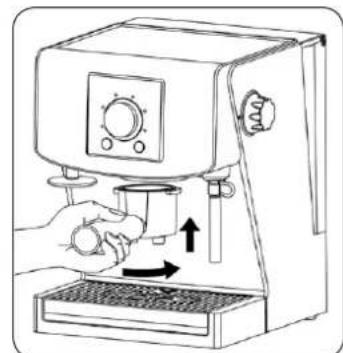
natural_image
Line drawing of a hand using a coffee machine to press or brush into a cup (no text or symbols present)Des. 3
natural_image
Line drawing of a hand using a coffee maker to press or<|rotate_right|> (no text or symbols present)Des. 4
natural_image
Line drawing of a hand using a manual espresso machine with a lever and control panel (no text or symbols)Des. 5
natural_image
Illustration of a hand holding a small eye next to a circular object (no text or symbols)Des. 6
natural_image
Line drawing of a hand holding a faucet with liquid pouring from the side (no text or symbols)Des. 7
natural_image
Line drawing of a hand using a coffee machine with a cup on the tray (no text or symbols)Des. 8
natural_image
Line drawing of a hand using a standard espresso machine (no text or symbols present)Des. 9
natural_image
Line drawing of a mechanical clamp or bracket mounted on a base (no text or symbols)Des. 10
13. Detartrarea
natural_image
Line drawing of a coffee maker with hands holding the top panel and an upward arrow indicating motion (no text or symbols)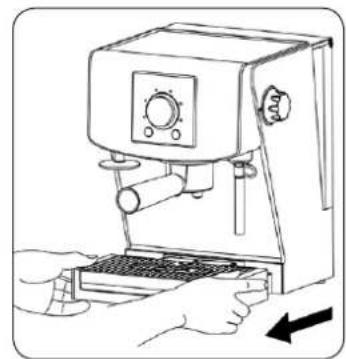
natural_image
Line drawing of a hand using a espresso machine to press or install a keyboard (no text or symbols present)Des. 11
natural_image
Diagram of a hand operating a circular mechanical device with a rotating knob (no text or symbols)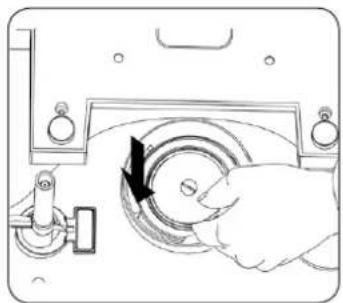
natural_image
Diagram of a hand operating a circular device with a black arrow indicating rotation (no text or symbols present)Des. 14
natural_image
Diagram of a hand operating a circular mechanical device with rotating components (no text or symbols)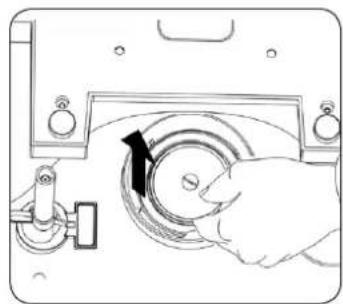
natural_image
Line drawing of a hand operating a circular device with a black arrow indicating rotation (no text or symbols)Des. 12
natural_image
Line drawing of a hand using a espresso machine with a keyboard and lever (no text or symbols)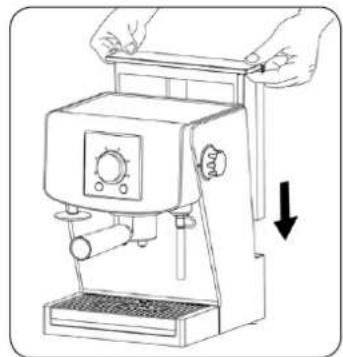
natural_image
Line drawing of a hand operating a standard espresso machine with a downward arrow indicating compression (no text or symbols present)Des. 13
natural_image
Line drawing of a hand using a coffee machine with a keyboard and control panel (no text or symbols)natural_image
Line drawing of a hand operating a manual coffee machine with an arrow indicating press direction (no text or symbols)Puc. 1
natural_image
Line drawing of a water tap with a rectangular tank and handle (no text or symbols)Puc. 2
natural_image
Line drawing of a hand using a coffee machine to press or adjust its contents (no text or symbols present)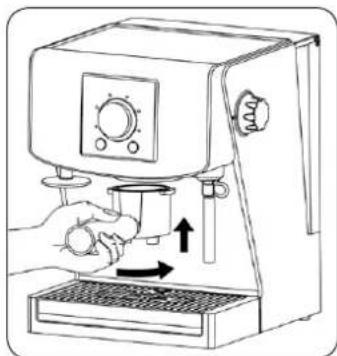
natural_image
Line drawing of a hand using a coffee machine to press or adjust its cup (no text or symbols present)Puc. 3
natural_image
Line drawing of a hand using a coffee maker to press or<|rotate_right|> (no text or symbols present)Puc. 4
natural_image
Line drawing of a hand using a manual mixer machine with a control panel and lever (no text or symbols)Puc. 5
natural_image
Illustration of a hand holding a small object next to a circular object (no text or symbols)Puc. 6
natural_image
Line drawing of a hand holding a faucet with liquid pouring from the side (no text or symbols)Puc. 7
natural_image
Line drawing of a hand using a coffee machine with a cup on the tray (no text or symbols)Puc. 8
natural_image
Line drawing of a hand using a standard espresso machine (no text or symbols present)Puc. 9
natural_image
Technical line drawing of a mechanical clamp or bracket mounted on a base (no text or symbols)Puc. 10
13. Удаление накипи
natural_image
Line drawing of a manual coffee machine with hands and an upward arrow indicating motion (no text or symbols)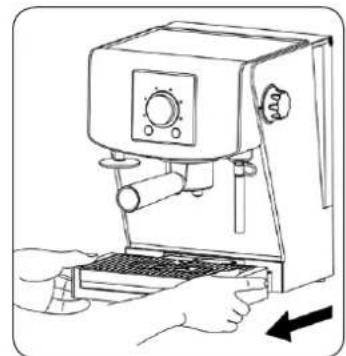
natural_image
Line drawing of a hand using a espresso machine with a keyboard and control panel (no text or symbols)Puc. 11
natural_image
Technical line drawing of a mechanical assembly with a hand operating a rotating component (no text or symbols)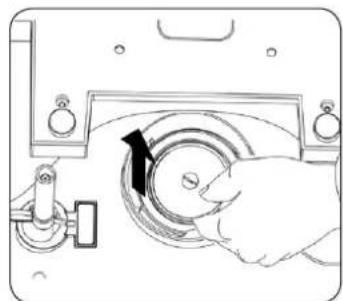
natural_image
Illustration of a hand operating a circular mechanical device with a black arrow indicating rotation (no text or symbols present)Puc. 12
natural_image
Line drawing of a hand using a espresso machine with a keyboard and lever (no text or symbols)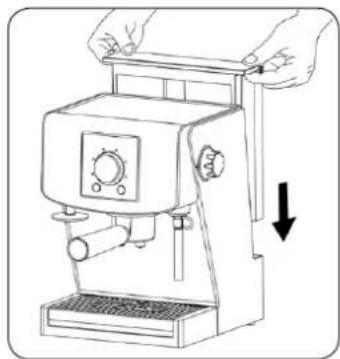
natural_image
Line drawing of a manual espresso machine with hands adjusting the blade (no text or symbols)Puc. 13
natural_image
Line drawing of a hand using a tool to interact with a circular mechanical device (no text or symbols)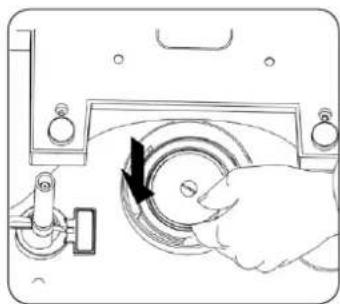
natural_image
Line drawing of a hand operating a circular mechanical component with a black arrow indicating rotation (no text or symbols)Puc. 14
14. Очистка и уход
natural_image
Line drawing of a hand using a coffee machine to press or install a tray (no text or symbols present)natural_image
Line drawing of a hand operating a coffee machine with an arrow indicating motion (no text or symbols)Puc. 1
natural_image
Line drawing of a water tap with a handle and adjacent storage unit (no text or symbols)Puc. 2
natural_image
Line drawing of a hand using a coffee machine to press or install a button (no text or symbols present)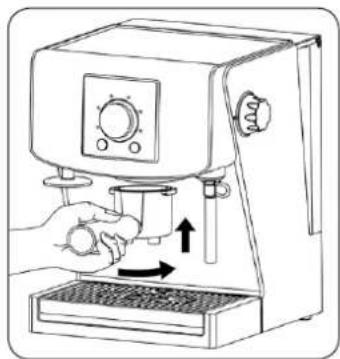
natural_image
Line drawing of a hand using a coffee machine to press or adjust its contents (no text or symbols present)Puc. 3
natural_image
Line drawing of a hand using a coffee maker to press or<|rotate_right|> (no text or symbols present)Puc. 4
natural_image
Line drawing of a hand using a espresso machine to press or adjust the cup (no text or symbols present)Puc. 5
natural_image
Illustration of a hand holding a small object near an eye, with a circular object below (no text or symbols)Puc. 6
natural_image
Line drawing of a hand holding a faucet with a hose, no text or symbols presentPuc. 7
natural_image
Line drawing of a coffee maker with a hand operating the machine (no text or symbols)Puc. 8
natural_image
Line drawing of a hand using a standard espresso machine (no text or symbols)Puc. 9
natural_image
Technical line drawing of a mechanical clamp or bracket mounted on a base (no text or symbols)Puc. 10
natural_image
Line drawing of a manual coffee maker with hands operating the blade (no text or symbols)Puc. 11
natural_image
Line drawing of a hand using a coffee machine with a keyboard and control panel (no text or symbols)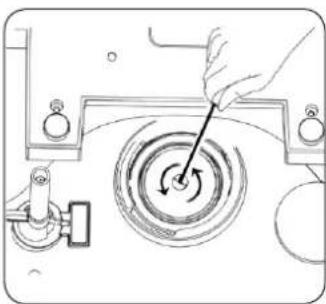
natural_image
Technical line drawing of a mechanical assembly with a hand operating a rotating component (no text or symbols)Puc. 12
natural_image
Line drawing of a hand operating a circular mechanical component with a black arrow indicating rotation (no text or symbols)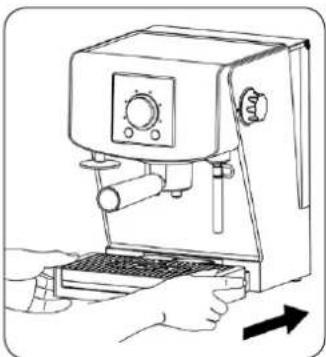
natural_image
Line drawing of a hand using a espresso machine with a keyboard and control panel (no text or symbols)Puc. 13
natural_image
Line drawing of a manual coffee machine with hands operating it, showing no text or symbols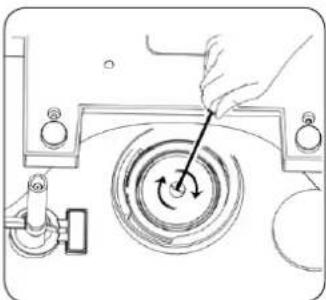
natural_image
Line drawing of a hand operating a circular mechanical device with a knob and rotating button (no text or symbols)Puc. 14
natural_image
Line drawing of a hand operating a mechanical device with a circular component and directional arrow (no text or symbols)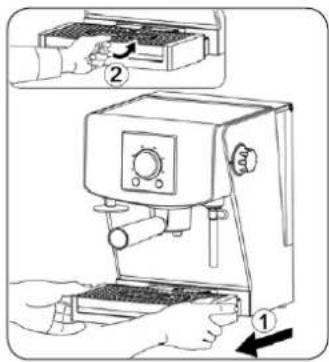
natural_image
Line drawing of a hand using a coffee machine to press or install a tray (no text or symbols present)natural_image
Line drawing of a manual espresso machine with hands operating it (no text or symbols)Мал. 1
natural_image
Line drawing of a water tap station with a handle and canopy (no text or symbols)Мал. 2
natural_image
Line drawing of a hand using a coffee machine to press or<|rotate_right|> (no text or symbols present)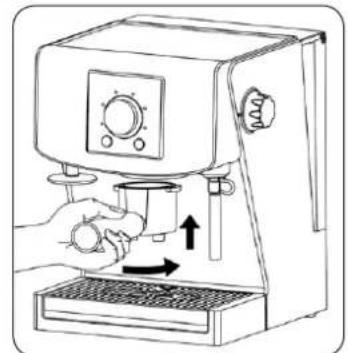
natural_image
Line drawing of a hand using a coffee machine to press or<|rotate_right|> (no text or symbols present)Мал. 3
natural_image
Line drawing of a hand using a coffee maker to press or<|rotate_right|> (no text or symbols present)Мал. 4
natural_image
Line drawing of a hand using a coffee machine to press or adjust its contents (no text or symbols present)Мал. 5
natural_image
Illustration of a hand holding an eye with a magnifying glass, next to a circular object (no text or symbols)Мал. 6
natural_image
Line drawing of a hand holding a faucet with water pouring from the side (no text or symbols)Мал. 7
natural_image
Line drawing of a coffee maker with a hand operating the machine (no text or symbols)Мал. 8
natural_image
Line drawing of a hand using a standard espresso machine (no text or symbols present)Мал. 9
natural_image
Technical line drawing of a mechanical clamp or bracket mounted on a base (no text or symbols)Мал. 10
13. Усування каменю
natural_image
Line drawing of a hand using a espresso machine with a keyboard and lever (no text or symbols)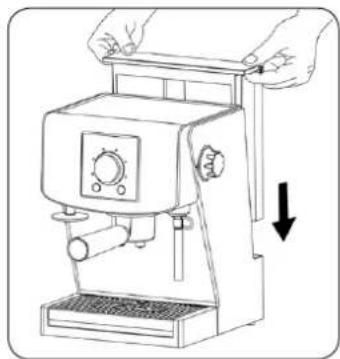
natural_image
Line drawing of a manual espresso machine with hands adjusting the top panel (no text or symbols)Мал. 13
natural_image
Diagram of a hand operating a circular mechanical device with rotating components (no text or symbols)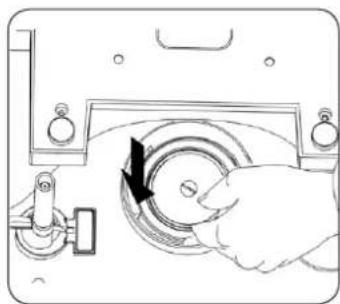
natural_image
Line drawing of a hand operating a mechanical device with a circular component and directional arrow (no text or symbols)Мал. 14
natural_image
Line drawing of a coffee maker with hands holding the lid and an upward arrow indicating motion (no text or symbols)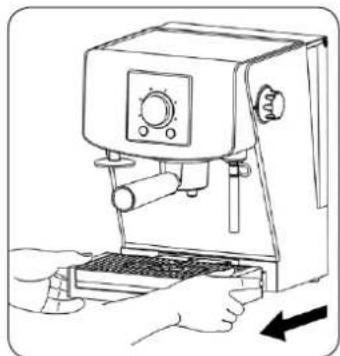
natural_image
Line drawing of a hand using a espresso machine to press or install a tray (no text or symbols present)Мал. 11
natural_image
Technical line drawing of a mechanical device with a hand operating a rotating wheel (no text or symbols)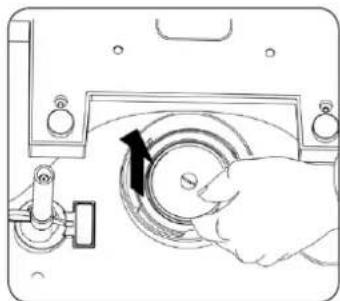
natural_image
Hand operating a circular mechanical device with a black arrow indicating rotation (no text or symbols visible)Мал. 12
-
Machine specifications....59
-
Machine design....59
-
Control panel....59
-
Filling the water tank 59
-
Warming up the cups 60
-
Before first use (rinsing the machine) 60
6.1. The rinse cycle for espresso function 60
6.2. The rinse cycle for steam function 60
-
Choosing mode of coffee in espresso bags/hot brewing temperature ...
-
Preparing espresso using programmed settings of coffee size ..... 60
-
Preparing espresso using function of manual brewing of coffee ..... 61
-
Preparing steam (milk foaming) 61
-
Automatic switch off function....62
-
Emptying of the drip tray 62
-
Descaling 62
-
Cleaning and care....63
-
Troubleshooting 63
ECOLOGY – ENVIRONMENT PROTECTION 64
Dear Customers,
Congratulations on your choice of our appliance, and welcome among the users of Zelmer products.
In order to achieve best possible results we recommend using exclusively original Zelmer accessories. They have been specially designed for this product.
We encourage you to read the following instruction manual carefully, especially paying great attention to the safety instructions. The instruction manual should be retained for future use of the espresso machine.
SAFETY INSTRUCTIONS
- Do not use the machine, if it has visible damage, a damaged cord, after it has fallen down or has been damaged in any other way. If you suspect that the machine is damaged, its testing, repair, adjustments should be carried out only by a member of a qualified service staff.
If the non-detachable part of the cord is damaged, it should be replaced by the producer or at a proper service point or by a qualified person in order to avoid any hazards.
The appliance can only be repaired by qualified service personnel. Improper servicing may cause a serious hazard to the user. In case of defects please contact a qualified service center.
- Read carefully and retain the following instruction manual delivered to you along with the machine.
● The machine is for home indoor usage only.
- Do not use the machine outdoors or for commercial purposes.
- Make sure that the voltage on the rating plate corresponds to the voltage in the socket.
● Always place the machine on a flat, even surface.
- Do not use the espresso machine without any water in the water tank. Fill the tank only with cold, filtered, clean and fresh water. Using warm or hot water or other liquids may result in damage of the machine or pose a threat. Refill the tank with no more than 1.5 liters.
- If the machine is not used for a longer period, empty the water tank.
- Never remove the filter handle during brewing coffee or hot water, as the machine is under pressure. Removing the filter handle may end in scalds or other injuries.
- The steam nozzle becomes extremely hot during milk foaming and water flow. It may cause scalds, therefore it is vital to avoid any direct contact with it.
- When cleaning the espresso machine or in case of any problems during brewing, it is necessary to turn the machine off and pull the plug out.
- Do not let the cord to come into contact with hot parts of the espresso machine, including the cup-warming plate and steam nozzle.
- Do not touch the hot surfaces of the machine.
- Do not place hands directly under a jet of steam, hot water or poured coffee, as it may result in scalds or other injuries.
- Using any additional equipment not recommended by the producer of the machine, may pose threat.
- While the machine is operating do not press any mobile elements against the machine.
- Before brewing coffee make sure the filter handle has been installed correctly.
- Do not move the machine when it is on or working. Before moving the espresso machine, turn it off and pull the plug out.
- Always turn the machine off before plugging or unplugging it. The plug should not be removed by the cord – grab the plug itself.
- Always turn the power off and remove the plug when the machine is cleaned or will not be used for a longer time.
- Do not use the machine with an extension cord, unless it was checked by a qualified technician or a service worker.
- The machine should only be plugged to an AC electric grid of a voltage in accordance with the requirements on the rating plate of the machine through a grounded socket.
- This appliance is not intended for use by persons (including children) with reduced physical, sensory or mental capabilities, or lack of experience and knowledge, unless they have been given supervision or instruction concerning use of the appliance by a person responsible for their safety.
- Children should be supervised to ensure that they do not play with the appliance.
- The appliance is not intended to be operated by means of an external timer or separate remote-control system.
- Turn off the device and unplug it from an outlet before replacing the equipment or approaching moving parts during use.
- Before cleaning the machine or its assembly/disassembly it is always advisable to plug the cord out of the socket and let the machine cool off.
- Do not use the espresso machine for purposes other than intended described in the instruction manual.
- Do not place the machine near sources of heat, flame, electric heaters or on a hot oven. Do not place it on any other device.
- Do not let the cord hang over a table or shelf or touch a hot surface.
- Do not place the machine on a wet or hot surface.
- Do not use the machine, if the drip tray or its grid are not properly installed.
- Do not leave the machine in the vicinity of a hot electric/gas cooker nor inside an oven.
- Do not submerge the machine in water or any other liquid.
- CAUTION: In order to minimize fire, electrocution or injury hazard, do not try to disassemble the machine on your own. The inner parts of the machine are not meant to be operated by the user. Any repairs should be carried out only by an authorized staff.
- Do not try to grease the machine. There are no additional maintenance works to be carried out for this espresso machine.
- The producer does not allow to use any additional equipment, as it may pose threat to the user.
- CAUTION: The water tank should not be open during use.
- CAUTION: Make sure every time you want to use the machine there is water in the tank.
Please make sure that the above instructions were comprehended.
TECHNICAL DATA
The technical data are given on the rating plate of the machine.
Power rating: 1130–1350 W at 220–240 V.
Water tank capacity: max. 1.5 l.
The espresso machine is a 1st class device equipped with a cord with a protective wire and a plug with a protective contact.
The espresso machine complies with the requirements of the current standards.
The machine meets the requirements of the following directives:
- The Low Voltage Directive (LVD) – 2006/95/EC.
- The Electromagnetic Compatibility (EMC) Directive – 2004/108/EC.
The product has the CE Mark on its rating plate.
1. Machine specifications
The espresso machine brews coffee of rich taste and aroma of high quality, as the water used for the process is at perfect temperature. The machine was designed to observe its readiness for brewing and percolation of coffee, as well as steam production for foaming milk.
The espresso machine has two unique and innovative systems: Perfect Brewing System and SmartPress System.
Perfect Brewing System by choosing the optimum brewing temperature and an adequate degree of coffee pressing provides you with the best quality of beverage.
SmartPress System is an integrated filtering system with automatic before-brewing coffee compression, which results in a beverage of unique taste and aroma with a delicious creamy froth.
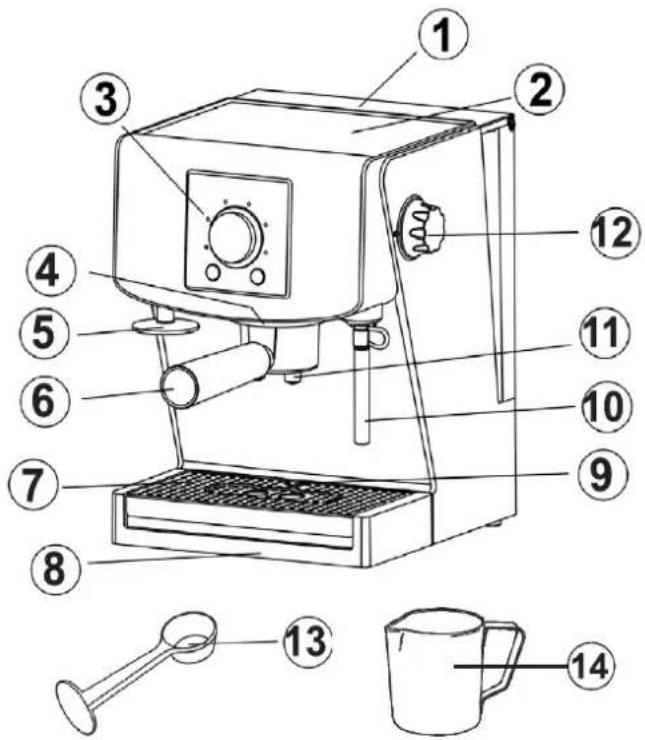
2. Machine design
1 Removable water tank with the cover
2 Cup heating plate
3 Control panel
4 Brew head
5 Tamping device
6 Filter holder
7 Drip tray grid
8 Drip tray
9 Emptying drip tray full indicator
10 Steam/cappuccino wand
11 Coffee dispenser
12 Steam release knob
13 Measuring/tamping spoon
14 500 ml jug
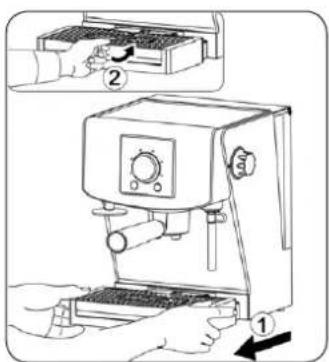
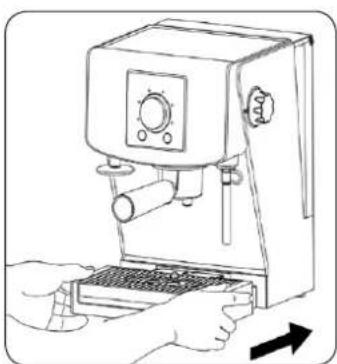
natural_image
Line drawing of a hand using a coffee machine with a keyboard and control panel (no text or symbols)Before start to use the appliance first time, remove the water release hole protective label from the drip tray plate.
3. Control panel
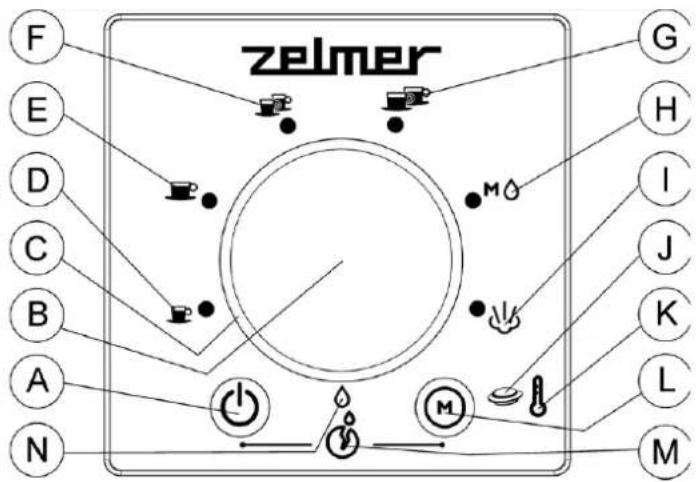
A Power On/Off button
B Espresso machine's knob
C Knob indicator
D Single small cup indicator
E Single big cup indicator
F Two small cups indicator
G Two big cups indicator
H Manual brewing coffee indicator
I Steam indicator
J Brewing coffee in espresso bags mode indicator
K Temperature level indicator
L Temperature/coffee in espresso bags/ground coffee button
M Descaling indicator
N Low water level indicator
4. Filling the water tank
ATTENTION! Fill the tank (1) with water only when the power cord is unplugged from the power grid. A valve in the bottom part of the tank prevents leaking water.
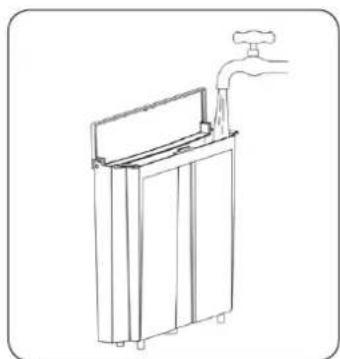
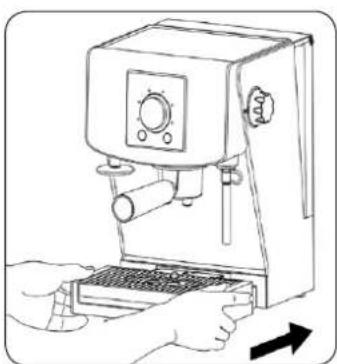
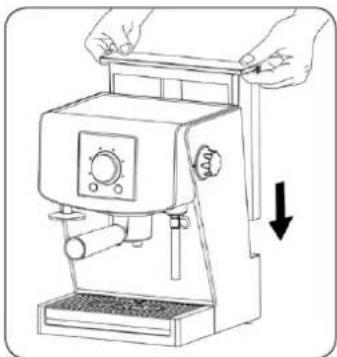
- Remove the water tank (1) by pulling it up (Fig. 1).
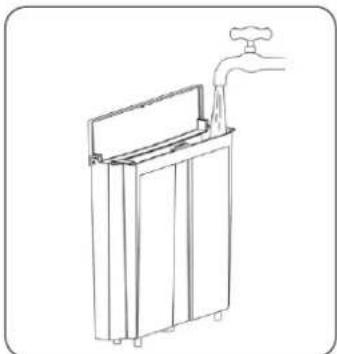
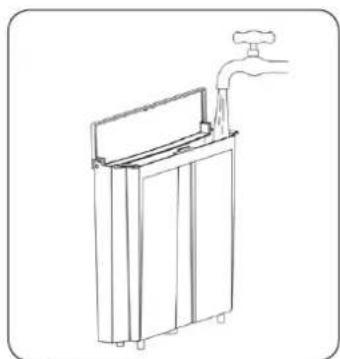
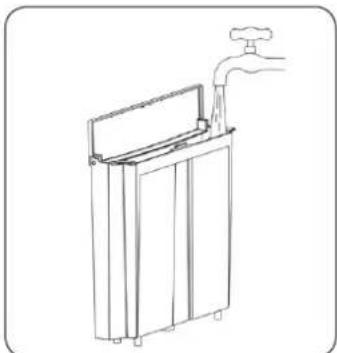
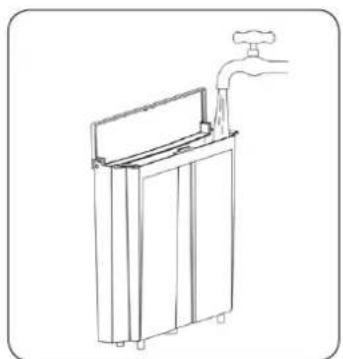
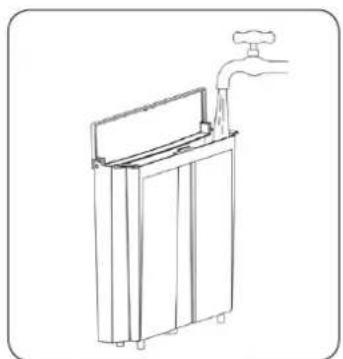
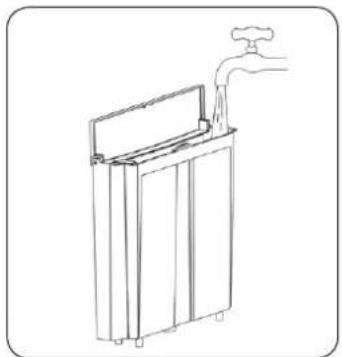
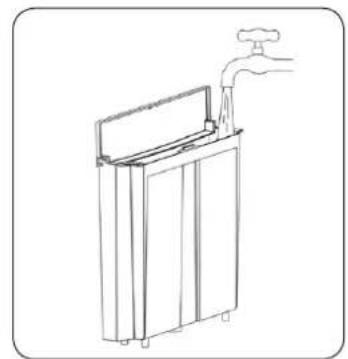
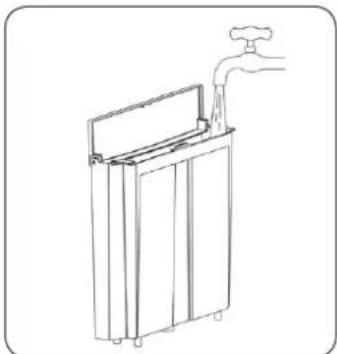
- Open the cover of the water tank (1) and fill it with cold, fresh water (Fig.2). The MAX mark shall not be exceeded.
- Put the tank (1) back and press it.
- Close the cover of the tank (1).
- We could fill the tank with water also without taking it out of the espresso machine, e.g. by using a jug of water.
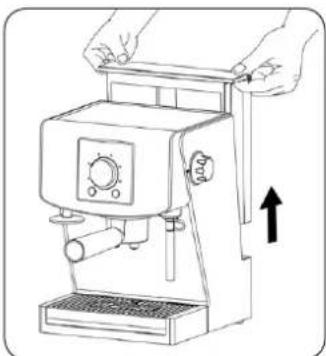
natural_image
Line drawing of a manual espresso machine with hands and an arrow indicating motion (no text or symbols)Fig. 1
natural_image
Line drawing of a water tap with a rectangular tank and handle (no text or symbols)Fig. 2
WARNING! The espresso machine should not be used, when the tank (1) is empty. Before starting the process of coffee brewing make sure that the tank (1) is full of water. Do not fill the tank (1) with hot water. For the hygienic reasons do not leave water in the tank for the long time.
WARNING! Remember to make sure that the water level in the tank (1) is appropriate (not too low). If this situation happens, the alarm signal will be repeated until the tank (1) is filled with water and the indicator △ (N) on the control panel starts flashing.
5. Warming up the cups
Using of a cup heated to the appropriate temperature before starting the coffee brewing process enhances the taste of the coffee just after its making and results in thick foam on top of it.
You can preheat a cup using two methods. First method is that a cup is heated with the use of the steam from the steam wand (10) according to the point 6.2.
Cups may be preheated also by putting them before the coffee brewing process on the special cup heating plate (2) on the upper side of the espresso machine.
ATTENTION! The coffee maker was designed with a power consumption protection device, and after one hour of standing-by (with no coffee making or other processes active), it automatically turns itself off. This means that it is impossible for the heating panel to heat up for more than one hour.
6. Before first use (rinsing the machine)
Before first use or if the machine hasn't been used for a prolonged period, it is advisable to run a rinse cycle through the machine.
6.1. The rinse cycle for espresso function
6.1.1. Turn the machine off at the power outlet and unplug the power cord.
6.1.2. Fill the tank (1) with water in accordance with point 4.
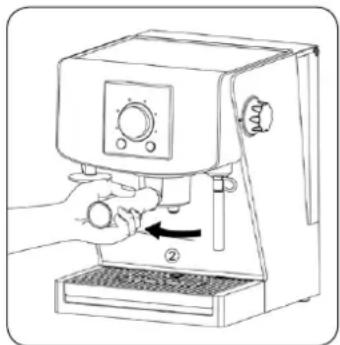
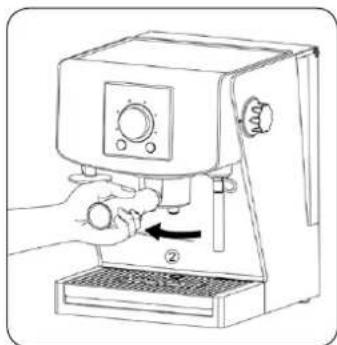
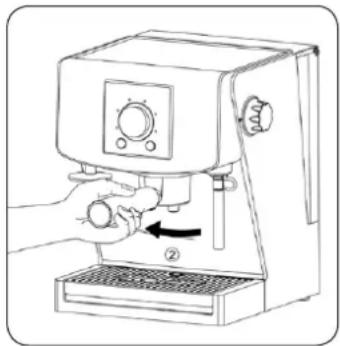
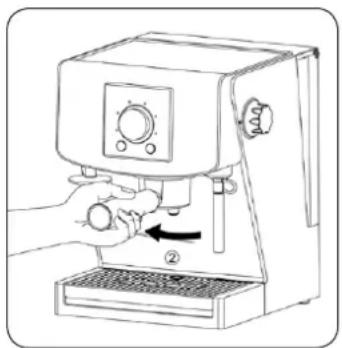
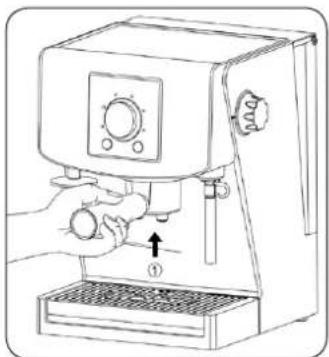
6.1.3. Install the empty filter holder (6) in the brew head (4), turning it firmly right (Fig. 3).
natural_image
Line drawing of a hand using a coffee machine to press or adjust a coffee machine (no text or symbols present)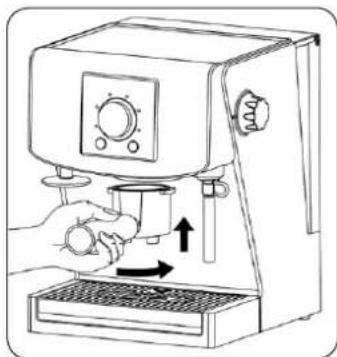
natural_image
Line drawing of a hand using a coffee machine to press or brush (no text or symbols present)Fig. 3
6.1.4. Put a container on the drip tray grid (7), under the brew head (4).
6.1.5. Connect the machine to the power grid putting the power plug to the socket. The espresso machine will turn on. The signal will sound, knob indicator (C) will flash several times. Then knob indicator (C) will go out.
6.1.6. Press the Power On/Off button (A). The signal will sound.
6.1.7. Knob indicator (C) will start flashing to inform you that the espresso machine is in the course of heating.
6.1.8. When the knob indicator (C) stops flashing, the signal will sound. Continuous glowing of the knob indicator (C) means that the espresso machine is ready to use (attaining appropriate temperature).
6.1.9. Turn the knob of the espresso machine (B) in such a way that two big cups of coffee indicator 📄 (G) on the control panel will start being illuminated.
6.1.10. Press the knob of the espresso machine (B). The signal will sound. If the machine does not attain appropriate temperature of use, the knob indicator (C) will start flashing to inform you that the espresso machine is in the course of warming up.
6.1.11. When the knob indicator (C) stops flashing and starts being illuminated continuously, the boiling water will come out of the machine.
6.1.12. The process of coffee brewing will be automatically finished after attaining the quantity of two big cups of water (by default). The two signals will sound and the knob indicator (C) will start being illuminated continuously.
6.1.13. Repeat the 6.1.10 step three times.
6.2. The rinse cycle for steam function
6.2.1. Check if there is water in the tank (1). In case there is no water, fill the tank (1) in accordance with the point 4.
6.2.2. Turn the knob the espresso machine in such a way that steam indicator ⏻ (I) starts being illuminated on the control panel. The knob indicator (C) will immediately start flashing to inform you that the espresso machine is in the course of warming up.
6.2.3. When the knob indicator (C) stops flashing and starts being illuminated continuously, it means that the espresso machine is ready for use with steam (attaining appropriate temperature).
6.2.4. Put a container under the steam wand (10) and turn the steam release knob (12) to the ⏻ position, that is turn it counterclockwise in such a way that the ⏻ symbol coincides with the mark on the machine casing. The steam will start coming out of the steam wand (10). Let the machine work with steam function turned on for about one minute. Then set the steam release knob (12) to the OFF position, that is turn it clockwise in such a way that OFF symbol coincides with the mark on the machine casing. Empty the container.
6.2.5. Repeat the 6.2.4 step three times.
7. Choosing mode of coffee in espresso bags/hot brewing temperature
The Ⓜ (L) button allows just before the coffee brewing process to set the mode of brewing coffee in espresso bags and also to shift between standard and hot temperature modes. Every pressing of the Ⓜ (L) button is accompanied with sound signal. Setting required mode is confirmed by
appearance of the indicators: (J), (K) in the red colour as well as their lack on the control panel (3). Setting the coffee in espresso bags mode/brewing temperature mode takes place according to the following
sequence of the indicators: (J) (K) (J) (K) (J) (K) turned off (J) etc.
| Indicator | Meaning |
| (J) (K) turned off | Ground coffee with standard temperature mode. |
| (J) | Coffee in espresso bags with standard temperature mode. |
| (K) | Ground coffee with hot temperature mode. |
| (J) (K) | Coffee in espresso bags with hot temperature mode. |
8. Preparing espresso using programmed settings of coffee size
8.1. Turn the machine off at the power outlet and unplug the power cord.
8.2. Fill the tank (1) with water in accordance with point 4.
8.3. Connect the device with to power grid putting the power plug to the socket. The espresso machine will turn on. The signal will sound, the knob indicator (C) will flash 5 times. Then the knob indicator (C) will go out.
8.4. Press the Power On/Off button ⏻(A); the signal will sound.
8.5. The knob indicator (C) will start flashing to inform you that the espresso machine is in the course of warming up.
8.6. When the knob indicator (C) stops flashing, the signal will sound. Continuous glowing of the knob indicator (C) means that the espresso machine is ready for use (attaining appropriate temperature).
8.7. Choose the coffee in espresso bags mode or ground coffee mode and the level of temperature (standard or hot) with the use of the Ⓜ (L) button – see point 7.
8.8. Pour ground coffee with the use of the measuring/tamping spoon (13) or put the coffee in espresso bags into the container of the filter holder (6).
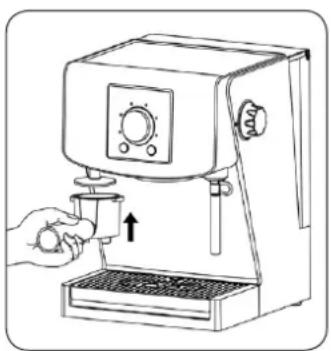
8.9. Remove the exceed of coffee from the edge of the filter and tamp coffee with the use of the tamping device fastened to the machine (5) or the tamping spoon of the measure (13) (Fig. 4).
8.10. Put the filter holder (6) into the brew head (4), turning it firmly right (Fig. 3).
8.11. Put a cup or cups on the drip tray grid (7), directly under the container of the filter holder (6).
8.12. With the use of the knob of the machine (B) choose a single small cup - 40 ml - (D) indicator) or a big cup - 60 ml - (E) indicator) or two small cups - 2x40 ml - (F) indicator) or two big cups - 2x60 ml - (G) indicator). Your choice will be confirmed by going on of the chosen indicator.
8.13. Press the knob of the espresso machine (B). The signal will sound. If the espresso machine does not attain appropriate temperature for use, the knob indicator (C) will start flashing to inform you that the espresso machine is in the course of warming up.
8.14. When the knob indicator (C) stops flashing and starts being illuminated continuously, the coffee will come out of the machine.
8.15. The process of brewing will be automatically finished after attaining the quantity of coffee set previously. Two signals will sound and the knob indicator (C) will glow continuously.
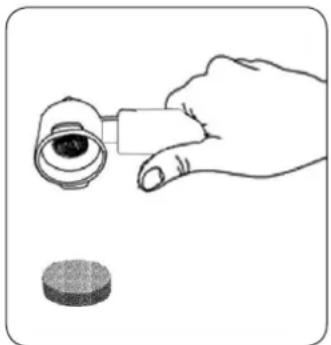
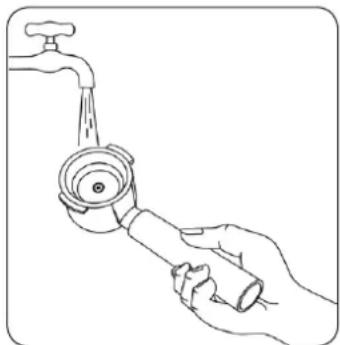
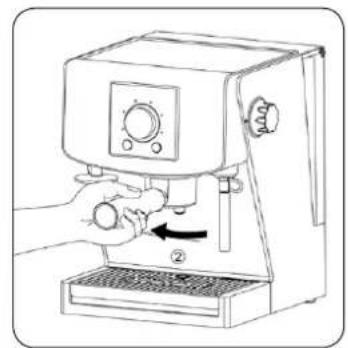
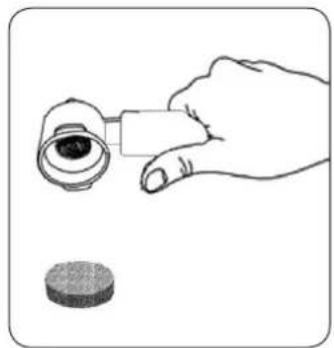
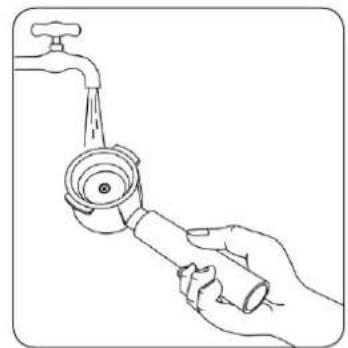
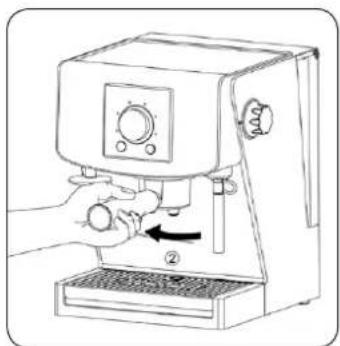
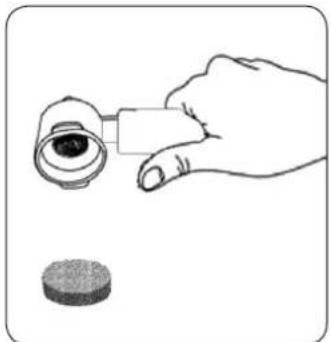
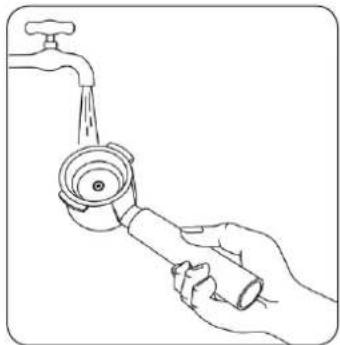
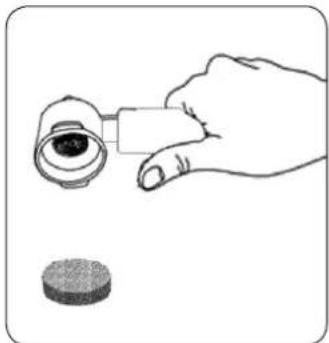
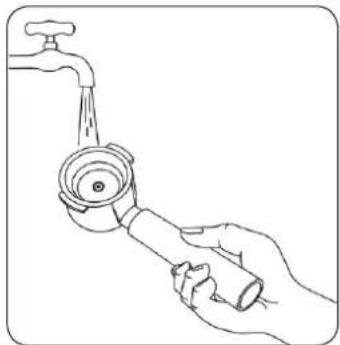
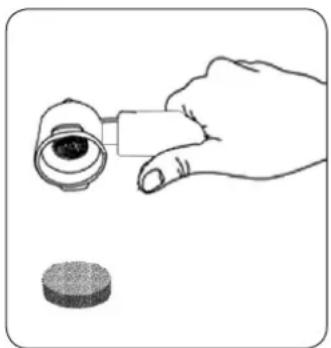
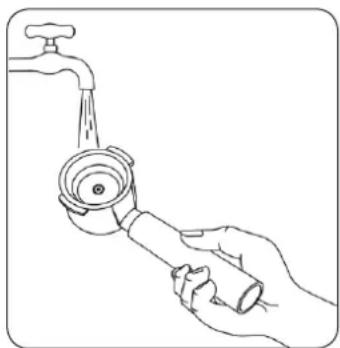
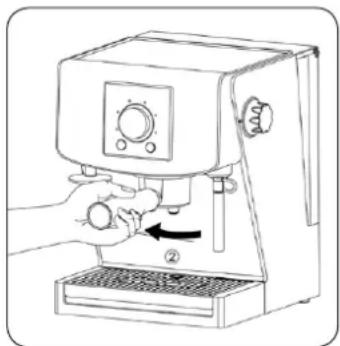
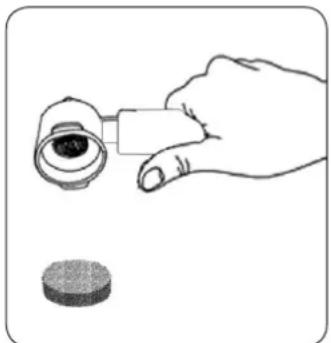
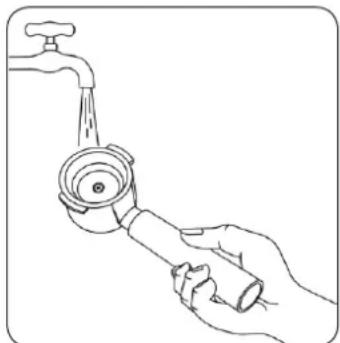
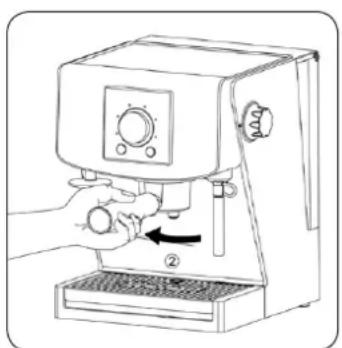
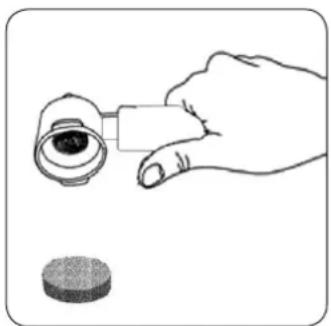
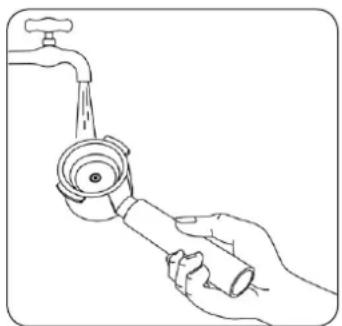
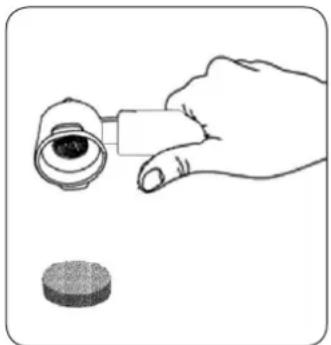
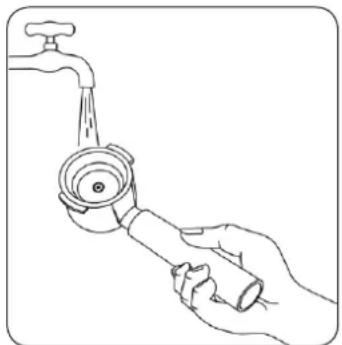
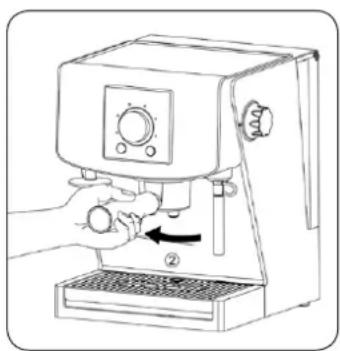
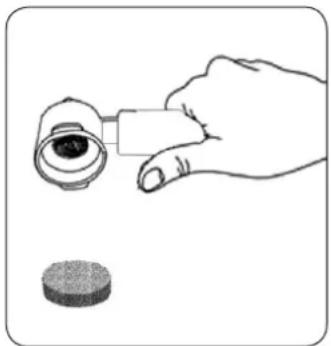
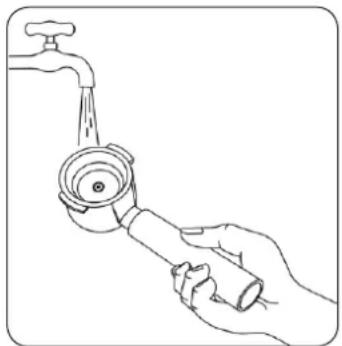
8.16. Take off the filter holder by turning it left (Fig. 5), then throw away the used bag or coffee grounds (Fig. 6). Clean the filter with water (Fig. 7).
natural_image
Line drawing of a hand using a coffee maker to press or<|rotate_right|> (no text or symbols present)Fig. 4
natural_image
Line drawing of a hand using a microwave oven to press or adjust the cup (no text or symbols present)Fig. 5
natural_image
Illustration of a hand holding an eye with a magnifying glass, next to a circular object (no text or symbols)Fig. 6
natural_image
Line drawing of a hand holding a faucet with water pouring from the side (no text or symbols)Fig. 7
ATTENTION! If there is too small amount of water in the tank (1) during the process of coffee brewing, the espresso machine will stop working. The ⬆(N) indicator on the control panel will start flashing and the repeating signal informing about the necessity to refill the tank with water will sound. Open the cover of the water tank (1) and pour water. Just after refilling tank the sound signal will stop and the espresso machine will automatically finish the coffee brewing process.
ATTENTION! You can stop the coffee brewing process at any time. In order to do so you need to press the Power On/Off ⏻(A) button.
ATTENTION! During the process of coffee brewing do not set steam release knob (12) to the ⏻ position, because boiling water can uncontrollably leak disturbing the process of coffee pouring at the same time. The steam release knob (12) may be only used during steam function.
9. Preparing espresso using function of manual brewing of coffee
Thanks to this function a user has a possibility to make the size of coffee that is the user's liking.
9.1. Turn the machine off at the power outlet and unplug the power cord.
9.2. Fill the tank with water (1) in accordance with the point 4.
9.3. Connect the device to the power grid by putting the power plug into a socket. The espresso machine will turn on. The signal will sound the knob indicator (C) will flash 5 times. Then the knob indicator (C) will go out.
9.4. Press the Power On/Off (A) button; the signal will sound.
9.5. The knob indicator (C) will start flashing to inform you that the machine is in the course of warming up.
9.6. When the knob indicator (C) will stop flashing, the signal will sound. If the knob indicator (C) will start being illuminated continuously, the espresso machine is ready for use (attaining appropriate temperature).
9.7. Choose the mode of coffee in espresso bags or the mode of ground coffee and the temperature level (standard or hot) with the use of Ⓜ (L) button – see point 7.
9.8. Pour ground coffee with the use of the measuring/tamping spoon (13) or put the coffee in espresso bags into the container of the filter holder (6).
9.9. Remove the exceed of coffee from the edge of the filter and tamp coffee with the use of the tamping device fastened to the machine (5) or the flat end of the measuring/tamping spoon (13) (Fig. 4).
9.10. Put the filter holder (6) into the brew head (4), turning it firmly right (Fig. 3).
9.11. Put a cup or cups on the drip tray grid (7), directly under the container of the filter holder (6).
9.12. Turn the knob of the machine (B) in such a way that the manual brewing of coffee indicator M ♂ (H) on the control panel will be illuminated.
9.13. Press the knob of the espresso machine (B). The signal will sound. If the espresso machine does not attain appropriate temperature for use, the knob indicator (C) will start flashing to inform you that the espresso machine is in the course of warming up.
9.14. When the knob indicator (C) stops flashing and starts being illuminated continuously, the coffee will come out of the machine.
9.15. The process of brewing will be automatically finished after attaining the quantity of coffee set previously. Two signals will sound and the knob indicator (C) will glow continuously.
9.16. Take off the filter holder by turning it left (Fig. 5), then throw away the used bag or coffee grounds (Fig. 6). Clean the filter with water (Fig. 7).
ATTENTION! If there is too small amount of water in the tank (1) during the process of coffee brewing, the espresso machine will stop working.
The (N) indicator on the control panel will start flashing and the repeating signal informing about the necessity to refill the tank with water will sound. Open the cover of the water tank (1) and pour water. Just after refilling tank the sound signal will stop and the espresso machine will automatically finish the coffee brewing process.
ATTENTION! You can stop the coffee brewing process at any time. In order to do so you need to press the Power On/Off (A) button.
ATTENTION! During the process of coffee brewing do not set steam release knob (12) to the ⏻ position, because boiling water can uncontrollably leak disturbing the process of coffee pouring at the same time. The steam release knob (12) may be only used during steam function.
10. Preparing steam (milk foaming)
For the process of milk foaming the steam function is used. The steam has two tasks: it warms up and at the same time mixes milk with the air giving it delicate, velvety appearance. Just like in coffee brewing process the best effects in milk foaming you can get gaining experience in this field.
Hint: Remember that coffee is the basis of every coffee drink and milk is only addition.
ATTENTION! It is advisable first to foam milk and then to prepare coffee.
The steam function may be also used to warm up drinks.
10.1. Prepare beforehand espresso in accordance with the point 8 or 9.
10.2. Determine the amount of necessary milk based on the number of cups or the size of a milk jug.
- Hint: Remember that the milk volume rises during the process of its foaming.
- Pour cold milk into the stainless steel jug up to 1/3 to 1/2 of its volume.
- Hint: Keep the stainless steel milk jug in a fridge in such a way that milk is chilled all the time. Remember not to rinse the jug with hot water before its use.
10.3. Turn the knob of the espresso machine (B) in such a way that the steam indicator ⏻ (I) on the control panel will be illuminated. The knob indicator (C) will immediately start flashing to inform you that the espresso machine is in the course of warming up.
10.4. When the knob indicator (C) stops flashing and starts being illuminated continuously, it means that the espresso machine is ready for foam mode (that it has attained appropriate temperature).
10.5. Rinse the steam wand (10) putting under it different container then a milk jug acting in accordance with point 6.2.4. The steam wand was initially rinsed.
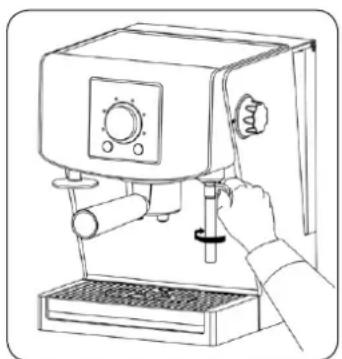
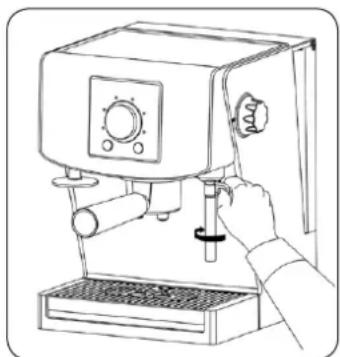
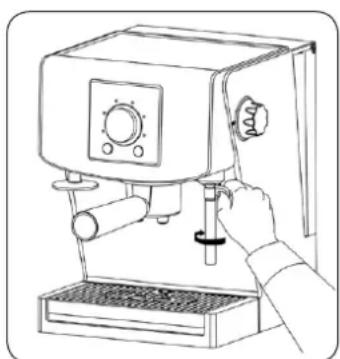
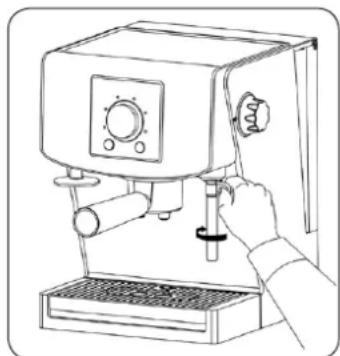
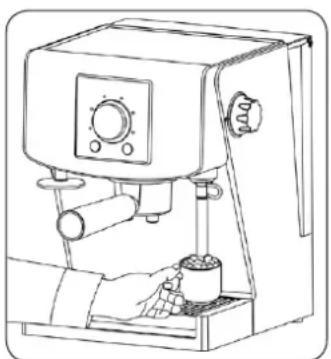
10.6. Then put the steam wand into a milk jug in such a way (Fig. 8), that the wand is approx. 1/2 ~cm below the milk surface. Activate the steam release by setting the steam release knob (12) again to the position, that is turn it counterclockwise in such a way that the symbol coincides with the mark on the casing of the espresso machine.
Tip the jug in such a way that the steam wand is in the jug and lower the jug until the tip of the steam wand is right under the milk surface. It results in starting the process of milk foaming.
- Important: Make sure that the steam comes out evenly. This results in appropriate aeration of foam. In order to avoid it, raise the jug in such a way that the steam wand is immersed deeper in milk. Remember that perfect consistency is soft, velvety foam. When milk has warmed up and foamed, the milk level in the jug starts rising. When it happens, lower the jug, however, always keep the tip of the steam wand right below the milk surface.
- When the foam is ready, raise the jug in such a way that the steam wand is inside the milk.
- Hint: The amount of necessary foam changes depending on the kind of drink. E.g. cappuccino requires more foam than coffee drink based on espresso with milk foamed by steam.
Turn off the steam function immediately, when milk is warmed up to the temperature of 60–65°C by setting the steam release knob (12) to the OFF position, that is turn it clockwise in such a way that the OFF symbol coincides with the mark on the casing of the espresso machine.
- Hint: If you do not possess the thermometer, you can find that the appropriate temperature is attained when you could not hold the hand on the jug longer than 3 seconds.
Important: ● Do not boil the milk.
- Remove the jug. Wipe the steam wand (10) and its tip immediately with the use of clean, wet cloth and then rinse the steam wand with the small amount of steam acting just like before the process of milk foaming.
- Knock the jug on a table holding it in hand in order to release the air bubbles. Then move the jug in a circular motion until the milk becomes shiny and there is no bubbles in it. It will help to achieve homogeneous consistency of milk and foam.
10.7. Pour foamed milk to prepared previously espresso. Cappuccino is ready to serve.
ATTENTION! If there is too small amount of water in the tank (1), the steam won't come out of the steam wand (10). The ⏻(N) indicator on the control panel will start flashing and the repeating signal informing about the necessity to refill the tank with water will sound. Set the steam release knob (12) to the OFF position, that is turn it clockwise in such a way that OFF symbol coincides with the mark on the machine casing. Open the cover of the water tank (1) and pour water. Just after refilling tank the sound signal will stop. In order to start the steam process again, set the steam release knob (12) to the ⏻ position, that is turn it counterclockwise in such a way that the ⏻ symbol coincides with the mark on the machine casing.
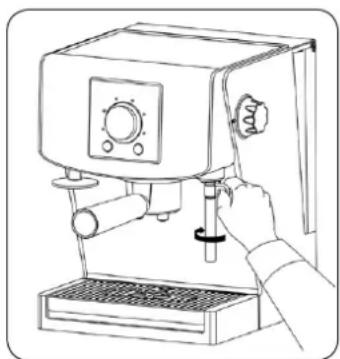
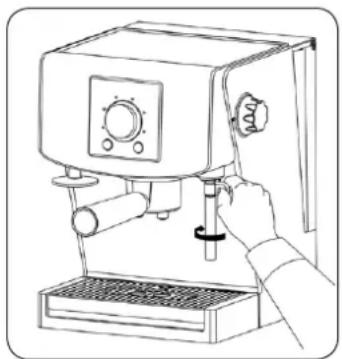
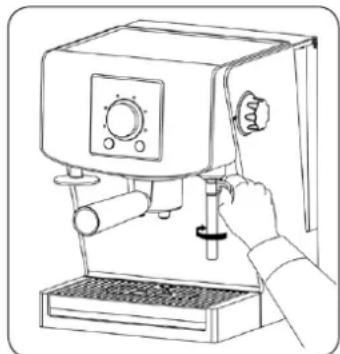
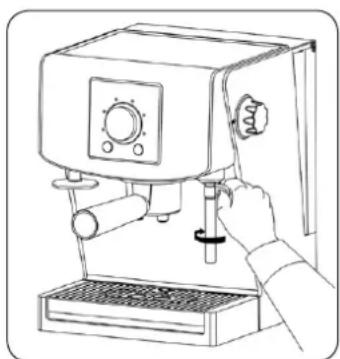
ATTENTION! Shifting of the steam/boiling water wand (10) has to be conducted with the use of special tip (Fig. 9). The steam/boiling water wand (10) is very hot.
ATTENTION! If you set steam release knob (12) to the 🔊 position when the espresso machine is not ready for foaming process (see point 10.3), the device will generate alarm signal, that is quickly repeating sound signals.
natural_image
Line drawing of a hand operating a coffee machine with a spool, no text or symbols presentFig. 8
natural_image
Line drawing of a hand using a standard espresso machine (no text or symbols present)Fig. 9
11. Automatic switch off function
The device will switch off automatically if it is not used for an hour. In order to switch on the machine again, press the Power On/Off ⏻ (A) button. The signal will sound.
12. Emptying of the drip tray
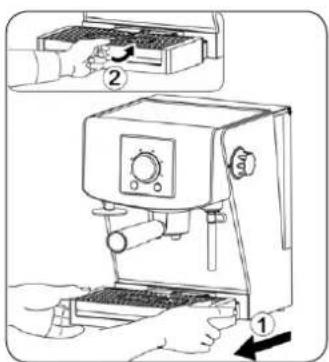
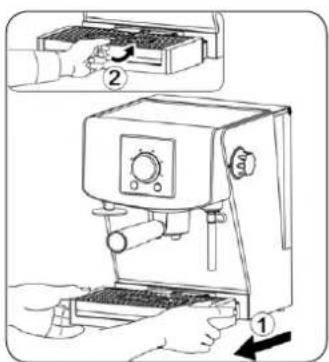
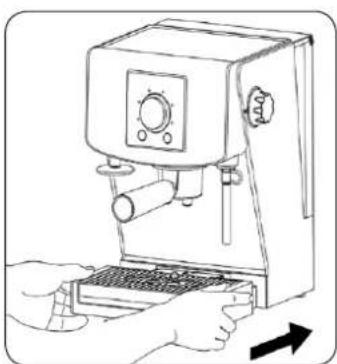
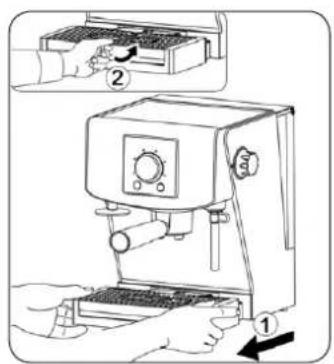
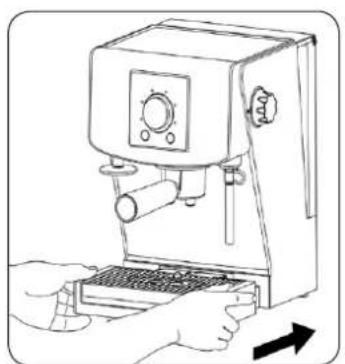
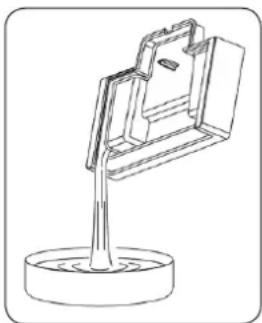
When the drip tray (8) are filled with water, red indicator of the water level in the drip tray (9) rises above drip tray grid (7). Pull out the drip tray complex (8) with the drip tray grid (7) and pour out water (Fig. 10). Put back the complex in the espresso machine.
natural_image
Technical line drawing of a mechanical clamp or bracket mounted on a base (no text or symbols)Fig. 10
13. Descaling
- Lime is the surface deposit of minerals, which appears naturally in every device connected with warming up water. That is why the machine need periodical removal of the lime. After using some determined amount of water by the machine (this amount depends strictly on the water hardness
degree set in the espresso machine) descaling indicator ⚙ will start being illuminated on the control panel. If you see this highlighted on the control panel, you have to descale the device.
ATTENTION! Descale your coffee maker at least every 3 months. The damages which are caused by failure to descale the appliance are not subject to warranty repairs.
Descaling solutions
Traditionally, the following agents are used for removal of scale from coffee makers:
Citric acid solution
Dissolve 2 spoonful (ca. 30 g) of citric acid in 1 l of water.
- Specially designated liquids or tablets.
Hint: For liquids and tablets, follow the instructions shown on the packaging of these products.
13.1. Turn the machine off at the power outlet and unplug the power cord.
13.2. Make sure that the espresso machine cools off.
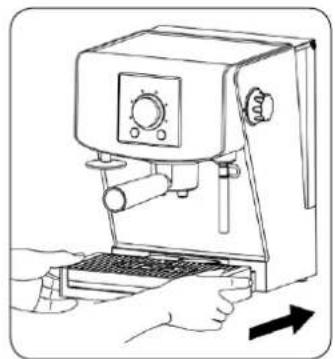
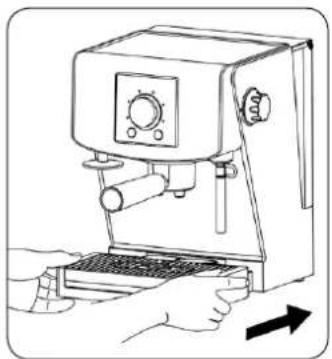
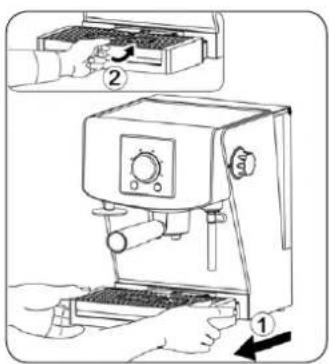
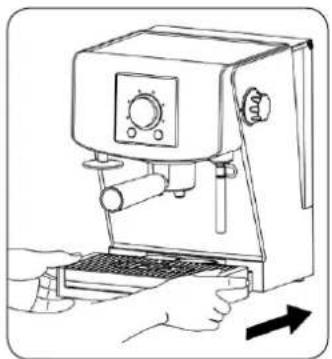
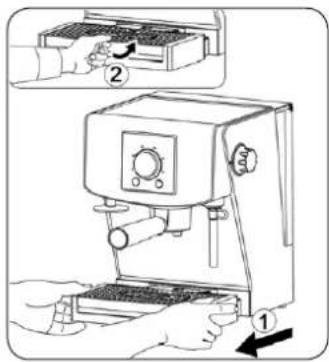
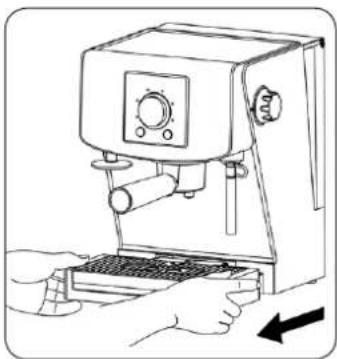
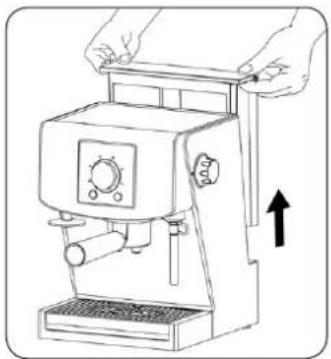
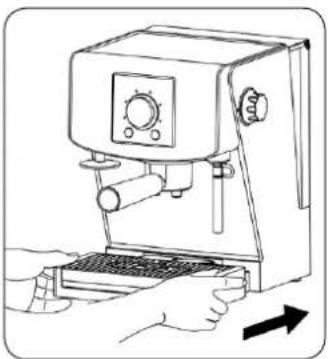
13.3. Take off the water tank (1) and the drip tray (8) with the grid (7) from the espresso machine (Fig. 11).
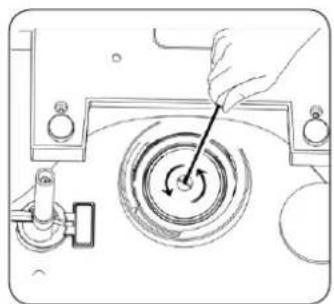
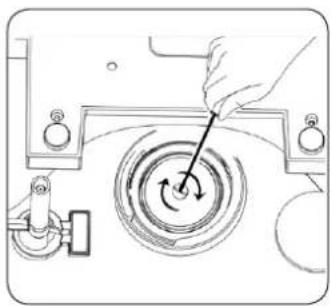
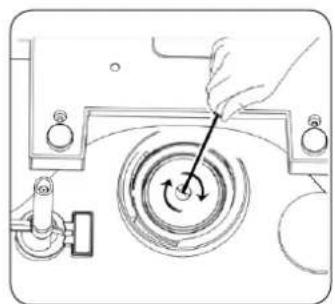
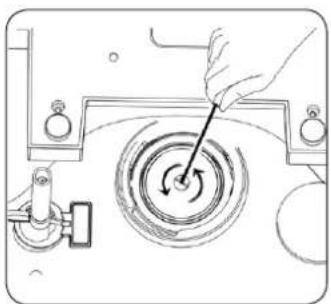
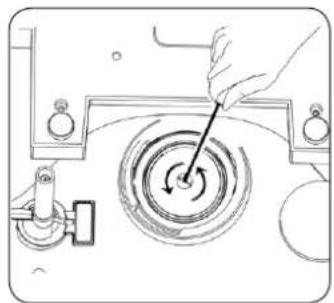
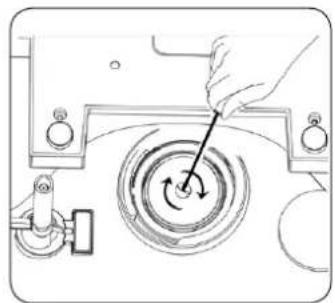
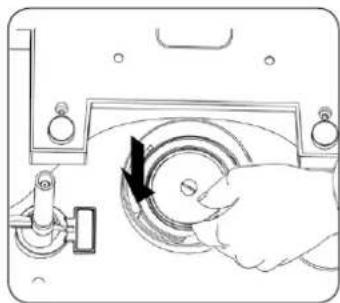
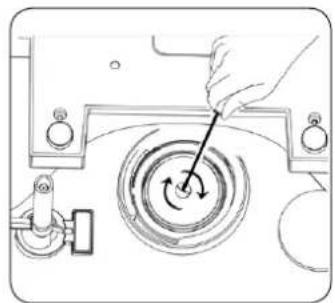
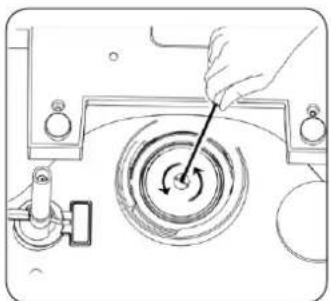
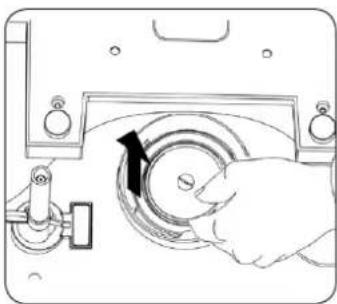
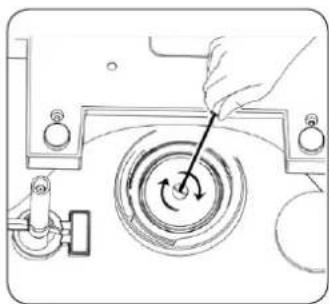
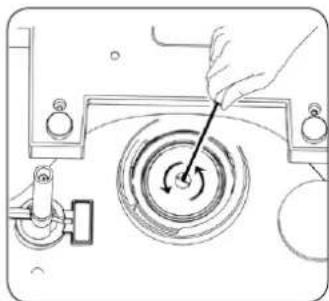
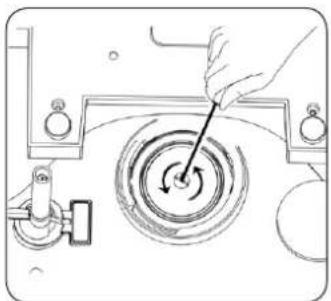
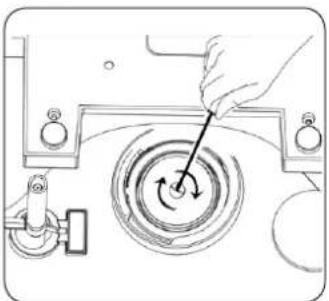
13.4. Put the machine upside down and take off the filter grid from the filter head (4) unscrewing the grid with the use of an appropriate screwdriver (Fig. 12).
13.5. Clean the filter grid and the filter head (4), remove the lime and coffee remains.
13.6. Set the espresso machine back on the work position.
13.7. Fill the water tank (1) with prepared previously solution of the citric acid.
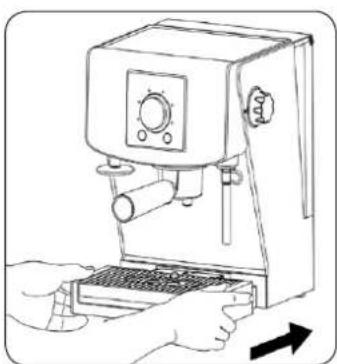
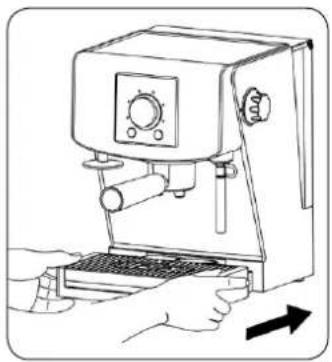
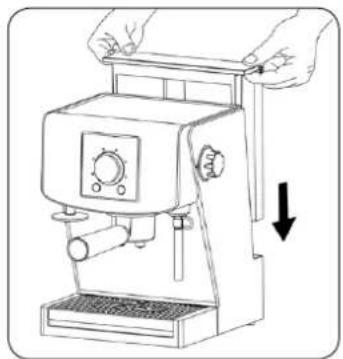
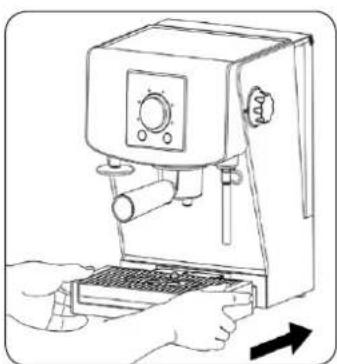
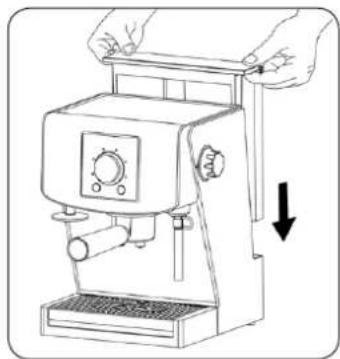
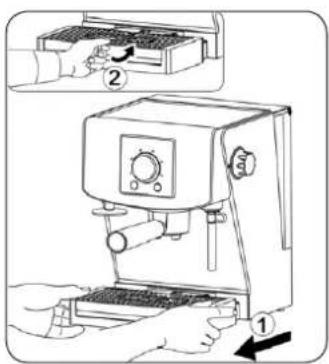
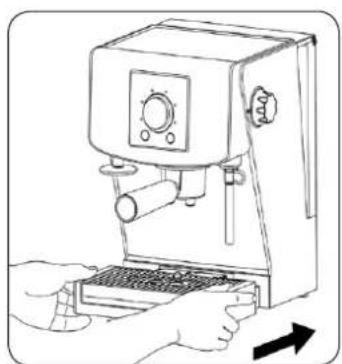
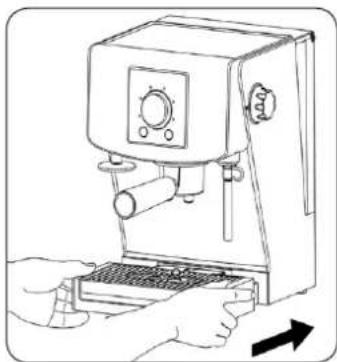
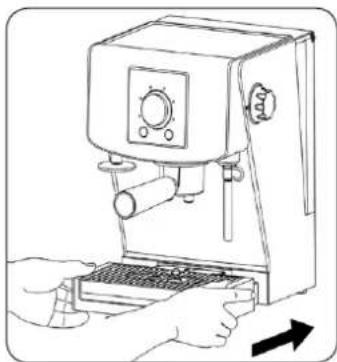
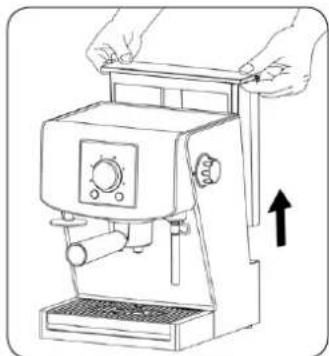
13.8. Close the cover of the water tank (1) and then put the tank (1), the drip tray (8) and the grid (7) back to the machine (Fig. 13).
13.9. Connect the device with the power grid putting the power plug to a socket. The espresso machine will turn on. The signal will sound, the knob indicator (C) will flash 5 times. Then the knob indicator (C) will go out.
13.10. Press the Power On/Off ⏻(A) button. The signal will sound.
13.11. The knob indicator (C) will start flashing to inform you that the espresso machine is in the course of warming up.
13.12. When the knob indicator (C) stops flashing, the signal will sound. Continuous glowing of the knob indicator (C) means that the machine is ready for use (it has attained appropriate temperature).
13.13. Press and hold the Power On/Off ⏻(A) button and Ⓜ(L) button together. The knob indicator (C) will go out and the signal will sound. The process of descaling will start. The descaling indicator
will flash for the time of this process.
13.14. The hot solution will come out of the brew head (4).
13.15. Wait until the solution flow through the brew head (4). The ending of 1st stage of descaling is indicated by repeating sound signal and flashing of the knob indicator (C).
13.16. Take off and rinse the tank (1) with clean water.
13.16. Put the empty container under the brew head (4) in such a way that clean water could flow through it.
13.17. In order to conduct 2nd stage of descaling (cleaning), fill the tank (1) with clean water to the MAX mark on the water tank (1). Close the cover of the water tank (1) and then put the tank back into the espresso machine.
13.18. The single signal will sound and the knob indicator (C) will go out. Water will come out of the brew head (4) (the process of the machine rinsing will start).
13.19. After the process completion water will stop flowing through the brew head (4). Single sound signal and flashing of the machine indicator (C) will indicate this. The machine will automatically turn off.
13.20. Turn the machine off at the power outlet and unplug the power cord.
13.21. Wait until the device will cool off completely.
13.22. Take off the water tank (1) and the drip tray (8) with the grid (7) from the espresso machine (Fig. 11).
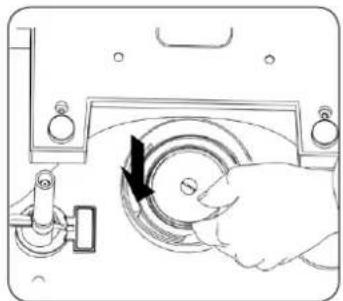
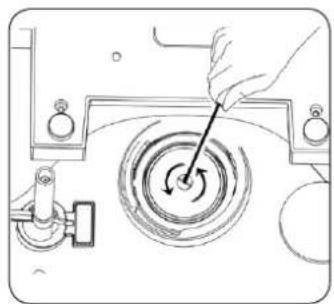
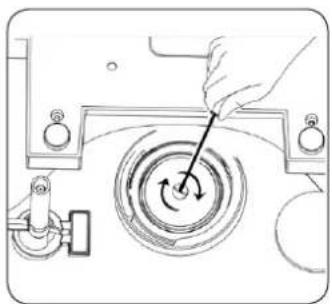
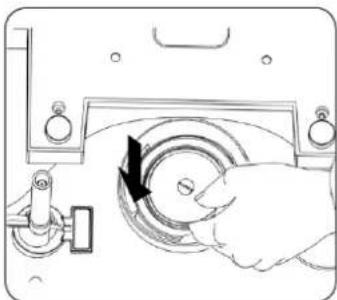
13.23. Set the espresso machine upside down and put the filter grid again on the filter head (4) screwing the grid with the use of an appropriate screwdriver (Fig.14).
13.24. Set the espresso machine back on its work position and put the drip tray (8) with the grid (7) and the water tank (1) back in the machine (Fig.13).
ATTENTION! During the process of descaling all functions of the machine are inactive.
natural_image
Line drawing of a manual coffee maker with hands adjusting the blade (no text or symbols)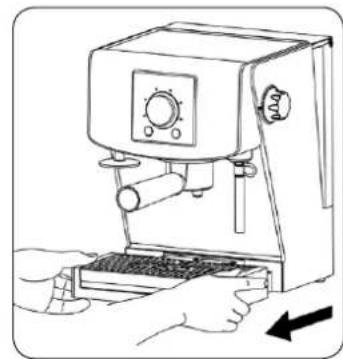
natural_image
Line drawing of a hand using a coffee machine with a keyboard and control panel (no text or symbols)Fig. 11
natural_image
Diagram of a hand using a tool to interact with a circular mechanical component (no text or symbols visible)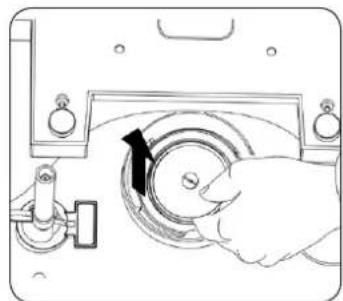
natural_image
Line drawing of a hand operating a circular device with a black arrow indicating rotation (no text or symbols)Fig. 12
natural_image
Line drawing of a hand using a espresso machine with a keyboard and control panel (no text or symbols)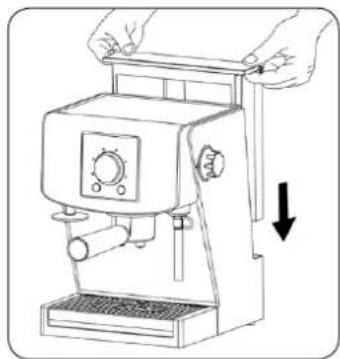
natural_image
Line drawing of a manual espresso machine with hands adjusting its lid (no text or symbols)Fig. 13
natural_image
Line drawing of a hand using a tool to interact with a circular mechanical device (no text or symbols)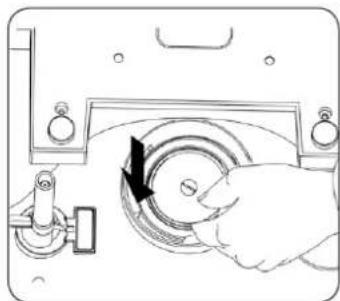
natural_image
Diagram of a hand operating a mechanical device with a circular component and directional arrow (no text or symbols)Fig. 14
14. Cleaning and care
Always keep the espresso machine clean in order to provide high quality of brewed coffee and extend the life-span of the machine.
- Before you start cleaning, turn the espresso machine off and unplug it from the power supply.
- Make sure that the espresso machine has cooled off.
- Do not immerse the espresso machine in water or any other liquids.
- Do not wash any part of the espresso machine in a dishwasher.
- Wipe the casing of the machine with a wet cloth or sponge.
- Remove the filter handle (6) from the coffee machine and then remove coffee grounds. Clean the filter handle (6) and the filter with a wet cloth or sponge.
- Dry the cleaned part on air or with the use of a cloth – do not dry them in an oven or a microwave.
- Remove the drip tray grid (7) and the drip tray (8) from the espresso machine and pour water out of them. Then clean them with a wet cloth or sponge.
-
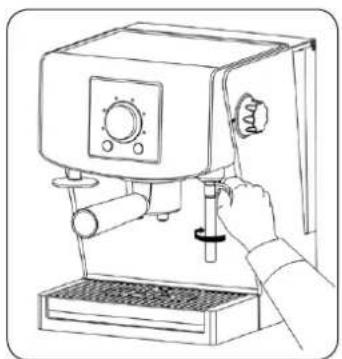
Remove the cappuccino attachment by unscrewing it and pulling it downwards.
-
Troubleshooting
| ISSUE POSSIBLE | CAUSE POSSIBLE SOLUTION | |
| Coffee flows out from the back of the filter handle | The filter handle (6) is not attached properly or not tightened enough. | Make sure that the filter handle (6) is properly placed in the brew head (4) and is maximally tightened. |
| There are coffee grains on the edge of the filter handle (6). | Clean the upper edge of the filter handle (6) from coffee and wipe the brew head (4) clean. | |
| The brew head (4) is dirty. Wipe the brew head (4) with a wet cloth. | ||
| The brew head (4) is damaged. Contact an authorized service center. | ||
| Coffee does not flow out | No water in the water tank (1). | Fill the tank (1) with water. |
| The water tank (1) is not properly installed. | Push the water tank (1) in making sure it is placed correctly. | |
| The control (12) is set to some other position, e.g. [TXXD] | Make sure that the control (12) is set to the OFF position. | |
| The filter on the brew head (4) may be blocked. | See paragraph 13 – Descaling. | |
| The sieve in the filter (6) is blocked. Coffee is too finely ground or too compressed. | Empty the sieve in the filter (6) and rinse it in running water. Wipe the brew head (4) with a cloth. | |
| Coffee is poured in drops | Coffee is too finely ground or too compressed. | If you use extremely fine ground coffee do not compress it too much. |
| The machine is blocked by calcareous residues. | See paragraph 13 – Descaling. | |
| Espresso is without the characteristic foam | Coffee is stale or dry. | Use fresh coffee. After opening a package of coffee be sure it is stored in an airtight container. |
| Coffee is not compressed enough. Compress the coffee harder. | ||
| Coffee is too coarsely ground. Use properly ground coffee or change your coffee brand. | ||
| Not enough coffee in the sieve of the filter (6). | See paragraph 8 – Preparing espresso. | |
| The handle is loose during the brewing process | The coffee is compressed too much. Compress the coffee more gently. | |
| Coffee is too finely ground. Change your coffee to a more coarsely ground. | ||
| The filter handle (6) does not fit tightly, as it was not screwed hard enough. | Make sure that the filter handle (6) is properly placed in the brew head (4) and is maximally tightened. | |
| There are coffee grains on the edge of the filter handle (6). | Clean the upper edge of the filter handle (6) from coffee and wipe the brew head (4) clean. | |
| The brew head (4) is dirty. Wipe the brew head (4) with a wet cloth. | ||
| The brew head (4) is damaged. Contact an authorized service center. | ||
| No steam doming out of the nozzle | The steam nozzle (10) is blocked. | Clean and rinse the steam nozzle (10). |
| Not enough foamed milk | The milk is not fresh. Make sure that the milk is fresh. | |
| The temperature of milk is too high. | Make sure that the milk is properly cooled off before being used. | |
| The pot. | To achieve the best results in foaming use the stainless steel pot delivered with the machine and as far as possible try to cool it off and rinse it with cold water before use. | |
| The steam nozzle (10) is blocked. | Clean and rinse the steam nozzle (10). | |
| The milk is boiled. Try to use some fresh, cool milk. | ||
| The machine is not working | The filter on the brew head (4) may be blocked. | See paragraph 13 – Descaling. |
| The machine is blocked with limescale. | See paragraph 13 – Descaling. | |
Remember that in case of any other damages or issues removing them on one's own is forbidden. Instead contact a qualified member of a service center.
ECOLOGY – ENVIRONMENT PROTECTION
Each user can protect the natural environment. It is neither difficult nor expensive.
In order to do it: put the cardboard packing into recycling paper container; put the polyethylene (PE) bags into container for plastic.
When worn out, dispose the appliance to particular disposal centre, because of the dangerous elements of this appliance, which can be hazardous for natural environment.
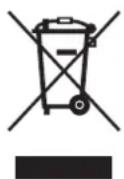
Do not dispose into the domestic waste disposal!!!
The manufacturer/importer does not accept any liability for any damages resulting from unintended use or improper handling.
The manufacturer/importer reserves his rights to modify the product any time in order to adjust it to law regulations, norms, directives, or due to construction, trade, aesthetic or other reasons, without notifying in advance.

- Odkamienianie
- Detartrarea
- Удаление накипи
- Очистка и уход
- Усування каменю
- Dear Customers,
- SAFETY INSTRUCTIONS
- TECHNICAL DATA
- Machine specifications
- Machine design
- Control panel
- Filling the water tank
- Warming up the cups
- Before first use (rinsing the machine)
- The rinse cycle for espresso function
- The rinse cycle for steam function
- Choosing mode of coffee in espresso bags/hot brewing temperature
- Preparing espresso using programmed settings of coffee size
- Preparing espresso using function of manual brewing of coffee
- Preparing steam (milk foaming)
- Automatic switch off function
- Emptying of the drip tray
- Descaling
- Descaling solutions
- Cleaning and care
- ECOLOGY – ENVIRONMENT PROTECTION
Brand : Zelmer
Model : Nerro 13Z015
Category : Coffee maker