Supremo - Coffee maker Zelmer - Free user manual and instructions
Find the device manual for free Supremo Zelmer in PDF.


| Product Type | Coffee Maker |
| Brand | Zelmer |
| Model | Supremo |
| Color | White/Black |
| Cup Capacity | 10 cups (1.25 L) |
| Water Tank Capacity | 1.25 L |
| Power Rating | 1000 W |
| Voltage | 220-240 V |
| Frequency | 50/60 Hz |
| Dimensions (W x D x H) | 25 x 20 x 30 cm |
| Weight | 1.5 kg |
| Filter Type | Paper filter (size #4) |
| Auto Shut-Off | Yes, after 30 minutes |
| Keep Warm Function | Yes |
| Anti-Drip System | Yes |
| Cord Storage | Yes |
| Water Level Indicator | Yes |
| Removable Filter Holder | Yes |
| Cleaning and Descaling | Descaling recommended every 3 months with vinegar or descaler |
| Safety Features | Overheat protection, automatic shut-off |
| Spare Parts Available | Carafe, filter basket, lid, etc. |
Frequently Asked Questions - Supremo Zelmer
User questions about Supremo Zelmer
0 question about this device. Answer the ones you know or ask your own.
Ask a new question about this device
Download the instructions for your Coffee maker in PDF format for free! Find your manual Supremo - Zelmer and take your electronic device back in hand. On this page are published all the documents necessary for the use of your device. Supremo by Zelmer.
USER MANUAL Supremo Zelmer
natural_image
Exterior view of a modern Supremo coffee machine with two cups and control panel (no visible text or symbols on main body)PL
2-12
PRZYCISK WŁĄCZ/WYŁĄCZ POWER
natural_image
Line drawing of a hand pressing down on a food processor with control panel (no text or symbols)natural_image
Line drawing of a hand pouring liquid from a mug into a toaster (no text or symbols)natural_image
Line drawing of a hand pressing down on a kitchen appliance with an upward arrow (no text or symbols)natural_image
Technical line drawing of a mechanical component with a pin inserted (no text or symbols)natural_image
Illustration of a hand pressing down on a kitchen grater with an arrow indicating motion (no text or symbols)natural_image
Line drawing of a hand pressing a button on a food processor (no text or symbols visible)natural_image
Line drawing of a kitchen appliance front panel with control buttons and a handle (no text or symbols)natural_image
Line drawing of a toaster oven with three shades of smoke and control buttons (no text or symbols)natural_image
Line drawing of a hand using a coffee machine to press or prepare it, with an arrow indicating the process (no text or symbols present)natural_image
Illustration of a hand using a tool to press or install a machine component, with no visible text or symbols.natural_image
Line drawing of a coffee maker with a glass bowl on a tray, no text or symbols presentnatural_image
Line drawing of a hand pressing a button on a kitchen appliance (no text or symbols)natural_image
Illustration of a hand holding a small container with a lid and a funnel above it, no text or symbols present.natural_image
Line drawing of a hand using a espresso machine to press or feed into a gridded tray (no text or symbols)natural_image
Illustration of hands pouring dark liquid into a container with a tube (no text or symbols)natural_image
Illustration of hands performing a manual task with a tool, no text or symbols presentUbij kawę.
natural_image
Illustration of a hand using a tool to press or inspect a small object, no text or symbols presentnatural_image
Line drawing of a hand using a espresso machine to press or feed into a gridded machine (no text or symbols present)natural_image
Line drawing of a hand using a espresso machine to press or adjust a gridded tray (no text or symbols present)natural_image
Line drawing of a coffee machine with a cup and side table (no text or symbols)natural_image
Line drawing of a hand using a digital espresso machine to press or adjust a cup (no text or symbols visible)natural_image
Line drawing of a hand pressing a button on a kitchen appliance (no text or symbols)natural_image
Line drawing of a hand operating a kitchen press with a control panel and a pot (no text or symbols)natural_image
Line drawing of a hand using a tool to clean or inspect a container (no text or symbols)natural_image
Line drawing of a hand holding a device with a knob, no text or symbols presentnatural_image
Line drawing of a hand operating a device with a knob, no text or symbols presentnatural_image
Line drawing of a kitchen appliance with control panel and hanging handle (no text or symbols)natural_image
Illustration of hands using a micrometer to process liquid from a beaker (no text or symbols visible)natural_image
Line drawing of a hand pouring liquid from a steaming cup into a kitchen appliance (no text or symbols)natural_image
Line drawing of a hand pouring liquid from a small container into a grater using a microwave (no text or symbols)natural_image
Illustration of a hand pouring liquid into a mug using a microwave (no text or symbols visible)natural_image
Line drawing of a kitchen appliance with a cloth and a tray, no text or symbols presentnatural_image
Line drawing of a hand using a coffee machine to press or brush into a glass (no text or symbols present)natural_image
Illustration of a hand using a coffee machine to press or install a cup (no text or symbols visible)natural_image
Line drawing of a coffee machine with control panel and tray (no text or symbols)natural_image
Line drawing of hands pouring liquid from a container into a container (no text or symbols)natural_image
Illustration of hands performing a manual task with a tool and component (no text or symbols)Ubij kawe.
natural_image
Line drawing of a hand using a coffee machine to press a cup (no text or symbols visible)natural_image
Illustration of a hand using a handheld device to press or<|rotate_right|> a machine, with no visible text or symbols.natural_image
Line drawing of a hand using a blender to press or<|rotate_right|> a cup (no text or symbols present)natural_image
Line drawing of a hand pressing a button on a kitchen appliance (no text or symbols)natural_image
Line drawing of a hand operating a kitchen appliance with control panel (no text or symbols)natural_image
Line drawing of a hand pressing down on a grater with a control panel (no text or symbols)natural_image
Line drawing of a hand operating a coffee machine with a hand holding a cup (no text or symbols)natural_image
Line drawing of a device with a handle and base, showing a downward arrow indicating motion (no text or symbols)natural_image
Line drawing of a hand pressing down on a kitchen appliance with an upward arrow (no text or symbols)natural_image
Technical line drawing of a mechanical component with a handle and circular feature (no text or symbols)natural_image
Illustration of two hands holding a circular object with a small object inserted, no text or symbols present.natural_image
Line drawing of a kitchen appliance with a bag being handled, no text or symbols presentnatural_image
Diagram of a mechanical component with a numbered part and a handle, no visible text or symbolsnatural_image
Hand inserting a plug into a device with a label (54), no text or symbols presentnatural_image
Glass of dark beverage with small berries in the foreground (no text or symbols visible)ESPRESSO (SHORT BLACK)
natural_image
Black and white photo of a white ceramic cup on a saucer with a spoon, no text or symbols visible.LONG BLACK
natural_image
Black and white photo of a glass of dark liquid on a white tray with a white ceramic cup in the background (no text or symbols visible)MACCHIATO
natural_image
Black and white photo of a teacup on a saucer with a spoon beside it (no text or symbols visible)FLAT WHITE
natural_image
Black and white photo of a glass of milk with a spoon, no text or symbols visibleCAFFÈ LATTE
natural_image
Black and white photo of a coffee cup on a saucer over a stack of papers (no text or symbols visible)CAPPUCCINO
natural_image
Black and white photo of a metallic coffee cup on a saucer with a small piece of paper beside it (no text or symbols visible)CAFFE MOCHA
natural_image
Black and white photo of a glass bowl with a straw inside, placed on a saucer (no text or symbols visible)CON PANNA
natural_image
Line drawing of a kitchen appliance with a hand adjusting the lid (no text or symbols)natural_image
Line drawing of a hand pouring liquid into a toaster oven (no text or symbols)natural_image
Line drawing of a hand pressing down on a kitchen appliance with an upward arrow (no text or symbols)natural_image
Technical line drawing of a mechanical component with a pin inserted (no text or symbols)Naplnte studenou vodou.
natural_image
Illustration of a hand pressing down on a kitchen grater with control panel (no text or symbols)natural_image
Line drawing of a hand pressing a button on a food processor (no text or symbols visible)natural_image
Line drawing of a toaster oven with three shades of smoke (no text or symbols)natural_image
Line drawing of a hand using a coffee machine to press or feed into a cup (no text or symbols)natural_image
Illustration of a hand using a microwave presser to press a grater (no text or symbols visible)natural_image
Line drawing of a coffee maker with a cup and side table (no text or symbols)natural_image
Line drawing of a hand operating a kitchen appliance with control buttons (no text or symbols)natural_image
Illustration of a hand holding a small container with a lid and an arrow indicating downward motion (no text or symbols)natural_image
Line drawing of a hand using a espresso machine to press or brush (no text or symbols visible)natural_image
Illustration of hands pouring liquid into a container with a dropper (no text or symbols)natural_image
Illustration of hands performing a manual task with a tool, no text or symbols presentUpěchujte ji.
natural_image
Illustration of a hand using a tool to adjust or install a mechanical component (no text or symbols visible)natural_image
Line drawing of a hand using a espresso machine to press or feed into a gridded machine (no text or symbols present)natural_image
Line drawing of a hand using a coffee machine to press or<|rotate_right|> a griddle, with no visible text or symbols.natural_image
Line drawing of a coffee machine with a cup and tray, no text or symbols presentnatural_image
Line drawing of a hand operating a coffee maker with control panel (no text or symbols)natural_image
Line drawing of a hand pressing a control panel on a kitchen machine (no text or symbols)natural_image
Line drawing of a hand using a digital kitchen press with a control panel and a coffee cup (no text or symbols)natural_image
Illustration of a hand using a sewing machine to press or install a product (no text or symbols visible)natural_image
Line drawing of a hand using a tool to clean or inspect a container (no text or symbols)natural_image
Line drawing of a hand holding a device with a knob, no text or symbols presentnatural_image
Line drawing of a hand operating a device with a tool, no text or symbols presentnatural_image
Line drawing of a kitchen mixer with control panel and handle (no text or symbols)natural_image
Illustration of a hand pouring liquid from a digital kitchen appliance into a glass (no text or symbols visible)natural_image
Line drawing of a hand pouring liquid into a blender with control panel (no text or symbols)natural_image
Line drawing of a hand pouring liquid from a small container into a kitchen appliance (no text or symbols)natural_image
Illustration of hands using a microwave oven to press a mug, no text or symbols presentnatural_image
Line drawing of a washing machine with a cloth cover and a textured fabric item, no text or symbols presentnatural_image
Line drawing of a hand using a digital espresso machine to press or brush into a glass (no text or symbols visible)natural_image
Illustration of a hand using a digital espresso machine to press or install a glass (no text or symbols visible)natural_image
Line drawing of a coffee machine with control panel and tray (no text or symbols)natural_image
Illustration of hands pouring dark liquid into a container with a dropper (no text or symbols)natural_image
Illustration of hands performing a mechanical or electrical operation with a valve and socket (no text or symbols)Upěchujte ji.
natural_image
Line drawing of a hand using a coffee machine to pour liquid into a cup (no text or symbols)natural_image
Line drawing of a hand operating a kitchen press with a control panel and a cup (no text or symbols)natural_image
Illustration of a hand using a microwave presser to press a grater (no text or symbols visible)natural_image
Line drawing of a hand operating a kitchen blender with control panel (no text or symbols)natural_image
Line drawing of a hand using a coffee maker to press or<|rotate_right|> (no text or symbols present)natural_image
Line drawing of a hand pressing down on a grater with an arrow indicating press direction (no text or symbols)natural_image
Illustration of a hand pressing down on a kitchen grater with an upward arrow (no text or symbols)natural_image
Line drawing of a kitchen appliance with a cloth and tray, no text or symbols presentnatural_image
Line drawing of a kitchen machine with a hand pressing a button on a tray (no text or symbols)natural_image
Technical line drawing of a mechanical component with a central circular feature and a U-shaped connector (no text or symbols)natural_image
Diagram of a mechanical component with a numbered part and a handle, no visible text or symbolsnatural_image
Line drawing of a device with a handle and base, showing a downward arrow indicating motion (no text or symbols)natural_image
Illustration of hands performing a sewing or stamping operation on a circular object (no text or symbols visible)natural_image
Hand inserting a plug into a device with a label (54), no text or symbols presentVložte čistítko do otvoru trysky dole.
PŘÍPRAVA KÁVOVARU PŘED PRVNÍM POUŽITÍM (PO- PIS)
natural_image
Black and white photo of a glass filled with dark beverage, accompanied by small black beans (no text or symbols visible)ESPRESO (SHORT BLACK)
natural_image
Black and white photo of a white ceramic cup on a saucer with a spoon, no text or symbols visible.LONG BLACK
natural_image
Black and white photo of a glass of dark liquid on a white tray with a ceramic pitcher in the background (no text or symbols visible)MACCHIATO
natural_image
Black and white photo of a teacup on a saucer with a straw, no text or symbols visible.FLAT WHITE
natural_image
Black and white photo of a glass of milk with a spoon, no text or symbols visibleCAFFÈ LATTE
natural_image
Black and white photo of a coffee cup on a saucer with a napkin, placed on a textured surface (no text or symbols visible)CAPPUCCINO
natural_image
Black and white photo of a metallic coffee cup on a saucer with a small object on top (no text or symbols visible)CAFFE MOCHA
natural_image
Black and white photo of a glass bowl with a straw inside, placed on a saucer (no text or symbols visible)CON PANNA
- Ohrievacia platňa
natural_image
Line drawing of a hand pressing down on a food processor with control panel (no text or symbols)natural_image
Line drawing of a hand pouring liquid into a toaster oven (no text or symbols)Naplnte studenou vodou i zatvorte veko.
natural_image
Line drawing of a hand pressing down on a kitchen appliance with a handle (no text or symbols)natural_image
Technical line drawing of a mechanical component with a pin inserted (no text or symbols)Naplňte studenou vodou.
natural_image
Illustration of a hand pressing down on a toaster front panel with control buttons (no text or symbols)Nasadte nádržku na vodu a zatvorte veko.
natural_image
Line drawing of a hand pressing a button on a food processor (no text or symbols)natural_image
Line drawing of a front panel with control buttons and a connector (no text or symbols)natural_image
Line drawing of a toaster oven with three shades of smoke and control buttons (no text or symbols)natural_image
Line drawing of a hand pouring liquid into a coffee machine with a paper towel, no text or symbols presentNasad'te držiak fi ltra do hlavy.
natural_image
Illustration of a hand using a espresso machine to press or<|rotate_right|> (no text or symbols visible)Otočte držiak filtra celkom doprava.
natural_image
Line drawing of a coffee maker with a glass bowl and control panel (no text or symbols)natural_image
Line drawing of a hand pressing a control panel on a device (no text or symbols visible)natural_image
Illustration of a hand holding a small container with a lid and a funnel above it, no text or symbols present.natural_image
Line drawing of a hand using a espresso machine with a gridded base (no text or symbols)Pridržite držiak filtra a opláchnite vodou, aby ho úvodne zohriat'.
natural_image
Illustration of hands pouring dark liquid into a small container (no text or symbols)natural_image
Illustration of hands performing a manual task with a tool, no text or symbols presentPritlačte kávu.
natural_image
Illustration of a hand holding a small bowl with a spoon, no text or symbols presentnatural_image
Line drawing of a hand using a coffee machine to press or feed into a griddle (no text or symbols visible)Nasad'te držiak fi ltra do hlavy.
natural_image
Line drawing of a hand using a griddle to press or adjust a machine (no text or symbols present)Otočle držiak filtra celkom doprava.
natural_image
Line drawing of a coffee machine with a cup and tray, no text or symbols presentnatural_image
Line drawing of a hand operating a coffee maker with control panel (no text or symbols)Stlačte tlačidlo MANUAL.
V tom istom čase sa začne nalievanie kávy. Opakované stlačenie tlačidla MANUAL spôsobí zastavenie nalievania kávy.
natural_image
Line drawing of a hand pressing a button on a kitchen appliance (no text or symbols)natural_image
Line drawing of a hand using a digital kitchen presser to press a cup (no text or symbols present)natural_image
Illustration of a hand using a sewing machine to press or install a product (no text or symbols visible)natural_image
Line drawing of a hand using a tool to clean or inspect a container with a lid (no text or symbols)natural_image
Line drawing of a hand holding a device with a handle, no text or symbols presentnatural_image
Line drawing of a hand operating a device with a knob and lever (no text or symbols)natural_image
Line drawing of a kitchen appliance with a hand valve and control panel (no text or symbols)Dajte parnu trysku na bok zariadenia a na trysku nasadte nasadenie na napeňovanie mlieka.
natural_image
Illustration of hands using a microwave to press a cup into a container (no text or symbols visible)natural_image
Line drawing of a hand pouring liquid from a cup into a machine (no text or symbols)natural_image
Line drawing of a hand pouring liquid from a small container into a kitchen appliance (no text or symbols)natural_image
Illustration of hands using a microwave oven to press a mug, no text or symbols presentnatural_image
Line drawing of a kitchen appliance with a cloth and a digital counter (no text or symbols)natural_image
Line drawing of a hand using a espresso machine to press or brush into a glass (no text or symbols visible)natural_image
Illustration of a hand using a coffee machine to press or install a cup (no text or symbols visible)natural_image
Line drawing of a coffee machine with control panel and tray (no text or symbols)natural_image
Line drawing of hands pouring dark liquid into a container (no text or symbols)Do filtra nasypte jemne zomletú kávu.
natural_image
Illustration of hands performing a manual valve or adjustment operation (no text or symbols present)Stlačte kávu.
natural_image
Line drawing of a hand using a coffee machine to pour into a cup (no text or symbols)natural_image
Illustration of a hand using a espresso machine to press or adjust a griddle (no text or symbols visible)Otočte držiak filtra celkom doprava.
natural_image
Line drawing of a hand using a coffee maker to press or<|rotate_right|> (no text or symbols present)Stlačte tlačidlo PROGRAM.
natural_image
Line drawing of a hand pressing a control panel on a kitchen appliance (no text or symbols)natural_image
Line drawing of a hand using a blender with control panel and key (no text or symbols)natural_image
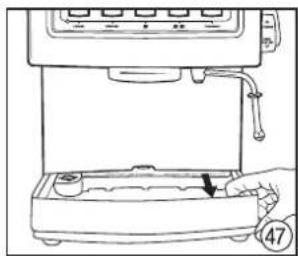
Line drawing of a hand pressing down on a grater with an arrow indicating press direction (no text or symbols)Vyberte mriežku misky na odkvapkávanie. Vyberte misku na odkvapkávanie, vyberte ju a opakovane nasadte.
natural_image
Line drawing of a hand operating a kitchen machine with a handle and base (no text or symbols)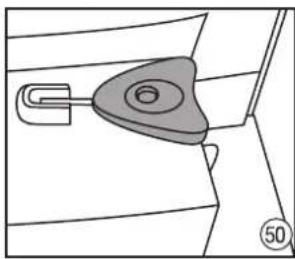
natural_image
Diagram of a car door handle with a triangular key inserted into the seat (no text or symbols)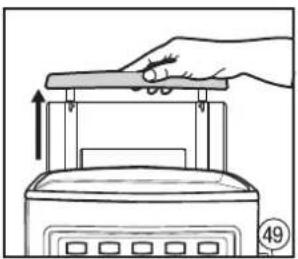
natural_image
Illustration of a hand pressing down on a kitchen appliance with an upward arrow (no text or symbols)natural_image
Line drawing of a device with a handle and base, showing a downward arrow indicating motion (no text or symbols)Presvedčte sa, či umelohmotná vložka je na vhodnom mieste v miske na odkvapkávanie.
filtrov na kávu – sivá farba aj pamej trysky – čierna farba.
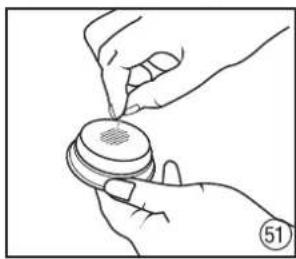
natural_image
Illustration of hands holding a circular object with a small mark, no text or symbols presentnatural_image
Line drawing of a kitchen appliance with a cloth and tray, no text or symbols presentOviňte parnu trysku vlhkou handričkou i na 10 sekúnd zapníte paru.
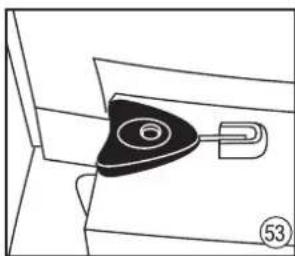
natural_image
Pure mechanical component diagram without any text, numbers, or symbolsnatural_image
Hand inserting a plug into a device with a label (54), no text or symbols presentnatural_image
Glass of dark beverage with scattered coffee beans on the side (no text or symbols visible)
natural_image
Black and white photo of a ceramic coffee cup on a saucer with a spoon (no text or symbols visible)
natural_image
Black and white photo of a glass of dark liquid on a white tray with a white ceramic vessel in the background (no text or symbols visible)
natural_image
Black and white photo of a teacup on a saucer with a spoon, no visible text or symbols
natural_image
Black and white photo of a glass mug filled with milk and a spoon (no text or symbols visible)
natural_image
Black and white photo of a coffee cup on a saucer over a napkin, with no visible text or symbols.
natural_image
Black and white photo of a glass coffee cup on a saucer with a small piece of coffee beside it (no text or symbols visible)
natural_image
Black-and-white photo of a glass bowl with a straw and a spoon, placed on a matching saucer (no text or symbols visible)ESPRESSO (SHORT BLACK)
- Melegítő lap
natural_image
Line drawing of a hand pressing down on a rice cooker with control panel (no text or symbols)natural_image
Line drawing of a hand pouring liquid into a toaster oven (no text or symbols)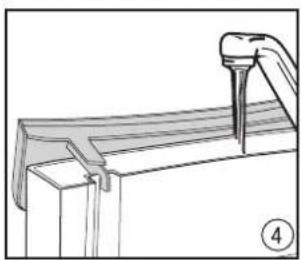
natural_image
Technical line drawing of a mechanical component with a pin inserted (no text or symbols)natural_image
Illustration of a hand pressing down on a portable kitchen appliance with control panel (no text or symbols)natural_image
Line drawing of a hand pressing down on a kitchen appliance with an upward arrow (no text or symbols)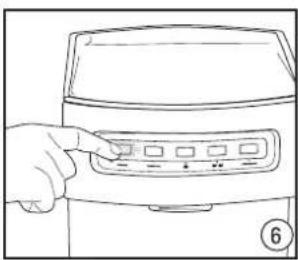
natural_image
Line drawing of a hand inserting a button into a kitchen appliance (no text or symbols)natural_image
Line drawing of a front panel with control buttons and a connector (no text or symbols)natural_image
Line drawing of a toaster oven with three models and control panel (no text or symbols)natural_image
Illustration of a hand pouring liquid into a coffee machine with a small cup, no text or symbols presentnatural_image
Illustration of a hand using a microwave presser to press or adjust a grater (no text or symbols visible)natural_image
Line drawing of a coffee maker with a glass bowl and control panel (no text or symbols)natural_image
Line drawing of a hand pressing a control panel on a kitchen appliance (no text or symbols)natural_image
Illustration of a hand holding a small container with a lid and a funnel above it, no text or symbols present.natural_image
Line drawing of a hand using a espresso machine with a glass bowl and control panel (no text or symbols)natural_image
Illustration of hands pouring dark liquid into a small container (no text or symbols)natural_image
Illustration of hands performing a manual valve or pump operation (no text or symbols present)natural_image
Illustration of a hand holding a small bowl with a spoon, no text or symbols presentnatural_image
Line drawing of a hand using a coffee machine to press or feed into a griddle (no text or symbols)natural_image
Line drawing of a hand using a espresso machine to press or adjust a gridded tray (no text or symbols present)natural_image
Line drawing of a coffee machine with two cups on a tray, no text or symbols presentnatural_image
Line drawing of a hand operating a coffee maker with control buttons (no text or symbols)natural_image
Line drawing of a hand pressing a control panel on a kitchen appliance (no text or symbols)natural_image
Line drawing of a hand operating a kitchen appliance with a control panel (no text or symbols)natural_image
Illustration of a hand using a sewing machine to press or install a product (no text or symbols visible)natural_image
Line drawing of a hand using a tool to clean or inspect a container with a handle (no text or symbols)natural_image
Line drawing of a hand holding a device with a knob, no text or symbols presentnatural_image
Line drawing of a hand holding a device with a knob, no text or symbols presentnatural_image
Line drawing of a kitchen appliance with control panel and handle (no text or symbols)natural_image
Illustration of a hand pouring liquid from a container into a washing machine (no text or symbols visible)natural_image
Line drawing of a hand pouring liquid from a cup into a kitchen appliance (no text or symbols)natural_image
Line drawing of a hand pouring liquid from a small container into a steamer (no text or symbols)natural_image
Illustration of hands using a microwave oven to press a mug, no text or symbols presentnatural_image
Line drawing of a kitchen appliance with a cloth and a digital counter (no text or symbols)natural_image
Line drawing of a hand using a hand mixer machine to press or brush into a glass (no text or symbols visible)natural_image
Illustration of a hand using a coffee machine to press or install a cup (no text or symbols visible)natural_image
Line drawing of a coffee machine with control panel and tray (no text or symbols)natural_image
Line drawing of hands pouring dark liquid into a small container (no text or symbols)natural_image
Illustration of hands performing a mechanical tool with a valve (no text or symbols)natural_image
Line drawing of a hand using a coffee machine to pour into a cup (no text or symbols)natural_image
Illustration of a hand using a microwave presser to press a grater (no text or symbols visible)natural_image
Line drawing of a hand using a coffee maker to press or<|rotate_right|> (no text or symbols present)natural_image
Line drawing of a hand operating a kitchen press with a container and a numbered tag (no text or symbols)natural_image
Line drawing of a hand pressing down on a kitchen appliance with control panel (no text or symbols)natural_image
Line drawing of a hand pressing down on a grater with an arrow indicating press direction (no text or symbols)natural_image
Line drawing of a kitchen appliance with a hand operating the base (no text or symbols)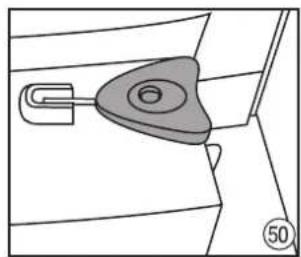
natural_image
Technical line drawing of a mechanical component with a handle and circular feature (no text or symbols)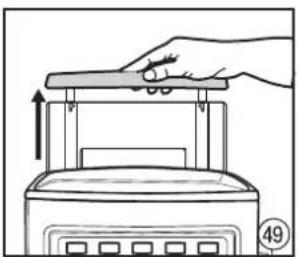
natural_image
Illustration of a hand pressing down on a kitchen appliance with an upward arrow (no text or symbols)natural_image
Line drawing of a device with a handle and base, showing a downward arrow indicating motion (no text or symbols)natural_image
Illustration of hands performing a sewing or stamping operation on a circular object (no text or symbols visible)natural_image
Line drawing of a kitchen appliance with a bag on a counter and control panel (no text or symbols)natural_image
Line drawing of a mechanical component with a numbered part (6) and a handle, no text or symbols presentnatural_image
Hand inserting a plug into a device with an arrow indicating the insertion point (no text or symbols present)natural_image
Black and white photo of a glass filled with dark beverage, accompanied by small black beans (no text or symbols visible)
natural_image
Black and white photo of a ceramic coffee cup on a saucer with a spoon (no text or symbols visible)
natural_image
Black and white photo of a glass of dark liquid on a white tray with a white ceramic cup in the background (no text or symbols visible)
natural_image
Black-and-white photo of a teacup on a saucer with a spoon beside it (no text or symbols visible)
natural_image
Black and white photo of a glass of milk with a spoon, no visible text or symbols
natural_image
Black and white photo of a coffee cup on a saucer with a napkin, placed on a textured surface (no text or symbols visible)
natural_image
Black and white photo of a coffee cup on a saucer with a small object partially visible (no text or symbols)
natural_image
Black and white photo of a glass cup filled with liquid, a straw, and a saucer on a saucer (no text or symbols visible)ESZPRESSZÓ (SHORT BLACK)
natural_image
Line drawing of a kitchen appliance with a hand adjusting the top panel (no text or symbols)natural_image
Line drawing of a hand pouring liquid into a toaster (no text or symbols)natural_image
Line drawing of a hand pressing down on a kitchen appliance with a handle (no text or symbols)natural_image
Technical line drawing of a mechanical assembly with a tool inserted (no text or symbols)natural_image
Illustration of a hand pressing down on a kitchen grater with control panel (no text or symbols)natural_image
Line drawing of a hand pressing a button on a food processor (no text or symbols visible)natural_image
Line drawing of a front panel with control buttons and a connector (no text or symbols)natural_image
Line drawing of a toaster oven with three cooling towers (no text or symbols)natural_image
Line drawing of a hand pouring liquid into a coffee machine with a small cup, no text or symbols presentnatural_image
Illustration of a hand using a microwave presser to press or adjust a grater (no text or symbols visible)natural_image
Line drawing of a coffee maker with a glass bowl and control panel (no text or symbols)natural_image
Line drawing of a hand pressing a button on a device (no text or symbols visible)natural_image
Illustration of a hand holding a small container with a lid and a funnel above it, no text or symbols present.natural_image
Line drawing of a hand using a espresso machine with a gridded base (no text or symbols)natural_image
Illustration of hands pouring dark liquid into a small container (no text or symbols)natural_image
Illustration of hands performing a manual task with a mechanical component (no text or symbols)natural_image
Illustration of a hand holding a small bowl with a spoon, no text or symbols presentnatural_image
Line drawing of a hand using a coffee maker machine to press or prepare it, with no visible text or symbols.natural_image
Line drawing of a hand using a microwave oven to press or<|rotate_right|> (no text or symbols present)natural_image
Line drawing of a coffee machine with two cups on a tray, no text or symbols presentnatural_image
Line drawing of a hand using a blender with control buttons (no text or symbols)natural_image
Line drawing of a hand pressing a control panel on a kitchen appliance (no text or symbols)natural_image
Line drawing of a hand pressing down on a kitchen appliance with a control panel (no text or symbols)natural_image
Line drawing of a hand using a tool to clean or inspect a container (no text or symbols)natural_image
Line drawing of a hand holding a device with a handle, no text or symbols presentnatural_image
Line drawing of a hand operating a device with a knob and lever (no text or symbols)natural_image
Line drawing of a kitchen appliance with a hand operating the button (no text or symbols)natural_image
Illustration of a hand pouring liquid from a small container into a machine (no text or symbols visible)natural_image
Line drawing of a hand pouring liquid from a cup into a kitchen appliance (no text or symbols)natural_image
Line drawing of a hand pouring liquid from a small container into a kitchen appliance (no text or symbols)natural_image
Illustration of hands using a blender to press a mug into a steamer (no text or symbols visible)natural_image
Line drawing of a kitchen appliance with a cloth and a digital counter (no text or symbols)natural_image
Line drawing of a hand using a hand mixer machine to press or brush into a glass (no text or symbols visible)natural_image
Illustration of a hand using a coffee machine to press or install a cup (no text or symbols visible)natural_image
Line drawing of a coffee machine with control panel and tray (no text or symbols)natural_image
Illustration of hands pouring liquid into a container with a dropper (no text or symbols)natural_image
Illustration of hands performing a manual valve or adjustment operation (no text or symbols present)Presati cafeaua.
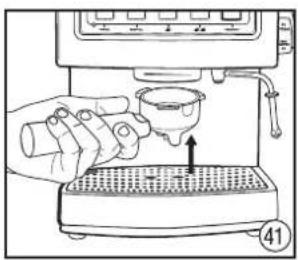
natural_image
Line drawing of a hand using a coffee machine to pour into a cup (no text or symbols)natural_image
Illustration of a hand using a microwave presser to press a grater (no text or symbols visible)natural_image
Line drawing of a hand using a coffee maker to press or<|rotate_right|> (no text or symbols present)natural_image
Line drawing of a hand pressing a control panel on a coffee machine (no text or symbols)natural_image
Line drawing of a hand operating a coffee maker with a key inserted (no text or symbols)natural_image
Line drawing of a hand pressing down on a grater with an arrow indicating press direction (no text or symbols)natural_image
Line drawing of a coffee machine with a hand operating the cup (no text or symbols)natural_image
Line drawing of a device with a handle and a button, showing a step-down view (no text or symbols)natural_image
Line drawing of a hand pressing down on a kitchen appliance with an upward arrow (no text or symbols)natural_image
Diagram of a car door handle with a key inserted into the seat (no text or symbols)natural_image
Illustration of two hands holding a circular object with a textured surface, no text or symbols presentnatural_image
Line drawing of a kitchen appliance with a cloth and tray, no text or symbols presentnatural_image
Pure mechanical component diagram without any text, numbers, or symbolsnatural_image
Hand inserting a plug into a device with a valve, showing a button and label (no text or symbols on the diagram itself)POGRAMAREA APARATULUI ESPRESSO PENTRU CAFEA
natural_image
Glass of dark beverage with scattered coffee beans on the side (no text or symbols visible)
natural_image
Black and white photo of a ceramic coffee cup on a saucer with a spoon (no text or symbols visible)
natural_image
Black and white photo of a glass of dark liquid on a tray with a white ceramic vessel in the background (no text or symbols visible)
natural_image
Black-and-white photo of a teacup on a saucer with a small spoon beside it (no text or symbols visible)
natural_image
Black and white photo of a glass mug filled with milk and a spoon (no text or symbols visible)
natural_image
Black and white photo of a coffee cup on a saucer with a napkin, placed on a folded napkin (no text or symbols visible)
natural_image
Black and white photo of a glass coffee cup on a saucer with a small piece of coffee beside it (no text or symbols visible)
natural_image
Black and white photo of a glass bowl with a straw, placed on a saucer (no text or symbols visible)ESPRESSO (SHORT BLACK)
natural_image
Line drawing of a hand pressing down on a food processor with control panel (no text or symbols)natural_image
Line drawing of a hand pouring liquid into a toaster oven (no text or symbols)natural_image
Line drawing of a hand pressing down on a kitchen appliance with an upward arrow (no text or symbols)Или извлеките резервуар для воды.
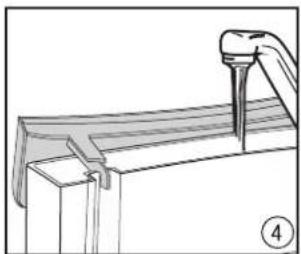
natural_image
Technical line drawing of a mechanical component with a tool inserted (no text or symbols)natural_image
Illustration of a hand pressing down on a portable kitchen appliance with control panel (no text or symbols)natural_image
Line drawing of a hand pressing a button on an electric oven (no text or symbols)natural_image
Line drawing of a kitchen appliance front panel with control buttons and a handle (no text or symbols)natural_image
Line drawing of a toaster front with three designs and control buttons (no text or symbols)natural_image
Illustration of a hand pouring liquid into a coffee machine with a measuring cup (no text or symbols)natural_image
Illustration of a hand using a espresso machine to press or adjust a griddle (no text or symbols visible)natural_image
Line drawing of a coffee machine with a cup and side table (no text or symbols)natural_image
Line drawing of a hand holding a control panel with buttons and a dial (no text or symbols)natural_image
Illustration of a hand holding a small container with a funnel above it, no text or symbols presentnatural_image
Line drawing of a hand using a espresso machine with control panel (no text or symbols)natural_image
Illustration of hands pouring dark liquid into a small container (no text or symbols)natural_image
Illustration of hands performing a manual valve or tool manipulation (no text or symbols present)Утрамбуйте кофе.
natural_image
Illustration of a hand holding a small bowl with a spoon, no text or symbols presentСоберите излишек кофе с краев ситечка.
natural_image
Line drawing of a hand using a espresso machine to press or feed into a gridded machine (no text or symbols present)natural_image
Line drawing of a coffee machine with two cups on a tray, no text or symbols presentnatural_image
Line drawing of a hand operating a coffee maker with control panel (no text or symbols)natural_image
Line drawing of a hand pressing a button on a coffee machine (no text or symbols)natural_image
Line drawing of a hand operating a kitchen press with a control panel and a cup (no text or symbols)natural_image
Line drawing of a hand using a tool to clean or inspect a container (no text or symbols)natural_image
Line drawing of a hand holding a device with a knob, no text or symbols presentnatural_image
Line drawing of a hand operating a device with a knob and lever (no text or symbols)natural_image
Line drawing of a kitchen mixer with control panel and handle (no text or symbols)natural_image
Illustration of hands using a micrometer to press a glass over a tray (no text or symbols visible)natural_image
Line drawing of a hand pouring liquid from a container into a machine (no text or symbols)natural_image
Line drawing of a hand pouring liquid into a steaming cup using a microwave (no text or symbols)natural_image
Illustration of a hand using a blender to press a mug, with no visible text or symbolsnatural_image
Line drawing of a kitchen appliance with a cloth and a digital counter (no text or symbols)natural_image
Line drawing of a hand using a hand mixer machine to press or<|rotate_right|> a glass (no text or symbols visible)natural_image
Illustration of a hand using a coffee machine to press or install a cup (no text or symbols visible)natural_image
Line drawing of a coffee machine with control panel and tray (no text or symbols)natural_image
Illustration of hands pouring dark liquid into a container (no text or symbols)natural_image
Illustration of hands performing a mechanical tool with a valve (no text or symbols)Утрамбуйте кофе.
natural_image
Line drawing of a hand pouring liquid into a coffee machine (no text or symbols)natural_image
Line drawing of a hand using a microwave oven to press or<|rotate_right|> (no text or symbols present)natural_image
Line drawing of a hand using a blender to press or<|rotate_right|> a cup (no text or symbols present)natural_image
Line drawing of a hand pressing a button on a kitchen appliance (no text or symbols)natural_image
Line drawing of a hand using a blender with control panel and key (no text or symbols)natural_image
Illustration of a hand pressing down on a grater with an arrow indicating press direction (no text or symbols)natural_image
Line drawing of a hand pressing down on a kitchen appliance with an arrow indicating motion (no text or symbols)Извлеките резервуар для воды.
natural_image
Line drawing of a hand operating a small machine with a handle and control panel (no text or symbols)natural_image
Technical line drawing of a mechanical component with a handle and circular hole (no text or symbols)natural_image
Line drawing of a device with a handle and base, showing a downward arrow indicating motion (no text or symbols)natural_image
Illustration of hands holding a small object with a patterned top, no text or symbols presentnatural_image
Line drawing of a kitchen appliance with a cloth and tray, no text or symbols presentnatural_image
Pure diagram of a mechanical component with a numbered part (6) and number 53, no text or symbols present.natural_image
Line drawing of a hand inserting a plug into a device with an arrow indicating the insertion point (no text or symbols present)natural_image
Black and white photo of a glass filled with dark beverage, accompanied by small black beans (no text or symbols visible)
natural_image
Black and white photo of a ceramic coffee cup on a saucer with a spoon (no text or symbols visible)
natural_image
Black and white photo of a glass of dark liquid on a white tray with a white ceramic cup in the background (no text or symbols visible)
natural_image
Black-and-white photo of a teacup on a saucer with a spoon beside it (no text or symbols visible)
natural_image
Black and white photo of a glass mug filled with milk and a spoon (no text or symbols visible)
natural_image
Black and white photo of a coffee cup on a saucer with a napkin, placed on a folded napkin (no text or symbols visible)
natural_image
Black and white photo of a coffee cup on a saucer with a small object beside it (no text or symbols visible)
natural_image
Black-and-white photo of a glass bowl with a spoon and liquid, placed on a saucer (no text or symbols visible)- Плоча за подгряване
natural_image
Line drawing of a hand pressing down on a food processor with control panel (no text or symbols)Отворете капака на резервоара за вода.
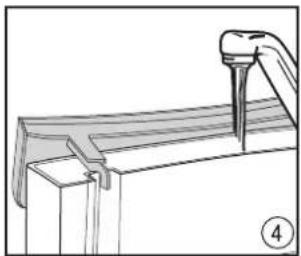
natural_image
Technical line drawing of a mechanical component with a pin inserted (no text or symbols)natural_image
Line drawing of a kitchen appliance front panel with control buttons and a numbered connector (no text or symbols)natural_image
Line drawing of a hand using a coffee machine to pour liquid into a griddle (no text or symbols)natural_image
Line drawing of a hand pressing a control panel on a device (no text or symbols visible)natural_image
Line drawing of a hand pouring liquid into a toaster oven (no text or symbols)natural_image
Illustration of a hand pressing down on a kitchen grater with control panel (no text or symbols)Сложете резервоара за вода и затворете капака.
natural_image
Line drawing of a toaster front with three shades of smoke (no text or symbols)natural_image
Illustration of a hand using a sewing machine to press or install a product (no text or symbols visible)natural_image
Line drawing of a hand pressing down on a kitchen appliance with a handle (no text or symbols)Или свалете резервоара за вода.
natural_image
Line drawing of a hand pressing a button on a food processor (no text or symbols visible)natural_image
Line drawing of a coffee maker with a cup and side table (no text or symbols)natural_image
Illustration of a hand holding a small container with a lid and an arrow indicating direction (no text or symbols)natural_image
Illustration of hands performing a manual task with a tool, no text or symbols presentНатъпчете кафето.
natural_image
Line drawing of a hand using a espresso machine with control panel (no text or symbols)natural_image
Illustration of a hand holding a small bowl with a spoon, no text or symbols presentnatural_image
Illustration of hands pouring dark liquid into a small container (no text or symbols)natural_image
Line drawing of a hand using a coffee machine to press or prepare it, with no visible text or symbols.natural_image
Line drawing of a hand using a pour-over machine to press or adjust a gridded sink (no text or symbols present)natural_image
Line drawing of a coffee machine with a cup and tray, no text or symbols presentnatural_image
Line drawing of a hand using a coffee maker machine to press or adjust coffee cups (no text or symbols visible)natural_image
Line drawing of a hand pressing a button on a kitchen appliance (no text or symbols)natural_image
Line drawing of a hand operating a kitchen appliance with a control panel (no text or symbols)natural_image
Illustration of a hand using a sewing machine to press or install a product (no text or symbols visible)natural_image
Line drawing of a hand pouring liquid into a container with a handle (no text or symbols)natural_image
Line drawing of a hand holding a device with a handle, no text or symbols presentnatural_image
Line drawing of a hand operating a device with a scroll wheel (no text or symbols)natural_image
Line drawing of a kitchen mixer with control panel and handle (no text or symbols)natural_image
Illustration of a hand pouring liquid from a digital kitchen appliance into a glass (no text or symbols visible)natural_image
Line drawing of a hand pouring liquid from a cup into a kitchen appliance (no text or symbols)natural_image
Line drawing of a hand pouring liquid from a small container into a kitchen appliance (no text or symbols)natural_image
Illustration of hands using a microwave oven to process a cup (no text or symbols visible)natural_image
Line drawing of a kitchen appliance with a cloth and a digital counter (no text or symbols)natural_image
Line drawing of a hand using a hand mixer machine to press or brush into a glass (no text or symbols visible)natural_image
Illustration of a hand using a coffee machine to add beverages into a glass (no text or symbols visible)natural_image
Line drawing of a coffee machine with control panel and tray (no text or symbols)natural_image
Illustration of hands pouring dark liquid into a container (no text or symbols)natural_image
Illustration of hands performing a manual task with a tool, no text or symbols presentНатъпчете кафето.
natural_image
Line drawing of a hand pouring liquid into a coffee machine (no text or symbols)natural_image
Line drawing of a hand using a handheld device to press or<|rotate_right|> a machine (no text or symbols visible)natural_image
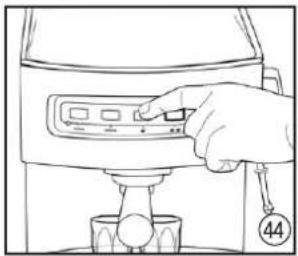
Line drawing of a hand using a coffee maker to press or<|rotate_right|> (no text or symbols present)Натиснете бутона PROGRAM.
natural_image
Line drawing of a hand pressing a button on a kitchen appliance (no text or symbols)natural_image
Line drawing of a hand using a blender with control panel and key (no text or symbols)natural_image
Illustration of a hand pressing down on a grater with an arrow indicating press direction (no text or symbols)natural_image
Line drawing of a hand operating a kitchen machine with a hand holding a small pot (no text or symbols)natural_image
Line drawing of a device with a handle and a button, no text or symbols presentnatural_image
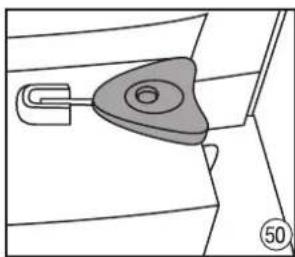
Line drawing of a hand pressing down on a portable kitchen appliance (no text or symbols)Свалете резервоара за вода.
natural_image
Diagram of a mechanical component with a central circular feature and a U-shaped handle, no text or symbols present.natural_image
Illustration of hands using a tool to apply material to a circular component (no text or symbols visible)natural_image
Line drawing of a kitchen appliance with a cloth and a bag on a grater (no text or symbols)natural_image
Technical line drawing of a mechanical component with a numbered part (53), no visible text or symbolsnatural_image
Hand inserting a plug into a device with an arrow indicating the insertion point (no text or symbols present)natural_image
Black and white photo of a glass filled with dark beverage, accompanied by small black beans (no text or symbols visible)
natural_image
Black and white photo of a ceramic coffee cup on a saucer with a spoon (no text or symbols visible)
natural_image
Black and white photo of a glass of dark liquid on a white tray with a white ceramic vessel in the background (no text or symbols visible)
natural_image
Black-and-white photo of a teacup on a saucer with a spoon beside it (no text or symbols visible)
natural_image
Black and white photo of a glass mug filled with milk and a spoon (no text or symbols visible)
natural_image
Black and white photo of a coffee cup on a saucer with a napkin, placed on a folded napkin (no text or symbols visible)
natural_image
Black and white photo of a glass coffee cup on a saucer with a small paper lid (no text or symbols visible)
natural_image
Black and white photo of a glass bowl with a straw, placed on a saucer (no text or symbols visible)ЕСПРЕСО – КЪСО КАФЕ (SHORT BLACK)
natural_image
Line drawing of a kitchen appliance with a hand adjusting the lid (no text or symbols)natural_image
Line drawing of a hand pouring liquid into a toaster oven (no text or symbols)natural_image
Line drawing of a hand pressing down on a kitchen appliance with an upward arrow (no text or symbols)natural_image
Technical line drawing of a mechanical assembly with a tool inserted (no text or symbols)natural_image
Line drawing of a hand pressing down on a toaster front panel with control buttons (no text or symbols)natural_image
Line drawing of a hand inserting a button into a kitchen appliance (no text or symbols)natural_image
Line drawing of a front panel with control buttons and a connector (no text or symbols)Якщо на пульті управління будуть підсвітлюватися кнопки POWER, MANUAL, 📄, 📋, 📁, 📃, 📄, 📃, 📄, 📃, 📄, 📃, 📄, 📃, 📄, 📃, 📄, 📃, 📄, 📃, 📄, 📃, 📄, 📃, 📄, 📃, 📄, 📃, 📄, 📃, 📄, 📄, 📃, 📄, 📃, 📄, 📃, 📄, 📃, 📄, 📃, 📄, 📃, 📄, 📃, 📄, 📃, 📄, 📃, 📄, 📃, 📄, 📃, 📄, 📃, 📃, 📄,
natural_image
Line drawing of a toaster oven with three shades of smoke and control buttons (no text or symbols)natural_image
Line drawing of a hand pouring liquid into a coffee machine with a small cup, no text or symbols presentnatural_image
Illustration of a hand using a microwave presser to press or adjust a grater (no text or symbols visible)natural_image
Line drawing of a microwave oven with control panel and base tray (no text or symbols)natural_image
Line drawing of a hand pressing a button on a kitchen appliance (no text or symbols)natural_image
Illustration of a hand holding a small container with a lid and an arrow indicating direction (no text or symbols)natural_image
Illustration of hands performing a manual task with a tool and mechanical component (no text or symbols)Взбивати каву.
natural_image
Line drawing of a hand using a espresso machine with control panel (no text or symbols)natural_image
Illustration of a hand holding a small bowl with a spoon, no text or symbols presentnatural_image
Illustration of hands pouring dark liquid into a small container (no text or symbols)natural_image
Line drawing of a hand using a coffee machine to press or prepare it, with no visible text or symbols.natural_image
Line drawing of a hand using a espresso machine to press or adjust a gridded tray (no text or symbols present)natural_image
Line drawing of a coffee machine with a cup and tray, no text or symbols presentnatural_image
Line drawing of a hand using a coffee maker machine to press or adjust coffee cups (no text or symbols visible)natural_image
Line drawing of a hand pressing a button on a kitchen appliance (no text or symbols)natural_image
Line drawing of a hand using a tool to clean or inspect a cylindrical object (no text or symbols)natural_image
Line drawing of a hand operating a kitchen appliance with a control panel (no text or symbols)natural_image
Illustration of a hand using a sewing machine to press or install a product (no text or symbols visible)natural_image
Line drawing of a hand holding a device with a knob, no text or symbols presentnatural_image
Line drawing of a hand operating a device with a knob and lever (no text or symbols)natural_image
Line drawing of a kitchen mixer with control panel and handle (no text or symbols)natural_image
Illustration of a hand pouring liquid from a control panel into a beaker (no text or symbols visible)natural_image
Line drawing of a hand pouring liquid from a cup into a kitchen appliance (no text or symbols)natural_image
Line drawing of a hand pouring liquid from a small container into a kitchen appliance (no text or symbols)natural_image
Illustration of hands using a microwave oven to press a cup into a stand (no text or symbols visible)natural_image
Line drawing of a kitchen appliance with a cloth and a tray, no text or symbols presentnatural_image
Line drawing of a hand using a hand mixer machine to press or brush into a glass (no text or symbols visible)natural_image
Line drawing of a hand using a coffee machine to press or install a cup (no text or symbols visible)natural_image
Line drawing of a coffee machine with control panel and tray (no text or symbols)natural_image
Illustration of hands pouring dark liquid into a container with a dropper (no text or symbols)natural_image
Illustration of hands performing a mechanical tool with a valve (no text or symbols)Взбивати каву.
natural_image
Line drawing of a hand pouring liquid into a coffee machine (no text or symbols)natural_image
Line drawing of a hand pressing a button on a kitchen appliance (no text or symbols)natural_image
Illustration of a hand using a lathe machine to press or<|rotate_right|> a gridded plate (no text or symbols visible)natural_image
Line drawing of a hand using a blender with control panel and key (no text or symbols)natural_image
Line drawing of a hand using a blender to press a cup (no text or symbols)Натиснути кнопку ПРОГРАМА.
Очищення
natural_image
Illustration of a hand pressing down on a grater with an arrow indicating press direction (no text or symbols)natural_image
Line drawing of a hand operating a kitchen machine with a hand holding a small pot (no text or symbols)natural_image
Line drawing of a device with a handle and base, showing a downward arrow indicating motion (no text or symbols)natural_image
Illustration of a hand pressing down on a kitchen appliance with an upward arrow (no text or symbols)natural_image
Technical line drawing of a mechanical component with a handle and circular feature (no text or symbols)natural_image
Illustration of hands using a tool to apply material to a circular component (no text or symbols visible)natural_image
Line drawing of a kitchen appliance with a bag attached to the counter (no text or symbols)natural_image
Technical line drawing of a mechanical component with a black triangular base and circular feature (no text or symbols)natural_image
Line drawing of a hand inserting a plug into a device with a label (54), no text or symbols present.natural_image
Black and white photo of a glass filled with dark beverage, accompanied by small black beans (no text or symbols visible)
natural_image
Black and white photo of a ceramic coffee cup on a saucer with a spoon (no text or symbols visible)
natural_image
Black and white photo of a glass of dark liquid on a white tray with a white ceramic vessel in the background (no text or symbols visible)
natural_image
Black and white photo of a teacup on a saucer with a straw, no text or symbols visible.
natural_image
Black and white photo of a glass mug filled with milk and a spoon (no text or symbols visible)
natural_image
Black and white photo of a coffee cup on a saucer with a napkin, placed on a textured surface (no text or symbols visible)
natural_image
Black and white photo of a coffee cup on a saucer with a small object partially visible (no text or symbols)
natural_image
Black-and-white photo of a glass bowl with a straw and spoon, placed on a saucer (no text or symbols visible)ΕСПРЕСО (SHORT BLACK)
Congratulations on your choice of our appliance, and welcome among the users of Zelmer products.
In order to achieve best possible results we recommend using exclusively original Zelmer accessories. They have been specially designed for this product.
We urge that you read this user's manual carefully. Special attention needs to be paid to the safety precautions. Please save this manual so it can be referred to in the future use of the product.
SAFETY PRECAUTIONS WHEN USING THE ESPRESSO MACHINE
- Carefully read this user's manual provided with the appliance and save it for future reference.
●Always place the appliance on a flat, even surface.
- Do not use the espresso machine without water in the water tank. Fill the water tank with clean and cold water only. Do not fill beyond the maximum capacity of the water tank, which is 2.1 l.
●Never remove the filter holder when brewing coffee or collecting boiling water because the appliance is under pressure. Removing the filter holder may result in burning or hurting oneself.
●The steam wand gets very hot during milk frothing and water flowing. This may cause burns in case of contact, therefore avoiding any direct contact with the steam wand is advised.
Before cleaning the espresso machine and in the event that a problem occurs during the coffee brewing process, always turn off the espresso machine and remove the plug from the socket.
- When turning on the cup warming plate and the steam wand, do not allow any contact between the connecting cord and the hot parts of the espresso machine.
Never place hands under a stream of steam, hot water, or coffee poured as it may result in burning or hurting oneself.
●Always disconnect power (POWER button) before inserting the plug into or removing it from the socket. Do not the remove the plug from the socket by pulling the connecting cord – grip the plug only.
●Always disconnect power and unplug the appliance when it is not going to be used for a longer period of time and before cleaning.
Never use the espresso machine with an extension cord, unless the extension cord has been tested by a qualified electrician or a service center engineer.
●The appliance should always be plugged into an electric socket (alternating current only) equipped with a safety pin and whose voltage is compliant with the value given on the data plate of the appliance.
- Do not use the espresso machine for anything other than its intended use described in the user's manual.
- Do not place the appliance near a heat source, a fire, an electric heating element or on a hot stove. Do not place it on another appliance.
- Do not let the power cord of the appliance hang over the edge of a table or shelf, or touch a hot surface.
- Do not use the appliance if it is visibly damaged, if it has a damaged power cord, after it has fallen down or been damaged in any other way. If believed to be damaged, the appliance can be tested, repaired or regulated only by qualified staff of an authorised service center.
- Do not immerse the appliance in water or any other liquid.
- If the undetachable power cord gets damaged, it should be replaced by a specialist repair shop in order to avoid danger.
Warning: The water tank should not be open when the appliance is in use.
●This appliance is not intended for use by persons (including children) with reduced physical, sensory or mental capabilities, or lack of experience and knowledge, unless they have been given supervision or instruction concerning use of the appliance by a person responsible for their safety.
●Children should be supervised to ensure that they do not play with the appliance.
●The appliance is not intended to be operated by means of an external timer or separate remote-control system.
Ensure that the above guidelines are understood.
TECHNICAL DATA
The technical parameters are given on the data plate of the product.
Power rating: 1050 W at 230 V.
Capacity of the water tank: 2.1 l.
The espresso machine is a class I appliance equipped with a connecting cord with a protective conductor and a plug with an earth contact.
The espresso machine meets the requirements of the standards in force.
The appliance is compliant with the requirements of the following directives:
- The Low Voltage Directive (LVD) - 2006/95/EC.
- Electromagnetic Compatibility (EMC) - 2004/108/EC.
The product is affi xed with a CE Mark on the data plate.
ABOUT THE ESPRESSO MACHINE
The espresso machine brews coffee of rich aroma and taste, as the perfect brewing temperature of water, 92–94°C, is ensured. The espresso machine was designed so that its readiness to brew coffee or produce steam for frothing milk can be watched.
DESCRIPTION OF THE APPLIANCE
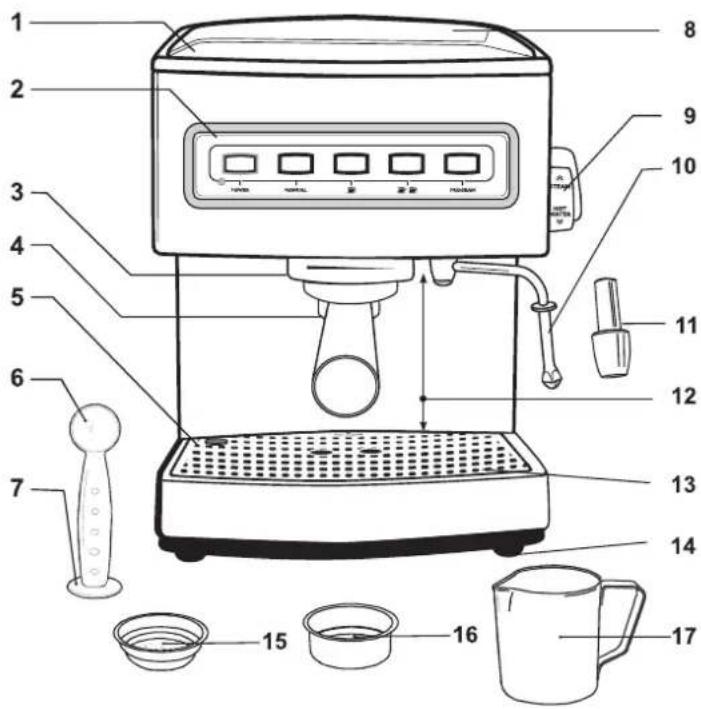
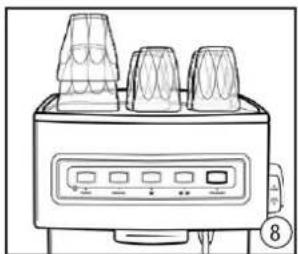
- Cup warming plate
Pre-warming of up to 9 coffee cups.
- Control panel
Easy to use control panel which shows readiness to brew coffee.
MANUAL, single espresso 📋, double espresso 🐃PROGRAM buttons and power light.
-
Brew head
-
Filter holder
-
Water level indicator
The water level indicator in the drip tray indicates how full the tray is. The upper part of the indicator has a red stripe for easier identification.
-
Measuring spoon
-
Tamping end of the measuring spoon
-
2.1l water tank
Removable water tank to facilitate filling up. Lift to remove.
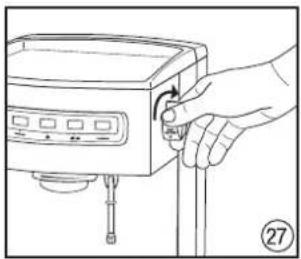
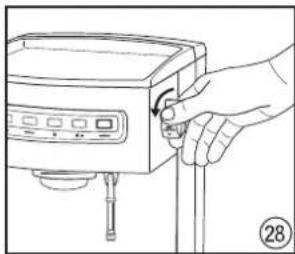
- Regulator knob
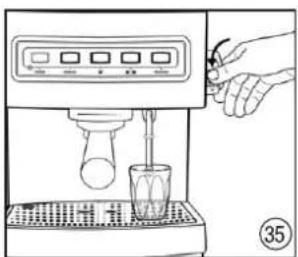
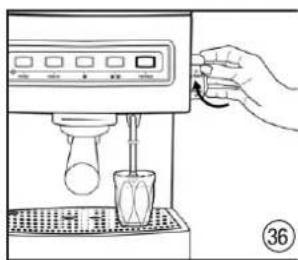
Turn to the left – hot water from the steam wand, turn to the right – steam from the steam wand.
-
Steam wand
-
Frothing attachment
A rubber attachment was designed to facilitate making compact, thick froth from milk in just a few seconds. Always use it for frothing milk.
- Large cup height
The space between the filter holder and the drip tray is intended for placing even high cups.
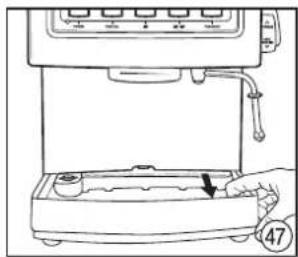
- Removable drip tray
The drip tray and the grid can be removed to facilitate cleaning.
- Rubber antislip legs
They ensure that the appliance is stable and prevent it from moving and scratching the table top.
-
1 cup filter
-
2 cup filter
-
500 ml mug
Turn the espresso machine on by pressing the POWER button. The signal light below the POWER button will illuminate in red. At the same time, illumination around the outer edge of the POWER button will flash, which indicates that the espresso machine is in the course of reaching the temperature required.
Warning: Before turning the espresso machine on, check that the knob on the side of the appliance is in position 0 (off).
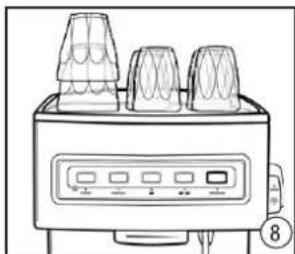
When the illumination of the POWER button stops flashing, it will change to continuous light, which indicates that the espresso machine is ready for brewing. At the same time, the outer edges around each of the MANUAL buttons, single espresso and double espresso but as will light up.
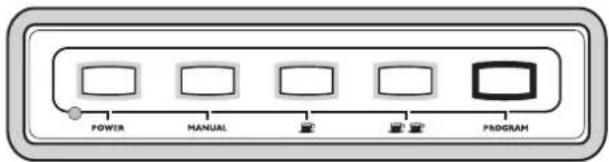
Warning: Remember that the illumination around the outer edge of the POWER button flashes, it indicates that the espresso machine has not reached the right temperature. Only the continuous light signals that the machine is ready to use. To turn the espresso machine off, simply press the POWER button.
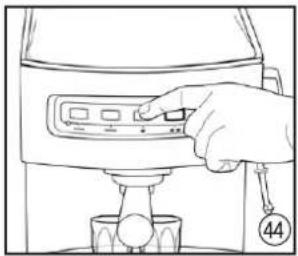
MANUAL BUTTON
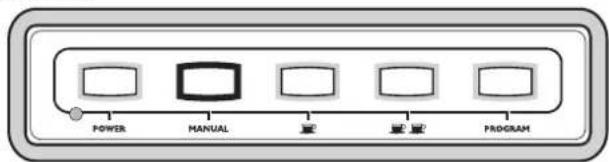
The MANUAL button allows a full control of the time of the coffee pouring process. Use it when the espresso machine has heated up and the outer edges of the MANUAL, single espresso and double espresso buttons light up (continuous light). Immediately after the MANUAL button has been pressed, the illumination around the single espresso and the double espresso buttons off. Only the POWER and MANUAL buttons remain illuminated. The coffee pouring process will resume.
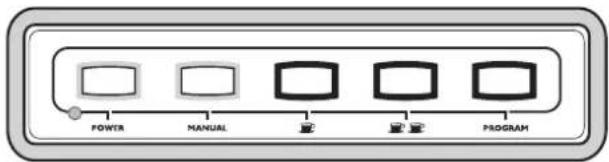
Pressing the MANUAL button again stops the coffee pouring process.
Warning: If the MANUAL button is not illuminated, and a light around the POWER button flashes, it means the espresso machine has not reached the required operating temperature.
SINGLE ESPRESSO

The single espresso function ⚪tomatically prepares one espresso.
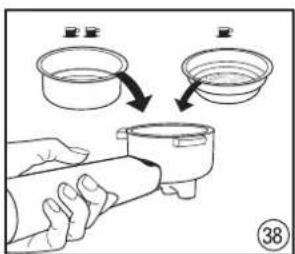
Tip: To prepare a single espresso, use the 1 cup filter holder (the smaller one).
The moment the espresso machine has heated up, i.e. the MANUAL, single espresso and double espresso lights light up (continuous light), press the single espresso button. The coffee pouring process of an espresso into 1 cup will be automatically started and finished.
For a single espresso, the appliance has been pre-programmed to pour 60 ml of coffee.
After pressing the single espresso button, the illumination around the MANUAL button and around the double espresso button will go out and the coffee pouring process will resume. Only the POWER and the single espresso buttons will be lit.
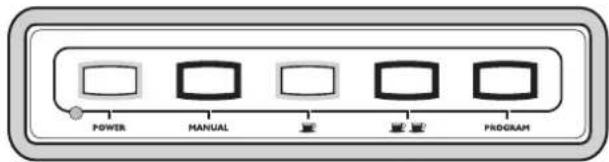
Notice: It is not necessary to press the single espresso button again to stop the coffee pouring process. The espresso machine will stop pouring automatically.
DOUBLE ESPRESSO


The double espresso function automatically prepares two espressos.
Tip: To prepare two espressos, use the 2 cup filter holder (the bigger one).
The moment the espresso machine has heated up, i.e. the MANUAL, single espresso and double espresso lights light up (continuous light), press the double espresso. The coffee pouring process of espresso into two cups, 60 ml each, will be automatically started and finished.
After pressing the double espresso 📄 button, the illumination around the MANUAL button and the single espresso 📄 button will go out and the coffee pouring process will resume. Only the POWER and the double espresso 📄 as will be lit.
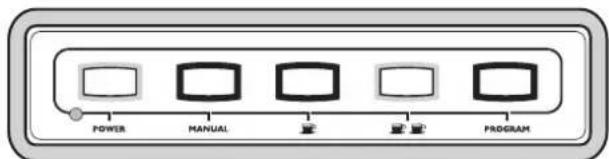
Notice: It is not necessary to press the double espresso 📄 button again to stop the coffee pouring process. The espresso machine will stop pouring automatically.
PROGRAM BUTTON
The PROGRAM function allows the user to set the length of the coffee pouring time. This allows the user to programme the intensity of coffee according to their individual taste. Using the PROGRAM function (programming) – see PROGRAMMING THE ESPRESSO MACHINE (p. 11).
After activating the PROGRAM function, the illumination around the MANUAL button will go out. The POWER, the single espresso and the double espresso buttons, as well as the PROGRAM button will remain lit.
A SHORT GUIDE TO USING THE ESPRESSO MACHINE
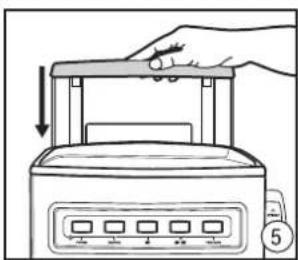
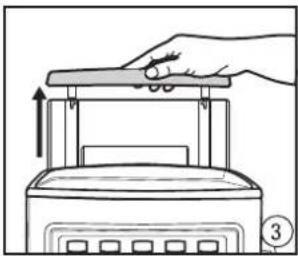
The pictures below are intended to help you use the espresso machine. Each picture has its number. The content of the guide will make references to these pictures, therefore they have been numbered to ensure they are easy and comfortable to use.
For example: Fill up the water tank (1) (2) (3) (4) (5) with cold water – do not use mineral water.
Each time you see such numbers, please refer to the relevant pictures.
Preparing the espresso machine – rinsing the system
natural_image
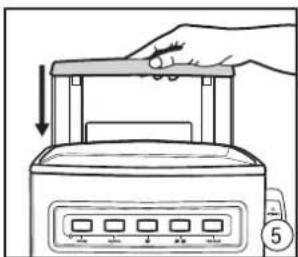
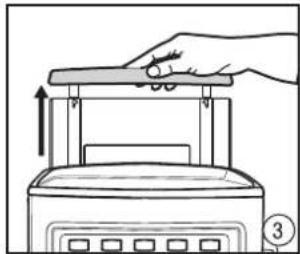
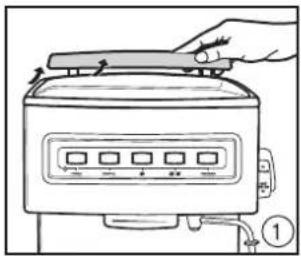
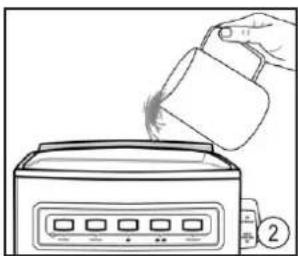
Line drawing of a kitchen appliance with a hand adjusting the lid (no text or symbols)Open the lid of the water tank. Fill up with cold water and close the lid. Or take out the water tank.
natural_image
Line drawing of a hand pouring liquid into a toaster oven (no text or symbols)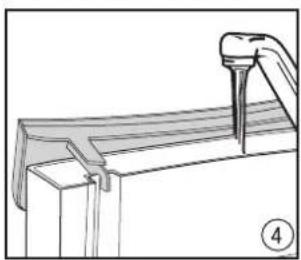
natural_image
Technical line drawing of a mechanical assembly with a tool inserted (no text or symbols)Fill up with cold water.
natural_image
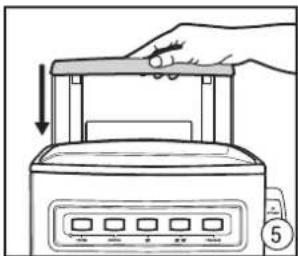
Line drawing of a hand pressing down on a toaster front panel with control buttons (no text or symbols)Replace the water tank and close the lid.
natural_image
Line drawing of a hand pressing down on a kitchen appliance with an upward arrow (no text or symbols)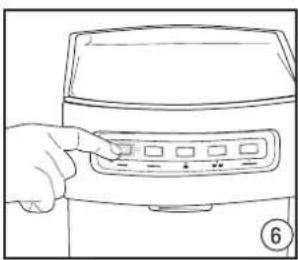
natural_image
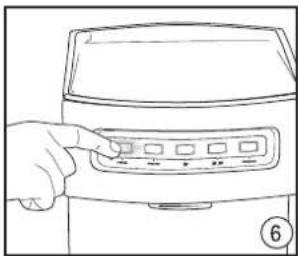
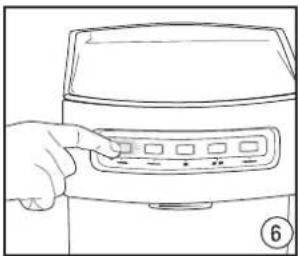
Line drawing of a hand pressing a button on a food processor (no text or symbols visible)Press the POWER button to switch on the appliance.
natural_image
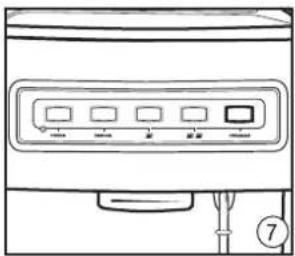
Line drawing of a front panel with control buttons and a connector (no text or symbols)When these buttons light up on the control panel:
POWER, MANUAL, 📄, the espresso machine is ready to use.
natural_image
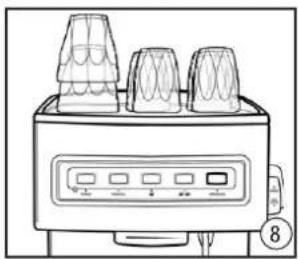
Line drawing of a toaster oven with three models and control panel (no text or symbols)Warming cups on the plate.
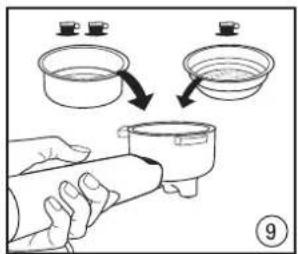
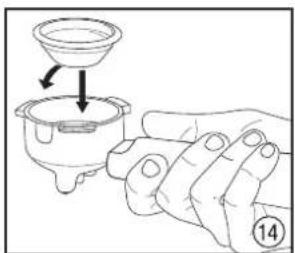
Choose a suitable filter and place it in the filter holder.
natural_image
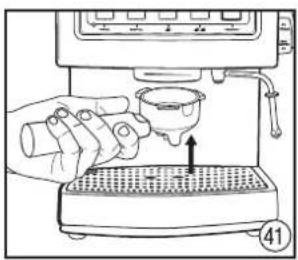
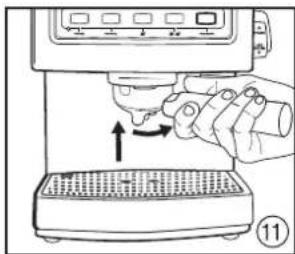
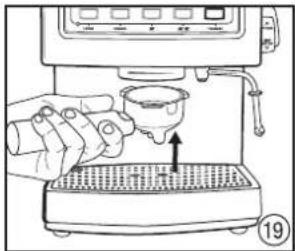
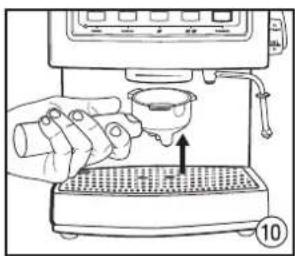
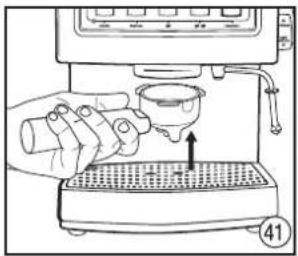
Illustration of a hand using a coffee machine to pour liquid into a griddle (no text or symbols visible)Place the filer holder in the brew head.
Notice: Projections on the holder must fit in the slots of the brew head.
natural_image
Illustration of a hand using a coffee machine to press or<|rotate_right|> a griddle, with no visible text or symbols.Turn the filter holder all the way to the right.
natural_image
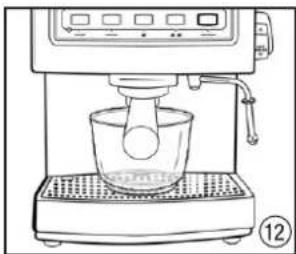
Line drawing of a coffee machine with a glass bowl and control panel (no text or symbols)Place a large cup under the outlets.
natural_image
Line drawing of a hand pressing a button on a device (no text or symbols visible)Press the MANUAL button and run a flow of about 0.5 l
water. Turn off the water flow (the pump) by pressing
the MANUAL button again
natural_image
Illustration of a hand holding a small container with a lid and an arrow indicating direction (no text or symbols)Choose a suitable filter and place it in the filter holder.
natural_image
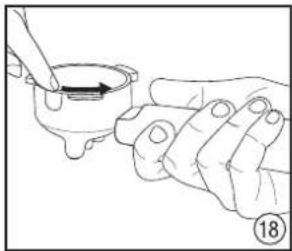
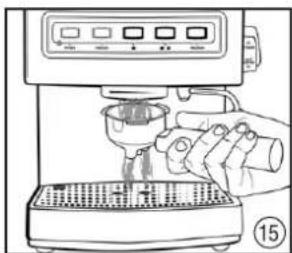
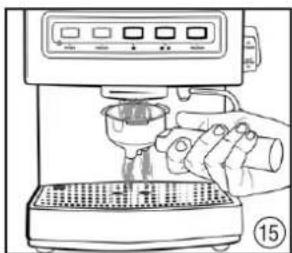
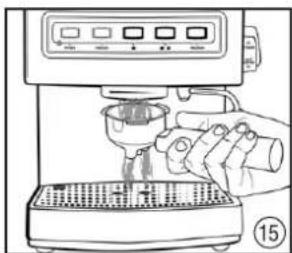
Line drawing of a hand using a espresso machine with control panel (no text or symbols)Hold the filter holder and rinse it with water to pre-heat it.
natural_image
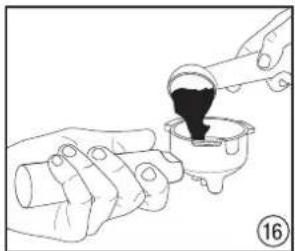
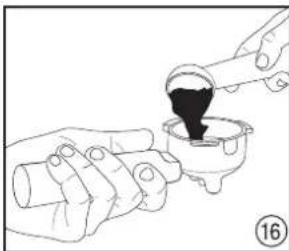
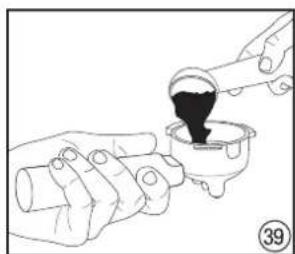
Illustration of hands pouring dark liquid into a small container (no text or symbols)Pour finely ground coffee into the filter.
natural_image
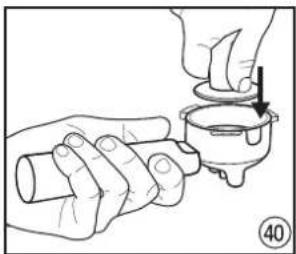
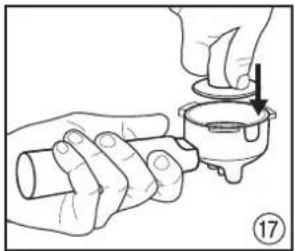
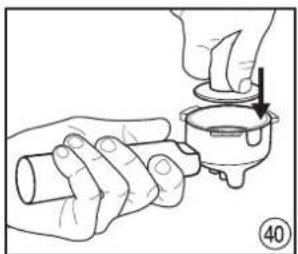
Illustration of hands performing a manual task with a tool, no text or symbols presentTamp the coffee.
natural_image
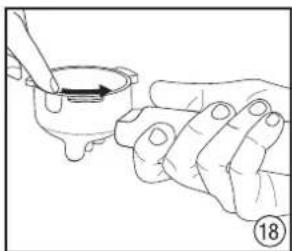
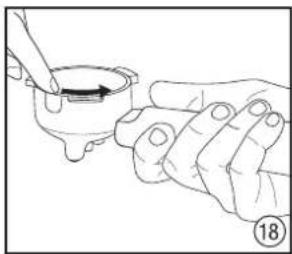
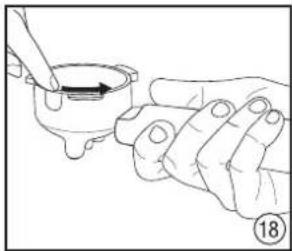
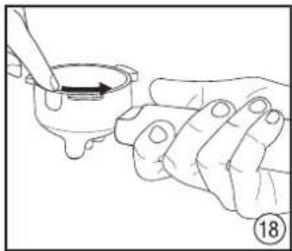
Illustration of a hand holding a small bowl with a spoon, no text or symbols presentClean the rim of the filter holder to remove any excess ground coffee.
natural_image
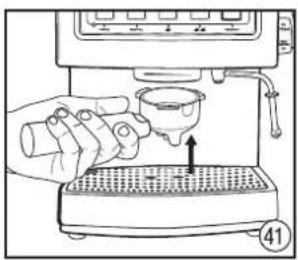
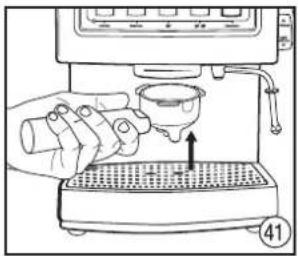
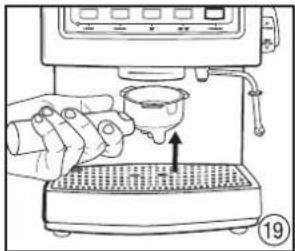
Line drawing of a hand using a coffee machine to press or feed a cup (no text or symbols visible)Place the filer holder in the brew head. Notice: Projections on the holder must fit in the slots of the brew head.
natural_image
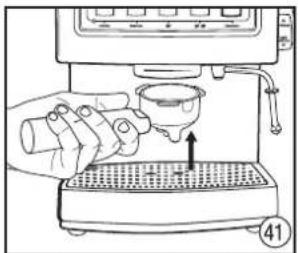
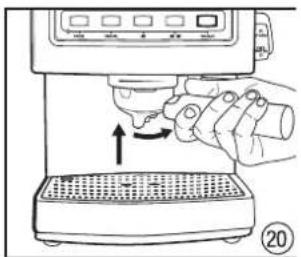
Line drawing of a hand using a espresso machine to press or<|rotate_right|> a gridded tray (no text or symbols)Turn the filter holder all the way to the right.
natural_image
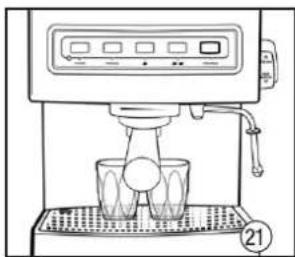
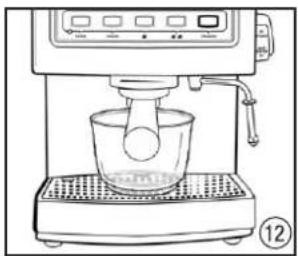
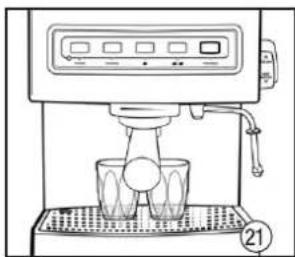
Line drawing of a coffee machine with a cup and tray, no text or symbols presentPlace cups under the outlets of the holder.
natural_image
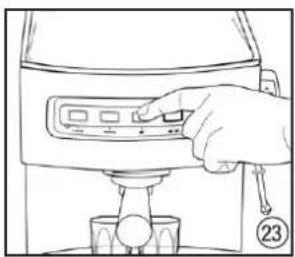
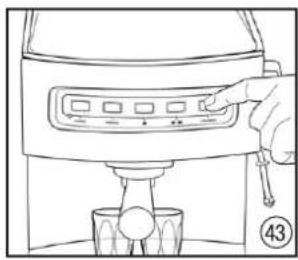
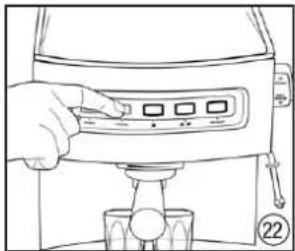
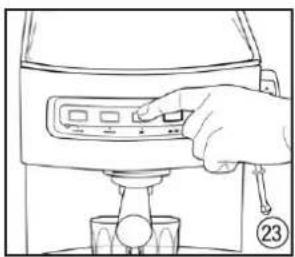
Line drawing of a hand using a coffee maker machine to press or adjust coffee cups (no text or symbols visible)Press the MANUAL button.
The coffee pouring process will resume. Press the MANUAL button again to stop the coffee pouring process.
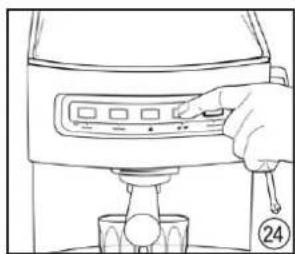
natural_image
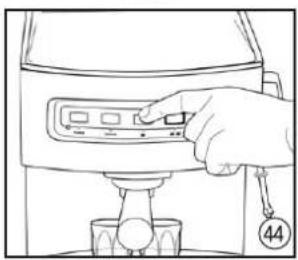
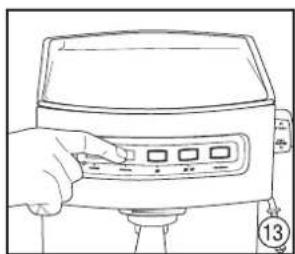
Line drawing of a hand pressing a button on a kitchen appliance (no text or symbols)Press the single espresso 📄tton.
natural_image
Line drawing of a hand operating a kitchen appliance with a control panel (no text or symbols)Press the double espresso 🍴
natural_image
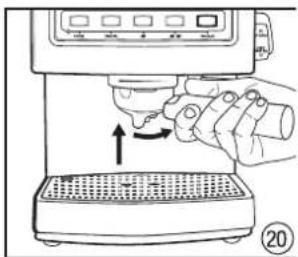
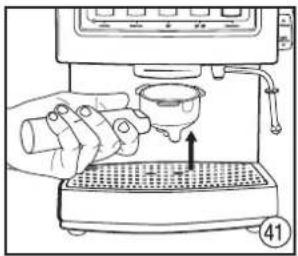
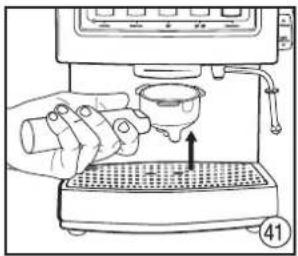
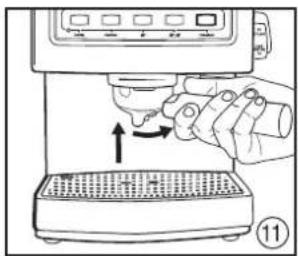
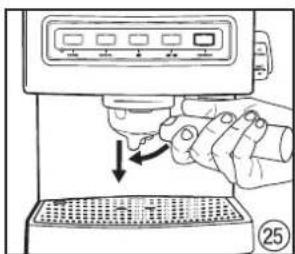
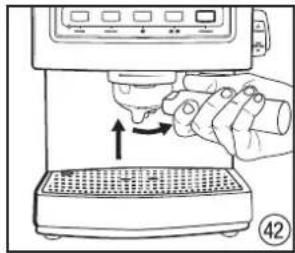
Illustration of a hand using a microwave oven to press or<|rotate_right|> (no text or symbols visible)Take out the coffee holder by turning it to the left and pulling it down.
The coffee pouring process will resume. When the cup has been filled with 60 ml of coffee, the espresso machine will stop automatically.
natural_image
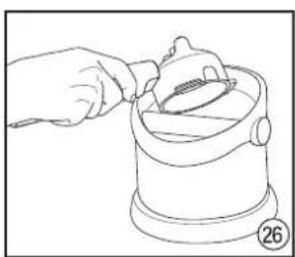
Line drawing of a hand using a tool to clean or inspect a container (no text or symbols)Remove the used coffee from the filter.
Frothing milk
natural_image
Line drawing of a hand holding a device with a handle, no text or symbols presentRinse the steam wand by placing a cup under the wand and turning the regulator knob clockwise to the steam position 🔊.
natural_image
Line drawing of a hand operating a device with a knob and lever (no text or symbols)Turn the steam off by turning the knob to position 0.
natural_image
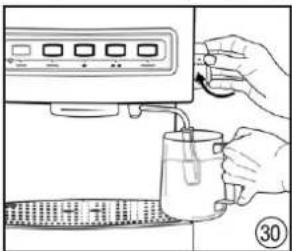
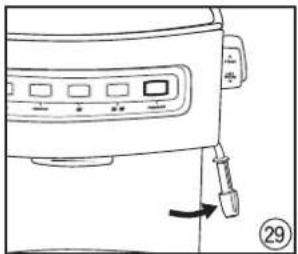
Line drawing of a kitchen appliance with a hand operating the button (no text or symbols)Move the steam wand to the side of the appliance and attach the milk frothing attachment to the wand.
natural_image
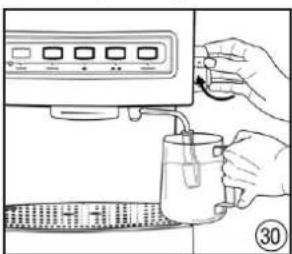
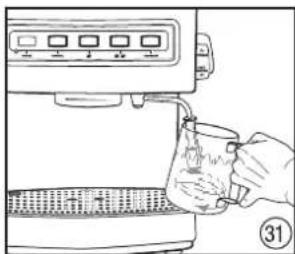
Illustration of hands using a water dispenser to add liquid into a container (no text or symbols visible)Immerse the steam wand in milk, about 1 cm below the surface, and activate the steam dosing again - position 🤨.
natural_image
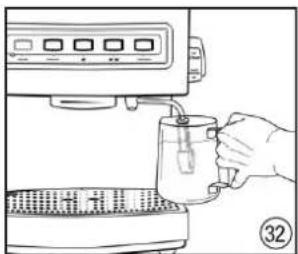
Line drawing of a hand pouring liquid from a cup into a kitchen appliance (no text or symbols)Hold the frothing jug at an angle so that the steam wand sits in the „spout" and immerse the wand just below the surface of milk.
natural_image
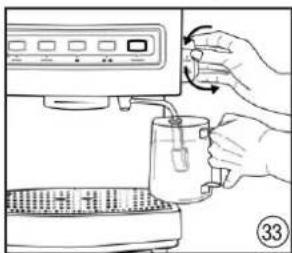
Line drawing of a hand pouring liquid from a small container into a microwave oven (no text or symbols)Lift the jug so the steam wand is in the middle of the milk.
natural_image
Illustration of a hand pouring liquid into a coffee maker using a mallet (no text or symbols visible)Stop the steam by turning the knob to position 0 (off).
natural_image
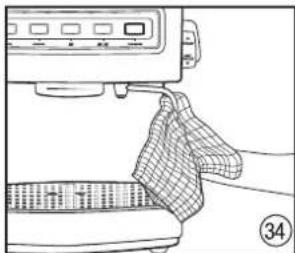
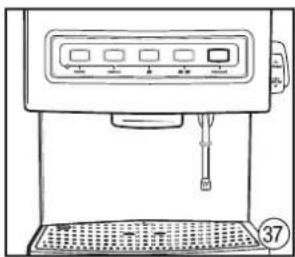
Line drawing of a kitchen appliance with a cloth and a tray, no text or symbols presentTake off the frothing attachment, wash it in warm water with the addition of washing-up liquid. Wipe the steam wand with a damp cloth and rinse with a little steam.
Hot water/boiling water
natural_image
Line drawing of a hand using a hand mixer machine to press or brush into a glass (no text or symbols visible)Place a cup on the drip tray under the steam wand and activate the hot water function by turning the regulator knob to position HOT WATER.
natural_image
Illustration of a hand using a coffee machine to press or install a cup (no text or symbols visible)Turn off the hot water by turning the knob to the off position 0.
natural_image
Line drawing of a coffee machine with control panel and tray (no text or symbols)Leave the steam/hot water wand over the drip tray.
Programming
Choose a suitable filter and place it in the filter holder.
natural_image
Illustration of hands pouring dark liquid into a container with a pipette (no text or symbols)Pour finely ground coffee into the filter.
natural_image
Illustration of hands performing a manual valve or tool manipulation (no text or symbols present)Tamp the coffee.
natural_image
Line drawing of a hand pouring liquid into a coffee machine with a downward arrow indicating a drop (no text or symbols)Place the filter holder in the brew head.
Notice: Projections on the holder must fit in the slots of the brew head.
natural_image
Line drawing of a hand pressing a button on a kitchen appliance (no text or symbols)Press the single espresso 📄 button.
The coffee pouring process will resume. The moment the desired amount of coffee has been poured, press button 📄 again to stop the pouring process.
natural_image
Line drawing of a hand using a handheld device to press or<|rotate_right|> a machine (no text or symbols visible)Turn the filter holder all the way to the right.
natural_image
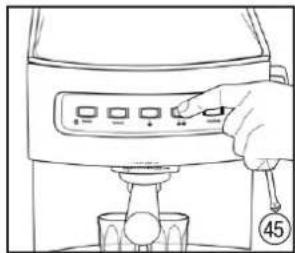
Line drawing of a hand operating a kitchen press with control panel (no text or symbols)Press the double espresso 🎨 🎩 button.
The coffee pouring process will resume. The moment the desired amount of coffee has been poured into 2 cups, press button 🎨 again to stop the pouring process.
natural_image
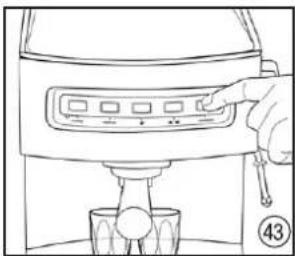
Line drawing of a hand using a blender to press or<|rotate_right|> a cup (no text or symbols present)Press the PROGRAM button.
Cleaning
natural_image
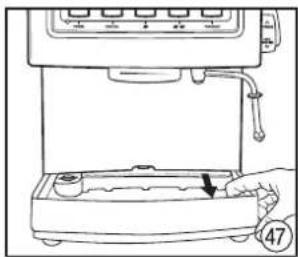
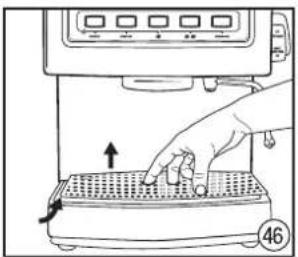
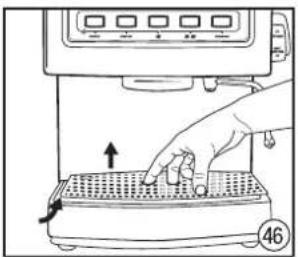
Illustration of a hand pressing down on a grater with a control panel (no text or symbols)Remove the grid from the drip tray.
natural_image
Line drawing of a hand operating a kitchen machine with a hand holding a tray (no text or symbols)Remove the drip tray, wash it and replace it.
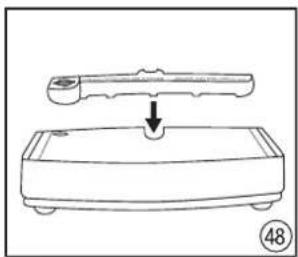
natural_image
Line drawing of a device with a handle and a circular button, no text or symbols presentCheck that the plastic insert is in the right place on the drip tray.
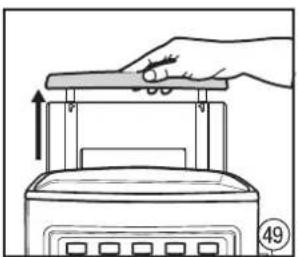
natural_image
Line drawing of a hand pressing down on a device with an arrow indicating motion (no text or symbols)Take out the water tank. On the base under the water tank there are two pins
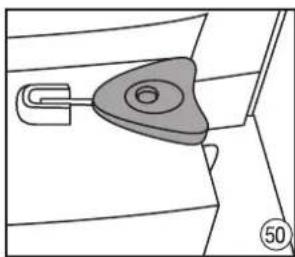
natural_image
Diagram of a mechanical component with a handle and circular hole, no text or symbols present- a grey one for cleaning coffee filters, and a black one for cleaning the steam wand.
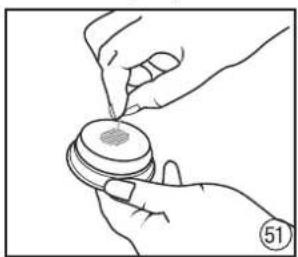
natural_image
Illustration of hands using a tool to apply material to a circular component (no text or symbols visible)Use the grey pin to clean the holes of the coffee filter.
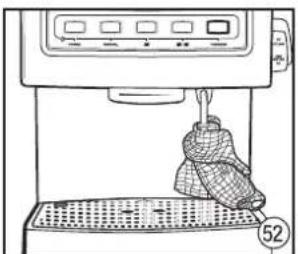
natural_image
Line drawing of a kitchen appliance with a bag being handled, no text or symbols presentWrap the steam wand with a damp cloth and turn on steam for 10 seconds.
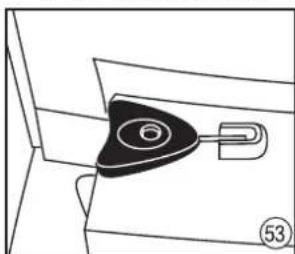
natural_image
Diagram of a mechanical component with a triangular knob and attached hook, labeled with number 53 (no text or symbols on the diagram itself)Take out the black pin for cleaning the steam wand from the base.
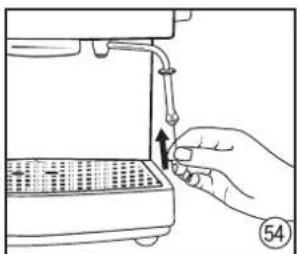
natural_image
Hand inserting a plug into a device component (no text or symbols visible)Insert the pin for the steam wand into the bottom part of the wand.
PREPARING THE ESPRESSO MACHINE FOR ITS FIRST USE (DESCRIPTION)
-
Place the espresso machine on a dry and stable surface.
-
Check that the drip tray and the grid are in place.
-
Fill the water tank up with water.
There are two ways of fi lling the tank up with water:
a) Lift the lid of the water tank; it is in the top part of the espresso machine (1), and using e.g. a jug, fill it up with fresh cold water or with filtered water (2) and close the lid.
b) Alternatively, the water tank can be taken out and filled up with fresh cold water. To do this, lift the lid and using it as a handle, slide the water tank out (3). Next, fill it up with fresh cold water or with filtered water (4). Replace the water tank and close the lid (5).
- Plug the connecting cord in a 230V alternating current mains socket. Press the POWER button to turn the espresso machine on (6). A red signal light placed below the POWER button will come on and the illumination around the outer edge of the POWER button will start flashing indicating that the espresso machine is on and is being heated. When the illumination of the POWER button stops flashing and will give continuous light, it means that the espresso machine is ready for brewing espresso. At the same time, the outer edges of each of the MANUAL, the single espresso and the double espresso buttons will light up (continuous light).
Warning: Before turning the espresso machine on, check that the regulator knob on the side of the espresso machine is in position 0 (off).
- Place cups or other dishes on the warming plate (8).
Notice: When using the appliance for the first time, or when the appliance has not been used for a longer time, it is crucial that the espresso machine is rinsed.
-
To do this, place a one or two cup filter in the holder (9). Place the filter holder in the brew head (10) (11).
-
Place a sufficiently large container under both filling outlets (12).
-
Check that the espresso machine is in the espresso mode, i.e. the outer edges around the POWER, MANUAL, single espresso and double espresso lit is are lit (continuous light).
Tip: Remember that if the illumination around the outer edges of the POWER button flashes, it means that the espresso machine is not ready to use yet. Only the continuous illumination of the outer edges around the POWER, MANUAL, single espresso and double espresso indicates that the espresso machine is ready to use.
- Press the MANUAL button (13) and allow water to flow out of the appliance until the water tank has been emptied completely.
Notice: Due to the activation of the safety system (limitation to 250 ml), the user must press the MANUAL button several times to empty the tank completely.
BREWING ESPRESSO (DESCRIPTION)
To obtain a flavour-rich coffee, we recommend that the cups, the filter holder and the filter are pre-heated in the following manner:
Pre-heating the fi Iter holder
-
Fill up the water tank (1) (2) (3) (4) (5) with cold water and turn on the appliance (6).
-
Choose a suitable filter and place it in the holder (9) (14) (10) (11).
Tip: Use a smaller filter (for one cup) for one coffee, and a bigger one for two coffees.
-
Take the filter holder, hold it under the brew head and rinse it with water by pressing the MANUAL button to start the flow of water. To stop the rinsing process, press the MANUAL button again (15).
-
Allow the filter holder to dry.
Pre-heating cups
-
If the appliance has been on for a longer time, pre-heat cups/glassware on the plate – it will help keep the froth of the brewed coffee (8).
-
Cups can also be pre-heated by filling them with hot water (12) (13). Press the MANUAL button to start the flow of water. To stop the process, press the MANUAL button again. Pour the hot water out of the cups.
Brewing coffee
-
Check if there is cold water in the tank. If there is no or little water, fill up the tank (1) (2) (3) (4) (5) with cold water and turn the appliance on (6).
-
Using the measure provided, put finely ground coffee in the filter (16).
-
Using the other end (the flat end) of the measure, press the coffee down lightly making a 90 degree turn (17) to fill the bottom. It will tighten the tamped coffee.
-
Remove any excess coffee so it is level with the rim of the filter (18). Important: Ensure there is not too much coffee in the filter.
Tip: Doses of coffee and the degree to which coffee is tamped should be the same each time. The pouring time of brewed coffee depends
on the coarseness of ground coffee. The finer the coffee, the lower the pouring speed.
Tip: Check that the flat end of the measure is dry when tamping coffee. If it is damp, coffee particles may stick together.
Warning: Too finely ground coffee may block the holes of the filter and stop the coffee flow.
-
Place the filter holder in the brew head and turn it all the way to the right (19) (20).
-
Place cups under the pouring outlets of the holder (21).
Warning: Check that the espresso machine is ready to use, i.e. that the outer edges around the POWER, MANUAL, single espresso and double espresso lights are lit up (continuous light).
-
To resume pouring coffee in the manual mode (which gives a full control of the espresso pouring time), press the MANUAL button. To stop coffee pouring in the manual mode, press the MANUAL button again (22).
-
To resume pouring coffee in the automatic mode (pre-programmed), press button ☐ (23) (for 1 cup) or button ☐ (for 2 cups) (24). When the cups are full, the espresso machine will stop automatically.
Tip: Perfectly brewed coffee is dark, caramel with reddish highlights. It largely depends on the quality of coffee used. Always serve freshly brewed, hot coffee.
After brewing
-
Turn the filter holder to the left and remove it from the brew head (25).
-
Empty the used coffee from the filter (26).
Tip: After each use of the espresso machine, we recommend that the fi liter holder is removed from the head and the brew head is rinsed with a small amount of water at the contact point between the head and the fi liter holder. This will wash off the used coffee which has stuck to the bottom part of the brew head and will ensure the right temperature of water for next brewing. To do this, press the MANUAL button and run a short flow of water into a dish.
FROTHING MILK (DESCRIPTION)
The steam function is used for frothing milk. Steam performs two functions. Firstly, it warms milk. Secondly, it mixes milk with air which gives it a delicate, smooth appearance.
As is the case with brewing coffee, the best results with frothing milk are achieved with time as the user gains experience.
Tip: Remember that coffee is the basis of all coffee beverages, and milk is only an addition.
Notice: It is recommended that espresso is prepared first, and milk is frothed afterwards.
Warning: Before the milk frothing process, check that the espresso machine is ready to use, i.e. that the outer edges of the POWER, MANUAL, single espresso and double espresso units are lit (continuous light).
-
Check if there is cold water in the tank. If there is no or little water, fill up the tank (1) (2) (3) (4) (5) with cold water.
-
Determine the amount of milk needed based on the number of cups of coffee brewed or on the size of the milk jug.
Tip: Remember that the volume of milk increases during frothing.
- Pour cold, cooled down milk into a stainless steel jug filling it up to 1/2 or 2/3 of its capacity.
Tip: Store a stainless steel jug with milk in a fridge so that the milk is well cooled down. Remember not to rinse the jug with warm water before use.
-
Rinse the steam wand by placing a dish under it and by turning the regulator knob to the steam position ⏻ (27). Turn off the steam by turning the knob to position 0 (28).
-
Move the steam wand to the side of the appliance and attach the milk frothing attachment (29).
-
Immerse the steam wand in milk so that the wand is about 1 cm below the surface and activate steam dosing by turning the regulator knob into position ⏻(30).
-
Hold the frothing jug at an angle so that the steam wand sits in the "spout" and lower the jug until the end of the steam wand is immersed just below the surface of milk. This will start the milk frothing process.
Warning: Do not allow an uneven outflow of steam, or the froth will not be properly aired. To avoid it, lift the jug so that the steam wand is deeper immersed in milk. Remember that the ideal texture of milk is soft, smooth froth.
-
The moment the milk has warmed up and frothed, the level of milk in the jug will start rising. If this happens, start lowering the jug but always keep the end of the steam wand immersed just under the milk surface (31).
-
The moment froth has been obtained, lift the jug so that the steam wand is in the middle of milk (32).
Tip: The amount of froth required will change depending on the type of beverage prepared. E.g. a cappuccino requires more froth than a coffee beverage on the basis of an espresso served with steam frothed milk.
- Immediately after milk has been warmed up to 60–65°C, turn off the steam by turning the regulator knob to position 0 (33).
Tip: If you do not have a thermometer, a good indication of reaching the right temperature is if you cannot keep a hand against the jar for longer than 3 seconds.
Important: Do not boil the milk.
- Remove the jug and take the frothing attachment off the steam wand. After each use, clean the wand in warm water with the addition of washing-up liquid. Clear all its outlets. Promptly wipe the steam wand and its end with a clean damp cloth (34) and rinse with a small amount of steam.
- Holding the jug in one hand tap it lightly on the table so as to release air bubbles and then move the jug in a circular motion until milk gets shiny and there are no bubbles in it. This will help obtain a uniform texture of milk and froth.
USING THE HOT WATER FUNCTION
The hot water function is perfect for preparing the long black drink (espresso diluted with hot water), hot chocolate and for filling a coffee plunger or a tea pot.
Warning: Before using the hot water function, check that the milk frothing attachment has been taken off the steam wand.
- Fill up the tank (1) (2) (3) (4) (5) with cold water.
- Turn on the espresso machine (6). The pilot light placed under the POWER button will illuminate in red. AT the same time, the illumination around the outer edge of the POWER button will start flashing which indicates that the espresso machine is in the course of reaching the right operating temperature.
- Move the steam wand to the side of the appliance and check that the milk frothing attachment has been taken off the steam wand.
- When the illumination of the POWER button stops flashing and gives continuous light, it means that the espresso machine is ready for brewing espresso. At the same time the outer edges around each of the MANUAL, single espresso 📄 and double espresso 📄 buttons will light up (continuous light).
- Place a cup or a dish under the steam/hot water wand and activate the hot water function by turning the regulator knob anticlockwise to position HOT WATER (35).
- The moment the cup or dish has been filled with the desired amount of hot water, close the hot water by turning the regulator knob to position 0 (36).
- Take out the cup or dish and leave the steam wand over the drip tray (37).
PROGRAMMING THE ESPRESSO MACHINE
The espresso machine allows to programme the coffee pouring time so that it is possible to adapt it to the user's individual needs (it mainly concerns the taste or the intensity of coffee).
Originally, the espresso machine has been programmed for a single espresso 📋 (60 ml) and a double espresso 📋20ml). However,
the use can programme their own settings for the single espresso function or for the double espresso function following the instructions below.
Programming a single espresso
- Fill up the water tank (1) (2) (3) (4) (5) with cold water.
- Turn on the espresso machine (6). The pliot light placed below the POWER button will illuminate in red. At the same time, the illumination around the edge of the POWER button will start flashing indicating that the espresso machine is in the course of reaching the desired operating temperature.
- Prepare the filter holder. Choose a filter for 1 cup (38) and place it in the filter holder (14). Using the measure provided, place ground coffee in the filter (39). Press the coffee down using the tamper (the other end of the measure) (40). Do not tamp to hard.
Notice: Check that you do not put too much coffee in the filter. Wipe the rim of the filter and remove coffee from it (18).
4. Place the filter holder in the brew head of the appliance (41). Next turn the holder all the way to the right (42).
5. Press the PROGRAM button. All the illuminations apart from the MANUAL button will come on (43).
6. Place 1 cup directly under the brew head on the drip tray (43).
7. Press the single espresso button and activate the espresso pouring process (44).
8. After the single espresso button has been pressed, the illumination of the MANUAL and double espresso 📋 buttons will go out, and the illumination around the outer edges of the POWER and the single espresso 📋 buttons will come on.
9. Pour the coffee to the desired level. The moment the desired level is reached, press the single espresso button. It will stop the coffee pouring process. A double sound signal will be heard which will indicate a new setting for the single espresso function that has been pre-programmed and saved in the memory of the appliance. The illumination of the PROGRAM button will flash.
10. Next the appliance will return to the standby mode.
Programming a double espresso
- Fill up the water tank (1) 2) (3) (4) (5) with cold water.
- Turn on the espresso machine (6). The signal light placed below the POWER button will illuminate in red. At the same time, the illumination around the edge of the POWER button will start flashing indicating that the espresso machine is in the course of reaching the desired operating temperature.
- Prepare the filter holder. Choose a filter for 2 cups (38) and place it in the filter holder (14). Using the measure provided, place ground coffee in the filter (39). Press the coffee down using the tamper (the other end of the measure) (40). Do not tamp to hard. Notice: Check that you do not put too much coffee in the filter. Wipe the rim of the filter and remove coffee from it (18).
- Place the filter holder in the brew head of the appliance (41). Next turn the holder all the way to the right (42).
- Press the PROGRAM button. All the illuminations apart from the MANUAL button will illuminate (43).
- Place 2 cups directly under the brew head on the drip tray (43).
- Press the double espresso 📁 button and activate the espresso pouring process (45).
- After the double espresso button has been pressed, the illumination of the MANUAL and the single espresso buttons will go out, and the illumination around the outer edges of the POWER and the double espresso buttons will come on.
- Pour the coffee to the desired level. The moment the desired level is reached, press the double espresso 📄 button. It will stop the coffee pouring process. A double sound signal will be heard which will indicate a new setting for the double espresso 📄 button that has been pre-programmed and saved in the memory of the appliance. The illumination of the PROGRAM button will flash.
- Next the appliance will return to the standby mode.
Restoring factory settings
To restore factory settings, follow the steps below:
- Press the PROGRAM button.
- Press and hold the two buttons: MANUAL and PROGRAM together for about 5 seconds.
- After about 5 seconds or after hearing 4 sound signals, the illumination around the edges of the PROGRAM button will flash.
- Release the MANUAL and PROGRAM buttons. The espresso machine will restore the factory settings for a single espresso and a double espresso
SAMPLE ESPRESSO RECIPES
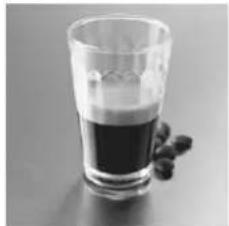
natural_image
Black and white photo of a glass filled with dark beverage, accompanied by small black beans (no text or symbols visible)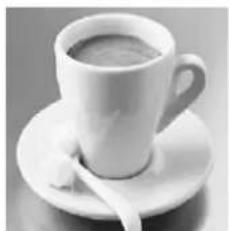
natural_image
Black and white photo of a ceramic coffee cup on a saucer with a spoon (no text or symbols visible)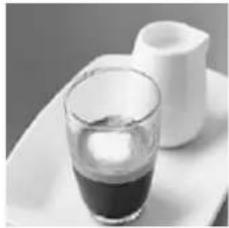
natural_image
Black and white photo of a glass of dark liquid on a white tray with a white ceramic vessel in the background (no text or symbols visible)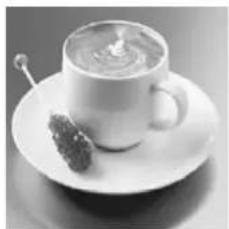
natural_image
Black-and-white photo of a teacup on a saucer with a straw, no visible text or symbols
natural_image
Black and white photo of a glass mug filled with milk and a spoon (no text or symbols visible)
natural_image
Black and white photo of a coffee cup on a saucer with a napkin, placed on a textured surface (no text or symbols visible)
natural_image
Black and white photo of a coffee cup on a saucer with a small object partially visible (no text or symbols)
natural_image
Black and white photo of a glass bowl with a straw inside, placed on a saucer (no text or symbols visible)ESPRESSO (SHORT BLACK)
Espresso is a strong concentrated coffee with a layer of foam on the surface known as "crema" (a layer of brown foam). Espresso is the basis of all coffee beverages. Its varieties are obtained by adding different amounts of milk and froth.
Prepare a glass 90 ml espresso cup or a small coffee cup.
Pour in a single espresso (60–65 ml).
LONG BLACK
Standard espresso with the addition of hot water, served in a regular coffee cup or in a mug. Hot water is added first so that the layer of "crema" is kept.
Prepare a 190 ml cup.
Pour in a single or double espresso.
Add hot water to taste.
MACCHIATO
Macchiato, the name comes from an Italian word meaning a "spot". Traditionally served as a standard espresso with a spoonful of milk on the surface and a little foam ("crema") in the middle.
Prepare a 90 ml glass espresso cup or a small coffee cup.
Pour in a single or double espresso.
Add a spoonful of milk on the top.
FLAT WHITE
Another favourite coffee beverage is a flat white, a beverage on the basis of espresso, with steam frothed milk, served in a regular coffee cup or in a mug. The layer of frothed milk should be 2 mm thick to insulate the coffee.
Prepare a 190 ml cup.
Pour in a single or double espresso.
Add frothed milk.
CAFFÈ LATTE
Espresso mixed with steamed milk; usually served in a glass. A layer of frothed milk on the top should be 10 mm thick to insulate coffee.
Prepare a 220 ml glass or cup.
Pour in a single or double espresso.
Add frothed milk.
CAPPUCCINO
This fabulous beverage is an espresso with the addition of frothed milk, froth and sprinkled with cocoa. A beverage produced this way is 2/3 of coffee and 1/3 of froth.
Prepare a 190–240 ml cup.
Pour in a single or double espresso.
Observe the proportions: 2/3 of coffee and 1/3 of froth.
Sprinkle with cocoa.
CAFFE MOCHA
Prepared similarly to a cappuccino, but with the addition of drinking chocolate. Just add chocolate to an espresso and mix before adding frothed milk and froth.
Prepare a 190–240 ml cup.
Pour in a single or double espresso.
Add two spoonfuls of drinking chocolate.
Add steam frothed milk.
Observe the proportions: 2/3 of coffee with milk, 1/3 of foam.
CON PANNA
A variety of the original Vienna coffee, this fabulous beverage is an espresso with the addition of whipped cream. It may also be sprinkled with cinnamon or chocolate.
Prepare a 190 ml cup.
Pour in a single or double espresso.
- Add whipped cream.
●Sprinkle with cinnamon or chocolate.
MAINTENANCE AND CLEANING
It is important that the espresso machine is regularly cleaned. It will ensure a high quality of the coffee brewed. We recommend that the machine is cleaned after each brewing. Procedure:
●Rinse the brew head unit.
Rinse the steam wand with steam.
- Wipe the steam wand clean with a damp cloth immediately after the espresso machine has been used.
Take out the filter from the handle and wash it, clean the holes of the filter.
●Empty and rinse the drip tray.
Important: Never wash parts and accessories of the espresso machine in a dishwasher.
Cleaning the drip tray and the grid
Take out the grid and the drip tray (46) (47). Wash with water with the addition of some mild washing-up liquid, rinse and dry.
Warning: Ensure that after taking out and replacing the drip tray and grid the insert is in the right place (48).
Cleaning the brew head unit, the filter holder and the filter
Rinse the filter and the filter holder with warm water and dry after each use.
To clean the brew head unit from used coffee, rinse it with water, wipe the head and the internal ring with a damp cloth. If the holes of the filter are blocked with coffee, use a delicate brush.
Important: If the holes of the filter are still blocked, use the grey pin placed on the base, under the water tank (49) (50). Insert the cleaning pin into the holes in the bottom part of the filter (51).
Rubber seal of the brew head
The seal of the brew head is at the bottom of the brew head unit and it seals the filter holder when coffee is poured.
Warning: It is recommended that the filter holder is not left in the brew head unit during long breaks in the use of the espresso machine, as it may reduce the durability of the seal.
It is natural that a seal loses its elasticity and needs replacing. A lack of tightness between the filter holder and the brew head (steam is visible around the brew head unit when pouring espresso) is an indication that the seal is worn out.
Warning: Contact the nearest authorised service center if you think that the seal of the brew head unit needs replacing.
Cup warming plate and outer elements
Wipe the appliance with a damp cloth and dry it. Do not use any brushes or abrasive cleaning agents as they may scratch outer surfaces.
Cleaning the steam wand
Keeping the steam wand clean is essential to ensure the maximum performance of the steam function. Deposits of e.g. dried milk on the wand will decrease its steaming and frothing capacity.
Important: Wipe the wand clean with a damp cloth and rinse with a little steam after each use.
Should milk have dried on the steam wand, wrap the wand with a clean damp cloth, place the wand above the drip tray and turn on steam for about 10 seconds (52). Next, leave the cloth on the wand for about 5 minutes until it soaks. If there still is dirt on the wand, repeat the procedure.
Important: Never clean the steam wand with an abrasive scourer as it may damage the wand.
In the event that the steam wand is still blocked, a black cleaning pin is provided with the espresso machine. It is placed on the base under the water tank (49) (53).
Insert the cleaning pin in the outlet at the bottom of the wand (54). If the steam wand is still blocked, unscrew the end of the steam wand. Clean the wand again using the black cleaning pin and then rinse it under running water.
DESCALING
Scale is a mineral build-up which naturally occurs on all appliances connected with heating water. Therefore the espresso machine will require descaling on a regular basis.
Warning: Descale your coffee maker at least every 3 months. The damages which are caused by failure to descale the appliance are not subject to warranty repairs.
Descaling solutions
Traditionally, the following agents are used for removal of scale from coffee makers:
●Citric acid solution
Dissolve 2 spoonful (ca. 30 g) of citric acid in 1 l of water.
●Specially designated liquids or tablets.
Notice: For liquids and tablets, follow the instructions shown on the packaging of these products.
Descaling the espresso machine
Warning: Ensure that the espresso machine is switched off and the connecting cord is disconnected from the socket.
- Take out the water tank and rinse it clean. Depending on the descaling agent used, follow the steps below:
A. Espresso machine descaling tablets
Pour about 1l of warm water into the water tank and put in a suitable number of descaling tablets, as recommended by the manufacturer. When the tablets have dissolved (it takes about 5-7 minutes), replace the tank.
B. Descaling liquid
Pour about 1.5l of warm water into the water tank. Add a suitable amount of the descaling agent, as recommended by the manufacturer and replace the tank.
-
If the filter holder is in the brew head unit, take it out, rinse thoroughly under running water and put it aside.
-
Using a screwdriver, unscrew the filter from the bottom of the filter holder unit.
-
Take out the filter, the washer, the screw, and the seal and put them aside in a safe place.
Important: Be careful not to lose the filter, the washer, the screw or the seal after disassembling the brew head unit.
-
Using a small delicate brush, clean the brewing area of the head removing all coffee particles.
-
Place a sufficiently big container under the brew head unit.
-
Insert the plug of the connecting cord in the mains socket and switch on the espresso machine by pressing the POWER button.
Warning: Remember that if the illumination around the POWER button fl ashes, it means that the espresso machine is in the course of reaching the operating temperature. The moment the espresso machine has reached the right temperature, the illumination of the POWER button will stop flashing and will give continuous light. At the same time, the outer edges of each of the MANUAL, the single espresso 📄 and the double espresso 📄 buttons will light up (continuous light).
- Press the MANUAL button and allow half of the decaling solution to flow through the brew head unit.
Important: Due to the activation of the safety system (limitation to 250 ml), the user must press the MANUAL button several times to empty half of the solution from the tank.
Warning: Depending on the size of the container under the brew head unit, it may be necessary to empty it during the process.
-
After about half of the solution has flowed through, press the MANUAL to stop the flow of the solution.
-
Turn the regulator knob to position ⏻ and allow the solution to run through the steam wand for about 2 minutes.
-
Stop the appliance after 2 minutes by pressing the POWER button.
-
Next set the regulator knob into position 0.
-
Leave the espresso machine for about 10-15 minutes allowing the descaling agent to work.
-
Next press the POWER button. The espresso machine will be switched on.
-
Press the MANUAL button and allow the next portion of the descaling solution to flow through the brew head unit.
Warning: Always remember about the safety system.
-
Press the MANUAL button again to stop the flow of the solution.
-
Turn the regulator knob to position ⏻ and allow the solution to flow through the steam wand for about 3-4 minutes.
-
After this time, set the regulator knob in position 0.
-
To finish the whole descaling process, press the MANUAL button again so that the last portion of the solution can flow through the brew head unit.
Warning: Always remember about the safety system.
-
Take out and empty the containers placed below the brew head and the steam wand. When they have been emptied, replace them under the brew head and the steam wand.
-
Take out the water tank from the appliance and thoroughly rinse it under running water. Check that all traces of the descaling solution have been removed. Fill up the tank with fresh water and place it in the espresso machine (1) 2) (3) (4) (5).
-
Following the same procedure as with the descaling process, run 2 full tanks of clean water through the brew head and the steam wand.
Warning: Always remember about the safety system.
Warning: Depending on the size of the container under the brew head unit, it may be necessary to empty it during the process.
-
When the process has finished, remove the container from under the brew head and wipe the whole brew head unit thoroughly.
-
Carefully install the rubber seal, the filter, and the washer in the brew head, following their disassembling procedure in reverse order. Using a screwdriver, tighten the fastening screw home.
-
Fill the tank up with fresh water and replace it in the espresso machine. The appliance is ready for further use.
TROUBLE SHOOTING
| PROBLEM POSSIBLE CAUSE HOW TO FIX, WHAT TO DO | |||
| Coffee runs out around the edge of the fi lter holder | Filter holder is not inserted in the brew head properly or is not tightened properly. | Ensure the holder is properly inserted in the brew head unit and tightened home. SeeBrewing espresso-p. 97. | |
| There are coffee particles around the filter rim. | Clean the rim of the filter and wipe all coffee from the brew head. | ||
| Brew head is dirty. Wipe the brew head with a damp cloth. | |||
| Brew head is damaged. Contact an authorised service center. | |||
| Rubber seal of the head is damaged or worn out. | Contact an authorised service center. | ||
| Coffee does not run through | No water in the water tank. Fill up the tank with water. | ||
| Water tank is not properly installed. Press the tank down to ensure it sits properly. | |||
| Knob is in position | Ensure regulator knob is in0position. | ||
| Filter on the brew head may be blocked. SeeDescaling-p. 100. | |||
| Coffee filter is blocked. Coffee is ground too finely firmly. | or tamped too | Empty the fi lter and rinse it under running water. Wipe the brew head with a cloth. Clear the holes of the filter using thegreypin and re-fill with coffee. Tamp less firmly. | |
| Coffee fi liters out in drops | Coffee is ground very finely or tamped too firmly. | If you use very finely ground coffee, do not tamp it too firmly. | |
| The appliance is blocked with scale build-up. SeeDescaling-p. 97. | |||
| Espresso does not have characteristic foam | Coffee is stale or dry. | Use fresh coffee. After opening the coffee, ensure it is stored in a light container. | |
| Coffee is not tamped firmly enough. | Tamp coffee more firmly. | ||
| Coffee is ground too coarsely. | Use properly ground coffee or change coffee brand. | ||
| Not enough coffee in the filter. | SeeBrewing espresso-p. 97. | ||
| Holder loosens during brewing | Coffee is tamped too firmly. | Tamp ground coffee less firmly. | |
| Coffee is ground too finely. | Change to coarser coffee. | ||
| Filter holder does not sit firmly as it has not been tightened firm enough. | Ensure coffee holder is placed correctly and tightened home in the brew head.SeeBrewing espresso-p. 97. | ||
| There are coffee particles around the filter rim. | Clean the rim of the filter and clean coffee from the brew head. | ||
| Brew head is dirty. Wipe the brew head with a damp cloth. | |||
| Brew head is damaged. Contact an authorised service center. | |||
| Rubber seal of the brew head is damaged or worn out. | Contact an authorised service center. | ||
| Coffee is too cold | Cups, filter or filter head are cold. | Before brewing, pre-heat cups, filters and holder. SeeBrewing espresso-str. 97. | |
| When making cappuccino or latte, milk is not heated enough. | Check if milk is properly heated during frothing. Ensure that milk does not boil. SeeFrothing milk-p. 97. | ||
| No steam from steam wand | Steam wand is blocked. | SeeMaintenance and cleaning-p. 100. | |
| Not enough frothed milk | Milk is not fresh. | Check if milk is fresh. | |
| Temperature of milk is too high. | Check that milk is properly cooled before use. | ||
| Jug. | To obtain best results when frothing, use the stainless steel jug provided and cool it down or rinse with cold water if possible. | ||
| Steam wand is blocked. | SeeMaintenance and cleaning-p. 100. | ||
| Milk has been boiled. | Try to use fresh, cooled milk. | ||
| Uneven distribution of coffee into cups | Uneven distribution or interrupted outflow of coffee. | Check if coffee is evenly tamped and check if anything obstructs the outlets in the head for fixing the filter. | |
| Damaged partition in filter holder. | Contact an authorised service center. | ||
| Espresso has burnt taste | Coffee used is unsuitable. | Try other coffee brands. | |
| Appliance was not rinsed after descaling. | Before brewing next coffee, rinse the appliance with a tankfull of water, allow tank to empty completely. | ||
| Pump makes too much noise | No water in water tank. | Fill up water tank with water. | |
| Water tank is not properly inserted. | Check if water tank is properly inserted. | ||
| Appliance does not work | Filter in brew head may be blocked. | Take out filter head and clean brew head unit. SeeMaintenance and cleaning-p. 100. | |
| Appliance is blocked with scale build-up. | SeeDescaling-p. 100. | ||
ECOLOGY - ENVIRONMENT PROTECTION
Each user can protect the natural environment. It is neither difficult nor expensive.
In order to do it: put the cardboard packing into recycling paper container; put the polyethylene (PE) bags into container for plastic.
When worn out, dispose the appliance to particular disposal centre, because of the dangerous elements of this appliance, which can be hazardous for natural environment.
Do not dispose into the domestic waste disposal!!!
The manufacturer/importer does not accept any liability for any damages resulting from unintended use or improper handling.
The manufacturer/importer reserves his rights to modify the product any time in order to adjust it to law regulations, norms, directives, or due to construction, trade, aesthetic or other reasons, without notifying in advance.