
MP 212 - Mp3 player HYUNDAI - Free user manual and instructions
Find the device manual for free MP 212 HYUNDAI in PDF.


| Product Type | MP3 Player |
| Model | MP 212 |
| Brand | Hyundai |
| Dimensions | 28 x 41 x 12 mm |
| Weight | 30 g (net) |
| Power Source | Built-in lithium battery |
| Battery Life | Up to 4 hours music playback |
| Charging Time | Approximately 3 hours |
| USB Interface | USB 2.0 High Speed |
| Music Formats | MP3 (8-320 kbps), WMA (64-320 kbps) |
| Frequency Response | 20 Hz - 20 kHz |
| Earphone Output | 5 mW (L) + 5 mW (R) |
| Operating System | Windows 2000/XP/Vista |
| Operating Temperature | -5 °C to +40 °C |
| Key Functions | Power on/off, play/pause, volume control, track skip, folder navigation, fast forward/backward |
| LED Indicator | Flashing during playback; steady on while paused/charging |
| Auto Power Off | After 90 seconds in pause mode |
| Safety Features | Do not expose to water, extreme temperatures, or physical shock; battery removal only by authorized personnel |
| Maintenance Tips | Keep earphone jack clean; avoid using in dusty environments; charge only using PC USB port |
| Environmental Compliance | Do not dispose as household waste; recycle at designated collection points |
| Warranty | No specific warranty stated |
| Country of Origin | Licensed by Hyundai Corporation, Korea |
Frequently Asked Questions - MP 212 HYUNDAI
User questions about MP 212 HYUNDAI
0 question about this device. Answer the ones you know or ask your own.
Ask a new question about this device
Download the instructions for your Mp3 player in PDF format for free! Find your manual MP 212 - HYUNDAI and take your electronic device back in hand. On this page are published all the documents necessary for the use of your device. MP 212 by HYUNDAI.
USER MANUAL MP 212 HYUNDAI
natural_image
Exterior view of a Hyundai USB flash drive (no text or symbols on body)NÁVOD K POUŽITÍ / NÁVOD NA POUŽITIE INSTRUKCJA OBSŁUGI / INSTRUCTION MANUAL HASZNÁLATÍ ÚTMUTATÓ
PŘEHRÁVAČ MP3 / PREHRÁVAČ MP3 ODTWARZACZ MP3 / MP3 PLAYER MP3 LEJÁTSZÓ
natural_image
Symbol of a trash bin crossed with a diagonal line and a horizontal bar below (no text or labels)natural_image
Symbol of a trash bin crossed with a diagonal line and a horizontal bar below (no text or labels)natural_image
Symbol of a trash bin crossed with two crossed lines and a solid rectangle below (no text or labels)Thank you for purchasing our digital MP3 player. Before you use this player, please read through this manual book, so you can operate it correctly.
A. CAUTION
1) Please switch off power when not using the player
2) Avoid using MP3 player in a very cold or hot place.
3) Do not put the MP3 player in the water.
4) Do not knock or beat the MP3 player
5) Do not use MP3 player when you drive car or ride bike to avoid danger.
6) Please do not open the MP3 player by yourself if you are not professional people.
7) Lithium battery inside. Battery must ONLY be removed by authorized personal
8) This model cannot playback DRM protected WMA files, such as sound books, songs bought from internet etc
B. KEY FUNCTION AND OPERATING METHOD
1. Key function:
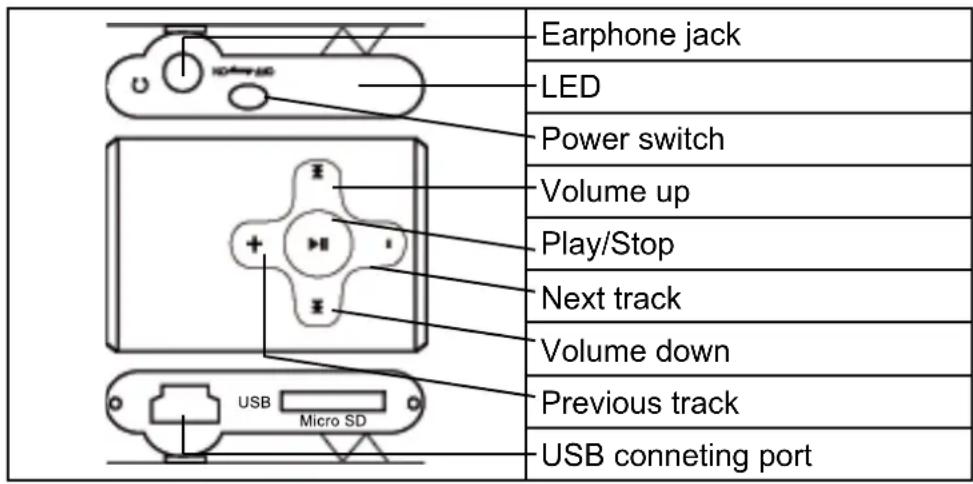
Power switch: Switch on/switch off the player.
Play/Off/On: Power on/power off/pause/play (mark as ▶)
Vol+: volume rise up
Vol-: volume low down
◀: Previous song, fast backward
▶: Next song, fast forward
Light indicator: LED
2. Operating method:
Power on:
Please insert earphone, press PLAY key for 3 seconds, the LED will light up and the player enter the playing status.
Music playing:
When playing music, the LED will be flashing. Mp3 player will keep playing the song that unfinished last time if without pressing any key. when finishing playback of the last track, it will play from the first track again.
File management:
In stop mode, press ▶ or ◀ button to select next or previous folder.
Forward and backward track:
When the player is playing music, press ▶ key, the player skips to play the next song, long press ▶ key to fast forward, press ◀ key, it skips to the previous song, long press ◀ key to fast backward.
Volume adjustment:
When playing music, short press Vol+ key to rise up volume; short press Vol- key to low down volume.
Pause playing:
In playing status, press PLAY key, player stop temporarily (LED light on), pressing PLAY key again, it continues playing music (LED flashing).
Power off:
In standby status, long press PLAY key for 3 seconds (or more than 3 Seconds), this player will be powered off.
When you press PLAY key to pause playing and without pressing any keys, this player will be powered off automatically after 90 seconds.
C. CONNECT WITH COMPUTER
1) Connect USB jack of this MP3 player with your computer USB socket, the LED will be flashing continually, you can find the removable disk on your computer.
2) Copy your files from the computer into this MP3 player, this MP3 player also can be used as flash disk.
D. HOW TO CHARGE
Turn ON the unit and connect it to PC or remove the hardware safely, MP3 will be automatically charged. When the unit is fully recharged the LED bulb will turn off. Suggest charge for three hours around.
E. TROUBLE SHOOTING
| No power | If the battery have enough power.If you have powered on the player. |
| No sound from the Earphone | Make sure the earphone is connecting with the player correctly. Make sure the earphone is clean. The damaged MP3 files may have some kind of noise or even cannot have audio output. Make sure your downloaded files are not destroyed. |
| Can not download file Check if the USB connection is ok. | |
F. SPECIFICATIONS
| Power: Maximum 4 hours for music playback | |
| USB transfers rate: USB2.0 (High Speed) | |
| Music format: | MP3 bit rate: 8KBPS-320KBPSWMA bit rate: 64KBPS-320KBPS |
| Frequency scope: 20HZ-20KHZ | |
| Earphone output power: (L)5mW+(R)5mW | |
| Operate system: Windows2000/XP/Vista | |
| Operate Temperature: -5 ~ +40 °C | |
| Dimensions: 28x41x12 mm | |
| Weight (NET) 30 g |
We reserve the right to change technical specifications.
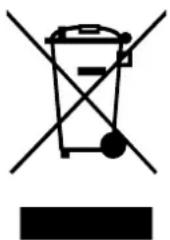
Old electrical appliances, used batteries and accumulators disposal
natural_image
Symbol of a trash bin crossed with a diagonal line and a horizontal bar below (no text or labels)This symbol appearing on the product, on the product accessories or on the product packing means that the product must not be disposed as household waste. When the product/ battery durability is over, please, deliver the product or battery (if it is enclosed) to the respective collection point, where the electrical appliances or batteries will be recycled. The places, where the used electrical appliances are collected, exist in the European Union and in other European countries as well. By proper disposal of the product you
can prevent possible negative impact on environment and human health, which might otherwise occur as a consequence of improper manipulation with the product or battery/ accumulator.
Recycling of materials contributes to protection of natural resources. Therefore, please, do not throw the old electrical appliances and batteries/ accumulators in the household waste. Information, where it is possible to leave the old electrical appliances for free, is provided at your local authority, at the store where you have bought the product. Information, where you can leave the batteries and accumulators for free, is provided to you at the store, at your local authority.
natural_image
Symbol of a trash bin crossed with a diagonal line and a horizontal bar below (no text or labels)Licensed by Hyundai Corporation, Korea


Brand : HYUNDAI
Model : MP 212
Category : Mp3 player