
MP 312 - Mp3 player HYUNDAI - Free user manual and instructions
Find the device manual for free MP 312 HYUNDAI in PDF.


| Brand | Hyundai |
| Model | MP 312 |
| Product Type | MP3 Player |
| Dimensions (approx.) | 80 x 40 x 10 mm |
| Weight (approx.) | 30 g |
| Power Source | Built-in rechargeable Li-ion battery |
| Battery Life (approx.) | Up to 10 hours of music playback |
| Storage Capacity | 4 GB internal memory |
| Display | 1.5-inch LCD screen |
| Supported Audio Formats | MP3, WMA, WAV |
| Connectivity | USB 2.0, 3.5mm headphone jack |
| Main Functions | Music playback, FM radio, voice recording, folder navigation, repeat/shuffle modes, equalizer presets |
| Accessories Included | USB cable, earphones, user manual |
| Operating System Compatibility | Windows, Mac OS, Linux (mass storage) |
| Maintenance and Cleaning | Wipe with a soft, dry cloth. Do not use liquids or abrasives. |
| Safety Warnings | Do not expose to extreme temperatures or moisture. Keep away from magnetic fields. |
| Spare Parts and Repairability | Battery replacement possible by qualified technician. Earphones and cable replaceable. No user-serviceable parts inside. |
Frequently Asked Questions - MP 312 HYUNDAI
User questions about MP 312 HYUNDAI
0 question about this device. Answer the ones you know or ask your own.
Ask a new question about this device
Download the instructions for your Mp3 player in PDF format for free! Find your manual MP 312 - HYUNDAI and take your electronic device back in hand. On this page are published all the documents necessary for the use of your device. MP 312 by HYUNDAI.
USER MANUAL MP 312 HYUNDAI
Thank you for buying our product. Please read through these operating instructions, so you will know how to operate your equipment properly. After you finished reading the instructions manual, put it away in a safe place for future reference.
PRECAUTIONS
- Do not put the player in areas with high temperature, humidity or dust, especially not in the car with the windows closed in summer.
• Do not knock or hit the player. - Select suitable volume, turn down or stop using when you feel a tingle in ears.
- Do not disconnect the player abruptly during the formatting or uploading and downloading, otherwise, it will cause a program error.
• We will not be held responsible for any obligation for any memory loss caused by product damage, repair or other reasons. Please operate correctly as per the manual. - The player can be charged whether the device is on or off by connecting it to a running PC's USB port.
- Do not dismantle the player personally or use alcohol, thinner or benzene to clean the surface of the player.
• Do not use the player in the electronics-prohibited area, such as in the plane.
• Do not use the player when driving or walking in order to avoid traffic accidents.
WARRANTY
Our product is warranted for 2 full year from the date of purchase. The warranty is provided on all material defects and workmanship. Guarantee of 24 months does not apply to decrease in the accumulator's effective capacity caused by its use or age. Effective capacity gradually decreases depending on the method of use of the accumulator.
CHARGING THE BATTERY
The charger is not included in the package, please charge the MP3 player via a standard 5 V / 1 A charger or via a PC. The indicator will glow red during charging. The indicator turns off when the MP3 player is fully charged.
IMPORTANT: If the MP3 player is discharged, the indicator flashes. Charge the MP3 player.
Please make a complete charge every three months to avoid shortening the battery lifespan.
PLAYER DESCRIPTION
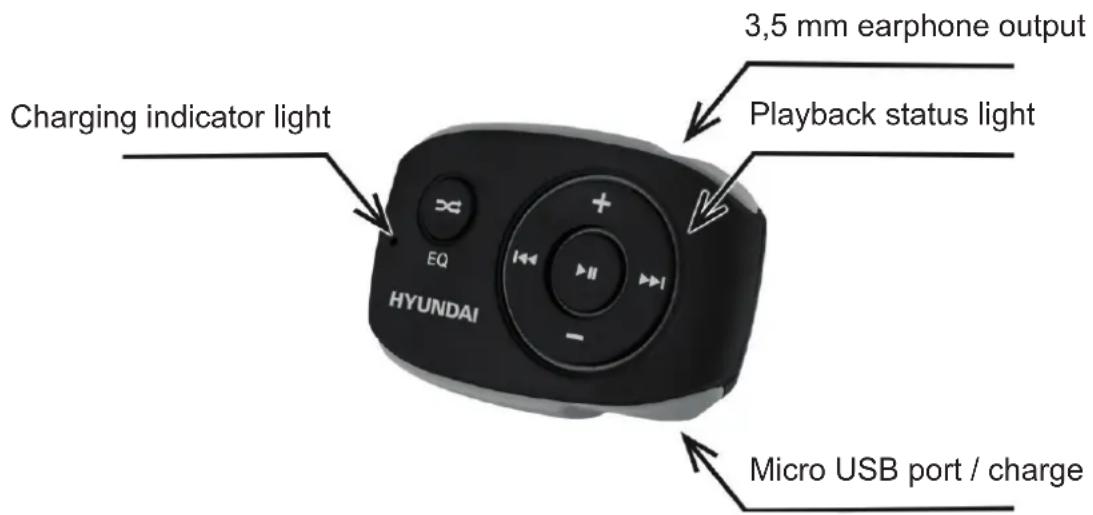
BUTTON FUNCTIONS
| Button Short press Long press | ||
| ▶II | Play / Pause On / Off | |
| ◀◀ | Next track Fast forward | |
| ◀◀ | Previous track Fast forward | |
| + | Increase the volume by one step Gradual | increase in volume |
| - | Decrease the volume by one step Gradually reducing the volume | |
| ∞ | Changes the equalizer mode Toggles Shuffle/Standard playback | |
| RESET | If the MP3 player does not turn off or respond, short press the RESET button with a small round pin to reset the MP3 player. | |
Playback status light
Blinks at 5s intervals: Standard playback
Glows: Playback paused
Blinks at 2s interval: Shuffle playback
SPECIFICATIONS
| Dimensions / Weight 46 x 30 x 18 | mm / 15 g |
| Audio format | MP3: 8K bps – 320K bpsWMA: 32K bps – 320K bps |
| S/N / Frequency response 85 dB / | 20 Hz - 20 KHz |
| Max. output power of earphone 10 | mW + 10 mW |
| Flash memory 4 GB or 8 GB | |
| Built-in battery | 3,7 V Li-ion battery |
| Battery Charging Time | 2 hours |
| Playback time of battery | 15 hours (50 % Volume) |
| Working temperature | 5 °C to 40 °C |
We reserve the right to change technical specifications.


TO AVOID DANGER OF SUFFOCATION, KEEP THIS PLASTIC BAG AWAY FROM BABIES AND CHILDREN. DO NOT USE THIS BAG IN CRIBS, BEDS, CARRIAGES OR PLAYPENS. THIS BAG IS NOT A TOY.
Disposal of old Electrical & Electronic Equipment (Applicable in the European Union and other European countries with separate collection systems).
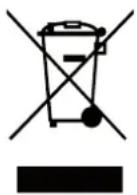
This symbol on the product or on its packaging indicates that this product shall not be treated as household waste. Instead it shall be handed over to the applicable collection point for the recycling of electrical and electronic equipment. By ensuring this product is disposed of correctly, you will help prevent potential negative consequences for the environment and human health, which could otherwise be caused by inappropriate waste handling of this product. The recycling of materials will
help to conserve natural resources. For more detailed information about recycling of this product, please contact your local Civic Office, your household waste disposal service or the shop where you purchased the product.
BEVEZETÉS
Licensed by Hyundai Corporation Holdings, Korea


Brand : HYUNDAI
Model : MP 312
Category : Mp3 player