USER MANUAL VN-5500 OLYMPUS
Thank you for purchasing an Olympus Digital Voice Recorder. Please read these instructions for information about using the product correctly and safely. Keep the instructions handy for future reference. To ensure successful recordings, we recommend that you test the record function and volume before use.
BnaIapardmBn 3e 2kaymmpximLepoopnBn DktoHbOHa OYnpms. Moa, npnoTethe Tse HNtHcPfKUa3 a HNpOpMaaQyA OHIOHO pNBOHITNO B 6eONsAChO 3XIOINBAHe n HnpDgKTA.CxbpaHrAIE HNTCpyKuInte HAocBTHIO MRC30 a 3bEaeun pCTABKk. Aa da pRapmtie yuechina zanckn, npnppeBaBbDA Ta cTebTAE NtCABaUa7y FynHKuB 3Nyke prndyntOyptba.
Dekujeme vam, je 2e si koupil diginiti diktaf Olympus. Pied pvrim pouzitto thet ostroje sici pezirne pozotne navod, umozhi amu vam pozutiv prozi bezpecn a spravne. Nadvoc peliuch uvochoyte pro dalii pozuti. Pied pvrim pozutiu ovochoyte pravnokov, naukov zefu kistrope na vastot hlasiot, zasitale tak dokonoluk anhruvaki.
- The contents of this document may be changed in the future without advanced notice. Contact our Customer Support Center for the latest information relating to product names and model numbers.
- The utmost care has been taken to ensure the integrity of the contents of this document. In the unlikely event that a questionable item, error, or omission is found, please contact our Customer Support Center.
- Any liability for passive damages or damage of any kind occurred due to data loss incurred by a defect of the product, repair performed by the third party other than Olympus or an Olympus authorized service station, or any other reason is excluded.
Safe and Proper Usage
Before using your new recorder, read this manual carefully to ensure that you know how to operate it safely and correctly. Keep this manual in an easily accessible location for future reference.
- The warning symbols indicate important safety related information. To protect yourself and others from personal injury or damage to property, it is essential that you always read the warnings and information provided.
Getting Started
Identification of Parts
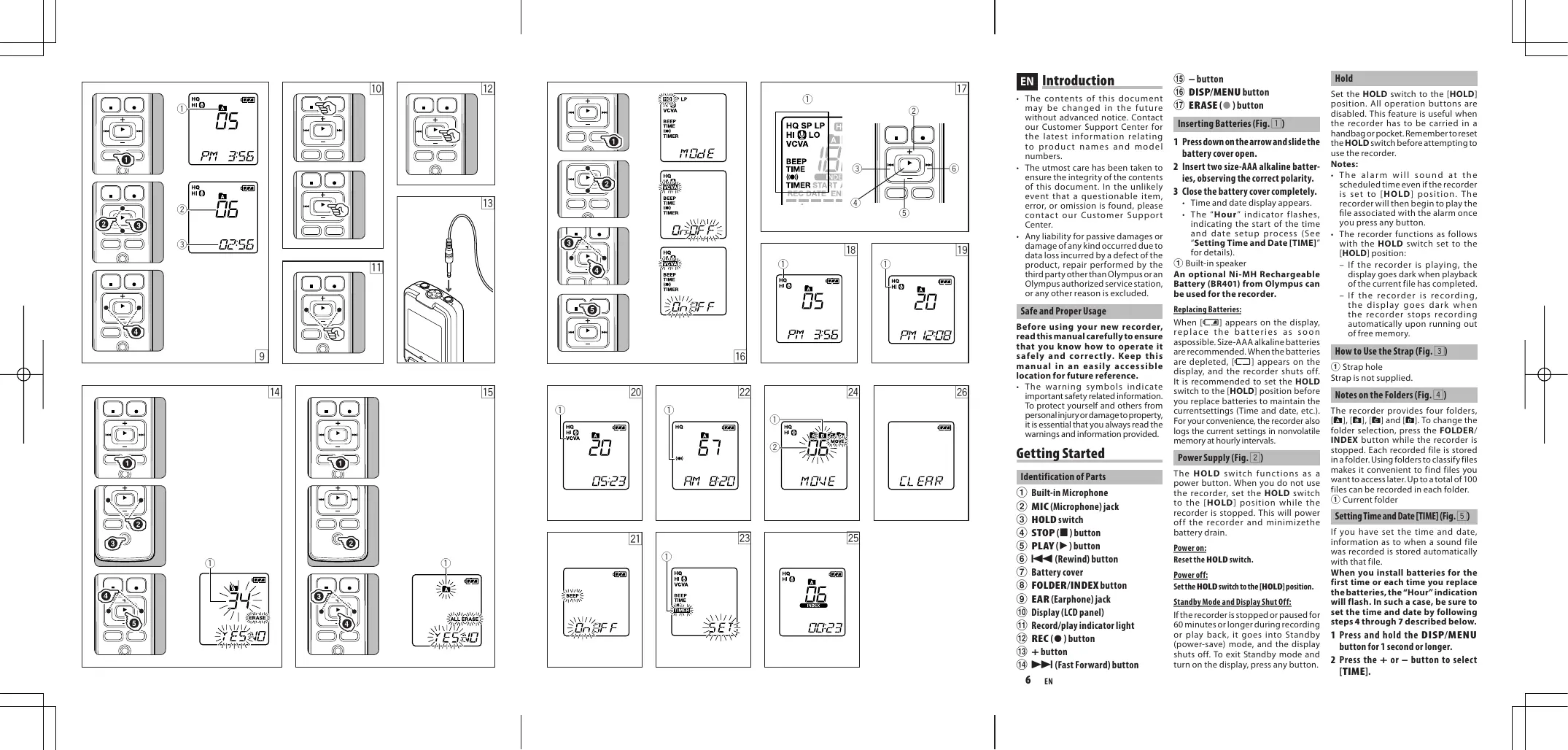
① Built-in Microphone
② MIC(Microphone)jack
③ HOLD switch
④ STOP(■)button
⑤ PLAY(▶) button
⑥ I←(Rewind) button
⑦ Battery cover
⑧ FOLDER/INDEX button
⑨ EAR(Earphone)jack
10 Display (LCD panel)
① Record/play indicator light
12 REC(●) button
⑬ + button
14 I (Fast Forward) button

- button
DISP/MENU button
ERASE () button
Inserting Batteries (Fig. 1)
1 Press down on the arrow and slide the battery cover open.
2 Insert two size-AAAlkaline batteries, observing the correct polarity.
3 Close the battery cover completely.
- Time and date display appears.
The "Hour" indicator flashes, indicating the start of the time and date setup process (See Setting Time and Date [TIME] for details).
① Built-in speaker
An optional Ni-MH Rechargeable Battery (BR401) from Olympus can be used for the recorder.
Replacing Batteries:
When [C] appears on the display, replace the batteries as soon as possible. Size-AAA alkaline batteries are recommended. When the batteries are depleted, [C] appears on the display, and the recorder shuts off. It is recommended to set the HOLD switch to the [HOLD] position before you replace batteries to maintain the current settings (Time and date, etc.). For your convenience, the recorder also logs the current settings in nonvolatile memory at hourly intervals.
Power Supply (Fig. 2)
The HOLD switch functions as a power button. When you do not use the recorder, set the HOLD switch to the [HOLD] position while the recorder is stopped. This will power off the recorder and minimize the battery drain.
Power on:
Reset the HOLD switch.
Power off:
Set the HOLD switch to the [HOLD] position.
Standby Mode and Display Shut Off:
If the recorder is stopped or paused for 60 minutes or longer during recording or play back, it goes into Standby (power-saving) mode, and the display shuts off. To exit Standby mode and turn on the display, press any button.
Hold
Set the HOLD switch to the [HOLD] position. All operation buttons are disabled. This feature is useful when the recorder has to be carried in a handbag or pocket. Remember to reset the HOLD switch before attempting to use the recorder.
Notes:
The alarm will sound at the scheduled time even if the recorder is set to [HOLD] position. The recorder will then begin to play the file associated with the alarm once you press any button.
The recorder functions as follows with the HOLD switch set to the [HOLD] position:
- If the recorder is playing, the display goes dark when playback of the current file has completed.
- If the recorder is recording, the display goes dark when the recorder stops recording automatically upon running out of free memory.
How to Use the Strap (Fig. 3)
① Strap hole
Strap is not supplied.
Notes on the Folders (Fig. 4)
The recorder provides four folders, [B], [E], [G] and [H]. To change the folder selection, press the FOLDER/INDEX button while the recorder is stopped. Each recorded file is stored in a folder. Using folders to classify files makes it convenient to find files you want to access later. Up to a total of 100 files can be recorded in each folder.
① Current folder
Setting Time and Date [TIME] (Fig. 5)
If you have set the time and date, information as to when a sound file was recorded is stored automatically with that file.
When you install batteries for the first time or each time you replace the batteries, the "Hour" indication will flash. In such a case, be sure to set the time and date by following steps 4 through 7 described below.
1 Press and hold the DISP/MENU button for 1 second or longer.
2 Press the + or - button to select [TIME].
EN
Introduction
- The contents of this document may be changed in the future without advanced notice. Contact our Customer Support Center for the latest information relating to product names and model numbers.
- The utmost care has been taken to ensure the integrity of the contents of this document. In the unlikely event that a questionable item, error, or omission is found, please contact our Customer Support Center.
- Any liability for passive damages or damage of any kind occurred due to data loss incurred by a defect of the product, repair performed by the third party other than Olympus or an Olympus authorized service station, or any other reason is excluded.
Safe and Proper Usage
Before using your new recorder, read this manual carefully to ensure that you know how to operate it safely and correctly. Keep this manual in an easily accessible location for future reference.
- The warning symbols indicate important safety related information. To protect yourself and others from personal injury or damage to property, it is essential that you always read the warnings and information provided.
Getting Started
Identification of Parts
① Built-in Microphone
② MIC(Microphone)jack
③ HOLD switch
④ STOP(■)button
⑤ PLAY(▶) button
⑥ (Rewind) button
⑦ Battery cover
⑧ FOLDER/INDEX button
⑨ EAR (Earphone) jack
10 Display (LCD panel)
① Record/play indicator light
⑫ REC(●) button
13 + button
(14)▶I (Fast Forward) button
15 - button
DISP/MENU button
17 ERASE( ) button
Inserting Batteries (Fig. 1)
1 Press down on the arrow and slide the battery cover open.
2 Insert two size-AAA alkaline batteries, observing the correct polarity.
3 Close the battery cover completely.
- Time and date display appears.
The "Hour" indicator flashes, indicating the start of the time and date setup process (See Setting Time and Date [TIME] for details).
① Built-in speaker
An optional Ni-MH Rechargeable Battery (BR401) from Olympus can be used for the recorder.
Replacing Batteries:
When [c] appears on the display, replace the batteries as soon as possible. Size-AAA alkaline batteries are recommended. When the batteries are depleted, [c] appears on the display, and the recorder shuts off. It is recommended to set the HOLD switch to the [HOLD] position before you replace batteries to maintain the currentsettings (Time and date, etc.). For your convenience, the recorder also logs the current settings in nonvolatile memory at hourly intervals.
Power Supply (Fig. 2)
The HOLD switch functions as a power button. When you do not use the recorder, set the HOLD switch to the [HOLD] position while the recorder is stopped. This will power off the recorder and minimize the battery drain.
Power on:
Reset the HOLD switch.
Poweroff:
Set the HOLD switch to the [HOLD] position.
Standby Mode and Display Shut Off:
If the recorder is stopped or paused for 60 minutes or longer during recording or play back, it goes into Standby (power-saving) mode, and the display shuts off. To exit Standby mode and turn on the display, press any button.
Hold
Set the HOLD switch to the [HOLD] position. All operation buttons are disabled. This feature is useful when the recorder has to be carried in a handbag or pocket. Remember to reset the HOLD switch before attempting to use the recorder.
Notes:
- The alarm will sound at the scheduled time even if the recorder is set to [HOLD] position. The recorder will then begin to play the file associated with the alarm once you press any button.
-
The recorder functions as follows with the HOLD switch set to the [HOLD] position:
-
If the recorder is playing, the display goes dark when playback of the current file has completed.
- If the recorder is recording, the display goes dark when the recorder stops recording automatically upon running out of free memory.
How to Use the Strap (Fig. 3)
① Strap hole
Strap is not supplied.
Notes on the Folders (Fig. 4)
The recorder provides four folders, [B], [B], [G] and [H]. To change the folder selection, press the FOLDER/INDEX button while the recorder is stopped. Each recorded file is stored in a folder. Using folders to classify files makes it convenient to find files you want to access later. Up to a total of 100 files can be recorded in each folder.
① Current folder
Setting Time and Date [TIME] (Fig.5)
If you have set the time and date, information as to when a sound file was recorded is stored automatically with that file.
When you install batteries for the first time or each time you replace the batteries, the "Hour" indication will flash. In such a case, be sure to set the time and date by following steps 4 through 7 described below.
1 Press and hold the DISP/MENU button for 1 second or longer.
2 Press the + or - button to select [TIME].
The "Hour" indicator flashes.
- The "Minute" indicator flashes.
- Pressing the + button enables the "Hour" setting again.
- Repeat steps 5 and 6 to continue to set the "Year", "Month" and "Date" in the same way.
This completes the time and date setup procedure.
Notes:
- You can switch the time indication between the 12-hour system and the 24-hour system by pressing the DISP/MENU button while you are setting the hour or minute.
- You can change the order of the date indication by pressing the DISP/MENU button while you are setting the year, month, or day.
Example: July 14, 2008
7.108→H.708→88.74
Recording (Fig. 6)
- The record/play indicator light turns red, and recording starts.
- New recordings are saved as the last file in the folder.
① Current microphone sensitivity
② Current folder
③ Current recording mode
④ Current file number
⑤ Recording level meter
⑥ Recording time
⑦ Remaining recording time
To Pause Recording (Fig.7)
To Pause:
- [PAUSE] appears on the display and the record/play indicator light flashes.
To Resume Recording:
- Recording will resume at the point of interruption.
Notes for Recording
- If [FULL] appears on the display, you cannot record in the selected folder. In such a case, erase unnecessary files.
- If the recorder is placed directly on a table when recording a meeting, it tends to pick up table vibrations. Put a notebook or other item between the table and the recorder so that the vibration is not easily transmitted for clearer recording.
- Even if you press the DISP/MENU button, the display will not change to current recording time if the remaining recording time is 5 minutes or less.
- When remaining recording time is less than 60 seconds, the record/play indicator light starts flashing in red. When the recording time is decreased to 30 or 10 seconds, the light flashes faster.
- The recorder will enter Stop mode if it has been left paused for 60 minutes or longer.
- In case of difficult acoustic conditions or low speaker's voice, recording in [HQ] is recommended. Also, usage of an external microphone (sold separately) could improve the quality of recordings.
Recording from external Microphone or other Devices
The external microphone and other devices can be connected and the sound can be recorded.
- When using an external microphone, select adequate microphone, such as a Noise-Cancellation microphone or Electret condenser microphone (optional).
- To connect the recorder to an external device, use the connecting cord KA333 (optional), and the
stereo/monaural converting plug adapter supplied with KA333.
- The input level cannot be adjusted on this recorder. When you connect the recorder to an external device, execute a test recording and adjust the output level of the external device.
① A audio input terminal of other devices (Fig.8)
② Converting plug adapter of KA333 (Fig.8)
You can select an option for the display of the recorder. This will help review and confirm different recorder settings and file information.
| Operation | Display |
| While the recorder is during stop mode, press and hold the STOP (■) button | The total number of files recorded in the folder and remaining recording time appears on the display |
| While the recorder is during recording mode, press the DISP/MENU button | The display switches between current recording time and remaining recording time |
| While the recorder is during stop mode or playback mode, press the DISP/MENU button | Playing time → Remaining playing time → Recording date of the file → Recording time of the file → Playing time ... |
Playback (Fig. 9)
- The record/play indicator light turns green, and the elapsed playing time is indicated on the display.
- The display shows the volume level. You can choose between [00] to [30].
① Current folder
② Current file number
③ Playing time
CancelingPlayback(Fig.10)
To Stop:
Press the STOP (■) button.
- The recorder stops in the middle of the file being played.
To Resume Playback:
Press the PLAY () button again.
- Playback will resume at the point of interruption.
Forwarding and Rewinding (Fig. 11)
Fast Forward:
While the recorder is during playback mode, press and hold the button.
- When you release the▶ button, the recorder will resume normal playback.
Rewind:
While the recorder is during playback mode, press and hold the 一 button.
- When you release the button, the recorder will resume normal playback.
Notes:
- The end of the file is located by pressing and holding the button during fast forwarding. The recorder will pause at the end of the file. If you do not release the button, the recorder will continue to fast forward.
- The beginning of the file is located by pressing and holding the 1 button during rewinding. The recorder will pause at the beginning of the file. If you do not release the 1 button, the recorder will continue to rewinding.
- When the index mark is shown in the middle of a file, it will stop temporarily in the position of the index mark.
Locating the Beginning of the File
While the recorder is during playback mode (playback or playback in slow/fast mode), press the 1 or button forwards or rewrites to the beginning of the next file or the file being played respectively.
- If an index mark is encountered midway, playback begins at that point (See "Index Marks" for details).
Changing Playback Speed (Fig.12)
While the recorder is during playback mode, press the PLAY▶ button.

- When the slow playback mode is selected, the [B] appears and, for the fast playback mode, [P] appears on the display while the recorder is playback.
- The recorder stops playback when you press the STOP (■) button while playback in the slow/fast mode, or when it reaches to the end of the file. If you once press the STOP (■) button and start playback again, the recorder will playback files in normal speed as well.
Listening with Earphone (Fig. 13)
You can listen to files by connecting earphones to the microphone jack. If an microphone is connected, the speaker doesn't emit sound. Sound will be played back monaurally.
- To avoid irritation to the ear, insert the earphone after you turn down the volume level.
- When you listen with the earphone during playback, do not raise the volume too much. It may cause hearing impairment and loss in hearing ability.
- Earphones are not supplied. You can use any standard 3.5mm monaural microphone or headphone.
Erase
You can easily erase unnecessary files. Sequential file numbers are reassigned automatically.
Erasing One File at a Time (Fig. [14])
1 Press the FOLDER/INDEX button to select folder.
2. Press the or I button to select the file to be erased.
3 Press the ERASE () button.
4 Press the or I- button to select [YES].
① File to be erased
5 Press the PLAY () button.
Erase All Files from a Folder (Fig. 15)
1 Press the FOLDER/INDEX button to select the folder to be erased.
2 Press the ERASE () button twice.
3 Press the or button to select [YES].
① Folder to be erased
4 Press the PLAY () button.
Notes:
- An erased file cannot be restored.
- If operation is not executed for 8 seconds during the setting, it will return to the stop status.
- Completion of erasing may take several seconds. Do not attempt to remove, replace battery or attempt any other functions on the voice recorder during this period because data may be corrupted.
Using the menu function, you can change various settings according to your preference.
1 While the recorder is during stop mode, press and hold the DISP/MENU button for 1 second or longer.
2 Press the + or - button to select what you would like to set up.
- The selected menu item flashes.
3 Press the or button to change the setting.
4 Press the PLAY (▶) button to confirm the setting.
5 Press the STOP (■) button to close the menu. (Fig. 17)
① Menu setting screen
② Move the selection one position up/increase the number
③ Move the selection one position to the left
④ Confirm the setting
⑤ Move the selection one position down/decrease the number
^6 Move the selection one position to the right
Notes:
-
The recorder will stop if you leave it idle for 3 minutes during a menu setup operation, when a selected item is not applied.
-
If you press the STOP (■) button during a menu setup operation, the recorder will stop and apply the items that were set to that point.
Recording Modes [HQ SP LP]
The recording mode can be chosen from [HQ] (high quality sound recording), [SP] (standard recording) and [LP] (long-term recording). In Menu mode selection...[HQ], [SP], [LP]
| HQ | SP | LP |
| Approx. 20 hours 5 minutes | Approx. 53 hours 40 minutes | Approx. 300 hours 30 minutes |
① Current recording mode (Fig.18)
- The recording time shown above is for one continuous file. The available recording time may be shorter than specified if several files are recorded. (Use the remaining time and recorded time only as references.)
Microphone Sensitivity [HI 9 LO]
Microphone sensitivity is adjustable to meet your recording needs...[HI 0], [LO]
| HI 9 | 9 LO |
| High-sensitivity mode that records sounds in all directions | Low-sensitivity mode suited for dictation |
To ensure successful recording, make a test recording to select appropriate microphone sensitivity before recording.
- If you select [H0], we recommend setting the recording mode to [HQ] to best take advantage of the higher sensitivity.
- If you select [H] [Q], background noise may be high depending on the recording conditions.
① Current microphone sensitivity (Fig.19)
Using the Variable Control Voice Actuator [VCVA]
When the microphone senses that sound has reached a preset volume, the built-in Variable Control Voice Actuator (VCVA) starts recording automatically, and stops it when the volume drops.
Particularly helpful for extended recording, the VCVA not only conserves memory by turning off recording during silent periods, but also makes playback more efficient and convenient.
In Menu mode selection...[On], [OFF]
During recording, press the + and - buttons to adjust the VCVA level in 15 levels.
- The record/play indicator light is lit during recording. When the recorder is in Standby mode, the Record/Play indicator light flashes and [VCVA] flashes on the display.
①VCVAindicator(Fig.20)
System Sounds [BEEP] (Fig. 21)
Informs a button operation or a wrong operation of the recorder by sound. System sounds may be turned off. In Menu mode selection...[On], [OFF]
- If the alarm playback function has been set, the alarm will sound at the scheduled time even if the system sounds are disabled.
AlarmPlaybackFunction[( () )]
You can use the alarm playback function to sound the alarm tone for 5 minutes at the scheduled time. Within this 5 minutes, pressing any button other than the HOLD switch starts the recorder to playback the preselected file.
In Menu mode selection...[SET], [On], [OFF]
After selecting [SET], press the PLAY (▶) button to set the time.
- With the alarm playback function, only one file can be played back. Select a file for the function before setting the time.
① Alarm indicator (Fig.22)
To cancel an alarm playback:
For ( ) in the menu mode, select [OFF] and press the PLAY (▶) button.
- Regardless of the selected folder, once the alarm playback is set, it operates every day unless the setting is canceled.
-
To view the current setting, select [On], and press the PLAY (▶) button.
The alarm tone stops automatically if no button is pressed within 5 minutes after the alarm starts. The file is not played back in this case.
-
If the recorder has no recorded file in the selected folder, the alarm playback function is not available.
- Alarm playback occurs every day unless it is set to [OFF].
Timer Recording [TIMER]
You can schedule for automatic recording, specifying the start time and end time of recording. When the timer-controlled recording completes, the setting is released.
In Menu mode selection...[SET], [On], [OFF]
After selecting [SET], press the PLAY (▶) button to set the time.
① Timer indicator (Fig.23)
To cancel the timer setting:
For the timer in the menu mode, select[OFF], and press the PLAY button.
To view the current setting, select [On], and press the PLAY (▶) button.
- With this function, you can set only the start and the end time of recording. The current settings of the recording mode, microphone sensitivity, VCVA and folder are applied for the settings before you set timer-controlled recording.
- The setting exceeding the remaining recording time is not allowed.
- You can record at any time even if it is not within the specified recording duration. However, if that makes the remaining recording time insufficient for the timer-controlled recording, the recording will not complete.
- If any operation is ongoing, the timer-controlled recording is overridden.
Other Functions
Moving File between Folders
You can move files recorded in folders [A], [B], [C] and [D] to other folders. The moved file is added to the end of the destination folder.
1 Select the file you want to transfer, and press the PLAY (▶) button to play it.
2 While the recorder is during playback mode, press and hold the DISP/MENU button for 1 second or longer.
- The destination folder and the number of the moved file appear on the display, and moving is completed.
- If the destination folder is full (100 files), [FULL] appears on the display, and you cannot move the file to that folder.
① Destination folder
② Destination number of the file (Fig.24)
Index Marks (Fig. 25)
Index marks can be placed in a file during recording or playback to provide a quick and easy way of keeping track of important sections in the file.
1 While the recorder is during recording (pause recording) mode or playback mode, press and hold the FOLDER/INDEX button to set an index mark.
An index number appears on the display.
Clearing an Index Mark:
While the index number appears on the display, press the ERASE (●) button.
- Up to 10 index marks can be set in a file.
Sequential index marks numbers are reassigned automatically.
Resetting the Recorder [CLEAR] (Fig.26)
This function resets the current time and other settings to their initial status. It is useful if you are having problems with the recorder, or if you want to erase the entire memory of the recorder.
1 Press and hold the STOP (■) button and the ERASE (●) button for 3 seconds or longer.
2 Press the or button to select [YES].
- If you leave the recorder untouched for 8 seconds or longer before you press the PLAY (▶) button in Step 3, Clear mode will be canceled, and the recorder will enter Stop mode.
General Precautions
Read this manual carefully to ensure that you know how to operate it safely and correctly. Keep this manual in an easily accessible location for future reference.
- The warning symbols indicate important safety related information. To protect yourself and others from personal injury or damage to property, it is essential that you always read the warnings and information provided.
Warning regarding data loss:
- Recorded content in memory may be destroyed or erased by operating mistakes, unit malfunction, or during repair work.
- For important recorded content, we recommend you to write it down some where.
- Any liability for passive damages or damage of any kind occurred due to data loss incurred by a defect of the product, repair performed by the third party other than Olympus or an Olympus authorized service station, or any other reasons is excluded from Olympus's liability.
For safe and correct Usage
- Be sure to stop the recorder before replacing the battery.
- Do not leave the recorder in hot, humid locations such as inside a closed automobile under direct sunlight or on the beach in the summer.
- Do not store the recorder in places exposed to excessive moisture or dust.
- Do not use organic solvents such as alcohol and lacquer thinner to clean the unit.
- Do not place the recorder on top of or near electric appliances such as TVs or refrigerators.
- Avoid sand or dirt. These can cause irreparable damage.
- Avoid strong vibrations or shocks.
- Do not disassemble, repair or modify the unit yourself.
- Do not operate the unit while operating a vehicle (such as a bicycle, motorcycle, or go-cart).
- Keep the unit out of the reach of children.
Batteries
Warning:
- Batteries should never be exposed to flame, heated, short-circuited or disassembled.
- Do not attempt to recharge alkaline, lithium or any other non-rechargeable batteries.
- Never use any battery with a torn or cracked outer cover.
- Keep batteries out of the reach of children.
If you notice anything unusual when using this product such as abnormal noise, heat, smoke, or a burning odor:
① removethebatteriesimmediately while being careful not to burn yourself, and;
2 call your dealer or local Olympus representative for servicing.
Troubleshooting
Q1: Nothing happens when a button is pressed.
A1: The HOLD switch may be set to [HOLD] position. The batteries may be depleted. The batteries may be inserted incorrectly.
Q2: No sound or quiet sound is heard from the speaker while playing back.
A2: The earphone plug may be plugged into the recorder. The volume may be set to the minimum level.
Q3: Recording is not possible.
A3: By pressing the STOP (■) button repeatedly while the recorder stops, check if the display shows:
- The remaining recording time in the selected folder may have reached [00:00].
- The number of files is 100.
Check if the display shows [FULL] by pressing the REC (●) button.
Q4: The playback speed is too fast (slow).
A4: The recorder may be set to fast (slow) Playback.
Specifications
Recording medium:
Built-in flash memory
Overall frequency:
HQ mode: 200 to 7,900Hz
SP mode: 300 to 4,700Hz
LP mode: 300 to 2,900Hz
Recording time:
HQ mode: Approx. 20 hours 5 minutes
SP mode: Approx. 53 hours 40 minutes
LP mode: Approx. 300 hours 30 minutes
Microphone:
Electret Condenser Microphone (monaural)
Speaker:
Built-in 28 mm round dynamic speaker
Maximum power: 120mW
Earphone jack (monaural):
3.5 ~mm diameter, impedance 8
Microphone jack (monaural):
3.5 ~mm diameter, impedance 2 k
Power supply:
Two AAA (LR03) batteries or Two NiMH rechargeable batteries
Continuous battery:
Alkaline batteries:Approx. 39 hours
Ni-MH rechargeable batteries:
Approx. 22 hours
Dimensions:
102 (L) x 36 (W) x 20.5 (T) mm
Weight: 63g (including battery)
- Battery life is measured by Olympus. It varies greatly according to the type of batteries used and the conditions of use.
- Your recorded contents are for your personal use or pleasure only. It is prohibited to record copyrighted material without permission of the copyright holders according to copyright law.
- Specifications and design are subject to change without notice for improvement of performance.
Accessories (Optional)
Ni-MH Rechargeable Battery
Charger:
BU-400 (Europe only)
Ni-MH Rechargeable Battery:
BR401
Connecting cord (Earphone jack
Microphone jack):
KA333
Noise-Cancellation microphone:
ME52
Electret condenser microphone:
ME15
Telephone pickup: TP7

"CE" mark indicates that this product complies with the European requirements for safety, health, environment and customer protection.

This symbol [crossed-out wheeled bin WEEE Annex IV] indicates separate collection of waste electrical and electronic equipment in the EU countries.

Please do not throw the equipment into the domestic refuse. Please use the return and collection systems available in your country for the disposal of this product.
Applicable Product: VN-5500

This symbol [crossed-out wheeled bin Directive 2006/66/EC Annex II] indicates separate collection of waste batteries in the
EU countries. Please do not throw the batteries into the domestic refuse. Please use the return and collection systems available in your country for the disposal of the waste batteries.
BG
BbBeHeHne
CbdpzhannoHaTO3nDOKyMEHT MOKeJda6BdnePOMeHENoB6Dbese6e3npdynpexdHeNe.CbPjEte ce C bawsna KInneTcN zuentb3a 0ncIeHa HnFOpMaJcn, CbPb3Na cHaBaHNaTtHa NpOduKTNITE IN Homepata HA MoDenlnte.
IonojexHoE mAKcMuaHNo TcapanaHe 3a OcnfyrBaHe 3nuePnatEnHOCTa Ha cBbDpKJAHWEto HA TO3N DOJKYMETh B nKJIouEHMeHa, KOATOpeuHete aptnkynl, koTo He p36bnPatre, rpeKna nn pOnyck, moJa, cbpXbete Ce KnneHTCKn eTbHp.
BcKaKaBa OTBOOBOPCT 3a NaCnBnH NOpebn nnnoPbepo aKabBTo n da e BnD, Cbbp3Ha cBc 3ary6a Ha daHHn, pNpUHMeHa oDeEkeKT B npOyTkA, nonpRaBn, n3BbpHeoA hTpeTa cPbHa, pa3nnHua OYompu Nnn OTOp3npanHa cepuHa Olympus, nn KaKbato n da e Dpyra npnuHna, e u3KnloUeHa.
Kak da 3anouhete
IeHTnHcnpaHeHauctnte
① BrpaedENMkpofoh
② MinkpofoHHOrHe3do
③ПпевкlnуватeN
④ ByToH STOP (■)
⑤ ByToH PLAY(▶)
⑥ BytoTH 3a npeBbptane Ha3a
⑦ Kanak Ha rhe3doTo 3a6aTePnTa
⑧ ByToH FOLDER/INDEX
⑨ Tne3do 3a cnywaanka
10 Ducnnei (LCD nahen)
⑪ CbeteHHeHnHnKaTOp 3a3anC/ Bb3PpOHNBExKdane
⑫ BytohREC(●)
⑬ Byton+
14 1byton3a6b30npebbptane Hnpepe
15 BytoH
16 ByToH DISP/MENU
⑰ BytoH ERASE(●)
I36opHaOniINBpeJMMeHIO...[On],[OFF]
OTMЯHa Na HactpoKa Ha TaIMeP:
3aTaimepBvXmHcMn6Hepe[OFF] nCtedaTOBAHHCTeGyHTOPLAY(
3anperneHnHaHCTOaHTeHAcTPOHm, n6bepet [On] n ToRaBa HAtcHcHete 6yToH PLAN
C TzainyHnKUIMNoMKeTe NaHCTPOINTE CAMBOBEMTO 3aHaNauOu KnPaH a3nIcA.TekyuichiTeHaCTPOIKnHaPekKIma Ha3nIcBaHe,YueCTBENTENHOCT NaMkPOoHOna,VCVANaNtke DoCBABT
KMB HACTOKMITE INPENDA HACTPONE 3AINCA, KOHTPOPNAOIT TMNPEP.
HacrpoiKaT,no3BOnBaIaI npocpyBaHeHaOctBaIooTOBpeMe 3a3anCBAHe,eNo3OBoneHa.
Mochete da 3a nncBaote no BCaKa Bpeme, dopn H Korato He y ectahOBHea PnpDbIknteHNOCTHa 3aNcIBAbe.AKOObaHe ToBaPnBIOCTABAUTo Bpeme 3a 3aNcIBaBe HneOCTaBHO 3a 3aNICA,KoHTOpINpaOH TO TaMEpa, 3aNCbTbHRMa DA6bJe 3abBupeu.
Ako onepaunc eB npoec ha Ⅲnblhene, KOthponipauHHT OT TaHmep 3aIncE OToMeHHe.
Dpyrfoynkun
PnpDnBxKBaHeHaΦaINo npanKu
MoJte Da npuDnBxBate 3aIncanH
paIInObe OtpanKn [A], [B], [A] n [B]
Bdpyn panKn. PnpMeCTeHnT aHn ce
doBaBb HapKa Ha neEbeBata npana.
1 N3epeTe Pain, KOIO To HKeNaTe Da pIneMeTHe HATMCHete 6yToHa PLAY (3)ab3bn3BcEJaDA.
2 Hatachete n 3bdpbxte 6ytoha DISP/MENU bnpbJxhenHe na 1 cekyna nnnoBce,doKaTo faHntc ce b3npn38KJa.
3 HattincheTe 6byToH▶InniI▶,3a da n36epeTe ueleba nanka.
4 HaTnchete 6yToHa PLAY(>.
HajncnepenecnoenoeBbaTnebeBanatanaNa HnHmepbIHa nPpeMeCTHeNnAaHnC TOBA nPeMecTBaHTo nPnPKNoHIO.
Ako zenebaTanpae nAnbH (100
paJIa), naIcNpEnCe noOBBa
[FULL]nHe moKeJaCe oCbteCTBn
npemECTBAHE B Ta3n pAnka.
① Leneba nanka
② LéneBn Homep Ha φaɪna (ΦnR.24)
Hndekchm mapkep (Our. 25)
HNeKcNHTe MapKeRn MoTaf Da ce NOCTABR BbB aIa NIO BpeMe hAanHIN bB3PON3BeKdAne, 3a daOnCyrpat b6p3 nLeCN HauNt a3 npocEnDaBaHe BAHNKIMOMEHNTBbBaaJIa.
1 Hatnche6ytoh FOLDER/INDEXno Bpeme Ha 3aInc (nay3a Ha 3aInc) INH Bb3poN3BVeKdAe,3a Da 3aDaTe INHeKcEe Mapkep.
HaIcnnneCe no norBaBA mncNo ce3aDaBa HnDEKeCH mapKeP.
U3HcTBAHe Ha HnDeKcen MapKepe:
HATCHHESEyToHAERASE(@JokatoHNDeKCHOTO YCNHO CE noPnHa HcNpIe.
Bémin d'Anonat Ta 6bdata4aeneo Do 10 hInckmch Keparke.
NocobateleHn HOMeHa HnIbHKcnM mapKepei nepeHsAbaHbAT oBtAMOTUHIO.
HacrpoikaHa pekopdep [CLEAR] (Фиг.26)
Taan yfnkunpaBpda TekyuOTo BPeme ndpyntne hactpoyn Kkm Teynna pnbPOHauhanet CTayc.Taan yfKnuepeone3ha, kmoImate HNAKbAn npObnemn cpekopdepaaNnAkoKaTeaDnTpneTe cneta naMet naPeKopDepe
1 3abTbke6byToHaSTOP (B)6byToHa ERASE (E)3a3cekyHnHnNoBene.
2 Hatnche6bytoh▶InniIa da n36epete [YES].
3 Hatachete 6ytoh PLAY ()
Ako He dokocbate pekopedeba PnOblJneHe Ha 8eKyuHnIINnNoeuepepeHaHATNCHeBeToHYPL (一) BCTbnka3,pekmSe6bJeOTMeHENPeKOpdepbTJeBNe3epePekim。
06uMepK3a6e3oNaCHOCT
BHMATEHNO npOHTe HAcTOnIOTo pKOBODCTBO,3a Da CTc CunpyHn, 4e 3HaTe eK napBnHO nE63onACdo hpa60TtcepekOpDepa.CxbpaHraBaTe pKOBODCTBO tNa cHeCHODoCTbHNO mTo 3a 6bDeu nCpABN.
IpeynpedntenHnne CmboJn Dabat Baxna INHOpmaun OTHCHO 6eonacchoCTTA.3a zauNTa HBaN cOtabnAHTe OKONoBACOTcPOHCHAn HaparhaHnIN NIOBPeHN Ha IMUJICTBO,OTCbIeCTBEHO3AHueHWe BInHnDaayetepneDynpexJeHnra TnpedocABehNAHINOpmaun
PepdunpejckdeHne 3a3ary6haHa daHHn:
3AnicaHATO H nMaetra CbBpbXnAHMe MOKeJd6abDeYhuOxOeHOHNn3PTNO nopadn rpeuKn npynOpTeBa7a, HeN3npABHOCT HaCyTPOCTBO,TINNo BPEme HA nonpAbKa.
-Пенироваиме ВД за CBANITE/3aannwe He Na pyro MЯТС NO-BaXHNTeФaINObE.
-lympus He noema OTOBOPHCT 3a nacBHHnTeHNIOBpeDnOTBCRAKBO eCTeCTBO, Bb3NHKHANI Bpe3Ytnta H 3aY6BaHa DAHNu, PnpYHNEHaOT DeEeKTH Na pOyKTa, nonpabKa, N3bBpuHena OT peTo I nuie, pa3MnHOy OtpU50s/
OTOP3IMAP cEBPBA Ha Olympus, INN BCRAKAEI Dpyr pnpHH.
Be3oNaCha H npabInHa ynoTpe6a
HeocraBrra3eanbauoTOyCTPOCTBO H a RopeuIN, BnAkhN MeCTa, KATO HanpMMePBtBe3ATBopeHABToMoBN, INOJXKeHOHa nPpKa CTbHcBEaCBETTIna NIN HaIpaKa Pne3 JPTOTO.
He cxbpaaHbAte 3aIcBaAtoTo yctpoCTBOHaMe, nIbNoJeHNHa npekoMephaBnlaru nnpax.
- Hém3nON3BaIeOprAaHINHpa3TbOpBHTEN KOAT ANKOXENI NAKOB p3peITEN 3a NOCTCBAHE NcYPTOCTBO.
He Noctabraye 3aIbnCbaToO UyctpoIcTBO Bbpy XnB 6Bn30ct Do enKeTpInceck ypeKn Kato TeneBuaOpNn XnaJadinHnInu.
N368raBteTaeBcKmNpMbctOtn. Te MOratDanpeDnBvKnATHeHONPabMn 电Tt
- 136847BaiTe CINH NIN Bn6paunu nn ydapn.
AePaaaBaaTe,He npnpaBaeTne H MoaHpmaepaAamCa ytCpTcBTO.
HnEmNo3BaIATECyPONCTBOTo,DOkATO ynpaBnlaBe npeBo3HOcPcEDTBO (KTO napHmIPe BEOcnOpEnD,MOtozCNKETNII DETCa CNOPTH KAONuKa).
CxbpaarBaBteUcTPOCTBTODaney ot Deza.
Batepnn
IpeDynpexkDeHne:
BatepiniheNe6bHaNKAora Da6bDatm3aHnAHOfBn,3aqrBaHane, Kbco CbeDInHeHne,Nm da6bDat pahrNo6bAHn.
He npabete onnnt 3a npe3epaJzHaJe NaIJIANJIH, NITIMeBN IIN BCRAKBAI pyrI Hn pe3epaJzDaem Batepriu.
HnKORA He nIOn3BaTte KakBATO n Da bIIO 6bATErna C pa3kbcaHa IINI hanyPKA hBbHua 06BbKA.
CxbpaanBaBte 6atepneinte danee ot deua.
A KOpn pIri nOImBa3HeFoH a npOyKTu 3a6eJnxMe HEO neo Heo6uNauH, Koto hAprrmepeHecTeCTeBHeuM, 3arpZBaHe, PNueK eHmMPc HA n3rTopPAn:
1eHa6BaBHOBcBanTe6GatePnIraT,KATo BHMMaBeTaJaHe cEaHIOrPITpe?
② 06bphete Ce KbM Ba7nA DnIbpNIM MeCTe NpeCTaBtENHaOlympus 3a CepBn3HO6CnkyBaHae NaCyTPOINCTBOTo.
0tctpaHbAne Ha HnE3npaBHOCTN
Q1:Пиатника на Бolyтон се cnuyba Hnso.
A1:ПпевклінвовatenгT HOLD може 6и e noctabeH b noloxkeHne [HOLD].
Bb3mKHO e 6aTePnIa da enToiJeuE.
Bb3mKno H6eatara da e noctabaha hempabuHnho.
Q2: HMa38kYKnIIOBTBcOKOBOBOPITnE I NO BPeMe HaNb3pnON3BekDahe Ce YBaY TINX 3BYK.
A2:BmMOxH e KbM peKOpEpa da ca cBp3aHnCnuAnkA.
Bb3mOxHoe HNBOTO ha cnIATA Ha 3ByKa da e 3aDaJeHO Ha MNHMJHNO HNBO.
Q3: He e b3MOxHO da ce n3Bbpiu 3aInc.
A3: C HenpeBcSHTa HtUcKHeA Ma 6ytOH STOP ( ) DOKATO peKOpEpbT cnpe, npOpeBepe Danb bPyX duinien ce nok3aa?
- Octabaúto VPéme 3a 3a1nc
B 36bpaHATA npKa, MOKe da e doCTNRHO [00:00].
- 6poarHa qaiNoBete e 100.
PnpoBepe TaIuNcNnEeTnKo3Ba
[FULL] KaTo HATnCHe 6yToHaREC
(●).
Q4: KcOPOCTaHaBaIbIpyOB3EeJaDaHe TBRpDe BnCOKA (NHCa).
A4: Bb3MoxHo e peKOpDeBpT dae HactpoenHaBcOKa/HnCKaFast(Slow) CKoPCT haB3npO3BeJKeJaHe
CneuΦkaaun
CpeaHa3an:
BrdaHa namet
O67a yecToTa oTROBOp:
pexim HQ: 200 do 7.900 Hz
PezkIMSP:300do 4.700Hz
Pexim LP: 300 Ωo 2.900 Hz
Bpeme 3a 3anuC:
PezkHM HQ:PiPr6n3u3Te1NeH20 2aaca n5MHN.
PekmSP:Pp6n3nteHNO 53 caca 40Mn.
PekmL: PpI6N3nIeHIO300aaca 30 MIn.
MnKpOΦH:
Enektpehen KOHDeHN3OpEN MInKpOhoN (pbHeH)
Bucokoroboputen:
Brepadé O 28 MMKpBtBn DnHaMnUHEN BVCOKOROBOPINET
MaKcImaHaMoHocT:120mW
THe3do 3a cnyuwaKa (MOHOOHnH0):
03,5MMdnaMeTbp,MmpeDacHc8Ω
3axpaanbe: IeAAA (L03)6atepnnpnpe Ni
Dbe AAA (LRO3) 6atepinu nIbe NiMH akymatopnH6atepin
BaTePn3a HnpeKbchato n3non3BaHe
AnkanaHa 6bepnra: Pnp6bn3ntanH0 39 uaca
Ni-MH akymuntopn H6atepun: Pn6n3ntanlno 22 caca
Pampep: 102 (L) x 36 (W) x 20,5 (T) MM
Terno: 63 tr (BkIIOUHTeJIHO c 6aTePnraTa)
EcknloataaunOHnHJrKbNt ha 6aTepyra e3mpehen Olympus. Bb3mokho Ea bapira R tonenr rapanuB 3abncmoct OT tnaHa non3baHata6aTepyra u cIobrya H aynoptpe6a
3aHnCaHOTbBpKJHHe a3uNHa ynoTpe6a nnu yobOONCTBne.B cBtOBETCTBMEc3aKOHa3aABTOPCKTO npAO e 3abpaHEn 3aNHC naMATEPnA, 3aunTeC nABTOPCKn pnaBa 6e3 paapeHeneoT texHHn pnpTEkaten.
CneuiknukiaqntteNua3aHbTc5aOcbEtk n npomhna 63e nepduynjekDehme c cnllnoo6pbaheHaYkunhoAnhtnie xapakTeptncIn.
PnHaJIeXHoCTn (Oncn)
3aJekaDauo yCtpoiTbO 3a Ni-MH akymunatopHa 6Beparu:
BU-400 (camo 3a Ebpona)
Akymunatopha 6atepya Ni-MH: BR401
CbeHHHTenH KAb6n (The3do 3a cnUwAnka MnkpoOoHOnrHe3do: KA333
MOHOOHueH MKNpOoH Noise
Cancellation:
ME52
EnektpetenKOHdE3OpEH MmKpOoH: ME15
YcTpoCTBO3aCBbp3BaHe cTeleoH:TP7

3HaKbT“CE"03NaHauBa,ue To3n1pOyDKYOTOROBAPHar EByOpECKHTeU3NCKBANHAR 3a63oJNAChOCHT,ON3aBaHe HA3dpaBetoHaOKOnHATA CpEDA,N3aMHTHa NaNotpe6Wtrena.
TOMC BIMONB [3adpackha Kofpa 3a6boknyk C koneta WEEE AneKC IV] nok3aba otlenHnOToCbiparaHe aOntlaTeOTeNETekPrteNcE noNTekPNOHOboDyBaHEB cTpanHeOT EC.
MoHa, He xbpynIte 6obpydBaHeto B bOHTOBITE OtnaBtu. 3a 1NxBbpynHeto Ha To3n PNOyDuK, MoHa, INoON3BaYHe CNTcEMATA 3a BpTuAne H CBbpaHae HA OToaNbTu, DeiCTBaUu BB BaWata CTPAHa.
Ppnojxum npodykT:VN-5500

CMMBONbT[3auepkHTaKoU 30 atnDlaIaN DApEeKTH2 2006/66/EC AHeKc I] HnDnKpa CbHpaHane HAynOTpeBENa BatepenB TcPahnteOTEbPonEnckMcbO3.
MOna, He3xBbPnIe 8atePnITBE BOMdHNN6BOKNk. MoN, n3oN3BaIe CnCTemnite 3a peuKnLnpaHe cBbIpHaBe BbWauTa cTpaHa 3a n3xBcBpLnHe Na HEnyKHNbATEpn.
CZ
Uvod
rechargeables Ni-MH:
BU-400 (Europe uniquely)
Batterie Ni-MH rechargeable:
BR401
Natnate to koupi nSTOP (■).
H oukeun otatqa oto meo tou apexeiou noaieiai.
Ia ouvexion tou Natiipatoc:
Pnto koupi PLAY () xava.
| HQ | SP | LP |
| Pribl. | Pribl. | Pribl. |
| 20 sati | 53 sati | 300 sati |
| i 5 | i 40 | i 30 |
① Trenutna kvaliteta snimanja (slika.[18]
Pavyzdys: June 14, 2008
7.108→H.708→08.7
Iraśymas (6 pav.)
1 PaspaudeFOLDER/INDEXmygtuka, pasirinkite nomira aplanka.
2 Noredami pradeti jrasyma, pa-pauskite REC () mytqka.
- Irasymo / atkuriimo indicatorius ims sviesti raudonai ir rasymas prasides.
3 Noredami sustabdyti irasyma, paspauskite STOP (■) mygtuka.
Irasymas is iisorinio
mikrofono arba is kitj起重iniu
Jalima jinguitj siorinj mikrofonarba kitus grenginius ir ja'syta garsa.
Kai nadojate isorjin mi krofonoa, pasirinkite tinkama, pavyzdziui, triuksmus sumazinanti arba kondensatorinmi krofonoa (isigyjami atskrai).
Noredami jungti diktofona prie isorinio prietaiso, naudokite jungiamaj laida KA333 (jsigyama atskirai) ir su KA333 teikiama stereofoninio/monofoninio signalo pereinamajj jungti.
- Sio diktofono ejjimo lygis nera reguliuojamas. Kai sj diktofona jungate prie isorinio jrenginio, atlikite bandomaji jrasyma ir pareguliuokite isorinio jrenginio isejimo lygi.
1 Kito jrenginio garso jejimo juntgis (8] pav.
② KA333 pereinamoji jungtis (8 pav.)
Visu mapes faildzeshana (Fig.15)
1 Nospiediet FOLDER/INDEXpoguin izvlieties mapi.
2 Divas reizes piespiediet ERASE ( ) pogu.
3 Piespieiediet▶l vail▶pogu, lai izveletos iespeju YES.
① Dzěsāmā mape
4 Nospiediet PLAY () pogu.
Piezime:
- Izdžestus failus nav iespejams atjaunot.
Ja iestatijuma laikā darbiba netiek izpildita aosto as sukundes, diktofona darbiba tiks aptureta.
Dzeseanas pabeiga sana var a ezim vairakas sekundels. Neiz emiet un nemainiet baterijas saja laika, ka arie neveiciet citas daribas a dirktofun, jo saedi var sbaboj informatquc.
Izvělné
Electret condenser microphone: ME15
Talrua austina/mikrofons: TP7

,CE" markejums norada, kizpas drosibas, veselibas, akartjes vides un clientu aizsardzibas prisibam.

Sis Symbols [parsingvitrot atkritumu konteiners uz ritenisiem, Eiropas Kopianas Direktivas per elektrisko un elektronisko iekartu atkritiumiem (WEEE) IV pielikums] noradz au
atseviš u elektrisko un elektronisko iekartu atkritumu savaksanu Eiropas Savienibas valstis.
Ludzu, neizmetiet so ierici majsaimniecibas atkritumos. Izmantonjietattiecigajvalstipeejamas sadiu izstradajumu atgriiesanas un savaksanas iespejas, lai atrbivitos no produkta.
Attiecigais izstradajums:VN-5500

Sis symbols [parsvitrots atkritumtu konteiners uz ritenisi, Direktiva 2006/66/EK, II Pielikums] norada uz atsevišku nolietoto bateriju savaksanu ES valstis.
Ludzu, nelvidjejiet baterijas kopa ar majsainmiecijat akritumjiem.
Lailikvidetu nolietotas baterjias, ludzhu, izmantojet agitresanas vai savaksanas sistemas, kadas darbojas jusu valsti.
NL Inleiding
Schuife HOLD-schakelaarnar de [HOLD]-positive.
Opmerkingen over mappings (afb. 4)
① Timer-indicator (afb.23)
Eentimerinstallingannuleren:
De recorder resetten [CLEAR] (afb.26)
Acessórios (optionals)
① Director de sters
102 (L) x 36 (I) x 20,5 (I) mm
Greutate: 63g (inclusiv bateriile)
- Novi sminkostaje poslednjda datotekaufolderu.Newrecordings are saved as the last file in the folder.
① Prikaz osetljivosti mikrofona
② Izabrani folder
③ Izabrani način smimanja
④ Broj datoteke
⑤ Merač nivoa snimanja
⑥ Trajanje snimanja
⑦ Presotalo vreme za snimanje
Erase All Files from a Folder (sika 15)
1 Pritisnite dugme FOLDER/INDEX da biste izabrali zenjeni folder.
2 Pritisnite dva puta dugme ERASE ()
3 Pritisnite dgume I li I da bistie zabrabl tasyk [YES].
Ha3BaHncaOCTaBbIX YacTei
① BCTpoehhbl MmKpOfoH
② THe3doDnBHeuHeroMnKpOfoHa
③ PepeKlouaTeIb HOLD
④ Khonka STOP
⑤ Khonka PLAY(>)
⑥ Khonka (yckopehna nepemotka ha3a)
⑦ Kpbiika oTeJeHnna 6atapeek
⑧ KhoNka FOLDER/INDEX
⑨ THe3do DnayHnIKOB
⑩ Dmncnn(XKN-3KpaH)
11 NmkaTOp 3aHcN/BOcnpOn3BeDeHn
(12) Khonka REC (●) (3auncb)
(13) KhoNka +
14 Khonka I (yckopehna nepemotka Bnepe)
15 Khonka -
16 Khonka DISP/MENU
⑰ Khonka ERASE (●)
UctahOBka6atapeeK(ΦnR.1)
1 OtoBbInbte KpbIshky OtdenenHH 6atapeek NekHM HauKaTHem, KaK yka3bBaet cStpenka.
2 BcraBbTe DBe 6batapeuKn Tuna AAA,co6Hnoa npabunbHyo nonpaHocb.
3 3akpoTe KpbIshky doynopa.
-ПовиетсякранВрemeHДaТbl.
Индikatokучавoc naHETMnBAtyCnHnI3NpyoHaJIeNopeccaYCTAHOBKBNBpemeha/DaTbI(TOKACAETCnoPdo6HcTeM,CM.NoDpa3en"YCTAHOBKaBpemeha/DaTbI[TIME]).
① BCTpoEHbI dHAmNK
Ди AnktofoHaMorytakHexe NcNOnb3ObaTbCn HKKeBmMetannorupdInbIeakKymynaTOpbR (BR401) npmo3BocTa8aOlympus (npno6petaotcTOndJIbHo).
3aMeHa 6aTaapeek:
Pn noBleHn Hn cIeNne HnDkaaun [C]zamEnte6batapeynk KAK moKHO Ckoepe. PekOMehyUOTc ZIouChyU6 bTaepaenp TaPmeA AAQ KorJa 6atapeynu paoRJAocTn,Ha nCInCIIne 0nBnJAECTc HnDkaaun [C]uNtKOtohoB HbKnIOuaeTc. Npeed Tm, KaK Bbl npOn3BeTepe ZAMHcyTAbeepK, peKOMehyUETc ytaHOBHTb nepeKIOUATeB HOLD B nOJooHenHe [HOLD] Jnra CoXpAHenHe TYkuXHs YtauHOBOK (bPemr/aDna t u.T.n). JnBaWaeero UydoCTBaNtDOtoHok TaKe3aNcNbBaetTEkyuShueYctAHOBKN B HeNEproRe3aBcIMuYo naMrtb C ZaOcbOBMa INTePBalaAM.
6 Haxmamae KhoNKNY + mkn KhoNKY -dyaTcahOBKMMHNT.
- Nobtopine INCTpykun5 5 nnn 6 pnn PPOJONKhenya YCTAHOKN rOda, Mecraa N daTbI aHAnoRnHO.
7 Nocle yctaHOBKn DaTb HAnKMeTne KhoKNy PLAY (一) nnH 1.
- ΘTO nO3B0JAE T3ABEPWHTb npOeDpyU yCTaHOBN DaTBI/ BVPEMEH.
Приимechanical:
- Bы можete Быбрать 12-илу 24-
- acBOYOCIHYCTEMHAKATMENKHOJNK
DISP/MENU BO bРму yctahOBKN
yacOB mMHVT.
Bb MoKTe Bb6PabT nopRdoK cnEIoBaHnToJa, Mecaua N uCnla HauKaTneM KHONKn DISP/MENU BO BpMe yCTaHOBNk 3nIX napametpoB.
Pnmupe:IOHb 14,2008
7.1408→H.708→087.14
3anncb (phi. [6]
1 Haxatmeh KhoNk FOLDER/INDEX Bby6eport nanky.
2 Håkmtte Khoŋky REC (●) dЯн Нана заимп.
- INdikatop3anlnc/BOcnp0n3BedenH 3aOpntCk PcaChbM 3aNtCb HAYETCT, NauHHTcT 3aNtCb.
3 Octabohute 3a nbc haxaTHEM KHONK STOP (■)
HObbe 3aIcN6bUyt COxpaHeBb B VbIe nocpeHero foHa BA napanke.
1DnncnYCbCTBntbHcOHTN MKNPOOHHa
② Tekyaznpanka
③ TeKyuün pexkM 3aIncn
④HomepTekyeeroaainla
⑤ INHДиKaTOp yPoBnBa3aIncn
⑥ Bpem3aHncn
⑦ OctaioeeBpem3aTnnc
3aIncb CBeHeHero MKnpofoHa Hnn Dpyrnx yctpoCTB
MorybT noDcoeHnBbHeuHHmMKPOOH uN npyue yctpoCTBA, C nOMOou bKOToPbix MooKet 6bTb 3aNcAn 3Byk.
ПинспоблбаньиMHNeHwoMnKPOfOHa,ВblBupaTe MKNPOfOH nOxDxOJaIeTo TIna,HanpImeP, MKNPOfOH C yMOnNoDAJIbENHEm mN3KeTpeThb KOHNDeCATOpHbM mKPOfOH (npno6peTaetc OtEbnHO).
YtObblnQIOHNTBnIKTOFOH K BWEHNEHYCTPOIHTBY,INCOHb3yHe DONOHNHTeNbHbM COEHNHTeNbHb KabEnb KA333 (npno6petaTcR oTebnH) nCTpeo/MHO uTekepepexoHnK, NOCTaBnEMbC KA333.
- YpoboeBb BXOHDORc HrHana He MoMeJ 6bTb OTpyrNPOBaHn Ha daHHom dNKToFOhe. KOrda BbNoCoDHNHTe BHeuHne yctPnoCTBO, BbNOHnHte TcctBOyI ZaNNCb n OTpyrNPyIye YpoboeB bBXoHa BHeuHOReY cTpyOCTBA.
K Pablemy aaynoBxOa dpyrOro yctpoIcTa (Fth. 8)
②ЛшковерпесховникддяКАЗ33 (Фиг.)
HΦopmauaHaXKN-ducnnee
BbMoketeaKTMBNOpBaTbnCnPneI bKnTOfoHaO.3ToNOMoAeTnpocMaTPNBaTbN noNDpBeXdTaB paaNHyBteYCTAHOBKNHnHOFpaMuHOaJnaXtKOfTOHaO.
M3meHHeCKoPcTHBOCpOIm3BeHnA (mR.12)
Korla duktofoh haxdutcr b pheimc bocnpb3edhima, khammite hoknky PLAY(>
B Vo BpemBa OBCnpOn3BedeHnHa DaCnPee DukTofoHa 3aRopntcO coo6uHHe [D] npRbVbOppeKxMHa 3aMeDInHoRO BocPOn3BedeHnA, a PnB bOppe KxMHa yCkOpoeHoro BOCnpOn3BedeHn A3apopntc coo6uHHe [D].
ДИКТОФОHOCTAHOBINTBOCNPOI3BDEHNEH, ecn Bb HAKMETE KONKNY STOP () BO Bpem ABOCPON3BDEHNEB Y 3aMeJIeHNOM/CKOpEHON KEPHMIE, mnn pni DoCTNKeH NCOH KAJIaFNI. Ecn Bb Odn HAPKHEMTE KONKNY STOP (),a3TeM CHOBA HauHete BOCPOn3BDEHNEH,ДИКТОФH TAKHe 6bETD OBCP3BDOJIITb KaJIbIc C hOPMaJIbOH KCPOCTbO.
PpocnyuBaanueYepe3HayuHnKn (m.13)
BbMoKoTe pnoCynuHnBaT bafnbl, noDcoeINHNB HauyNkn K THe3dy hauyNknOB. Pn nDcoeINHeNHbXb HauyNknKax DnHAMK He M3daet 3ByK 3Byk 6ydt BOCpOn3BODInbCra MOHOFOHNueCKNI.
Длп релдоваший радзаркалоцени BOZDEЛСТВИУ ИУSHI BCTAVRIJIte HAYUNHNI KOCNE CHINKENYA YPOBNA rPOMKOCTNI.
Плпорocлунованьиотаимсеонерз hayushnkn He yctahabnmaite cnliKOM BblcOKyI rpoMkoCTb.Зт можетоврдпь илу ухduшнь cnyx.
HauyHnKHe HE BxOaB T B KOMnIeK T NOCTABKn. BMoKeTeNCNOL3b0BaT bCTaHdaptThbe 3,5-MmIMMeTObpe BMOHoHfUeChekne HauNyHKn IINI rONOBHbte TeneOHOHs.
ydaenne
BbMOxETeIerKOydaNtBHeNyKhbIe
aHbIb. PocneOBoATEnbHbIe Homepa
aHbON 6yUT ABTomatNuYeCKn
npCBOoeBHa3HObo.
YdaneHneOTaNbHbIXΦaINOB (mIg.14)
1 B66epte nanky hkaatmekhONKFN FOLDER/INDEX.
2.HaKTHaEM KHOKNI IHNI bbl6epnt foai, KOtobn XOTNTe ydantntb.
3 HaxMMTe KhoNky ERASE ( ).
4 Haxmte KhoNky I nI I dIy Bb6opa coo6eHnA [YES].
①Фаил,КOTOPьн haO CTepeTb
5 HaxmTe KhoNky PLAY(>).
YdaneHne Bcex faJIOB n3 npKn (mur.15)
1 Böb6epte nanky hαkatahem KhoNkFNOLDER/INDEX.
2 HaxMMTe KhoNky ERASE ( ).
3 Haxmte KhoNky I mI I dIy Bb6opa coo6eHnA [YES].
①Пanka,КOTopyHnO HDo CTepeTb
4 Haxmte KhoNky PLAY(>).
PpmeuHn:
- YdaJIeHbIy foAII He BOCCTaHaBnBAeTcra.
Ecnn onepaunhe 6bdyet BblonHBe TceHHB BO Bpemy UcTaHOBN,DMKTOOH 6bdyet Bo3BaPuen H CoCTOHNHe OCTAOHOBK.
3aBepseHHe yJaEHHaMOKet 3aHb106ekynd.HNKoRa HnHero HeJeAaIeB3ObPcMn,POCKoBky BAnHbHe MOrT 6bItb NOBpeJHeN. IVBNeueHne Nm UYCTaHOBKa 6batapeek HeOnyckaTeC, h3aBcIMNo OTTO, YCTaHOJIeHa Nb batapeKe BnKtQFOH.
MeHoo
OchOBhIbe onepaunBpeXnme MeHO (pH.16)
IcNob3yraYfHKnIOMeHNO,BbMOKete 1mHeTb pa3JInHbE yTaHOBKn no Bauemy cYMOTPENIO.
1 Haxmte H ydepknaBate Haxatoh KhoNky DSP/MENU B TceHne 1 cekynbI nn DoJIwe npn octahOBNeHOM dNKToFOHe.
2 Haxmte KhoNky +nn -nna bbl6paNYkTA,KOTOpbyBbXoTeNN 6bIyCTAHOBNTb.
Bb6paHnnI pyNKT MeHIO 6yDet MInrA.
3ИспобьтугКонку▶IинI↓ДЯИЗМЕненя установки.
4 Haxmte KhoNky PLAY (▶) dans noTBePckdHn yctahOBKn.
YBCTBHTeNbHOCTb MMKpOoHa [HI 0 LO]
YCbCTBNTBHeHbOtMbMKpOfoHa MOKET MeHMeHbTCB C COOTBCTCBN CNOTpe6HObCTAm3aNNc.
Bb6Op B pexmme MeHIO...[SET], [On], [OFF]
Ponce Bb6opa no3mnn [SET] HAKMnte KhONky PLAY (▶) dnycTahOBN bpeMeHH.
Пиелдевшиуфн cyclогалыбого bocnpom3BedeHЯ мoket 6b1b bocnpon3BedeH toIbKO oniH faH. Bb6epinfaHnIaI thOTof yhknu npey eJCTAHOKВ epemHn
IryOTmHeBICrHbHOroBOcnpOn3BeDeHn:
BpeKmmeMeHNOdIaNyHKta[((O))Bb6BePte No3nHIO [OFF] n HaxMnTe KhoNky PLAY (>)
He3aBcIMoO Tb6bpHnNnKAnk, ToKbIoo FyHKuIN CnHnBHoRO BOCpOw3BEdEHN yCTahOBnEha ONa 6yDet FyHKuONHPOBaTb EkeJHEBHO, NOKa YCTahOBKa He 6yDet OTMeHENA.
Дларносмограхушь установки вьберпго поцию [On], a 3a tem наимпerte Кноку PLAY (>.
Onoboeauouiu ciHnAebOTAMtuueckn peKpntt 3Byahnue, nB tteyeHne 5 MmHT oNcH aHaJua NOpaDn ciHnAha He 6ydt HAcATA HOnDA KONKa. B 3OM Cnyae paM BoCpnO3BODNTbCHe 6ydt
Ecnna HnndKtofohe EtanacnHbX faHnoBBbIpaHOnnPaKe,dyHKuJia CnHaB hOBOcPon3BeHeHH nEOctOyNA
Функгдагнганьогбрпбдевелявплелнгета exejdneBEO,сима оно He yctahoobNeBa n03ninoI[OFO].
3anucno Taimepy [TIMER]
Bb Mojote 3anporpammpoBatb ABTomatueckyto 3aNcB, yka3ab BVPm Hauana H BPm OKOHuaHn3aNNc. Pocne 3aBepseHn3 aNcni NodynpaBneHnem TaMepaYctAHOBKa C6paCbaeTc.
Bb6op B pexmme MeHIO...[SET], [On], [OFF]
Nocne Bb6opa no3uyn [SET] HaxMMte KKNKy (P) Jnry yctAOHBNBPEMENI.
1NtIeKATOPOTcTcHaTeBpEmEHn (fur.23)
2 Haxmte KhoNky I nnI IaBb60pa coo6eHnA [YES].
3 Haxmte KhoNky PLAY ()
EcnBbHe6yBeTe pNkAcatcbK cnKtofoHy B TeueHne 8 cekyHn mnn Boene nepeXe,hem HaeMeTe KhoNky PLAY (p) npBbIOnHnHnHCTpyKun3, pEKHM OuyCTKn bEyet OTmehEn, HnKToOoHnTepeKlIOuNTcBpeKIM octAHOKn.
06üne yka3aHn
Pnpouitaite daHnOoe pyKOBQCTBOB BHmteIbHO DnI OIpNJyEHNH He6XoDMbIX 3HNNIO pPabINbHO HbeZonaHcOH KcNpTAtauzCNiEaDN. XpaHne daDHHoe pyKOBQCTBO B NERKO DOctYNHom mecTe dJeONyENHa CnpaBOnO HInHoFOMaun B 6Byduem.
3Hakamn BHMaHaHH OTMeHuA BaxhaHHΦopMaunuObezOnaHOM nolbOahHH.Bo n36eJahnHe TpaBMnOpNHyMmUeCTBaXho Bcerda CoobIaByt kya3aHno n oIbnObaHnIO NKTOfoHOMn 6beonacHOCTn.
Ppeynpekdenne othocntenbHO BO3MOKHOyTpaBt daHHbIX:
3aHc, xpaHuaC8n B naMTn, moKet 6bTb nobpeJedHa nIyUHcyTOxHeA bPeybTaTe Ou6NkO ynpabEnHH, oUH6K bPa6ote nIIN BO BPem aPo6tB no pemOHTY annapata.
Baxhhbne hAnndhepeKoemOHeYTeC xpaHnhBa HTOpEnhBbHbHOCmTeHNX.
Фигма Olympus He heset OTBETCBENHOCT HN 3a KAKO KOCBeHHbIyuepe6, npOn3oWeuH N3-3a Notepn DAHNBIX BCNECTBHe NOLOMKN DAHNHO rDJIeNN, pEmOHTA, npOn3BeHENHOrTeBtB CTOPOHoH, a He pIMoY OPMUs Hne ABTopn3OBaHbMb CepBcNOM Olympus, INI No KaKIM-NIOBOHbM npInNHAM.
Длб6e3oNaChOrO npaBnIbHOrO uCNoIb30BaHnI
He octabJnTe JnKToOoH B HarpetOn BnAkhOn CpeDe, HanPnIme,B ABTOMO6nue NpI npMbIMn COIneHuBmN PuYamn INn HaJIaKe jNETom.
He Xpahane DnKToDoh B MeCTax C NOBbIeHNo 3aBbIeHNOCTbIO NIN BIAKHOCTbIO.
He pImnHaeIOTpAraHcckne IxMHHcKMe pactBTOPITeN, TAKHE KcIPTN cpeCTBOaNIOPOBKO, dJIy NcHTKdAnHORO yctPOCTBA.
He KnaIaTe NukToKoH aNekTponPn6Oby, TAKme KaK XOAnOpINbHN IN TeNeBn3Op, INN B6Nu3n IX.
Bepertite NktofoH on OTaNDaHnnepeNn rpnA.3To MoKETPNbETrN K HEBOCCTAHOBIMbIM NOPBekdHnMAM.
He npcykaTe cnBbX BVbpaun yuapOB.
He Za36npaJte, He YUHInTe n HBe BHOCTeMOINKauinBUNKTOOH CAMOCTOHTeBHO.
He noIb3yIeBc bIkTOΦoHOMO, KOrJa IpvIaBnTe TpAChNOpTHbIM cpeCTbOM (TAKM K A BENOCINEd, MOTOUKN).
- EApKHe DnKToΦoH B MecTe, HeqOCTynHom JIaTetJe.
Батарейки
BHHMaHHe:
HInKoDaHeNneDBePraIe6batapeiKu Bo3eCTBNI OTHN, HarpBaEHIO Nn KOPOTKOMy 3aMbKaHN, He pa3bUpaTae IIN.
He bttaiTeBcepe3apXabteoJeOHTBe, nIITMeBbIe N dpyrTe He nepe3apXaIOUeNcB aTaBepKu.
He nclonbtsyte 6atapekiK c TpeunHAMn mNIOBpeJedHnMn HnBEHneOboOnQe.
-Д配电КБаата佩иВ мсес,
небуTNOM Ддя。
Ecnin Bbl 3ametntu Tcno-1nbo HeobbHoe npin cnoIb3oBaHHn DnKTOfoHa, Hapnpimep, HeobbHcyi Wm, BbleneHe Tenna, BeIM ININ 3anax Ropeno?
① HEmdJeHnHO BbHbTe 6aTaapeKn -6yBteO octopoxHbI, 0TO6bHe 06kcebca;
6 obpatitteb B cepBnchul CEHTP KOMNAHNI Olympus.
YctpaHene B03MOXHbIX HenoIaOk
Q1:Диктофонеарует haHAKATNEKHOKNK.
A1: έπεκλιουτατην HOLD MOJEKT
6bɪt b yctaHOBβEN B ΝΙΝΟχΕΗΝE
[HOLD].
BatapeiKm Moryt 6bIt baPraJxHeHb. BatapeiKm Moryt 6bIt bCTaBJIeHb HnepaunblBO.
Q2:Пи ВОспомБеDEнн He cnblseB 3bYk nIи КсblseH TIXNb 3bYK nIДИнмКИ.
A2:JItekep HanyuHnKOB MoKet 6bTbCTBAnBJ BnKTOfOH
PomkoTb MoXet 6bTb yctaHOBneHa MaMHMaJIbHbIyypoBeHb.
Q3:3aNcB He npOn3BODnTcA.
A3: Haximam KhoiNYKSTOP() NOBTOPHB E POKHME OCTAHOBKM DIKKOfoHa,POBbTe, OTOBpaKaETcRn Ha DCNcNee:
- OctaBwEeBc BpEMA 3AnmCn pabNoE HynIO,nnI.
-Konuuctbo kaio nob paBHO 100.
Pnpoebte,OTo6paxaetc nHa Ndncnpeo cooeehence [FULL] npHn HnKONKREC (●).
Q4:KcOpocTb BCOpOn3BEdeHn CmKoMk 6bctpa( MedenHnA).
A4:ДИКТОФОНМОЖETБВТУСТАНБЕЦь рекимусКореонно(RaMeДпЕнHOrO) BOCIPONNOBEDEHIN.
CneuΦkaaun
Hocntenb3anncn:
BctpoeHHa nei-namrTa
YactOTThbI dHaana3OH:
PexnM HQ:200-7.900T
PexnM SP:300-4.700
Pexm LP:300-2.900
Bpem3annc:
Pexum HQ: Okono 20 q. 5 MNH.
PexumSP:Okono53q.40MnH
Pexm LP: Okojo 300 u. 30 MmH.
MnKpoΦoH:
KoHDeHCaTOpHbI 3NeKTpeTHeB (MOHOFOHueCKn)
ДиHamNK:
BCTpoHnbl, Kpyrbln, DnAmepTp 028MM
MaKc.MouHocTb:120MBT
THe3doDnHayuHnKOB
MOHOΦOHnueckn):
Даметр 03,5 MM, MHH-NrH3e3Do, conpotINBHE8Om
THe3doIaMnKpOfoHa
(MOHOΦOHNueckn):
Диамета 03,5 MM,mHn- rhe3do,conpotBmneHene2KOM
Питунг:
Cpok cnyx6bl 6atapeek:
Cpok cnkyb6I yenoohbix 6aateek: Okono 39 cacob
CpckLnKb6BnKnBe-tMetAnOrDnHnHOA kkyMMyIHTopo:Okono 22 qacoh
Pa3Mepbl:
Satt Lasknappen pa [HOLD].
Otázka1: Nothing happens when a button is pressed.
- 3 dakika boyunca herhangi bir islem yapmadiginiz takdirde cihaz otomatik olar kapanacaktir ve yapilan islem uygulanmayacaktir.
- STOP (■) tusuna basarak menu Dietary: 1. Take a diet of 200-300 grams, and 2. Take a diet of 200-300 grams, and 3. Take a diet of 200-300 grams, and 4. Take a diet of 200-300 grams, and 5. Take a diet of 200-300 grams, and 6. Take a diet of 200-300 grams, and 7. Take a diet of 200-300 grams, and 8. Take a diet of 200-300 grams, and 9. Take a diet of 200-300 grams, and 10. Take a diet of 200-300 grams, and 11. Take a diet of 200-300 grams, and 12. Take a diet of 200-300 grams, and 13. Take a diet of 200-300 grams, and 14. Take a diet of 200-300 grams, and 15. Take a diet of 200-300 grams, and 16. Take a diet of 200-300 grams, and 17. Take a diet of 200-300 grams, and 18. Take a diet of 200-300 grams, and 19. Take a diet of 200-300 grams, and 20. Take a diet of 200-300 grams, and 21. Take a diet of 200-300 grams, and 22. Take a diet of 200-300 grams, and 23. Take a diet of 200-300 grams, and 24. Take a diet of 200-300 grams, and 25. Take a diet of 200-300 grams, and 26. Take a diet of 200-300 grams, and 27. Take a diet of 200-300 grams, and 28. Take a diet of 200-300 grams, and 29. Take a diet of 200-300 grams, and 30. Take a diet of 200-300 grams, and 31. Take a diet of 200-300 grams, and 32. Take a diet of 200-300 grams, and 33. Take a diet of 200-300 grams, and
Kayit Modlari [HQ SP LP]
IiD qac npocnyxOBaHnHa3nCiB y HabyuHnKxAH He BCTAOHbIOJIte 3aHDo BVCOKy rYnuHcTb. Ce MoKe 3auKoNDTH ABO nOriPHiN CnCy.
HabyuHnHK He BxOaTbY b KOMNKeT NOCTaBKN. Bu MOneTe HBNOPCSTyBuTu CTAnJaTHi 3,5- MinITropo MI MOBOHauNyHnK
BudanenHH
BmOxKeTeIeKOBuIaIHTHeNHeoTpi6HbFaJIIN. NocIIOBNI HOMepn FaiJIIB 6yDyTB aBTOMaTuHOp npucBOeHI HAHOb.
BukopncTOBvOuH MeHIO,MOxHa 3mHHTb6yIyCTaHOBNKa HBaW pOc3yD.
1 HatncihTb Ta ytpmmyte KKnoky DISP/MENU BnpoDobK 1ab0doBwue cekyn dn doKn He npoBodtbcn 3annc.
2 Hatnichb+6a0-17AanB6OpnyNHTky, AKN Bn 6BaKaTe BCTAOHbTm.
- 06paHnI nyHKt 6yde 6nMaTn.
3 BnKOpncToByTe ▶I a6oI 4 nla3miny uctahOBok.
4 Hatncitb Khonky PLAY () nianiTbePdKeHHy yctaHOBok.
Bn6ip pexkmy B MeHIO...[HI Q], [Q LO]
IndeekmiTkn (phi.25)
Ley CmBON (nepekpceneha CMITeBaayHWEeHaKonecae, daotokAIV)O3hauae poa3iBnHe 36npanHH enekTpHnAa TX enekTPOHNHX BIXdoYb IBypoeNcKnX KpaIIax. BybNo-cakac, he BVkuJaIe
Bnpo6y n o6yobn cmittenpOid. BnkoprOCTOBYNE CTcEMN NOBEPHENH 6o 360py (kaio TKi e) yraTni3auii BIXdoHN BuieEKBa3AAHX TNIIB.
PnpaTnBupi6:VN-5500

LcHcMBoBN[nepeKpcEnnHm CMITTEBm 6aK hONKeCax, DnEeKtNbA 2006/66/ EC,doatok II] Bk3aye Ha zo3iJbnh 36ip BijnpaOboAHns 6atapey y kpaiahx CC.
býd lappa, HE BVKNDAITE Batapei pāom i3 nobyotobunm BIXxodamn.Дяутлзацii BIDINApoBahMN6batapei kopructyItecdoHUMnyBauii kpaini CICtEmAMN NOBepTaNHa T360pny Iytnl3aazii.
OLYMPUS SERVICE DEPARTMENT
P.O.Box 222, Southall Middlesex UB2 4SH
Tel.: (0207) 2530513, www.olympus.co.uk
OLYMPUS C&S, SPOL. S.R.O.
OLYMPUS HUNGARY KFT.
1382 Budapest 62, Pf. 838, Tel.: +36 1 250 9377
POLYPHOTO S.P.A.
Via C. Pavese 11/13 20090 Opera/Milano, Tel.: (02) - 530021
OLYMPUS LITHUANIA UAB
Seskines 55A, Vilnius, LT -07159 Lithuania Tel.: +370 523 00 21
OLYMPUS LATVIA SIA
Vienibas gatte 87 b, LV-1004 Riga, Tälr: +371 762 33 34
OLYMPUS NEDERLAND B.V.
Industriieweg 44, 2382 NW Zoeterwoude Tel:0031071-5821888, www.olympus.nl
OLYMPUS POLSKA SP. Z O.O.
(Premises/Goods delivery) Wendenstrasse 14-18, 20097 Hamburg, Germany. Tel. 040-237730
(Letters) Postfach 10 49 08. 20034 Hamburg, Germany.
http://www.olympus-europa.com
OLYMPUS UK LTD.
Vision House 19 Colonial Way Watford Herts WD24 4JL. Tel. +44(0) 1923 831000
http://www.olympus.co.uk