
Everywhere - Sports camera Xblitz - Free user manual and instructions
Find the device manual for free Everywhere Xblitz in PDF.


| Type | Sports camera |
| Brand | Xblitz |
| Model | Everywhere |
| Dimensions | 60 x 40 x 25 mm |
| Weight | 80 g |
| Battery type | Rechargeable lithium-ion 3.7V, 1000 mAh |
| Power supply | USB charging (5V, 1A) |
| Video resolution | 1080p Full HD at 30 fps |
| Photo resolution | 12 MP |
| Storage | MicroSD card up to 32 GB (not included) |
| Connectivity | USB 2.0, Mini HDMI |
| Waterproof | Up to 30 m with included housing |
| Field of view | 170° wide angle |
| Mount | Standard tripod mount (¼ inch) |
| Display | None (control via buttons) |
| Remote control | Optional wireless remote compatible |
| Main functions | Video recording, photo capture, time-lapse, loop recording |
| Care instructions | Clean lens with soft, dry cloth; avoid abrasive cleaners |
| Safety warnings | Do not disassemble; use only approved charger; avoid temperatures above 60°C |
| Spare parts | Replacement battery, charger, waterproof case, adhesive mounts |
| Repairability | Contact authorized service center for repairs |
| General information | Shockproof design; ideal for action sports and outdoor activities |
Frequently Asked Questions - Everywhere Xblitz
User questions about Everywhere Xblitz
0 question about this device. Answer the ones you know or ask your own.
Ask a new question about this device
Download the instructions for your Sports camera in PDF format for free! Find your manual Everywhere - Xblitz and take your electronic device back in hand. On this page are published all the documents necessary for the use of your device. Everywhere by Xblitz.
USER MANUAL Everywhere Xblitz
natural_image
Black Xblitz brand light bulb device with lens and control buttons (no visible text beyond branding)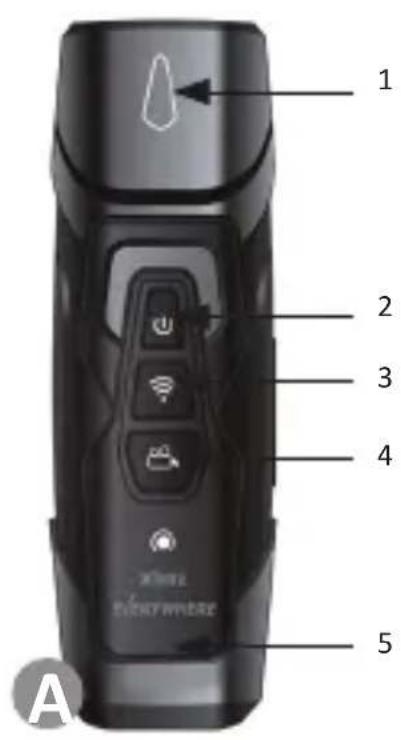

PL
INSTRUKCJA OBSŁUGI
KAMERA SPORTOWA
Producent:
KGK Trade sp. z o.o. sp. k.
ul. Ujastek 5b
31-752 Kraków
Polska
Please read the enclosed user manual and safety instructions carefully before use to avoid accidental damage to the equipment or unintentional injury.
PRODUCT INTENDED USE
The Xblitz Everywhere sports camera is designed to capture video and audio using two lenses simultaneously – the front and the back. Using the included mounts, you can mount it anywhere you like: to your helmet, to your bike frame or to your belt. The manufacturer is not responsible for incorrectly mounted device or resulting injuries. The warranty also does not cover mechanical damage caused by falling down of the camera or the product to which it will be attached.
01. KIT
- Video recorder
- Frame holder
- Holder for double-sided tape
- Belt holder
- Sticker
- Strap
- User Manual
- Two USB cables
02. PRODUCT DESCRIPTION
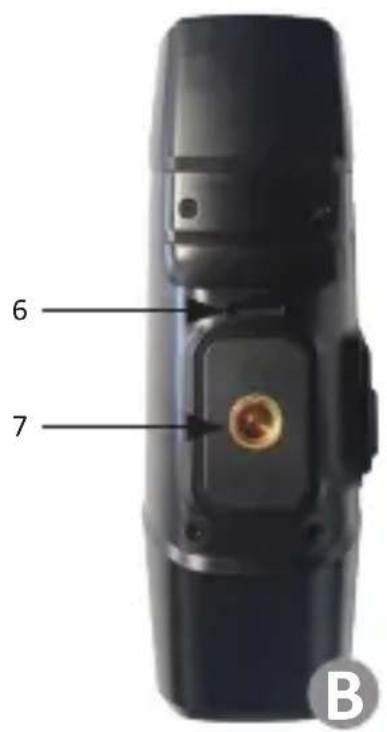
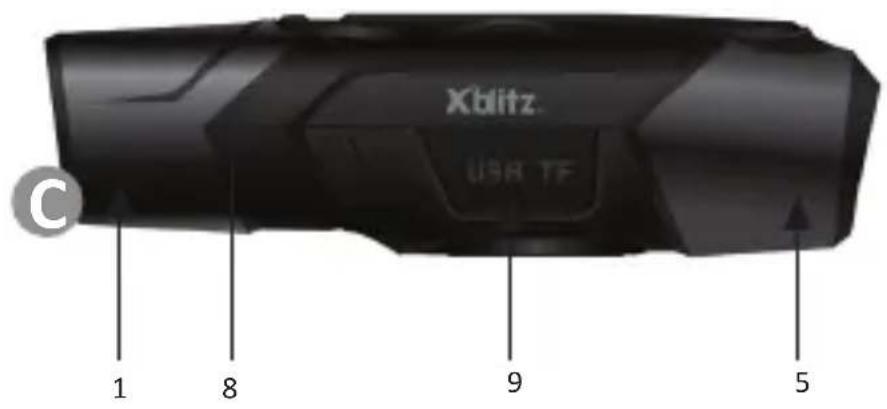
SEE FIGURES A, B & C
- Front camera
- Power button
- Wi-Fi Button
- Recording Button
- Rear camera
- Loudspeaker
- Mounting Bracket
- Microphone
- USB port, SD memory card slot, reset button
03. VOICE COMMAND LIST
-
No memory card
-
Format memory card - format the memory card by holding down the record key
-
Power off
-
Start recording
-
End of recording
-
Power is disconnected
-
Format the memory card
-
The memory card has been formatted
-
Failed to format
-
WiFi on
-
WiFi connected
-
WiFi off
-
Updating
-
Updated
-
Battery low
-
Recording secured – pressing the Wi-Fi key during recording will secure the current recording and take a picture at the same time.
04. BUTTON OPERATION AND FUNCTION
- Recording button
a) Short press – turn off, press shortly to start recording, press again to stop recording
b) Long press – pressing and holding for 5 seconds will format the SD memory card
- Wi-Fi button
a) Short press – turn on, press briefly to enable Wi-Fi, press again to disable Wi-Fi
- Power button
a) Long press – press and hold 3 seconds to turn on, press and hold 3 seconds to turn off
- Reset Button
a) Short press – press at the indicated location to reset.
05. LED COLOR DESCRIPTION
- Operational indication
a) The green light indicates the power is on.
b) The flashing green light indicates the memory card is being formatted
c) The green light blinks to start recording
d) The green light blinks continuously – stop recording
e) The blue light blinks – start Wi-Fi
f) Blue light on continuously – Wi-Fi connected
g) Yellow light blinks – battery low
06. RECHARGING
Use the original USB cable to connect the power source.
- Charging in progress – the red light remains on.
- When charging is complete, the red light turns off.
- It takes about 3 hours to fully charge the device when it is turned off.
- When fully charged, unplug the power source to prevent overcharging and to preserve the battery life.
07. FUNCTIONS
- ON/OFF. Press the power button for 3 seconds to turn on the device. The green light indicates the power is on. Press the power button again for 3 seconds to turn off the device.
- Memory Card Formatting: when the device starts up, it will beep 3 times and cannot perform any operation – format the micro SD card by pressing the record button for 5s. When the LED stops flashing and the device emits a single beep, it means the formatting is completed and recording has started.
- Recording: when green light is blinking, it means the recording is in progress, and when green light is solid, it means the recording is paused.
- Connect to computer: connect the device to your computer with a USB cable. The computer will detect the portable hard drive. You can read and transfer files. Do not disconnect the device while copying or playing files.
- Connecting to an application: launch the cam application (see FIGURE D for the application code) and click the Wi-Fi button to connect to the device, select the network name „Xblitz Everywhere” and click connect, then enter the password: „12345678”.
08. FAQ
- The device can't turn on.
The battery is low, please charge the device.
- Why the computer cannot recognize the device?
The USB cable may be damaged, please check another USB cable.
- The device does not work when a memory card (Micro SD) is inserted.
The device may not read the format of the card when it first starts. Please format the card by holding down the record button.
- Why do you have to wait sometimes before the recording starts?
You may have interrupted the recording of the last video by improperly pulling out the card or directly turning off the device without pausing the
recording. The device restores the lost files, which takes some time.
- Why does the device beep three times after starting up and then turn off? When the device does not detect a memory card, it will automatically shut down.
- Why I cannot turn off the device's Wi-Fi by pressing the Wi-Fi button while using the application on my cell phone?
To avoid accidental disconnection while using the app, the power button only works on the device.
- Why does the device continue to beep after booting up, and the other buttons do not work?
When you insert an unrecognized card, it will notify you with a sound. You need to press the record button for 5 seconds to format the card before using the device.
09. PRECAUTIONS
- Do not disassemble or tamper with the camera yourself. If a malfunction occurs, please contact the service center.
- Use only original accessories.
- Do not use the equipment contrary to the law of your country or region.
- Do not exceed the maximum operating temperature of 0 to 35 °C (59 to 86 °F) and the maximum storage temperature of +5 to +45 °C (59 to 86 °F).
- Do not subject the device to damage or physical impact.
- Do not expose this unit to physical impact or damage. Do not use detergents or chemicals to clean the lens.
- Clean the device when unplugged.
- Keep out of the reach of children.
- Do not expose the device to extreme heat or fire.
- Make sure that the waterproof cap is tightly fitted to the housing, if it is damaged, it may cause less water resistance and lead to damage of the device.
10. SPECIFICATIONS
Video resolution: 1080P
Sensor: 1/2.9"2M CMOS
Viewing angle: 140 degrees
Microphone: Yes
Recording time: up to 120 minutes
Waterproof: IPX 6.5
Supports Micro SD memory cards up to 128 GB class 10
Charging during recording: Yes
Power supply: DC 5V/2A / battery: 4.35V 1450mAh li-on
Product dimensions: 115*36.5*34.5mm
Weight: 105g
11. NOTES
- Due to continuous product improvement, the manufacturer reserves the right to make changes to the device and its set without prior notice. Some of the functions described in this manual may differ slightly from reality.
- Use only the original charger with 5V/1.5A charging current. (Do not plug directly into a 220/230V outlet). Failure to comply may cause damage to the camera or lead to dangerous situations.
- Make sure the waterproof cap is firmly attached to the housing, if it is damaged, it may cause less water resistance and lead to damage to the device.
- The Wi-Fi module in the unit is used to connect to your cell phone using the dedicated cam software, so you can view the live camera image, review recordings, and change camera settings using your cell phone.
12. WARRANTY CARD/COMPLAINTS
The product is covered by a 24-month warranty. Warranty terms and conditions can be found at: https://xblitz.pl/gwarancja/
Claims should be submitted using the claim form located at: http://reklamacje.kgktrade.pl/
Details, contact and service address can be found at: www.xblitz.pl. Specifications and contents are subject to change without notice. We apologize for any inconvenience.
KGK Trade declares that the XBLITZ EVERYWHERE device complies with the essential requirements of Directive 2014/53/EU. The text of the declaration can be found at the link: https://xblitz.pl/download/DOC/deklaracja-CE-Xblitz-EVERYWHERE.pdf

The crossed out trash can symbol indicates that unusable electrical or electronic devices, its accessories (such as power supplies, cords) or components (for example batteries, if included) cannot be disposed of alongside with household waste. In order to dispose of the devices or its components (for example, batteries) deliver the device to the collection point, where it will be accepted free of charge. Disposal is subject to the recast version of the WEEE Directive (2012/19/ EU) and the Directive on batteries and accumulators (2006/66 / EC). Proper disposal of the device prevents degradation of the natural environment. Information about the collection points of the facilities is issued by the competent local authorities. Incorrect disposal of waste is subject to penalties provided for by the law in force in the given area.

Manufacturer:
KGK Trade sp. z o.o. sp. k.
Ujastek 5b
31-752 Cracow
Poland
Made in PRC
Xblitz®
DE
BEDIENUNGSANLEITUNG
SPORTSKAMERA
KGK Trade Sp. z o.o. sp. K
Ujastek 5b
31-752 Kraków
Polen
Hergestellt in PRC
Xblitz®
CZ
NÁVOD K POUŽITÍ
SPORTOVNÍ KAMERA
Výrobce:
KGK Trade sp. z o.o. sp. k.
Ujastek 5b
31-752 Krakov
Polsko
Vyrobeno v PRC
Xblitz®
HU
HASZNÁLATI UTASÍTÁS
SPORTKAMERA
Gyártó:
KGK Trade sp. z o.o. sp. k.
Ujastek 5b
31-752 Krakkó
Lengyelország
Kínában készült
Xblitz®
SK
POUŽÍVATELŠKÁ PRÍRUČKA
ŠPORTOVÁ KAMERA
Výrobca:
KGK Trade sp. z o.o. sp. k.
Ujastek 5b
31-752 Krakov
Pol'sko
Vyrobené v PRC
Xblitz®
LT
VARTOTOJO VADOVAS
SPORTO KAMERA
Gamintojas:
KGK Trade sp. z o.o. sp. k.
Ujastek 5b
31-752 Krokuva
Lenkija
Pagaminta KLR
Xblitz®
BG
РЪКОВОДСТВО ЗА УПОТРЕБА
СПОРТНА КАМЕРА
Вносител:
KGK Trade sp. z o.o. sp. k.
Ujastek 5b
31-752 Краков
Полша
Producător:
KGK Trade sp. z o.o. sp. k.
Ujastek 5b
31-752 Cracovia
Polonia
Fabricat în RPC

natural_image
Pure white background with no visible text, symbols, or objectsXblitz®
- PL
- INSTRUKCJA OBSŁUGI
- KAMERA SPORTOWA
- PRODUCT INTENDED USE
- KIT
- PRODUCT DESCRIPTION
- VOICE COMMAND LIST
- BUTTON OPERATION AND FUNCTION
- LED COLOR DESCRIPTION
- RECHARGING
- FUNCTIONS
- FAQ
- PRECAUTIONS
- SPECIFICATIONS
- NOTES
- WARRANTY CARD/COMPLAINTS
- DE
- BEDIENUNGSANLEITUNG
- SPORTSKAMERA
- CZ
- NÁVOD K POUŽITÍ
- SPORTOVNÍ KAMERA
- HU
- HASZNÁLATI UTASÍTÁS
- SPORTKAMERA
- SK
- POUŽÍVATELŠKÁ PRÍRUČKA
- ŠPORTOVÁ KAMERA
- LT
- VARTOTOJO VADOVAS
- SPORTO KAMERA
- BG
- РЪКОВОДСТВО ЗА УПОТРЕБА
- СПОРТНА КАМЕРА
- Xblitz®
Brand : Xblitz
Model : Everywhere
Category : Sports camera