Dual View - VCR Xblitz - Free user manual and instructions
Find the device manual for free Dual View Xblitz in PDF.


Pick your language and provide your email: we'll send you a specifically translated version.
| Product Type | Videocassette Recorder (VCR) |
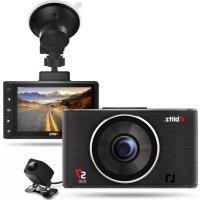
| Model | Xblitz Dual View |
| Dimensions (W x D x H) | Approx. 430 x 280 x 95 mm |
| Weight | Approx. 3.5 kg |
| Power Supply | AC 220-240 V, 50/60 Hz |
| Power Consumption | Approx. 20 W |
| Playable Formats | VHS, VHS-C (with adapter) |
| Recording Format | VHS SP, LP, EP |
| Video Heads | 4-head helical scan |
| Inputs | RF antenna, RCA composite, S-Video |
| Outputs | RCA composite, S-Video, RF out |
| Remote Control | Infrared remote included |
| Timer Recording | Up to 8 programs, 1 month in advance |
| On-Screen Display | Multilingual menu |
| Cleaning | Use a soft dry cloth; avoid liquids |
| Safety Features | Auto power-off after 60 min inactivity |
| Spare Parts Availability | Contact Xblitz support or authorized service |
| Reparability | Serviceable by qualified technician only |
Frequently Asked Questions - Dual View Xblitz
What types of tapes can I use with the Xblitz Dual View VCR?
The Xblitz Dual View VCR is compatible with standard VHS tapes. For VHS-C tapes, you will need a VHS-C adapter.
How do I connect the VCR to my TV?
You can connect using the RCA composite cables (yellow for video, red and white for audio) or via RF coaxial cable. For better picture quality, use the S-Video connection if available.
Can I record from an external source?
Yes, you can record from external devices such as a cable box or camcorder using the front or rear RCA input jacks. Select the input source via the remote control.
How do I set the clock and timer recordings?
Use the MENU button on the remote to access the setup. Set the clock manually or enable Auto Clock Set if supported. For timer recording, press PROG and enter the date, start/end time, and channel.
Why is the playback picture poor or snowy?
Check the video heads for dirt – a cleaning tape may help. Ensure the tape is not damaged and the connections are secure. Poor RF signal can also cause snow, so try adjusting the TV's tuning.
How do I clean the VCR?
Use a dry soft cloth to wipe the exterior. For the tape path, use a VCR cleaning cassette sparingly. Avoid liquids or sprays.
The remote control doesn't work. What should I do?
Replace the batteries (typically AAA). Make sure there are no obstructions between the remote and the VCR's IR sensor. If issues persist, try resetting the VCR by unplugging it for 30 seconds.
Does this VCR have auto head cleaning?
No, the Xblitz Dual View does not have auto head cleaning. Manual cleaning with a cleaning cassette is recommended every few months.
Can I connect the VCR to a modern HDTV?
Yes, but picture quality may be limited. Use the RCA composite or S-Video output. If your TV lacks these inputs, an AV-to-HDMI converter can be used.
Where can I find spare parts or service?
For spare parts such as remote controls or power cords, contact Xblitz customer support. Repairs should be performed by an authorized service center.
User questions about Dual View Xblitz
0 question about this device. Answer the ones you know or ask your own.
Ask a new question about this device
No questions yet. Be the first to ask one.
Download the instructions for your VCR in PDF format for free! Find your manual Dual View - Xblitz and take your electronic device back in hand. On this page are published all the documents necessary for the use of your device. Dual View by Xblitz.
USER MANUAL Dual View Xblitz
Manual assistant
Powered by Anthropic
Waiting for your message
Product information
Brand : Xblitz
Model : Dual View
Category : VCR