ZMB6000 - Meat Grinder Zelmer - Free user manual and instructions
Find the device manual for free ZMB6000 Zelmer in PDF.


| Product Type | Beard Trimmer |
| Brand | Zelmer |
| Model | ZMB6000 |
| Series | ZMB |
| Power Input | 5V DC, 1A (via USB) |
| Charging Time | 2-3 hours (first use), 2 hours (regular) |
| Battery Type | Rechargeable lithium-ion (built-in) |
| Attachments | 4 limit combs: 3mm, 6mm, 9mm, 12mm (levels 1-4) |
| Display | Digital LCD screen with battery level, lock, and wash indicators |
| Lock Function | Yes, long press 3 seconds to lock/unlock |
| Blade Material | Metal blades (stainless steel assumed) |
| Cleaning | Rinse blades under tap; use cleaning brush; apply lubricating oil |
| Safety | Do not use near water or on wet hair; IP rating not specified |
| User Level | Home use only |
| Warranty | 2 years (against manufacturing defects) |
| Included Accessories | 4 limit combs, cleaning brush, lubricating oil, USB charging cable |
| Weight (approx) | 200 g |
| Dimensions (approx) | 180 x 50 x 40 mm |
Frequently Asked Questions - ZMB6000 Zelmer
User questions about ZMB6000 Zelmer
0 question about this device. Answer the ones you know or ask your own.
Ask a new question about this device
Download the instructions for your Meat Grinder in PDF format for free! Find your manual ZMB6000 - Zelmer and take your electronic device back in hand. On this page are published all the documents necessary for the use of your device. ZMB6000 by Zelmer.
USER MANUAL ZMB6000 Zelmer
natural_image
Black Zelmer hair curler with digital display and control buttons (no visible text or symbols)PL INSTRUKCJA UŻYTKOWANIA
Trymer
EN USER MANUAL Beard Trimmer
DE BENUTZERHANDBUCH
Trimmer
CZ NÁVOD K POUŽITÍ
Zastřihovač
SK NÁVOD NA UOBSLUHU
Zastrihávač
natural_image
Illustration of a hand holding a mobile phone with a finger inserted, showing the process (no text or symbols)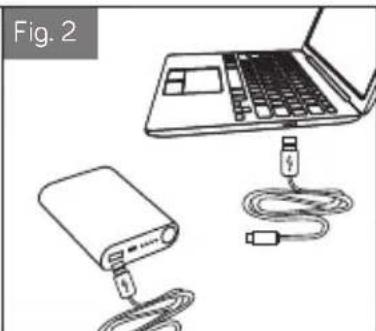
natural_image
Illustration of a laptop connected to a USB cable and a power bank, labeled 'Fig. 2' (no text or symbols on the devices themselves)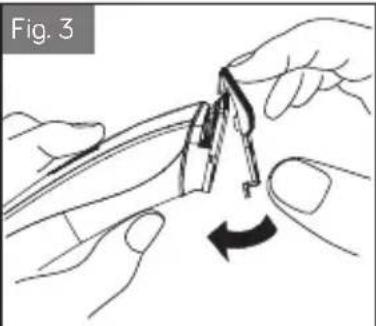
natural_image
Illustration of hands using a pliers to adjust a mechanical part, showing a curved arrow indicating rotation (no text or symbols)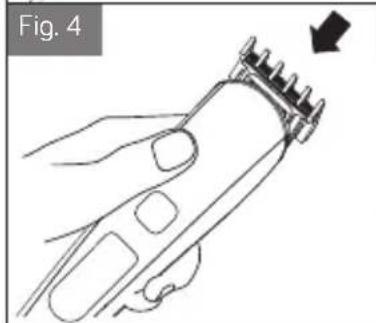
natural_image
Line drawing of a hand using a hairbrush to trim teeth, with an arrow indicating the step (no text or symbols present)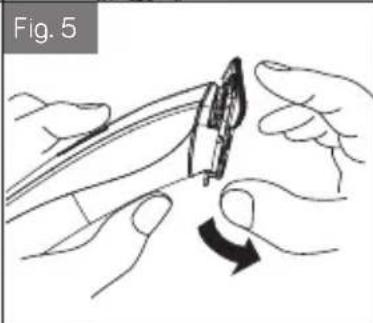
natural_image
Illustration of hands using a tool to adjust or install a component, showing a curved arrow indicating rotation (no text or symbols present)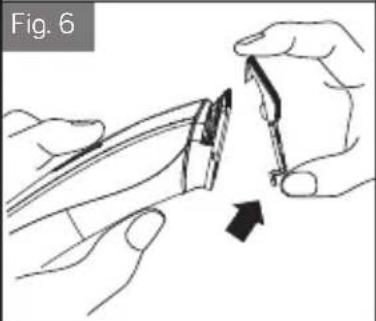
natural_image
Illustration of hands using a tool to cut or apply a small object, with an arrow indicating the process (no text or symbols present)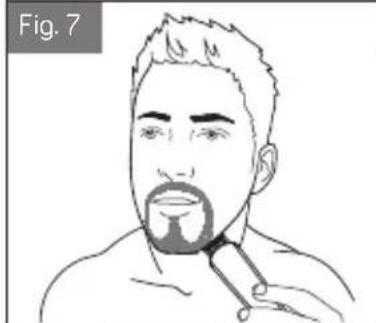
natural_image
Line drawing of a person's face with a beard and short hair, no text or symbols present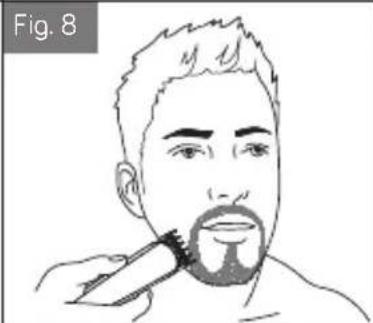
natural_image
Line drawing of a person applying a toothbrush to their beak (no text or symbols)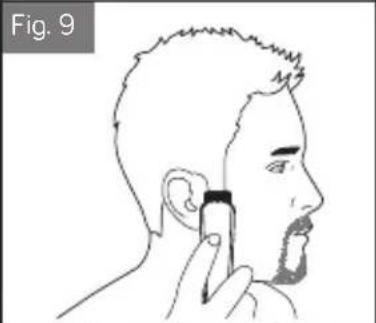
natural_image
Line drawing of a person applying a toothpaste to their ear (no text or symbols)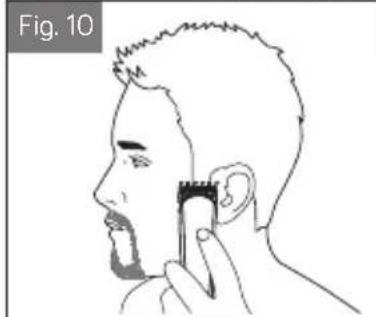
natural_image
Line drawing of a person applying a toothbrush to their ear (no text or symbols)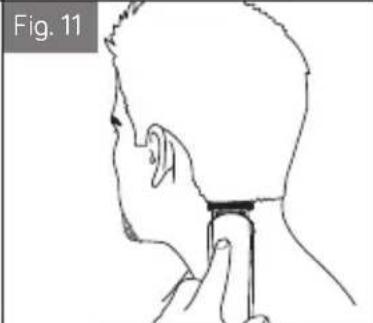
natural_image
Side profile sketch of a person's head and neck with a finger inserted, labeled Fig. 11 (no text or symbols on the diagram itself)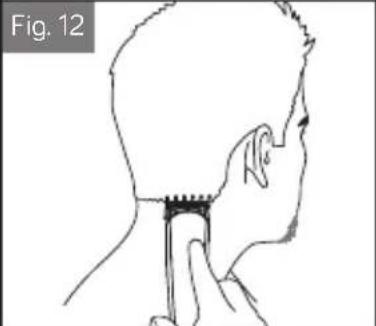
natural_image
Side profile sketch of a person's head and neck with a finger inserted, labeled Fig. 12 (no text or symbols on the diagram itself)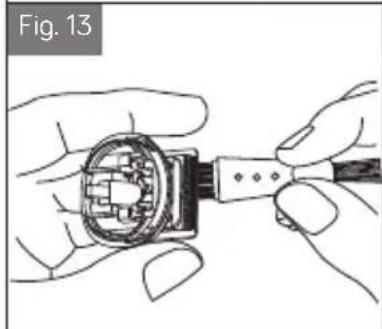
natural_image
Illustration of hands assembling a mechanical component (no text or symbols visible)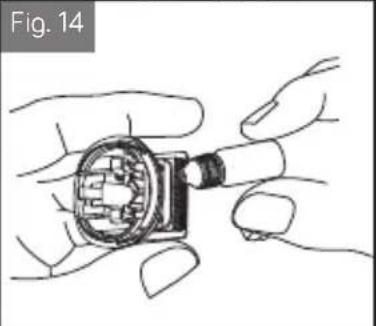
natural_image
Illustration of hands assembling a mechanical component (no text or symbols visible)DZIĘKUJEMY ZA WYBÓR MARKI ZELMER.
ŻYCZYMY SATYSFAKCJI Z UŻYTKOWANIA URZĄDZENIA.
OSTRZEŻENIE
PRZED UŻYCIEM PRODUKTU NALEŻY UWAŻNIE PRZECZYTAĆ INSTRUKCJĘ UŻYTKOWANIA. PRZECHOWUJ JĄ W BEZPIECZNYM MIEJSCU DO WYKORZYSTANIA W PRZYSZŁOŚCI.
OPIS
WE WOULD LIKE TO THANKS YOU FOR CHOOSING ZELMER, WE WISH THE PRODUCT PERFORMS TO YOUR SATISFACTION AND PLEASURE.
WARNING
PLEASE READ THE INSTRUCTIONS FOR USE CAREFULLY PRIOR TO USING THE PRODUCT. STORE THESE IN A SAFE PLACE FOR FUTURE REFERENCE.
DESCRIPTION
1 - Blades
2 - On switch
3 - Digital display screen
4 - Limit comb 3mm(a)/6mm(b)/9mm(c)/12mm(d)
5 - USB charging cable
6 - Brush
7 - Lubricating oil
SAFETY INSTRUCTIONS
This device can be used by children aged 3 or over under supervision. This device can be used by children aged 8 years and above and persons with reduced physical, sensory or mental abilities or lack of experience and knowledge if they are supervised or have received proper instructions regarding use of the device in a safe manner and understand the dangers
EN
involved. Children must not play with the device. Cleaning and maintenance operations to be performed by the user must always be supervised.
This device can only be connected with the USB interface (5VDC, Output Max 1A).
Follow the DEVICE CHARGE instructions in order to charge it.
Follow the device BATTERY REMOVAL instructions for removal of the batteries from the device.
This appliance is intended for use at a maximum altitude of 2000m above sea level.
IMPORTANT WARNINGS
This appliance is designed for home use and should never be used for commercial or industrial use under any circumstances.
Do not use the device on wet hair.
Do not use connect or disconnect the device to the mains with your hands or feet wet. Do not use any accessories other than those supplied.
Do not use this device near to bathtubs, showers, sinks or other tanks that contain water.
The mains connection cable must not be tangled or wrapped around the product during use. Do not pull on the cable to unplug it or use it to carry the product.
Do not wrap the cable around the device.
Proceed according to the cleaning section of this manual for cleaning. Do not use the product on animals.
Unplug the product immediately from the mains in the event of any breakdown and contact an authorised Technical support service.
In order to prevent any risk of danger, do not open the device. Only qualified technical personnel from the brand's Official Technical support service may carry out repairs or procedures on the device.
Any incorrect use or improper handling of the product shall render the warranty null and void. Only an authorised technical support service centre may carry out repairs on this product.
B&B TRENDS SL. disclaims all liability for damages that may occur to people, animals or objects, for the non-observance of these warnings.
CHARGING THE DEVICE
Before using your beard trimmer for the first time, charge for 2-3 hours, and charge 2 hours regularly. Ensure the product is switched off. First insert the plug on the end of the USB charging cable lead into the unit □(Fig. 1) and then connect the USB charging cable to the USB interface. This appliance is suitable for 5V DC Max 1A charger, computer and other power interface (Fig. 2). The charging indicator icon will flash on the LCD display when it's charging and when it's fully charged it will show 99. The display will always show the remaining battery level.
Your hair clipper cannot be overcharged. However, if the product is not going to be used for an extended period time (2-3 months), unplug it from the mains and store. Fully recharge your hair clipper when you like to use it again.
To preserve the life of your batteries, let them run out every 2 months then recharge for 2-3 hours again.
INSTRUCTIONS FOR USE
Prior to turning the device on, select the desired comb guide (a,b,c or d) fitting it by pushing forward in a proper way (fig 3-4). If the hand combing needs to be
EN
replaced, pull upwards by hand. Open the bottom end of the comb lock and push forward (fig 5-6).
Choose between four levels of matching comb to cut hair of different lengths.
The length of the cut is indicated on each limit comb as follows:
| Number | Level | length (mm) |
| 1 | 1 | 3 |
| 2 | 2 | 6 |
| 3 | 3 | 9 |
| 4 | 4 | 12 |
HOW TO SWITCH ON/OFF THE LOCK FUNCTION?
Long press for 3 seconds to lock the machine and then long press for 3 seconds to unlock. The display will show lock function icon when it's activated.
HOW TO TRIM BEARD
For different beard styling please refer from Fig.7 to Fig.12
MAINTENANCE AND CLEANING
After a continuous use of more than 15 minutes, the display will show washing function icon as a reminder.
It will disappear if you turn off the machine and turn it on again.
You can rinse the blades under the tap and make sure to dry them properly.
Unplug the product when you do not intend to use it for an extended period of time to prolong its shelf-life. Allow the device to cool down prior to storage.
Separate the tool head from the body and use the cleaning brush to remove dust from the internal parts (Fig.13).
Apply a drop of oil on one of the edges of the blades for their maintenance, and turn on the device for a few seconds to distribute it. This should be done when you notice a certain amount of difficulty during the trimming operation (Fig. 14)
Ensure that the device is unplugged prior to cleaning it.
This device may only be cleaned with a damp cloth, and chemical products must never be used for the same.
PRODUCT DISPOSAL
This product complies with European Directive 2012/19/EU on electrical and electronic devices, known as WEEE (Waste Electrical and Electronic Equipment), provides the legal framework applicable in the European Union for the disposal and reuse of waste electronic and electrical devices. Do not dispose of this product in the bin, instead going to the electrical and electronic waste collection center closest to your home.
The product may contain batteries. Remove them before disposing of the product and dispose in special containers approved for this purpose.
REMOVING BATTERY
The appliance must be disconnected from the supply mains when removing the battery
Ensure that the clipper is discharged of all power First remove the comb.
Then remove the blade.
Unscrew the 2 screws in the blade base of the unit. Unscrew the other screw on the lower back housing of the clipper. Lift or pry the clipper halves apart, exposing the battery.
Cut the metal pieces on both ends of the battery and remove it from the PCB.
Pull downward the battery set from the unit.
The battery must be removed from the appliance before it is scrapped. The battery is to be disposed of safety.
We hope that you will be satisfied with this product.
ELIMINAREA PRODUSULUI
B&B TRENDS, S.L. guarantees compliance of this product for the use for which it is intended for a period of two years. In the case of breakdown during the term of this warranty, users are entitled to repair or else the replacement of the product at no charge if the former is unavailable, unless one of these options proves impossible to fulfill or is disproportionate. In this case, you can then opt for a reduction in price or cancellation of the sale, which must be dealt with directly with the sales vendor. This also covers replacement of spare parts provided that the product has been used according to the recommendations specified in this manual for both cases, and has not been tampered with by any third party that is not authorised by B&B TRENDS, S.L. The warranty will not cover any parts subject to wear and tear. This warranty does not affect your rights as a consumer in accordance with the provisions in Directive 1999/44/EC for member states of the European Union.
USE OF WARRANTY
Customers must contact a B&B TRENDS, S.L. authorised Technical Service for repair of the product. Since any tampering of the same by anyone not authorised by B&B TRENDS, S.L., or the careless or improper use of the same shall render this warranty null and void. The warranty must be fully completed and delivered along with the receipt or delivery docket for the effective exercise of rights under this warranty.
This warranty should be retained by the user as well as the invoice, receipt or the delivery docket to facilitate the exercise of these rights. For technical service and after-sales care outside the Polish territory, please submit your query to the point of sale where you purchased the item or check for further aftersales information at www.zelmer.com
Series: ZMB. Mod: ZMB6000
Input: 5V = 1A
Type: FK-8688T