
Touchman TM455 - Smartphone LEXIBOOK - Free user manual and instructions
Find the device manual for free Touchman TM455 LEXIBOOK in PDF.


| Product type | Personal organizer assistant with FM radio and games |
| Brand | Lexibook |
| Model | Touchman TM455 |
| Main power | 2 AAA batteries (not included) |
| Memory backup | 1 CR2032 battery (included) |
| Display | Backlit LCD screen |
| Display languages | English, Spanish, French, German, Italian, Portuguese, Dutch |
| Main functions | Local and world clock, alarm, countdown, hourly chime |
| Phone directory | Personal and professional, up to 200 entries (estimated) |
| Schedule | Event planning with alarm |
| To-do list | Task management with priority and status |
| Memos | Text note entry |
| Calculator | Basic functions, percentage, memory |
| Currency conversion | 5 programmable pairs |
| Measurement conversion | 9 units (inches/cm, gallons/liters, etc.) |
| Translation | English, German, Spanish, French |
| Country codes | 120 dialling codes |
| FM radio | Auto scan, requires headphones |
| Games | Hammer, Tape Speed, Sudoku (1 million grids) |
| Security | Password protection |
| Maintenance | Soft dry cloth |
| Warranty | 2 years against manufacturing defects |
| Dimensions (approx.) | Not specified |
| Weight (approx.) | Not specified |
Frequently Asked Questions - Touchman TM455 LEXIBOOK
User questions about Touchman TM455 LEXIBOOK
0 question about this device. Answer the ones you know or ask your own.
Ask a new question about this device
Download the instructions for your Smartphone in PDF format for free! Find your manual Touchman TM455 - LEXIBOOK and take your electronic device back in hand. On this page are published all the documents necessary for the use of your device. Touchman TM455 by LEXIBOOK.
USER MANUAL Touchman TM455 LEXIBOOK
TOUCHMAN® RADIO & SUDOKU USER GUIDE / MODE D'EMPLOI
LEXIBOOK
TM455
TV4551M0072 Inc.
19/03/2007 10:43:45
natural_image
Color gradient bar transitioning from black to white with no text or symbols
natural_image
Color bar with multiple solid color blocks (yellow, magenta, cyan, blue, green, red, black, yellow) and a gray bar on the right (no text or symbols)


TM455IM0077.indb 2 19/03/2007 10:43:45





1. INTRODUCTION
yard = yards → = mètres,
mile = miles km = kilomètres
C = C^ F = F^
feet = pieds → m = mètres
oz = onces → g = grammes
lb = livres kg = kilogrammes
natural_image
Color gradient bar transitioning from black to white, no text or symbols present

13. TRADUCTEUR
natural_image
Color gradient bar transitioning from black to white, no text or symbols present

1. INTRODUCTION
Thank you for purchasing the TM455 TOUCHMAN® RADIO & SUDOKU personal assistant.
Please read this manual carefully to ensure you understand the operation and keep it for future reference.
Important Safety Instructions
- Do not carry the personal organizer in the back pocket of your trousers.
- Do not drop the organizer or subject it to strong impact.
- Do not expose it to extreme temperatures.
- Use a soft, dry cloth to clean the outer body of the organizer.
- As this organizer is not waterproof, avoid using or storing in places where it might be splashed by water.
2. KEY OPERATION
2.1 Push keys on the main unit
FM SCAN/RESET : To scan and reset the radio frequencies.
ON/OFF: To turn the organizer on/off.
•: ▼ and down arrow keys. To toggle different menu options.
2.2 LCD screen
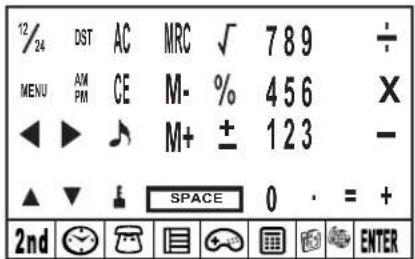


2.3 Main function keys on the LCD screen

To access the second function keys.

To enter time display. To perform clock and alarm settings.

To access the phonebook.

To access the schedule, notes and "to do" list.

To enter the game mode.

To enter calculator, currency conversion and metric conversion modes.

To access the translator function.

To view the country code list.

Press to confirm a selection or store data.

Cursor keys. Press to move cursor / to view information out of the screen.

Press to select a symbol or special character.

Press to edit fields and enter setting modes.

INS Press to insert a space before the cursor.

Press to delete a character or an entry.

Press to insert a space.

To toggle between upper case letters and lower case letters. The icon "CAPS" is displayed above the letter "Q" for upper case letters.

To insert a decimal point/dot.

To toggle daily alarm on/off.

To toggle hourly chime on/off.

To turn the schedule alarm on/off.



2.4 Second function keys on the LCD screen
To set a password protecting the data of the phonebook, schedule and "to do" list.
DST To toggle the daylight saving time on/off.
To toggle the key tone on/off.
MENU To access the setting menu.
12/24 To toggle between 12/24-hour time display.
3. GETTING STARTED
3.1 Batteries
- Unscrew the large battery compartment located at the back side of the unit. Remove the battery door and insert 2 x AAA batteries (not included).
- Remove the pull tab located inside the small battery compartment. If it proves difficult:
a. Unscrew the small battery compartment.
b. Remove the CR2032 battery, then the pull tab.
c. Insert the CR2032 with the + sign facing upward.
d. Replace the battery door and the screw.
3.2 Static label
Remove the static label from the LCD screen.
3.3 Reset
Before using your TM455 for the first time, press the RESET button located at the back of the product using the tip of a paper clip. "RESET?" is displayed onscreen. Press ENTER to confirm. This operation can take several seconds.
3.4 On/Off function
Press to switch the organizer on. Press to switch the organizer off.
3.5 Auto-Off function
Auto power off will be activated after 5 minutes if no key is pressed. Press the ⓚkey again to restart the organizer.



4. SETTINGS
4.1 Selecting the operation language
Press the <2nd> key to enter the second function menu keys. Then, use the felt-tip pen to press the MENU icon. Use the up and down arrow keys to select "LANGUAGE?", and press ENTER. Use the up and down arrow keys to select a display language among ENGLISH, ESPAÑOL, FRANCAIS, DEUTSCH, ITALIANO, PORTUGUÊS and NEDERLANDS. Press ENTER to confirm the desired language.
4.2 Date display format
Press the <2nd> key followed by
- When the schedule alarm rings during game play, the icon "((( / ))" will flash on the upper left side of the screen during one minute. You can continue playing.
- When the unit is turned off (manually or automatically), your current game play will be stored in memory. Press the Ⓞ key, and continue solving the grid where you left off.
12. CALCULATOR AND CONVERSION MODE
12.1 Calculator
- Press ☐ to enter calculator mode.
- Perform calculations. Use the CE key to delete the last number entered. Press AC to reset the calculator. Use the % key to calculate percentages. Use the MRC, M+ and M- keys for the memory function.
Note: "ERR" will be displayed onscreen to signal results of over 10 digits and other error calculations.




12.2 Setting a currency exchange rate
- Press twice. There are 5 pairs of programmable currencies: EURO → USD, CAD → USD, JPY → USD, AUD → USD, GPD → USD. You can edit the fields of these currencies into any other pair of currencies. For example, you can replace the 5 pairs of preset currencies with: EURO → GPD, GPD → CAD, CHF → EURO, SEK → EURO and USD_CHF. You must set the rate for each pair of currencies before you attempt to make any conversion.
- Use the up and down keys on the unit ( ) to toggle the preset pairs of currencies.
- Press the EDIT key. Key in the 2 currencies for which you wish to set the rate.
- Press ENTER and key in the rate.
- Press ENTER to store your settings.
12.3 Performing a currency conversion
- Press twice.
- Use the up and down keys on the unit ( ) to select a pair of currencies.
- Select the source and the target currency (the arrow points towards the target currency). Use the ◀▶ key to change the direction of the arrow.
- Key in the amount you want to convert, and press ENTER.
12.4 Performing a metric conversion
There are 9 built-in conversion units:
inch = inches cm = centimetres,
yard = yards → m = meters,
mile = miles km = kilometres
C = C^ F = F^
feet = feet → m = meters
oz = ounces → g = grams
lb = pounds kg = kilograms
gal = us gallons → US = litres
gal = uk gallons → UK = liter
- Press 3 times.
- Use the up and down keys on the unit ( ) to select a conversion.
- Select the source and the target units (the arrow points towards the target units). Use the ◀▶ keys to change the direction of the arrow.
- Key in the amount you want to convert, and press ENTER.



13. TRANSLATOR
Translate words of up to 36 characters into English (ENG), German (DEU), Spanish (SPA) and French (FRA).
- Press the 🔒 key to access this function.
- Use or key to select a source and a target language. The arrow should point towards the target language.
- Use the up and down keys on the unit ( ) to select another target language.
- Input the word you wish to translate, and press ENTER. If the word entered was not found in the database, "NOT FOUND" will be displayed onscreen followed by the closest entry.
- If the translation is longer than 10 letters, use the ◀ keys to view the entire word.
14. COUNTRY CODE
This organiser includes 120 country phone codes.
- Press the 🔒 key to access this function.
- Use the up and down keys on the unit ( ) to browse though the alphabetical code list. You can also type the first letters or the full name of the country you are looking for. Then, press the up or down key on the unit to launch the query.
- You can also input a country code, and press the up or down key on the unit to find which country it corresponds to.
15. CHANGING BATTERIES
TM455 works with 1 x CR2032 battery (included) for the personal agenda function and 2 x AAA batteries (not included) for the radio function.
You must replace the CR2032 battery within one minute to save your data.
To replace the CR2032 battery:
- Turn off the unit.
- Open the small battery compartment using a screwdriver. Remove the old battery and insert 1 new CR2032 battery making sure the + sign is facing upwards.
- Replace the battery door. "RESET?" is displayed onscreen.
- Press any key except ENTER to keep the data previously stored.




WARNING! If the battery loses power or is removed during more than one minute, all your data will be lost. Incorrect usage can also corrupt or delete your data. Therefore, make sure you keep written copies of your data. Caution: If the unit receives an electrostatic shock and stops working, use the tip of a paper clip to push the RESET button located at the back of the unit. If this proves to be ineffective, remove the batteries and insert them again. All data will be lost.
16. WARRANTY
This product is covered by our 2-year warranty.
To make use of the warranty or after-sales service, please contact your retailer and supply proof of purchase, or return the unit the address given below complete with proof of purchase.
Our warranty covers material or installation-related defects attributable to the manufacturer, with the exception of wear caused by failure to respect the instructions for use or any unauthorised work on the equipment (such as dismantling, exposure to heat or damp, etc.).
Note: Warranty does not cover broken LCD displays.
It is the nature of products utilising electronic memory that on rare occasions information stored in the memory of the unit may be lost. Lexibook cannot accept any responsibility for the loss of data caused by misuse, attempts to repair the unit, an error, replacement of batteries, use of batteries after their use-by-date has expired, or any other circumstance. Similarly we cannot accept any direct or indirect responsibility for financial losses or complaints of third parties, which could result from the use of this product. Note: It is recommended that all packaging be kept for future reference. Keep this instruction manual in a safe place as it contains important information.
Disclaimer: In our constant concern for improvement, the colours and details of the product may differ slightly from those shown on the packaging.
LEXIBOOK UK Ltd,
Unit 10 Petersfield Industrial Estate,
Bedford Road, Petersfield, Hampshire, GU32 3QA,
United Kingdom,
Freephone helpline: 0808 100 3015
http://www.lexibook.com
Environmental Protection
Unwanted electrical appliances can be recycled and should not be discarded along with regular household waste! Please actively support the conservation of resources and help protect the environment by returning this appliance to a collection centre (if available).



1. INTRODUCCIÓN
natural_image
Color gradient bar transitioning from black to white, no text or symbols present

yard = yardas → m = metros,
feet = pies → m = metros
oz = onzas → g = gramos
lb = libras kg = kilogramos
gal = galones US ✦US = litros
gal = galones UK ⚡UK = litros
Lexibook Ibérica S.L.
natural_image
Color gradient bar transitioning from black to white with no text or symbols

yard = jardas → = metros,
LEXIBOOK Electronica Lda,
Quinta dos Loios, Praceta José Domingos dos Santos, 6B-8 ^a , 2835-343 Lavradio-Barreiro, Portugal
natural_image
Color gradient bar transitioning from black to white with no text or symbols

natural_image
Color gradient bar transitioning from black to white, no text or symbols present

inch = Zoll - cm = Zentimeter,
yard = Yards → m = Meter
mile = Meilen km = Kilometer
C = C^ F = F^
feet = Fuß → m = Meter
oz = Unzen → = Gramm
lb = Pound kg = Kilogramm
gal = US Gallonen → I US = Liter
gal = brit. Gallonen → I UK = Liter
natural_image
Color gradient bar transitioning from black to white, no text or symbols present

1. INLEIDING
inch = duim → cm = centimeter,
yard = yard → m = meter,
mile = mijl → km = kilometer
C = C^ F = F^
feet = voet = meter
oz = ons → g = gram
lb = pond → kg = kilogram
gal = us gallon → US = liter
gal = uk gallon → UK = liter
natural_image
Color gradient bar transitioning from black to white, no text or symbols present

13. VERTALER
IM code: TM455IM0127


natural_image
Color gradient bar with grayscale transition from black to white (no text or symbols)

| TIME ZONE | CITY NAME | 3-LETTER CODE | TIME DIFFERENCE |
| 01 | LONDON | LON | +0 |
| 02 | LISBON | LIS | +0 |
| 03 | PARIS | PAR | +1 |
| 04 | BERLIN | BER | +1 |
| 05 | ROME | ROM | +1 |
| 06 | AMSTERDAM | AMS | +1 |
| 07 | BARCELONA | BCN | +1 |
| 08 | HELSINKI | HEL | +2 |
| 09 | CAIRO | CAI | +2 |
| 10 | MOSCOW | MOW | +3 |
| 11 | RIYADH | RUH | +3 |
| 12 | TEHERAN | THR | +3.5 |
| 13 | DUBAI | DXB | +4 |
| 14 | KABUL | KBL | +4.5 |
| 15 | KARACHI | KHI | +5 |
| 16 | DELHI | DEL | +5.5 |
| 17 | DHAKA | DAC | +6 |
| 18 | YANGON | RGN | +6.5 |
| 19 | BANGKOK | BKK | +7 |
| 20 | BEIJING | BEI | +8 |
| 21 | HONG KONG | HKG | +8 |
| 22 | SINGAPORE | SIN | +8 |
| 23 | TOKYO | TYO | +9 |





| 24 | ADELAIDE | ADL | +9.5 |
| 25 | SYDNEY | SYD | +10 |
| 26 | GUAM | GUM | +10 |
| 27 | NOUMEA | NOU | +11 |
| 28 | WELLINGTON | WLG | +12 |
| 29 | AUCKLAND | AKL | +12 |
| 30 | TONGA | TNG | +13 |
| 31 | MIDWAY ISLANDS | MID | -11 |
| 32 | HONOLULU | HNL | -10 |
| 33 | ANCHORAGE | ANC | -9 |
| 34 | LOS ANGELES | LAX | -8 |
| 35 | DENVER | DEN | -7 |
| 36 | CHICAGO | CHI | -6 |
| 37 | NEW YORK | NYC | -5 |
| 38 | TORONTO | YYZ | -5 |
| 39 | CARACAS | CCS | -4 |
| 40 | RIO DE JANEIRO | RIO | -3 |
| 41 | MID ATLANTIC | MAT | -2 |
| 42 | ---- | -2H | -2 |
| 43 | AZORES ISLANDS | AZO | -1 |


- INTRODUCTION
- TRADUCTEUR
- Important Safety Instructions
- KEY OPERATION
- Push keys on the main unit
- LCD screen
- Main function keys on the LCD screen
- Second function keys on the LCD screen
- GETTING STARTED
- Batteries
- Static label
- Reset
- On/Off function
- Auto-Off function
- SETTINGS
- Selecting the operation language
- Date display format
- Memory status
- Key tone
- Backlight
- LCD Contrast
- Special characters and symbols
- RADIO
- TIME SETTING
- City list
- Local time
- World time
- Alarm
- Count down
- PHONEBOOK
- Making an entry
- Searching and viewing entries
- Editing entries
- Deleting entries
- SCHEDULE/"TO DO"/MEMO
- Schedule
- To Do
- Memo
- Alarm
- Managing entries
- PASSWORD SETTINGS
- Activating your password
- Editing your password
- Deactivating your password
- GAMES
- Hammer
- Keyboard Wiz
- SUDOKU
- Getting started
- Menu options
- Solution
- Quit function
- Notes
- CALCULATOR AND CONVERSION MODE
- Calculator
- Setting a currency exchange rate
- Performing a currency conversion
- Performing a metric conversion
- TRANSLATOR
- COUNTRY CODE
- CHANGING BATTERIES
- WARRANTY
- Environmental Protection
- INTRODUCCIÓN
- INLEIDING
- VERTALER
Brand : LEXIBOOK
Model : Touchman TM455
Category : Smartphone