Touchman TM160 - Smartphone LEXIBOOK - Free user manual and instructions
Find the device manual for free Touchman TM160 LEXIBOOK in PDF.


| Product type | Electronic organizer (personal scheduler) |
| Brand | Lexibook |
| Model | Touchman TM160 |
| Power supply | 1 CR2032 battery (3V) |
| Estimated battery life | Several months with normal use |
| Dimensions (estimated) | Approximately 10 x 6 x 1.5 cm |
| Weight (estimated) | Approximately 60 g (with battery) |
| Display | LCD screen, 12 characters per line |
| Main functions | Local and world clock, alarm, phone directory, appointment book, calculator, currency/metric converter, games, password lock |
| Directory capacity | Not specified, estimated: several hundred contacts |
| Available languages | English, French, German, Italian, Spanish, Portuguese, Dutch |
| Auto shutdown | After 5 minutes of inactivity |
| Maintenance and cleaning | Wipe with a soft, dry cloth. Do not use liquid or abrasive products. |
| Safety | Do not carry in back pocket. Do not drop. Avoid extreme temperatures and exposure to water. |
| Spare parts and repairability | CR2032 battery replaceable. Other repairs not user-serviceable. |
| Warranty | 2 years, covers material and workmanship defects |
| General information | Keep packaging for reference. Manufactured under license from Lexibook. Ref: TM160series |
Frequently Asked Questions - Touchman TM160 LEXIBOOK
User questions about Touchman TM160 LEXIBOOK
0 question about this device. Answer the ones you know or ask your own.
Ask a new question about this device
Download the instructions for your Smartphone in PDF format for free! Find your manual Touchman TM160 - LEXIBOOK and take your electronic device back in hand. On this page are published all the documents necessary for the use of your device. Touchman TM160 by LEXIBOOK.
USER MANUAL Touchman TM160 LEXIBOOK
Thank you for purchasing the TM160 series TOUCHMAN® personal assistant.
Please read this manual carefully to ensure you understand the operation and keep it for future reference.
NOTICE
- We strongly recommend that separate permanent written records be kept of all important data. Data may be lost or altered in virtually any electronic memory product under certain circumstances. Therefore we assume no responsibility for data lost or otherwise rendered unusable whether as a result of improper use, repairs, defects, battery replacement, use after the specific battery life has expected, or any other cause.
- We assume no responsibility for any damage or loss caused by data loss as a result of important use, repairs, and battery replacement. To prevent data loss, it is highly recommended that separate permanent written records be kept of all-important data.
• The information provided in this manual is subject to change without notice.
CAUTION
- Do not carry the organizer in the back pocket of your slacks or trousers.
- Do not drop the organizer or apply exercise force to it.
- Do not subject the organizer to extreme temperature.
- Clean only with a soft, dry cloth.
- Since this product is not waterproof, do not use it or store it where fluids can splash onto it. Raindrops, water spray, juice, coffee, steam, perspiration, etc. will also cause the organizer to malfunction.
CONTENT
Introduction 12
| Key operations | 14 |
Reset 14
| Selecting operation language | 14 |
Key Tone 14
On/Off the organizer 14
| Auto-Off function | 15 |
Home and world time mode 15
Alarm 15
Telephone directory
Schedule
Searching and viewing
telephone & schedule records 17
Editing telephone & schedule records 17
Deleting telephone & schedule records 17
Calculator 17
Currency and Metric converter 18
| Game mode | 19 |
Secret memory 19
| Inserting special symbols | 20 |
Changing batteries 21
| Warning | 21 |
Warranty 21
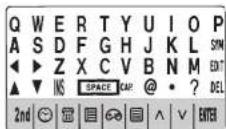
Key Operations
Home, world time clock and alarm mode key.
Telephone mode key.
Schedule mode key.
Game mode key.
Calculator, currency/metric conversion mode key. Press to confirm or store selection.
Secret lock mode key. In daily alarm mode, press to enter → password setting mode.
DST: To toggle the DST function on/off.
To toggle the key tone on/off.
To toggle daily alarm on/off.
To toggle hourly chime on/off.
◀ Cursor keys. Press to move cursor / to view information out of the screen. Press and hold to scroll the upper line.
▲▼ Press to view other number fields in Tele mode.
Search key.
EDIT Press to enter editing files mode / enter time Setting mode.
DIL Press to delete a character or a file.
SYM Press to select corresponding symbols.
To insert a decimal point / dot.
Press to insert a hyphen.
SPACE Press to insert a space.
12/24 To select 12/24-hour time basis display.
To select a.m. or p.m. in time setting.
Operators keys.
× +
Reset
Before using your TM160 series for the first time, press the BUTTON located on the back of the product using 📄
a line point RESET is displayed with the screen. Press ENTER to confirm. This operation can take several seconds.
Selecting operation language
After resetting your TM160series, you can select the operation
language. Press <2nd> to enter the Menu function and
press up and down keys to select among ENGLISH,
FRANÇAIS, DEUTSCH, ITALIANO, ESPANOL, NEDERLANDS and PORTUGUES. Press ENTER to confirm the desired language.
Key tone
Press <2 nd> and then press ↗ to toggle key tone on/off
and indicator will be on/off accordingly.
On/Off function
Press Ⓤ to switch on the organizer.
Press Ⓤ to switch off the organizer.
Auto-Off function
Auto power off will be activated after 5 minutes if no key is touched.
Press Ⓞ key again to restart the organizer.
Home and world Time Setting
Press ⬤ once for local (*) time, twice for world time, three times for alarm mode and four times for count down
- Press ⬢ to enter home and world time.
| LON | SUN |
| 11-01-2004 | |
| 03-05-41 | |
-
Before setting time, press <2 nd> and
to toggle daylight saving. -
Press 12/24 to toggle between 12/24-hour display.
-
Then press <2 nd>
to enter home or world time setting mode, city name will flash. -
Press √^ to select your city, then press enter
to confirm.
- Input year, month, day, hour and minute. Press AM/PM
to define a.m./p.m.
- Press ENTER to confirm. Day of week will be calculated automatically. Second starts from zero.
Alarm
Press ⬇ key twice to select the alarm mode.
Press ◀ or ▶ key to open or shut down the alarm function.
Press ▲ or ▼ to choose from the alarm 1 to alarm 3. Touch.
Press◀ or ▶ key, then press EDIT enter alarm setting
Set time alarm.
Type 06 30, then press (B/AM/PM) for a.m.or p.m.
Press ENTER.
When the alarm function is open, Press 2nd and then lap number "2" to choose the second alarm ring. Touching "1" or "3" can choose the rest two alarm rings.
When the home time reaches the alarm setting, the alarm will sound for 60 seconds. Touch any key to turn it off.
If you want to change the alarm setting, just repeat all the procedures above, and then the new setting will overwrite the old setting.
When setting alarm, press Ⓧ repeatedly for different alarm types. The icon ((•)) is for the alarm, the icon ((/)) in for the schedule, in for the hourly alarm.
When entering the from 1 to 3 to choose the three kinds of the alarm rings.
Telephone directory
You can store the names, e-mail addresses, and phone numbers of your friends and classmates. Store your friends under "personal" and your colleagues under "business".
- Press ☐ to enter Telephone mode. Once for PERSONAL and twice for BUSINESS mode
Press ☐ to select BUSINESS mode.
BUSINESS?
Enter JOHN SPAGE SMITH and press ▼
ADDRESS?
Press ▼, input 555777
| HONE# |
| SSS177_ |
Press ▼, input F SPACE 345-456-1256
| FAX# |
| F345-456-1256_ |
Press ▼, input 585
| CELL# |
| SBS |
Press ▼.
| E-MAIL? |
Enter lexibook and press 2nd and SYM key to get @. then input @lexibook.com
| @lexibook.com |
Press ▼
| URL? |
Enter @lexibook.com
| www.lexibook.com |
Press ▼.
| NOTE? |
Press ENTER.
| STORED! |
2 seconds later, screen returns to the original display.
Schedule
- Press ☐ to enter Schedule mode.
| SCHEDULE |
- To store schedule (Meeting on April 2nd7th at 12:30pm) Enter MEETING.
| NEETING |
| 00-00 |
| 800-00 |
3- Press ▼ and input schedule time (month, day, hour, minute).
| MEETING |
| 04-27 |
| A12-30 |
4- Press ENTER to save data.
Note that if the input time is out of range, display will be prompt "ERR" for 2 seconds then returns to previous screen. Input schedule time again.
5- When real time meets the schedule time, the unit turns on (if it was off) and displays the schedule. Press any key to stop the sound.
Searching and viewing telephone / schedule records
-
Press 📞 to enter related mode.
-
Press ∧ or ∨ to do the upwards or downwards search of files.
- Telephone files are in alphabetical order of the name. - Schedule files are in chronological order of schedule date/time.
-
Press ◀ or ▶ to view upper line information exceeding 12 characters.
-
Press and hold ▶ or ▶ about 1 second, upper line scrolls continuously if content exceeds 12 characters. Press ▶ or ▶ again to stop scrolling.
-
In Tele mode, press ◀ or ▶ to enter other number fields.
Note: If it is the most top (bottom) record, after pressing (), "NOT FOUND" will be shown and then it exits to initial display.
Editing telephone / Schedule records
- Search out the record.
- Press EDIT to enter record editing mode.
- Press ◀, ▶, ▲ or ▼ to move the cursor to desired editing area.
- Press DEL to delete characters.
- Press ENTER to save the changes.
Deleting telephone / Schedule records
- Search out the record.
- Press, DEL *DELETE?" will be prompt on the screen
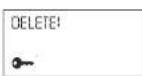
- Press ENTER to confirm then "DELETE!" will be prompt for 2 seconds and then it goes to initial display. Or press other keys to abort.
Calculator
- Press to enter Calculator mode.
- 10-digit calculation with the arithmetic functions
+1-1x,
- Press to clear inputting number.
- Press ☑ to calculate percentage calculation.
- Press NR N-MRC and or for memory function.
- "ERR" will be shown on display for over 10-digit /error calculation. Press ☐to exit.
Converter
Press ☐ key to select the currency conversion mode.
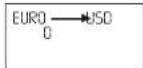
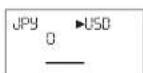
Press √ or ∧ to select the desired currency conversion. EX: JPY → USD
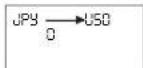
Press EDIT key to entry the setting mode, and the 1st character will flash.
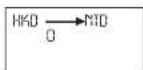
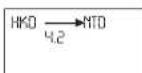
Input HKD ▶ NTD
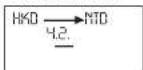
Press ENTER. Input the rate amount 4.2.
Press ENTER key to store the setting.
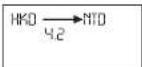
Currency conversion mode
Press ☐ twice for currency conversion mode.
Press √ or ∧ key to select the desired conversion set in
the currency conversion mode.
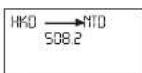
Input 508.2.
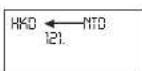
Press
Metric conversion mode
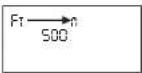
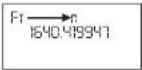
In the home time mode, press ☐ three times for metric Example: 100 Meters = ? Feet
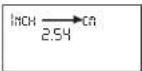
Press √ or ∧ key to search the desired conversion set.
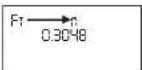
Input 500.
Press◀ key.
Game mode
There are two games for your choice: Hammer Game and To access the game mode, press the 📞 button. Keyboard Wiz.
Hammer
Regulations: Press ▲ and ▼ keys to move the hammer and press ENTER or SPACE key to knock the segments continuously rising under the hammer. When two are displayed in the same column, if you don't knock it within a second, the game is over. The highest score you can get is 999. Keyboard Wiz.
Keyboard Wiz
Set the desired level. (01 being the easiest, 20 the hardest.) Press to start the game. After 2 seconds, numbers and characters display sequentially from the right-hand direction. Characters or numbers will disappear by pressing the correct key and will keep displaying if the wrong key is pressed. The level will advance after you correctly type 12 characters. When the screen is full, it means you have lost the game. "Game Over" will display. When all the characters of level 20 are typed correctly, it means you have won the game. "You Win!" will display. The screen will go back to the initial display.
Secret memory
A separate list of data can be secured by using the secret mode, which is available in TELEPHONE, SCHEDULE, TO DO and MEMO modes. The password cannot be more than 6 characters. Example: Set up a password of "ABCD" and delete it. From the Time Mode ☉.
19
Press 2nd key to select the secret mode.
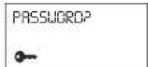
Set password (6 characters max.)
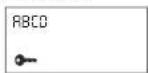
Press ENTER to confirm.
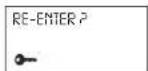
Input the password again.
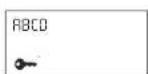
Press ENTER to confirm
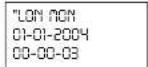
Press 2nd key.
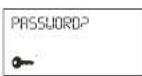
Input ABCD and press ENTER to confirm.

Press ENTER
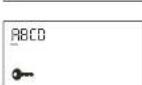
Press DEL
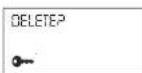
Press ENTER
Inserting Special Symbols
You can insert symbols when doing data input in Telephone / Schedule
20
modes. 16 symbols provided: -, @, #, \$, £, ¥, (,), -, ', :, /, \, _, %.
- Press SYM, symbol shows at the cursor position.
- Press SYM to select the desired symbol.
- Continue to input other characters or press ▶ to move the cursor, the selected symbol is inserted.
- Keep Written Copies of Important Data
This organizer stores your information as long as the battery supplies power.
Changing batteries
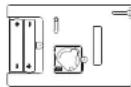
You have to use 1 CR2032 battery.
You have to replace the batteries within 1 minute if you want to save your data.
- Press key to turn off the unit.
- Remove the battery cover on the back of the unit.
- Remove the battery and insert a new battery.
- Replace the battery door.
- Press any key except to skip
RESET for preventing loss of previously stored data.
Do not use rechargeable batteries. Non-rechargeable batteries are not to be recharged. Rechargeable batteries are to be removed from the toy before being charged. Rechargeable batteries are only to be charged under adult supervision. Different types of batteries or new and used batteries are not to be mixed. Only batteries of the same or equivalent type as recommend
are to be used. Batteries are to be inserted with the correct polarity. Exhausted batteries are to be removed from the toy.
The supply terminals are not to be short circuited. Do not throw batteries into a fire. Remove the batteries if you are not going to use the game for a long period of time. Please retain the packaging for future reference since it contains important information.
WARNING: if the unit malfunctions or receives an electrostatic shock, switch the unit off and on again using the ON/OFF button. If this proves to be ineffective, remove the batteries and/or perform the Reset procedure.
Warranty
This product is covered by our two-year warranty. For warranty requirements or after sales service, please contact your local retailer with your proof of purchase. Our warranty covers all manufacturer defaults but does not cover deterioration due to non-respect of the Instruction Manual or bad handling of the product (like sun or water exposure or dismantling of the product).
Warranty does not cover batteries.
In a bid to keep improving our services, we could
implement modification on the colours and the details of the product shown on the packaging.
Not suitable for children under 36 months old, as it contains small detachable elements which could be swallowed.
Freephone helpline : 0808 100 3015
http://www.lexibook.com
Reference: TM160series
© 2005 LEXIBOOK®
INTRODUCCION
Encender/Apagar (On/Off) la agenda
MEETING 04-27 PI2-30
Voer www.lexibook.com in
@lexibook.com
Druk op ▼
NOTA P
Druk op ENTER
OPGESLAGEN!