
DVD-R7783 - DVD Burner PIONEER - Free user manual and instructions
Find the device manual for free DVD-R7783 PIONEER in PDF.


| Product Type | Internal DVD Recorder for Pioneer Changer |
| Dimensions (W x H x D) | 187.9 x 73.3 x 260.7 mm |
| Weight | 2.0 kg |
| Power Supply | DC +12 V, 1.0 A; DC +5 V, 1.5 A |
| Interface | Wide Ultra-2 SCSI (80 MB/s, effective ~40 MB/s) |
| Buffer Capacity | 2.0 MB |
| Recording Formats | DVD-R for General ver. 2.0, DVD-RW ver. 1.2 |
| Playback Formats | DVD-ROM, DVD-Video, DVD-R, DVD-RW, CD-ROM, CD-R, CD-DA, Video-CD |
| DVD-R Write Speed | 8X (ZCLV), 6X (CLV), 4X (CLV) |
| DVD-RW Write Speed | 4X (CLV), 2X (CLV) |
| Max DVD-ROM Read Speed | 12X (CAV) |
| Max CD-ROM Read Speed | 40X (CAV) |
| Average Access Time (DVD-ROM) | 140 ms |
| Anti-Error Technology | Burn-Proof (active by default) |
| Operating Temperature | +5 °C to +35 °C |
| Operating Humidity | 5% to 85% (non-condensing) |
| Laser Class | Class 1 |
| Changer Compatibility | DRM-7000 and DRM-3000 |
| SCSI ID Setting | Rotary switch (default 0) |
| Regional Code Change | 5 times maximum (final on 5th) |
| Recommended Discs | Brands recommended by the dealer |
| Maintenance | Clean with soft cloth, from inside to outside |
| Safety | Do not open, expose to water or moisture |
| Repairs | Refer to qualified personnel |
Frequently Asked Questions - DVD-R7783 PIONEER
User questions about DVD-R7783 PIONEER
0 question about this device. Answer the ones you know or ask your own.
Ask a new question about this device
Download the instructions for your DVD Burner in PDF format for free! Find your manual DVD-R7783 - PIONEER and take your electronic device back in hand. On this page are published all the documents necessary for the use of your device. DVD-R7783 by PIONEER.
USER MANUAL DVD-R7783 PIONEER
Operating Instructions
Mode d'emploi
Bedienungsanleitung
操作说明书
取扱説明書

R/RW
This product complies with the EMC Directives (89/336/EEC, amended by 92/31/EEC and 93/68/EEC). D3-4-2-1-9b_En
LASER DIODE – This product contains a laser diode. To assure continued safety, DO NOT remove any convers or attempt to gain access to the inside of the product.
CAUTION: USE OF CONTROLS OR ADJUSTMENTS OR PERFORMANCE OF PROCEDURES OTHER THAN THOSE SPECIFIED HEREIN MAY RESULT IN HAZARDOUS RADIATION EXPOSURE.
CAUTION: USE OF OPTICAL INSTRUMENTS WITH THIS PRODUCT WILL INCREASE EYE HAZARD.
NOTE: This equipment has been tested and found to comply with the limits for a Class A digital device, pursuant to Part 15 of the FCC Rules. These limits are designed to provide reasonable protection against harmful interference when the equipment is operated in a commercial environment. This equipment generates, uses, and can radiate radio frequency energy and, if not installed and used in accordance with the instruction manual, may cause harmful interference to radio communications. Operation of this equipment in a residential area is likely to cause harmful interference in which case the user will be required to correct the interference at his own expense. D8-10-1-1_En
Information to User
Alteration or modifications carried out without appropriate authorization may invalidate the user's right to operate the equipment.
D8-10-2_En
This Class A digital apparatus complies with Canadian ICES-003.
[For Australian and New Zealander models]
Warning
This is a class A product. In a domestic environment this product may cause radio interference in which cause the user may be required to take adequate measures. D44-8-5_En
[For Taiwanese model]
警告使用者:
This is a class A product. In a domestic environment this product may cause radio interference in which case the user may be required to take adequate measures.
FOR FRANCE
Attention
Thank you for buying this Pioneer product.
Please read through these operating instructions so you will know how to operate your model properly.
This product is an optional drive designed for exclusive use as the disc changers, models DRM-7000 and DRM-3000. This means that this unit cannot be used alone or connected to other equipment than specified.
Pioneer may not be held liable for the loss of any data or any other direct or indirect damage suffered as the result of the use or breakdown of this product. It is strongly recommended that regular backups be taken of all critical data.
IMPORTANT

The lightning flash with arrowhead symbol, within an equilateral triangle, is intended to alert the user to the presence of uninsulated "dangerous voltage" within the product's enclosure that may be of sufficient magnitude to constitute a risk of electric shock to persons.
CAUTION
RISK OF ELECTRIC SHOCK DO NOT OPEN
CAUTION:
TO PREVENT THE RISK OF ELECTRIC SHOCK, DO NOT REMOVE COVER (OR BACK). NO USER-SERVICEABLE PARTS INSIDE. REFER SERVICING TO QUALIFIED SERVICE PERSONNEL.

The exclamation point within an equilateral triangle is intended to alert the user to the presence of important operating and maintenance (servicing) instructions in the literature accompanying the appliance.
D3-4-2-1-1_En-A
CAUTION
This product is a class 1 laser product, but this product contains a laser diode higher than Class 1.
To ensure continued safety, do not remove any covers or attempt to gain access to the inside of the product.
Refer all servicing to qualified personnel.
CLASS 1 LASER PRODUCT LASER KLASSE 1
The following caution label appears on your unit.
Location: on top of the cover
CAUTION CLASS 3B VISIBLE AND INVISIBLE LASER RADIATION WHEN OPEN, AVOID EXPOSURE TO THE BEAM.
ATTENTION RADIATIONS LASER VISIBLES ET INVISIBLES DE CLASSE 3B QUAND OUVERT. ÉVITEZ TOUT EXPOSITION AU FAISCEAU.
NUMBER AND SERIAL NUMBERS OF THIS EQUIPMENT BELOW.
THE NUMBERS ARE ON THE TOP PANEL.
MODEL NO. DVD-R7783 SERIAL NO.
KEEP THESE NUMBERS FOR FUTURE USE. D1-4-2-6-2_En
WARNING
This equipment is not waterproof. To prevent a fire or shock hazard, do not place any container filed with liquid near this equipment (such as a vase or flower pot) or expose it to dripping, splashing, rain or moisture. D3-4-2-1-3_A_En
WARNING: Handling the cord on this product or cords associated with accessories sold with the product will expose you to lead, a chemical known to the State of California and other governmental entities to cause cancer and birth defects or other reproductive harm.
Wash hands after handling
D36-P4_En
USE ONLY WITH PIONEER MODELS DRM-7000 AND DRM-3000. D1-4-1-12_En
The Generation of Acoustical Noise Is Less Than 70dB.(ISO7779/DIN45635)

Important
Disc changer firmware revision 1.25 or higher is required to operate this unit. If you are using a version older than 1.24, please update to 1.25 or higher. For update information, consult your dealer.
SAFETY INSTRUCTIONS
To ensure your personal safety and to maximize the full operating potential of your Drive, read and follow these safety precautions:
READ INSTRUCTIONS - Read all safety and operating instructions before the Drive is operated.
RETAIN INSTRUCTIONS - Retain the safety and operating instructions for future reference.
FOLLOW INSTRUCTIONS - Follow all operating and use instructions.
HEED WARNINGS - All warnings must be adhered to.
ENVIRONMENT - Please do not use the unit at places with much dust, high temperature, or high humidity. Never turn off the power to the unit or allow it to become subjected to shocks or vibrations during operation.
WATER AND MOISTURE - DO NOT use this product near water.
OBJECT AND LIQUID ENTRY - Never push objects of any kind into this product. Touching dangerous voltage points may cause a short resulting in fire or electric shock. Do not spill liquid of any kind on this product.
CONDENSATION - Beware of the formation of condensation on the drive. In the event condensation collects when installing the drive, disconnect the power source and allow all moisture to dry before installing the unit.
SERVICING - Do not attempt to repair this product yourself. Opening or removing covers may expose you to dangerous voltage or other hazards. Refer all servicing to qualified service personnel.
When using the DVD-R7783, please make sure that the recording of the material in question does not violate any copyright laws.
The DVD-R7783 has been developed and is produced exclusively for commercial use. It is necessary to obtain the authorization of copyright owners and owners of related rights when using the DVD-R7783 to record copyrighted materials. Note that the recording of copyrighted materials without the authorization of the owners of related rights may result in the person or persons performing the recording to be subjected to prosecution. Also note that in such cases PIONEER may not be held liable for any damages resulting as a result of disputes between copyright holders and persons recording copyrighted materials.
Disc-related
■ Recommended Discs
- For stable recording and playback, always use a recommended brand of disc.
- For specific disc recommendations, consult your dealer.
■ Handling Discs
- Avoid touching or scratching the signal surface (shiny side) of the disc
- Hold the disc by the edges or by the center hold and one edge
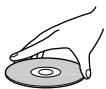
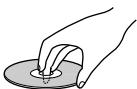
- Do not affix paper or labels to the disc
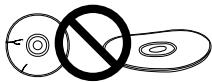
- Discard warped or cracked discs as they may cause damage to the drive
- Avoid specially shaped discs such as hearts or polygons
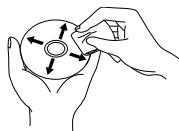
- Remove dust or lint from the disc with a soft cloth by wiping from the inside to the


natural_image
Line drawing of hands holding a CD or DVD disc with arrows indicating direction (no text or symbols)outside edge rather than in a circular motion
- Do not use record-cleaning or anti-static agents as the solutions may cause damage to a disc
Discs for Recording
■ When data cannot be recorded or errors occur during recording:
- Are you using a recommended brand of disc?
- Has a sufficiently large writing area been secured?
- Are you using a disc that has already been finalized (closed to further recording)?
- Has the disc been inserted correctly with its label side facing up and writing side down?
- Is the disc dirty or scratched?
■ The device cannot read a disc that has been recorded.
- Are you using a recommended brand of disc?
- Is an unwritten disc installed?
- Is the disc dirty or scratched?
- It is possible that condensation has formed on the optical components or on the disc. (Wait 1 to 2 hours before attempting to use the device again.)
* For other issues, consult the operating instructions accompanying your application software.
■ Regarding DVD-R/RW, CD-R discs
- Due to the unique construction of DVD-R/RW and CD-R discs, leaving them for extended periods of time in the pause mode at a single point may result in the discs' becoming difficult to play at that place. The same symptom may also occur if the loop function is used to play back a single point on the disc excessively.
As a result, users are advised to construct backup archive discs when playing discs containing important data.
The following special precautions should be taken into consideration if this unit is to be installed in a changer:
- This unit is an LVD SCSI drive. If this drive is to be installed on the same SCSI bus with an SE SCSI drive and the main changer unit, the optional LVD SCSI interface unit (DRM-ULV16) should be used.
- When making the LVD SCSI connections for this unit, an optional LVD drive connector panel (DRM-LN721: supports two drives; or DRM-LN741: supports four drives) should be used. Consult the Operating Instructions accompanying the LVD drive connector panel regarding procedures for installing the connector panel to the changer.
- The number of drives and DVD-D7563 that can be installed in the changer are as follows:
| Changer Model | Ambient temperature | Connection method (DVD-D7563 and DVD-R7783) | Maximum DVD-R7783 units | Maximum DVD-D7563 units |
| DRM-7000 | 5°C – 30°C | Same bus | 1 – 3 | 3 |
| 4 | 2 | |||
| Separate buses | 1 | 5 | ||
| 2 | 4 | |||
| 3 | 3 | |||
| 4 | 2 | |||
| 30°C – 35°C | Same bus/separate bus | 1 | 3 | |
| 2 | 2 | |||
| 3 | 1 | |||
| 4 | None | |||
| DRM-3000 | 5°C – 30°C | Same bus/separate bus | 1 | 3 |
| 2 | 2 | |||
| 3 | 1 | |||
| 4 | None | |||
| 30°C – 35°C | Same bus/separate bus | 1 | 2 | |
| 2 | 1 | |||
| 3 | None |
Please consult your dealer when installing optional drives other than those listed above, or when adding this drive to a changer already in use.
- This drive is not equipped with an SCSI terminator (LVD).
When there is a need for LVD SCSI termination, use the optional SCSI Terminator (LVD) DRM-TM160 or the SCSI Terminator (LVD) provided with the LVD SCSI interface unit DRM-ULV16. - This unit cannot be installed in a DRM-7000 when the latter has been equipped with the Power supply unit DRM-PW701.
- This unit can be installed in any of bays #1 to #8 on the DRM-7000 or DRM-3000.
REAR VIEW
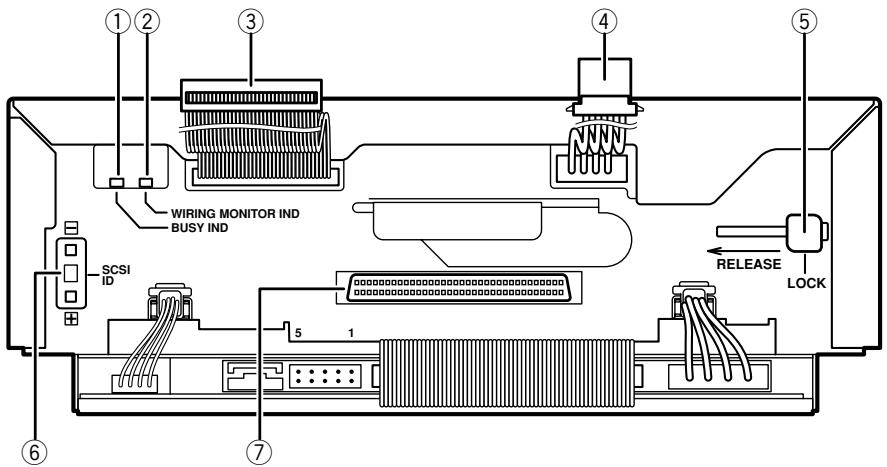
① Busy indicator
Lights when drive is busy.
② Wiring monitor indicator
Meaning of indicator when indicator is lit up:
● Lights when drive has been installed in changer and power cable is connected.
Meaning of indicator when indicator flashes in 2-second intervals:
- This indicator flashes in 2-second intervals when the drive is installed in a changer and its changer interface cable has been connected.
Meaning of indicator when indicator flashes in 0.5-second intervals:
- This indicator flashes in 0.5-second intervals when the drive in question has been specified as the drive to be swapped during the swapping of drives.
③ Changer interface cable
This cable must be connected to the changer interface connector located in the changer.
④ Power cable
This cable must be connected to the power inlet located in the changer.
⑤ Lock lever
When a drive is to be removed from the changer, flip the lock lever to the released position and then pull the drive out from the changer.
⑥ SCSI ID switch
Set the Drive SCSI ID. Press the upper button to decrement the number, and the lower button to increment the number. Factory default: "0".
⑦ LVD SCSI interface connector
Use to connect an optional LVD drive connector panel (DRM-LN721, for 2 drives; or DRM-LN741, for 4 drives).
NOTE:
Be careful not to allow any part of your body to come into contact with connector pins, as doing so may result in faulty connections or damage from static electricity.
FRONT VIEW
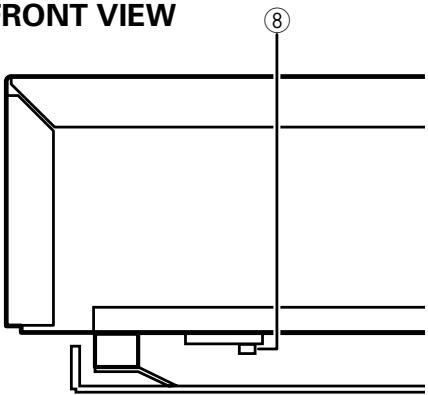
⑧ Busy indicator
Lights when drive is busy.
For instructions on how to open the access doors, see the operating instructions for the changer. Before installation, be sure to specify the following settings at the rear of each drive to be installed.
- SCSI ID assignment
Specify the SCSI IDs to be used so as to ensure that the same SCSI ID is not assigned by more than one drive on the same SCSI bus.
Warning about static electricity
Always be sure never to touch the contacts or ports when operating drives.
Also be sure to touch a metallic surface on the changer before installing additional drives to the changer.
1. When inserting a drive, be sure to place the drive on the changer guide rails and push the drive in until the lock lever on the drive shifts to the locked position. Maybe you can hear a clicking sound then. Guide rails
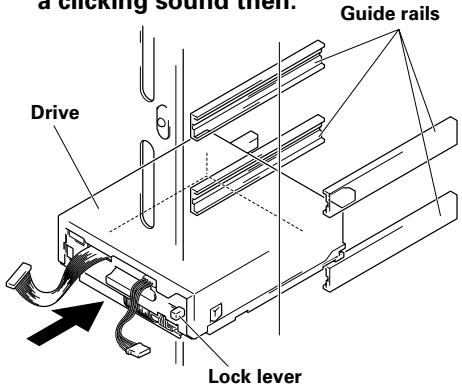
When a drive is to be removed from the changer, flip the lock lever to the released position and then pull the drive out from the changer.
2. Connect the power cable.
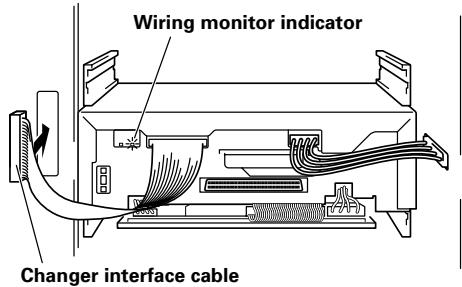
- When the power cable has been connected, the wiring monitor indicator on the rear of the drives (orange) will light up.
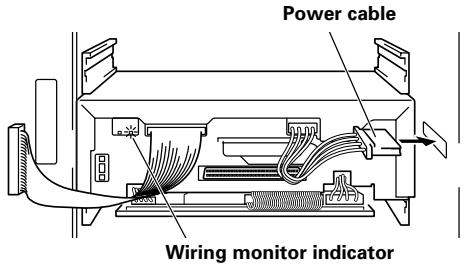
3. Connect the changer interface cable.
- When the changer interface cable has been connected, the wiring monitor indicators will flash at two-second intervals.
NOTE:
Connect the changer interface cable to the connector corresponding to the bay in which the drives have been installed. (Note that labels are affixed to connectors indicating the corresponding bay number.) Note that it is extremely important to do this, as connecting the changer interface cable to a neighboring bay will result in damage to discs and the disc transport mechanism.
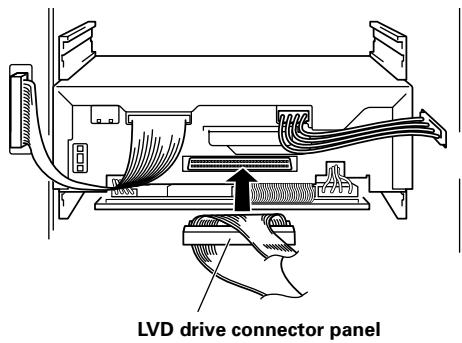
4. Connect the LVD drive connector panel.
Connect the optional LVD drive connector panel (DRM-LN721, for 2 drives; or DRM-LN741, for 4 drives).
Region codes are part of the DVD standard. There is a Region number located within one or all of the components required for DVD-VIDEO playback.
The region code on the DVD-R7783 can be changed ONLY 5 times, including the 1st setting. Please be aware that the 5th change will be PERMANENT. Therefore please use caution when changing the region code.
NOTE:
The method of changing the Region number will vary depending on the Decoder/Operating System used.
SPECIFICATIONS
[Supported Formats]
Writing format
DVD-R for General Ver. 2.0 Disc at Once, Incremental
DVD-RW Ver. 1.2 Disc at Once, Incremental, Restricted Overwrite
* Recommended number of overwrites on DVD-RW media: 100 times or less (at normal room temperature).
Reading format
DVD-ROM, DVD-Video
DVD-R (for General / Authoring 3.95 GB, 4.7 GB)
DVD-RW Ver. 1.1, Ver. 1.2
CD-ROM Mode 1
CD-ROM XA Mode 2 (form 1, form 2)
CD-R, CD-DA, CD-Extra, Video CD
- DVD+R/RWs, DVD-RAMs and CD-RWs cannot be read nor written.
- Does not support recording on CD-R media.
[Writing/Reading speed]
Writing Speed
DVD-R for General Ver. 2.0 Rev. 3.0
8X (ZCLV), 6X (CLV), 4X (CLV)
DVD-RW Ver. 1.2 4X (CLV), 2X (CLV)
Reading Speed (max.)
DVD-ROM (single) 12X (CAV)
DVD-ROM (dual) 8X (CAV)
DVD-R 8X (CAV)
DVD-RW 8X (CAV)
CD-ROM 40X (CAV)
CD-R 40X (CAV)
CD-DA 40X (CAV)
Video CD 9.3X (CAV)
[Reading Performance]
Data transmission speed (Sustained max.)
| DVD-ROM (single) | 16620 KB/sec |
| DVD-ROM (dual) | 11080 KB/sec |
| DVD-R | 11080 KB/sec |
| DVD-RW | 11080 KB/sec |
| CD-ROM | 6000 KB/sec |
| CD-R | 6000 KB/sec |
Note that the transmission speed may vary depending on the state (e.g., the existence of scratches) of the disc being used.
| Access time (Random average) | |
| DVD-ROM (single) | 140 ms |
| DVD-ROM (dual) | 160 ms |
| DVD-R | 150 ms |
| DVD-RW | 150 ms |
| CD-ROM | 130 ms |
| CD-R/RW | 130 ms |
[Data buffer capacity]
2.0 MBytes (writing, reading)
[Interface]
Wide Ultra-2 SCSI (80 MB/s)
* Maximum effective speed approx. 40 MB/s
[Buffer under-run free mode]
Although the default setting is ON, this setting can be changed to OFF depending on the application in use. This mode is locked in the ON mode and cannot be turned off during the 8X (ZCLV) recording of a DVD-R.
[Others]
| Power supply | DC +12 V, 1.0 A |
| DC +5 V, 1.5 A | |
| External dimensions | 187.9 (W) x 73.3 (H) x 260.7 (D) mm |
| 7-3/8 (W) x 2-7/8 (H) x 10-1/4 (D) in. | |
| Weight | 2.0 kg (4.4 lb) |
Operation temperature (The temperature outside the changer)
$$ + 5 ^ {\circ} \mathrm{C} \text { to } + 3 5 ^ {\circ} \mathrm{C} (+ 4 1 ^ {\circ} \mathrm{F} \text { to } + 9 5 ^ {\circ} \mathrm{F}) $$
Operation humidity (The humidity outside the changer)
$$ 5 \% \text { to } 85 \% (\text { no condensation }) $$
Storage temperature -40^ to +60^ ( -40^ to +140^ )
Storage humidity 5 % to 90 % (no condensation)
- Discs recorded on this unit may not playback properly on players or drives which do not support the same media format.
- Specifications and design subject to possible modifications without notice, due to improvements.
CLASS 1 LASER PRODUCT LASER KLASSE 1
CAUTION CLASS 3B VISIBLE AND INVISIBLE LASER RADIATION WHEN OPEN, AVOID EXPOSURE TO THE BEAM.
ATTENTION RADIATIONS LASER VISIBLES ET INVISIBLES DE CLASSE 3B QUAND OUVERT. ÉVITEZ TOUT EXPOSITION AU FAISCEAU.
Précautions relatives aux disques
natural_image
Line drawing of hands holding a CD or DVD disc with arrows indicating direction (no text or symbols)natural_image
Technical line drawing of a computer monitor with cable routing and ventilation duct (no text or symbols)natural_image
Technical diagram of a mechanical assembly with wires and connectors (no text or symbols)[Performances lecture]
DVD-ROM (simple): 16620 Ko/sec.
DVD-ROM (double): 11080 Ko/sec.
DVD-R: 11080 Ko/sec.
DVD-RW: 11080 Ko/sec.
CD-ROM: 6000 Ko/sec.
CD-R: 6000 Ko/sec.
DVD-ROM (double): 160 mS
DVD-R: 150 mS
DVD-RW: 150 mS
CD-ROM: 130 mS
CD-R/RW: 130 mS
Publication de Pioneer Corporation.
© 2004 Pioneer Corporation.
CLASS 1 LASER PRODUCT LASER KLASSE 1
CAUTION CLASS 3B VISIBLE AND INVISIBLE LASER RADIATION WHEN OPEN, AVOID EXPOSURE TO THE BEAM.
ATTENTION RADIATIONS LASER VISIBLES ET INVISIBLES DE CLASSE 3B QUAND OUVERT. ÉVITEZ TOUT EXPOSITION AU FAISCEAU.
natural_image
Line drawing of hands holding a CD or DVD disc with arrows indicating direction (no text or symbols)natural_image
Pure technical line drawing of a mechanical assembly without any text, numbers, or symbols⑧ Laufwerkanzeige
natural_image
Technical line drawing of an electronic device with internal wiring and connectors (no text or symbols)natural_image
Technical line drawing of a mechanical device with internal wiring and a cable outlet (no text or symbols)natural_image
Technical line drawing of a mechanical assembly with internal components and a hand holding a cable (no text or symbols)LVD drive connector panel
WISSENSWERTES ÜBER REGIONALCODES
DVD-R for General Ver. 2.0 Disc at Once, inkremental
DVD-R for General Ver. 2.0, Rev. 3.0
8X (ZCLV), 6X (CLV), 4X (CLV)
DVD-RW Ver. 1.2 4X (CLV), 2X (CLV)
CLASS 1 LASER PRODUCT LASER KLASSE 1
下面的提醒标签位于本装置上。
位置:本装置上面板上
CAUTION CLASS 3B VISIBLE AND INVISIBLE LASER RADIATION WHEN OPEN, AVOID EXPOSURE TO THE BEAM.
ATTENTION RADIATIONS LASER VISIBLES ET INVISIBLES DE CLASSE 3B QUAND OUVERT. ÉVITEZ TOUT EXPOSITION AU FAISCEAU.
natural_image
Two hand-drawn diagrams showing a disc being inserted into a pad, no text or symbols present- 请勿在光盘表面上贴纸张或封条。

natural_image
Simple line drawing of a circle with a diagonal line crossing it, and a horizontal line with concentric circles (no text or symbols)natural_image
Line drawing of hands holding a CD or DVD disc with arrows indicating direction (no text or symbols)要将本机安装在换盘机上时,请注意下列事项:
natural_image
Technical line drawing of a mechanical assembly with wires and connectors (no text or symbols)LVD 连接板
区域码为 DVD 规格的一部分。
DVD-R for General Ver.2.0 Disc at Once, Incremental
DVD-RW Ver.1.2 Disc at Once, Incremental,
Restricted Overwrite
Wide Ultra 2 SCSI (80MB/s)
*最大有效速度为约 40MB/s
【缓冲器欠载运行自由模式】
natural_image
Two illustrations showing hands holding a CD or DVD disc, with one hand pressing a button (no text or symbols present)natural_image
Line drawing of hands holding a CD or DVD disc with arrows indicating rotation direction (no text or symbols)natural_image
Pure technical line drawing of a structural component without any text, numbers, or symbols⑧ ビジーインジケータ
ドライブがビジー時に点灯します。
natural_image
Technical line drawing of a mechanical assembly with wires and connectors (no text or symbols)LVD ドライブコネクターパネル
地域コードは、DVD 規格の一部です。
DVD-R for General Ver. 2.0 Disc at Once, Incremental
DVD-RW Ver. 1.2 Disc at Once, Incremental, Restricted Overwrite
DVD-R (for General / for Authoring 3.95 GB、4.7 GB)
DVD-RW Ver. 1.1、Ver. 1.2
CD-ROM Mode 1
CD-ROM XA Mode 2 (form 1、form 2)
DVD-R for General Ver. 2.0 Rev. 3.0
8X (ZCLV)、6X (CLV)、4X (CLV)
DVD-RW Ver. 1.2 4X (CLV)、2X (CLV)
最大再生速度
AFTER-SALES SERVICE FOR PIONEER PRODUCTS
Please contact the dealer or distributor from where you purchased the product for its after-sales service (including warranty conditions) or any other information. In case the necessary information is not available, please contact the Pioneer's subsidiaries (regional service headquarters) listed below:
PLEASE DO NOT SHIP YOUR PRODUCT TO THE COMPANIES at the addresses listed below for repair without advance contact, for these companies are not repair locations.
AMERICA
PIONEER ELECTRONICS (USA) INC.
CUSTOMER SUPPORT DIVISION
P.O. BOX 1760, LONG BEACH, CA 90801-1760, U.S.A.
EUROPE
PIONEER EUROPE NV
EUROPEAN SERVICE DIVISION
HAVEN 1087, KEETBERGLAAN 1, B-9120 MELSELE, BELGIUM
ASEAN
PIONEER ELECTRONICS ASIACENTRE PTE. LTD.
SERVICE DEPARTMENT
253, ALEXANDRA ROAD #04-01 SINGAPORE 159936
JAPAN AND OTHERS
PIONEER CORPORATION (HEAD OFFICE)
CUSTOMER SUPPORT CENTER
Published by Pioneer Corporation.
Copyright © 2004 Pioneer Corporation.
All rights reserved.
パイオニア株式会社
PIONEER ELECTRONICS (USA) INC.
Business Solutions Division: 2265 East 220th Street, Long Beach, CA 90810, U.S.A. TEL: +1-213-746-6337
Customer Support Division: 1925 East Dominguez St. Long Beach, CA 90810, U.S.A. TEL: +1-310-952-3076
PIONEER EUROPE NV
Multimedia Division: PIONEER House, Hollybush Hill Stoke Poges, Slough SL2 4QP U.K. TEL: +44-1753-789-789
PIONEER ELECTRONICS OF CANADA, INC.
Industrial Products Department: 300 Allstate Parkway, Markham, Ontario L3R OP2, Canada TEL: +1-905-479-4411
PIONEER ELECTRONICS AUSTRALIA PTY. LTD.
178-184 Boundary Road, Braeside, Victoria 3195, Australia TEL:+61-39-586-6300
PIONEER ELECTRONICS ASIACENTRE PTE. LTD.
253 Alexandra Road, #04-01, Singapore 159936 TEL: +65-6472-1111
PIONEER HIGH FIDELITY TAIWAN CO., LTD.
13 ^th Fl., No.44 Chung Shan, North Road Section 2 Taipei, Taiwan TEL: +886-2-2521-3588
日本先锋公司
日本国东京都目黒区目黒1-4-1
经销商:先锋电子(中国)投资有限公司


- Information to User
- [For Australian and New Zealander models]
- Warning
- [For Taiwanese model]
- 警告使用者:
- FOR FRANCE
- Attention
- IMPORTANT
- CAUTION
- CAUTION:
- CLASS 1 LASER PRODUCT LASER KLASSE 1
- SAFETY INSTRUCTIONS
- When using the DVD-R7783, please make sure that the recording of the material in question does not violate any copyright laws.
- Disc-related
- ■ Recommended Discs
- ■ Handling Discs
- Discs for Recording
- ■ When data cannot be recorded or errors occur during recording:
- ■ The device cannot read a disc that has been recorded.
- ■ Regarding DVD-R/RW, CD-R discs
- NOTE:
- - SCSI ID assignment
- Warning about static electricity
- When inserting a drive, be sure to place the drive on the changer guide rails and push the drive in until the lock lever on the drive shifts to the locked position. Maybe you can hear a clicking sound then. Guide rails
- Connect the power cable.
- Connect the changer interface cable.
- Connect the LVD drive connector panel.
- SPECIFICATIONS
- [Supported Formats]
- [Writing/Reading speed]
- [Reading Performance]
- [Data buffer capacity]
- [Interface]
- [Buffer under-run free mode]
- Précautions relatives aux disques
- [Performances lecture]
- WISSENSWERTES ÜBER REGIONALCODES
- 【缓冲器欠载运行自由模式】
- 最大再生速度
- AFTER-SALES SERVICE FOR PIONEER PRODUCTS
- AMERICA
- EUROPE
- ASEAN
- JAPAN AND OTHERS
- パイオニア株式会社
- PIONEER ELECTRONICS (USA) INC.
- PIONEER EUROPE NV
- PIONEER ELECTRONICS OF CANADA, INC.
- PIONEER ELECTRONICS AUSTRALIA PTY. LTD.
- PIONEER ELECTRONICS ASIACENTRE PTE. LTD.
- PIONEER HIGH FIDELITY TAIWAN CO., LTD.
- 日本先锋公司
- 经销商:先锋电子(中国)投资有限公司
Brand : PIONEER
Model : DVD-R7783
Category : DVD Burner