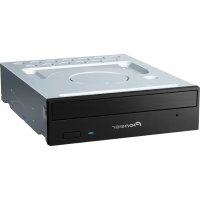
DVR-710 - DVD Burner PIONEER - Free user manual and instructions
Find the device manual for free DVR-710 PIONEER in PDF.


Pick your language and provide your email: we'll send you a specifically translated version.
| Brand | Pioneer |
| Model | DVR-710 |
| Category | DVD Burner |
| Product Type | Internal DVD±R/RW Drive |
| Interface | ATAPI / E-IDE |
| Form Factor | 5.25-inch half-height |
| Dimensions (W x H x D) | 148 x 42 x 170 mm |
| Weight | 0.9 kg |
| Power Consumption | 12 W (typical) |
| Supported Disc Types | DVD±R, DVD±RW, DVD-ROM, CD-R, CD-RW, CD-ROM |
| DVD±R Write Speed | 16x |
| DVD±RW Write Speed | 8x |
| CD-R Write Speed | 40x |
| CD-RW Write Speed | 24x |
| DVD Read Speed | 16x |
| CD Read Speed | 40x |
| Buffer Size | 2 MB |
| Loading Mechanism | Tray |
| Supported Operating Systems | Windows 98SE/Me/2000/XP |
| Power Supply | 12V DC via IDE power connector |
| Cleaning | Use a dry lens cleaning disc. Do not use liquids. |
| Safety | Class 1 laser product. Do not open the drive. |
Frequently Asked Questions - DVR-710 PIONEER
How do I install the Pioneer DVR-710 DVD burner?
Turn off your computer, open the case, set the jumper on the drive to Master or Slave as needed, slide the drive into an empty 5.25-inch bay, connect the IDE cable and power cable, then close the case and boot up. Windows should detect the drive automatically.
What disc formats can the DVR-710 write?
It supports DVD±R, DVD±RW, CD-R, and CD-RW discs. It can read DVD-ROM and CD-ROM discs as well.
Why is my computer not detecting the DVR-710?
Check that the IDE cable is firmly connected, the jumper is set correctly, and the power cable is plugged in. Also ensure the drive is enabled in the BIOS.
What is the maximum write speed for DVD-R discs?
The DVR-710 can write to DVD-R discs at up to 16x speed. Use high-quality media for best results.
Can I use this drive to watch movies?
Yes, the DVR-710 can read DVD movies. You need a compatible player software like PowerDVD or Windows Media Player.
Does the DVR-710 support dual-layer DVD+R discs?
No, the DVR-710 only supports single-layer DVD±R discs. For dual-layer, consider a newer model.
How can I clean the laser lens?
Use a commercial DVD lens cleaning disc. Follow the instructions that come with the disc. Avoid using any liquids or touching the lens.
What is the buffer size and does it prevent buffer underrun?
The buffer size is 2 MB. The DVR-710 includes Buffer Underrun Protection technology to prevent errors.
How to set the jumper for Master or Slave?
The jumper is located on the back of the drive. Refer to the diagram on the drive label. Typically, place the jumper on the leftmost pair for Master, center for Slave, and right for Cable Select.
Is the DVR-710 compatible with Windows 10?
The drive is designed for older Windows versions. It may work with Windows 10 but driver support is limited. Use generic drivers or consider a modern drive.
User questions about DVR-710 PIONEER
0 question about this device. Answer the ones you know or ask your own.
Ask a new question about this device
No questions yet. Be the first to ask one.
Download the instructions for your DVD Burner in PDF format for free! Find your manual DVR-710 - PIONEER and take your electronic device back in hand. On this page are published all the documents necessary for the use of your device. DVR-710 by PIONEER.
USER MANUAL DVR-710 PIONEER


Manual assistant
Powered by Anthropic
Waiting for your message
Product information
Brand : PIONEER
Model : DVR-710
Category : DVD Burner