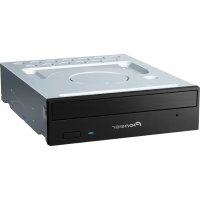
DVR-A09XL - DVD Burner PIONEER - Free user manual and instructions
Find the device manual for free DVR-A09XL PIONEER in PDF.


Pick your language and provide your email: we'll send you a specifically translated version.
| Product Type | Internal DVD±R/RW Burner |
| Model | Pioneer DVR-A09XL |
| Form Factor | 5.25-inch half-height |
| Dimensions (approx.) | 148 x 42 x 170 mm (WxHxD) |
| Weight (approx.) | 0.9 kg |
| Interface | ATAPI (IDE) |
| Power Supply | 12V DC / 5V DC from internal power supply |
| Supported Discs | DVD±R, DVD±RW, DVD±R DL, CD-R, CD-RW |
| Maximum Write Speed (DVD±R) | 16x |
| Maximum Write Speed (CD-R) | 48x |
| Maximum Read Speed (DVD-ROM) | 16x |
| Buffer Memory | 2 MB |
| Key Features | DVD Dual Layer support, Quiet Drive technology, Precision Recording Technology |
| Maintenance | Clean lens with dry cloth; avoid dust and moisture |
| Safety Precautions | Use in well-ventilated area; avoid exposure to extreme temperatures; disconnect power for cleaning |
| Spare Parts Availability | Drive replacement only; no user-serviceable parts inside |
| General Information | Pioneer DVR-A09XL – model released 2005; compatible with Windows and Mac systems |
Frequently Asked Questions - DVR-A09XL PIONEER
How do I install the Pioneer DVR-A09XL?
Slide the drive into a free 5.25-inch bay and connect the power and IDE cables. Set the master/slave jumper correctly then secure with screws.
What types of discs can it burn?
It burns DVD±R, DVD±RW, DVD±R DL, CD-R, and CD-RW. It also reads DVD-ROM and CD-ROM.
What are the maximum write speeds?
DVD±R: 16x, DVD±RW: 8x, DVD±R DL: 4x, CD-R: 48x, CD-RW: 24x.
Is it compatible with my computer?
It requires a free internal IDE connector and power cable. Works with most PCs from the early 2000s and can be used with USB adapters.
How do I set the region code for DVDs?
The region code can be changed via firmware or software like DVD Region+CSS Free. You might have a limited number of changes.
What should I do if the drive is not recognized?
Check IDE cable and power connections. Verify jumper settings (master/slave). Try a different cable or port. Update firmware or drivers.
How do I clean the laser lens?
Use a lens cleaning disc specifically for DVD drives. Do not open the drive. If needed, carefully use a cotton swab with isopropyl alcohol.
Can I use this drive for audio CD extraction?
Yes, it reads audio CDs at up to 48x and supports digital audio extraction (DAE) via software.
What is the buffer size and how does it affect burning?
It has a 2 MB buffer. This helps prevent buffer underrun errors. Pioneer's technology further reduces errors during burning.
Are there any known issues with dual-layer discs?
Some early dual-layer media may require firmware updates. Ensure you use high-quality discs and update the drive firmware to the latest version.
User questions about DVR-A09XL PIONEER
0 question about this device. Answer the ones you know or ask your own.
Ask a new question about this device
No questions yet. Be the first to ask one.
Download the instructions for your DVD Burner in PDF format for free! Find your manual DVR-A09XL - PIONEER and take your electronic device back in hand. On this page are published all the documents necessary for the use of your device. DVR-A09XL by PIONEER.
USER MANUAL DVR-A09XL PIONEER


Manual assistant
Powered by Anthropic
Waiting for your message
Product information
Brand : PIONEER
Model : DVR-A09XL
Category : DVD Burner