
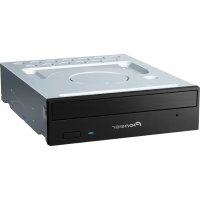
DVR-216MBK - DVD Burner PIONEER - Free user manual and instructions
Find the device manual for free DVR-216MBK PIONEER in PDF.


| Product Type | Internal DVD Burner |
| Brand | Pioneer |
| Model | DVR-216MBK |
| Form Factor | 5.25-inch half-height |
| Interface | SATA |
| Write Speed (DVD±R) | 16x |
| Write Speed (DVD±R DL) | 8x |
| Write Speed (DVD+RW) | 8x |
| Write Speed (DVD-RW) | 6x |
| Write Speed (CD-R) | 40x |
| Write Speed (CD-RW) | 24x |
| Read Speed (DVD-ROM) | 16x |
| Read Speed (CD-ROM) | 40x |
| Buffer Size | 2 MB |
| Dimensions (W x H x D) | 148.0 x 42.3 x 170.0 mm |
| Weight | 0.80 kg |
| Power Requirements | +5V / +12V DC from SATA power |
| Supported Disc Types | DVD±R/RW, DVD±R DL, DVD-RAM, CD-R/RW, CD-ROM |
| System Requirements | Windows 10/8/7/Vista/XP or Linux with SATA port |
| Maintenance | Clean lens with a CD/DVD cleaner disc; avoid dust accumulation |
| Safety Precautions | Do not expose to liquids; ensure proper ventilation; avoid dropping |
| Spare Parts & Repairability | Not user-serviceable; contact Pioneer service for repairs |
| General Information | Pioneer DVR-216MBK is a reliable internal SATA DVD burner with fast write speeds and quiet operation |
Frequently Asked Questions - DVR-216MBK PIONEER
User questions about DVR-216MBK PIONEER
0 question about this device. Answer the ones you know or ask your own.
Ask a new question about this device
Download the instructions for your DVD Burner in PDF format for free! Find your manual DVR-216MBK - PIONEER and take your electronic device back in hand. On this page are published all the documents necessary for the use of your device. DVR-216MBK by PIONEER.
USER MANUAL DVR-216MBK PIONEER
Frequently Asked Questions about Pioneer Qflix™ Drives
General questions about the Pioneer Qflix DVD Download & Burn DVD/ CD Writers:
1. What is Qflix?
Qflix is an IP-licensed program for DVD download and burning established by Sonic Solutions® and Pioneer Electronics.
2. What is DVD download and burn technology?
"DVD download" is the DVD Forum Specification for DVD media with recordable CSS technology (content scramble system) and the method used to write to the media.
3. Is this technology recognized by the DVD Forum?
Yes, the DVD download specification was ratified by the forum within the “DVD-R for General Use” specification under Optional Specifications.
4. Do I need special DVD media to record and download CSS video protected content?
Yes, the media is called pre-keyed media. This media has a CSS key pre-written onto the lead in area of the disc.
5. What is "CSS-R" media?
CSS-R media is specialized optical media that supports secure recording of digitally distributed entertainment content containing Content-Scrambling System protection (CSS).
6. Where can I purchase Qflix DVD download and burn DVD/ CD writers?
The Pioneer DVR-216MBK, DVR-2920Q, and DVR-X162Q DVD/CD writers all feature the Qflix DVD download and burn functionality. Visit www.pioneerelectronics.com to find out where these products can be purchased.
7. Where can I purchase Qflix Media?
Qflix certified media is available from Verbatim ^® , RiTEK ^® and CMC ^® . Currently media is not available through the retail channel but can be purchased directly from these manufacturers and/or their e-commerce distribution channels.
8. Do I need special software to record DVD downloaded content onto Qflix discs?
Yes, Qflix-licensed software is required to burn protected content onto DVD download video discs. This software is available from Sonic Solutions but is also bundled with the Pioneer Qflix-enabled drives.
9. How long will it take to download and burn to optical disc media?
The download and burn times vary based on the content length and your internet connection speed. Laboratory testing has resulted in times ranging from 65 minutes to 120 minutes.
10. Where can I purchase and/or download titles for recording to Qflix media?
Titles are available through the Roxio Venue™ program included with the Pioneer Qflix™ DVD/CD writers. Launch Roxio Venue to access the CinemaNow website. Please note that you are required to register a username and password to download titles.
11. Will a Qflix Download & Burn movie play on my DVD player or PC-based DVD drive?
Yes, this media can be played on most set-top and PC-enabled DVD drives. There are a few PC drives that may experience playback issues. Please contact your device manufacturer for more information.
Frequently Asked Questions about Pioneer Qflix™ Drives
12. What are the Minimum PC requirements needed to use the Pioneer DVD/ CD writers with Qflix support?
- Windows ^® XP ^® or Windows Vista ^® PC
- 1.4 GHz Pentium ^ IV processor or equivalent recommended
- 512 MB RAM
• Video display with at least 1024 x 768 resolution and 32-bit color - 5GB of available hard disk space (for downloaded movies)
- Broadband internet connection
13. Which software applications are on the installation disc for the Pioneer Qflix DVD/ CD writers?
The bundled applications on the installation disc are as follows:
- CinemaNow™ Media Manager
- Roxio ^® Venue ^TM
- Roxio Easy CD and DVD Burning™
-
Roxio Cineplayer®
-
Do the Qflix writers read and write to standard CD and DVD media?
Yes, please reference your drive's specification for supported read/write speeds. -
Is Qflix media available for recording in both the single layer (SL), and dual layer (DL), formats?
Currently Qflix media is only available for SL recording only. Downloaded titles are encoded to fit on a single layer 4.7GB piece of Qflix™ media. -
How many titles are available for downloading?
As of October 2008 there are approximately 200 titles available for downloading. This number is increasing as more Hollywood studios release their content. -
Is the video quality on the downloaded title similar to that of a replicated DVD? Yes, the downloadable video content is encoded using MPEG-2, with a constant bit rate setting (CBR). Replicated DVD titles encode using MPGE-2 with a variable bit rate setting (VBR). Downloaded titles are encoded as Region One for North America playback only.
-
What happens if my download fails or there is an interruption in my internet connection?
If your network connection is interrupted during the download process, it resumes automatically from where it left off when the connection is re-established.
-
Can I download and record HD video content from the CinemaNow website?
No, currently only standard definition video format files are available for download. -
Can I download the extras and artwork that are available on replicated DVD titles?
No, at this time the Hollywood movie studios have not made the extra material or artwork available for download and/or print. -
Can closed captioning and subtitles be downloaded and supported on Qflix media? No, not at this time.
Frequently Asked Questions about Pioneer Qflix™ Drives
- Can I copy downloaded content to another HDD or perform multiple recordings to Qflix media?
No, the content is CSS encrypted and will only support viewing to the initially downloaded HDD, and one copy right to Qflix media. Additionally user will not have the ability to copy original recorded disc to another piece of media as the disc is CSS protected.
- Once the downloaded file is copied to a piece of Qflix-certified media, can I make additional copies from the file on the HDD?
No, you are only entitled to copy a file once to QFlix certified media. Users are allowed five attempts to burn to Qflix media. If you are unable to burn the file the first time, a pop-up window within Venue informs you of the number of attempts remaining. CinemaNow also recommends that you contact Roxio's support group if the issue continues.
- What are the dimensions of the Pioneer Qflix writers?
DVR-2920Q & DVR-216MBK: 148 (W) x 180 (D) x 42.3 (H) mm (with height of front bezel)
5.83 (W) x 7.18 (D) x 1.67 (H) inches
- How much do the Pioneer Qflix writers weigh?
DVR-2920Q & DVR-216MBK: 1.72 lbs (0.78 Kg)
DVR-X162Q: 2.5 lbs (1.2 Kgs)
- What is the buffer size capacity of the Pioneer Qflix writers?
All three models have a buffer size capacity of 2Mbytes.
- Can the Pioneer Qflix writers support both 12cm and 8cm optical media?
Yes, however the drives do not support non-standard sized discs such as oddly shaped or business card sized discs.
- Can the Pioneer Qflix writers be mounted vertically as well as horizontally?
Yes, a drive can be tilted as much as +/- 5 degrees from horizontal/vertical. However, the drive does not support 8cm optical media when mounted in the vertical position.
- How can I record my home movie to a Qflix DVD disc?
Qflix is designed for copy-protected material only. The technology makes it possible for a content owner to electronically send a copy-protected movie or other video content you purchase to your home PC. To show the movie on your TV, you need to burn the movie to a Qflix disc using a Qflix-enabled drive. Being as your home movie and data files are not encoded with copy-protection technology like a Hollywood movie, record your personal data and home movies instead to DVD-R or +R discs.

- Frequently Asked Questions about Pioneer Qflix™ Drives
- General questions about the Pioneer Qflix DVD Download & Burn DVD/ CD Writers:
- What is Qflix?
- What is DVD download and burn technology?
- Is this technology recognized by the DVD Forum?
- Do I need special DVD media to record and download CSS video protected content?
- What is "CSS-R" media?
- Where can I purchase Qflix DVD download and burn DVD/ CD writers?
- Where can I purchase Qflix Media?
- Do I need special software to record DVD downloaded content onto Qflix discs?
- How long will it take to download and burn to optical disc media?
- Where can I purchase and/or download titles for recording to Qflix media?
- Will a Qflix Download & Burn movie play on my DVD player or PC-based DVD drive?
- What are the Minimum PC requirements needed to use the Pioneer DVD/ CD writers with Qflix support?
- Which software applications are on the installation disc for the Pioneer Qflix DVD/ CD writers?
Brand : PIONEER
Model : DVR-216MBK
Category : DVD Burner