PIONEER

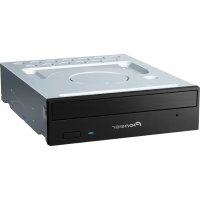
DVR-A07 - DVD Burner PIONEER - Free user manual and instructions

Find the device manual for free DVR-A07 PIONEER in PDF.

📄 1 pages English EN Download 💬 AI Question 10 questions ⚙️ Specs
Notice PIONEER DVR-A07 - page 1
Pick your language and provide your email: we'll send you a specifically translated version.
Product Type Internal DVD Burner
Brand Pioneer
Model DVR-A07
Interface ATAPI (IDE)
Form Factor 5.25-inch half-height internal
Dimensions (W x H x D) 148 mm x 42 mm x 170 mm
Weight 0.9 kg
Power Supply DC 5V / 12V via IDE connector
Write Speed (DVD-R) 4x
Write Speed (DVD+R) 4x
Rewrite Speed (DVD-RW) 2x
Rewrite Speed (DVD+RW) 2.5x
Write Speed (CD-R) 24x
Rewrite Speed (CD-RW) 16x
Read Speed (DVD-ROM) 12x
Read Speed (CD-ROM) 40x
Buffer Size 2 MB
Supported Disc Formats DVD-R, DVD+R, DVD-RW, DVD+RW, CD-R, CD-RW, CD-ROM, DVD-ROM
Loading Mechanism Tray loading
Operating Temperature 5°C to 40°C
Safety Class Class 1 Laser Product
Cleaning Instructions Use a DVD lens cleaning disc periodically
Spare Parts Availability Not user-serviceable; contact Pioneer support

Frequently Asked Questions - DVR-A07 PIONEER

How do I install the Pioneer DVR-A07 DVD burner?
To install the drive, power off your computer, open the case, and connect the IDE cable and power connector. Set the master/slave jumper appropriately. Secure the drive in a 5.25-inch bay, close the case, and power on. The system should detect it automatically.
What is the maximum write speed for DVD-R?
The Pioneer DVR-A07 supports write speeds up to 4x for DVD-R and 4x for DVD+R. For rewritable discs, DVD-RW is 2x and DVD+RW is 2.5x.
Can it read dual-layer DVDs?
No, the DVR-A07 model does not support dual-layer DVD discs. It is designed for single-layer DVD ± R/RW and CD formats.
My computer does not detect the drive. What should I do?
First, check the IDE cable and power connections. Ensure the jumper is set correctly (master/slave). Try a different IDE port. If still not detected, update the firmware or test the drive in another computer.
How do I update the firmware?
Download the latest firmware from Pioneer's support website. Run the update utility on your computer with the drive connected. Follow on-screen instructions. Do not power off during update. After completion, restart your system.
What types of discs are supported?
This drive supports DVD-R, DVD+R, DVD-RW, DVD+RW, CD-R, CD-RW, and read-only formats like DVD-ROM and CD-ROM.
The drive tray will not open. How to fix?
If the tray does not open via the button or software, use the manual eject hole on the front panel. Insert a straightened paper clip into the hole to force the tray open. Ensure the drive is powered off.
Is it compatible with Windows 10?
Windows 10 includes native drivers for IDE devices, so the DVR-A07 should work. However, burning software may need compatibility mode. For best results, use Windows 7/8/10 with legacy IDE support enabled.
How to clean the laser lens?
Use a DVD lens cleaning disc specifically designed for DVD burners. Insert the disc and let it spin for the recommended time. Do not use alcohol or abrasive materials.
What are the differences between DVR-A07 and DVR-106?
The DVR-A07 is a single-format (DVD-R/RW) drive, while the DVR-106 supports both DVD-R/RW and DVD+R/RW. Additionally, the DVR-106 has higher write speeds and a larger buffer.

User questions about DVR-A07 PIONEER

0 question about this device. Answer the ones you know or ask your own.

Ask a new question about this device

The email remains private: it is only used to notify you if someone responds to your question.

No questions yet. Be the first to ask one.

Download the instructions for your DVD Burner in PDF format for free! Find your manual DVR-A07 - PIONEER and take your electronic device back in hand. On this page are published all the documents necessary for the use of your device. DVR-A07 by PIONEER.

USER MANUAL DVR-A07 PIONEER

Pioneer sound.vision.soul

Media Care & Maintenance

Cracked/warped media Handling Media Cleaning media

PIONEER DVR-A07 - Media Care & Maintenance - 1

natural_image Illustration showing four hand-drawn diagrams: disc, ring, CD, and hand holding a circular object with directional arrows (no text or symbols)

Cracked or warped discs may damage a media playing/recording device. If a disc breaks inside of the unit, pieces are likely to strike the optics. If this happens, contact an authorized Pioneer service facility.

When working with DVD or CD recordable media, follow the guidelines below:

  • Avoid touching or scratching the signal side (shinier side) of the disc.
  • Hold the disc by the edges or by the center hole.
  • Do not affix paper labels to the media.
  • Avoid using non-standard disc shapes such as hearts, polygons, etc.
  • Remove dust or lint from the disc with a soft dry cloth by wiping from the inside to the outside edge rather than in a circular motion.
  • Do not apply record cleaning fluids, anti-static solutions or chemicals to clean a disc.
  • Store discs vertically and in a dust-free case whenever possible.
Table of contents Click a title to access it
Manual assistant
Powered by Anthropic
Waiting for your message
Product information

Brand : PIONEER

Model : DVR-A07

Category : DVD Burner