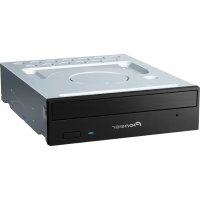
DVR-108 - DVD Burner PIONEER - Free user manual and instructions
Find the device manual for free DVR-108 PIONEER in PDF.


Pick your language and provide your email: we'll send you a specifically translated version.
| Product Type | Internal DVD Burner |
| Model | Pioneer DVR-108 |
| Interface | ATAPI (IDE) |
| Form Factor | 5.25-inch half-height |
| Write Speed (DVD+R) | 16x |
| Write Speed (DVD-R) | 16x |
| Write Speed (DVD+RW) | 4x |
| Write Speed (DVD-RW) | 4x |
| Write Speed (DVD+R DL) | 2.4x |
| Write Speed (CD-R) | 40x |
| Write Speed (CD-RW) | 24x |
| Read Speed (DVD-ROM) | 16x |
| Read Speed (CD-ROM) | 40x |
| Buffer Size | 2 MB |
| Supported Media | DVD±R/RW, DVD+R DL, CD-R/RW, CD-ROM |
| Dimensions (W x H x D) | 148 x 42 x 170 mm |
| Weight | 0.9 kg |
| Power Supply | 5V / 12V DC (via IDE cable) |
| Laser Class | Class 1 (safe under normal use) |
| Supported Disc Diameter | 8 cm and 12 cm |
| Cleaning | Use a lens cleaning disc or dry cloth for exterior |
| Spare Parts | Drive unit is sealed; replace entire drive if faulty |
| Operating Temperature | 5°C to 45°C |
| Humidity | 10% to 80% (non-condensing) |
Frequently Asked Questions - DVR-108 PIONEER
What is the maximum write speed for DVD+R discs?
The Pioneer DVR-108 supports a maximum write speed of 16x for DVD+R media.
Does the DVR-108 support dual-layer DVD discs?
Yes, it supports DVD+R DL (dual layer) with a write speed of 2.4x.
Can this drive burn CD-RW discs?
Yes, it supports CD-RW at up to 24x write speed.
What interface does the Pioneer DVR-108 use?
It uses an ATAPI (IDE) interface, compatible with most desktop computers of its era.
How do I clean the lens of the DVR-108?
Use a commercially available lens cleaning disc following the disc's instructions. Do not disassemble the drive.
What is the buffer size of this drive?
The buffer (cache) size is 2 MB, which helps prevent buffer underrun errors.
Is the Pioneer DVR-108 compatible with 8 cm mini discs?
Yes, it supports both 8 cm and 12 cm diameter discs.
What operating systems are supported?
The drive works with Windows 98/ME/2000/XP and earlier Mac OS versions with appropriate drivers.
How do I install the drive?
Mount the drive in a 5.25-inch bay, connect the IDE cable and power supply, and set the jumper (Master/Slave) as needed.
Can this drive read DVD-RAM discs?
No, the DVR-108 does not support DVD-RAM. It only reads/writes DVD±R/RW and CD formats.
User questions about DVR-108 PIONEER
0 question about this device. Answer the ones you know or ask your own.
Ask a new question about this device
No questions yet. Be the first to ask one.
Download the instructions for your DVD Burner in PDF format for free! Find your manual DVR-108 - PIONEER and take your electronic device back in hand. On this page are published all the documents necessary for the use of your device. DVR-108 by PIONEER.
USER MANUAL DVR-108 PIONEER


Manual assistant
Powered by Anthropic
Waiting for your message
Product information
Brand : PIONEER
Model : DVR-108
Category : DVD Burner