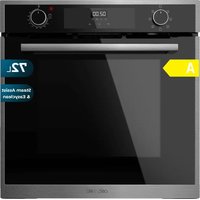
Bolero Hexa M226000 - Oven CECOTEC - Free user manual and instructions
Find the device manual for free Bolero Hexa M226000 CECOTEC in PDF.


| Product type | Built-in electric oven |
| Brand | Cecotec |
| Model | Bolero Hexa M226000 |
| References | 02806, 02807, 02808, 02809, 02810, 02811 |
| Rated voltage | 220-240 V~, 50-60 Hz |
| Rated power | 2300-2800 W |
| Cavity volume | 72 L |
| Energy efficiency class | A (EEI 92,9) |
| Conventional mode consumption | 0,81 kWh/cycle |
| Forced convection mode consumption | 0,79 kWh/cycle |
| Net weight | 23,0 kg |
| Number of cavities | 1 |
| Heat source | Electricity |
| Control type | Rotary selectors and touch screen |
| Cooking functions | Convection, Gentle cooking, Grill, Grill with fan, Defrost, Rapid cooking, Steam cleaning, Steam function |
| Included accessories | Rack, drip tray, oven tray |
| Timer | Up to 23 h 59 min, with automatic shutdown |
| Interior lighting | Replaceable 300°C resistant bulb |
| Cooling ventilation | Automatic |
| Cleaning | Steam cleaning function, removable door and inner glass |
| Safety | Selector lock (Push-in), hot surface indicator |
| Standby consumption | 0,97 W |
| After-sales service | Official Cecotec Service: +34 9 63 21 07 28 |
Frequently Asked Questions - Bolero Hexa M226000 CECOTEC
User questions about Bolero Hexa M226000 CECOTEC
0 question about this device. Answer the ones you know or ask your own.
Ask a new question about this device
Download the instructions for your Oven in PDF format for free! Find your manual Bolero Hexa M226000 - CECOTEC and take your electronic device back in hand. On this page are published all the documents necessary for the use of your device. Bolero Hexa M226000 by CECOTEC.
USER MANUAL Bolero Hexa M226000 CECOTEC
natural_image
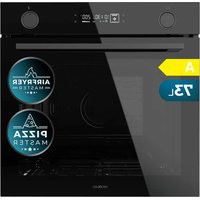
Product display of various kitchen ovens and appliances, including oven, stove, and air conditioner (no visible text or labels)bolero
Safety instructions 8
-
Parts and components 51
-
Before use 51
-
Installation 52
-
Operation 54
-
Cleaning and maintenance 60
-
Technical specifications 62
-
Disposal of old electrical and electronic appliances 63
-
Technical support and warranty 64
-
Copyright 64
SOMMAIRE
Read these instructions thoroughly before using the appliance. Keep this instruction manual for future reference or new users.
- This appliance can be used by children aged 8 years and above and persons with reduced physical, sensory, or mental capabilities or lack of experience and knowledge if they have been given supervision or instruction concerning use of the appliance in a safe way and understand the hazards involved. Children must not play with the appliance. Cleaning and user maintenance should not be carried out by unsupervised children.
- This appliance is designed for domestic use only and is not intended for bars, restaurants, farmhouses, hotels, motels, and offices.
- This symbol means "caution, hot surface". The temperature of the accessible surfaces may be high when the appliance is in operation.
- The appliance heats up during use. Avoid touching the heating elements inside.
- WARNING: all accessible parts of the appliance and the appliance itself may heat up during use. Do not touch the heating elements. Children under 8 years of age should be kept away from the appliance unless continuously supervised.
- Do not use abrasive cleaners or sharp metal scrapers to clean the oven door glass, as it may scratch the surface and cause subsequent glass breakage.
- Never clean the appliance with steam cleaners.
- WARNING: Make sure that the appliance is unplugged from
the mains before replacing the lightbulb to avoid any risk of electric shock.
- Do not install the appliance behind a decorative panel to avoid overheating.
- Incorrect repairs can be dangerous. Refer only to authorised technical personnel for repairs and replacement of damaged power cables. If the appliance is defective, unplug it from the power supply or switch off your home circuit breaker. Contact the official Cecotec Technical Support Service.
- The appliance is not intended to be operated by means of an external timer or a separate remote-control system.
- Open the appliance door carefully. Keep children away from the appliance.
- If the door glass is damaged, it could crack. Do not use glass scrapers, cleaning agents, or abrasive detergents to clean the appliance door.
- The appliance hinges move when opening and close the door: be careful not to get caught. Keep hands away from hinges.
- If you store flammable items inside the oven, they may catch fire. Never store flammable items inside the oven. Never open the door of the appliance if there is smoke inside. Unplug the appliance from the mains or switch off the circuit breaker of your home.
- The control panel and control elements use fixed magnets. These can affect electronic implants, such as pacemakers or insulin pumps. Users with electronic implants must stay at least at 10 cm from the control panel.
- Do not allow aluminium foil to come into contact with the glass door. This could cause permanent discolouration of the glass door.
- Do not use silicone frying pans, nor lids with silicone covers or silicone accessories. This could damage the oven sensor.
- Moisture inside the oven for a long period of time could cause corrosion. Allow the appliance to dry after every use. Do not store wet food inside the oven while it is closed for long periods of time. Do not store food in the oven.
- When baking cakes with particularly juicy fruit, do not overfill the baking tray. If fruit juice drips from the baking tray, it could cause permanent stains. Use a deep tray if possible.
- If the gaskets are dirty, the appliance door will not close properly during operation. This could damage the front part of the adjacent appliances and furniture. Make sure that the gaskets are always clean.
- Do not sit on the appliance door or place or hang objects on it. Do not place tableware or accessories on the appliance door.
- Do not transport or hold the appliance by the door handle. The door handle cannot withstand the weight of the appliance and could break.
- If you use residual heat when the oven is off to keep food warm, you can create a high moisture content inside the oven. This could lead to condensation and corrosion damage in the appliance, as well as damage to your kitchen.
INSTRUCTIONS DE SÉCURITÉ
- Zero mode
- Defrost mode
- Delicate Cooking mode
- Grill & Fan mode
- Grill mode
- Fast Cooking mode
- Convection mode
- Light
- Decrease icon
- Function icon
- Increase icon
- Timer icon
- Start-of-cooking icon
- End-of-cooking icon
- Clock icon
NOTE:
The graphics in this manual are schematic representations and may not exactly match the appliance.
2. BEFORE USE
- This appliance is packaged in a way as to protect it during transport. Take the appliance out of its box and remove all packaging materials. You can keep the original box and other packaging elements in a safe place. This will help you prevent damage to the appliance when transporting it in the future. In case the original packaging is disposed of, make sure all packaging materials are recycled accordingly.
ENGLISH
- Make sure all parts and components are included and in good conditions. If there is any piece missing or in bad conditions, contact the official Cecotec Technical Support Service immediately.
Box content
- Rack
- Grease-collection tray
- Wire rack
- Baking tray
- Instruction manual
3. INSTALLATION
To install the appliance, refer only to qualified professionals. The manufacturer declines all liability in the event of incorrect installation and subsequent injury to people and animals, as well as damage to property.
Important
- Unplug the appliance from the mains before any adjustment or maintenance work is carried out.
- The air duct is used for ventilation.
Built-in installation
To ensure the correct operation of the appliance, make sure the piece of furniture is suitable for built-in installation. Figure 3 shows the adequate size of the hole for installation under a worktop or in a wall unit.
Installation in accordance with the statement of consumption
- To ensure adequate ventilation, the rear panel of the cabinet must be removed. It is preferable to install the oven so that it rests on two wooden slats. If the oven rests on a flat surface, there must be an opening of at least 45×560 mm. Fig. 4
- Adjacent cabinet panels shall be made of heat-resistant material. In particular, enclosures with a veneered exterior must be assembled with glues that can withstand temperatures up to 100 °C.
- In compliance with current safety regulations, it must not be possible to come into contact with the electrical parts of the oven once it has been installed. All parts that ensure the safe operation of the appliance must only be removed with the aid of a tool.
- To fix the oven to the cabinet, open the oven door and fix it by inserting the 4 wood screws into the 4 holes on the perimeter of the frame.
Electrical connections
Ovens equipped with a three-pole power cable are designed to operate on alternating current. The earth wire of the appliance is yellow-green.
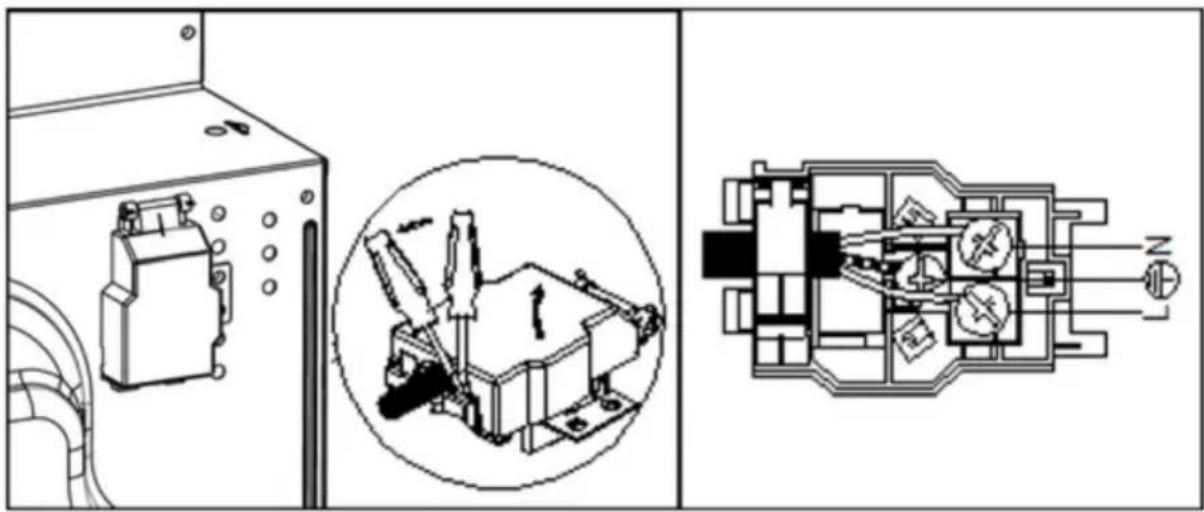
Installing the power cable Fig. 5
- Opening the terminal board:
- Take a screwdriver.
- Unscrew the screws on the side tabs of the cover and remove the latter.
To install the power cable, proceed as follows:
- Remove the cable retaining screw and the three contact screws. (L-N).
- Fix the wires under the screw heads using the following colour scheme: Blue (N) Brown (L) Yellow-Green.
- Secure the power cable with the cable clamp and close the terminal board cover.
Connecting the power cable to the mains
- Install a standard plug socket corresponding to the load indicated on the rating plate. When connecting the cable directly to the mains, install an omnipolar circuit breaker with a minimum contact opening of 3 mm between the appliance and the mains. The omnipolar circuit breaker must be sized according to the load and comply with the applicable regulations (the earth wire must not be interrupted by the circuit breaker).
- Position the power cable in such a way as to prevent it from reaching 50 °C above ambient temperature at any point along its length, and make sure it's protected by insulation with an appropriate rating.
Before connecting, check the following:
- The electrical safety of this appliance can only be guaranteed if the oven is correctly and effectively earthed in accordance with electrical safety regulations. Always make sure that the ground connection is effective; if in doubt, call a qualified technician to check the system. The manufacturer declines all liability for damage resulting from an ungrounded system.
- Before connecting the appliance to the mains, check that the specifications indicated on the rating plate (on the appliance and/or on the packaging) correspond to those of the mains supply at home.
- Check that the electrical capacity of the installation and the sockets can withstand the maximum power of the appliance. If in doubt, contact a qualified technician.
- If the socket and plug of the appliance are not compatible, ask a qualified technician to replace the socket with a suitable model. The latter, in particular, will also have to ensure that the cross-section of the socket cables is adequate for the power used by the appliance. The use of adapters, multiple sockets and/or extensions is not recommended. If their use cannot be avoided, remember to use only single or multiple adapters and extension cords that comply with current safety regulations. In these cases, never exceed
ENGLISH
the maximum current capacity indicated on the single adapter or extension cord and the maximum power indicated on the multiple adapter. The plug and socket shall be easily accessible.
4. OPERATION
Push-in knob (available only for some models)
Push the knob slightly inwards to lock it or unlock it.
Note
Upon first use of the appliance, it's recommended to set the temperature to maximum and leave the oven on for half an hour with nothing in it and with the door closed. The odour given off by the oven at the begging is due to the evaporation of the substances used to protect it during storage until first installation.
Note
Insert the grease-collection tray provided in the bottom oven slide to prevent any juice and/or grease from dripping onto the bottom of the oven when using the rotisserie fork (available only for some models). For all other types of cooking, never use the bottom shelf and never place anything on the bottom of the oven when it is in operation, as this could damage the enamel. Place your cooking utensils (plates, aluminium foil, etc.) on the rack supplied with the product.
Modes
Convection
In this mode, both heating elements are switched on. When cooking in this mode, use only one tray or rack at a time to ensure an even heat distribution. By using the different heights available, you can balance the amount of heat between the top and bottom of the oven.
Choose the appropriate slide depending on whether the food needs more or less heat from the top.
Delicate cooking
- In this mode, the bottom heating element and the fan are switched on. It's recommended to insert the grease-collection tray in the bottom slide.
- Use this mode to remove food remains from inside the oven. Select the steam-assisted cleaning function and set the temperature to 130 °C .
Grill
In this mode, the upper central heating element is switched on to heat up the food from the top. Grill the food by placing it on the rack and inserting the latter in either of the 2 upper slides.
Grill & Fan
In this mode, the upper central heating element and the fan is switched on.
Defrost
Before activating Defrost mode, set the temperature knob to 0.
Push-in knob (available only for some models)
This model is equipped with a timer to set the switch-off time of the oven. Timer knob position: between 10 minutes and 120 minutes. At the end of the cooking time, the timer will beep and automatically switch off the oven.
3-icon timer baking (available only for some models)
- Once the oven is plugged to the mains, the display will show '12:00' with the square symbol above the Clock icon.
- Touch the Increase or Decrease icon to set the current time.
Automatic adjustment (fully automatic start and end time)
-
Touch the Function icon repeatedly until the square symbol flashes above the Start-of-cooking icon, then touch the Increase/Decrease icon to adjust the Start-of-cooking time.
-
Touch the Function icon repeatedly until the square symbol flashes above the End-of-cooking icon, then touch the Increase/Decrease icon to adjust the End-of-cooking time.
-
Turn the temperature knob to adjust the temperature and the cooking-mode knob to select the cooking mode.
- After making the above adjustments, the symbols above Start-of-cooking and End-of-cooking icons will flash, indicating that the oven cooking procedure has been set.
- Example: the food needs to bake for 45 minutes, shut-off time at 14:00.
- Touch the Function icon repeatedly until the square symbol flashes above the Start-of-cooking icon, then set the cooking time to 45 minutes.
- Touch the Function icon repeatedly until the square symbol flashes above the End-of-cooking icon, then set the end-of-cooking time to 14:00.
- After making these adjustments, the clock (hours and minutes) and the square symbol will be shown on the display, indicating that the settings have been saved and confirmed.
- When the clock strikes 13:15 (between 14 -15 min), the oven will switch on automatically. The square symbol will keep flashing during the cooking procedure.
ENGLISH
- When the clock strikes 14:00, the oven will switch off automatically, and alarm will sound, and the square symbol will flash. Press any of the icons to stop the alarm.
Semi-automatic configuration (automatic start and end time adjustment)
- Adjust the cooking time (10 hours maximum).
- Touch the Function icon repeatedly until the square symbol flashes above the Start-of-cooking icon, then adjust the baking time.
- Switch on the oven immediately: the square symbol above the Start-of-cooking icon will flash. Once the cooking time has elapsed, the square symbol above the Start-of-cooking icon will flash and the alarm will sound. Press any of the icons to stop the alarm.
- Set the end-of-cooking time (23 hours and 59 minutes maximum).
- Touch the Function icon repeatedly until the square symbol appears above the End-of-cooking icon, then set the end-of-cooking time.
- Switch on the oven immediately: the square symbol above the End-of-cooking icon will flash. Once the set time has elapsed, the cooking process will stop automatically, the square symbol above the End-of-cooking icon will flash, and the alarm will sound. Press any of the icons to stop the alarm.
- The set baking procedure can be viewed by repeatedly touching the function icon at any time, but only if baking time is set to 0.
- You can also cancel the baking settings by setting the end-of-cooking time to the current time.
Timer
The timer can be set up to a maximum of 23 hours and 59 minutes. To set the time, repeatedly touch the Function icon until the square symbol above the Timer icon flashes, then press the Increase/Decrease icon to adjust the time as desired. After setting the timer, the time (hours and minutes) and the square symbol above the Timer icon will start flashing and the countdown will start. Once the set time has elapsed, the square symbol above the Timer icon will flash and the alarm will sound. Press any of the icons to stop the alarm.
Note
In case of a sudden power failure, the settings will be reset. Upon reconnection, the display will show '12:00' and the square symbol above the Clock icon.
Light
Turn the Cooking-mode knob to the Light position to turn on the oven light. This light stays on when any of the oven's electric heating elements are switched on.
Cooling fan
- This model is equipped with a cooling fan that switches on automatically when the oven is hot.
- When the fan is on, you'll notice air flowing out between the oven door and the control panel.
Please note
Once cooking is complete, the fan stays on until the oven has sufficiently cooled down.
Practical cooking tips
- You can insert racks or trays in up to 5 slides inside the oven, effectively obtaining 'shelves' at 5 different heights. Use two of the three middle shelves during fan cooking. Racks and trays inserted in the top and bottom slides are subject to more heat, which may cause more delicate food to burn.
- As a general rule, use the 2^nd and 4^th slide from the bottom, placing foods that require more heat on the 2^nd guide from the bottom. For example, when cooking meat together with other foods, place the meat on the 2^nd shelf from the bottom and the more delicate foods on the 4^th shelf from the bottom.
- When cooking foods that require different times and temperatures, set an intermediate temperature between the two required, place the more delicate foods on the 4^th shelf from the bottom, and remove the foods that require less time from the oven first.
- Insert the grease-collection tray in the lower slide, and the rack in the upper one.
Grill mode
- Because Grill mode turns on only the central part of the upper heating element, make sure to place the food in the middle of the rack or tray ( 3^rd or 4^th shelf from the bottom).
- Insert the grease-collection tray provided in the 1 ^st slide from the bottom to catch any juice and prevent it from dripping onto the bottom of the oven. When using this mode, we recommend that you set the temperature to the highest setting. However, this does not mean that you cannot use lower temperatures by simply adjusting the temperature knob.
- Grill & Fan mode is very useful for browning the surface as well as for cooking the underside of the food, grilling it quickly.
- It can also be used to brown food at the end of the cooking process, e.g., to gratinate pasta.
- When using this mode, insert the rack on the 2^nd or 3^rd slide from the bottom (see the table below); then, to prevent fat from dripping onto the bottom of the oven and smoke from forming, insert the grease-collection tray in the 1^st slide from the bottom.
- Make sure to set the temperature to 200 °C to make the most of the infrared-ray emission during Grill mode. However, this does not mean the temperature can't be set to a lower value by turning the temperature knob to the desired position.
- Best results in Grill mode can therefore obtained by inserting the tray on the lower slides (see the table below). To prevent fat from dripping onto the bottom of the oven and smoke from forming, insert the grease-collection tray in the 1^st slide from the bottom
| Cooking mode | Food Weight | (kg) | Cooking rack (counting from the bottom upwards) | Pre-heating (minutes) | Temperature | Time (minutes) |
 | Duck 1 3 15 200 | 65-75 | ||||
| Roast veal or beef | 1 3 15 200 | 70-75 | ||||
| Roast pork 1 3 15 | 200 70-80 | |||||
| Biscuits - 3 15 18 | 30 15-20 | |||||
| Tartlet 1 3 15 18 | 30 30-35 | |||||
 | cuttlefish skewers | 1 4 5 | Max | 8-10 | ||
| Squid and prawn skewers | 1 4 5 | Max | 6-8 | |||
| Cod fillet | 1 4 5 | Max | 10 | |||
| Grilled vegetables | 1 3/4 | 5 | Max 10-15 | |||
| Veal fillet | 1 4 5 | Max | 15-20 | |||
| Chops | 1 4 5 | Max | 15-20 | |||
| Hamburgers | 1 4 5 | Max | 7-10 | |||
| Mackerel | 1 4 5 | Max | 15-20 | |||
| Toasted sandwiches - 4 | 5 | Max 2-3 | ||||
 | Frozen foods | |||||
| Roasted chicken | 1.5 3 5 200 | 55-60 | ||||
| Cuttlefish 1.5 3 | 5 200 30-35 | |||||
| With rotisserie fork | 1.5 - 5 200 | 70-80 | ||||
| Grilled veal 2.0 | - 5 200 70-80 | |||||
| Grilled chicken | 1.5 - 5 200 | 70-75 | ||||
| Chicken (grilled) + Potatoes (baked) | - 2 5 200 | 70-75 | ||||
| Grilled lamb 1.5 | - 5 200 70-80 | |||||
 | Frozen foods | |||||
| Pizza 0.3 2 - 250 | 12 | |||||
| Courgette and prawn pie | 0.4 2 - 200 | 20 | ||||
| Spinach pie 0.5 | 2 - 220 | 30-35 | ||||
| Leftovers 0.3 2 | - 200 | 25 | ||||
| Lasagna 0.5 2 | - 200 | 35 | ||||
| Rolls 0.4 2 - 180 | 25-30 | |||||
| Chicken Milanese | 0.4 2 - 220 | 15-20 | ||||
| Roast veal or beef | 1 2 10 | 180 | 25-30 | |||
| Chicken 1 2/3 10 | 220 | 60 | ||||
| Pre-cooked food | ||||||
| Browned chicken wings | 0.4 2 - 200 | 20-25 | ||||
| Fresh food | ||||||
| Biscuits | 0.3 2 - 200 | 15-18 | ||||
| Fruitcake | 0.6 2 - 180 | 45 | ||||
| Cheese bites | 0.2 2 - 210 | 10-12 | ||||
 | Steam-assisted function | 0.5 3 15 | 220 | 15-20 | ||
5. CLEANING AND MAINTENANCE
Before cleaning or servicing the oven, disconnect it from the mains.
To prolong the life of your oven, you should clean it frequently, bearing in mind that:
- Enamelled or stainless steel parts should be washed with lukewarm water without the use of abrasive powders or corrosive substances that could damage them. Stainless steel can stain, if these stains are difficult to remove, use special products available on the market. After cleaning, it is advisable to rinse thoroughly and dry the product.
- The inside of the oven should preferably be cleaned immediately after use while still hot with hot soapy water; the soap should be rinsed out and the inside dried thoroughly.
Avoid using abrasive detergents (e.g., scouring powders) and abrasive dish sponges or acids (e.g., lime scale removers) as they may damage the enamel. If grease stains and dirt are particularly difficult to remove, use a special oven cleaning product according to the instructions on the packaging. Never use a steam cleaner to clean the inside of the oven.
- If you use the oven for a long period of time, condensation may form, dry it with a soft cloth.
- The oven has a rubber gasket around the opening which guarantees its perfect functioning. Periodically check the condition of this seal. If necessary, clean it and avoid using abrasive products or objects to do so. In the event of a fault, please contact the official Cecotec Technical Support Service. We recommend that you avoid using the oven until it has been repaired.
- Never line the bottom of the oven with aluminium foil, as the resulting heat build-up could compromise cooking and even damage the enamel.
- Clean the glass door with non-abrasive products or sponges and dry it with a soft cloth.
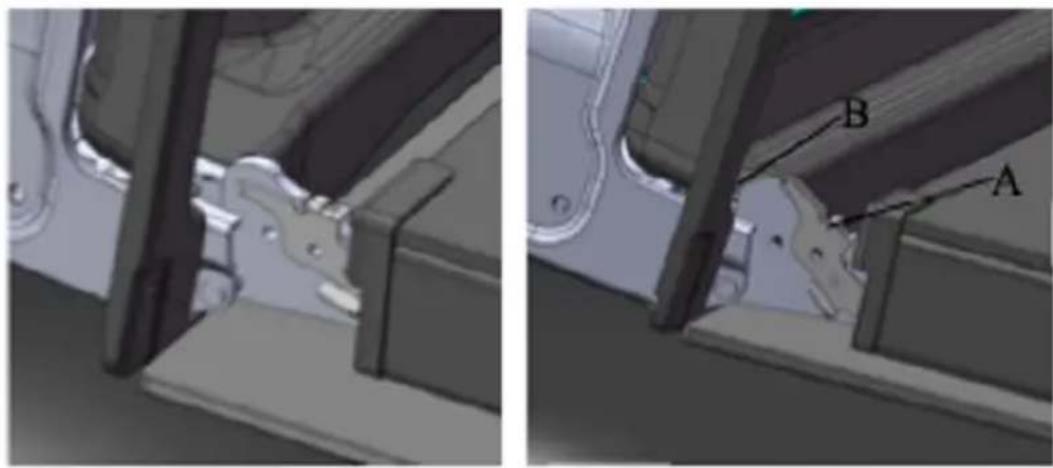
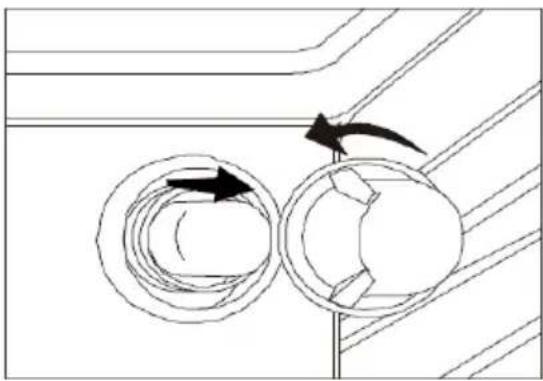
Disassembling the oven door. Fig. 6
You can remove the oven door for thorough cleaning. Choose the disassembly and assembly method. Proceed as follows: Oven door structure, disassembly and assembly procedure:
- Fully open the door.
- Fully open the left and right hinge lever.
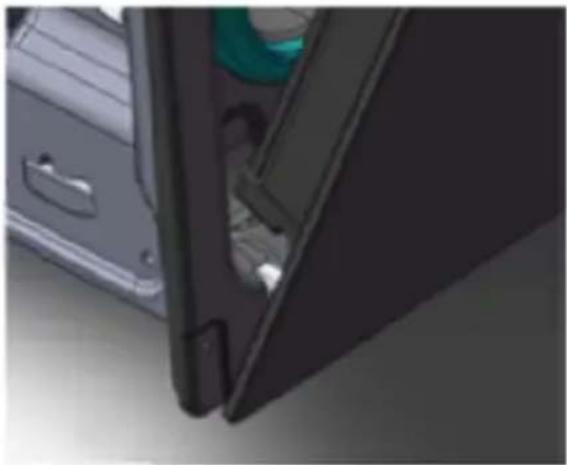
- Hold the door as shown in the third picture.
- Gently close the door until the left and right hinge levers are engaged on the B side of the door as shown in the third picture.
- Remove the hinge hooks from their location following the arrow shown in Figure 4.
- Rest the door on a soft surface.
- To replace the door, repeat the above steps in reverse order.
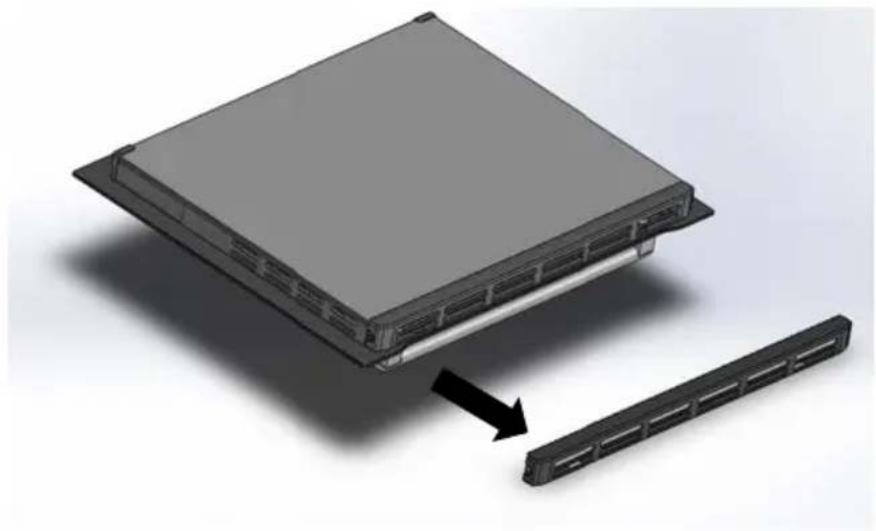
Removing the inner glass. Fig. 7
- Double oven door: remove the seal by unscrewing screws no. 2 as shown in the first picture in Figure 7.
- Carefully remove the inner pane 2 as shown in the second picture of Figure 7.
- Clean the glass with a suitable cleaning product. Thoroughly dry it and place it on a soft surface so as to also clean the inside of the outer pane.
- To place the glass back in position, repeat the above steps in reverse order.
Steam-assisted cleaning. Fig. 8
This function can only be used to remove easily cleanable food remains from inside the oven. It is not suitable for stubborn stains. This function can only be used when the oven is cold.
-
Make sure to empty the oven before cleaning it with this method.
-
Prepare a solution of water (85%), white vinegar (10%), and dish detergent (5%) and spray generously on the door, side walls, and rear wall of the oven cavity.
ENGLISH
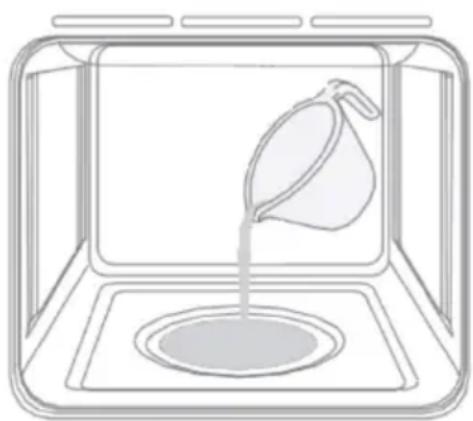
- Pour 40 ml of water into the base of the cavity as shown in Figure 8.
- Close the door. Select the steam-assisted cleaning function and set the temperature to 130^ C.
- Turn off the oven after 18 minutes.
- Allow the oven to cool down to a safe temperature before wiping it with a damp cloth.
Replacing the light bulb. Fig. 9
- Unplug the appliance from the mains.
- Remove the glass cover from the lightbulb holder.
- Remove the lightbulb and replace it with another high-temperature resistant one (300 °C).
- Replace the glass lid and reconnect the oven to the mains.
6. TECHNICAL SPECIFICATIONS
Product reference: 02806 / 02807 / 02808 / 02809 / 02810 / 02811
Product: Bolero Hexa M226000 Inox A / Bolero Hexa M226000 Edge A / Bolero Hexa
M226000 Matt A / Bolero Hexa M226000 Glass Black A / Bolero Hexa M226000 Glass White
A / Bolero Hexa M226000 Glass Grey A
Rated voltage: 220-240 V\~.
Rated frequency: 50-60 Hz
Rated power: 2300-2800 W
| Symbol Value Unit | ||
| Model identification 02806 / 02807 / | 02808 / 02809 / 02810 / 02811 | |
| Type of oven Electric oven | ||
| Mass of the appliance M 23.0 Kg | ||
| Number of cavities 1 | ||
| Heat source per cavity (electricity or gas) Electricity | ||
| Volume per cavity V 72 l |
| Energy consumption (electricity) required to heat a standardised load in a cavity of an electric heated oven during a cycle in conventional mode per cavity (electric final energy) | EC_electric cavity | 0.81 kWh/ | cycle |
| Energy consumption required to heat a standardised load in a cavity of an electric heated oven during a cycle in fan-forced mode per cavity (electric final energy) | EC_electric cavity | 0.79 kWh/ | cycle |
| Energy consumption required to heat a standardised load in a gas-fired cavity of an oven during a cycle in conventional mode per cavity (gas final energy) | EC_gas cavity | N/AN/A | MJ/cyclekWh/cycle(1) |
| Energy consumption required to heat a standardised load in a gas-fired cavity of an oven during a cycle in fan-forced mode per cavity(gas final energy) | EC_gas cavity | N/AN/A | MJ/cyclekWh/cycle |
| Energy Efficiency Index per cavity EEI | cavity | 92.9 | |
| Energy Efficiency Class A | |||
| Standby mode 0.97 W | |||
| (1) 1 kWh/cycle = 3.6 MJ/cycle. |
Technical specifications may change without prior notification to improve product quality. Made in China | Designed in Spain
7. DISPOSAL OF OLD ELECTRICAL AND ELECTRONIC APPLIANCES
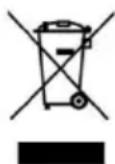
This symbol indicates that, according to the applicable regulations, the product and/or batteries must be disposed of separately from household waste. When this product reaches the end of its shelf life, you should dispose of the cells/batteries/accumulators and take them to a collection point designated by the local authorities.
Consumers must contact their local authorities or retailer for information concerning the correct disposal of old appliances and/or their batteries.
Compliance with the above guidelines will help protecting the environment.
ENGLISH
8. TECHNICAL SUPPORT AND WARRANTY
Cecotec shall be liable to the end user or consumer for any lack of conformity that exists at the time of delivery of the product under the terms, conditions, and deadlines established by the applicable regulations.
It is recommended that repairs be carried out by qualified personnel.
If at any moment you detect any problem with your product or have any doubt, do not hesitate to contact the official Cecotec Technical Support Service at +34 963 210 728.
9. COPYRIGHT
The intellectual property rights over the texts in this manual belong to CECOTEC INNOVACIONES, S.L. All rights reserved. The contents of this publication may not, in whole or in part, be reproduced, stored in a retrieval system, transmitted, or distributed by any means (electronic, mechanical, photocopying, recording or similar) without the prior authorization of CECOTEC INNOVACIONES, S.L.
1. PIÈCES ET COMPOSANTS
Img. 1
natural_image
Technical line drawing of a structural frame with two horizontal bars and vertical supports (no text or symbols)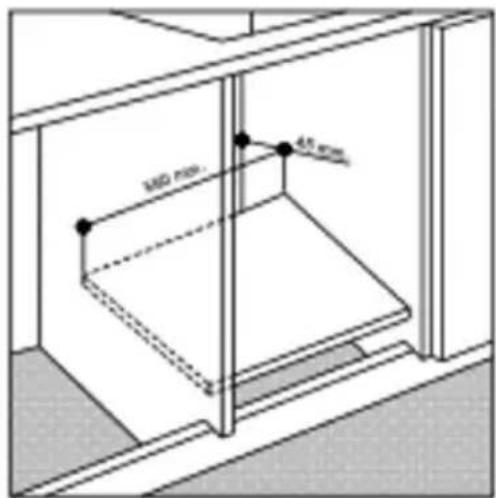
Fig./Img./Abb./Afb./Rys. 4
natural_image
Technical diagram showing three views of an electrical enclosure with internal components and wiring (no text or labels)Fig./Img./Abb./Afb./Rys. 5
natural_image
Close-up of a car door with visible seatbelt and door panel, showing interior details (no text or symbols)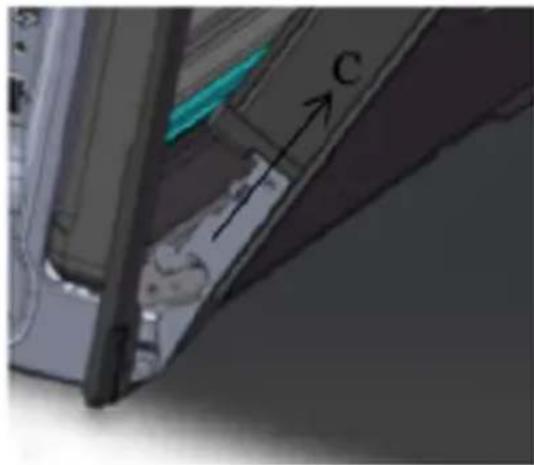
natural_image
Close-up of a mechanical component with labeled part 'C' and directional arrow (no readable text or symbols beyond label)Fig./Img./Abb./Afb./Rys. 6
natural_image
3D rendering of a server rack with an arrow indicating the component's direction (no text or symbols present)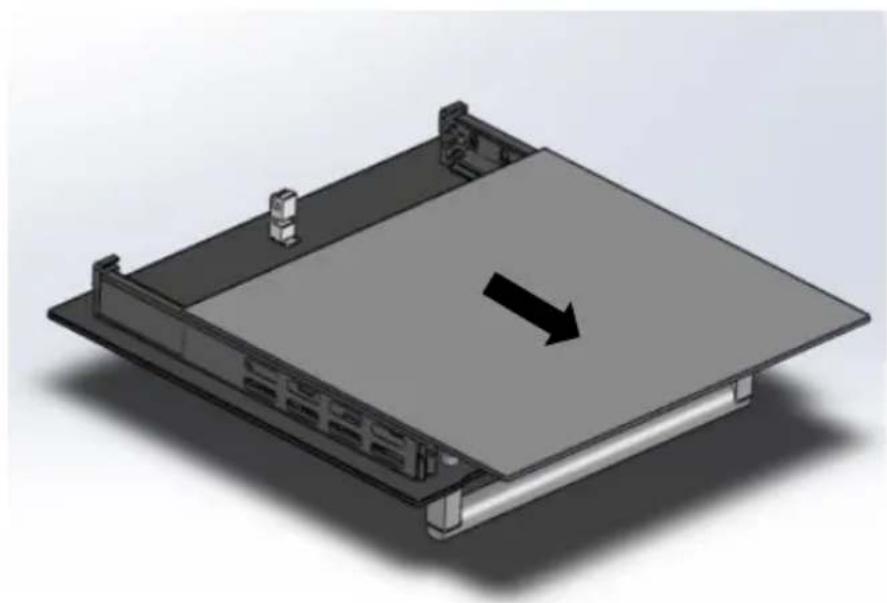
natural_image
3D rendering of a computer chassis with a black arrow indicating direction (no text or symbols present)Fig./Img./Abb./Afb./Rys. 7
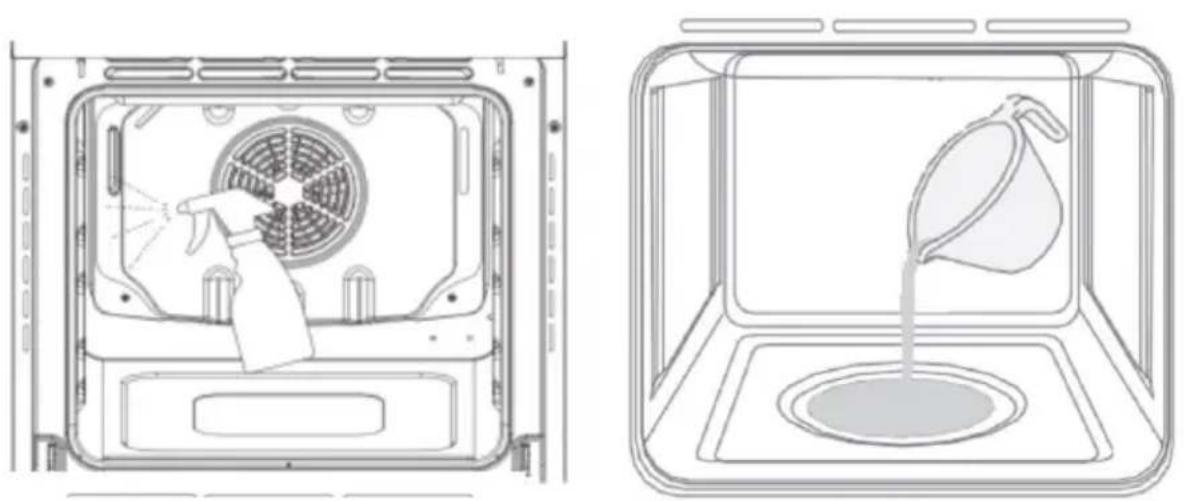
Fig./Img./Abb./Afb./Rys. 8
natural_image
Diagram showing two mechanical components with directional arrows, no text or symbols presentFig./Img./Abb./Afb./Rys. 9
natural_image
Simple line drawing of a container with a funnel pouring liquid into a basin (no text or symbols)NOTA:
Steam Assist cooking function
You can use this function to add extra browning to pizza bases, pies and cakes, or to cook different foods using a combination of bottom heat and steam.
If you wish, you can follow the steps below:
1.- Add approximately 100 ml of water in the bottom cavity (Fig. 1). The approximate capacity of the cavity can be up to 200 ml.
NOTE: the capacity may vary depending on the oven model.
2.- Activate the Steam Assist mode and select a temperature of 200 °C . Approximate cooking time: 20 minutes.
3.- Be sure to remove any excess water from the oven cavity at the end of the cooking process.
NOTE: You can adjust the amount of water, the cooking time and the temperature according to the needs of the food to be prepared.
WARNING: make sure that the interior is completely cool before removing excess water. Risk of burns.
Fig. 1
natural_image
Line drawing of a funnel pouring liquid into a circular tank inside a rectangular chamber (no text or symbols)NOTE:
The graphics in this manual are schematic representations and may not exactly match the device.
FR
natural_image
Simple line drawing of a container with a pitcher pouring liquid into a basin (no text or symbols)NOTE :
natural_image
Simple line drawing of a funnel pouring liquid into a basin (no text or symbols)HINWEIS:
natural_image
Simple line drawing of a funnel pouring liquid into a square tank (no text or symbols)NOTA:
natural_image
Line drawing of a funnel pouring liquid into a basin (no text or symbols)NOTA:
natural_image
Simple line drawing of a funnel pouring liquid into a tank (no text or symbols)OPMERKING:
natural_image
Simple line drawing of a container with a funnel pouring liquid into a basin (no text or symbols)UWAGA:
natural_image
Line drawing of a funnel pouring liquid into a square tank (no text or symbols)POZNÁMKA:
- SOMMAIRE
- INSTRUCTIONS DE SÉCURITÉ
- NOTE:
- BEFORE USE
- ENGLISH
- Box content
- INSTALLATION
- Important
- Built-in installation
- Installation in accordance with the statement of consumption
- Electrical connections
- Installing the power cable Fig. 5
- Connecting the power cable to the mains
- Before connecting, check the following:
- OPERATION
- Note
- Modes
- Convection
- Delicate cooking
- Grill
- Grill & Fan
- Defrost
- Push-in knob (available only for some models)
- 3-icon timer baking (available only for some models)
- Automatic adjustment (fully automatic start and end time)
- Semi-automatic configuration (automatic start and end time adjustment)
- Timer
- Light
- Cooling fan
- Please note
- Practical cooking tips
- Grill mode
- CLEANING AND MAINTENANCE
- Disassembling the oven door. Fig. 6
- Removing the inner glass. Fig. 7
- Steam-assisted cleaning. Fig. 8
- Replacing the light bulb. Fig. 9
- TECHNICAL SPECIFICATIONS
- DISPOSAL OF OLD ELECTRICAL AND ELECTRONIC APPLIANCES
- TECHNICAL SUPPORT AND WARRANTY
- COPYRIGHT
- PIÈCES ET COMPOSANTS
- Img. 1
- NOTA:
- Steam Assist cooking function
- FR
- NOTE :
- HINWEIS:
- OPMERKING:
- POZNÁMKA:
Brand : CECOTEC
Model : Bolero Hexa M226000
Category : Oven