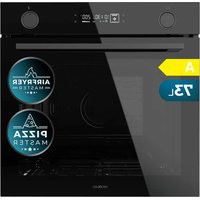
Bolero Hexa AF326000 - Oven CECOTEC - Free user manual and instructions
Find the device manual for free Bolero Hexa AF326000 CECOTEC in PDF.


User questions about Bolero Hexa AF326000 CECOTEC
0 question about this device. Answer the ones you know or ask your own.
Ask a new question about this device
Download the instructions for your Oven in PDF format for free! Find your manual Bolero Hexa AF326000 - CECOTEC and take your electronic device back in hand. On this page are published all the documents necessary for the use of your device. Bolero Hexa AF326000 by CECOTEC.
USER MANUAL Bolero Hexa AF326000 CECOTEC
Hornos integrables/Built-in ovens
natural_image
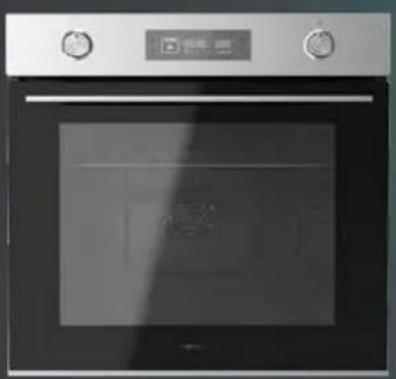
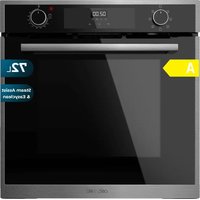
Front view of a stainless steel oven with control knobs and a digital display (no visible text or symbols)
natural_image
Exterior view of a modern kitchen oven with control panel and door (no visible text or symbols)
natural_image
Exterior view of a black double boiler oven (no visible text or symbols)SAFETY INSTRUCTIONS....5
ESPAÑOL....48
ENGLISH....73
FRANÇAIS....97
DEUTSCH....123
ITALIANO....150
PORTUGUÊS....175
NEDERLANDS....200
POLSKI....225
ČEŠTINA....251
MAGYAR....275
ΕΛΛΗΝΙΚΑ......300
TÜRKÇE 326
العربية 350
CATALÀ....371
FIGURES....396
NOTA
04733 Bolero Hexa AF326000 Glass Black A
EU01_121500 Bolero Hexa AF326000 Line A
EU01_121501 Bolero Hexa AF326000 Matt Black A
EN • The coding in this manual is generic and applies to all code variants of the appliance.
Read the following instructions carefully before using the appliance. Keep this instruction manual for future reference or new users.
- It is recommended that the installation and connection of the appliance be carried out by authorised specialists. The manufacturer is not liable for damage caused by installation or connection errors.
- This appliance can be used by children aged 8 years and above and people with reduced physical, sensory, or mental capabilities or lack of experience and knowledge if they have been given supervision or instruction concerning the use of the appliance in a safe way and understand the hazards involved. Children must not play with the appliance. Cleaning and user maintenance should not be carried out by unsupervised children.
- This appliance is intended for domestic use only and is not suitable for use in commercial establishments such as bars, restaurants, farms, hotels, motels, and offices.
- This symbol means "caution, hot surface." The temperature of the accessible surfaces may be high when
the appliance is in operation.
- The appliance heats up during use. Avoid touching the heating elements inside.
- WARNING: all accessible parts of the appliance and the appliance itself may heat up during use. Do not touch the heating elements. Children under 8 years of age should be kept away from the appliance unless continuously supervised.
- Do not use abrasive cleaners or sharp metal scrapers to clean the oven door glass, as it may scratch the surface and cause subsequent glass breakage.
- Never clean the appliance with steam cleaners.
- WARNING: make sure that the appliance is unplugged from the mains before replacing the lightbulb to avoid any risk of electric shock.
- Do not install the appliance behind a decorative panel to avoid overheating.
- Incorrect repairs can be dangerous. Refer only to authorised technical personnel for repairs and replacement of damaged power cables. If the appliance is defective, unplug it from the power supply or switch off your home circuit breaker. Contact Cecotec's Official Technical Support Service.
- The appliance is not intended to be operated by means of an external timer or a separate remote-control system.
- Open the appliance door care fully. Keep children away from the appliance.
- If the door glass is damaged, it could crack. Do not use glass scrapers, cleaning agents, or abrasive detergents to clean the appliance door.
- The appliance hinges move when opening and close the door: be careful not to get caught. Keep hands away from
hinges.
- If you store flammable items inside the oven, they may catch fire. Never store flammable items inside the oven. Never open the door of the appliance if there is smoke inside. Unplug the appliance from the mains or switch off the circuit breaker of your home.
- The control panel and control elements use fixed magnets. These can affect electronic implants, such as pacemakers or insulin pumps. Users with electronic implants must stay at least at 10 cm from the control panel.
- Do not allow aluminium foil to come into contact with the glass door. This could cause permanent discolouration of the glass door.
- Do not use silicone frying pans, nor lids with silicone covers or silicone accessories. This could damage the oven sensor.
- Moisture inside the oven for a long period of time could cause corrosion. Allow the appliance to dry after every use. Do not store wet food inside the oven while it is closed for long periods of time. Do not store food in the oven.
- When baking cakes with particularly juicy fruit, do not overfill the baking tray. If fruit juice drips from the baking tray, it could cause permanent stains. Use a deep tray if possible.
- If the gaskets are dirty, the appliance door will not close properly during operation. This could damage the front part of the adjacent appliances and furniture. Make sure that the gaskets are always clean.
- Do not sit on the appliance door or place or hang objects on it. Do not place tableware or accessories on the appliance door.
- Do not transport or hold the appliance by the door handle. The door handle cannot withstand the weight of the
appliance and could break.
- If you use residual heat when the oven is off to keep food warm, you can create a high moisture content inside the oven. This could lead to condensation and corrosion damage in the appliance, as well as damage to your kitchen.
1. Parts and components
Fig. 1
- Control panel
- Fan motor (behind the steel plate)
- Side guides
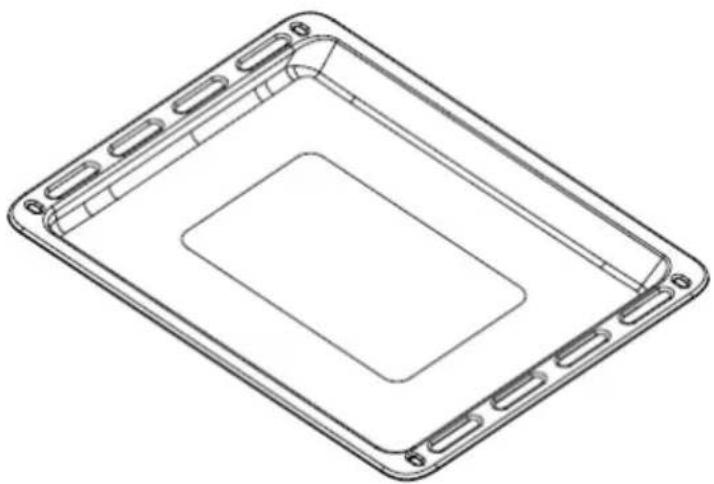
- Tray
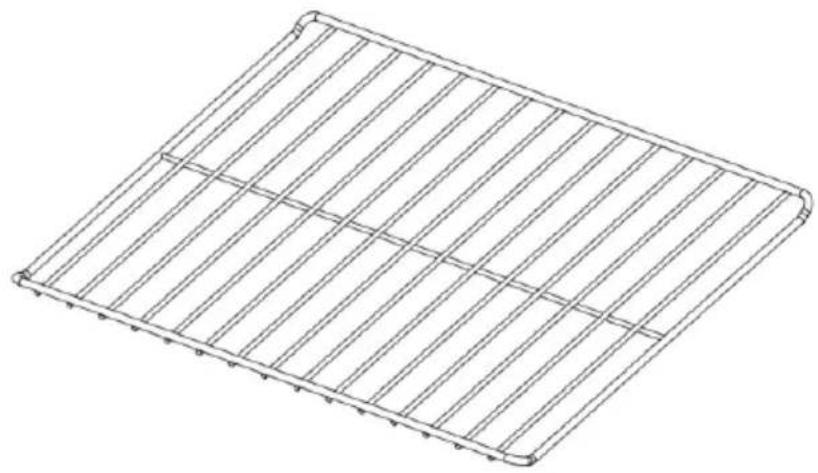
- Rack
- Door
- Handle
NOTE:
The graphics in this manual are schematic representations and may not exactly match the product.
2. Before use
- This appliance comes in a packaging designed to protect it during transport. Take the appliance out of its box and remove all packaging materials. You can keep the original box and other packaging materials in a safe place to prevent damage to the appliance if you need to transport it in the future. If you wish to dispose of the original packaging, make sure all items are recycled properly.
- Check that all parts and components are included and in good condition. If any of them are missing or damaged, please contact Cecotec's Official Technical Support Service immediately.
● This appliance is exclusively designed for household use.
● Use the oven only for cooking food.
● Before cooking, be sure to remove all unnecessary accessories from the oven.
● Preheat the oven before using it. - Place the baking trays in the centre of the oven and leave space between them when using more than one to allow air to circulate.
- Do not place the trays on the oven base or cover them with aluminium foil. This would cause heat build-up, which would affect the cooking time and damage the enamel of the oven.
- Try to open the oven door as little as possible to see the food (the oven light remains on during cooking).
● Be careful when opening the door to avoid contact with hot parts and steam.
Box content
- Oven
ENGLISH
- Tray
Rack - XXL Pizza Stone
AirFryer basket - Instruction manual
3. Appliance installation
Before installation
The appliance must be installed in a built-in cabinet. A safety distance must be maintained between the appliance and the kitchen walls.
- Surfaces, synthetic laminates and adhesives used must be heat resistant (100 °C minimum).
- Kitchen cabinets must be level and fixed. A space of 5 mm must be left between the oven and other appliances.
- If there is a drawer under the oven, a shelf must be installed between the oven and the drawer.
Figure 2 shows the dimensions of the oven and built-in unit.
Installation and connection
WARNING: Materials could be damaged.
The door and/or handle must not be used to lift or move the appliance.
- For installation, the appliance must be connected in accordance with all local gas and/or electrical regulations.
● Transport must be carried out by at least two people.
● Use the slots or wire handles on both sides to carry it.

Connection to the mains
● This appliance must be connected to an earthed socket.
- Cecotec is not liable for any damage caused by the use of the appliance without an earth connection. If the installation is not carried out professionally, there is a risk of electric shock. The appliance must only be connected to the mains by an authorised qualified person. If this is not the case, the warranty will be voided.
- If the power cable is damaged, there is a risk of electric shock, short circuit and fire. The power cable must not be pinched, bent or trapped and must not come
ENGLISH
into contact with hot parts of the appliance. If the power cable is damaged, it must be replaced by a qualified electrician.
- The mains supply must correspond to the information on the rating plate of the appliance. The power cable must correspond to the specifications and power consumption.

Risk of electric shock
● Before carrying out the electrical installation, switch off the appliance.
Installation
- The appliance must only be installed by qualified personnel following the instructions supplied and taking into account the current regulations. Cecotec declines all liability in the event of incorrect installation, which may cause injury to people and animals, as well as damage to property.
- Important: the appliance must be disconnected from the mains before any adjustment or maintenance work is carried out on it.
● The air duct is used for ventilation.
- In order for the built-in appliance to function properly, the cabinet containing it must be suitable. Figure 2 shows the dimensions of the cut-out for installation under the worktop or in a wall unit.
- To ensure adequate ventilation, the rear panel of the cabinet must be removed. It is preferable to install the oven so that it rests on two wooden slats. If the oven rests on a flat surface, there must be an opening of at least 45×560 mm.
- Adjacent cabinet panels shall be made of heat-resistant material. In particular, enclosures with veneered exteriors must be assembled with glues that can withstand temperatures up to 100 °C.
- In compliance with current safety regulations, it must not be possible to come into contact with the electrical parts of the oven once it has been installed.
- All parts that ensure the safe operation of the appliance must only be removed with the aid of a tool (NOT INCLUDED).
- To fix the oven to the cabinet, open the oven door and fix it by inserting the 4 wood screws into the 4 holes on the perimeter of the frame. Fig. 3
Electrical connections
Ovens equipped with a three-pole power cable are designed to operate on alternating current. The cable for the grounding of the device is yellow-green.
Mounting the power cable
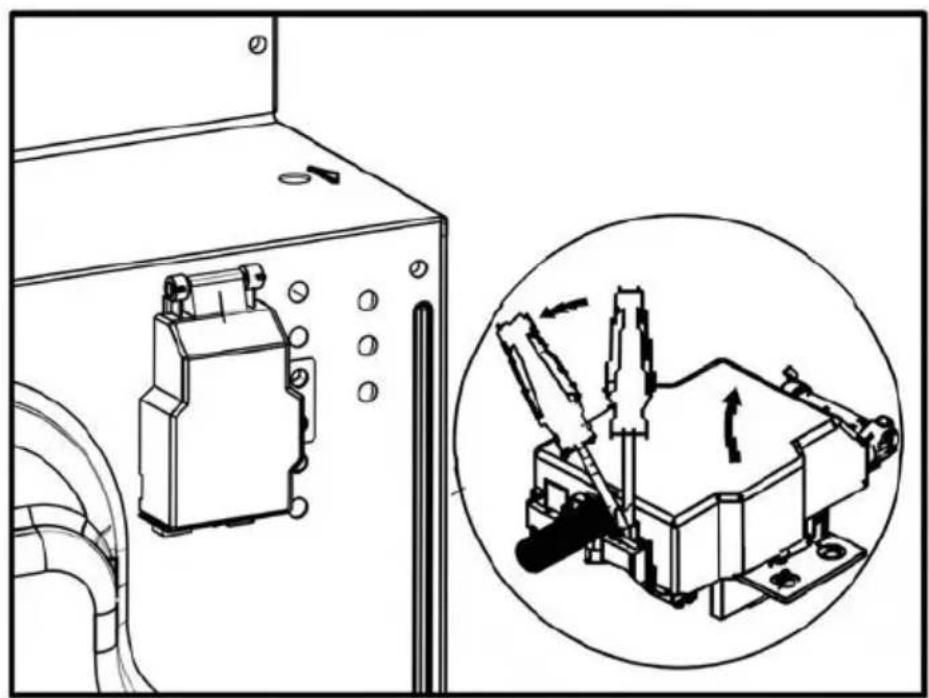
Opening the terminal box. (Fig. 4):
- Using a screwdriver, prise the bolt on the side tabs of the terminal box cover.
ENGLISH
- Unscrew the screw and open the cover.
To install the cable, proceed as follows:
- Remove the cable clamp screw and the three contact screws.
- Fix the wires under the screw heads using the following colour scheme:
- Blue - Neutral (N)
- Brown phase connector (L)
- Yellow-Green (Ground)
- Secure the power cable with the cable clamp and close the terminal box cover.
Opening the terminal box
- With a screwdriver, tighten the screw on the side tabs of the terminal box cover.
- Unscrew the screws on the side tabs of the cover and remove the latter.
Connecting the power cable to the mains
- Install a standard plug (not included) corresponding to the load indicated on the rating plate. When connecting the cable directly to the mains, install an omnipolar circuit breaker with a minimum contact opening of 3 mm between the device and the mains. The omnipolar circuit breaker must be sized according to the load and comply with the applicable regulations (the earth wire must not be interrupted by the circuit breaker).
- The power supply cable must be routed so that it does not reach a temperature above 50 °C above room temperature and must be protected by insulation with an appropriate rating.
Before connecting, check the following:
- The electrical safety of this appliance can only be guaranteed if the oven is correctly and effectively earthed in accordance with electrical safety regulations. Always make sure that the ground connection is effective; if in doubt, call a qualified technician to check the system. Cecotec declines all liability for damage resulting from a system that has not been grounded.
- Before connecting the appliance to the mains, check that the specifications indicated on the rating plate (on the appliance and/or on the packaging) correspond to those of the mains supply at home.
- Check that the electrical capacity of the installation and the sockets can withstand the maximum power of the appliance. If in doubt, contact a qualified technician.
- If the socket and plug of the appliance are not compatible, ask a qualified technician to replace the socket with a suitable model. The latter, in particular, will also have to ensure that the cross-section of the socket cables is adequate for the power used by the appliance.
ENGLISH
- The use of adapters, multiple sockets and/or extensions is not recommended. If their use cannot be avoided, remember to use only single or multiple adapters and extension cords that comply with current safety regulations. In these cases, never exceed the maximum current capacity indicated on the single adapter or extension cord and the maximum power indicated on the multiple adapter. Theplug and socket shall be easily accessible.
Accessories
- The provided accessories are suitable for preparing any type of food. Make sure to insert the accessories correctly when using the oven.
- There are optional accessories, with which you can enhance some of your favourite dishes, or simply cook in a more practical way.
Inserting the accessories
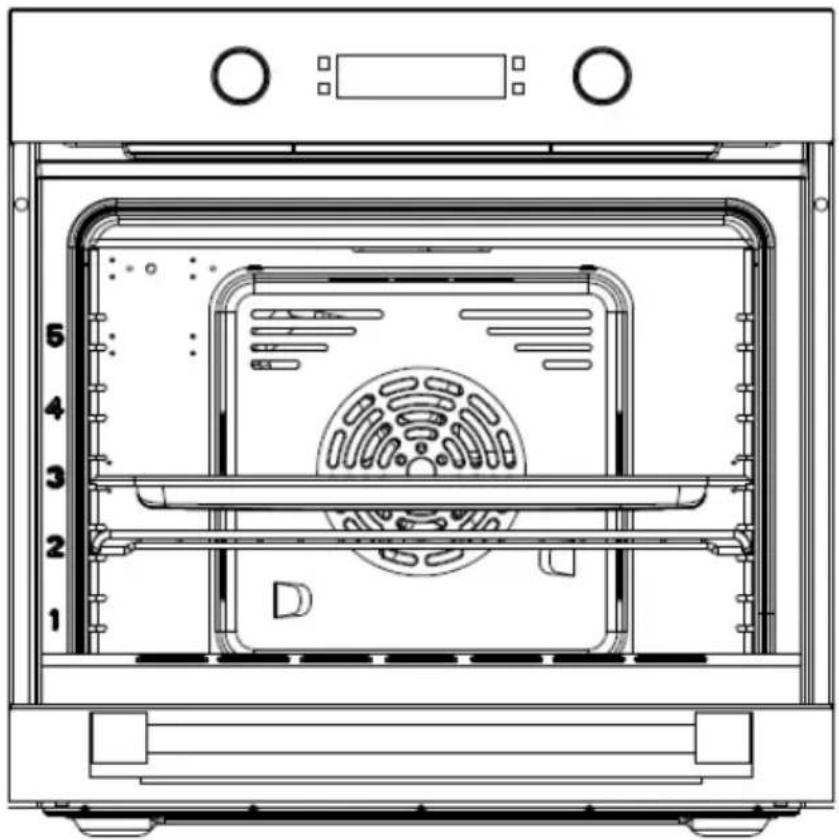
● The oven has 5 different levels on which you can place the accessories. Fig. 5.
WARNING: Insert them as far as they will go so that they do not touch the door panel.
- The accessories can be pulled out about halfway, allowing you to easily remove the food.
Note: Accessories may deform when heated. When they have cooled down, they will return to their original shape. This does not affect its operation.
Oven tray. Fig. 6.
For moist cakes, pies, frozen meals and large roasts. It can also be used to collect dripping fat when grilling directly on the rack.
Rack. Fig. 7
It is used for roasting and for placing food to be baked.
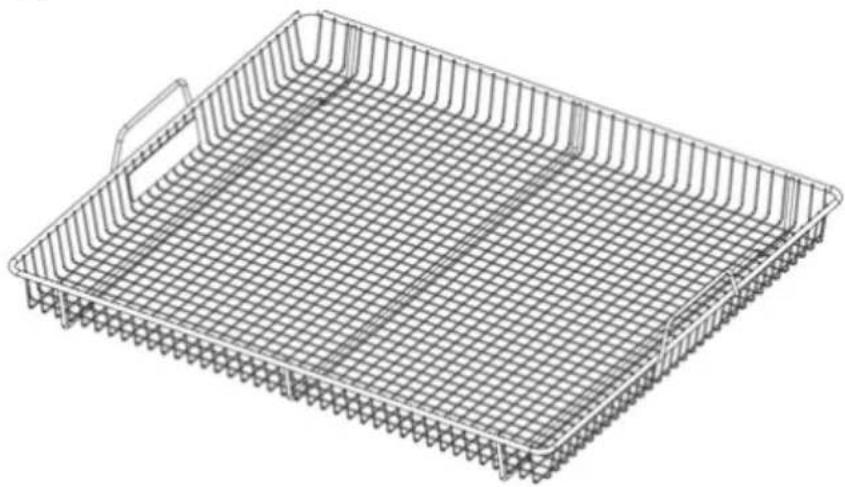
AirFryer mode basket. Fig. 8
Use the basket when activating the AirFryer mode. This will make cooking faster and you will get better results.
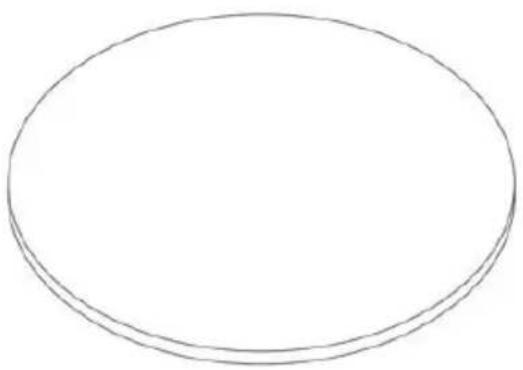
Pizza stone. Fig. 9
If you are going to bake a pizza, place it on this stone tray and activate the Pizza mode.
Guides
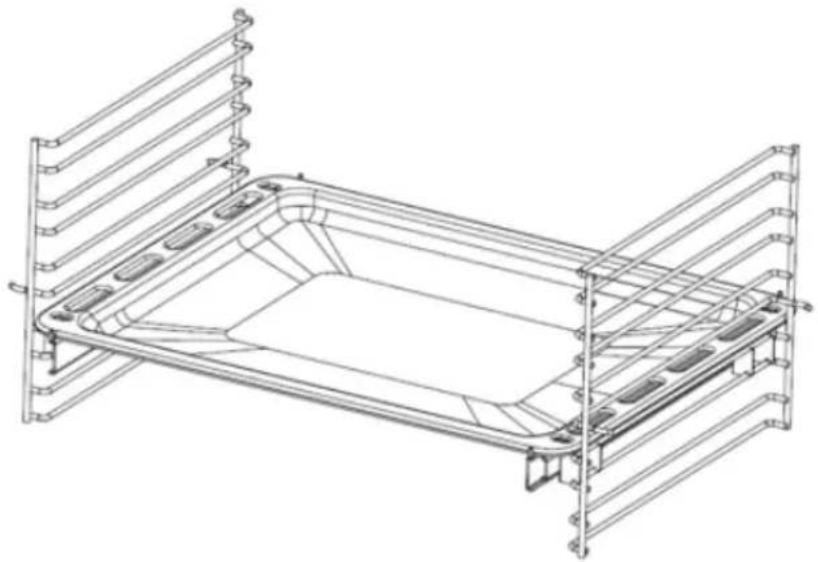
- This oven has 5 side guides so that you can place the accessories at the desired height. They are used to attach accessories that are fixed to the sides of the oven cavity.
- If you need more space for cooking, you can remove the guides and place them on
ENGLISH
the base of the oven.
Note: When placing food on the oven base, do not use modes where the bottom heating element is lit, to prevent heat build-up (specific models only).
Sliding guide (for specific models only). Fig. 10
It is usually placed in the second or fourth lateral guide. It makes it easier to insert and remove the tray or rack from the oven.
4. Operation
Control panel
The control panel can change depending on the model.
Icons and knobs. Fig. 11
- Alarm/Change of settings icon (Temperature/time)
- Clock/Delay End icon
- Start/Pause icon
- Light icon
- Mode knob
- Temperature/Time knob
Display. Fig. 12
| Function | |
| 1 | Selected mode indicator light |
| 2 | Operation indicator light |
| 3 | Delay end indicator light |
| 4 | Hours/minutes indicator light |
| 5 | Hour indicator light |
| 6 | Minute indicator light |
| 7 | Temperature indicator light |
| 8 | Temperature unit indicator light (°C) |
| 9 | Clock |
| 10 | Child lock function indicator light |
| 11 | Alarm indicator light |
| 12 | Interior light indicator light |
| 13 | Heating indicator light |
| 14 | Heating level indicator light |
ENGLISH
Oven functions
| Symbol | Function | ||
 | Top outer heating element | ||
 | Fan (Defrost function) | ||
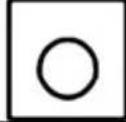 | Ring heating element | ||
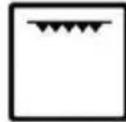 | Top inner heating element | ||
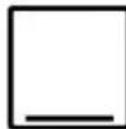 | Bottom heating element | ||
Operation
- Connect the oven to the mains to switch it on. Then, the control panel will light up and it will ask you to set the time. To do so, please refer to the relevant section.
NOTES:
- If, after 10 seconds, no operation has been performed, the oven will ask you to set the minutes.
- If, after 10 seconds, no operation has been performed, the oven will enter standby mode.
- If the oven is in standby mode and no operation is performed, it will automatically switch off after 3 minutes.
- When the oven is off, you can return to standby mode by pressing any icon or by moving the knob to the left. The oven will display the time and the clock indicator light (Figure 13).
Fig. 13. Standby mode
Time setting
- When the oven is in standby mode, press the clock icon . Then, use the knob on the right to set the time.
Fig. 14. Time setting
-
When you have finished setting the hours, press the clock icon again to set the minutes. Minutes will flash. Use the knob on the right to set them.
-
Fig. 15. Minutes setting
ENGLISH
-
Once the setting has been made, press the clock icon 📊 again to confirm it. NOTES:
-
If, after 10 seconds, you have not confirmed this, the system completes the default clock setting and automatically returns to standby mode.
- If you connect the oven to the mains and it takes more than 20 seconds to set the time, the system will default to 12:00 h and go into standby mode.
- If the oven is disconnected from the mains, you will have to reset the time.
WARNING: The time will only be displayed when the oven is in standby mode.
-
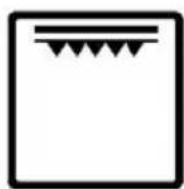
When the oven is in standby mode, you can select the desired mode using the knob on the left. The available modes are shown in Figure 16.
-
After selecting a mode, the default temperature and the indicator light will flash. If the temperature of that mode is not adjustable, the default time and indicator light will flash.
-
When you select a mode, you can adjust the time and temperature by pressing the icon.
NOTE:
● The time or temperature can be set by using the knob on the right.
- If, after 10 seconds, the time or temperature are not set, or if the icon is not pressed, the oven will enter standby mode.
● The time range of the modes is from 0 minutes to 10 hours.
- If you select 0 minutes and then press the icon, the oven will not start, but will enter standby mode.
Delay End function
-
Once the temperature and time have been set, and before pressing the icon to start the oven, press to select the time at which you want the oven to switch off. The delay end indicator light will flash as well as the clock indicator light. Set the desired time with the knob on the right.
-
When you have done this, press again and set the minutes. The minutes will flash, to adjust them, use the knob on the right.
-
You can use to set the hour and minutes alternately.
-
When you have selected the delay end time, press the ▷II icon to confirm.
ENGLISH
- Until it starts, the oven will display the time.
See the example shown in figure 17. This figure shows the display of the oven once the delay end has been activated.
- Once the Delay End is activated, the and clock icons will appear. In addition, the current time and the selected temperature and mode will also be displayed. For example, after having selected the mode, time and temperature, if you are not going to programme the delay end, you can press the ▷□ icon to start the oven (figure 19 shows what would appear on the display in operation).
NOTE: If, after 10 seconds, you have not confirmed the operation, the oven will enter standby mode.
-
When the oven is in operation, the display will show the indicator light, the countdown of the selected cooking time, the selected mode and temperature, the indicator light and the heating level indicator light.
-
If you change the selected function or temperature, these indicator lights will flash until you select the new settings and confirm them. The countdown will start when you switch the function on.
-
When the oven is in operation, press the icon to pause it.
-
If you press and hold the icon, the oven will enter standby mode.
-
When the countdown reaches 0, the oven will enter standby mode. A beep will sound for 5 minutes to let you know that the time is up.
-
Temperature range: the minimum temperature is 30^ ; if you select a lower temperature, the display will show "Lo °C".
Note: If you have activated the delay end function, the following will occur when the oven is operating: if the door is closed, the oven will operate normally; if the door is open, the oven will pause and the display will flash.
Query function
-
When you have selected a mode and started the oven, press the icon to check the time. The colon indicator light (":") shall flash. If you press the icon again, or if 10 seconds pass, the oven will return to the display of the selected mode.
-
When you have selected a mode or when you have activated the delay end and want to check the alarm countdown, press the icon. If you press the icon again, or if 10 seconds pass, the oven will return to the previous screen. If the oven is in standby mode, you can see the alarm countdown or set the time. If the remaining time is less than 1 minute, the display will show 0:00 (only hours and minutes are shown, not seconds).
ENGLISH
- If you have activated the delay end function and wish to check the time at which
the oven will start, press the icon. If you do so, the hour, minutes and the indicator light will flash. If you press the icon again, or if 10 seconds pass, the oven will return to the previous screen.
Alarm
- When the oven is in standby mode, press the icon to activate the alarm. The
hour will flash, the minutes will remain fixed and the indicator light will light up.
-
Turn the knob on the right to set the time, when you do so, this value will stop flashing and become fixed. The setting range is 0-23.
-
Press the 📞 icon again, the minutes will flash, while the hour will remain fixed.
-
Turn the knob on the right to set the minutes, when you do so, this value will stop flashing and become fixed. The setting range is 0-59.
-
When you have selected the time, press the ▷□□ icon to confirm the setting. The ":" icon will flash and the 🔊 will remain steady. The countdown will also start. When it reaches 0, a beep will sound for one minute (one second at a time) and the 🔊 icon will flash. To stop flashing, press any icon.
NOTE:
- During configuration, the ":" icon and the 🔊 will remain steady.
- During setting, if you press and hold the icon, the alarm setting will be cancelled and the oven will enter standby mode.
- If you have already set the alarm, the icon will appear on the display when the oven is in operation and you can check the remaining time.
Child lock function
- To activate the Child lock function, press the and icons simultaneously for 3 seconds. A beep will sound to indicate that the function has been activated.
Note: This function can be activated even if the oven is in standby mode. The Child lock indicator light will light up.
- To deactivate the Child lock function, press the and icons simultaneously for 3 seconds. A beep will sound to indicate that the function has been deactivated.
ENGLISH
Note:
- When the Child lock is activated, there will be no changes to the display. Icons and knobs will simply be blocked.
So, if you want to pause the oven when it is running and the Child lock function is activated, you will have to deactivate it first.
Start/Pause/Cancel function
- Once you have selected the mode and set the time and temperature, press the ▷II icon to start the oven.
NOTE: If you press when the oven is paused, it will restart.
- During cooking, press the icon to pause the oven. The time, which will flash on the display, can be set with the knob on the right. To adjust the temperature (in modes that allow it), press the icon. The temperature, which will flash on the display, can be set with the knob on the right. When you do so, the indicator light will flash, but the mode indicator light will remain fixed. Once you have set the temperature, press the icon to confirm the setting. If you want to cancel the cooking process, set the time to 0 or press and hold the icon.
NOTES:
- If you press and hold the icon when you are setting the time, the oven will enter standby mode.
- If you press and hold the icon when you are setting the mode, time or temperature, the oven will enter standby mode.
- If you press and hold the icon when you are setting the mode, time or temperature, the oven will enter standby mode.
Protection function
-
If the sensor is short circuited or disconnected, the display will show E-1 (Fig. 18) and 10 beeps will sound. If you press the icon, the oven will enter standby mode.
-
If you start a mode (other than Defrost and ECO) and after 5 minutes the temperature does not exceed 35^ , it means that one of the heating elements is faulty. If this occurs, the display will show the E-2 code (Fig. 20) and 10 beeps will sound. Press the icon for the oven to enter standby mode.
ENGLISH
Steam-assisted cooking function
- To activate this function, add 150 ml of purified water to the bottom of the oven cavity and select 200 °C temperature. Select Mode 10, bottom heating element. The approximate cooking time with this function is 20 minutes.
Note:
- Be sure to remove excess water from the oven cavity when the cooking process is complete.
- It is recommended not to add more than 500 ml of purified water; the maximum capacity is 1000 ml.
- You can adjust the amount of water and the temperature according to the needs of the food to be prepared.
● Make sure that the interior is completely cool before removing excess water. Otherwise, you could get burned.
Other indications
Oven beeps
● A beep will sound each time an icon is pressed.
- An alarm will sound when an error code appears on the display (when the sensor is short-circuited or disconnected or when one of the heating elements is faulty).
- When the oven reaches the selected temperature and when the countdown of the selected mode or alarm reaches zero, a beep will sound.
Modes
This oven features 12 modes. They are detailed below:
| Icons | Description | |
| Mode 1 |  | Quick preheating: In this mode, both parts of the top heating element (inner and outer) and the bottom heating element are activated to circulate heat alternately. The fan is also activated to provide an even heat distribution and shorten the cooking time. Thus, it is suitable to preheat the oven quickly. |
| Mode 2 |  | Conventional mode (top and bottom heating elements). This mode is suitable for roasting meat or baking food that is placed on a single level of the oven. |
ENGLISH
| Mode 3 |  | Full grill: In this mode, the inner and outer parts of the top heating element will be on so that heat descends towards the food. Thus, it is suitable for cooking medium to large sausages, bacon, veal or fish fillets, etc. |
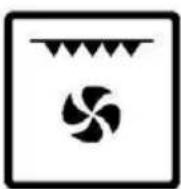
| Mode 4 | 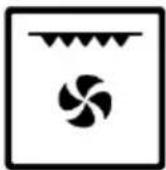 | Fan & grill: This mode uses the top heating element together with the fan, which helps to circulate the heat. |
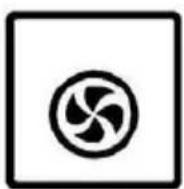
| Mode 5 |  | Fan-assisted heating: In this mode, the ring heating element and the fan are activated, allowing better heat circulation. The cooking time is short, so it is an economical way to cook. The heat will be transmitted evenly at all levels, which will prevent the flavours of the different preparations from mixing. |
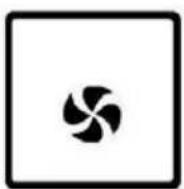
| Mode 6 | 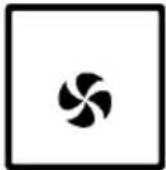 | Defrosting: In this mode, the fan is activated at room temperature. The defrosting time will vary according to the type of food and quantity. |
| Mode 7 |  | Fan & top and bottom heating elements: This is the Conventional mode. If selected, the fan and both heating elements will be switched on. |
| Mode 8 | [HZT] | Half grill: This mode only uses the inner part of the top heating element, which causes the heat to be directed downwards. Suitable for cooking small portions of bacon, toast, meat, etc. |
| Mode 9 |  | Fan and grill heating: This mode uses the top heating element and the fan, which allows the heat to circulate more quickly inside. Thus, it is suitable for when you need food to cook quickly and to prevent some foods such as steaks, hamburgers, and some vegetables from losing juiciness. |
| Mode 10 |  | Pizza: This mode activates the fan and the bottom heating element, making it suitable for heating the oven base quickly. |
| Mode 11 |  | AirFryer: This mode simultaneously activates the top heating element, the ring heating element and the fan. This allows the oven to heat up quickly and remove moisture from the surface of the food, making it crispier on the outside and more tender on the inside. |
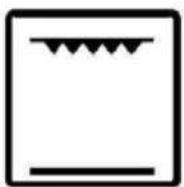
| Mode 12 |  | ECO mode: In this mode, the inner part of the top heating element and the bottom heating element are used to control the temperature, thus reducing energy consumption. This function is suitable for baking large foods, as the oven temperature rises progressively, allowing the heat to fully penetrate the food. |
Before using the oven for the first time
Heating the oven
To remove the smell, heat the oven while it is empty and closed. We recommend that you choose a function in which both heating elements are activated (Conventional mode) and set the oven to 250 °C for one hour. Make sure that no packaging remains inside the oven.
- Use the knob to activate the Conventional Mode function.
- Set the temperature knob to 250^ C. After one hour, turn off the oven. To do this, turn the function knob to the off position.
Accessories cleaning
Before using the accessories for the first time, clean them thoroughly with hot water, soap and a soft cloth.
Energy saving tips
The following information will help you to save energy:
- Use dark-coloured or enamel-coated cookware, as heat transmission will be better.
● Preheat the oven before cooking food. - Do not open the oven door frequently during cooking.
- Try to cook more than one dish in the oven at the same time. You can cook by placing two cooking containers on the rack.
● Cook more than one dish, one after the other. The oven will still be hot. - You can save energy by switching off the oven a few minutes before the cooking time. Do not open the oven door.
● Defrost frozen dishes before cooking.
ENGLISH
Oven operation
WARNING: Risk of burns. Be careful when opening the oven door, as steam may escape.
Baking tips
- Use suitable metal trays or aluminium containers with non-stick coating or heat-resistant silicone moulds.
● Make the best use of the rack space. - It is recommended to place the mould in the centre of the rack.
- Keep the door closed.
Roasting tips
- If you are cooking a whole chicken or turkey, or a large piece of meat, season it with a little lemon juice and black pepper.
● Meat with bones takes 15 to 30 minutes longer to cook than a roast of the same size without bones. - You should allow 4 to 5 minutes of cooking time per centimetre of height of the meat.
- Let the meat rest in the oven for about 10 minutes after the cooking time. This way, the juices will be better distributed throughout the roast, and will not run out when the meat is cut.
● If you are cooking fish, set it to medium or low. - If you are roasting food, preheat the oven for 4 minutes before putting it in. When the oven is in operation, always close the door.
- As far as possible, the pieces of food to be grilled should be of the same thickness. This will allow them to brown evenly and remain tender and juicy.
● Turn the food you are grilling after 2/3 of the time has elapsed. - Do not add salt to the beef steaks until they have been grilled.
- Add a little liquid if the meat is lean. Cover the base of the dish with about 1/2 cm of liquid.
- Place the food to be grilled directly on the rack. If you are grilling a single piece, the best results are achieved by placing it in the centre of the rack. Also, place the oven tray on level 1 to collect the fat.
- When grilling, do not insert the baking tray on levels 4 or 5, as this could deform it.
- The heating element switches on and off continuously. This is normal. The setting of the function determines how often this will occur.
- When the roast is ready, turn off the oven and leave to rest for a further 10 minutes. This allows a better distribution of the meat juices.
- If you are roasting pork with a crust, cut the crust crosswise and place the roast on
ENGLISH
the plate with the crust on the bottom.
- Place whole birds on the bottom rack, breast side down. Turn them over after 2/3 of the specified time.
- If cooking duck or goose, pierce the skin on the underside of the wings. This allows the fat to escape.
- If you are cooking fish pieces, turn them after 2/3 of the specified time. It is not necessary to do this if you cook the fish whole. Place the whole fish in the oven with the dorsal fin upwards. Placing half a potato or a small oven-safe container in the stomach cavity of the fish will make it more stable.
- How to know if the roast is ready. Use a meat thermometer (available in specialised shops) or perform the "spoon test". Press down on the roast with a spoon. If it's hard, it's ready. If, on the other hand, you can press it with a spoon, it needs a little more cooking.
- The roast is too dark in colour and some parts are slightly burnt. Check the height at which it is placed and the temperature.
- The roast looks good, but the juices are burnt. Next time, use a smaller baking dish or add more liquid.
- The roast looks good, but the juices are too clear and watery. Next time, use a bigger baking dish or add less liquid.
- Steam comes out of the roast. This is normal and is due to the laws of physics. Most of the steam escapes through the steam outlet. Steam can settle and form condensation on the knobs or on adjacent furniture elements.
Tips for using the Grill function
This function is ideal for cooking meat, fish and poultry, as these foods will be browned but not dry. Flat pieces, meat skewers and sausages are particularly suitable for grilling with the Grill function, as are vegetables with a high water content, such as tomatoes and onions.
Baking tips
● How to know if a sponge cake is well baked.
About 10 minutes before the end of the baking time specified in the recipe, insert a toothpick into the highest point of the cake. If the toothpick comes out clean, the cake is ready.
● The sponge cake crumbles.
Use less liquid next time or adjust the oven temperature 10 degrees lower. Observe the mixing times specified in the recipe.
● The cake has risen in the centre, but is lower at the edges.
Do not grease the sides of the mould. After baking, carefully remove the cake from the tin. Use a knife to do this.
ENGLISH
● The top of the cake is too dark.
Place it lower in the oven, select a lower temperature and bake it for a little longer.
● The sponge cake is too dry.
When done, poke small holes in it with a toothpick. Then, sprinkle it with fruit juice or an alcoholic beverage. Next time, select a temperature 10 degrees higher and reduce the baking time.
● The bread or cake (e.g. cheesecake) looks good, but is soggy inside.
Use a little less liquid next time and bake for a little longer at a lower temperature. For wet topping cakes, bake the base first. Sprinkle with almonds or breadcrumbs, then top with the topping. Follow the recipe and baking times.
● The cake browns unevenly.
Select a slightly lower temperature so that the cake bakes more evenly. Bake delicate cakes on a single level using the Conventional Mode. If the greaseproof paper protrudes, it can affect air circulation. For this reason, always cut the paper to the size of the baking tray.
● The bottom of a fruit cake is too light.
Place the cake on a lower level next time.
● The fruit juice overflows.
Next time, use a deeper container.
● Bakery products made with yeast dough stick together during baking.
There should be a space of about 2 cm between each product. In this way, there is enough space for them to expand well and brown on all sides.
- It has been baking on several levels.
The food in the upper tray is darker than the food in the lower tray. Always use 3D hot air for baking on more than one level. Just because you put several trays in the oven does not mean that they will all be ready at the same time.
● Condensation forms when baking moist cakes.
Cooking can lead to the formation of steam, which escapes over the door. Steam can settle and form water droplets on the control panel or on adjacent furniture elements. This is normal.
5. Cleaning and maintenance
- The oven must be cleaned after each use. When cleaning the oven, the light must be switched on so that the surfaces can be seen better.
- The inside of the oven should only be washed with lukewarm water and a little liquid soap.
● After cleaning the inside of the oven, wipe it dry with a cloth.
● Never clean oven surfaces with steam cleaners. - The inside of the oven should only be cleaned with warm soapy water, using a sponge or soft cloth. Abrasive cleaners must not be used.
- Any stains that may appear on the bottom of the oven will have been caused by splashes of food or spilled food. These splashes occur during the cooking process. They may be due to food being cooked at too high a temperature or placed in a container that is too small.
- You must select a temperature and cooking function suitable for the food to be cooked. You should also make sure that you place the food in an appropriately sized dish and use the oven tray where appropriate.
- The exterior parts of the oven should only be cleaned with warm soapy water, using a sponge or soft cloth. Abrasive cleaners must not be used.
- If you use any type of oven cleaner, make sure that it is suitable for this appliance.
● Damage caused to the appliance by a cleaning agent will not be repaired free of charge, even if the appliance is within the warranty period. - Do not use cleaning products containing abrasive materials for cleaning and maintenance of the glass front panel.
WARNING: No oven cleaner or other special cleaning agents are required to clean the oven. It is recommended to clean the oven with a damp cloth while it is hot.
Steam-assisted cleaning
Use this function to remove food remains from inside the oven. It is only suitable for cleaning light soiling. It is not efficient for ingrained dirt and stubborn stains caused by cooking. This function can only be used when the oven is cold.
Cleaning process
- Remove all accessories from the oven.
- Prepare a solution of water (85%), white vinegar (10%), and dish detergent (5%) and spray generously on the door, side walls, and rear wall of the oven cavity.
- Pour 40 ml of water into the base of the oven cavity.
- Close the door. Select the Steam cleaning function and set the oven to 120^ C.
ENGLISH
- Switch off the oven after 15 minutes.
- Allow it to cool down and then wipe the surface with a damp cloth.
- Dry the inside with a cloth or kitchen paper.
WARNING:
Before doing so, make sure that the oven is completely cool. Otherwise, you could get burned.
Assembling and disassembling the oven door
- To clean the door, remove it. Each door hinge is fitted with a locking rod. When the door is closed, the door locks into place. To remove the door you will need to open the locking rod.
- When the hinge is not locked, the door may suddenly close with great force. Therefore, make sure that the locking rod is closed at all times. It should only be open when the door is removed.
Disassembling the door
- Open the door completely.
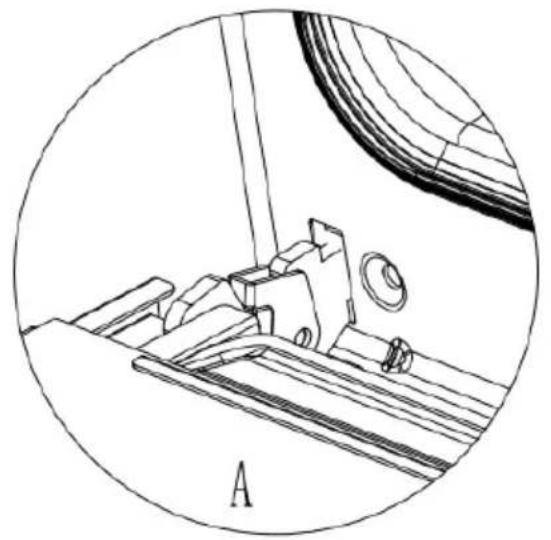
- Lift both sides of the locking rod. Fig. 21
- Close the door as far as it will go. Hold it on both sides, then close it again. Move it up and down and pull it out.
Positioning the door
Follow the reverse order of disassembly of the door.
- When fitting the door, make sure that both hinges fit correctly.
- When opening the door, lower the locking rod. Fig. 22
- If the door accidentally falls down or the hinges suddenly close, do not reach into the hinges. Contact Cecotec's Official Technical Support Service.
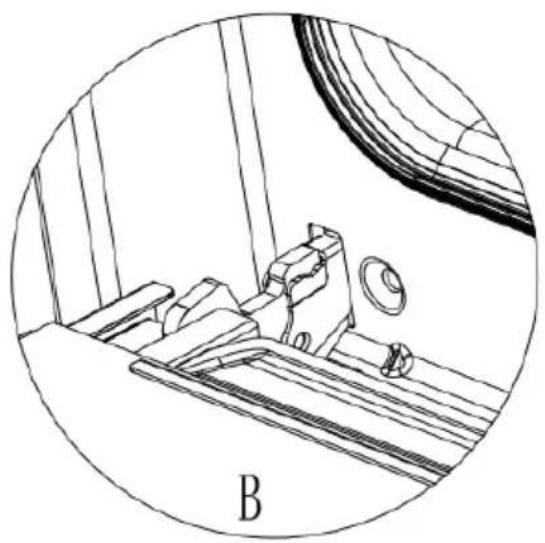
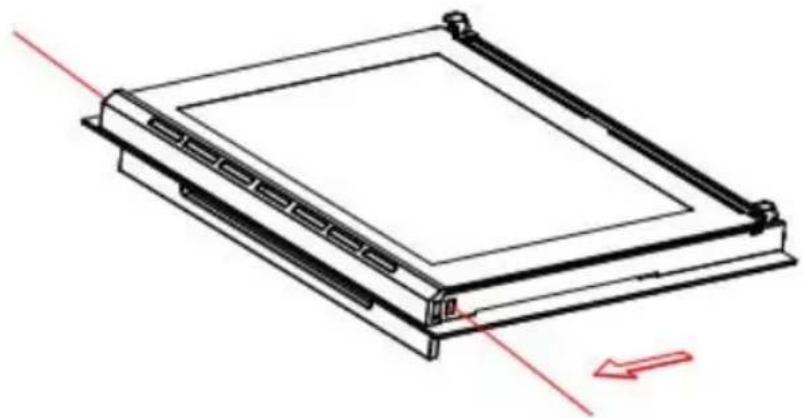
Disassembling and installing the door panel. Fig. 23
Disassembly
- Remove the oven door and place it on a piece of cloth.
- Press the button on the inside door glass bracket with both hands. The bracket will be released automatically.
- Remove the inner and centre panes.
Note:
- If the glass has some scratches, it may crack.
● Do not use a glass spatula or abrasive cleaning agents for cleaning.
ENGLISH
Installation
- Insert the inner pane into the slot.
- Both the right and left sides must be aligned with the slot. When they are, push the glass into place.
- Position the oven door.
Removing and installing the side guides
To clean the sides of the oven, you can remove the guides. To do this, push the side of the oven with one hand and hold the front of the guide with the other hand. Then, pull it out.
Replacing the oven light bulb
⚠️ If the light bulb malfunctions, it should be replaced. There is a risk of electric shock.
To replace the light bulb, follow the steps below:
- Switch off the circuit breaker in the fuse box.
- Place a kitchen towel in the oven when it is cold to prevent it from spoiling.
- Unscrew the glass cover by turning it counterclockwise.
- Replace the bulb with one of the same type.
- Screw the glass cover back on.
- Remove the tea towel and switch on the circuit breaker.
Periodic inspections
In addition to keeping the oven clean, you should:
● Conduct regular inspections. After the warranty period has expired, the oven must be inspected by a service centre at least once every two years.
● Repair any operational faults.
⚠ WARNING: All repairs must be carried out by qualified personnel.
6. Troubleshooting
The oven may malfunction during operation. Check the list before calling the Technical Support Service. You may be able to repair some faults yourself.
Normal operation:
- When using the oven for the first time, it may release a peculiar smell and smoke for a few hours. Therefore, we recommend that you run it for one hour with nothing inside. After this time, allow it to cool and clean it.
- When the oven is in operation, you may hear some crackling, this is due to the metal bottom of the oven.
● If the food to be heated has some moisture in it, the heat emission orifice may give
ENGLISH
off steam during operation.
- The fan will start to run 15 minutes after the oven is switched on. Even if the oven is closed, the fan will continue to run for 35 minutes.
● Preheat the oven before putting in the food.
- If you are going to bake for a long period of time, you can turn off the oven before the time is up. This will use the residual heat to finish cooking
Troubleshooting
| Problem | Possible cause | Possible solution |
| The oven does not work | There has been a power cut. | Check the light in your kitchen or the operation of another appliance. |
| Circuit breaker failure. | Check if the circuit breaker is working. | |
| You forgot to select the function you want. | Select the function. | |
| The light does not switch on. | Defective light. | Replace the lightbulb |
| There is no power supply. | Check if the oven is powered by electricity. | |
| The device suddenly stops working. | There has been a power cut. | Check the light in your kitchen or the operation of another appliance. |
| Thermostat failure | Check if the fan is working. If so, replace the thermostat with a new one. | |
| The oven does not heat | You have not selected the temperature. | Adjust the temperature. |
| If this model has a timer, you cannot set the time. | Set the timer. | |
| No power supply. | Check the power supply box. | |
| The heating element is damaged. | Replace the heating element for a new one. | |
| Water leaks out of the door when using the oven. | Door seal is damaged. | Replace the door seal. |
| The hinge is not strong enough. | Replace the hinge. | |
| The oven stops working, but the motor does not. | The oven has been running for a long period of time, so it needs time to cool down. | Place your hand on the air outlet. If you notice that the air comes out hot, it is not a problem. |
| Thermostat failure. | If you notice that the air comes out at room temperature, replace the thermostat. |
If the problem has not been solved:
- Remove the oven from the mains (switch off or disconnect the fuse).
- Contact the official Cecotec Technical Support Service. Do not try to repair the appliance on your own.
7. Disposal of old electrical and electronic appliances
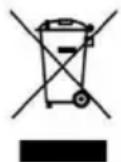
This symbol indicates that, according to the applicable regulations, the product and/or batteries must be disposed of separately from household waste. When this product reaches the end of its service life, you must remove the batteries/accumulators and take it to a collection point designated by local authorities.
For detailed information on how to properly dispose of electrical and electronic equipment and/or the corresponding batteries, consumers should contact their local authorities.
Compliance with the above guidelines will help to protect the environment.
8. Copyright
The intellectual property rights over the texts in this manual belong to CECOTEC INNOVACIONES, S.L. All rights reserved. The content of this publication may not, either in part or in its entirety, be reproduced, stored in a retrieval system, transmitted or distributed by any means (electronic, mechanical, photocopying, recording or similar) without prior authorisation from CECOTEC INNOVACIONES, S.L.
9. Simplified EU Declaration of Conformity

Cecotec Innovaciones hereby declares that this appliance complies with the essential requirements and other relevant provisions of the regulations applicable in the European Union. This appliance has been designed, manufactured and tested in compliance with required safety and quality standards. The full text of the EU Declaration of Conformity can be found on the following website:
https://cecotec.es/es/information/declaration-of-conformity
10. Technical specifications
Product reference: 04733
Product: Bolero Hexa AF326000 Glass Black A
Product reference: EU01_121500
Product: Bolero Hexa AF326000 Line A
Product reference: EU01_121501
Product: Bolero Hexa AF326000 Matt Black A
| Symbol | Value | Unit | |
| Model reference | 04733 / EU01_121500 / EU01_121501 | ||
| Type of oven | Electric oven | ||
| Mass of the appliance | M | 30.8 | Kg |
| Number of cavities | 1 | ||
| Heat source per cavity (electricity or gas) | Electricity | ||
| Volume per cavity | V | 73 | L |
| Energy consumption (electricity) required for heating a standardised charge in an electric furnace cavity for one cycle in conventional mode, per cavity (final electrical energy) | ECelectric cavity | 0.82 | kWh/cycle |
| Energy consumption required to heat a standardised load in a cavity of an electric heated oven during a cycle in fan-forced mode per cavity (electric final energy) | ECelectric cavity | 0.86 | kWh/cycle |
| Energy consumption required to heat a standardised load in a gas-fired cavity of an oven during a cycle in conventional mode per cavity (gas final energy) | ECgas cavity | N/A N/A | MJ/cycle kWh/cycle (1) |
| Energy consumption required to heat a standardised load in a gas-fired cavity of an oven during a cycle in fan-forced mode per cavity(gas final energy) | ECgas cavity | N/A N/A | MJ/cycle kWh/cycle |
| Energy Efficiency Index per cavity | EEIcavity | 95.3 | |
| Energy efficiency class | A | ||
| (1) 1 kWh/cycle = 3.6 MJ/cycle. | |||
ENGLISH
The appliance power consumption when off is 0.37 W, following the guidelines of EN 50564:2011 and the European regulations 1275/2008/EC and 801/2013/EC. This measurement is taken with the appliance connected to the mains power supply without performing any function. The appliance switch/knob was set to the "off" position.
This appliance features an A rating energy efficient light source.
Technical specifications may change without prior notice to improve product quality. Made in China | Designed in Spain
11. Technical support and warranty
Cecotec shall be liable to the end user or consumer for any lack of conformity that exists at the time of product delivery under the terms, conditions and deadlines established by applicable regulations.
Repairs should be carried out by qualified personnel.
If at any moment you detect any problem with your product or have any doubt, do not hesitate to contact Cecotec's Official Technical Support Service at +34 96 321 07 28.
FRANÇAIS
FRANÇAIS
https://storececotec.it/it/information/declaration-of-conformity
Retirar e instalar as guias laterais
https://cecotec.pt/pt/information/declaration-of-conformity
- De cake is te droog.
https://cecotec.es/es/information/declaration-of-conformity
10. Technische specificaties
Productreferentie: 04733
Product: Bolero Hexa AF326000 Glass Black A
Product: Bolero Hexa AF326000 Line A
Product: Bolero Hexa AF326000 Matt Black A
https://cecotec.es/es/information/declaration-of-conformity
10. Müszaki adatok
https://cecotec.es/es/information/declaration-of-conformity
https://cecotec.es/es/information/declaration-of-conformity
https://cecotec.es/es/information/declaration-of-conformity
- المواصفات الفنية
https://cecotec.es/es/information/declaration-of-confomity
natural_image
Line drawing of an open oven with ventilation grilles and control knobs (no text or labels)Fig 4
natural_image
Technical line drawing of an electrical enclosure with a magnified inset showing internal components (no text or symbols)Fig 5
natural_image
Technical line drawing of an oven with numbered components (1–6), showing internal structure and ventilation slots (no text or symbols)Fig 6
natural_image
Technical line drawing of a square electronic device casing with internal compartments (no text or symbols)Fig 7
natural_image
Isometric line drawing of a rectangular metal grate or rack structure (no text or symbols)Fig 8
natural_image
3D wireframe model of a rectangular metal tray with grid pattern and handle (no text or symbols)Fig 9
natural_image
Simple hand-drawn oval shape with no text, numbers, or symbolsFig 10
natural_image
Technical line drawing of a bed frame structure with metal railings and support brackets (no text or symbols)Fig 11
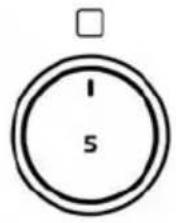

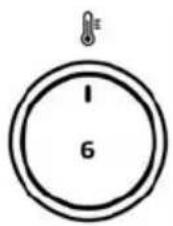
Fig 12
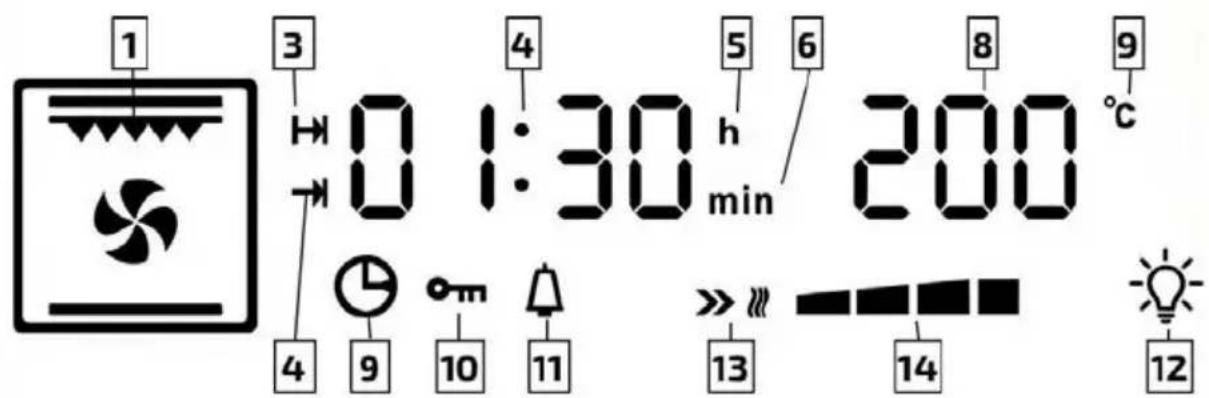
Fig 13
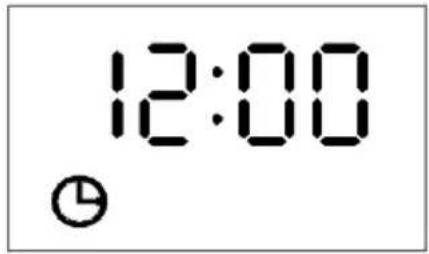
Fig 14
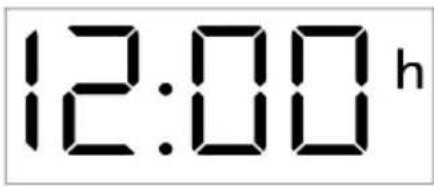
Fig 15
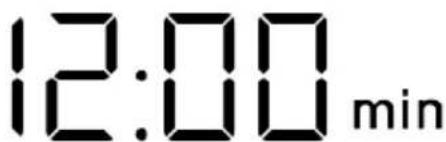
Fig 16

1

2
3
4
5
6

7

8

9

10

Air Fry
ECO
Fig 17
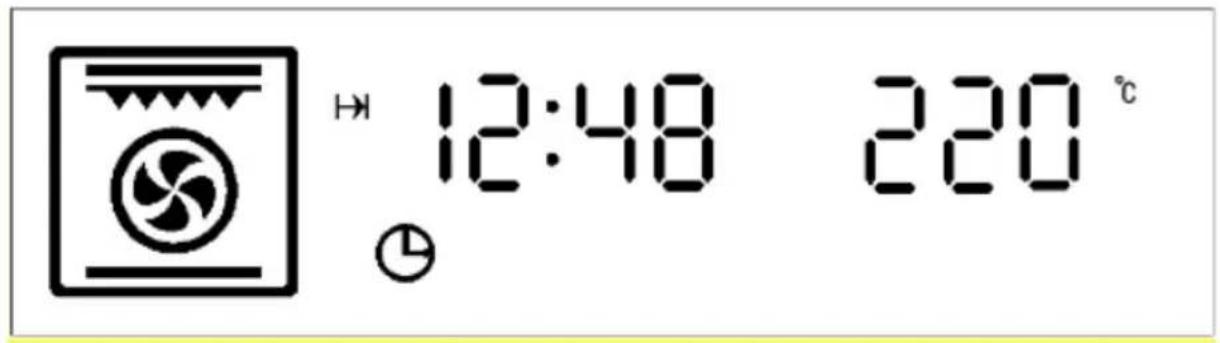
Fig 18

Fig 19
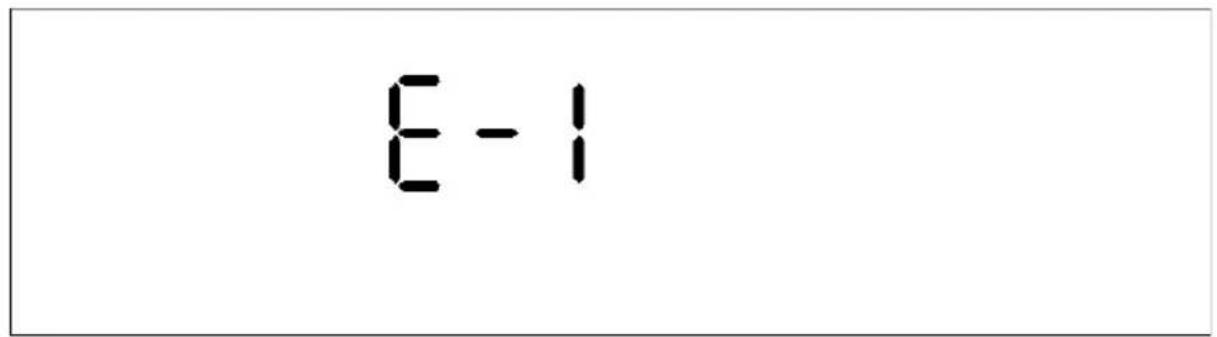
Fig 20
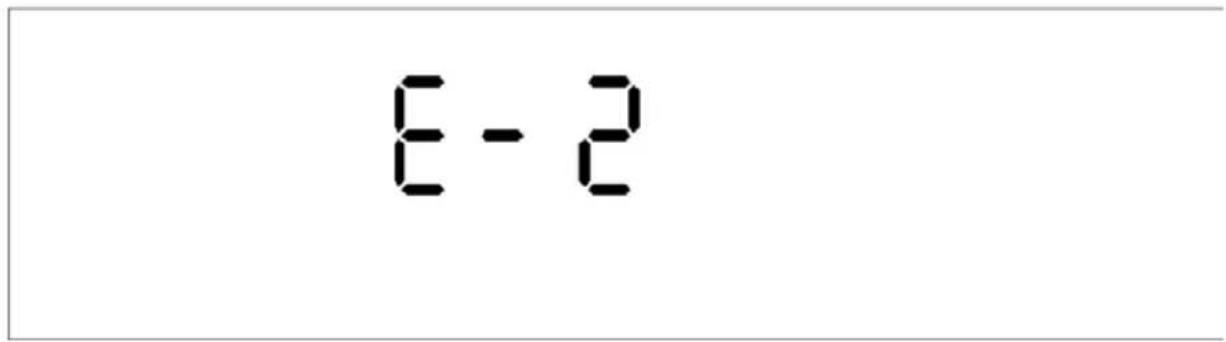
Fig 21
natural_image
Technical line drawing of a mechanical assembly with labeled section A (no text or symbols beyond label)Fig 22
natural_image
Technical line drawing of a mechanical assembly inside a circular frame, labeled 'B' (no text or symbols on the diagram itself)Fig 23
natural_image
Technical line drawing of a rectangular electronic component with mounting brackets and a red directional arrow indicating motion (no text or symbols)www.cecotec.es
Cecotec Innovaciones S.L. Av. Reyes Católicos, 60 46910, Alfafar, Valencia (Spain)
- NOTA
- Parts and components
- Fig. 1
- NOTE:
- Before use
- Box content
- ENGLISH
- Appliance installation
- Before installation
- Installation and connection
- Connection to the mains
- Risk of electric shock
- Installation
- Electrical connections
- Mounting the power cable
- Opening the terminal box
- Connecting the power cable to the mains
- Before connecting, check the following:
- Accessories
- Inserting the accessories
- Guides
- Operation
- Control panel
- Operation
- NOTES:
- Time setting
- Fig. 14. Time setting
- Delay End function
- Query function
- Alarm
- Child lock function
- Start/Pause/Cancel function
- Protection function
- Steam-assisted cooking function
- Other indications
- Oven beeps
- Modes
- Before using the oven for the first time
- Heating the oven
- Accessories cleaning
- Energy saving tips
- Oven operation
- Baking tips
- Roasting tips
- Tips for using the Grill function
- Cleaning and maintenance
- Steam-assisted cleaning
- Cleaning process
- WARNING:
- Assembling and disassembling the oven door
- Disassembling the door
- Positioning the door
- Disassembly
- Removing and installing the side guides
- Replacing the oven light bulb
- Periodic inspections
- Troubleshooting
- Normal operation:
- Disposal of old electrical and electronic appliances
- Copyright
- Simplified EU Declaration of Conformity
- Technical specifications
- Technical support and warranty
- FRANÇAIS
- Retirar e instalar as guias laterais
- Technische specificaties
- Müszaki adatok
Brand : CECOTEC
Model : Bolero Hexa AF326000
Category : Oven