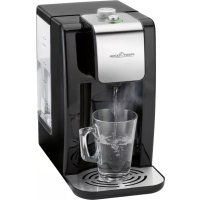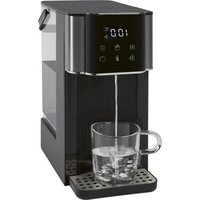
PC-HWS 1320 - Water dispenser PROFICOOK - Free user manual and instructions
Find the device manual for free PC-HWS 1320 PROFICOOK in PDF.


| Product type | Water dispenser |
| Brand | ProfiCook |
| Model | PC-HWS 1320 |
| Power supply | 220-240 V~, 50-60 Hz |
| Power consumption | 2200-2600 W |
| Standby power consumption | ≤ 0.5 W |
| Tank capacity | 3 liters max. |
| Net weight | Approx. 2 kg |
| Adjustable temperatures | 40, 50, 60, 70, 80, 90, 100 °C and without heating (000) |
| Preset water quantities | 150 ml, 250 ml, 350 ml |
| Manually adjustable water quantities | 100, 200, 300, 400, 500 ml or unlimited |
| Control type | Touch panel with display |
| Automatic shut-off | Yes, after dispensing the set quantity or 2 minutes of inactivity |
| Overheat protection | Yes |
| Settings memory | Yes, as long as the device remains plugged in |
| Audible signal | Yes, confirmation and end of dispensing |
| Drip tray | Removable with stainless steel support, magnetic attachment |
| Water tank | Removable, with lid and level indicator |
| Descaling | Recommended every 2 to 4 fills with a citric acid-based descaler |
| Maintenance | Clean the tank and tray with a soft cloth; wipe the exterior with a slightly damp cloth |
| Protection class | I |
| Storage | Drain residual water via the drainage opening; store in a dry place |
Frequently Asked Questions - PC-HWS 1320 PROFICOOK
User questions about PC-HWS 1320 PROFICOOK
0 question about this device. Answer the ones you know or ask your own.
Ask a new question about this device
Download the instructions for your Water dispenser in PDF format for free! Find your manual PC-HWS 1320 - PROFICOOK and take your electronic device back in hand. On this page are published all the documents necessary for the use of your device. PC-HWS 1320 by PROFICOOK.
USER MANUAL PC-HWS 1320 PROFICOOK
natural_image
Modern digital water dispenser with digital display and glass mug, no visible text or symbols on main subjectHeißwasserspender PC-HWS 1320
Hot Water Dispenser • Heet water dispenser • Distributeur d'eau chaude Dispensador de agua caliente • Erogatore di acqua calda • Dozownik gorącej wody Melegvíz-adagoló • Диспенсер для горячей воды • موزع اللماء الساخن
CE
Bedienungsanleitung......Seite 4
Instruction Manual...... Page 9
Gebruiksaanwijzing......Pagina 13
Mode d'emploi.... Page 18
Manual de instrucciones ...... Página 23
Istruzioni per l'uso....Pagina 28
Instrukcja obsługi......Strona 33
Használati utasítás .... Oldal 38
Руководство по эксплуатации ...... стр. 42
50 صفحة دليل التعليمات
Be sure to read the separately enclosed safety instructions first.
Instruction Manual
Thank you for choosing our product. We hope you will enjoy using the appliance.
Read the instruction manual and the separately enclosed safety instructions very carefully before using this appliance. Keep these documents, including the warranty certificate, receipt and, if possible, the box with the inner packaging in a safe place. If you pass the appliance on to a third party, always include all the relevant documents.
Symbols in this Instruction Manual
Important information for your safety is specially marked. It is essential to comply with these instructions in order to avoid accidents and prevent damage to the appliance:

WARNING:
This warns you of dangers to your health and indicates possible injury risks.

CAUTION:
This refers to possible hazards to the appliance or other objects.
Content
Overview of the Components....3
Unpacking the Appliance....9
Overview of the Components / Scope of Delivery......9
Warnings for the Use of the Appliance ....10
Connected Load....10
Notes for Use....10
Placement....10
Water....10
Water Tank 10
Drip Tray with Stainless Steel Support 10
Electric Connection 10
Standby (Standby Mode)....10
Button Functions....10
Functionality of the Appliance 10
First Use....11
Operation 11
Decalcification....11
Cleaning....11
Storage....12
Troubleshooting....12
Technical Data....12
Disposal....12
Meaning of the "Dustbin" Symbol 12
Unpacking the Appliance
- Remove the appliance from its packaging.
- Remove all packaging material, such as foils, filling material, cable ties and cardboard packaging.
- Check the scope of delivery for completeness.
- If the contents of the packaging are incomplete or if damage can be detected, do not operate the appliance. Return it to the dealer immediately.
- There may still be dust or production residues on the appliance. We recommend that you clean the appliance as described under "Cleaning".
Overview of the Components / Scope of Delivery
Illustration A: Appliance
1 Water tank lid
2 Handle
3 Water level indicator
4 Water tank
5 Button for resetting an error message
6 Mains cable
7 Valve
8 Housing
9 Drain closure
11 Water faucet
12 Control panel with display
10 Shelf / drip tray with stainless steel support (removable)
Illustration B: Control Panel
13 Display of temperature in degrees Celsius (°C) / display of water quantity in millilitres (☐)
14 Sensor button 📋 (250 ml)
15 Sensor button ☐ (350 ml)
16 Sensor button (switch appliance on / off / start water dispensing)
17 Sensor button ⚫(select temperature)
18 Sensor button 📋(manual selection of filling quantity)
19 Sensor button 📋 (150 ml)
Warnings for the Use of the Appliance

WARNING: Risk of Burns!
- Keep hands away from the water outlet when hot water is being prepared.
- The temperature of the water outlet is high during operation. Do not touch.
- Only use fresh, cold drinking water from the tap!
- Place the appliance on a waterproof surface, as water splashes may occur when water is dispensed.
- It is essential to ensure that the drainage plug on the underside of the appliance is closed before the appliance is put into operation!
Connected Load
The appliance has a total power consumption of 2600 W. With this connected load, a separate supply line with a 16 A household circuit breaker is recommended.

CAUTION: Overload!
- If an extension lead is used, it should have a cable cross-section of at least 1.5 ~mm^2 .
- Do not use a multiple socket as this appliance is too powerful.
Notes for Use
Placement
- Place the appliance on a stable and level surface.
- Due to rising heat and vapours do not operate the appliance under wall cabinets.
- Do not place the appliance in close proximity to a gas or electric stove or any other heat source.
Water
The fresh drinking water that you fill into the water tank should have a temperature of 22 °C to 28 °C . Do not fill with water above 35 °C or below 15 °C . This can cause fluctuations in the temperature of the water dispensed.
Water Tank
There are two ways to fill the water tank with water.
- If the water tank is in the housing, fill the water using a container.
- Alternatively, you can remove the water tank beforehand and reinsert it when full.
- Pull the water tank upwards by the handle to remove it. Hold the appliance firmly with the other hand.
- Push the filled water tank into the housing so that the water tank lid is flush with the appliance. Press the water tank down to open the valve.
- Only operate the appliance when the water tank lid is in place.
Drip Tray with Stainless Steel Support
If you are using a small cup, place the drip tray with the stainless steel support under the water outlet. The drip tray is magnetically locked in place when it is positioned closer to the appliance.
Electric Connection
Ensure that your mains power corresponds with the specifications of the appliance. The specifications are printed on the type label.
Standby (Standby Mode)
Connect the mains cable to a properly installed and earthed wall outlet. A signal tone is heard and the sensor button lights up on the control panel. The appliance is in standby mode.
Button Functions
The appliance features touch buttons. A slight touch of the control panel with the finger is enough. Use the fingertip, not the top of the finger. Each press of the button is confirmed by an acoustic signal.
| Button | Function |
| Press and hold for 3 seconds to switch the appliance on or off. | |
| Start or prematurely end water dispensing. | |
| Setting the water temperature in °C:40 / 50 / 60 / 70 / 80 / 90 / 100 / 000 (without heating) | |
| Pre-programmed water quantity of 150 ml | |
| Pre-programmed water quantity of 250 ml | |
| Pre-programmed water quantity of 350 ml | |
| Setting the water volume in ml:100 / 200 / 300 / 400 / 500 / 000 (endless, water dispensing must be stopped manually using the button ⏻ |
- If no button is pressed within 2 minutes, the appliance automatically switches to standby mode.
Functionality of the Appliance
- The appliance will save the temperature and quantity setting selected last as long the power plug has not been removed from the socket.
- Once the selected amount of water has been dispensed the appliance will stop dispensing automatically. You will hear 3 signal tones.
First Use

CAUTION:
Before first use cold water must run through the heating system to avoid activating the over temperature protection.
- Fill the water tank with clean, fresh water to the MAX marking.
- Place an empty container under the water outlet. The container must be able to hold at least 500 ml of water.
- Switch on the appliance.
- Check the temperature setting. It must be set to "000".
- Tap the button until "500" is shown in the display.
- To start dispensing water tap the button ⏻
- Once the water discharge is completed you will hear 3 signal tones.
- Pour the dispensed water away. Place the container back under the water outlet.
- Select the temperature "100" °C.
- Start the water dispense once again. Also pour this dispensed water away.
The water dispenser is now ready to use.
- If you accidentally heat up the water to 100 °C during first use the over temperature protection of the appliance may be activated. During the next use the appliance would dispense cold water only. In this case refer to "Troubleshooting".
Operation
- Always use fresh, cold water.
- Ensure that a sufficient amount of water is left in the tank.
- Place a vessel with the desired volume onto the drip tray
- Switch the appliance on.
- Tap the button to set the desired temperature.
- Tap the button to select the desired amount of water. Or use the buttons ☐, ☑ or ☑ to select a pre-set amount of water.
- Start dispensing water by tapping the button The display alternately displays the selected temperature and the amount of water.
- Tap the button ⏻ to interrupt the water dispenser. You will hear 3 signal tones.
Decalcification
Decalcification is necessary if preparation time increases or if the amount of water issued varies. In any case, we recommend that you decalcify the appliance after filling the water tank 2 – 4 times, depending on the degree of hardness of your tap water.
- Use only commercially available citrus acid-based de-scaler.
- Follow the recommended instructions for use.
- Dispense hot water with a temperature of 100^ once.

WARNING:
- Then dispense the biggest volume (500 ml) of hot water with a temperature of 100 °C for three times in order to rinse any residues of de-scaling agent.
- Do not use this water for consumption.
Cleaning

WARNING:
- Always disconnect the mains plug from the socket before cleaning. Wait until the appliance has cooled down.
- Do not immerse the appliance in water! This could lead to an electric shock or fire.

CAUTION:
- Do not use a wire brush or any abrasive items.
- Do not use any acidic or abrasive detergents.
• Empty the water tank completely. -
Wipe out the water tank with a damp cloth (without additives). Then wipe it with a dry cloth.
-
When using the appliance for the first time rinse the water tank with clean water. Use a cloth to wipe the water tank dry. Repeat this step several times.
• Empty the drip tray. Wipe it dry. - Use a microfibre cloth to remove water stains on the stainless steel covers.
- The exterior of the appliance should be cleaned as necessary with a slightly damp cloth - without any additives.
Storage
- Clean the appliance as described. Allow the accessories to dry completely.
-
If the appliance is not used for a longer period of time, the residual water must be drained. Proceed as follows:
-
Remove the water tank.
-
Place the appliance with the drainage plug on one side over the sink.
-
Pull the plug out of the appliance.
- Hold the appliance upright over the sink. The drainage will be emptied.
- Use the closure to lock the drainage again.
- We recommend storing the appliance in its original packaging if you do not intend to use it for a longer period of time.
- Always store the appliance out of the reach of children in a well-ventilated and dry place.
Troubleshooting
| Problem Possible Cause Remedy | ||
| The appliance has no function. | The appliance has no power supply. | Check the power socket with another appliance. |
| Insert the mains plug correctly. | ||
| Check the house fuse. | ||
| The appliance is defective. | Contact our service or a specialist. | |
| “E7” will appear on the display. | The water tank is empty. Fill the water tank with cold water immediately.The error message is deleted. You may need to adjust the previously set water quantity.If the error message “E7” remains visible, disconnect the appliance from the power supply for about one minute. | |
| The appliance is dispensing water without heating it up. | The over temperature protection is enabled. | 1. Remove the water tank.Press the “RESTART” button (5) on the housing.Reinsert the water tank.Continue as described under “First Use”. |
Technical Data
Model: PC-HWS 1320
Power supply: 220–240 V\~, 50–60 Hz
Power consumption: 2200–2600W
Power consumption in standby mode: ....≤ 0.5 W
Switching off to standby mode: ≤ 5 minutes
Protection class: I
Filling capacity: max. 3 litres
Net weight: .... approx. 2 kg
The right to make technical and design modifications in the course of continuous product development remains reserved.
This appliance has been tested according to all applicable, current CE directives and built according to the latest safety regulations.
Disposal
Meaning of the "Dustbin" Symbol
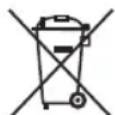
Protect our environment: do not dispose of electrical equipment in the domestic waste.
Please return any electrical equipment that you will no longer use to the collection points provided for their disposal.
This helps avoid the potential effects of incorrect disposal on the environment and human health.
This will contribute to the recycling and other forms of re-utilisation of electrical and electronic equipment.
Information concerning where the equipment can be disposed of can be obtained from your local authority. Your dealer and contractual partner is also obliged to take back the old appliance free of charge.
BELANGRIJK:
WAARSCHUWING: Verbrandingsgevaar!
Pobór mocy: 2200–2600W
CTC Clatronic Sp. z o.o
Ul. Brzeska 1
45-960 Opole
Usuwanie
49 Household ( Household) Household
49..... وظitaف الأزرار
49..... ........
49 alاستخدام الأول
48....التشخيل