USER MANUAL SHFS 2150 B1 SILVERCREST
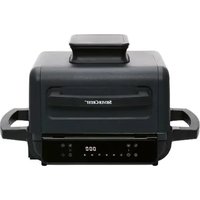
PREMIUM-HEIßLUFTFRITTEUSE SHFS 2150 B1 PREMIUM AIR FRYER SHFS 2150 B1 FRITEUSE À AIR CHAUD PREMIUM SHFS 2150 B1
GB IE NI Operating instructions
PREMIUM AIR FRYER
For EU market: Imported for GB market by:
HOYER Handel GmbH Lidl Great Britain Ltd
Kühnehöfe 12 Lidl House · 14 Kingston Road
22761 Hamburg Surbiton · KT5 9NU
GERMANY
Stand der Informationen · Status of information · Version des information
Android iOS
- Overview 31
- Intended purpose 32
- Safety information 32
- Items supplied 35
- How to use 36
- Overview of operating panel and display 37
- The basics of frying 38
- Operation 39
8.1 Power connection 39
8.2 Switching on/off.... 39
8.3 Basic operation 39
8.4 Using Programs 40
8.5 Interrupting the cooking process.... 40
8.6 End of the cooking process 41
8.7 The programs at a glance 41
8.8 Cooking table 42
- Control via app 42
9.1 Requirements for the app 42
9.2 Installing the app 42
9.3 Establishing a connection to the device.... 43
9.4 Switching WiFi on/off 43
9.5 App functions for the hot air fryer.... 43
9.6 Terminate wireless connection 44
9.7 Standard functions of the Lidl Home app.... 44
- Recipes 45
10.1 Mixed French fries with herb mayonnaise 45
10.2 Pigs in a blanket 46
10.3 Baked Camembert with cranberries.... 46
10.4 Stuffed tomatoes 47
10.5 Falafel made from chickpea flour 47
10.6 Salmon parcel 48
10.7 Courgette and aubergine skewers.... 48
10.8 Mini pizza with ham and rocket 49
10.9 Marinated chicken wings.... 49
10.10 Chocolate tartlets with a liquid core 50
- Cleaning 50
- Storage 51
- Disposal 51
- Trouble-shooting 51
- Technical specifications 52
- Warranty of the HOYER Handel GmbH 53
1. Overview
1 Housing
2 Heating element (at the top of the interior)
3 Display and operating panel
4 MAX Marking for the maximum filling level of the frying basket (maximum filling level is 5.2 litres)
5 Frying basket
6 Safety catch
7 Button for unlocking the frying basket
8 Handle of the frying basket
9 Pan; the liquid from cooking collects here
10 Power cable with mains plug
11 Spacer with cable spool
12 Air outlet
Thank you for your trust!
Congratulations on your new hot air fryer.
For safe handling of the product and in order to get to know the entire range of features:
- Read these operating instructions thoroughly prior to initial use.
- Above all, observe the safety information!
- The device should only be used as described in these operating instructions.
- Keep this copy of the operating instructions for information purposes.
- If you pass the device on to someone else, please include this copy of the operating instructions. The operating instructions are a part of the product.
We hope you enjoy using your new hot air fryer!
Symbols on the device
This symbol warns you against touching the hot surface.

The food-safe material of devices with this symbol will not change the taste or smell of food.
2. Intended purpose
The hot air fryer is intended for the cooking of food in hot air at a temperature of up to max. 200 °C.
The hot air fryer is designed for private, domestic use. The hot air fryer must only be used indoors.
This device must not be used for commercial purposes.
Foreseeable misuse
The hot air fryer is not suitable for heating liquids.

Bluetooth®
The Bluetooth® word mark and the Bluetooth logo (®) are registered trademarks of Bluetooth SIG Inc. (Special Interest Group), and any use of these trademarks by Hoyer Handel GmbH is under licence.
All other names and trademarks are the property of their respective owners.
Warnings
If necessary, the following warnings are used in these operating instructions:

DANGER! High risk: failure to observe this warning may result in injury to life and limb.
WARNING! Moderate risk: failure to observe this warning may result in injury or serious material damage.
CAUTION: low risk: ignoring this warning may result in minor injuries or damage to property.
NOTE: circumstances and specifics that must be observed when handling the device.
Instructions for safe operation
- This device can be used by children from the age of 8 and people with restricted physical, sensory or intellectual abilities or a lack of experience or knowledge if they are supervised or have been instructed in how to use this device safely and if they have understood the resulting dangers. Children must not play with the device. Cleaning and user maintenance must not be performed by children unless they are older than 8 years and supervised.
- Children under the age of 8 must be kept away from the device and the power cable.
- Misuse may result in injuries.
- Do not touch any hot parts of the device such as the air outlet on the back. The frying basket should only be touched at the handle.
- During frying, hot steam escapes from the air outlet. Be careful not to put your hands into the steam.
- If the mains power cable of this device should become damaged, it must be replaced by the manufacturer, the manufacturer's customer service department or a similarly qualified specialist, in order to avoid any hazards.
- The heating element must not be wiped with a damp cloth.
- This device is not intended to be operated using an external timer or a separate remote control system.
- This device is equally intended for use in the home and in applications similar to the home, such as for example...
... in kitchens for staff in shops, offices and other commercial settings;
... on agricultural properties;
... by customers in hotels, motels and other residential facilities; ... in bed-and-breakfast establishments.
- Please take note of the chapter on cleaning (see "Cleaning" on page 50).

DANGER for children!
- Please make sure that the hot air fryer can never be pulled down (e.g. with the power cable) by children. In cases of scalding there is danger to life!
- Packing materials are not children's toys. Children should not be allowed to play with the plastic bags: there is a risk of suffocation.

DANGER to and from pets and livestock!
Electrical devices can represent a danger to pets and livestock. In addition, animals can also cause damage to the device. For this reason you should keep animals away from electrical devices at all times.

DANGER for birds!
Birds breathe faster, distribute the air differently in their bodies and are significantly smaller than humans. For this reason, it may be dangerous for birds to inhale even the smallest smoke quantities, which develop while this device is in operation. When using this device, birds should be relocated into a different room.

DANGER! Risk of electric shock due to moisture!
- Protect the device from moisture, water drops and water splashes.
- The device, the power cable and the mains plug must not be immersed in water or any other liquids.
- If liquid gets into the device, disconnect the mains plug immediately. Have the device checked before reusing.
- If the device has fallen into water, pull out the mains plug immediately, and only then remove the device from the
water. Do not use the device again, and have it checked by a specialist workshop.
- Never touch the device with wet hands.

DANGER! Risk of electric shock!
- To avoid any risk, do not make modifications to the product. Repairs must be carried out by a specialist workshop or the Service Centre.

DANGER - Fire hazard!
- Never leave the device unattended while it is plugged in.
- Never leave the hot air fryer unattended during operation. You will thus be able to detect possible problems early on due to unusual smells or noises.
- Never cover the device or place it on soft objects (e.g. towels).
- Make sure that there is free space on all sides and above the device.
- Do not use the hot air fryer directly under wall units or wall sockets and not near to any curtains, paper or any similar flammable objects.
- The hot air fryer should only be operated on a stable, flat, non-slip, dry and non-flammable work surface, in order to prevent it from tipping over or slipping away.

DANGER! Risk of injury through burning!
- Do not touch the hot surfaces of the device or the interior. Use oven gloves or potholders.
- Allow the device to cool down completely before you clean it or put it away.
- Do not move or transport the hot air fryer while it is switched on.
WARNING! Risk of material damage!
- Only use original accessories.
- Never place the device on hot surfaces (e.g. hot plates) or near to heat sources or open fire.
-
Make sure that the food will not touch the hot heating element at the top of the interior and become stuck there.
-
Do not clean using sharp objects or abrasive cleaning agents.
The device is fitted with non-slip plastic feet. As furniture is coated with a variety of different varnishes and acrylics, and treated with different cleaning agents, it cannot be completely ruled out that components are contained in some of these substances that could damage and soften the plastic feet. If necessary, place a non-slip mat under the device.
4. Items supplied
1 hot air fryer
1 pan 9
1 frying basket 5
1 complete copy of the operating instructions (on the Internet)
1 copy of the short manual (enclosed with the device)
5. How to use
- Remove all packing material. The interior in particular must be completely free of packaging remains such as polystyrene particles.

DANGER - fire hazard!
On the back of the device you will find the air outlet 12 and the spacer 11. Hot air escapes from the air outlet during operation.
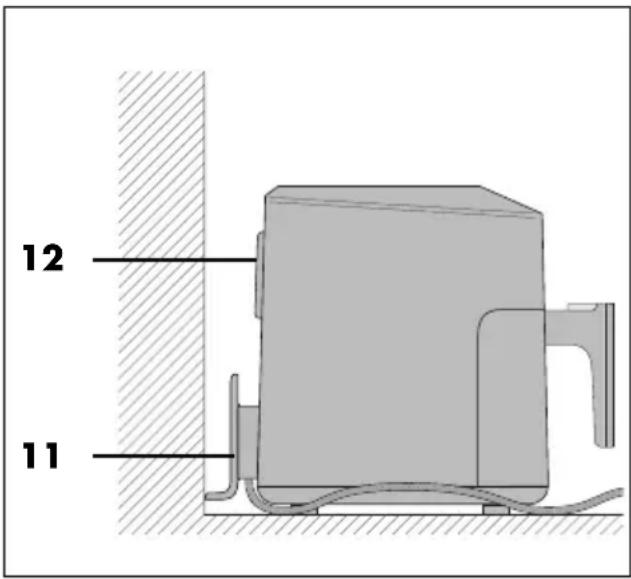
- Never cover the air outlet 12.
- Do not use the hot air fryer directly under wall units or wall sockets and not near to any curtains, paper or any similar flammable objects.
- Make sure that there is free space on all sides and above the device.
-
Take the pan 9 by the handle 8 and remove it from the housing 1.
-
Slide the safety catch 6 in the direction of the arrow.
-
Press the button 7 to unlock the frying basket and lift the frying basket 5 out of the pan 9.
NOTE: when in operation for the first time, some smoke and odour may be generated by the device. This is due to the assembly materials used for the heating element 2 and is not a fault in the product. Ensure adequate ventilation.
- Remove protective films and adhesive strips from the device, but do not remove the rating plate on the underside of the device.
- Check that all accessories are present and undamaged.
- Clean the device and all accessories before using for the first time (see "Cleaning" on page 50).
- Place the device on a dry, level, non-slip, heat-resistant surface.
- Insert the mains plug 10 into a wall socket corresponding to the specifications of the rating plate. The wall socket must also be easy to reach after switching on the device.
6. Overview of operating panel and display
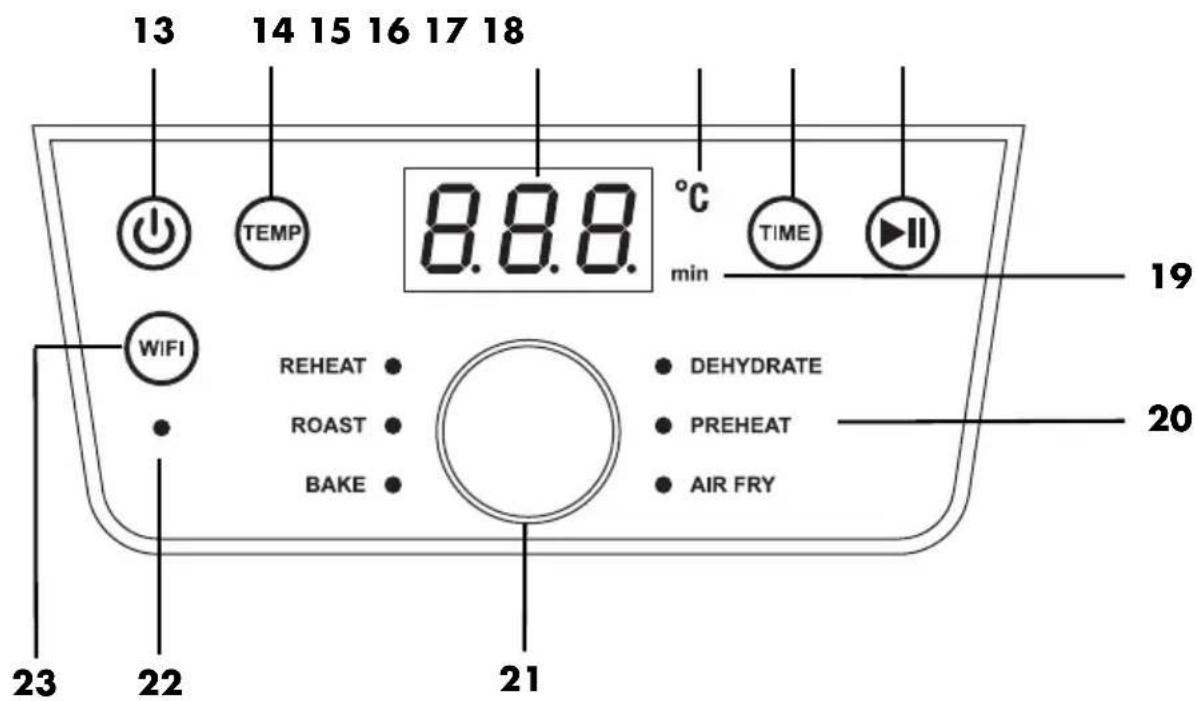
13 Switching on/off
14 TEMP Press to change the temperature; display flashes
15 The display indicates the temperature and cooking time
16 °C Lights up when the temperature is displayed.
17 TIME Press to change the cooking time; display flashes
18 Start/Pause function
19 min Lights up when the time is displayed.
20 6 programs (see "The programs at a glance" on page 41)
21 Control dial:
- press to open the menu for program selection. The LED behind REHEAT lights up. Turning selects the programs. The selected program is displayed by the lit LED.
- turn to change the temperature or time, only when the values flash on the display.
22 LED flashes when a connection to the app can be established. As long as it is flashing there is no connection.
23 WIFI Press briefly: the LED lights up when the device has been switched from offline to online.
Press for approx. 3 seconds: an acoustic signal is heard and the LED flashes; a connection to the app can be established.
7. The basics of frying
Preparation of the food
- All food must be as dry as possible when used for frying. Dry the food to be fried and remove any ice from frozen food.
- When using deep-frozen food, remove as much water and ice as possible before you put the food into the hot air fryer.
- In case of breaded food, please make sure that the breading sticks as tightly as possible to the food to be fried.
Frying time and frying temperature
- For a tasty and healthy result, the information on the packaging should be observed very carefully when selecting the temperature and the frying time.
- Only small quantities should be fried at a time.
- The frying basket 5 must not be filled more than the MAX 4 marking.
- Acrylamide may be carcinogenic. In order to reduce the formation of acrylamide as much as possible, browning the food too much should be avoided.
For an even browning 12
1 : Shake or turn every 5 minutes.
2: Shake or turn halfway through the cooking time.
If the food (e.g. French fries or chicken nuggets) requires an even browning, give it 1 - 2 shakes during the frying process.
-
Use the handle 8 to pull the pan 9 together with the frying basket 5 out of the housing 1 and shake the contents. While shaking make sure that the French fries are being thoroughly mixed and that the still rawer ones at the basket centre will get to the outside. The ventilation switches off automatically when the pan 9 is removed. The display 3 flashes.
-
Reinsert the pan 9 with the frying basket 5 into the device. The interrupted process will be restarted automatically.
Baking
Dough may never be filled directly into the frying basket 5. After preparing the dough put it into a baking tin or another heat-resistant pan (e.g. muffin liners). Then put the container holding the dough into the frying basket 5.
Package instructions
If on a package of deep-frozen food you don't find information regarding the cooking times for hot air fryers, observe the times given for convection ovens.
8. Operation

DANGER of burns!
- During operation, the surfaces of the device may become hot. Do not touch any hot parts of the device such as the air outlet 12 on the back.
- Use oven gloves or potholders to handle the pan 9 and the frying basket 5.
- During frying, hot steam escapes from the air outlet 12. Be careful not to put your hands into the steam.
- Do not move or transport the hot air fryer while it is switched on.
WARNING! Risk of material damage!
The device must not be operated under any circumstances without the frying basket 5!
8.1 Power connection
- When the device is set up, plug the mains plug 10 into an earthed wall socket that corresponds to the specifications on the rating plate. The wall socket must also be easy to reach after switching on the device.
- A short acoustic signal can be heard.
8.2 Switching on/off
- Press the button ⏻ 13 to switch on the device from standby mode.
- A short acoustic signal can be heard.
- All program LEDs light up briefly.
- The preset temperature of 180\ °C is shown on the display 3.
- The device can be switched to standby mode at any time by pressing the button 13 again. This also works during running programs.
8.3 Basic operation
The following applies: the device is switched on.
Accessing programs
- Press the control dial 21. The LED behind REHEAT lights up.
- Turn the control dial until the LED of the desired program lights up – this indicates that the program has been selected.
Changing the temperature
The temperature can be set in increments of 5 degrees between 60 and 200 °C.
- Press the button TEMP 14. The temperature flashes on the display 3.
- Turn the control dial until the desired temperature is displayed. The flashing stops approx. 5 seconds after adjustment. The new temperature has been set.
Changing the time
The cooking time can be set in increments of 1 minute between 1 and 60 minutes. (From 60 minutes to 24 hours in the DEHYDRATE program.)
- Press the button TIME 17. The time flashes on the display.
- Turn the control dial until the desired time is displayed. The flashing stops approx. 5 seconds after adjustment. The new time has been set.
8.4 Using Programs
NOTES:
- Make sure that the food will not touch the hot heating element 2 at the top of the interior and become stuck there.
• QUICK START FUNCTION
Switch the device on from standby mode with the button ⏻ 13. Pressing the button ⏻ 18 starts cooking at the preset temperature of 180 °C and the preset cooking time of 15 min.
The device has preset programs for certain foods and types of preparation. When you select a program, you can also carry out the following settings at any time:
NOTE: to change the temperature, press TEMP; to change the time, press TIME.
While the corresponding value is flashing in the display, you can change it by turning the control dial. Wait approx. 5 seconds after turning. The display stops flashing and the new value is set.
- Start the cooking process by pressing the button ☐ 18. The program is started.
- The remaining runtime is shown on the display.
- The temperature and remaining runtime can also be changed while the program is running.
8.5 Interrupting the cooking process
NOTES:
- 20 minutes after the cooking process is interrupted, the device switches to off mode.
- Too long a pause can affect the quality of the cooking very negatively.
- In the AIRFRY program, an acoustic signal sounds every 5 minutes to remind you to shake or turn the French fries.
You can interrupt the cooking process of any time, e.g. to check the degree of browning.
- Take the pan 9 by the handle 8 and remove it from the housing 1. When the pan 9 is taken out, the device automatically switches itself off.
- The program symbol and the display flash.
- The cooking time is displayed.
- The fan stops until the pan 9 is reinserted.
- Reinsert the pan into the device. The device switches on again automatically until the cooking time has expired.
or
- Press the button ☑ 18 briefly to pause the cooking process.
- The display flashes.
- The cooking time is displayed.
- Press the Start/Pause button 18 again to continue the cooking process.
8.6 End of the cooking process
- When the program has run through to the end, an audio signal sounds and End appears on the display.
- You need a heat-resistant surface for the pan 9 and the frying basket 5 and a plate or bowl (pre-heated if necessary).
-
To disconnect the device from the power supply pull the mains plug 10 after use.
-
Take the pan 9 by the handle 8 and remove it from the housing 1. Place the pan 9 on the heat-resistant surface.
-
Figure A: slide the safety catch 6 in the direction of the arrow.
-
Press the button 7 to unlock the frying basket and lift the frying basket 5 out of the pan 9.
- Place the frying basket 5 on the heat-resistant surface. Place the food on the prepared plate / in the prepared bowl.
- Allow the device and accessories to cool down before cleaning them.
NOTE: if, for example, the degree of browning does not yet meet your requirements, you can adapt the cooking process manually. Slide the pan 9 with the filled frying basket 5 back into the housing 1 and restart the cooking process. Check the level of browning after a few minutes. Simply pull the pan 9 by the handle 8 out of the housing 1 and then replace it again.
8.7 The programs at a glance
- The following table provides basic settings advice for the specified foods.
| Program Use | | Preset temperature (adjustable range) | Preset time (adjustable range) |
| REHEAT Reheating | | 200 °C(60 – 200 °C) | 15 min.(1 – 60 min.) |
| ROAST Steaks, chops | | 200 °C(60 – 200 °C) | 20 min.(1 – 60 min.) |
| BAKE Muffins, cakes and baked goods | | 150 °C(60 – 200 °C) | 18 min.(1 – 60 min.) |
| DEHYDRATE | Dehydrate/dry food (plums, apple slices) | 60 °C(fixed temperature) | 2 hours(60 min. – 24 hrs.) |
| PREHEAT Preheating | | 200 °C(60 – 200 °C) | 5 min.(1 – 60 min.) |
| AIRFRY | Frozen French fries1 | 190 °C(60 – 200 °C) | 30 min.(1 – 60 min.) |
8.8 Cooking table
- The temperatures and cooking times specified in the cooking table are reference values. Depending on the quality, size and quantity of the food, and on your taste, you can vary the temperature and time.
| Food to be cooked °C Minutes | Optimal quantity | Maximum quantity |
| French fries1 | 190 30 – 40 500 g 1 | 400 g | |
| Chicken legs2 | 200 30 | 45 | 0 g 1000 g | |
| Vegetables2 | 180 15 – 30 400 g 1 | 400 g | |
| Part baked bread rolls2 | 180 | 8 | 4 in total 6 in total |
| Muffins | 150 18 | 4 in | total 9 in total | |
| Salmon fillet | 200 | 16 | 100 g | 500 g |
| Steak2 | 200 | 5 – 20 | 100 g | 500 g |
The superscript numbers 1,2 have the following meaning:
1: shake or turn every 5 minutes. The AIRFRY program emits an acoustic signal every 5 minutes as a reminder.
2: shake or turn halfway through the cooking time.
9. Control via app
The hot air fryer can also be controlled via an app. To use this function, you need to install the Lidl Home app.
You can use the app to conveniently set the cooking temperature and cooking time. The app also keeps you informed about the current status of the cooking process.
9.1 Requirements for the app
You will need:
- Mobile device (connected to the router in the 2.4 GHz frequency band)
Android: 6.0 or higher
iOS: 12.0 or higher
- Existing WiFi 2.4 GHz with access to the Internet
- WiFi access data
- Lidl Home app account (can also be created after installing the app using the app)
NOTE: if necessary, use the router software to ensure that your mobile device is connected to the 2.4 GHz frequency band.
9.2 Installing the app
Download the Lidl Home app from the App Store
Once you have ensured that you have an active internet connection on your mobile device, you can download the Lidl Home app.
- Open the App Store on your mobile device (Android: Google Play App Store, Apple: iOS App Store).
- Enter Lidl Home in the search bar.
- Tap the Install / Get button to downlo the app to your mobile device.
• After installing, open the app and follow the instructions.
Download the Lidl Home app via the QR code
- Scan one of the following QR codes with your mobile device (depending on your operating system).
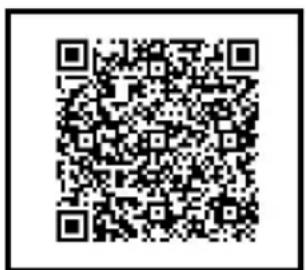
Android iOS
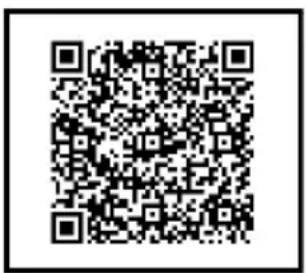
- Install Lidl Home.
- After installing, open the app and follow the instructions.
9.3 Establishing a connection to the device
- Activate Bluetooth and WLAN/Wi-Fi on your smartphone.
- Switch on the hot air fryer.
- Briefly press the WIFI button 23. The LED 22 flashes rapidly. A wireless signal is sent.
- Open the Lidl Home app on your mobile device.
- Tap the add button under the symbol
- The hot air fryer will appear in a new window.
- Tap the button at the bottom to add the hot air fryer. Once the process is complete, the hot air fryer will appear in the device overview.
- Tap the + sign in the circle at the top right.
- Enter the access data for the WiFi. The connection progress is shown in the display. After a short time, the hot air fryer
will be connected. Tap on the lettering in the top right-hand corner to leave the registration page.
NOTES:
- If your device does not appear automatically, select it from the list of available devices.
- If the device does not appear in the list of devices that can be added, press the WIFI button 23 for approx. 3 seconds. The LED 22 flashes rapidly. A wireless signal is sent.
- A page with a link to the privacy policy opens immediately after logging in to the app for the first time. Tap on the country that applies to you to view the privacy policy. If you want to view the privacy policy later ...
... use the link in the respective app store or
... tap the 🔒 symbol at the bottom of the app and then on 🔒 Select your language.
- The functionality of the app is limited without an internet connection. It is not possible to access the food database or change user settings offline.
9.4 Switching WiFi on/off
You can switch the WiFi connection on and off.
- To switch on, briefly press the WIFI button 23. If a WiFi connection is established, the LED lights up 22.
- To switch off, briefly press the WIFI button 23. The LED 22 goes out.
9.5 App functions for the hot air fryer
You can set and activate various functions via the Lidl Home app.
- Open the Lidl Home app.
- Tap the symbol at the bottom of the app.
- Select the hot air fryer by tapping on it.
In the app you will find, for example:
- Recipes
- Settings for time and temperature
- Button for starting and stopping the cooking process
9.6 Terminate wireless connection
End the wireless connection between the hot air fryer and your mobile device using the Lidl Home app.
- Open the Lidl Home app.
- Tap the symbol at the bottom of the app.
- Select the hot air fryer by tapping on it.
- Tap the 3 dots at the top right of the display.
- Select Device Management.
- Select the hot air fryer by tapping on it.
- Tap the bin symbol at the bottom right to remove the device.
- Tap the button to confirm.
Alternative option
- Open the Lidl Home app.
- Tap the symbol at the bottom of the app.
- Select the hot air fryer by tapping on it.
- Tap the edit symbol in the top right-hand corner ∠.
-
Tap the button at the bottom to remove the device.
-
Tap the button to disconnect.
or
Tap the button to disconnect and delete data.
- Tap the button to confirm.
You can also terminate the wireless connection on the hot air fryer.
- Press the WIFI button 23 for approx. 3 seconds. An acoustic signal is heard, the LED under the button flashes, the connection is terminated - a new one can be established.
NOTE: if you terminate the wireless connection on the device, the data will not be deleted. To delete the data as well, use the app.
9.7 Standard functions of the Lidl Home app
NOTE: the app is constantly being improved. It is possible that further functions will be added in the future that are not yet described here.
You can also make changes in the Lidl Home app after installation. For example, you can personalise the app by adding your profile photo and choosing a user name.
You will find the following symbols in a toolbar at the bottom of the app:

Here you will find an overview of the paired devices and their status (off/online). Tap the symbol of the device to access the device-specific functions.

Control devices, e.g. lamps, with one click and automate their functions.

In this screen you can personalise the app and access information about the app and your smart device:
| Symbol | Function |
 | - Profile photo- User Name- Time zone |
 | - Manage locations of the devices (if supported by devices) |
 | - Enable/Disable/Set Notifications- If there are messages, this is indicated by a dot behind the symbol name. |
 | - Help Centre |
 | - Watch explanatory videos |
 | - Control the device with Google Assistant (if supported by Google Home and the device) |
 | - Various settings- Change account access or delete account- Set up push messages- Temperature unit- Change language- Clear the cache- Log out |
 | - Data protection regulations |
 | - Settings for data protection and notifications |
 | - Imprint |
| Symbol | Function |
 | - Request data access |
 | - Download operating instructions- Contact Lidl Customer Service |
10. Recipes
10.1 Mixed French fries with herb mayonnaise
Ingredients for 4 portions
Ingredients for the mayonnaise
1 egg yolk
1 teaspoon mustard
125 ml sunflower oil
1 teaspoon finely chopped parsley
1 teaspoon finely chopped chervil
1 teaspoon lemon juice
Salt, pepper
Ingredients for the French fries
| 250 | g | sweet | potatoes |
| 250 | g | waxy | potatoes |
2 tablespoons sunflower oil
Preparation
- To make the herb mayonnaise, place the egg yolk and mustard into a tall blender jug and blend these with a hand blender.
- While blending, pour in the oil in a thin stream until a creamy, homogeneous mixture is formed.
- Add herbs and flavour with salt, pepper and lemon juice.
- Peel, wash and pat the potatoes and sweet potatoes dry.
-
Cut the potatoes and sweet potatoes into sticks about 1 cm thick and mix them with the oil in a bowl.
-
Fill the French fries into the frying basket. Observe the max. filling level. You may have to carry out two frying processes.
- Set the values 25 minutes and 200 °C.
- Reduce the temperature to 180 °C after 15 minutes and shake the French fries thoroughly.
- Salt the French fries and serve them with the herb mayonnaise.
10.2 Pigs in a blanket
Ingredients for 4 portions
Ingredients
8 sausages (e.g. Frankfurter or Vienna sausages)
1 packet puff pastry
Salt & pepper
2 tablespoons mustard
2 eggs
Preparation
- Roll out the puff pastry on a floured work surface.
- Cut the sausages into 4 cm long pieces.
- Spread the rolled-out puff pastry with mustard and season with salt and pepper.
- Cut the dough into 3 cm wide strips.
- Wrap the sausages in the puff pastry and let them protrude slightly at the sides.
- Whisk the eggs and brush the puff pastry with them.
- Press the ends of the puff pastry firmly together.
- Put the sausages into the frying basket.
Observe the max. filling level. You may have to carry out two frying processes.
- Bake at 200 °C for approx.
12 - 15 minutes, depending on taste and degree of browning.
10.3 Baked Camembert with cranberries
Ingredients for 4 portions
NOTE: check at the beginning, if the 4 Camemberts can be place in the frying basket next to each other. If not, fry the Camemberts in 2 processes.
Ingredients
4 Camembert
(up to 150 g each)
2 eggs
2 tablespoons cream
6 tablespoons breadcrumbs
4 tablespoons cranberries from the jar
Salt & pepper to taste
Preparation
- Whisk the eggs with the cream and season with salt and pepper.
- Place the breadcrumbs in a deep plate.
- Coat the chilled Camembert (whole or in quarters) in the egg mixture and then roll it in the breadcrumbs until the breading coats the cheese firmly.
- Bake the Camembert pieces at 200 °C for approx. 5 - 10 minutes until golden brown.
- Serve the Camembert with some cranberries.
10.4 Stuffed tomatoes
Ingredients for 4 portions
NOTE: depending on the size of the tomatoes they may not fit in the frying basket all at once. In this case fry the remaining tomatoes in a separate frying process.
Ingredients
| 12 tablespoons | olive oil |
| 12 | medium |
| 4 | cloves |
| 2 bunches | smooth parsley |
| 4 slices | toast (normal size) |
| 1 | teaspoon salt |
| 4 pinches | pepper |
| 80 g | freshly grated Parmesan |
Preparation
- Wash the tomatoes, remove the stems and cut a lid off the top.
- Carefully scoop out the fruit with a spoon and drain upside down in a sieve.
- Peel the garlic.
- Wash and dry the parsley.
- Now tear up the toast and put it in a blender with the remaining oil, garlic, parsley, salt, pepper and Parmesan.
- Finely chop all the ingredients.
- Place the filling in the tomatoes.
- Place the tomatoes in the frying basket.
- First cook at 180° C for approx.
10 minutes, then at 140° C for a further 5 minutes.
Tip: if you cook the tomatoes without the lid, the filling will turn brown and crispy on top. If you place the lid on the tomatoes while they are cooking, the cooking time will be increased by approx. 3 minutes and the filling will remain tender.
10.5 Falafel made from chickpea flour
Ingredients for 4 portions
NOTE: observe the maximum filling level. You may have to carry out 2 frying processes.
Ingredients
| 240 g | chickpea flour |
| 240 ml | water |
| 8 tablespoon garlic olive oil |
| 4 | cloves of garlic |
| 2 | shallots |
| 2 bunches parsley |
| 1 teaspoon salt |
| 3 teaspoons cumin |
| 1 teaspoons baking powder |
| A little lemon juice |
Preparation
- Wash and dry the parsley, pluck the leaves and chop them very finely.
- Peel and dice the shallot and garlic cloves.
- Mix the parsley, shallot, garlic, chick-pea flour, cumin, baking powder and salt.
- Bring the water to the boil and gradually add to the flour mixture. Work everything into a consistent and relatively firm dough.
- Leave the dough to rest for 15 minutes.
- Then knead in 1 tablespoon of olive oil and a little lemon juice.
- With wet hands, shape the dough into balls about the size of a walnut and place them next to each other on the assembly of the frying basket.
- First cook the falafel at 180 °C for approx. 6 minutes. Then cook at 200 °C for a further 4 minutes.
-
Now pour 7 tablespoons of olive oil into a bowl and carefully toss the falafel in it.
-
Return the falafel to the assembly and deep-fry at 200 °C for approx.
6 minutes until golden brown.
10.6 Salmon parcel
Ingredients for 2 portions
Ingredients
250 g waxy
100 g fresh spinach
1 shallot
1 clove of garlic
1 tablespoon olive oil
300 g salmon fillet (without skin)
1 parsley sprig
1 basil sprig
1 tablespoon capers
2 tablespoons soft butter
1 organic unwaxed lime
Salt, pepper
Preparation
-
Peel and wash the potatoes, cook in boiling salted water, then drain and cut into thin slices.
-
In the meantime, clean and wash the spinach and drain well.
-
Peel the shallots and garlic, dice into small cubes, place in a pot with the oil and sauté until translucent.
-
Add the spinach and sauté briefly until the leaves start to shrivel. Then remove the pot from the heat and set aside.
-
Rinse the salmon, pat dry and cut into two pieces.
-
Wash the parsley and basil, shake dry and finely chop the leaves.
-
Drain and roughly chop the capers.
-
Knead the capers and chopped herbs with the butter.
-
Wash the lime in hot water, pat dry and cut into slices.
-
Prepare two large pieces of baking paper.
-
Place the potato slices in the centre and season with salt and pepper. Place the spinach and salmon on top.
-
Flake the caper butter onto the salmon and top with slices of lime.
-
Fold the paper over the ingredients, seal well at the sides and place the packets next to each other in the frying basket.
potatoes. Cook at 200 °C for approx. 20 minutes.
- Then remove the paper and serve the dish immediately.
10.7 Courgette and aubergine skewers
Ingredients for 4 portions
NOTE: observe the maximum filling level. You may have to carry out 2 frying processes.
Ingredients
1/2 teaspoon pepper
1/2 teaspoon pimento
1/2 teaspoon coriander
1/2 teaspoon dried thyme
1/2 teaspoon dried oregano
1 teaspoon salt
50 ml olive oil
2 aubergines
2 courgettes
2 onions
Wooden skewers
Preparation
-
Mix the herbs, spices and oil in a bowl.
-
Cut the courgettes and aubergines into 2 cm thick slices and quarter the onions.
-
Add the vegetables to the spice and oil mixture.
-
Alternate the vegetables on the skewers.
-
Cook the skewers at 200 °C for 15 minutes. Turn the skewers halfway through cooking time.
10.8 Mini pizza with ham and rocket
Ingredients for 2 portions
Ingredients
| 1 packet pizza dough |
| 1 | can | tomato |
| 200 | g | mozzarella |
| 1 bunch rocket |
| 100 g | Serrano ham | |
| Olive oil | |
| Salt, pepper & orega | |
Preparation
- Roll out the pizza dough on a floured work surface and cut out rectangles that are 1 cm smaller on all sides than the surface of the frying basket.
- Prick the dough lightly with a fork.
- Cut the mozzarella into thin slices.
- Spread the tomato passata on the dough, season with salt, pepper and oregano and top with the mozzarella slices.
- Bake the pizza slices in several batches at 180 °C for approx. 7 minutes.
- Spread the Serrano ham over the pieces and bake for another 3 - 5 minutes.
- When the pizza starts to brown slightly at the edges, remove them and sprinkle with washed rocket.
- Drizzle the mini pizzas with a little olive oil and serve.
Tip: depending on the thickness of the dough, the pizza will take 1 - 2 minutes longer or shorter.
10.9 Marinated chicken wings
Ingredients for 2 persons
Ingredients
Approx. 8 chicken wings
Ingredients for the marinade
6 tablespoons sunflower or rapeseed oil
6 tablespoons sweet'n hot chilli sauce
pasta tablespoons tomato ketchup
4 tablespoons vinegar
1 - 2 teaspoons salt
1 - 2 teaspoons paprika
1 - 2 teaspoons chili flakes
Preparation
- Mix all the marinade ingredients together in a large bowl.
- Place the chicken wings in the bowl and mix them with the marinade.
- Leave the chicken pieces to marinate in the marinade for approx. 1 hour.
- Place the chicken wings next to each other in the frying basket and set the frying basket to 190 °C and 15 minutes.
- Turn the chicken wings halfway through the cooking time.
- Check the chicken wings at the end of the cooking time and remove them when you are satisfied.
Tip: if you like your wings crispier, you can cook them at 200\ °C for a further 5 minutes.
10.10 Chocolate tartlets with a liquid core
Ingredients for 8 tartlets
NOTE: you can prepare 4 tartlets per cycle.
Ingredients
75 g dark chocolate
3 eggs
75 g butter
75 g sugar
50 g flour
Preparation
-
Chop the chocolate and melt it in a water bath.
-
Add butter to it and let it melt as well.
-
Whip the eggs and sugar until frothy.
-
Sift flour over the mass and stir to form a smooth batter.
-
Fold in the chocolate and butter mixture.
-
Pour the batter into muffin moulds and place them in the frying basket. Place this in the preheated device.
-
Set the temperature to 180\ °C and the cooking time to 5 - 6 minutes.
-
Bake the chocolate tartlets and enjoy them warm.
11. Cleaning

DANGER of burns!
- Let the device cool down before moving or cleaning it.

DANGER! Risk of electric shock!
- Pull out the mains plug 10 from the wall socket before cleaning the hot air fryer.
- The hot air fryer must not be immersed in water.
WARNING! Risk of material damage!
- Do not clean using sharp objects or abrasive cleaning agents.
NOTE: please note that water drops may still be present in cavities after drying. Allow all parts to air dry completely.
Accessories
- Remove coarse food residues.
- The frying basket 5 can be cleaned in the dishwasher.
NOTE: you can also clean these parts by hand with warm water and detergent. Then rinse thoroughly with clean water.
- Soak burnt-in food leftovers beforehand.
- Clean the pan 9 by hand with warm water and detergent. Then rinse thoroughly with clean water.
- Let all parts dry completely before you put them away or use the device again.
Housing
- Wipe the housing 1 from the outside with a damp cloth and a little mild detergent.
- Dry with a tea towel.
Interior
- Clean the interior with a soft sponge, a little water and mild detergent.
- Wipe several times with a damp microfi-bre cloth, which you wash and wring out from time to time.
- Dry with a tea towel.
12. Storage
- Before putting the hot air fryer away, make sure that ...
... the mains plug 10 has been pulled out,
... the device has cooled down and ... all parts are completely dry again.
- Wind the power cable 10 around the cable spool 11.
13. Disposal
This product is subject to the provisions of European Directive 2012/19/EC. The symbol showing a wheelie bin crossed through indicates that the product requires separate refuse collection in the European Union. This applies to the product and all accessories marked with this symbol. Products identified with this symbol may not be discarded with normal household waste, but must be taken to a collection point for recycling electric and electronic appliances.
This recycling symbol marks e.g. an object or parts of the material as valuable for recycling. Recycling helps to reduce the consumption of raw materials and protect the envi

Packaging
When disposing of the packaging, make sure you comply with the environmental regulations applicable in your country.
You can find the Privacy Policy:
- in the app: in the app menu under Privacy policy.
- on the website: at the bottom of the start page under Data protection regulations.
14. Trouble-shooting
If your device fails to function as required, please try this checklist first. Perhaps there is only a minor problem, and you can solve it yourself.

DANGER! Risk of electric shock!
- Do not attempt to repair the device yourself under any circumstances.
| Fault | Possible causes /Actions |
| No function | Has the device been connected to the power supply?Check the connection. |
| Food not yet ready after the recommended time | Was the quantity too large or the pieces too thick?Was the temperature or cooking time set too low? |
| Formation of thick smoke and strong smell | Are there food residues on the heating element 2 that can burn during heating? The frying basket 5 must not be filled more than the MAX 4 marking. |
| Display of E1,E2 or E3 | The device no longer heats or does not heat sufficiently. Unplug the mains plug for a few minutes. If the fault is still displayed after this, the device will need to be repaired by a qualified technician. |
15. Technical specifications
| Model: SHFS 2150 B1 | |
| Mains voltage: 220 – 240 V ~ 50 Hz |
| Protection class: I | |
| Power rating: 2150 W | |
| Power consumption in off mode: ≤ 0.5 W |
| automatic switch to off mode: ≤ 20 min. |
| Power consumption in off mode when connected to WiFi: ≤ 2.0 W |
| WIFI:Frequency range: 2412 MHz - 2472 MHzTransmitting power: 18.2 dBm | |
| Bluetooth:Frequency range: 2402 MHz - 2480 MHzTransmitting power: 8.5 dBmRange: up to 10 m | |
HOYER Handel GmbH hereby declares that this product meets the basic requirements of the RED 2014/53/EU and the RoHS Directive 2011/65/EU + 2015/863/EU. A complete EU declaration of conformity can be found on the Internet at: https://www.hoyerhandel.com/de/konformitaetserklaerungen/
Symbols used
 | Protective earth connection |
 | Geprüfte Sicherheit (certified safety): devices must comply with the generally acknowledged rules of technology and the German Product Safety Act (Produkt-sicherheitsgesetz - ProdSG). (Not for UK) |
 | With the CE marking, HOYER Handel GmbH declares the conformity with EU guidelines. |
 | This symbol reminds you to dispose of the packaging in an environmentally friendly manner. |
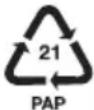 | Recyclable materials are marked with the recycling symbol (3 arrows). The material can be specified by the recycling number in the centre (here: 21) and/or an abbreviation (here: PAP). |
| ~ | AC voltage |
 | The symbol identifies parts that can be cleaned in the dishwasher. |
 | It is a recyclable product which is subject to an extended producer responsibility and for which the rules of waste separation apply. |
 | With the UKCA marking, HOYER Handel GmbH declares that the product is in conformity with the UKCA requirements. |
 | The symbol identifies the product manufacturer. |
Subject to technical modifications.
16. Warranty of the HOYER Handel GmbH
Dear Customer,
your device is provided with a 3 year warranty starting with the purchase date. In the event of product defects, you are entitled to statutory rights against the vendor. These statutory rights are not restricted by our warranty presented in the following.
Warranty conditions
The warranty period starts with the purchase date. Please keep the original purchase receipt in a safe place. This document is required to verify the purchase.
If within three years from the purchase date of this product a material or factory defect occurs, the product will be repaired or replaced by us – at our discretion – free of charge to you, or the purchase price will be refunded. This warranty implies that within the period of three years the defective device and the purchase receipt are presented, including a brief written description of the defect and the time it occurred.
If the defect is covered by our warranty, the repaired or a new product will be returned to you. No new warranty period starts with a repair or replacement of the product.
Warranty period and statutory claims for defects
The warranty period is not extended when the warranty has been claimed. This also applies to replaced and repaired parts. Any damages and defects already existing at the time of purchase must be reported immediately upon unpacking. Repairs arising after the expiration of the warranty period are subject to a charge.
Warranty coverage
The device was produced carefully according to strict quality guidelines and tested diligently prior to delivery.
The warranty applies to material or factory defects.
Excluded from the warranty are wear parts subject to normal wear and damages to fragile parts, e.g. switches, lamps or other parts manufactured from glass.
This warranty expires if the product is damaged, not used as intended or not serviced. For the proper operation of the product, all instructions listed in the operating instructions must be observed carefully. Any form of use and handling that is advised against in the operating instructions or warned against must always be avoided.
The product is only intended for private and not for commercial use. In the case of incorrect and improper treatment, use of force and interventions not performed by our authorised Service Centre, the warranty shall cease.
Handling in case of a warranty claim
In order to ensure prompt processing of your matter, please observe the following notes:
- Please keep the article number
IAN: 484399_2501 and the purchase receipt as a purchase verification for all inquiries.
- The article number can be found on the rating plate, an engraving, the title page of your instructions (in the bottom left), or as a label on the rear or underside of the device.
- If faulty operation or other defects occur, first contact the Service Centre listed in the following by telephone or email.
- Then, you are able to send a product reported as defective free of charge to the service address specified to you, including the purchase receipt and the information on the defect and when it occurred.
At www.lidl-service.com you can download this and many other manuals, product videos and installation software.
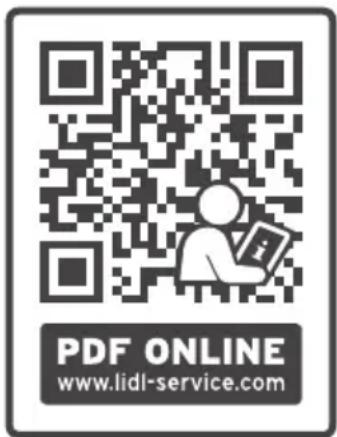
This QR code takes you directly to the Lidl Service website (www.lidl-service.com), where you can enter the article number (IAN) 484399_2501 to open your user instructions.

Service Centre
GB Service Great Britain
Tel.: 0800 404 7657
E-Mail: hoyer@lidl.co.uk
IE Service Ireland
Tel.: 1800 101010
E-Mail: hoyer@lidl.ie
MT Service Malta
Tel.: 80062230
E-Mail: hoyer@lidl.com.mt
CY Service Cyprus
Tel.: 8009 4241
E-Mail: hoyer@lidl.com.cy
IAN: 484399_2501
Supplier
Please note that the following address is no
service address. First contact the aforementioned Service Centre.
HOYER Handel GmbH
Kühnehöfe 12
22761 Hamburg
GERMANY
Sommaire
Android iOS
10.4 Tomates farcies
Android iOS
w a Android iOS
i e ć Wi-Fi 2,4 GHz
Android iOS
Android iOS
Android iOS
9.2 Installation of appen
Download af Lidl Home appen via App Store
Android iOS
Android iOS

Android iOS