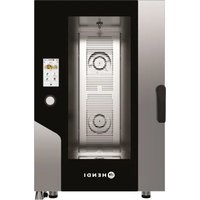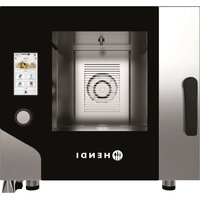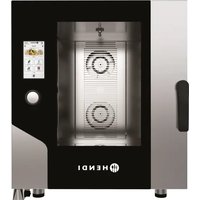
229637 - Oven Hendi - Free user manual and instructions
Find the device manual for free 229637 Hendi in PDF.


| Product type | Professional oven |
| Brand | Hendi |
| Model | 229637 |
| Material | Stainless steel |
| Power supply | Electric, protection class I (grounded) |
| Temperature range | 30 °C to 270 °C |
| Core probe temperature | 0 °C to 100 °C |
| Timer | 1 minute to 11 h 59 min or unlimited time |
| Humidification | From 0% to 100% (in 10% steps) |
| Fan speed | 5 levels (1 to 5), including semi-static mode |
| Cooking modes | Simplified, Expert (up to 10 phases), Multi-level |
| Special functions | Preheating, keep warm, delayed start, manual humidification/drying, core probe, recipe book, semi-static mode, rapid cooling |
| Display and controls | Touch screen and rotary control knob |
| Washing programs | Eco (39 min), Normal (69 min), Intensive (100 min), Rinse (9 min), Pump loading (2 min) |
| Manual cleaning | Damp cloth with mild soap; do not immerse |
| Descaling the steam generator | Recommended at least once a month |
| Safety | Safety thermostat, door sensor, circuit breaker, automatic cycle stop |
| Connectivity | WiFi, USB port for export/import of recipes |
| Included accessories | Descaling bottle, hose; trolley (model 229859 only) |
| Warranty | 1 year, subject to proper use |
Frequently Asked Questions - 229637 Hendi
User questions about 229637 Hendi
0 question about this device. Answer the ones you know or ask your own.
Ask a new question about this device
Download the instructions for your Oven in PDF format for free! Find your manual 229637 - Hendi and take your electronic device back in hand. On this page are published all the documents necessary for the use of your device. 229637 by Hendi.
USER MANUAL 229637 Hendi
ÅNGUGN FÖR KONVEKTION
КОНВЕКТОРНА ПАРНА ФУРНА
GB: Read user manual and keep this with the appliance.
GB: For indoor use only.
natural_image
Simple line drawing of a wine glass with a fork (no text or symbols)
natural_image
Symbol of a trash bin with crossed lines indicating no waste or discharge (no text or labels)
GB: NOTE: This manual is translated from original English manual using AI and machine translations.
3

E
H
4
A
B
C
E
F
H
5
A
B
D
E
F
6
7
8
9
10A
229859
flowchart
graph TD
    A["380V 3N ~"] --> B["M"]
    B --> C["N2 N1 L3 L2 L1"]
    C --> D["L1"]
    D --> E["B6 B5 B4 B3 B2 B1"]
    E --> F["T1"]
    F --> G["E M S MT"]
    G --> H["PL"]
    H --> I["AC2 Com"]
    I --> J["CN 20 CN 15 CN 16 CN 17 CN 18 CN 19 CN 20 CN 21 CN 22 CN 23 CN 24 CN 25 CN 26 CN 27 CN 28 CN 29 CN 30 CN 31 CN 32 CN 33 CN 34 CN 35 CN 36 CN 37 CN 38 CN 39 CN 40 CN 41 CN 42 CN 43 CN 44 CN 45 CN 46 CN 47 CN 48 CN 49 CN 50 CN 51 CN 52"]
    A --> J
    J --> K["BL"]
    K --> L["A1"]
    L --> M["TR"]
    M --> N["R1A R2A R3A R4A"]
    N --> O["B2 TR"]
    O --> P["R1B R2B R3B R4B"]
    P --> Q["B4 TR"]
    Q --> R["R1C R2C R3C R4C"]
    R --> S["B5 TR"]
    S --> T["A2"]
    T --> U["CP LIV D MAX"]
    U --> V["MI MV MIC"]
    V --> W["S2"]
10B
229637, 229842
10C
229620
11
natural_image
Person in white lab coat handling a black panel or device (no visible text or symbols)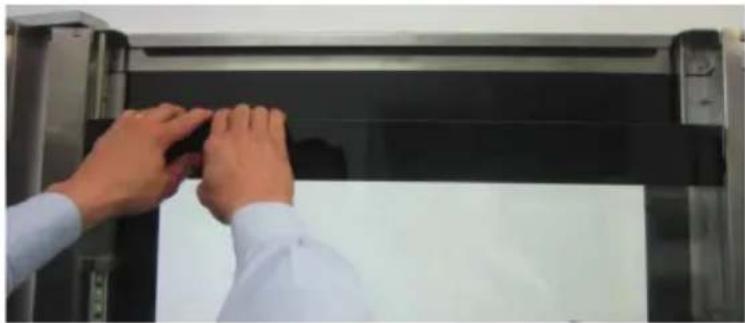
natural_image
Close-up of hands installing or adjusting a black rectangular panel on a metallic frame (no visible text or symbols)12
A.
natural_image
Close-up of a hand operating a sewing machine with a foot, no visible text or symbolsB.
natural_image
Close-up of gloved hands handling a small object near a dark panel (no visible text or symbols)13
natural_image
Line drawing of a window with a bottle and handle, showing airflow or ventilation (no text or symbols)GB: Technical specifications / DE: Technische Angaben / NL: Technische gegevens / PL: Dane techniczne / FR: Données techniques / IT: Parametri di base / RO: Parametrii de bază / GR: Bašukéç paráµetrot / HR: Tehnički podaci / CZ: Technická specifikace / HU: Můszaki adatok / UA: Texníční характеристики / EE: Tehnilised andmed / LV: Tehniskās specifikacijas / LT: Techninės specifikacijos / PT: Especificações técnicas / ES: Especificaciones técnicas / SK: Technické špecifikácie / DK: Technical specifications / FI: Tekniset tiedot / NO: Tekniske spesifikasjoner / SI: Tehnične specifikacije / SE: Tekniska specifikationer / BG: Texнически спецификации / RU: Texнические данные
| A 229620 229637 229842 229859 | |||
| B 380-400 V ~3N / 50/60 Hz | |||
| C 7,8 kW 11,4 kW 15,4 kW 31,0 kW | |||
| D | I | ||
| E | IPX5 | ||
| F 5x GN1/1 7x GN1/1 11x GN1/1 20x GN1/1 | |||
| G 4kg | |||
| H 30-270°C | |||
| I 11 h 59 min | |||
| J | 590x370x(H)425 mm | 590x370x(H)575 mm | 590x372x(H)855 mm |
| K | 730x849x(H)700 mm | 730x849x(H)850 mm | 730x849x(H)1130 mm |
| L 78 4 kg | 96,0 kg | 113,8 kg | 247,2 kg |
A: GB:Item no. / DE:Art.-Nr. / NL:Artikelnr. / PL:Nr pozycji / FR:N° d'article / IT:N. articolo / RO:Nr. articolului/ GR:Aρ. εἰδους / HR:Broj stavke / CZ:Položka č. / HU:Cikkszám / UA:Homer elementa / EE:Artikli nr / LV:Vienums Nr. / LT:Prekès Nr. / PT:Item n.o / ES:N.o de artículo / SK:Č. položky / DK:Varenr. / FI:Kohteen nro / NO:Varenr. / SI:Št. izdelka / SE:Art.nr / BG:Homer na елемент / RU:Homer позиции
B: GB: Rated voltage and frequency / DE: Nennspannung und Frequenz / NL: Nominale spanning en frequentie / PL: Znamionowe napięcie i częstotliwość / FR: Tension et fréquence nominales / IT: Tensione e frequenza nominali / RO: Tensiune nominală și frecvenlă / GR: Ovoportikn táon koi ouxvótnta / HR: Nazivni napon i frekvencija / CZ: Jmenovité napětí a frekvence / HU: Névleges feszültség és frekvencia / UA: Номінальна напруга та частота / EE: Nimipinge ja -sagedus / LV: Nominálais spriegums un frekvence / LT: Vardine jtampa ir dažnis / PT: Tensão e frequência nominais / ES: Tensión y frecuencia nominales / SK: Menovité napätie a frekvencia / DK: Nominel spænding og frekvens / Fl: Nimellisjännite ja -taajuus / NO: Nominell spenning og frekvens / SI: Nazivna napetost in frekvenca / SE: Märkspänning och frekvens / BG: Номинално напрежение и честота / RU: Номинальное напряжение и частота
C: GB: Rated input power / DE: Nenneingangsleistung / NL: Nominaal ingangsvermogen / PL: Znamionowa moc wejściowa / FR: Puissance d'entrée nominale / IT: Potenza nominale in ingresso / RO: Putere nominală de intrare / GR: Ovopastikn ioxus eisobou / HR: Nazivna ulazna snaga / CZ: Jmenovitý vstupní výkon / HU: Névleges bemeneti teljesítmény / UA: Hominalna bixidna potужність / EE: Nimisisendvõimsus / LV: Nominalā ieejas jauda / LT: Vardinė jėjimo galia / PT: Potência de entrada nominal / ES: Potencia de entrada nominal / SK: Menovitý vstupný výkon / DK: Nominel indgangseffekt / FI: Nimellistuloteho / NO: Nominall inngangseffekt / SI: Nazivna vhodna moč / SE: Märkineffekt / BG: Hominalna входяща мощност / RU: Hominальная входная мощность
D: GB: Protection class (Class) / DE: Schutzklasse (Klasse) / NL: Beschermingsklasse (klasse) / PL: Klasa ochrony (klasse) / FR: Classe de protection (classe) / IT: Classe di protezione (classe) / RO: Clasă de protectie (clasă) / GR: Kláon prostaiaç (katnyopia) / HR: Klasa zaštite (klasa) / CZ: Trída ochrany (trída) / HU: Védelmi osztály (osztály) / UA: Klas zahesty (klac) / EE: Kaitseklass (klass) / LV: Aizsardzības klase (klase) / LT: Apsaugos klasè (klasè) / PT: Classe de proteção (classe) / ES: Clase de protección (clase) / SK: Trieda ochrany (trieda) / DK: Beskyttelsesklasse (klasse) / FI: Suojausluokka (luokka) / NO: Beskyttelsesklasse (klasse) / SI: Razred zaščite (razred) / SE: Skyddsklass (klass) / BG: Klas na защитa (Klas) / RU: Klacc защиты (klacc)
E: GB: Waterproof protection rating / DE: Wasserdichtigkeitsschutzklasse / NL: Beschermingsgraad tegen water / PL: Klasa wodoodporności / FR: Indice de protection étanche / IT: Grado di protezione impermeabile / RO: Clasificare protecție impermeabilă / GR: Voθμός αδιάβροχης προστασίας / HR: Vodootporna zaštita / CZ: Odolnost proti vodě / HU: Vízálló védelmi besorolás / UA: Рейтинг водонепроникности / EE: Veekindluse kaitseaste / LV: Üdensnecaurlaidības klase / LT: Apsaugos nuo vandens klasė / PT: Classificação de proteção à prova de água / ES: Grado de impermeabilidad / SK: Stupeň ochrany proti vode / DK: Vandtæt beskyttelsesklassificering / FI: Vedenpitävä suojausluokitus / NO: Vanntett beskyttelsesklassifisering / SI: Stopnja zaščite pred vodorom vode / SE: Vattentät skyddsklassning / BG: Клас на водоустойчивост / RU: Рейтинг водонепроницаемости
F: GB: Capacity / DE: Kapazität / NL: Capaciteit / PL: Pojemność / FR: Capacité / IT: Capacità / RO: Capacitate / GR: Xörpntukótna / HR: Kapacitet / CZ: Kapacita / HU: Kapacitás / UA: Mictkíсть / EE: Mahutavus / LV: Efektivitáte / LT: Pajègumas / PT: Capacidade
/ ES:Capacidad / SK:Kapacita / DK:Kapacitet / FI:Tilavuus / NO:Kapasitet / SI:Zmogljivost / SE:Kapacitet / BG: Kapaçitet / RU:Вместимость
G: GB:Max. load per tray / DE:max. Beladung pro Tablett / NL:Maximaal lading per lade / PL:Maks. obciążenie na tace / FR:Max. charge par plateau / IT:Massimo carico per vassoio / RO:Max. încărcare pe tavă / GR:Méyiotn. forptio ová díoko / HR:Maks. opterećenje po ladici / CZ:Max. zatížení na zásobník / HU:Max. töltet tálcánként / UA:Maks. завантаження на лоток / EE:Max laadimine salve kohta / LV:Maks. ielāde uz paplāti / LT:Maks. apkrova viename dékle / PT:máx. carga por bandeja / ES:máx. carga por bandeja / SK:Max. zaťaženie na zásobník / DK:Maks. fyld pr. bakke / FI:Max. kuorma per lokero / NO:Maks. belastning per brett / SI:maks. obremenitev na pladenj / SE:Max. last per bricka / BG:Maks. зареждане на тава / RU:Mаксимум. нагрузка на лоток
H: GB: Temperature settings / DE: Temperatureinstellungen / NL: Temperatuur instellingen / PL: Ustawienia temperatury / FR: Paramètres de température / IT: Impostazioni di temperatura / RO: Setări de temperatură / GR: Puθμίσεις θερμοκρασίας / HR: Postavke temperature / CZ: Nastavení teploty / HU: Hőmérséklet beállítások / UA: Налаштування температури / EE: Temperatuuri seaded / LV: Temperatūras iestalījumi / LT: Temperatūros nuslatymai / PT: Configurações de temperatura / ES: Ajustes de temperatura / SK: Nastavenie teploty / DK: Temperaturindstillinger / FI: Lämpötila-asetukset / NO: Temperaturinnstillinger / SI: Nastavitve temperature / SE: Temperaturinställningar / BG: / RU: Настройки температуры
I: GB:Time settings (Min.) / DE:Zeit-Einstellungen (Min.) / NL:Tijd-instellingen (Min.) / PL:Ustawienia czasu (Min.) / FR:Paramètres de temps (Min.) / IT:Impostazioni ora (Minuti) / RO:Setări de timp (Min.) / GR:Puθμίσεις ώρας (Ελάχ.) / HR:Postavke vremena (Minuta) / CZ:Nastavení času (Min.) / HU:Időbeállítások (Min.) / UA:Налаштування часу (Шахти) / EE:Kellaaja seaded (Mins) / LV:Laika iestatījumi (Min.) / LT:Laiko nuostatos (Min.) / PT:Definições de hora (Min.) / ES:Ajustes de tiempo (Min.) / SK:Nastavenia času (Min.) / DK:Tidsindstillinger (Min.) / FI:Aika-asetukset (Minuuttia) / NO:Tidsinnstillinger (Minutter) / SI:Časovne nastavitve (Min) / SE:Tidsinställningar (Min) / BG: Настройки за време (Минути) / RU:Настройки времени (Мин.)
J: GB:Internal dimensions / DE:Innenmaße / NL:Interne afmetingen / PL:Wymiary wewnętrzne / FR:Dimensions internes / IT:Dimensioni interne / RO:Dimensiuni interioare / GR:Εσωτερικές διαστάσεις / HR:Unutarnje dimenzije / CZ:Vnitřní rozměry / HU:Belső méretek / UA:Внутрішні розміри / EE:Sisemised mõõdud / LV:lekšëjie izměri / LT:Vidiniai matmenys / PT:Dimensões internas / ES:Dimensiones internas / SK:Vnútorné rozmery / DK:Indvendige dimensioner / FI:Sisämitat / NO:Innvendige mål / SI:Notranje mere / SE:Innermått / BG:Вътрешни размери / RU:Внутренние размеры
K: GB:Dimensions / DE:Abmessungen / NL:Afmetingen / PL:Wymiary / FR:Dimensions / IT:Dimensioni / RO:Dimensiuni / GR:Διαστάσεις / HR:Dimenzije / CZ:Rozměry / HU:Méretek / UA:Pózmíri / EE:Mõötmed / LV:Izmēri / LT:Matmenys / PT:Dimensões / ES:Dimensiones / SK:Rozmery / DK:Mål / FI:Mitat / NO:Mål / SI:Mere / SE:Mått / BG:Размери / RU:Размеры
L: GB:Net weight / DE:Nettogewicht / NL:Nettogewicht / PL:Waga netto / FR:Poids net / IT:Peso netto / RO:Greutate netă / GR:Kaθαρὸ Βάρος / HR:Neto težina / CZ:Čistá hmotnost / HU:Nettó tömeg / UA:Bara нетто / EE:Netokaal / LV:Neto svars / LT:Grynasis svoris / PT:Peso líquido / ES:Peso neto / SK:Čistá hmotnosť / DK:Nettovægt / FI:Nettopaino / NO:Nettovekt / SI:Neto teža / SE:Nettovikt / BG:Нетно тегло / RU:Вес нетто
GB: Remark: Technical specification is subjected to change without prior notification.
Thank you for purchasing this Hendi appliance. Read this user manual carefully, paying particular attention to the safety regulations outlined below, before installing and using this appliance for the first time.
Safety instructions
- Only use the appliance for the intended purpose it was designed for, as described in this manual.
- The manufacturer is not liable for any damage caused by incorrect operation and improper use.
• DANGER! RISK OF ELECTRIC SHOCK! Do not attempt to repair the appliance by yourself. Do not immerse the electrical parts of the appliance in water or other liquids. Never hold the appliance under running water.
- NEVER USE A DAMAGED APPLIANCE! Check the electrical connections and cord regularly for any damage. When damaged, disconnect the appliance from the power supply. Any repairs should only be carried out by a supplier or qualified person to avoid danger or injury.
- WARNING! When positioning the appliance, route the power cable safely if necessary to avoid unintentional pulling, being damaged, coming into contact with the heating surface, or causing a tripping hazard.
- WARNING! As long as the plug is in the socket the appliance is connected to the power supply.
- WARNING! ALWAYS switch off the appliance before disconnecting from the power supply, cleaning, maintenance or storage.
- Only connect the appliance to an electrical outlet with the voltage and frequency mentioned on the appliance label.
- Do not touch the plug/electrical connections with wet or damp hands.
- Keep the appliance and electrical plug/connections away from water and other liquids. If the appliance falls into water, remove the power supply connections immediately. Do not use the appliance until it has been checked by a certified technician. Failure to follow these instructions will cause life threatening risks.
- Connect the power supply into an easily accessible electrical outlet so you can disconnect the appliance immediately in case of emergency.
- Make sure the cord does not come in contact with sharp or hot objects and keep it away from open fire. Never pull the power cord to unplug it from the socket, always pull the plug instead.
- Never carry the appliance by its cord.
- Never try to open the housing of the appliance yourself.
- Do not insert objects into the housing of the appliance.
- Never leave the appliance unattended during use.
- This appliance should be operated by trained personnel in kitchen of the restaurant, canteens or bar staff, etc.
- This appliance should not be operated by persons with reduced physical, sensory or mental capabilities, or persons that have a lack of experience and knowledge.
- This appliance should, under any circumstances, not be used by children.
- Keep the appliance and its electrical connections out of reach of children.
- Never use accessories or any extra devices other than those
supplied with the appliance or recommended by the manufacturer. Failure to do so could pose a safety risk to the user and could damage the appliance. Only use original parts and accessories.
- Do not operate this appliance by means of an external timer or remote-control system.
- Do not place the appliance on a heating object (gasoline, electric, charcoal cooker, etc.).
- Do not cover the appliance in operation.
- Do not place any objects on top of the appliance.
- Do not use the appliance near any open flames, explosive or flammable materials. Always operate the appliance on a horizontal, stable, clean, heat-resistant and dry surface.
- The appliance is not suitable for installation in an area where a water jet could be used.
- Leave a space of at least 20 cm around the appliance for ventilation during use.
- WARNING! Keep all ventilation openings on the appliance free from obstruction.
Special safety instructions
- Do not use the appliance to prepare food or liquids in a closed container as the container may explode.
- No foods containing easily flammable substances must be cooked, such as alcohol-based foods; self-combustion phenomena might occur leading to fires and explosions in the cooking chamber.
- ATTENTION! The appliance must be installed under exhaust hood to ensure all steam and other vapour produced during work run freely.
• CAUTION! RISK OF BURNS! HOT SURFACES! The temperature of the accessible surfaces are very high during use. Touch only the control panel, handles, switches, timer control knobs or temperature control knobs, etc.
- CAUTION! RISK OF BURNS! Pay attention to handling food containers during and after cooking: they might be very hot. Wear appropriate protective thermal clothing to prevent burns.
- During operation, with the door open, do not remove the fan cover; do not touch the moving fans and resistors which are still hot.
WARNING! To avoid scalding, do not use loaded containers with liquids or cooking goods that become fluid by heating in shelves positioned at levels higher than 1.6m above the floor.
- WARNING! When opening the door of the cooking compartment, hot steam can come out.
- Do not overload the interior shelves. The maximum load is mentioned in "Technical specification".
- ATTENTION! The power supply lines should be connected by authorized technician.
- WARNING! Before obtaining access to terminals, all supply circuits must be disconnected.
- The appliance must be connected to an equipotential system the effectiveness of which must be suitably assessed according to applicable regulations. This connection must be set up between appliances through the suitable terminal which is marked with the symbol ⏻. The equipotential conductor must have a minimum section of 2,5 mm ^2 .
- If the supply cord is damaged, it must be replaced by the manufacturer, its service agent or similarly qualified persons in order to avoid a hazard.
- The new hose-sets supplied with the appliance are to be used and that old hose-sets should not be reused.
• Always connect appliance to potable water supply. - Do not use the door handle to move the appliance (possible glass breakage).
Only for model 229859
CAUTION! RISK OF BURNS! HOT SURFACES! During process of moving door's internal glass (up or down) - in case of moving the trolley or for cleaning / pre-heating process - wear protective gloves or other clothes (not included). Door's internal glass could be very hot.
- CAUTION! RISK OF BURNS! Pay attention to handling food containers putted on trolley as well as moving the trolley with prepared food afterwards.
- In case of no using the trolley, ensure that the wheels brake is engaged.
Intended use
- This appliance is intended to be used for professional use, also for commercial applications, for example in kitchens of restaurants, canteens, hospital and in commercial enterprises such as bakeries, butcheries, etc., but not for continuous mass production of food
- The appliance is designed for only for cooking food (for all types of baking of pastries, baked goods and food): fresh and frozen; for reconditioning chilled and frozen food, for steam cooking meats, fish and vegetables, etc. Any other use may lead to damage to the appliance or personal injury.
- Operating the appliance for any other purpose shall be deemed a misuse of the device. The user shall be solely liable for improper use of the device.
Grounding installation
This appliance is classified as protection class I and must be connected to a protective ground. Grounding reduces the risk of electric shock by providing an escape wire for the electric current.
This appliance is fitted with a power cord with grounding plug or electrical connections with grounding wire. The connections must be properly installed and grounded.
Control panel
Main control panel parts and main symbols (Fig.1 on page 3)
A. Touch screen
B. Control knob with push function
C. CONFIRM / START
D. STOP
E. BACK
F. HOME screen
G. MENU (additional functions)
H. ON
I. OFF
J. ADD
K. DELETE
L. Navigation arrows (to left / to right)
M. Program not saved in recipe book
N. Program saved in recipe book
- Receptive menu (changing list view)
P. INFO
Q. STOP (cooling / washing)
Home screens (Fig.2 on page 3)
A. Board with recipe list / board with active function
B. Operating parameters - simplified mode
C. Operating parameters - expert mode
D. Recipe book (programs)
E. Opearting parameters - multi-level mode
F. Accessories
G. Cooling function
H. General settings
I. After sales service
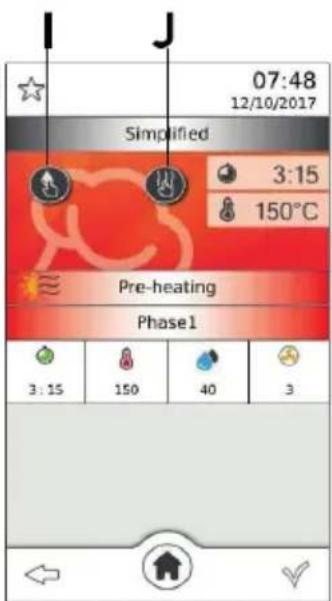
Screen with parameters - simplified mode (Fig.3 on page 3)
A. Time
B. Temperature
C. Humidification
D. Fan speed
E. Semi-static mode
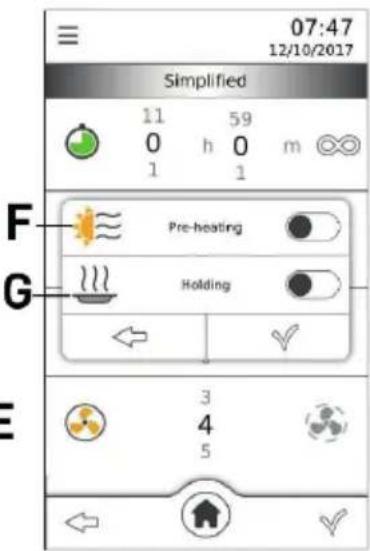
F. Pre-heating function
G. Temperature holding function
H. Screen of active cycle
1. Icon for manual humidification
J. Icon for manual drying
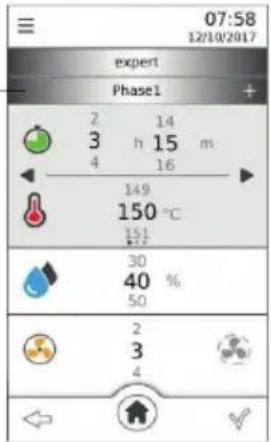
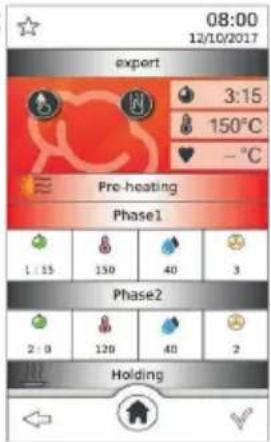
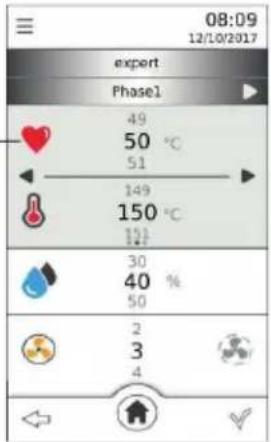
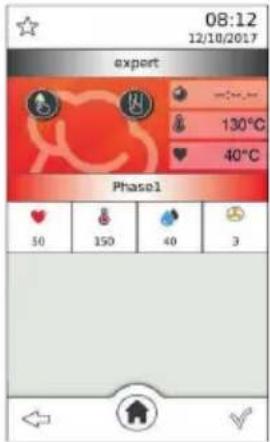
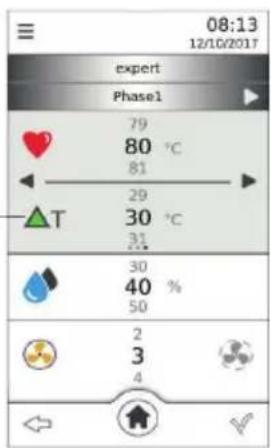
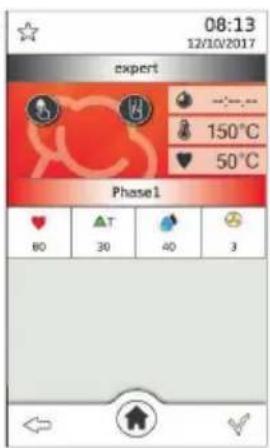
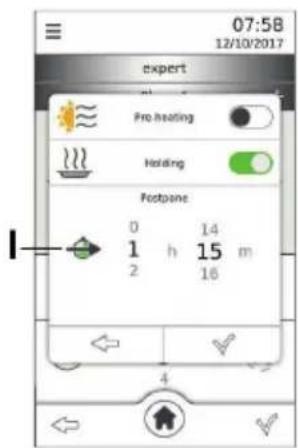
Screen with parameters - expert mode (Fig.4 on page 4)
A. Adding phase of cycle
B. Screen of active cycle in expert mode
C. Screen of parameters for cycle with core probe
D. Core probe temperature
E. Screen of active cycle with core probe
F. Screen of parameters for cycle with core probe and T
G. T Temperature
H. Screen of active cycle with core probe and T
I. Postpone of the cycle (delayed start)
Screens for recipe book / programs (Fig.5 on page 4)
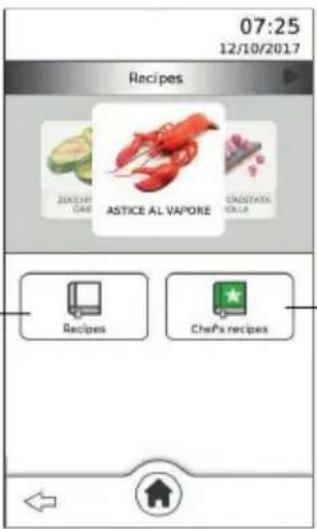
A. Main recipe book (deafult programs)
B. Chef's recipes (saved by user)
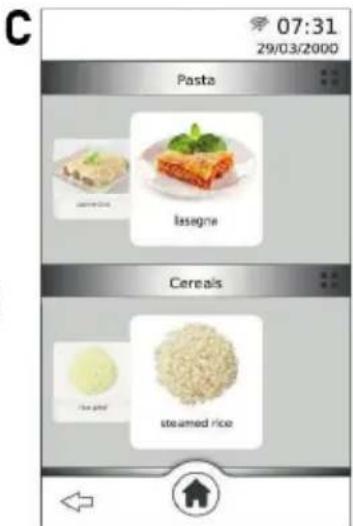
C. Screen of Main recipe categories list
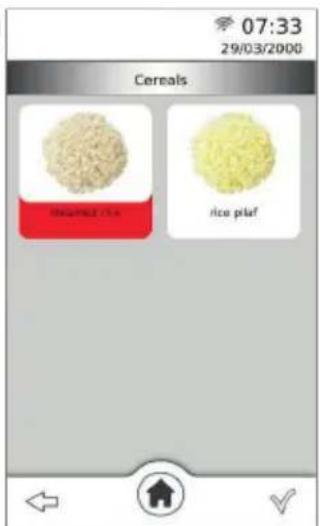
D. Screen of recipe list in category (example)
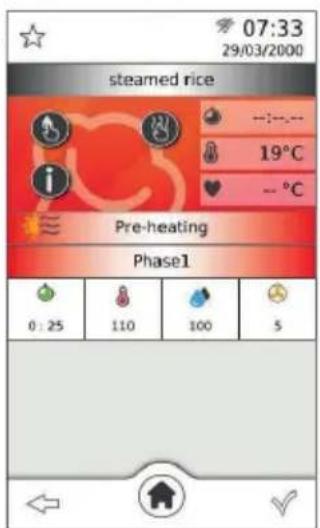
E. Screen of active cycle (choosen recipe)
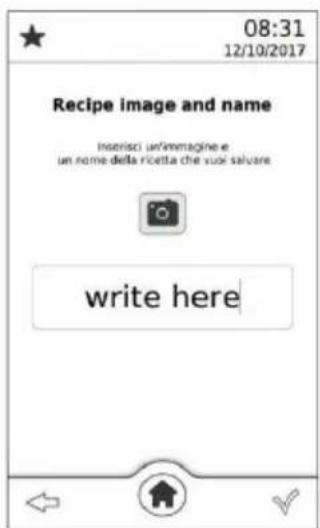
F. Screen of recipe saving
G. Screen of choosing category (saving)
Screen with parameters - multi-level mode (Fig.6 on page 5)
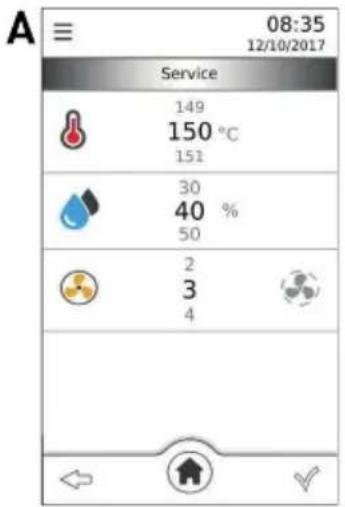
A. Screen with general parameters for multi-level mode
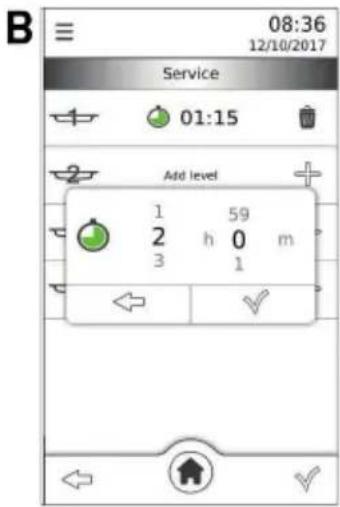
B. Screen of adding levels / time setting
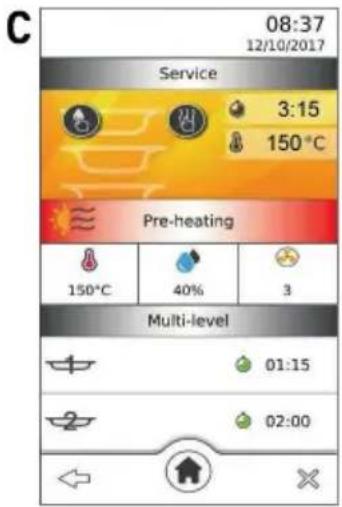
C. Screen of active cycle in multi-level mode
Screen of washing cycle (Fig.7 on page 5)
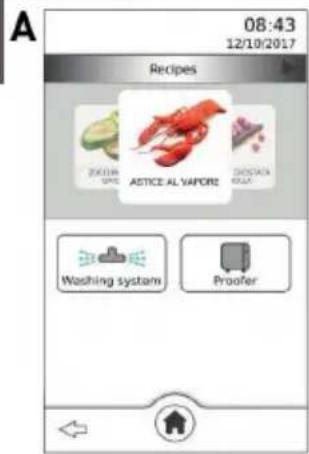
A. Screen with available accessories
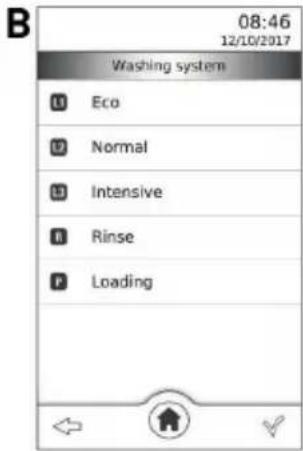
B. Screen with available list of washing programs
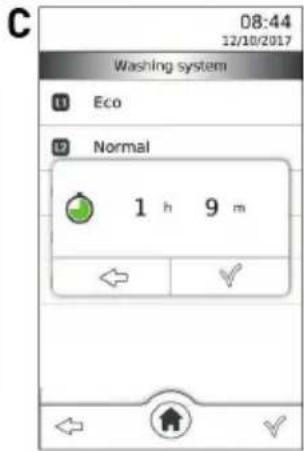
C. Screen of washing time setting
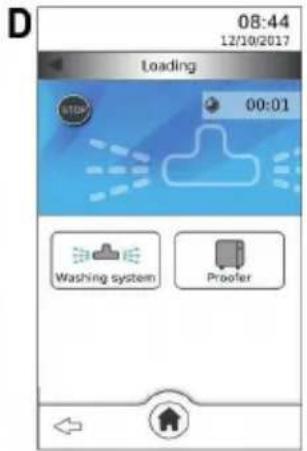
D. Screen of active washing cycle
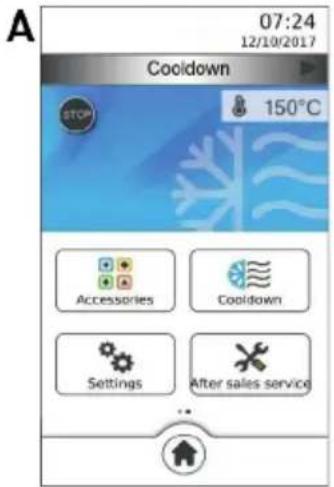
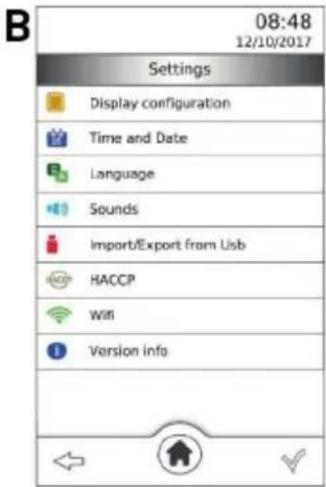
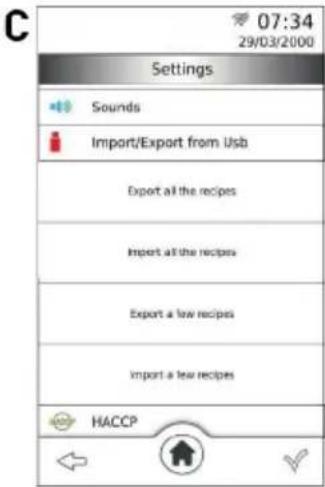
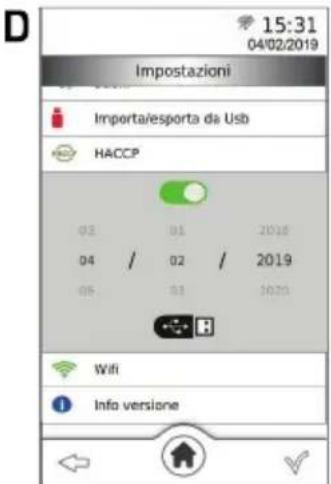
Screen of other functions / settings (Fig.8 on page 5)
A. Screen of active cooling function
B. Screen with list of general settings
C. Import/export options menu
D. HACCP function activation
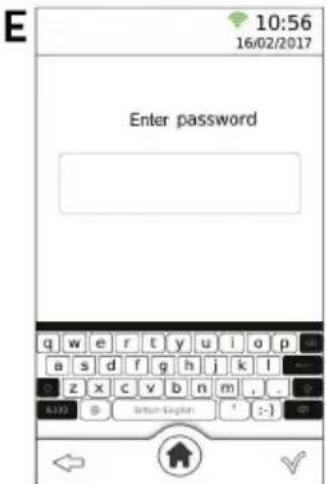
E. WiFi - screen for entering the password
Operating parameters
- Cooking time (Fig.3A) - from 1 minute to 11 hours 59 minutes or infinity time ( )
-
Cooking temperature (Fig.3B) - 30°C-270°C
-
Core temperature (Fig.4D) - 0°C-100°C
- T temperature (Fig.4G) - 0°C-100°C
- Humidification (Fig.3C) - from OFF to 100% (10% intervals)
- Fan speed (Fig.3D) - from 1 to 5
- Fan speed in semi-static mode (Fig.3E) - from 1 to 5
- Manual humidification (Fig.31) - always active
- Manual drying (Fig.3J) - always active
Electric c onnection
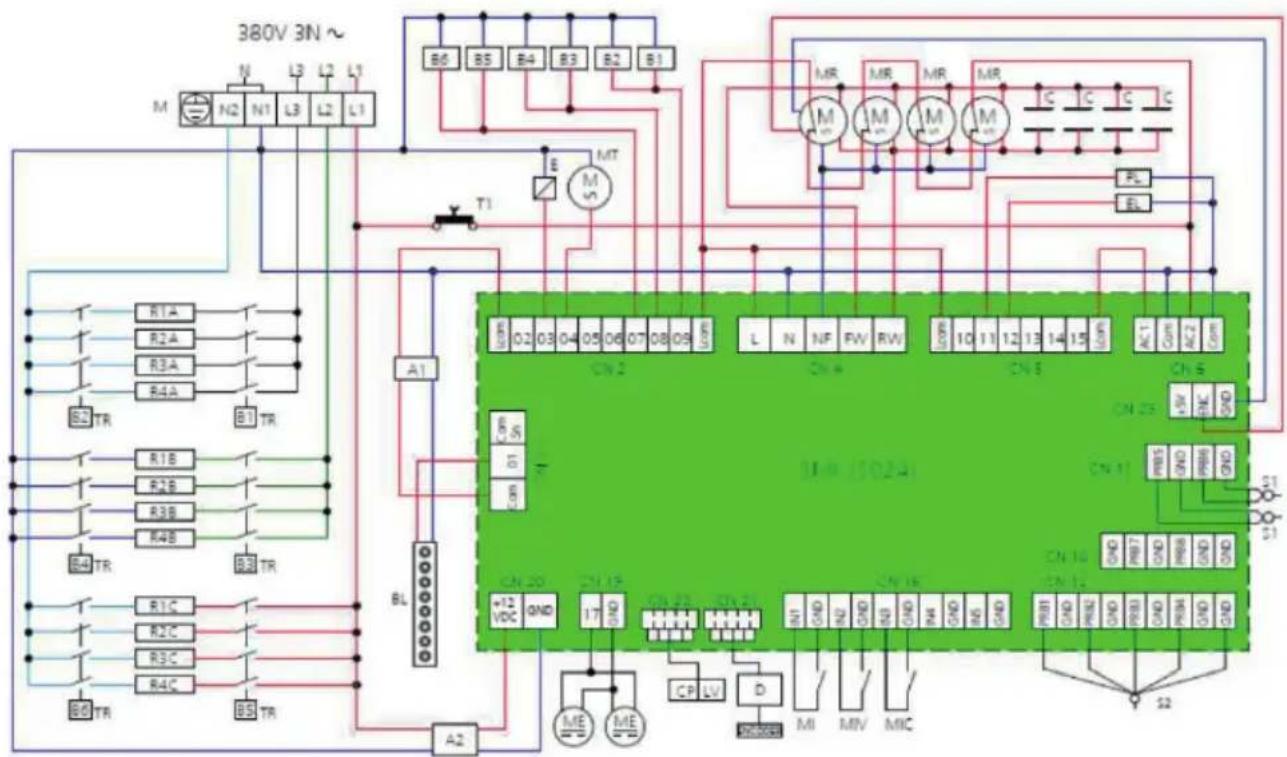
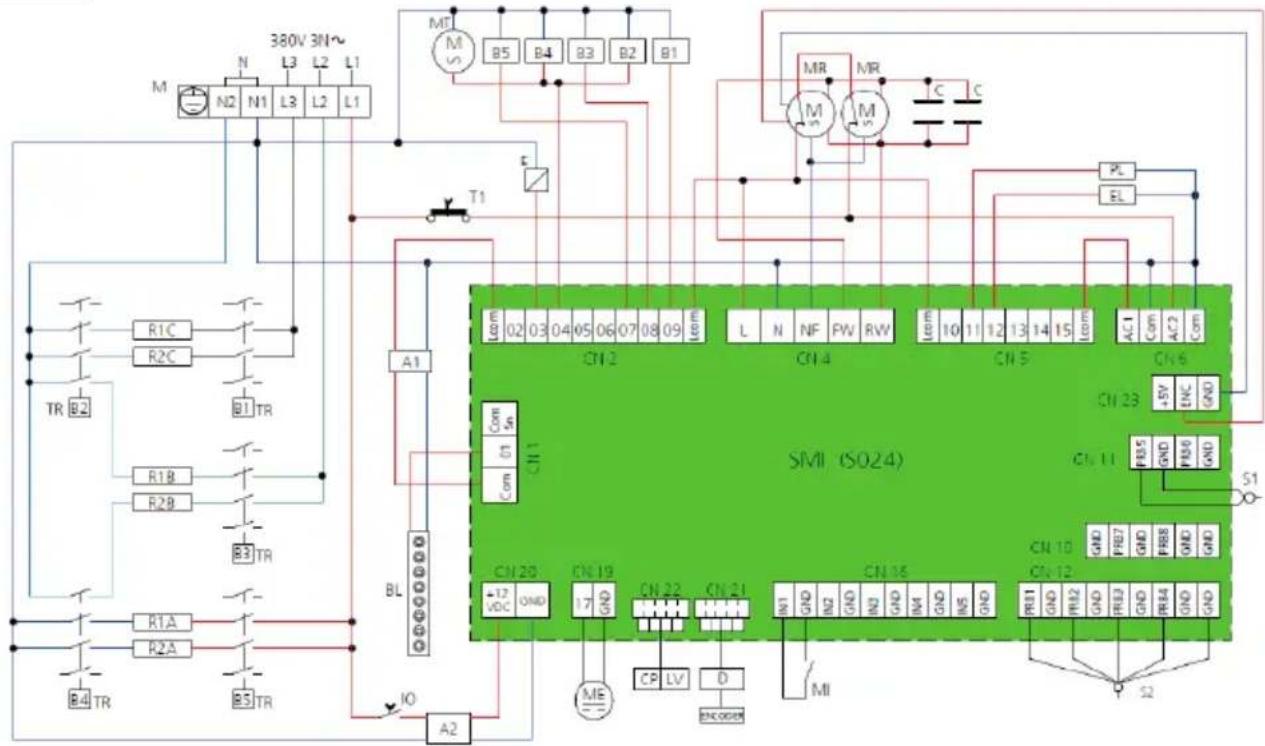
(Fig.10A-C on page 6-7)
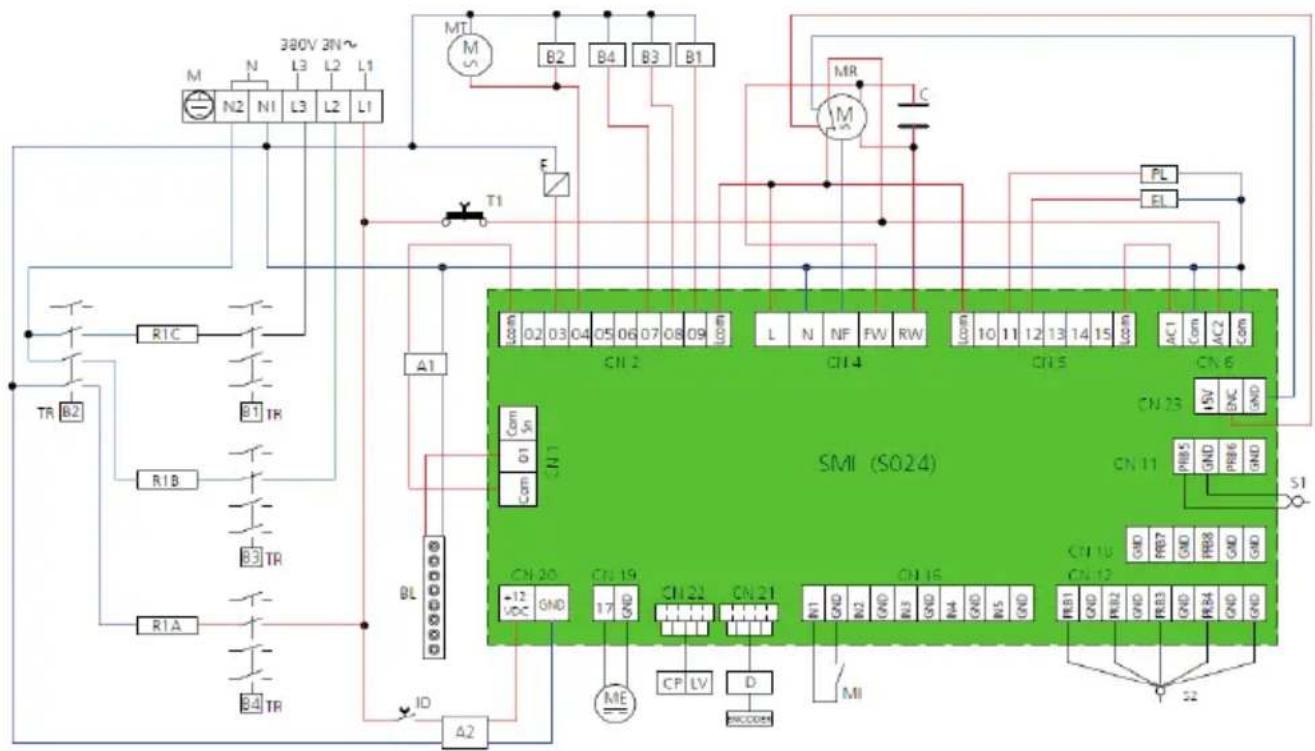
- In the permanent connection to the mains, a protective pole switch must be installed between the appliance and the mains with minimum opening between the contacts of over-voltage category III (4000V), sized for the load and complying with applicable regulations (automatic circuit breaker).
- The protective pole switch used for the connection must be easily accessible when appliance is installed.
Water connection
• Maximum water temperature should not exceed 30^ C.
- The water pressure must be between 100 and 200kPa (1-2 bar). if the pressure exceeds 2 bar, install a pressure reducer upstream of the appliance. If pressure is lower than 1 bar use the pump to raise the pressure value.
- Water hardness should be between 0,5°f and 3°f. Appliance must be installed with water softener to reduce limescale formation.
- Water drain must be connect through an adequate trap. If drain pipe is conveyed to an open floor drain distance between pipe and discharge point should have at leats 25-30 mm. Wall-mounted discharge is also allowed as long as the drain pipe maintains the steady slope of 4 - 5% .
Preparation before use
- Remove all protective packaging and foil or tapes.
- Check that the device is in good condition and with all accessories. In case of incomplete or damaged delivery, please contact the supplier immediately. In this case, do not use the device.
- Clean the accessories and the appliance before use (See ==> Cleaning & Maintenance).
- Make sure the appliance is completely dry.
- Place the appliance on a horizontal, stable and heat resistant surface that is safe against water splashes. Level appliance by adjustable feet. Do not disassemble the feet.
- Keep the packaging if you intend to store your appliance in the future.
- Keep the user manual for future reference.
NOTE! Due to manufacturing residues, the appliance may emit a light odor during the first few uses. This is normal and does not indicate any defect or hazard. Make sure the appliance is well ventilated. It is recommended to run an empty cycle for 40/50 minutes at a temperature of 220/230°C. In this way all unpleasant yet fully normal smells due to heating the thermal insulation enveloping the cooking chamber and the silicone used for its external sealing are dissipated.
Operating instructions
- ATTENTION! Avoid prolonged permanence on the steel surfaces of foods containing acidic substances (lemon juice, vinegar, salt, etc.) which cause corrosion deterioration.
- Preheat the appliance every time before cooking to achieve top performance.
- Avoid adding salt to food in the cooking chamber.
BASIC operating
- For switching the appliance on (after conecting to electric power supply) set the button to "ON" position. Button is place on the left side of the appliance under the base and is marked on the left side of casing.
- Using touch screen (Fig.1A) - for choosing an option, confirming function or selected parameters / values simply touch corresponding icons on the screen; for moving between screens, selecting parameyters, recipes or values scroll by finger on the screen.
- Using the control knob (Fig.1B): for moving between screen views, settings or for selecting parameters or values, simply turn knob clockwise or reverse; for choosing options and confirming active parameter or values push control knob.
- If the appliance is not used, the stand-by mode will be automatically activated after 5 minutes - on the screen only current time will be displayed. To reactive control panel tap the screen twice.
- To back to the Home screen view (Fig.2) touch home screen icon (Fig. 1F) at any time.
SEMI-STATIC mode
- Used for reproducing static mode in appliance - fans works only when heating element operating.
- To choose and activated semi-static mode touch grey fan icon (Fig.3E).
Manual HUMIDIFICATION / DRYING
- In standard cycle the appliance detect level of the humidity inside chamber and depends on it activate automatically humidification or drying function (for example if there is set to 20% of humidification, but current value is higher, drying system will activate automatically; if value of humidity is lower, steam will be inserted to keep 20% of humidification).
- If humidification will be set to OFF value, to activate drying / humidification manually touch corresponding icons during cycle (Fig.3I-J).
PRE-HEATING setting
- Choose menu icon (Fig.1G); additional window will be displayed and pre-heating (Fig.3F) can be enabled or disabled (Fig.1H-I)
- When pre-heating is enabled, temperature automatically increase about 40^ of setted cycle temperature (for example if 180^ was setted, pre-heating function will allow reaching temperature of 220^ )
- When the temperature has been reached display will show "PRE-HEATING OK OPEN THE DOOR" and acoustic alarm will appear.
- Open the door, put food inside and close the door; cycle will start automatically.
ATTENTION: Function can not be used with delayed start. Preheating temperature cannot exceed 270^ C.
HOLDING TEMPERATURE function setting
- Choose menu icon (Fig.1G); additional window will be displayed and holding function (Fig.3G) can be enabled or disabled (Fig.1H-I).
- If enabled, it will start at the end of the cycle and will hold temperature inside of the chamber at 80^ .
- It stops when door will open.
POSTPONE OF THE CYCLE - delayed start
- Choose menu icon (Fig.1G); additional window will be displayed and delayed start (Fig.4I) can be setted.
- Delayed start can be set only in expert mode (Fig.2C/Fig.4) for a time between 1 minute to 11h and 59 minute. During this time only internal light will be enabled.
ATTENTION: Delayed start can not be set with pre-heating.
SIMPLIFIED MODE
- On home screen choose simplified mode icon (Fig.2B); screen with general parameters will be shown (Fig.3).
- In this mode is possible to set only one phase of the cycle with parameters: time, temperature, humidification, fan speed and semi-static fan speed (Fig.3A-E); in additional menu (Fig.1G) is also possible to set pre-heating or holding function (Fig.3F-G).
- Touch confirmation icon (Fig.1C) - summary screen will be displayed (Fig.3H); touch icon again to start the cycle.
- During cycle it is possible to edit parameters value at any time. To save new value touch confirmation icon; to back without saving touch icon BACK (Fig.1E).
- To stop the cycle, touch icon "X" (Fig.1D).
EXPERT MODE
- On home screen choose expert mode icon (Fig.2C); screen with general parameters will be shown (Fig.4).
- In this mode is possible to set up to 10 phases of the cycle with all general parameters; in additional menu (Fig.1G) is also possible to set pre-heating, holding function or delayed start (Fig.4I).
- To add new phase, touch "+" (Fig.4A).
- To set cycle with core probe and/or T touch right or left arrows (Fig.1L) on the screen with general parameters (Fig.4) or simply slide to the left or right by finger. Instead of time, after that there will be possible to set core probe tempearture (Fig.4C-D) or core probe and T tempearture (Fig.4F-G).
- Touch confirmation icon (Fig.1C) - summary screen will be displayed depending on the type of the cycle (Fig.4B/E/H); touch icon again to start the cycle.
- During cycle it is possible to edit parameters value at any time. To save new value touch confirmation icon; to back without saving touch icon BACK (Fig.1E).
- To stop the cycle, touch icon X (Fig.1D).
Recipe book and CHEF recipe book
- On home screen choose recipe book icon (Fig.2D); screen with available book will appear - it is possible to choose default recipe book (Fig.5A) or Chef's recipe book - saved programs (Fig.5B).
- When choosing desire book, screen with recipe categorised list will be displayed (Fig.5C). Each category have own recipe list - to see all recipe in category, touch menu icon (Fig.10), recipe list with photo will appear (Fig.5D).
- To choose desire recipe simply touch recipe photo - summary screen of the cycle will be displayed (Fig.5E). Start cycle as described before.
- To save individual setted program in Chef recipe book, after setting and confirming the parameters touch star icon on summary screen: white star (Fig.1M) means that program is note saved in recipe book; black star icon (Fig.1N) means that program is already saved.
- After touching white star icon for saving the program, saving screen will be displayed (Fig.5F).
- To choose recipe name tap on text field and name the recipe using keyboard. It is possible to write name in other desired languages (42 available) by tappin the icon 📋. Touch confirmation icon (Fig.1C) to confirm the name, touch icon again to go through and choose recipe category (Fig.5G). After choosing and touching the confirmation icon, program will be saved.
- To save program with photo, during saving, USB drive with file should be inserted. Only one photo should be exist on the drive. During saving photo will upload automatically.
NOTE: Photo must have "png" format, 205x105 pixels and be named "recipe" in english. USB port is located on the lower door hinge.
- To delete program, choose desire recipe on screen with recipe list in one of the category. Recipe name will be highlighted. Touch trashbin icon (Fig.1K) to delete program. Additional window will be displayed: touch confirmation icon or touch BACK icon to cancel deletion.
NOTE: Only recipe from Chef book can be delete.
MULTI-LEVEL MODE
- On home screen choose multi-level mode icon (Fig.2E); screen with general parameters will be shown (Fig.6A).
- It is possible to set parameters: tempearture, humidification, fan speed (including semi-static mode). After confirmation, screen with time setting will be displayed (Fig.6B). It is possible to add or delete several level with different time for each level (available number of levels depend on technical specification).
- To add level touch icon “+”; to delete touch trash bin icon.
- After confirmation summary screen will be displayed (Fig.6C); touch confirmation icon to start cycle (time will start countdown for each level). If set time will end for one of the level, info "remove tray" will be displayed and acostic alarm will appear.
- In multi-level mode, when the last level ends, cycle must to be stopped manually.
COOLING function
- On home screen, after sliding to second view choose cooldown icon (Fig.2G); fast cooling function will be shown at the top of the home screen (Fig.8A).
- To start the cooling process open the door.
- To stop cooling manually, simply touch STOP icon (Fig.1Q); process will stop automatically when chamber temperature reach 40°C.
General settings
- On home screen, after sliding to second view choose settings icon (Fig.2H); list of settings will be shown (Fig.8B).
- In first four setting you can adjust brightness of the display, set time, date or desire language or enable/disable the acoustic alarm.
- In export/import options (Fig.8C) there is possible to export/import all saved programs or only selected.
- HACCP option is used for recording data of the cycles parameters, constantly monitoring their progress. Tap HACCP option to expand setting (Fig.8D). There is possible to enable (Fig.1H) or disabled (Fig.1I) the function. For downloading the data, wait for appearing the USB icon (Fig.8D) and choose desire date from which data should be downloaded. Touch USB icon for a few seconds; process will be done when info "export completed" appear.
- Touch the Wi-Fi icon to select desire network to connect. After choosing the network, screen for entering the password will appear (Fig.8E). Write the password and confirm.
Only for model 229859
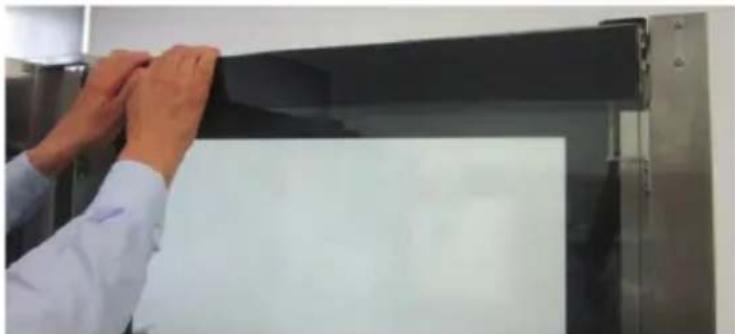
- Appliance's door is equipped with special system which provide to moving internal glass up or down according to the needs.
- To move the door glass down (Fig. 11 on page 8), open the appliance door completely and then, applying sufficient force, slide the glass down until it locks into place (you will hear a clicking sound).
CAUTION! In this position of the glass, it is only possible to close the door if there is no trolley in the chamber - only for pre-heating cycle or semi-automatic and automatic cleaning cycle. If the trolley is placed inside, an audible alarm will activated. DO NOT close the door - risk of damaging the glass.
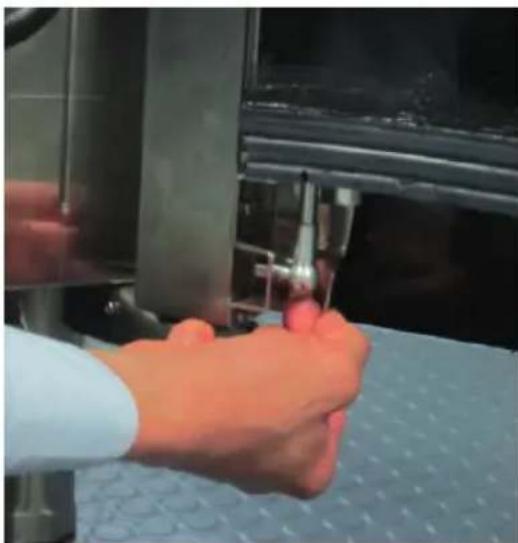
- To move the door glass upwards, open the door (even partially) and press the appropriate lever in the lower part (on the right side of the door) behind the outer glass. The release mechanism will engage and the glass will automatically move to the up position. In this position, the appliance can operate normally, with the trolley placed inside the chamber - without the trolley, no operation on the appliance is possible.
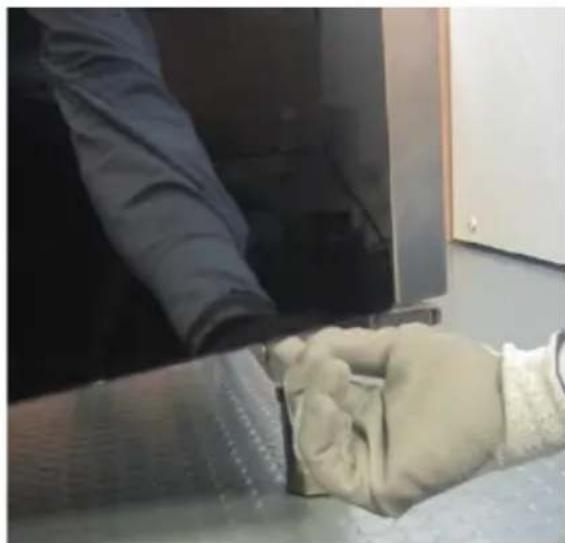
NOTE: If you move the glass upwards before using the appliance, we recommend opening the door completely and pressing the lever from the inside (Fig. 12A on page 8). If after using the appliance, for safety, we recommend partially opening the door and pressing the lever from the outside of the door, using protective gloves - not included (Fig. 12B on page 8).
Cleaning & maintenance
- ATTENTION! Always disconnect the appliance from the power supply and cool down before storage, cleaning & maintenance.
- Do not use water jet or steam cleaner for cleaning and do not push the appliance under the water as the parts will get wet and electric shock might be resulted.
- If the appliance is not kept in a good state of cleanliness, this can adversely affect the life of the appliance and result in a dangerous situation.
- Food residues should be regularly cleaned and removed from the appliance. If the appliance is not cleaned properly, it will reduce its lifespan and may result in a dangerous condition during use.
Manual cleaning
- Clean the cooled exterior and interior surface with a cloth or sponge slightly dampened with a mild soap solution.
- For reasons of hygiene, the appliance should be cleaned before and after use.
- Avoid water contacting the electrical components.
- Never immerse the appliance in water or other liquids.
- Never use aggressive cleaning agents, abrasive sponges, or cleaning agents containing chlorine. Do not use steel wool, metallic utensils, or any sharp or pointed objects for cleaning. Do not use petrol or solvents!
- No parts are dishwasher safe.
- Clean fan with appropriate descaling detergents to ensure creating limescales.
- Remove door gasket and wash it separately with warm soapy water, then rinse and dry with soft cloth.
Semi-automatic cleaning of chamber
- Apply a suitable detergent to the chamber walls, fan covers and the inner door glass. Leave for about 20 minutes with closed door.
- Set the temperature to about 70-80°C and the humidification level on 100%. Set the time to 15 minutes.
• After the cycle is finished, switch off the appliance and let the chamber cool down. Rinse with water. - To dry the chamber, set the cycle to 10 minutes and the temperature to about 150 - 160^ (repeat the cycle if necessary).
• After cleaning, leave the door slightly open.
Automatic cleaning oh chamber
ATTENTION: Before cleaning ensure that drain is free from obstruction to prevent overflowing. If case of caked dirt forming, removed it and clean chamber manually. It is recommended to use intensive program once a day.
- On home screen, after sliding to second view choose accessories icon (Fig.2F); screen with accessible washing system will appear (Fig.7A); choose washing system - list with washing program will appear (Fig.7B): L1. Eco (39 min.); L2. Normal (69 min.); L3. Intensive (100 min.); R. Rinse (9 min.) and P. Pump loading (2 min.).
- After choosing the program - corresponding time will appear (Fig.7C); touch confirmation icon to start washing cycle - active washing will appear on accessories screen (Fig.7D).
- Touch the symbol STOP to disabled washing in progress at any time (Rinse program will start automatically).
NOTE: Washing cycle can not be activated if chamber temperature is over 100°C.
IMPORTANT: First time use or every time the pump is emptied use P program to ensure correct system operating.
WARNING: Before using appliance after washing, ensure that in chamber there are not any detergent residue.
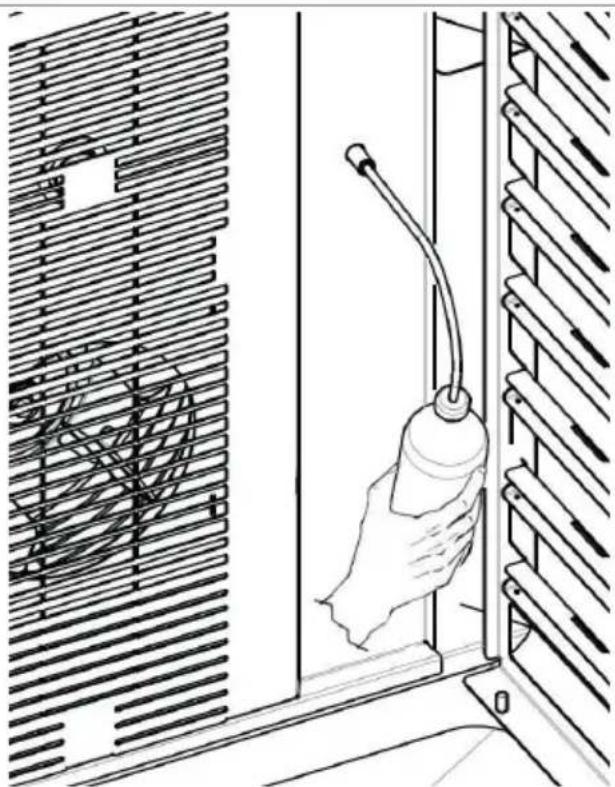
Steam generator cleaning / descaling (Fig.13 on page 8)
- Steam generator must be clean (descale) at least once a month.
- Switch of the appliance, disconnect from the electric mains and let it cool down.
- Fill supplied bottle with descaling bottle and insert small hose with sprayer inthe the hole in fan cover inside chamber.
- Press the bottle repeatedly and insert descing liquid in amount of 500ml (full bottle).
- Leave it for 8-9 hours (possibly overnight). After that reconnect the appliance.
- Steam generator remove descaling liquid automatically and start washing cycle lasting about 5 minutes. After washing, appliance is ready to use.
Maintenance
- Check the operation of the appliance regularly to prevent serious accidents.
- If you see that the appliance is not working properly or that there is a problem, stop using it, switch it off and contact the supplier.
- All maintenance, installation and repair work must be carried out by specialised and authorised technicians, or recommended by the manufacturer.
Transportation and Storage
- Before storage, always make sure that the appliance has
been disconnected from the power supply and completely cooled down.
- Store the appliance in a cool, clean and dry place.
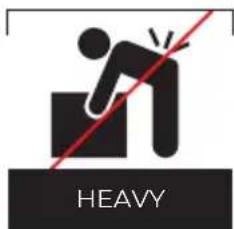
- Never place heavy objects on the appliance as this could damage it.
- Do not move the appliance while it is under operation. Disconnect the appliance from power supply when moving and hold it at the bottom.
Troubleshooting
If the appliance does not function properly, please check the below table for the solution. If you are still unable to solve the problem, please contact the supplier/service provider.
| Problems Possible cause Possible solution | ||
| Appliance does not work (control panel totally off). | Faulty connection to the power mains. | Check connection to the power mains. |
| Lack of voltage. Restore the power supply voltage. | ||
| Blown electronic board protection fuse. | Contact with technical service. | |
| Cooking cycle active - appli-ance does not work. | Door open. Close the door properly. | |
| Door sensor dam-aged. | Contact with technical service. | |
| Humidification / steam produc-tion does not work. | Faulty water con-nection. | Check connection to the water mains. |
| Closed water valve. Open the valve. | ||
| Obstructed water inlet filter. | Clean the filter. | |
| Damaged water inlet solenoid valve. | Contact with technical service. | |
| Steam generator safety thermostat activated | ||
| Door closed. Steam escape through the gasket. | Gasket mounted not properly. | Check gasket as-sembly. |
| Damaged gasket. Conact with technical service. | ||
| Handle adjusted incorrectly. | ||
| Non evenly cooking. | One of the motor is faulty or operates at low speed. | Contact with technical service. |
| The motors do not reverse direction. | ||
Error code identification
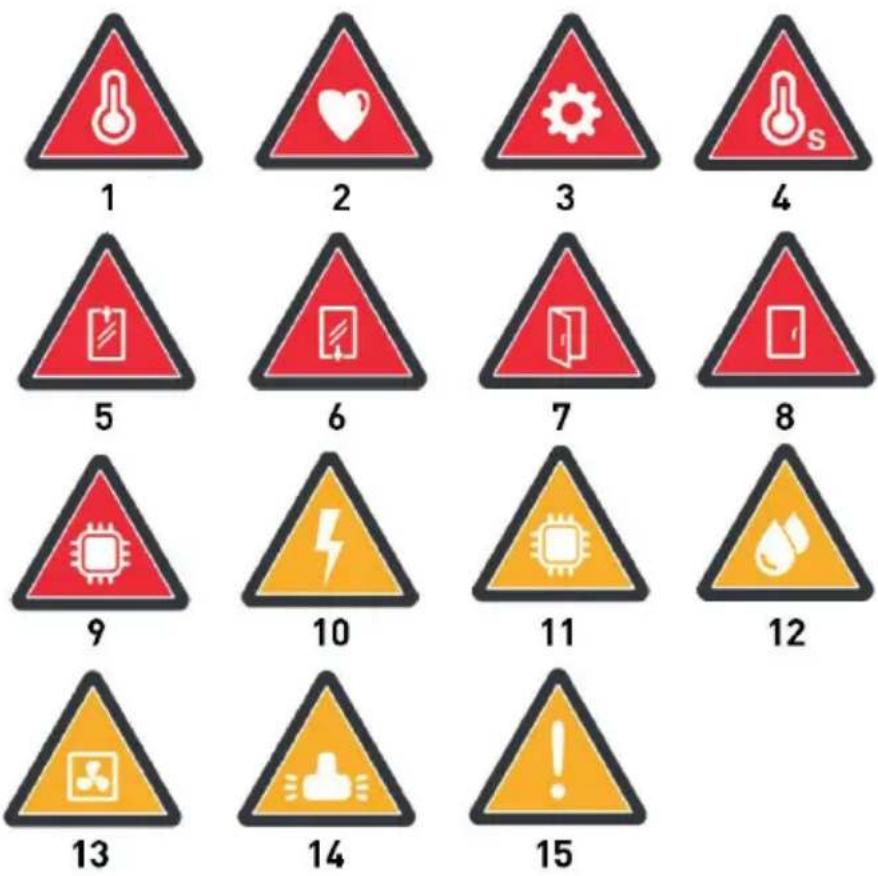
When anomalies occur during the operation of the appliance that prevent the continuation of the cooking cycle or the automatic washing cycle, the display shows alarm/error icon (Fig.9 on page 6) with an acoustic warning. To reset the alarm touch the symbol STOP (Fig.1D). The various types of alarms are described below - red alarms (E) causes that inhibit the oven operation; yellow errors (W) inform about abnormal operating without disabling oven functions.
| Error codes Possible | cause Possible solution | |
| E01: Chamber probe not detected (Fig.9.1) | Interrupted connection between probe and electric board | Contact with technical service |
| Probe damaged | ||
| E02: Core probe not detected (Fig.9.2) | Interrupted connection between probe and electric board | |
| Probe damaged | ||
| E03: Safety circuit breaker tripped (Fig.9.3) | Overheated motors | |
| E04: Safety thermostat tripped (Fig.9.4) | Maximum oven operating temperature exceeded | |
| E10: Door glass is down (Fig.9.5) | Incorrect position of the door glass | Move door glass up |
| E11: Door glass is up (Fig.9.6) | Incorrect position of the door glass | Move door glass down |
| Door open (Fig.9.7) | Door open / not properly closed during the cycle | Close the door properly |
| Door closed (Fig.9.8) | Door closed during cooling down cycle | Open the door |
| E05: Display electronic card over-heated (Fig.9.9) | Display electronic card temperature exceed 75°C | Contact with technical service |
| E06: Main power electronic card over-heated (Fig.9.9) | Main power electronic card temperature exceed 75°C | |
| E07: Auxiliary power electronic card over-heated (Fig.9.9) | Auxiliary power electronic card temperature exceed 75°C | |
| Power supply blackout - oven is off from xx:xx to yy:yy (Fig.9.10) | Lack of main power in period of time | Appliance automatically will re-active interrupted cycle |
| W01: Display electronic card over-heated (Fig.9.11) | Display electronic card temperature exceed 60°C | Contact with technical service |
| W02: Main power electronic card over-heated (Fig.9.11) | Main power electronic card temperature exceed 60°C | Contact with technical service |
| W03: Auxiliary power electronic card over-heated (Fig.9.11) | Auxiliary power electronic card temperature exceed 60°C | Contact with technical service |
| W06: Cannot reach the desire humidification level (Fig.9.12) | Insufficient humidification in chamber | Contact with technical service |
| W07: Cannot reach the desire drying effect (Fig.9.13) | Excessive humidification level in chamber | Contact with technical service |
| W08: Wash the appliance. Number of cycles without washing exceeded (Fig.9.14) | Too many cycles executed without washing | Contact with technical service |
| W09: Faulty heating elements (Fig.9.15) | Excessive time taken to reach the required temperature | Contact with technical service |
Warranty
Any defect affecting the functionality of the appliance which becomes apparent within one year after purchase will be repaired by free repair or replacement provided the appliance has been used and maintained in accordance with the instructions and has not been abused or misused in any way. Your statutory rights are not affected. If the appliance is claimed under warranty, state where and when it was purchased and include proof of purchase (e.g. receipt).
In line with our policy of continuous product development we reserve the right to change the product, packaging and documentation specifications without notice.
Discarding & Environment
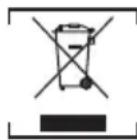
When decommissioning the appliance, the product must not be disposed of with other household waste. Instead, it is your responsibility to dispose to your waste equipment by handing it over to a designated collection point. Failure to follow this rule may be penalized in accordance with applicable regulations on waste disposal. The separate collection and recycling of your waste equipment at the time of disposal will help conserve natural resources and ensure that it is recycled in a manner that protects human health and the environment.
For more information about where you can drop off your waste for recycling, please contact your local waste collection company. The manufacturers and importers do not take responsibility for recycling, treatment and ecological disposal, either directly or through a public system.
DEUTSCH
MODALITÀ MULTI-LEVEL
Len pre model 229859
Len pre model 229859
39100 Bolzano (BZ), Italy
Tel: +39 800 727 438
Email: office.italy@hendi.eu
HENDI GmbH
Ehring 15
1201, 12/F Exchange Tower
33 Wang Chiu Road, Kowloon Bay, Hong Kong
Tel: +852 2154 2618
Email: info-hk@hendi.eu
HENDI Romania S.R.L.
Str. Sânzienei FN, DE 305
507075, Ghimbav, Braşov, Romania
Tel: +40 268 320330
Email: office@hendi.ro
Find HENDI on internet:
www.hendi.com
www.facebook.com/HendiToolsforChefs
https://www.linkedin.com/company/hendi-tools-for-chefs/
www.youtube.com/HendiEquipment
GB: Changes, printing and typesetting errors reserved.