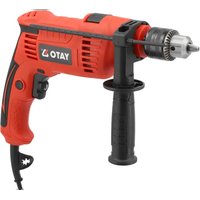
YT-82038 - Drill Yato - Free user manual and instructions
Find the device manual for free YT-82038 Yato in PDF.


| Brand | Yato |
| Model | YT-82038 |
| Product Type | Impact Drill |
| Supply Voltage | 220-240 V~ |
| Frequency | 50/60 Hz |
| Nominal Power | 650 W |
| No-load Speed | 0-2800 min⁻¹ |
| Impact Frequency | 0-44800 min⁻¹ |
| Max. Drilling Diameter Steel | 13 mm |
| Max. Drilling Diameter Wood | 25 mm |
| Max. Drilling Diameter Concrete | 12 mm |
| Chuck Size | 13 mm (self-centering) |
| Weight | 1.8 kg |
| Sound Pressure Level (LpA) | 91 dB(A) |
| Sound Power Level (LwA) | 99 dB(A) |
| Vibration Level (Main Handle) | 8.4 m/s² |
| Vibration Level (Auxiliary Handle) | 7.2 m/s² |
| Insulation Class | II |
| Protection Degree | IPX0 |
| Main Functions | Drilling with/without percussion, screwdriving, speed control, reverse rotation, switch lock |
| Package Contents | Drill, auxiliary handle, depth stop, chuck key |
| Maintenance and Cleaning | Clean with air jet (max 0.3 MPa), brush or dry cloth. Do not use chemicals or liquids. |
| Safety | Wear safety goggles, hearing protection and gloves. Do not use in explosive environment. Unplug before adjustments. |
| Repairability | Repairs exclusively by an authorized workshop with original parts. The user must not open the tool under warranty. |
| General Information | Use for drilling metals, wood, plastics, concrete, masonry. Also for screwing and unscrewing. |
Frequently Asked Questions - YT-82038 Yato
User questions about YT-82038 Yato
0 question about this device. Answer the ones you know or ask your own.
Ask a new question about this device
Download the instructions for your Drill in PDF format for free! Find your manual YT-82038 - Yato and take your electronic device back in hand. On this page are published all the documents necessary for the use of your device. YT-82038 by Yato.
USER MANUAL YT-82038 Yato
CE
PL EN DE RU UA LT LV CZ SK HU RO ES FR IT NL GR BG PT HR AR
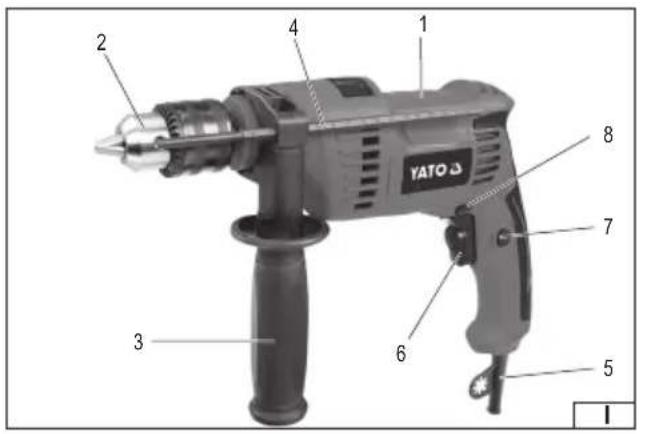
- drive body with handle
- self-centering drill chuck
- additional handle
- drilling depth limiter
- power cord with plug
- electric switch with speed control
- switch lock
- direction of rotation switch
- drill chuck key
DE
Read the operating instruction
Wear protective goggles
Wear hearing protectors
Second class of insulation
This symbol indicates that waste electrical and electronic equipment (including batteries and storage cells) cannot be disposed of with other types of waste. Waste equipment should be collected and handed over separately to a collection point for recycling and recovery, in order to reduce the amount of waste and the use of natural resources. Uncontrolled release of hazardous components contained in electrical and electronic equipment may pose a risk to human health and have adverse effects for the environment. The household plays an important role in contributing to reuse and recovery, including recycling of waste equipment. For more information about the appropriate recycling methods, contact your local authority or retailer.
A hand-held impact drill is an ordinary power tool, insulation class II, designed for drilling holes in various materials: metals, wood and its processed products, plastics, concrete, brickwork, etc. using drills with a cylindrical grip appropriate for the material being processed. The drill has the functions of smooth spindle speed regulation, changing the direction of rotation, drilling with and without impact. It can also be used to screw in and unscrew screws using screwdriver tips available on the market. Correct, reliable and safe operation of the tool depends on proper use, therefore:
Before using the tool, read the entire manual and keep it.
The supplier is not liable for any damage resulting from failure to comply with the safety regulations and recommendations of this manual.
DRILL EQUIPMENT
The factory packaging should contain:
- drill
- additional handle
- drilling depth limiter
- drill chuck key
Note! The tool is not equipped with drills!
TECHNICAL PARAMETERS
| Parameter Unit of measurement Value | ||
| Catalogue number YT-82038 | ||
| Mains voltage [V~] 220 - 240 | ||
| Network frequency [Hz] 50/60 | ||
| Rated power [W] 650 | ||
| Rated speed [min] | -1 0 - 2800 | |
| Stroke frequency [min] | -1 0 - 44800 | |
| Max drilling diameter in steel [mm] | 13 | |
| Max. drilling diameter in wood | [mm] | 25 |
| Max. drilling diameter in concrete | [mm] | 12 |
| Tool holder size | [mm] | 13 |
| Mass | [kg] | 1.8 |
| Noise level | ||
| - sound pressure LpA + K | [dB (A)] | 91 ± 5.0 |
| - sound power LmA + K | [dB (A)] | 99.0 ± 5.0 |
| Insulation class | II | |
| Vibration level: main/additional handle | [m/s2] | 8.4 ± 1.5 / 7.2 ± 1.5 |
| Degree of protection | IPX0 |
The declared noise emission value has been measured using a standard test method and can be used to compare one tool with another. The declared noise emission value can be used in a preliminary exposure assessment.
The declared vibration total value has been measured using a standard test method and can be used to compare one tool with another. The declared vibration total value can be used in a preliminary assessment of exposure.
Note! Vibration emission during tool operation may differ from the declared value depending on how the tool is used.
Note! Safety measures to protect the operator must be defined that are based on an assessment of exposure in the actual conditions of use (including all parts of the operating cycle, such as times when the tool is switched off or idle and activation time).
GENERAL POWER TOOL SAFETY WARNINGS
Warning! Please read all safety warnings, illustrations and specifications provided with this power tool. Failure to follow them may result in electric shock, fire or serious injury.
Save all warnings and instructions for future reference.
The term "power tool" used in the warnings refers to all corded and cordless electric power tools.
Workplace safety
Keep your work area clean and well lit. Clutter and poor lighting can cause accidents.
EN
Do not operate power tools in explosive atmospheres, such as in the presence of flammable liquids, gases or fumes.
Power tools create sparks which may ignite the dust or fumes.
Do not allow children or bystanders into the work area. Loss of concentration can cause loss of control.
Electrical safety
The plug on the electric cord must match the outlet. Do not modify the plug in any way. Do not use any plug adapters with grounded power tools. An unmodified plug that matches the outlet reduces the risk of electric shock.
Avoid body contact with grounded surfaces such as pipes, radiators, and refrigerators. Grounding your body increases the risk of electric shock.
Do not expose power tools to precipitation or moisture. Water or moisture entering a power tool will increase the risk of electric shock.
Do not overload the power cord. Do not use the power cord to carry, pull, or disconnect the plug from the wall outlet.
Keep the power cord away from heat, oil, sharp edges, and moving parts. A damaged or entangled power cord increases the risk of electric shock.
When working outdoors, use extension cords designed for outdoor use. Using an extension cord designed for outdoor use reduces the risk of electric shock.
If using a power tool in a damp environment is unavoidable, a residual current device (RCD) should be used as protection against supply voltage. The use of an RCD reduces the risk of electric shock.
Personal safety
Stay alert, watch what you are doing and use common sense when operating a power tool. Do not use a power tool while tired or under the influence of drugs, alcohol or medication. Even a moment of inattention while operating a power tool can result in serious personal injury.
Use personal protective equipment. Always wear eye protection. The use of personal protective equipment such as dust masks, non-skid safety shoes, hard hats, and hearing protection reduces the risk of serious personal injury.
Prevent accidental starting. Ensure that the power switch is in the “off” position before connecting to power source and/or battery pack, picking up or carrying the power tool. Carrying a power tool with your finger on the switch or energizing a power tool that has the switch in the “on” position can result in serious injury.
Remove any wrench or key that is used to adjust the power tool before turning it on. A wrench or key left attached to a rotating part of the power tool may result in serious injury.
Do not overreach or overextend. Maintain proper posture and balance at all times. This will make it easier to control the power tool in the event of unexpected situations while working.
Dress appropriately. Do not wear loose clothing or jewelry. Keep hair and clothing away from moving parts of the power tool. Loose clothing, jewelry, or long hair can be caught in moving parts.
If devices are provided for the connection of dust extraction or dust collection facilities, ensure that these are connected and used correctly. The use of dust extraction reduces the risk of dust-related hazards.
Don't let the experience gained from frequent use of the tool cause you to become careless and ignore safety rules.
Careless action can cause serious injuries in a split second.
Use and care of power tools
Do not overload the power tool. Use the correct power tool for the selected application. The correct power tool will provide better and safer work when used for the designed load.
Do not use a power tool if the power switch does not turn it on and off. A tool that cannot be controlled with the power switch is dangerous and must be repaired.
Disconnect the plug from the power outlet and/or remove the battery pack if detachable from the power tool before making any adjustments, changing accessories, or storing the tool. Such precautions will prevent the power tool from being switched on accidentally.
Store the tool out of the reach of children, do not allow persons unfamiliar with the power tool or these instructions to use the power tool. Power tools are dangerous in the hands of untrained users.
Maintain power tools and accessories. Check the tool for misalignment or binding of moving parts, breakage of parts and any other condition that may affect the power tool's operation. Any damage should be repaired before using the power tool. Many accidents are caused by poorly maintained tools.
Cutting tools should be kept clean and sharp. Properly maintained cutting tools with sharp edges are less likely to bind and are easier to control during operation.
Use power tools, accessories and attachments etc. in accordance with these instructions, taking into account the type and conditions of work. Use of tools for work other than those designed may result in a hazardous situation.
Keep handles and gripping surfaces dry, clean and free from oil and grease. Slippery handles and gripping surfaces do not allow safe operation and control of the tool in hazardous situations.
Repairs
Have your power tool repaired only by authorized service centers, using only original spare parts. This will ensure proper
EN
safety of your power tool.
DRILL SAFETY WARNINGS
Safety instructions for all activities
Wear hearing protection when hammer drilling. Exposure to noise can cause hearing loss.
Use additional - y handles. Loss of control can result in personal injury.
Hold the tool properly before use. This tool produces high torque and without proper grip during operation, loss of control may cause personal injury.
Hold power tools by insulated gripping surfaces when performing an operation where the cutting tool may contact hidden wiring or its own wire. The cutting tool contacting a live wire may make exposed metal parts of the power tool live and could give the operator an electric shock.
Safety Instructions When Using Long Drill Bits
Never operate at a higher RPM than the maximum RPM of the drill. At higher speeds, the drill is likely to bend if allowed to rotate freely without contact with the workpiece, causing personal injury.
Always start at low speed and when the tip of the drill bit is in contact with the workpiece. At higher speeds the drill bit will likely bend if allowed to rotate freely without contact with the workpiece, causing personal injury.
Apply pressure only in the direction of the drill axis and do not apply excessive pressure. The drill may bend, causing breakage or loss of control, causing personal injury.
INSTALLATION OF EQUIPMENT ELEMENTS
CAUTION! Accessories may only be mounted when the power supply is disconnected. Pull the tool cable plug out of the power socket!
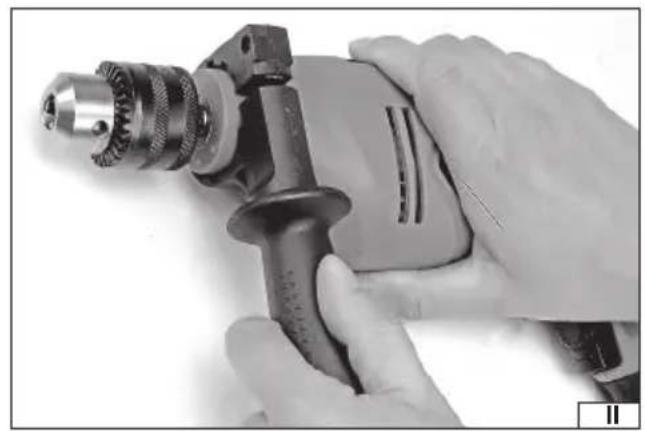
Installing the additional handle (II)
Attach the drill chuck clamp to the drill body, select the grip position in such a way as to ensure the safest work. The grip position should be selected so that it is possible to fully counteract the torque directed against the direction of rotation of the drill chuck. Such a torque is generated during normal work, but it reaches its highest value when the drill is jammed in the drilled material. Secure the grip position by firmly and securely tightening the additional grip handle.
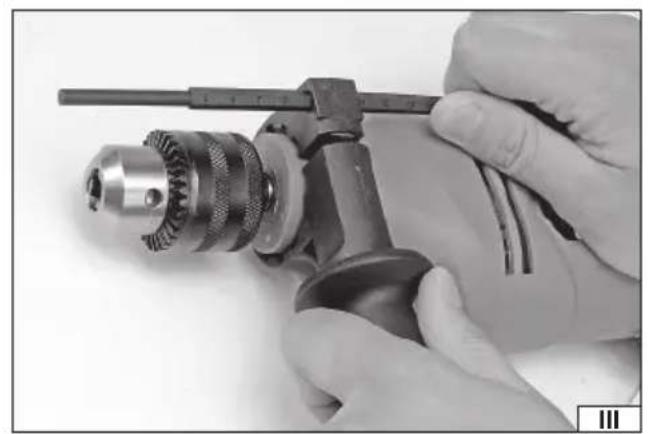
Installing the drilling depth limiter (III)
Insert the limiter rod through the hole in the additional handle clamp. The limiter position should be secured depending on the type of assembly: by tightening the additional handle handle, by tightening the knob separately or by using the lock button. The detailed method of locking the limiter position is shown in the illustration.
PREPARING FOR WORK
Before starting work, check that the housing body and the connecting cable with the plug are not damaged. If any damage is found, further work is prohibited.
Attention! All activities related to mounting and replacing working tools, mounting covers and guides, adjustments, etc. should be carried out with the power supply voltage of the drill switched off, therefore before starting these activities: Unplug the tool cable from the mains socket!
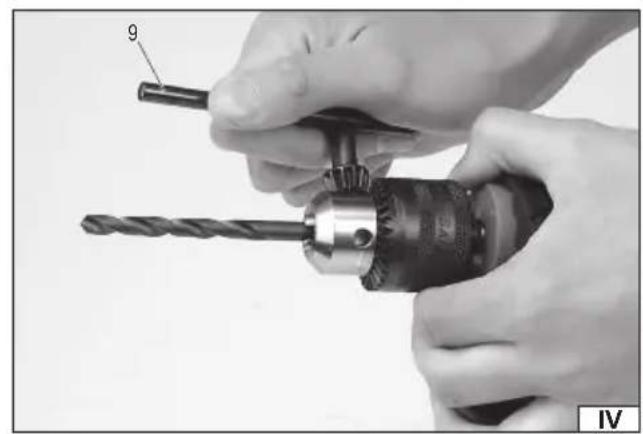
Fixing drills in the drill chuck (IV)
Be sure to select the appropriate cylindrical shank drill for the job.
Insert the drill into the holder and tighten each of the 3 holes with a key so that it is securely and tightly fastened in the holder.
Then remove the key from the mounting hole.
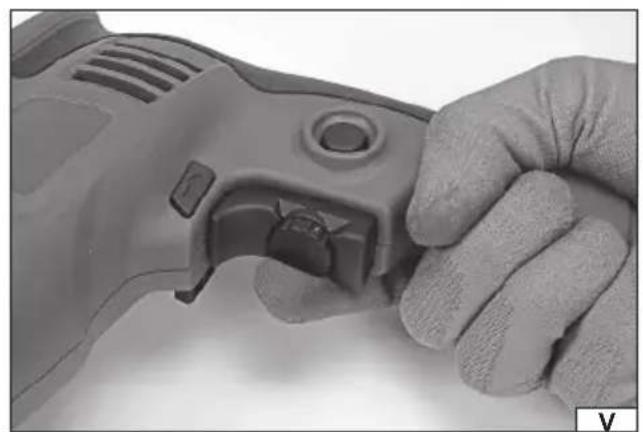
Speed control (V)
The drill is equipped with smooth speed control. Adjustment is done by setting the knob as in V. Turning the knob in the direction marked with the „+” symbol increases the speed, turning it in the opposite direction decreases the speed. Turning the knob regulates the range of the switch movement, which translates into the maximum value of the speed. Gradually pressing the switch speeds up the engine speed.
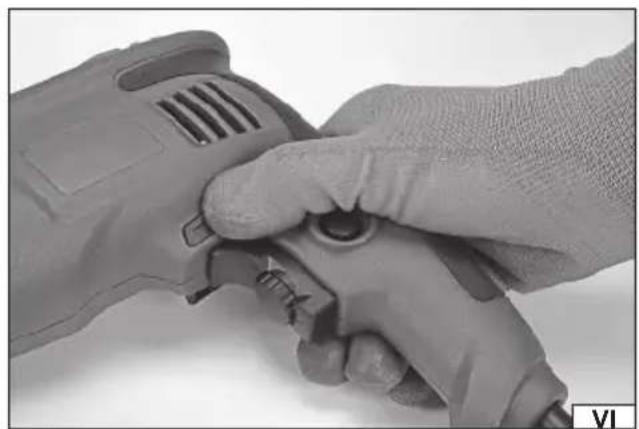
Setting the direction of rotation (VI)
Set the direction of rotation switch to the R (clockwise) or L (anti-clockwise) position.
Attention! The direction of rotation can only be changed when the supply voltage is disconnected!
EN
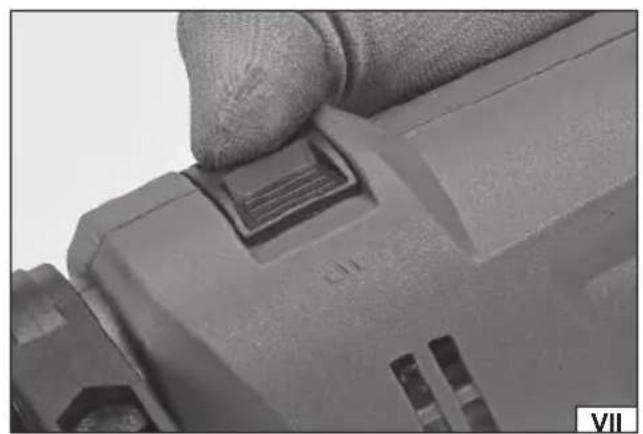
Setting the impact function (VII)
The impact function makes it easier to work when making holes in concrete, masonry and hard ceramic materials (hard bricks, stones, marble). To do this, set the impact switch to impact mode (hammer symbol).
When drilling holes in other materials, the impact drilling function should be turned off by setting the switch to non-impact operation (drill symbol)
Preparatory activities for work
Before starting work:
Secure the workpiece in a vice or with clamps.
Use tools that are appropriate for the job at hand. Keep them sharp and in good condition.
Put on work clothes and eye and hearing protection.
Insert the drill plug into the electrical outlet.
Hold the drill with both hands on the handle and the additional handle
Adopt a confi dent and stable stance.
Turn on the drill by pressing the electric switch with your finger
Caution! If you notice any suspicious noises, crackling sounds, a suspicious smell, etc., immediately turn off the drill and remove the plug from the power outlet.
USING THE TOOL
Using right or left rotation direction
Use clockwise rotation when drilling with commonly used right-handed drills.
Use left-hand rotation when a right-hand drill becomes jammed in the material or when removing screws.
When removing screws, use minimum rotation speed.
Using the switch lock
It is recommended to use the switch lock for long-term drilling (e.g. when drilling in concrete, masonry, etc.). To do this, with the switch pressed, press the lock button with your thumb and release the switch.
To deactivate the lock, simply press the electric switch.
Drilling in wood
Before making a hole, it is recommended to secure the workpiece with carpenter's clamps or in a vice, and then use a center punch or nail to determine the drilling location. Attach the appropriate drill to the drill chuck, set the speed, connect the drill to the mains and start drilling.
When making through holes, it is recommended to place a wooden pad under the material to prevent the edge of the hole at the outlet from being jagged.
When making large diameter holes, it is recommended to drill a smaller pilot hole first.
Drilling in metals
Always securely clamp the workpiece.
In the case of thin sheet metal, it is recommended to place a piece of wood under it to avoid unwanted bends, etc. Then mark the places where the holes are to be made with a center punch and start drilling. Use drills for steel. When drilling in white cast iron, it is recommended to use carbide-tipped drills. When drilling larger holes, it is recommended to make a smaller pilot hole first. When drilling in steel, use machine oil to cool the drill. For aluminum, use turpentine or paraffin as a coolant.
When drilling brass, copper or cast iron, do not use coolants. To cool, remove the drill bit from the material frequently to allow it to cool.
Drilling in ceramic materials
Drilling in hard, compact materials (concrete, hard brick, stone, marble, etc.)
Before drilling the actual hole, drill a smaller hole without impact. Drill the actual hole with the impact function turned on. Use carbide impact drills in good condition.
Drilling in tiles, soft brick, plaster, etc.
Drill as in the above step, but without impact.
Periodically remove the drill bit from the drill hole to remove dust and debris. Press the tool firmly with a constant force while drilling.
Using a drill to screw or unscrew screws
A drill with speed control and a direction of rotation switch can also be used for screwing in and out screws. For this purpose, it is recommended:
EN
- using the lowest possible rotational speed,
- using appropriate tips.
The bits can be mounted directly in the drill chuck or using a special magnetic holder.
To unscrew the screw, change the direction of rotation of the switch to left rotation (L).
Cutting holes
A drill can be used to make larger holes in wood using special fixed diameter drill bits or replaceable bits from a jigsaw set.
In order to avoid the formation of burrs or jagged edges of the hole being made, place a piece of scrap wood under the material at the hole outlet.
Using attachments
Drills with variable direction of rotation should not be used to drive work attachments.
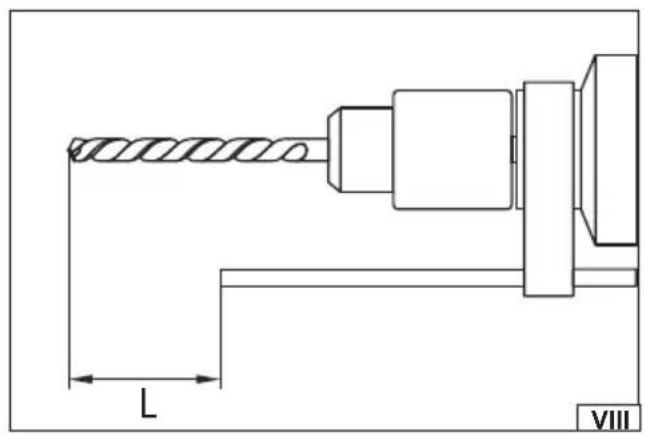
Drilling with depth gauge (VIII)
The stop can be used to facilitate drilling in surfaces where blind holes are made, especially in concrete and wood. Set the depth of the hole. Install the drill in the holder, use a marker to mark on the drill the distance from the working end of the drill equal to the depth of the hole. Set the depth stop so that its end matches the distance marked „L” on the drill. Make sure that the stop does not move during operation. Start drilling, at the set depth the face of the stop will rest on the surface near the hole. Then withdraw the drill from the hole.
Additional notes
While working, do not exert too much pressure on the material being processed and do not make sudden movements so as not to damage the working tool and the drill.
Take regular breaks while working.
The tool must not be overloaded – the temperature of the external surfaces must never exceed 60 °C.
After finishing work, turn off the drill, unplug the tool from the power outlet and perform maintenance and inspection.
MAINTENANCE AND INSPECTIONS
NOTE! Before starting any adjustments, maintenance or servicing, unplug the tool from the power outlet. After finishing work, check the technical condition of the power tool by visually inspecting it and assessing: the body and handle, the electric cable with the plug and bending protection, the operation of the electric switch, the patency of the ventilation slots, the sparking of the brushes, the noise level of the bearings and gears, the start-up and the smoothness of the operation. During the warranty period, the user may not add any power tools or replace any components or parts, as this will void the warranty. Any irregularities observed during the inspection or during work are a signal to carry out repairs at a service point. After finishing work, the housing, ventilation slots, switches, additional handle and covers should be cleaned, for example, with an air jet (with a pressure of no more than 0.3 MPa), a brush or a dry cloth without using any chemicals or cleaning fluids. Clean the tools and handles with a dry, clean cloth.
WERKZEUGMERKMALE
VEILIGHEIDSWAARSCHUWINGEN VOOR BOORMACHINES
DEKLARACJA ZGODNOŚCI DECLARATION OF CONFORMITY DECLARATIE DE CONFORMITATE
0425/YT-82038/EC/2025
We declare and guarantee with full responsibility that the following products:
meet requirements of the following European Standards / Technical Specifications:
and fulfill requirements of the following European Directives:
2006/42/WE Machinery and safety elements
2014/30/UE Electromagnetic compatibility (EMC) Directive
Directiva privind compatibilitatea electromagnetică (EMC) (H.G. nr. 487/2016)
2011/65/UE Restriction of the Use of Certain Hazardous Substances
Serial number: concern all serials numbers of item(s) mentioned in this declaration
The person authorized to compile the technical file:


- DE
- BEFORE USING THE TOOL, READ THE ENTIRE MANUAL AND KEEP IT
- DRILL EQUIPMENT
- GENERAL POWER TOOL SAFETY WARNINGS
- EN
- ELECTRICAL SAFETY
- PERSONAL SAFETY
- USE AND CARE OF POWER TOOLS
- REPAIRS
- DRILL SAFETY WARNINGS
- SAFETY INSTRUCTIONS FOR ALL ACTIVITIES
- SAFETY INSTRUCTIONS WHEN USING LONG DRILL BITS
- INSTALLATION OF EQUIPMENT ELEMENTS
- INSTALLING THE ADDITIONAL HANDLE (II)
- INSTALLING THE DRILLING DEPTH LIMITER (III)
- PREPARING FOR WORK
- FIXING DRILLS IN THE DRILL CHUCK (IV)
- SPEED CONTROL (V)
- SETTING THE DIRECTION OF ROTATION (VI)
- SETTING THE IMPACT FUNCTION (VII)
- PREPARATORY ACTIVITIES FOR WORK
- USING THE TOOL
- USING RIGHT OR LEFT ROTATION DIRECTION
- USING THE SWITCH LOCK
- DRILLING IN WOOD
- DRILLING IN METALS
- DRILLING IN CERAMIC MATERIALS
- DRILLING IN TILES, SOFT BRICK, PLASTER, ETC
- USING A DRILL TO SCREW OR UNSCREW SCREWS
- CUTTING HOLES
- USING ATTACHMENTS
- DRILLING WITH DEPTH GAUGE (VIII)
- ADDITIONAL NOTES
- MAINTENANCE AND INSPECTIONS
- WERKZEUGMERKMALE
- VEILIGHEIDSWAARSCHUWINGEN VOOR BOORMACHINES
- DEKLARACJA ZGODNOŚCI DECLARATION OF CONFORMITY DECLARATIE DE CONFORMITATE
Brand : Yato
Model : YT-82038
Category : Drill