STM15 - Steam cleaner Duronic - Free user manual and instructions
Find the device manual for free STM15 Duronic in PDF.


User questions about STM15 Duronic
0 question about this device. Answer the ones you know or ask your own.
Ask a new question about this device
Download the instructions for your Steam cleaner in PDF format for free! Find your manual STM15 - Duronic and take your electronic device back in hand. On this page are published all the documents necessary for the use of your device. STM15 by Duronic.
USER MANUAL STM15 Duronic
Creative Consumer Products
natural_image
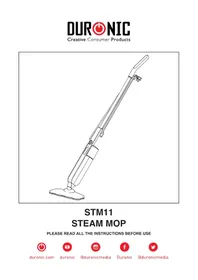
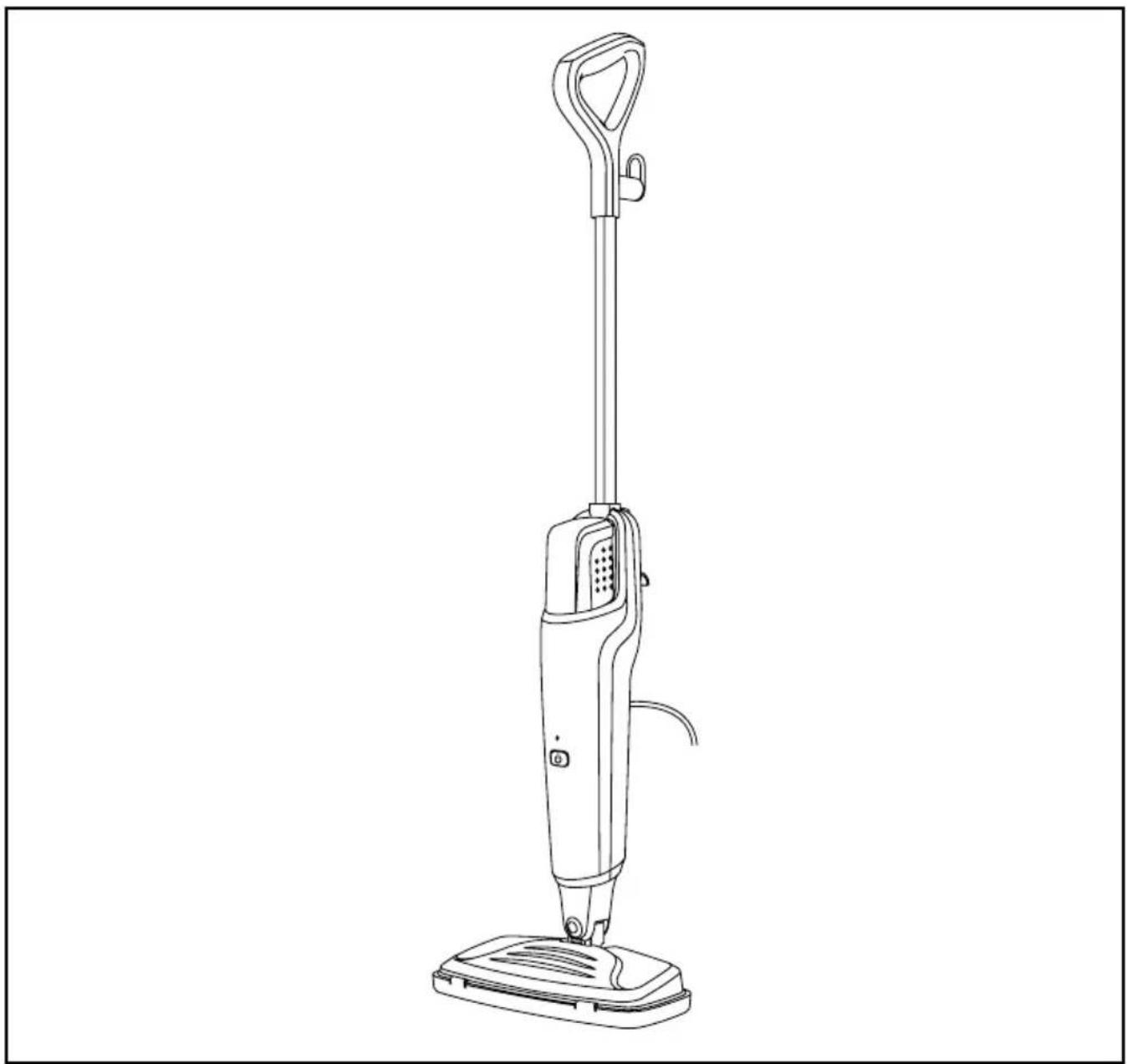
Line drawing of a vacuum cleaner with handle and base (no text or symbols)STM15 Steam Mop
PLEASE READ ALL THE INSTRUCTIONS BEFORE USE

duronic.com

duronic

@duronicmedia

duronic

@duronicmedia

@duronicuk
Contents
English Manual 3
Features and Specifications
| IP rating Dimensions Cable Length Weight | |||||
| IPX4 | 112.5x31.5x17cm44.3x12.4x6.7in | 7m275.6in | 2kg | ||
| Max°C | Tank Capacity | Steam Flow Rate | Power Voltage | ||
| 100°C 50 | 0ml 25-30g/min 150 | 0W | 220-240V50-60Hz | ||
Components
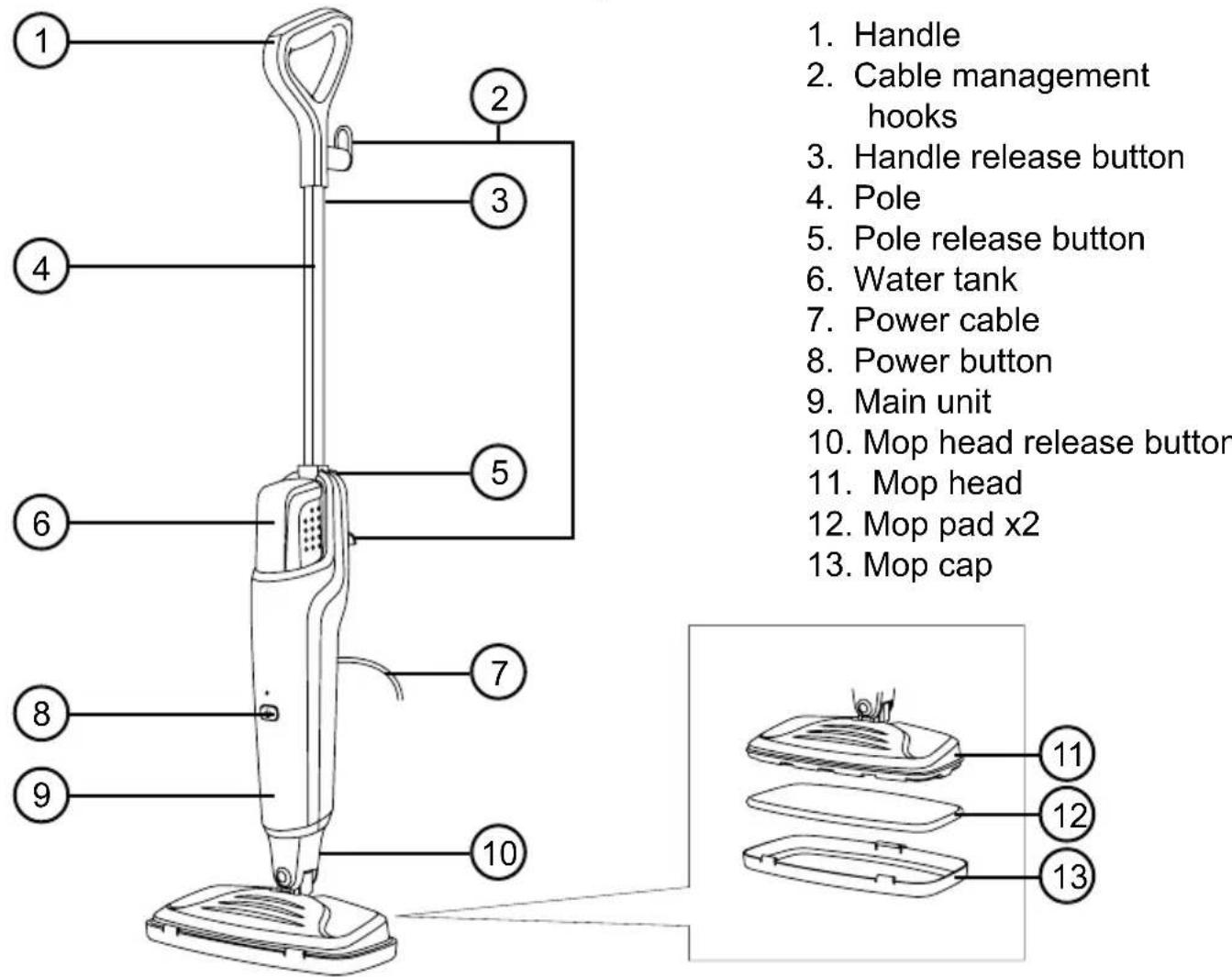
Purchasing Spare Mop Pads (STM15X10)
If you would like to purchase spare mop pads for your steam mop, please visit our website at www.duronic.com or contact us directly on sales@duronic.com.
DURONIC
Safety Information
PLEASE READ THIS MANUAL CAREFULLY AND RETAIN FOR FUTURE REFERENCE
• This appliance is for indoor/household use only. Do not use outdoors.
- This appliance is not designed for commercial or industrial use; it is for household use only.
- This appliance is not intended for use by persons (including children) with reduced physical, sensory or mental capabilities, or lack of experience and knowledge unless they have been given supervision or instruction concerning the use of the appliance by a person responsible for their safety.
- Children should be closely supervised at all times to ensure that they do not play with the appliance.
- Only use the appliance out of the reach of children because it gets hot.
- Do not operate this appliance if the power cable or plug is damaged. If either is damaged, return it to Duronic for service or repair by a professional technician.
- Never try to replace the parts and repair the unit by yourself. Do not modify the appliance in any way that is not described in the instructions for use. The machine contains live parts. Repairs may only be carried out by Duronic, using original spare parts and accessories.
- If an extension lead/cable is needed to reach the appliance to a mains power socket that is too far away out of reach of the machine's accompanying cable, please ensure that:
- the marked electrical rating of the extension lead is at least as great as the electrical rating of the appliance.
- the extension lead is of the grounded type.
- no other appliance is plugged into the same extension lead.
- the extension cable is safely positioned to avoid it being pulled on by children or animals or being tripped over.
• Always turn off the steam mop before unplugging from the outlet.
DURONIC
Safety Information
- Unplug from the mains plug outlet when not in use.
- Never disconnect the plug by pulling on the power cable. You should always hold the plug with your hand and pull to disconnect.
- To protect against the risk of electric shock, do not immerse any part of steam mop in water or other liquids.
- The appliance is not to be used if it has been dropped, if there are visible signs of damage or if it is leaking.
- The appliance should not be left unattended while connected to the mains power.
- Do not use the steam mop for anything other than cleaning floors.
- Ensure that there is no foreign matter blocking the steam outlet.
- When the mop cleaning head is used, the temperature output is higher. Do not put your hands or feet under the mop head to avoid scalding.
• Always test the mop on an inconspicuous area first. Never use on materials that can not resist high temperature, such as dralon, natural fur, etc. - To avoid deformation, do not use the steam mop on a newly polished / waxed wood floor. Flooring made of special material or that requires cleaning via a specific method should not be steam cleaned using this mop.
- Do not use on unsealed wooden or hard flooring.
- Don't use the steam mop in one place or the same place over and over again. Depending on the type of material the floor is made of, it may deform or fade.
DURONIC
Safety Information

CAUTION:
- Danger of scalding - when using a steam mop, do not turn it upside down or spray it in the direction of people or animals.
- Risk of electrocution - never touch the plug or cable with wet hands.
IMPORTANT:
- Only use deionised or distilled water in this steam mop.
- Do not use tap water, detergents, disinfectants, scented oils, cleaning solutions, bleach, vinegar or scented water in your steam mop. They will cause damage to your product and void your warranty.
Introduction
Using only water, a steam mop will clean your household floors without the need for harmful or toxic chemicals, leaving you with peace of mind that your family's wellbeing is taken care of.
In addition to this, steam mopping cleans and dries the flooring simultaneously, providing a nicer finish on smooth or shiny flooring as it ensures that streaks or marks aren't left behind.
Steam cleaning with the STM15 steam mop will bring a completely new level of cleanliness to your home. From the kitchen to bathroom, this lightweight steam mop will take care of the hard cleaning work so that you don't have to.
It is ideal for cleaning hard floors such as sealed wood, lino or tiles. Thanks to its simplistic design, it is easy to manoeuver along every edge and corner, blitzing away bacteria, dirt and scum along the way, leaving you with beautifully clean floors.
DURONIC
Before First Use
- Remove all of the packaging materials. Check that there are no parts missing.
- Assemble the steam mop following the steps below.
IMPORTANT:
- This steam mop operates by emitting steam at an increased temperature of 100^ C.
• Always test on an inconspicuous area of the floor first. - Never use it on flooring which cannot resist this temperature, or on floorings with coatings, polishes, or that are plastic or antique.
- If in any doubt, please check carefully on a part of the floor surface where minor marks will not matter.
How to Assemble the Mop
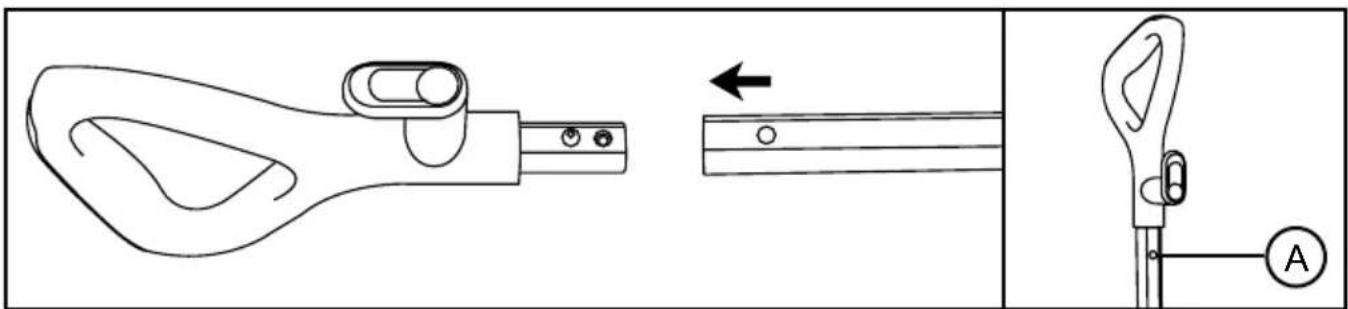
natural_image
Technical line drawing of a mechanical tool with an arrow indicating direction, alongside a close-up view of the handle (no text or symbols)- Insert the pole onto the handle. It will click into place. You can remove the handle by pressing the handle release button (A).
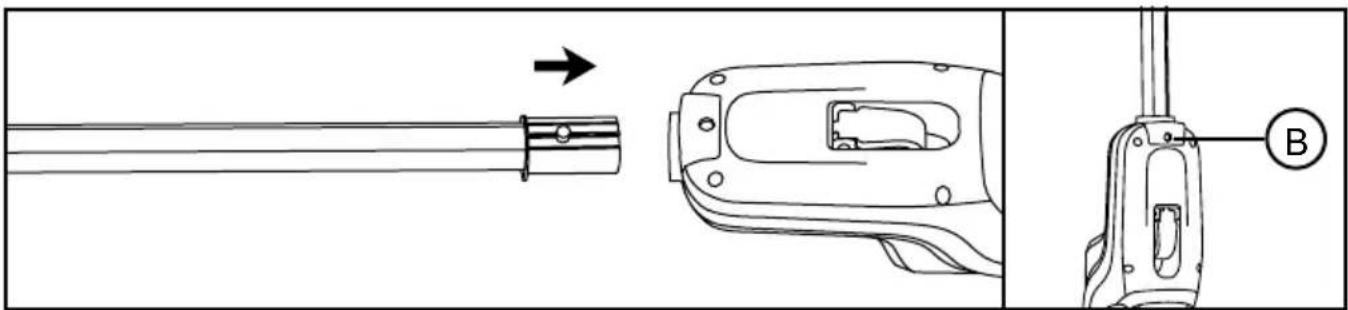
natural_image
Technical line drawing of a mechanical component with an arrow indicating direction and a labeled section B (no text or symbols beyond labels)- Insert the pole into the top of the main unit. It will click into place. You can remove the pole by pressing the pole release button (B).
DURONIC
How to Assemble the Mop
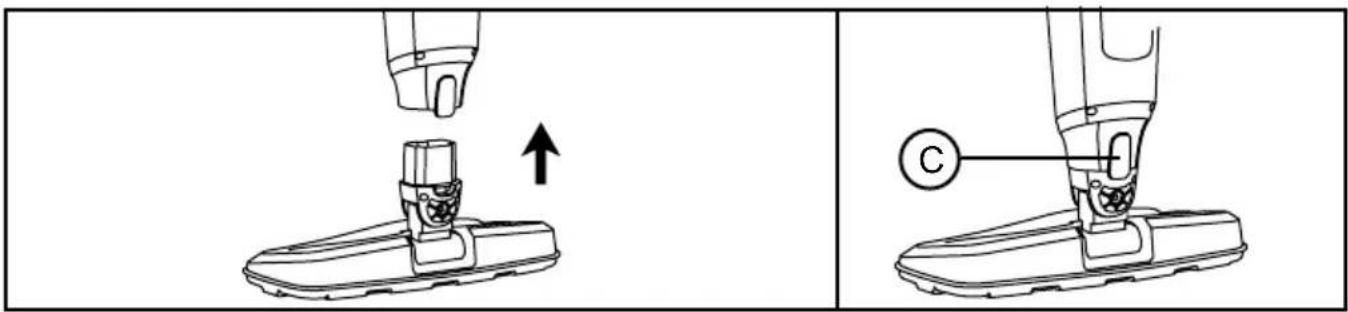
- Insert the mop head into the bottom of the main unit. It will click into place. You can remove the mop head by pressing the mop head release button (C).
natural_image
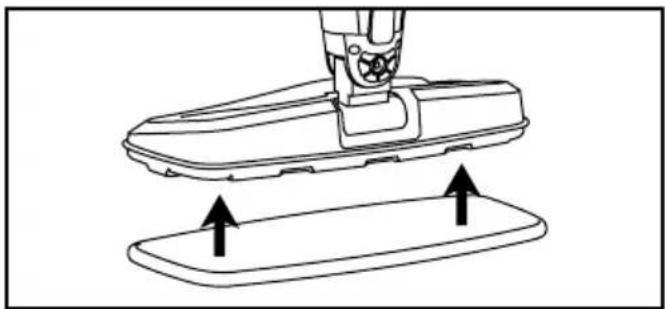
Technical line drawing of a mechanical component with two upward arrows indicating motion or assembly (no text or symbols)- Place a mop pad on the bottom of the mop head and press into place. You can begin mopping hard floors.
natural_image
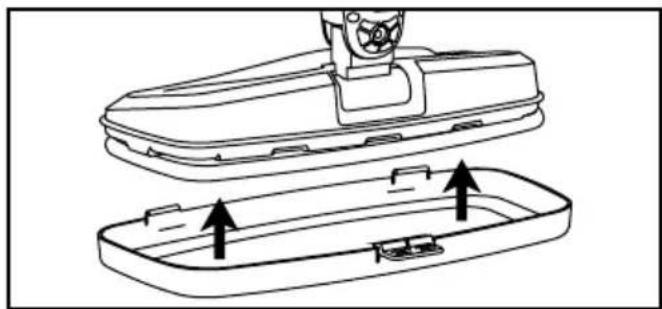
Technical line drawing of a mechanical component with internal parts and arrows indicating assembly (no text or symbols)- To use the steam mop on carpets, clip the mop cap onto the mop head. Place the mop on the carpet and move it slowly back and forth, allowing the steam to penetrate the fibers. Avoid leaving the mop in one spot for too long.
Please Note:
• Not suitable for wool carpets or rugs.
- Not suitable for delicate, antique, or non-colorfast rugs.
DURONIC
How to Use
- Before using the steam mop, ensure that the floors are swept or vacuumed to remove any surface dirt or debris.
Note:
We recommend to not use the steam mop on bare wooden floors, unsealed flooring or on any surfaces where wood is exposed (as it will absorb moisture and may distort).
- Attach a mop pad to the mop head by aligning the hook & loop pads.
- Pull the water tank upwards to release the water tank from the main unit.
- Remove the cap from the tank, fill the tank with deionised or distilled water. Fill up to 500ml. Close the cap on the water tank.
- Place the water tank back into the main unit and ensure that it clicks into place as this means the tank is securely back in the right place.
Note:
If you are using this mop for the first time, or for the first time after a period of not using it, you will need to wait a minute or two for the water to start traversing through into the main unit.
- Unwind the power cable from the cable management hooks. A quick way to release the cable is to rotate the top cable management hook inwards as this automatically releases the whole cable at the same time.
- Plug in the power cable to a mains outlet. On the mop main unit, press the power button. The power indicator light will light up and the unit will start to preheat.
DURONIC
How to Use
- When the preheating is done, the light will turn green. The water pump will start working and you will start to see steam start to come out of the mop head.
- Push and glide the mop over the floor surface to clean it. Try to use up all the water in the tank at one time. Do not use the mop just in one place, or on the same place over and over again. Depending on the material of the floor, it may deform or fade it over time. If there is any water left in the water tank, empty the remaining.
- After you have finished mopping, press the power button to switch the mop off.
- Unplug the power cable from the mains outlet socket and wind it around the cable management hooks to secure in place.
Using on Carpets
With the mop cap attachment fitted, the steam mop can be used to refresh and sanitize carpets and rugs. Place the mop on the carpet and move it slowly back and forth, allowing the steam to penetrate the fibers. Avoid leaving the mop in one spot for too long.
Suitable Carpets:
- Low-pile and medium-pile carpets
- Most rugs that can tolerate heat and moisture
Unsuitable Carpets:
• High-pile or shag carpets
- Wool carpets or rugs
• Delicate, antique, or non-colorfast rugs
- Carpets made of materials sensitive to heat or water
Always check the carpet manufacturer's cleaning instructions before use.
DURONIC
Cleaning and Maintenance
Before cleaning, turn off the steam mop and allow it to cool down completely.
To clean the main unit, use a dry cloth to remove any dust or dirt. If there are stubborn areas of dirt, use a damp well-wrung cloth to wipe over the body.
Leave to air dry or use a dry cloth afterwards to dry it.
IMPORTANT:
- Do not immerse the power cable, plug or the mop itself into water or any liquid.
- Do not pour water or any liquid over the mop.
- Do not use detergents, abrasive cleaning products or any kind of cleaning solutions in the water tank as this may damage the mop.
- Do not use alcohol or solvent-based cleaners on the plastic components, as this will cause the cracking and ageing of these parts.
Cleaning the Mop Pads
Please wash the mop pads immediately after use. The mop pads should be cleaned separately from other fabrics. Machine or hand wash and air dry naturally. Lay flat to dry.
The mop pads can be machine washed at 40^ C max. For heavy soiling, soak the mop pads in warm water and detergent or a mild stain remover, then wash as normal in the washing machine.
IMPORTANT:
- Do not use bleach or fabric softener when cleaning the mop pads.
Each mop pad can be used 70 to 80 times under normal circumstances.
When the mop pad appears damaged or the cleaning effect is weakened, it is recommended to replace the it with a new mop pad.
DURONIC
Cleaning and Maintenance
Decalcifying the Water Tank
To clean calcium deposits that build up inside the Water Tank;
- Remove the water tank from the steamer.
- Add one or two tablespoons of white vinegar to a full Water Tank. Close the Water Tank Cap and shake the contents.
- Rinse out the water tank with clean water when clean.
WARNING:
- Do not turn the steam mop on when the water tank is removed or being cleaned.
Removing Internal Limescale
If your steam mop produces steam more slowly than usual or stops producing steam, limescale may have built up inside. Limescale forms on internal metal parts over time and can reduce performance.
To keep your steam mop working properly, remove limescale regularly every 25-50 full tanks of water or at least once a month, especially in hard water areas.
- Mix a solution of 1/3 white vinegar and 2/3 tap water.
- Pour the solution into the water tank.
- Place the mop in a secure position so the steam is directed away from the floor, furniture, or other surfaces.
- Plug in the unit and switch it ON. Allow it to run until the vinegar solution is completely used up.
- Repeat the process if needed until steam flow returns to normal.
- Empty the tank, rinse thoroughly, and refill with fresh water.
- Run the mop again with only fresh water until the tank is empty, to flush out any remaining vinegar.
DURONIC
Cleaning and Maintenance
Cleaning Blocked Accessories
In some areas, tap water has a high mineral content. This can cause calcium buildup inside the nozzle, reducing the amount of steam that comes out of the handheld accessories.
Wipe the water outlets with a damp cloth. If that does not clear the debris;
- Spray a small amount of spray lubricant (1–2 bursts) into the tip of the Jet Nozzle.
- Fill the steamer with water as instructed in the manual.
- Run a continuous jet of steam through the blocked accessory for several minutes to ush out the deposit.
- Once steam ows freely, aim the nozzle at a neutral surface or a cleaning cloth to ensure no debris is released.
Storage
Let the steam mop cool completely before storing.
Store in a cool dry place.
Position the mop in such a way that it is rested against something stable, like a wall, ensuring that it will not fall at any time.
Remove the mop pads from the mop before storing it away.
Ensure the power cable is wrapped around the cable management hooks with the upper hook facing upwards so that it is securely holding the cable in place.
DURONIC
Troubleshooting
| Problem Possible Cause and Solution | |
| The mop won’t start | Check the mains power outlet, the fuse on the plug and if the switch is pressed on or off. |
| There is no steam coming out | Check the water level in the water tank.Check if the steam holes are blocked. If they are, clean the blocked holes with a damp cloth. |
| There is a lot of moisture after use | The mop pad is either too wet or installed incorrectly. Remove it, wring it out and place it back onto the mop head. |
| It is difficult to move whilst in use | The mop pad may be too dirty. Wash and wring out the pad before continuing to use it. Alternatively, change the mop pad for a new one. |
| The mop pad is too dry. Allow the steam to pass through it for a short while to dampen it before attempting to use it again. | |
If you are still experiencing issues, please contact Duronic.
natural_image
Technical line drawing of a mechanical tool with an arrow indicating direction, alongside a close-up view of the handle (no text or symbols)natural_image
Technical line drawing of a mechanical component with an arrow indicating direction and a labeled section B (no text or symbols beyond labels)natural_image
Technical line drawing of a mechanical component with two upward arrows indicating motion or assembly (no text or symbols)natural_image
Technical line drawing of a mechanical component with internal parts and arrows indicating assembly (no text or symbols)natural_image
Technical line drawing of a mechanical tool with an arrow indicating direction, alongside a close-up view of the handle (no text or symbols)natural_image
Technical line drawing of a mechanical component with an arrow indicating direction and a labeled section B (no text or symbols beyond labels)natural_image
Line drawing of a mechanical component with two upward arrows indicating motion or force (no text or symbols)natural_image
Technical line drawing of a mechanical component with internal parts and arrows indicating assembly (no text or symbols)natural_image
Technical line drawing of a mechanical tool with an arrow indicating direction, alongside a close-up view of the handle (no text or symbols)natural_image
Technical line drawing of a mechanical component with an arrow indicating direction, showing assembly and close-up views (no text or symbols)natural_image
Line drawing of a mechanical component with two upward arrows indicating motion or force (no text or symbols)natural_image
Technical line drawing of a mechanical component with internal parts and arrows indicating assembly (no text or symbols)natural_image
Technical line drawing of a mechanical tool with an arrow indicating assembly direction (no text or symbols)natural_image
Technical line drawing of a mechanical component with an arrow indicating direction and a labeled section B (no text or symbols beyond labels)natural_image
Line drawing of a mechanical device with two upward arrows indicating motion or force application (no text or symbols)natural_image
Technical line drawing of a mechanical component with internal parts and arrows indicating assembly (no text or symbols)natural_image
Technical line drawing of a mechanical tool with an arrow indicating direction, alongside a close-up view of the handle (no text or symbols)natural_image
Technical line drawing of a mechanical component with an arrow indicating direction, showing assembly and close-up views (no text or symbols)natural_image
Technical line drawing of a mechanical component with two upward arrows indicating motion or assembly (no text or symbols)natural_image
Technical line drawing of a mechanical component with internal parts and arrows indicating assembly (no text or symbols)natural_image
Technical line drawing of a mechanical tool with an arrow indicating direction, alongside a close-up view of the handle (no text or symbols)natural_image
Technical line drawing of a mechanical component with an arrow indicating direction and a labeled section B (no text or symbols beyond labels)natural_image
Technical line drawing of a mechanical component with two upward arrows indicating motion or assembly (no text or symbols)natural_image
Technical line drawing of a mechanical component with internal parts and arrows indicating assembly (no text or symbols)natural_image
Technical line drawing of a mechanical tool with an arrow indicating direction, alongside a close-up view of the handle (no text or symbols)natural_image
Technical line drawing of a mechanical component with an arrow indicating direction, showing assembly and close-up views (no text or symbols)natural_image
Technical line drawing of a mechanical component with two upward arrows indicating motion or assembly (no text or symbols)natural_image
Technical line drawing of a mechanical component with internal parts and arrows indicating assembly (no text or symbols)Köpa reservmoppdynor (STM15X10)
natural_image
Technical line drawing of a mechanical tool with an arrow indicating direction, alongside a close-up view of the handle (no text or symbols)natural_image
Technical line drawing of a mechanical component with an arrow indicating direction, showing assembly and close-up views (no text or symbols)natural_image
Technical line drawing of a mechanical component with two upward arrows indicating motion or assembly (no text or symbols)natural_image
Technical line drawing of a mechanical component with internal parts and arrows indicating assembly (no text or symbols)Information for consumers on the disposal of Waste Electrical & Electronic Equipment (WEEE).
This mark on a product and/or accompanying documents indicates that when it is to be disposed of, it must be treated as Waste Electrical & Electronic Equipment, (WEEE).
Any WEEE marked products must not be mixed with general household waste, but kept separate for the treatment, recovery and recycling of the materials used. For proper treatment, recovery and recycling; please take all WEEE marked waste to your Local Authority Civic waste site, where it will be accepted free of charge.
If customers dispose of Waste Electrical & Electronic Equipment correctly, they will be helping to save valuable resources and preventing any potential negative effects upon human health and the environment, of any hazardous materials that the waste may contain.

Information for consumers on the disposal of Waste Electrical & Electronic Equipment (WEEE).