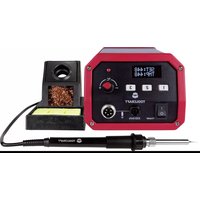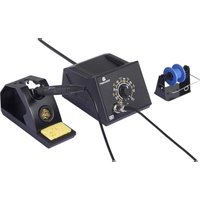
ZD-8962E - Welding machine Toolcraft - Free user manual and instructions
Find the device manual for free ZD-8962E Toolcraft in PDF.


User questions about ZD-8962E Toolcraft
0 question about this device. Answer the ones you know or ask your own.
Ask a new question about this device
Download the instructions for your Welding machine in PDF format for free! Find your manual ZD-8962E - Toolcraft and take your electronic device back in hand. On this page are published all the documents necessary for the use of your device. ZD-8962E by Toolcraft.
USER MANUAL ZD-8962E Toolcraft
GB Operating Instructions
70W ESD Analog Soldering Station
Item no: 3411542
F Mode d'emploi
Station de soudage analogique ESD 70 W
1 Operating Instructions for download.... 12
2 Intended use 12
3 Delivery contents 12
4 Description of symbols.... 13
5 Safety instructions 13
5.1 Read first! 13
5.2 Personal safety.... 13
5.3 General.... 14
5.4 Handling 14
5.5 Operating environment.... 14
5.6 Operation.... 14
5.7 Mains cable 15
5.8 Soldering iron 15
5.9 Accessories 15
5.10 Replacement parts 15
6 Product overview 16
7 Setting up.... 16
8 Operation.... 17
8.1 Standby mode 17
8.2 Operating the soldering iron 17
9 Cleaning.... 17
9.1 Cleaning the main unit.... 17
9.2 Cleaning the soldering iron.... 17
10 Maintenance 18
10.1 Replacing the soldering iron tip.... 18
11 Disposal 18
12 Technical data 19
12.1 Main unit.... 19
12.2 Soldering iron 19
12.3 Soldering iron holder 19
12.4 Solder wire spool holder.... 19
13 Spare parts 19
1 Operating Instructions for download
Use the link www.conrad.com/downloads (alternatively scan the QR code) to download the complete operating instructions (or new/current versions if available). Follow the instructions on the web page.
2 Intended use
The product is a soldering station. The product is intended to be used for soldering surface-mounted electronic components.
The product is intended for indoor use only. Do not use it outdoors.
Contact with moisture must be avoided under all circumstances.
If you use the product for purposes other than those described, the product may be damaged.
Improper use can result in short circuits, fires, electric shocks or other hazards.
The product complies with the statutory national and European requirements.
For safety and approval purposes, you must not rebuild and/or modify the product.
Read the operating instructions carefully and store them in a safe place. Make this product available to third parties only together with the operating instructions.
All company names and product names are trademarks of their respective owners. All rights reserved.
3 Delivery contents
Soldering Station
Soldering Iron
Soldering iron stand
Sponge
Wire cleaning ball
■ Solder wire spool holder
Operating instructions
4 Description of symbols
The following symbols are on the product/appliance or are used in the text:

The symbol warns of hazards that can lead to personal injury.

The symbol warns of dangerous voltage that can lead to personal injury by electric shock.

Read the operating instructions carefully.
5 Safety instructions

Read the operating instructions carefully and especially observe the safety information. If you do not follow the safety instructions and information on proper handling, we assume no liability for any resulting personal injury or damage to property. Such cases will invalidate the warranty/guarantee.
5.1 Read first!
This appliance can be used by children aged from 8 years and above and persons with reduced physical, sensory or mental capabilities or lack of experience and knowledge if they have been given supervision or instruction concerning use of the appliance in a safe way and understand the hazards involved. Cleaning and user maintenance shall not be made by children without supervision.
■ WARNING! If the soldering iron is not in use, it must be placed in the soldering iron stand.
■ Children shall not play with the appliance.
- Cleaning and user maintenance shall not be made by children without supervision.
5.2 Personal safety
■ Never work under the influence of alcohol or medication.
Splashing solder might cause serious burns or eye damage. Wear suitable protective clothing and safety goggles when soldering/de-soldering.
- Do not ingest solder. Do not eat or drink during soldering.
■ Wash your hands thoroughly after working with solder.
- Ensure that there is sufficient ventilation while soldering. Vapours can be harmful to your health.
5.3 General
The product is not a toy. Keep it out of the reach of children and pets.
Do not leave packaging material lying around carelessly. This may become dangerous playing material for children.
If you have questions which remain unanswered by this information product, contact our technical support service or other technical personnel.
- Maintenance, modifications and repairs must only be completed by a technician or an authorised repair centre.
5.4 Handling
- Handle the product carefully. Jolts, impacts or a fall even from a low height can damage the product.
5.5 Operating environment
Place the product on a clean, level, non-flammable surface of a sufficient size.
■ Protect the product against vibrations.
- Keep flammable or combustible materials (example: curtains) away to prevent fire.
■ Always operate the product on a non-flammable and heatproof surface.
Do not place the product on valuable furniture without using suitable protection, as this may result in scratch marks, pressure points, discolouration or burn marks.
■ Ensure that there is sufficient lighting.
- Keep your work area clean and tidy.
- Do not place the product under any mechanical stress.
■ Protect the appliance from extreme temperatures, strong jolts, flammable gases, steam and solvents.
- Protect the product from high humidity and moisture.
■ Protect the product from direct sunlight.
5.6 Operation
Consult an expert when in doubt about the operation, safety or connection of the product.
If it is no longer possible to operate the product safely, take it out of operation and protect it from any accidental use. DO NOT attempt to repair the product yourself. Safe operation can no longer be guaranteed if the product:
– is visibly damaged,
– is no longer working properly,
– has been stored for extended periods in poor ambient conditions or
– has been subjected to any serious transport-related stresses.
5.7 Mains cable

Do not modify or repair mains supply components including mains plugs, mains cables, and power supplies. Do not use damaged components. Risk of death by electric shock!
The mains outlet must be located near to the device and be easily accessible.
■ Never plug in or unplug the mains plug when your hands are wet.
- Never pull the mains plug from the socket by pulling at the cable. Always pull it from the mains socket using the intended grips.
- Unplug the mains plug from the mains socket if you do not use the device for an extended period of time.
- Disconnect the mains plug from the mains socket in thunderstorms for reasons of safety.
■ Make sure that the mains cable is not squeezed, bent, damaged by sharp edges or put under mechanical stress.
- Avoid excessive thermal stress on the mains cable from extreme heat or cold.
Do not modify the mains cable. Otherwise the mains cable may be damaged. A damaged mains cable can cause a deadly electric shock.
- Do not touch the mains cable if it is damaged.
- First, power down the respective mains socket (e.g. via the respective circuit breaker) and then carefully pull the mains plug from the mains socket.
- Never use the product if the mains cable is damaged.
A damaged mains cable may only be replaced by the manufacturer, a workshop commissioned by the manufacturer or a similarly qualified person, so as to prevent any danger.
- Ensure that cables are not pinched, kinked or damaged by sharp edges.
Always lay cables so that nobody can trip over or become entangled in them. This poses a risk of injury.
5.8 Soldering iron
■ Always place the soldering iron in the stand/holder if you do not use it.
- Do not leave the soldering iron unattended if switched on.
- Do not touch the hot soldering iron tip to prevent burns.
■ Always keep the soldering tip away from the power cord.
- Switch the soldering iron off if you do not use it for extended periods.
5.9 Accessories
- Accessories and components that are not compatible with the product can damage the product or result in hazards. Only use the supplied components and accessories.
5.10 Replacement parts
■ Only use replacement parts designed for the product to prevent hazards.
6 Product overview
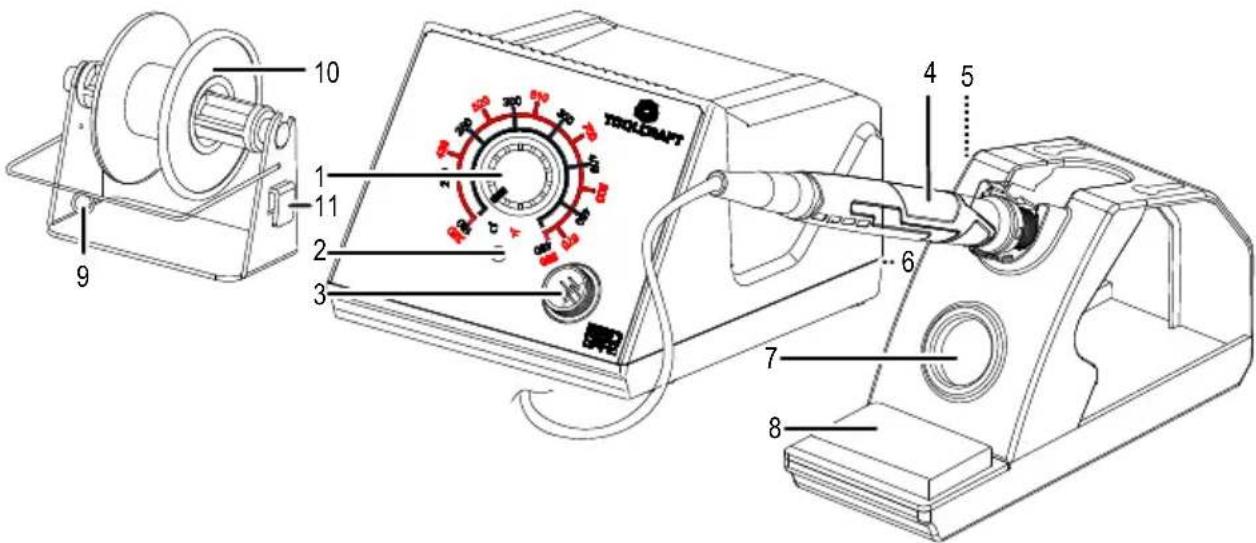
text_image
10 1 2 3 9 11 4 5 6 7 8 TROLGRAFT| Part Description/Function | ||
| 1 Temperature control dial | ||
| 2 LED | indicator light | ■ Red: heating up■ Green: set temperature reached■ Green (blinking): standby mode active |
| 3 Cable input for soldering iron | ||
| 4 Soldering iron | ||
| 5 Slot | Attach the solder wire holder to the side of the stand. | |
| 6 ON(I)/OFF(I) switch At rear | ||
| 7 Wire cleaning ball | ||
| 8 Sponge | ||
| 9 Solder cable guide | ||
| 10 Solder wire spool holder | ||
| 11 Latch Attach the solder wire holder to the stand. | ||
7 Setting up
Important:
Only connect the supplied soldering iron or a replacement soldering iron of identical type.
- Latch the solder wire spool holder to the side of the solder iron stand.
- (If needed) insert the sponge and wire ball into their receptacles on the soldering iron stand.
- Connect the soldering iron to the soldering iron connection port.
- Place the soldering iron into the soldering iron stand.
8 Operation
8.1 Standby mode
The soldering station will enter standby mode after 5 minutes of inactivity.
In standby mode:
■ Temperature is maintained at 200 °C.
■ The LED indicator blinks green
8.2 Operating the soldering iron
- Place the soldering iron into the soldering iron stand.
- Switch the main unit on by flipping the power switch I/O to the position I.
- Wait for the main unit to start up.
→ The soldering iron heats up. - The soldering iron is ready for use.
→ Adjust the temperature using the temperature control dial. - After use, switch the main unit off by flipping the power switch I/O to the position O.
9 Cleaning
Important:
- Do not use aggressive cleaning agents, rubbing alcohol or other chemical solutions. They damage the housing and can cause the product to malfunction.
- Do not immerse the product in water.
9.1 Cleaning the main unit
- Disconnect the product from the power supply.
- Let the product cool down to ambient temperature.
- Clean the product with a dry, fibre-free cloth.
- Disconnect the product from the power supply.
- Let the product cool down to ambient temperature.
- Clean the product with a dry, fibre-free cloth.
- Remove oxide from the soldering iron tip with a fine abrasive paper.
- Wipe the soldering iron tip clean with a dry cloth.
- Heat the soldering iron up and tin the soldering iron tip to prevent oxidation.
9.2 Cleaning the soldering iron
10 Maintenance
10.1 Replacing the soldering iron tip
Replace the soldering iron tip if it shows signs of significant wear and tear or if it no longer performs effectively.
- Switch the main unit off by flipping the power switch I/O into the position O.
- Disconnect the mains cable from the product.
- Let the soldering iron cool down to room temperature.
- Disconnect the soldering iron from the main unit.
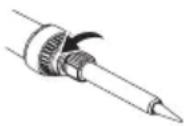
- Remove the soldering tip by unscrewing it. See figure.
- Replace the soldering tip with a new one. Refer to Spare parts [▶ 19] for more information.
11 Disposal

This symbol must appear on any electrical and electronic equipment placed on the EU market. This symbol indicates that this device should not be disposed of as unsorted municipal waste at the end of its service life.
Owners of WEEE (Waste from Electrical and Electronic Equipment) shall dispose of it separately from unsorted municipal waste. Spent batteries and accumulators, which are not enclosed by the WEEE, as well as lamps that can be removed from the WEEE in a non-destructive manner, must be removed by end users from the WEEE in a non-destructive manner before it is handed over to a collection point.
Distributors of electrical and electronic equipment are legally obliged to provide free take-back of waste. Conrad provides the following return options free of charge (more details on our website):
in our Conrad offices
■ at the Conrad collection points
at the collection points of public waste management authorities or the collection points set up by manufacturers or distributors within the meaning of the ElektroG
End users are responsible for deleting personal data from the WEEE to be disposed of.
It should be noted that different obligations about the return or recycling of WEEE may apply in countries outside of Germany.
12 Technical data
12.1 Main unit
Input voltage.... 220 - 240 V/AC, 50 Hz
Power consumption.... 70 W
Protection class .... I
ESD safe Yes
Temperature units ...... °C / °F
Temperature range.... +160 to +480 °C
Operating conditions.... 0 to +40 °C, 20 - 70 % RH
Storage conditions.... 0 to +45 °C, 5 - 80 % RH
Cable length 1.25 m
Dimensions (W x H x D) 115 x 92 x 157 mm
Weight 1.59 kg
12.2 Soldering iron
Input 20 V/DC
Power consumption.... 70 W
Temperature range.... 160 - 480 °C, (320 - 896 °F)
Heating time 10 s to 300 °C
Cable length .... approx. 1.1 m
Dimensions (∅ x L).... 19 x 220 mm
Weight .... approx. 90 g
12.3 Soldering iron holder
Dimensions (W x H x D) 60 x 90 x 160 mm
Weight .... approx. 238 g
12.4 Solder wire spool holder
Dimensions (W x H x D) 78 x 63 x 45 mm
Weight 74 g
13 Spare parts
Go to the product page on www.conrad.com for available spare parts and accessories.
F Sommaire
Dimensions (L x H x P).... 115 x 92 x 157 mm
Poids.... 1,59 kg
12.2 Fer à souder
Entrée.... 20 V/CC
Dimensions (L x H x P).... 60 x 90 x 160 mm
Poids.... env. 238 g
12.4 Porte-bobine de fil de soudure
Dimensions (L x H x P).... 78 x 63 x 45 mm
Poids....74 g
text_image
Technical diagram of a mechanical device with numbered components and labeled partsnatural_image
Line drawing of a soldering iron with a curved tip and mechanical shaft (no text or symbols)11 Verwijdering

12.3 Soldeerbouthouder
Afmetingen (B x H x D).... 60 x 90 x 160 mm
This is a publication by Conrad Electronic SE, Klaus-Conrad-Str. 1, D-92240 Hirschau (www.conrad.com).
All rights including translation reserved. Reproduction by any method (e.g. photocopying, microfilming or the capture in electronic data processing systems) requires prior written approval from the editor. Reprinting, also in part, is prohibited. This publication reflects the technical status at the time of printing.
Copyright by Conrad Electronic SE *3411542_V3_1025_mh_en 27021600035068299-2 l4/O3 en