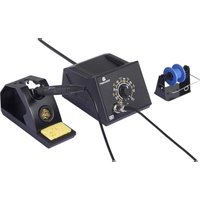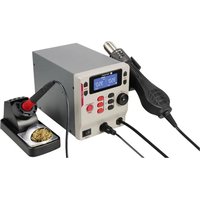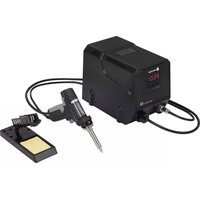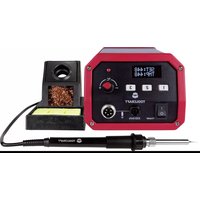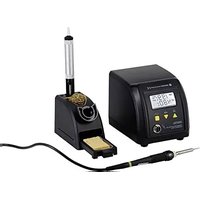
ZD-8916 - Welding machine Toolcraft - Free user manual and instructions
Find the device manual for free ZD-8916 Toolcraft in PDF.


User questions about ZD-8916 Toolcraft
0 question about this device. Answer the ones you know or ask your own.
Ask a new question about this device
Download the instructions for your Welding machine in PDF format for free! Find your manual ZD-8916 - Toolcraft and take your electronic device back in hand. On this page are published all the documents necessary for the use of your device. ZD-8916 by Toolcraft.
USER MANUAL ZD-8916 Toolcraft
GB Operating Instructions
Digital soldering station
60 W ZD-8916
Item No. 1553056 Page 14 - 24
© Notice d'emploi
www.business.conrad.at
text_image
TEMP.888°8 HEAT ON WAIT ERROR SET 888°8- Introduction......15
- Explanation of symbols....15
- Intended use....16
- Package contents 16
- Features and functions ...... 16
- Important safety information....17
- Safety instructions ....17
a) General information....17
b) Electrical safety 18
c) Persons and product ...... 19
d) Occupational safety....19
- Product overview 20
- Operation....20
a) Preparation for use....20
b) Changing the temperature unit (Celsius (°C) / Fahrenheit (°F))....21
c) Setting the temperature....21
d) Soldering 22
e) Changing the soldering tip....22
- Care and cleaning....23
- Disposal....23
- Technical data....24
1. Introduction
Dear customer,
Thank you for purchasing this product.
This product complies with the statutory national and European requirements.
To maintain this status and to ensure safe operation, you as the user must observe these operating instructions!

These operating instructions are part of this product. They contain important notes on commissioning and handling. Also consider this if you pass on the product to any third party. Therefore, retain these operating instructions for reference!
If there are any technical questions, please contact:
International: www.conrad.com/contact
United Kingdom: www.conrad-electronic.co.uk/contact
2. Explanation of symbols

The symbol with the lightning in a triangle indicates that there is a risk to your health, e.g. due to an electric shock.

The symbol with an exclamation mark in a triangle is used to highlight important information in these operating instructions. Always read this information carefully.

The arrow symbol indicates special information and advice on how to use the product.

Read the operating instructions carefully.
3. Intended use
The digital soldering station features a soldering tip with an adjustable temperature. The adjustable temperature makes it possible to perform a wide range of soldering work on electronics using various soft solders (lead, lead-free or silver solder). The soldering station is specifically designed for lead-free solders.
Only use the product for soldering and desoldering. The soldering tip can be replaced. Do not use the soldering tip to solder live components.
This product is intended for indoor use only. Do not use it outdoors. Contact with moisture (e.g. in bathrooms) must be avoided under all circumstances.
For safety and approval purposes, you must not rebuild and/or modify this product. Using the product for purposes other than those described above may damage the product. In addition, improper use can cause hazards such as a short circuit, fire or electric shock. Read the instructions carefully and store them in a safe place. Only make this product available to third parties together with its operating instructions.
All company and product names are trademarks of their respective owners. All rights reserved.
4. Package contents
- 1x soldering station
- 1x soldering iron
- 1x mains cable
- 1x desoldering pump
- 1x stand for soldering iron
• 1x wire sponge for soldering tips - 1x cleaning sponge
- 1x operating instructions
Up-to-date operating instructions
To download the latest operating instructions, visit www.conrad.com/downloads or scan the QR code on this page. Follow the instructions on the website.
5. Features and functions
- Soldering station with high-precision sensor for temperature control
- Adjustable soldering temperature (160 °C to 480 °C)
• Dual temperature display (°C and °F)
6. Important safety information
- Children under 3 should be kept away to prevent them from playing with the product.
- Children between 3 and 8 years of age must only turn the appliance on and off when they are supervised or when they have been taught how to use it safely and understand the safety hazards. The appliance must also be placed or mounted in its normal working position. Children between 3 and 8 years of age must not plug in, configure, clean or repair the appliance.
7. Safety instructions
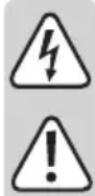
Read the operating instructions and safety information carefully. If you do not follow the safety instructions and information on proper handling in this manual, we will assume no liability for any resulting personal injury or damage to property. Such cases will invalidate the warranty/guarantee.
a) General information
- This device is not a toy. Keep it out of the reach of children and pets.
- Do not leave packaging material lying around carelessly, as it may become dangerous playing material for children.
- Protect the product from extreme temperatures, direct sunlight, strong jolts, high humidity, moisture, flammable gases, vapours and solvents.
- Do not place the product under any mechanical stress.
-
If it is no longer possible to operate the product safely, stop using it and prevent unauthorized use. Safe operation can no longer be guaranteed if the product:
-
is visibly damaged,
- is no longer working properly,
- has been stored for extended periods in poor ambient conditions
- has been subjected to any serious transport-related stress.
- has been subjected to strong magnetic fields, such as those found close to machinery or loudspeakers
• Always handle the product carefully. Jolts, impacts or a fall even from a low height may damage the product.
- Consult a technician if you are not sure how to use or connect the product.
- Maintenance, modifications and repairs must be done by a technician or a specialist repair centre.
- If you have questions which remain unanswered by these operating instructions, contact our technical support service or other technical personnel.
b) Electrical safety
- Exercise particular caution when children are present. Children do not understand the hazards associated with the incorrect use of electrical devices. For example, children may attempt to insert objects into the openings on the product, which can cause a fatal electric shock! There is also a significant risk of injury and burns due to hot surfaces!
- Never touch or operate the product if your hands are moist or wet. This may cause a fatal electric shock!
- Completely unwind the mains cable before use. A mains cable that is not completely unwound can lead to overheating. This constitutes a fire hazard!
- Before connecting the product to the mains, check that your local A/C mains voltage matches the specifications on the nameplate.
- The appliance is constructed according to protection class I. Only use a grounded mains socket (230 V/AC, 50 Hz) connected to the public grid to power the product.
- Never pour liquids over electrical devices or place objects filled with liquid next to the product. If liquid or an object does get inside the appliance, power down the respective socket (e.g. switch off the circuit breaker), and then remove the mains plug from the mains socket. Discontinue use and take the product to a specialist repair centre.
- The mains outlet must be located near to the device and be easily accessible.
- Never unplug the mains plug by pulling on the cable. Always use the grips on the plug.
- Unplug the mains plug from the mains socket if you do not plan to use the appliance for an extended period of time.
- For safety reasons, unplug the mains plug from the mains socket during thunderstorms.
- Do not touch the mains cable if there are any signs of damage. Power down the respective mains socket (e.g. via the respective circuit breaker), and then carefully pull the mains plug from the mains socket. Never use the product if the mains cable is damaged.
- Damaged mains cables must be replaced by the manufacturer, an authorized repair centre or a qualified electrician.
- Never insert or unplug the mains plug when your hands are wet.
- When setting up the product, make sure that the mains cable is not pinched, kinked or damaged by sharp edges.
- Avoid excessive thermal stress on the mains cable from extreme heat or cold.
- The product must always be grounded at the wall socket during use.
- The product will remain hot for a while after it is turned off. Do not touch it during this time.
- Do not leave the product unattended during use.
- Only move, transport or store the product when it has completely cooled down.
- Only use the product in temperate climates. It is not suitable for use in tropical climates.
• Always lay the cables so that nobody can trip over or become entangled in them. This poses a risk of injury. - Never use the product immediately after it has been brought from a cold room into a warm one. The condensation generated may destroy the product. Allow the product to reach room temperature before connecting it and putting it to use. This may take several hours.
c) Persons and product
- Do not cover or fasten any items to the soldering station, as this constitutes a fire hazard.
- Do not remove soldering residue from the soldering tip by tapping on the housing of the soldering station, as this may damage the soldering iron (heating element) and soldering station.
- The soldering iron must not get damp or wet. If you wish to use a damp sponge to wipe the soldering tip, it must be inserted into the corresponding opening on the soldering iron holder.
- Never use the soldering iron to heat up liquids.
- If you do not plan to use the product for an extended period (e.g. storage), unplug the mains socket to disconnect the product from the power supply.
- Store the product in a secure place out of the reach of children.
- Always comply with the accident prevention regulations for electrical equipment when using the product in commercial facilities.
d) Occupational safety
- Never solder live electrical components or parts. Always disconnect these components from the power supply beforehand.
- Caution! Touching or soldering capacitors (or similar components) or leads/cables that are connected to capacitors may cause a fatal electric shock! Capacitors may stay charged for several hours after you switch off the power supply!
- Depending on the workpiece or soldering method, the workpiece must be fixed in place with a suitable clamping device. This enables you to use both hands for the soldering process.
- Keep your workstation clean.
- Ensure that there is sufficient lighting.
- Ensure that there is sufficient ventilation when soldering. Solder and flux vapours can be harmful to your health.
- Wash your hands thoroughly after working with solder. This is particularly important when using lead-based solder.
- Do not put solder into your mouth or eat or drink when you are soldering.
- Wear suitable protective clothing and safety goggles when soldering.
- Liquid/splashing solder may cause serious burns or eye damage.
- Never use soldering flux, acid or similar aids when soldering. These materials can cause bad soldering joints and may damage the soldering tip. For best results, use a solder wire with a flux core.
- When soldering, do not touch any part of the soldering iron except the handle, otherwise you may burn yourself!
- Always solder on non-flammable surfaces. Ensure that there are no neighbouring materials that may be damaged by the heat generated from the soldering iron.
• Always place the hot soldering iron in the holder when it is not in use. - Improper use may cause a fire. Do not use the appliance in areas with flammable or explosive substances.
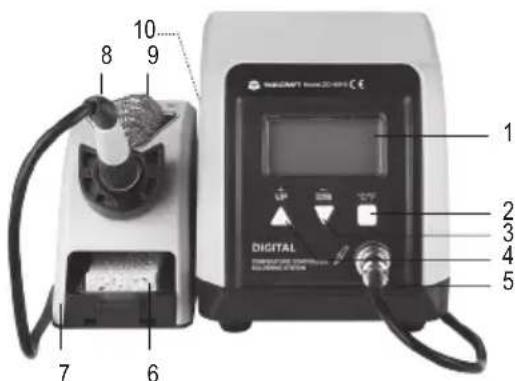
8. Product overview
text_image
10 8 9 7 6 DIGITAL 1 2 3 4 51 Display
2 Temperature unit button (°C/°F)
3 Temperature control button (- DOWN)
4 Temperature control button (+ UP)
5 Connection socket (with connector and connection cable)
6 Cleaning sponge
7 Stand
8 Soldering iron
9 Wire sponge
10 On/off switch (I = ON / 0 = OFF) (hidden, located on the rear of the appliance)
9. Operation
a) Preparation for use
- Unpack the soldering station and check that all parts are intact. Do not use parts that are damaged.
- Place the soldering station on a solid, heat-resistant surface.
- Place the stand for the soldering iron next to the soldering station. Note the position of the soldering station. If you are right-handed, place the appliance to your right, or to your left if you are left-handed. Ensure that the stand is placed on a fire and heat-resistant surface.
- Insert the plug on the soldering iron into the 4-pin connection socket (5) on the soldering station. The plug only fits into the socket when the polarity is correct. Note the orientation of the tongue and groove on the socket and plug.
- Tighten the nut (turn clockwise) to secure the plug in place.
- Place the soldering iron (8) into the stand (7). You can use the cleaning sponge (6) in the storage tray to remove excess solder, flux and dust from the soldering tip.
- Insert the connector on the mains cable into the socket on the soldering station, and then plug the power adapter into a mains socket.
- Switch the soldering station on using the on/off switch (10) (I = ON / 0 = OFF). The soldering station will beep and all display elements will turn on briefly. After completing a short test, the soldering station will show the preset temperature on the display (1). The lowest value will be displayed when the soldering station is switched on for the first time.
If you switch on the appliance before connecting the plug on the soldering iron to the 4-pin socket (5) on the soldering station, "ERROR" will be shown on the display (1). This error message will disappear when you connect the soldering iron to the 4-pin socket (5). "ERROR" is also displayed when the soldering iron reaches the end of its lifespan.
b) Changing the temperature unit (Celsius (°C) / Fahrenheit (°F))
Follow the steps below to change the temperature unit:
- Press the temperature unit button (°C/°F, 2). You can switch between degrees Celsius (°C) and degrees Fahrenheit (°F).
- The selected unit will be used for the target temperature ("SET") and current temperature ("TEMP") of the soldering tip.
- The soldering station remembers the temperature unit setting and loads it automatically when you switch the soldering station back on.
c) Setting the temperature
text_image
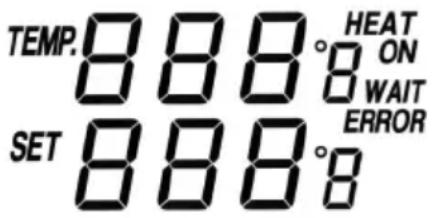
TEMP.888°8 SET 888°8 HEAT ON WAIT ERROR→ You can configure the soldering tip temperature before connecting the soldering iron to the soldering station and adjust the temperature later when you are soldering.
- Use the temperature control buttons to set the desired soldering tip temperature. The display (1) shows the target temperature ("SET") when you press one of the temperature control buttons. "TEMP" indicates the current soldering tip temperature.
- The +UP temperature control button (4) increases the temperature in 1 °C increments. The -DOWN button (3) decreases the temperature in 1 °C increments. Hold down the buttons to adjust the temperature more quickly. The soldering station will beep when you hold down the buttons. The temperature can be set from 160 to 480 °C in 1 °C increments.
- The preset temperature is shown on the display (1).
→ "HEAT ON" indicates that the soldering tip is heating up. "TEMP" indicates the current temperature, which rises or falls until the target temperature is reached. If "HEAT ON" is not displayed, this indicates that the soldering tip is not heating up and the temperature will fall. When the absolute difference between the preset target temperature and the soldering tip temperature measured by the soldering station's electronic control system is more than 10 °C, "WAIT" will appear on the display (1). Wait until this message disappears and the target temperature is within the acceptable tolerance. You can then commence soldering.
If "ERROR" is displayed, the connector on the soldering iron may not be inserted correctly into the soldering station, or there may be another fault. Check that the connector and plug are securely in place. If the issue persists, switch the appliance off using the on/off switch (10) (0 = OFF), and then switch it back on.
- Adjust the temperature based on your solder. For example, if you are using a lead-based solder, select a temperature between 270–360 °C.
The temperature sensor is built into the heating element (not in the replaceable soldering tip). The soldering tip may therefore take a moment to heat up to the preset temperature.
- When you have finished using the soldering station, switch it off using the on/off switch (10) ( 0 = OFF ) before unplugging the mains plug.
d) Soldering

Always use the handle to hold the soldering iron. Never touch the hot soldering tip or the shaft – burn hazard! Always put the soldering iron on the stand when it is heating up or during breaks from soldering. Ensure that the soldering contacts on the workpiece are kept clean.
- Apply solder to the heated soldering tip. Wipe off excess solder using the sponge.
- Heat the soldering joint and apply solder.
- Allow the soldering joint to cool down. Do not shake the soldering joint when it is cooling down.
- Use the desoldering pump to remove solder.
• After each solder, clean the soldering tip with the cleaning sponge (6). - When you have finished soldering, place the soldering iron in the stand and turn the soldering station off with the on/off switch (I = ON / 0 = OFF) (10)
- Never file the soldering tip, as this may cause permanent damage.

Allow the soldering iron to cool down after use. Do not immerse the soldering tip in water.
- Use the brass wire sponge (9) to clean the soldering tip (after the soldering tip has cooled down). This ensures that solder remains on the soldering tip and protects the tip against excessive wear.
e) Changing the soldering tip
The soldering tip is subjected to a mechanical load during use, which causes wear and tear. Over time, the soldering tip will become blunt, meaning that you will not be able to solder precisely on small components. If this occurs, the soldering tip can be replaced.
Follow the steps below to replace the soldering tip:
- Turn off the soldering station and let the soldering iron cool down completely.
- Loosen the metal nut from the soldering iron (turn clockwise) and remove the sleeve.
- Carefully remove the soldering tip in a straight line from the ceramic heating element on the soldering iron.
- The ceramic heating element must not be subjected to mechanical loads. Damaging the ceramic heating element will void the warranty/guarantee!
- Carefully insert a new tip onto the ceramic heating element.
- Replace the sleeve and carefully turn the metal nut with your hand to secure the tip in place. Do not use any force or tools when screwing the nut.
→ Replacement soldering tip have the following Conrad item number: 1694194 (see "Technical data").
10. Care and cleaning

Never use aggressive detergents, rubbing alcohol or other chemical solutions, as these may damage the casing or stop the product from functioning properly.
- The soldering station is maintenance-free, except for the occasional replacement of the soldering tip.
- Maintenance or repair work must be done by a technician or a specialist repair centre. Under no circumstances should you service any of the components in the interior of the product, therefore never open/dismantle it.
- Do not clean the product by immersing it in water.
- Use a slightly damp, lint-free cloth to clean the exterior of the product. Dust can be easily removed using a soft, clean long-haired brush and a vacuum cleaner. Only use a small amount of water when cleaning the product.
- Before cleaning the soldering station, switch it off and unplug the power adapter to disconnect it from the mains. Allow the soldering iron and soldering station to cool down completely.
- The soldering tip does not require any special cleaning. It is sufficient to clean it occasionally by using the wire sponge to remove flux residues or excess solder.
- The soldering tip must be coated with tin before the soldering station is switched off. This prevents corrosion on the soldering tip.
11. Disposal
Electronic devices are recyclable waste and must not be placed in household waste. Always dispose of the product according to the relevant statutory regulations.
You thus fulfil your statutory obligations and contribute to the protection of the environment.
12. Technical data
Operating voltage 220–240 V/AC, 50 Hz
Power 60 W
Material....ABS
Cable length 1 m
Operating conditions....-6 to +46 °C, 10–90 % relative humidity (non-condensing)
Storage conditions....-20 to +60 °C, 10–70 % relative humidity (non-condensing)
Dimensions (L x W x H)....175 x 130 x 130 mm (soldering station)
Weight 2.65 kg
→ Replacement soldering tip (Conrad item no. 1694194)
Page
France (email) : technique@conrad-france.fr
text_image
TEMP.888°8 HEAT ON WAIT ERROR SET 888°8text_image
10 8 9 7 6 DIGITAL DIGITAL MULTIDUCTOR SALAWARI ELECTRICAL 1 2 3 4 5text_image
TEMP.8 8 8°8 HEAT ON SET 8 8 8°8 WAIT ERRORAfmetingen (l x b x h)....175 x 130 x 130 mm (soldeerstation)
Gewicht....2,65 kg