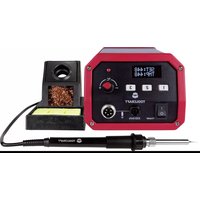
ST-80D - Welding machine Toolcraft - Free user manual and instructions
Find the device manual for free ST-80D Toolcraft in PDF.
Questions des utilisateurs sur ST-80D Toolcraft
0 question sur cet appareil. Repondez a celles que vous connaissez ou posez la votre.
Poser une nouvelle question sur cet appareil
Download the instructions for your Welding machine in PDF format for free! Find your manual ST-80D - Toolcraft and take your electronic device back in hand. On this page are published all the documents necessary for the use of your device. ST-80D by Toolcraft.
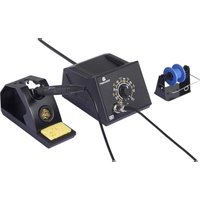
USER MANUAL ST-80D Toolcraft
- If you have questions which remain unanswered by these operating instructions, contact our technical support service or other technical personnel. b) Product Safety
- The product is approved only for operation in dry indoor rooms.
- The design of the product complies with the safety class II.
- The mains socket into which the mains plug is plugged must be easily accessible.
- Do not pull the power plug from the mains socket by pulling on the cable.
- Do not use the recessed light in rooms or under adverse ambient conditions where combustible gases, vapours or dust are or may be present! There is a risk of explosion!
- Do not fasten any items to the soldering station; never cover the soldering station; there is a risk of re!
- The soldering iron must not get damp or wet. If you want to use a damp sponge for wiping the tip, it may only be inserted into the corresponding opening of the soldering iron holder.
- Never use the soldering rod to heat up liquids.
- Never work on electrical components that are powered up. Always switch off the power before-hand.
- Caution! Touching or soldering at condensers (or similar components) or leads/ cables connected to them, may result in a lethal electric shock! Condensers can be under power for hours even after switching off the power supply!
- Keep your workstation clean.
- Only work with sufcient lighting at your workstation.
- Ensure proper ventilation during soldering. Solder or solder ux can be harmful.
- Wash your hands thoroughly after working with brazing solder containing tin. This is especially true when using leaded solder.
- Do not put brazing solder into your mouth, do not eat or drink during soldering.
- Wear suitable protective clothing and protective glasses when soldering. Liquid blazing solder, etc. may cause serious burns or harm your eyes!
- Never use soldering ux, acid or similar aids when soldering. Such materials lead to bad soldering joints and they can also damage the tip of the soldering rod. Preferably, use a tubular solder with ux core.
- Do not touch any other area of the soldering rod than the handle when working. Risk of burns!
- Soldering must be done on non-combustible surfaces. Protect other materials nearby from damage through heat.
- Place the soldering iron in holder when not in use.
- If the power cord is damaged, do not touch it; there is danger to life from electric shock! First, switch off the mains voltage to the socket to which the soldering iron is connected (switch off at the corresponding circuit breaker or remove the safety fuse or switch off at the corresponding RCD protective switch, so that the socket is fully disconnected). Then you can remove the mains plug from the mains socket. Do not use the product any longer, take it to a specialised workshop or dispose of in an environmentally friendly manner.
- Never use the product immediately after taking it from a cold room to a warm one. The condensation that forms might damage the product. Furthermore, this could cause a lethal electric shock! Allow the product to reach room temperature, before connecting it to the power supply and putting it into use. This may take several hours.
- Disconnect the power supply from the power socket if the product will not be used for a while (e.g. storage).
- The soldering station and iron must be completely cooled down before storing it! There is a risk of re, if this is not observed!
- In commercial institutions, the accident prevention regulations of the Employer’s Liability Insurance Association for Electrical Systems and Operating Facilities are to be observed.
- Never use a fuse with other nominal data. Never bridge the fuse! There is a risk of re! Operating Instructions Digital Soldering Station Item No. 1561694 (ST-50D, 50 W) Item No. 1561695 (ST-80D, 80 W) Item No. 1561696 (ST-100D, 100 W) Intended use The digital soldering station is temperature-controlled with adjustable soldering tip temperature. The adjustable temperature makes it possible to perform all soldering work in the electronic area with various soft solders (lead, lead-free or silver solder). The soldering tip can be replaced. The display shows the target and actual temperatures. Three programmable buttons can be assigned custom temperature values. The enclosed soldering handle is calibrated with this soldering station (temperature accuracy). If the soldering handle has to be replaced, calibration must be repeated. The soldering station is suitable only for operation with a mains voltage (230 V/AC, 50 Hz). For safety and approval purposes, you must not rebuild and/or modify this product. If you use the product for purposes other than those described above, the product may be damaged. In addition, improper use can result in short circuits, res, electric shocks or other hazards. Read the instructions carefully and store them in a safe place. Make this product available to third parties only together with its operating instructions. This product complies with the statutory national and European requirements. All company names and product names are trademarks of their respective owners. All rights reserved. Delivery Content
- Soldering tip (removable)
- Operating instructions
- Dry cleaning sponge (metal) Up-to-date operating Instructions Download the latest operating instructions at www.conrad.com/downloads or scan the QR code on this page. Follow the instructions on the website. Explanation of Symbols The symbol with the lightning in the triangle is used if there is a risk to your health, e.g. due to an electric shock. The symbol with the exclamation mark in the triangle is used to indicate important information in these operating instructions. Always read this information carefully. The arrow symbol indicates special information and advice on operation. Safety Instructions Read the operating instructions carefully and especially observe the safety information. If you do not follow the safety instructions and information on proper handling in this manual, we assume no liability for any resulting personal injury or damage to property. Such cases will invalidate the warranty/guarantee. a) General Information
- The device is not a toy. Keep it out of the reach of children and pets.
- Do not leave packaging material lying around carelessly. This may become dangerous playing material for children.
- Protect the appliance from extreme temperatures, direct sunlight, strong jolts, high humidity, moisture, ammable gases, steam and solvents.
- Do not place the product under any mechanical stress.
- If it is no longer possible to operate the product safely, take it out of operation and protect it from any accidental use. Safe operation can no longer be guaranteed if the product: - is visibly damaged, - is no longer working properly, - has been stored for extended periods in poor ambient conditions or - has been subjected to any serious transport-related stresses.
- Please handle the product carefully. Jolts, impacts or a fall even from a low height can damage the product.
- Consult an expert when in doubt about the operation, safety or connection of the appliance.The soldering rod requires some time to reach the set temperature. Wait for about 2-3 minutes before starting the rst soldering work. During the heating phase, the LED above the knob will ash at short intervals. When the set tip temperature is reached, the LED will ash at long intervals.
4. Insert the soldering rod into the holder after nishing with the soldering work. Switch off the
soldering station. Lower the temperature during breaks. This saves energy and extends the durability of the soldering tip. A worn out wet / dry cleaner can be exchanged for a new one. This is available as an accessory (see e.g. on the Internet at www.conrad.com the product page). The same applies to the sponge. a) Assigning Set Temperatures to Buttons You can assign custom temperatures to each of the three multifunctional buttons. This will override factory presets.
3. After approximately one second, adjusted value following PS2: will blink 3 times and the
display will show the following:
4. The upper value behind PS1 / PS2 / PS3 shows the target temperature for the respective
5. After releasing the PRESET button, the new value is saved. Repeat this for the other buttons.
6. The saved values are retained after turning unit off.
b) Correction of Soldering Tip Temperature The temperature display is calibrated to soldering tips with 0° deviation. When using other soldering tips, the temperature displayed will deviate from the actual soldering tip temperature. For example, if there is a 10°C deviation, the temperature will show 270 °C, but the actual soldering tip temperature will be 260 °C. This deviation can be compensated at the soldering station.
- Push and hold “PRESET1” and “PRESET3” at the same time.
- Release both buttons when the following display appears: - Press “PRESET 1” for negative values up to - 20 °C - Press “PRESET 3” for positive values up to +30 °C.
- Press “PRESET 2” to save. The arrow behind “TMP” indicates an active value correction (< negative / > positive). A negative value means that the soldering top withdraws heat from the heating element. A higher heating output is needed for the set temperature. The opposite is the case for a positive value. The settings are retained after turning the base station OFF. c) Calibration The soldering station was matched (calibrated) with the enclosed soldering handle in the factory. If you need to replace or exchange the soldering handle, calibration must be performed again. The procedure takes about 8 minutes and has three stages. Stage 1
1. Switch the soldering station OFF and let the handle cool down.
2. Attach the new handle to the base station, then insert the tip into the holder.
3. With the power OFF, push and hold “PRESET1” and “PRESET3” at the same time.
4. While keeping the buttons pressed, switch ON the soldering station.
5. Release both buttons when the display shows:
The calibration programme will begin with a heating phase. It will take approximately three minutes and a countdown from 18 to 1 will show in the TMP line. After this time, the soldering tip temperature will be approximately 270 to 400° C.
Operating Elements Base Station SET: TMP:
1 ON/OFF switch 2 Multifunctional / PRESET buttons 3 ESD socket 4 Handle connector 5 Fuse compartment 6 Power supply socket 7 Temperature controller dial 8 Status LED for temperature control 9 Illuminated display 10 Indicator for displaying the difference between the target and current soldering tip temperature Soldering Iron Holder Soldering Iron 11 Soldering iron holder 12 Removable hood 13 Dry / Wet sponge (dry pictured) 14 Cord assembly 15 Heating element / terminal board enclosure screw 16 Soldering tip locking screw 17 Soldering tip (removable) 18 Handle connector plug Installation a) Soldering Iron Holder Stand
- Select a at, stable and sufciently large surface away from ammable objects.
- Remove the protective rubber on the tip of the soldering iron. It serves only as protection during transport, it is no longer needed.
- Make sure soldering tip locking screw is secure (do not use tools to tighten!).
- Place the dry cleaner (brass wool) or wet cleaning sponge into the tank and cover with the removable hood.
- Insert the soldering iron into the holder. b) Connect Soldering Iron to Station
- Make sure the base station power is not connected to the power supply.
- Connect soldering iron plug to the base station handle connector and screw it in manually (do not use tools!).
- Connect the high-impedance potential equalization socket with your ESD workstation using a suitable cable, if necessary.
- Connect the mains plug to an earthed mains socket. Operation Rising smoke is caused by evaporating ux contained inside the solder. Make sure the area is well ventilated.
1. Switch the soldering station ON using the power switch. LED above temperature control
(adjusting knob) should blink indicating operation of the heater.
2. Set the desired soldering tip temperature at the temperature controller (approx. 270 - 360 °C
for lead-containing solder).
3. Alternatively, you can also set the temperature via the function buttons (PRESET 1-3) by
pushing once. The buttons are pre-programmed with the following temperatures. Preset Temperature (°C) 1 150 (standby)
10 9This is a publication by Conrad Electronic SE, Klaus-Conrad-Str. 1, D-92240 Hirschau (www.conrad.com). All rights including translation reserved. Reproduction by any method, e.g. photocopy, microlming, or the capture in electronic data processing systems require the prior written approval by the editor. Reprinting, also in part, is prohibited. This publication represent the technical status at the time of printing. Copyright 2017 by Conrad Electronic SE. *1561694-6_v5_1219_02_dh_m_4L Stage 2 The second stage will start automatically.
- The temperature of the soldering tip is controlled.
- This is displayed again with a countdown from 30 to 0.
- The soldering tip temperature will be stable after approximately ve minutes. The temperature is below 400 °C. Always Avoid drafts during calibration. This may negatively inuence calibration. Stage 3 The third stage will start automatically.
- The temperatures will be measured and set.
- The display shows the following screen.
- The “TMP” line shows three dashes, the “SET” line shows the value of the temperature controller - depending on its current position.
- Now measure the temperature at the soldering tip with a precise measuring probe and read the actual temperature at the thermometer. Use a small measuring probe for the measurement, since large-area sensors may falsify the result. K-type thermal sensors are well suitable.
- Set the value read at the temperature controller. Turning the temperature controller dial changes the value in the “SET” line.
- Briey push the button “PRESET 2”. The setting menu is terminated and the current soldering tip temperature is displayed.
- End of calibration procedure is followed with message “SUCCESS! RESTART”
- Turn soldering station OFF and On to restart. If calibration is started by accident, you can terminate it at any time by switching off before pushing the button “PRESET 2”. The pre-set values are retained. Replacement of Soldering Tip
1. Turn off the soldering station and let the soldering iron cool down completely.
2. Loosen the soldering tip locking screw from the soldering iron and pull the bracket off.
3. Carefully pull the soldering tip in a straight line from the ceramic heating element of the
4. Insert a new tip on to the ceramic heating element.
5. Place the cap nut in its position and tighten it carefully. Do not use force when screwing; do
6. Calibrate your new tip (see “Calibration”).
The ceramic heating element must not be mechanically stressed. In case of damage to the ceramic heating element, the warranty will become void. Maintenance and Cleaning The soldering station is maintenance-free, except for the occasional replacement of the soldering tip or sponge.
- Disconnect the product from the mains before each cleaning and let cool down.
- Do not use any aggressive cleaning agents, rubbing alcohol or other chemical solutions as they can cause damage to the housing and malfunctioning.
- Clean the product with a dry, bre-free cloth. Changing the Fuse
EasyManual