ZD-8925 SE - Welding machine Toolcraft - Free user manual and instructions
Find the device manual for free ZD-8925 SE Toolcraft in PDF.



User questions about ZD-8925 SE Toolcraft
0 question about this device. Answer the ones you know or ask your own.
Ask a new question about this device
Download the instructions for your Welding machine in PDF format for free! Find your manual ZD-8925 SE - Toolcraft and take your electronic device back in hand. On this page are published all the documents necessary for the use of your device. ZD-8925 SE by Toolcraft.
USER MANUAL ZD-8925 SE Toolcraft
GB Operating Instructions
Adjustable digital desoldering station
Item No. 2621034 Page 15 - 27
© Notice d'emploi
natural_image
Diagram showing two concentric circular layers with a central dark irregular shape, connected by lines (no text or symbols)text_image
Technical diagram of a mechanical device with labeled parts and directional arrows indicating motion or assembly.natural_image
Simple line drawing of a tool or connector with a handle and circular end (no text or symbols)d) Filter ersetzen
- Introduction......16
- Explanation of symbols....16
- Intended use....17
- Package contents 17
- Important safety information....18
- General safety information....19
a) General information....19
b) Power cable/mains voltage....19
c) Operation....20
- Product overview 21
- Operation....22
a) Installation site and connection 22
b) Switching on and off 22
c) Setting the temperature....22
- Desoldering/extraction 23
- Replacing the tip....24
- Care and cleaning....25
a) General information....25
b) Removing residual solder 25
c) Cleaning the desoldering gun....26
d) Replacing the filter....26
- Disposal 27
- Technical Data 27
1. Introduction
Dear customer,
Thank you for purchasing this product.
This product complies with statutory national and European regulations.
To ensure that the product remains in this state and to guarantee safe operation, always follow the instructions in this manual.

These operating instructions are part of this product. They contain important information on setting up and using the product. Do not give this product to a third party without the operating instructions. Therefore, retain these operating instructions for reference!
If there are any technical questions, please contact: www.conrad.com/contact
2. Explanation of symbols

The symbol with the lightning in a triangle indicates that there is a risk to your health, e.g. due to an electric shock.

The symbol with an exclamation mark in a triangle is used to highlight important information in these operating instructions. Always read this information carefully.

The arrow symbol indicates special information and advice on operation.
3. Intended use
The product is suitable for melting and extracting lead-free solder. The temperature of the tip of the desoldering gun is adjustable.
The product is not intended for desoldering leaded solder.
Power is supplied via a standard household mains socket.
This product is intended for indoor use only. Do not use it outdoors. Contact with moisture (e.g. in bathrooms) must be avoided under all circumstances.
For safety and approval purposes, you must not rebuild and/or modify this product. Using the product for purposes other than those described above may damage the components. In addition, improper use can cause hazards such as a short circuit, fire or electric shock. Read the instructions carefully and store them in a safe place. Only make this product available to third parties together with its operating instructions.
This product complies with statutory national and European regulations. All company and product names are trademarks of their respective owners. All rights reserved.
4. Package contents
- Station
- Desoldering gun
- 2-piece stand
- Sponge
- 4 x cotton filter disc (1 x 20.8 mm / 3 x 16.8 mm)
- 3 x cleaning tool
- 2 x spare tip (N5-1 & N5-3)
- Operating instructions
Up-to-date operating instructions
Download the latest product information at www.conrad.com/downloads or scan the QR code shown. Follow the instructions on the website.

5. Important safety information

- This product is not intended to be used by people (including children) with impaired physical, sensory or mental capabilities or lack of experience and/or lack of knowledge unless they are supervised by a person responsible for their safety or have received instructions on how to use the product.
- Children must not clean or service the product without appropriate supervision.
- Children must always be supervised by an adult to ensure that they do not play with the product.
- Exercise caution when using the product, otherwise there is a fir hazard.
- Exercise caution if you use the device on joints with combustible materials.
- Do not heat up the same joint for a prolonged period.
- Do not operate the product in rooms or under adverse ambient conditions, where combustible gas, smoke or dust are or could be present! Danger of explosion!
- Turn off the station after use. Place the desoldering gun in the stand. Let the desoldering gun cool down completely before storing the product.
- Never leave the product unattended during use.
Read the operating instructions and safety information carefully. If you do not follow the safety information and information on proper handling in these operating instruction, we will assume no liability for any resulting personal injury or damage to property. Such cases will invalidate the warranty/guarantee.
a) General information
- The device is not a toy. Keep it out of the reach of children and pets.
- Do not leave packaging material lying around carelessly. It may become a dangerous toy for children.
- Protect the product from extreme temperatures, direct sunlight, strong jolts, high humidity, moisture, flammable gases, vapours and solvents.
- Do not place the product under any mechanical stress.
-
If it is no longer possible to operate the product safely, stop using it and prevent unauthorised use. Safe operation can no longer be guaranteed if the product:
-
is visibly damaged,
- is no longer working properly,
- has been stored for extended periods in poor ambient conditions or
-
has been subjected to any serious transport-related stress.
-
Always handle the product carefully. Jolts, impacts or a fall even from a low height may damage the product.
- In schools, educational facilities, hobby and DIY workshops, the product must be operated under the supervision of qualified personnel.
- Always comply with the accident prevention regulations for electrical equipment when using the product in commercial facilities.
- Consult a technician if you are not sure how to use or connect the product.
- Maintenance, modifications and repairs must be done by a technician or a specialist repair centre.
- If you have questions which remain unanswered by these operating instructions, contact our technical support service or other technical personnel.
b) Power cable/mains voltage
- This product is built according to protection class I. It must be powered by a standard earthed mains socket.
- Before connecting, make sure that the mains voltage in your region meets the specifications on the name plate.
- The mains socket that you use to connect the power cable must be easily accessible.
- Never unplug the mains plug by pulling on the cable.
- Do not touch the mains cable or product if there are any signs of damage, as this may cause a fatal electric shock!
Switch off the mains voltage to the socket containing the power adapter (switch off at the corresponding circuit breaker or remove the fuse, and then switch off at the corresponding RCD protective switch).
You can then unplug the power adapter from the mains socket.
- If there are any signs of damage, discontinue use immediately. Take the product to a specialist repair centre or dispose of it in an environmentally friendly manner.
- A faulty mains cable may be replaced only by the manufacturer, a service engineer or a similarly qualified person in order to prevent hazards.
- Do not insert any objects into the ventilation slots on the desoldering station. This may cause a fatal electric shock!
c) Operation
- Never use the desoldering gun to heat up liquids.
- Never solder live electrical components or parts. Always switch off the power before-hand.
- Do not cover or fasten any items to the desoldering station. Otherwise there is a risk of fire.
- Touching or soldering capacitors (or similar components) or leads/cables that are connected to capacitors may cause a fatal electric shock! Capacitors may stay charged for several hours after you switch off the power supply!
- Keep your workstation clean.
- Ensure that there is sufficient lighting.
- Ensure proper ventilation during soldering. Solder and flux vapours can be harmful to your health.
- Wash your hands thoroughly after working with solder.
- Do not put soldering alloys into your mouth. Do not eat or drink during soldering.
- Wear suitable protective clothing and safety goggles when soldering. Liquid/splashing solder may cause serious burns or eye damage.
- Never touch the metal shaft or the tip of the desoldering gun while working. Otherwise there is a danger of burning!
• Always solder on non-flammable surfaces. Protect other materials nearby from damage through heat.
- Place the desoldering gun in the stand when not in use.
- Residual solder also builds up on the tip and in the inner tube of the heating element. This residual solder slows down the heating process and reduce the station's suction power. If you notice a loss in suction power, replace the cotton filter discs and clean the tip as well as the inner tube of the heating element with the enclosed cleaning tool.
- If you fail to clean inner tube of the heating element in time after use, residual solder will eventually clog up the desoldering gun. Solder oxidises at high temperatures and builds up on the inside walls. It will then also no longer be possible to remove residual solder with the cleaning tool.
- Do not operate the product without the cotton filter discs. One cotton filter disc must always be installed on the suction opening of the station and on the back end of the glass tube.
7. Product overview
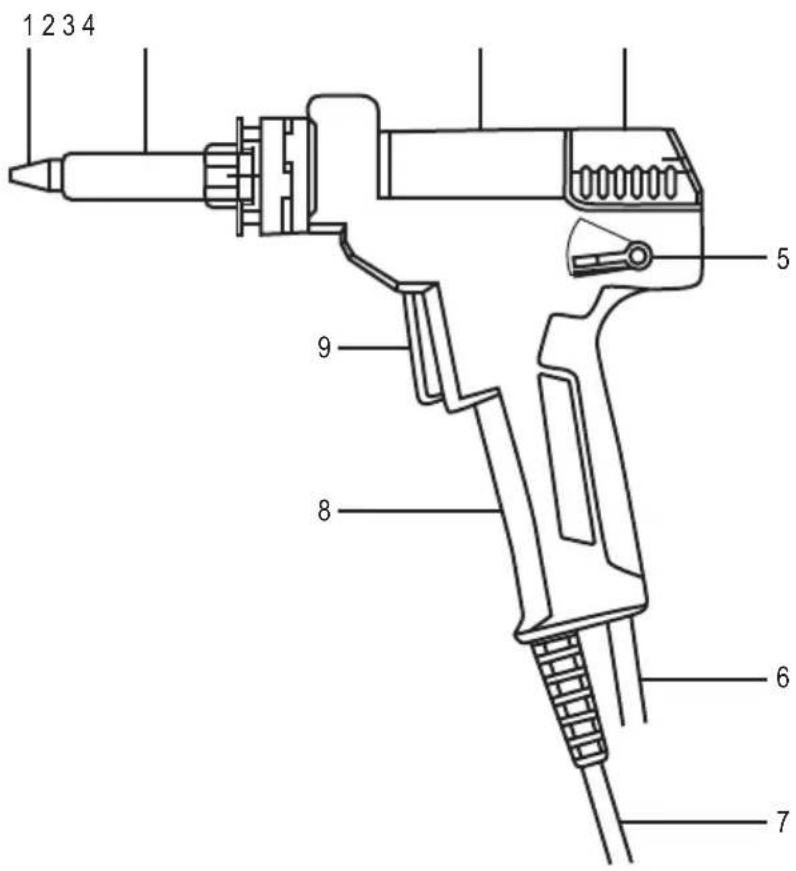
text_image
1 2 3 4 5 9 8 6 71 Tip
2 Heating element
3 Glass tube
4 Latch
5 Release lever
6 Suction hose
7 Power cable
8 Handle
9 Suction trigger
8. Operation
a) Installation site and connection

Protect heat-sensitive surfaces with a suitable cover.
Never place the product on valuable furniture surfaces, floors or carpets.
Maintain a sufficient distance from combustible or flammable objects (e.g. curtains).
- Place the product on a horizontal, stable, sufficiently large surface.
- Assemble the stand. Insert the metal tongue of the holder into the appropriate slot of the base. The holder must be located above the sponge holder.

Risk of fire!
If you insert the holder incorrectly so that it extends over the edge of the base, the holder may tip over when you insert the desoldering gun.
- Connect the mains cable of the desoldering gun with the appropriate socket on the station. The plug fits only in one direction. Do not use any force.
- Connect the suction hose with the appropriate opening on the station. Turn the cap clockwise to secure the connection.
- Place the desoldering gun in the stand.
- Connect the mains plug to a standard mains socket.
b) Switching on and off
- Switch on the station via the mains switch on the rear (switch position I = on). The product immediately begins heating up after it switches on. The display shows the current temperature of the desoldering gun.

If the message EEE appears on display, turn off the station. Disconnect the desoldering gun and reconnect it with the station. Make sure that the plug is connected correctly and that the union nut is hand-tight. Turn the product back on. If the message EEE persists, the desoldering gun is defective and must be replaced.
- Switch off the product after use (switch position O = off).
c) Setting the temperature
- Press the + button to increase the temperature by 1 degree.
Press the - button to reduce the temperature by 1 degree.
Press and hold the button to fast forward.
- With the °C/°F button, you can switch display between Celsius and Fahrenheit.
9. Desoldering/extraction
→ Place the desoldering gun in the stand during heating up, cooling down and breaks.
When desoldering, always make sure that the conductor paths are not heated up for too long, otherwise they may detach from the carrier material.
- Switch on the station and set the desired temperature.
- After setting the desired temperature, the product requires a few seconds until the tip reaches the desired temperature.
- As soon as the temperature is reached, remove the desoldering gun from the stand.

Risk of burns!
Touch the desoldering gun by the handle only. Never touch the hot tip or the metal shaft.
- For larger soldering joints, increase the temperature to speed up the process.
→ Only use the highest temperature setting for as long as necessary to avoid overloading the tip.
- Reduce the temperature during breaks. This saves energy and prolongs the lifespan of the tip.
- Make sure that the tip is well coated with tin when taking breaks or before switching the station off.
- Clean the tip from time to time (e.g. with a damp sponge). To do this, briefly wipe the tip.

Do not press the tip into the damp sponge. Never hold the tip against the sponge for too long to prevent damage to the sponge.
Ensure that the sponge is sufficiently damp. Never clean the tip with a dry sponge!
Do not clean the tip with sharp objects or a metal brush.
- Please remove the IC with pincers or tweezers as soon as the soldering tin is melted.
- After you have removed the component, you can suck away the remaining soldering tin. To do this, press the trigger of the desoldering gun.
- Before you finish your work, reapply tin to the tip. Apply a small amount of tin to the tip, ensuring that the tin forms an even layer on the tip. This prevents corrosion on the tip.
- Now place the desoldering gun in the stand. Then switch off the station.

Risk of burns!
It takes about 10–15 minutes for the desoldering gun to cool down completely. Do not touch the tip or the stand during this time.
10. Replacing the tip

If you notice a significant decrease in efficiency while removing solder although the product is cleaned and the filter has been replaced, the opening of the tip may be have become too large through corrosion over time. In this case, replace the tip.
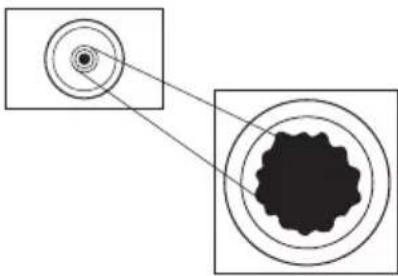
natural_image
Diagram showing concentric circular layers with a central dark irregular shape, no text or symbols presentOnly use the included replacement tips or identical tips.
The use of other tips can lead to a false temperature reading (the actual temperature of the tip does not match the temperature display). In addition, the heating element can be damaged. This leads to a loss of the warranty.
- Turn off the product and let the desoldering gun cool down completely.
- Loosen the knurled union nut on the metal shaft. Remove the nut and the metal sleeve.

The heating/cooling process may cause the union nut to become very tight.
If so, loosen the union nut with a pair of pliers. However, do not use any force, as this may damage the heating element. This leads to a loss of the warranty.
- Remove the tip.
- Install a new tip.
- Replace the metal sleeve and the union nut on the heating element. Tighten the fittings manually! Do not use any force when screwing tight.
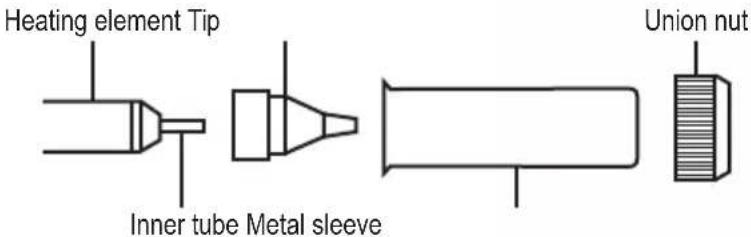
text_image
Heating element Tip Inner tube Metal sleeve Union nut11. Care and cleaning
a) General information

Never use aggressive detergents, rubbing alcohol or other chemical solutions, as these could damage the casing or stop the product from functioning properly.
- Always disconnect the product from the power supply before cleaning it. Disconnect the mains plug from the mains socket.
- Let the desoldering gun cool down completely before cleaning.
- Use a dry, lint-free cloth to clean the station.
- Do not use a file or sandpaper to clean the tip. This may damage the tip.
- Clean the exterior of the tip with a damp sponge to remove excess solder.
- Before turning off the product, the tip must be well coated in tin. This prevents corrosion on the tip and prolongs its lifespan.
b) Removing residual solder

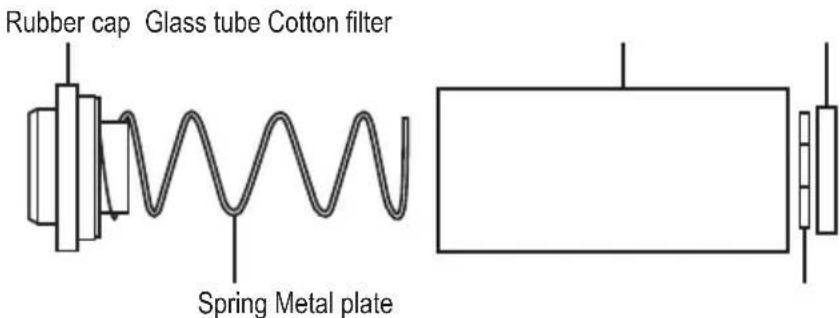
Empty the glass tube as soon as it about half filled.
- Press the release lever upwards. The lock then jumps back to release the tube.
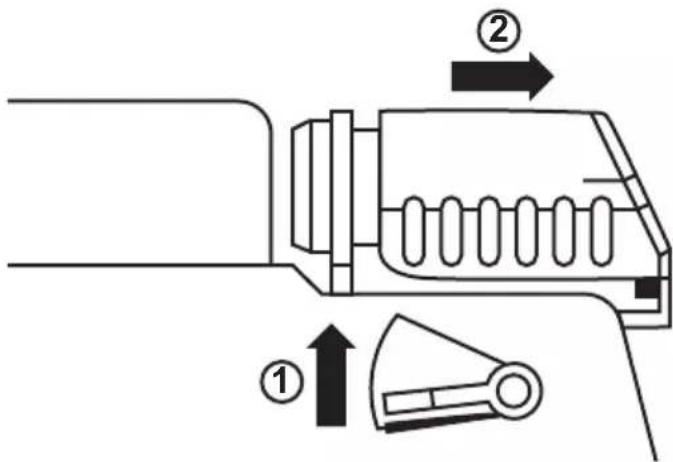
text_image
Technical diagram of a mechanical device with labeled parts and directional arrows indicating motion or assembly.- Carefully remove the glass tube.
- Remove the spring from the glass tube and remove any residual solder.

Residual solder does not belong in household waste. Dispose of residual solder in accordance with the statutory provisions.
text_image
Rubber cap Glass tube Cotton filter Spring Metal plate- Replace the spring in the glass tube.
- Place the glass tube back into the desoldering gun.
- Press the lock in the direction of the glass tube until the release lever jumps to the lower position.
c) Cleaning the desoldering gun
If there is a significant reduction in suction power, interrupt the process and immediately clean the desoldering gun.
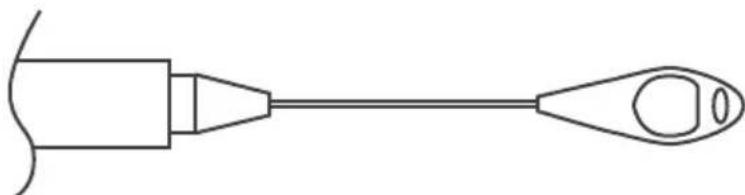
- Directly after desoldering, press the trigger 3 to 5 times to remove residual solder from the tip and the inner tube.
- Use the cleaning tool to clean the inside of the tip and the inner tube of the heating element.
natural_image
Simple line drawing of a medical or laboratory device with a pointed tip and handle (no text or symbols)d) Replacing the filter
Replace the cotton filter discs on the suction opening of the station and in the glass tube as soon as they have hardened.
12. Disposal
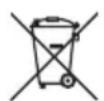
This symbol must appear on any electrical and electronic equipment placed on the EU market. This symbol indicates that this device should not be disposed of as unsorted municipal waste at the end of its service life.
Owners of WEEE (Waste from Electrical and Electronic Equipment) shall dispose of it separately from unsorted municipal waste. Spent batteries and accumulators, which are not enclosed by the WEEE, as well as lamps that can be removed from the WEEE in a non-destructive manner, must be removed by end users from the WEEE in a non-destructive manner before it is handed over to a collection point.
Distributors of electrical and electronic equipment are legally obliged to provide free take-back of waste. Conrad provides the following return options free of charge (more details on our website):
• in our Conrad offices
• at the Conrad collection points
- at the collection points of public waste management authorities or the collection points set up by manufacturers or distributors within the meaning of the ElektroG
End users are responsible for deleting personal data from the WEEE to be disposed of.
It should be noted that different obligations about the return or recycling of WEEE may apply in countries outside of Germany.
13. Technical Data
Operating voltage....220 - 240 V/AC, 50 Hz
Power consumption....90 W
Protection class ....I
Temperature range ....+160 to +480 °C
Tolerance....±5 %
Vacuum pressure....600 mbar
Operating conditions....-6 to +46 °C, 10 – 90 % RH
Storage conditions....-20 to +60 °C, 10 – 70 % RH
Dimensions (W x H x D) 160 x 170 x 230 mm
Weight 2.54 kg
Page
France (email): technique@conrad-france.fr
a) Placement/raccordement

natural_image
Diagram showing two concentric circular layers with a central dot, connected by lines to a larger black textured region (no text or symbols)text_image
Technical diagram of a mechanical device with labeled parts and directional arrows indicating motion or assembly.natural_image
Pure electrical circuit lines without any symbolsnatural_image
Simple line drawing of a medical or laboratory device with a pointed tip and handle (no text or symbols)Dimensions (L x H x P)....160 x 170 x 230 mm
Poids....2,54 kg