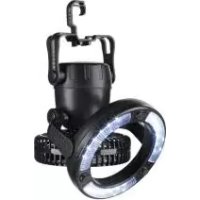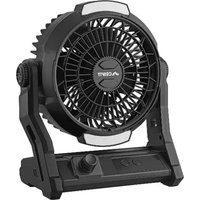
SCVL A1 - Fan CRIVIT - Free user manual and instructions
Find the device manual for free SCVL A1 CRIVIT in PDF.


| Product type | Cordless fan |
| Brand | CRIVIT |
| Model | SCVL A1 |
| Power supply | Integrated lithium-ion battery 3.7 V, 10,000 mAh, 37 Wh |
| Charging input | USB-C 5 V, 2 A |
| USB outputs | 1 × USB-A 5 V, 2 A; 1 × USB-C 5 V, 2 A (total 2 A max simultaneously) |
| Power consumption | Fan: 6 W; LED lamps: 1 W |
| Fan speeds | Continuous adjustment from 01 to 100 (25% increments per press) |
| LED lighting | 2 LED lamps (upper and lower), 3 brightness levels, individual or simultaneous activation |
| Timer | 1, 2, 4 or 8 hours (automatic shut-off) |
| Powerbank function | Yes, charging external devices via USB-A and USB-C |
| Tilt angle | Manually adjustable |
| Hanging hook | Yes, foldable (for tent, etc.) |
| Protection class | III |
| Use | Dry indoor only |
| Warranty | 3 years |
| Customer service France | Tel. 0800904879, email owim@lidl.fr |
| Customer service Belgium | Tel. 080071011, email owim@lidl.be |
| Repairability | LED and battery not replaceable by user |
| Cleaning | Slightly damp cloth; do not immerse; no abrasive cleaners |
Frequently Asked Questions - SCVL A1 CRIVIT
User questions about SCVL A1 CRIVIT
0 question about this device. Answer the ones you know or ask your own.
Ask a new question about this device
Download the instructions for your Fan in PDF format for free! Find your manual SCVL A1 - CRIVIT and take your electronic device back in hand. On this page are published all the documents necessary for the use of your device. SCVL A1 by CRIVIT.
USER MANUAL SCVL A1 CRIVIT
Intended use.... Page 34
Scope of delivery.... Page 34
Description of parts ...... Page 35
Technical data Page 35
Trademark notices Page 35
Safety instructions...... Page 36
Safety instructions for batteries/ rechargeable batteries..... Page 40
Before use Page 41
Unpacking Page 41
Charging the product. . . . . . . . . . . . . . . . . . . . . . . . . . . . . . . . . . . . . . . . . . . . . . . . . . . . . . . . . . . . . . . . . . . . . . . 42
Setting up the product .... Page 42
Operation...... Page 43
Switching the product on/off....Page 43
Adjusting the speed....Page 43
Tilt adjustment..... Page 44
Using the LED lights .... Page 44
Setting the timer....Page 45
Hanging up the product..... Page 46
Using as a power bank ...... Page 46
Cleaning and care ...... Page 47
Storage Page 48
Disposal Page 49
Warranty Page 50
Warranty claim procedure.... Page 51
Service Page 52
| List of pictograms used | |
 | DANGER! - Designating a hazard with high risk, which will result in death or severe injury if not avoided (e.g. risk of suffocation) |
 | WARNING! - Designating a hazard with moderate risk, which can result in death or severe injury if not avoided (e.g. risk of electric shock) |
 | CAUTION! - Designating a hazard with low risk, which could result in minor or moderate injury if not avoided (e.g. risk of scalding) |
 | NOTICE! - Warns of possible damage to property/the product if not avoided (e.g. risk of short circuit) |
 | WARNING! EXPLOSION HAZARD! A warning with this symbol and word “WARNING! EXPLOSION HAZARD” indicates the potential threat of explosion. Failure to observe this warning may result in serious or fatal injuries and potential property damage. Follow the instructions in this warning to prevent serious injuries, a danger to life or the risk of property damage! |
 | NOTE: This symbol in combination with “Note” provides additional useful information. |
 | Do not put fingers through grille. |
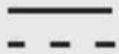 | Direct current/voltage |
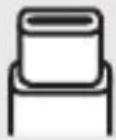 | USB-C connector |
 | USB-A connector |
 | Protection class III |
 | Only use the product in dry indoor areas. |
 | Read the user manual. |
 | CE mark indicates conformity with relevant EU directives applicable for this product. |
 | Safety informationInstructions for use |
CORDLESS FAN
Introduction
We congratulate you on the purchase of your new product. You have chosen a high quality product. The instructions for use are part of the product. They contain important information concerning safety, use and disposal. Before using the product, please familiarise yourself with all of the safety information and instructions for use. Only use the product as described and for the specified applications. If you pass the product on to anyone else, please ensure that you also pass on all the documentation with it.
Intended use
This product is intended to produce a cooling airflow.
This product can be used as a power bank to charge external devices with a USB connection.
The LED lights 1 5 are used to illuminate the immediate surroundings of the product.
This product is not suitable for household room illumination.
■ Any other use not mentioned in these instructions may cause a damage to the product or create a serious risk of injury.
This product is only intended for private household use, not for commercial purposes.
The manufacturer accepts no liability for damages caused by improper use.
- Scope of delivery
After unpacking the product, check if all parts are in good condition. Remove all packing materials before use.
1 Cordless Fan
1 Charging cable
1 Short manual
● Description of parts
1 Upper LED light
2 Front grille
3 Fan blade
4 Speed control
5 Lower LED light
6 Timer button
7 Light switch
8 Display
9 Rear grille
10 On/off switch
11 USB-A output port
12 USB-C port
13 Foldable hook
14 USB charging cable
- Technical data
| Battery Type: 1260110 | |
| Built-in rechargeable battery: 3 | 7 V, 10,000 mAh,37 Wh (Lithium-ion) |
| USB-C input/output: 5 V, 2 A | * --- |
| USB-A output: 5 V, 2 A * | --- |
| Power consumption: 6 W (fan), | 1 W (LED lights) |
* If the USB-A output port 11 and the USB-C port 12 are used simultaneously to charge external devices, the total output current of both ports combined is 2 A.
Trademark notices
□ USBs a registered trademark of USB Implementers Forum, Inc.
☐ The CRIVIT trademark and trade name is the property of its owner.

Safety instructions
BEFORE USING THE PRODUCT, FAMILIARISE YOURSELF WITH ALL OF THE SAFETY INFORMATION AND INSTRUCTIONS FOR USE! WHEN PASSING THIS PRODUCT ON TO OTHERS, ALSO INCLUDE ALL THE DOCUMENTS!
In the case of damage resulting from non-compliance with these operating instructions the warranty claim becomes invalid! No liability is accepted for consequential damage! In the case of material damage or personal injury caused by incorrect handling or non-compliance with the safety instructions, no liability is accepted!
⚠️ DANGER! Risk of suffocation!
Never leave children unsupervised with the packaging material. The packaging material represents a danger of suffocation. Children frequently underestimate the dangers. Always keep children away from the packaging material.
This product can be used by children aged from 8 years and above and persons with reduced physical, sensory or mental capabilities, or lack of experience and knowledge if they have been given supervision or instruction concerning use of the product in a safe way and understand the hazards involved.
Cleaning and user maintenance shall not be made by children without supervision.
This product is not a toy and should be kept out of the reach of children. Children are not aware of the dangers associated with handling electrical products.
■ Children shall not play with the product
- Do not use the product if you detect any type of damage.
■ Never immerse the product in water or other liquids!
Only connect the product to a properly installed USB socket. The voltage must comply with the information given in the section "Technical data".
- Do not carry out any modifications or repairs to the product yourself. The LEDs cannot and must not be replaced.
The LEDs are not replaceable.
If the LEDs fail at the end of their lives, the entire product must be replaced.
⚠ WARNING! Do not turn on the light
when the product is facing down to a combustible surface. The exposed surface may be overheated or ignited.
- Do not place burning candles or open fire on or near the product.
- Do not use the product near heat sources such as radiators or devices emitting heat.
■ Dispose of the product if product or US charging cable 14 are damaged.
■ Ensure the USB charging cable 14 cannot become damaged by sharp edges or hot objects.
■ Unwind the USB charging cable 14 completely before use.
Immediately switch the product off and remove the USB charging cable 14 from the product if you smell burning or see smoke. Have the product examined by a qualified technician before using it again.
If you use a USB power supply, the socket used must always be easily accessible so that the USB power supply can be quickly removed from the socket in the case of emergency. Also refer to the manufacturer's instruction manual.
- Observe the usage restrictions and prohibitions of use for battery-operated products in situations which may be hazardous such as at petrol stations, airports, hospitals, etc.
⚠ WARNING! Do not cover the product while charging. There is a risk of warming and overheating.
⚠ WARNING! Risk of injury! Switch the product off and disconnect it from the USB power supply before cleaning work and when not in use.
■ Protect the product against dust, direct sunlight, dripping and splashing water.
⚠️ CAUTION! Risk of injury! Never use the product without the safety grille or with a damaged safety grille.
⚠️ CAUTION! Risk of injury! During use, keep hands, hair, clothing and utensils away from the safety grille to avoid injuries and damage of the product.

Safety instructions for batteries/rechargeable batteries
⚠️ DANGER TO LIFE! Keep batteries/rechargeable batteries out of reach of children. If accidentally swallowed seek immediate medical attention.
DANGER OF EXPLOSION! Never recharge
non-rechargeable batteries. Do not short-circuit batteries/rechargeable batteries and/or open them.
Overheating, fire or bursting can be the result.
- Never throw batteries/rechargeable batteries into fire or water.
- Do not exert mechanical loads to batteries/rechargeable batteries.
Risk of leakage of batteries/rechargeable batteries
- Avoid extreme environmental conditions and temperatures, which could affect batteries/rechargeable batteries, e.g. radiators/direct sunlight.
If batteries/rechargeable batteries have leaked, avoid contact with skin, eyes and mucous membranes with the chemicals! Flush immediately the affected areas with fresh water and seek medical attention!

WEAR PROTECTIVE GLOVES! Leaked or damaged batteries/rechargeable batteries can cause burns on contact with the skin. Wear suitable protective gloves at all times if such an event occurs.
This product has a built-in rechargeable battery which cannot be replaced by the user. The removal or replacement of the rechargeable battery may only be carried out by the manufacturer or his customer service or by a similarly qualified person in order to avoid hazards. When disposing of the product, it should be noted that this product contains a rechargeable battery.
Before use
Unpacking
☐ Remove the packaging. Check if the product is damaged.
● Charging the product
⚠ NOTICE! Risk of property damage! Do not connect the product to a PC or notebook to charge the product.
⚠ NOTICE! Do not connect any device to the USB-A output port 11 while charging the product via the USB-C port 12. Disconnect the USB charging cable 14 from the product when the product is fully charged.
i NOTES:
■ Before first use: Fully charge the product.
For charging, only use a power supply (not provided) with protection class II and a SELV output of 5 V,2A, which is approved for use with household appliances.
- You cannot operate the product during the charging process.
-
Connect the USB-C plug of the USB charging cable 14 to the USB-C port 12.
-
Connect the USB-A plug of the USB charging cable 14 to the USB-A socket of your USB power adaptor.
The current battery level percentage flashes on the display 8 during the charging process.
When the product is fully charged, the display 8 shows 100 % and stops flashing.
- Disconnect the USB charging cable 14 from the product and the USB power adaptor.
The display 8 goes off once the USB charging cable is disconnected from the product.
Setting up the product
☐ Place the product on a horizontal, even surface.
Operation
- Switching the product on/off
NOTE: Always slide the on/off switch 10 to the OFF position after the battery charge is used up.
☐ Switching on: Slide the on/off switch 10 to the ON position.
☐ Switching off: Slide the on/off switch 10 to the OFF position.
- Adjusting the speed
NOTE: Once the product is switched on, the fan blade 3 starts rotating at speed level 01. The current battery level percentage is shown on the display 8.
☐ Rotate the speed control 4 in clockwise or counterclockwise direction to adjust the speed between level 01 and 100.
□ Alternatively, you can press the speed control 4 repeatedly to increase the speed in increments of 25%.
| Speed control 4 | Speed level |
| Press 1× | 25 |
| Press 2× | 50 |
| Press 3× | 75 |
| Press 4× | 100 |
| Press 5× | 01 |
☐ Switching off the fan only: Press and hold the speed control 4 for 3 seconds.
- Tilt adjustment
□ Adjust the tilt angle by hand.
Using the LED lights
NOTE: You can switch the LED lights 1 5 on/off either simultaneously or individually.
Simultaneously
☐ Press the light switch 7 repeatedly to switch the LED lights 1 5 on/off and to select a brightness level.
| Light switch 7 | Description |
| Press 1× | Both LED lights 1 5 light up at brightness level 1. |
| Press 2× | Both LED lights 1 5 light up at brightness level 2. |
| Press 3× | Both LED lights 1 5 light up at brightness level 3. |
| Press 4× | Both LED lights 1 5 go off. |
Individually
- Press the light switch 7 once to switch both LED lights 1 5 on.
- Proceed as follows to switch either the upper LED light 1 or the lower LED light 5 on/off and to select their brightness level:
| Light switch 7 | Description |
| Press and hold for 2 seconds | Only the upper LED light 1 lights up at brightness level 1. |
| Press and hold for 2 seconds again | Only the lower LED light 5 lights up at brightness level 1. |
| Press 1× | The upper LED light 1 or the lower LED light 5 lights up at brightness level 2. |
| Press 2× | The upper LED light 1 or the lower LED light 5 lights up at brightness level 3. |
| Press 3× | The upper LED light 1 or the lower LED light 5 goes off. |
- Setting the timer
i NOTES:
You can set a timer to switch off the product automatically after an operating time of 1 to 8 hours.
The timer function is applicable for the fan only.
The timer will be reset automatically once you
- charge the product via the USB-C port 12,
- slide the on/off switch 10 to the OFF position,
-switch off the fan by pressing and holding the speed control 4 for 3 seconds.
☐ When the product is switched on: Press the timer button 6 repeatedly to set the timer.
| Timer button 6 | Action | Display 8 |
| Press 1× | Entering the timer mode | 0H |
| Press 2× | Setting the timer to 1 hour | 1H |
| Press 3× | Setting the timer to 2 hours | 2H |
| Press 4× | Setting the timer to 4 hours | 4H |
| Press 5× | Setting the timer to 8 hours | 8H |
| Press 6× Deactivating the timer | 0H | |
● Hanging up the product
NOTE: The foldable hook 13 allows you to hang up the product e.g. under the roof of a camping tent.
- Turn the product upside down.
- Swing out the foldable hook 13.
- Rotate the foldable hook 13 to the desired position.
- Hang the product from a suitable fixing point. Make sure the product cannot fall down.
Using as a power bank
i NOTES:
If the product is used as a power bank while the fan is set to a speed higher than 50, the maximum fan speed will be reduced to 50.
After your device is disconnected from the USB port, the maximum fan speed will reset to level 100.
The product enters sleep mode after being idle for 3 minutes (the on/off switch 10 set to the ON position). To activate the power bank, press the timer button 6 1x after connecting your device.
You can use the product as an emergency backup power source to charge e.g. mobile devices via the USB-A output port 11 and the USB-C port 12.
You can charge 2 devices simultaneously via the USB-A output port 11 and the USB-C port 12. In this case the total output current of both ports combined is 2 A.
The power bank function can only be used when the on/off switch 10 is set to the ON position.
- Slide the on/off switch 10 to the ON position.
- Connect your mobile device to the USB-A output port 11 or the USB-C port 12 using the USB charging cable 14.
- Optional: Connect a second device to the USB-A output port 11 or the USB-C port 12 using another USB charging cable (not included).
- The charging process starts automatically. The display 8 shows the current battery level percentage. #flashes on the display.
- Disconnect your devices from the product as soon as they are sufficiently charged.
● Cleaning and care
- Do not immerse the electrical parts of the product in water or other liquids. Never hold the product under running water.
Before cleaning: Turn the product off. Disconnect the USB charging cable 14 from the product.
| Part Cleaning | |
| Product | □ Clean the housing with a slightly moistened cloth.□ Do not allow any water or other liquids enter the product's interior. |
| Grilles2 9 | □ Carefully remove coarse dust deposits with a vacuum cleaner.□ Wipe the grilles with a slightly moistened cloth.□ For stubborn soiling use a mild detergent on the cloth. |
Do not use abrasives, harsh cleaning solutions or hard brushes for cleaning.
i NOTES:
The grilles 2 9 act as safety guards to protect the user from touching the fan blade 3.
Do not remove the front grille 2 or the rear grille 9 under any circumstances.
□ After cleaning: Let all parts dry.
Storage
NOTE: The built-in battery can discharge itself even if the product is not in use. If you do not plan to use the product for a long time, fully charge the built-in battery before storage to prolong the battery's operating life. Regularly charge the built-in battery during non-use (we recommend an interval of 3 months) to preserve its characteristics.
☐ Store the product in a dry, secure location away from children.
Disposal
The packaging is made entirely of recyclable materials, which you may dispose of at local recycling facilities.
Observe the marking of the packaging materials for waste separation, which are marked with abbreviations (a) and numbers (b) with following meaning: 1–7: plastics/20–22: paper and fibreboard/80–98: composite materials.
Product:

FR
The product and packaging materials are recyclable and are subject to extended producer responsibility.
Dispose them separately, following the illustrated Info-tri (sorting information), for better waste treatment.
The Triman logo is valid in France only.

Contact your local refuse disposal authority for more details of how to dispose of your worn-out product.
To help
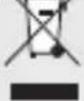
protect the environment, please dispose of the product properly when it has reached the end of its useful life and not in the household waste. Information on collection points and their opening hours can be obtained from your local authority.
Faulty or used batteries/rechargeable batteries must be recycled. Return the batteries/rechargeable batteries and/or the product to the available collection points.
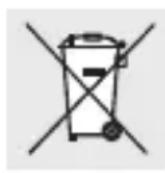
Environmental damage through incorrect disposal of the batteries/rechargeable batteries!
Batteries/rechargeable batteries may not be disposed of with the usual domestic waste. They may contain toxic heavy metals and are subject to hazardous waste treatment rules and regulations. The chemical symbols for heavy metals are as follows: Cd = cadmium, Hg = mercury, Pb = lead. That is why you should dispose of used batteries/rechargeable batteries at a local collection point.
Warranty
The product has been manufactured to strict quality guidelines and meticulously examined before delivery. In the event of material or manufacturing defects you have legal rights against the retailer of this product. Your legal rights are not limited in any way by our warranty detailed below.
The warranty for this product is 3 years from the date of purchase. The warranty period begins on the date of purchase. Keep the original sales receipt in a safe location as this document is required as proof of purchase.
Any damage or defects already present at the time of purchase must be reported without delay after unpacking the product.
Should the product show any fault in materials or manufacture within 3 years from the date of purchase, we will repair or replace it – at our choice – free of charge to you. The warranty period is not extended as a result of a claim being granted. This also applies to replaced and repaired parts.
This warranty becomes void if the product has been damaged, or used or maintained improperly.
The warranty covers material or manufacturing defects. This warranty does not cover product parts subject to normal wear and tear, thus considered consumables (e.g. batteries, rechargeable batteries, tubes, cartridges), nor damage to fragile parts, e.g. switches or glass parts.
For this product, rechargeable battery is also covered by its warranty period.
● Warranty claim procedure
To ensure quick processing of your claim, observe the following instructions:
Make sure to have the original sales receipt and the item number (IAN 492795_2407) available as proof of purchase.
You can find the item number on the rating plate, an engraving on the product, on the front page of the instruction manual (bottom left), or as a sticker on the rear or bottom of the product.
If functional or other defects occur, contact the service department listed below either by telephone or by e-mail.
Once the product has been recorded as defective you can return it free of charge to the service address that will be provided to you. Ensure to enclose the proof of purchase (sales receipt) and a short, written description outlining the details of the defect and when it occurred.

Service

Service Great Britain
Tel.:0800 0569216
E-Mail: owim@lidl.co.uk

Service Ireland
Tel.:1800 200736
E-Mail: owim@lidl.ie