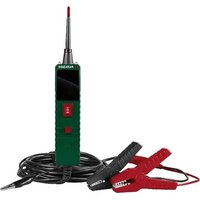
PSKT 30 A1 - Electrical tester PARKSIDE - Free user manual and instructions
Find the device manual for free PSKT 30 A1 PARKSIDE in PDF.


User questions about PSKT 30 A1 PARKSIDE
0 question about this device. Answer the ones you know or ask your own.
Ask a new question about this device
Download the instructions for your Electrical tester in PDF format for free! Find your manual PSKT 30 A1 - PARKSIDE and take your electronic device back in hand. On this page are published all the documents necessary for the use of your device. PSKT 30 A1 by PARKSIDE.
USER MANUAL PSKT 30 A1 PARKSIDE
Operating instructions
FR / BE
TESTEUR DE CIRCUIT POUR VÉHICULES
Mode d'emploi
CZ
TESTER AUTOMOBILOVÝCH OBVODŮ
Návod k obsluze
SK
TESTER AUTOMOBILOVÝCH OBVODOV
Návod na obsluhu
DK
KREDSL∅BSTESTER TIL K∅RET∅JER
GB/IE Operating instructions Page 1
| DE/AT/CH Bedienungsanleitung Seite 33 | |||
| FR/BE Mode d’emploi Page 65 | |||
| NL/BE Gebruiksaanwijzing Pagina 103 | |||
| CZ Návod k obsluze Strana 135 | |||
| PL Instrukcja obsługi | Strona | 167 | |
| SK Návod na obsluhu | Strana | 199 | |
| ES | Instrucciones de uso | Página | 231 |
| DK | Betjeningsvejledning | Side | 263 |
| IT | Istruzioni per l’uso | Pagina | 295 |
| HU | Használati utasítás | Oldal | 327 |
A
text_image
1 2 3 4 5 6 7 8 9 10 11 PARKSIDEB
text_image
3 12 13 14 15 16 17 18 21 19 20 22 /// PARKSIDEContents
Introduction 3
Information about these instructions for use 3
Intended use 3
Warnings and symbols used 3
Safety 4
Basic safety instructions 4
Operating elements / parts 7
Getting started 8
Checking the package contents 8
Connecting the test probe 8
Connecting the device to the vehicle 9
Operation and use 10
Self-test 10
Protecting the on/off switch.... 1 1
Overload protection 11
Test modes 11
Tests 14
Testing voltage and polarity 14
Testing resistance 15
Testing continuity 16
Testing the signalling circuit 17
Testing components without circuits.... 1 8
Testing trailer lighting 20
Testing components in the vehicle interior 21
Testing earthed components 22
Testing for bad earth contacts 24
Localising and tracing short circuits 24
Polarity indicator LEDs 25
Troubleshooting 25
Cleaning 26
Storage 26
Disposal 26
Disposal of the appliance 27
Disposal of the packaging 27
Appendix 28
Technical data 28
Kompernass Handels GmbH warranty 29
Service 32
Importer 32
Introduction
Information about these instructions for use

Congratulations on the purchase of your new device. You have selected a high-quality device. The instructions for use are part of this device.
They contain important information about safety, usage and disposal. Before using the device, please familiarise yourself with all operating and safety instructions. Use this device only as described and for the areas of application specified. Hand over all documents when passing the device on to third parties.
Intended use
The device is used exclusively for testing electrical systems in vehicles from 6 to 30 V. The device is operated via the vehicle's electrical system. No separate power supply is required. After connecting the device to the vehicle, you can carry out measurements of voltage, resistance and continuity. Commercial or industrial use is not permitted. No liability will be assumed in cases of improper use. No liability will be assumed for damage caused by misuse or improper handling, the use of force or unauthorised modification. The risk is borne solely by the user.
Warnings and symbols used
The following warnings and symbols are used in these instructions for use, on the packaging and on the device:

WARNING! A warning with this symbol and the signal word "WARNING" indicates a potentially hazardous situation which could result in death or serious injury if not avoided.
 | ATTENTION! A warning with this symbol and the signal word "ATTENTION" indicates a potential situation which could result in property damage if not avoided. |
 | Note: A note identifies additional information that facilitates the use of the device. |
 | DC current/voltage |
 | AC current/voltage |
 | This device is made partly from recycled material. |
Safety
This section contains important safety instructions for using the device. This device complies with statutory safety regulations. Improper use may result in personal injury and property damage.
Basic safety instructions
⚠ WARNING! To ensure safe operation of the device, follow the safety instructions set out below:
Do not allow children to play with the packaging material! Keep all packaging materials away from children.
- Keep electrical appliances out of the reach of children. People with disabilities should only use electrical appliances within the scope of their abilities. Never allow children or people with disabilities to use electrical appliances unsupervised. They may not recognise potential dangers.
Check the device before every use to make sure it is in perfect condition. Inspect the insulation in the area of connections and cables particularly carefully. Do not use the device if it is damaged in any way.
- Do not use the device in locations where there is a risk of fire or explosion, e.g. in the vicinity of inflammable liquids or gases.
■ Protect the device from wetness or direct sunlight.
Do not expose the device to any extremes of temperature or temperature fluctuations. For example, do not leave it lying in a car for extended periods. After exposure to large temperature fluctuations, allow the device to acclimatise before using it again. The precision of the device can be adversely affected by extreme temperatures or temperature fluctuations.
■ Never immerse the device in water or other liquids, and never expose the device to spraying or dripping water.
■ Avoid hefty knocks or dropping the device.
■ Switch off the device immediately if you notice any unusual noises, smell of burning or smoke. Have the device checked by a qualified specialist before using it again.
- Keep clothing, hair, hands, tools, test equipment, etc. away from all moving or hot engine parts.
■ Operate the vehicle in a well-ventilated work area, as the exhaust fumes are unhealthy.
■ Fuel and battery vapours are highly flammable. Do not smoke near the vehicle during the test.
■ Never place tools on a vehicle battery, as this can lead to a short circuit between the terminals. This could damage the device, the tools or the vehicle battery.
■ Always block the drive wheels. Never leave a vehicle unattended during the test.
- Set the gearbox to neutral and ensure that the parking brake is applied.
- Keep a fire extinguisher for petrol, chemical and electrical fires nearby.
■ Engine parts become very hot when the engine is running. Avoid contact with hot engine parts to prevent serious burns.
Be extremely careful when working near the ignition coil, distributor cap, ignition cables or spark plugs while the engine is running. These parts are high-voltage components that can cause an electric shock.
When the engine is running, many parts (e.g. pulleys, coolant fan, belts, etc.) rotate at high speed. Always be alert and keep a safe distance from these parts to avoid serious injury.
When the device is switched on, voltage/current is immediately applied to the test probe, which can cause sparks if it comes into contact with earth or certain circuits. Therefore, the device must not be used in the vicinity of flammable substances, such as petrol or its vapours. The sparks from a live device can ignite such vapours.
Do not connect the device when the ignition is switched on or the engine is running. Switch off the engine and ignition before disconnecting the device.
■ After testing, remove the terminals from the battery poles. Otherwise, the device may malfunction or the battery may be damaged.
■ Ensure that no engine oil adheres to the metal parts of the clamps. This can lead to poor contact.
If the battery terminals are oxidised or heavily corroded, the conductivity is poor.
- Do not attach the clamps directly to the steel screw that is attached to the battery terminals. This can lead to inaccurate measured values or contradictory results.
- Do not make any unauthorised modifications or alterations to the device.
■ Never open the device housing. None of the components in the device can be serviced or replaced by the user. This will also invalidate the warranty.
Operating elements / parts
(See fold-out pages for illustrations)
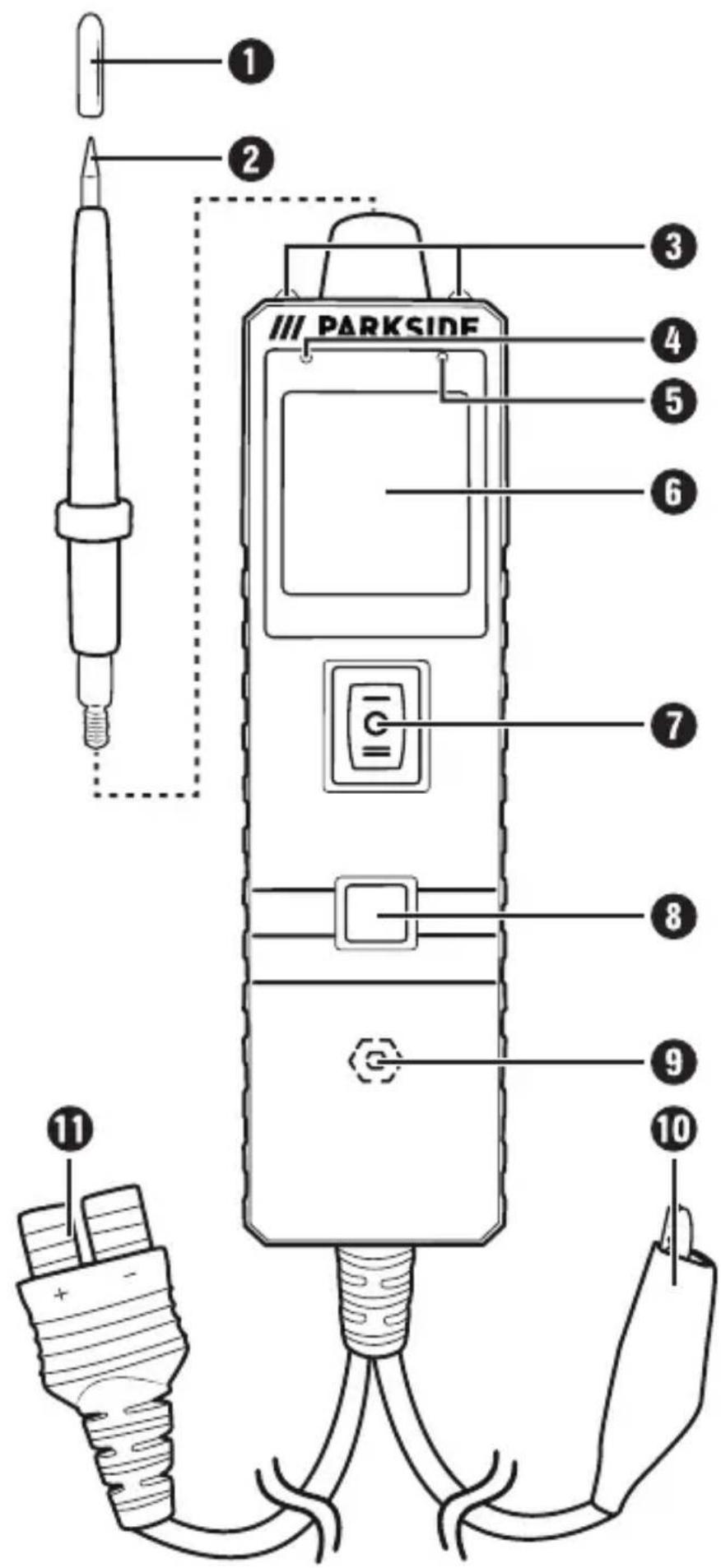
① Protective cap for test probe
② Test probe
③ LED work lights
4 Red positive pole LED (polarity indicator)
⑤ Green negative pole LED (polarity indicator)
⑥ Display
⑦ On/off switch
⑧ Mode button
⑨ Speaker
⑩ Earthing cable with terminal
⑪ Adapter
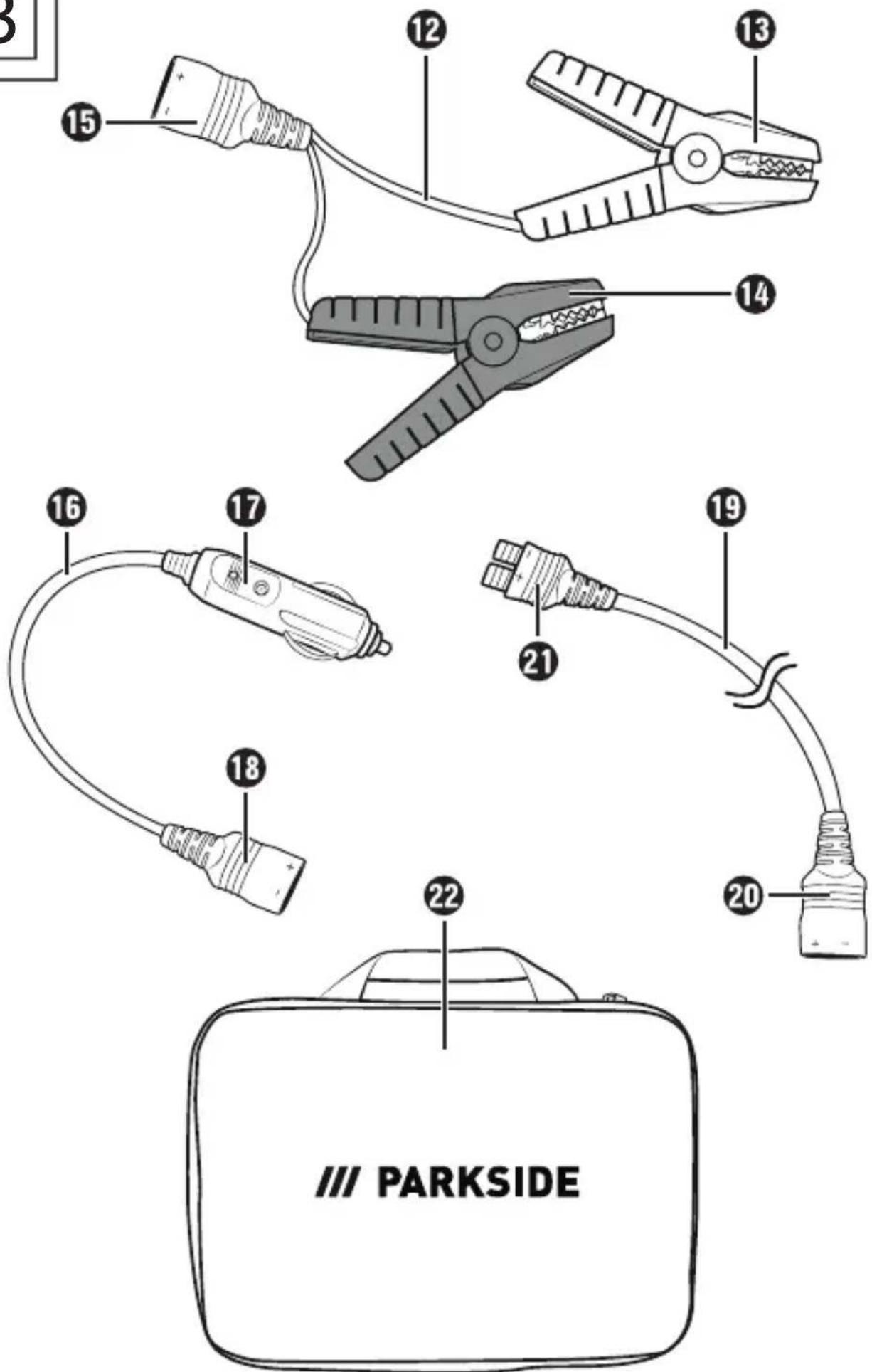
⑫ Battery terminal adapter cable
13 Red connection terminal
14 Black connection terminal
15 Adapter
16 Car cigarette lighter adapter cable
⑰ Car cigarette lighter adapter
18 Adapter
19 Extension cable
20 Adapter
21 Adapter
22 Storage bag
Getting started
Checking the package contents
●Automotive current tester
- Test probe with protective cap
• Car cigarette lighter adapter
● Battery terminal adapter
- 10 m extension cable
- Storage bag
• These instructions for use
Remove the storage bag 22 from the packaging.
◆ Open the storage bag 22.
Remove all packaging material and the protective film from the display 6.
(i) Note: Check the package for completeness and signs of visible damage. If the delivery is incomplete or damage has occurred as a result of defective packaging or during transport, contact the Customer Service hotline (see section Service).
Connecting the test probe
Screw the test probe ② clockwise into the device.
(i) Note: Do not remove the protective cap ① of the test probe ② until you are about to carry out a test. Replace the protective cap ① of the test probe ② when you have finished the test.
Connecting the device to the vehicle
You can connect the device to your vehicle in two different ways. You can connect it to the vehicle battery or alternatively to the car cigarette lighter. If required, you can use the 10 m extension cable ^19 .
Connecting the terminals
- Connect the adapter ⑪ of the device to the adapter ⑮ of the battery terminal adapter cable ⑫. Pay attention to the polarity of the adapters.
- Connect the red connection terminal Ⓔ to the positive terminal of the vehicle battery.
Connect the black terminal 14 to the negative terminal of the vehicle battery.
(i) Note: When connecting the device to a vehicle battery, a signal tone sounds and the polarity indicator ④/⑤ lights up briefly. The display ⑥ switches on and the LED work lights ③ light up continuously to illuminate the working area for the device.
Connecting the car cigarette lighter adapter
Connect the adapter ⑪ of the device to the adapter ⑱ of the car cigarette lighter adapter cable ⑯.
Plug the car cigarette lighter adapter ⑰ into the 12/24 V connection of your vehicle. This is usually the car cigarette lighter (on-board socket) in the dashboard of your vehicle. Many vehicles have a second socket by the rear seats or in the boot. 24 volt batteries are sometimes used in vehicles such as lorries or boats.
(i) Note: When connecting the device to a car cigarette lighter, a signal tone sounds and the polarity indicator ④/⑤ lights up briefly. The display ⑥ switches on and the LED work lights ③ light up continuously to illuminate the working area for the device.
Connecting the extension cable
Connect the adapter ⑪ of the device to the adapter ⑳ of the extension cable ⑲.
Connect the other adapter 21 of the extension cable 19 with the adapter 15 of the battery terminal adapter cable 12 or with the adapter 18 of the car cigarette lighter adapter cable 16.
Operation and use
Self-test
Before you test a circuit or component, you should ensure that the device is working. Carry out a short self-test as follows:
◆ Press and hold the on/off switch ⑦ to the "-" position to apply a positive (+) voltage to the test probe ②.
The red positive pole LED ④ lights up, and the voltage of the vehicle battery (voltage source) appears in the red illuminated display ⑥.
If the sound is switched on, a rapid sequence of beeps sounds.
Release the on/off switch ⑦.
◆ Press and hold the on/off switch ⑦ to the "=" position to apply a negative (−) voltage to the test probe ②.
The green negative pole LED ⑤ lights up, and the voltage "0.0 V" (earth) appears in the green illuminated display ⑥. If the sound is switched on, a slow sequence of beeps sounds.
Release the on/off switch ⑦.
The device is now ready for use.
(i) Note: If the self-test did not work, try again. If the self-test still does not work, please contact the Service Hotline (see section Service).
Protecting the on/off switch
When testing electrical systems, you can extend the service life of the on/off switch ⑦ on the device. For each test, always press the on/off switch ⑦ before touching the relevant component with the test probe ②. This ensures that the arc occurs at the test probe ② and not at the contacts of the on/off switch ⑦.
Overload protection
The device is short circuit-proof and has an internal circuit breaker. The circuit breaker is a safety measure to protect the device against overloads. All other functions of the device are still active, i.e. you can continue to test a circuit and monitor the voltage value. If the circuit breaker has been tripped, the device cannot conduct battery current to the test probe ②, even if the on/off switch ⑦ is pressed.
Test modes
The device has four modes for testing your vehicle's electrical systems. You can optionally set the sound and language.
◆ Press the mode button ⑧ to access the following modes in sequence:
- Direct current measurement( )
- AC voltage measurement( )
- Resistance measurement()
- Continuity measurement
- Sound and language
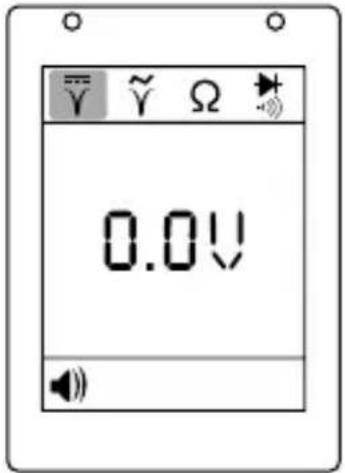
Direct current measurement ( )
text_image
0.0VThe device is in "Direct current measurement" mode when the symbol is selected in the display ⑥.
- Touch a circuit with the test probe ②. The display ⑥ shows the DC voltage with a resolution of 0.1 V.
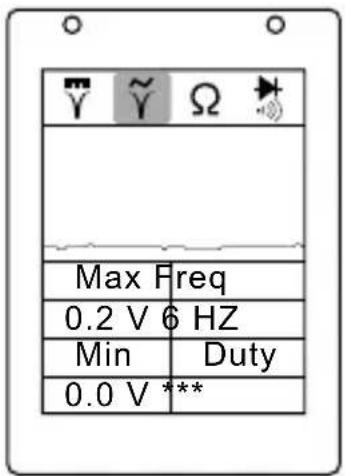
AC voltage measurement ( )
text_image
Max Freq 0.2 V 6 HZ Min Duty 0.0 V ***The device is in "AC voltage measurement" mode when the symbol is selected in the display ⑥.
◆ Touch a circuit with the test probe ②. The display ⑥ shows the maximum and minimum voltage, the frequency and the duty cycle.
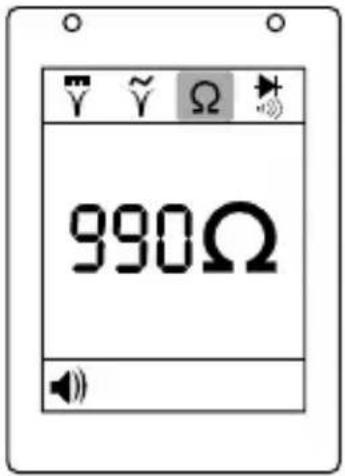
Resistance measurement (Ω)
text_image
990ΩThe device is in "Resistance measurement" mode when the symbol is selected in the display 6.
- Touch a circuit with the test probe ②. The display ⑥ shows the resistance between the test probe ② and the terminal on the earthing cable ⑩.
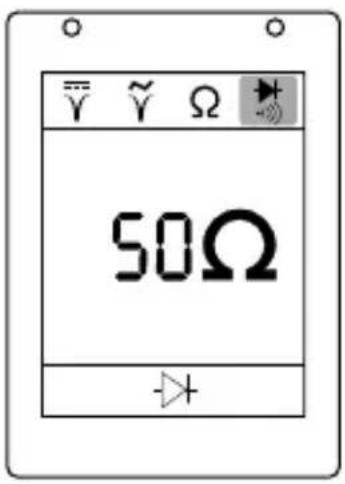
Continuity measurement (▶+)
text_image
50ΩThe device is in "Continuity measurement (with acoustic signal)" mode when the symbol is selected in the display 6.
- Touch a circuit with the test probe ②. At a resistance of 0-80 Ω, the display ⑥ will show the measured value. The red positive pole LED ④ lights up. If the sound is switched on, a slow sequence of beeps sounds. At a resistance of 80-200 Ω, only the display ⑥ will show the measured value. At a resistance of greater than 200 Ω, the display ⑥ will show "0L" (over range).
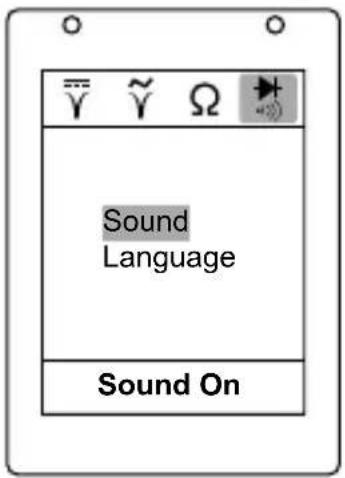
Sound and language (······)
text_image
Sound Language Sound OnThe device is in "Sound and language" mode when the symbol is selected in the display 6.
- Briefly press the on/off switch ⑦ to the "-" position to switch between "Sound" and "Language".
In the "Sound" menu, you can switch the sound on or off. Press and hold the mode button ⑧ to switch the sound off or on again.
In the "Language" menu, you can select the languages English, French, German, Spanish or Italian.
- Press and hold the mode button ⑧ to access the language selection.
- Press the mode button ⑧ to switch between the languages.
- Press and hold the mode button ⑧ to exit the language selection.
Tests
Testing voltage and polarity
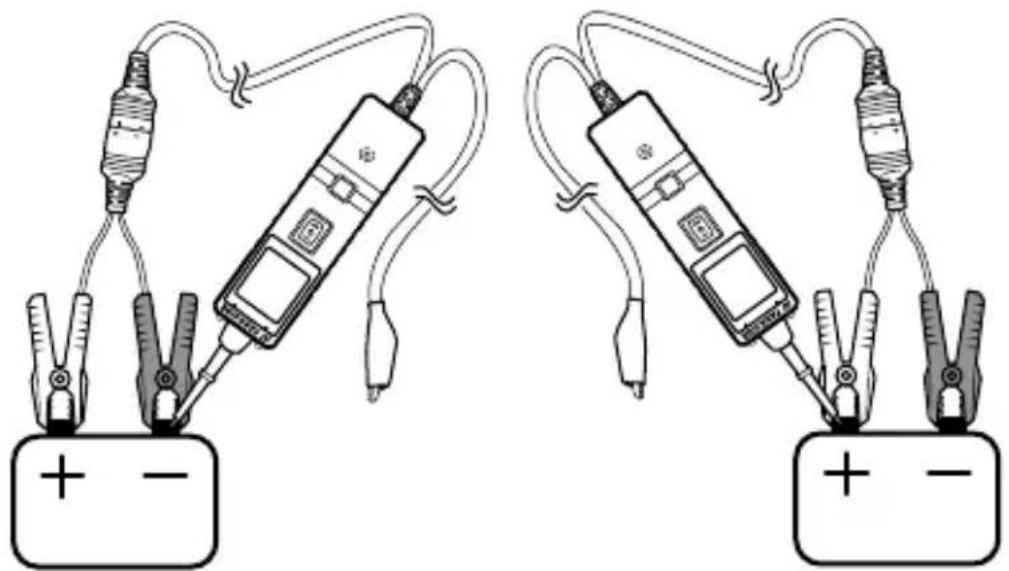
◆ Press the mode button ⑧ until you reach the "Direct current measurement √" mode.
- Touch a positive terminal with the test probe ②. The red positive pole LED ④ lights up, and the voltage of the circuit appears in the red illuminated display ⑥. If the sound is switched on, a rapid sequence of beeps sounds.
- Touch a negative terminal with the test probe ②. The green negative pole LED ⑤ lights up, and the voltage of the circuit appears in the green illuminated display ⑥. If the sound is switched on, a slow sequence of beeps sounds.
(i) Note: If the test probe ② touches an open circuit, neither of the two polarity indicators ④/⑤ lights up.
natural_image
Two identical electrical circuit diagrams showing a battery connected to a clamp and a multimeter, with no text or symbols present.Testing resistance
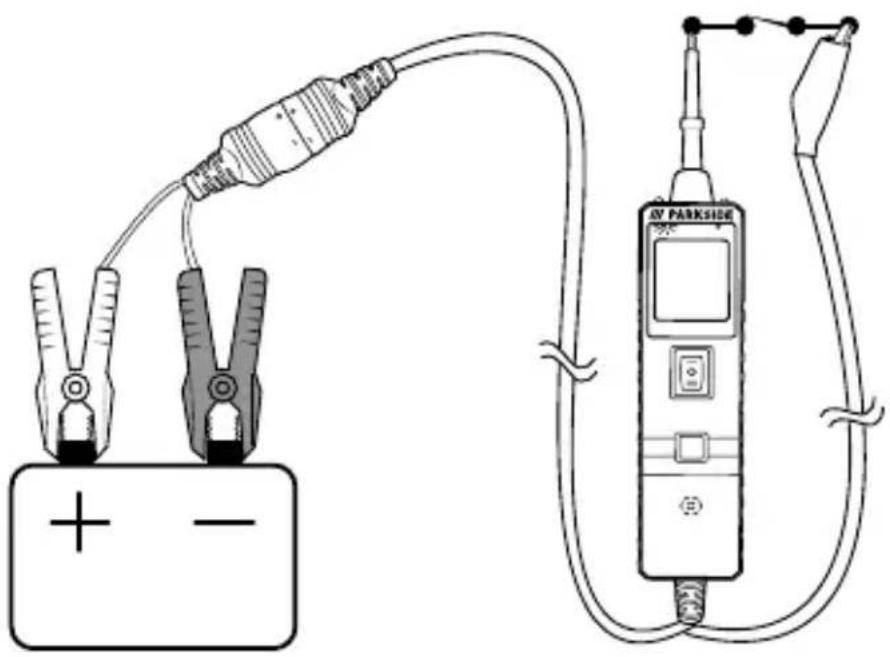
◆ Press the mode button Ⓤ until you reach the "Resistance measurement ⬇mode.
Touch the test probe ② to a cable or an electrical component that is connected to or disconnected from the vehicle's electrical system to test the resistance.
If the test probe ② measures a resistance between 0 and 200 k , the display ⑥ will show the measured value. If the resistance value is greater than 200 k , the display ⑥ will show "OL" (over range).
There is also another way to test the resistance of an electrical component. Press the on/off switch ⑦. If the internal circuit breaker trips, you know that you have a good, solid and low-resistance connection.
① Note: You can pierce the plastic insulation of a cable with the test probe ②. This allows you to test the circuit without the need for more complex disconnection.
text_image
Diagram showing a battery connected to an electrical device via a multimeter, with polarity markings and a power outlet labeled 'BY PARKSIDE'.Testing continuity
Press the mode button ⑧ until you reach the "Continuity measurement" mode.
◆ Touch the test probe ② to a cable or electrical component located inside or outside your vehicle to test the continuity.
If the test probe ② measures a resistance between 0 and 80 , the display ⑥ will show the measured value. The red positive pole LED ④ lights up. If the sound is switched on, a slow sequence of beeps sounds.
If the test probe ② measures a resistance of 80 - 200 , only the display ⑥ will show the measured value.
If the test probe ② measures a resistance of greater than 200 , the display ⑥ will show "0L" (over range).
There is also another way to test the continuity of an electrical component. Press the on/off switch ⑦. If the internal circuit breaker trips, you know that you have a good connection with low continuity.
(i) Note: You can pierce the plastic insulation of a cable with the test probe ②. This allows you to test the circuit without the need for more complex disconnection.
Testing the signalling circuit
If you have received a Diagnostic Trouble Code (DTC) after testing your vehicle's electrical system and recognise that the fault code corresponds to the 'sensor fault' category, there is a quick test you can perform to verify the fault code.
If you suspect a problem with the MAP sensor, for example, follow the instructions below:
Press the mode button ⑧ until you reach the "AC voltage measurement v̅ mode.
Connect a vacuum pump to the MAP sensor.
◆ Touch the positive pole of the MAP sensor with the test probe ② and observe the display ⑥. Normally, a sine curve appears.
◆ Create a vacuum.
Release the vacuum and observe the display 6.
If the sine curve looks unusual, there is a problem with the MAP sensor.
Testing components without circuits
Press the mode button ⑧ until you reach the "Direct current measurement √" mode.
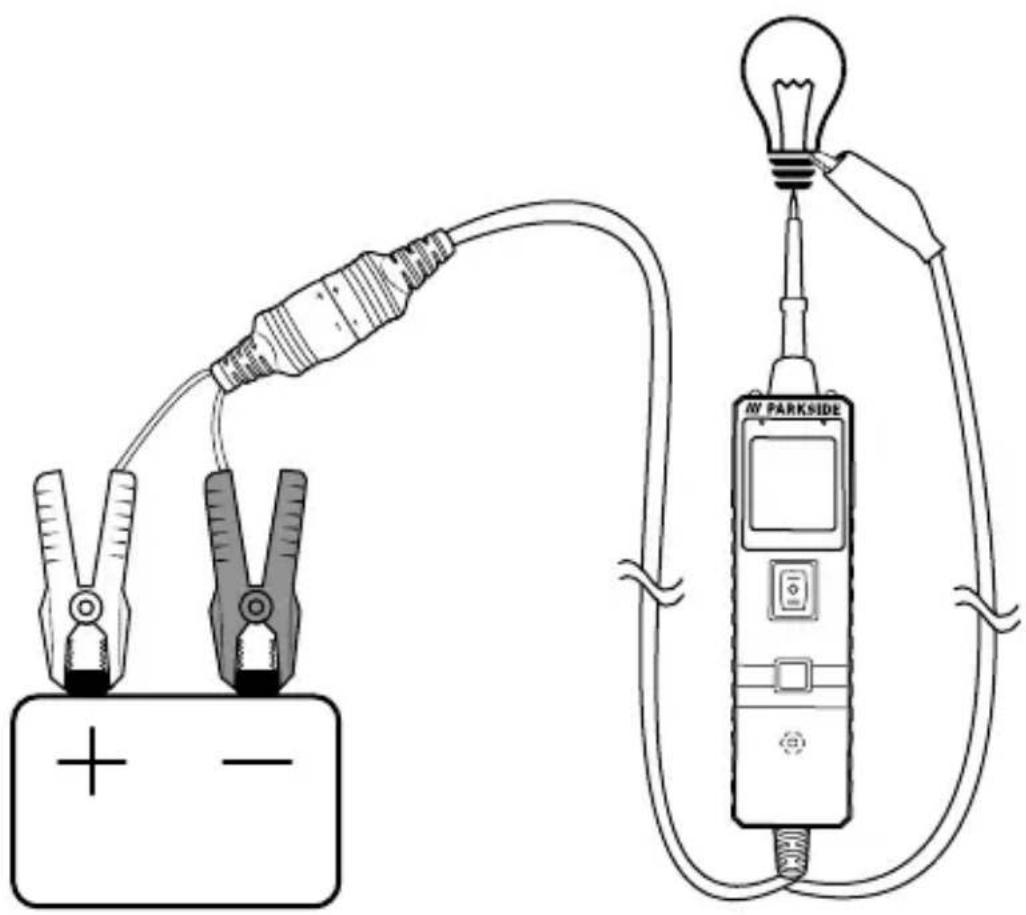
Connect the terminal of the earthing cable ⑩ to the negative pole of the component to be tested.
◆ Touch the positive terminal of the component with the test probe ②. The green negative pole LED ⑤ lights up. If the sound is switched on, a slow sequence of beeps sounds.
Observe the green negative pole LED ⑤ and quickly press the on/off switch ⑦ to the "—" position. When the green negative pole LED ⑤ has gone out and the red positive pole LED ④ lights up, you can continue with further activation.
- Press the on/off switch ⑦ to the "-" position to supply the component with power. In this position, current flows from the positive terminal of the battery into the test probe ②, on to the positive terminal of the component, on to the terminal of the earthing cable ⑩, back into the component and back to the earth of the vehicle battery.
If the green negative pole LED ⑤ goes out at this moment or the circuit breaker has tripped, the device has been overloaded. This can happen for the following reasons:
- The component you are testing is earthed or has a negative voltage.
- The component you are testing is short-circuited.
- The component is a high-current component (e.g. a starter motor).
(i) Note: If the circuit breaker is tripped, it will automatically reset after about 15 seconds.
text_image
Diagram of a power supply circuit with two voltage meters connected to a battery and a meter labeled 'M PARKSIDE'.Testing trailer lighting
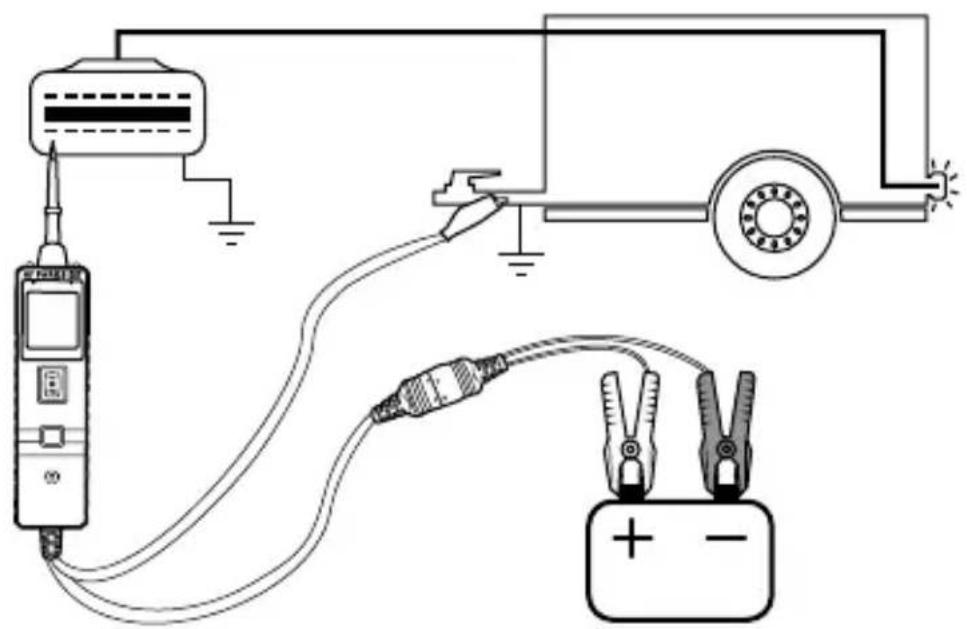
◆ Press the mode button ⑧ until you reach the "Direct current measurement √" mode.
Connect the terminal from the earth cable ⑩ to the earth of the trailer to test its lighting.
◆ Insert the test probe ② into the OBD pin to display the voltage. This method allows you to test the function of the lighting.
(i) Note: If the circuit breaker is tripped, it will automatically reset after about 15 seconds.
text_image
Electrical circuit diagram showing connections between a power meter, switch, battery, and motor with labeled terminals and polarity indicators.Testing components in the vehicle interior
ATTENTION! The indiscriminate application of voltage to certain circuits of your vehicle can lead to damage to the electronic components of your vehicle. We therefore strongly recommend that you use the vehicle manufacturer's wiring diagram and diagnostic procedure when testing.
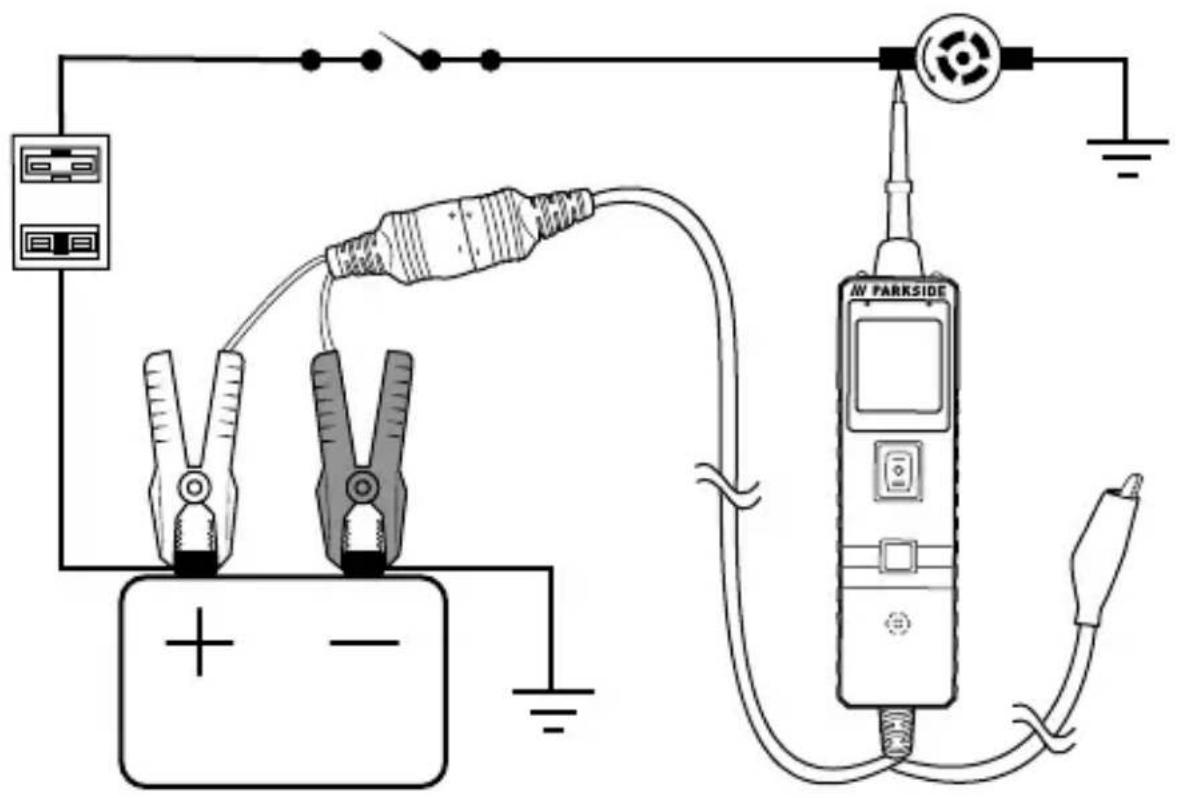
Press the mode button ⑧ until you reach the "Direct current measurement √" mode.
◆ Touch the positive terminal of the component with the test probe ②. The green negative pole LED ⑤ lights up. If the sound is switched on, a slow sequence of beeps sounds.
Observe the green negative pole LED ⑤ and quickly press the on/off switch ⑦ to the "—" position. When the green negative pole LED ⑤ has gone out and the red positive pole LED ④ lights up, you can continue with further activation.
If the green negative pole LED ⑤ goes out at this moment or the circuit breaker has tripped, the device has been overloaded. This can happen for the following reasons:
- The component you are testing is earthed or has a negative voltage.
- The component you are testing is short-circuited.
- The component is a high-current component (e.g. a starter motor).
(i) Note: If the circuit breaker is tripped, it will automatically reset after about 15 seconds.
text_image
Electrical circuit diagram showing connections between battery, switch, power supply, and meters connected to a parkside meter.Testing earthed components
ATTENTION! If you apply earth to a protected circuit, your vehicle's fuse may blow or be triggered.
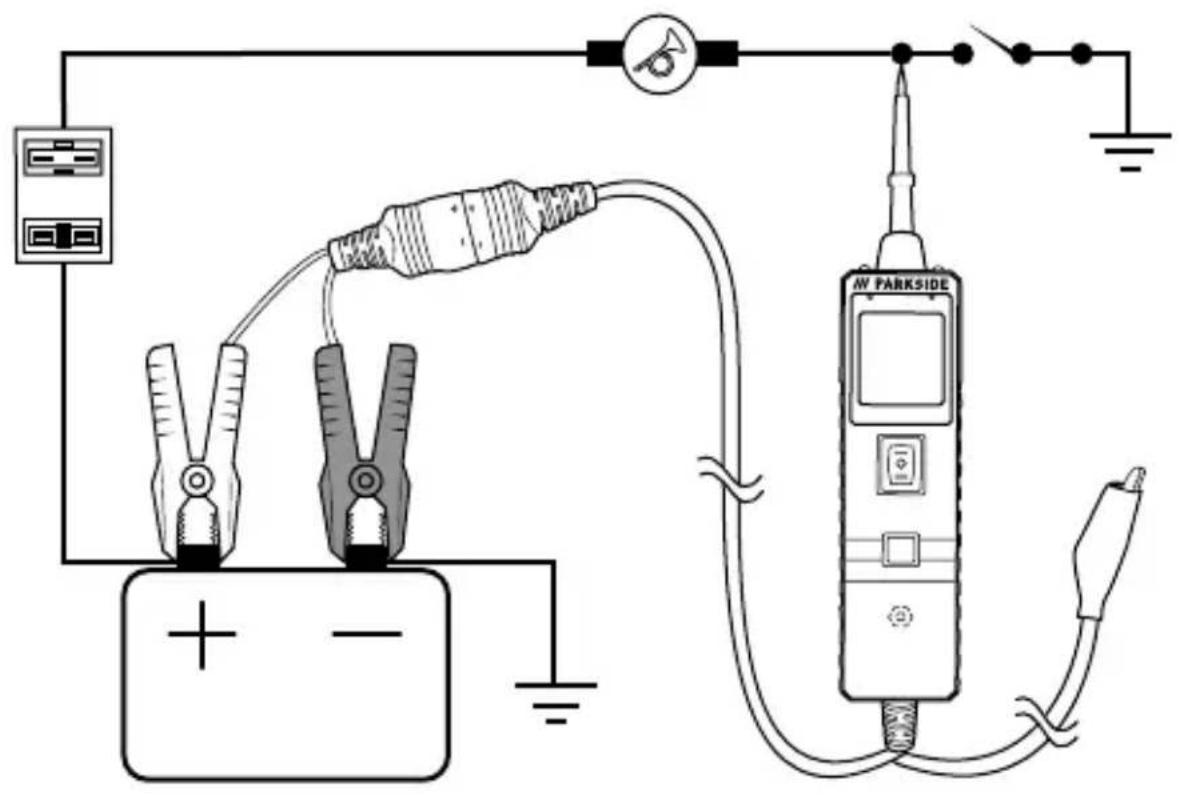
◆ Press the mode button ⑧ until you reach the "Direct current measurement √" mode.
◆ Touch the negative terminal of the component with the test probe ②. The red positive pole LED ④ lights up. If the sound is switched on, a rapid sequence of beeps sounds.
Observe the red positive pole LED ④ and quickly press the on/off switch ⑦ to the "=" position. When the red positive pole LED ④ has gone out and the green negative pole LED ⑤ lights up, you can continue with further activation.
If the green negative pole LED ⑤ goes out at this moment or the circuit breaker has tripped, the device has been overloaded. This can happen for the following reasons:
- The component you are testing is earthed or has a negative voltage.
- The component you are testing is short-circuited.
- The component is a high-current component (e.g. a starter motor).
(i) Note: If the circuit breaker is tripped, it will automatically reset after about 15 seconds.
text_image
Electrical circuit diagram showing connections between a battery, power supply, meters, and a parkside meter with labeled components.Testing for bad earth contacts
Test the suspected earth cable or the suspected contact with the test probe ②.
◆ Press the mode button ⑧ until you reach the "Direct current measurement √" mode.
Observe the green negative pole LED ⑤ and quickly press the on/off switch ⑦ to the "-" position. If the green negative pole LED ⑤ has gone out and the red positive pole LED ④ lights up, this is not a genuine earthing.
(i) Note: If the circuit breaker has tripped, this circuit is most likely well earthed. Remember that high-current components such as starter motors can also trip the circuit breaker.
Localising and tracing short circuits
In most cases, a short circuit is indicated by the blowing of a fuse or the tripping of an electrical protective device (e.g. a circuit breaker).
◆ Remove the blown fuse from the fuse box.
Use the test probe ② to activate and energise each of the fuse contacts. The contact that trips the circuit breaker is responsible for the short circuit. Make a note of the identification code or the colour of this cable.
◆ Follow the wire as far as possible along the wiring harness. Here is an example of this application.
- If you are tracing a short circuit in the brake light circuit, you may know that the cable must run through the wiring harness at the door sill. Locate the colour-coded cable in the wiring harness and expose it.
- Pierce the insulation with the test probe ② and press the on/off switch ⑦ to the"—" position to activate the cable and energise it. - If the circuit breaker has tripped, you have detected the short circuit. Cut the cable and test both cable ends with the test probe ②. The cable end that trips the circuit breaker again is causing the short circuit and will lead you to the short-circuited area.
- Follow the cable in the direction of the short-circuited area and repeat this process until you have found the short circuit.
Polarity indicator LEDs
The positive pole LED ④ and the negative pole LED ⑤ light up when the voltage of the test probe ② matches the supply voltage within ±0.8 volts. This is additional information that may be important for you.
If the circuit you have tested does not match the supply voltage within ± 0.8 volts, you will see the voltage value on the display ⑥, but you will not hear a beep and the positive pole LED ④ and negative pole LED ⑤ will not light up. This indicates that there is either a voltage drop of more than 0.8 volts from the supply voltage or that you are testing a circuit that has a rise of 0.8 volts or more compared to the supply voltage.
To determine the supply voltage, simply remove the test probe ② from the circuit and press the on/off switch ⑦ to the "-" position. The supply voltage is then shown on the display ⑥. The difference between the supply voltage and what is read on the circuit is either a voltage drop or a voltage rise. This allows you to detect a voltage drop without having to test the supply voltage. This is just another time-saving function of the device.
Troubleshooting
| Fault Remedy | |
| The test probe 2 is not receiving current even though the on/off switch 7 is pressed. | The circuit breaker has been tripped. Wait about 15 seconds until the circuit breaker automatically resets. |
Cleaning
WARNING! Risk of electric shock! Disconnect the device from any electrical circuit.
ATTENTION! Damage to the device! The device is not waterproof. To avoid irreparable damage to the device, do not immerse the device in water and make sure that no moisture can get into it during cleaning. Do not use caustic, abrasive or solvent-based cleaning agents. They can damage the surfaces of the device.
- Clean the surfaces of the device with a soft, dry cloth.
Storage
Place the protective cap ① on the test probe ②.
Unscrew the test probe ② anticlockwise from the device.
◆ Store the entire scope of delivery in the storage bag 22.
If you do not use the device for a longer period of time, store the storage bag 22 in a clean, dry place out of direct sunlight.
Disposal
Applies only to France:
The product, its packaging and the operating instructions are recyclable. They are subject to an extended manufacturer responsibility and will be collected separately.
Disposal of the appliance
natural_image
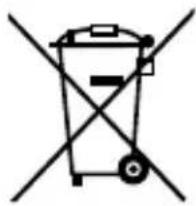
Symbol of a trash bin crossed with a diagonal line, representing no waste or discharge (no text or labels)The adjacent symbol of a crossed-out dustbin means that this appliance is subject to Directive 2012/19/EU. This directive states that this appliance may not be disposed of in the normal household waste at the end of its useful life, but must be taken to specially set-up collection
locations, recycling depots or disposal companies.
The disposal is free of charge for the user. Protect the environment and dispose of this appliance properly.
If your old appliance has stored any personal data, you are responsible for deleting it yourself before returning it.

Your local community or municipal authorities can provide information on how to dispose of the worn-out product.
Disposal of the packaging

The packaging materials have been selected for their environmental friendliness and ease of disposal and are therefore recyclable. Dispose of packaging materials that are no longer needed in accordance with applicable local regulations.
text_image
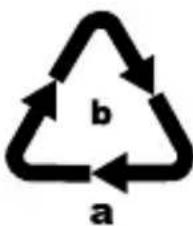
b aDispose of the packaging in an environmentally friendly manner. Note the labelling on the packaging and separate the packaging material components for disposal, if necessary. The packaging material is labelled with abbreviations (a) and numbers (b) with the following
meanings: 1–7: plastics, 20–22: paper and cardboard, 80–98: composites.
Applies only to Spain:
The packaging contains paper and/or cardboard components.
Appendix
Technical data
| Operating voltage 6-30 V via vehicle --- | |
| LCD display 160 | × 128 dpi |
| Display accuracy 0.1 V/Ω | |
| Direct current range 0-65 V +1 digit | |
| Resistance range 0-200 kΩ | |
| Frequency response of the acoustic signal | 0-10 kHz |
| Circuit breaker current rating 1-10 A | |
| Operating temperature 0°C to +60°C | |
| Storage temperature -40°C to +70°C | |
| Humidity (no condensation) ≤ 75% | |
This appliance has a 3-year warranty valid from the date of purchase. If included with the product on delivery, the battery packs of the X12V and X20V Team series also come with a 3-year warranty from the date of purchase. If this product has any faults, you, the buyer, have certain statutory rights. Your statutory rights are not restricted in any way by the warranty described below.
Warranty conditions
The warranty period starts on the date of purchase. Please keep your receipt in a safe place. This will be required as proof of purchase.
If any material or manufacturing fault occurs within three years of the date of purchase of the product, we will either repair or replace the product for you or refund the purchase price (at our discretion). This warranty service requires that you present the defective appliance and the proof of purchase (receipt) within the three-year warranty period, along with a brief written description of the fault and of when it occurred.
If the defect is covered by the warranty, your product will either be repaired or replaced by us. The repair or replacement of a product does not signify the beginning of a new warranty period.
Warranty period and statutory claims for defects
The warranty period is not prolonged by repairs effected under the warranty. This also applies to replaced and repaired components. Any damage and defects present at the time of purchase must be reported immediately after unpacking. Repairs carried out after expiry of the warranty period shall be subject to a fee.
Scope of the warranty
This appliance has been manufactured in accordance with strict quality guidelines and inspected meticulously prior to delivery.
The warranty covers material faults or production faults. The warranty does not cover product parts that are subject to normal wear and tear and can therefore be considered wearing parts, such as saw blades, replacement blades, abrasive papers, etc. or for damage to fragile parts, such as switches or parts made of glass.
The warranty does not apply if the product has been damaged, improperly used or improperly maintained. The directions in the operating instructions for the product regarding proper use of the product are to be strictly followed. Uses and actions that are discouraged in the operating instructions or which are warned against must be avoided.
This product is intended solely for private use and not for commercial purposes. The warranty shall be deemed void in cases of misuse or improper handling, use of force and modifications/repairs which have not been carried out by one of our authorised Service centres.
The warranty does not apply to
■ Normal reduction of the battery capacity over time
■ Commercial use of the product
■ Damage to or alteration of the product by the customer
■ Non-compliance with safety and maintenance instructions, operating errors
■ Damage caused by natural hazards
Warranty claim procedure
To ensure quick processing of your case, please observe the following instructions:
■ Please have the till receipt and the item number (IAN) 488327_2501 available as proof of purchase.
You will find the item number on the type plate on the product, an engraving on the product, on the front page of the operating instructions (below left) or on the sticker on the rear or bottom of the product.
If functional faults or other defects occur, please first contact the service department listed below by telephone or use our contact form, which you can find on parkside-diy.com in the Service category.
- You can return a defective product to us free of charge to the service address that will be provided to you. Ensure that you enclose the proof of purchase (till receipt) and information about what the defect is and when it occurred.
text_image
PDF ONLINE parkside-diy.comYou can view and download these instructions along with many other manuals at parkside-diy.com. This QR code will take you directly to parkside-diy.com. Select your country and use the search box to search for the operating instructions. Enter the article number (IAN) 488327_2501 to find the operating instructions for your article.
Service
GB Service Great Britain
Tel.: 0800 051 897 0
Contact form on parkside-diy.com
IE Service Ireland
Tel.: 1800 851251
Contact form on parkside-diy.com
IAN 488327_2501
Importer
Please note that the following address is not the service address. Please use the service address provided in the operating instructions.
KOMPERNASS HANDELS GMBH
BURGSTRASSE 21
44867 BOCHUM
GERMANY
www.kompernass.com
Inhaltsverzeichnis
Einführung 35
natural_image
Two identical electrical circuit diagrams showing a battery connected to a clamp and a multimeter, with no text or symbols present.Widerstand prüfen
text_image
Diagram showing a battery connected to an IV Parkside sensor via a cable, with polarity markings and wiring connections.Durchgang prüfen
text_image
Diagram of a power supply circuit with two voltage meters connected to a battery and a meter labeled 'M PARKSIDE'.text_image
Electrical circuit diagram showing connections between a power meter, switch, battery, and lamp with labeled terminals and polarity indicators.text_image
Electrical circuit diagram showing connections between battery, switch, meters, and meters connected to a parkside meter.text_image
Electrical circuit diagram showing connections between a battery, power supply, meters, and a meter labeled 'M PARKSIDE'natural_image
Simple line drawing of a trash bin with two crossed lines indicating no waste or restriction (no text or symbols)KOMPERNASS HANDELS GMBH
BURGSTRASSE 21
44867 BOCHUM
DEUTSCHLAND
www.kompernass.com
Table des matières
Introduction 67
natural_image
Two identical electrical circuit diagrams showing a battery connected to a clamp and a multimeter, with no text or symbols present.text_image
Diagram showing a power supply connected to an IV Parkside meter via a cable, with polarity indicators and terminal connections.Tester la continuité
text_image
Diagram of a power supply circuit with two pliers, a battery, and a connected device labeled 'M PARKSIDE'.text_image
Electrical circuit diagram showing connections between a power meter, a switch, and a battery with polarity labelstext_image
Electrical circuit diagram showing connections between battery, switch, power supply, and meters connected to a parkside meter.text_image
Electrical circuit diagram showing connections between a battery, power supply, meters, and a device labeled 'AW PARKSIDE'natural_image
Symbol of a trash bin crossed with no text or labelsKOMPERNASS HANDELS GMBH
BURGSTRASSE 21
44867 BOCHUM
ALLEMAGNE
www.kompernass.com
Inhoud
Inleiding 105
natural_image
Two identical electrical circuit diagrams showing a battery connected to a clamp and a multimeter, with no text or symbols present.Weerstand testen
text_image
Diagram showing a battery connected to an IV Parkside sensor via a multimeter, with labeled terminals and polarity indicators.Continuïteit testen
text_image
Diagram of a power supply circuit with two voltage meters connected to a battery and a digital device labeled 'M PARKSIDE'.text_image
Electrical circuit diagram showing connections between a meter, power supply, car, and battery with labeled terminals and polarity indicators.Componenten in de auto testen
text_image
Electrical circuit diagram showing connections between battery, switch, meters, and meters connected to a power meter labeled 'AW PARKSIDE'.Geaarde componenten testen
text_image
Electrical circuit diagram showing connections between a battery, power supply, meters, and a parkside meter with labeled components.natural_image
Simple line drawing of a trash bin with two crossed lines indicating no waste or discharge (no text or symbols)KOMPERNASS HANDELS GMBH
BURGSTRASSE 21
44867 BOCHUM
DUITSLAND
www.kompernass.com
Obsah
Úvod 137
natural_image
Two identical electrical circuit diagrams showing a battery connected to a clamp and test probes (no text or symbols present)Zkouška odporu
text_image
Diagram of a power supply circuit with two voltage meters connected to a battery and a meter labeled 'M PARKSIDE'.text_image
Electrical circuit diagram showing connections between a meter, power supply, car, and battery with labeled terminals and polarity indicators.text_image
Electrical circuit diagram showing connections between battery, switch, meters, and meters connected to a parkside meter.text_image
Electrical circuit diagram showing connections between a battery, power supply, meters, and a parkside meter with labeled terminals.natural_image
Simple line drawing of a trash bin with crossed lines indicating no waste or prohibition (no text or symbols)KOMPERNASS HANDELS GMBH
BURGSTRASSE 21
44867 BOCHUM
NĚMECKO
www.kompernass.com
Spis treści
Wstep 169
natural_image
Two identical electrical circuit diagrams showing a battery connected to a clamp device, with no text or symbols present.text_image
Diagram showing a battery connected to an electrical device via a multimeter, with labeled terminals and polarity indicators.Kontrola ciągłości
text_image
Diagram of a power supply circuit with two voltage meters connected to a battery and a meter labeled 'M PARKSIDE'.text_image
Electrical circuit diagram showing connections between a meter, power supply, car, and battery with labeled terminals and polarity indicators.text_image
Electrical circuit diagram showing connections between battery, switch, power supply, and meters connected to a parkside meter.text_image
Electrical circuit diagram showing connections between a battery, power supply, meters, and a parkside meter with labeled terminals.natural_image
Simple line drawing of a trash bin with no text or symbolsKOMPERNASS HANDELS GMBH
BURGSTRASSE 21
44867 BOCHUM
NIEMCY
www.kompernass.com
Obsah
Úvod 201
natural_image
Two identical electrical circuit diagrams showing a battery connected to a clamp and a multimeter, with no text or symbols present.Kontrola odporu
text_image
Diagram showing a power supply connected to an IV Parkside meter via a cable, with polarity indicators and terminal connections.Kontrola priechodnosti
text_image
Diagram of a power supply circuit with two voltage meters connected to a battery and a meter labeled 'M PARKSIDE'.text_image
Electrical circuit diagram showing connections between a meter, power supply, car, and battery with labeled terminals and polarity indicators.text_image
Electrical circuit diagram showing connections between battery, switch, meters, and meters connected to a parkside meter.text_image
Electrical circuit diagram showing connections between a battery, meters, a switch, and a parkside meter with labeled terminals.natural_image
Symbol of a trash bin crossed with a diagonal line, representing no waste or discharge (no text or labels)KOMPERNASS HANDELS GMBH
BURGSTRASSE 21
44867 BOCHUM
NEMECKO
www.kompernass.com
Índice
Introducción 233
natural_image
Two identical electrical circuit diagrams showing a battery connected to a clamp and a multimeter, with no text or symbols present.text_image
Diagram showing a battery connected to an electrical device via a cable, with labels indicating polarity and 'PV PARKSIDE' in the device.text_image
Diagram of a power supply circuit with two voltage meters connected to a battery and a digital display labeled 'M PARKSIDE'.text_image
Electrical circuit diagram showing connections between a power meter, battery, and electrical components with labeled terminals and polarity indicators.text_image
Electrical circuit diagram showing connections between battery, switch, meters, and meters connected to a power meter labeled 'AW PARKSIDE'.text_image
Electrical circuit diagram showing connections between battery, switch, meters, and meters connected to a parkside meter.natural_image
Simple line drawing of a trash bin with crossed lines indicating no waste or restriction (no text or symbols)KOMPERNASS HANDELS GMBH
BURGSTRASSE 21
44867 BOCHUM
ALEMANIA
www.kompernass.com
Indholdsfortegnelse
Indledning 265
natural_image
Two identical electrical circuit diagrams showing a battery connected to a clamp and a multimeter, with no text or symbols present.Test af modstand
text_image
Diagram showing a power supply connected to an OV Parkside meter via a multimeter, with polarity indicators and wiring.Test af gennemgang
text_image
Diagram of a power supply circuit with two voltage meters connected to a battery and a meter labeled 'M PARKSIDE'.text_image
Electrical circuit diagram showing connections between a meter, power supply, switch, and battery with polarity labelstext_image
Electrical circuit diagram showing connections between battery, switch, power supply, and meters connected to a parkside meter.text_image
Electrical circuit diagram showing connections between a battery, power supply, meters, and a parkside meter with labeled terminals.text_image
FR © RECO ©natural_image
Simple line drawing of a trash bin with no text or symbolsKOMPERNASS HANDELS GMBH
BURGSTRASSE 21
44867 BOCHUM
TYSKLAND
www.kompernass.com
Indice
Introduzione 297
natural_image
Two identical electrical circuit diagrams showing a battery connected to a clamp and a multimeter, with no text or symbols present.text_image
Diagram showing a power supply connected to an OY PARKside meter via a cable, with polarity indicators and terminal connections.text_image
Diagram of a power supply circuit with two voltage meters connected to a battery and a meter labeled 'M PARKSIDE'.text_image
Electrical circuit diagram showing connections between a power meter, switch, battery, and motor with labeled terminals and polarity indicators.text_image
Electrical circuit diagram showing connections between battery, switch, power supply, and meters connected to a parkside meter.text_image
Electrical circuit diagram showing connections between a battery, power supply, meters, and a parkside meter with labeled components.natural_image
Simple line drawing of a trash bin with crossed lines indicating no waste or restriction (no text or symbols)KOMPERNASS HANDELS GMBH
BURGSTRASSE 21
44867 BOCHUM
GERMANIA
www.kompernass.com
Tartalomjegyzék
Bevezető 329
natural_image
Two identical electrical circuit diagrams showing a battery connected to a clamp, with no text or symbols present.text_image
Diagram showing a power supply connected to an IV Parkside meter via a multimeter, with polarity indicators and wiring connections.text_image
Diagram of a power supply circuit with two voltage meters connected to a battery and a light bulb, labeled 'IV PARKSIDE'.text_image
Electrical circuit diagram showing connections between a meter, battery, and car with labeled terminals and polarity indicatorstext_image
Electrical circuit diagram showing connections between battery, switch, meters, and meters connected to a parkside meter.text_image
Electrical circuit diagram showing connections between a battery, power supply, meters, and a parkside meter with labeled terminals.natural_image
Simple line drawing of a trash bin with two crossed lines indicating no waste or restriction (no text or symbols)KOMPERNASS HANDELS GMBH
BURGSTRASSE 21
44867 BOCHUM
Németország
www.kompernass.com
text_image
PDF ONLINE parkside-diy.com
text_image
FR RECOCONOMATIONKOMPERNASS HANDELS GMBH
BURGSTRASSE 21
44867 BOCHUM
GERMANY
www.kompernass.com
Last Information Update · Stand der Informationen · Version des informations
Stand van de informatie · Stav informací · Stan informacji · Stav informácií
Estado de las informaciones · Tilstand af information · Versione delle informazioni