CBK-55BK - Software license & extension SONY - Free user manual and instructions
Find the device manual for free CBK-55BK SONY in PDF.


User questions about CBK-55BK SONY
0 question about this device. Answer the ones you know or ask your own.
Ask a new question about this device
Download the instructions for your Software license & extension in PDF format for free! Find your manual CBK-55BK - SONY and take your electronic device back in hand. On this page are published all the documents necessary for the use of your device. CBK-55BK by SONY.
USER MANUAL CBK-55BK SONY
EFP STYLE BUILDUP KIT
CBK-55BK

Japanese/English/French/German/Italian/Spanish/Chinese/Russian
1st Edition
安全のために
natural_image
Line drawing of a professional video camera with visible sound waves and control panel (no text or symbols)
すぐに電源を切り、消火する。
警告表示の意味
text_image
Technical diagram of a mechanical device with numbered components for identification①AUDIO IF 端子
text_image
Technical diagram of a mechanical device with numbered parts for identificationtext_image
GAIN/EI ASSIGN.5 WHITE BAL MENU ON/OFF CANCEL/BACK ASSIGN 6 7 8text_image
Technical diagram of a mechanical device with numbered components and labeled parts①マイクホルダー
text_image
Technical diagram of an electrical fuse box with numbered components for identificationtext_image
Technical diagram of an electrical contactor with labeled components and directional arrows indicating assembly steps.ご注意
natural_image
Technical line drawing of a video camera with no visible text or symbols4 PMW-F55/F5 を固定する。
text_image
Technical diagram of a video camera with numbered components and directional arrows indicating motion or signal flow.ハンドルを取り付ける
natural_image
Technical line drawing of a mechanical device with mounting holes and internal components (no text or symbols)ビューファインダーを取り付ける
natural_image
Technical line drawing of a camera assembly with no visible text or symbolsビューファインダーを取りはずすには
natural_image
Technical line drawing of a mechanical assembly with hoses and components (no text or symbols)natural_image
Technical line drawing of a mechanical assembly with no visible text or symbolsnatural_image
Technical line drawing of a mechanical assembly with no visible text or symbolsnatural_image
Line drawing of a video camera with external components and no visible text or symbolsnatural_image
Technical line drawing of a mechanical assembly with no visible text or symbolsnatural_image
Diagram showing a device being inserted into a bracket, with no visible text or symbolsクリップ
natural_image
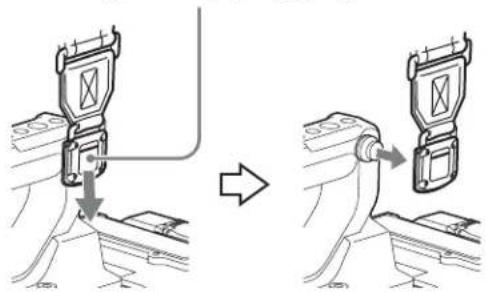
Technical line drawing of a mechanical clamp or bracket assembly (no text or symbols)ショルダーベルトを取りはずすには
ここを押したまま矢印の方向へ引く
text_image
Diagram illustrating a device's cable connection and assembly process, showing before-and-after states with labeled components.ショルダーパッドの位置調整
text_image
33mm 37mm 70mmBefore operating the unit, please read this manual thoroughly and retain it for future reference.
WARNING
To reduce the risk of fire or electric shock, do not expose this apparatus to rain or moisture.
To avoid electrical shock, do not open the cabinet. Refer servicing to qualified personnel only.
CAUTION
Danger of explosion if battery is incorrectly replaced.
Replace only with the same or equivalent type recommended by the manufacturer.
When you dispose of the battery, you must obey the law in the relative area or country.
Important Safety Instructions
- Read these instructions.
- Keep these instructions.
- Heed all warnings.
- Follow all instructions.
- Do not use this apparatus near water.
- Clean only with dry cloth.
- Do not block any ventilation openings. Install in accordance with the manufacturer's instructions.
- Do not install near any heat sources such as radiators, heat registers, stoves, or other apparatus (including amplifiers) that produce heat.
- Do not defeat the safety purpose of the polarized or grounding-type plug. A polarized plug has two blades with one wider than the other. A grounding-type plug has two blades and a third grounding prong. The wide blade or the third prong are provided for your safety. If the provided plug does not fit into your outlet, consult an electrician for replacement of the obsolete outlet.
- Protect the power cord from being walked on or pinched particularly at plugs, convenience receptacles, and the point where they exit from the apparatus.
- Only use attachments/accessories specified by the manufacturer.
- Use only with the cart, stand, tripod, bracket, or table specified by the manufacturer, or sold with the apparatus. When a cart is used, use caution when moving the cart/apparatus combination to avoid injury from tip-over.

- Unplug this apparatus during lightning storms or when unused for long periods of time.
- Refer all servicing to qualified service personnel. Servicing is required when the apparatus has been damaged in any way, such as power-supply cord or plug is damaged, liquid has been spilled or objects have fallen into the apparatus, the apparatus has been exposed to rain or moisture, does not operate normally, or has been dropped.
Do not install the appliance in a confined space, such as book case or built-in cabinet.
WARNING
Batteries shall not be exposed to excessive heat such as sunshine, fire or the like.
For the customers in the U.S.A.
This equipment has been tested and found to comply with the limits for a Class A digital device, pursuant to part 15 of the FCC Rules. These limits are designed to provide reasonable protection against harmful interference when the equipment is operated in a commercial environment. This equipment generates, uses, and can radiate radio frequency energy and, if not installed and used in accordance with the instruction manual, may cause harmful interference to radio communications. Operation of this equipment in a residential area is likely to cause harmful interference in which case the user will be required to correct the interference at his own expense.
You are cautioned that any changes or modifications not expressly approved in this manual could void your authority to operate this equipment.
All interface cables used to connect peripherals must be shielded in order to comply with the limits for a digital device pursuant to Subpart B of part 15 of FCC Rules.
This device complies with part 15 of the FCC Rules. Operation is subject to the following two conditions: (1) This device may not cause harmful interference, and (2) this device must accept any interference received, including interference that may cause undesired operation.
For the customers in Canada
CAN ICES-3 (A)/NMB-3(A)
For the customers in Europe
This product with the CE marking complies with the EMC Directive issued by the Commission of the European Community. Compliance with this directive implies conformity to the following European standards:
• EN55103-1 : Electromagnetic Interference(Emission)
• EN55103-2 : Electromagnetic Susceptibility(Immunity)
This product is intended for use in the following Electromagnetic Environments: E1 (residential), E2
(commercial and light industrial), E3 (urban outdoors), E4 (controlled EMC environment, ex. TV studio).
ATTENTION
The electromagnetic fields at the specific frequencies may influence the picture and sound of this unit.
For the customers in Europe
Manufacturer: Sony Corporation, 1-7-1 Konan Minato-ku Tokyo, 108-0075 Japan
For EU product compliance: Sony Deutschland GmbH, Hedelfinger Strasse 61, 70327 Stuttgart, Germany
For the customers in the U.S.A.
SONY LIMITED WARRANTY - Please visit http://www.sony.com/psa/warranty for important information and complete terms and conditions of Sony's limited warranty applicable to this product.
For the customers in Canada
SONY LIMITED WARRANTY - Please visit http://www.sonybiz.ca/solutions/Support.do for important information and complete terms and conditions of Sony's limited warranty applicable to this product.
For the customers in Europe
Sony Professional Solutions Europe - Standard Warranty and Exceptions on Standard Warranty. Please visit http://www.pro.sony.eu/warranty for important information and complete terms and conditions.
For the customers in Korea
SONY LIMITED WARRANTY - Please visit http://bpeng.sony.co.kr/handler/BPAS-Start for important information and complete terms and conditions of Sony's limited warranty applicable to this product.
Table of Contents
Overview 30
Name and Function of Parts.... 31
Front panel.... 31
Rear panel.... 32
Operating section (front) 33
Operating section (side).... 33
Audio operating section.... 34
Connector section (rear) 35
Handle 35
Battery adaptor 36
Connection and Setup 36
Power supply 36
Attaching a battery adaptor for the CBK-55BK.... 36
Using AC power (DC IN power).... 37
Using the AXS-R5.... 37
Attaching the PMW-F55/F5.... 37
Attaching the handle.... 38
Attaching a viewfinder 39
Using an external microphone.... 40
Attaching a UHF portable tuner (for a UHF wireless microphone system) 40
Connecting line input audio equipment.... 41
Tripod mounting.... 42
Connecting a video light.... 42
Using the shoulder strap 43
Adjusting the shoulder pad position.... 43
Using the headphone plug adaptor 44
Basic Setup Menu Operations 44
Adjusting the Audio Level.... 45
Manually adjusting the audio levels of the audio inputs from the AUDIO IN CH-1/CH-2 connectors 45
Manually Adjusting the Audio Level of the MIC IN Connector 46
Recording Audio on Channels 3 and 4.... 46
Important Notes on Operation 48
Specifications.... 48
Dimensions.... 50
Overview
The CBK-55BK is an accessory kit that improves stability and operability of the shoulder camcorder style by attaching it to the PMW-F55/F5.
The CBK-55BK has various audio input/output connectors, direct switches that allow you to control the PMW-F55/F5 on hand while looking through the viewfinder when shooting with the PMW-F55/F5 on your shoulder, wireless audio receiver slot, and audio control panel.
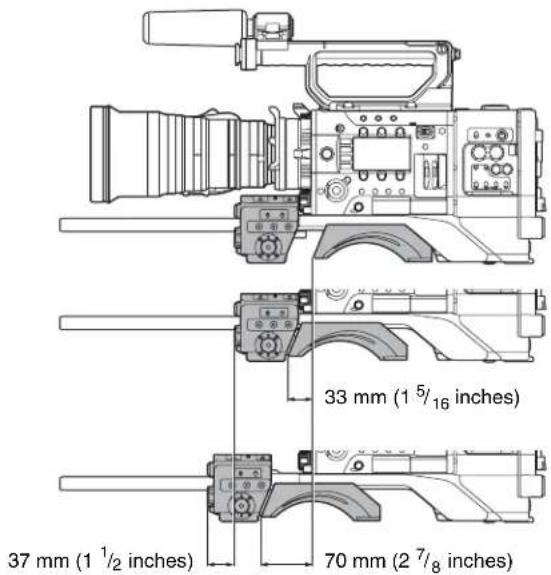
The front control section and shoulder pad can be slid 70 mm ( 2^7/_8 inches) in the front-to-rear direction. You can maintain balance easily while shooting with the PMW-F55/F5 on your shoulder when the PL lens or large portable B4 lens is attached.
Name and Function of Parts
Front panel
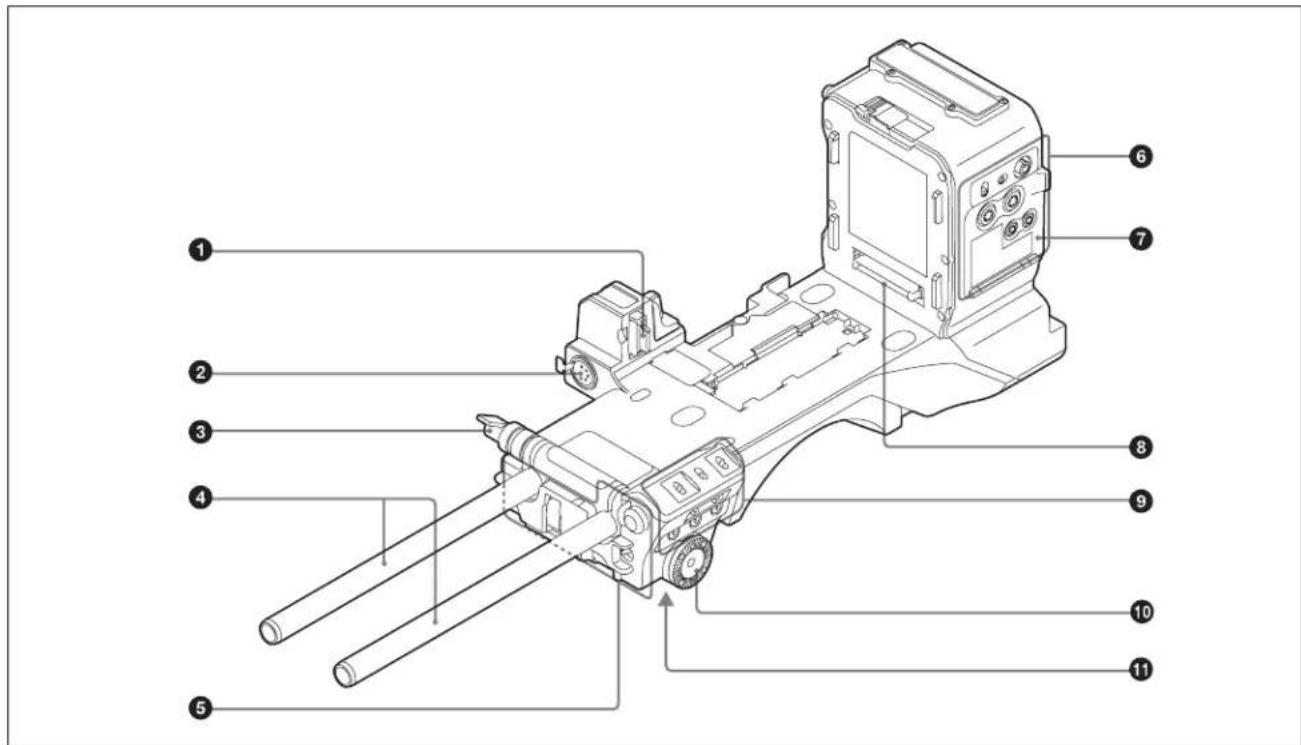
text_image
Technical diagram of a mechanical device with numbered components for identification① AUDIO IF connector
Used for connecting the CBK-55BK to the PMW-F55/F5.
②MIC IN (microphone input) (+48 V) connector (XLR type, 5-pin, female)
Connect a stereo microphone to this connector. The power (+48 V) is supplied via this connector.
③Rod lock lever
Used when attaching or removing 15 rods.
When attaching rods, rotate the lever to lock them in place.
Whenever the lever is in a position that makes it difficult to rotate, pull the lever out sideways and turn it to a better position before pushing it back to continuing rotating.
Note
Do not turn the rod lock lever forcefully when the rods are not attached.
④Φ 15 rods
Used to attach the matte box, follow focus, and other accessories.
⑤ Operating section (front) (See "Operating section (front).")
⑥ Audio operating section (See "Audio operating section.")
⑦Protection cover of the audio operating section
Open to access the audio operating section (see page 34).
⑧ Expansion IF connector
Used for connecting the CBK-55BK to the PMW-F55/F5.
⑨ Operating section (side) (See “Operating section (side).”)
⑩Rosette mounts (left and right)
Used for attaching generic hand grips.
⑪Tripod mount
Attach the tripod adaptor (optional) when using the CBK-55BK on a tripod.
Rear panel
① Attachment point for the UHF portable tuner Attach the UHF portable tuner (see page 40).
② Attachment point for the battery adaptor
Attach the supplied battery adaptor (see page 36).
③ TALLY (tally) indicator (red)
Lights up during recording. This indicator flashes if an abnormality occurs on the CBK-55BK or PMW-F55/F5. (For details about the abnormality, refer to the operating instructions of the PMW-F55/F5.)
④ Expansion IF connector
Used for connecting the battery adaptor or AXS-R5.
⑤ Connector section (rear) (See “Connector section (rear).”)
⑥ Release button/ejection lever
Used for attaching the CBK-55BK to the PMW-F55/F5 (see page 37).
⑦Front block
The front block position can be adjusted in the front-to-rear direction by releasing the front block fixing lever. Adjust the front block position so that the CBK-55BK can be operated easily while it is on your shoulder (see page 43).
⑧ AUDIO slide knob
Used for attaching the CBK-55BK to the PMW-F55/F5 (see page 37).
⑨ Camera lock lever Used for attaching the CBK-55BK to the PMW-F55/F5 (see page 37).
10Shoulder pad Raise the shoulder pad fixing lever to adjust the position in the front-to-rear direction. Adjust the position for maximum convenience when operating the PMW-F55/F5 on your shoulder (see page 43).
Operating section (front)
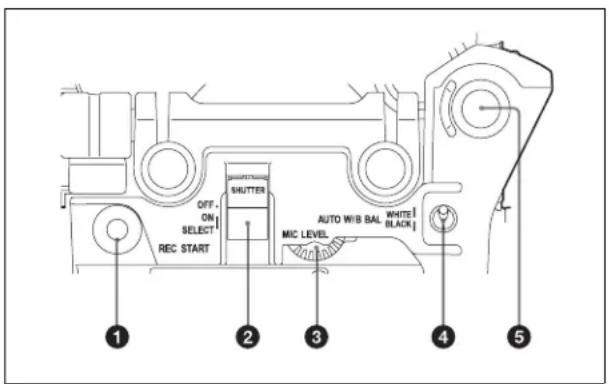
text_image
OFF. ON SELECT REC START SHUTTER AUTO W/B BAL MIC LEVEL WHITE BLACK 1 2 3 4 5①REC START (recording start) button
Press to start recording. Press it again to stop recording. The effect is the same as that of the REC button on the lens.
②SHUTTER switch
Set to ON to use the electronic shutter. Push to SELECT to switch the shutter speed setting. When this switch is operated, the new setting appears on the viewfinder screen for about three seconds.
When “Select” in “Shutter” of the Camera menu is set to “Step” and the switch is pushed to SELECT, the shutter speed is switched, and when “Select” in “Shutter” of the Camera menu is set to “Continuous” and the switch is pushed to SELECT, the current shutter speed is displayed, and the shutter speed is switched by turning the MENU knob.
③MIC (microphone) LEVEL control
Adjusts the input level of audio channels 1, 2, 3, and 4.
4 AUTO W/B BAL (automatic white/black balance adjustment) switch
Activates the automatic white/black balance adjustment functions.
- WHITE: Adjust the white balance automatically. If the WHITE BAL switch (see page 34) is set to A or B, the white balance setting is stored in the corresponding memory. If the WHITE BAL switch is set to PRST, the automatic white balance adjustment function does not operate.
- BLACK: Adjust the black set and black balance automatically.
If you push the switch to WHITE once more during the automatic white balance adjustment, the adjustment is cancelled and the white balance setting returns to the original setting.
If you push the switch to BLACK once more during the automatic black balance adjustment, the adjustment is cancelled and the black balance setting returns to the original setting.
⑤MENU knob
Changes the item selection or a setting within the menu (see page 44).
Operating section (side)
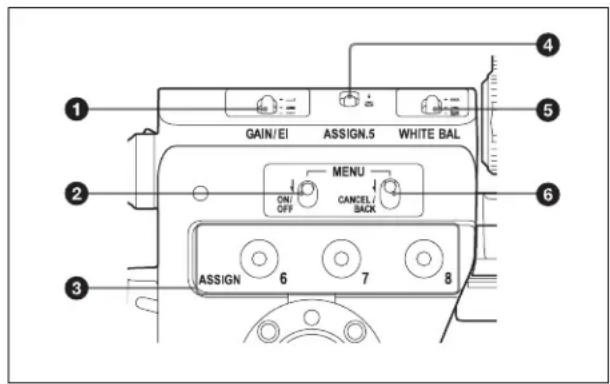
text_image
GAIN/El ASSIGN.5 WHITE BAL ON/OFF MENU CANCEL/BACK ASSIGN 6 7 8①GAIN/EI selector
Switches the gain of the video amplifier to match the lighting conditions during shooting. The gain corresponding to the H, M, and L settings can be selected on the menu of the PMW-F55/F5. (For details on the setting, refer to the operating instructions of the PMW-F55/F5.)
Switches to the 3 types of EI values preset while in Cine EI mode.
②MENU ON/OFF switch
Used to display the menu on the viewfinder screen or the test signal screen. Each time the switch is pushed down, the menu screen is turned on and off.
③ASSIGN. (assignable) 6/7/8 switches
Assign your desired functions to the switches on "Assignable Button" of the System menu.
“Off” is assigned to the ASSIGN. 6/7/8 switches as the factory default setting. The ASSIGN. 6/7/8 switches are provided with an indicator to show whether a function is assigned to the switch (on) or not (off). (For details on the setting, refer to the operating instructions of the PMW-F55/F5.)
④ASSIGN. (assignable) 5 switch
Assign your desired function to the switch on “Assignable Button” of the System menu.
“Color Bars” (color bar output signal) is assigned to the ASSIGN. 5 switch as the factory default setting. (For details on the setting, refer to the operating instructions of the PMW-F55/F5.)
⑤WHITE BAL (white balance memory) switch
Controls adjustment of the white balance.
- PRST: Adjust the color temperature to the preset value (the factory default setting: 3200K). Use this setting when you have no time to adjust the white balance.
- A or B: Recall the white balance adjustment settings already stored in A or B. Push the AUTO W/B BAL switch (see page 33) to WHITE, to automatically adjust the white balance, and save the adjustment settings in memory A or memory B.
While in the Cine EI mode, switches between Preset 3200K, Preset 4300K, and Preset 5500K.
The white balance is set to the following setting as the factory default setting while in the Cine EI mode.
PRST: Preset 3200K
A: Preset 4300K
B: Preset 5500K
⑥MENU CANCEL/BACK switch
When the switch is pushed to CANCEL/BACK, the page returns to the previous hierarchy. The settings before changing are cancelled.
Audio operating section
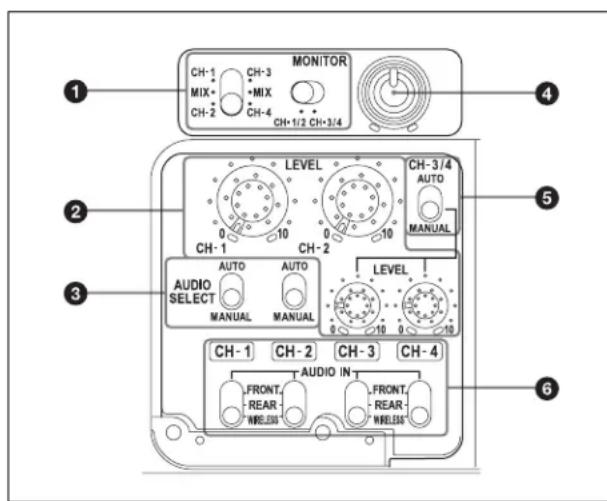
text_image
MONITOR CH-1 CH-3 MIX MIX CH-4 CH-2 CH-1/2 CH-3/4 LEVEL CH-1 CH-2 AUTO AUTO AUDIO SELECT MANUAL MANUAL LEVEL CH-1 CH-2 CH-3 CH-4 AUDIO IN FRONT REAR WRELESS FRONT REAR WRELESS ① ② ③ ④ ⑤ ⑥①MONITOR (audio monitor selection) switches
By combining of the two switches, you can select audio that you want to hear through the built-in speaker or headphones.
Position of right-side switch: CH-1/2
| Position of left- Audio output side switch |
| CH-1/CH-3 Channel 1 audio |
| MIX Channels 1 and 2 mixed audio (stereo) |
| CH-2/CH-4 Channel 2 audio |
Position of right-side switch: CH-3/4
| Position of left- Audio output side switch |
| CH-1/CH-3 Channel 3 audio |
| MIX Channels 3 and 4 mixed audio (stereo) |
| CH-2/CH-4 Channel 4 audio |
* By connecting stereo headphones to the HEADPHONE jack, you can hear the audio in stereo. (For details on the setting, refer to the operating instructions of the PMW-F55/F5.)
② LEVEL CH-1/CH-2/CH-3/CH-4 (audio channel 1/2/3/4 recording level) knobs
You can adjust the audio levels to be recorded on channels 1, 2, 3, and 4 when the AUDIO SELECT CH-1/CH-2 and AUDIO SELECT CH-3/CH-4 switches are set to MANUAL.
③ AUDIO SELECT CH-1/CH-2 (audio channel 1/2 adjustment method selection) switches
Select the audio level adjustment method for audio channels 1 and 2.
• AUTO: Automatic adjustment
• MANUAL: Manual adjustment
Note
The recording audio level is fixed for the channel to which the AES/EBU signal is selected for audio input signals.
④MONITOR (monitor volume adjustment) knob Controls the volume of the sound that is output via the built-in speaker or headphones. When the knob is turned to the minimum position, no sound can be heard.
⑤ AUDIO SELECT CH-3/4 (audio channel 3/4 adjustment method selection) switch
Select the audio level adjustment method for audio channels 3 and 4 simultaneously.
• AUTO: Automatic adjustment
• MANUAL: Manual adjustment
⑥ AUDIO IN CH-1/CH-2/CH-3/CH-4 (audio channel 1/2/3/4 input selection) switches
Select the audio input signals to be recorded on audio channels 1, 2, 3 and 4.
- FRONT: Audio input signals from the microphone connected to the MIC IN connector
- REAR: Audio input signals from an audio device connected to the AUDIO IN CH-1/CH-2 connectors
- WIRELESS: Audio input signals from the UHF portable tuner if it is installed
Connector section (rear)
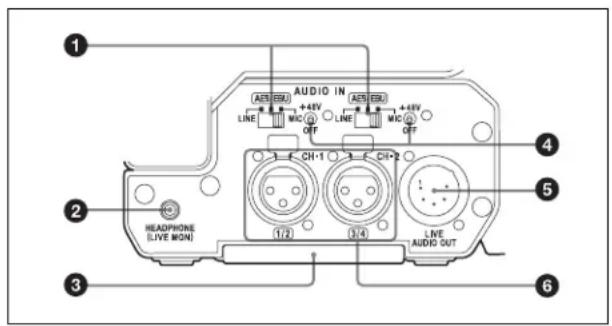
text_image
AUDIO IN A25 10V +48V A25 10V +48V LINE MIC OFF LINE MIC OFF 1 CH-1 CH-2 HEADPHONE (LIVE MON) 1/2 3/4 LIVE AUDIO OUT 6① AUDIO IN selectors
Select the audio source connected to the AUDIO IN CH-1/CH-2 connectors.
• LINE: When connecting an external audio signal source such as a stereo amplifier
- AES/EBU: When connecting an external digital audio signal source
- MIC: When connecting a microphone
②HEADPHONE (LIVE MON) jack (stereo, minijack)
You can monitor the E-E* sound by connecting headphones. When an alarm is indicated, you can hear the alarm sound through the headphones. Plugging headphones into the jack automatically cuts off the built-in speaker of the PMW-F55/F5.
* E-E: Abbreviation of “Electric-to-Electric”. In E-E mode, video and audio signals input to the camcorder are output after passing through internal electric circuits only. This can be used to check input signals.
Note
The playback sound cannot be output.
③Bottom cover
This is provided for protecting the cables connected to the connectors on the rear panel.
By loosening the screws on the bottom of the CBK-55BK, you can adjust the position of the cover depending on the size and shape of the microphone or audio cable plugs.
After adjusting the position, tighten the screws to secure the cover.
④+48V/OFF (48 V power supply on/off) switch
Switch to the following setting depending on the connected microphone.
- +48V: When connecting a microphone that requires 48 V power supply
- OFF: When connecting a microphone that does not require 48 V power supply
⑤ LIVE AUDIO OUT connector (XLR type, 5-pin, male)
Outputs the audio signals input on audio channels 1 and 2 or audio channels 3 and 4.
The audio signals are selected by the MONITOR switch.
Note
The playback sound cannot be output.
⑥ AUDIO IN CH-1/CH-2 (audio channel 1 and 2 input) connectors (XLR type, 3-pin, female)
Connect audio equipment or a microphone.
Handle
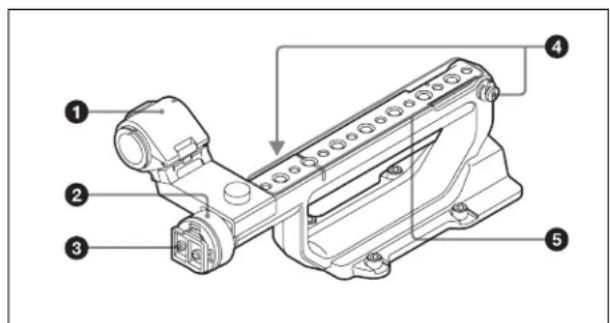
text_image
Technical diagram of a mechanical assembly with numbered components and directional arrows indicating assembly or flow.①Microphone holder
Attach an external microphone (see page 40).
②Viewfinder left-to-right positioning ring
Loosen this ring to adjust the left-to-right position of the viewfinder (see page 39).
③ Viewfinder fitting shoe
Attach the viewfinder (see page 39).
④Shoulder strap fitting
Attach the supplied shoulder strap (see page 43).
⑤Accessory mounting screw holes
• Type of screw: 1/4-20UNC (×9)
• Type of screw: 3/8-16UNC (× 8)
• Length of engagement: 9 mm ( ^3/_8 inch) or less
Note
Do not apply excessive force to the mounted accessory. It may damage the screw thread.
Battery adaptor
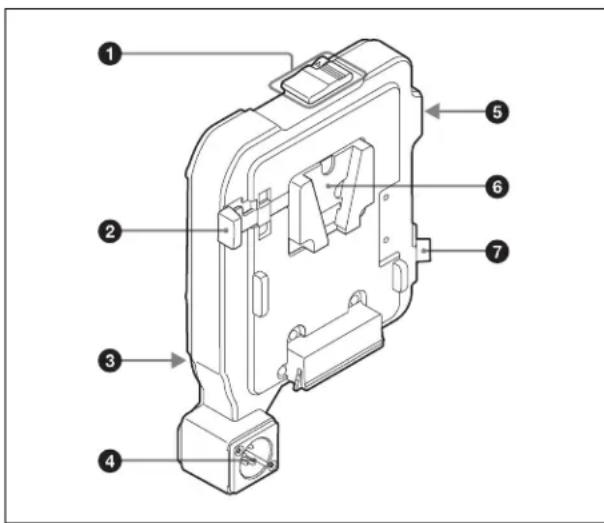
text_image
Technical diagram of an electrical fuse box with numbered components labeled 1 through 7For attaching/removing the battery adaptor, see "Attaching a battery adaptor for the CBK-55BK" on page 36.
① Release button/ejection lever
②Battery release lever
③ Expansion IF connector
④DC IN connector (see page 37)
⑤LIGHT (video light) connector (2-pin, female)
A video light with a maximum power consumption of 50 W, such as the Anton Bauer Ultralight 2 or equivalent can be connected (see page 42).
Note
Video light ON/OFF is not interlocked with the recording.
⑥ Battery pack attaching part
⑦DC OUT connector
Note
When connecting a device, use one with current consumption of 1.8A or less.
Connection and Setup
Power supply
You can use a battery pack or AC power via an AC adaptor.
For safety, use only the Sony battery packs and AC adaptors listed below.
Lithium-ion Battery Pack
BP-FL75
BP-L80S
AC Adaptor
AC-DN2B
AC-DN10
Attaching a battery adaptor for the CBK-55BK
1 Press the release button (①) of the battery adaptor to pop up the ejection lever, then raise the ejection lever (②).

text_image
Battery release lever Battery pack attaching part2
Insert the projection of the battery adaptor into the slot on the rear of the CBK-55BK (①), then lower the ejection lever (②) until the battery adaptor is locked in the release button.
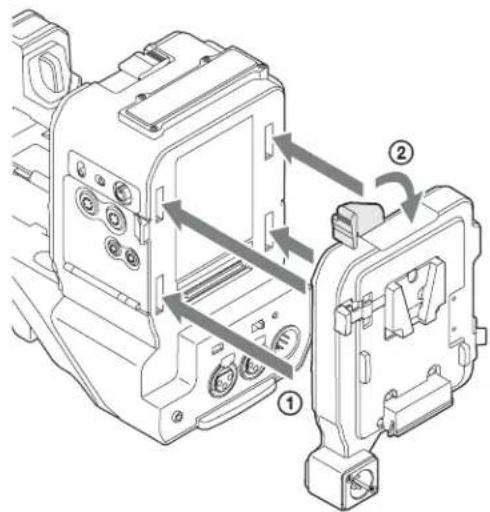
text_image
Technical diagram of an electrical contactor with labeled components and directional arrows indicating assembly or movement.Notes
- Before attaching the battery adaptor, make sure that the ejection lever is raised.
- Before lowering the ejection lever, make sure that the four hooks are attached securely. If the four hooks are not attached securely, it may cause the connection to be poor or damage the CBK-55BK and battery adaptor.
To use Battery Pack
Insert the battery pack into the battery pack attaching part of the battery adaptor, then slide the battery pack down to lock it in place.
Notes
- Before use, charge the battery pack with the battery charger.
- A warm battery pack immediately after use may not be able to be fully recharged.
To remove a battery pack
Unlock the battery pack by sliding it up while pressing the battery release lever, then remove it.
To remove a battery adaptor
Press the release button and raise the ejection lever, then remove the battery adaptor by pulling it out while sliding upward.
Note
Remove the battery adaptor while supporting it by hand.
Using AC power (DC IN power)
The CBK-55BK works with AC power by using the AC adaptor AC-DN2B/AC-DN10 (optional).
Using the AXS-R5
For attaching the AXS-R5, refer to the operating instructions of the PMW-F55/F5.
Attaching the PMW-F55/F5
For details about the handling of the PMW-F55/F5, refer to the operating instructions supplied with the PMW-F55/F5.
Notes
- Requires PMW-F55/F5 software version 5.0 or later.
- Attach to or remove from the PMW-F55/F5 while the power supply is turned off.
1
Attach the supplied slide plate to the bottom of the PMW-F55/F5 securely by using a coin, etc.
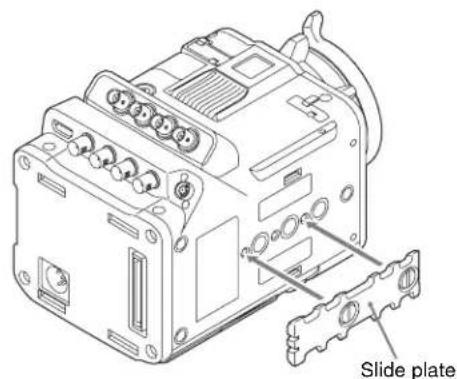
text_image
Slide plateNote
Be sure to attach in the correct direction.
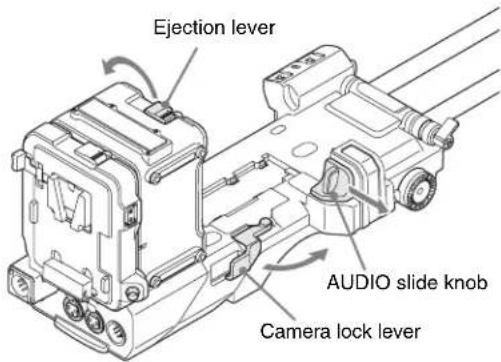
2 Release the lock of the camera lock lever, ejection lever, and AUDIO slide knob.
text_image
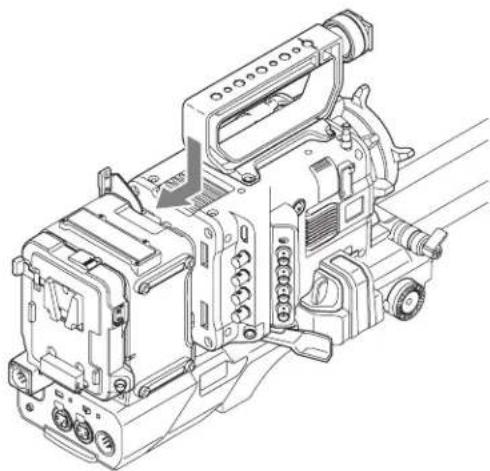
Ejection lever AUDIO slide knob Camera lock lever3 Put the PMW-F55/F5 on the CBK-55BK, then slide it to the back.
Put the PMW-F55/F5 on aligned to the slot of the slide plate attached to the bottom of the PMW-F55/F5 and the CBK-55BK, then slide the PMW-F55/F5 to the back until it stops securely.
natural_image
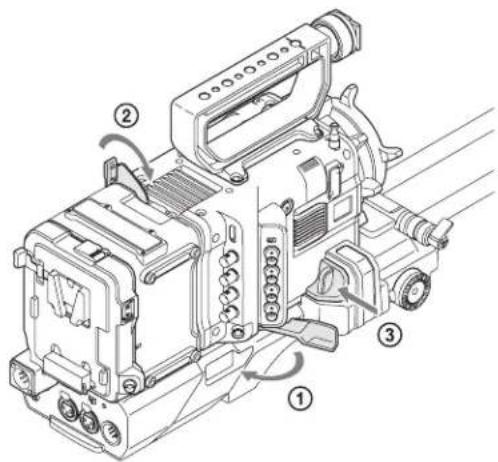
Technical line drawing of a cable or transmission device with no visible text or symbols4 Lock the PMW-F55/F5.
① Turn the camera lock lever.
② Lower the ejection lever until it is locked.
③ Push in the AUDIO slide knob.
text_image
Technical diagram of a video camera with numbered parts and labeled motion arrowsAttaching the handle
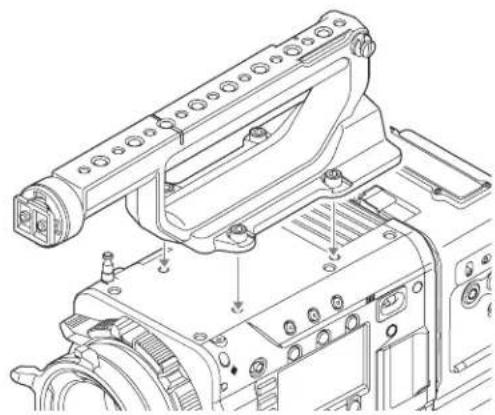
1 Remove the handle that is attached to the PMW-F55/F5.
2 Attach the handle of the CBK-55BK by using the hexagon socket bolt (hexagonal wrench size: 3/16).
natural_image
Technical line drawing of a mechanical device with mounting brackets and control panel (no text or symbols)Attaching a viewfinder
Available viewfinders for the PMW-F55/F5
• DVF-L350: LCD color viewfinder
• DVF-L700: LCD color viewfinder
• DVF-EL100: OLED color viewfinder
Caution
Do not leave the CBK-55BK with the eyepiece of the viewfinder facing the sun. Direct sunlight can enter through the eyepiece, be focused in the viewfinder, and cause fire.
Notes
- Attach/remove the viewfinder while the PMW-F55/F5 is turned off.
- When using the PMW-F55/F5 with the DVF-L700 attached, turn it on while the POWER switch of the DVF-L700 is set to ON.
For details about attaching the viewfinder, refer to the operating instructions of the viewfinder.
1 Loosen the fixing ring of the viewfinder shoe, align the slot of the viewfinder, then attach the viewfinder by sliding it horizontally.
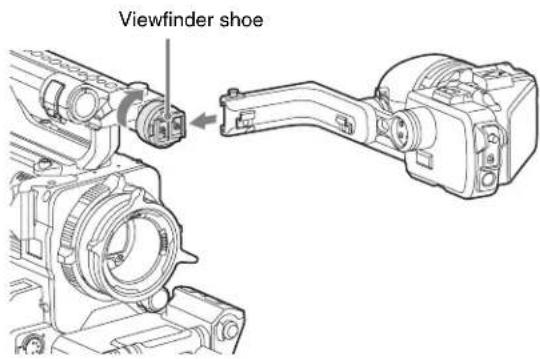
text_image
Viewfinder shoe2 Tighten the fixing ring after determining the left and right position of the viewfinder, then connect the viewfinder cable to the VF connector of the PMW-F55/F5.
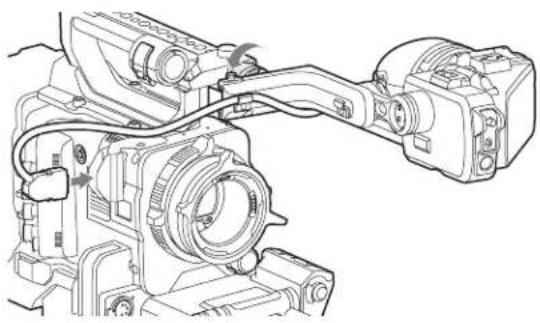
natural_image
Technical line drawing of a camera assembly with no visible text or symbolsTo remove the viewfinder
Loosen the fixing ring for the viewfinder, raise the stopper, then remove the viewfinder by sliding it in the reverse direction for when attaching.
To attach the VF connector protector
Attach the VF connector protector with the tape measure hook that is supplied with the PMW-F55/F5 and CBK-55BK, and the screw of the VF connector protector.
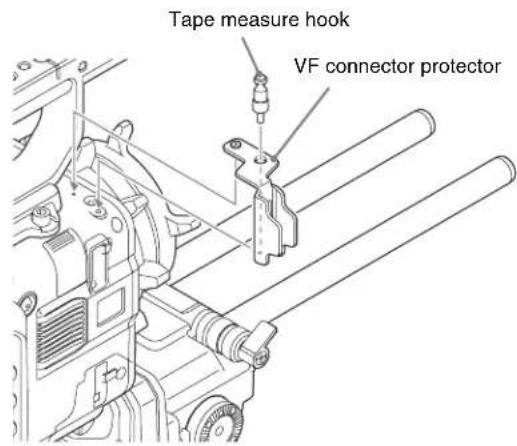
text_image
Tape measure hook VF connector protectorUsing an external microphone
You can use the ECM-680S/678/674 stereo microphone (optional) by attaching it to the supplied microphone holder.
Note
To attach the ECM-678/674, the conversion cable (EC-0.5X3F5M) is required.
To attach the microphone holder
Align the microphone holder to the handle, then attach it by tightening the screw securely.
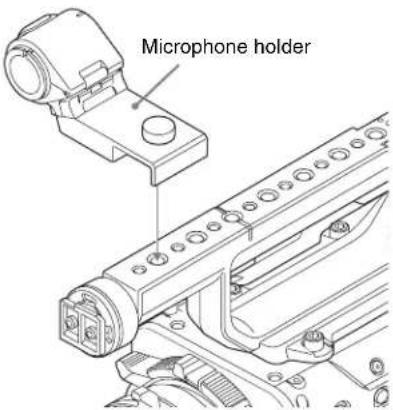
text_image
Microphone holderTo attach a microphone
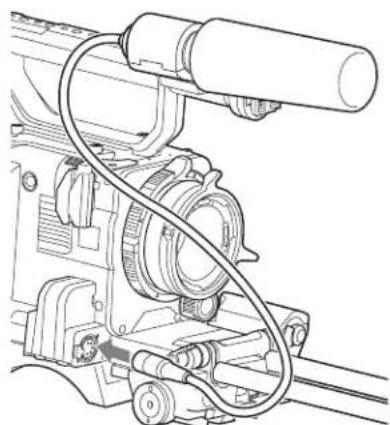
1 Open the cover of the external microphone attachment part by pulling the knob up.
2 Attach the microphone, then fix the microphone by closing the cover of the external microphone attachment part as it was.
3 Plug the microphone cable into the MIC IN connector, then set the AUDIO IN switch (see page 34) for the channel on which you want to record the audio from this microphone to FRONT.
natural_image
Technical line drawing of a mechanical assembly with hoses and components (no text or symbols)Attaching a UHF portable tuner (for a UHF wireless microphone system)
To use a Sony UHF wireless microphone system, power the PMW-F55/F5 off and then fit one of the following UHF portable tuners.
• DWR-S02D Digital Wireless Receiver
• WRR-855S UHF Synthesized Tuner Unit
• WRR-860A/861/862 UHF Synthesized Diversity Tuner
For details of these units, refer to the operation manuals for them.
Note
The optional WRR tuner fitting (service part number: A-8278-057-B) is required to fit the WRR-862.
For details, contact your vendor or a Sony service representative.
To fit the DWR-S02D or WRR-855S
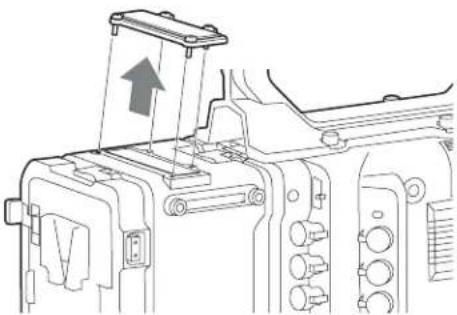
1 Remove the four fixing screws holding the cover of the portable tuner/receiver housing slot.
natural_image
Technical line drawing of a mechanical assembly with no visible text or symbols2 Insert the DWR-S02D or WRR-855S into the housing slot, and fasten the four fixing screws.
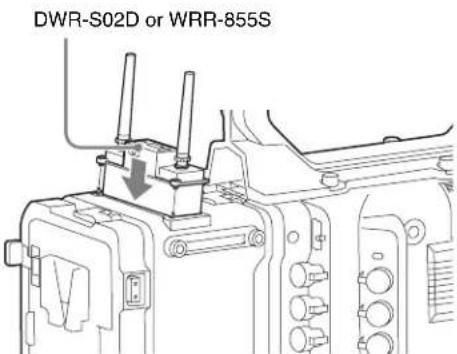
text_image
DWR-S02D or WRR-855S3 Set the AUDIO IN selector for the channel to which you want to input audio signal to WIRELESS (see page 35).
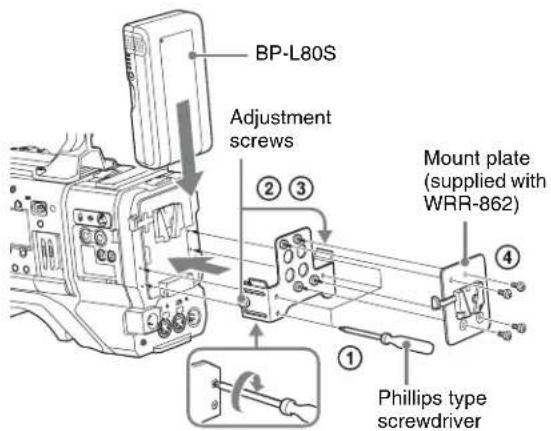
To fit the WRR-862 (when using a BP-L80S Battery Pack)
1 Attach the WRR tuner fitting (not supplied; service part number: A-8278-057-B) to the back of the CBK-55BK.
①Use a Phillips type screwdriver to tighten the four screws placed in the tuner fitting as in the following illustration.
Note
Make sure that all four screws are fully tightened.
②Loosen the adjustment screws on the tuner fitting.
③Adjust the tuner fitting position for a BP-L80S Battery Pack to be attached, and tighten the adjustment screws to fix its position.
④Attach the mount plate supplied with the WRR-862.
About the WRR tuner fitting (service part number: A-8278-057-B), contact a Sony service or sales representative.
text_image
BP-L80S Adjustment screws ② ③ Mount plate (supplied with WRR-862) ④ ① Phillips type screwdriver2 Attach the battery pack.
On how to attach the battery pack, see "To use Battery Pack" on page 37.
3 Mount the tuner on the WRR tuner fitting.

natural_image
Technical line drawing of a mechanical device with no visible text or symbols4 Connect the tuner power cord to the DC OUT connector of the supplied battery adaptor, and the audio output cable to the AUDIO IN CH-1 or CH-2 connector.
5 Set the switches as follows.
- Set the AUDIO IN selector for the channel to which the audio output cable is attached to MIC.
- Set the AUDIO IN CH-1/CH-2/CH-3/CH-4 switch for the channel to which the audio output cable is connected to REAR.
If the XLR connection automatic detection function is on, the input signal for audio recording is selected automatically, and therefore this setting is not required.
Connecting line input audio equipment
Connect the audio output connector of the audio equipment that supplies the line input signal to the AUDIO IN CH-1 or CH-2 connector.
Switch settings
Set the AUDIO IN selector for the channel to which the audio signal source is connected to LINE.
Tripod mounting
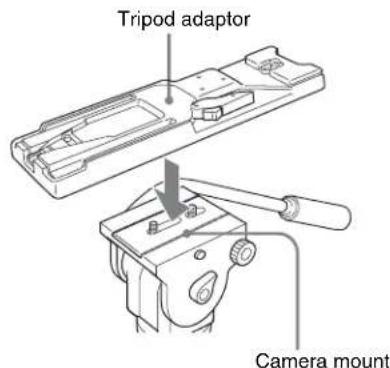
1 Attach the VCT-14/U14 Tripod Adaptor (optional) to the tripod.
text_image
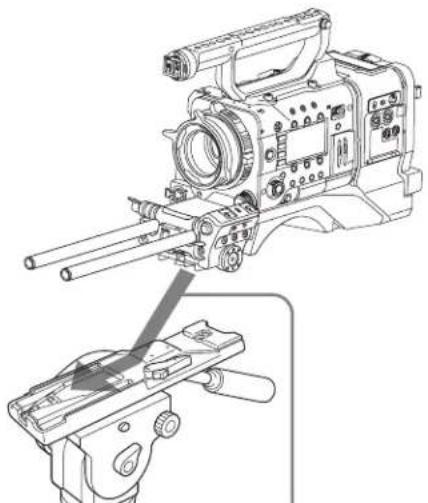
Tripod adaptor Camera mount2 Mount the CBK-55BK on the tripod adaptor.
natural_image
Technical line drawing of a video camera with attached clamp and bracket (no text or symbols)Slide the CBK-55BK forward along the groove in the adaptor until it clicks.
3 Move the CBK-55BK forward and backward, and make sure it does not detach.
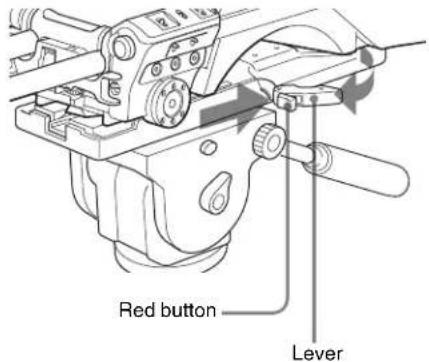
To remove the CBK-55BK from the tripod adaptor
Hold down the red button and pull the lever in the direction of the arrow.
text_image
Red button LeverNote
The tripod adaptor pin may remain in the engaged position even after the CBK-55BK is removed. If this happens, press the red button and move the lever as shown above until the pin returns to the stowed position. If the pin remains in the engaged position, you will not be able to mount the CBK-55BK on the tripod adaptor.
Connecting a video light
With this CBK-55BK, you can use the Anton Bauer Ultralight 2 or equivalent video light (powered by 12 V with maximum power consumption of 50 W).
The output of the LIGHT connector on the CBK-55BK is controlled to 12 V even when the CBK-55BK is supplied with over 12 V power (through the DC IN connector or battery pack). The brightness or color temperature of the light will not change according to voltage increase.
Notes
- Do not use a video light with power consumption of over 50 W.
- The brightness or color temperature of the light will change when the voltage (supplied through the DC IN connector or from the battery pack) is under 12 V.
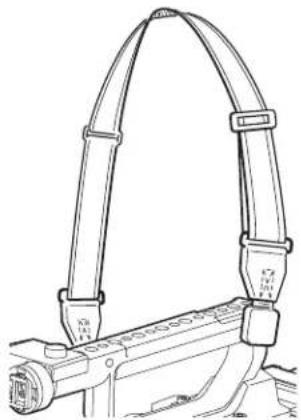
Using the shoulder strap
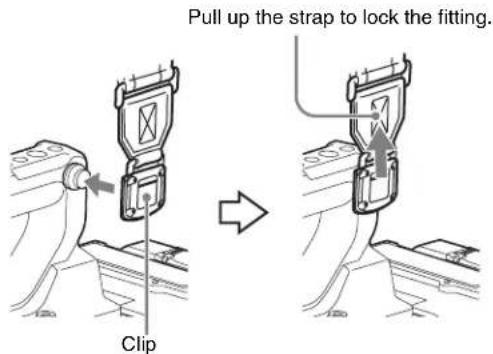
To attach the shoulder strap
1 Fit one of the clips to a shoulder strap fitting.
text_image
Pull up the strap to lock the fitting. Clip2 Fit the other clip to the shoulder strap fitting on the other side of the grip in the same way as in step1.
natural_image
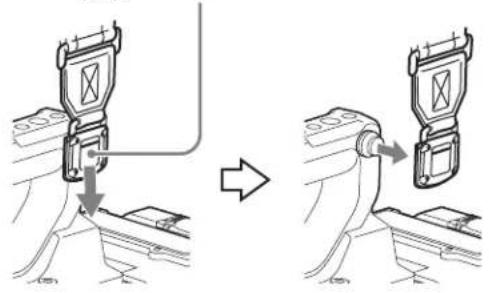
Technical line drawing of a mechanical bracket assembly (no text or symbols)To remove the shoulder strap

text_image
Press here and pull in the direction shown by the arrow to release.Adjusting the shoulder pad position
You can change the position of the CBK-55BK and shoulder pad as follows by sliding the front block.
text_image
33 mm (1 5/16 inches) 37 mm (1 1/2 inches) 70 mm (2 7/8 inches)Adjust the position of the front block and shoulder pad so that the CBK-55BK can be operated easily while it is on your shoulder.
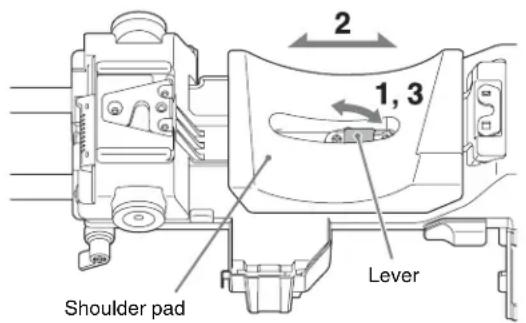
To adjust the front block position
1 Release the lock of the front block by turning the front block fixing lever on the bottom of the CBK-55BK.
2 Select the desired position by sliding the front block backward or forward.
3 Fix the front block by turning the front block fixing lever.

text_image
2 Front block 1, 3 Front block fixing leverTo adjust the shoulder pad position
1 Raise the lever in the center of the shoulder pad to unlock the shoulder pad.
2 Slide the shoulder pad backward or forward until it is in the most convenient position.
3 Lower the lever to lock the shoulder pad in the selected position.
text_image
2 1, 3 Lever Shoulder padUsing the headphone plug adaptor
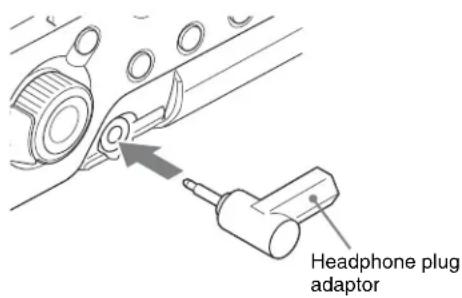
If the headphones with a straight type connector is hard to use while using the headphone connector of the PMW-F55/F5, use the supplied headphone plug adaptor.
text_image
Headphone plug adaptorBasic Setup Menu Operations
To display the setup menu
Push the MENU ON/OFF switch of the CBK-55BK down or press the MENU button of the PMW-F55/F5.
Note
For operations after pressing the MENU button of the PMW-F55/F5 and menu screen, refer to the operating instructions of the PMW-F55/F5. In this section, only the operations of the CBK-55BK are explained.
To make menu settings
1 Turn the MENU knob to move the cursor to the item that you want to set.
Selectable menu items appear in the menu item selection area to the right of the icon.
2 Press the MENU knob.
The cursor moves to the menu item selection area.
3 Turn the MENU knob to move the cursor to the menu item that you want to set, and then confirm by pressing the MENU knob.
The setting area appears.
4 Turn the MENU knob to move the cursor to the item that you want to set, and then confirm by pressing the MENU knob.
5 Turn the MENU knob to select the value that you want to set, and then confirm by pressing the MENU knob.
The setting is changed and the display is updated to show the new setting.
Items that require confirmation before execution
In step3, the menu disappears and a confirmation message appears if you select an item that requires confirmation before execution. Follow the instructions in the message to execute or cancel the operation.
To enter text
When you select an item that requires text input, such as time data or file names, the text entry field is highlighted, and “SET” is displayed to the right.
1 Turn the MENU knob to select a character, then confirm by pressing the MENU knob.
The cursor moves to the next position. To return to the previous position, push the MENU CANCEL/BACK switch down.
2 When all characters are input, confirm them by selecting "Done."
To cancel the setting change
Push the MENU CANCEL/BACK switch down.
To exit the menu
Set the MENU ON/OFF switch to OFF. The normal camera picture reappears.
Adjusting the Audio Level
When you set the AUDIO SELECT switch to AUTO, the input levels of analog audio signals recorded on each channel are adjusted automatically. You can also make manual adjustments.
Note
Even if you set the AUDIO SELECT switch to AUTO, the input levels of digital audio signals are not adjusted automatically.
Target audio level for manual audio level adjustment
Make adjustment using -20 dB as the target level. If the audio level meter shows a maximum level of 0 dB, then it indicates that the input audio level is excessive.
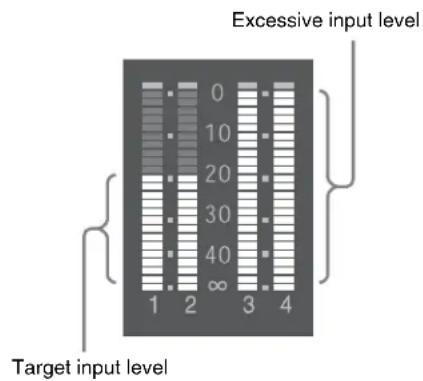
text_image
Excessive input level Target input level 1 2 3 4Manually adjusting the audio levels of the audio inputs from the AUDIO IN CH-1/CH-2 connectors
1 To adjust the signal input to the AUDIO IN CH-1 or CH-2 connector, set the AUDIO IN CH-1 or CH-2 switch to REAR.
To adjust both input signals, set both switches to REAR.
2 Set the AUDIO SELECT switch(es) corresponding to the channel(s) selected in step1 to MANUAL.
3 With the LEVEL knob(s) for the channel(s) selected in step1, make adjustment so that the audio level meter displays up to -20 dB for a normal input volume.
Correspondence between recording level adjustments and audio level controls
On “Audio Input” of the Audio menu, you can select which audio level control controls the audio recording level of the input to each of the AUDIO IN CH-1/CH-2 connectors. The correspondences between the settings of the menu items and the controls are as follows.
Rear1/WRR Level: Channel 1 recording level
| Setting Knob |
| Side1 LEVEL (CH-1) knob |
| Front MIC LEVEL control |
| Front+Side1 LEVEL (CH-1) knob and MIC LEVEL control (linked operation) |
Rear2/WRR Level: Channel 2 recording level
| Setting Knob |
| Side2 LEVEL (CH-2) knob |
| Front MIC LEVEL control |
| Front+Side2 LEVEL (CH-2) knob and MIC LEVEL control (linked operation) |
Note
When you have operation of the LEVEL (CH-1/CH-2) knobs and MIC LEVEL control linked together, if the MIC LEVEL control is set to 0, the audio signals on channels 1 and 2 cannot be recorded. Check the position of the MIC LEVEL control before adjusting the LEVEL (CH-1/CH-2) knobs.
Manually Adjusting the Audio Level of the MIC IN Connector
1 Set the AUDIO IN switch(es) that is(are) used to FRONT.
2 Set the AUDIO SELECT switch(es) for the desired channel(s) selected in step1 to MANUAL.
3 Turn the MIC LEVEL control and make adjustment so that the audio level meter displays up to -20 dB for a normal input volume.
Correspondence between recording level adjustments and audio level controls
On “Audio Input” of the Audio menu, you can select which audio level control controls the audio recording level of the front microphone input. The correspondences between the settings of the menu items and the controls are as follows.
MIC CH1 Level: Channel 1 recording level
| Setting Knob |
| Side1 LEVEL (CH-1) knob |
| Front MIC LEVEL control |
| Front+Side1 LEVEL (CH-1) knob and MIC LEVEL control (linked operation) |
MIC CH2 Level: Channel 2 recording level
| Setting Knob |
| Side2 LEVEL (CH-2) knob |
| Front MIC LEVEL control |
| Front+Side2 LEVEL (CH-2) knob and MIC LEVEL control (linked operation) |
Note
When you have operation of the MIC LEVEL control and LEVEL (CH-1/CH-2) knobs linked together, if the LEVEL (CH-1/CH-2) knobs are set to 0, the audio signals on channels 1 and 2 cannot be recorded. Check the position of the LEVEL (CH-1/CH-2) knobs before adjusting the MIC LEVEL control.
Recording Audio on Channels 3 and 4
Selecting the recorded audio
You can select the audio recorded on audio channels 3 and 4 with the AUDIO IN CH-3/CH-4 switches.
| CH-3 switch Channel 3 recording target |
| FRONT Front microphone audio |
| REAR Audio signal input to AUDIO IN CH-1 connector |
| WIRELESS Wireless microphone audio |
| CH-4 switch Channel 4 recording target |
| FRONT Front microphone audio |
| REAR Audio signal input to AUDIO IN CH-2 connector |
| WIRELESS Wireless microphone audio |
Adjusting the audio recording levels
To adjust automatically
Set the AUDIO SELECT CH-3/4 switch to AUTO.
To adjust manually
1 Set the AUDIO SELECT CH-3/4 switch to MANUAL.
2 Select the knobs that adjust the audio levels “Audio CH3 Level” and “Audio CH4 Level” in “Audio Input” of the Audio menu.
Audio CH-3 Level: Channel 3 recording level
| Setting Knob |
| Side3 LEVEL (CH-3) knob |
| Front MIC LEVEL control |
| Setting Knob |
| Front+Side3 LEVEL (CH-3) knob and MIC LEVEL control (linked operation) |
| Audio CH-4 Level: Channel 4 recording level |
| Setting Knob |
| Side4 LEVEL (CH-4) knob |
| Front MIC LEVEL control |
| Front+Side4 LEVEL (CH-4) knob and MIC LEVEL control (linked operation) |
You can now adjust the levels of audio channels 3 and 4 with the knobs selected here.
The relation between the AUDIO IN CH-1/CH-2 switch setting and recording channel is as follows.
| AUDIO IN switch on the audio operating section | Front MIC Select menu | AUDIO IN switch on the connector section (rear) | Recording channel | |||||
| CH-1/2/3/4 CH-1 | CH-2 CH-1 CH-2 CH-3 CH-4 | |||||||
| FRONT | Mono -- | Front Mic (Mono) | Front Mic (Mono) | Front Mic (Mono) | Front Mic (Mono) | |||
| Stereo -- | Front Mic (L-Ch) | Front Mic (R-Ch) | Front Mic (L-Ch) | Front Mic (R-Ch) | ||||
| REAR | – LINE or MIC LINE or MIC | LINE1 or MIC1 | LINE2 or MIC2 | LINE1 or MIC1 | LINE2 or MIC2 | |||
| – AES/EBU LINE or MIC | AES/EBU 1-1 | AES/EBU 1-2 | No sound | LINE2 or MIC2 | ||||
| – LINE or MIC AES/EBU | LINE1 or MIC1 | No sound | AES/EBU 2-1 | AES/EBU 2-2 | ||||
| – AES/EBU AES/EBU | AES/EBU 1-1 | AES/EBU 1-2 | AES/EBU 2-1 | AES/EBU 2-2 | ||||
| WIRELESS | Analog | – | – | – | Mono | Mono | Mono | Mono |
| Digital | --- | CH-1 | CH-2 CH-1 CH-2 | |||||
LINE or MIC: LINE or MIC is selected.
AES/EBU: AES/EBU is selected.
Mono: Monaural Audio
L-Ch/R-Ch: Mic L-Ch/R-Ch
LINE1 or MIC1: LINE or MIC signal input from the CH-1 connector
LINE2 or MIC2: LINE or MIC signal input from the CH-2 connector
AES/EBU1-1: CH-1 signal in the AES/EBU signal input from the CH-1 connector
AES/EBU1-2: CH-2 signal in the AES/EBU signal input from the CH-1 connector
AES/EBU2-1: CH-1 signal in the AES/EBU signal input from the CH-2 connector
AES/EBU2-2: CH-2 signal in the AES/EBU signal input from the CH-2 connector
Important Notes on Operation
Use and storage locations
The life expectancy of the electrolytic capacitor is about 5 years under normal operating temperatures and normal usage (8 hours per day; 25 days per month). If usage exceeds the above normal usage frequency, the life expectancy may be reduced correspondingly.
Do not subject to severe shocks
Damage to the case or internal components may result.
In the event of operating problems
If you should experience problems with the unit, contact your Sony dealer.
Operation and storage environment
Store in a level place with air conditioning.
If the unit gets wet, make sure it is completely dry before storage.
Avoid use or storage in the following places:
• Extremely hot or cold places
- Places with high humidity
- Places with strong vibration
• Near strong magnetic fields
- In places where it receives much direct sunlight, or near heating equipment
Note about the battery terminal
The battery terminal of this unit (the connector for battery packs and AC adaptors) is a consumable part.
Power may not be supplied to the unit properly if the pins of the battery terminal are bent or deformed by shock or vibrations, or if they become corroded due to prolonged outdoor use.
Periodic inspections are recommended to keep the unit working properly and to prolong its usable lifetime.
Contact a Sony service or sales representative for more information about inspections.
On condensation
If the unit is suddenly taken from a cold to a warm location, or if ambient temperature suddenly rises, moisture may form on the outer surface of the unit and/or inside of the unit. This is known as condensation. If condensation occurs, turn off the unit and wait until the condensation clears before operating the unit. Operating the unit while condensation is present may damage the unit.
Specifications
General
Dimensions (W× H× D)
$$ \text { Approx. } 1 7 0 \times 1 8 2 \times 3 7 1 \mathrm{mm} $$
$$ (6 ^ {3} / _ {4} \times 7 ^ {1} / _ {4} \times 1 4 ^ {5} / _ {8} \text {inches}) $$
$$ (\text { see page } 5 0) $$
Mass Approx. 2.2 kg (4 lb. 14 oz.) (Body and battery adaptor)
Power Requirements
$$ \mathrm{DC} 1 2 \mathrm{V} (1 1 \mathrm{V} \text { to } 1 7 \mathrm{V}) $$
Power Consumption
$$ \begin{array}{l} \text { Approx.3.8W(Bodyandbattery} \ \text { adaptor) } \end{array} $$
Operating temperature
$$ 0 ^ {\circ} \mathrm{C} \text { to } 4 0 ^ {\circ} \mathrm{C} (3 2 ^ {\circ} \mathrm{F} \text { to } 1 0 4 ^ {\circ} \mathrm{F}) $$
Operating humidity
$$ 20\% \text{to} 90\% $$
Storage temperature
$$ - 2 0 ^ {\circ} \mathrm{C} \text { to } + 6 0 ^ {\circ} \mathrm{C} (- 4 ^ {\circ} \mathrm{F} \text { to } + 1 4 0 ^ {\circ} \mathrm{F}) $$
Input/output
Expansion interface connector
$$ 1 4 4 \text {-pin, supplying power} $$
Audio input XLR-type 3-pin (×2), LINE / AES/EBU /
$$ \mathrm{MIC} / \mathrm{MIC} + 4 8 \mathrm{V} \text { selectable } $$
$$ \text { LINE: } + 4 / 0 / - 3 \mathrm{dBu} $$
$$ \text { AES / EBU: AES3 standard } $$
Audio output XLR type, 5-pin, +4/0/-3 dBu (balanced)
Microphone input
$$ \mathrm{XLR} \quad \text { type }, 5 - \text { pin }, - 7 0 \mathrm{dBu} \text { to } - 3 0 \mathrm{dBu} $$
Headphone output
DC input XLR-type 4-pin, 12 V DC
DC output 4-pin, 12 V DC (maximum rated current: 1.8A)
LIGHT 2-pin, 12 V DC (less than 50 W)
Supplied Accessories
Battery adaptor (service part number: A-2067-625-) (1)
Rod (Φ 15 mm × 250 mm) (2)
Headphone plug adaptor (L type) (1)
Handle (service part number: A-2068-023-) (1)
Microphone holder (pre-attached to the handle) (service part number: A-2068-182-) (1)
Slide plate (service part number: A-2070-502-) (1)
Tape measure hook (service part number: 4-458-622-) (1)
VF connector protector (service part number: A-2068-183-) (1)
Shoulder strap (1)
Operation manual (1)
Options
WRR-855 UHF Synthesized Tuner Unit
DWR-S02D Digital Wireless Receiver
AXS-R5 Portable Memory Recorder
AC-DN10, AC-DN2B AC Adaptor
BP-FL75, BP-L80S Battery Pack
BC-L70, BC-L90 Battery Charger
ECM-680S, ECM-678, ECM-674 Microphone
EC-0.5X3F5M Microphone Conversion Cable (for ECM-678/674)
Design and specifications are subject to change without notice.
Notes
• Always verify that the unit is operating properly before use. SONY WILL NOT BE LIABLE FOR DAMAGES OF ANY KIND INCLUDING, BUT NOT LIMITED TO, COMPENSATION OR REIMBURSEMENT ON ACCOUNT OF THE LOSS OF PRESENT OR PROSPECTIVE PROFITS DUE TO FAILURE OF THIS UNIT, EITHER DURING THE WARRANTY PERIOD OR AFTER EXPIRATION OF THE WARRANTY, OR FOR ANY OTHER REASON WHATSOEVER.
- SONY WILL NOT BE LIABLE FOR CLAIMS OF ANY KIND MADE BY USERS OF THIS UNIT OR MADE BY THIRD PARTIES.
- SONY WILL NOT BE LIABLE FOR THE TERMINATION OR DISCONTINUATION OF ANY SERVICES RELATED TO THIS UNIT THAT MAY RESULT DUE TO CIRCUMSTANCES OF ANY KIND.
SONY WILL NOT BE LIABLE FOR DAMAGES OF ANY KIND RESULTING FROM A FAILURE TO IMPLEMENT PROPER SECURITY MEASURES ON TRANSMISSION DEVICES, UNAVOIDABLE DATA LEAKS RESULTING FROM TRANSMISSION SPECIFICATIONS, OR SECURITY PROBLEMS OF ANY KIND.
Dimensions
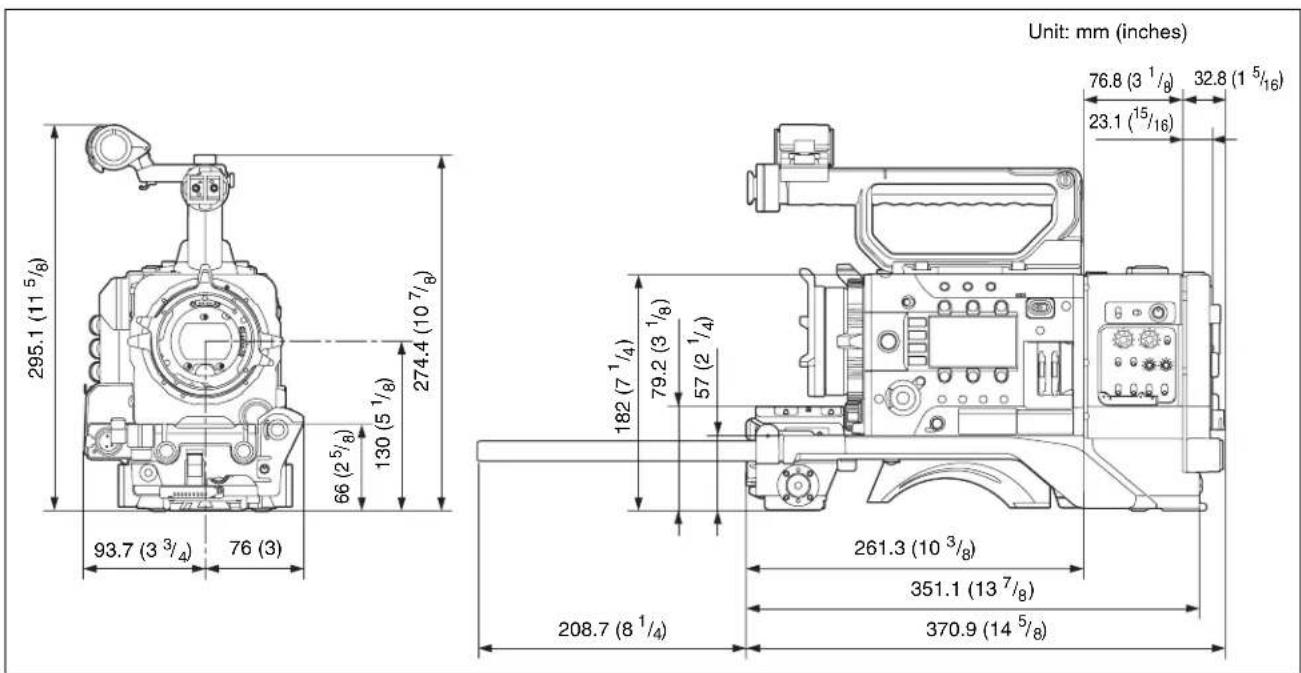
text_image
Unit: mm (inches) 295.1 (11 5/8) 66 (2 5/8) 130 (5 1/8) 274.4 (10 7/8) 93.7 (3 3/4) 76 (3) 182 (7 1/4) 79.2 (3 1/8) 57 (2 1/4) 208.7 (8 1/4) 261.3 (10 3/8) 351.1 (13 7/8) 370.9 (14 5/8) 76.8 (3 1/8) 32.8 (1 5/16) 23.1 (15/16)Français
text_image
Technical diagram of a mechanical device with numbered components for identificationtext_image
Technical diagram of a mechanical device with numbered components for identificationtext_image
Technical diagram of a mechanical assembly with numbered components for identification①Support de microphone
text_image
Technical diagram of an electrical fuse box with numbered components labeled 1 through 7text_image
Technical diagram of an electrical contactor with labeled components and directional arrows indicating assembly steps.Remarques
text_image
Plaque coulissanteRemarque
natural_image
Technical line drawing of a mechanical device with no visible text or symbolstext_image
Technical diagram of a video camera with numbered components and labeled partsnatural_image
Technical line drawing of a video camera module with mounting hardware (no text or symbols)natural_image
Technical line drawing of a camera assembly with no visible text or symbolstext_image
Support de microphonenatural_image
Technical line drawing of a mechanical assembly with hoses and components (no text or symbols)natural_image
Technical line drawing of a mechanical assembly with no visible text or symbolstext_image
DWR-S02D ou WRR-855Snatural_image
Technical line drawing of a mechanical device with no visible text or symbolsnatural_image
Technical line drawing of a video camera with attached clamp and bracket (no text or symbols)natural_image
Technical line drawing of a mechanical clamp or bracket assembly (no text or symbols)text_image
Diagram illustrating the process of lifting a device, showing step-by-step assembly from top to bottom.AES/EBU / MIC / MIC+48V
sélectionnable
LINE: +4/0/-3 dBu
AES/EBU : AES3 standard
Sortie audio De type XLR, 5 broches, +4/0/-3 dBu (balancé)
Entrée microphone
text_image
Technical diagram of a mechanical device with numbered components for identificationtext_image
Technical diagram of a mechanical device with numbered parts for identificationtext_image
Technical diagram of a mechanical assembly with numbered components and directional arrows indicating assembly or flow.① Mikrofonhalter
text_image
Technical diagram of an electrical fuse box with numbered components labeled 1 through 7text_image
Technical diagram showing mechanical assembly with numbered components and directional arrows indicating movement or assembly.Hinweise
natural_image
Technical line drawing of a mechanical device with no visible text or symbolstext_image
Technical diagram of a video camera with numbered parts and labeled connection pointsnatural_image
Technical line drawing of a video camera module with mounting holes and control panel (no text or symbols)natural_image
Technical line drawing of a camera assembly with no visible text or symbolsnatural_image
Technical line drawing of a mechanical assembly with hoses and components (no text or symbols)natural_image
Technical line drawing of a mechanical assembly with no visible text or symbolsnatural_image
Line drawing of a cable-cable mechanical device (no text or symbols visible)natural_image
Technical line drawing of a video camera with an inset close-up showing the component (no text or symbols present)natural_image
Technical line drawing of a mechanical clamp or bracket assembly (no text or symbols)AES/EBU: AES3-Standard
Audioausgang XLR, 5-polig, +4/0/-3 dBu
(symmetrisch)
Mikrofoneingang
XLR, 5-polig, -70 dBu bis -30 dBu
Kopfhörerausgang
Stereominibuchse
WRR D-Sub, 15-polig
Analog, CH1: -40 dBu
Digital, CH1/CH2: -40 dBFS
Akkuadapter
Gleichstromeingang
XLR, 4-polig, 12 V Gleichstrom
Gleichstromausgang
4-polig, 12 V Gleichstrom (maximaler
Nennstrom: 1,8 A)
text_image
Technical diagram of a mechanical device with numbered components for identificationtext_image
Technical diagram of a mechanical device with numbered components for identificationtext_image
Technical diagram of a mechanical assembly with numbered components and directional arrows indicating assembly or flow.text_image
Technical diagram of an electrical fuse box with numbered components labeled 1 through 7text_image
Technical diagram of an electrical contactor with labeled components and directional arrows indicating assembly or connection.Note
natural_image
Technical line drawing of a mechanical device with no visible text or symbolstext_image
Technical diagram of a video camera with numbered parts and labeled componentsnatural_image
Technical line drawing of a video camera with mounting brackets and control panel (no text or symbols)natural_image
Technical line drawing of a camera assembly with no visible text or symbolsnatural_image
Technical line drawing of a mechanical device with hoses and components (no text or symbols)natural_image
Technical line drawing of a mechanical assembly with no visible text or symbolstext_image
DWR-S02D o WRR-855Snatural_image
Technical line drawing of a video camera with no visible text or symbolsnatural_image
Technical line drawing of a video camera with attached clamp and bracket (no text or symbols)natural_image
Technical line drawing of a mechanical clamp or bracket assembly (no text or symbols)text_image
Diagram illustrating the process of a device lock switch, showing before and after states with labeled components.Dimensioni (L × H × P)
Circa 170 × 182 × 371 mm
(vedere pagina 122)
LINE / AES/EBU / MIC / MIC+48V
LINE: +4/0/-3 dBu
AES/EBU: AES3 standard
Uscita audio Tipo XLR, 5 pin, +4/0/-3 dBu
(bilanciato)
Ingresso microfono
Tipo XLR, 5 pin, da -70 dBu a -30 dBu
Uscita cuffia Presa stereo mini
WRR D-sub 15 pin
Analogica CH1: -40 dBu
Digitale CH1/CH2: -40 dBFS
text_image
Technical diagram of a mechanical device with numbered components for identification①Conector AUDIO IF
⑧Conector Expansion IF
text_image
Technical diagram of a mechanical device with numbered components for identification④Interruptor ASSIGN. (asignable) 5
text_image
Technical diagram of a mechanical assembly with numbered components and directional arrows indicating assembly or flow.text_image
Technical diagram of an electrical fuse box with numbered components labeled 1 through 7text_image
Technical diagram of an electrical contactor with labeled components and directional arrows indicating assembly steps.Notas
natural_image
Technical line drawing of an electrical component with labeled placa (no text or symbols beyond label)Nota
natural_image
Technical line drawing of a mechanical device with no visible text or symbols4 Bloquee la PMW-F55/F5.
text_image
Technical diagram of a video camera with numbered components and labeled partsConexión del asa
natural_image
Technical line drawing of a video camera assembly with mounting holes and control panel (no text or symbols)natural_image
Technical line drawing of a camera assembly with no visible text or symbolsnatural_image
Technical line drawing of a mechanical assembly with hoses and components (no text or symbols)natural_image
Technical line drawing of a mechanical assembly with no visible text or symbolstext_image
DWR-S02D o WRR-855Snatural_image
Technical line drawing of a cable or transmission device (no text or symbols visible)natural_image
Technical line drawing of a video camera with attached clamp and bracket (no text or symbols)natural_image
Technical line drawing of a mechanical clamp or bracket assembly (no text or symbols)natural_image
Diagram showing two mechanical assembly steps: one with a switch and cable, the other with a valve and handle (no text or symbols)| Front Control MIC LEVEL |
| Front Control MIC LEVEL |
text_image
Technical diagram of a mechanical device with numbered components for identification①AUDIO IF 接口
text_image
Technical diagram of a mechanical device with numbered components for identification①UHF 便携式调谐器的安装点
text_image
Technical diagram of a mechanical component with numbered parts and annotation arrows indicating assembly or assembly steps.①麦克风固定架
安装外部麦克风(请参阅第158页)。
②取景器左右定位环
text_image
Technical diagram of a mechanical component with numbered parts labeled 1 through 7text_image
Technical diagram of an electrical contactor with labeled components and directional arrows indicating assembly steps.注意
natural_image
Technical line drawing of a video camera module with no visible text or symbols4 锁定 PMW-F55/F5。
text_image
Technical diagram of a video camera with numbered components and directional arrows indicating motion or signal flow.安装手柄
natural_image
Technical line drawing of a mechanical device with mounting brackets and internal components (no text or symbols)安装取景器
PMW-F55/F5 可用的取景器
natural_image
Technical line drawing of a camera assembly with no visible text or symbols拆卸取景器
natural_image
Technical line drawing of a mechanical assembly with hoses and components (no text or symbols)natural_image
Technical line drawing of a mechanical assembly with no visible text or symbolstext_image
DWR-S02D 或 WRR-855Snatural_image
Technical line drawing of a mechanical device with no visible text or symbolsnatural_image
Technical line drawing of a mechanical clamp or bracket assembly (no text or symbols)拆卸肩带
按压此处,按照箭头所示方向拉动并松开。
natural_image
Diagram showing two mechanical assembly steps: one with a switch and cable, the other with a belt buckle (no text or symbols)调节肩垫位置
text_image
Technical diagram of a mechanical device with numbered components for identification①Разъем AUDIO IF
text_image
Technical diagram of a mechanical device with numbered components for identificationtext_image
AUDIO IN AEE BU +AV AEE BU +AV LINE MIC OFF Line MIC OFF CH-1 CH-2 HEADPHONE (LIVE MON) (1/2) (3/4) LIVE AUDIO OUT ① ② ③ ④ ⑤ ⑥text_image
Technical diagram of an automotive electrical connector with numbered parts labeled 1 to 5text_image
Technical diagram of an electrical fuse housing with numbered components for identificationtext_image
Technical diagram of an electrical contactor assembly with labeled parts and directional arrows indicating connection points.Примечания
natural_image
Technical line drawing of a mechanical device with no visible text or symbols4 Закрепите PMW-F55/F5.
text_image
Technical diagram of a video camera with numbered parts and labeled connection pointsКрепление ручки
natural_image
Technical line drawing of a video camera with mounting brackets and control panel (no text or symbols)natural_image
Technical line drawing of a mechanical assembly with two views (top and side), no visible text or symbolsnatural_image
Technical line drawing of a camera assembly with no visible text or symbolsСнятие видоискателя
natural_image
Technical line drawing of a mechanical assembly with hoses and components (no text or symbols)natural_image
Technical line drawing of a mechanical assembly with no visible text or symbolstext_image
DWR-S02D или WRR-855Snatural_image
Technical line drawing of a mechanical device with no visible text or symbolsnatural_image
Technical line drawing of a video camera with a close-up view of its internal components (no text or symbols)natural_image
Technical line drawing of a mechanical clamp or bracket assembly (no text or symbols)text_image
Diagram illustrating a device's cable connection and assembly process, showing before-and-after states with labeled components.LINE / AES/EBU / MIC /
MIC+48V по выбору
LINE: +4/0/-3 dBu
AES/EBU: стандарт AES3
Open Source Software License List
[arm-sony-linux-gnueabi-armv7a-dev-busybox-1.13.4-08000101]
[arm-sony-linux-gnueabi-armv7a-dev-dosfstools-2.11-08000101]
[arm-sony-linux-gnueabi-armv7a-dev-procps-3.2.7-08000101]
[linux-2.6.29-patched-armv7a]
GNU GENERAL PUBLIC LICENSE
Version 2, June 1991
Copyright (C) 1989, 1991 Free Software Foundation, Inc. 59 Temple Place, Suite 330, Boston, MA 02111-1307 USA
Everyone is permitted to copy and distribute verbatim copies of this license document, but changing it is not allowed.
Preamble
The licenses for most software are designed to take away your freedom to share and change it. By contrast, the GNU General Public License is intended to guarantee your freedom to share and change free software--to make sure the software is free for all its users. This General Public License applies to most of the Free Software Foundation's software and to any other program whose authors commit to using it. (Some other Free Software Foundation software is covered by the GNU Library General Public License instead.) You can apply it to your programs, too.
When we speak of free software, we are referring to freedom, not price. Our General Public Licenses are designed to make sure that you have the freedom to distribute copies of free software (and charge for this service if you wish), that you receive source code or can get it if you want it, that you can change the software or use pieces of it in new free programs; and that you know you can do these things.
To protect your rights, we need to make restrictions that forbid anyone to deny you these rights or to ask you to surrender the rights. These restrictions translate to certain responsibilities for you if you distribute copies of the software, or if you modify it.
For example, if you distribute copies of such a program, whether gratis or for a fee, you must give the recipients all the rights that you have. You must make sure that they, too, receive or can get the source code. And you must show them these terms so they know their rights.
We protect your rights with two steps: (1) copyright the software, and (2) offer you this license which gives you legal permission to copy, distribute and/or modify the software.
Also, for each author's protection and ours, we want to make certain that everyone understands that there is no warranty for this free software. If the software is modified by someone else and passed on, we want its recipients to know that what they have is not the original, so that any problems introduced by others will not reflect on the original authors' reputations.
Finally, any free program is threatened constantly by software patents. We wish to avoid the danger that redistributors of a free program will individually obtain patent licenses, in effect making the program proprietary. To prevent this, we have made it clear that any patent must be licensed for everyone's free use or not licensed at all.
The precise terms and conditions for copying, distribution and modification follow.
GNU GENERAL PUBLIC LICENSE TERMS AND CONDITIONS FOR COPYING, DISTRIBUTION AND MODIFICATION
- This License applies to any program or other work which contains a notice placed by the copyright holder saying it may be distributed under the terms of this General Public License. The "Program", below, refers to any such program or work, and a "work based on the Program" means either the Program or any derivative work under copyright law: that is to say, a work containing the Program or a portion of it, either verbatim or with modifications and/or translated into another language. (Hereinafter, translation is included without limitation in the term "modification".) Each licensee is addressed as "you".
Activities other than copying, distribution and modification are not covered by this License; they are outside its scope. The act of running the Program is not restricted, and the output from the Program is covered only if its contents constitute a work based on the Program (independent of having been made by running the Program). Whether that is true depends on what the Program does.
- You may copy and distribute verbatim copies of the Program's source code as you receive it, in any medium, provided that you conspicuously and appropriately publish on each copy an appropriate copyright notice and
disclaimer of warranty; keep intact all the notices that refer to this License and to the absence of any warranty; and give any other recipients of the Program a copy of this License along with the Program.
You may charge a fee for the physical act of transferring a copy, and you may at your option offer warranty protection in exchange for a fee.
- You may modify your copy or copies of the Program or any portion of it, thus forming a work based on the Program, and copy and distribute such modifications or work under the terms of Section 1 above, provided that you also meet all of these conditions:
a) You must cause the modified files to carry prominent notices stating that you changed the files and the date of any change.
b) You must cause any work that you distribute or publish, that in whole or in part contains or is derived from the Program or any part thereof, to be licensed as a whole at no charge to all third parties under the terms of this License.
c) If the modified program normally reads commands interactively when run, you must cause it, when started running for such interactive use in the most ordinary way, to print or display an announcement including an appropriate copyright notice and a notice that there is no warranty (or else, saying that you provide a warranty) and that users may redistribute the program under these conditions, and telling the user how to view a copy of this License. (Exception: if the Program itself is interactive but does not normally print such an announcement, your work based on the Program is not required to print an announcement.)
These requirements apply to the modified work as a whole. If identifiable sections of that work are not derived from the Program, and can be reasonably considered independent and separate works in themselves, then this License, and its terms, do not apply to those sections when you distribute them as separate works. But when you distribute the same sections as part of a whole which is a work based on the Program, the distribution of the whole must be on the terms of this License, whose permissions for other licensees extend to the entire whole, and thus to each and every part regardless of who wrote it.
Thus, it is not the intent of this section to claim rights or contest your rights to work written entirely by you; rather, the intent is to exercise the right to control the distribution of derivative or collective works based on the Program.
In addition, mere aggregation of another work not based on the Program with the Program (or with a work based on the Program) on a volume of a storage or distribution medium does not bring the other work under the scope of this License.
- You may copy and distribute the Program (or a work based on it, under Section 2) in object code or executable form under the terms of Sections 1 and 2 above provided that you also do one of the following:
a) Accompany it with the complete corresponding machine-readable source code, which must be distributed under the terms of Sections 1 and 2 above on a medium customarily used for software interchange; or,
b) Accompany it with a written offer, valid for at least three years, to give any third party, for a charge no more than your cost of physically performing source distribution, a complete machine-readable copy of the corresponding source code, to be distributed under the terms of Sections 1 and 2 above on a medium customarily used for software interchange; or,
c) Accompany it with the information you received as to the offer to distribute corresponding source code. (This alternative is allowed only for noncommercial distribution and only if you received the program in object code or executable form with such an offer, in accord with Subsection b above.)
The source code for a work means the preferred form of the work for making modifications to it. For an executable work, complete source code means all the source code for all modules it contains, plus any associated interface definition files, plus the scripts used to control compilation and installation of the executable. However, as a special exception, the source code distributed need not include anything that is normally distributed (in either source or binary form) with the major components (compiler, kernel, and so on) of the operating system on which the executable runs, unless that component itself accompanies the executable.
If distribution of executable or object code is made by offering access to copy from a designated place, then offering equivalent access to copy the source code from the same place counts as distribution of the source code, even though third parties are not compelled to copy the source along with the object code.
- You may not copy, modify, sublicense, or distribute the Program except as expressly provided under this License. Any attempt otherwise to copy, modify, sublicense or distribute the Program is void, and will automatically terminate your rights under this License. However, parties who have received copies, or rights, from you under this
License will not have their licenses terminated so long as such parties remain in full compliance.
-
You are not required to accept this License, since you have not signed it. However, nothing else grants you permission to modify or distribute the Program or its derivative works. These actions are prohibited by law if you do not accept this License. Therefore, by modifying or distributing the Program (or any work based on the Program), you indicate your acceptance of this License to do so, and all its terms and conditions for copying, distributing or modifying the Program or works based on it.
-
Each time you redistribute the Program (or any work based on the Program), the recipient automatically receives a license from the original licensor to copy, distribute or modify the Program subject to these terms and conditions. You may not impose any further restrictions on the recipients' exercise of the rights granted herein. You are not responsible for enforcing compliance by third parties to this License.
-
If, as a consequence of a court judgment or allegation of patent infringement or for any other reason (not limited to patent issues), conditions are imposed on you (whether by court order, agreement or otherwise) that contradict the conditions of this License, they do not excuse you from the conditions of this License. If you cannot distribute so as to satisfy simultaneously your obligations under this License and any other pertinent obligations, then as a consequence you may not distribute the Program at all. For example, if a patent license would not permit royalty-free redistribution of the Program by all those who receive copies directly or indirectly through you, then the only way you could satisfy both it and this License would be to refrain entirely from distribution of the Program.
If any portion of this section is held invalid or unenforceable under any particular circumstance, the balance of the section is intended to apply and the section as a whole is intended to apply in other circumstances.
It is not the purpose of this section to induce you to infringe any patents or other property right claims or to contest validity of any such claims; this section has the sole purpose of protecting the integrity of the free software distribution system, which is implemented by public license practices. Many people have made generous contributions to the wide range of software distributed through that system in reliance on consistent application of that system; it is up to the author/donor to decide if he or she is willing to distribute software through any other system and a licensee cannot impose that choice.
This section is intended to make thoroughly clear what is believed to be a consequence of the rest of this License.
-
If the distribution and/or use of the Program is restricted in certain countries either by patents or by copyrighted interfaces, the original copyright holder who places the Program under this License may add an explicit geographical distribution limitation excluding those countries, so that distribution is permitted only in or among countries not thus excluded. In such case, this License incorporates the limitation as if written in the body of this License.
-
The Free Software Foundation may publish revised and/or new versions of the General Public License from time to time. Such new versions will be similar in spirit to the present version, but may differ in detail to address new problems or concerns.
Each version is given a distinguishing version number. If the Program specifies a version number of this License which applies to it and "any later version", you have the option of following the terms and conditions either of that version or of any later version published by the Free Software Foundation. If the Program does not specify a version number of this License, you may choose any version ever published by the Free Software Foundation.
- If you wish to incorporate parts of the Program into other free programs whose distribution conditions are different, write to the author to ask for permission. For software which is copyrighted by the Free Software Foundation, write to the Free Software Foundation; we sometimes make exceptions for this. Our decision will be guided by the two goals of preserving the free status of all derivatives of our free software and of promoting the sharing and reuse of software generally.
NO WARRANTY
-
BECAUSE THE PROGRAM IS LICENSED FREE OF CHARGE, THERE IS NO WARRANTY FOR THE PROGRAM, TO THE EXTENT PERMITTED BY APPLICABLE LAW. EXCEPT WHEN OTHERWISE STATED IN WRITING THE COPYRIGHT HOLDERS AND/OR OTHER PARTIES PROVIDE THE PROGRAM "AS IS" WITHOUT WARRANTY OF ANY KIND, EITHER EXPRESSED OR IMPLIED, INCLUDING, BUT NOT LIMITED TO, THE IMPLIED WARRANTIES OF MERCHANTABILITY AND FITNESS FOR A PARTICULAR PURPOSE. THE ENTIRE RISK AS TO THE QUALITY AND PERFORMANCE OF THE PROGRAM IS WITH YOU. SHOULD THE PROGRAM PROVE DEFECTIVE, YOU ASSUME THE COST OF ALL NECESSARY SERVICING, REPAIR OR CORRECTION.
-
IN NO EVENT UNLESS REQUIRED BY APPLICABLE LAW OR AGREED TO IN WRITING
WILL ANY COPYRIGHT HOLDER, OR ANY OTHER PARTY WHO MAY MODIFY AND/OR REDISTRIBUTE THE PROGRAM AS PERMITTED ABOVE, BE LIABLE TO YOU FOR DAMAGES, INCLUDING ANY GENERAL, SPECIAL, INCIDENTAL OR CONSEQUENTIAL DAMAGES ARISING OUT OF THE USE OR INABILITY TO USE THE PROGRAM (INCLUDING BUT NOT LIMITED TO LOSS OF DATA OR DATA BEING RENDERED INACCURATE OR LOSSES SUSTAINED BY YOU OR THIRD PARTIES OR A FAILURE OF THE PROGRAM TO OPERATE WITH ANY OTHER PROGRAMS), EVEN IF SUCH HOLDER OR OTHER PARTY HAS BEEN ADVISED OF THE POSSIBILITY OF SUCH DAMAGES.
END OF TERMS AND CONDITIONS
How to Apply These Terms to Your New Programs
If you develop a new program, and you want it to be of the greatest possible use to the public, the best way to achieve this is to make it free software which everyone can redistribute and change under these terms.
To do so, attach the following notices to the program. It is safest to attach them to the start of each source file to most effectively convey the exclusion of warranty; and each file should have at least the "copyright" line and a pointer to where the full notice is found.
Copyright (C)
This program is free software; you can redistribute it and/or modify it under the terms of the GNU General Public License as published by the Free Software Foundation; either version 2 of the License, or (at your option) any later version.
This program is distributed in the hope that it will be useful, but WITHOUT ANY WARRANTY; without even the implied warranty of MERCHANTABILITY or FITNESS FOR A PARTICULAR PURPOSE. See the GNU General Public License for more details.
You should have received a copy of the GNU General Public License along with this program; if not, write to the Free Software Foundation, Inc., 59 Temple Place, Suite 330, Boston, MA 02111-1307 USA
Also add information on how to contact you by electronic and paper mail.
If the program is interactive, make it output a short notice like this when it starts in an interactive mode:
Gnomovision version 69, Copyright (C) year name of author
Gnomovision comes with ABSOLUTELY NO WARRANTY; for details type `show w'.
This is free software, and you are welcome to redistribute it under certain conditions; type `show c' for details.
The hypothetical commands `show w' and `show c' should show the appropriate parts of the General Public License. Of course, the commands you use may be called something other than `show w' and `show c'; they could even be mouse-clicks or menu items--whatever suits your program.
You should also get your employer (if you work as a programmer) or your school, if any, to sign a "copyright disclaimer" for the program, if necessary. Here is a sample; alter the names:
Yoyodyne, Inc., hereby disclaims all copyright interest in the program `Gnomovision' (which makes passes at compilers) written by James Hacker.
Ty Coon, President of Vice
This General Public License does not permit incorporating your program into proprietary programs. If your program is a subroutine library, you may consider it more useful to permit linking proprietary applications with the library. If this is what you want to do, use the GNU Library General Public License instead of this License.
[arm-sony-linux-gnueabi-armv7a-dev-glibc-2.11.2-08000105]
GNU LESSER GENERAL PUBLIC LICENSE
Version 2.1, February 1999
Copyright (C) 1991, 1999 Free Software Foundation, Inc. 59 Temple Place, Suite 330, Boston, MA 02111-1307 USA
Everyone is permitted to copy and distribute verbatim copies of this license document, but changing it is not allowed.
[This is the first released version of the Lesser GPL. It also counts as the successor of the GNU Library Public License, version 2, hence the version number 2.1.]
Preamble
The licenses for most software are designed to take away your freedom to share and change it. By contrast, the GNU General Public Licenses are intended to guarantee your freedom to share and change free software--to make sure the software is free for all its users.
This license, the Lesser General Public License, applies to some specially designated software packages--typically libraries--of the Free Software Foundation and other authors who decide to use it. You can use it too, but we suggest you first think carefully about whether this license or the ordinary General Public License is the better strategy to use in any particular case, based on the explanations below.
When we speak of free software, we are referring to freedom of use, not price. Our General Public Licenses are designed to make sure that you have the freedom to distribute copies of free software (and charge for this service if you wish); that you receive source code or can get it if you want it; that you can change the software and use pieces of it in new free programs; and that you are informed that you can do these things.
To protect your rights, we need to make restrictions that forbid distributors to deny you these rights or to ask you to surrender these rights. These restrictions translate to certain responsibilities for you if you distribute copies of the library or if you modify it.
For example, if you distribute copies of the library, whether gratis or for a fee, you must give the recipients all the rights that we gave you. You must make sure that they, too, receive or can get the source code. If you link other code with the library, you must provide complete object files to the recipients, so that they can relink them with the library after making changes to the library and recompiling it. And you must show them these terms so they know their rights.
We protect your rights with a two-step method: (1) we copyright the library, and (2) we offer you this license, which gives you legal permission to copy, distribute and/or modify the library.
To protect each distributor, we want to make it very clear that there is no warranty for the free library. Also, if the library is modified by someone else and passed on, the recipients should know that what they have is not the original version, so that the original author's reputation will not be affected by problems that might be introduced by others.
Finally, software patents pose a constant threat to the existence of any free program. We wish to make sure that a company cannot effectively restrict the users of a free program by obtaining a restrictive license from a patent holder. Therefore, we insist that any patent license obtained for a version of the library must be consistent with the full freedom of use specified in this license.
Most GNU software, including some libraries, is covered by the ordinary GNU General Public License. This license, the GNU Lesser General Public License, applies to certain designated libraries, and is quite different from the ordinary General Public License. We use this license for certain libraries in order to permit linking those libraries into non-free programs.
When a program is linked with a library, whether statically or using a shared library, the combination of the two is legally speaking a combined work, a derivative of the original library. The ordinary General Public License therefore permits such linking only if the entire combination fits its criteria of freedom. The Lesser General Public License permits more lax criteria for linking other code with the library.
We call this license the "Lesser" General Public License because it does Less to protect the user's freedom than the ordinary General Public License. It also provides other free software developers Less of an advantage over competing non-free programs. These disadvantages are the reason we use the ordinary General Public License for many libraries. However, the Lesser license provides advantages in certain special circumstances.
For example, on rare occasions, there may be a special need to encourage the widest possible use of a certain library, so that it becomes a de-facto standard. To achieve this, non-free programs must be allowed to use the library. A more frequent case is that a free library does the same job as widely used non-free libraries. In this case, there is little to gain by limiting the free library to free software only, so we use the Lesser General Public License.
In other cases, permission to use a particular library in non-free programs enables a greater number of people to use a large body of free software. For example, permission to use the GNU C Library in non-free programs enables many more people to use the whole GNU operating system, as well as its variant, the GNU/Linux operating system.
Although the Lesser General Public License is Less protective of the users' freedom, it does ensure that the user of a program that is linked with the Library has the freedom and the wherewithal to run that program using a modified version of the Library.
The precise terms and conditions for copying, distribution and modification follow. Pay close attention to the difference between a "work based on the library" and a
"work that uses the library". The former contains code derived from the library, whereas the latter must be combined with the library in order to run.
GNU LESSER GENERAL PUBLIC LICENSE TERMS AND CONDITIONS FOR COPYING, DISTRIBUTION AND MODIFICATION
- This License Agreement applies to any software library or other program which contains a notice placed by the copyright holder or other authorized party saying it may be distributed under the terms of this Lesser General Public License (also called "this License"). Each licensee is addressed as "you".
A "library" means a collection of software functions and/or data prepared so as to be conveniently linked with application programs (which use some of those functions and data) to form executables.
The "Library", below, refers to any such software library or work which has been distributed under these terms. A "work based on the Library" means either the Library or any derivative work under copyright law: that is to say, a work containing the Library or a portion of it, either verbatim or with modifications and/or translated straightforwardly into another language. (Hereinafter, translation is included without limitation in the term "modification".)
"Source code" for a work means the preferred form of the work for making modifications to it. For a library, complete source code means all the source code for all modules it contains, plus any associated interface definition files, plus the scripts used to control compilation and installation of the library.
Activities other than copying, distribution and modification are not covered by this License; they are outside its scope. The act of running a program using the Library is not restricted, and output from such a program is covered only if its contents constitute a work based on the Library (independent of the use of the Library in a tool for writing it). Whether that is true depends on what the Library does and what the program that uses the Library does.
- You may copy and distribute verbatim copies of the Library's complete source code as you receive it, in any medium, provided that you conspicuously and appropriately publish on each copy an appropriate copyright notice and disclaimer of warranty; keep intact all the notices that refer to this License and to the absence of any warranty; and distribute a copy of this License along with the Library.
You may charge a fee for the physical act of transferring a copy, and you may at your option offer warranty protection in exchange for a fee.
- You may modify your copy or copies of the Library or any portion of it, thus forming a work based on the Library, and copy and distribute such modifications or work under the terms of Section 1 above, provided that you also meet all of these conditions:
a) The modified work must itself be a software library.
b) You must cause the files modified to carry prominent notices stating that you changed the files and the date of any change.
c) You must cause the whole of the work to be licensed at no charge to all third parties under the terms of this License.
d) If a facility in the modified Library refers to a function or a table of data to be supplied by an application program that uses the facility, other than as an argument passed when the facility is invoked, then you must make a good faith effort to ensure that, in the event an application does not supply such function or table, the facility still operates, and performs whatever part of its purpose remains meaningful.
(For example, a function in a library to compute square roots has a purpose that is entirely well-defined independent of the application. Therefore, Subsection 2d requires that any application-supplied function or table used by this function must be optional: if the application does not supply it, the square root function must still compute square roots.)
These requirements apply to the modified work as a whole. If identifiable sections of that work are not derived from the Library, and can be reasonably considered independent and separate works in themselves, then this License, and its terms, do not apply to those sections when you distribute them as separate works. But when you distribute the same sections as part of a whole which is a work based on the Library, the distribution of the whole must be on the terms of this License, whose permissions for other licensees extend to the entire whole, and thus to each and every part regardless of who wrote it.
Thus, it is not the intent of this section to claim rights or contest your rights to work written entirely by you; rather, the intent is to exercise the right to control the distribution of derivative or collective works based on the Library.
In addition, mere aggregation of another work not based on the Library with the Library (or with a work based on the Library) on a volume of a storage or distribution medium
does not bring the other work under the scope of this License.
- You may opt to apply the terms of the ordinary GNU General Public License instead of this License to a given copy of the Library. To do this, you must alter all the notices that refer to this License, so that they refer to the ordinary GNU General Public License, version 2, instead of to this License. (If a newer version than version 2 of the ordinary GNU General Public License has appeared, then you can specify that version instead if you wish.) Do not make any other change in these notices.
Once this change is made in a given copy, it is irreversible for that copy, so the ordinary GNU General Public License applies to all subsequent copies and derivative works made from that copy.
This option is useful when you wish to copy part of the code of the Library into a program that is not a library.
- You may copy and distribute the Library (or a portion or derivative of it, under Section 2) in object code or executable form under the terms of Sections 1 and 2 above provided that you accompany it with the complete corresponding machine-readable source code, which must be distributed under the terms of Sections 1 and 2 above on a medium customarily used for software interchange.
If distribution of object code is made by offering access to copy from a designated place, then offering equivalent access to copy the source code from the same place satisfies the requirement to distribute the source code, even though third parties are not compelled to copy the source along with the object code.
- A program that contains no derivative of any portion of the Library, but is designed to work with the Library by being compiled or linked with it, is called a "work that uses the Library". Such a work, in isolation, is not a derivative work of the Library, and therefore falls outside the scope of this License.
However, linking a "work that uses the Library" with the Library creates an executable that is a derivative of the Library (because it contains portions of the Library), rather than a "work that uses the library". The executable is therefore covered by this License. Section 6 states terms for distribution of such executables.
When a "work that uses the Library" uses material from a header file that is part of the Library, the object code for the work may be a derivative work of the Library even though the source code is not. Whether this is true is especially significant if the work can be linked without the Library, or if the work is itself a library. The threshold for this to be true is not precisely defined by law.
If such an object file uses only numerical parameters, data structure layouts and accessors, and small macros and small inline functions (ten lines or less in length), then the use of the object file is unrestricted, regardless of whether it is legally a derivative work. (Executables containing this object code plus portions of the Library will still fall under Section 6.)
Otherwise, if the work is a derivative of the Library, you may distribute the object code for the work under the terms of Section 6. Any executables containing that work also fall under Section 6, whether or not they are linked directly with the Library itself.
- As an exception to the Sections above, you may also combine or link a "work that uses the Library" with the Library to produce a work containing portions of the Library, and distribute that work under terms of your choice, provided that the terms permit modification of the work for the customer's own use and reverse engineering for debugging such modifications.
You must give prominent notice with each copy of the work that the Library is used in it and that the Library and its use are covered by this License. You must supply a copy of this License. If the work during execution displays copyright notices, you must include the copyright notice for the Library among them, as well as a reference directing the user to the copy of this License. Also, you must do one of these things:
a) Accompany the work with the complete corresponding machine-readable source code for the Library including whatever changes were used in the work (which must be distributed under Sections 1 and 2 above); and, if the work is an executable linked with the Library, with the complete machine-readable "work that uses the Library", as object code and/or source code, so that the user can modify the Library and then relink to produce a modified executable containing the modified Library. (It is understood that the user who changes the contents of definitions files in the Library will not necessarily be able to recompile the application to use the modified definitions.)
b) Use a suitable shared library mechanism for linking with the Library. A suitable mechanism is one that (1) uses at run time a copy of the library already present on the user's computer system, rather than copying library functions into the executable, and (2) will operate properly with a modified version of the library, if the user installs one, as long as the modified version is interface-compatible with the version that the work was made with.
c) Accompany the work with a written offer, valid for at least three years, to give the same user the materials specified in Subsection 6a, above, for a charge no more than the cost of performing this distribution.
d) If distribution of the work is made by offering access to copy from a designated place, offer equivalent access to copy the above specified materials from the same place.
e) Verify that the user has already received a copy of these materials or that you have already sent this user a copy.
For an executable, the required form of the "work that uses the Library" must include any data and utility programs needed for reproducing the executable from it. However, as a special exception, the materials to be distributed need not include anything that is normally distributed (in either source or binary form) with the major components (compiler, kernel, and so on) of the operating system on which the executable runs, unless that component itself accompanies the executable.
It may happen that this requirement contradicts the license restrictions of other proprietary libraries that do not normally accompany the operating system. Such a contradiction means you cannot use both them and the Library together in an executable that you distribute.
- You may place library facilities that are a work based on the Library side-by-side in a single library together with other library facilities not covered by this License, and distribute such a combined library, provided that the separate distribution of the work based on the Library and of the other library facilities is otherwise permitted, and provided that you do these two things:
a) Accompany the combined library with a copy of the same work based on the Library, uncombined with any other library facilities. This must be distributed under the terms of the Sections above.
b) Give prominent notice with the combined library of the fact that part of it is a work based on the Library, and explaining where to find the accompanying uncombined form of the same work.
-
You may not copy, modify, sublicense, link with, or distribute the Library except as expressly provided under this License. Any attempt otherwise to copy, modify, sublicense, link with, or distribute the Library is void, and will automatically terminate your rights under this License. However, parties who have received copies, or rights, from you under this License will not have their licenses terminated so long as such parties remain in full compliance.
-
You are not required to accept this License, since you have not signed it. However, nothing else grants you permission to modify or distribute the Library or its derivative works. These actions are prohibited by law if you do not accept this License. Therefore, by modifying or distributing the Library (or any work based on the Library), you indicate your acceptance of this License to do so, and all its terms and conditions for copying, distributing or modifying the Library or works based on it.
-
Each time you redistribute the Library (or any work based on the Library), the recipient automatically receives a license from the original licensor to copy, distribute, link with or modify the Library subject to these terms and conditions. You may not impose any further restrictions on the recipients' exercise of the rights granted herein. You are not responsible for enforcing compliance by third parties with this License.
-
If, as a consequence of a court judgment or allegation of patent infringement or for any other reason (not limited to patent issues), conditions are imposed on you (whether by court order, agreement or otherwise) that contradict the conditions of this License, they do not excuse you from the conditions of this License. If you cannot distribute so as to satisfy simultaneously your obligations under this License and any other pertinent obligations, then as a consequence you may not distribute the Library at all. For example, if a patent license would not permit royalty-free redistribution of the Library by all those who receive copies directly or indirectly through you, then the only way you could satisfy both it and this License would be to refrain entirely from distribution of the Library.
If any portion of this section is held invalid or unenforceable under any particular circumstance, the balance of the section is intended to apply, and the section as a whole is intended to apply in other circumstances.
It is not the purpose of this section to induce you to infringe any patents or other property right claims or to contest validity of any such claims; this section has the sole purpose of protecting the integrity of the free software distribution system which is implemented by public license practices. Many people have made generous contributions to the wide range of software distributed through that system in reliance on consistent application of that system; it is up to the author/donor to decide if he or she is willing to distribute software through any other system and a licensee cannot impose that choice.
This section is intended to make thoroughly clear what is believed to be a consequence of the rest of this License.
- If the distribution and/or use of the Library is restricted in certain countries either by patents or by copyrighted interfaces, the original copyright holder who places the Library under this License may add an explicit geographical distribution limitation excluding those countries, so that distribution is permitted only in or among countries not thus excluded. In such case, this License incorporates the limitation as if written in the body of this License.
- The Free Software Foundation may publish revised and/or new versions of the Lesser General Public License from time to time. Such new versions will be similar in spirit to the present version, but may differ in detail to address new problems or concerns.
Each version is given a distinguishing version number. If the Library specifies a version number of this License which applies to it and "any later version", you have the option of following the terms and conditions either of that version or of any later version published by the Free Software Foundation. If the Library does not specify a license version number, you may choose any version ever published by the Free Software Foundation.
- If you wish to incorporate parts of the Library into other free programs whose distribution conditions are incompatible with these, write to the author to ask for permission. For software which is copyrighted by the Free Software Foundation, write to the Free Software Foundation; we sometimes make exceptions for this. Our decision will be guided by the two goals of preserving the free status of all derivatives of our free software and of promoting the sharing and reuse of software generally.
NO WARRANTY
- BECAUSE THE LIBRARY IS LICENSED FREE OF CHARGE, THERE IS NO WARRANTY FOR THE LIBRARY, TO THE EXTENT PERMITTED BY APPLICABLE LAW. EXCEPT WHEN OTHERWISE STATED IN WRITING THE COPYRIGHT HOLDERS AND/OR OTHER PARTIES PROVIDE THE LIBRARY "AS IS" WITHOUT WARRANTY OF ANY KIND, EITHER EXPRESSED OR IMPLIED, INCLUDING, BUT NOT LIMITED TO, THE IMPLIED WARRANTIES OF MERCHANTABILITY AND FITNESS FOR A PARTICULAR PURPOSE. THE ENTIRE RISK AS TO THE QUALITY AND PERFORMANCE OF THE LIBRARY IS WITH YOU. SHOULD THE LIBRARY PROVE DEFECTIVE, YOU ASSUME THE COST OF ALL NECESSARY SERVICING, REPAIR OR CORRECTION.
- IN NO EVENT UNLESS REQUIRED BY APPLICABLE LAW OR AGREED TO IN WRITING WILL ANY COPYRIGHT HOLDER, OR ANY OTHER
PARTY WHO MAY MODIFY AND/OR REDISTRIBUTE THE LIBRARY AS PERMITTED ABOVE, BE LIABLE TO YOU FOR DAMAGES, INCLUDING ANY GENERAL, SPECIAL, INCIDENTAL OR CONSEQUENTIAL DAMAGES ARISING OUT OF THE USE OR INABILITY TO USE THE LIBRARY (INCLUDING BUT NOT LIMITED TO LOSS OF DATA OR DATA BEING RENDERED INACCURATE OR LOSSES SUSTAINED BY YOU OR THIRD PARTIES OR A FAILURE OF THE LIBRARY TO OPERATE WITH ANY OTHER SOFTWARE), EVEN IF SUCH HOLDER OR OTHER PARTY HAS BEEN ADVISED OF THE POSSIBILITY OF SUCH DAMAGES.
END OF TERMS AND CONDITIONS
How to Apply These Terms to Your New Libraries
If you develop a new library, and you want it to be of the greatest possible use to the public, we recommend making it free software that everyone can redistribute and change. You can do so by permitting redistribution under these terms (or, alternatively, under the terms of the ordinary General Public License).
To apply these terms, attach the following notices to the library. It is safest to attach them to the start of each source file to most effectively convey the exclusion of warranty; and each file should have at least the "copyright" line and a pointer to where the full notice is found.
This library is free software; you can redistribute it and/or modify it under the terms of the GNU Lesser General Public License as published by the Free Software Foundation; either version 2.1 of the License, or (at your option) any later version.
This library is distributed in the hope that it will be useful, but WITHOUT ANY WARRANTY; without even the implied warranty of MERCHANTABILITY or FITNESS FOR A PARTICULAR PURPOSE. See the GNU Lesser General Public License for more details.
You should have received a copy of the GNU Lesser General Public License along with this library; if not, write to the Free Software Foundation, Inc., 59 Temple Place, Suite 330, Boston, MA 02111-1307 USA
Also add information on how to contact you by electronic and paper mail.
You should also get your employer (if you work as a programmer) or your school, if any, to sign a "copyright disclaimer" for the library, if necessary. Here is a sample; alter the names:
Yoyodyne, Inc., hereby disclaims all copyright interest in the library 'Frob' (a library for tweaking knobs) written by James Random Hacker.
That's all there is to it!
[nbl]
Copyright (c) 1994-2004 The NetBSD Foundation, Inc. All rights reserved.
Redistribution and use in source and binary forms, with or without modification, are permitted provided that the following conditions are met:
- Redistributions of source code must retain the above copyright notice, this list of conditions and the following disclaimer.
- Redistributions in binary form must reproduce the above copyright notice, this list of conditions and the following disclaimer in the documentation and/or other materials provided with the distribution.
- All advertising materials mentioning features or use of this software must display the following acknowledgement:
This product includes software developed by the NetBSD Foundation, Inc. and its contributors. - Neither the name of The NetBSD Foundation nor the names of its contributors may be used to endorse or promote products derived from this software without specific prior written permission.
THIS SOFTWARE IS PROVIDED BY THE REGENTS AND CONTRIBUTORS ``AS IS'' AND ANY EXPRESS OR IMPLIED WARRANTIES, INCLUDING, BUT NOT LIMITED TO, THE IMPLIED WARRANTIES OF MERCHANTABILITY AND FITNESS FOR A PARTICULAR PURPOSE ARE DISCLAIMED. IN NO EVENT SHALL THE REGENTS OR CONTRIBUTORS BE LIABLE FOR ANY DIRECT, INDIRECT, INCIDENTAL, SPECIAL, EXEMPLARY, OR CONSEQUENTIAL DAMAGES (INCLUDING, BUT NOT LIMITED TO, PROCUREMENT OF SUBSTITUTE GOODS OR SERVICES; LOSS OF USE, DATA, OR PROFITS; OR BUSINESS INTERRUPTION) HOWEVER CAUSED AND ON ANY THEORY OF LIABILITY, WHETHER IN CONTRACT, STRICT LIABILITY, OR TORT
(INCLUDING NEGLIGENCE OR OTHERWISE) ARISING IN ANY WAY OUT OF THE USE OF THIS SOFTWARE, EVEN IF ADVISED OF THE POSSIBILITY OF SUCH DAMAGE.
The following notices are required to satisfy the license terms of the software that we have mentioned in this document:
This product includes software developed by Adam Glass. This product includes software developed by Bill Paul. This product includes software developed by Brini.
This product includes software developed by Causality Limited.
This product includes software developed by Charles M. Hannum.
This product includes software developed by Christian E. Hopps.
This product includes software developed by Christopher G. Demetriou.
This product includes software developed by Christopher G. Demetriou for the NetBSD Project.
This product includes software developed by Christos Zoulas.
This product includes software developed by Gardner Buchanan.
This product includes software developed by Gordon W. Ross
This product includes software developed by Manuel Bouyer.
This product includes software developed by Mark Brinicombe.
This product includes software developed by Rolf Grossmann.
This product includes software developed by TooLs GmbH.
This product includes software developed by the NetBSD Foundation, Inc. and its contributors.
This product includes software developed by the RiscBSD team.
This product includes software developed by the University of California, Berkeley and its contributors.
This product includes software developed by the University of California, Lawrence Berkeley Laboratory and its contributors.
This product includes software developed by the University of California, Lawrence Berkeley Laboratory. This product includes software developed for the NetBSD Project by Wasabi Systems, Inc.
This product includes software developed for the NetBSD Project by Matthias Drochner.
[arm-sony-linux-gnueabi-armv7a-dev-openssl-with-ec-0.9.8x-08000102]
LICENSE ISSUES
The OpenSSL toolkit stays under a dual license, i.e. both the conditions of the OpenSSL License and the original SSLeay license apply to the toolkit.
See below for the actual license texts. Actually both licenses are BSD-style Open Source licenses. In case of any license issues related to OpenSSL please contact openssl-core@openssl.org.
OpenSSL License
Copyright (c) 1998-2008 The OpenSSL Project. All rights reserved.
Redistribution and use in source and binary forms, with or without modification, are permitted provided that the following conditions are met:
-
Redistributions of source code must retain the above copyright notice, this list of conditions and the following disclaimer.
-
Redistributions in binary form must reproduce the above copyright notice, this list of conditions and the following disclaimer in the documentation and/or other materials provided with the distribution.
-
All advertising materials mentioning features or use of this software must display the following acknowledgment: "This product includes software developed by the OpenSSL Project for use in the OpenSSL Toolkit. (http://www.openssl.org/)
-
The names "OpenSSL Toolkit" and "OpenSSL Project" must not be used to endorse or promote products derived from this software without prior written permission. For written permission, please contact openssl-core@openssl.org.
-
Products derived from this software may not be called "OpenSSL" nor may "OpenSSL" appear in their names without prior written permission of the OpenSSL Project.
-
Redistributions of any form whatsoever must retain the following acknowledgment:
"This product includes software developed by the OpenSSL Project for use in the OpenSSL Toolkit (http://www.openssl.org/)"
THIS SOFTWARE IS PROVIDED BY THE OpenSSL PROJECT ``AS IS'' AND ANY EXPRESSED OR IMPLIED WARRANTIES, INCLUDING, BUT NOT LIMITED TO, THE IMPLIED WARRANTIES OF MERCHANTABILITY AND FITNESS FOR A PARTICULAR PURPOSE ARE DISCLAIMED. IN NO
EVENT SHALL THE OpenSSL PROJECT OR ITS CONTRIBUTORS BE LIABLE FOR ANY DIRECT, INDIRECT, INCIDENTAL, SPECIAL, EXEMPLARY, OR CONSEQUENTIAL DAMAGES (INCLUDING, BUT NOT LIMITED TO, PROCUREMENT OF SUBSTITUTE GOODS OR SERVICES; LOSS OF USE, DATA, OR PROFITS; OR BUSINESS INTERRUPTION) HOWEVER CAUSED AND ON ANY THEORY OF LIABILITY, WHETHER IN CONTRACT, STRICT LIABILITY, OR TORT (INCLUDING NEGLIGENCE OR OTHERWISE) ARISING IN ANY WAY OUT OF THE USE OF THIS SOFTWARE, EVEN IF ADVISED OF THE POSSIBILITY OF SUCH DAMAGE.
This product includes cryptographic software written by Eric Young (eay@cryptsoft.com). This product includes software written by Tim Hudson (tjh@cryptsoft.com).
/
Original SSLeay License
Copyright (C) 1995-1998 Eric Young (eay@cryptsoft.com)
All rights reserved.
This package is an SSL implementation written by Eric Young (eay@cryptsoft.com).
The implementation was written so as to conform with Netscapes SSL.
This library is free for commercial and non-commercial use as long as the following conditions are aheared to. The following conditions apply to all code found in this distribution, be it the RC4, RSA, lhash, DES, etc., code; not just the SSL code. The SSL documentation included with this distribution is covered by the same copyright terms except that the holder is Tim Hudson (tjh@cryptsoft.com).
Copyright remains Eric Young's, and as such any Copyright notices in the code are not to be removed. If this package is used in a product, Eric Young should be given attribution as the author of the parts of the library used. This can be in the form of a textual message at program startup or in documentation (online or textual) provided with the package.
Redistribution and use in source and binary forms, with or without modification, are permitted provided that the following conditions are met:
- Redistributions of source code must retain the copyright notice, this list of conditions and the following disclaimer.
- Redistributions in binary form must reproduce the above copyright notice, this list of conditions and the following
disclaimer in the documentation and/or other materials provided with the distribution.
- All advertising materials mentioning features or use of this software must display the following acknowledgement:
"This product includes cryptographic software written by Eric Young (eay@cryptsoft.com)"
The word 'cryptographic' can be left out if the routines from the library being used are not cryptographic related :-).
- If you include any Windows specific code (or a derivative thereof) from the apps directory (application code) you must include an acknowledgement:
"This product includes software written by Tim Hudson (tjh@cryptsoft.com)"
THIS SOFTWARE IS PROVIDED BY ERIC YOUNG ``AS IS" AND ANY EXPRESS OR IMPLIED WARRANTIES, INCLUDING, BUT NOT LIMITED TO, THE IMPLIED WARRANTIES OF MERCHANTABILITY AND FITNESS FOR A PARTICULAR PURPOSE ARE DISCLAIMED. IN NO EVENT SHALL THE AUTHOR OR CONTRIBUTORS BE LIABLE FOR ANY DIRECT, INDIRECT, INCIDENTAL, SPECIAL, EXEMPLARY, OR CONSEQUENTIAL DAMAGES (INCLUDING, BUT NOT LIMITED TO, PROCUREMENT OF SUBSTITUTE GOODS OR SERVICES; LOSS OF USE, DATA, OR PROFITS; OR BUSINESS INTERRUPTION) HOWEVER CAUSED AND ON ANY THEORY OF LIABILITY, WHETHER IN CONTRACT, STRICT LIABILITY, OR TORT (INCLUDING NEGLIGENCE OR OTHERWISE) ARISING IN ANY WAY OUT OF THE USE OF THIS SOFTWARE, EVEN IF ADVISED OF THE POSSIBILITY OF SUCH DAMAGE.
The licence and distribution terms for any publicly available version or derivative of this code cannot be changed. i.e. this code cannot simply be copied and put under another distribution licence [including the GNU Public Licence.]
The material contained in this manual consists of information that is the property of Sony Corporation and is intended solely for use by the purchasers of the equipment described in this manual.
Sony Corporation expressly prohibits the duplication of any portion of this manual or the use thereof for any purpose other than the operation or maintenance of the equipment described in this manual without the express written permission of Sony Corporation.