ST-12000LTE - Surveillance Camera Stamony - Free user manual and instructions
Find the device manual for free ST-12000LTE Stamony in PDF.


| Product type | Trail camera |
| Brand | Stamony |
| Model | ST-12000LTE |
| Dimensions (L x H x D) | 80 x 145 x 57 mm |
| Weight | 335 g (without batteries) |
| Power supply | 8 AA batteries (not included) or 6V DC power adapter |
| Photo resolution | 18 MP (16 MP, 12 MP, 8 MP adjustable) |
| Video resolution | 1080P, 720P, WVGA, VGA |
| Image sensor | 8 MP color CMOS sensor |
| Motion detector | 3 PIR sensors, 120° angle, up to 20 m range |
| Night vision | 44 IR LEDs, range up to 20 m |
| Storage | microSD card up to 32 GB (not included) |
| Cellular connectivity | 4G LTE (bands B1/B3/B5/B7/B8/B20/B38/B40/B41) and 3G/GSM |
| Image transmission | MMS, SMTP (email), FTP |
| Protection rating | IP65 (dust-tight and protected against water jets) |
| Operating temperature | -30 °C to +50 °C |
| Display | 2.0 inch TFT color display |
| Menu languages | French, English, German, Spanish, Russian, etc. |
| Shooting modes | Photo, Video, Photo+Video, Time-lapse |
| Cleaning and maintenance | Disconnect before cleaning; use a soft dry cloth; do not immerse |
| Safety | Do not expose to water, excessive heat; use only recommended batteries |
| Recycling | Do not dispose with household waste; take to a WEEE collection point |
| General information | Manual available in multiple languages; SMS support via command codes |
Frequently Asked Questions - ST-12000LTE Stamony
User questions about ST-12000LTE Stamony
0 question about this device. Answer the ones you know or ask your own.
Ask a new question about this device
Download the instructions for your Surveillance Camera in PDF format for free! Find your manual ST-12000LTE - Stamony and take your electronic device back in hand. On this page are published all the documents necessary for the use of your device. ST-12000LTE by Stamony.
USER MANUAL ST-12000LTE Stamony
text_image
Labeled diagram of a surveillance device with numbered components for identificationDE
text_image
Labeled diagram of a mobile device with numbered parts for identificationnatural_image
Hand holding a small electronic component with ports, no visible text or symbols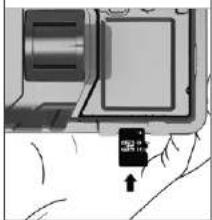
natural_image
Diagram of a device with a labeled component and directional arrow (no readable text or symbols)text_image
Camera Parameter Setting Name XMS MS/CP FCF Photo Setting HOLD RED: OK Photo Setting HOLD RED: Auto Photo Clear: Greatness Photo Optimize: 2. Plus Photo Picture Photo mask: NC Photo Open Setting Auto Open Setting Access: Access Forward: Forward Show Setting USBAC: Web-based IP: 10.0-4.0-10.0 Face: Face Text Default Load Resettext_image
Current Parameter Settings Mass NGS SNTP FTP User Settings MOS ON/OFF ON Phone Setting MOS MODE Listed Phone1 Controller Office Phone2 Operator Other Phone3 Pick up to say OK Phone4 User Settings APR Email Setting Access Email1 Personal Email2 Service Settings MUSIC Email3 OK Email4 Help Care Defaults Send NextSMTP-Einstellungen
text_image
Custom Parameter Settings Name IDM SFTP FTP Stop Setting Gross Setting SUPPORT OS APC Alt set SUPPORT Auto Analog ppg@dpcpk Category:Australia Papernet FTP Operator AI Server Setting的基本设置 Type Other Email: + No SQL + SQL + STARTERS Server: Port: Load: Preload: Next Next1 Next2 Next3 Next4 Next5 Next6 Next7 Next8 Next9 Next10 Next11 Next12 Next13 Next14 Next15 Next16 Next17 Next18 Next19 Next20 Next21 Next22 Next23 Next24 Next25 Next26 Next27 Next28 Next29 Next30 Next31 Next32 Next33 Next34 Next35 Next36 Next37 Next38 Next39 Next40 OK Cancel Cancel Cancel Cancel Cancel Cancel Cancel Cancel Cancel Cancel Cancel Cancel Cancel Cancel Cancel Cancel Cancel Cancel Cancel Cancel Cancel Cancel Cancel Cancel Cancel Cancel Cancel Cancel Cancel Cancel Cancel Cancel Cancel Cancel Cancel Cancel Cancel Cancel Cancel Cancel Cancel Cancel Cancel Cancel Cancel Cancel Cancel Cancel Cancel Cancel Ctrl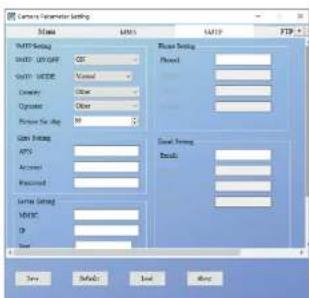
text_image
Camera Parameter Setting Name: MMS MPS Setting MIME: UNTAGE Color: None Opacity: 100% Resolution: 500 Current Settings APC: Accession: Received: System Settings MASC: ID: Size Reset Setting Flowed: Giant Setting Details: Temp Details Load Helptext_image
Camera Properties Setting Name NAME WATP FTP Setting FTP ON OFF: 0% Server: Post: 3 Data: mt/define Access: Password: Open Setting Country: China Office: China Mobile APPS: Inser Account: Password: Save Default Load Next| Protection rating IP | IP65 |
| Dimensions [mm] | 80 x 145 x 57 |
| Weight [kg] | 0,335 |
1. GENERAL DESCRIPTION
The user manual is designed to assist in the safe and trouble-free use of the device. The product is designed and manufactured in accordance with strict technical guidelines, using state-of-the-art technologies and components. Additionally, it is produced in compliance with the most stringent quality standards.
DO NOT USE THE DEVICE UNLESS YOU HAVE THOROUGHLY READ AND UNDERSTOOD THIS USER MANUAL.
To increase the product life of the device and to ensure trouble-free operation, use it in accordance with this user manual and regularly perform maintenance tasks. The technical data and specifications in this user manual are up to date. The manufacturer reserves the right to make changes associated with quality improvement. The device is designed to reduce noise emission risks to a minimum, taking into account technological progress and noise reduction opportunities.
LEGEND
CE The product satisfies the relevant safety standards.
Read instructions before use. The product must be recycled.

PLEASE NOTE! Drawings in this manual are for illustration purposes only and in some details may differ from the actual product.
The original operation manual is written in German. Other language versions are translations from the German.
2. USAGE SAFETY
ATTENTION! Read all safety warnings and all instructions. Failure to follow the warnings and instructions may result in electric shock, fire and/or serious injury or even death.
The terms "device" or "product" are used in the warnings and instructions to refer to Hunting camera. Do not use in very humid environments or in the direct vicinity of water tanks. Prevent the device from getting wet. Risk of electric shock (when the device is powered from the mains)!
2.1.ELECTRICAL SAFETY
Caution: The rules of "electrical safety" should be followed when the device is powered from the mains.
a) The plug must fit the socket. Do not modify the plug in any way. Using original plugs and matching sockets reduces the risk of electric shock.
(b) Avoid touching earthed elements such as pipes, heaters, boilers and refrigerators. There is an increased risk of electric shock if the earthed device is exposed to rain, comes into direct contact with a wet surface or is operating in a damp environment. Water getting into the device increases the risk of damage to the device and of electric shock.
EN
c) Do not touch the device with wet or clamp hands. d) Use the cable only for its designated use. Never use it to carry the device or to pull the plug out of a socket. Keep the cable away from heat sources, oil, sharp edges or moving parts. Damaged or tangled cables increase the risk of electric shock.
e) If using the device in a damp environment cannot be avoided, a residual current device (RCD) should be applied. The use of an RCD reduces the risk of electric shock.
f) Do not use the device if the power cord is damaged or shows obvious signs of wear. A damaged power cord should be replaced by a qualified electrician or the manufacturer's service centre.
g) To avoid electric shock, do not immerse the cord, plug or device in water or other liquids. Do not use the device on wet surfaces.
2.2 SAFETY IN THE WORKPLACE
a) Do not use the device in a potentially explosive environment for example in the presence of flammable liquids, gases or dust. The device generates sparks which may ignite dust or fumes.
b) If you discover damage or irregular operation, immediately switch the device off and report it to a supervisor without delay.
c) If there are any doubts as to the correct operation of the device, contact the manufacturer's support service.
d) Only the manufacturer's service point may repair the device. Do not attempt any repairs independently!
e) In case of fire, use a powder or carbon dioxide (CO₂) fire extinguisher (one intended for use on live electrical devices) to put it out.
f) Please keep this manual available for future reference. If this device is passed on to a third party, the manual must be passed on with it.
g) Keep packaging elements and small assembly parts in a place not available to children.
h) If this device is used together with another equipment the remaining instructions for use shall also be followed.
2.3. PERSONAL SAFETY
a) The device is not designed to be handled by persons (including children) with limited mental and sensory functions or persons lacking relevant experience and/or knowledge unless they are supervised by a person responsible for their safety or they have received instruction on how to operate the device.
2.4.SAFE DEVICE USE
a) Do not use the device if the ON/OFF switch does not function properly (does not switch the device on and off). Devices which cannot be switched on and off using the ON/OFF switch are hazardous, should not be operated and must be repaired.
b) Disconnect the device from the power supply before commencement of adjustment, cleaning and maintenance. Such a preventive measure reduces the risk of accidental activation.
c) When not in use, store in a safe place, away from children and people not familiar with the device who have not read the user manual. The device may pose a hazard in the hands of inexperienced users. d) Keep the device out of the reach of children.
e) Device repair or maintenance should be carried out by qualified persons, only using original spare parts. This will ensure safe use.
f) To ensure the operational integrity of the device, do not remove factory-fitted guards and do not loosen any screws.
g) Clean the device regularly to prevent stubborn grime from accumulating.
h) It is forbidden to interfere with the structure of the device in order to change its parameters or construction.
Keep the device away from sources of fire and heat. ATTENTION! Despite the safe design of the device and its protective features, and despite the use of additional elements protecting the operator, there is still a slight risk of accident or injury when using the device. Stay alert and use common sense when using the device.
- USE GUIDELINES
The device is designed to take photos or videos when motion is detected by the device's sensor.
The user is liable for any damage resulting from unintended use of the device.
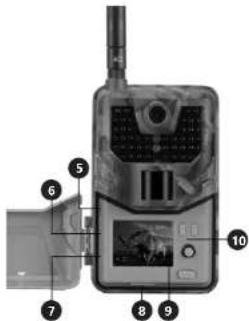
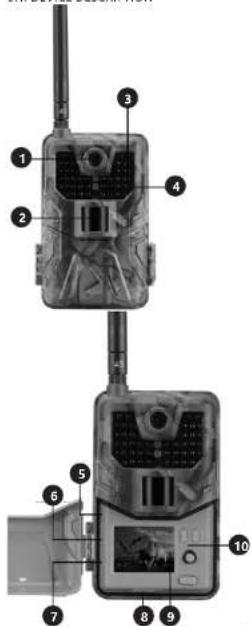
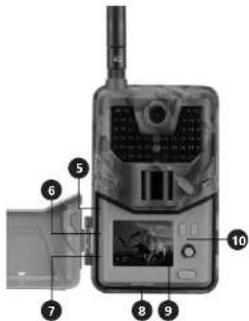
3.1. DEVICE DESCRIPTION
text_image
Labeled diagram of a surveillance camera with numbered parts for identification and assembly reference.EN
-
Lens
-
PIR sensor
-
IR diode
4 LED indicator
-
USB port
-
Memory and out
-
CIM card app
-
SIM card port
- Mode switch
0.
- Bally, group
CONTROL PANEL
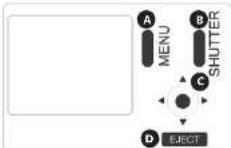
A. MENU: press to enter the settings menu
B. SHUTTER: press to take a picture or video (depending on the current operating mode) and save on the memory card
C. The button has 5 functions: left, right, up, down and
OK 1. Press left to stand or stop checking press SHUTTER
(B) to quit
in TEXT mode press left to display (145)
D. ELECT: sliding out the battery compartment
3.2.PREPARING FOR USE
APPLIANCE LOCATION
It is recommended to place the camera 1-2 meters above the ground.
The temperature of environment must not be higher than 40°C and the relative humidity should be less than 85%. Keep the product away from hot surfaces. Position the device such that you always have access to the power plug. The power cord connected to the appliance must be properly grounded and correspond to the technical details on the product label. ASSEMBLING THE APPLIANCE
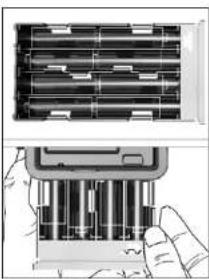
Battery installation
-
Press the ELECT button to slide out the battery compartment
-
Install batteries according to the polarity marking inside the compartment.
-
Slide in the battery compartment Caution: Installing any of the batteries in the wrong position may cause acid leakage or explosion, which may damage the device.
natural_image
Diagram showing two views of a battery pack with internal components, no text or symbols presentConnecting to the power supply
-
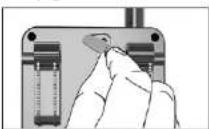
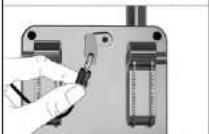
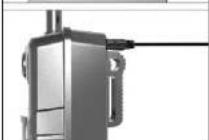
Remove the rubber plug from the power cord port located at the bottom of the device.
-
Connect the adapter cable to the device port.
-
Route the cable through the hook on the side of the device. This will reduce the forces on the cable and power port that can damage them.
-
Connect the adapter to the wall socket.
-
When the power port is not in use, reinstall the rubber plug.
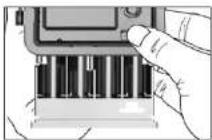
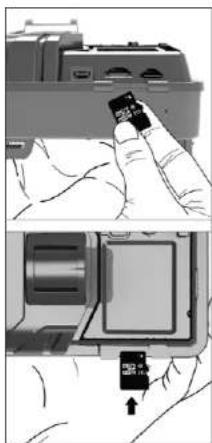
Installing a memory card
-
Insert the memory card until it clicks. The card should slide in with a slight resistance.
-
To eject the memory card, push the card in lightly.
EN
natural_image
Illustration showing a hand inserting a small card into a computer interface (no text or symbols visible)3.3. DEVICE USE
TEST mode
Slide the mode switch from OFF to the TEST position to start the device and display the settings. It is not recommended to move the switch directly from OFF to ON.
TEST mode, allows you to change the device settings, manually taking photos and videos, viewing photos and videos.
To send photos and videos you need a SIM card. Make sure that the card used supports SMS, MMS and data transfer service. When the SIM card is recognized by the device, the icon of the mobile operator appears on the display.
ADVANCED SETTINGS
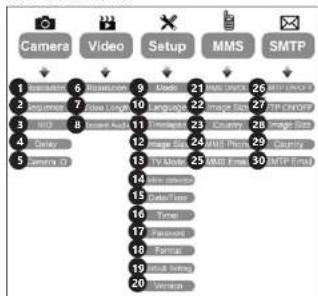
flowchart
graph TD
    A["Camera"] --> B["1"]
    C["Video"] --> D["2"]
    E["Setup"] --> F["3"]
    G["MMS"] --> H["4"]
    I["SMTP"] --> J["5"]
    B --> K["6"]
    D --> L["7"]
    F --> M["8"]
    H --> N["9"]
    I --> O["10"]
    K --> P["11"]
    L --> Q["12"]
    M --> R["13"]
    N --> S["14"]
    O --> T["15"]
    P --> U["16"]
    Q --> V["17"]
    R --> W["18"]
    S --> X["19"]
    T --> Y["20"]
| No. | Parameter name | Submenu Description | |
| 1 | Resolution 16MP, | 12MP, BMP | Photo quality |
| 2 | Sequence 1/3/6/9 | The number of | photos taken each time |
| 3 | ISO Auto, 100, | 200, 400 | Sensitivity of the matrix to light |
| 4 | Delay 1/5/10/30 | sec/min | Waiting time since last shot |
| 5 | ID cameras 0-0-0 | 0 0 0 | |
| 6 | Resolution 1080P, | 720P, WVGA, VGA | Video quality |
| 7 | Video lenght 10S, | 80S, 60S, 90S | Video duration |
| 8 | Sound recording | On, Off Sound | recording on/off |
| 9 | Mode photos, | video, photo and video, time-lapse mode | |
| 10 | Language | English, Francais, Deutsch ltd. | Menu language |
| 11 | Time-lapse interval | 5/30/60 | Making a film or photo every 5/30/60 min |
| 12 | Photo size | Small / Normal / Large | The size of the transmitted photo |
| 13 | TV mode | NTSC, PAL | TV play mode |
EN
| 14 Motion sensing | High/Medium/Low | Changes the PIR sensor sensitivity | |
| 15 Date/time 2018-09-03 | 16:37:25 | Time-Month-DayHours minutes:seconds | |
| 16 Timer ON, OFF If it is on, the device will only work for limited time | |||
| 17 Password *** 4-digit number | (1314 universal password) | ||
| 18 Format SD card Delete all data from the memory card | |||
| 19 Default settings | Restore default settings | Cancel / OK | |
| 20 Version 08/09/2018 16:37:25 | Camera version | ||
| 21 MMS ON/OFF ON/OFF MMS ON/OFF | |||
| 22 Photo size | Small / Normal / Large | The size of the transmitted photo Small <100KB Normal <150KB Large <200KB | |
| 23 Country | Set in MMSCONFIG | Operator name | |
| 24 MMS phone | Set in MMSCONFIG | MMS recipient phone number | |
| 25 MMS email | Set in MMSCONFIG | MMS recipient email address | |
| 26 SMTP ON/OFF | ON/OFF SMTP | on/off | |
| 27 FTP ON/OFF | ON/OFF FTP on/off | ||
| 28 Photo size | Small / Normal / Large | The size of the transmitted photo Small <100KB Normal <150KB Large <200KB | |
| 29 Country | Set in MMSCONFIG | Operator name | |
| 30 SMTP email Set in MMSCONFIG | Photo recipient email address | ||
,ON\* mode
After completing the settings, slide the switch to the ON position to switch to automatic operation mode. The motion indicator will flash for about 5 seconds and the camera will start working. The device will start recording video or take pictures when motion is detected in the sensor's operation zone.
Caution: The device display and control panel buttons will be inactive when the device is in "ON" mode. To view content or change device settings, slide the mode switch to the TEST position.
Caution: To avoid accidental starts due to temperature or movement, do not point the device at heat sources (e.g. sun, heated stones or metal) or nearby branches of trees and bushes. The best direction in which the device should be directed is north and an open space without heat sources. It is also recommended to remove branches from before the device.
MMSCONFIG settings
• Insert the CD into the computer drive
- Run the MMSCONFIG.exe file in the MMSCONFIG folder

MMSCONFIG

MMSCONFIG
• Enter photo, video and system settings
Caution: If the parameter settings have been made directly in the device in "TEST" mode, you can skip this step.
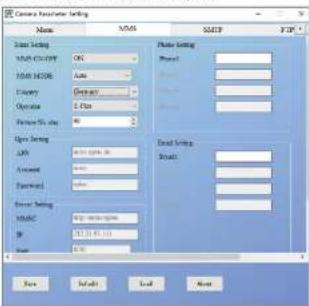
MMS settings
Auto MMS mode
In Auto MMS mode, select:
a) Country
b) Operator
d) Email address of the photos recipient
text_image
Camera Resource Setting Name: NMS Size: 500 Size setting: NMS CURRENT ON Size setting: Size Energy: GeV/Hz Operative: 2 Plan Format Size: 40 Open setting: LAN: 10000000000 Amount: 5000 Password: 0000 Event setting: MASC: Web-based code IP: 121.3.19.11 Port: 8.76 Send setting: Send: Send setting: Send: Send: Send: Send: Send: Send: Send: Send: Send: Send: Send: Send: Send: Send: Send: Send: Send: Send: Send: Send: Send: Send: Send: Send: Send: Send: Send: Send: Send: Send: Send: Send: Send: Send: Send:Manual MMS mode
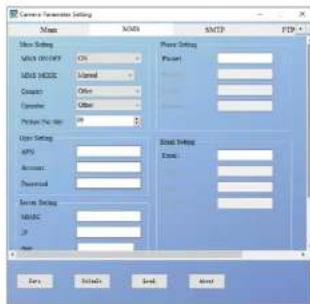
If the program does not contain the correct data to be selected, select Manual MMS mode. Select the Manual MMS mode Enter APN, account, password, MMSC, IP and port. CAUTION: This data must be obtained from the SIM card operator. Then enter the recipient's phone number and e-mail address on the right.
EN
text_image
Current Parameters Settings Name NAME SMTP FTP Main Settings NAME ONLY: CN MSD MODE: Internal Coarse: Office Operator: Other Please Note: 10 User Settings API Account Financial Service Settings MUSIC IP Form Details Send AboutSMTP settings
This way of sending photos is called data transmission. The photo is sent from email to email.
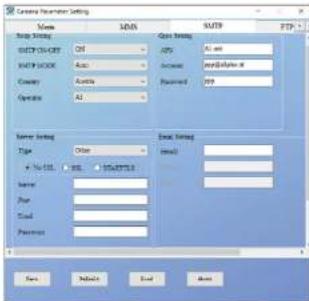
Auto SMTP mode
In Auto SMTP mode, select:
a) Country
B) Operator
c) Email type
d) Adding the sender's email address (on the left)
e) Adding e-mail sender password (on the left).
1. Adding the recipients of non-bounded (on the right)
text_image
Camera Parameter Settings Name NAME SNTP FTP SAP: S&P SAP: C: C: C: 01 Auto Alt SAP: M: M: M: Auto Account jeep@jia#e.m Country:Austria Pakistan Japan Operator:AS Server Setting Type Other Email Setting + No. of... URL STARTERS Email Name Phone Cloud Password Save Detect Cancel Help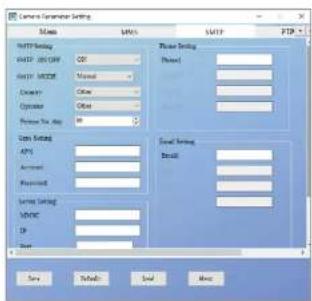
text_image
Camera Generator Settings Name: WiFi WiFi: 000000000000000000000000000000000000000000000000000000000000000000000000000000000000000000 WiFi Setting: WiFi: 12.5GHz Radio: 12.5GHz Binary: 12.5GHz Binary: 12.5GHz Copper: 12.5GHz Copper: 12.5GHz Power Setting: Power: 12.5GHz Power: 12.5GHz Power: 12.5GHz Power: 12.5GHz Power: 12.5GHz Power: 12.5GHz Power: 12.5GHz Power: 12.5GHz Power: 12.5GHz Power: 12.5GHz Power: 12.5GHz Power: 12.5GHz Load Setting: Load: 12.5GHz Load: 12.5GHz Load: 12.5GHz Load: 12.5GHz Load: 12.5GHz Load: 12.5GHz Load: 12.5GHz Load: 12.5GHz Load: 12.5GHz Load: 12.5GHz Load: 12.5GHz Load: 12.5GHz Save Default Send HelpManual SMTP mode
If the program does not contain the correct data to be selected, select Manual SMTP mode. Enter APN, account, password. CAUTION: This information must be obtained from the SIM card operator. Enter the server and port number. CAUTION: This information must be obtained from the e-mail provider.
a) Add the senders email address (on the left).
b) Add the sender's box password (on the left)
c) Add the recipient's email address (on the right).
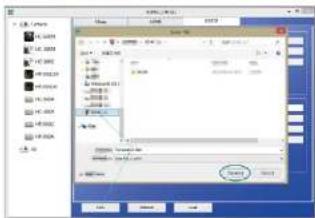
Save the file, Parameter, dat, on the micro SD card.
text_image
Screenshot of a legacy software interface showing file selection dialog with Chinese text and file listEN
FTP
| Currency Parameter Setting | |||
| Name | MMS | MVTP | FTP |
| FTP Setting | |||
| FTP-OR/FF | 100 | ||
| Server | |||
| Host: | 3 | ||
| Data: | or/other | ||
| Address: | |||
| Password: | |||
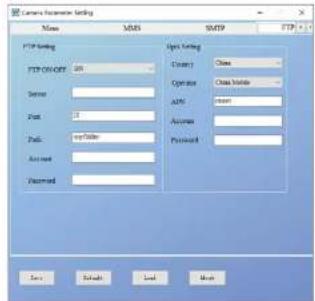
Complete the FTP address, port, account and password. Videos and photos will be sent to the server automatically. CAUTION: FTP related GPRS data settings will be synchronized with SMTP data.
SM5 command codes
The device can be controlled by commands sent via SMS.
| Code | Function | Meaning |
| *530* | Starting the device | |
| *531* | Standby mode | |
| *500* | Taking a photo | The device takes a photo and then sends it to the set phone number or e-mail. |
| *505* | Taking a photo and sending from the sender (in MMS mode) | The device takes a photo and sends it to the sender's phone |
| *520* | Receiving photo information | The device sends a text message with photo number, SD card capacity and battery status. |
3.4 CLEANING AND MAINTENANCE
a) Always unplug the device before cleaning it.
b) Use only non-corrosive cleaners to clean the surface.
c) After cleaning the device, all parts should be dried completely before using it again.
d) Store the unit in a dry, cool place, free from moisture and direct exposure to sunlight.
e) Do not spray the device with a water jet or submerge it in water.
f) Use a soft cloth for cleaning.
g) Do not leave the battery in the device if it will not be used for a longer period of time.
INSTRUKCJA OBSEUGI
SAFE REMOVAL OF BATTERIES AND RECHARGEABLE BATTERIES
AA batteries are installed in the devices. Remove used batteries from the device using the same procedure by which you installed them. Recycle batteries with the appropriate organisation or company.
DISPOSING OF USED DEVICES
Do not dispose of this device in municipal waste systems. Hand it over to an electric and electrical device recycling and collection point. Check the symbol on the product instruction manual and packaging. The plastics used to construct the device can be recycled in accordance with their markings. By choosing to recycle you are making a significant contribution to the protection of our environment. Contact local authorities for information on your local recycling facility.
DANE TECHNICZNE
| Klasa ochrony IP | IP65 |
| Wymiary [mm] | 80x145x57 |
| Ciezar [kg] | 0.335 |
text_image
Labeled diagram of a surveillance device with numbered parts for identification18 19
text_image
Labeled diagram of a mobile device with numbered parts for identificationnatural_image
Three-step diagram showing a hand inserting into a battery into three views (no text or symbols present)natural_image
Two-step diagram showing a hand using a tool to adjust or install a mechanical component, no text or symbols present.STAMONY
27.07.2022
PL
natural_image
Hand holding a small card with a smartphone on top (no visible text or symbols)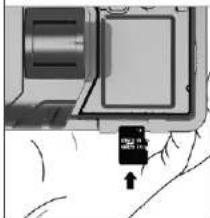
natural_image
Close-up of a mechanical component with a small black arrow pointing to a specific part (no visible text or symbols)text_image
Name SAMS MASC F37 Data Setting HOLD CURRENT OK SAMS CURRENT Active Create Operative Process Data OK Open Setting OFF: Command: Textfield: Server Setting NSAIC IP Temp Photo Print Photo Settings Results Email Settings Emails Send Settings Send to: Send to: Send to: Send to: Send to: Send to: Send to: Send to: Send to: Send to: Send to: Send to: Send to: Send to: Send to: Send to: Send to: Send to: Send to: Send to: Send to: Send to: Send to: Send to: Send to: Send to: Send to: Send to: Send to: Send to: Send to: Send to: Send to: Send to: Send Default Load Resettext_image
Current Parameter Settings Name NAME SNTP FTP User Setting MIME NAME: OK Phone Setting MIME MODE: Standard Center Crossover: Other Center Symbol: Other Center Picture size: 100 User Setting MIFI Address Personal Service Setting AUDIO: IP Copy Details Send NextUstawienia SMTP
text_image
Camera Application Setting Name STATUS WATP FTP Setting FTP OFF On IP Address Server First 3 Options Case Mobile Address Access Password New Default Load Nextnatural_image
Diagram showing two views of a battery pack with internal components, no text or symbols presentPripojeni napajeni
natural_image
Three-step diagram showing a hand using a tool to adjust or install a mechanical component, with no visible text or symbols.natural_image
Two-step diagram showing a hand inserting a small card into a device component, with no visible text or symbols.3.3. PRÁCE SE ZAŘÍZENÍM Bežim .TEST*
text_image
Camera Parameter Setting Name NAME SIAP TIP Name setting MAX ORDER: OK Pixel setting MAX NODE: Auto Panel Country: Clearrow Operator: 0 Bus Panel Power Supply: 0.166 Opt setting CPU: 80000000000000000000000000000000000000000000000000000000000000000000000000000000000000000000000 Current: 12347.96.111 Password: 12347.96.111 Sensor setting MASC: 12347.96.111 IP: 12347.96.111 OK Help Load Resettext_image
Custom Parameters Setting Mass NDIS SMTP FTP Mass Setting Add Options ON Add Mode Internal Casestry Office Customs Other Package Pres. Use Off Load Setting APG Account Thermostat Save Setting MASC Up Down Load Delete Settings Export Start Next Send Exittext_image
Camera Parameter Settings Name SAMS SMTP FTR Data Setting SHEPROVEGET 205 ANS Alt and SHEPROVEGET Auto Accessories ppm@optico.it Company Asella Password PPR Operator 61 Server Setting Type Others Basic Static Settings in the SSL Bill PSKPTSL Small Name First Second Personal Save Next End Help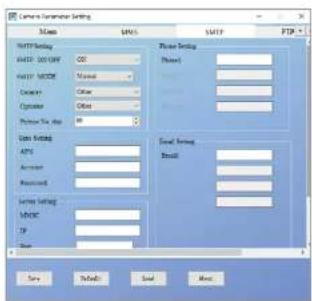
text_image
Camera Transaction Setting Name: MIP15 SVP15 SVP25 FTP25 HTTP Setting HTTP NAME: 00 Password: Manual Password: None Password: Other Password: No Size Setting API Amount Received Send Setting: NOTICE: TCP Send Settings: Send Settings: Send Settings: Send Settings: Send Settings: Send Settings: Send Settings: Send Settings: Send Settings: Send Settings: Send Settings: Send Settings: Send Settings: Send Settings: Send Settings: Send Settings: Send Settings: Send Settings: Send Settings: Send Settings: Send Settings: Send Settings: Send Settings: Send Settings: Send Settings: Send Settings: Send Settings: Send Settings: Send Settings: Send Settings: Send Settings: Send Settings: Send Settings: Send Settings: Sany Default Send More:text_image
Scanned screenshot of a legacy software interface showing file selection dialog with Chinese text and buttonsCZ
FTP
| Camera Parameter Setting | |||
| Name | MMS | MFTP | FTP |
| FTP Setting | |||
| FTP 201/FTP | 00 | Open Setting | |
| Sensor | Country: Date | ||
| Port: 3 | Operator: Clear Mobile | ||
| Push: or similar | GPS: Insert | ||
| Access | Activity: | ||
| Password | Password: | ||
text_image
Diagram of two surveillance cameras with numbered labels indicating component locationsnatural_image
Illustration of a hand inserting into a device into a battery pack (no text or symbols visible)FR
natural_image
Two-step diagram showing a hand using a tool to adjust or install a component, with no visible text or symbols.natural_image
Illustration showing a hand inserting a small card into a device component, with no visible text or symbols.text_image
Current Parameter Setting Name AMS MACP FTP Main Setting Alpha: 125 Binary: Normal Capacity: 000 Operator: Other Program Pro Day: 99 System Setting API: Access: Password: Server Setting MASC: IP: Port Mode Setting Method: Serial Setting Serial: Menu Finish Save NextParamètres SMTP
text_image
Language Parameter Setting Name MSB SFTP FDP Setup Setting SYNC/CCN/CY OS Open All net VACP/HSBC Auto Accessories you@live.it Cusden Access Password SPR Operator AS Service Setting Type Other n = No. 100 WS STARTS Server Prior Total Password Open Setting Email: Face Next End Close
text_image
Camera Parameter Settings Class MMS GATF F2F Instance Setting HACI: CCOST 05 Instance Mode: None Category: Other Operator: Other Picture No. 37 W Class Setting APV Accumul Discount Server Setting MUSIC 19 Save Sisms Load NextMode Manual SMTP
text_image
Scanned screenshot of a legacy software interface showing file selection dialog with Chinese text and buttonsFTP
text_image
Current Parameter Setting Name MSYS SNTP FTP Setting FTP ON/OFF: 20 Server Port: 3 Pass: http://bit/ Account Password Organ Setting Class: Class Operator: Class Vehicle API: Insert Access: Password: Save Refresh Cancel Helptext_image
Labeled diagram of a surveillance device with numbered components for identification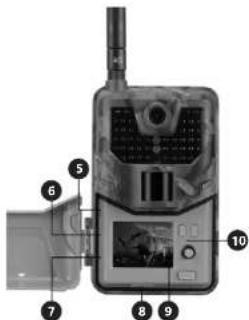
text_image
Labeled diagram of a mobile surveillance device with numbered parts for identificationnatural_image
Hand holding a small black card with visible serial number 20, partially visible in front of a device (no text or symbols on the card)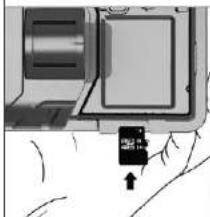
text_image
Technical diagram showing a device with a labeled component and directional arrow indicating motion or movement.3.3. LAVORARE CON IL DISPOSITIVO Modalità „TEST“
text_image
Camera Parameter Setting Mode: NMS SHEET FTP View Setting MIME-01/2007 OK View Mode: Auto Current: Format Operative: 1 Plus System Pin-size: 96 View Setting ADY: Service type in Access: None Forecast: None Server Setting ADISC: Web Application IP: 481.39.91.150 Port: 0.00 Phone Setting Phone: Serial Setting Email: Data Default Load NoneModalità Manual MMS
text_image
Current Parameter Settings Mass NVDS SMTP FTP User Settings VDD/0000 On Phone Setting VDD MODE Listed Phone: Cancer Other None Operator Other None Picture No. 16 User Settings APD Email Setting Amount Excel:\ Password OK Server Settings MIME OK Gray OK Default Small Finishtext_image
Current Parameter Settings Start Update Next Finish Start Setting START ON/OFF OK Update Setting SUPPORT MODE Auto Options Alt set Custom Auto Accessories yes/My/Other Operator All Payment FTP Same Setting Type Other Save Setting At No SQL SQL STARTS email: Save: Port: Total: Personnel: Menu Refresh Cancel Help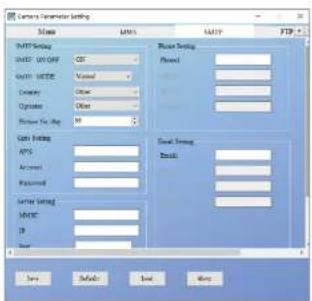
text_image
Camera Parameter Setting MSS MNS FAN FTP MSS Setting MSS: 0.0000 MSS: 0.0000 MSS: 0.0000 MSS: 0.0000 MSS: 0.0000 MSS: 0.0000 MSS: 0.0000 MSS: 0.0000 MSS: 0.0000 MSS: 0.0000 MSS Setting MSS: 0.0000 MSS: 0.0000 MSS: 0.0000 MSS: 0.0000 MSS: 0.0000 MSS: 0.0000 MSS: 0.0000 MSS: 0.0000 MSS: 0.0125 MSS: 0.1256 MSS: 1.2567 MSS: 2.3778 MSS: 3.4989 MSS: 4.6191 MSS: 5.7392 MSS: 6.8693 MSS: 8.1894 MSS: 10.3995 MSS: 12.7196 MSS: 14.9397 MSS: 17.1598 MSS: 19.3799 MSS: 21.7999 MSS: 24.12999 MSS: 26.559999 MSS: 29.1899999 MSS: 31.7399999 MSS: 34.12999999 MSS: 36.55999999 MSS: 39.189999999 MSS: 41.7399999999 MSS: 44.12999999999 MSS: 46.559999999999 MSS: 49.1899999999999 MSS: 51.73999999999999 MSS: 54.129999999999999 MSS: 56.559999999999999 MSS: 58.189999999999999 MSS: 60.739999999999998 MSS: 62.129999999999987 MSS: 64.55999988888886 MSS: 66.18888888888884 MSS: 68.73888888888872 MSS: 71.18888888888871 MSS: 73.73888888888867 MSS: 76.18888888888854 MSS: 78.73888888888842 MSS: 81.18888888888821 MSS: 83.73888888888107 MSS: 86.18888888887774 MSS: 88.73888888874442 MSS: 91.18888888861121 MSS: 93.73888888677772 MSS: 96.18888888543412 MSS: 98.73888888411152 MSS: 101.18888888277771 MSS: 103.73888887543122 MSS: 106.18888886311552 MSS: 107.73888861575742 MSS: 110.18888860375732 MSS: 112.73888675535412 MSS: 114.12555553254262 MSS: 116.55555531254272 MSS: 117.73555525542732 MSS: 120.125555225427412 MSS: 122.555554625427462 MSS: 124.73555431247442 MSS: 126.125554162474432 MSS: 127.555546624744432 MSS: 127.735546362474432 MSS: 130.125554332474432 MSS: 132.555542162474432 MSS: 134.735541632474432 MSS: 136.125541342474432 MSS: 137.555540662474432 MSS: 137.735540372474432 MSS: 140.1255406662474432 MSS: 142.555540376247432 MSS: 144.735540666247432 MSS: 146.1255406662474432 MSS: 147.555540666247432 MSS: 147.735540666247432 Sany... Safely... Sakel... Wang... Savetext_image
Labeled diagram of a surveillance device with numbered parts for identification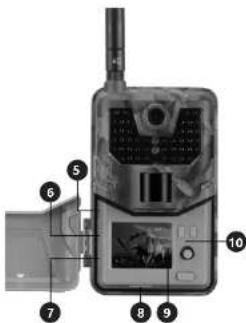
text_image
Labeled diagram of a mobile device with numbered parts for identificationnatural_image
Hand inserting a small card into a device (no visible text or symbols)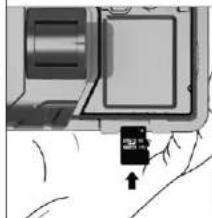
natural_image
Close-up of a mechanical component with a small black component and an arrow pointing to it (no visible text or symbols)text_image
Camera Parameter Setting Mass MMT NAV NAV FTP Mass Setting M&T ON/OCT CP M&T MODE Auto Copper Genome Operator 6.4 Plus System No. due 09 Power Setting Phone1 Options L2V www.rptv.de Automotive 0000 DataBus 0000 Local Setting Host: Server Setting SNPC: http://www.npc/ ID: 113-52-01-113 Base: 0000 None Default Load Alerttext_image
Camera Parameters Settings Name: MNEI S/FTP FTP View Setting M-001-OFFORT ON Phase Setting Sound Source Information Address Linearity Other Appearance Other Photo Setting Aero Audio Ambient Password Sound Setting M-DEC IP End Final Settings Sound Final Settings Soundtext_image
Camera Parameters Settings HAT: HAT HAT: HAT Camera Operator Balance Time Size: 100 Size: 100 Size: 100 Size: 100 Size: 100 Size: 100 Size: 100 Size: 100 Size: 100 Size: 100 Size: 100 Size: 100 Size: 100 Size: 100 Size: 100 Data Default Load Moretext_image
Labeled diagram of a surveillance camera with numbered parts for identification and assembly reference.natural_image
Three-step illustration showing hand positioning of a battery pack with internal compartments (no text or symbols)natural_image
Three-step diagram showing a hand using a tool to adjust a mechanical component, with no visible text or symbols.text_image
Diagram showing a hand inserting a card into a device, with an arrow indicating the card's direction.text_image
Camera Parameters Settings Name MVS SAGP FTP Size Setting MSS ESCAPE OK Size SECRE Size Capacity Capacity Operator 1.0 GHz Portion No. class X Size Setting Project Project Open Setting USB USB port. sh Current Current External Setting USB: 250 MHz/Hz IP: 32.22 MHz / (Hz) Load Load Load NextKezi MMS mod
text_image
Camera Parameters Settings Name ADDRESS SMTP FTP Mouse Setting Phone Setting ADDRESS ID: 015 Printed MNET NAME: Manned Category: Auto Language: Copy Physical Type: IP Gauss Setting Event Setting APC Animated Showcard Event Setting AUDIO IF Play Menu Default Cancel AboutSMTP beállítások
text_image
Camera Parameters Settings Name MSR NAVTP FCP MRTS Setting MRTS INCOME ON Power Setting MRTS MRES Material Pixel Current Other None System Other None Pulse Rate 0% Gain Setting APG Total Setting Amount Basic Received Basic System Setting MASC Basic IP Save Cancel Load ShowKézi SMTP mód
For the disposal of the device please consider and act according to the national and local rules and regulations.